Call center agents are some of the most tool-heavy workers in any company.
On any given call, an agent might have six tabs open: the phone dialer, the CRM, the ticketing system, the customer’s order history, an internal knowledge base, and maybe a Slack thread where they’re waiting on a colleague to confirm a refund policy.
And picture this: The customer on the line hears hold music, while the agent frantically clicks between windows.
This isn’t a hypothetical. It’s the reality for most call center teams right now — and it’s not a people problem. It’s a setup problem.
The tool stack most agents use wasn’t built to work together. But they still make it work- manually, in real time, at the cost of speed, accuracy, and their own sanity.
But here’s the good news. We now have a new generation of call center ticketing systems built specifically to fix this. They bring voice, email, chat, and customer history into one unified workspace — so instead of toggling between apps, agents spend more time helping customers.
This guide covers what call center ticketing systems look like, what separates the good ones from the mediocre ones, and how to actually implement one without it becoming a six-month IT project.
Let’s dive in!
What is a Call Center Ticketing System?
A call center ticketing system is software that converts customer interactions — phone calls, emails, chats, SMS — into structured, trackable tickets. Instead of relying on agents to remember what happened or where things stand, every conversation becomes a record with a status, an owner, and a history.
But the definition has expanded. A few years ago, “call center ticketing software” mostly meant a database where agents logged what happened after a call. Now, it’s the operational backbone of the entire support workflow.
A modern call center ticketing system typically handles:

Ticket management at its core — assigning ticket IDs, setting priority levels, custom fields, SLA policies, collision detection (so two agents don’t accidentally work the same ticket), and automated routing to get tickets to the right person without manual intervention.
Call center infrastructure — IVR routing, ACD (automatic call distribution), CTI integration, softphone or VoIP capabilities, and PBX connectivity. These aren’t bolt-ons; in the best platforms, they’re built right in.
Voice-to-data workflows — this is where modern systems really pull ahead. Calls get recorded, transcribed in real time, and automatically attached to the ticket. Screen pops show the agent who’s calling and what their history looks like before they even say hello. After-call work — notes, follow-ups, tags — gets automated so agents aren’t stuck typing for five minutes after every interaction.
Omnichannel support — a customer who calls today and emails tomorrow should land in the same ticket thread, not create two separate cases. The best systems handle email, voice, live chat, and SMS under one roof, with clean handoffs between bots and human agents.
The older setup, where voice lives in one tool and ticketing lives in another, just creates unnecessary friction. Every extra system means another login, another tab, and another place where something can break. That’s why more teams are moving toward platforms with built-in voice.
3 Ways Call Center Ticketing Has Changed in 2026
If you’re evaluating systems in 2026, the landscape looks very different from even a few years ago. Here are three shifts in particular that are shaping how modern call centers operate.
1. Voice-to-Text AI: Calls Automatically Become Searchable Records
Not long ago, documenting a call meant manually typing notes before jumping to the next interaction. The quality of that record depended on how much time the agent had — and how much they remembered.
Today, AI transcription changes that. Calls are recorded, transcribed in real time, and automatically attached to the ticket. When the call ends, you already have a searchable, timestamped transcript.
Supervisors can review key moments without replaying entire recordings. Compliance teams can search for specific phrases across thousands of calls. Coaches can pinpoint friction points quickly.
Transcription also feeds automation. If a caller mentions “cancellation,” the system can tag the ticket or trigger a retention workflow. If billing comes up, it can route the case appropriately. The transcript isn’t just documentation — it becomes usable data.
2. Sentiment Routing: Frustration Gets Handled Faster
Customer emotion has always mattered. What’s new is that systems can detect it during the call and act on it immediately.
Modern platforms analyze customer tone, pace, and language patterns to flag rising frustration. When a call crosses a certain threshold, the system can alert a supervisor, prioritize the ticket, or route the interaction to a senior agent automatically.
Catching frustration before it escalates leads to fewer blown-up complaints and better outcomes. It also makes coaching more targeted. Managers can review the calls that actually matter instead of sampling randomly.
On the other hand, positive sentiment matters too. A satisfied caller can automatically trigger a CSAT survey or be flagged for upsell or referral workflows.
3. The “Invisible” Interface: Voice Inside the Tools Agents Already Use
This shift is quieter but just as important.
Instead of forcing agents to work inside a separate call center application, voice is moving into the platforms they already use — Gmail, Outlook, and CRM side panels.
That makes a bigger difference than it sounds. When agents don’t have to jump between systems, they can stay focused on the conversation.
They can place calls, view history, and manage tickets without switching applications. The conversation stays in one interface.
For ops and IT teams, it also means fewer integrations to maintain and fewer systems to troubleshoot.
Hiver shows how this works in practice. With Hiver, email conversations are already structured and actionable — AI can summarize threads, extract key details, and trigger workflows without leaving the inbox.
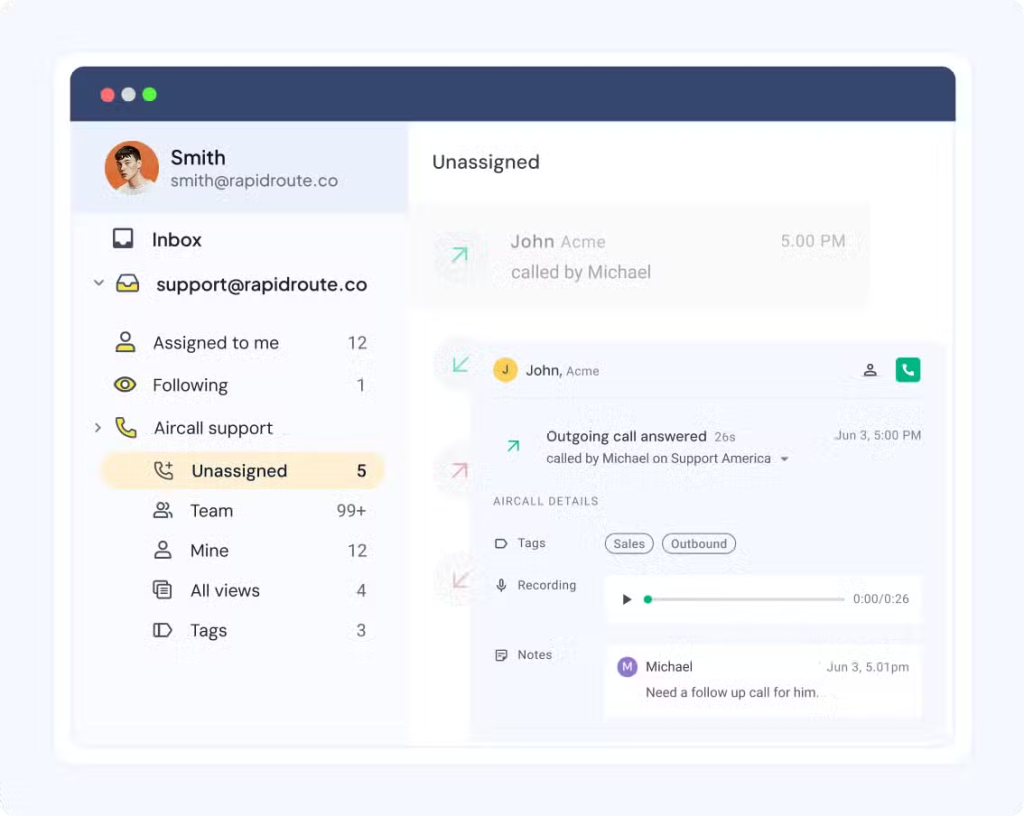
When it comes to voice, Hiver’s Aircall integration brings call records into a dedicated Voice Inbox. Recordings, voicemails, notes, and tags sync directly into the same environment, and agents can assign and track calls just like any other ticket.
Ultimately, it’s not about replacing your phone system. It’s about keeping call activity and email support inside one consistent workflow, so agents don’t feel like they’re juggling separate worlds.
Recommended reading
Top 5 Call Center Ticketing Systems (That Actually Work)
1. Hiver (Best for AI-Native, Omnichannel Support Without a Heavy Call Center Stack)
Hiver is built for teams that run most of their support across channels like shared email inboxes, chat, Slack, and more. Teams can also handle calls like proper tickets—not random one-off events. It acts as an omnichannel helpdesk where email, chat, WhatsApp, voice, and portals share the same queues, rules, and reporting, without forcing agents into a bulky call-center UI.
Hiver’s approach to call center support is simple: connect Aircall, and every call automatically becomes a trackable conversation in your workspace
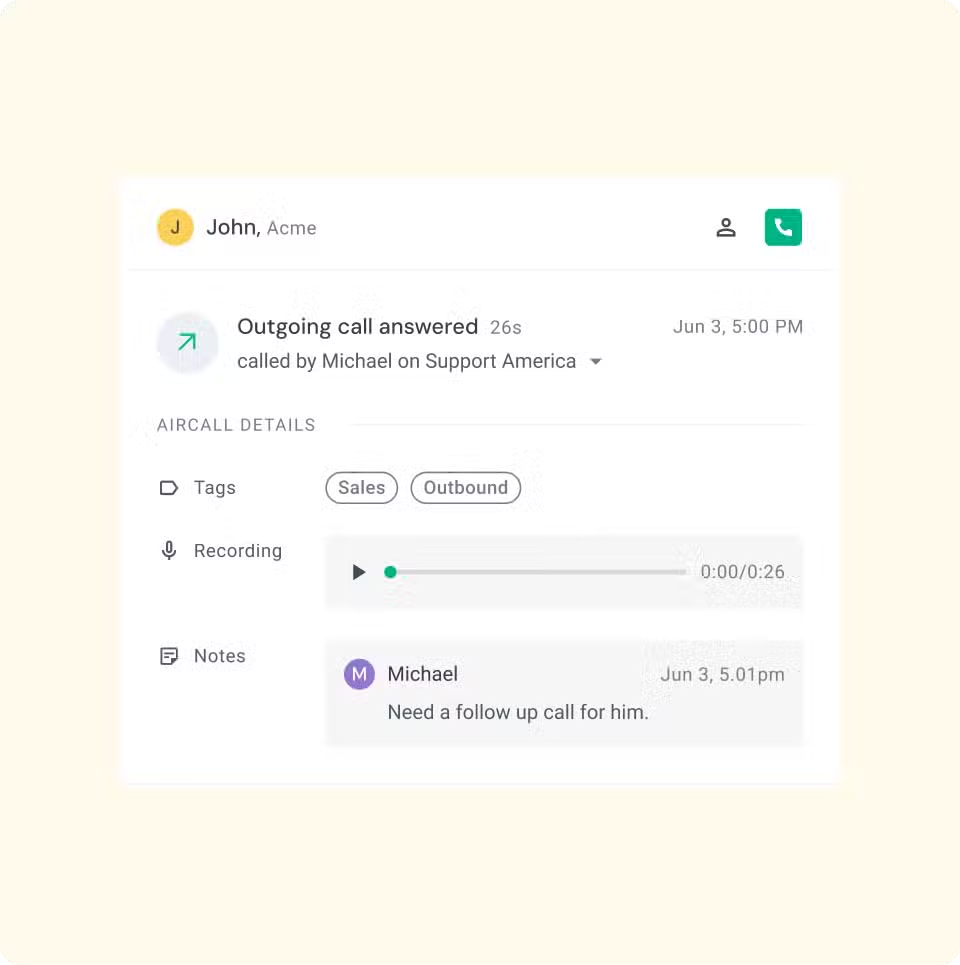
Calls logged from the Aircall numbers you choose appear in your Voice Inbox and can be assigned, tagged, and followed up on just like any other ticket. The Aircall dialer sits right inside Hiver, so agents can make and receive calls, then see them in the Unassigned view for triage and follow-through.
Hiver also works with Zapier, which lets you connect Hiver to thousands of other apps and build simple call workflows across tools. For example, you can create a Hiver conversation from a missed call, send call details or summaries into your CRM, trigger an outbound campaign in tools like Call Loop, or automatically send a post-call survey when a voice ticket is closed.
The result is a setup where voice doesn’t sit in isolation. Calls, emails, and follow-ups all move through the same structured workflow, giving agents full context and managers clear visibility without adding another system to manage.
Hiver’s Call-Center Ticketing Features
- Voice Inbox with Aircall: Connect Aircall once, select which numbers to track, and Hiver automatically logs all future calls to those numbers as inbox conversations with owners, statuses, and internal notes.
- Integrated Aircall dialer: Agents click a phone icon to place or receive calls directly in their workspace, and each call shows up as a conversation that can be assigned and worked on like a ticket.
- Zapier for cross-tool call workflows: Hiver’s Zapier integration lets you trigger actions across apps whenever something changes in a ticket, such as a new call, assignment, tag, SLA breach, or CSAT rating. That means you can use Zapier to push Hiver call tickets into other call-center tools (or vice versa). You can automatically push call tickets to your CRM, log missed Aircall calls, or trigger follow-ups, SMS, or surveys based on voice conversation status.
- AI triage and sentiment for conversations: Hiver analyzes messages for intent, priority, and sentiment, and uses that context to route work and surface at-risk conversations before SLAs or CSAT drop.
- SLA-based routing for “call-like” work: SLA triggers (First Response/Resolution) can fire automations that escalate or reassign conversations, which is particularly useful when calls lead to follow-up tickets that can’t be dropped.
- Reporting on call-related work: Voice conversations live in the same reporting layer—teams can see volumes, assignments, SLA adherence, and trends across channels instead of treating calls as a disconnected system.
Hiver Pros and Cons
| Pros | Cons |
|---|---|
| Great for teams that want calls to be handled with the same workflows, SLAs, and collaboration as email, chat, Slack, and other channels. | Not a full CCaaS: advanced voice features (multi-level IVR, ACD tuning, WFM, native QA on recordings) still live in Aircall/ call center integration of choice. |
| Very quick to set up (minutes) and easy for agents to adopt since everything looks and behaves like an inbox with added structure. | Better suited to mixed-channel teams than to ultra-high-volume, voice-only contact centers that rely heavily on complex call routing. |
Hiver Pricing
Hiver offers tiered, per-user pricing with a free plan and AI available across all paid tiers, which makes it approachable for small teams that want to bring calls into an existing inbox-based operation.
- Free – $0 (unlimited users)
Basic shared inbox and portal, with core collaboration and simple workflows. Good for very small teams replacing an unstructured inbox and experimenting with tracking follow-ups from calls as tickets (voice still requires an Aircall subscription). - Growth – ~$25/user/month (annual)
Multichannel support (email, live chat, voice, WhatsApp) plus basic automation, reporting, and integrations, including the ability to route and auto-assign conversations that originate as calls. - Pro – ~$65/user/month (annual)
A more complete helpdesk layer: advanced workflow automation, SLA-aware routing, custom analytics, portals, and deeper integrations (e.g., Salesforce/Jira), which matter once call volumes grow, and you need structured follow-up workflows after each call. - Elite – ~$105/user/month (annual)
Designed for larger or regulated teams: enterprise automation, skill-based routing, advanced analytics, HIPAA/GDPR/SOC 2-grade security, and stronger support—useful if calls generate sensitive tickets or strict response obligations.
Hiver’s AI features are available across all paid plans, so teams can start small and layer in advanced capabilities as they grow.
Who Is Hiver For?
Hiver is built for support teams that need an agentic omnichannel ticketing system.
It works well for SaaS, IT services, logistics, and healthcare teams where calls generate follow-up tasks that must be tracked, reassigned, and reported alongside written conversations.
Who Is Hiver NOT For?
It’s less ideal as the sole platform for massive, voice-only centers with heavy IVR/ACD/QA/WFM needs. In those cases, Hiver works best paired with a dedicated CCaaS (like Aircall) rather than replacing it.
2. Freshdesk (Best for Teams That Want a Classic Helpdesk With Embedded Contact Center)
Freshdesk is built for teams that want a more conventional helpdesk experience, but with a full contact center sitting right inside it. Instead of treating phone support as a lightweight add-on, it integrates phone alongside email, chat, and social in a single interface, with agent panels, call controls, and ticket workflows, all tightly connected.
When you switch on Freshdesk’s contact center capabilities, every inbound or outbound call can automatically create or update a ticket. Call direction, duration, agent, notes, wrap-up codes, and recording links are attached to that ticket, so follow-ups, escalations, and reporting all run through one structured workflow rather than a separate phone system.
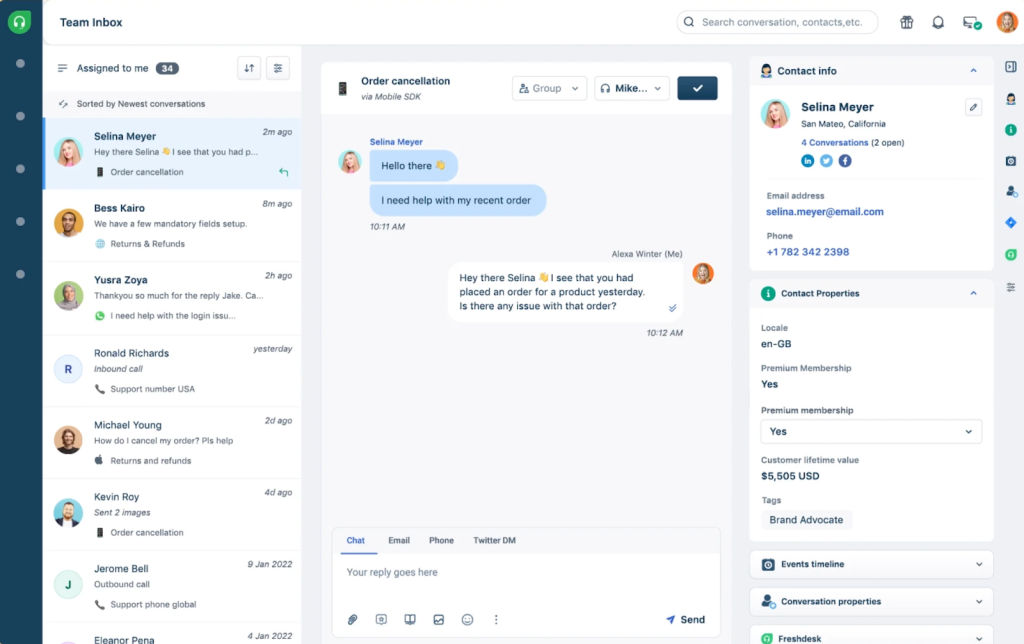
Because the voice stack is native to the platform, agents can answer calls, transfer, conference, or put customers on hold without ever leaving the helpdesk screen.
This makes Freshdesk a good fit if you want a “classic” helpdesk plus built-in contact center, and you’re comfortable adopting a richer, more configurable tool where voice is treated as a core channel instead of something you stitch on later.
Freshdesk’s Call Center Ticketing Features
- Built-in contact center: Freshdesk Contact Center provides inbound and outbound calling, call recording, call transfer, conferencing, voicemail, and wrap-up codes inside the same interface agents use for tickets.
- Auto ticket creation from calls: Every call—answered, missed, or voicemail—can automatically open a ticket with metadata attached (agent, queue, duration, outcome)..
- Integration with CCaaS (e.g., Voiso): Integrations like Voiso embed an agent panel in Freshdesk, enabling click-to-call, call logging, and advanced speech analytics that push summaries, sentiment, and call scores into tickets.
- Routing & IVR: Freshdesk setups typically include IVR menus and queue-based routing.
- Call analytics: Supervisors can track inbound/outbound volumes, handle times, abandonment, and agent performance from the same reporting layer used for ticket metrics.
Freshdesk: Pros and Cons
| Pros | Cons |
|---|---|
| Mature helpdesk + contact center combo; good if you want “one big system” rather than stitching multiple tools together. | Can feel heavy and complex for smaller teams. |
| Strong ticket automation and voice workflows (IVR, queues, dispositions) to support structured call flows. | Cost and complexity can be overkill if you only need basic call logging plus light ticketing. |
Freshdesk Pricing
For call centers, you typically choose between Freshdesk Contact Center (voice-first) or the Omnichannel Suite (ticketing + chat + voice).
Freshdesk Contact Center – Free to $69/agent/month
Includes one free voice plan, with paid tiers from $15–$69 per agent/month for IVR, call queues, recording, and analytics. Outbound calls and excess inbound minutes are billed separately.
Omnichannel Suite – $29–$99/agent/month (annual billing)
Bundles Support Desk, chat, and voice into one system.
The Growth plan at $29/agent/month is a common starting point.
Freshdesk uses a per-agent pricing model, with additional variable costs for call minutes and AI usage.
Who Is Freshdesk For?
Freshdesk is a good fit for support organizations that want a central, traditional helpdesk to manage phone, email, chat, and social from one platform. It’s especially suited for teams that need detailed control over IVR, queues, and reporting.
Who Is Freshdesk NOT For?
It’s less suited to teams that want a very lightweight inbox-based workspace and minimal setup.
Recommended reading
3. Zoho Desk (Best for Teams That Want IVR + ACD + Ticketing in One Suite)
Zoho Desk is a strong fit if you want classic call-center building blocks (IVR, ACD, queues) plus ticketing and basic CRM in a single, tightly integrated suite, rather than stitching together a separate CCaaS and helpdesk.
Sitting at the heart of the Zoho ecosystem, it brings IVR menus, call queues, and support tickets together.
Agents can make and receive calls directly from the helpdesk interface, see caller history the moment the phone rings, and convert any call into a ticket with a single click.

When you pair Desk with Zoho Voice or a CTI partner, you get the full call-center toolkit—multi-level IVR, skill- or queue-based routing, call logging, and recordings—while tickets handle the structured follow-up, SLAs, and collaboration.
Zoho Desk’s Call-Center Features
- Web-based calling in the helpdesk: Agents can place and receive calls over the web, with live screen pop showing contact details and history.
- IVR with multi-level menus: Zoho’s IVR supports multi-level menus, greetings, and routing options.
- CTI integrations (e.g., Teliqon): CTI setups embed softphone controls in Zoho Desk, automatically log call activities, and create or associate tickets with callers in real time.
- Ticket creation from calls: Unknown numbers can be turned into contacts or accounts on the fly, and new calls can auto-create tickets with call logs attached.
- Call + ticket analytics: Supervisors can monitor key telephony metrics (volume, handle time, missed calls) alongside ticket metrics, giving a combined view of queue health.
Zoho Desk: Pros and Cons
| Pros | Cons |
|---|---|
| Strong IVR and telephony capabilities when paired with Zoho Voice/CTI. | Best experience comes if you commit to the Zoho ecosystem. |
| Single interface where agents see caller context and tickets together | The breadth of options (Zoho Desk, Voice, CRM, etc.) can be overwhelming for small teams wanting “just a simple inbox + phone.” |
Zoho Desk Pricing
Zoho Desk uses tiered, per-agent pricing, starting with a free plan and scaling up to Enterprise. Telephony (Zoho Voice or a CTI partner) is priced separately.
Free – $0/user/month
Basic ticketing for up to 3 agents, email support, knowledge base, SLAs, and simple reports.
Standard – ~$14/user/month (annual)
Adds automation, assignment rules, social channels, CSAT, and dashboards.
Professional – ~$23/user/month (annual)
Includes multi-department ticketing, Blueprint workflows, time tracking, and structured post-call coordination features.
Enterprise – ~$40/user/month (annual)
Adds advanced automation, multi-brand support, AI assistant (Zia), deeper reporting, and more process control.
Telephony Costs
Zoho Voice typically starts around $34–$49/user/month, while CTI partners charge separately for minutes, numbers, and advanced IVR features.
Zoho Desk works best if you plan to run CRM, helpdesk, and telephony within the same ecosystem. Telephony costs are separate from the core helpdesk license.
Who Is Zoho Desk For?
Zoho Desk is suited to teams that want classic call-center controls (IVR, queues, telephony) directly wired into their helpdesk, and who are comfortable using Zoho as a primary platform for CRM, support, and calling.
Who Is Zoho Desk NOT For?
It’s less of a fit for inbox-native teams who want to keep things extremely minimal.
4. NICE (Best for Large, Voice-Heavy Call Centers That Live on Analytics)
NICE is built for operations where the phone is the primary touchpoint and every interaction needs to be captured, measured, and governed. Instead of a lightweight helpdesk, it delivers a full contact center and IT ticketing stack designed for large, regulated environments where voice analytics and compliance drive decisions.
Inside NICE, tickets are deeply connected to calls. Each case can include call recordings, full transcripts, sentiment scores, keyword flags, QA evaluations, and compliance status. It feels less like a basic ticket thread and more like a structured case file.
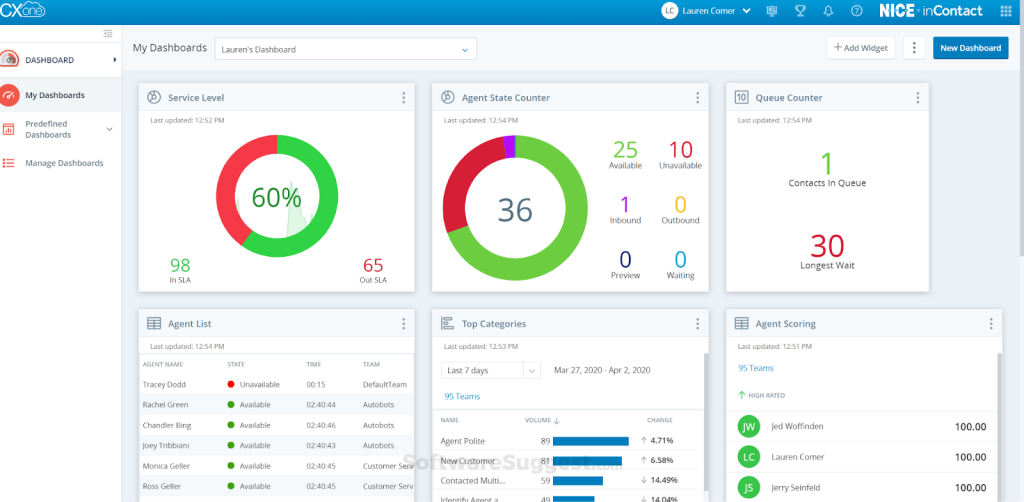
When a call comes in, NICE records, transcribes, and analyzes it in near real time. The transcript is attached to the ticket and used to detect sentiment, intent, and potential risk phrases, which can influence routing, escalations, and follow-up workflows.
Because everything runs on one platform, reporting is highly granular. Leaders can drill into how specific call types, agents, or processes affect AHT, FCR, compliance events, and ticket backlogs. Tickets, calls, QA, and compliance are not separate systems — they are different layers of the same interaction data.
The result is a system where tickets, calls, QA, and compliance aren’t separate workflows but different views on the same underlying interaction data, which is exactly what large, voice-heavy call centers need when they “live on analytics.”
NICE’s Call-Center Features
- Speech-to-text at scale: NICE’s speech-to-text tools transcribe calls in real or near-real time, attach transcripts to interactions, and support keyword search and topic mining.
- Sentiment and intent insights: Transcripts feed sentiment and intent models that help identify dissatisfied customers, compliance risks, and churn signals at scale.
- QA and coaching built in: Interactions are scored automatically on things like adherence to script, empathy, and process.
- Ticketing integrated with WFO/WEM: Ticket workflows are often tied to workforce optimization and management—who handled what, how long it took, and whether it met internal and regulatory standards.
- Compliance and audit trails: For regulated industries, transcripts, redactions, and audit logs around call handling are central; IT ticketing is part of the compliance story, not just customer support.
NICE: Pros and Cons
| Pros | Cons |
|---|---|
| Very strong for large, regulated, voice-heavy operations that need deep analytics, QA, and compliance. | Overkill for most small or mid-sized teams; complexity and cost make sense mainly at scale. |
| Excellent transcription and analytics capabilities. | Not an “easy switch-on” helpdesk; you’re adopting an enterprise contact center platform, not a simple shared inbox. |
NICE Pricing
NICE CXone Mpower is sold in five pre-defined suites with per-agent, per-month pricing. The highest tier also includes per-session AI pricing.
- Omnichannel Suite – $110/agent/month
Voice and digital channels, omnichannel routing, proactive engagement, recording, and compliance. - Essential Suite – $135/agent/month
Adds more structured engagement and routing capabilities. - Core Suite – $169/agent/month
Includes advanced routing, compliance, and reporting controls. - Complete Suite – $209/agent/month
Full-featured CCaaS for large, complex operations. - Ultimate Suite – $249/agent/month + $0.25 per AI session
Adds AI routing and outbound campaign management with per-session pricing.
NICE is positioned as an enterprise-grade CCaaS platform with layered pricing, rather than a lightweight ticketing tool.
Who Is NICE For?
NICE is a fit for large, voice‑centric call centers in industries like finance, telecom, and healthcare, where compliance, QA, and analytics are non‑negotiable and where ticketing has to be tightly tied to recordings, transcripts, and performance management.
Who Is NICE NOT For?
NICE is usually not a good fit for small or mid‑sized teams that just need basic call logging plus light ticketing, or for inbox‑first support teams that want a simple helpdesk with occasional voice. It’s also overkill if you don’t have strict regulatory, QA, or workforce management requirements and don’t plan to use advanced speech analytics or AI routing.
5. Nextiva (Best for Voice-First Teams That Want Telephony + Ticketing Under One Roof)
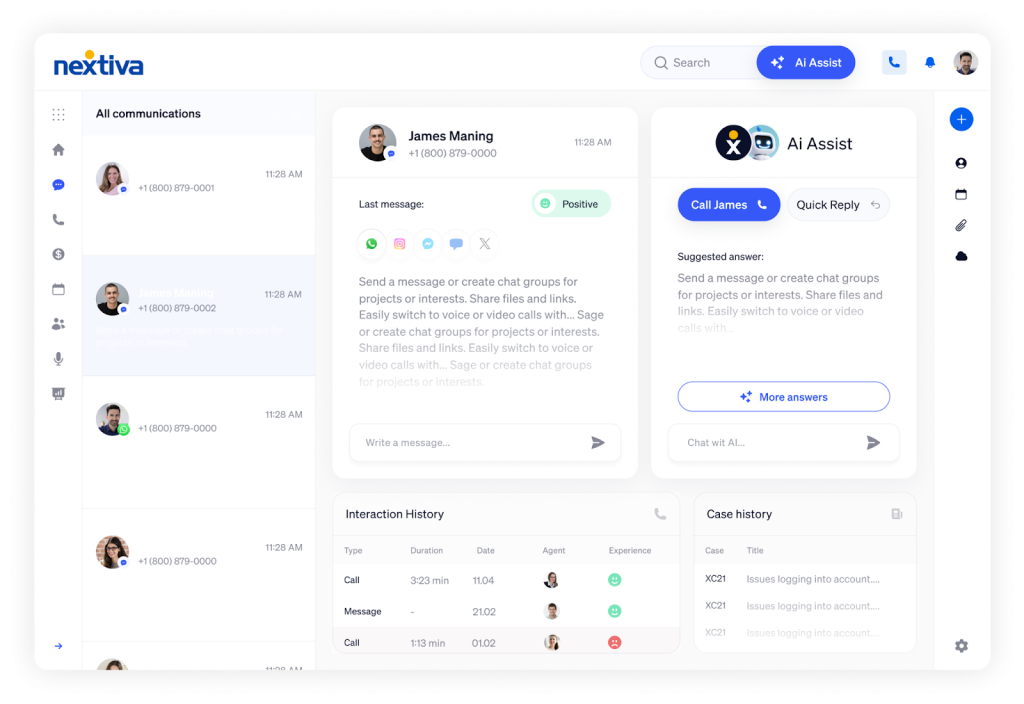
Nextiva is what you reach for when the phone system already is your business, and you want everything else to wrap around it. Instead of starting from tickets and bolting on voice, it starts with VoIP, IVR, and queues, then adds just enough ticketing and case tracking so every call has a clear “what happened next” trail.
In practice, that means agents live in a telephony-first interface—handling inbound queues, outbound campaigns, and callbacks—while tickets quietly capture the story behind those interactions.

A missed call, a transferred escalation, or a series of short follow-up calls can all roll into a single case, with status, owner, and next steps, so supervisors see both the call-center metrics (AHT, abandonment, queue load) and the actual work those calls generate in one place.
This makes Nextiva a good fit for teams that don’t want to re-center their world around a helpdesk UI, but do want the discipline of tickets: structured follow-ups, clear ownership, and history—without losing the “we’re a phone-first operation” feel of a classic call center.
Nextiva’s Call-Center Features
- Full contact center stack: Nextiva Contact Center includes VoIP calling, ACD, IVR, skill-based routing, auto-dialers (preview, progressive, predictive), and recording—all integrated with its CRM and service tools.
- Ticketing tied to calls: Agents can generate and update tickets directly from call interactions.
- Call transcription & analysis: Advanced plans include call transcription and conversational intelligence, enabling teams to view transcripts, sentiment signals, and keywords linked to customer records and support tickets.
- Omnichannel with a voice center-of-gravity: Voice is primary, but chat, SMS, and email can be linked so agents see a unified interaction history when handling tickets.
- Reporting across voice and tickets: Supervisors view KPIs like AHT, FCR, abandonment, and queue performance alongside ticket metrics.
Nextiva: Pros and Cons
| Pros | Cons |
|---|---|
| Ideal for teams where phones are still the main channel and ticketing is there to structure post-call work. | Less appealing if your support is primarily inbox-based and you only need occasional call logging. |
| Strong all-in-one telephony + contact center capabilities (IVR, ACD, dialers) with integrated ticketing. | Can feel like “too much contact center” for teams that don’t need advanced dialers or complex routing. |
Nextiva Call-Center Pricing
Nextiva sells three main UCaaS/CCaaS plans for sales and service teams, billed per user per month with discounts for annual contracts.
- Core – $15/user/month (annual): entry voice + SMS + meetings + basic routing for small teams.
- Engage – $25/user/month (annual): adds proper queues, toll‑free, better reporting, and web chat—good for growing call centers.
- Power Suite CX – $75/user/month (annual): adds AI transcription, advanced routing, and CX orchestration for up to 100 agents.
This makes Nextiva attractive when you want to consolidate telephony and contact center features under one provider, and you’re okay with a voice‑first model.
Who Is Nextiva For?
Nextiva is best suited for voice-first organizations where most customer interactions happen over the phone.
It’s a strong fit for sales and service teams that rely on calls as their primary channel, with ticketing used mainly to track follow-ups and outcomes rather than day-to-day support workflows.
Who Is Nextiva NOT For?
Nextiva is usually not a great fit for teams that are inbox‑first (email/chat as the main channels) and only need occasional call logging. It’s also not for small teams that want a very lightweight shared-inbox–style helpdesk without advanced IVR, routing, or AI transcription.
It’s also less compelling if you already have a mature CCaaS stack and are just looking for a thin ticketing layer instead of replacing your phone system.
How to Choose the Right Call Center Ticketing System
Here’s a scenario worth thinking through before you start demoing products.
It’s three months after your new ticketing system goes live. Your team is using it. Tickets are moving.
But your top two agents — the ones who’ve been with you for years — quietly mention that the new system is actually slower than what you had before. The automation is there, but it requires a workaround for your specific queue structure.
The reporting is good, but it doesn’t surface the metric your operations manager actually cares about. And the voice integration? It works, but agents still have to log back into a separate dialer at the start of every shift.
This is the failure mode that doesn’t show up in demos. Everything looks good in a controlled walkthrough. The problems surface after go-live, when real workloads hit an imperfectly configured system.
The way to avoid it is to evaluate honestly before you commit — not just against a feature checklist, but against how your team actually works.
Here’s what to run each tool against:
| Dimension | What to Evaluate |
|---|---|
| Team Fit & Scalability | Does it match your team size today and scale without adding major complexity or cost? |
| Voice & Omnichannel Depth | Is calling native or via CTI pop-up? Are all channels unified into a single interface? |
| AI Workflow Coverage | Does AI handle transcription, routing, tagging, and reply suggestions in real workflows? |
| QA & Workforce Management | Are the quality scoring and performance tools built in, or are they separate add-ons? |
| Time to Value | How long does real-world implementation take? Weeks or months? |
| Total Cost of Ownership | Per-agent pricing plus AI usage, voice minutes, add-ons, and implementation fees. |
Recommended reading
How to Implement a Call Center Ticketing System (Step-by-Step Checklist)

Most failed implementations share a common story. The vendor demos went well. Everyone was enthusiastic. The contract got signed. And then… the system went live too broadly, too fast, with undertrained agents and half-configured workflows, and the support team spent three months cleaning up the mess.
Here’s how to avoid that story.
Think of implementation in five phases:
Phase 1: Get clear on the problem before you touch the system
Before you configure anything, spend time with the data you already have. Look at your current resolution times, first-contact resolution rates, ticket volumes by channel, and peak load patterns. These aren’t just historical records — they’re the benchmarks you’ll measure your new system against.
Then get specific about what you’re trying to fix. Slow response times? Agents duplicating work on the same ticket? The clearer you are about the actual problem, the less likely you are to configure a technically impressive system that doesn’t solve it.
Assign ownership early. Someone needs to own the technology setup. Someone needs to own training. Someone needs to own the data migration. If those roles aren’t defined before implementation begins, everything takes three times as long.
Checklist for Phase 1:
- Pull baseline metrics: resolution time, FCR rate, ticket volume by channel, peak periods
- Document the top three workflow problems you’re solving for
- Assign implementation owner, training lead, and data lead
- Define success metrics for the first 90 days
Phase 2: Set up the system before anyone touches it
Configuration is where most teams underinvest. Default settings in a ticketing system are only a starting point.
Start by defining the ticket fields your agents actually need, such as service type, customer tier, or issue category. Then build routing rules so tickets automatically reach the right team. Set clear SLA policies and escalation paths to ensure high-priority issues do not sit unattended.
Enable collision detection to prevent duplicate work, configure role-based access so agents only see relevant queues, and mirror your real support structure with proper department hierarchies.
None of this is glamorous work. But it’s what separates a system that actually runs your support operation from a system that your agents quietly work around.
Checklist for Phase 2:
- Custom ticket fields configured for your workflows
- Routing rules and assignment logic defined
- SLA policies set for each ticket type and priority level
- Collision detection enabled
- Role-based permissions configured by team and tier
- Escalation workflows built
Phase 3: Integrate and test before anyone goes live
Map out every system your ticketing platform needs to connect with — your CRM, your e-commerce platform, your knowledge base, your voice infrastructure.
Integration ensures customer data flows automatically into tickets; without it, agents are back to manual copy-paste, which is the exact problem you’re solving.
Build a test environment that mirrors your live setup. Then, simulate the workflows your agents use every day and look out for these:
| Testing focus | What to verify |
|---|---|
| Ticket classification | Are tickets routing to the right queue automatically? |
| Automation triggers | Are SLA alerts and escalations firing correctly? |
| Integration data flow | Is customer data populating without manual input? |
| Security and access | Can each role only see and do what they’re supposed to? |
Don’t skip this phase under deadline pressure. Issues caught in testing take an hour to fix. The same issues caught post-launch take a week, plus the cost of customer impact.
Recommended reading
Phase 4: Roll out small, then expand
Pick one team, or one ticket type, and go live with that first. Not the whole operation – one team.
This is the single most underused tactic in software rollouts. A pilot group will surface configuration gaps, training needs, and workflow friction that testing environments don’t catch. Let them run on the system for two to three weeks. Gather feedback, fix what’s broken and then expand.
Track these metrics from day one of the pilot:
- Average handling time (is it going up or down compared to baseline?)
- First contact resolution rate
- Agent feedback on workflow friction
- CSAT scores from customers who went through the new system
Only expand once the pilot metrics are trending in the right direction. “We need to get everyone on it quickly” is not a good reason to skip this step.
Phase 5: Train, monitor, and keep improving
Training isn’t a one-time event before launch. The agents who got trained in week one will have forgotten half of it by week four, and new hires need onboarding into the system on an ongoing basis. Build training into your operational rhythm, not just your launch plan.
Set up dashboards that surface the metrics you defined in Phase 1. Review them weekly, at least at first. When a metric moves in the wrong direction, trace it back — is it a training gap, a configuration problem, or a workflow issue?
Run a monthly retrospective with your team on system performance. What’s working? What’s causing friction? Where are tickets getting stuck? The system you launch with is not the system you’ll want in six months. Build in the process to keep improving it.
Ongoing monitoring targets to aim for:
| Metric | Target (Example Metrics) |
|---|---|
| Resolution time | 30% reduction from baseline within 90 days |
| First contact resolution | 85% or higher |
| Automation rate | 40–60% of routine ticket actions handled without manual intervention |
| CSAT | Minimum 4.2/5 |
Send post-resolution surveys to customers. Host monthly team meetings to surface feedback. Review unresolved tickets for patterns — they’ll tell you where your knowledge base has gaps, where your routing rules are misconfigured, and where your agents need more support.
Implementation isn’t a project with an end date. It’s the beginning of an ongoing system. The teams that get the most out of their ticketing platforms are the ones that treat it that way.
Choosing the Right Call Center Ticketing System for Your Team
After looking at how most call center tools work in practice, one pattern is hard to ignore: the “best” platform is rarely the one with the deepest feature list.
It’s the one your team can actually live in every day—without drowning in tabs, manual updates, or admin overhead.
For many teams, especially smaller or hybrid “support + success” teams, call-center stacks tend to break in the same ways. Calls sit in one system and follow-ups in another. Tickets are created manually. Adding new queues or workflows means weeks of reconfiguration. Or costs spike the moment you try to bring email, chat, and voice together.
That’s the gap Hiver is designed to fill.
Hiver works well for teams that want to treat calls like tickets—logged, owned, and tracked—without adopting a heavy, voice-only contact center stack.
If you’re looking for a call center ticketing system that keeps voice connected to the rest of your support—not isolated in a separate tool—Hiver is worth a look. It gives you structure, automation, and AI for call follow-ups, without forcing you into an enterprise CCaaS deployment.
You can always start with a free trial and see how it fits your call volumes, team size, and existing support processes.
Frequently Asked Questions
1. What is call center ticketing software?
Call center ticketing software is a centralized system that tracks and manages customer interactions across channels like phone, email, chat, and social media. Every time a customer contacts support, the system creates a ticket that logs the issue, customer details, and conversation history. That ticket is then assigned, prioritized, and tracked until resolution. It ensures no request gets lost and gives teams measurable visibility into performance.
2. Can a call center ticketing system automatically create tickets from calls?
Yes, most modern systems can automatically create tickets from inbound or outbound calls. When telephony is connected, the system logs the caller’s details and basic call metadata and generates a ticket without manual entry. That ticket can then be routed, prioritized, or escalated just like one created from email or chat. This removes the risk of missed follow-ups and eliminates manual logging after every call.
3. Does call center ticketing software support voice-to-text transcription?
Many modern call center setups include voice-to-text transcription, either built in or through integrations. Calls are converted into searchable transcripts that are attached to the ticket record. These transcripts can be used for quality monitoring, compliance checks, coaching, and trend analysis. Some systems offer real-time transcription for live agent assist, while others generate transcripts after the call ends.
4. How does sentiment-based call routing work?
Sentiment-based routing uses AI to analyze a caller’s tone, language, and speech patterns to detect emotional signals like frustration or satisfaction. If the system detects high frustration, it can automatically prioritize or route the call to a senior or specially trained agent. Neutral or routine calls can be routed to standard queues. By combining real-time analysis with routing rules, sentiment becomes an operational signal rather than just a reporting metric.