







You’ve probably had this happen before: a teammate swings by your desk or sends a quick message on Slack or Teams saying, “Hey, can you take a look at my laptop?”
A few hours later, you realize that the request never got logged anywhere. Someone else asks for Wi-Fi access, another needs a new mouse, and before you know it, there’s no clear record of who’s handling what. Some problems get solved, others slip through the cracks.
That’s where an IT ticketing system helps. It turns all those casual messages and hallway requests into trackable tickets with clear ownership. Everyone knows what’s being worked on, and nothing gets missed, even when someone’s away.
In this guide, we’ll cover how these systems work, what features to look for, and the 10 best IT ticketing tools in 2025, including free and paid options.
What is an IT Ticketing System?
An IT ticketing system is a software that helps IT teams capture, track, manage, and resolve technical support requests throughout their lifecycle. Each user issue or request becomes a “ticket“, allowing organized and structured management of IT services.
These tickets move through clear stages (from creation to resolution) so nothing gets missed. This structure helps IT teams prioritize work, stay accountable, and deliver support faster.
How IT Ticketing Systems Work
An IT ticketing system follows a structured, end-to-end process for each support request:

- Ticket creation: Employees submit IT issues through email, web forms, chat, or directly in the system.
- Centralized repository: The system logs every issue in a single database so everyone can track progress.
- Categorization and prioritization: The system tags tickets by issue type and urgency, helping teams resolve critical problems first.
- Automated routing: AI or rule-based workflows assign tickets to the right technician to prevent bottlenecks.
- Resolution workflow: Agents follow guided steps to resolve issues and document solutions for future reference.
What are the Key Features of an IT Ticketing System?
The best IT ticketing systems help IT teams respond faster, automate repetitive tasks, and maintain visibility even in complex environments.
Here’s what you need to look for:
- Multi-channel ticket creation: Employees and customers report issues through email, web portals, chat, or phone, making it easy to submit requests from anywhere.
- Automated routing and assignment: The system routes each ticket to the right IT specialist, preventing delays and confusion.
- SLA management and escalation: Teams set deadlines based on urgency and get automatic alerts if tickets approach or exceed SLA limits.
- Knowledge base integration: Users quickly find answers to common problems, reducing ticket volume and improving response times.
- Mobile accessibility: IT staff view, update, and resolve tickets on mobile devices to keep support moving when away from their desks.
- Reporting and analytics: Managers track ticket trends, resolution times, and recurring issues through dashboards and reports.
- APIs and integrations: The system connects with tools like Slack, Microsoft Teams, and HR or asset management platforms for seamless workflows.
- Role-based access control: Sensitive issues remain visible only to authorized users, maintaining security and compliance.
Benefits of an IT Ticketing System
Using a structured IT ticketing system transforms how your team handles support. It brings order, saves time, and improves both visibility and user satisfaction.

1. Keeps everything organized
When every IT request lives in one place, there’s no need to hunt through emails, chats, or sticky notes. Centralized tracking brings order to the noise, making it easier to assign, follow up, and close tickets on time. In fact, research shows that organizations using centralized data management see a 30% reduction in resolution times compared to fragmented approaches.
2. Saves time
Automation features like ticket routing, canned responses, and self-service cut out repetitive grunt work. IT teams with automation save up to 40% of their time on admin tasks, leaving you with more bandwidth for real troubleshooting and projects.
3. Improves visibility and accountability
IT ticketing systems give managers a real-time view of every support request, from open incidents to resolved tickets. Instead of guessing where delays are happening, teams can see exactly what’s pending, who’s working on what, and how long each issue has been in the queue.
With built-in dashboards and analytics, you can spot recurring problems early, track response times, and identify bottlenecks before they escalate. That kind of visibility makes it easier to plan workloads, improve accountability, and ensure nothing falls through the cracks.
4. Enhances the user experience
A self-service portal and searchable knowledge base allow employees to find quick answers on their own. They can reset passwords, install approved software, or follow troubleshooting steps without waiting for IT help. This not only speeds up resolution but also reduces ticket volume, freeing the IT team for more complex issues.
IT Ticketing vs. Helpdesk vs. Service Desk
If you work in IT, you’ve probably seen the terms “IT ticketing system,” “help desk,” and “service desk” used interchangeably. But while they’re related (and often overlap in real-world setups), each one actually covers a different part of IT support and service delivery.
Here’s how they differ, and why it matters for anyone managing tech support.
- IT Ticketing System is a tool for logging, tracking, and managing user requests and issues. It is the central log where all issues are recorded and monitored until resolution.
- Help Desk is the tactical, user-facing team (and software) focused on fixing immediate problems. For example, password resets, software errors, or other technical hiccups. Help desk software relies on a ticketing system, but its primary goal is fast “break/fix” support and basic troubleshooting.
- Service desk is a broader, strategic function that manages the entire lifecycle of IT services. This covers service requests, change management, asset management, knowledge management, and more. Service desks incorporate the ticketing system and help desk within a wider ITSM (IT Service Management) framework; they aim to improve the overall delivery and quality of IT services to the business.
| Feature/Aspect | IT Ticketing System | Help Desk | Service Desk |
|---|---|---|---|
| Main Focus | Logging, tracking, and managing support requests | Quick, reactive issue resolution | End-to-end IT service management |
| Scope | Basic ticket management for incidents/requests | Incident resolution, basic troubleshooting | Includes incidents, requests, changes, and assets |
| User Interaction | Internal team use | Mostly end-user facing | Both end-users and broader IT/business |
| Approach | Reactive | Reactive | Proactive, strategic |
| ITIL Alignment | Low to moderate | Moderate | High (follows ITIL/ITSM best practices) |
| Automation/Features | Basic ticket routing, status updates | Some automations, FAQs, and simple SLAs | Advanced automations, workflows, and integrations |
| Example Tools | osTicket, Spiceworks | Freshdesk, Zendesk, Jira Service Mgmt | ServiceNow, TOPdesk, FreshService |
Recommended reading
Top 10 IT Ticketing Systems Compared
Now that you know what an IT ticketing system does (and how it differs from a help desk or service desk), let’s look at the top tools available today. Each platform below helps IT teams manage requests more efficiently, automate workflows, and maintain visibility across departments.
| Name | Key Features | Starts at | G2 Rating* |
|---|---|---|---|
| TOPdesk | Incident management, self-service portal, asset management, SLAs | £51 | 4.3/5 |
| Hiver | AI-powered ticketing, multichannel inbox, automations, analytics | $19/user/month | 4.7/5 |
| Freshservice | AI agent, asset management, no-code workflows, ESM | $29/agent/month | 4.6/5 |
| ServiceNow | Full ITSM suite, AI workflows, deep integrations | ~ $100/user/month (est.) | 4.4/5 |
| Jira Service Management | Dev integration, incident management, automations | $23.80/agent/month | 4.3/5 |
| Zammad | Open-source, multichannel support, knowledge base, APIs | €5/agent/month | 4.4/5 |
| Spiceworks | Free ticketing, asset management, email-to-ticket | Free | 4.3/5 |
| osTicket | Open-source, custom forms, SLAs, plugins | Free (self-hosted) | 4.4/5 |
| Monday.com | Visual boards, automations, dashboards | $9/user/month | 4.7/5 |
| Rezolve.ai | AI auto-resolution in Teams/Slack, no-code workflows | Quote-based | 4.8/5 |
*Ratings as listed on G2 at the time of writing.
1. TOPdesk
TOPdesk is an IT service management platform that helps teams handle support requests and keep IT operations organized. Since it’s based in Europe, it offers strong local support across different regions.
The interface is easy to learn, and the self-service portal makes it simple for employees to submit requests and track progress. Incidents, service requests, and changes are in one place, so nothing slips through the cracks. Integrations and an open API connect TOPdesk to the tools your team already uses.
Best for: Organizations wanting ITIL‑aligned processes with straightforward setup and regional support.
Topdesk homepage
Key Features
- Automated workflows: Automate tickets, approvals, and escalations so teams spend less time on manual tasks.
- Asset and Configuration Tracking: Keeps track of all your computers, software, and hardware in one place for easy management.
- ITIL-based Processes: Use industry standards for incident, problem, and change management, ensuring everything runs smoothly.
- Knowledge base: The knowledge base and service catalog help standardize answers and services.
- Easy Integrations: Connects easily with over 90 other apps and tools your team already uses.
| What users like | What users don’t like |
|---|---|
| The configuration and layout are very straightforward relative to many other ticketing systems that have been converted within a few months, with no need for a professional engineer. | Creating workflow-based email alerts is very difficult and time-consuming. Our deployment leader has had a difficult time establishing the triggers to work with |
| Easy to enter tickets and see ticket updates. | Reporting is not easy, and customizing was complicated. Interface looks. |
Note: All reviews have been sourced from G2.
Pricing
- Custom pricing based on organization size and requirements.
2. Hiver
Next on the list is Hiver. It’s an AI ticketing system that lets you manage support requests across email, live chat, voice, WhatsApp, and social media from a single interface. Every request becomes a ticket with a clear owner, defined status (open, pending, closed), and complete history.

You can use tags and custom fields to categorize tickets by type, priority, due date, and SLA targets. This helps you create filtered views like “High priority today” or “Urgent infrastructure issues.”
Unlike traditional ITSM tools, Hiver is quick to set up, simple to use, and powerful enough to support complex workflows. Built-in AI handles repetitive work, suggests accurate responses, and keeps teams focused on helping users instead of managing software.
More than 10,000 teams, including Harvard University, Flexport, Upwork, and Epic Games, trust Hiver to deliver fast, reliable support.
Best for: Internal IT and service teams that want a modern ticketing system without the overhead of a traditional IT service desk.
Key Features
- Automation & routing – Set up workflows to automatically triage and route tickets based on keywords, urgency, or skill requirements. For example, route anything with “server down” to senior engineers immediately.
- Collaboration – Use @mentions and internal notes to loop in specialists without forwarding emails. Share context with security, networking, or database teams directly within tickets.
- SLA management – Set response and resolution time targets, with alerts when deadlines are approaching or breached.
- Integrations – Connect with tools like Gmail, Outlook, Slack, Teams, Jira (to create/link issues), Salesforce, and other systems to pull employee context and log updates without switching tabs.
- Self-Service Options: Integrated knowledge base and customer portal so users can find answers, track ticket status, and raise requests independently.
- AI Assistance: AI Copilot assists agents in real-time by drafting responses, searching documentation, and summarizing complex threads.
- AI Agents can execute multi-step automations across your entire IT process. For example: Employee requests new laptop → AI detects “Hardware Request” → Routes to IT procurement → Checks inventory system via API → Auto-replies with available models and 3-day delivery estimate → Creates tracking ticket → Updates asset management system when shipped → Sends setup instructions when delivered → Closes ticket after confirmation.
- It can also trigger actions across connected apps. For example, create Jira tickets for bugs, update asset records in your ITSM system, log incidents in ServiceNow, or notify teams in Slack about critical issues.
- Analytics Built-in analytics that surface actionable insights, highlight what’s working or not, track customer health trends like unresolved issues or delayed responses, and measure how automation is improving performance over time.
| What users like | What users don’t like |
|---|---|
| Ticketing system, ease of assigning, tracking of the status of the invoices, ease of checking the status of the team’s open Items, and why they are pending. We can write Notes there and tag a particular person in the Team. | We’ve had it crash a few times, which just requires a simple page refresh to fix, so it’s not a big problem. |
| Super easy implementation to turn your inbox into a real support ticketing system. Works like a charm, and I love the ability to create templates for common tickets. | Some technical difficulties with emails not coming through for a small portion of our clients, but we don’t know if that’s Gmail-related. |
Note: All the above reviews have been sourced from G2.
Pricing
- Lite: $19/month per user (basic features, up to 10 users)
- Growth: $29/month per user (automation and integrations)
- Pro: $49/month per user (SLA management, priority support)
- Elite: Custom pricing
3. FreshService
Freshservice is part of the Freshworks suite, so if your team already uses tools like Freshdesk or Freshsales, it fits neatly into that stack. It covers the core ITSM needs out of the box: ticketing, a self-service portal and knowledge base, a service catalog, and automation workflows. You also get incident, problem, change, and release management, plus asset management with discovery. Freddy AI helps draft replies, summarize threads, suggest solutions, and assist with routine tasks.
Because it ties tickets to assets and configuration data, agents can see device details, past incidents, and approvals in one place. You can automate common processes like onboarding and access requests, set and track SLAs. It also helps you build reports that combine service performance and asset metrics to spot trends before they escalate.
Best for: Growing teams moving from ticketing to ITSM.
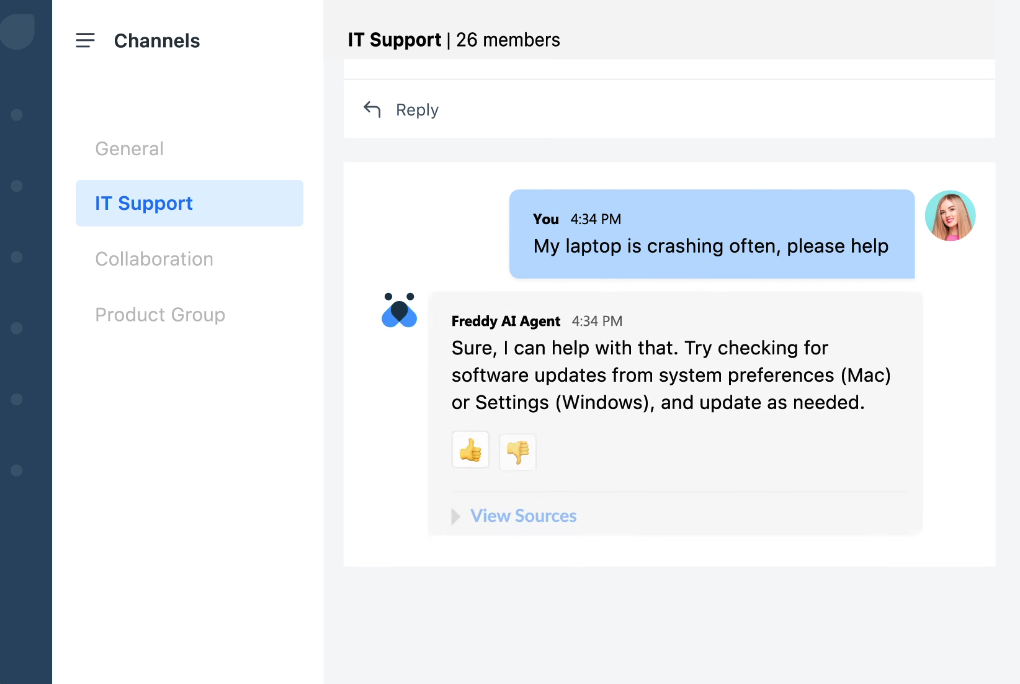
Freddy AI in Freshservice
Key Features
- Full ITSM workflows: Incidents, service requests, problems, changes, and releases in one place with linked records and approvals.
- Asset management with discovery: Automatically find devices and software, track relationships in a CMDB, and see impact before you make changes.
- Automation, SLAs, and orchestration: No-code rules to auto-assign, escalate, notify, and enforce response/resolution targets end-to-end.
- Works for Every Department: Can handle IT, HR, facilities, and more, keeping requests organized company-wide.
| What users like | What users don’t like |
|---|---|
| The automation features save a lot of time by streamlining repetitive tasks, and the asset management module helps us keep track of hardware and software efficiently. Integration with tools like Azure AD and Slack is seamless. | Sometimes, the dashboard takes time to load with a large number of tickets. |
| The interface is modern and generally intuitive, making it easier for users to adopt. | The pricing gets a bit expensive going forward, and the mobile app lags a lot. |
Note: All reviews have been sourced from G2.
Pricing
- Starter: $19/agent/month (basic ITSM features)
- Growth: $49/agent/month (advanced workflows)
- Pro: $99/agent/month (comprehensive ITSM)
4. ServiceNow
ServiceNow sits at the center of the Now Platform, so if your company already runs workflows across HR, security, or operations there, it fits right in. It covers full ITSM out of the box: incident, request, problem, change, and release management, backed by a CMDB.
A lot of the routine work is automated. A chatbot (Virtual Agent) answers common questions. Visual workflows (Flow Designer and orchestration) send tickets to the right people and manage approvals. Each ticket links to the devices and services it affects, so agents can see the impact before they act. An integration layer (Integration Hub) keeps ServiceNow in sync with the other tools you already use.
Best for: Enterprises standardizing workflows across IT, HR, security, and beyond.

Key Features
- Smart Automation: Uses AI to automatically assign tickets and spot problems before they get big.
- Full ITSM Suite: Manages everything—incidents, changes, assets—on one powerful platform.
- Virtual Agent: A chatbot to answer common IT requests and help users help themselves.
- Relationship Mapping: Shows how every device and app is connected, helping teams plan for changes or outages.
- Connects to Other Systems: Works with lots of business software, so workflows smoothly across departments.
| What users like | What users don’t like |
|---|---|
| The best part is its user-friendly interface and centralized platform, which makes it easy to log, track, and resolve incidents or requests. | It can sometimes feel complex and overwhelming for new users because of the many features and configurations. |
| The automation and workflows save a lot of manual effort by streamlining processes like approvals, change requests, and ticket assignments. | The licensing structure can be intricate and costly, with expenses varying based on the modules, user count, and particular features required. |
Note: All reviews have been sourced from G2
Pricing
- Subscription: $60-$65 per ITIL user/month (enterprise volume discounts available)
- Implementation: $20,000-$500,000 depending on scope
- Consulting: $150-$300 per hour
5. Jira Service Management
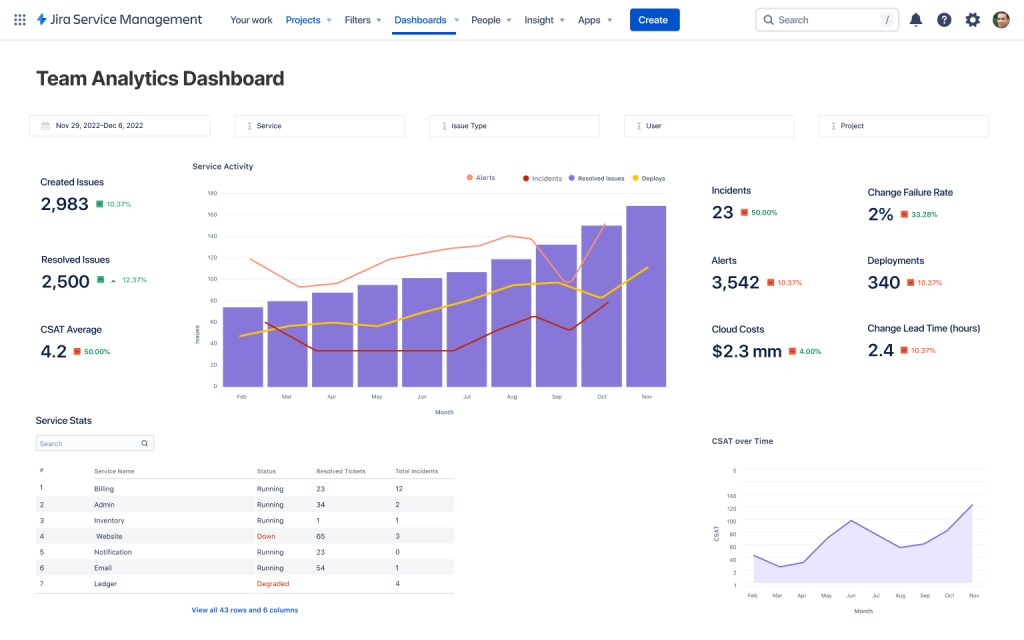
Jira Service Management is where IT and engineering meet. It sits next to Jira and Confluence, so tickets, changes, and runbooks connect to the work that the dev teams already track. When support finds a bug, the ticket links to a Jira issue. As code moves through pull requests and deployments, the service ticket shows that activity, so change risk and status are visible without chasing people.
Day to day, you work out of queues and a self-service portal. Request types ask for the right fields up front, so you’re not chasing basics later. Automations handle the boring parts: they triage and route to the right team, start and track SLA timers, send updates, and kick off approvals. Confluence suggests relevant KB articles as you type, so you can reuse proven fixes.
Best for: Development-heavy IT teams and organizations already using Atlassian products.
Key Features
- Built for Developers: Links ticketing with development tools like Jira and Confluence.
- Advanced Ticket Flows: Tracks incidents, problems, and fixes from start to finish, with automation.
- AI Assistant: Answers common questions and speeds up basic support for users.
- SLAs and automation: Auto-triage, route by team/priority, trigger approvals, and track response/resolution timers.
- Change management: Plan changes with a calendar, link to Jira issues and deployments, and surface risk before rollout.
- Assets/CMDB: Link tickets to devices, apps, and services so impact and ownership are clear.
| What users like | What users don’t like |
|---|---|
| Integration with Jira software and Confluence ensures seamless cooperation between IT and development teams. | Complex setup and configuration. The initial setup can be intimidating, particularly for teams with no prior Jira expertise. |
| What I like best about Jira Service Management is how seamlessly it helps manage IT support tickets through customizable workflows, automation, and SLAs. | Some settings can be confusing for new admins. The interface has many options, which is good, but it takes time to learn. |
Note: All reviews have been sourced from G2.
Pricing
- Free: $0 (up to 3 agents)
- Standard: $19.04/agent/month (basic ITSM)
- Premium: $47.82/agent/month (AI + advanced features)
6. Zammad
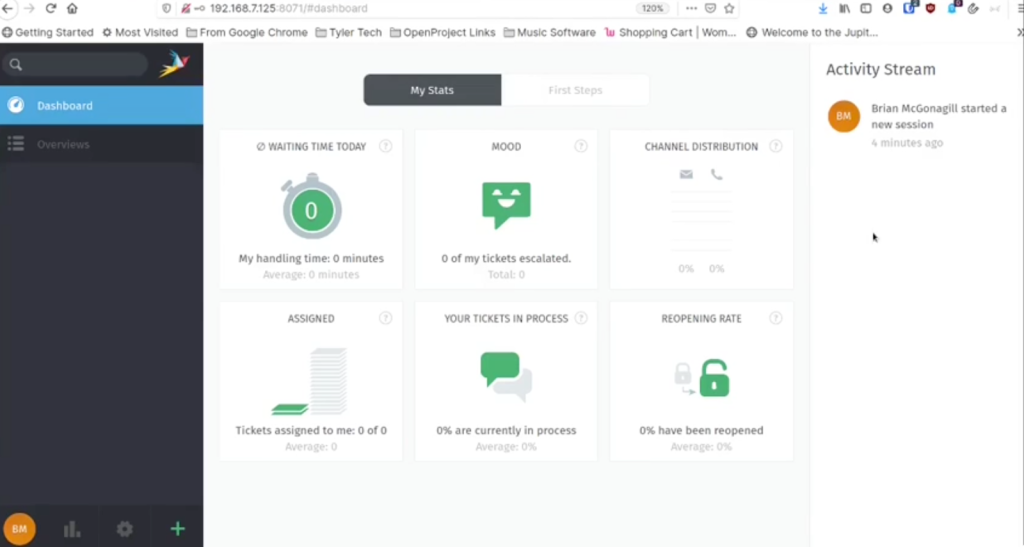
Zammad is an open-source help desk system with modern web interfaces and multi-channel support. Just like Hiver, it lets you handle tickets from email, chat, phone, and social media in one place. The platform offers both cloud hosting and self-hosted options for organizations wanting control over their data.
You get the basics IT cares about on day one: queues and views by team or priority, SLAs and escalations, canned responses, and a searchable knowledge base for self-service. The REST API and webhooks make it easy to tie into your stack for alerts, approvals, or updates, without locking you into a vendor’s ecosystem. If you want control over data, costs, and customization, Zammad gives you that without the legacy feel.
Best for: Organizations wanting open-source flexibility with modern features.
Key Features
- Automation rules: Triggers and schedules to auto-tag, route, reply, and set priorities based on keywords or fields.
- Roles and security: Granular permissions, SSO/LDAP, and 2FA so access stays tight.
- Knowledge base + self-service: Publish internal/external articles and suggest fixes to cut L1 noise.
- Reusable building blocks: Tags, custom fields, templates, and canned responses for consistent handling.
- Search and audit trail: Fast search across tickets with change history for compliance.
| What users like | What users don’t like |
|---|---|
| Zammad is simple to use and set up, and helps us manage all related communications within time. | One thing that could be improved would be the automatic emails. These are not customizable, or at least it is not that easy to customize them. |
| As we found Zammad, it totally surprises us. Self-hosted, super stable, easy to use, if you don’t need support, even free to use… We love it. | Sometimes it takes a load while using, and a slowness issue if tickets are increasing. |
Note: All reviews are sourced from Captera.
Pricing
- Open source: Free (self-hosted)
- Starter: €5/agent/month (up to 5 agents, basic features)
- Professional: €15/agent/month (up to 35 agents, SLAs, knowledge base)
7. Spiceworks
Looking for a budget-friendly option? Spiceworks gives you a simple way to turn emails and portal requests into tickets with clear owners and statuses. Setup is quick, the UI is easy, and you can run it in the cloud or on-prem.
It’s ad-supported and not a full ITSM suite, but that’s the tradeoff for zero license cost and fast rollout. For extra context, you can pair it with Spiceworks Inventory to see devices alongside tickets. Ideal when the goal is “stop losing requests and reply faster,” not “implement heavy ITIL.”
Best for: Small IT teams and budget-conscious organizations.
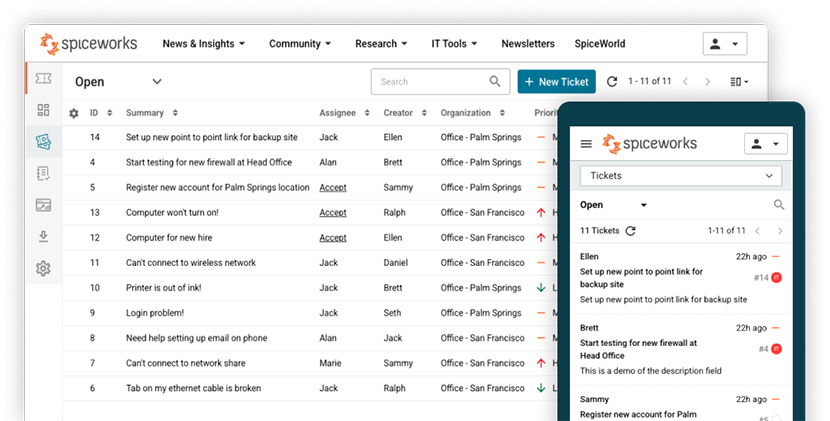
Spiceworks web and mobile app
Key Features
- Free Ticketing: Unlimited users and tickets at zero cost with all basic help desk features.
- Community Help: Connects users to a big IT community for advice and troubleshooting.
- Tracks Devices: Finds and logs computers and software on your network automatically.
- Simple Setup: Easy for small teams to start using—no training needed.
- Ticket from Email: Turns emails into tickets and lets users check requests online.
| What users like | What users don’t like |
|---|---|
| It’s free! And it runs in the cloud, on their servers. No need for infrastructure or a server. | The ads can get in the way a lot. |
| Spiceworks is a wonderful ‘all-in-one’ helpdesk solution. | Could use more customization options; end users struggle with getting set up and accessing at times. Almost too simple. |
Note: All reviews are sourced from Capterra.
Pricing
- Cloud-hosted: Free (ad-supported)
- Self-hosted: Free (requires own infrastructure)
8. osTicket
If you want a simple, self-hosted help desk software with no contracts, osTicket covers the basics and stays out of your way. Point it at your support mailbox and a web form, and every request turns into a ticket with the fields you care about, a help topic, and a queue.
You can set straightforward rules to auto-assign tickets, add tags, and start SLA timers so nothing slips. It’s intentionally minimal, easy to theme, and you keep full control because it runs on your own server. If your goal is to get organized fast without buying an ITSM suite, osTicket is a solid, no-drama start.
Best for: Organizations that want a ticketing system without subscription costs.

Key Features
- Custom forms and fields: Collect the exact details you need (asset ID, location, app).
- Help topics, queues, and assignment: Sort tickets by type and route them to the right team.
- SLAs and business hours: Start response/resolution timers and escalate before a breach.
- Roles and permissions: Limit who can see or act on sensitive tickets; LDAP/AD plugins available.
- Reports and exports: See volume, aging, and SLA performance; export data when you need it.
- REST API + plugins: Tie into monitoring or inventory tools and extend features as you grow.
| What users like | What users don’t like |
|---|---|
| I liked that it started as an open-source solution, which gave us a chance to test and customize before committing to the supported package. | The graphical display—I’m just not a fan of how it looks. It’s nothing major, just a preference thing. |
| What I loved most about osTicket was how easy and simple creating a ticket became for our customers. Perfect on-premise and open-source helpdesk software. | OsTicket had some minor learning curves. |
Note: All reviews have been sourced from Capterra.
Pricing
- Open source: Free (self-hosted)
- Professional support and hosting are available through commercial partners
9. Monday.com
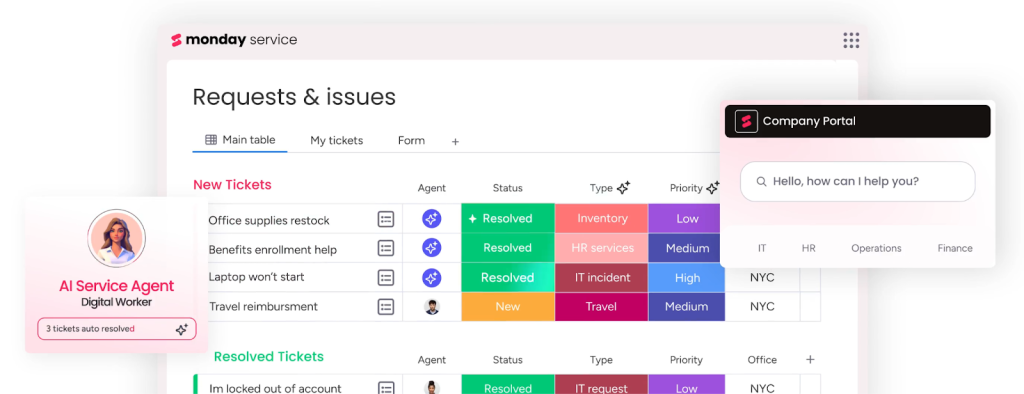
If you’re a visual person, Monday.com lets you run IT requests on boards instead of rigid queues. It uses colorful boards and automation to help teams track tickets and collaborate on projects. The platform is flexible and can adapt to various workflow needs beyond just ticketing.
It isn’t a full ITSM suite, but it’s great for transparency, handoffs, and quick wins when you value visibility over heavy process.
Best for: Supports IT, HR, and marketing teams wanting visual project management alongside ticketing capabilities.
Key Features
- Kanban Boards: Visual boards make it easy to track support tickets and projects.
- Automation: Automatically update statuses, assign tasks, or send reminders with a few clicks.
- Time Tracking: Log and monitor how long tasks and tickets take to complete.
- Dashboards: Real-time charts and reports show team progress and ticket trends.
| What users like | What users don’t like |
|---|---|
| It has replaced Excel almost entirely for me and allows me to also create AI-driven, real-time dashboards for our data that enhance data-based decision-making. | The setup was kind of an extended process.I had to build our ticketing system myself. |
| It allows me to efficiently manage both ticketing and project tracking in one place. The ability to customize workflows and tasks to fit my specific needs has been incredibly helpful. | Sometimes it is challenging to get all the information you need in a graphic for the dashboard. . |
Note: All reviews have been sourced from G2
Pricing
- Monday service Standard: $26/seat/month
- Monday service Pro: $38/seat/month
- Enterprise: Custom pricing
10. Rezolve.ai
Do you use Microsoft Teams and Slack a lot? Then Rezolve.ai can help you resolve requests there.
Rezolve.ai is an AI-powered IT Service Management (AITSM) platform that eliminates L1 support tickets by auto-resolving 30-70% of IT and HR requests through intelligent automation. So if employees can ask questions or pick a request type in chat, the bot can answer common issues, gather the right details, and kick off the workflow. If a human needs to step in, it escalates to an agent without losing context. Approvals, status checks, and updates all happen in the same thread, so no one has to switch tools just to get help.
On the back end, Rezolve.ai connects to Jira, ServiceNow, Okta/Entra ID, HR systems, and more. You can automate onboarding, password resets, access requests, and routine software installs, then write the updates back to your service desk.
Best for: Organizations using Microsoft Teams or Slack who want AI-powered automation without replacing existing ITSM systems.

Key Features
- Agentic SideKick 3.0:14+ specialized AI agents that proactively resolve IT and HR issues before they become tickets.
- Multi-Agent Reasoning RAG Architecture: Advanced AI system with specialized IT and HR agents that collaborate to deliver contextually relevant responses with built-in explainability.
- No-Code GenAI Automation: Creator Studio enables teams to build, test, and deploy automation workflows without coding.
- Enterprise-Grade Security & Integration: SOC 2 Type 2, HIPAA certified with GDPR compliance, plus 1000+ pre-built integrations.
| What users like | What users don’t like |
|---|---|
| Rezolve is very easy to use, and the setup is pretty straightforward. | It can sometimes take a long time to get seemingly small things fixed or adjusted. |
| The features can be tailored to our needs, and it offers real-time analytics. The Rezolve team provides exceptional customer service. | Rezolve.ai does not currently allow us to customize the app. |
Note: All reviews have been sourced from G2.
Pricing
- Core: Free trial (9 users/month, MS Teams conversational ticketing)
- Automate: Free trial (50 users/month, L1 automation with intelligent routing)
- Automate Plus: Free trial (100 users/month, includes white-glove service for additional L1 automation)
How To Choose The Right It Ticketing System For Your Organization
When selecting your solution, consider these factors based on what actually matters in daily operations and real user experiences:
1. Scalability
Don’t just consider your current team size. Plan for growth. A system that works for five people might break down when you hit 50 users. Look for cloud-based solutions that can handle increasing ticket volumes without performance drops, and pricing models that won’t shock you as you scale.
2. Ease of Use
If your system requires extensive training or has a confusing interface, your team will resist using it. Choose intuitive platforms that enable new employees to become productive quickly. Avoid over-engineering your setup. Any extra overhead is wasted time. Don’t get caught up in complex workflows that slow down actual problem-solving.
3. Automation & AI
Manual ticket routing and assignment waste time and create bottlenecks. Look for systems that automatically categorize tickets, route them to the right team member, and can predict resolution times. Smart automation frees up your team to focus on complex problems rather than administrative tasks.
4. Integration Support
Your ticketing system shouldn’t operate in isolation. Ensure it integrates with tools your team already uses, such as Slack, Microsoft Teams, asset management systems, or monitoring tools. Poor integration leads to switching between multiple platforms and losing context.
5. Reporting & Analytics
You need visibility into performance metrics like response times, resolution rates, and common issue patterns. Look for dashboards that help you spot trends, identify training needs, and demonstrate your team’s value to leadership. Real-time data helps you make quick decisions during critical incidents.
Make Your IT Ticketing System Work For You
Choosing the right IT ticketing system can improve your support operations. It can boost team efficiency, improve customer satisfaction, and reduce errors.
So, focus on solutions that fit your business size, budget, and workflow without overcomplicating processes.
Remember, the best system is the one your team will actually use and your customers will benefit from. Start small, test features, gather feedback, and be ready to adapt as your needs evolve. With the right ticketing tool in place, your support team can focus more on helping people and less on managing tools.
Frequently Asked Questions (FAQs)
1. What is an IT ticket?
An IT ticket is a digital record of a user request, problem, or incident requiring support from IT staff. It tracks the issue from creation through resolution and closure.
2. What is the most common IT ticketing system?
Popular examples include Hiver, ServiceNow, Jira Service Management, Freshservice, Zendesk, and TOPdesk. ServiceNow and Jira Service Management are widely used in organizations of all sizes.
3. Is Jira a ticketing tool?
Yes, Jira Service Management is a ticketing software from Atlassian extensively used for incident management, service requests, and IT project tracking.
4. What are the three types of tickets in an IT ticketing system?
The three main types of tickets in an IT ticketing system are:
Incident tickets (unexpected disruptions)
Service request tickets (routine or access requests)
Change request tickets (requests to modify systems/configurations)
Start using Hiver today
- Collaborate with ease
- Manage high email volume
- Leverage AI for stellar service













