







If you’ve ever seen an SLA breach and ignored it, you probably did the right thing.
In many teams, the SLA clock keeps running when no one is working, doesn’t stop when a ticket is waiting on the customer, and escalates issues that no one owns. Once that happens, SLAs stop guiding day-to-day decisions. Agents learn which breaches are “real” and which ones to discard.
That’s not a people problem. It’s a configuration problem most teams don’t realize they have.
This guide breaks down how SLA ticketing software actually behaves in production and where most setups go wrong. You’ll learn how to configure SLAs so they surface the tickets that genuinely need attention.
What is a Service Level Agreement (SLA)?
In SLA ticketing software, an SLA is a set of rules you configure to control how tickets are prioritized, timed, and escalated.
You define when the clock should start, when it should pause, which tickets get stricter deadlines, and who is alerted as a deadline approaches. Only after these rules are set does the system begin tracking response and resolution times, surfacing at-risk tickets, and enforcing accountability.
For example, you might set an SLA where critical technical issues require a response within two hours and resolution within 24 hours. The clock runs only during business hours, pauses automatically when the ticket is waiting on a customer, and resumes the moment an agent takes action again. If the deadline is at risk, the ticket escalates to a specific owner.
This is what makes SLAs practical. They don’t just describe expectations. They actively enforce timing rules that shape how tickets are prioritized and handled in real time.
What makes ticketing software SLAs different?
Once an SLA policy is configured, the system applies it consistently to every ticket so agents don’t have to track deadlines manually.
To work in practice, ticketing software SLAs rely on four things you must define upfront:
- When should the clock run. You need to specify business hours and ticket states. The SLA clock should run only when an agent can act and pause when a ticket is waiting on the customer or a third party.
- Which tickets get which deadlines. Response and resolution targets should vary by priority, issue type, or customer tier. Without this, low-impact requests compete with urgent incidents.
- What happens before a breach. Escalations must trigger while there’s still time to act, not after the SLA has already failed. That means defining warning thresholds and clear owners.
- Who owns the ticket at each stage. SLAs only work when ownership is explicit. Every escalation should route to a person or role responsible for moving the ticket forward.
When these rules are set correctly, SLAs stop being just a reporting metric. They become a live system that tells your team what needs attention next and why.
Core SLA components in ticketing systems
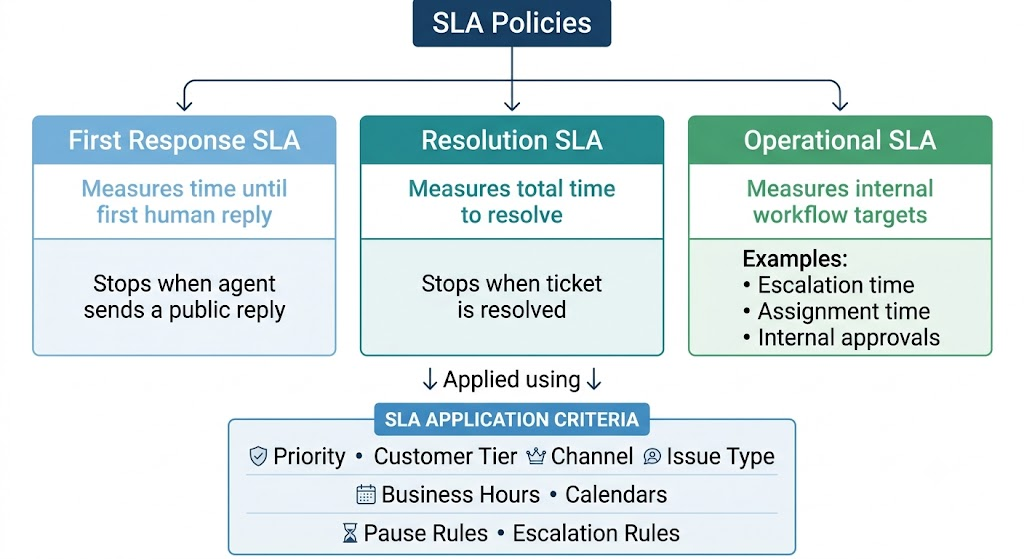
SLAs only work when the system knows exactly what counts as work and what doesn’t. These three components define that behavior.
1. Response time SLAs (first reply)
Response time SLAs measure how long a customer waits before receiving a human response.
You need to define exactly which actions stop the response timer:
- A public reply sent to the customer → stops the clock
- An automated acknowledgement → does not stop the clock
- An internal note or comment → does not stop the clock
- Reassigning the ticket to another agent → does not stop the clock
If these rules aren’t explicit, response SLAs get met on paper while customers are still waiting for a real answer.
2. Resolution time SLAs (time to fix)
Resolution time SLAs measure how long it takes to fully resolve the issue. You need to define when the resolution clock should pause and resume:
- Ticket marked as “waiting on customer” → clock pauses
- Ticket waiting on a third party or internal dependency → clock pauses
- Agent resumes work or customer replies → clock resumes
- Ticket marked resolved or closed → clock stops
You should also set different resolution targets for different types of work. A password reset and a production bug should not be measured against the same deadline.
3. SLA behavior as tickets move through states
SLAs follow the ticket, not the agent. And a simple, reliable setup looks like this:
- Assigned or in progress → SLA clock runs
- Waiting on customer or external dependency → SLA clock pauses
- Resolved or closed → SLA clock stops
If waiting states don’t pause the clock, SLAs end up tracking delays your team cannot control, which quickly erodes trust in the metric.
When these components are defined clearly, SLAs become predictable. It also means that agents know which actions matter, and managers can trust that breaches point to real problems.
How does ticketing software track SLA compliance?
Ticketing software doesn’t track SLAs by default. It only starts tracking once you define SLA rules in the system. For example, response targets, resolution SLA targets, business hours, pause conditions, and escalation thresholds.
Once those rules are in place, the system continuously measures each ticket against them. The goal is to help agents see what needs attention now and give leads time to intervene before a breach happens.
Here’s how SLA tracking works in practice:
- Live SLA timers: Each ticket shows the remaining time for response and resolution based on the SLA it’s assigned. Agents don’t calculate deadlines; they work off the remaining time.
- Clear risk indicators: Tickets are marked as on track, at risk, or breached based on how much SLA time is left. This makes urgency visible without opening each ticket.
- Business-hours enforcement: The SLA clock runs only during the working hours you’ve defined. Nights, weekends, and holidays are excluded unless you explicitly configure otherwise.
- Calendar-hour SLAs (when needed): For 24/7 support or premium customers, SLAs can run continuously without pausing for business hours.
- Pause and resume rules: The clock stops automatically when a ticket is waiting on a customer, vendor, or internal dependency, and resumes when your team can act again.
- SLA activity history: Every start, pause, resume, and breach is logged, so you can audit what happened and understand why a ticket missed or met its target.
When configured correctly, SLA tracking gives teams a live, shared view of deadlines. Agents know what to work on next, and managers can step in before a missed SLA turns into a customer issue.
How to set up and configure SLA policies?
The easiest way to set up SLAs is to break the process into four simple phases: understand your ticket patterns, set the rules, map your working hours, and make sure tickets go to the right people. When these pieces fit, your SLAs become predictable and much easier for your team to meet.
Let’s go through each phase.
Phase 1: Establish your SLA inputs
Before you define any SLA rules, you need to lock down the inputs the system will rely on. If these are unclear, SLAs fail regardless of how well the rules are written.
What to define before configuring SLAs:
1. Group tickets by effort
Review the last 30–60 days of tickets and group them by the type of work required to resolve them. For example, product bugs, billing or payment issues, onboarding or setup questions, and account access problems.
Limit this to 5–8 categories. Separate tickets only when they differ in urgency or resolution effort. If two issues are handled the same way, they should share the same SLA.
2. Set a baseline using real data
For each ticket group, pull your current average first response time and average resolution time.
Use these numbers as your starting point. If billing tickets currently get a first response in six hours, a one-hour SLA will break immediately. Set targets slightly better than today’s performance and tighten them gradually.
3. Define when your team can actually work
List your team’s availability in detail:
- daily working hours
- weekends or off days
- time zones for distributed teams
SLA timers should run only when someone is available to act. Anything else creates false breaches.
4. Configure business hours and exceptions in the system
Set business hours, holidays, and weekends directly in your ticketing tool. Then define exceptions for tickets that need different coverage. For example,
- Incidents or outages require calendar-hour (24/7) SLAs
- General support questions need business-hours-only SLAs
These settings control when SLA clocks run. Get them right before moving on.
Phase 2: Creating SLA policies
Once you understand your ticket patterns and team capacity, you can create SLA policies that actually make sense in day-to-day work. The goal here is simple: set clear rules for what needs attention first, and apply them consistently.
- Create a small set of SLA categories. Use clear urgency levels like Critical, High, Medium, and Low. These should reflect the real impact of your most common ticket types, not just generic labels.
- Set realistic response and resolution targets. Use your current averages from Phase 1 as the baseline. Set initial SLAs slightly tighter than what you already achieve. Large jumps (for example, moving from a 6-hour response to 1 hour) will fail immediately and make the SLA meaningless.
- Define when each SLA applies. Specify the exact conditions that attach an SLA to a ticket. For example, issue type, priority, customer tier, or channel. The goal is for SLAs to be assigned automatically, not chosen manually by agents.
- Give complex issues more breathing room. Some tickets require multiple handoffs or waiting on third parties, such as intermittent bugs or account investigations. These should have longer resolution targets so agents aren’t forced to close tickets prematurely to meet the clock.
- Automate SLA assignment. Configure rules so SLAs are applied at ticket creation and escalations trigger before a breach. Alerts should go to a specific owner who can act, not a general inbox.
When these policies are defined clearly, every ticket enters the queue with a deadline, an owner, and an escalation path already set. There’s no interpretation required at the agent level.
Phase 3: Configuring business hours and calendars
Your SLA timers only work if the system knows when your team is actually available. Setting up business hours and calendars prevents unfair breaches and makes every SLA target feel achievable.
Deliver timely support, every time with Hiver’s SLAs
- Add your working hours. Set the exact hours your team is online so that timers only run when someone is available to respond.
- Mark weekends and holidays. Define non-working days in the calendar to avoid accidental overnight or holiday breaches.
- Account for different time zones. If your team is distributed, assign the correct schedule to each group so SLAs don’t run while another region is offline.
- Create separate calendars if teams work different shifts. For example, billing might work 9–5, while technical support operates late into the evenings.
- Decide which issues should use 24/7 timers. Critical outages or on-call incidents may require round-the-clock tracking; all other incidents should follow standard business hours.
Setting this up now ensures every SLA policy you create later runs on accurate, fair time.
Phase 4: Set up auto-assignment and routing rules
The SLA clock begins the moment a ticket is created. If that ticket sits in a shared queue waiting for someone to pick it up, you’re losing time without making progress. Routing exists to remove that gap.
Auto-assign tickets using Hiver
- Stop tickets from landing in shared inboxes. At ticket creation, route each ticket directly to a team that can work on it. Technical issues go to technical support agents. Billing issues go to the billing team. Account access issues should be directed to Tier-1 support. If an agent still has to decide where a ticket belongs, routing has failed.
- Make priority change assignment speed, not just labels. Many teams mark tickets as “Critical,” but route them the same way as everything else. That defeats the purpose. Critical and high-priority tickets should skip normal distribution and go to the next available agent immediately. If urgent tickets wait in line, priority is cosmetic.
- Route based on load, not fairness. Assigning tickets evenly sounds fair, but it breaks SLAs. What matters is active workload. If an agent already has 12 open tickets and another has 3, the next ticket should go to the second agent.
- Define what happens when routing fails. If the primary team is offline or at capacity, the ticket must be automatically transferred. For example, if no billing agents are online, route the ticket to an on-call owner or a backup queue. If nothing happens, the SLA clock continues to run with no owner.
- Separate high-value customers at intake. Use customer tier or account type to fast-track VIP and enterprise tickets. Route them directly to senior agents or dedicated queues with tighter SLAs from the moment the ticket is created.
When routing is configured this way, tickets don’t wait to be discovered. They start moving immediately, and that alone removes the least visible causes of SLA breaches.
With these four phases in place, your SLA setup finally matches how your team actually works. Tickets are categorized correctly, timers run only during actual working hours, and routing rules ensure that nothing remains untouched.
At this point, your system can track deadlines accurately; now it’s time to add automation so SLA management runs on its own.
Automating SLA management in ticketing software
Automation exists to handle the parts of SLA tracking that humans consistently miss.
When ticket volume increases, agents stop checking timers, and leads stop scanning queues. SLAs then fail quietly, not because anyone ignored them, but because no one noticed the risk early enough.
Well-configured automation solves that by surfacing tickets before they are close to breaching, and escalating only when someone needs to step in.
1. Use time-based signals, not fixed reminders
Avoid alerts like “2 hours before breach.” These only work for one SLA length and fall apart as soon as priorities differ.
Instead, trigger automation based on the percentage of SLA time used so the same logic applies across all tickets.
A practical setup:
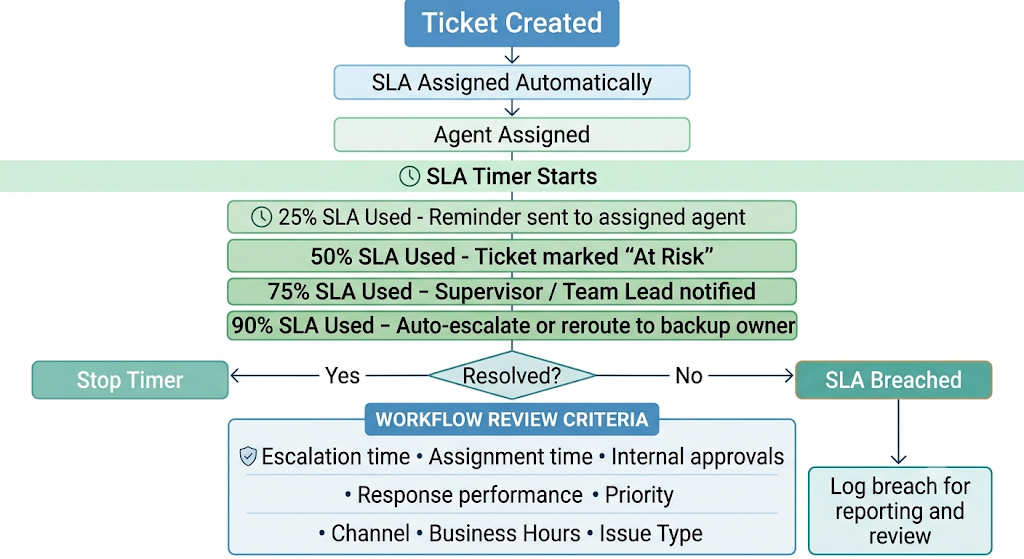
- Trigger the first alert when 25% of the SLA time is used to surface the ticket, while there’s still plenty of time to act. This should be a quiet reminder, not a warning.
- Send a second alert at 75% of the SLA time, but only if the customer hasn’t received a public reply yet. Internal notes or reassignments shouldn’t count as progress.
- Notify only the assigned agent at this stage to maintain clear ownership and prevent alerts from being ignored by the rest of the team.
- Escalate to a lead or on-call owner only when the ticket is still unassigned or unchanged at 90% of SLA time, so escalation signals real risk, not normal ticket aging.
This setup prevents the most common automation failure: escalating tickets simply because time has passed.
2. Add automated actions that kick in before things go wrong
At this stage, your SLA rules are already in place. Automation here should address only one problem: tickets that are not moving.
Configure actions based on inactivity, ownership gaps, and capacity limits.
- Handle tickets with no owner: Set a rule that checks whether a ticket has been assigned shortly after it is created. If a ticket remains unassigned after a defined window, like 15 minutes for critical tickets and 60 minutes for standard ones. It should be automatically assigned to a fallback owner or secondary queue. This prevents tickets from sitting idle at the intake stage.
- Handle tickets that are assigned but untouched: Assignment does not mean work has started. Create a rule that searches for tickets with an assigned owner but no public reply or status update within a specified time frame. If there is no customer-facing action after 45–60 minutes, escalate or reassign the ticket.
- Prevent overload at the point of assignment: Define a maximum number of active tickets an agent can hold. When an agent reaches that limit, new tickets should be routed to the next available agent. This avoids slowdowns caused by overloaded queues.
- Change handling when SLA time is nearly exhausted: When a ticket reaches 80–90% of its SLA time, automation should change how the ticket is handled. Move it out of standard queues and route it to a faster path, such as a senior agent or on-call rotation, rather than simply increasing its priority label.
- Add system context when an action is missing: If a ticket is approaching breach with no customer response sent, add a system-generated internal note such as, “Customer has not received a reply. 20 minutes of SLA time remaining.” This gives immediate context to the next person who opens the ticket.
These automations are designed to identify and automatically redirect stalled tickets. When they’re in place, SLA failures point to real capacity issues.
3. Handle after-hours tickets so your timers stay fair
Many teams lose SLAs simply because the system keeps counting when no one is working. Automation should clearly separate when time should count from when it shouldn’t.
- Pause SLA timers outside working hours: Configure SLA clocks to stop during nights, weekends, and holidays. If no one is expected to respond, the timer shouldn’t be moving. This single setting prevents a large number of false breaches.
- Send a clear after-hours auto-response: When a ticket arrives outside business hours, send an automatic reply that sets expectations. For example, “We’ve received your message. Our team is back online at 9:00 AM and will respond then.” This reassures customers and reduces follow-ups like “Is anyone there?”
- Route urgent issues to on-call coverage: If your team supports after-hours coverage, define which tickets qualify. For example, Critical incidents can bypass paused SLAs and route directly to an on-call agent using calendar-hour tracking. All other tickets should be addressed during business hours.
- Alert a supervisor only for true exceptions: If a Critical ticket arrives while the team is offline and no on-call owner is available, alert a supervisor immediately. This ensures high-impact issues don’t sit unnoticed overnight.
These automations keep SLA measurement honest. Time is counted only when action is possible, urgent issues are handled intentionally, and customers know exactly what to expect.
Example of a Well-Configured SLA Policy
If you’ve followed these steps exactly, you should end up with a system that runs like this SLA example.
Suppose your support team has configured the following SLA policy for high-priority email tickets:
- First response SLA: 2 business hours
- Resolution SLA: 8 business hours
- Business hours: 9:00 AM–5:00 PM, Monday–Friday
- Pause condition: SLA timers pause when a ticket is marked as Waiting on Customer
Here’s how it could run in practice if well set up:
| Time | Event | SLA Status |
| Monday, 10:00 AM | Customer submits a high-priority ticket | Response and resolution timers start |
| Monday, 11:15 AM | Agent sends the first public reply | First response SLA met (1 hour 15 minutes elapsed) |
| Monday, 12:30 PM | Agent requests additional information | Resolution timer continues |
| Monday, 1:00 PM | Ticket moves to Waiting on Customer | Resolution timer pauses (3 business hours used) |
| Tuesday, 10:00 AM | Customer replies with the requested information | Resolution timer resumes (5 business hours remaining) |
| Tuesday, 3:00 PM | Agent resolves the ticket | Resolution SLA met (8 business hours total) |
Although the ticket remained open for more than a day, only 8 business hours counted toward the resolution SLA because the timer paused while the team was waiting for the customer and outside working hours.
If the customer had not replied before the SLA deadline, the ticket would have remained paused rather than continuing to consume resolution time. Once the customer responded, the timer would resume from where it stopped, giving the team the remaining time to resolve the issue.
Alternatively, if the agent had not resolved the ticket within the remaining SLA window after the customer replied, the system could trigger an SLA breach. Depending on the configured rules, this could notify a team lead, escalate the ticket to a higher-priority queue, or alert the assigned agent to take immediate action.
This is why accurate SLA configuration matters. Without clearly defined business hours, ticket statuses, and pause conditions, teams can end up with misleading SLA reports that don’t reflect the actual time spent working on customer requests.
Monitoring and measuring SLA performance
Once automation is running, your next task is to stay ahead of potential problems. Monitoring is about identifying risks early and addressing the patterns that cause breaches repeatedly. Think of this section as your “early-warning layer.”
1. Track the metrics that actually influence your SLAs
Start with these five metrics. Every ticketing system can surface them, and each one answers a specific operational question.
- SLA compliance rate: This shows the percentage of tickets that met their SLA targets within a given period. It tells you whether your current setup is broadly working or consistently failing.
- Breach rate: This is the percentage of tickets that missed their SLA. Unlike compliance rate, breach rate helps you isolate where things are going wrong. It can be by team, ticket type, priority, or time of day.
- First response time: This measures how long tickets wait before receiving a first human reply. High response times usually point to intake or routing issues, not resolution problems.
- Resolution time: This measures how long tickets take to reach a final resolution. Spikes here usually indicate complexity, dependency issues, or workload imbalance.
- Tickets at risk: These are tickets that haven’t breached yet but are close to doing so based on remaining SLA time. This metric is the most actionable because it shows where intervention can still prevent a failure.
How to apply this today: Open your dashboard, filter the last 7 days, and flag any category with a breach rate of more than 10%. That’s where you fix next.
2. Build SLA dashboards people can act on
Your dashboard should clearly indicate what needs attention, not overwhelm users with unnecessary widgets.
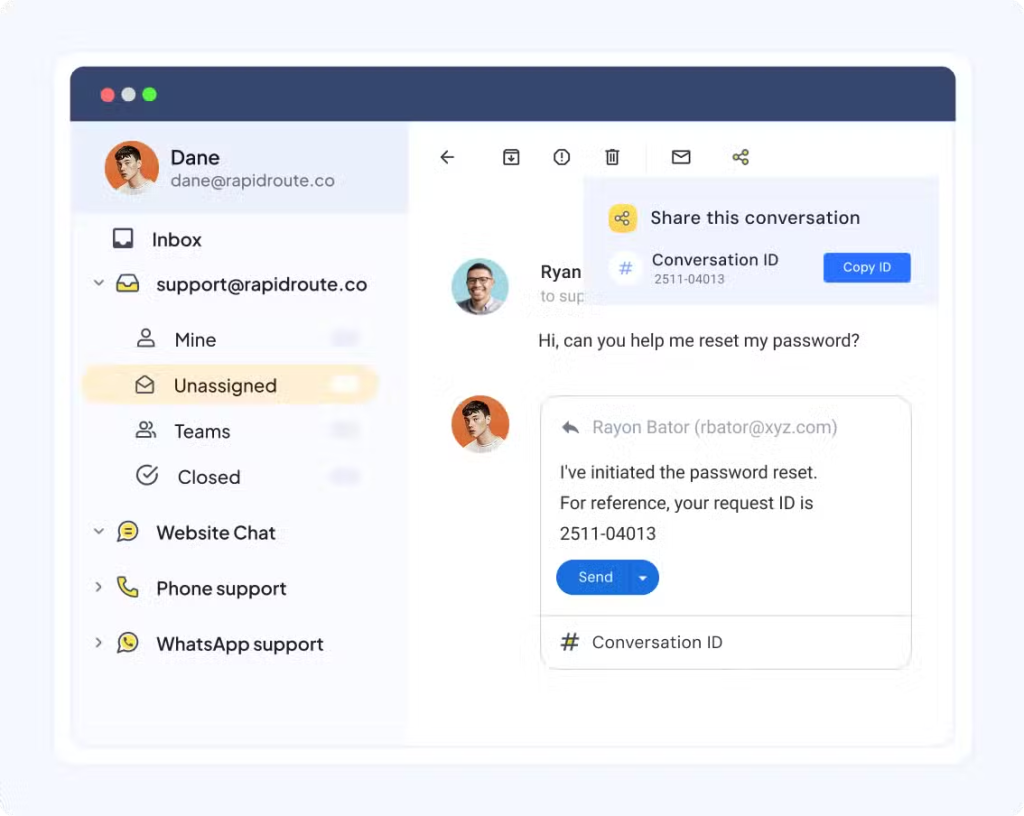
- Agents should be able to view their open tickets and SLA timers at a glance.
- Managers should be able to see real-time compliance, breaches, and volume.
- Leads should be able to identify patterns, such as which categories or channels are underperforming
Immediate Action: Remove any chart nobody uses. If it doesn’t help someone decide their next step, cut it.
3. Use weekly/monthly SLA reports to find patterns
Reports explain why breaches happen. Review these regularly:
- SLAs by issue type (e.g., bugs vs billing).
- SLAs by channel (e.g., email vs chat).
- SLA breaches by reason (e.g., “unassigned too long”).
- Volume spikes and their impact.
Do this: Run a monthly SLA report and sort by breach reason. For example, if the top reason is “ticket unassigned too long,” add an auto-assignment or fallback routing rule. If the top reason is “waiting on customer counted against SLA,” fix the pause rules tied to ticket status. Fix the top two causes first. Then re-check the report next month.
4. Use SLA data to plan staffing and scheduling
Your SLA numbers should tell you when tickets pile up, which work slows teams down, and where coverage is thin.
Use it to make small, targeted staffing changes instead of reacting after breaches happen.
- Check breach rate by hour and day. Look for repeat patterns, not one-off spikes.
- If breaches cluster between 2–4 PM, that’s a coverage gap. Add one agent in that window instead of tightening SLAs across the board.
- Sort tickets by average resolution time and SLA consumption. “Complex tickets” are the ones that consistently use most of their SLA, like bug investigations, data issues, third-party dependencies, or account-level problems. Route these earlier to Tier-2 technical support or billing specialists instead of letting them bounce between general agents.
- Use historical SLA data to mark predictable peaks, like end-of-month billing, renewals, launches, or seasonal traffic. Plan short-term coverage for these windows like temporary agents, extended shifts, or reduced non-essential work, so SLAs don’t dip the same way every cycle.
- Compare breach rate and ticket volume by team. If one team has fewer tickets but a higher breach rate, the issue is usually complexity. Either adjust routing to share the load or set different SLA targets that reflect the work they handle.
Immediate Action: Open your SLA report and find the single hour with the highest breach rate. For the next week, move one agent’s shift by one hour to cover that gap. Track the breach rate for that window daily. If it drops, you’ve confirmed a real staffing issue.
Used this way, SLA data becomes a planning input. It tells you where to add coverage, where to route differently, and where SLAs need adjustment.
Preventing and managing SLA breaches
SLA breaches don’t happen “suddenly.” They build up quietly, a ticket sits unassigned, an alert comes too late, or an internal team doesn’t respond. This section helps you identify issues early and address the root causes before they become recurring problems.
1. Spot the common SLA triggers that usually lead to breaches
Most breaches are predictable if you know where to look. Start by checking for these patterns:
- Tickets are staying too long in the unassigned queue.
- Agents are missing the first response because the queue isn’t prioritized.
- Alerts are firing too late or not at all.
- Tickets are pending with other teams and have no follow-up.
- Escalation rules are not triggering when a ticket is at risk.
Immediate action: Filter tickets from the last 14 days, sort by “breached”, and look for the top recurring cause. For example:
- If most breaches show “unassigned too long”, add or tighten auto-assignment and fallback routing.
- If breaches show “waiting on internal team”, fix pause rules or add internal follow-up reminders.
- If breaches show “no response before deadline”, move alerts earlier in the SLA timeline.
Fix the top recurring cause first. Then re-run the same filter next week to confirm the impact.
2. Build a pre-breach alert system that agents can rely on
Late alerts are the #1 reason teams miss deadlines. Set up alerts that actually give people time to act:
- Trigger the first alert at 25% of SLA time used. This is a visibility check, which tells the assigned agent that the ticket is aging and needs to be acknowledged.
- Send a second at 50% if no action is taken. A public reply or meaningful status change counts as action. This alert signals real risk and should prompt immediate handling.
- Escalate only when intervention is required. For example, escalate to a supervisor or on-call owner at 75% of SLA time and only if the ticket is still unassigned or unchanged. This ensures supervisors are pulled in to save tickets, not to monitor routine progress.
- Keep alerts narrow and role-specific. Agents should see early alerts for their own tickets. Supervisors should see alerts only when a breach is likely and their intervention can change the outcome.
Immediate action: Create a simple rule:
- Notify the assigned agent at 25% and 50% SLA usage
- Escalate to a lead at 75% SLA usage if no customer response has been sent
Apply it to a single SLA policy and observe how agents respond over a few days. Adjust timing only if alerts are consistently ignored or consistently too late.
3. Handle SLA exceptions without breaking your reporting
Exceptions are helpful, but only when used sparingly and documented properly.
- Use overrides only for tickets that fall outside normal workflows, such as third-party investigations, legal reviews, or customer-requested delays. If the same type of ticket appears regularly, it needs its own SLA.
- Always add a short internal note explaining why the SLA was overridden. This keeps reports accurate and makes patterns visible later.
- Review SLA overrides monthly. Group them by reason and look for repeats. If the same reason shows up more than a few times, adjust your SLA rules or routing instead of continuing to override manually.
Immediate action: Review all SLA overrides from the last 30 days. If one category appears repeatedly, create a dedicated SLA policy for it.
4. Keep ownership clear to prevent tickets from getting stuck
Nothing kills SLA performance faster than unclear ownership. Make it easy to see who’s responsible at every step:
- Every ticket must have an assigned owner; there are no exceptions.
- Reassign automatically if an agent goes offline.
- Escalate ownership if the ticket hasn’t moved in X hours.
- Add internal notes when the ticket is pending review by another team.
Immediate action: Run a search for “Unassigned” or “Owner = None” right now. Assign them before doing anything else.
Breaches are an operational signal. When you fix the upstream issues (slow assignment, late alerts, unclear ownership), your SLA performance improves instantly.
Team management and SLA compliance
SLAs only work when your team knows how to use them. Most breaches come from unclear expectations, messy queues, and overloaded agents. This section helps you fix that with simple, practical steps.
1. Train teams on how SLA workflows actually work
A surprising number of breaches happen because agents aren’t sure how timers, pauses, or priorities behave. Fix that with quick, hands-on training.
What to cover in training:
- Teach agents how to read SLA timers and risk indicators. They should know where the remaining time is shown and how to spot tickets marked as at risk versus already breached.
- Show how to prioritize tickets by SLA risk, not queue order. Agents should work on tickets with the least remaining SLA time first, even if they arrived later than others.
- Explain when and how to pause an SLA. Use clear examples: waiting on a customer reply, a vendor response, or an internal dependency. Make it clear that SLAs should not pause just because a ticket is reassigned or noted internally.
- Walk through how escalation rules work. Agents should know when a ticket will escalate automatically and what actions prevent escalation, such as sending a customer-facing response.
- Define what a “breach risk” ticket looks like. For example, a ticket that has less than 25% of its SLA time remaining and no recent customer-facing activity. Agents should recognize this as a signal to act immediately.
Immediate action: Run a 15-minute weekly SLA review. Pick one breached or near-breach ticket and walk through:
- where the SLA time was lost
- which alert or action could have prevented it
- what should be done differently next time
This keeps SLA knowledge practical and prevents the same mistakes from repeating.
2. Protect quality while still hitting SLA speed targets
Fast replies don’t matter if they create more follow-ups. Good SLA performance equals fast and accurate service. How to keep the balance:
- Use more flexible timers for complex issues. For example, technical troubleshooting, intermittent bugs, or data mismatches usually need testing or back-and-forth. Assign these ticket types longer resolution SLAs so agents don’t rush incomplete answers just to stop the clock.
- Don’t force instant replies. Avoid rules that pressure agents to respond just to meet a response SLA. Allow them a short window to verify steps, check logs, or confirm details before replying. A slightly later but accurate response often prevents multiple follow-ups.
- Track CSAT next to SLA metrics to spot rushed answers. If SLAs are being met but CSAT drops or tickets reopen frequently, agents are likely rushing responses.
- Review sample tickets during high-volume weeks to maintain accuracy. Look for repeated clarifications, reopened issues, or incorrect guidance. These are early signs that speed is hurting quality.
Immediate action: Add a rule: “If the ticket type = technical troubleshooting, give agents a longer resolution timer.” This instantly reduces rushed, low-quality replies.
3. Agent workload distribution for SLA compliance
Even perfect SLAs fail when work piles up unevenly. Balanced queues keep deadlines realistic. What to do:
- Assign tickets based on capacity, not rotation. Capacity means how many active tickets an agent already has, not whose “turn” it is. Configure routing so new tickets go to agents with fewer open or in-progress tickets, instead of spreading work evenly by count alone.
- Reassign tickets when availability changes. If an agent goes offline, starts a break, or ends a shift, automatically reassign their active SLA-bound tickets to someone who is available. Don’t let tickets sit with owners who can’t respond.
- Cap the number of urgent tickets per agent. High-priority tickets consume more attention. Set a limit so one agent doesn’t receive multiple critical tickets at the same time while others handle low-impact work. This keeps response quality intact under pressure.
- Reduce single-person bottlenecks. If only one or two agents can handle certain issues like billing disputes or advanced technical troubleshooting. Those tickets will always move slower. Cross-train a small backup group so SLAs don’t depend on a single person being available.
- Rebalance before queues get stuck. Review active tickets daily and look for agents carrying a disproportionate share of SLA-bound work. Move a few tickets early instead of waiting for breaches to force escalation.
Immediate action: Each morning, run a quick capacity check. Identify any agent with a significantly higher active ticket count than others and move 2–3 SLA-sensitive tickets to agents with room. This small adjustment alone can prevent multiple breaches later in the day.
Balanced workloads make SLAs achievable. When tickets are owned by available agents, urgency is shared, and no one is overloaded.
Industry-specific SLA configurations
Different teams handle very different types of work, so one SLA model won’t fit everyone. Here’s how to set up SLAs that actually match your industry’s reality.
1. B2B SaaS customer support SLAs
In B2B SaaS, outages are the clearest test of whether your SLAs actually work. They’re high impact, time-sensitive, and involve multiple teams. Your SLA setup should treat outages as a separate workflow, not just another ticket.
Let’s see how to configure SLAs for an outage?
When an outage ticket is created, it should immediately be classified as P1 / Critical based on keywords, monitoring alerts, or manual tagging.
From there, the system should do three things:
- Apply a short response SLA. Set a 10–15 minute first-response SLA. This response is not a fix. It’s an acknowledgment that the issue is known and being worked on.
- Route the ticket out of normal queues. Bypass Tier-1 support entirely. Route the ticket directly to an escalation pod or senior engineering group so it doesn’t compete with routine tickets.
- Track resolution in stages, not a single deadline. Use a longer resolution SLA (for example, 2–4 hours) but require progress updates at fixed intervals, such as every 30 minutes, until mitigation is complete.
Some teams go wrong because they use the same SLA logic for outages as they do for normal tickets. That leads to delayed acknowledgment, unclear ownership, and noisy escalations. Treating outages as their own SLA workflow avoids all three.
For example, an outage ticket comes in at 11:00 AM:
- By 11:15 AM, the customer receives an acknowledgment.
- The ticket is owned by an escalation pod, not a general queue.
- Progress updates are sent every 30 minutes until service is restored.
2. IT service desk SLAs
For internal IT teams, the highest-impact scenario is a system outage affecting multiple employees. This is where SLA design matters most.
Internal IT teams handle incidents, outages, hardware issues, and service requests. These tasks have a clear business impact, so SLAs must reflect priority levels. Let’s look at the same narrative of outages in the IT service desk industry.
When an outage ticket is created like VPN down, email unavailable, core internal app offline. It should immediately be classified as P1 based on impact (multiple users blocked, business work stopped).
From there, the SLA workflow should do the following:
- Apply a short response SLA. Set a 10–15 minute response SLA to confirm the issue is acknowledged and being worked on. This prevents employees from submitting duplicate tickets or escalating informally.
- Route directly to on-call IT engineers. Bypass the general IT queue. P1 incidents should go straight to the on-call or escalation engineer so resolution work starts immediately.
- Use a tight resolution SLA with clear pause rules. Apply a 60–90 minute resolution target, but pause the clock when the team is waiting on a vendor, system access, or third-party confirmation. This keeps SLAs fair and accurate.
- Track progress, not just closure. Require internal updates at fixed intervals (for example, every 30 minutes) so stakeholders know the outage is actively being handled, even if the fix isn’t complete yet.
What you should not do is apply the same SLA logic used for service requests like software installs or hardware provisioning. Those should follow longer, separate SLAs and never compete with outage tickets.
For example, if an internal VPN outage is reported at 10:00 AM:
- By 10:15 AM, IT acknowledges the issue.
- The ticket is owned by the on-call engineer, not the general queue.
- Updates are posted every 30 minutes until service is restored.
3. E-commerce customer service SLAs
In e-commerce, delivery problems create urgency fast. Customers expect prompt responses and clear next steps, especially on chat and social channels.
Your SLA setup should treat delivery issues as a priority workflow, not general support.
Let’s look at how to configure SLAs for delivery-related tickets.
When a customer reports a delayed, missing, or incorrect delivery, the ticket should immediately be tagged as delivery issue and routed accordingly.
From there, the SLA workflow should do the following:
- Apply fast response SLAs by channel. For chat and social messages, set a response SLA of 2–5 minutes so customers know the issue is seen. For email, a 1-hour response SLA is usually acceptable.
- Route to a delivery or order-support queue. These tickets shouldn’t sit with general product questions. Route them to agents trained to check shipment status, courier systems, and refund rules.
- Use a short resolution SLA with clear next steps. Set a 24-hour resolution window focused on action: reshipment, refund initiation, or confirmed delivery update. Pause the SLA only if you’re waiting on a courier response.
- Tighten SLAs for repeat or high-value customers. For VIP or repeat buyers, reduce response SLAs further (for example, chat response under 2 minutes) and escalate earlier if there’s no progress.
- Adjust SLAs during peak periods. During sales or holiday seasons, keep response SLAs tight but allow slightly longer resolution windows, since courier dependencies increase.
For example, a customer messages on chat saying their order hasn’t arrived:
- The system applies a 3-minute response SLA.
- The ticket routes to the delivery support queue.
- The agent acknowledges the issue, checks courier status, and either confirms delivery timing or initiates a refund or reshipment within 24 hours.
Your industry defines your customers’ urgency. Match your SLA targets to the type of work you actually receive, not a generic “24-hour response for everything” rule.
Using AI to improve SLA performance
AI is one of the fastest ways to improve SLA compliance because it reduces manual effort, flags risks early, and clears out repetitive work. Done right, AI becomes the “extra team member” watching your queue 24/7.
1. Use AI-powered SLAs to predict which tickets will breach
The goal is simple: surface risky tickets before they consume most of their SLA time. If your tool supports AI-driven signals, configure them to focus on these patterns:
- Tickets with repeated follow-ups: Tickets that historically need multiple replies tend to stall. Flag them early so agents know extra time or escalation may be needed.
- Ticket categories that frequently hit SLA limits: Use historical data to mark high-risk categories such as billing disputes, refunds, or vendor-dependent issues. These tickets should be visible earlier in the queue.
- Time-based risk windows: Identify hours or days when breaches happen more often like end of day, weekends, or shift changes. Highlight tickets entering the queue during these windows.
- Tickets missing required information: If key fields like order ID, account details, or error logs are missing, flag the ticket immediately. These delays are predictable and preventable.
For example, if a billing issue typically requires multiple follow-ups, AI can mark it as “high risk” as soon as it enters the queue.
Immediate action: Start by checking if your ticketing tool can flag tickets that are likely to miss their SLA. Choose one high-risk ticket type, such as billing disputes. Set it up so these tickets are marked as soon as they are created and always appear higher in the queue.
Add an early alert when about 25–30% of the SLA time is used. After a week, review whether fewer of these tickets are breaching SLAs before applying the same setup to other ticket types.
2. Use AI automation for SLA compliance
AI helps with SLAs when it removes friction at the start of a ticket. The faster a ticket is understood, routed, and acted on, the more SLA time you preserve.
- Route tickets based on intent, not keywords. If your system supports intent detection, use it to route tickets automatically. For example, messages that mention failed payments, declined cards, or invoices should go straight to the billing team instead of waiting in a general queue.
- Give agents a starting point for replies. AI-assisted draft responses help agents respond faster without rushing. Tools like Hiver AI can suggest replies based on past conversations and knowledge, letting agents edit instead of starting from scratch, especially useful for high-volume or repetitive tickets.

- Auto-tag and categorize at intake. Misclassified tickets lose SLA time immediately. Use AI-based tagging to apply the correct issue type and priority as soon as a ticket arrives, so it inherits the right SLA and routing rules without manual correction.
- Adjust urgency when the message signals risk. If AI detects urgency signals, such as repeated follow-ups, strong language, or words like “urgent” or “blocked”. Use that signal to raise priority or surface the ticket earlier in the queue. This helps catch risk before the SLA clock runs down.
- Prompt for missing information early. When required details are missing (order ID, account email, error screenshots), AI can prompt the agent, or even the customer, to collect them upfront. This prevents long back-and-forth that quietly consumes SLA time.
For example, a customer emails about a payment failure. AI detects the intent, auto-tags it as a billing issue, routes it to the billing team, applies the correct SLA, and suggests a draft response. By the time an agent opens the ticket, ownership, priority, and context are already set.
Immediate action: Check which AI features your ticketing tool supports today like intent routing, AI drafts, tagging, or priority signals. Start with your top 3–5 most common ticket types and apply AI to just one step (routing, drafting, or tagging). Expand only after you see faster first responses or fewer SLA breaches.
3. Use chatbots and self-service to reduce SLA pressure
The fastest way to improve SLA performance is to remove tickets that never needed an SLA in the first place. Use chatbots and self-service to handle repeat, low-risk questions so agents can focus on work that actually needs human judgment.
- Deflect repetitive requests at entry. Configure chatbots to resolve common requests like order tracking, return status, password resets, and account updates. These tickets are predictable and time-sensitive but don’t require investigation.
- Offer self-service articles before ticket creation. Surface relevant help articles or guided steps before a customer submits a ticket. If the answer is obvious, don’t start an SLA clock.
- Hand off only when escalation is necessary. Set clear handoff rules. The bot should pass the conversation to an agent only when the issue is outside predefined flows or when the customer explicitly asks for help.
- Track what gets deflected. Log which topics are resolved by bots or self-service. These issues should no longer factor into SLA reporting or staffing plans.
For example, order tracking questions are answered instantly by a chatbot using shipment data. These conversations never create tickets, so agents aren’t pulled into low-value work and SLA timers aren’t triggered unnecessarily.
Immediate action: Identify your top three repetitive ticket types. Build one chatbot or self-service flow for each and measure how many tickets stop reaching the queue within two weeks.
Used correctly, chatbots don’t replace support teams. They protect SLA capacity by keeping routine questions out of the queue so agents can meet deadlines on work that actually matters.
Integrating SLAs with your tech stack
SLAs work best when your other tools support them. If your CRM, communication apps, or analytics aren’t connected, timers break, escalations are delayed, and teams miss critical updates.
This section covers how to keep everything in sync so your SLAs stay accurate end-to-end.
1. Sync SLAs with your CRM
Your CRM already knows customer tiers, contracts, and account owners, and your SLA engine should use that information automatically. How to use it:
- Apply SLAs based on customer tier automatically: Sync plan level or customer tier from the CRM into your ticketing system. Use this field to assign stricter response and escalation SLAs to enterprise or premium accounts without relying on agents to tag tickets correctly.
- Route escalations to the right owner: Use CRM ownership data to route escalations. If an SLA is at risk for a strategic account, notify the assigned account manager or CSM automatically instead of a generic queue.
- Keep SLA history visible in the CRM: Log SLA compliance and breaches back into the CRM. This gives sales, success, and support a shared view of service performance during renewals, QBRs, and escalations.
For example, if an enterprise customer reports a product bug. The ticketing system pulls the customer’s plan from the CRM, applies a Critical SLA automatically, routes the ticket to senior support, and alerts the assigned CSM if the SLA is at risk.
Immediate action: Sync customer tier and account ownership from your CRM into your ticketing system and use those fields to apply SLAs automatically. Remove manual tagging from the process entirely.
2. Push urgent SLA updates into your communication tools
Your team shouldn’t have to live inside the helpdesk to stay updated. Urgent SLA updates should appear where people already work, like Slack, Teams, or email. How to set it up:
- Send alerts for tickets approaching SLA deadlines.
- Post escalations to a dedicated “priority-support” channel.
- Notify managers instantly when a Critical SLA triggers.
- Include the ticket link so agents can jump in quickly.
For example, a ticket that hits 75% of its SLA time remaining can trigger an alert in a #priority-support Slack channel.
Immediate action: Create one channel (Slack/Teams) dedicated to “SLA at-risk” alerts, not noise, and just actionable updates.
3. Use time-tracking and reporting tools for deeper SLA insights
Your SLA timer shows countdown time, but not where the actual effort goes. Integrating time-tracking or analytics tools helps you catch hidden bottlenecks. What to track:
- Actual working time vs. SLA countdown time.
- Where tickets lose the most time (handoffs, internal approvals, vendor delays).
- Time spent waiting on customers vs. internal teams.
- Patterns that predict future delays.
For example, if internal notes show tickets spend hours waiting on another department, your SLA reports will highlight exactly where to fix the process.
Immediate action: Integrate your ticketing system with BI dashboards (Looker, Power BI, HubSpot Reporting) to visualize delay patterns.
Your SLAs are only as reliable as the tools supporting them. When CRM, communication apps, and analytics sync correctly, timers don’t drift, escalations fire on time, and teams respond faster with less effort.
Common SLA configuration mistakes to avoid
Even the best SLA setups fall apart if a few basic things are missed. These are the mistakes that quietly sabotage SLA performance, along with the fixes you can apply immediately.
1. Setting targets without checking real data. Teams often set a “1-hour response SLA” even though their current average is 4–6 hours. The result is guaranteed breaches from day one.
▶️ Base every SLA on the last 30–60 days of performance. Improve gradually instead of jumping to unrealistic targets.
2. Using one SLA rule for every ticket. A billing question and a platform outage should never share the same deadline. Universal SLAs force agents to choose between speed and sanity.
▶️ Create 4–5 categories (Critical, High, Medium, Low) tied to issue type and customer impact.
3. Letting timers run when no one is online. If timers run overnight or during holidays, you get false breaches and agents stop trusting SLAs.
▶️ Set business hours, time zones, and holiday calendars before enabling any SLA rule.
4. Not enabling pause conditions. A significant number of breaches occur simply because the system continues to count time while the team is waiting for customers or vendors.
▶️ Enable pause states like Pending Customer, Pending Vendor, or Blocked.
5. Leaving tickets unassigned for too long. SLAs are often breached before work even begins. An unassigned queue is one of the biggest silent killers.
▶️ Use auto-routing + fallback rules so every ticket gets an owner immediately.
6. Creating too many SLA categories. More categories create more confusion, as agents struggle to remember which rule applies where.
▶️ Stick to a small, predictable set of tiers the team can memorize. For example, one SLA each for outages, urgent issues, standard requests, and low-priority work.
7. Skipping escalation logic. If your system doesn’t flag risk early, agents only notice tickets when it’s too late.
▶️ Alert agents at 25% of SLA time for visibility, flag risk at 75% if no action is taken, and escalate to a lead only when a breach is likely.
8. Overloading agents with notifications. Too many alerts mean that everyone ignores them all.
▶️ Send alerts only to the assigned agent first, not the entire team.
9. Applying email SLAs to fast channels (chat, social, phone). Chat cannot have the same SLA as email. Social media needs even quicker responses.
▶️ Set separate SLA rules for each channel based on real expectations.
10. Not reviewing SLAs regularly. SLAs go stale as teams, volume, or product complexity change.
▶️ Review performance monthly; update targets, routing rules, or categories as needed.
11. Ignoring patterns behind repeated breaches. If low-priority tickets always breach, the issue is usually assignment or ownership.
▶️ Do a root-cause review: slow assignment? No ownership? Too many handoffs?
12. Using exceptions to hide operational problems. If overrides become the norm, your SLA model is flawed.
▶️ Allow exceptions only for rare cases (e.g., vendor investigations) and log every override with a reason.
13. Not training agents on how SLAs work. Most SLA failures happen simply because the team doesn’t know how timers behave.
▶️ Train every new hire on timers, pauses, escalation rules, and prioritization.
14. Relying on manual checks instead of automation. Manual monitoring always leads to missed deadlines.
▶️ Let your system handle reminders, routing, and escalations automatically.
Most SLA issues are operational. Fixing even one of these mistakes can immediately reduce breaches and make your SLA setup far more predictable.
SLA optimization checklist
Use this checklist to keep your SLAs accurate and easy to maintain. Each item is something you can execute immediately.
| What to Check | What to Do (Actionable Step) |
| SLA types with high breach rates | Review last 30–60 days → adjust only the categories repeatedly failing. |
| SLA timers that feel too tight or too loose | Tighten or extend deadlines in 15–30 minute increments based on real performance. |
| Tickets frequently misclassified | Add or refine auto-tagging rules for your top recurring ticket types. |
| Business hours or shift changes | Update business-hour calendars monthly, especially for distributed teams. |
| Slow or inconsistent routing | Add workload-based routing so new tickets flow to agents with lighter queues. |
| Escalation alerts not firing correctly | Run a test ticket to confirm alerts trigger at 50% and 75% of SLA time. |
| SLA pauses not working | Test pause states (Pending Customer, Pending Vendor) to ensure timers stop. |
| Too many outdated SLA policies | Archive or delete unused SLAs so agents only see rules that matter. |
| Repeated delays in the same stages | Add automation: auto-escalate, auto-tag, auto-reassign based on patterns. |
| Frequent SLA breaches without clear cause | Run breach reports → fix root issues (e.g., slow assignment, misrouting). |
| Agent-reported bottlenecks | Ask weekly: “What slowed you down?” → update workflows accordingly. |
| Customer expectations unclear | Add a CSAT follow-up question asking about response-time satisfaction. |
| Need to improve a specific SLA without risk | A/B test new SLA targets on one category for 30 days before scaling. |
This checklist keeps SLAs up to date without requiring a complete rebuild. Small improvements, done consistently, have the biggest impact on response times, workload balance, and breach prevention.
Make your SLA ticketing software work for your team
You now have a clear, practical roadmap for building SLAs that your team can actually meet. The quickest win is to get your SLA rules live, watch how they behave for a week, and fix the bottlenecks you uncover.
Small improvements, such as cleaner categories, faster routing, and smarter alerts, make an immediate difference. Don’t overthink it, start with what you have, automate what you can, and refine the rest as you go.
If you want a tool that makes this whole setup easier, Hiver provides smart SLA rules, automated escalations, and real-time alerts in a clean and intuitive workspace.
Frequently Asked Questions
1. What is an SLA in ticketing software?
An SLA is a response and resolution deadline your system tracks for every ticket. It tells agents when work is due and shows customers when to expect an update.
2. How do you set up SLA rules in a helpdesk or ticketing system?
You define categories, set response and resolution targets, add business hours, and create automation rules that assign the right SLA to each new ticket.
3. What happens when an SLA is breached in ticketing software?
The ticket is marked as overdue, alerts fire for the agent or supervisor, and the breach is logged for reporting and follow-up.
4. How do SLA timers work (and how can you pause them)?
The timer starts when a ticket is created and stops when the agent replies or resolves it. You can pause the timer by moving the ticket to a “pending customer,” “blocked,” or similar waiting state.
5. What are the most important SLA metrics to track in ticketing software?
Track compliance rate, breach rate, first-response time, resolution time, and how many tickets are currently at risk of breaching.
6. Can you have different SLAs for different channels (chat, email, phone)?
Yes. Chat and social need faster targets, while email and phone usually follow longer windows. Most systems let you set channel-specific SLAs.
7. How does AI improve SLA management in ticketing software?
AI predicts which tickets are likely to miss deadlines, routes issues to the right team, drafts faster replies, and deflects simple questions before they reach an agent.
8. What’s the difference between response SLA and resolution SLA?
A response SLA defines how quickly your team must acknowledge or reply to a customer request, while a resolution SLA sets the deadline for fully resolving the issue. Tracking both will help you balance quick communication with timely solutions.
9. What are SLA priority levels (P1, P2, P3, and P4)?
SLA priority levels define how urgent it is for a support team to respond to and resolve different types of tickets based on their predicted impact.
P1 (critical) issues usually require immediate attention because they affect many users or core services, while P2 (high) issues have significant impact but may have workarounds. P3 (medium) issues affect individual users or non-critical functions, and P4 (low) issues are general requests or minor problems with longer resolution timelines.
Teams often assign different response and resolution targets to each priority level.













