Skip to content







Most teams don’t realize they need trouble ticket software until they’re already struggling to manage customer requests. One day, you’re handling 30 emails a week in a shared inbox; six months later, you’re at 200 tickets a week, and your best customer just sent their third “following up…” email.
I’ve evaluated help desk trouble ticket software for teams at that exact breaking point. Here’s what I consistently see – the crisis that forces the purchase also clouds the decision. Teams panic-buy the market leader, commit to six-month implementations, and end up with tools their agents don’t particularly enjoy using.
That’s why this guide doesn’t rank platforms by feature count or market share. I’ve tested these systems, analyzed where teams get stuck during rollout, and tracked which tools are actually easy to use.
What follows is the unfiltered breakdown – what these platforms do well, where they lack, and which tradeoffs matter for teams like yours.
Table of Contents
- How Did I Evaluate These Tools?
- Trouble Ticket Software: Compared by Buying Criteria
- Top 10 Trouble Ticket Software: Ranked by Ease-of-Use
- 1. Hiver: Best for teams that need an AI-powered ticketing system that’s intuitive and easy to set up
- 2. Freshdesk: Best for small to medium teams wanting quick deployment with a generous free tier
- 3. Help Scout: Best for customer-facing teams prioritizing a fast, human support experience
- 4. Spiceworks Help Desk: Best for small businesses on a zero budget, willing to trade features for free access
- 5. HappyFox: Best for automation-first teams prioritizing smart rules and SLA management
- 6. Zoho Desk: Best for budget-conscious teams already invested in the Zoho ecosystem
- 7. Zendesk: Best for large enterprises needing advanced automation and omnichannel at scale
- 8. ManageEngine ServiceDesk Plus: Best for IT help desks in SMBs wanting ITIL alignment without enterprise pricing
- 9. SolarWinds Service Desk: Best for mature IT organizations needing asset management and ITSM
- 10. Jira Service Management: Best for IT/DevOps teams handling complex requests with ITIL workflows
- How to Choose a Trouble Ticket Software for Your Business
- Invest in the Best Trouble Ticket Software Without Overcomplicating It
- Frequently Asked Questions
Trouble Ticket Software at a Glance
Here’s a snapshot of my top 10 picks in trouble ticketing tools and what each one does best.
- Spiceworks Cloud Help Desk – Best for small businesses with zero budget, willing to trade features for free access
- Hiver – Best for teams that need an AI-powered ticketing system that’s intuitive and easy to set up
- Zendesk – Best for large enterprises needing advanced automation and omnichannel at scale
- Freshdesk – Best for small-medium sized (up to 50 agents) support teams wanting quick deployment with a generous free tier
- Zoho Desk – Best for budget-conscious teams already invested in the Zoho ecosystem
- Jira Service Management – Best for IT/DevOps teams handling complex requests with ITIL workflows
- HappyFox – Best for automation-first teams prioritizing smart rules and SLA management
- SolarWinds Service Desk – Best for mature IT organizations needing asset management and ITSM
- ManageEngine ServiceDesk Plus – Best for IT help desks in SMBs wanting ITIL alignment without enterprise pricing
- Help Scout – Best for customer-facing teams prioritizing a fast, human-centric support experience
How Did I Evaluate These Tools?
As a part of my research, I went beyond vendor demos and polished case studies. Here’s my methodology:
1. Workflow Testing: I signed up for free trials and tested real helpdesk workflows. For every platform that offered a trial, I created dummy tickets, tested routing logic, set up automations, and tracked how long it took to get from signup to a functional ticketing system.
2. User Truths: I scoured several Reddit threads. Reddit’s r/sysadmin and r/helpdesk communities tell you what breaks at odd hours, which vendors stop being helpful after the contract is signed, and where hidden costs explode your budget. I cataloged these pain points for every major platform.
3. Pricing Traps: I analyzed pricing structures for traps. Most trouble ticket software uses per-agent pricing, but the devil lives in the details. Does SSO require jumping to the Enterprise tier? Are critical automation features paywalled? Do integration fees pile up? I documented where costs surprise buyers six months in.
4. Feature Reality: I mapped features to real use cases, not marketing claims. A platform might advertise “AI-powered routing,” but if it requires weeks of training data and constant rule adjustments, that’s not automation, that’s a second job.
5. Adoption Friction: I tracked implementation timelines and adoption challenges. The best ticketing system is the one your team actually uses. I researched common onboarding failures: resistance to change, inadequate training, poor integration with existing tools, and insufficient post-launch support.
Trouble Ticket Software: Compared by Buying Criteria
This trouble ticket software comparison ranks my top 10 picks by buying criteria.
| Platform | Best Fit For | Key Strengths | Ease of Use | Core Perception (Reddit, Reviews & Social) | G2 Rating | Starting Price |
|---|---|---|---|---|---|---|
| Hiver | Teams needing AI-powered ticketing with predictable pricing and intuitive UI | – Sub-15-min setup – AI Agents + Copilot – 24×7 support on all plans – Omnichannel | Very easy (15 minutes setup time) – minimal configuration, intuitive UI, agents are productive almost immediately | – No learning curve- Feels familiar- Fast to deploy- Powerful AI included | 4.6/5 | Free (unlimited users); $25/user/mo |
| Freshdesk | Small to medium teams wanting quick deployment with a generous free tier | – Intuitive UI – Parent-child ticketing – Freddy AI | Very easy (1-2 hours setup time) – fast onboarding and clear workflows, but complexity increases as teams scale | – Easy to use- Good for small teams- Features locked behind paywalls- Support quality declines at scale | 4.5/5 | Free (1-2 agents, 6 months); $19/agent/mo |
| Help Scout | Customer-facing teams prioritizing fast, human support experiences | – Email-centric – Strong Docs/KB – Beacon widget | Very easy (30-60 minutes setup time) – stripped-down interface focused on conversations, not tickets | – Clean interface – Lacks advanced ticketing | 4.4/5 | Free (5 users, 100 contacts); $25/user/mo |
| Spiceworks | Small businesses on a zero budget willing to trade features for free access | – 100% free, ad-supported – Asset tracking – Massive IT community support | Easy (1-2 hours setup time) simple ticket creation, but dated UI and missing modern workflows | – Great for basic needs- Slow- Barebones but free- Good for startups | 4.3/5 | Free (ad-supported); Premium $6/agent/mo |
| HappyFox | Automation-first teams prioritizing smart rules and SLA management | – Powerful smart rules – Drag-and-drop KB – Automatic time tracking | Moderate (1-2 days setup time) – clean UI, but teams must invest time upfront to design rules, workflows, and queues properly | – Highly customizable- Responsive support- No free plan- Strong automation | 4.6/5 | $21/agent/mo |
| Zoho Desk | Budget-conscious teams already invested in Zoho ecosystem | – Zia AI (Enterprise) – Highly customizable – Native Zoho integration | Moderate to difficult (2-5 days setup time) – flexible but overwhelming for first-time users | – Great value- Dated interface- Overwhelming setup initially- Flexible | 4.4/5 | Free (3 agents); $14/agent/mo |
| Zendesk | Large enterprises needing advanced automation and omnichannel ticketing at scale | – Feature-rich – 1,000+ integrations – Deep analytics | Difficult (3-6 weeks setup time) – enterprise-grade depth means months of setup, formal onboarding, and ongoing admin overhead | – Powerful but expensive- Steep learning curve- 3-6 month implementations- Overkill for SMBs | 4.3/5 | $19/agent/mo (Suite $55+) |
| ManageEngine | IT help desks in SMBs wanting ITIL alignment without enterprise pricing | – ITIL-aligned, affordable ITSM – Department-specific workflows – Asset management | Difficult for non-IT teams (1-2 weeks setup time) – built for IT professionals, not intuitive for general support agents or customer-facing teams | – Good value- Slow web interface- Robust but mediocre UX- IT-focused | 4.5/5 | Affordable; custom pricing |
| SolarWinds | Mature IT organizations needing asset management and ITSM | – CMDB, network discovery – Enterprise Service Management – HIPAA compliance | Difficult (2-4 weeks setup time) – powerful but configuration-heavy; usability takes a backseat to control and compliance | – Solid for infrastructure- Mature IT tool- Unlimited end-users- Best for IT departments | 4.3/5 | $39/technician/mo |
| Jira SM | IT/DevOps teams handling complex requests with ITIL workflows | – Native Jira Software integration – ITIL templates, CMDB (50K objects free) – Rovo Agent AI | Very difficult (2-4 weeks setup time) – steepest learning curve, requires Jira familiarity, 2–4 weeks minimum to set up properly | – Best for dev workflows- Complex for non-technical teams- Needs 2-4 weeks setup- IT tool first | 4.2/5 | Free (3 agents); $20/agent/mo |
Top 10 Trouble Ticket Software: Ranked by Ease-of-Use
Here are my top 10 picks for trouble ticket software, broken down in detail:
1. Hiver: Best for teams that need an AI-powered ticketing system that’s intuitive and easy to set up
Average setup time: 15 minutes
Hiver is an AI-first, omnichannel helpdesk that has a reputation for being extremely easy to use and intuitive to navigate.
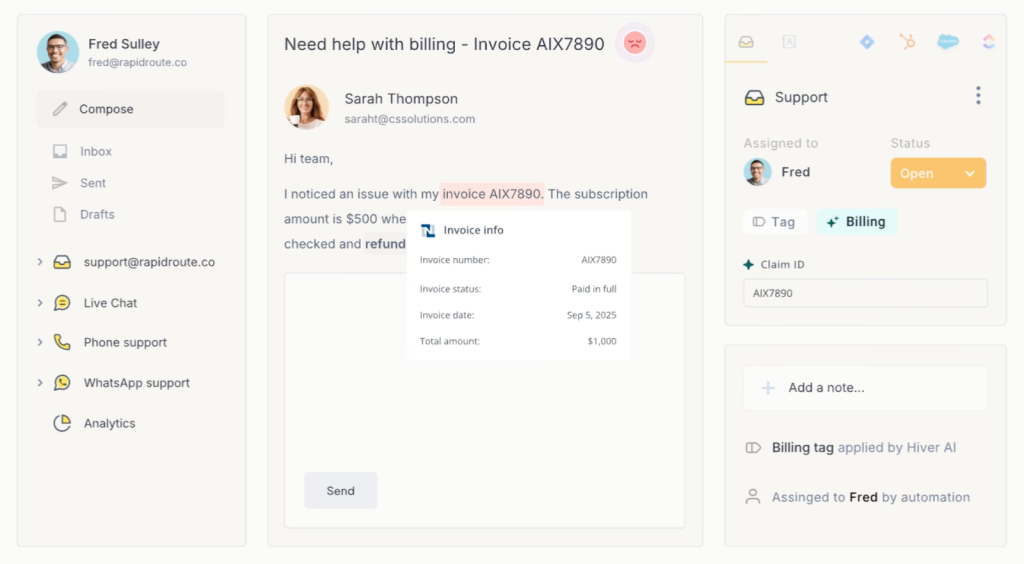
When I tested Hiver, I was up and running in 10 minutes. The interface is familiar enough that your team won’t need to rethink their entire workflow – they can start being productive immediately.
The collision alerts and private notes worked exactly as advertised, preventing the duplicate-work chaos I’ve seen in shared inboxes.
Most ticketing tools rely on ticket numbers that make support feel transactional. What I love about Hiver is how it handles this with its Conversation ID feature – it keeps customer issues trackable, but interactions still feel like normal, human conversations.
Hiver’s AI features are particularly noteworthy. AI Copilot helps agents draft contextual replies, summarize long threads, and surface relevant knowledge base content. AI Agents handle repetitive tasks and auto-resolve common queries. And with its other built-in AI tools like auto-tagging, sentiment analysis, and workflow triggers, teams can stay organized, respond faster, and scale support, right from their helpdesk.
Another huge plus about Hiver is that it offers 24/7 support on all plans, including the free tier. Most platforms gate that kind of support behind Enterprise pricing or charge a premium for it.
Pros:
- Has a generous free plan with email, live chat & knowledge base
- Setup takes under 15 minutes (verified in my testing)
- Powerful AI capabilities included in all paid plans
- 24×7 support even on free/lite plans
Cons:
- Some enterprise features (advanced analytics) require the Pro tier
- Integration marketplace is smaller compared to legacy ticketing systems like Zendesk and Freshdesk
Pricing:
- Free: Unlimited users, email + chat + knowledge base
- Growth: $25/user/month (AI Compose +Summarizer, analytics, automation)
- Pro: $45/user/month (AI Agents, WhatsApp, voice)
- Elite: $75/user/month (skill-based routing, HIPAA compliance)
Free trial for 14 days available.
Who is this for?
Small-to-medium teams in customer support, IT, operations, or finance who need AI-powered ticketing without the complexity.
Who is this NOT for?
Large enterprises requiring heavy ITIL workflows, or teams that prefer traditional ticketing dashboards.
Want to see Hiver in action? Check out the product tour below.
2. Freshdesk: Best for small to medium teams wanting quick deployment with a generous free tier
Average setup time: ≈1–2 hours
Freshdesk is one of the easiest trouble ticketing tools I’ve come across. It has an intuitive UI with essential customer service channels from email to chat to social in one place.
If you need to roll out support without much setup time, Freshdesk is a strong pick.
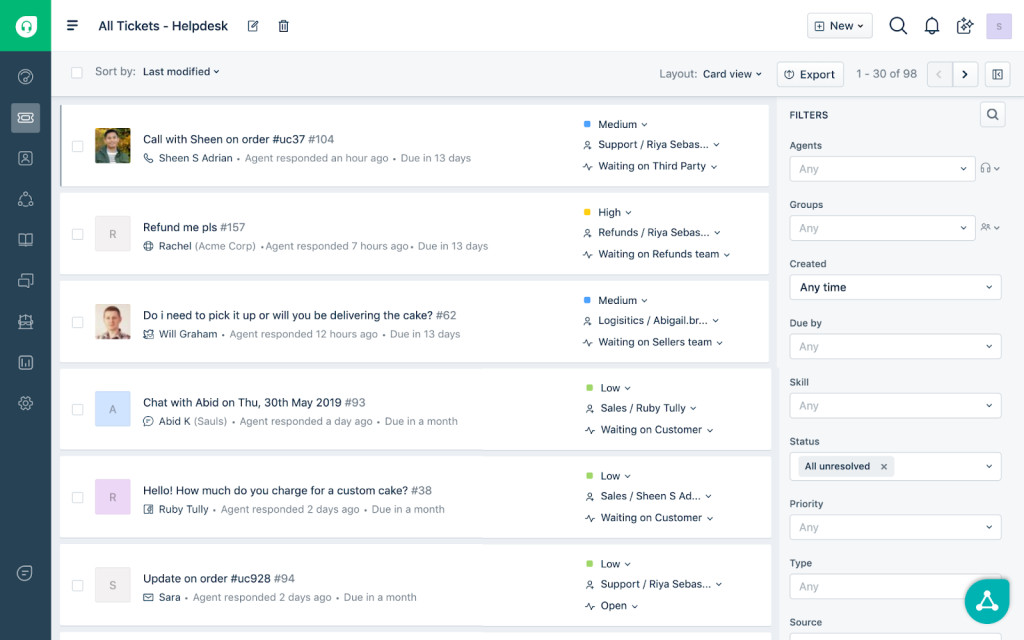
When I tested Freshdesk, I didn’t need to reference documentation to set up the helpdesk for automations, canned responses, or SLAs.
Freshdesk’s collaboration features impressed me. Agents can add private notes, @mention teammates, link related tickets, and track time spent per ticket. The parent-child ticket feature really helps when one customer issue spawns multiple sub-tasks.
The catch is that advanced features sit behind paywalls. The free and Starter plans handle basic ticketing well, but you’ll outgrow them as your operation matures.
Pros:
- Clean, intuitive interface
- Good collaboration tools (notes, @mentions, ticket linking)
- Omnichannel support (email, chat, phone, social)
- Freddy AI for ticket assignment and canned responses
- Strong mobile app
Cons:
- Key features locked behind Growth tier ($35/agent/month)
- Limited customization on lower tiers
- Reporting is less robust than Zendesk
- Some users report that vendor support quality is not the best
Pricing:
- Free: 1-2 agents for 6 months
- Growth: $19/agent/month (ticket management, SLA)
- Pro: $55/agent/month (parent-child ticketing, advanced automation)
- Enterprise: $79/agent/month (custom roles, sandbox)
- AI add-ons: Freddy AI $29/agent + $100 per 1,000 sessions
Free trial available for 14 days.
Who is this for?
Teams of 3-50 agents who need robust ticketing that doesn’t need manuals, and appreciate a free tier trial to test before committing.
Who is this NOT for?
Large operations needing deep customization, or companies needing predictable AI pricing and accessible helpdesk support.
Recommended reading
12 Best Freshdesk Alternatives for 2025 (Tried, Tested and Compared)
3. Help Scout: Best for customer-facing teams prioritizing a fast, human support experience
Average setup time: ≈30–60 minutes
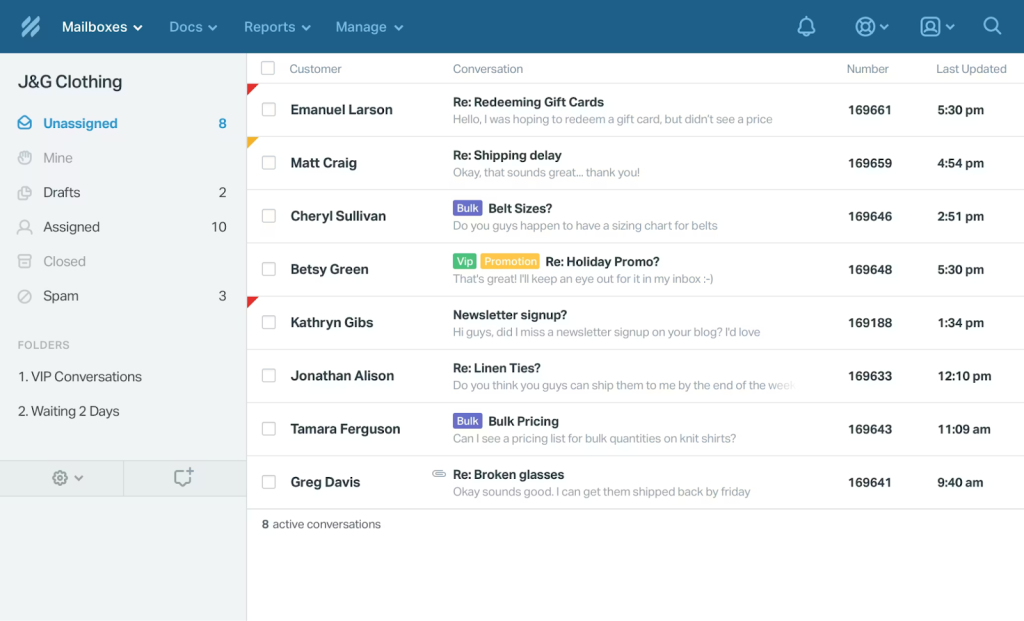
Help Scout strips away dashboard clutter and ensures customer support feels like actual conversations – simple, email-focused, and easy to adopt.
The knowledge base (Docs) is genuinely good. It comes with a drag-and-drop article builder, offers multi-site support, SEO optimization, and analytics showing which articles customers actually use.
Help Scout’s Beacon widget takes a different angle on self-service than most platforms. Rather than dumping customers into a generic knowledge base search, it identifies which page they’re on and surfaces relevant articles before they ask. A customer stuck on the billing page, for example, sees billing FAQs. Someone browsing integrations gets setup guides. It offers contextual deflection.
But it lacks some advanced ticketing features that platforms like Zendesk offer. There’s no skill-based routing on lower tiers, and it’s not optimized for workflows in specific industries like ecommerce..
Pros:
- Strong knowledge base (Docs) for self-service
- AI features are included in all paid plans
- Clean, email-centric interface
Cons:
- Lacks advanced ticketing features of full helpdesks
- Not optimized for e-commerce support
- Limited automation on the Standard tier
- Skill-based routing requires a Plus tier or higher
- Fewer integrations than Zendesk/Freshdesk
Pricing:
- Free: 5 users, 100 contacts/month, shared inbox
- Standard: $25/user/month (AI Assist, workflows with 150 rule limit)
- Plus: $45/user/month (unlimited workflows)
- Pro: $75/user/month (SSO, HIPAA, white-labeling)
- AI Answers: $0.75 per resolution
There’s a free 15-day trial available.
Who is this for?
Customer-facing support teams (especially SaaS) prioritizing self-service, and small to medium teams valuing simplicity over feature depth.
Who is this NOT for?
Teams needing advanced automation, ecommerce operations requiring order system integration, or IT departments wanting traditional ticketing workflows.
Recommended reading
11 Best Help Scout Alternatives (2025): Tested Picks with Free & Paid Options
4. Spiceworks Help Desk: Best for small businesses on a zero budget, willing to trade features for free access
Average setup time: ≈1–2 hours
Spiceworks is a free ticketing system that’s ad-supported and used by 280,000+ organizations worldwide. It offers access to basic IT ticketing features without you having to spend a dollar.

For small businesses and internal IT departments, Spiceworks covers the essentials: users can submit requests via a portal and these requests are converted into tickets. Agents can then assign, prioritize and track tickets, and the system logs everything for basic reporting.
There’s also a paid Premium tier that removes ads and unlocks features like bulk actions and live chat.
Spiceworks stands out with its built-in asset tracking. It automatically scans your network to detect devices, software, and OS details and then links them directly to support tickets. Combined with its active IT community of 530,000+ IT professionals, Spiceworks offers peer support that most free helpdesk tools can’t come close to.
The limitations are real: no chat support integration in the free tier, no social media channels, minimal dashboard customization, and advanced features are simply absent. Multiple users describe it as “barebones” and “slow”.
Pros:
- 100% free, ad-supported for 1-5 agents
- Email integration and self-service portal
- Basic ticketing, assignment, tracking
- Knowledge base capabilities
- Asset management integration (with other Spiceworks tools)
- Massive community support
Cons:
- Limited dashboard customization
- In-app advertising
- The system can be slow (reported by users)
- Advanced features are non-existent
- Scalability issues for larger teams
Pricing:
- Core (Free): 1-5 agents, ad-supported, ticketing + asset tracking
- Premium: $6/agent/month (removes ads, adds bulk actions and live chat)
Who is this for?
Startups with $0 budget, small IT departments (1-5 techies) handling internal tickets, organizations under 50 employees willing to accept feature limitations..
Who is this NOT for?
Customer-facing support teams, operations managing 100+ tickets daily, companies needing modern UI or advanced automation, teams uncomfortable with ads.
5. HappyFox: Best for automation-first teams prioritizing smart rules and SLA management
Average setup time: ≈1–2 days
HappyFox is a clean, no-nonsense trouble ticketing system with a refreshingly simple UI. But behind it is a powerful engine focused on automation and workflow efficiency.

When I explored HappyFox, what stood out was how customizable the automation was. You can set up smart rules, canned actions, and custom queues that route tickets exactly where they need to go.
For example, you could auto-tag and assign anything with “refund” in the subject line straight to the billing team. The tool also supports 39 languages.
HappFox supports email, chat, phone, and social tickets, and pulls everything into a unified dashboard. There’s also a built-in knowledge base and a community forum, so customers can self-serve when required.
Pros:
- Powerful smart rules for conditional automation
- Excellent SLA management with visual breach alerts
- Highly customizable (fields, forms, workflows)
- Multilingual support
- Strong knowledge base builder (drag-and-drop)
- Responsive support team (verified in user reviews)
Cons:
- No free plan
- Advanced features require higher tiers
- Some integrations feel limited vs. Zendesk/Freshdesk
- The mobile app could be more robust
Pricing:
- Basic: $21/agent/month (ticketing, SLA, basic automation)
- Team: $39/agent/month (multi-brand, advanced automation)
- Pro: $89/agent/month (custom roles, LDAP, audit logs)
- AI add-ons: $14-39/agent/month extra
The tool offers a free 14-day trial for all its features.
Who is this for?
Teams of 10-100 agents that that want to automate repetitive workflows, have strict SLA requirements, and a budget for quality tooling. Strong fit for IT, customer support, and managed service providers.
Who is this NOT for?
Startups with <5 agents wanting free options, or teams that don’t need sophisticated automation logic.
Recommended reading
6. Zoho Desk: Best for budget-conscious teams already invested in the Zoho ecosystem
Average setup time: ≈2–5 days
Zoho Desk is a solid choice, especially if you’re already using other Zoho tools like CRM or Projects. It covers all the essentials like multi-channel ticketing, SLAs, automations, and a knowledge base.
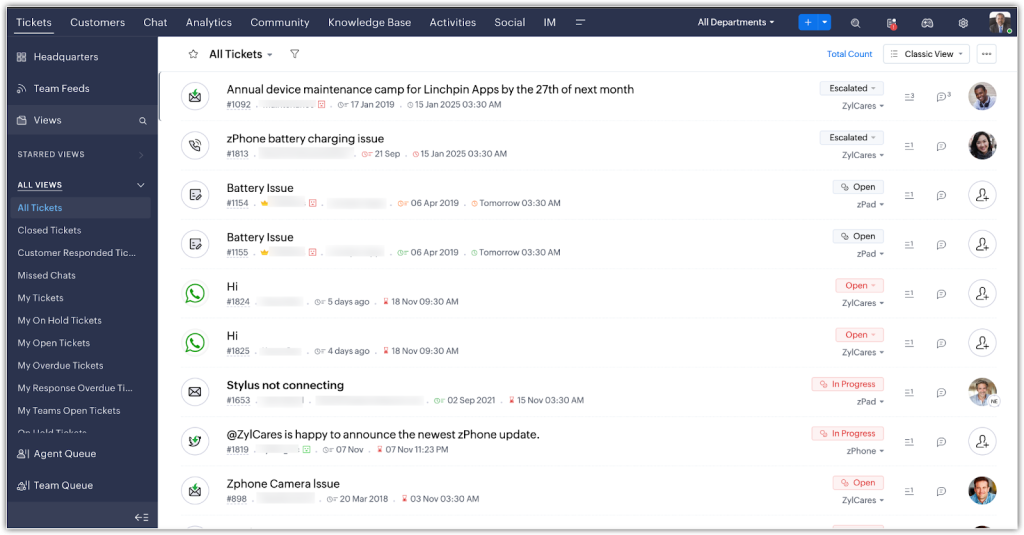
Zia, its AI assistant, is a standout feature that can auto-tag and prioritize tickets, suggest responses, and even detect customer sentiment in real time.
The customization depth surprised me. You can modify ticket layouts, create custom modules, build department-specific workflows, and design your own reports using Zoho Analytics. This flexibility matters when your support process doesn’t fit vendor templates.
Zoho’s tight integration with its own ecosystem (Zoho CRM, Zoho Projects, Zoho Books) creates workflow advantages. For instance, when a support ticket gets created, your CRM updates automatically with interaction history.
But the interface is purely functional; multiple reviews describe it as “dated” or “clunky”. New users report the setup feeling overwhelming initially because of all the customization options.
Pros:
- Extremely affordable
- Highly customizable (layouts, workflows, modules)
- Strong automation capabilities
- Native integration with the Zoho ecosystem
- Multi-brand and multilingual support
Cons:
- Interface feels dated compared to Freshdesk, Hiver, and Zendesk
- Initial setup can be overwhelming due to customization options
- Zia AI is locked behind the Enterprise tier
- Some users report slower vendor support response
Pricing:
- Free: 3 agents (basic ticketing, knowledge base, SLAs)
- Standard: $14/agent/month (workflows, generative AI, multi-brand)
- Professional: $23/agent/month (advanced automation)
- Enterprise: $40/agent/month (Zia AI, AI Agents, custom roles, advanced analytics)
You get a free 15-day trial of the tool.
Who is this for?
Cost-conscious teams (10-100 agents) wanting enterprise features and deep customization without enterprise pricing. Especially recommended for companies already using Zoho CRM.
Who is this NOT for?
Teams prioritizing beautiful UI over functionality, or those wanting plug-and-play simplicity without configuration.
Recommended reading
7. Zendesk: Best for large enterprises needing advanced automation and omnichannel at scale
Average setup time: ≈3–6 weeks
Zendesk is arguably the biggest name in customer service software, and it’s known for its rich feature set and flexibility. It’s built to scale, whether you’re a 10-person startup or a global support operation.
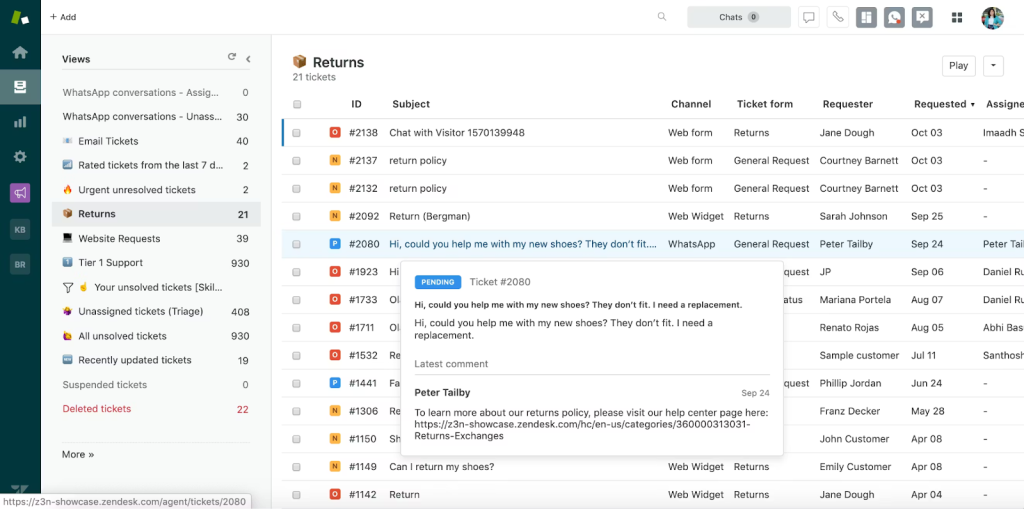
Zendesk Suite unifies email, chat, phone, social media, and messaging apps into one agent workspace. The skill-based routing is sophisticated – you can route based on language, product expertise, customer tier, or even sentiment analysis.
When I evaluated Zendesk, the breadth of integrations stood out the most. 1,000+ apps connect natively. If your stack includes Salesforce, Jira, Shopify, Slack, and custom tools, Zendesk probably already has pre-built connectors.
The platform shines at scale. When you’re managing 50,000+ tickets monthly across multiple brands and regions, Zendesk’s architecture handles the load. The reporting is granular. You can slice performance by team, channel, topic, time of day, and custom fields.
But all that power comes at a cost – both financial and operational. Multiple Reddit threads describe Zendesk implementations taking 3-6 months with consultants.
Pros:
- Truly omnichannel (email, chat, voice, social, messaging)
- Powerful AI
- 1,000+ native integrations
- Handles massive ticket volume without breaking
- Advanced automation and macros
- Deep analytics and custom reporting
Cons:
- Gets very expensive at scale +usage-based AI resolutions add to the cost
- Steep learning curve and complex setup
- Best features locked behind higher tiers
- Implementation often requires consultants
- Overkill for teams under 50 agents
Pricing:
- Support Team: $19/agent/month (email ticketing only)
- Suite Team: $55/agent/month (omnichannel)
- Suite Professional: $115/agent/month (advanced features)
- Suite Enterprise: $169/agent/month (multi-brand, sandbox)
- AI add-ons: Copilot $50/agent/month; Advanced AI agents (custom pricing); $1.50-$2 per resolution beyond limits
There’s a free 14-day trial available.
Who is this for?
Enterprises (500+ employees) with complex support operations, multiple products, global teams, and budget to match. Companies that need every feature and can afford a 3-6 month implementation time period.
Who is this NOT for?
Agile teams, budget-conscious companies, or teams that want to start seeing ROI in days.
Recommended reading
The 25 Best Zendesk Alternatives in 2026 (Tested & Reviewed)
8. ManageEngine ServiceDesk Plus: Best for IT help desks in SMBs wanting ITIL alignment without enterprise pricing
Average setup time: ≈1–2 weeks
ManageEngine delivers full ITSM (incident, problem, change, asset management) with ITIL alignment at a price point that won’t make SMB budgets flinch.
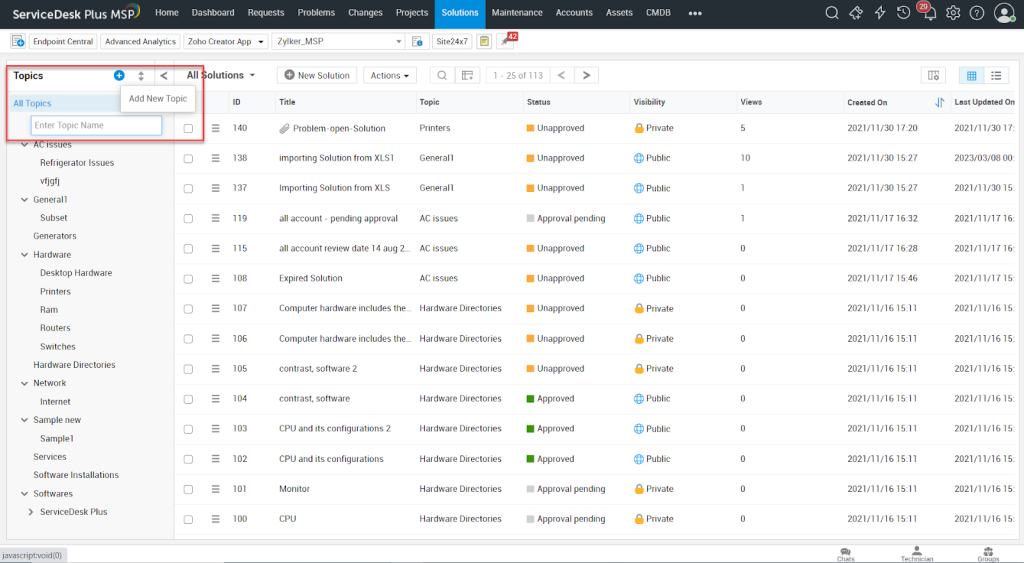
The recent updates added problem handling for specific departments, including HR, finance, and facilities, so your IT desk can manage non-IT requests without forcing everything into technical workflows.
The AI-based self-service portal answers common questions automatically, deflecting tickets before they reach agents. The integration with Zoho products creates workflow advantages if you use Zoho CRM, Projects, or Analytics.
Release and patch management tools integrate with ServiceDesk to help IT teams plan deployments and track patch status across the entire infrastructure.
But users consistently report that the web interface feels slow.
Pros:
- ITIL-aligned (incident, problem, change management)
- Affordable for full ITSM feature set
- Problem handling customized by department (HR, finance, etc.)
- Tight integration with ManageEngine/Zoho ecosystem
- Asset management, contract management
- Good value for money
Cons:
- Web interface is slow (verified across multiple reviews)
- Ticket conversations are hard to read
- Interface aimed at IT pros, not general users
- Advanced analytics only on the top tier plan
- Pricing can be confusing with feature add-ons
Pricing:
- Affordable compared to competitors
- Custom pricing (request quote)
- Free trial available
Who is this for?
SMB IT service desks (10-100 technicians) needing ITIL processes,internal help desk operations, teams on budget wanting full ITSM without paying Zendesk/ServiceNow prices.
Who is this NOT for?
Customer-facing support teams, organizations prioritizing modern UI, or non-technical departments wanting simple ticketing.
9. SolarWinds Service Desk: Best for mature IT organizations needing asset management and ITSM
Average setup time: ≈2–4 weeks
SolarWinds is an enterprise helpdesk that combines IT service management with robust asset tracking, network discovery, and HIPAA-compliant security. It’s built for IT departments managing both tickets and infrastructure.
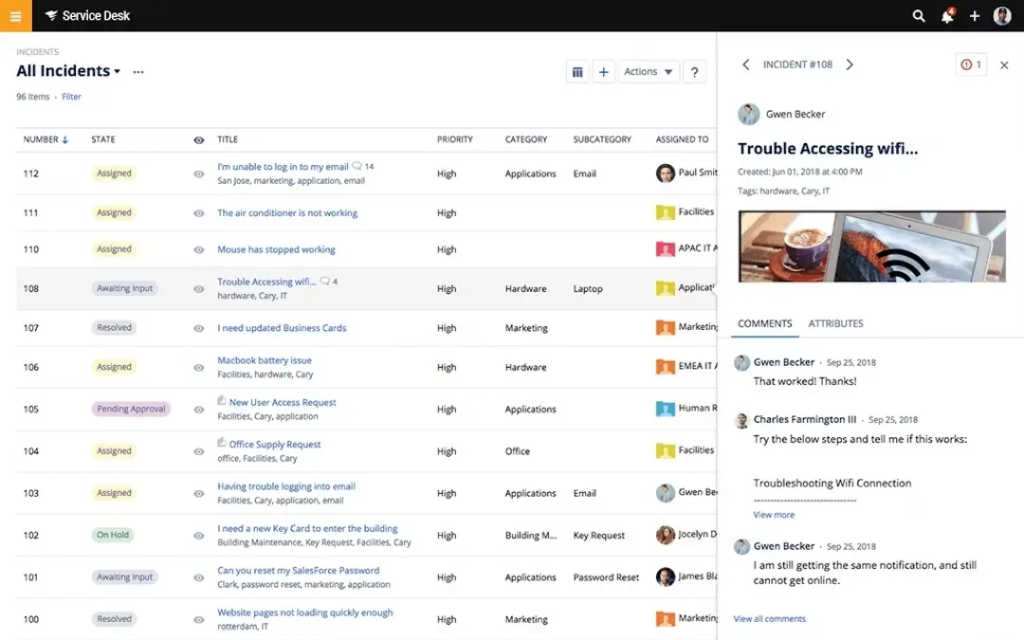
The unlimited requestors model changes the economics. Most platforms charge per agent, but SolarWinds lets your entire organization (1,000 employees or 10,000 employees) submit tickets while you only pay for technicians.
The asset management capabilities go beyond simple inventory. Network Discovery automatically maps your infrastructure. The CMDB (Configuration Management Database) shows dependencies, so when a server goes down, you immediately see which systems and users are impacted.
I also found it useful that Enterprise Service Management extends the platform beyond IT. HR can use it for onboarding tickets, Finance for invoice queries, and Facilities for office requests, all with department-specific workflows.
The Premier tier unlocks advanced capabilities like Virtual Agent (AI service desk chatbot), Runbooks for automated remediation, visual CMDB with dependency mapping, and up to 1,500 API calls per user per minute.
The security is enterprise-grade. You get SSO/SAML, Multi-Factor Authentication, HIPAA Business Associate Agreements, audit trails, and data masking for sensitive fields.
Pros:
- Unlimited requestors (pay only for technicians)
- Asset management and network discovery are integrated
- CMDB with visual dependency mapping
- HIPAA BAA support, data masking, compliance tools
- Virtual Agent and Runbooks for automation
Cons:
- Interface prioritizes function over form
- Overkill for teams <20 employees
- Best features require the Premier tier
- High learning curve for non-IT departments
Pricing:
- Essentials: $39/month per technician (basic ITSM features)
- Advanced: $79/month per technician (custom fields, automations, etc.)
- Premier: $99/month per technician (full feature set including CMDB and advanced support)
Note: All plans support unlimited end‑users. Asset pricing may be additional upon request. There’s a 30-day free trial available.
Who is this for?
IT departments at companies with 100+ employees, organizations needing asset management alongside ticketing, teams requiring HIPAA compliance, or MSPs managing multiple client environments.
Who is this NOT for?
Customer-facing support teams, small businesses, or non-technical departments wanting simple ticketing.
10. Jira Service Management: Best for IT/DevOps teams handling complex requests with ITIL workflows
Average setup time: ≈2–4 weeks
Jira Service Management is purpose-built for IT and devops teams. If your support team handles incidents, change requests, or collaborate with engineering teams often to resolve tickets, this tool offers structure that most other customer service platforms on this list don’t.
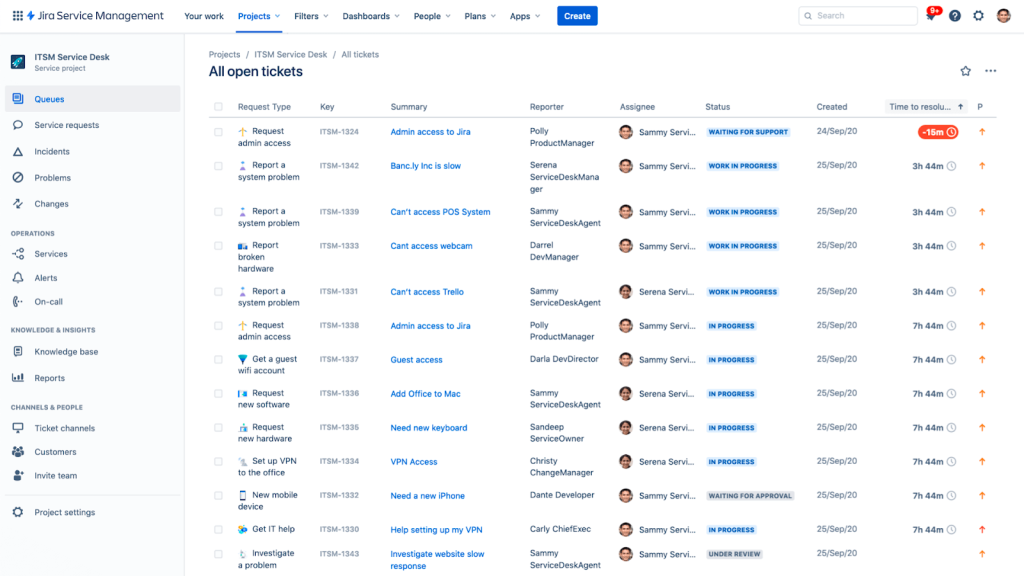
What I found most compelling about this IT trouble ticket software is that this is the only platform on this list where “trouble ticket” and “dev task” live in the same ecosystem without awkward integrations. When a customer reports a bug, support creates a ticket; if it requires engineering, a single click converts it into a Jira Software issue assigned to your sprint.
The ITIL templates are comprehensive – there are pre-built workflows for incident, problem, and change management. Asset & Configuration Management (CMDB) tracks 50,000 objects for free on the Premium tier, linking tickets to specific hardware/software assets.
The Premium tier includes Rovo Agent – Atlassian’s AI that answers agent questions by surfacing relevant Confluence docs, past ticket resolutions, and runbooks. For IT teams, this beats generic AI because it understands technical context.
That said, it’s not for everyone. Jira SM carries Atlassian’s DNA of complexity. Multiple users describe needing a minimum of 2-4 weeks to configure it properly.
The interface prioritizes power over simplicity, and non-technical teams often find it overwhelming.
This is primarily an IT tool that can do customer support, rather than a customer support tool that can do IT.
Pros:
- Native integration with Jira Software
- Comprehensive ITIL templates (incident, problem, change)
- Asset & Configuration Management (CMDB) included
- Rovo Agent AI for technical documentation surfacing
- Strong for IT service desks and DevOps teams
Cons:
- Complex setup
- Interface intimidates non-technical teams
- Virtual service agent costs $0.30/conversation above the free tier
- Best value requires an Annual subscription commitment
- May need Confluence, Atlassian Access (additional costs)
Pricing:
- Free: 3 agents (full ITSM features, unlimited tickets)
- Standard: $20/agent/month (SLA tracking, asset management, automation)
- Premium: $51.42/agent/month (change management, incident management)
- Enterprise: Custom pricing
It offers a 14-day free trial.
Who is this for?
IT departments, DevOps teams, SRE organizations, and technical service desks that already use Atlassian products and handle incident, change and problem management.
Who is this NOT for?
External support teams, non-technical departments (HR, finance), or teams wanting simple ticketing without extensive configuration.
How to Choose a Trouble Ticket Software for Your Business
With so many options out there, picking the right trouble ticketing software can feel overwhelming. Here’s a simple 5-step framework to guide your decision:
1. Know your support volume and where you’re headed
Start by sizing up your workload: How many tickets do you handle per day or month? How many agents will be using the system? A small team managing 15 tickets daily needs very different tooling than a fast-scaling IT department handling hundreds.
Also, factor in your growth. A tool that works for five agents may crack under 50. Choose a system that fits now but can grow with you without a painful helpdesk migration later.
2. Define must-haves vs. nice-to-haves
Make a two-column list: what your team can’t operate without vs. what would be nice to have. Need SLA tracking for client contracts? That’s a must. Want AI-powered suggestions or a mobile app? That might go under “nice.” Depends on your needs.
Consider use cases unique to your business, such as HIPAA compliance, multi-language support, or CRM integration. This step keeps you grounded when flashy features try to sway your decision.
3. Prioritize ease of use and onboarding speed
The best tool is the one your team will actually use. During trials, test the basics: logging a ticket, assigning it, adding notes, pulling customer service reports. Does it feel intuitive? How much training would a new agent need?
Also, check the customer-facing side: is it simple for users to submit requests? Tools like Freshdesk or Hiver are built for fast onboarding; platforms like Salesforce or Jira offer depth but may need more ramp-up time. Match the tool’s complexity to your team’s comfort level.
4. Check for native integrations
Will the tool play nicely with your existing support stack? At a minimum, it should integrate with your email, CRM, and chat tools. Bonus if it connects with project management, bug tracking, or e-commerce platforms.
Native integrations reduce manual work and make sure agents have context at their fingertips. Review the vendor’s integration directory or API docs. If your essential systems aren’t listed, that’s a red flag.
5. Don’t forget pricing, support, and scalability
Look beyond the starting price. Are there per-agent fees that will balloon as you grow? Are features locked behind higher tiers? Do you get real support or just a help center?
If you’re evaluating enterprise tools, check if they offer onboarding help or account management. Read user reviews to gauge vendor responsiveness. Most importantly, ask: will this platform still serve you when your team or ticket volume doubles?
Pro Tip: Start with a free trial or monthly plan. It gives you room to pivot if the tool doesn’t match your workflow in real-world use.
Invest in the Best Trouble Ticket Software Without Overcomplicating It
Most teams looking for trouble ticket software are trying to solve three core problems: tickets falling through cracks, no visibility into who’s handling what, and customers frustrated by slow responses.
Hiver is best for teams that don’t want to spend months learning and configuring a new tool. But don’t get mislead that the tool’s ease of use means it offers extremely basic functionalities. Hiver brings omnichannel support, powerful AI, and all fundamental ticketing capabilities into one intuitive dashboard.
We built Hiver because we saw support teams drowning in complexity. Legacy helpdesks force you to think in ticket numbers, queue management, and multi-step workflows. That works for some teams. But most just need clear ownership, smart automation, visibility, and AI to empower their team, without the overhead of becoming helpdesk administrators.
So, if you’re tired of tools that require consultants to implement and manuals to understand,
start a free trial today. You’ll be resolving tickets in under 15 minutes, not three months.
Frequently Asked Questions
1. What is trouble ticket software?
Trouble ticket software transforms support requests into trackable, structured workflows. When someone submits an issue via email, chat, or web form, the system creates a ticket containing the request details, customer context, assigned owner, and full resolution history, ensuring nothing falls through the cracks.
2. What’s the difference between a trouble ticket system and help desk software?
Historically, trouble ticket systems focused narrowly on logging and tracking issues, while help desks offered collaboration, knowledge bases, and reporting. Today, the terms are broadly interchangeable, and most modern platforms include both core trouble ticketing and full help desk capabilities.
3. How does a trouble ticketing system work?
Here’s a typical workflow:
1. Requests come in through email, chat, phone, or web forms
2. Each request is turned into a ticket automatically
3. Tickets are categorized, prioritized, and routed to the right agent
4. All internal notes, replies, and updates are tracked in one thread
5. Once resolved, tickets are closed, and satisfaction surveys are triggered
6. If a customer replies, the ticket reopens automatically
4. Who should use a trouble ticket system?
-IT support teams handling internal tech and infrastructure issues
-Customer support teams resolving product-related questions
-SaaS companies tracking bugs and technical feedback
-Managed service providers (MSPs) coordinating client requests
-HR teams managing employee inquiries and internal requests
-Ecommerce operations processing order issues and returns
5. What are the benefits of using trouble ticket software?
-Faster response times with automation and smart routing
-Clear ownership, so there’s no confusion about who’s handling what
-Centralized history of all conversations and actions
-SLA tracking to ensure commitments are met
-Insightful reports to spot trends and bottlenecks
-Better workload distribution, reducing agent burnout
6. What key features should I look for in trouble ticket software?
-Multi-channel support (email, chat, phone, web forms)
-Automated ticket routing and categorization
-SLA management with alerts for breaches
-Internal collaboration tools (notes, @mentions)
-Reporting and analytics dashboards
-Native integrations with CRM and key tools
-AI features for faster responses to common queries
–Mobile access for remote or field teams
7. What are the key metrics to track in a trouble ticketing system?
Here are key help desk metrics to track:
-First Response Time – Speed of initial acknowledgment
-First Contact Resolution – % of tickets resolved in one go
-Average Resolution Time – Time from ticket creation to closure
-SLA Compliance – % of tickets resolved within SLA targets
-Customer Satisfaction (CSAT) – Survey-based user ratings
-Ticket Volume – Trends in tickets over time
-Cost Per Ticket – Operational cost per support interaction
8. How much does trouble ticket software cost?
Pricing ranges from free (Spiceworks, ad-supported) to $14-49/agent/month for SMB solutions (Zoho Desk, Freshdesk, Hiver) to $50-165/agent/month for enterprise helpdesk platforms (Zendesk, ServiceNow). Total cost depends on team size, required features, integrations, and support level.
9. What are common implementation challenges with trouble ticket software?
-Staff resistance to switching from legacy systems
-Integration issues with existing tools or data silos
-Complications with data migration from older platforms
-Inadequate training leading to low adoption
-Misalignment between IT and stakeholder expectations
-Weak post-launch support from vendors
10. What are some examples of trouble tickets?
-IT – Password resets, network issues, software access
-Customer Support – Order inquiries, billing issues, bug reports
-HR – Onboarding questions, benefits help, policy clarifications
-Facilities – Maintenance needs, access card problems, broken equipment