







Imagine this: You’re about to pitch to a client, but can’t log in to your account. The meeting starts in 15 minutes. You reach out to customer support, flagging it as urgent.
But the reply comes an hour later.
Too late. The damage is already done.
That’s what happens when incoming tickets aren’t prioritized. Urgent requests fall through the cracks, and the result? Frustrated customers, and possibly churn.
Customer service SLAs are built to prevent exactly this. They bring structure, urgency, and accountability to support processes.
In this guide, we break down what a customer service SLA really is, what it includes, and how to build one that helps your team.
What is a Customer Service SLA?
A customer service SLA, or Service Level Agreement, is a formal commitment between your business and your customers. It defines clear, measurable standards for how quickly your support team should respond to and resolve inquiries.
It’s not just about setting internal goals. An SLA sets a mutual understanding between customers and your support team: “Here’s what we’ll deliver, and here’s what you can expect.”
Typical components include:
- Response time guarantees
- Resolution windows
- Escalation paths
- Availability terms
That’s why your SLA is one of the most important tools your support team will use to deliver consistent, high-quality service.
4 Types of Customer Service SLAs (+Examples)

How you define your SLA depends on a lot of factors, such as business model, customer base, and support structure. Here are some common examples:
Customer-Based SLA
A customer-based SLA is tailored for specific clients, addressing their unique service requirements, such as dedicated support hours or custom response times.
It’s ideal when you’re working with enterprise clients or customers with specific needs.
Service-Based SLA
A service-based SLA applies the same standards to all customers. An example could be a SaaS provider offering 99.9% uptime and a two-hour response for all users.
This approach keeps things simple and ensures every customer gets the same level of service, regardless of their subscription tier.
🤝Example:
A standard SLA includes 99.9% uptime and a two-hour response time for critical tickets.
This approach works well for companies with a broad customer base. Everyone gets the same level of service, expectations are clear, and the metrics are easy to track.
If you’re running a product with a broad customer base and consistent support needs, a service-based SLA is often the easiest to implement and maintain.
🌞Did you know?
Hiver offers live, 24×7 human support across multiple channels, such as email, live chat, customer calls (via Google Meet), and Slack — both for internal escalations (Sales and Customer Success teams) and for our external Hiver Community.
“We don’t gate support behind premium plans. Whether you’re on a free trial or our highest tier, you get the same fast, human-first help.” – Akshay
A process like this needs the right SLAs in place, and we’ve seen that firsthand at Hiver. Our customer satisfaction scores (CSAT) also consistently stay above 90%, thanks to our dedicated, around-the-clock customer support team.
Multilevel SLA
A multilevel SLA uses a layered approach based on subscription tiers.
For instance, premium customers receive first-tier support within 30 minutes, while regular support happens during working hours with a one to two-hour resolution window.
The type of support could differ depending on plan as well. Premium tiers may get 24×7 assistance or video support, while basic tiers may only get email or chat support.
This model lets you offer differentiated service based on subscription level while still maintaining clear standards for all customers.
🤝Example:
Consider this support interaction. While on the basic plan of Mouseflow, when asked for specific assistance, it was the support team’s duty to set expectations with the customer:
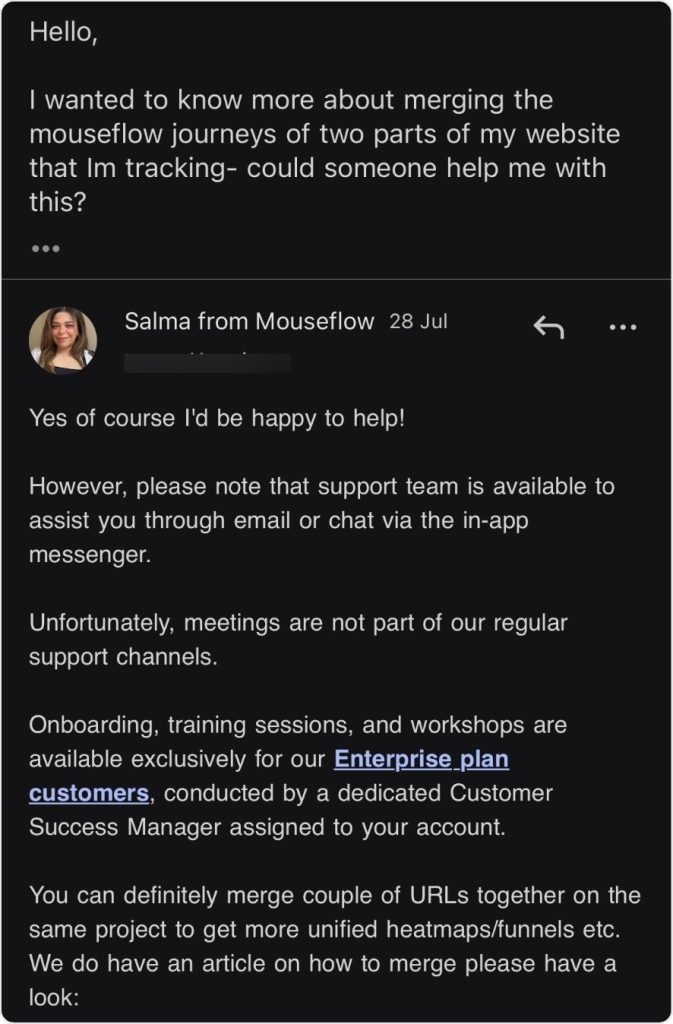
This model works well for businesses with tiered pricing structures where customers expect different levels of support based on what they’re paying.
Internal SLA
An internal SLA is set between teams within your company to support external customer-facing operations.
For example, your support team might have an internal SLA with your engineering team that requires bug fixes within 48 hours of escalation.
These agreements ensure that your customer-facing SLAs stay realistic and achievable, even when they depend on other departments.
Recommended reading
5 Key Components of Customer Service SLAs
Frankly, SLAs aren’t just about responding to the customer. They define every aspect of the support relationship, from what’s promised to how issues are resolved when things don’t go as planned.
Here’s what to include in your customer service SLA:
Agreement Summary
This includes a clear overview of what the SLA covers. Right from the scope of services, the customers or teams involved, to the duration of the agreement. Think of this as the foundation upon which everything else is built.
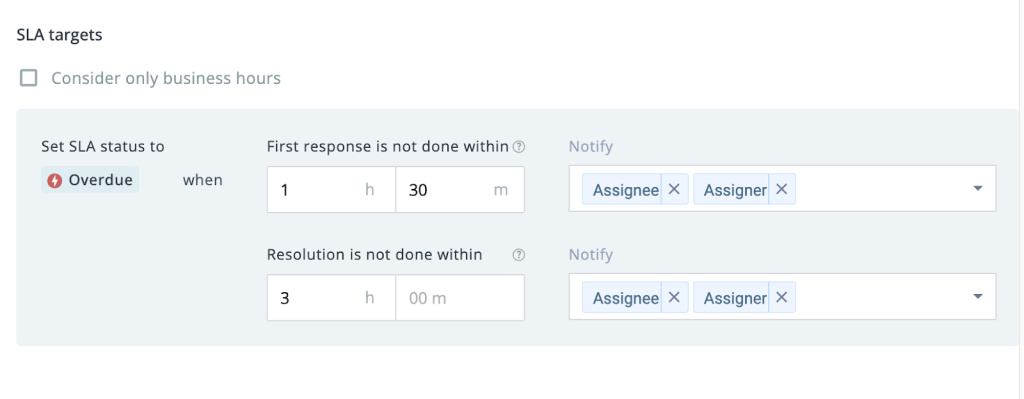
In this part, define which key services and support types are covered. Not every interaction needs to be part of your SLA.
Focus on the support channels, issue types, and service levels that have the biggest impact on customer satisfaction.
For example, you might include email support, live chat, and phone support in your SLA while keeping social media support outside the formal agreement.
Performance Metrics
To make your SLA meaningful, it should clearly define the performance standards or KPIs your support team is accountable for. This typically includes metrics like first response time, resolution time, and customer satisfaction scores. These numbers help you understand whether the team is meeting expectations and delivering consistent service.
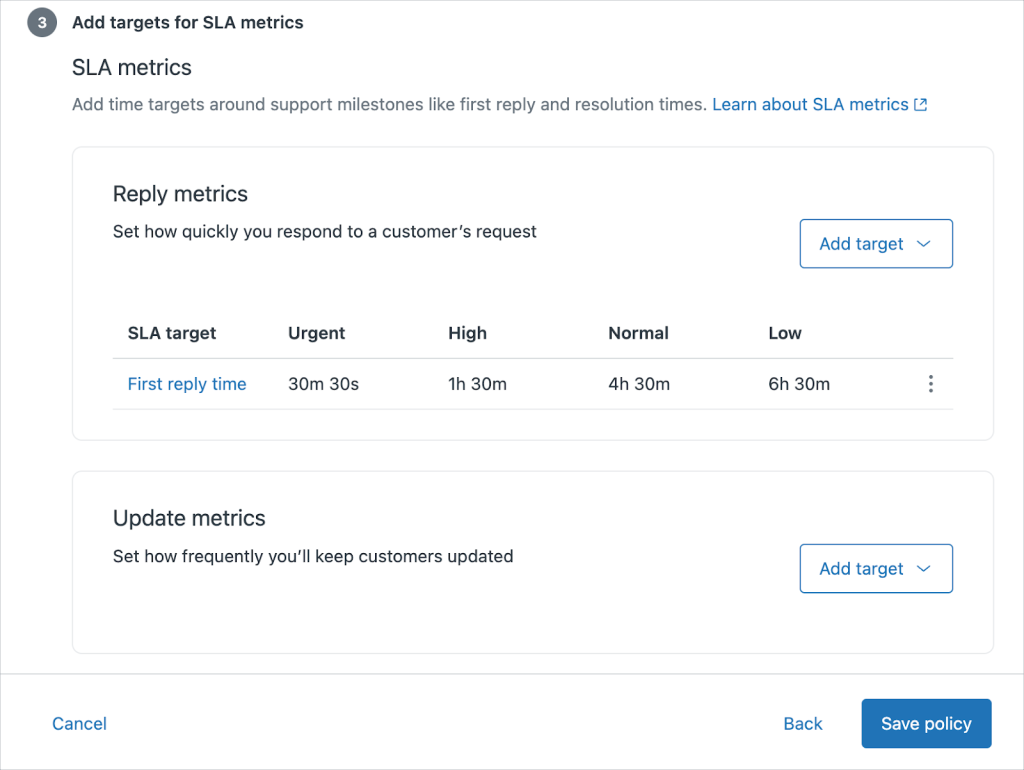
In this section, also specify how quickly your team will acknowledge and resolve different types of inquiries.
For example, a critical issue may require a first response within 30 minutes and a full resolution within four hours, while a general question may have a 24-hour response window. The key is to describe these timelines clearly so customers know what to expect and agents know what they are responsible for.
📊 How Continental Stock Transfer Used SLA Metrics to Improve Performance
Continental Stock Transfer & Trust manages time-sensitive communications for public companies and their investors — where delayed responses can create compliance and trust risks.
But without a system to measure response and resolution times, the team couldn’t reliably track performance or ensure service consistency.
After moving to Hiver, CST started monitoring key SLA metrics in real time, including: First-response time, Resolution time, SLA adherence rate and Email completion rate.
Hiver’s SLA alerts, automated routing, and analytics dashboard helped the team see exactly where delays were happening — and correct them quickly.
The result? Their SLA adherence improved from 70–80% to 99%, and overall response completion rates increased by 50%+, with faster, more consistent communication.
Responsibilities and Behaviors
Your SLA should outline what both parties are responsible for.
What does your support team commit to? What do customers need to provide to help resolve their issues quickly?
This section sets expectations for communication, escalation paths, and the information needed to troubleshoot problems effectively.
Accountability Measures
Finally, your SLA needs teeth. What happens when response times aren’t met? Accountability measures include reporting, escalation paths, and consequences for breaches.
This might include automatic escalations to senior team members, regular performance reports, or even compensation for repeated SLA breaches. The goal is to make sure everyone takes the commitments seriously.
6 Benefits of Customer Service SLAs
Setting up an SLA takes work, but the payoff is worth it. Here’s what you can expect when you implement a strong customer service SLA.
Improves Productivity
SLAs improve productivity by setting clear priorities and response times, optimizing workflow, and triage.
When your team knows which tickets need immediate attention and which can wait, they spend less time deciding what to work on and more time actually helping customers.
Recommended reading
Helps Analyze Support Performance
With clear metrics baked into your SLA, you can track performance over time and spot trends before they become problems.
Are first response times slipping? Is one team member handling more breaches than others?
Your SLA data will tell you.
Helps Provide Consistent Service
SLAs ensure service consistency, avoid misunderstandings, and promote long-term trust between teams and customers.
Customers get the same level of support whether they reach out on a Monday morning or Friday afternoon. That consistency builds confidence in your brand.
🤔How Noble Schools Used Hiver to Handle HR Ops During Peak Season
Noble Schools serves 12,000+ students across 18 campuses — but their HR team struggled to meet a 48-hour response SLA using color-coded Gmail inboxes. Requests slipped through, and some delays even created legal risk.
After switching to Hiver, the team gained full visibility into every request – with SLA tracking, automated reminders, and real-time analytics ensuring nothing slips through the cracks.
[Hiver Wistia Video] [Downloaded]
Chase now monitors first-response times, resolution times, and SLA breaches in real time — and uses these metrics in 1:1 coaching to keep performance on track.
The result? The HR team now achieves 100% compliance with their two-business-day SLA, even during peak seasons.
Avoids Service Failures and Misunderstandings
When everyone knows what’s expected and has the tools to meet those expectations, service failures become rare.
Clear SLAs help both your team and your customers stay on the same page. When expectations are documented upfront, there is no confusion about how quickly your team will respond, how issues will be prioritized, or what the resolution process looks like.
✈️How Kiwi.com Reduced Miscommunication and Maintained a 24-Hour SLA With Hiver
Kiwi.com’s partner operations team manages 1500+ business-critical emails every month from airlines and travel agencies. But before Hiver, those conversations were handled through Gmail lists — meaning every message hit everyone’s inbox.
There was no clear ownership, and the team often had to announce who was taking an email. This led to confusion, duplicated effort, and occasional misses on their 24-hour internal SLA, which strained partner relationships.
With Hiver, every email now has:
- A clear owner
- A visible status (Open, Pending, Closed)
- And full team visibility into what’s being worked on

Automated routing ensures each partner request goes straight to the right account manager, without manual coordination. And with analytics, managers can see workload, response times, and overall performance at a glance.
The result? The team now consistently maintains a 100% success rate on their 24-hour SLA, and everyone knows exactly where things stand, which leads to fewer misunderstandings, faster responses, and smoother relationships with partners.
Promotes Compliance with Regulatory Standards
SLAs align service delivery with compliance and contractual regulations.
For businesses in regulated industries, having documented SLAs isn’t just good practice but often a requirement. Your SLA proves that you’re meeting the standards your industry demands.
How to Create a Customer Service SLA
SLAs only work if they’re realistic, trackable, and built around what your customers actually need.
Here’s how to create one that hits all three.
And before finalizing your SLA, make sure to review these:
- What do your customers actually expect from support, and which types of issues matter most to them in terms of speed and clarity?
- Which channels and request types will your SLA apply to, and what is intentionally left out so expectations stay realistic?
- Which performance metrics (like first response time, resolution time, or CSAT) will show whether your team is doing well, and are these easy to track every day?
- What response and resolution time goals will you commit to for different priority levels, and are these timelines both achievable for your team and meaningful for customers?
- What should happen when a request is taking too long, how will it be escalated, and who is responsible for owning it at each stage?
- How will you make sure every support team member understands the SLA and knows exactly how to follow the workflows and use the right tools?
- How often will you review this SLA to check what’s working, what’s not, and whether customer expectations or team capacity have changed?
How to Measure Performance of Customer Service SLAs
Setting an SLA is just the start. The real work is tracking performance and making sure your team consistently meets its commitments.
Here’s how to do it:
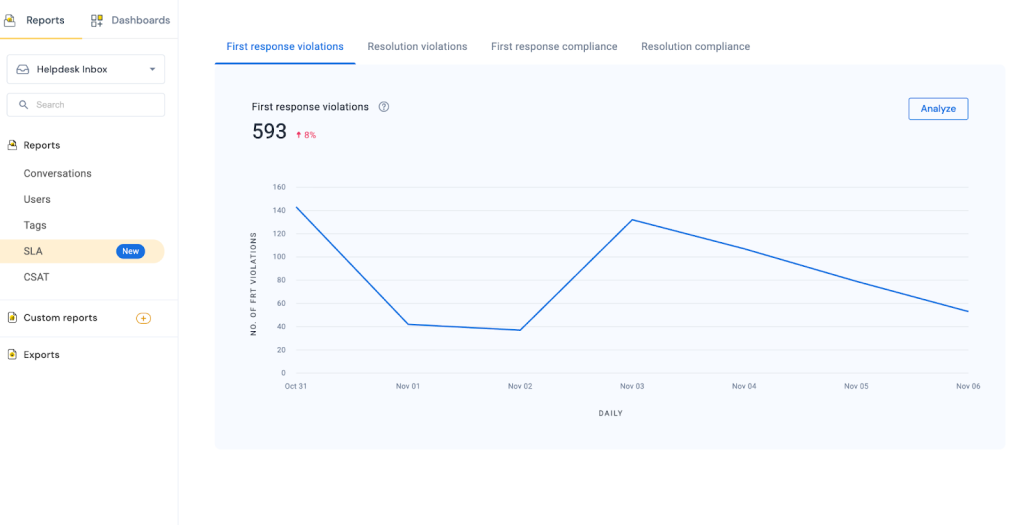
- Use real-time dashboards to track SLA compliance, breach risks, first-response times, and resolution times at a glance. Set up alerts so agents know when a ticket is close to breaching.
- Benchmark key metrics—like CSAT, NPS, First Contact Resolution (FCR), and Average Handle Time (AHT)—against industry standards and your internal goals to understand where you stand.
- Monitor trends and root causes of SLA misses. Look for patterns in request types, channels, peak volume times, or staffing gaps, and adjust processes or resources to prevent repeat issues.
Manage SLAs Effectively with Hiver
Hiver makes it easy to stay on top of SLAs, with real-time tracking, automated alerts, and customizable rules for different ticket types, priorities, and channels.
The platform flags at-risk tickets before they breach and gives you clear reporting on compliance, performance, and trends.
With this kind of visibility, you can fix issues fast and keep your support running smoothly.
Ready to see how this can transform your support operations? Try Hiver for free, today.
Frequently Asked Questions
How do customer service SLAs improve customer satisfaction?
SLAs improve customer satisfaction by setting clear expectations for response and resolution times. When customers know when they can expect to hear back from your team, they feel less anxious and more confident in your service. Meeting those commitments consistently builds trust and shows customers that you value their time.
How do you deal with an SLA breach?
When you miss an SLA deadline, acknowledge it quickly and communicate transparently with the customer. Let them know you’re aware of the delay, provide an updated timeline for resolution, and escalate the issue internally if needed. For repeated breaches, consider offering compensation, such as service credits or priority support for future issues.
What is the purpose of SLA in customer service?
The purpose of an SLA is to create accountability and set clear expectations for both your team and your customers. It defines what level of service customers can expect, gives your team measurable goals to work toward, and provides a framework for resolving issues when things don’t go according to plan.
Is a Customer Service SLA transferable?
SLAs are typically tied to specific service agreements or subscription tiers rather than individual customers. If a customer upgrades or downgrades their plan, their SLA usually changes to match the new service level. However, the specific terms depend on how your business structures its agreements. Always review your contract terms or consult with your legal team if you’re unsure about transferability.
What are some SLA best practices?
To make SLAs work consistently, keep these principles in mind:
-Track SLA metrics in real time (e.g., first-response time, resolution time, breach rates) so your team can act before issues escalate.
-Define clear ownership for each stage of the support process — who responds first, who escalates, and who closes the loop.
-Involve your frontline support team when creating or updating SLAs — they know what’s realistic and where bottlenecks happen.
-Review and adjust SLAs regularly to ensure they still align with customer expectations and your team’s capacity.
Start using Hiver today
- Collaborate with ease
- Manage high email volume
- Leverage AI for stellar service













