





If you run an online store, a big chunk of your day probably goes into answering “Where’s my order?” across email, Instagram DMs, and WhatsApp.
Infact, this is what a Reddit user mentioned as well.

You’re checking DMs, tracking shipments, processing refunds, and jumping between tools just to keep up. On busy days, it adds up fast. And at some point, managing support through inboxes and workarounds just stops working.
That’s usually when teams start looking for a better way to handle support, but that comes with its own frustrations.
Some tools are built for IT teams, not e-commerce. Others work fine with Shopify but fall apart once you add marketplaces or more channels. And plenty promise “AI” that creates more setup than it removes.
If you’ve ever thought, “I just want one place to see orders and reply to customers without losing track,” this guide is for you.
I tested 30+ ecommerce helpdesks with real store workflows in mind—orders, returns, multichannel support, automation, and pricing that still makes sense as volume grows. The result is a curated list of tools that actually make life easier for support and ops teams.
By the end of this guide, you’ll know which helpdesk fits your store, your stack, and your workload—and which ones you can skip.
What Is an E-commerce Help Desk and Why Is It Essential in 2026?
An ecommerce help desk is a customer support platform built specifically for online stores. In practical terms, it’s what brings every customer conversation into one place and connects it directly to order, shipping, and payment data.
That way, when someone asks about an order status, a return, or a refund, the agent doesn’t have to bounce between the ecommerce platform, email, spreadsheets, or other data sources to get answers.
At a basic level, an e-commerce help desk gives you:
- a shared inbox for email, live chat, social messages, and marketplaces
- Along with ticketing to keep track of every request
It also plugs into your ecommerce stack so order details surface inside the conversation, uses automation and AI to handle repetitive questions, and offers self-service through a knowledge base. Teams use that ecommerce order visibility to pull the right order, confirm shipping status, and reply without switching tabs between the storefront, checkout, and the helpdesk. That’s the big difference compared to generic helpdesks or internal IT tools, which just aren’t built around ecommerce workflows like orders and deliveries.
But why is it essential in 2026, you ask?
Because in this era of customer support, this setup isn’t optional anymore. Customers reach out across more channels and expect quick, consistent replies, while support volume keeps rising and teams are expected to do more with less.
An e-commerce help desk makes that manageable by centralizing conversations, speeding up responses, and giving teams visibility into metrics like response times, CSAT, and recurring order issues—turning scattered support into a scalable operation that drives retention and growth.
6 Non-Negotiable Features of Modern Ecommerce Help Desk Software (2026 Checklist)
Before diving into individual tools, here’s a quick litmus test. If a helpdesk can’t tick every box below, it’s probably a generic support tool with a thin ecommerce layer on top.
1. Does it connect natively with your e-commerce platform (Shopify, WooCommerce, BigCommerce, Magento)?
This is table stakes. Your helpdesk should pull in order data, shipping status, payment history, and customer profiles automatically, either natively or through solid integrations—so agents can view, refund, cancel, or modify orders without ever leaving the ticket.
2. Does it support marketplace SLAs (Amazon, eBay, Walmart, Etsy)?
If you sell on marketplaces, your helpdesk needs to understand their rules. Look for built-in SLA countdown timers, automatic message imports from marketplace messaging systems, and order data attached to every ticket by default.
3. Does it offer a true omnichannel inbox (email, live chat, WhatsApp, Instagram, Facebook, SMS)?
Your customers don’t think in channels. A true omnichannel inbox consolidates every touchpoint into a single interface, with full context carried across channels—so if a customer starts on Instagram and follows up via email, the agent sees one continuous thread, not two separate tickets.
4. Can it automate routine ecommerce queries (WISMO, returns, cancellations)?
Order status, returns, cancellations, and delivery updates shouldn’t eat up agent time. Your helpdesk should handle these with workflows or AI so agents can focus on exceptions and escalations.
5. Does it include AI that’s trained for e-commerce, not just generic support?
Not all AI is equal. Generic AI tools struggle with marketplace-specific queries and e-commerce context. Look for AI that can pull live order data into responses, suggest refund actions, detect customer sentiment on order-related issues, and draft replies using your knowledge base.
6. Does it offer ecommerce-specific reporting (product-level ticket analysis, channel performance)?
Basic ticket counts just aren’t enough. You need visibility into how support ties back into revenue, trends, product-level issues, channel performance, and fulfillment problems so support becomes a feedback loop for ops.
E-commerce Help Desk Software at a Glance: 2026 Comparison
| Tool | Ideal E-commerce Use Case | Channels Supported | Integrations | AI & Automation | Entry Price |
|---|---|---|---|---|---|
| Hiver | Ecommerce teams that want AI-powered support without a heavy helpdesk setup | Email, live chat, WhatsApp, phone, customer portal | Shopify, WooCommerce, HubSpot, QuickBooks, NetSuite, Salesforce | AI intent detection, tagging, data extraction, reply suggestions, AI agents, SLA tracking, analytics | Free plan available; paid plans from $25/user/month |
| eDesk | Multi-marketplace sellers managing Amazon, eBay, Walmart, and multiple storefronts | Email, marketplaces, live chat, social | Amazon, eBay, Walmart, Etsy, Shopify, WooCommerce, BigCommerce | Ava AI Agent, order-aware automation, SLA tracking, marketplace-specific workflows | From $39/month (AI add-ons priced separately) |
| Gorgias | Shopify and Shopify Plus stores focused on revenue attribution and storefront-native support | Email, live chat, social, SMS, WhatsApp, voice | Shopify (deep native), TikTok Shop, Loop, Meta, Klaviyo | AI agent for WISMO/returns, intent detection, macros, revenue tracking for AI conversations | From $10/month (ticket-based pricing + overages) |
| Tidio | Small e-commerce stores needing affordable AI chat and automation | Live chat, chatbot, email, Messenger, Instagram, WhatsApp | Shopify, WooCommerce, Wix, WordPress | Lyro AI chatbot, proactive flows, abandoned cart automation | From $24.17/month (AI add-on priced separately) |
| Zendesk | Large or multi-brand ecommerce businesses needing advanced reporting and customization | Email, chat, voice, SMS, social, help center | Shopify, WooCommerce, BigCommerce, Magento, 100+ apps | AI bots, advanced routing, triggers, macros, unlimited custom dashboards | From $19/agent/month (AI on higher tiers) |
| SendPulse | DTC brands and social-first sellers turning chat conversations into sales | WhatsApp, Instagram, Facebook, TikTok, Telegram, Viber | Built-in CRM, real-time order and deal sync | Retail bot for comment replies, story reply automation, abandoned cart recovery, in-chat checkout flows | Free plan available; chatbot paid plan from $12/month |
| Freshdesk | Budget-conscious teams that need omnichannel support as volume grows | Email, chat, phone, social, portal | Shopify, WooCommerce (via apps/connectors) | Freddy AI summaries, reply suggestions, workflow automation | Free plan available; paid from $19/agent/month |
| HubSpot Service Hub | E-commerce brands already using HubSpot CRM for marketing and sales | Email, live chat, forms, messaging apps | HubSpot CRM, Commerce Hub, Shopify (via apps) | Breeze AI agent, CRM-based workflows, automation across marketing + support | Free tools available; paid from $15/seat/month |
| Help Scout | Small e-commerce stores that want a simple, email-like helpdesk | Email, live chat, Facebook Messenger, Instagram DMs | Shopify, WooCommerce, Magento, HubSpot, Salesforce | AI Assist for drafts and summaries, light automation | Free plan available; paid from $25/user/month |
| Kustomer | Enterprise ecommerce brands that want CRM-level customer context and personalization | Email, chat, SMS, social | Shopify, BigCommerce, Adobe Commerce, Loop Returns | AI agents for customers and reps, timeline-based automation | From $89/agent/month (8-seat minimum) |
| Re:amaze | Mid-sized ecommerce teams needing multichannel support with built-in chatbots | Email, live chat, SMS, social, voice | Shopify, WooCommerce, BigCommerce, Magento | Pre-built ecommerce chatbots, AI replies, proactive cues | From $26/user/month |
The 11 Best Ecommerce Help Desk Software for 2026 (Ranked & Reviewed)
1. Hiver (Best for AI-Native Ecommerce Support Without Complexity)
Hiver is built for ecommerce teams that need multichannel support with powerful AI automation, but without the learning curve or rigid workflows of traditional helpdesks.
For online stores, this shows up in the things that take up most of the day: “Where’s my order?” messages, return and refund requests, and pre-sale product questions coming in over email, live chat, WhatsApp, and phone. Everything lives in one shared workspace, with full conversation history and context visible, so agents aren’t jumping between tabs to retrieve information.
For ecommerce teams using Hiver, this is how a typical support workflow would look like: A customer emails asking, “Where’s my order?” and Hiver’s AI automatically detects the intent, tags the conversation, and pulls out key details like the order ID or delivery date. The agent sees a ready-to-send response with the right context, instead of digging through emails or past orders.

If the issue is straightforward—like an order status update or a basic return request—the AI helps the agent resolve it in one or two clicks. If it’s more complex, such as a damaged item or a delayed shipment escalation, the conversation is routed to the right teammate with the full thread, customer history, and internal notes already visible.
Throughout the day, managers can see which conversations are piling up, which SLAs are at risk, and how customers are feeling, without pulling reports or checking in with the team.
The best part? Setup takes minutes, not weeks, so teams usually start seeing faster first responses and real deflection within their first few days on Hiver.
Hiver’s Top E-commerce Features
- Multichannel Ecommerce Support: Manage customer inquiries from email, live chat, WhatsApp, and phone in one unified interface.
- AI across the support lifecycle: AI Agents handle repetitive ecommerce questions like shipping, returns, and order updates. AI Copilot suggests replies and pulls answers from connected tools in real time, while AI Insights helps you spot churn risks and recurring issues early.
- Live chat widget for e-commerce: Chat with customers in real time right from your website. Agents can start conversations proactively, get AI-suggested replies, use custom templates, and automate workflows.
- Macros: Use templated responses for common ecommerce queries (order status, returns, shipping).
- E-commerce Platform Integrations: Native integrations with Shopify, WooCommerce, and connections to tools like HubSpot, QuickBooks, NetSuite, and Salesforce for complete order visibility.
- Customer Context at a Glance: Built-in CRM functionality shows order history, previous conversations, and customer details so agents can personalize every interaction
- Real-Time Collaboration: Internal notes, shared drafts, and collision detection prevent duplicate responses when multiple agents handle rush periods.
- E-commerce-Focused Analytics: Track metrics that matter for online stores—first response time, resolution time, CSAT ratings, and team performance across all channels- with customizable reports.
Hiver: Pros and Cons
| Pros | Cons |
|---|---|
| AI is embedded across the entire support lifecycle: triage, replies, QA, and analytics—not bolted on as an afterthought | Features such as reply suggestions speed things up, but if the AI isn’t trained on the team’s tone and context upfront, responses can feel slightly off in sensitive conversations. |
| Strong fit for teams that want automation without a heavy helpdesk UI. | Scope to add more AI features for live chat |
Hiver Pricing
- Forever Free Plan: Ideal for small teams: Includes 1 shared inbox, knowledge base, live chat, collaboration features, and 24×7 email and live chat support for unlimited users.
- Growth ($25/user/month): Includes everything in the free plan, plus custom reports, advanced integrations, and analytics.
- Pro ($65/user/month): Includes chatbots, CSAT surveys, AI features, SLA reporting and tracking, and advanced analytics.
- Elite ($105/user/month): Unlocks the full suite, including skill-based routing, SSO, advanced analytics and reports, and deeper automation.
Hiver’s AI capabilities are available across all paid plans, but more advanced AI features (such as AI agents, AI insights, etc) unlock as you move up tiers.
Hiver also offers a 7-day free trial, allowing teams to explore all features before committing.
Who is this for?
Hiver is ideal for small to mid-sized ecommerce businesses (Shopify, WooCommerce, or multi-platform sellers) that need affordable, scalable support without the complexity of enterprise helpdesks.
Who is this NOT for?
Hiver may not fit if you’re a large marketplace seller managing 10+ storefronts and need deep marketplace-specific integrations (Amazon Seller Central, eBay, Walmart).
Recommended reading
2. eDesk (Best for Multi-Channel Marketplace Sellers)
eDesk is purpose-built for ecommerce businesses selling across multiple marketplaces and platforms. Unlike helpdesks that don’t offer integrations or native support with stores such as Amazon, or eBay, eDesk puts marketplace integration at its core.
What sets eDesk apart is its Smart Inbox featurethat consolidates over 250 channels—including Amazon, eBay, Shopify, Walmart, Etsy, and social platforms—into one interface with full order data visible alongside each customer message.
When a customer contacts you about a delayed shipment, your agents immediately see tracking information, order details, shipping carrier, and purchase history without leaving the ticket.
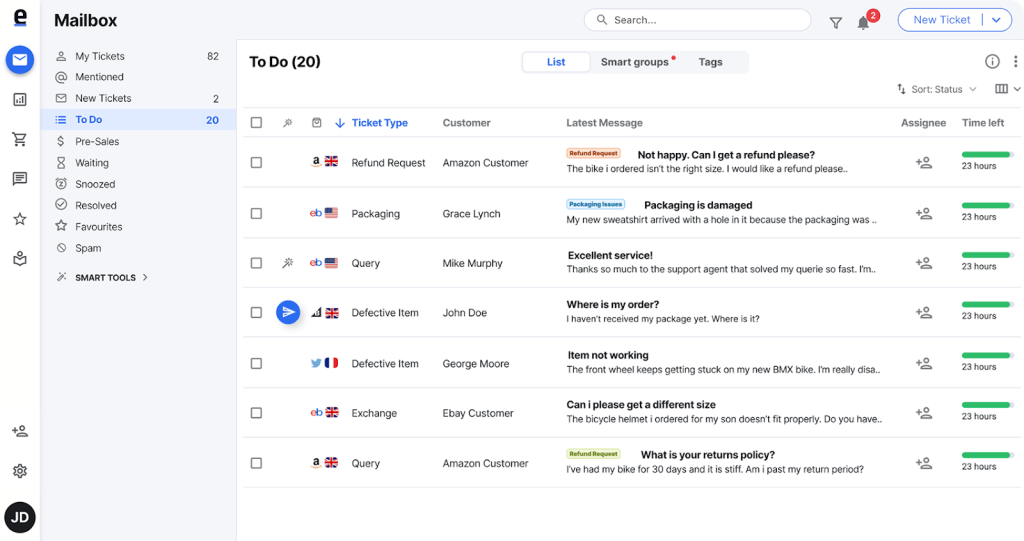
This level of integration solves the biggest pain point for marketplace sellers: jumping between platforms to find order information while customers wait. If marketplaces make up a large share of your support volume, eDesk can be a great option to consider.
eDesk’s Top E-Commerce Features
- 250+ Marketplace & Platform Integrations: Native connections to Amazon, eBay, Shopify, Walmart, BigCommerce, WooCommerce, Etsy, plus social channels and email—all in one Smart Inbox.
- Ava AI Agent: Handles customer inquiries 24/7, from product questions to order status checks, with seamless handoff to human agents when needed.
- Order Management Within Tickets: One-click refunds, order modifications, inventory checks, and tracking updates directly from customer conversations.
- Multi-Store Management: Manage up to 10 online stores or unlimited stores from a single dashboard—ideal for sellers with multiple brands.
- Advanced Reporting for Sellers: Track ticket trends, agent performance, response times, and identify recurring product issues affecting sales.
- SLA Management: Set and track service level agreements with automated alerts to ensure marketplace compliance and customer satisfaction.
eDesk: Pros and Cons
| Pros | Cons |
|---|---|
| Strongest marketplace coverage (Amazon, eBay, Walmart) compared to competitors | AI features (AI Assist, AI Automation, AI Translations) come as paid add-ons on top of base pricing |
| 24/7 phone and chat support included on all plans | Essential plan limited to 1 online store/marketplace; multi-store sellers need Growth plan or higher |
eDesk Pricing
- Essential (Starting from $39/month): 1 online store/marketplace, centralized workspace, social messaging, live chat, AI chatbot (part of the AI Automation add on)
- Growth ($89/month): 5 online stores/marketplaces, CSAT surveys, advanced reports, ticket collaboration.
- Professional ($119/month): 10 stores/marketplaces, custom roles, advanced API, 2FA, assisted onboarding.
- Enterprise (Custom pricing): Unlimited stores, dedicated account manager, tailored onboarding, JSON extracts for BI.
Add-ons available on all plans: AI Automation (€0.99 per resolution), AI Assist, AI Translations, Feedback & Reviews. eDesk also offers a 14-day free trial.
Who is this for?
eDesk is ideal for multi-channel sellers managing 3+ marketplaces (Amazon, eBay, Walmart) alongside their own Shopify or WooCommerce store. It’s especially valuable for sellers handling 500-10,000+ monthly tickets.
Who is this NOT for?
eDesk is overkill for single-platform Shopify or WooCommerce stores that don’t sell on marketplaces.
3. Gorgias (Best for Shopify-Native Stores Prioritizing Revenue Attribution)
Gorgias is one of the most Shopify-focused helpdesks I’ve tested. You can see it in how tightly support workflows connect with ecommerce operations –everything from order tracking to refunds feels built-in.
With every ticket, you can see order details, customer history, lifetime value, and revenue data, which makes it easy to respond and take action without jumping between tools.
What stood out to me most is revenue attribution. Gorgias doesn’t just track tickets; it shows how support conversations influence purchases and conversions, which is especially useful if you’re trying to understand the real business impact of your support team.

AI is also built directly into how Gorgias handles e-commerce support. The AI Agent can automatically resolve common questions like order status updates, returns, and basic policy queries around the clock, which helps reduce incoming volume before it ever reaches an agent.
There’s also an AI Shopping Assistant that steps in during live conversations to recommend products and guide shoppers in real time, turning support into a revenue touchpoint.
Everything comes together in a single workspace where email, live chat, social channels, SMS, and voice conversations live side by side. Add ecommerce-specific macros, automation rules, and it’s clear Gorgias is built to help ecommerce teams handle high volumes while staying closely connected to their storefront.
Gorgias’s Top Ecommerce Features
- Deep Shopify Integration: View order history, shipping status, customer lifetime value, and process refunds/cancellations directly within tickets.
- Unified Multichannel Inbox: Manage email, live chat, social media (Instagram, Facebook, TikTok), SMS, WhatsApp, and voice from one interface.
- AI Shopping Assistant: Acts as a front-line shopping assistant on product and cart pages, recommending items based on browsing behavior, cart contents, and inventory.
- Macros for Ecommerce Automation: Pre-built response templates for common queries like order status, returns, and shipping delays. Agents can trigger macros based on Klaviyo tags or customer segments.
- AI intent detection and routing: Automatically identifies the type and urgency of ecommerce requests and routes, tags, or responds to them without manual triage.
- Revenue attribution for AI conversations: Tracks how much revenue is influenced by AI-handled chats and tickets, letting teams see which conversations drive conversions, not just deflection.
Gorgias: Pros and Cons
| Pros | Cons |
|---|---|
| Ability to integrate a wide range of e-commerce platforms such as TikTok Shop, Shopify, Loop, FB Business, etc. | Ticket-based pricing gets expensive fast: $60/month for 300 tickets, but most stores exceed that quickly and pay overage fees |
| Revenue attribution helps justify support team ROI to leadership | Lag in reporting capabilities compared to competitors—limited export options, no custom chart variations |
Gorgias Pricing
- Starter ($10/month): 50 tickets included, $0.40 per additional ticket, 3 agents max, live chat.
- Basic ($60/month): 300 tickets included, $40 per 100 additional tickets, automation add-on available.
- Pro ($360/month): 2,000 tickets included, $36 per 100 additional tickets, automation add-on available.
- Advanced ($900/month): 5,000 tickets included, $36 per 100 additional tickets, automation add-on available.
AI Agent: Additional $1 per AI-resolved conversation ($0.90 on annual billing)
Gorgias also has a 7-day free trial available.
Who is this for?
Gorgias is best for established Shopify or Shopify Plus stores that have predictable monthly ticket volumes and want deep platform integration with revenue tracking.
Who is this NOT for?
Gorgias isn’t ideal for growing stores with unpredictable ticket volumes (the overage charges add up fast), multi-platform sellers using WooCommerce or BigCommerce, or teams needing strong collaboration features and advanced reporting.
Recommended reading
4. Tidio (Best Budget-Friendly AI Chatbot for Small Ecommerce Stores)
Tidio feels like a lightweight live chat tool at first, but once Lyro AI is enabled, it starts behaving more like a front-line support layer for ecommerce stores.
Instead of routing everything to humans, Lyro steps in early and quietly handles repetitive questions before they ever become tickets.
When I tested the platform, I noticed how reliably Lyro handled high-volume ecommerce queries without any setup overhead. “Where’s my order?”, shipping timelines, return policies, and discount code questions were answered instantly, pulling responses directly from the store’s knowledge base.

On the proactive side, Tidio’s no-code Flows kicked in at the right moments. When shoppers lingered on checkout or bounced between product pages, the chatbot triggered contextual messages, answered last-minute questions, and even surfaced discount offers.
Lyro also did a good job knowing when not to answer. When a question fell outside its scope, like a custom return dispute or a complex order change, it handed the conversation off cleanly to a human agent.
Overall, Tidio works best as an automation-first layer for small ecommerce teams. It doesn’t try to replace a full helpdesk. Instead, it absorbs the repetitive, time-consuming conversations and lets teams stay responsive without adding headcount.
Tidio’s Top E-commerce Features
- Lyro AI for Routine Ecommerce Queries: Lyro automatically handles high-volume questions like order tracking, shipping timelines, return policies, and basic product queries.
- Live Chat with Rich Media Support: Engage shoppers in real-time with live chat and video calls or rich media to provide personalized product recommendations.
- Visual Chatbot Builder: Drag-and-drop builder with templates for abandoned cart recovery, discount offers, and product recommendation flows.
- Proactive Chatbots and Flows: Use no-code flows to trigger chatbot messages at key moments, such as when shoppers linger on product pages, stall at checkout, or attempt to exit. These flows can answer questions, offer discounts, or capture leads automatically.
- E-commerce Integrations: Native Shopify, WooCommerce, Wix, and WordPress integrations, plus connections to Messenger, Instagram, WhatsApp, and email.
- Customer Intent Detection: AI analyzes messages to identify request types (order tracking, discount inquiries) and routes them appropriately.
Tidio: Pros and Cons
| Pros | Cons |
|---|---|
| Users praise Tidio’s visual chatbot builder, which makes it easy for anyone to create complex automations. | As chat volume grows, advanced features might push teams to higher plans. |
| Offers multilingual support for global stores. | Lyro’s ability to scan and interpret on-site pages is somewhat limited, which can reduce its effectiveness when answering page-specific customer questions. |
Tidio Pricing
- Starter ($24.17/month): 100 conversations, Lyro AI chatbot, live chat, basic automation.
- Growth ($49/month): 250 conversations, advanced chatbots, email integration, analytics
- Plus ($749/month): Custom conversations, dedicated support, priority features
Lyro is a separate paid add-on starting at $32.50/month for 50 AI conversations. Per-conversation cost is approximately $0.50/conversation.
Who is this for?
Tidio is ideal for small Shopify or WooCommerce stores with under 500 monthly tickets that want affordable AI automation, abandoned cart recovery, and proactive chat engagement.
Who is this NOT for?
Tidio isn’t suitable for multi-brand ecommerce operations, marketplace sellers needing Amazon/eBay integrations, or teams requiring deep CRM functionality and advanced reporting.
Recommended reading
5. Zendesk (Best for Enterprise Ecommerce with Complex Reporting Needs)
Zendesk is an enterprise-grade helpdesk that supports a broader range of ecommerce platforms—Shopify, WooCommerce, BigCommerce, Magento, and custom storefronts.
For e-commerce teams frustrated with managing email and chat separately, Zendesk consolidates all channels into a unified omnichannel inbox. Integrations help pull real-time order details, shipping status, payment transactions, and customer history directly into the ticket sidebar—connecting multiple storefronts into a single, unified view.
Agents can process refunds and cancellations without leaving Zendesk, eliminating tab-switching for routine order management.

For automating repetitive ecommerce queries, Zendesk’s triggers and macros handle return workflows end-to-end: auto-routing return tickets, applying consistent statuses (Pending → Approved → Refunded), and sending automated updates at each step.
Where Zendesk pulls ahead for larger operations is reporting. Unlike tools with historical data cutoffs, Zendesk offers unlimited custom dashboards that break down performance by channel, store, issue type, or specific workflows, such as refunds and late deliveries.
For price-sensitive smaller stores, this level of depth may be overkill—but for multi-brand or high-volume ecommerce teams, it’s one of the few platforms that scales with operational complexity.
Zendesk’s Top E-commerce Features
- Omnichannel Support: Manage email, chat, voice, SMS, social media, and self-service portals from one platform.
- 100+ Ecommerce Integrations: Native connections to Shopify, BigCommerce, WooCommerce, Magento, plus inventory, billing, and fulfillment systems.
- Unlimited Custom Reporting: Create complex reports with no data cutoff dates—crucial for understanding seasonal trends and customer behavior patterns.
- Detailed Customer Profiles: Pulls data from across your systems (inventory, billing, preferences) to create comprehensive customer views.
- Side Conversations: Include teammates or external partners (like fulfillment centers) in private threads within tickets using Slack or other channels.
- AI-Powered Automation: Pre-trained chatbots, AI-generated response suggestions, and intelligent ticket routing based on keywords and intent.
Zendesk: Pros and Cons
| Pros | Cons |
|---|---|
| Users praise Zendesk’s integration ecosystem- since integrations with CRM, ecommerce platforms feel native | Pricing can be a bit steep for small or growing ecommerce businesses. |
| Automation, macros, and workflows can save e-commerce teams time with repetitive queries | Has an initial learning curve and customization beyond basic workflows requires developer involvement |
Zendesk Pricing
- Support Team ($19/agent/month): Basic ticketing, email support, 50 custom ticket fields, limited automations
- Suite Team ($55/agent/month): Omnichannel (email, voice, chat, social), AI included, knowledge base, basic reporting
- Suite Professional ($115/agent/month): Advanced AI, custom objects, multilingual support, advanced analytics
- Suite Enterprise ($169/agent/month): AI agents for customers, skills-based routing, sandbox, advanced security
The AI features start from the Suite Team plan and higher. Zendesk also offers a 14-day free trial.
Who is this for?
Zendesk is ideal for mid-to-large ecommerce businesses (5,000+ monthly tickets) operating across multiple platforms who need enterprise-grade reporting, advanced automations, and deep customization.
Who is this NOT for?
Zendesk is overkill for small Shopify stores with basic order management needs. If you’re handling under 500 tickets monthly and need a simple setup, Zendesk’s complexity and cost won’t justify the investment.
Recommended reading
6. SendPulse (Best for Social Commerce Teams That Want to Turn Chats into Sales)
SendPulse didn’t make the main list because it’s not a help desk in the traditional sense — but if your ecommerce support happens primarily on social channels, it’s worth knowing about.
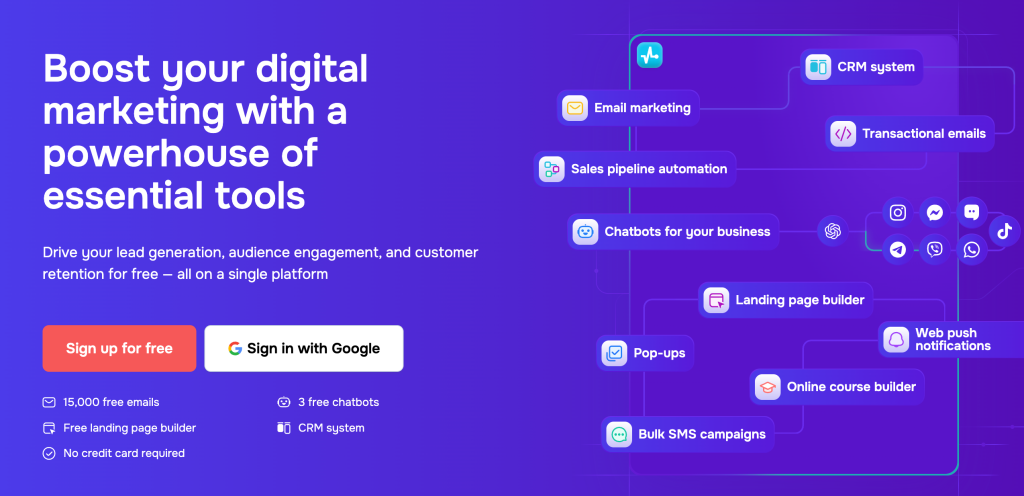
Where most helpdesks focus on post-purchase resolution, SendPulse is built around converting conversations into sales. Its retail bot pulls messages from WhatsApp, Instagram, Facebook, TikTok, Telegram, and Viber into a shared inbox, responds to comments and story replies automatically, and can move buyers through a checkout flow without ever leaving the chat. It also syncs deals and order data to the built-in CRM in real time.
The result is a tool that works best for DTC brands and social-first sellers who are losing sales to slow comment responses or fragmented messaging.
Who is this for? Ecommerce brands that drive a significant share of sales through Instagram, WhatsApp or even TikTok and want an ecommerce chatbot that can handle product discovery, abandoned cart recovery, and in-chat payments — without a full help desk setup.
Who is this NOT for? Teams that need Shopify or WooCommerce order management inside tickets, marketplace SLA tracking, or structured agent workflows for returns and refunds. For those use cases, the tools in the main list will serve you better.
7. Freshdesk (Best for Budget-Conscious Teams Needing Omnichannel Support)
Freshdesk is a full-featured help desk built for ecommerce teams that have outgrown basic inbox tools but aren’t ready to take on enterprise pricing or complexity.
It brings email, chat, social, phone, automations, and AI into one structured workspace, making it easier to manage rising support volume without rebuilding your stack from scratch.
What works especially well for e-commerce is how Freshdesk centralizes every customer touchpoint. Order issues, delivery delays, refund questions, and social DMs all land in one queue, so agents aren’t switching tools or losing context when conversations move across channels.
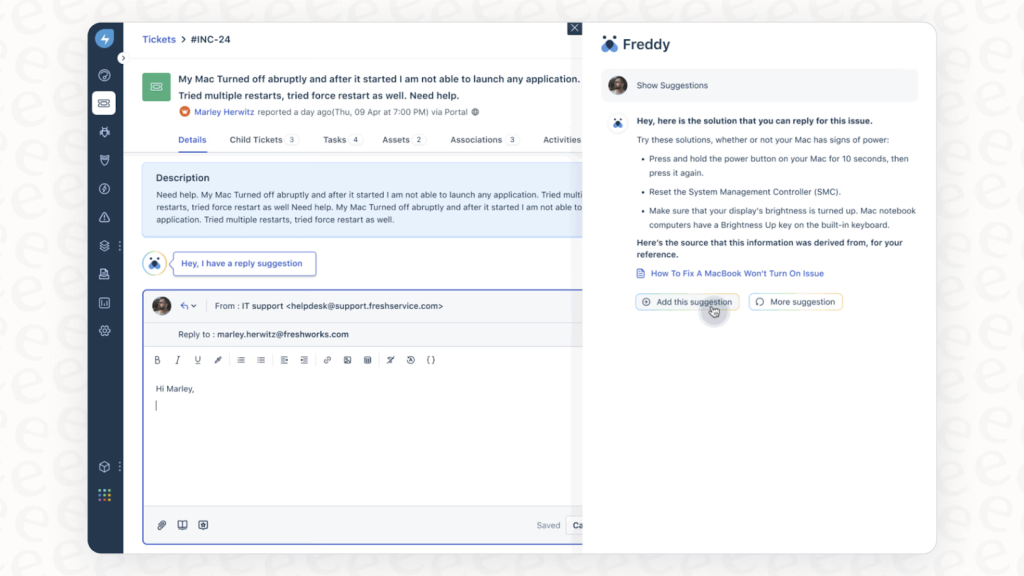
Freddy AI adds a helpful layer once things get busy. Instead of aggressively replacing agents, it supports them by summarizing long threads, drafting replies, and suggesting relevant help articles.
During sales or seasonal spikes, this reduces the mental load on agents handling dozens of similar e-commerce questions at once.
But the main tradeoff is e-commerce depth. While Shopify and WooCommerce integrations exist, deeper ecommerce workflows often rely on connectors or add-ons. Some of the most useful AI features also sit behind paid upgrades, so teams need to plan both setup and budget as they scale.
Freshdesk’s Top E-commerce Features
- Multichannel Ticketing: Unified inbox for email, chat, phone, social media, and web forms
- Freddy AI Agent: Automates responses to common queries and helps deflect repetitive tickets as volume increases.
- Freddy AI Copilot: AI assistant that suggests replies, summarizes tickets, and helps agents respond faster (paid add-on)
- Workflow Automation: Rules for routing, prioritization, SLAs, and status updates—useful for separating pre-sales, post-sales, and logistics issues.
- Self-Service & Knowledge Base: Branded help center and customer portal to reduce basic “Where is my order?” questions.
- E-commerce Integrations: Shopify, WooCommerce, and other platforms via native apps and third-party connectors.
Freshdesk: Pros and Cons
| Pros | Cons |
|---|---|
| Works well with platforms such as Shopify, WooCommerce, and other e-commerce platforms via connectors | Features such as reporting and automation rules have scope to be more user-friendly and flexible. |
| Strong automation and SLA management, even on lower tiers. | Order management and e-commerce-specific workflows are not as deep as tools solely focused on e-commerce. |
Freshdesk Pricing
- Free: $0 for 1-2 agents for 6 months, includes ticketing, knowledge base, and basic reports.
- Growth ($19/agent/month): Ticketing, customer portal, automation, reports, 5,000 collaborators.
- Pro ($55/agent/month): Custom portals, advanced routing, custom reporting, 500 AI Agent sessions included.
- Enterprise ($89/agent/month): Audit logs, approval workflows, skills-based assignments, and advanced security.
Add-ons: Freddy AI Copilot (per agent), Freddy AI Agent sessions ($49 per 100 sessions), Omnichannel module.
Freshdesk also offers a 14-day free trial.
Who is this for?
Freshdesk suits budget-conscious ecommerce teams (200-2,000 monthly tickets) that need solid omnichannel support and automation but don’t require deep platform-specific integrations.
Who is this NOT for?
Freshdesk isn’t ideal for Shopify merchants wanting native order management in tickets, or for teams needing ecommerce-specific features like revenue attribution and product recommendation engines.
Recommended reading
8. HubSpot Service Hub (Best for Ecommerce Brands Already Using HubSpot CRM)
At first glance, HubSpot Service Hub seems like a standard helpdesk. But if you’re already using HubSpot for marketing or sales, it quickly feels like an extension rather than a separate tool. Everything’s deeply connected.
Support tickets are automatically tied to the customer’s CRM record, so agents can see marketing interactions, sales conversations, purchases, and lifecycle stages in one place.
For e-commerce teams used to juggling scattered tools, this is the biggest shift. There’s no need to piece together context from different systems. When a customer writes in with a post-purchase issue, agents already know how that customer found the brand, what they’ve bought, and how valuable the relationship is overall.

HubSpot’s workflows take care of routing, SLAs, and follow-ups, while Breeze Customer Agent handles routine questions using your knowledge base and CRM data.
Because Breeze works across the wider HubSpot platform, automation isn’t limited to tickets. It can show up on marketing pages, sales flows, and post-purchase touchpoints, too.
The self-service side is solid as well. HubSpot’s knowledge base and customer portal make it easy for customers to find answers and track their own tickets, which helps reduce inbound volume over time.
HubSpot Service Hub’s Top E-commerce Features
- Breeze Customer Agent AI: HubSpot’s AI-powered agent uses CRM data and your knowledge base to resolve routine customer questions 24/7, freeing agents for more complex interactions.
- Unified CRM View: Support conversations and tickets are natively connected to the full HubSpot CRM — marketing interactions, sales history, and customer context all live in the same record
- Ticketing System: Consolidates customer requests from email, live chat, forms, and connected messaging channels into a single ticketing workspace with routing rules and shared inbox visibility
- Live Chat and Chatbots: Engage shoppers in real-time with customizable chat widgets and automated chatbot flows
- Customer Feedback Surveys: Automatically gather CSAT and NPS after purchases or support interactions
- Commerce Hub Integration: If using HubSpot Commerce Hub, manage payments, subscriptions, and quotes alongside support tickets
HubSpot Service Hub: Pros and Cons
| Pros | Cons |
|---|---|
| Strong for brands that want support data connected to marketing/sales attribution | Can seem expensive for growing teams with essential features require jumping up higher subscription tiers |
| The CRM Native view centralizes all customer support data, reducing the team’s manual effort | Less ecommerce-specific features (order management, marketplace integrations) than Gorgias or eDesk |
HubSpot Service Hub Pricing
- Free Tools: Basic ticketing, live chat, email templates, shared inbox
- Service Hub Starter ($15/seat/month): Ticketing, simple automation, basic reporting
- Service Hub Professional ($100/month): Customer Agent AI, knowledge base, advanced automation, workflows, custom surveys
- Service Hub Enterprise (Starts from $150/month): Advanced AI, custom reporting, predictive lead scoring, playbooks
Hubspot Service Hub also offers a 14 day free trial.
Who is this for?
HubSpot Service Hub is ideal for ecommerce brands (DTC, B2C) already invested in the HubSpot ecosystem who want support integrated with marketing attribution and sales data.
Who is this NOT for?
Service Hub isn’t suitable for e-commerce-first teams needing deep Shopify order management or marketplace integrations. If you’re not already using HubSpot CRM/Marketing/Sales, the standalone cost and setup complexity don’t justify choosing it.
Recommended reading
9. Help Scout (Best for Small Ecommerce Stores That Want a Simple, Email-Like Helpdesk)
Help Scout is simple, and that’s very much the point. When I tested it, the biggest win was how quickly a small ecommerce team could get started without dealing with complex setup or heavy configuration.
The interface feels closer to email than a traditional helpdesk, which makes it easy for agents to jump in with almost no learning curve.
If you’re managing email and chat in separate tools, Help Scout brings everything into one shared inbox. Email, live chat, and social messages from Facebook Messenger and Instagram DMs all land in the same place, with collision detection built in so two agents never reply to the same customer.

For e-commerce teams, the Shopify integration carries most of the value. As a Shopify Plus Certified App Partner, Help Scout pulls order history, lifetime value, and recent purchases directly into the sidebar.
Agents can check order status, view receipts, and handle refunds or cancellations without leaving the conversation. Support for WooCommerce and Magento keeps the setup flexible if you’re not Shopify-only.
Automation in Help Scout is intentionally kept lightweight, which fits the type of teams it’s built for. Workflows take care of basic routing, tagging, and auto-replies, while AI Assist helps agents draft responses, summarize long threads, and adjust tone. The focus is on supporting agents rather than fully automating conversations. For teams that want autonomous ticket deflection, AI Answers is available as a separate add-on. It pulls directly from the knowledge base.
Help Scout’s Top E-commerce Features
- Unified Shared Inbox: Email, live chat, Facebook Messenger, and Instagram DMs in one inbox with collision detection, internal notes, and team @mentions.
- Shopify Integration: View customer profiles with order history, lifetime value, and recent purchases directly in conversations.
- Beacon Widget: In-app messaging and self-service widget for proactive support on ecommerce sites.
- Detailed Customer Profiles: Support conversation history, contact info, tags, custom fields, and ecommerce metrics.
- AI-Powered Assistance for Agents: Smart summaries, suggested replies, and automated response drafting to improve agent productivity.
- Knowledge Base (Docs): Self-service portal customers can search before contacting support.
- Ecommerce Integrations: Connects with Shopify, WooCommerce, Magento, plus HubSpot and Salesforce.
Help Scout: Pros and Cons
| Pros | Cons |
|---|---|
| Very intuitive, email-like interface with minimal learning curve | Users report there’s scope to improve advanced automation and reporting features |
| Strong Shopify integration with in-inbox order actions | Not built for high-volume or enterprise support |
Help Scout Pricing
- Free Plan: Basic shared inbox with 1 Inbox, 1 Docs, and 100 contacts//month for 5 users
- Standard ($25/user/month): Unlimited contacts, unlimited tags/saved replies, AI Assist, basic workflows (limit of 1), 2-year report history, 100+ apps
- Plus ($45/user/month): Everything in Standard + AI Drafts, AI Summarize, round-robin routing, Salesforce/HubSpot/Jira, advanced workflows (limit of 50), all-time report history, 3 Docs sites
- Pro ($75/user/month): Everything in plus, along with priority support, advanced permissions, HIPAA compliance, onboarding assistance
AI Answers is available as an add-on for $0.75/resolution (3-month free trial included on signup). HelpScout also offers a 14 day free trial.
Who is this for?
Help Scout is perfect for small to mid-sized Shopify or WooCommerce stores (50-300 monthly tickets) that value simplicity, personal customer service, and straightforward pricing.
Who is this NOT for?
Help Scout isn’t suitable for high-volume ecommerce operations, multi-channel marketplace sellers, or teams needing advanced AI automation and complex workflow builders. Stores scaling past 500 tickets/month will likely outgrow its capabilities.
Recommended reading
10. Kustomer (Best for Enterprise Ecommerce Needing CRM-Powered Support)
Kustomer might look like a traditional helpdesk, but a few conversations in and the difference was clear as day.
With Kustomer, everything revolves around a single customer timeline instead of individual tickets. Emails, chats, SMS, social messages, orders, and past interactions all show up in one continuous view.
During testing, this timeline-first approach stood out as Kustomer’s biggest strength. Agents don’t have to jump between tools to get context. When a customer writes in about a delayed order, their purchase history and past conversations are already right there before anyone replies.

It’s built for teams that care more about customer relationships and lifetime value than just clearing tickets quickly. Conversations feel more personal because agents aren’t starting from scratch every time.
Automation in Kustomer is powered by AI agents that handle routine ecommerce requests, such as order status checks and returns, and hand them off to humans when needed. The trade-off is cost. AI isn’t included in the base plans, and pricing is based on engagement, so you pay even when AI escalates immediately.
Kustomer’s Top E-commerce Features
- Unified Customer Timeline: All interactions across email, SMS, chat, social, and order history in one chronological view per customer.
- Intelligent Conversation Routing: Automated routing based on customer type, request type, agent capacity, and custom attributes.
- Multiple AI Agents: Deploy specialized AI agents (customer-facing bots) and AI for Reps (agent-side assistance) that autonomously resolve issues, summarize conversations, and speed up responses.
- CRM-Powered Chatbots: Highly personalized chatbots that use customer data to provide contextual assistance and product recommendations.
- Real-Time Performance Dashboards: Live monitoring of SLAs, handle times, customer sentiment, and team efficiency.
- E-commerce Integrations: Native connections to Shopify, BigCommerce, Adobe Commerce, Spree, Loop Returns, and major e-commerce platforms.
Kustomer: Pros and Cons
| Pros | Cons |
|---|---|
| Users praise it for combining CRM functionality with support tools | It’s not a plug-and-play ecommerce solution |
| Deep ecommerce integrations with Shopify and the option to go for custom integrations | Creating custom reports can be complex and less intuitive for non-technical users |
Kustomer Pricing
- Enterprise (Starting at $89/agent/month): Core platform with omnichannel support, basic automations, and integrations.
- Ultimate (Starting at $139/agent/month): Advanced AI agents, custom workflows, dedicated support, advanced analytics.
For both plans, a minimum of 8 seats is required. Kustomer offers AI agents for customers and reps as add-ons, and does not have a free trial.
Who is this for?
Kustomer is best suited for mid-to-large ecommerce brands handling 2,000+ monthly tickets where customer lifetime value, CRM- level context and personalization matter more than speed alone.
Who is this NOT for?
Kustomer isn’t a good fit for small ecommerce teams or budget-conscious stores. The seat minimum, annual contracts, and AI add-on costs can push monthly spend high very quickly. If you need fast setup and simple workflows, lighter helpdesks will deliver better value.
11. Re: amaze (Best for Multichannel Support with Built-in Chatbots)
Re:amaze looks like a straightforward shared inbox at first, but once I tested it with live chat and ecommerce integrations turned on, it felt more like a complete support layer built for online stores.
For teams juggling email, website chat, social DMs, and order questions across tools, Re:amaze pulls everything into one multichannel inbox. Conversations from email, live chat, SMS, Facebook, Instagram, Twitter, and Shopify land in a single view, with customer and order details always visible alongside the conversation.

What also stood out during testing was how much automation comes built in without a heavy setup. Re:amaze includes native chatbots that handle common e-commerce questions before agents step in. Order-related queries are resolved directly in the chat widget, customers can check different orders without starting over, and vague messages are clarified automatically.
When an issue needs human attention, such as a return dispute or product issue, the handoff is smooth and contextual. On the backend, Re:amaze integrates natively with Shopify, WooCommerce, BigCommerce, and Magento, letting agents view, modify, or create orders directly from the inbox. Dynamic variables in templates auto-fill order status, tracking numbers, and customer details, reducing back-and-forth.
Re:amaze is clear about its focus, though. It’s not built for revenue attribution or deep sales analytics. Instead, it prioritizes faster responses, fewer repetitive tickets, and simpler multichannel support.
Re:amaze’s Top Ecommerce Features
- Unified Multichannel Inbox: All customer messages from email, live chat, SMS, voice, Facebook, Instagram, Twitter, and Shopify in one interface.
- Pre-built Ecommerce Chatbots: Hello Bot for greetings, FAQ Bot for common questions, Order Bot for order status—ready to deploy.
- Shopify Order Management: View, modify, and create Shopify orders directly in customer conversations and chats.
- Live User Monitoring: See visitors in real-time including location, current page, and browsing history for proactive outreach.
- AI-Powered Features: AI writes replies, builds chatbots, summarizes conversations, and creates FAQ articles.
- Multi-store Support: Manage multiple WooCommerce or Shopify stores from a single Re:amaze dashboard.
Re:amaze: Pros and Cons
| Pros | Cons |
| Built-in chatbots reduce setup time for common ecommerce support workflows | Users report that there are fairly less integrations compared to direct competitors such as Gorgias |
| Strong support for managing multiple ecommerce brands from one inbox | Not designed for revenue attribution or sales-focused analytics |
Re:amaze Pricing
- Basic ($26/user/month): 1 brand, 500 conversations/month, basic automation, live chat, social integrations
- Pro ($44/user/month): 3 brands, Unlimited email inboxes, live chat, social media channels, public/internal FAQ, workflow automation (macros), response templates, chatbots, cues (proactive messages), basic reporting, customer intents
- Plus ($62/user/month): Everything in Pro + Peek (live screensharing), departments, staff performance reporting, 5 brands, priority support, In-chat video calls, custom branding, advanced analytics
Who is this for?
Re:amaze is ideal for mid-sized Shopify or WooCommerce stores (200-2,000 monthly tickets) that need affordable multichannel support with chatbot automation. It’s especially good for multi-store merchants managing 2-5 brands who want to consolidate support in one dashboard.
Who is this NOT for?
Re:amaze isn’t the best fit for single-platform stores needing deep Shopify analytics and revenue attribution, or for large enterprises requiring advanced security, compliance, and enterprise-grade customization.
Ecommerce Help Desks vs Traditional IT Help Desks
Not all helpdesks are built for the same job. Ecommerce help desks are designed for customer-facing, order-driven support, while traditional IT help desks are built for internal teams and infrastructure issues. The differences matter once support volume starts to grow.
| Ecommerce Help Desk | Traditional IT Help Desk | |
|---|---|---|
| Who it’s built for | External customers (shoppers) | Internal employees |
| Primary use case | Orders, shipping, returns, refunds, and pre-sale questions | IT incidents, access requests, and asset management |
| Data inside tickets | Order history, shipping status, payment details, customer context | Device info, system logs, employee records |
| Core integrations | Shopify, WooCommerce, Amazon, eBay, BigCommerce, Magento | Active Directory, CMDBs, monitoring tools |
| Marketplace awareness | Tracks Amazon/eBay/Walmart SLAs and response deadlines | No built-in marketplace SLA tracking |
| Automation focus | WISMO, returns, cancellations, policy questions | Password resets, software provisioning |
| AI use cases | Order-aware replies, sentiment detection, ecommerce workflows | Generic responses, KB deflection |
| Channels supported | Email, chat, WhatsApp, Instagram, Facebook, SMS, marketplaces | Email, internal portals, phone, Slack |
| Success metrics | CSAT, response time, order-related resolution | MTTR, SLA compliance, backlog |
How to Choose the Right Ecommerce Help Desk for Your Team

Instead of getting lost in feature lists, use this checklist to sanity-check whether a helpdesk actually fits how your store operates today (and where it’s headed next).
☐ Does it connect to where you sell and where customers contact you?
Make sure it natively supports your storefront (Shopify, WooCommerce, etc.), marketplaces (Amazon, eBay, Walmart), and channels like email, chat, WhatsApp, and social DMs. If it doesn’t, you’ll still be jumping between tools.
☐ Can it handle your current and future ticket volume?
Look at how pricing and performance scale. A tool that works fine at 300 tickets a month may fall apart—or get very expensive—once volume doubles during peak seasons.
☐ Does it solve your biggest support headache right now?
If repetitive queries eat up time, prioritize automation. If agents constantly switch tabs for order details, you need order-linked tickets.
☐ Is automation actually built for ecommerce workflows?
Basic tagging isn’t enough. Look for automation or AI that understands order status, returns, cancellations, and shipping issues—not just generic ticket routing.
☐ Is the pricing predictable when volume spikes?
Check whether pricing is per ticket, per agent, or per AI resolution. Run the numbers for both your current volume and a busy month, so there are no surprises later.
☐ How fast can your team realistically get up and running?
Some tools work out of the box. Others need days or weeks of setup. If your team is lean and non-technical, complexity can quickly become friction.
How to Set Up an Ecommerce Help Desk for Scale
A help desk only scales if it’s set up with real ecommerce workflows in mind.
Here’s what that looks like. A customer asks, “Where’s my order?” The ticket opens with the order, tracking link, and delivery status already attached. It’s automatically tagged, routed, and ready to reply—no tab-switching, no manual sorting.
To get there, start by connecting your ecommerce stack first. Plug in your store, marketplaces, and shipping tools before adding email or chat. Then build a simple knowledge base for your most common questions,, like shipping, returns, and refunds, so agents and automation have something reliable to pull from.
Next, layer in automation gradually. Begin with routing and tagging, add canned replies for repetitive questions, and only then turn on AI for high-volume issues like repetitive questions and returns. More complex cases should always escalate to a human with full context intact.
Finally, track ecommerce-specific signals, not just tickets closed. Look at why customers are reaching out, which products cause the most issues, and where delays keep happening. That’s how your support setup holds up as volume grows.
Ecommerce Help Desk Trends to Watch in 2026
Ecommerce support in 2026 is shifting the momentum from just answering tickets faster to reducing the number of tickets in the first place. Here’s some of the top trends to keep an eye out for:
1. AI Copilots Are Evolving Into Autonomous Agents
Over the last year, we’ve seen several helpdesks introduce AI as a “copilot”—suggesting replies, summarizing threads, and surfacing knowledge base articles for agents to approve.
In 2026, the shift is toward fully autonomous AI agents that resolve tickets end-to-end without human involvement.
In Hiver, this shows up the moment an email lands in the inbox. AI already understands what the customer is asking, picks up on sentiment, applies the right tags, and pulls out details like order IDs before an agent even opens the thread.
For straightforward requests, agents can see suggested replies or ask AI to draft one using approved knowledge, while AI QA quietly checks whether the response actually answers the question and stays consistent. Instead of figuring out context or second-guessing replies, agents can focus on resolving the issue and moving on.
And here’s what the practical implication for ecommerce teams looks like: the helpdesks that win in 2026 will be judged less on how many features they offer agents and more on how many tickets never reach agents at all.
2. Predictive Support—Fixing Problems Before Customers Complain
The biggest shift in ecommerce support philosophy is the move from reactive to predictive. Instead of waiting for “Where is my order?” messages, helpdesks are starting to use order data, carrier tracking, and historical patterns to flag issues before customers even notice them.
A delayed shipment detected early triggers a proactive email or SMS update. A product with a known defect rate gets a targeted support message to recent buyers. A customer whose subscription renewal failed gets an automated outreach before they churn.
Amazon is already doing this at scale: it uses predictive analytics on carrier scans, routing data, and lane performance to anticipate likely delivery delays and proactively notify customers via app push and email before they ask “Where is my order?”.
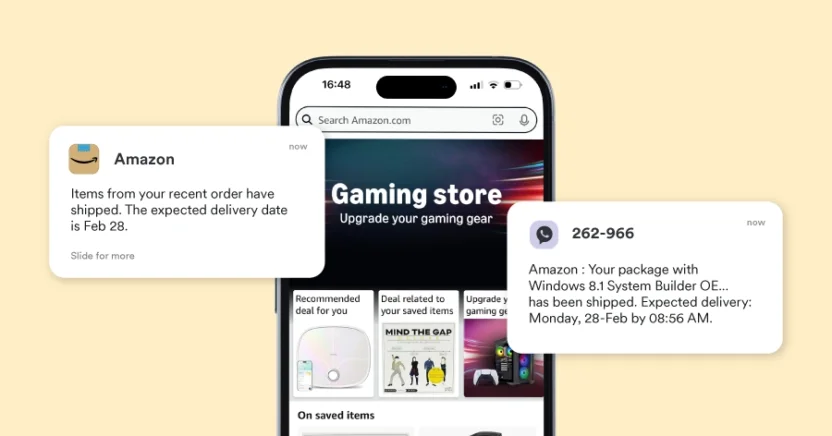
In some cases, it also offers compensatory benefits—like extending Prime membership—when delays are significant, which both reduces WISMO tickets and cushions the impact on customer satisfaction.
For ecommerce teams, this trend means your helpdesk’s value increasingly comes from what it prevents, not just what it resolves.
3. Hyper-Personalized Support Powered by Unified Customer Data
Generic canned responses are losing effectiveness. In 2026, ecommerce customers expect support interactions that reflect their specific purchase history, preferences, and brand relationships.
This goes beyond addressing customers by name. It means AI that adjusts tone based on customer sentiment, surfaces relevant product recommendations mid-conversation, tailors return offers based on customer lifetime value, and prefills forms with order context so customers don’t repeat themselves.
A good example of this is-Sculpted by Aimee-an Irish Cosmetics brand that turned checkout into a customer data touchpoint using Shopify POS. Instead of paper sign-ups, staff simply ask if shoppers want a digital receipt, which pulls the email straight into the customer profile.

That small change boosted email capture by 275%. With everything tied to a single profile, support teams and AI can see purchase history and preferences in a single view, making follow-ups feel more relevant than generic.
The underlying requirement is a unified data layer—helpdesks that can pull from your ecommerce platform, CRM, marketing tools, and fulfillment systems simultaneously to build a complete customer picture in real time. Siloed tools that only see ticket history will feel increasingly outdated.
Recommended reading
4. Proactive Chat and AI on High-Intent Pages
Support is becoming a revenue channel, not just a cost center. The 2026 trend is deploying AI chat and proactive messaging at the moments that directly influence purchase decisions—product pages, checkout, and cart pages—rather than hiding support behind a “Contact Us” link.
This is where tools like Hiver’s Chat Nudges come in. Nudges let teams proactively start conversations based on shopper behavior, like time spent on a page or the specific URL they’re browsing.

For example, if a customer lingers on a pricing or checkout page, a nudge can appear offering help with shipping, returns, or sizing—right when hesitation usually sets in.
For ecommerce helpdesk buyers, the implication is clear: evaluate tools not just on how well they resolve post-purchase issues, but on how effectively they can intervene at pre-purchase moments to drive conversion.
Recommended reading
Choosing the Right E-Commerce Help Desk
After comparing how different e-commerce help desks work in real stores, one thing is clear: there’s no single “best” tool for everyone. The right fit depends on where you sell, how many tickets you handle, and how much complexity your team can realistically manage.
Some tools work best for Shopify-first brands, others are built for marketplace sellers, and some are designed for small teams that just want a clean, email-like setup. What matters most is whether the tool actually solves your biggest problems—too many order questions, scattered channels, or lack of visibility into what’s driving support.
For e-commerce teams in particular, this is where Hiver fits in well.
Hiver works for stores that want a helpdesk across email, chat, WhatsApp, voice, and portals, without introducing a heavy, ticket-first system that slows teams down. It’s especially useful when support volume starts to grow and shared inboxes begin to break, but moving to a complex enterprise tool feels like overkill.
Because Hiver sits on top of email and familiar workflows, teams can manage order questions, returns, and customer conversations with clear ownership, automation, and built-in AI—without weeks of setup or constant admin work.
If you’re looking for an e-commerce helpdesk that adds structure and visibility without adding complexity, Hiver is worth a closer look.
Test drive the platform today, with a 7 day free trial!
Frequently Asked Questions
1. What Is the Best Ecommerce Help Desk Software?
There’s no single “best” ecommerce help desk—it depends on how and where you sell. Shopify-first stores often do well with tools like Gorgias, while multi-marketplace sellers need platforms like eDesk that handle Amazon and eBay SLAs.
Smaller teams usually benefit from simpler, lower-cost tools like Tidio or Help Scout, while enterprise teams lean toward Zendesk or Kustomer for advanced reporting. If you’re already using HubSpot, Service Hub makes sense because support ties directly into CRM data. The best choice is the one that fits your channels, volume, and day-to-day friction.
2. How Much Does Ecommerce Help Desk Software Cost?
Most e-commerce help desks charge either per agent, per ticket, or per AI resolution. Entry-level tools start around $20–$30 per user per month, but costs can rise quickly with ticket-based pricing during busy seasons.
AI features, voice, SMS, and mandatory onboarding fees are often charged separately and can add up fast. A good rule of thumb is to estimate your cost at today’s ticket volume and again at double that number. If the second figure feels risky, the pricing model probably isn’t right for you.
3. How Do You Avoid the Biggest E-Commerce Help Desk Mistakes?
The most common mistake is missing marketplace SLAs, which can hurt seller ratings and even lead to account penalties. Another is using tools that don’t truly unify channels, causing messages from email, chat, and social to live in separate places.
Many teams also underestimate how much time is wasted manually answering order status and return questions. The fix is choosing a help desk with native marketplace support, a true omnichannel inbox, and built-in automation for repetitive ecommerce queries.
4. Is E-commerce Help Desk Software Worth It for Small Stores?
Yes, as long as the tool matches your stage and volume. Even basic automation and order-linked tickets can save hours of manual work every week. For stores handling a few hundred tickets a month, that time savings alone can justify the cost. The mistake small teams make isn’t buying a help desk—it’s choosing one that’s too complex or too expensive. Simple, ecommerce-focused tools deliver the best ROI early on.













