





Customer support involves a lot of operational, repetitive work. It’s not uncommon to see support staff answer the same question for the nth time or tag and assign tickets based on priority.
Up till a few years back, all such tasks had to be done manually and this was eating into support teams’ bandwidth. But that’s changing today with AI.
Copilots, chatbots, AI agents, and more are taking away the grunt work from customer support teams, and giving them the time needed to have meaningful customer conversations and build relationships.
In 2026, the best customer support platforms combine structured workflows, shared inboxes, automation, and AI that helps teams triage, route, and resolve queries consistently — not just tools that write replies.
But which AI customer support software does this best? Where do you even begin your research?
We’ve done the ground work for you and put together a list of 10 best AI support tools for 2025. Let’s dive in!
What is AI Customer Support Software?
AI customer support software use machine learning and automation to help teams—not just individuals—handle, route, prioritize, and resolve customer queries across channels. This includes generative drafting, intent detection, extraction of key data, and insights into quality and performance.
The goal isn’t merely auto-writing replies but supporting predictable, scalable service delivery.
Today, most AI-powered support software can:
- Understand what a customer is asking.
- Suggest or even write a helpful reply.
- Automatically sort and assign tickets to the right team.
- Pull up past conversations or related help articles.
- Spot patterns in customer issues so teams can fix bigger problems.
It’s like having an extra pair of hands (or brains) behind the scenes – one that learns from past conversations and keeps getting better. The goal isn’t to replace human agents, but to help them save time, reduce errors, and steer their focus to more important conversations that need a human touch.
“AI is most powerful in tasks that involve language and prediction. We’re seeing a shift from full automation and cost-cutting toward co-pilot functionality. These tools help categorize and route requests, reduce onboarding time, and assist with sentiment analysis—while ensuring customers still receive a personalized experience.” – Karen Lam, Director of Customer Support at Top Hat
Benefits of AI Customer Support Software
AI can significantly improve how your support team works, making them better equipped to handle customer needs. Here’s how it helps:
- Faster response and resolution times: AI suggests replies, summarizes conversations, and resolves routine queries, so agents can move through tickets quicker.
- Fewer repetitive tasks: Automate tagging, ticket triage, and data entry to free up agents for more complex or high-impact conversations.
- 24/7 customer support: AI chatbots handle common questions anytime, ensuring customers get help even when your team is offline.
- Proactive support: AI can spot patterns in customer behavior and flag potential issues early, letting your team step in before things go wrong.
- Lower operational costs: AI takes care of high-volume, low-effort queries so you can support more customers without adding more agents.
How We Evaluated The Tools on This List
To put together this list, we compared multiple AI customer support platforms using the features that matter most to modern customer service teams. Features like:
- AI Capabilities: Are the AI capabilities limited to simple chatbot responses and FAQ deflection, or can the tool handle more complex support workflows?
- Complex Customer Service Handling: Can the platform handle multi-step support requests, cross-team collaboration, escalations, and customer conversations that require context, or is it primarily designed for simple, scripted interactions?
- Ease of Implementation: How easy is the platform to deploy, configure, and adopt? And how much ongoing maintenance is required to keep its AI workflows accurate and effective over time?
- Integrations: Can the tool pull customer context across your CRMs, communication platforms, and business systems to provide more personalized responses?
- Reporting and Analytics: Does the platform provide actionable insights into team performance, AI effectiveness, customer satisfaction, and operational trends?
- Scalability: Can the tool scale with your team as ticket volumes, support channels, and team sizes grow? Or will you eventually need to migrate to a new tool?
- Pricing: How much does the platform cost? Does it offer transparent pricing, a free plan, or a free trial so you can evaluate it before committing?
- Customer Reviews: What are existing customers saying about the platform’s promised capabilities?
All 10 tools on this list performed fairly well across these criteria, but each excels in different areas depending on your team’s size, support complexity, preferred integration channels, and AI requirements. Let’s look at each one in more detail.
Top 10 AI Customer Support Software
Here’s a quick comparison of the top AI customer support tools – so you can find the one that fits your team’s needs, budget, and support goals.
| Tool | Key AI features | Starting price | G2 Rating |
| Hiver | – Powerful AI to deflect repetitive queries– Drafts replies to support requests– Automates triaging & routing– Collaborative shared inboxes – Bot that pulls info from knowledge base, history, apps | $25/user/month. Free forever plan is also available | ⭐ 4.6 out of 5 |
| Velaris | – AI-driven customer insights & churn prediction– Analytics, workflow automation, live chat integration | Custom pricing | ⭐ 4.5 out of 5 |
| Freshdesk | – Freddy Copilot AI (response drafting, ticket summarization)– Omnichannel bot/chat automation | $15/agent/month | ⭐ 4.4 out of 5 |
| Kustomer | – AI agents (customer & rep assist)– Automated routing, workflows | $89/user/month | ⭐ 4.4 out of 5 |
| Tidio | Lyro AI chatbot (~$0.50/convo) automates up to 70% of queries | $24.17/agent/month | ⭐ 4.6 out of 5 |
| Zoho Desk | Zia AI (response suggestions, summarization, sentiment analysis) | $14/agent/month | ⭐ 4.4 out of 5 |
| Intercom | – Fin AI Agent ($0.99 per resolution)– Shared inbox, automation workflows | $29/user/month | ⭐ 4.5 out of 5 |
| Zendesk | AI responses & summarization, sentiment-based routing– Answer Bot | $55/agent/month | ⭐ 4.3 out of 5 |
| Nextiva | AI chatbot resolving up to 90% of queries | $20/user/month | ⭐ 4.5 out of 5 |
| Decagon | – Conversational AI agents with backend integration– Full conversation handling, analytics | Custom pricing | ⭐ 4.8 out of 5 |
1. Hiver
What I like most about Hiver is how easy it is to get started. Unlike many AI customer support tools that are difficult to set up, Hiver keeps things simple.
Hiver is a modern AI-powered platform built for email support. Hiver helps teams manage communication across multiple email inboxes – all from a single interface. Its AI is built into every part of the support process, and can help deflect repetitive queries, draft replies to incoming requests, and automate tasks like triaging and routing.

Hiver unifies email support inboxes, apps, and customer context in an AI-powered platform
AI Agents resolve complex multi-step, multi-system requests by pulling info from your docs, connected systems, and past tickets. It also keeps your help center up to date by finding gaps and drafting articles from resolved conversations.
The AI Copilot feature is like having a dedicated search engine which links to your knowledge base and suggests ideal responses for every customer query. Your team no longer has to navigate through help articles, write the same responses over and over, or spend time on routine tasks. With top-notch security (GDPR, HIPAA, CCPA compliant) and 24/7 support, it’s a no-brainer for teams that value efficiency and peace of mind.
Over 10,000 teams – including those at HubSpot, Harvard University, Flexport, and EPIC Games — use Hiver for running their customer support operations.
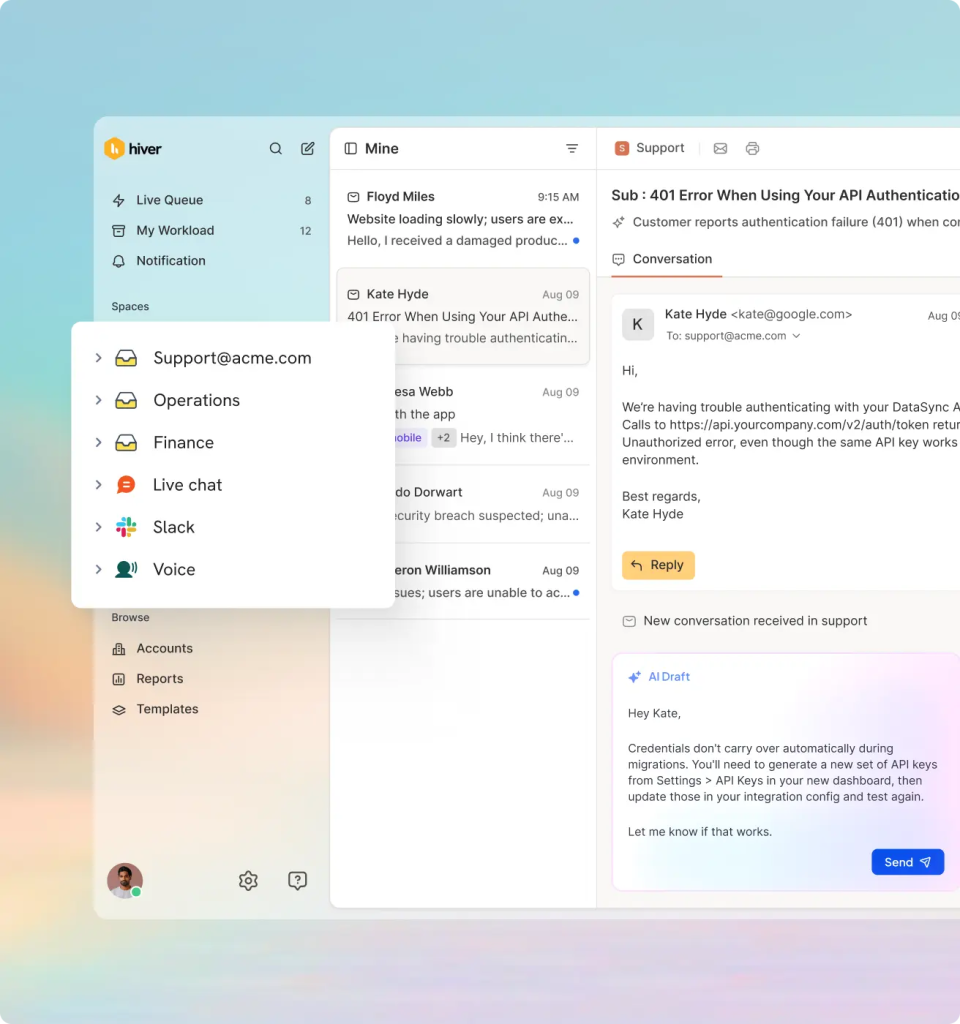
Speed up replies with AI-generated drafts, summaries, and suggestions
Key features:
- AI Compose: Instantly fix grammar, tweak tone, shorten replies, or clean up wording, so your responses are always sharp and on point.
- Smart Email Summaries: Summarize customer conversations into concise notes, making handoffs easier.
- Pull data from 100+ apps: Connect tools like Slack, Jira, WhatsApp, Asana, and more to bring all customer context into one place. AI Copilot fetches key details, like order history or account info, from platforms like NetSuite, HubSpot, and Salesforce, saving you from jumping between tabs.
- Automate Routine Email Closures: Hiver’s AI Thank you detector automatically closes conversations that don’t need a response. For instance, ‘thank you’ messages from customers.
“Thank You” detection by Harvey
- Automated Email Assignment: Automatically route queries to the right team member based on rules (sender name or keywords in the query) or round-robin logic. For example, all bugs can be routed to a technical support specialist.
- Customer Portal: Give customers a place to track ticket status and submit requests without constant follow-ups.
Let customers raise issues and track them via a self-serve portal
- Team Collaboration: No more forwarding queries or CC-ing half the team. Use internal notes to loop in colleagues for help on tickets. Share a draft of the response with your managers or supervisors to get a fresh pair of eyes on it before you send it to customers.
- Smart Analytics & Reporting: Track metrics like resolution time, workload, and CSAT. Build custom reports tailored to your workflows.
- Knowledge Base: Create a categorized, searchable help center where customers can find answers on their own.
Pricing:
Hiver offers five plans: Free Forever, Growth ($25/user/month), Pro ($55), and Elite ($85/user/month). As you move higher, you get more shared inboxes, automation, analytics, and features like CSAT, SLA management, Harvey, and voice support.
Pros:
- Extremely easy to set up and get started, with minimal technical configuration required.
- Improves over time as teams use it, with AI learning from customer conversations and workflows.
- Brings customer conversations, context, and team collaboration into one shared inbox experience.
Cons:
- Hiver only operates in English
- Email auto responders need to be manually turned off
What users say about Hiver:
- “We switched from Zendesk, and it has been a huge improvement. What took us 3 months to set up when we started Zendesk took us about 6 hours to set up in Hiver.”
- “Hiver has a good product for collecting email analytics and improving email workflow. But the best part is the team. They are very helpful and a partner in the process of implementing the application. This is something some other competitors don’t offer.”
- “What I like most about Hiver is that it is very flexible. We have a shared email inbox in our Financial team, and we use it to distribute and allocate workload, and it works like magic.”

2. Velaris
Velaris is a customer success platform purpose-built for post-sales teams: CS, support, onboarding, and renewals. It brings together customer data, workflows, and AI into one unified view, so your team can focus less on ticket-hopping and more on driving outcomes.
Unlike traditional helpdesks or CRMs, Velaris is designed around account intelligence. It doesn’t just tell you what your customers are saying—it helps you act on it.

Velaris Customer 360 view
Key features:
- Sentiment Indicators: Automatically tags incoming conversations with emotional signals—so your team can prioritize frustrated or unhappy customers first.
- Churn Risk Signals: AI analyzes behavioral patterns and support history to surface at-risk accounts before it’s too late.
- Trending Topics: Organize support tickets into categories and subtopics automatically. Understand which issues are most common, how many related tickets exist, and how the volume of tickets is changing over time.
- Writing Assistant: Suggests email and chat responses based on tone, context, and account history—speeding up replies without losing personalization.
- Unified Account Timeline: Combines CRM data, product usage, and support history into one customer view. No more jumping between tools.
Pricing:
Velaris offers custom pricing based on number of users and data sources. AI capabilities are available on enterprise plans or as add-ons.
Pros:
- Brings customer data, support conversations, and workflows together in one central view so you can understand each customer at a glance
- AI-powered insights like churn risk signals, sentiment analysis, and trending topics help teams identify issues proactively.
- Strong automation and integrations
Cons:
- Best suited for customer success and post-sales teams rather than businesses looking for a traditional helpdesk solution.
- Some advanced AI capabilities and features may require enterprise plans or additional add-ons.
What users say about Velaris:
- “Customer support is great, all the integrations are handled on their side which is extremely helpful. Good tool for automations, too.”
- “Velaris has made it much easier for us to gather customer feedback from multiple sources like emails and support tickets. This has helped our team better understand what customers really need, which has improved our product development process.
- “Velaris could be even more helpful if it allowed for more specific segmentation, like including particular product types, when configuring health scores. This would increase the precision of the scoring system.”
3. Freshdesk
Freshdesk by Freshworks combines ease of use with powerful AI capabilities, through its Freddy AI engine. Just like most popular customer support tools, it brings together customer interactions from email, phone, chat, and social media into a unified dashboard.
What really caught my attention is how naturally AI is woven into the platform. Freshdesk’s built-in AI assistant can draft replies, summarize conversations, tag tickets, and even detect customer sentiment. It learns from past interactions and adapts its responses accordingly, across platforms like WhatsApp, Facebook Messenger, and Apple Business Chat.
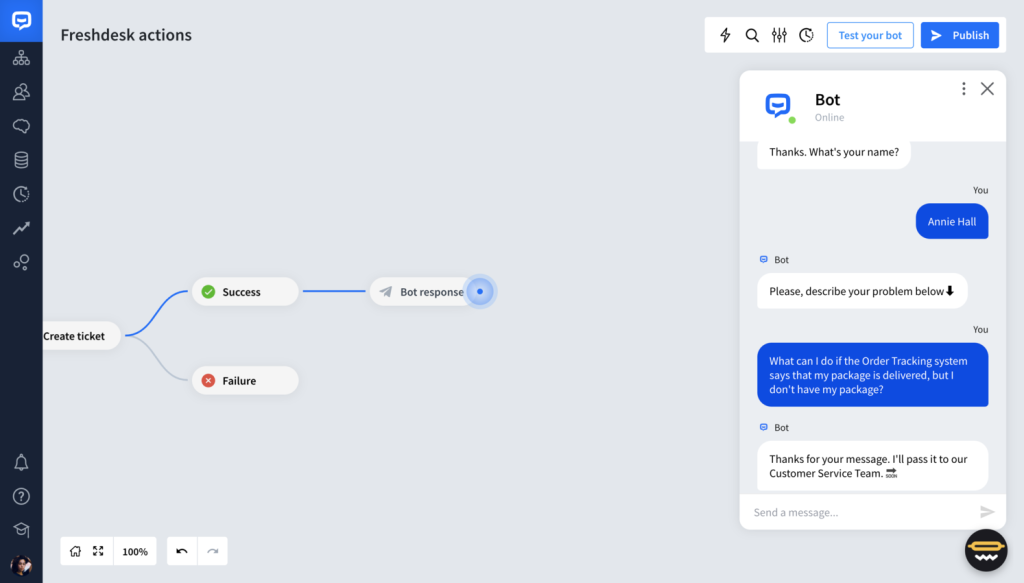
Freshdesk AI Bot
Key features:
- Freddy AI Copilot: Recommends replies, classifies tickets, and surfaces help articles—while also providing real-time feedback on agent performance.
- Freddy AI Insights: Gives managers access to trends like CSAT, response times, and conversation volume. Build custom dashboards and track team metrics.
- Freddy AI Agent: A 24/7 multilingual chatbot that handles common issues using your knowledge base and uploaded PDFs—freeing agents for complex tasks.
- Custom automations and SLAs: Set up rules for routing, escalations, and priority resolutions without having to code.
Pricing:
Freshdesk offers a free plan and four paid plans: Growth at $15/agent/month, Pro at $29, Pro + AI Copilot at $39, and Enterprise at $49/agent/month. Freddy AI is integrated into the Pro, Pro + AI Copilot, and Enterprise plans, at an additional cost starting at $29/agent/month on annual billing.
Pros:
- Offers a broad set of AI tools that support both agents and managers
- Combines powerful automation with an easy-to-navigate interface, making it accessible for teams without extensive technical expertise.
- Supports multiple communication channels, helping teams manage customer conversations from different platforms in one place.
Cons:
- Some of the more advanced AI capabilities come at an additional cost, which can increase the overall investment.
- AI-generated summaries and suggestions may still require human review to ensure accuracy in more complex conversations.
What users say about Freshdesk:
- “Freshdesk offers helpful automation tools, like auto-responses and AI-assisted replies, which have saved our team time and improved response consistency.”
- “I find the AI tool in Freshdesk, while commendable, to be lacking in precision. The summarization of tickets is not yet up to the mark, indicating room for improvement.”
- Freddy AI is especially useful for grammar checking, tonal adjustments in emails, paraphrasing, and summarizing chat or email interactions.”
4. Kustomer
Kustomer is a customer service platform that’s built for high-volume, omnichannel support teams. Its strength lies in how it consolidates every customer interaction – email, chat, SMS, voice, into a single timeline view.
But what really sets Kustomer apart is its modular AI system. You can deploy AI agents, each with its own role in your support workflow, without needing developer involvement.
Kustomer AI agent interface
Key features:
- AI Agents for Customers: Create role-specific bots like a Knowledge Base Agent to suggest help articles, a Triage Agent to sort and route messages, and a Data Agent to detect patterns and surface insights.
- AI Agents for Reps (Copilot): Assists agents with writing clear replies, suggesting next actions (like sharing a doc or escalating), and summarizing long conversations for smoother handoffs.
- AI Agent Studio: A no-code builder that lets ops teams configure, deploy, and fine-tune custom AI agents, without needing dev support.
- Cross-channel Support: Natively supports messaging on email, chat, WhatsApp, SMS, and voice with AI layered throughout.

Kustomer’s AI Agent Studio
Pricing:
Kustomer offers two pricing plans: the Enterprise plan at $89/seat/month and the Ultimate plan at $139/seat/month. Additionally, you can choose AI-powered add-ons, with AI Agents for Customers available at $0.60 per engaged conversation and AI Agents for Reps at $40/seat/month.
Pros:
- Powerful omnichannel support with a unified customer view.
- Flexible AI tools help automate workflows and assist agents.
- No-code AI builder makes customization easier for support teams.
Cons:
- Higher pricing may not suit smaller support teams.
- Some workflow issues may require refinement for smoother daily use.
What users say about Kustomer:
- “I love how seamlessly Kustomer integrates into every part of my workflow from Shopify for processing refunds, to ShipStation, Trustpilot, phone calls, and even WhatsApp.”
- “What I like about Kustomer is the easy navigation of every conversation ticket, the side panel tools, plus the capabilty to use pre-made email macros for quick messaging to customers.”
- “What I dislike about Kustomer is that when trying to add a tag, it sometimes drags and selects a different tag unintentionally, which can be frustrating and slow down the workflow.”
5. Tidio
Tidio is a customer communication platform that combines live chat, helpdesk, chatbot automation, and AI capabilities into one intuitive dashboard.
It’s standout AI feature is Lyro, a no-code conversational agent trained on your help center. Unlike generic bots, Lyro only uses your approved content—so it delivers responses that stay accurate, relevant, and on-brand. It improves over time, learning from real interactions to fill in knowledge gaps.

Tidio’s AI customer service platform
Key features:
- Handle routine queries: Resolves up to 70% of common questions (like order tracking and product info) using your existing knowledge base—reducing pressure on your team during peak times.
- AI Phrase Matcher: Uses NLP to generate natural, context-aware replies that go beyond scripted responses.
- Reply Assistant: Helps agents write faster and more professionally by suggesting pre-filled responses based on context.
- Customer Intent AI: Sort conversations by their intent (support, sales, billing) and route them to the right team instantly.
- Multichannel Inbox: Centralizes chats, emails, Instagram DMs, and Messenger messages—so agents don’t need to switch tabs.
Pricing:
Tidio offers four pricing tiers: Starter ($24.17/mo), Growth ($49.17/mo), Plus ($749/mo), and Premium ($2,999/mo). All plans include 50 free Lyro AI conversations monthly. If you exceed that, AI usage scales with your needs—starting at $39 for 50 additional conversations or $140 for 200. This pay-as-you-grow model makes Tidio one of the more flexible AI customer support software options for smaller teams getting started with automation.
Pros:
- Easy-to-use interface with quick setup for teams new to AI support.
- AI chatbot helps automate routine customer questions effectively.
- Flexible pricing makes it accessible for smaller businesses.
Cons
- More advanced automation features may require higher-tier plans.
- Best suited for simpler support workflows rather than complex enterprise needs.
What users say about Tidio:
- “It’s incredibly easy to use, and the built-in AI assistant is a huge asset. It helps ensure that visitors to our website get instant answers and assistance without delays.”
- “Liro, the Tidio AI agent is a really good way to answer fast to our clients. The implementations and connecting to the different platforms are really easy to implement.”
- “I love that you can save questions for the future, and the bot will supply those programmed answers for customers if I’m away from my desk and cannot respond in a timely manner.”
6. Zoho Desk
Zoho Desk is a cloud-based help desk platform that is part of the larger Zoho ecosystem. This makes it a natural choice for teams already using tools like Zoho CRM or Zoho Social.
What sets Zoho Desk apart is Zia, its built-in AI assistant. Zia helps support teams manage high volumes more effectively by analyzing ticket sentiment, suggesting replies, identifying unusual patterns, and surfacing help articles—so agents can focus on resolution, not digging through information.

Zia’s Sentiment Analysis
Key features:
- Answer Bot: Zia scans your knowledge base and suggests relevant help articles to both agents and customers—reducing response times without added effort.
- Sentiment Analysis: Classifies incoming tickets as angry, neutral, or happy—helping your team spot and escalate at-risk conversations quickly.
- Integration with ChatGPT: Zia uses ChatGPT’s generative AI capabilities to summarize long conversations, analyze tone, and suggest responses.
- Anomaly Detection: Flags unusual patterns—like a sudden spike in tickets or missed SLAs—so you can take proactive action.
- Multibrand Support: Create separate Zia bots and knowledge bases for different brands or teams within the same help desk ecosystem.
Pricing:
Zoho Desk offers a generous free plan for up to three agents, ideal for startups testing the waters. Paid plans include Standard ($14/agent/month), Professional ($23/agent/month), and Enterprise ($40/agent/month). Zia’s advanced AI features—like the Answer Bot, ChatGPT integration, and sentiment scoring—are included only in the Enterprise tier.
Pros:
- Strong choice for teams already using the wider Zoho ecosystem.
- AI capabilities help prioritize tickets, analyze sentiment, and speed up responses.
- Affordable plans and a free tier make it accessible for smaller teams.
Cons:
- Many advanced AI capabilities are limited to the top-tier plan.
- May feel less valuable for teams outside the Zoho ecosystem.
What users say about Zoho Desk:
- “The AI assistant, Zia, is a nice bonus. It helps us with ticket prioritization and even suggests articles from our knowledge base to resolve issues faster.”
- “The interface is clean, and I especially appreciate the AI-based suggestions and response automation, which save a lot of time for the support team.”
- “Lack of AI-powered features on the Express version. While the core functionality is excellent, having access to AI tools, such as ticket sentiment analysis or automated response suggestions, would add even more value, especially for smaller teams.”
7. Intercom
Few platforms have leaned into AI quite as deeply as Intercom. Designed from the ground up as an AI-first support solution, the platform is built around three core AI components: Fin (the customer-facing AI agent), AI Copilot (for support reps), and AI Analyst (for surfacing insights).
These capabilities work together to automate support processes – whether it’s resolving tickets, helping support staff find the right information, or surfacing data-backed insights for team leads.
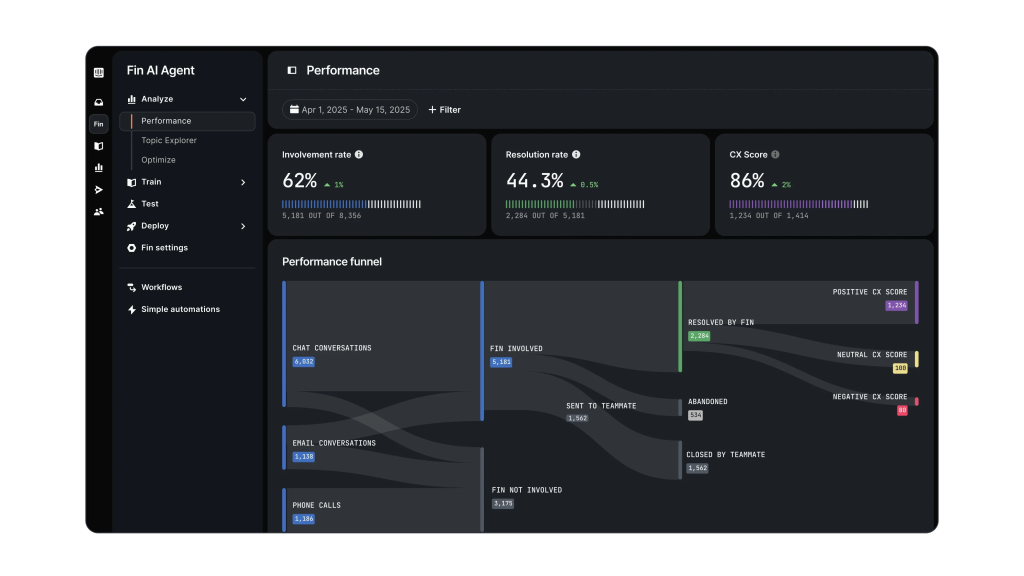
Fin AI Agent
Key features:
- AI Agent: Resolves common customer queries instantly across chat, email, and more. When needed, it seamlessly escalates to a human agent via its shared inbox, keeping the conversation flow intact.
- Checklists: Deliver personalized, in-app task lists to guide users through onboarding, highlight key features, and drive engagement. Great for nudging users toward specific actions without leaving your product.
- AI Copilot: Assists agents in real-time by suggesting replies, pulling up relevant info from your help center, PDFs, internal docs, Notion, Guru, Confluence, and more—helping your team respond faster.
- AI Analyst: Surfaces trends, patterns, and performance insights from support conversations—helping managers make data-driven decisions to improve team efficiency.
Fin AI Copilot
Pros:
- One of the most AI-focused support platforms, with tools for customers, agents, and managers.
- Strong automation and integration capabilities help reduce repetitive support workload.
- Connects AI responses with internal knowledge sources for more informed answers.
Cons:
- Usage-based AI pricing can become expensive for teams handling high ticket volumes.
- AI responses may still need monitoring for accuracy in complex conversations.
Pricing:
Intercom offers three plans: Essential ($29/user/month), Advanced ($85/user/month), and Expert ($132/user/month). Fin, the AI agent, is included in all plans—but you only pay when it resolves a query, at $0.99 per resolution. Plans include up to 10 AI conversations per agent per month, after which additional usage is billed. To enable unlimited Fin access and in-inbox support via AI Copilot, you’ll need to add it to any Full Seat for $35/month.
Intercom’s modular pricing allows teams to ease into AI without committing to enterprise spend—but costs can ramp up fast if you rely on Fin as your frontline responder.
What users say about Intercom:
- “I love that Fin gains its knowledge from all of our assets – Custom Answers, highly rated conversations, Articles, and Snippets, and that Intercom has created a Knowledge Hub where we can organize all of these for easy updating and creation!”
- “I love Fin to 99%, but there is one irritating thing: when you forward an email to Intercom, you cannot control how Fin responds and in what language. Fin considers me as a sender because I am forwarding it, and it’s irritating because if the email is in Spanish, but my language is English, Fin will reply in English.”
- “In our case of customer support, FIN demonstrates a moderate level of accuracy. Speaking in numbers, approximately 25% of the tickets are resolved by it. While this isn’t a bad result, I believe it could be improved to exceed 30%.”
8. Zendesk
Zendesk is one of the most widely used customer support platforms in the world. While its core strength lies in omnichannel ticketing and automation, it now offers advanced AI capabilities that improve team productivity and speed up ticket resolutions.
The latest Zendesk AI suite offers support teams a combination of autonomous resolution, agent-side assistive tools, and real-time intelligence—all designed to scale service without scaling headcount. The platform also offers AI capabilities, like smart suggestions and workflow automation, that improve the productivity of your support team.

Zendesk AI Agents
Key features:
- AI Agents: Zendesk’s AI agents handle customer queries from start to finish by scanning your knowledge base and drafting responses based on the content available there. They work on email, chat, social media, mobile, and voice channels, while supporting over 30 languages. You can monitor their responses and provide feedback in real time.
- AI Copilot: Supports agents in real-time by suggesting responses, predicting customer needs, and recommending next steps. It also automates routine tasks and can resolve certain issues on its own—helping agents focus on more complex conversations.
- AI and Automation: Automate support tasks, like classifying tickets, routing them to the right team, suggesting answers, and even triggering custom workflows.
- AI-Powered Ticket Intelligence: Examine incoming tickets to determine intent, urgency, and sentiment. This helps your team prioritize issues and provide better context for escalation and handoffs.
- Answer Bot: Uses machine learning to auto-suggest relevant help articles from your knowledge base to customers. It works across channels like email, web forms, and the web widget.
Pricing:
Zendesk offers four paid plans. The Suite Team plan starts at $55/agent/month, Suite Growth at $89/agent/month, Suite Professional at $115/agent/month, and the Suite Enterprise plan begins at $169/agent/month. All these plans include the AI Agents feature.
Pros:
- Extensive omnichannel support ecosystem with strong ticketing, automation, and workflow management.
- AI agents and Copilot help reduce manual work across both simple and complex customer conversations and agent tasks.
- Perfect for larger teams that need scalable support operations and complex processes.
Cons:
- Some reporting and customization capabilities are locked behind premium plans.
- Can feel complex to configure and manage compared to simpler support tools.
What users say about Zendesk:
- “It saves time via AI-powered automated answers, which keep customers engaged and get the help they need even when all our agents are busy.”
- “I like the AI features. I can write a response, and ZD can make it more friendly, more elaborate, more formal. It´s great. Also, the Zendesk team is always super helpful and great.”
- “Many of the reporting features are available only for ‘Elite users’. It would be nice to have more automated features and prompts.”
9. Nextiva
Nextiva approaches customer experience from a unified lens—combining voice, chat, email, and automation into one platform. It’s designed for businesses that want to integrate support, sales, and service into a single flow, without juggling between tools.
What makes Nextiva unique is how it blends conversational AI, virtual agents, and call intelligence inside its cloud contact center. For support leaders managing high call volumes or omnichannel teams, this can translate into faster routing, smarter automation, and more human-like virtual agents who handle routine queries.

Nextiva AI
Key features:
- Conversational AI: Enables natural, two-way dialogue using NLP and machine learning—far more fluid than basic chatbot logic.
- Intelligent Virtual Agents: Handle routine queries, book appointments, and share updates without human involvement.
- Speech Recognition and Sentiment Analysis: Transcribes voice calls in real-time and detects customer emotion to help agents course-correct mid-conversation.
- AI-Powered Call Routing: Match customer calls with the most appropriate support agent based on context. This reduces waiting time and improves first-contact resolution.
Pricing:
For digital-first support, plans start at $20/user/month. AI-powered capabilities like call routing, virtual agents, and sentiment analysis are bundled into its Contact Center Professional and Enterprise tiers, which go up to $129/agent/month.
Pros:
- Strong choice for teams managing voice-heavy support with built-in call intelligence.
- Combines communication channels, routing, and automation in one platform.
- AI-powered virtual agents help handle routine requests and reduce agent workload.
Cons
- Best suited for businesses with contact center needs rather than simpler support setups.
- Some AI capabilities are tied to higher-tier contact center plans.
What users say about Nextiva:
- “Nextiva has helped us develop a better relationship with our clients, through the use of VoIP, we are able to screen calls better, as well as, communicate more efficiently and effectively.”
- “Sometimes the wait times via the phone customer service line are a little long, we have waited for upwards of perhaps 40 minutes. Chat is available faster but it is not as helpful sometimes due to the complexity of the issue.”
- “It has multiple options that you can use to implement on your worksite, and you can easily manage your contacts and communicate with teammates or external numbers.”
10. Decagon
Decagon positions itself as more than just a chatbot or AI overlay—it’s a full-stack AI automation engine for customer support. Unlike regular chatbots that follow scripts, Decagon’s AI agents can think and respond on the spot. They can even create tickets, update the knowledge base, and escalate highly complicated cases. With effortless integrations and no rigid decision trees, Decagon provides a flexible, accurate, and scalable solution for customer service teams.
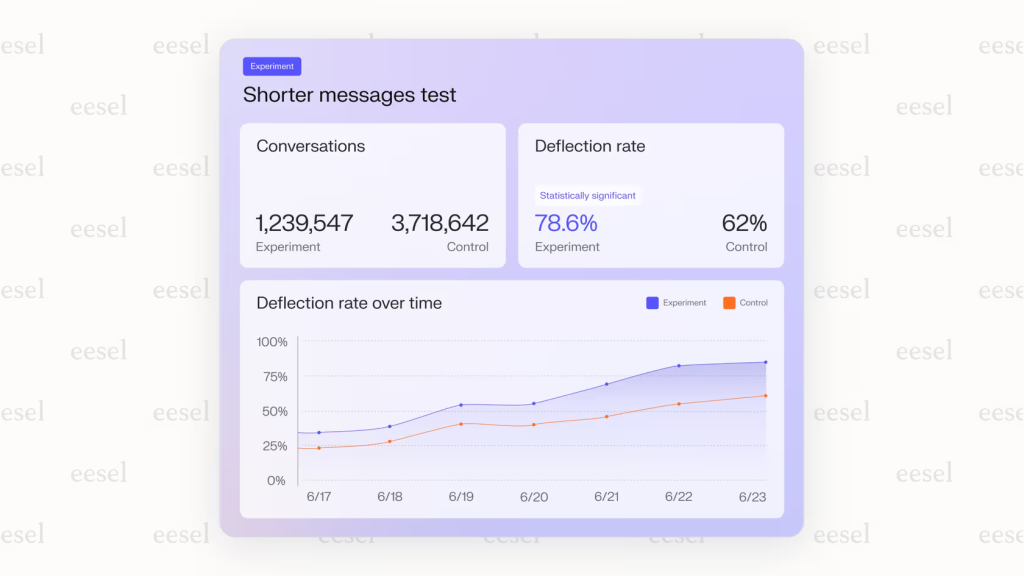
Decagon AI Agent Engine
Key features:
- Agent Assistance: Works as a copilot for human agents– —handling routine queries, offering contextual reply suggestions, and adapting to how agents work over time.
- Dynamic, Personalized Answers: Crafts unique replies using real-time customer data, knowledge sources, and brand-specific logic—without relying on scripted playbooks.
- Watchtower QA & Automated Insights: Monitors conversations in real time, performs automated quality checks, detects patterns and gaps, and provides suggestions for improvement based on actual interactions.
Pricing:
Decagon doesn’t offer standard pricing tiers. Instead, it builds custom plans based on conversation volume, use case complexity, and integration needs. Contact their sales team for more information.
Pros:
- Highly flexible AI agents that can handle complex conversations beyond basic chatbot workflows.
- Uses customer data and business context to deliver more personalized responses.
- Built-in quality monitoring helps teams identify support gaps and improve performance.
Cons:
- Custom pricing can make budgeting difficult for teams evaluating the platform.
- Requires ongoing monitoring and refinement to keep AI responses accurate as information changes.
What users say about Decagon:
- “Decagon allows us to evaluate data on a much deeper level. Boiling down qualitative data isn’t easy, but the AI solution Decagon provides is best-in-class.”
- Decagon is the most advanced chatbot provider on the market today. They truly allow you to create a unique user experience, where you’re adding in AI, but not losing the personalized touch of a human agent.
- “You may require very close monitoring to ensure the bot is effective according to the new information you feed it, It is a learning bot. This could be slightly time consuming depending on when this is rolled into your business.”
Common Challenges with AI in Customer Service
The integration of AI in customer service presents both challenges and opportunities. Here are some common challenges, along with relevant solutions:
Understanding Nuances and Context
AI systems often struggle with understanding the nuances, emotions, and context of customer interactions.
For example, a customer says, “I just bought this product, and it’s not cool.” AI might interpret “cool” in its literal sense when the customer might mean it’s not working properly or isn’t satisfactory.
Solution: Implement a combination of machine learning and natural language processing in the customer service software to better grasp context. Regularly update and train the model based on customer interactions and feedback.
Lack of Human Touch
Many customers prefer interacting with humans because they feel machines lack empathy and understanding. A customer who’s upset about a lost package might not feel comforted by an emotionless AI response.
Solution: Blend AI and human support. Use AI for first-level queries and then smoothly transition to human agents for more complex or sensitive issues. Additionally, design AI to recognize emotional cues and respond empathetically.
Inaccurate Responses
AI might sometimes provide incorrect or non-optimal solutions based on its training data. For example, a customer asks about a product’s vegan status, and the AI, misinterpreting the question, provides details about the product’s availability instead.
Solution: Regularly review and train the AI using feedback loops. Incorporate a system in the software where agents can flag and correct AI errors to improve future interactions.
Integration Challenges
Integrating AI into existing customer service platforms can feel tricky—like adding a chatbot to your current portal and suddenly running into unexpected glitches.
Solution: Pick an AI customer service software that offers pre-built integrations with your existing platforms. Start with a limited deployment, test thoroughly, and gradually expand its scope. This phased approach reduces tech headaches, minimizes disruptions, and lets you fix small issues before they impact your whole customer experience.
Unmanaged Expectations
If AI is perceived as a solution to all problems, it can lead to unrealistic expectations. For example, a company promotes its new AI chatbot as the go-to for all customer queries, but the bot can’t handle complex or out-of-scope issues.
“Too many companies will try to apply AI where it does not belong. It will be painful and expensive. If we focus on AI as an assistant—helping customers self-serve, guiding agents with workflows, and detecting issues proactively—AI becomes a powerful tool. But just because we have a drawer full of hammers does not mean all of our problems are nails.” – Miles Goldstein, Global Product & Technical Support Executive
Solution: Clearly communicate the capabilities and limits of the AI solution. Use the software’s analytics to monitor performance and make continuous improvements.
Is AI Replacing Customer Support Jobs?
AI isn’t taking jobs—it’s reshaping them. Support teams now have the opportunity to work smarter by using AI. By automating repetitive tasks like tagging, drafting responses, summarizing conversations, or pulling customer data from tools like Salesforce or HubSpot, AI allows agents to focus on issues that need human attention—escalations, empathy, and problem-solving.
To make this shift work, companies need to equip their teams. Run short training sessions, create easy-to-follow guides, and encourage hands-on practice with AI features like Copilot or Compose. When agents know how to use these tools, they respond faster, avoid burnout, and deliver more thoughtful support.
This shift is already happening. In our exclusive survey report, “AI vs Human: The Future of Customer Service,” we spoke to 500+ support professionals across the U.S. Nearly 50% believe AI will work with humans, while only 19% think it will fully replace them. AI is becoming a support partner—one that helps agents do better, more impactful work.
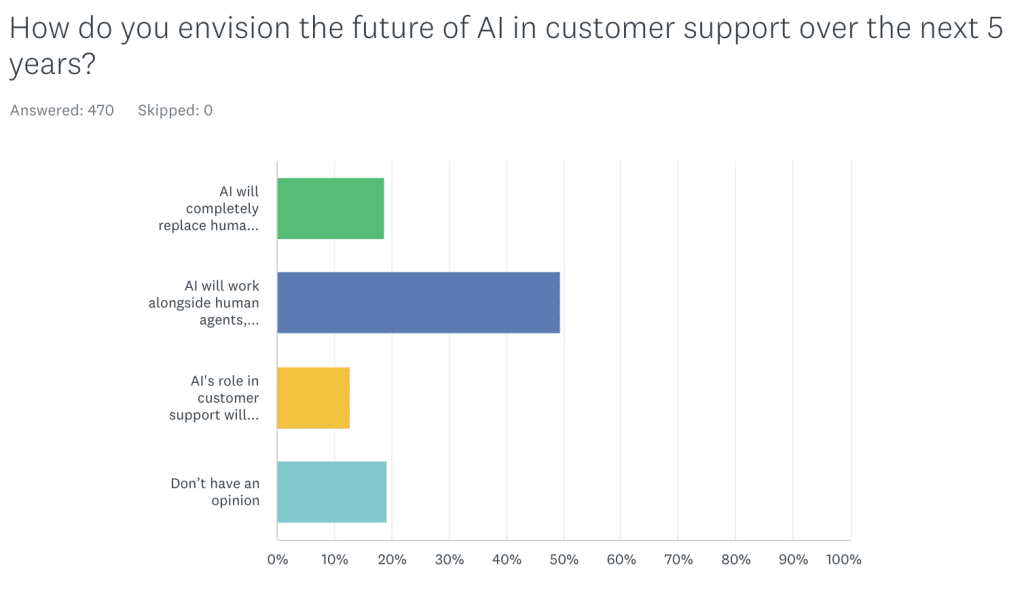
Insights from Hiver’s exclusive “AI vs Human: The Future of Customer Service” survey report
AI can take over those repetitive tasks, reduce manual effort, and give agents the time to focus on more complex issues. It’s no longer just buzz. We even asked 20+ support leaders how AI is showing up in their daily workflows.
Here’s what kept coming up: AI copilots assisting agents in real time, hyper-personalized replies across channels, and smarter self-service powered by AI search.
How to Implement AI for Your Customer Service Team
Ready to roll out AI for your customer service team? Here’s how you can set your team up for success from day one.
- Identify specific tasks to automate: Start small—pick repetitive tasks like ticket sorting or FAQ responses. Quick wins help your team embrace AI without feeling overwhelmed.
- Choose user-friendly software: Go for tools with intuitive dashboards and easy integration with your current systems. The simpler the setup, the faster your team adopts it.
- Run a short pilot program: Launch a pilot with a small group first. This helps iron out issues early and lets your team experience the benefits firsthand, easing wider adoption.
- Offer quick, hands-on training: Short workshops or guided video tutorials are perfect. Keep it practical—just enough to get them comfortable using the software right away.
- Gather team feedback regularly: Have brief weekly check-ins to hear about challenges or wins. It ensures the AI setup stays useful and your team stays motivated.
- Adjust based on real-world results: Review analytics monthly to see what’s working and what’s not. Small adjustments based on real-world insights keep the tool relevant and effective.
- Celebrate quick wins openly: Highlight success stories within your team meetings. Seeing real benefits makes your team feel positive about the transition.
Choosing the Right AI Tool for Your Support Team
From resolving tickets autonomously to helping agents respond faster, AI is making support operations more efficient.
What stands out across the tools in this list is how differently each platform approaches AI. Some are leaning into fully autonomous agents that handle everything from triage to resolution. Others focus on making support agents sharper—offering real-time suggestions, summaries, and sentiment detection. And a few are blending both worlds through intelligent routing and workflow automation.
Don’t just evaluate how “smart” a tool is. Look at how it fits into your support workflow.
- Does it reduce your team’s manual load?
- Can it personalize responses based on real-time data?
- Is it flexible enough to grow with your support volume and channels?
Whether you’re just getting started with AI or ready to scale what you’ve already built, the right platform should make your team faster, not just smarter.













