Skip to content





HappyFox pitches itself as the “all-in-one” help desk. With multi-channel ticketing, automation, and asset management capabilities, it’s designed for teams that want everything bundled under one roof. And to be fair, that pitch works for a lot of enterprises.
But I’ve noticed that this all-in-one approach often feels overwhelming for agile, fast-moving support teams. The interface can feel heavy, the pricing scales up quickly, and smaller teams end up paying for features they barely use. That gap has created a growing market for HappyFox alternatives that are lighter, faster to adopt, and more cost-friendly without compromising on core support capabilities.
In this guide, I’ll walk you through 11 of the best HappyFox competitors worth considering. I’ve highlighted where each tool shines, where it falls short, and why you might pick it over HappyFox.
Table of Contents
- Why Do Teams Consider HappyFox Alternatives?
- The 11 Best HappyFox Alternatives in 2025
- 3. Zendesk
- 4. Salesforce Service Cloud
- 5. Zoho Desk
- 6. Intercom
- 7. Kayako
- 8. HubSpot Service Hub
- 9. Dixa
- 10. LiveAgent
- 11. Groove
Why Do Teams Consider HappyFox Alternatives?
Despite its strengths, HappyFox may not be the perfect fit for every team. Here are some common reasons businesses look for HappyFox alternatives:
High Cost as You Scale
HappyFox’s rich functionality comes at a premium. The Basic plan starts at about $21 per agent per month, while the Pro ($89) and higher tiers climb significantly. For organizations with tight budgets or growing teams, the per-agent costs can become prohibitive – especially if you’re not utilizing all its advanced capabilities. Smaller teams might find they are paying for features they don’t need.
“The cost of HappyFox may be a consideration for small or start-up businesses, as the pricing is based on the number of agents or users.” | Capterra
“We would love to extend this to other staff members, however the cost is very high” | G2
Complex Setup and Learning Curve
Setting up HappyFox can be complex, and new users often face a steep learning curve. The interface and workflows are powerful but not the most intuitive.
The initial setup was painful and required some back-ed programming to support the way in which I wanted the Support Center page layout to appear. | Software Advice
“HappyFox may have a learning curve for users unfamiliar with ticketing systems or customer support software.” | Capterra
Limited Customization and Reporting
Some users report that HappyFox doesn’t offer the level of customization or depth in reporting they desire. If your support strategy relies on highly tailored workflows or detailed analytics, you might feel constrained.
For instance, HappyFox allows up to 15 filter conditions in a report. That sounds good, but users say that when they try to filter by several variables together — for example, agent name + tag + ticket priority + specific status — it gets difficult to build a clean report that meets all their criteria. Some combinations simply aren’t supported or produce empty results.
The reporting isn’t as intuitive and extensive as I hoped. That’s the biggest pain point right now. | G2
“Would like more flexibility in creating and exporting reports.”| Capterra
Integration Gaps
While HappyFox does integrate with many tools, it may not cover every third-party app in your stack. Missing integrations or tricky workarounds can disrupt your support team’s workflow.
“Consideration for adding more business related SaaS / technology tools integrations would be nice.” | G2
“Would love to see more integrations like with Salesforce contacts.” | G2
Overkill for Simple Needs
For teams primarily handling support via email (or small startups), HappyFox’s extensive feature set can be overkill. The platform might feel unnecessarily complex when a simpler, more lightweight help desk would suffice.
“Somewhat difficult to build if you aren’t an IT or engineering kind of person” | Capterra
“Easy to get lost in the software – Tough to find certain things & where they live (not intuitive).” | Capterra
If you identify with any of the above, it’s a good time to explore alternatives to HappyFox.
The 11 Best HappyFox Alternatives in 2025
Now, let’s get into the top HappyFox alternatives. For each tool, we’ll give a brief overview, highlight key features, outline pricing, and explain why we think it’s a good alternative to HappyFox.
| Tool | Key Features | Pricing | G2 Rating |
|---|---|---|---|
| Hiver | – Shared inbox across email, chat, WhatsApp, voice, SMS, and social – AI Capabilities (AI copilot, AI Agents and AI Insights) – Automations and reporting – Knowledge base | Free plan available; Paid plans start @ $19/user/mo | 4.6/5 |
| Help Scout | – Shared inbox- Knowledge base (Docs) – Live chat (Beacon) – AI drafts, summaries, translations | Free plan available; Paid plans start @ $25/mo. | 4.4/5 |
| Zendesk | – Multi-channel ticketing (email, chat, phone, social) – Knowledge base and community forums – Automation and AI (routing, reply nudges, sentiment) – Advanced analytics | Plans start @ $19/agent/mo | 4.3/5 |
| Salesforce Service Cloud | – Case management – Omnichannel routing – Automation and AI (Einstein) – 360° customer view | Plans start @ $75/user/mo | 4.2/5 |
| Zoho Desk | – Multi-channel ticketing – Workflow automation- Zia AI assistant (sentiment, suggestions) – Deep Zoho suite integrations | Free plan available;Paid plans start @ $7/user/mo | 4.4/5 |
| Intercom | – Live chat and in-app messaging – Bots and automation (Fin AI chatbot) – Shared inbox + ticketing – Product tours and targeted messaging | Plans start @ $29/seat/mo + $0.99/resolution for Fin AI | 4.5/5 |
| Kayako | – Unified omnichannel inbox – SingleView timeline across channels – Live chat – Custom workflows | Single plan priced at $79/agent/mo | 4.0/5 |
| HubSpot Service Hub | – Integrated ticketing system – Knowledge base – Live chat and bots – Single customer timeline with sales and marketing | Plans start @ $45/mo | 4.4/5 |
| Dixa | – Omnichannel routing (phone, SMS, email, chat, social) – Integrated telephony – Unified customer timeline – Mim AI agent (intent, context, sentiment) | Plans start @ $89/agent/mo | 4.5/5 |
| LiveAgent | – Universal inbox – Live chat and chat widgets – Call center support – Customer portal and knowledge base | Plans start @ $9/agent/mo | 4.5/5 |
| Groove | – Shared inbox – Knowledge base – Live chat – Lightweight AI (summaries, tags, drafts) | Plans start @ $24/user/mo | 4.5/5 |
1. Hiver
Hiver is one of the easiest-to-use HappyFox alternatives I’ve come across, and I say this without bias. It combines multichannel support (email, chat, WhatsApp, voice, SMS, social) with an interface that feels so intuitive you can get started in minutes, not days or weeks.
What really stands out is the depth of its AI features; they’re baked into how teams work. AI Copilot drafts polished replies, summarizes long threads, and pulls answers from your support documentation.
AI Agents take over routine tasks like triaging, routing, closing thank-you messages, or even processing refunds.
AI Insights helps leaders track sentiment, spot churn risks, and see how automation is performing.
Another subtle but powerful edge is how Hiver blends work emails and support emails. You can manage customer conversations and personal/team inboxes together, without jumping between platforms. And unlike most competitors, Hiver backs this with 24/7 human support on every plan.
Here are a few more features worth noting:
- Multichannel support: Manage all channels like emails, chat, social media, WhatsApp and more from one clean dashboard.
- Shared inboxes: Assign queries and track ownership without messy forwards or tab-switching.
- Live chat: Add a website chat widget for real-time support with round-robin routing, transcripts, and custom flows to handle FAQs.
- Reporting: Track agent performance, including response times, CSAT, workloads, and more with simple, digestible analytics.
- Automation: Automatically route queries, tag by priority, and escalate unresolved tickets.
- Integrations: Connect with 100+ tools like Aircall, Salesforce, Asana, and WhatsApp to keep context centralized.
- Knowledge base: Build a help center for customer self-service.
- Approvals: Let agents initiate and track multi‑step approval workflows right from their shared inbox, collecting feedback or sign‑off from (internal or external) reviewers before sending customer replies.
Pricing
Hiver offers a generous forever-free plan that includes multi-channel shared inboxes, ticketing, live chat, WhatsApp and voice support, a knowledge base, team collaboration features, Slack integration, and 24/7 email and chat support.
Here are details of its paid plans:
- The Lite plan is priced at $19/user per month, giving you a shared inbox, assignments, tags, basic automations, and multi-channel support.
- The Growth plan is priced at $29 per user per month and adds advanced automation, analytics, and integrations like voice calls.
- The top-tier Pro plan priced at $49/user/month includes features like chatbots, CSAT survey, SLA monitoring, AI, advanced analytics, premium integrations and more.
Why Hiver is a good HappyFox alternative
If HappyFox is like a foreign system to your agents, Hiver will feel incredibly intuitive. This nearly zero learning curve addresses one big HappyFox pain point of complex onboarding.
Hiver also offers great value: it’s typically 20-40% more affordable than traditional help desks in the same class, especially when factoring in no training overhead. Hiver’s multi-channel support and automation might cover exactly what you need without the bloat. And if white-glove support matters to you, Hiver provides uninterrupted, 24×7 support on all plans, ensuring you’re never left stranded (HappyFox’s support is limited on some lower-tier plans).

2. Help Scout
Help Scout is a popular help desk platform known for its emphasis on simplicity and user experience. It’s designed to feel as familiar as managing a personal email inbox, which makes it very approachable for small to mid-sized support teams.
With Help Scout, you get a shared inbox, knowledge base (called Docs), and a lightweight live chat widget. It helps your support team incorporate AI into their everyday workflows: think instant drafts, polished replies, quick summaries, and even tone adjustments and translations.
Another reason why companies love Help Scout is for its customer-friendly features. For example, customers never see weird ticket numbers; replies look like normal emails for a more human touch.
Key Features
- Shared Inboxes
- Knowledge Base (Docs)
- Live Chat and Messaging
- Customer Context
- Reporting
- Integrations
Base Pricing
Help Scout has a free plan for up to 100 contacts with limited features. The Standard plan starts at $25/month (billed annually) and includes 2 mailboxes, 1 Docs knowledge base, Beacon chat (with basic features), and reporting.
Help Scout vs. HappyFox
I love how user-friendly Help Scout is – the interface is clean and minimal, so your agents can focus on helping customers rather than navigating a complex UI. Help Scout doesn’t try to do everything under the sun, and that’s ideal for businesses that just need a reliable, easy-to-use email ticketing system.
On the cost front, Help Scout can be significantly cheaper for growing teams because of the unlimited users. You won’t pay more as you add support agents, which removes a common budget pain as you scale. Another reason Help Scout is a solid alternative is its customer-centric approach.
The lack of ticket numbers and the personalized emails can provide a nicer experience for your users. That said, Help Scout isn’t as feature-stacked as HappyFox. For instance, it might lack some advanced analytics or ITIL features that HappyFox offers.
Recommended reading
3. Zendesk
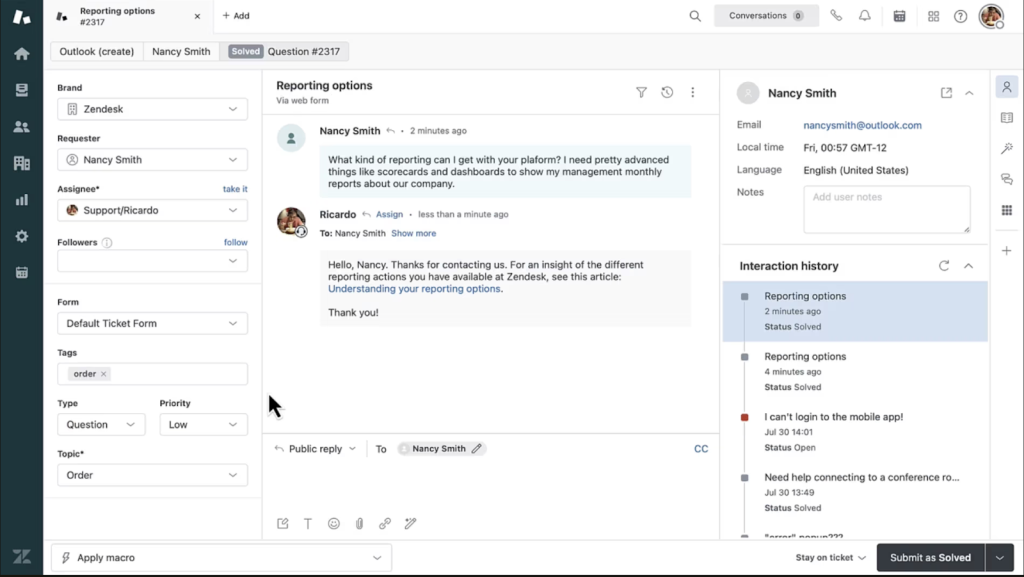
As a HappyFox alternative, Zendesk offers robust omnichannel support, advanced automation, and deep customization, ideal for large teams that need enterprise-grade control and scalability.
Agents can handle emails, live chat, phone calls, social media, and more from one unified interface. Zendesk also has an enormous marketplace of integrations and add-ons. Even its automation and AI features are pretty solid–think smart routing that routes tickets to the right agent, response suggestions for every ticket, sentiment cues to flag critical conversations, and even workload balancing.
Essentially, if you need an all-in-one customer service solution that can be tailored extensively, Zendesk fits the bill. Bear in mind that it can be pricey and complex to work with.
Key Features
- Multi-Channel Ticketing
- Knowledge Base and Community Forums
- Automation and AI Agents
- Extensive Integrations
- Advanced Analytics
Base Pricing
Zendesk’s Support Team plan is priced at $19/agent/month and offers basic ticketing features.
Zendesk vs. HappyFox
Zendesk is often considered the industry standard in customer service software, so it naturally deserves consideration as a HappyFox alternative. If you feel HappyFox is powerful but needs even more flexibility or scalability, Zendesk can deliver that.
I’ve found that Zendesk particularly shines for larger teams that require multi-channel support and integration depth. For example, if you want to run a call center, manage social media tickets, and integrate with a CRM, Zendesk has those capabilities ready to go. That said, the trade-off is complexity: many users report that Zendesk isn’t the most intuitive system for beginners and can be cumbersome to configure. Additionally, Zendesk’s rich features come at a cost – the per-agent pricing and tiered feature sets mean it can get very pricey as you upgrade.
Recommended reading
4. Salesforce Service Cloud
Salesforce Service Cloud is the heavyweight, enterprise-grade customer support solution from Salesforce (the CRM giant). It’s not a standalone help desk in the traditional sense, but rather a deeply integrated part of the Salesforce ecosystem that handles service and support.
For companies already using Salesforce (for sales, marketing, etc.), Service Cloud is a natural HappyFox alternative as it ties customer support directly to your CRM data. It provides a robust case management system, automation through Flows, AI insights, and omnichannel capabilities (email, chat, phone, social).
It especially stands out for its unification of customer data. Support agents have full visibility into a customer’s journey across sales and support, empowering them to offer more personalized support. Although Service Cloud is incredibly powerful and customizable, it can be overwhelming for new users and costly at scale.
Key Features
- Case Management
- Omnichannel Routing
- Knowledge Base
- Automation and AI with Einstein
- 360° Customer View
Base Pricing
Salesforce Service Cloud is priced per user (agent) and has editions rather than an “all-in-one” bundle. The Professional edition starts around $75 per user/month (billed annually) and covers core service features.
Salesforce Service Cloud vs HappyFox
Salesforce Service Cloud is in a league of its own in terms of breadth, thanks to that tight CRM integration. If one of your frustrations with HappyFox is that your customer support tool feels siloed from the rest of your business data, Service Cloud eliminates that. Your agents and sales reps essentially share the same customer record, which can improve collaboration across teams.
I’d also like to highlight that Service Cloud is supremely flexible. You can customize case layouts, build custom workflows, and even develop your own add-on apps within Salesforce, which is fantastic if you have very specific processes (though this requires admin/developer expertise). The trade-off, of course, is that Salesforce Service Cloud can be daunting and heavy. It has so many features that it might overwhelm teams that just need a straightforward ticketing system.
Cost is another differentiator: Salesforce is generally more expensive, especially when you start layering in needed add-ons or higher tiers, whereas HappyFox might offer a more inclusive package at a lower price point.
5. Zoho Desk
Zoho Desk is a help desk solution designed to provide agents with full customer context. It’s part of the larger Zoho suite of business applications. The system holds the edge over HappyFox as it combines broad customer service features with relatively affordable pricing.
Zoho Desk supports multi-channel ticketing (email, web, phone, social), automation, and a nifty AI assistant named Zia.
Zia can detect sentiment in tickets, suggest responses, pull up the right knowledge base articles, and even flag spikes in ticket volume before they spiral out of control.
If your company already uses other Zoho products (like Zoho CRM), Desk naturally integrates with them to create a unified ecosystem. Users often appreciate Zoho Desk’s customizability and AI features, though some caution that it can become complex as you unlock all the capabilities.
Key Features
- Multi-Channel Ticket Management
- Workflow Automation
- Zia AI Assistant
- Extensive Integrations (especially with Zoho apps)
- Workflow Customization
- Analytics
Base Pricing
Zoho Desk has a Free plan for up to 3 agents, which includes email ticketing and a basic knowledge base.
Its Express plan, priced at $7 per user/month, adds social channels, workflow automation, task assignments, round robin ticketing, CSAT surveys, and pre-built reports and dashboards for up to 5 users.
Zoho Desk vs. HappyFox
Zoho Desk strikes a nice balance: it’s an affordable help desk for small teams yet packed with enough features to serve mid-size (and even some enterprise) needs. If cost is the main reason you’re moving away from HappyFox, Zoho Desk can undoubtedly save you money while still giving you multi-channel support and strong automation.
I also appreciate Zoho Desk’s flexibility in integrating with the broader Zoho suite. For businesses already in Zoho’s ecosystem, this integration can be a game-changer, as data flows seamlessly without needing to build or maintain it via external integrations.
In terms of user experience, HappyFox is known for its straightforward interface, whereas Zoho Desk might feel a tad more intricate and cluttered if you enable the entire range of features (there are many tabs and options).
Recommended reading
6. Intercom
Intercom is a customer communication platform that takes a chat-first approach rather than a traditional ticketing-first approach. It’s the engine behind those in-app messengers and chat bubbles that many startups and SaaS companies use to talk to users. As an alternative to HappyFox, Intercom is ideal if you want to provide real-time support and personalized, proactive messaging.
It handles live chat support, in-app messaging, email (converting chats to emails when users are offline), and has a robust automation engine. Intercom even includes an AI chatbot (Fin) that can answer customer questions automatically, but do note that Intercom can get quite expensive as your user base grows.
Key Features
- Live Chat and In-App Messaging
- Fin AI
- Ticketing System
- Knowledge Base
- Customer Data Platform
Base Pricing
The Essential plan costs $29/seat/month and includes a shared inbox, messaging, ticketing, help center, basic automation features, plus access to the Fin AI Agent at $0.99 per resolution.
Intercom vs. HappyFox
Intercom is a different beast compared to traditional help desks like HappyFox. I would recommend Intercom as an alternative if your support strategy is centered on live chat, quick back-and-forth conversations, and proactive customer engagement. It’s superb for companies that want to prioritize in-app support.
HappyFox does have live chat and multi-channel capabilities, but Intercom’s chat and in-app messaging experience is arguably more refined and engaging, with features like interactive product tours and message targeting. Also, Intercom’s AI chatbot, Fin, is top-notch – it’s known for delivering very human-like answers and supporting many languages, which could reduce agent intervention for common questions.
On the flip side, if you primarily deal with a large volume of email tickets or need formal ITSM-style ticketing with fields and forms, Intercom might feel too chat-oriented and less structured.
Another consideration is cost: for a similar budget that gets you HappyFox, you might get fewer seats or lower volume limits on Intercom.
Recommended reading
7. Kayako
Kayako has been around for a while in the help desk space. It has evolved over the years into a cloud-based solution that emphasizes an integrated, omnichannel support experience. Like HappyFox, Kayako tries to bring multiple channels (email, live chat, social) into one system and focuses on ease of use and team collaboration.
One of its distinctive ideas is the SingleView timeline: a unified view of a customer’s conversations across channels. Kayako’s target audience tends to be small to mid-sized businesses that need multi-channel support without venturing into enterprise complexity. It’s simpler than something like Zendesk, but more multi-faceted than some of the other very basic help desk software.
Key Features
- Unified Omnichannel Inbox
- Live Chat and Collaboration
- SingleView timeline
- Customizable Workflows
- Self-Service Portal
- Insights and Reporting
- AI Chatbot
Pricing
Kayako offers a single all-inclusive plan at $79/month, giving you full access to features like a shared inbox, ticketing system, pre-built reports, multi-brand support, multiple team inboxes, a multilingual help center, and a customizable messenger.
Kayako vs. HappyFox
If you like HappyFox’s all-in-one idea but perhaps find it slightly lacking in either price flexibility or maybe specific integrations, Kayako could be an alternative to consider.
The feature I like best about Kayako is the unified conversation view across channels; HappyFox also consolidates channels, but Kayako’s SingleView is particularly great for keeping context intact as customers switch channels.
In terms of differences, Kayako might not have as extensive an automation or asset management feature set as HappyFox does (HappyFox has some ITSM leanings with asset management, etc., if you use those). Also, HappyFox offers more built-in integrations out of the box, whereas Kayako’s integration list is a bit more limited (though it covers basics like Salesforce, Magento, Shopify via Zapier or native connectors).
When it comes to pricing, Kayako keeps it simple with a single, all-inclusive plan. For most 10-member teams, HappyFox Team Plan offers the best initial value at $490/month – that’s $300/month (38%) less than Kayako. However, if you need comprehensive features without tier restrictions and value AI automation, Kayako One at $790/month provides better long-term value with its all-inclusive approach.
Recommended reading
8. HubSpot Service Hub
HubSpot Service Hub is the customer support arm of the broader HubSpot CRM ecosystem. If you’re already using HubSpot for sales or marketing, it slots right in as the service layer.
As a HappyFox alternative, HubSpot Service Hub is compelling if you are keen on having your support, sales, and marketing data all in one place. It offers ticketing, a knowledge base, live chat, and customer feedback tools, all integrated with the HubSpot CRM, so every customer interaction is tied to a rich customer record.
The interface is very polished and user-friendly, and it’s great for teams that want a unified growth platform. On the flip side, HubSpot’s advanced features can get pricey, and it’s most beneficial if you use the whole platform.
Key Features
- Integrated Ticketing System
- Live Chat and Bots
- Knowledge Base
- Customer Feedback and Surveys
- Automation and CRM Power
Base Pricing
The Service Hub Starter plan is priced at $45/month for 2 paid users. It includes live chat, meeting scheduling, ticket automation, conversation routing, and email/in-app chat support.
HubSpot Service Hub vs. HappyFox
For organizations looking to align their customer service closely with sales and marketing, HubSpot Service Hub is an excellent alternative. Teams can hugely benefit from the single source of truth that HubSpot provides – your support agents and sales reps see the same contact timeline, which fosters transparency and better customer experiences.
HappyFox offers integrations with CRMs, but having an all-in-one platform is usually more seamless. Additionally, if you need not just reactive support tools but also proactive engagement, HubSpot combines them. For instance, you can use marketing emails, in-app tips, etc., alongside support – somewhat akin to Intercom’s vision but in a unified CRM.
The main caveat with HubSpot is cost at scale: advanced features like automation workflows and deeper analytics are only available in the Professional or Enterprise tiers, which can be pricey.
HubSpot Starter, for instance, costs $200/month for 10 agents (59% cheaper than HappyFox Team at $490/month), but HubSpot Professional jumps to $900/month plus $1,500 onboarding fee, making it more expensive than HappyFox Pro at $990/month.
If your budget is tight and you only need basic help desk functions, HappyFox or others might be more economical.
Recommended reading
Best HubSpot Service Hub Alternatives to Power Your Support in 2025
9. Dixa
Dixa is a newer player in the support software space. It’s essentially an omnichannel contact center platform that unifies phone, email, chat, and messaging apps into one system. Dixa’s focus is on delivering personalized customer experiences and making it easy for support teams to engage with customers across channels without friction.
What stood out to me most in the platform is its Mim AI agent. It picks up on customer context, sentiment, and history to detect intent and trigger the right workflow. Paired with its AI-powered knowledge base that surfaces real-time suggestions for agents, it helps teams not waste time digging for answers.
If HappyFox’s multichannel support appeals to you, but you also heavily rely on voice support or want a fresh interface, Dixa is a compelling alternative.
Key Features
- Omnichannel Routing
- Integrated Voice (Telephony)
- Unified Customer Timeline
- Personalization and Customer Recognition
- Analytics
- Mim AI Agent
Base Pricing
The Growth plan is $89/agent/month and adds full omnichannel support (phone, SMS, chat, social, email), callback scheduling, CSAT, language detection, team segmentation, a knowledge base, and key integrations.
Dixa vs. HappyFox
Dixa is an excellent alternative to consider if your support strategy is truly omnichannel. Compared to HappyFox, Dixa provides an even more unified experience when blending voice and digital channels—an area where HappyFox might rely on integrations (like hooking into a third-party phone system).
If your team handles many calls, chats/emails, having them in one queue with Dixa can improve efficiency and reporting consistency. In terms of ease of use, Dixa is relatively modern and agents often find it intuitive. It’s built with the idea of a “next-gen contact center”, so it feels less like a ticketing system and more like a friendly conversation hub.
The downside could be complexity and cost – implementing an omnichannel platform, including voice, is inherently a bit more complex than implementing, say, just an email ticketing system.
Additionally, Dixa’s cost might be higher than HappyFox. Dixa costs 40-82% more than comparable HappyFox plans ($890/month vs $490/month for mid-tier plans, or $1,390/month vs $990/month for advanced tiers), making it a premium choice that’s primarily justified for teams with heavy voice support requirements and complex omnichannel needs.
10. LiveAgent
LiveAgent is a help desk and live chat solution known for offering a ton of features at a very competitive price point. It’s been around for a while, evolving into an all-in-one support hub that includes email ticketing, live chat, a built-in call center, and even social media integration.
If HappyFox’s comprehensive feature set appeals to you but you’re looking for a more budget-friendly option, LiveAgent is definitely one to look at. While its interface might not be as flashy as some newer tools, it is robust and continually updated.
Key Features
- Universal Inbox
- Live Chat and Chat Widgets
- Call Center Support
- Automations and Rules
- Customer Portal and Knowledge Base
Base Pricing
LiveAgent’s Small Business plan starts at $9/month and includes core ticketing, live chat, and basic automation.
LiveAgent vs. HappyFox
LiveAgent stands out as a feature-rich yet cost-effective alternative to HappyFox. Even its most feature-rich Large plan ($390/month) costs $600 less monthly than HappyFox Pro while delivering comparable omnichannel capabilities.
I also like how mature the product is – it’s been around for over a decade, so a lot of kinks have been ironed out. If you require help, LiveAgent provides 24/7 support to its customers, which not all competitors do (for instance, HappyFox’s support availability can depend on your plan).
Now, consider your needs: if you require extensive customization options or very advanced workflow capabilities, HappyFox or others might have an edge. LiveAgent covers most bases well, but it might not have the extreme flexibility of a Zendesk or the deep CRM integration of a Service Cloud. However, for a huge segment of typical support operations, LiveAgent offers 95% of what’s needed at a fraction of the cost.
Recommended reading
10 LiveAgent Alternatives for Your Customer Support Team in 2025
11. Groove
Groove markets itself as an alternative to overly complex help desk systems. It’s built for teams that mainly need to handle email support collaboratively along with a knowledge base.
It even offers some lightweight AI features. The AI can summarize conversations, pick up on sentiment, suggest tags, and draft smart replies so teams don’t have to start from scratch every time.
If you find HappyFox or some other support tools too feature-heavy or pricey for your lightweight needs, Groove could be the ideal alternative. It strips support down to the fundamentals: shared inbox, chat, social support, knowledge base, and basic reports – all in a clean, easy-to-use package. Its simplicity is its greatest strength; even non-technical folks can get it up and running quickly.
Key Features
- Shared Inbox
- Knowledge Base
- Live Chat
- Integrations
- Reporting and Analytics
- AI-Powered Ticketing Features
Base Pricing
The Standard plan costs $24/user/month and includes core helpdesk features like two inboxes, live chat, social support, and basic automation.
Groove vs. HappyFox
The appeal of Groove is in its utility and focus. I think it’s a great HappyFox alternative for small support teams overwhelmed by too many features in their customer service software. With Groove, you get a clean, clutter-free workspace to handle customer emails, which is the primary channel for many support teams. HappyFox, by contrast, packs in many modules (asset management, tasks, etc.) that smaller teams might not use.
Teams often report that Groove’s learning curve is minimal; you can literally sign up and start responding to tickets within minutes, and your agents need little training. In terms of cost too, Groove can also be easier on the pocket.
That said, it’s important to note what you won’t get with Groove: it’s not as feature-rich, and its automations are simpler. If you require complex workflows, advanced analytics, or a built-in call center, Groove might fall short.
Recommended reading
How to Choose the Right HappyFox Alternative
When evaluating HappyFox competitors, keep the following factors in mind to find the best help desk software for your team:
Channels and Use Cases
Identify your primary support channels. Do you mainly handle email tickets? Live chat or messaging in-app? Phone calls? Social media DMs? Different tools excel at different channels (e.g. Intercom is fantastic for live chat, while Help Scout focuses on email). Also consider any specialty use case, like e-commerce support, IT internal support, etc., and match tools known for those strengths.
Seamless Integration with Your Stack
Consider where you spend your day. If you already use a CRM like Salesforce or Zoho, picking a help desk that natively integrates (or is part of the same suite, like Zoho Desk or Salesforce Service Cloud) will make life easier. Look at integrations for Slack, project management, and e-commerce platforms—whatever is critical for your workflows.
Team Size and Collaboration
How large is your support team and how do they collaborate? Some support tools are built for scaling to hundreds of agents with advanced role permissions (e.g. Zendesk, Salesforce), whereas others shine for small teams with simpler collaboration needs (e.g. Groove for startups). If you have multiple departments or brands, check features like multi-brand support or team-based workflows to keep things organized and efficient.
Pricing Model and Budget Fit
This is a big one. Help desk pricing varies wildly, from per-agent (common) to per-contact (Help Scout) to per-ticket or even unlimited agents with fixed bundles (some HappyFox plans).
Forecast your usage and see what model is most cost-efficient. For instance, Help Scout’s new pricing (unlimited users, pay by customer contacts) might save money if you have many agents but receive relatively few tickets. On the flip side, if ticket volume is high, per-ticket pricing could become pricey. Match the pricing structure to your support volume and team size.
Ease of Use vs. Power
There’s often a trade-off between simplicity and advanced capabilities. Ask yourself: do we need enterprise-grade features (and am I okay with the complexity that comes with them)? Or do we value a clean, easy interface for the team over having every bell and whistle? Hiver and Help Scout, for example, prioritize simplicity and personal touch, whereas Salesforce Service Cloud or Zendesk offer a vast feature set but can be overkill (or require more admin effort) for smaller teams.
Support and Reliability
Finally, consider the reputation of the vendor. You want a partner who is reliable (uptime, security) and will support you when you need help. This might mean checking reviews about support responsiveness, SLAs, community forums, etc. If “supporting support teams” is important to you, it’s fair to hold these vendors to a high standard on customer service.
Frequently Asked Questions
What is HappyFox?
HappyFox is a cloud-based help desk known for its all-in-one approach. It offers a robust ticketing system, multi-channel support (email, chat, social, phone), a knowledge base, and plenty of automation capabilities. HappyFox is designed to help medium to large organizations manage customer inquiries across departments like IT, HR, and beyond.
You get the works: knowledge base, automations, asset tracking, and reporting tools. You also get integrations with tools like Salesforce, Jira, Slack, and Shopify.
In short, HappyFox is feature-rich and enterprise-ready. But all that capability comes with added complexity and often, a heavier price tag.
What are some free HappyFox alternatives?
Several tools HappyFox alternatives offer free plans. For example:
Hiver (forever free plan with limited features)
Zoho Desk (free for up to 3 agents)
Help Scout (free for up to 100 contacts)
These are great options for startups and small teams testing out help desk software.
Does HappyFox offer unlimited agent pricing?
Yes. HappyFox also has unlimited-agent plans that start at about $1,599 per month for up to 20,000 tickets/year. Higher tiers (Scale, Scale Plus, Ultimate) increase the ticket limits and add advanced features, ranging from $3,199/month to $4,799/month, with Ultimate being custom-quoted.
Start using Hiver today
- Collaborate with ease
- Manage high email volume
- Leverage AI for stellar service