







HubSpot Service Hub has built a reputation for integrating ticketing, automation, and CRM tools into a single support platform. But it’s far from the only choice for efficient customer support and doesn’t meet every company’s needs.
Maybe it’s overkill for your small support team or too expensive as you scale. Or maybe you just want a simpler help desk that’s easier for your agents to use day to day.
Whatever the reason, there are several HubSpot Service Hub competitors tailored to different team sizes, budgets, and workflows.
In this guide, we’ll break down 10 top alternatives to HubSpot Service Hub, and what really matters when choosing one.
What is HubSpot Service Hub?
HubSpot Service Hub is an AI-powered customer service platform built on HubSpot’s CRM. It helps businesses manage support across different channels, including email, live chat, social media messaging, SMS, voice calls, and in-app messaging – all within a unified help desk.
Support teams can also tap into features like omnichannel support, knowledge base management, customer portal, automated workflows, and SLA tracking, making it easier to deliver contextual support and manage customer interactions at scale.
While the tool provides an intuitive interface for basic ticketing functions, many support teams find that its competitors are better suited to their evolving needs.
We’ll learn more about HubSpot Service Hub’s limitations in the next section.
Recommended reading
How to Build an Omnichannel Customer Support System That Works
Why Look for HubSpot Service Hub Competitors?
HubSpot Service Hub is a popular support platform, but many businesses seek alternatives as they grow, mainly due to high pricing tiers, limited features in lower pricing plans, inconsistent support, complexity in onboarding, and the absence of advanced workflow capabilities.
Here’s a detailed breakdown:
1. Limited Features for Lower Pricing Tiers
The Starter and Free plans lack key features like managing knowledge bases, customizing ticket workflows, and advanced analytics. This often pushes teams to upgrade earlier than planned, even for basic functions.
“Advanced reporting and customization options can require an additional investment in higher tiers, and installing marketplace apps from third-parties.“– G2 Review
2. Complexity in Onboarding
Even though Service Hub has an easy-to-use interface, getting it set up and tailored to your specific work processes might take more time and learning than expected, especially for companies that haven’t used CRM systems.
“The learning curve was a bit of a challenge. I had to figure out a lot on my own, and it wasn’t always clear where to start or how to get the most out of it early on.”– G2 Review
Recommended reading
Customer Onboarding: Why It Matters, Best Practices, and Examples
3. Limited Help Desk Customization
Teams with specialized support processes might find HubSpot Service Hub’s help desk too inflexible. Tweaking ticket properties, automations, or agent workflows often requires workarounds or help from developers.
“You can’t tailor every single detail, especially when it comes to complex workflows or deeply customized ticketing setups.”– G2 Review
4. Advanced Support Workflows
HubSpot Service Hub doesn’t work well for IT service management (ITSM) automated workflows because it lacks built-in tools to handle incidents, problem/change requests, and asset tracking, thus making it a poor fit for IT or enterprise service teams.
“Not really designed for technical service tickets. No way to “sign in to a ticket and be required to track issues”. I am sure this system would be good for general customer service issues, but with no way to track root causes and fixes to issues, it really does not work smoothly for multiple technicians.”– G2 Review
Recommended reading
Key Features to Look for in HubSpot Service Hub Alternatives
When you’re exploring HubSpot Service Hub alternatives, look for features like flexible pricing, support across multiple channels (like email, chat, social media, and phone), automation, self-service options (knowledge bases and customer portals), CRM integration, quick onboarding, and advanced AI capabilities.
Here’s a closer look at what you should evaluate:
1. Affordable Pricing (Especially for Startups or Scaling Teams)
Check out pricing plans of other alternatives that give you the basic features you need, like ticketing, reporting tools, and automation, without immediately forcing you into expensive tiers. Flexible pricing based on usage or seats can help you scale without committing to expensive upgrades too early.
2. Omnichannel Support (Email, Chat, Social, Phone)
Choose a tool that lets you manage all customer interactions across email, live chat, social media, and phone support from one place. A unified view helps agents respond quickly and with better context.
Recommended reading
3. Automation and Workflow Capabilities
Even as ticket volume grows, automation can help teams stay productive. Look for tools that support skill-based routing, auto-replies, escalations, and custom triggers to reduce manual work and improve response consistency.
4. Self-Service Options (Knowledge Base, Customer Portal)
Most customers prefer solving simple queries on their own. Look for tools that offer a knowledge base and customer portal, so users can find answers, track support tickets, and get help anytime without contacting support.
Recommended reading
5. Integration with CRM, Marketing, and Other Tools
Your support software should work seamlessly with your current tech setup. Look for platforms with built-in or API-based integrations with CRMs, email systems, analytics platforms, and collaboration apps, so your team can access everything they need without constant tool-switching and ensure a smooth data migration when transitioning from another platform.
6. Ease of Use and Quick Onboarding
The most capable tools are the ones that are the easiest to use. A simple interface, easy-to-follow menus, and guided setup help new agents get started without a learning curve or tech support. This means they can start using the tool immediately, saving time and reducing frustration for everyone involved.
7. AI Capabilities
Today, AI features are key to helping support teams work faster and deliver higher-quality service with less manual effort. Features like ticket categorization, suggested replies, chatbot assistants, and sentiment analysis allow agents to focus on complex issues while improving response speed and quality.
Top HubSpot Service Hub Competitors to Consider
Popular HubSpot Service Hub competitors in 2025 include Hiver, Freshdesk, HelpScout, LiveAgent, Zoho Desk, Zendesk, Gorgias, Front, Salesforce Service Cloud, and Desk365.
Below is a quick comparison of the top alternatives:
| Tool | Key Features | Starting Price (for add-ons) | Free Trial | G2 Rating |
| Hiver | – Multi-channel support – Automation – Reporting – Customer feedback surveys – AI Co-Pilot and summarizer – 24×7 vendor support – SLA management – CSAT surveys | $19/month per user | 7 days | 4.6 🌟 |
| Freshdesk | – Helpdesk AI (Freddy) – Omnichannel support – Collision detection – Shared ownership of tickets – Gamification | $11/month per user | 14 days | 4.5 🌟 |
| Help Scout | – Automation – AI-powered Capabilities – Analytics – Response templates – Live chat – Knowledge base | $25/month per user | 15 days | 4.4 🌟 |
| LiveAgent | – Multi-channel capabilities – Ticket tagging – Canned responses – SLA management – Workflow automation | $9/month per user (offer) | 30 days | 4.5 🌟 |
| Zoho Desk | – Multi-channel support – AI-powered sentiment analysis – AI-powered response assistance – Email templates | $7/month per user | 15 days | 4.5 🌟 |
| Zendesk | – Omnichannel support – Collaboration tools – AI-powered tools – SLA management | $19/month per user | 14 days | 4.4 🌟 |
| Gorgias | – E-commerce Integrations – Ticket Management – Templates and Automation – In-depth Analytics | $50/month per user (with 300 helpdesk tickets) | 7 days | 4.6 🌟 |
| Front | – Ticket tagging, routing, and tracking – Shared drafts – Live chat – Reports and dashboards – AI-powered assistance | $25/month per user | 14 days | 4.7 🌟 |
| Salesforce Service Cloud | – Multichannel Support – AI-powered Chatbot – Analytics and Reporting – Automation | $25/month per user | 30 days | 4.4 🌟 |
| Desk365 | – AI-powered Support – Workflow Automation – SLA Management – Integration with Microsoft Teams | $12/month per user | 21 days | 4.8 🌟 |
Hiver
Hiver is an AI-powered multichannel help desk software with a modern yet familiar UI. It comes with a sidebar to handle all support channels: email, live chat, WhatsApp, voice, SMS, and social media. You don’t need to learn new tools, deal with complicated migrations, or juggle multiple tabs. Unlike most other help desk tools, teams using Hiver can get started in minutes.
Its unified interface allows you to manage both personal and shared emails from a single platform. Hiver also includes automation, SLA tracking, analytics, and CSAT surveys, giving you all the essentials to run your support operations from the get-go.
A feature that truly stands out is Hiver’s AI Co-pilot. It pulls answers from your knowledge base and connected tools like Salesforce and NetSuite in real time, helping agents respond faster without toggling between tabs. Think of it as an intelligent assistant embedded right into your workflow.
AI agents automatically handle ticket triage, response drafting, and routing, freeing your team from repetitive queries. They can even detect customer sentiment to prioritize critical issues. With AI Insights, you get a clear view of churn risks and emerging support trends, helping you take action before things escalate.
While HubSpot Service Hub includes more extensive CRM functionality, Hiver focuses on simplicity, speed, and support performance—making it a practical alternative for teams seeking operational efficiency without the added platform complexity.

Other Key Features
- Built-in Ticketing: Businesses can track every customer question like a ticket, making it simple to assign tickets, check up on them, and finish tasks without missing anything important.
- Instant Context with Every Customer: Hiver’s Contacts gives agents a 360° view of customer interactions, including past conversations, CSAT ratings, and internal notes to respond faster, personalize replies, and spot patterns to improve service quality.
- Workflow Automation: Set up automation systems for routine tasks such as assigning tickets, following up, and updating statuses with rule-based workflows.
- Internal Collaboration Tools: Shared Drafts, notes, and @mentions enable the team to work together on responses without sending emails or changing apps.
- Knowledge Base: Hiver allows you to create a knowledge base with FAQs, step-by-step guides, and tips for troubleshooting issues. This lets customers find answers by themselves at any time.
- Live Chat: From your help desk, you can talk with website visitors immediately, resolve queries, and turn leads into customers.
- Advanced Analytics: Optimize your team’s performance with easy-to-understand reports on response times, the number of issues solved, CSAT scores, and individual workload.
- Integrations: Hiver connects with 100+ tools that your team already uses, including Slack, WhatsApp, and CRM platforms. You can manage customer conversations, automate workflows, and share updates without too much tab-switching.
- 24/7 Global Support: Besides its easy-to-use design, Hiver offers 24/7 customer support on all plans. When you need help with setup or fixing problems, Hiver’s support team is always ready to assist you.
Pricing
Hiver offers a forever-free plan that includes support channels like live chat, phone, a shared inbox, and WhatsApp. The Lite plan ($19 per month) includes everything in the Free Plan, plus features like a customer portal, workflow automations, round-robin assignment, SLAs, custom fields, approval workflows, conversation analytics, and essential integrations.
Hiver also offers a 7-day free trial that gives you full access to all its features.
“Hiver allows us to manage our shared email alias seamlessly without the need to switch to a separate platform. The ability to assign emails to specific team members, add internal notes, and track email statuses (open, pending, closed) has helped us ensure accountability and avoid duplicated efforts. It has essentially turned our inbox into a light but effective helpdesk.” Hiver User Review | G2
Freshdesk
Freshdesk is a multichannel help desk platform that lets teams manage customer queries across email, chat, phone, WhatsApp, and social media from one unified view.
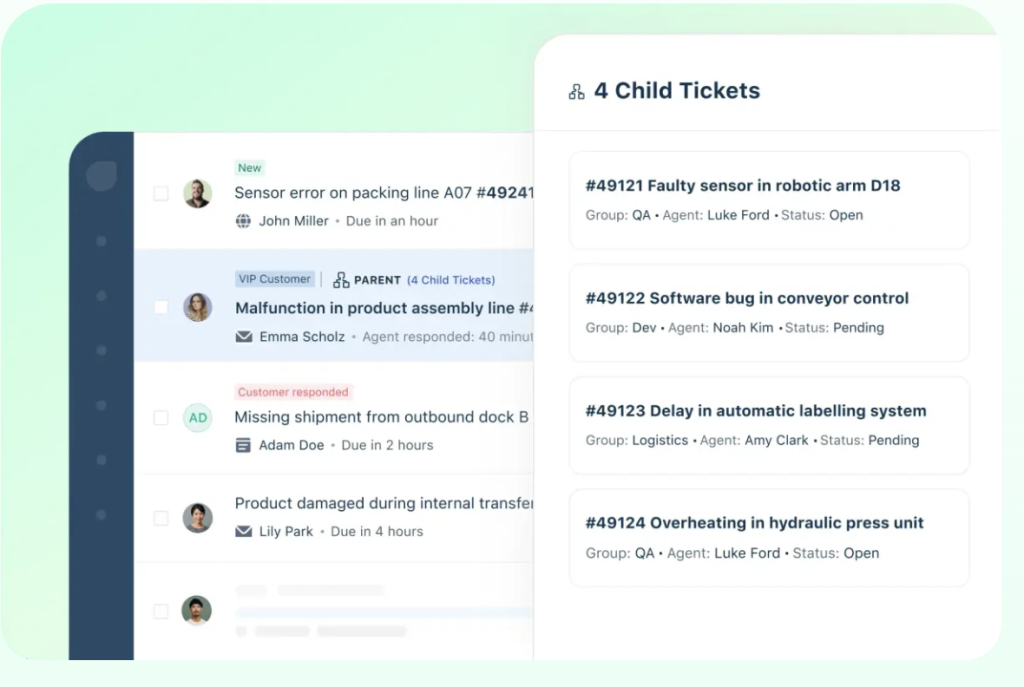
It offers key features like Agent Collision Detection to avoid duplicate replies, a Team Inbox for better collaboration, and Parent-Child Ticketing to break down complex issues into smaller, assignable tasks.
At higher tiers, Freshdesk unlocks Freddy AI, which includes personalized first-line support, contextual assistance for agents, and proactive insights for managers to improve decision-making and resolve issues more efficiently.
Freshdesk fares better than HubSpot Service Hub for teams that want enterprise-level capabilities without the enterprise-level pricing. It offers similar depth but with simpler packaging and a gentler cost curve, especially appealing for fast-growing support teams that don’t want to be locked into HubSpot’s bundled ecosystem.
Pricing
Freshdesk includes a free plan for up to two agents, which offers essentials like email and social ticketing, a knowledge base, team collaboration, and pre-built reports.
Pricing for the Growth plan is $11/ month per agent, and it offers everything from the free plan plus features like automation, marketplace apps, helpdesk reports, and customer satisfaction surveys.
Freshdesk also offers a 14-day free trial that gives you full access to all its features.
“What I like best about Freshdesk is its intuitive and user-friendly interface, which made onboarding our team remarkably smooth. The platform’s automation capabilities have significantly streamlined our support processes, allowing us to respond to customer inquiries faster and more efficiently.” Freshdesk User Review | G2
Help Scout
Help Scout is a fuss-free help desk solution built for businesses that want to deliver great support without wrestling with complex software. It combines customer conversations from email, chat, and social media into one inbox, helping teams stay organized and reduce switching between tabs.
To reduce support requests, Help Scout provides a self-service knowledge base, letting customers solve common issues independently. Businesses can also use Help Scout’s in-app messaging to guide customers through onboarding or product changes.
It’s AI Summarize feature condenses long threads into bullet points, while AI Drafts generates replies using past chats and help docs. Help Scout also integrates with over 100 tools, letting businesses sync support with their other business processes.
Help Scout beats HubSpot when simplicity and a personal touch matter most. It’s more intuitive, easier to onboard, and better suited for teams that prioritize human conversations over complex ticket workflows – without the overhead of HubSpot’s CRM-centric setup.

Pricing
Help Scout’s Standard plan starts at $25/month for 100 contacts per month with unlimited users. It includes multiple inboxes and Docs sites, API access with 100+ integrations, advanced reports, customer surveys, NPS, and CSAT ratings.
The tool also offers a 15-day free trial that gives you full access to all features.
“I use this tool daily to manage our company’s integrated Google inboxes. The clean, well-organized interface keeps distractions to a minimum, making it easy to focus on each task efficiently.” Help Scout User review | G2
LiveAgent
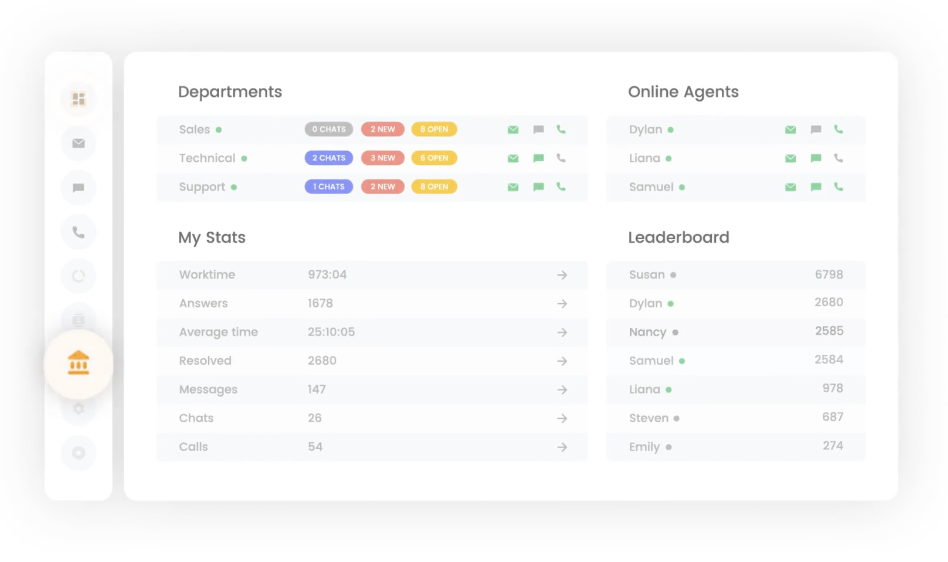
LiveAgent helps support teams stay responsive and organized with tools like automated ticket distribution, canned responses, internal notes, and a universal inbox that keeps every customer interaction in one place. Whether email, chat, voice, or social media, agents can manage conversations seamlessly without jumping between tabs.
The AI Chatbot and AI Answer Assistant intelligently handle repetitive queries, guide users through product or order-related questions, and deflect routine tickets—helping your agents focus on high-impact tasks.
With over 130+ ticketing features and native integrations to platforms like Slack, Zapier, and leading CRMs, LiveAgent brings real-time updates and collaboration into your existing workflows. Whether you’re a startup or a scaling enterprise, LiveAgent is a cost-effective, multichannel support platform that grows with your business.
LiveAgent is a stronger fit than HubSpot for lean teams that need multichannel support on a tight budget. Its all-in-one pricing make it easier to scale without running into the steep per-seat and add-on costs that HubSpot is known for.
Pricing
LiveAgent’s Small Business plan starts at $9/month per agent with features like ticketing, live chat, a knowledge base, and a customer portal to streamline communication and self-service.
LiveAgent offers a 30-day free trial that gives you full access to all features.
“The customer support team is top-notch – they respond very fast and are always up for the call. The features are amazing, and once you start using it, you won’t want to look elsewhere.” LiveAgent User Review | G2
Zoho Desk
Zoho Desk is perfect for teams embedded deeply in the Zoho ecosystem. It helps teams deliver consistent, efficient support with tools like Guided Conversations, which walk agents through self-service resources, and Blueprints, which map out visual step-by-step processes to standardize handling issues. This ensures that no matter who handles a ticket, the experience remains predictable and high quality.
The platform’s AI assistant, Zia, further boosts productivity by analyzing incoming messages for sentiment, flagging unusual activity, and suggesting context-aware responses—so agents can act faster and smarter.
Meanwhile, support teams can manage tickets from email, phone, chat, social, and messaging apps—all streamlined into one centralized workspace.
With integrations to Zoho CRM, Slack, and Zapier, plus customizable modules and views, Zoho Desk offers flexibility and control, whether you’re supporting a small team or a global customer base.
Zoho Desk is a more affordable and customizable option compared to HubSpot, especially for teams already in the Zoho ecosystem. It doesn’t force you into rigid tiers or bundled marketing tools, making it easier to tailor it to your support needs without overpaying.

Pricing
Zoho Desk offers a free plan for three users with features such as customer context, ticket management, and custom ticket filters.
Its Express plan starts at $6 per agent/month and covers everything from the free plan to essentials like ticket management via email, social and web forms, simple routing, basic sales automation, and custom domains.
Zoho Desk offers a 15-day free trial that gives you full access to all features.
“One of the features we’ve found most useful is the integration with other Zoho tools (such as webhooks and APIs) and third-party platforms like Slack. This makes it easy to centralize everything in one place and reduce manual steps within our team.” Zoho Desk User Review | G2
Zendesk
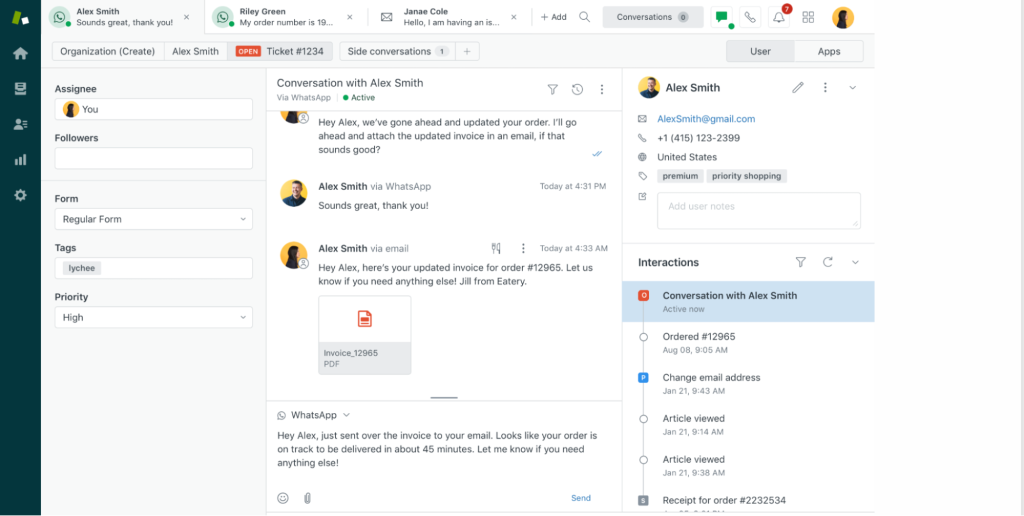
Zendesk works best for teams with high ticket volume that need AI to scale their support without breaking processes. You get a powerful agent workspace with conversation history, macros, and internal collaboration tools—built to handle complex workflows and multiple channels with minimal clutter.
Zendesk AI helps automate up to 80% of interactions from day one, whether it’s triaging tickets, suggesting responses, or handling FAQs. For managers, its robust reporting helps keep track of team performance trends and coach agents on their problem areas. The platform’s built-in QA and workforce management tools help improve service quality over time.
With ready-made integrations, quick deployment, and built-in automation, Zendesk minimizes manual tasks and reduces tickets by up to 15%—while enhancing ROI and customer satisfaction.
Zendesk surpasses HubSpot when support is the core business function. While both offer mature platforms, Zendesk is more battle-tested in large-scale service environments and isn’t weighed down by the marketing/sales-first DNA that sometimes makes HubSpot feel clunky for pure support use.
Pricing
The Support Team plan starts at $19/month per agent and offers key features like a unified ticketing system, contact form support, and various integrations. It also includes predefined responses, custom sales automation rules, analytical dashboards, and online support from Zendesk’s customer support.
Zendesk offers a 14-day free trial that gives you full access to all features.
“Zendesk Support Suite is great because it brings all customer conversations (email, chat, voice, social) into one place. It’s easy to use, supports automation, offers strong reporting, and has a help center for self-service.“ Zendesk User Review | G2
Gorgias
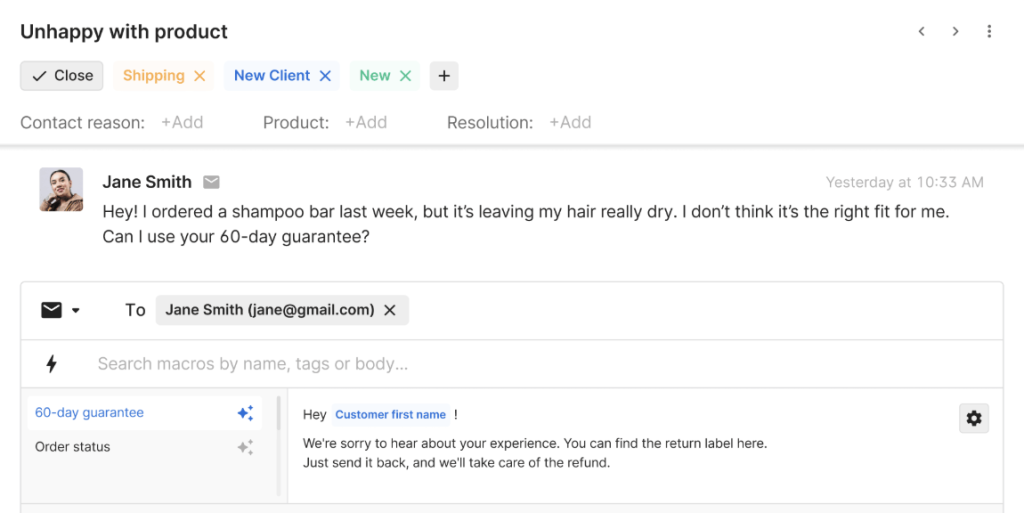
Gorgias serves e-commerce businesses by unifying customer communications across email, live chat, social media, SMS, and voice channels in one centralized inbox. Through integrations with Shopify, Magento, and BigCommerce, support teams can access order information, process refunds, and handle subscription changes directly within the platform.
Gorgias’ AI Agent is trained on many scenarios and can handle customer support and sales tasks 24/7. It learns your brand voice, policies, and workflows to respond like a support rep. You can connect it to your help center, Shopify store, and other tools to automate tasks like order tracking, returns, and FAQs.
It efficiently manages common inquiries, while preset chat sequences and order-related actions like shipment tracking, order cancellations, and returns handle routine customer needs. Teams can assess individual agent effectiveness, review specific support cases for training, and leverage CSAT feedback to spot patterns and gauge customer happiness.
Gorgias is purpose-built for e-commerce, which gives it a huge edge over HubSpot for online stores. It ties support directly to storefront operations (like order edits and refunds), something HubSpot can’t do natively, making Gorgias more efficient and revenue-aware for retail teams.
Pricing:
Gorgias’ Basic plan costs $50/month (300 customer support tickets), accommodates 3 team members, and includes core connections with e-commerce systems like Shopify and WooCommerce. It includes key features like real-time chat, social channel management, sales automation, and built-in intent and sentiment analysis.
The tool offers a 7-day free trial that gives you full access to all features.
“One of the features I appreciate most is the centralized inbox. It allows our team to respond to emails and social media posts without switching between platforms, which saves so much time and eliminates the risk of missing messages.” Gorgias User Review | G2
Front
Front is a strong pick if you’re looking for a more collaborative alternative to HubSpot Service Hub. It brings email, chat, and team collaboration into one place so agents can work together on customer conversations with full context.
It’s AI automatically sorts queries, directs them based on customer needs, and suggests real-time responses to agents. It also identifies recurring support issues, allowing teams to spot patterns and optimize their processes.
Front enhances internal collaboration through team inboxes, internal notes, and message assignment. The analytics dashboard helps supervisors track team metrics and customer patterns, while connections to platforms like Salesforce, Jira, and thousands more ensure seamless workflow integration.
Front is a good alternative to HubSpot Service Hub for teams that prioritize internal collaboration and streamlined workflows. Its email-like interface and focus on real-time collaboration make support feel conversational and fluid, unlike HubSpot, which often forces a rigid, CRM-heavy structure onto every interaction.

Pricing
The Starter plan costs $25/month per user (for up to 10 users). It provides core features such as collaborative mailboxes, ticket management, fundamental reporting, and a no-code customer portal. AI Copilot, QA, and CSAT are included as add-ons.
Front offers a 14-day free trial that gives you full access to all features.
“The collaboration tools let us work together seamlessly, assign conversations to the right team members based on expertise, and maintain consistency in our customer support responses. The integration capabilities are excellent, allowing us to connect with our existing tools effortlessly.” Front User Review | G2
Salesforce Service Cloud
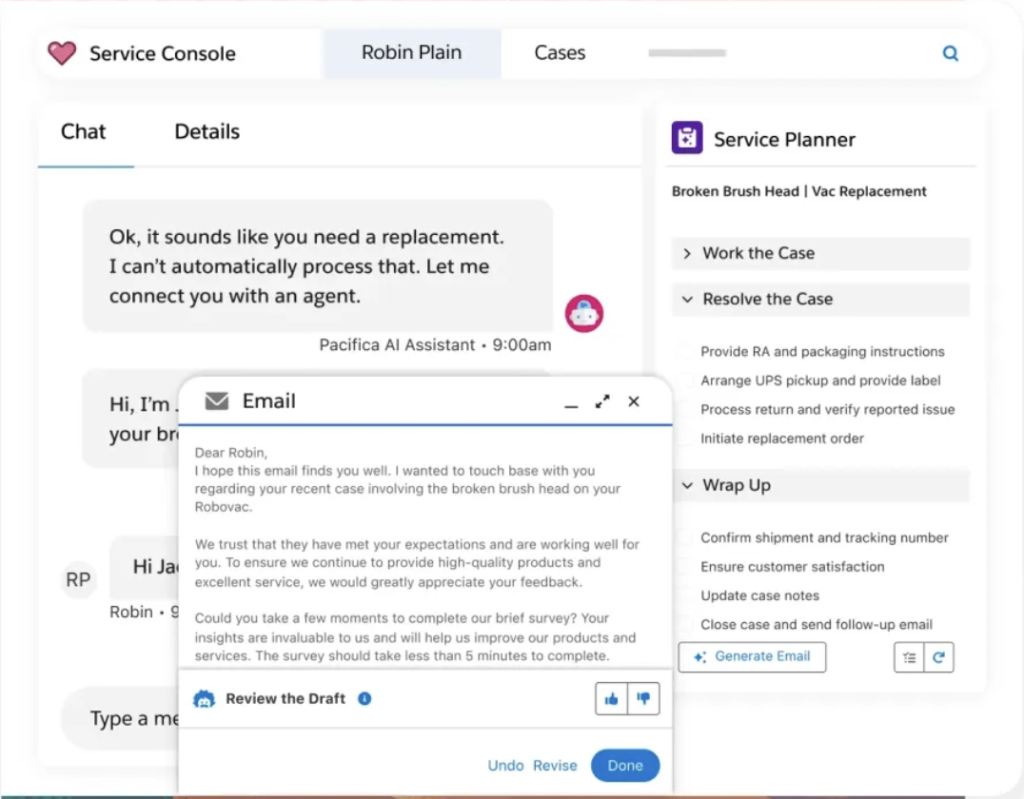
If you’re looking for an AI-powered alternative to HubSpot Service Hub with advanced case and incident management, Salesforce Service Cloud is worth a look. It gives support teams a workspace to manage customer issues, collaborate in real time with Slack, and resolve complex cases using AI-driven suggestions, workflows, and automation.
Agents can manage interactions across email, messaging, voice, and self-service channels from a unified interface—backed by complete visibility into each customer’s history and context.
Powered by its AI engine, Agentforce, Salesforce Service Cloud brings advanced AI to customer support: automating multi-step tasks, routing tickets intelligently, and surfacing real-time recommendations using live CRM data. It’s built for teams that need scalable, enterprise-grade workflows with minimal manual effort.
Unlike HubSpot Service Hub, which lacks native incident management and automation for enterprise workflows, Salesforce Service Cloud is better suited for complex, high-volume operations that need tight CRM integration, custom workflows, and deep analytics. While harder to implement, it gives large teams more control than HubSpot ever could.
Pricing
Salesforce’s Starter Suite begins at $25/month per user and offers an all-in-one CRM for marketing, sales, service, and commerce. It includes lead and opportunity management, dynamic email marketing with analytics, built-in sales flows and lead routing, and connected Slack conversations to streamline internal collaboration.
Salesforce offers a 30-day free trial that gives you full access to all features.
“Salesforce Service Cloud offers a robust suite of features that help deliver fast, efficient, and personalized support experiences. The ease of use is commendable once the Lightning setup is in place—agents can manage cases, view customer history, and respond across multiple channels from a single interface.” Salesforce Service Cloud User Review | G2
Desk365
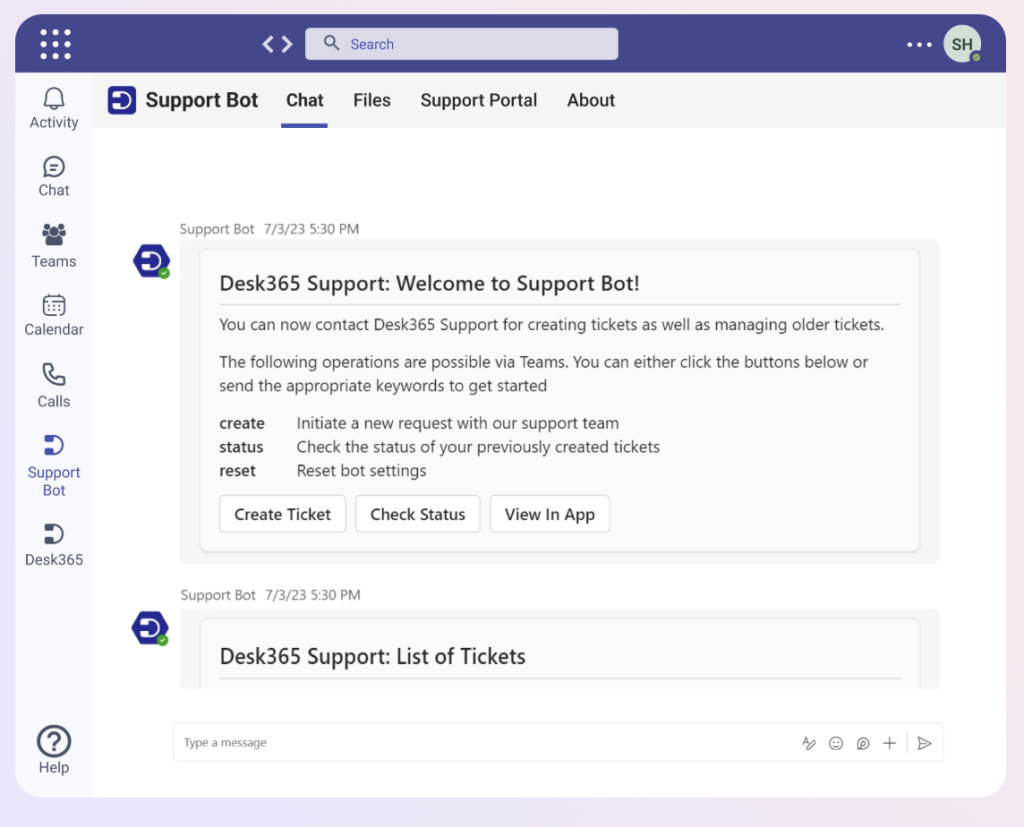
If you’re looking for a Microsoft Teams-native alternative to HubSpot Service Hub, Desk365 fits the bill. It lets customers raise and track tickets from email, chat, web, or even directly inside Teams, while agents get AI tools to summarize threads, draft replies, and convert conversations into knowledge base articles with ease.
Customers can reach out through multiple channels, including email, online forms, support portals, and embedded widgets, ensuring they always have an easy way to get help, no matter where they are.
It also features SLA monitoring, documentation management, role assignments, customizable fields, and seamless Microsoft Teams connectivity.
Unlike HubSpot Service Hub, which is built on a broader CRM platform and often feels heavy for support-only needs, Desk365 is designed for quick setup and seamless use within Microsoft Teams. This means support teams can be operational quickly, customize workflows easily, and avoid unnecessary CRM complexity.
Pricing
Desk365’s Standard plan starts at $12/month per agent. This plan includes ticketing via Microsoft Teams, email, web forms, widgets, and a customer support portal. It also offers a knowledge base, SLA reminders, AI-powered draft generation, and customization options such as custom fields, forms, roles, email templates, and reports.
Desk365 offers a 21-day free trial that gives you full access to all features.
“One of the standout features is its high level of customization—it allows us to tailor the platform to match our needs. The seamless integration with Microsoft products is another plus.“ Desk365 User Review | G2
Making the Switch to Hiver with Confidence
Thinking of switching from HubSpot Service Hub? You’re not alone, and you’re not stuck.
If your team is tired of hidden costs, clunky setups, and features locked behind premium tiers, Hiver is the reset button you’ve been waiting for.
You get all the essentials to manage email, chat, voice, social channels, WhatsApp, and more in one clean, familiar interface. With features like instant customer context, built-in collaboration, robust AI capabilities, and round-the-clock support, your agents are always equipped to deliver high-quality service.
Curious if Hiver could be the perfect alternative to HubSpot Service Hub for your team?
Sign up for a free trial today and see how simple support can be with Hiver.
Frequently Asked Questions
Is migrating from HubSpot Service Hub to another tool difficult?
Migrating from HubSpot Service Hub can be straightforward if you plan the transition carefully. Most modern help desk platforms offer onboarding assistance, data import tools, and integrations to move your tickets, contacts, and knowledge base articles.
Can I use HubSpot CRM if I move to a different service platform?
You can continue using HubSpot CRM even if you switch your service platform. Many help desks integrate seamlessly with HubSpot CRM via native apps or APIs, allowing your support and sales data to stay connected.
What is the difference between the HubSpot Service Hub and Sales Hub?
HubSpot Service Hub focuses on customer support and retention, offering tools like ticketing, a knowledge base, live chat, and automation for managing service requests. Sales Hub is designed to manage leads, pipelines, and revenue-generating activities. While both sit on the same CRM, Service Hub is tailored for post-sale engagement, whereas Sales Hub is built for closing deals.
Start using Hiver today
- Collaborate with ease
- Manage high email volume
- Leverage AI for stellar service













