







If managing support on Kayako feels cumbersome, you’re not alone. Analytics don’t go deep enough, workflows are complicated, and integrations often fall short. These issues pile up until your team is spending more time figuring out the tool than helping customers.
That’s you need faster, easier alternatives. In this guide, you’ll find the best Kayako alternatives for 2025, with pricing, pros, and cons. I have also mentioned which tool is best for which team, so you can choose a platform that scales your support operations.
Quick Summary
Kayako promises simplicity but often delivers friction with its dated UI, shallow analytics, and clunky workflows. After testing and reviewing top contenders, we found 17 Kayako alternatives that are faster, smarter, and more intuitive. Hiver leads with AI-first support that boosts agent speed and accuracy. Zendesk remains the best for enterprises, while Freshdesk and Zoho Desk deliver the strongest value for growing teams.
| Tool | Notable Features | G2 Rating | Starting Price |
|---|---|---|---|
| Hiver | Intuitive interface, AI features, fast resolution | 4.6 ⭐ | $25/user/monthHas a free-forever plan |
| Zendesk | Omnichannel support, AI, deep customization | 4.3 ⭐ | $19/agent/month |
| Freshdesk | AI ticketing, knowledge base, self-service tools | 4.4 ⭐ | $15/user/monthHas a free-forever plan |
| Help Scout | Unified inbox, clean UI, AI-powered suggestions | 4.4 ⭐ | $50/user/month |
| Intercom | Chat-first design, product tours, automation | 4.5 ⭐ | $29 per customer conversation |
Why Trust Us With Kayako Alternatives?
We have tested out every Kayako alternative mentioned in the list, cross-checked it with user reviews, and compared it against clear criteria such as ease of use, key features, integrations, and support. Our team also works closely with CX leaders so we know what actually holds up in a busy support environment. And with 10,000+ teams trusting Hiver, we’ve learned what makes customer service software truly dependable. So, you get straightforward, unbiased recommendations – nothing more, nothing less.
Kayako Alternatives: TL;DR
Here’s a list of top picks based on different use cases. Please note that this is not the full list — you’ll find all 17 tools in the detailed section further down.
- Best for B2B Support: TeamSupport or Supportbench – Account-based ticketing and custom SLAs.Best All-in-One Suite: Vtiger – Combines CRM, help desk, and marketing tools.
- Best Open-Source Option: Faveo Help Desk – Fully customizable with modular extensions.
- Best AI-first support: Hiver – Modern customer service platform with powerful automation and AI capabilities.
- Best for Enterprises: Zendesk – Omnichannel, deep automation, and advanced analytics.
- Best for SMBs/Startups: Freshdesk – Affordable, scalable, and easy to set up.Best for Collaboration: Front – Shared inbox design with strong team workflows.
- Best Budget-Friendly: Zoho Desk – Flexible automation and built-in CRM at a low cost.
- Best for Chat-first Teams: Intercom or Tidio – AI chatbots and proactive engagement.
Why You Need a Kayako Alternative?
The reason to switch from Kayako is rarely just one big issue. It’s usually a bunch of small frustrations that add up over time. Based on what I found in customer reviews, here are the most common reasons teams start exploring alternatives.
- Scalability Feels Restrictive: Kayako handles the basics, but as teams grow, it struggles to keep up. Automation is limited, and analytics lack depth. Teams often end up building manual workarounds.
“The complexities of building usable reports made the reporting part of the system unusable.” - Clunky to Use: The interface isn’t intuitive. Agents lose time navigating a dated dashboard, and the learning curve slows teams down.
“The main interface is clunky, sometimes tickets are slow to load in, and notifications were easy to miss.” - Integrations Are Limited: Kayako doesn’t work well with modern tech stacks. Many users report setup issues and a lack of essential integrations.
“It’s not so easy to integrate Kayako with other tools or even customize it according to your needs.” - Support Falls Short: Kayako’s own support is a frequent complaint. Response times are slow, and answers often lack clarity. Not ideal when your team depends on the tool to serve customers.
“Support was a headache…very difficulty to get any assistance. You are basically on your own.” - Pricing Lacks Flexibility: Kayako has only one plan at $79/month. That means you end up paying for features you don’t need while still missing the ones you do.
“A few years ago, the company changed its pricing policy dramatically, and it now costs upwards of $100 per agent per month.”
Top Kayako Alternatives to Consider in 2025
Here’s a complete list of Kayako alternatives that offer stronger automation, better reporting, cleaner interfaces, and smoother integrations. These tools are built to help your team move faster and deliver better customer support.
| Tool | Notable Features | G2 Rating | Pricing |
|---|---|---|---|
| Hiver | Intuitive interface, AI features, fast resolution | 4.6 ⭐ | $25/user/month Has a free forever plan |
| Zendesk | Omnichannel support, AI, deep customization | 4.3 ⭐ | $19/agent/month |
| Freshdesk | AI ticketing, knowledge base, self-service tools | 4.4 ⭐ | $15/user/month.Has a free forever plan |
| Help Scout | Unified inbox, clean UI, AI-powered suggestions | 4.4 ⭐ | $50/user/month |
| Intercom | Chat-first design, product tours, automation | 4.5 ⭐ | $29 per customer conversation |
| Zoho Desk | Flexible workflows, ITSM compatibility | 4.4 ⭐ | $14/user/monthHas a free forever plan |
| ProProfs | AI assistant, built-in KB, automation | 4.7 ⭐ | $19.99/user/monthHas a free forever plan |
| HappyFox | Deep workflow automation, strong analytics | 4.5 ⭐ | $21/user/month |
| Front | Shared inboxes, real-time collaboration | 4.7 ⭐ | $25/user/month |
| LiveAgent | Multichannel support, 200+ integrations | 4.5 ⭐ | $15/agent/monthHas a free forever plan |
| Tidio | AI bots, proactive messaging | 4.7 ⭐ | $24.17/monthHas a free forever plan |
| Supportbench | Customer success workflows, case management | 4.9 ⭐ | $40/user/month |
| TeamSupport | Account-based ticketing, SLA management | 4.4 ⭐ | $45/user/month |
| Crisp | Live chat, modern UI | 4.5 ⭐ | $45/month (4 agents)Has a free forever plan |
| Vtiger | CRM + help desk suite | 4.3 ⭐ | $10/user/monthHas a free forever plan |
| Desk365 | Shared inbox, MS Teams integration | 4.8 ⭐ | $12/user/month (annual billing) |
| Enchant | Smart workflows, tagging | 4.8 ⭐ | $20/user/month |
Recommended reading
10 LiveAgent Alternatives for Your Customer Support Team in 2025
Let’s zoom in on each of these Kayako alternatives and explore their features in more detail.
1. Hiver
Hiver is an AI-first customer service platform that unifies all your support channels (email, live chat, WhatsApp, voice, and knowledge base) into one place. Teams can manage all these channels from a left-side panel and get a complete overview of ongoing, pending, and resolved conversations.
This makes it extremely user-friendly for your agents, and they can start using the tool from day one without a steep learning curve.
Unlike Kayako’s rigid pricing, Hiver offers flexible pricing tiers, so you only pay for what you need. It also has a free-forever plan that covers all basic ticketing functionalities.

Key features
- AI Agents That Do the Heavy Lifting: Hiver’s AI Agents automate routine work like tagging, triaging, sentiment detection, and auto-resolving repetitive queries. This frees agents to focus on complex issues while customers get faster responses.
- Copilot for Smarter Replies: Hiver’s AI Copilot can summarize long threads in seconds and suggest contextually relevant responses. Agents save time and craft better replies without starting from scratch.
- Built-In Automations: Create rules to route, tag, or escalate conversations automatically based on keywords, priority, or customer type. This eliminates manual triaging and ensures nothing slips through the cracks.
- Real-Time Reporting and SLAs: Track SLAs, response times, and CSAT scores through intuitive dashboards. Visual reports make it easy to spot bottlenecks and share insights with leadership.
Pros
- Tags, filters, and “latest first” views make it easy to prioritize urgent conversations.
- SLA tracking makes it easy to see if your team is meeting targets.
- Shared drafts, notes, and @mentions help you collaborate internally without forwards or CCs.
- Set up your own live chat widget on your website to talk to your customers in real time.
- AI Triage classifies conversations by category, urgency, or sentiment and routes them to the right team.
- Integrations with HubSpot, Salesforce, Slack, and Asana keep you from juggling tabs.
Cons
- Automation is not as deep as other tools.
- The mobile interface has performance hiccups with high-volume tickets.
What It Offers Over Kayako
Hiver replaces Kayako’s complex interface with an intuitive design that feels instantly familiar. Its AI agents automate triaging and summarizing conversations, which are capabilities Kayako lacks. It also offers flexible pricing and deeper integrations with tools like Slack and HubSpot.
Ideal For
SaaS and e-commerce teams that want a platform for complex support.
Customer Reviews
- “The mobile experience isn’t as robust as desktop, which can be limiting for teams who are often on the go.”
- “Hiver has been beneficial and a great asset to our all-volunteer 180-seat theater in the round in Annapolis, MD!”
- “Hiver allows us to manage our shared email alias seamlessly from one single interface.”
Pricing
Hiver’s free plan covers basics like shared inboxes, notes, tags, and Slack/WhatsApp integrations. Paid plans start at $25/user/month for automation and analytics. For $49/user/month, you unlock advanced reporting and CRM integrations. All plans include 24/7 support.
In my opinion, Hiver’s pricing is transparent, scalable, and AI-packed from the start. Even its free plan gets teams moving fast. And at the top tier, you’ll still pay less than Kayako’s flat $79/month while getting more flexibility.

2. Zendesk Support Suite
Zendesk Support Suite is a great tool for large teams and enterprises that need to manage high volumes of conversations across email, chat, phone, and social. Unlike Kayako, which struggles with scalability due to limited automation, basic reporting, and fewer integrations, Zendesk offers features like advanced routing, macros, and AI-powered workflows.
It also offers a deep app marketplace and integrations with CRMs, analytics tools, and collaboration platforms, so teams aren’t stuck with a limited tech stack. The set up can take some time but once done, Zendesk gives enterprises the control they need to run multi-brand, multi-language, and SLA-driven support.

Pros
- AI capabilities help agents with reply suggestions, auto-assign tickets, and reduce manual work.
- Built-in help center and community forums let customers self-serve, cutting down ticket volume.
- Handles thousands of requests with macros, triggers, and advanced routing rules—something Kayako struggles with.
- Zendesk is big on controls. Role-based access keeps sensitive data restricted, SLAs track performance by priority, and sandbox testing lets admins test new workflows without breaking live support.
Cons
- AI and advanced analytics are only available on higher-tier plans, so smaller teams may find Zendesk pricey.
- Reporting is split into different tools (like Zendesk Explore), which means more setup and training before teams see value.
What It Offers Over Kayako
Zendesk scales where Kayako stalls. It handles higher ticket volumes, multi-brand setups, and omnichannel workflows with stronger automation and analytics. Its app marketplace and customization depth make it ideal for large operations needing structure and control.
Recommended reading – Zendesk vs Kayako
Ideal For
Enterprises and large organizations managing complex, multi-channel customer operations.
Customer Reviews
- “Zendesk Support Suite offers a clear, intuitive interface that makes managing support tickets easy and efficient.”
- “It took a long time to set things up from the beginning, but the system is powerful and needs some changes before it can be turned on and used to its full potential.”
Pricing
Zendesk’s pricing starts at $19/agent per month for basic email and social support. The $55 Suite Team plan adds live chat, voice, help center, bots, and CSAT tracking.
Suite Professional, at $115, unlocks advanced routing, forums, and deeper analytics. For enterprises, pricing begins at $169 with sandboxing, advanced permissions, and branding controls.
Recommended reading
Hiver vs Zendesk: Which Support Platform Is Right for Your Team in 2025?
3. Freshdesk
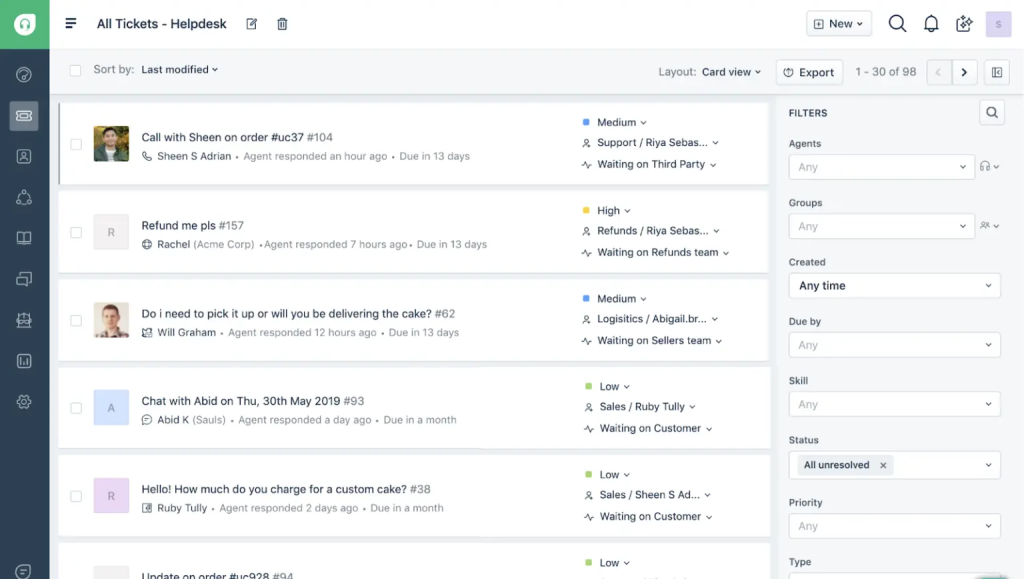
Freshdesk combines a clean interface with flexible workflows and reliable automation. Its AI tool, Freddy, deflects routine tickets through chatbots, knowledge base suggestions, and automated responses. This cuts agent workload and frees them up for complex issues.
It supports email, phone, chat, and social media. That makes it a strong fit for growing teams that want to scale into omnichannel support without adding complexity.
Pros
- Freshdesk includes a shared inbox, ticket collaboration, basic analytics, and a knowledge base. This is more than Kayako offers without paying.
- Paid plans add automation, SLA tracking, and multichannel support. The entry price is still lower than Kayako.
- Freshdesk also connects with other Freshworks apps and hundreds of third-party tools, giving it a broader ecosystem.
Cons
- Lower plans restrict workflow and report tailoring.
- AI and omnichannel tools exist but lack depth, even on higher tiers, compared to advanced platforms.
What It Offers Over Kayako
Freshdesk’s modern UI and flexible pricing make it easier to adopt and scale. It adds AI-driven ticket routing, workflow automation, and omnichannel support without the rigid setup Kayako requires. The free plan also gives small teams a head start.
Ideal For
Startups and SMBs that need an affordable, scalable help desk with AI and self-service features.
Customer Reviews
- “It provides a dynamic portal where we our different teams can team up in either automation or communication to resolve a myriad of issues our customers alert us to.”
- “The interface, although generally intuitive, can feel a bit overwhelming when you’re dealing with high ticket volumes.”
Pricing
Freshdesk has a Free plan for up to 10 agents with basic ticketing features. This already beats Kayako that doesn’t offer a free tier.
The Growth plan (from $15/agent) adds essentials like automation and reporting. The Pro plan (around $52/agent) gives you features like round-robin assignment and custom roles. The Enterprise plan (around $83/agent) unlocks AI support and advanced admin tools like audit logs.
So, Freshdesk is cheaper to start with than Kayako and grows with you as your team needs more automation and AI.
Recommended reading
Freshdesk vs Hiver: Say goodbye to clunky UX and slow support
4. Help Scout
Help Scout keeps support simple by focusing on email-style conversations instead of ticket IDs. Every thread shows the full history, tags, and internal notes in one clean view, which makes it easier for agents to stay in context.
Unlike Kayako, Help Scout now offers a free plan with AI features included, making it easier for small teams to get started. Shared inboxes, live chat, and an integrated knowledge base are built in, so customers can reach you on their channel of choice and find answers on their own.
Pros
- Help Scout’s Beacon widget lets customers find help articles or start a chat without leaving your site.
- The built-in Docs knowledge base makes self-service simple and cuts repetitive tickets.
- Customer profiles show full history, so every interaction feels personal.
- It integrates with Slack, HubSpot, and Salesforce to keep teams aligned.
Cons
- Help Scout doesn’t show “away” or “busy” statuses in chat, which makes real-time coordination harder.
- Ticket customization is limited. Filters and parent-child ticket setups aren’t as flexible as you might expect.
What It Offers Over Kayako
Help Scout focuses on human conversations rather than rigid ticketing. Its clean, email-style interface makes it easier for teams to manage threads contextually. The built-in knowledge base and AI suggestions make it more intuitive for both customers and agents.
Ideal For
Nonprofits and small teams that prioritize personal, relationship-driven support experiences.
Customer Reviews
- “Reporting can feel a bit limited at times, and more customization options for workflows would be helpful.”
- “Helpscout was easy to set up. And to maintain the system. And as a result, my customers are helped much better.”
Pricing
Help Scout offers a free plan with features including automation, knowledge base, shared inbox, and even a few AI features. The Standard plan starts at $50/month and covers all the essentials. The Plus plan, at $75, unlocks more integrations, automations, and advanced reporting.
Recommended reading
5. Intercom
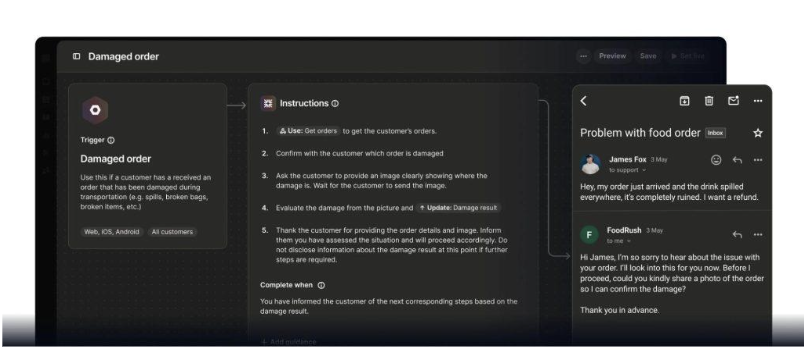
Intercom brings together live chat, AI bots, and help desk tools in one platform. It’s built for teams that need to move fast. Its standout feature is Fin, an AI agent that handles customer queries with natural, human-like responses.
Each support rep can set up how Fin responds, so automation feels more personal. It’s a strong option for handling Tier-1 support while still offering real-time help when needed.
Pros
- Intercom offers Fin bot that resolves repetitive queries, and Fin Copilot helps agents craft better replies.
- You can trigger proactive messages automatically based on user behavior or inactivity.
- Custom bots collect and qualify info before agents step in, saving time.
- Workflows are advanced yet easy to set up, giving teams more control with less effort.
Cons
- Intercom can get expensive, especially as teams grow or when using Fin AI, which is billed per resolution.
- Advanced tools like workflows and messaging automation take time to set up and customize.
What It Offers Over Kayako
Intercom offers features such as live chat, AI bots, and proactive engagement in one platform which something Kayako never perfected. Its Fin AI Agent handles Tier-1 queries with human-like precision, freeing agents for deeper issues. It also integrates closely with product tools for in-app messaging.
Ideal For
SaaS and tech companies that rely on real-time chat, onboarding, and behavioral messaging.
Customer Reviews
- In advanced scenarios it sometimes feels limited and we depend on Intercom support to unlock more complex configurations.
- “Organizations benefit from improved efficiency, reduced support costs, and higher customer satisfaction levels.”
Pricing
Intercom pricing begins at $29 per seat/month. This includes core tools like a shared inbox, live chat, ticketing, and a basic help center. Higher tiers add automation, analytics, and enterprise features. AI add-ons, like Fin AI Agent ($0.99 per resolution) and Fin Copilot (35 per user/month), are billed separately.
Recommended reading
6. Zoho Desk
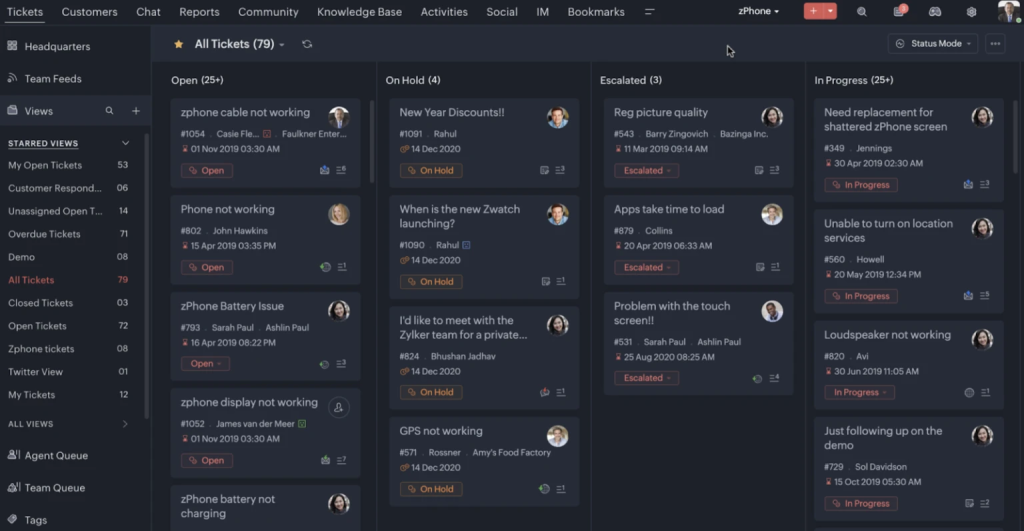
If you’re already invested in the Zoho ecosystem of tools, Zoho Desk is a great pick. It integrates directly with Zoho CRM and other Zoho apps, giving agents full context on each customer without switching tabs.
Its AI assistant, Zia, can analyze sentiment, suggest replies, and even alert managers when SLAs are at risk – features Kayako doesn’t provide. Automation rules go deeper too: teams can build workflows to auto-assign tickets, escalate based on keywords, or trigger custom actions across other Zoho tools.
Pros
- Omnichannel support across email, chat, phone, and social in one place.
- Zia AI assists with ticket tagging, sentiment analysis, and article suggestions.
- Automation for routing, SLAs, and escalations reduces manual work.
- Customizable dashboards and reports help track performance and spot bottlenecks.
Cons
- Zoho Desk’s free plan is limited, with only basic automation and reporting.
- The interface can feel tricky, and setting up workflows isn’t always intuitive for new users.
- Support is available 24/5, which may be a drawback if you need weekend coverage.
What It Offers Over Kayako
Zoho Desk integrates tightly with Zoho CRM, providing instant context on customer data—a major edge over Kayako’s siloed approach. It also includes Zia AI for sentiment analysis, SLA monitoring, and reply suggestions, bringing automation that Kayako lacks.
Ideal For
Businesses already using Zoho products or those seeking a budget-friendly help desk with CRM-level visibility.
Customer Reviews
- “The custom report builder feels clumsy and takes some time to get used to, especially for non-technical users.”
- “While the day-to-day use is very straightforward, some of the more advanced features and automation settings can have a bit of a learning curve.”
Pricing
Zoho Desk’s pricing is flexible and team-friendly. The Free plan covers up to 3 users. Standard starts at $14/user/month with core features like workflows and SLAs.
Professional, at $23, adds automation and time tracking. Enterprise, at $40, unlocks AI, advanced customization, and cross-team tools.
Recommended reading
7. ProProfs Help Desk
ProProfs is a solid pick if you’re just getting started with customer support. Its free plan makes it easy to test things out with no upfront cost. It combines AI-powered ticketing with a knowledge base, chatbots, and a shared inbox.
You’ll also get features like automated ticket routing, AI chatbots, visitor tracking, and helpful features like canned responses and conversation summaries. It’s a budget-friendly option for small and mid-sized teams.

Pros
- ProProfs includes AI features, ticket prioritization, auto-assignment, and internal notes, with automation that’s easy to set up.
- It offers detailed reporting to track performance and improve support.
- The interface is user-friendly and easy to navigate.
- Its lower starting cost makes it a strong value for small to mid-sized teams.
Cons
- ProProfs covers the basics well, but advanced automation and workflow customization can feel limited.
- The interface is easy to use but looks dated and could use a refresh.
What It Offers Over Kayako
ProProfs offers a simpler setup, stronger automation, and a free plan that Kayako doesn’t. It also combines ticketing with live chat, a knowledge base, and AI bots, giving smaller teams more flexibility without the cost or complexity.
Ideal For
Small and mid-sized businesses looking for an easy, budget-friendly way to manage customer requests
Customer Reviews
- “I am not much impressed with their integration options to third-party tools. This is something that needs to be improved.”
- “When starting up, it takes a while to understand their pricing model. Once you add all the modules, it can get costly.”
Pricing
ProProfs offers a free plan for solo users, making it great for individuals just starting out. For teams, the paid plan starts at around $19.99 per user per month, unlocking multi-user access and core help desk features.
While cost-efficient, I find ProProfs to be lacking in features. So, before signing up, try the free plan and see if it works for your team.
Recommended reading
8. HappyFox
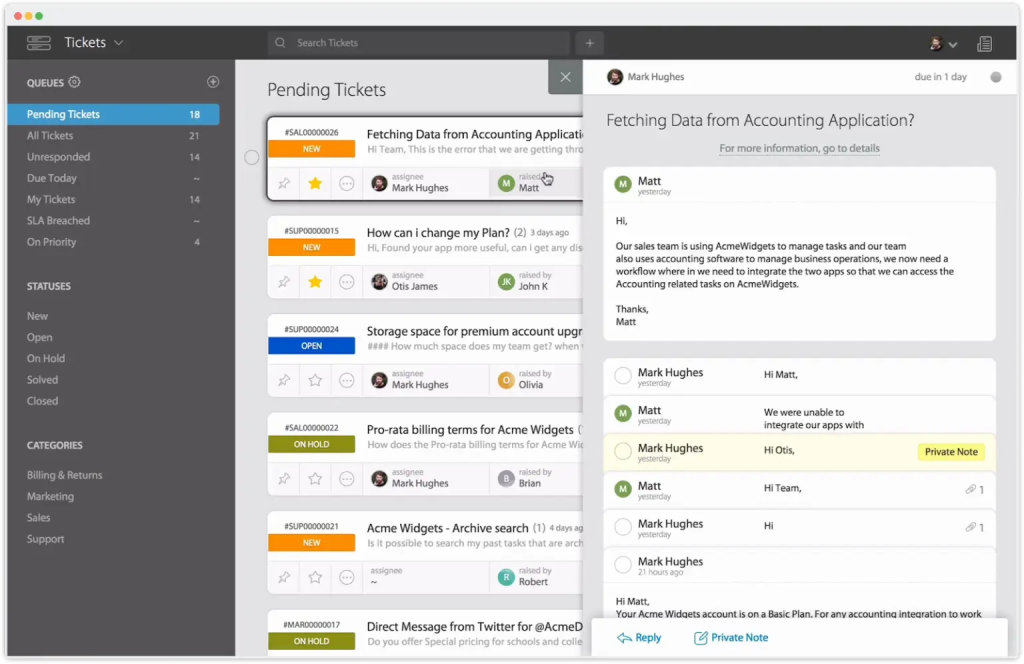
HappyFox focuses on workflow automation that cuts down manual triage. Unlike Kayako, where workflows often feel rigid and limited, HappyFox lets you design detailed rules to route, escalate, and close tickets automatically. Its Assist AI helps agents respond faster by drafting replies to repetitive questions.
The platform also covers multiple channels, like email, chat, social, and even phone, under one dashboard, making it easier to track requests without bouncing between tools. Pricing is straightforward, starting lower than Kayako’s plan.
Pros
- HappyFox is quick to set up and requires minimal configuration.
- It offers advanced workflow automation that reduces manual work for high-volume teams.
- The built-in AI assistant helps draft responses to FAQs and boosts agent productivity.
- Its interface is clean, modern, and easy to navigate.
Cons
- Customization can be time-consuming, and tweaking workflows isn’t always intuitive.
- There’s no mobile app for agents, which makes on-the-go responses difficult.
What It Offers Over Kayako
HappyFox delivers automation depth Kayako haven’t achieved. You can design detailed workflows for routing, escalation, and resolution without coding. Its Assist AI also drafts replies for repetitive questions, reducing agent workload.
Ideal For
Mid-size IT and service teams managing structured, high-volume customer workflows.
Customer Reviews
- “I love how easy and intuitive thier software is to setup and configure, including cusomizing the knowledge base.”
- “The reports may be confusing, and some of their features require a higher tier.”
Pricing
HappyFox’s pricing starts at $21/user/month for basic support needs. The $39 Team plan adds SLAs and roles, while the $89 Pro plan unlocks automation and task workflows. Enterprise plans are custom-priced.
Recommended reading
9. Front
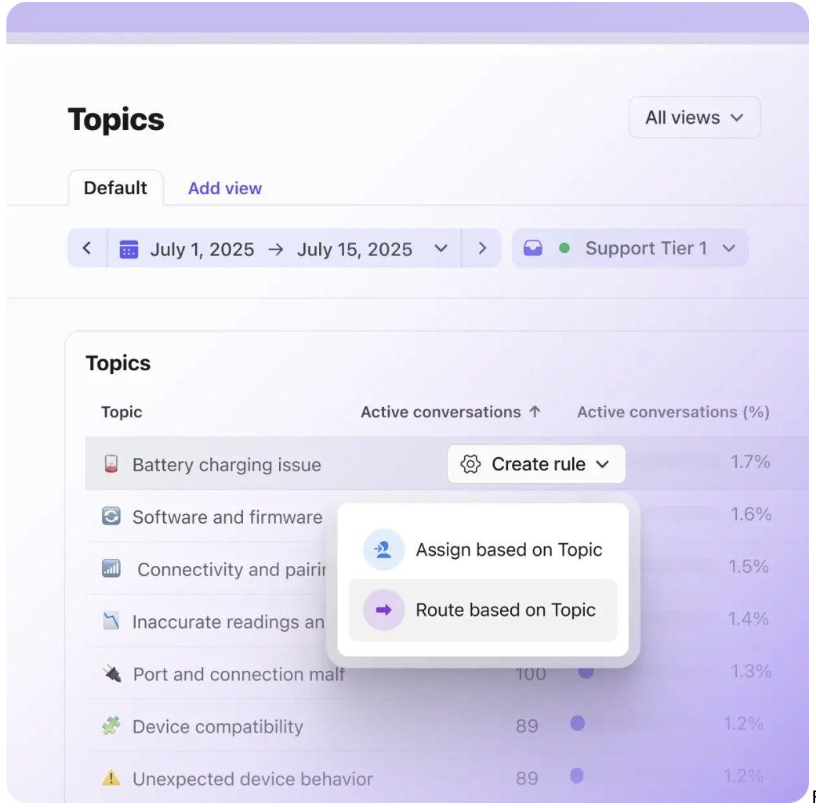
Front is designed for teams that want collaboration inside their support inbox. Every customer message, whether it comes in through email, chat, SMS, or social, lands in a shared inbox where agents can @mention teammates, share drafts, or leave comments directly on the thread. This cuts down on side Slack messages or back-and-forth emails.
Pros
- Front feels like a shared inbox, so teams can adopt it quickly.
- Collaboration is easy with internal comments, assignments, and tagging.
- Automation and AI features make routing and responses faster.
- It integrates well with CRMs and productivity apps, reducing context switching.
Cons
- Pricing can get expensive as your team grows.
- Built-in reporting is limited and lacks deep customization.
What It Offers Over Kayako
Front strengthens collaboration with a more modern, shared-inbox experience. Agents can @mention teammates, share drafts, and comment directly within conversations. This makes team communication smoother and more visible
Ideal For
Sales and support teams that thrive on collaboration and shared inbox management.
Customer Reviews
- “Customer service can be slow to review errors, and they require a message ID to resolve the issue when not all issues are specifically email-related.”
- “While Front excels at conversation management, I’d love to see more flexibility in connecting third-party AI tools and custom integrations.”
Pricing
Front’s pricing starts at $25/user/month for basic workflows. The $65 Pro plan adds automation. For large teams, the $105 Premier plan includes enterprise-grade features.
My views on this align with the customer review I referred to. While scalability is an advantage, integration is something you might want to consider.
Recommended reading
10. LiveAgent
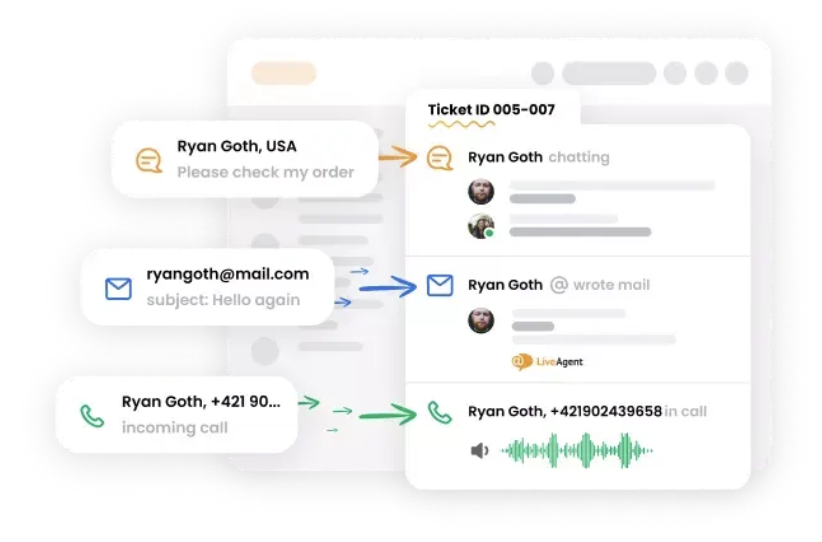
LiveAgent is a multichannel help desk that combines email ticketing, live chat, social media, and even a built-in call center in one platform. Compared to Kayako, which focuses more narrowly on email and chat, LiveAgent offers 200+ integrations and 175+ features, giving teams wider flexibility.
Pros
- LiveAgent offers fast onboarding and responsive customer support.
- Its live chat includes typing previews, canned responses, and real-time features that speed up conversations.
- The ticketing system is powerful, with features like universal inbox, hybrid ticket streams, and automated workflows.
- The platform also includes call center capabilities, making it a true multichannel solution.
Cons
- The interface feels dated, and the number of features can be overwhelming.
- Social channels like Facebook and WhatsApp often require paid add-ons.
What It Offers Over Kayako
LiveAgent unifies ticketing, chat, call center, and social support into one hub which is something Kayako can’t do natively. It includes real-time chat tools, 200+ integrations, and faster onboarding, helping teams serve customers across every channel without friction.
Ideal For
E-commerce and retail businesses managing multichannel, real-time customer support.
Customer Reviews
- “The customer support team is top-notch – they respond very fast and are always up for the call.”
- “Live Agent may sometimes take a while to pull emails through from Outlook, which can be inconvenient whilst on the phone to a customer.”
Pricing
LiveAgent has a free plan with basic ticketing and 7-day history. Paid plans start at $15/month with chat and knowledge base, go up to $49/month for social integration and gamification. The plans top out at $69/month with priority support and a dedicated manager on enterprise level.
Recommended reading
10 LiveAgent Alternatives for Your Customer Support Team in 2025
11. Tidio
Tidio is a great option if you’re looking for a chat-first support tool that’s quick to set up and easy on the budget. It combines live chat with AI-powered chatbots, helping you engage customers instantly and automate responses to common questions. Whether you’re running a small team or scaling up, Tidio makes it simple to stay responsive without overwhelming your agents.

Pros
- Tidio’s AI chatbots handle repetitive queries instantly, reducing manual work for support teams.
- Pricing is affordable and transparent, making it ideal for small teams that need strong features.
- It integrates seamlessly into websites, enabling real-time customer engagement.
- Tidio also includes proactive messaging tools that help businesses convert more visitors into customers.
Cons
- Tidio is chat-focused and lacks full ticketing features, so it may fall short for teams that rely on email support.
- Its AI responses can feel generic, and training is needed to match your brand’s tone and customer expectations.
What It Offers Over Kayako
Tidio simplifies chat automation with AI-powered bots that engage and qualify customers instantly. Its proactive messaging and real-time tracking make it better suited for conversions and lead capture than Kayako’s limited chat options.
Ideal For
Small businesses and online stores that rely on live chat and automation to drive engagement and sales.
Customer Reviews
- “I really like using Tidio, but it would be even better with more integrations(like CRMs, marketing tools, and payment platforms) and greater customizability in chatbot flows and design.”
- “Although it works well, I have noticed that some automations could be more flexible and customizable.”
Pricing
Tidio’s Free plan includes live chat, ticketing, and 50 AI conversations; ideal for small teams. The $24.17 Starter plan adds basic analytics and custom hours.
Growth, at $49.17, unlocks advanced analytics, higher limits, and removes branding. There’s also a Plus plan for additional integrations at $749..
I believe that Tidio is among the best Kayako alternatives as it gets your team up and going quickly. While some features may be lacking, you can test it out with the free plan.
Recommended reading
12. Supportbench
Supportbench is built for B2B teams that want smart, no-fuss support. You get AI that actually helps—think ticket summaries, CSAT predictions, and smart suggestions baked right in. The SLAs are flexible, the dashboards are customizable, and the whole thing is super easy to set up.
It also provides a branded self-service portal where customers can access resources and manage interactions. They can find answers on their own, creating a convenient, on-demand support experience.

Pros
- Supportbench includes built-in AI for sentiment analysis, auto-summaries, and CSAT prediction.
- It allows flexible SLAs and reporting with rules, triggers, and customizable dashboards.
- It’s designed for B2B support, letting you manage accounts, track multiple contacts, and connect with your CRM.
- It also offers customer success workflows, helping teams move beyond reactive support.
Cons
- Supportbench has a steep learning curve. The feature set is rich, but the interface feels overwhelming until teams get used to it.
- Its integrations are limited. While it covers the basics, it doesn’t connect with as many third-party tools.
What It Offers Over Kayako
Supportbench focuses on B2B success, offering flexible SLAs, account-level ticketing, and AI for summaries, sentiment, and CSAT prediction which are features Kayako doesn’t provide. It also blends reactive support with proactive customer success workflows.
Ideal For
B2B SaaS and enterprise teams that manage complex accounts and long-term customer relationships.
Customer Reviews
- “A very small percentage of emails don’t display correctly in Supportbench, so I occasionally need to forward them to my external email address to view them properly.”
- “Quick and efficient workflow turnaround in less time, with immediate results.”
Pricing
The Professional plan is $40/user/month with full access to AI, ticketing, chat, CSAT, and KPIs. The Enterprise plan at $125/user/month adds advanced customization and premium support.
Recommended reading
13. TeamSupport
TeamSupport is built for B2B customer support, where accounts often involve multiple stakeholders and long-term contracts. It unifies multi-channel ticketing, customer management, collaboration tools, and reporting in one platform.
You also get a self-service portal, automation for repetitive tasks, and CRM integrations. Its clean interface keeps agents aligned and makes handling complex accounts easier.
Pros
- TeamSupport offers precise SLA management with flexible triggers and follow-ups.
- It integrates seamlessly with Salesforce, Jira, HubSpot, Slack, and more.
- Users rate it highly for support quality, ease of setup, and overall satisfaction.
- It’s designed for B2B support, with account-based ticketing and multi-contact management.
Cons
- TeamSupport has a steep learning curve, and new users may take time to get comfortable.
- Customization is limited, so tailoring workflows or reports can be challenging.
What It Offers Over Kayako
TeamSupport provides true account-based support with shared customer profiles and multi-contact tracking, where Kayako remains ticket-focused. It also offers advanced SLA management and collaboration tools to keep large teams aligned.
Ideal For
B2B enterprises that handle multi-stakeholder accounts and prioritize SLA-driven support.
Customer Reviews
- “At this time, my only cons are the costs. I think some of the items, like AI, should be included. Overall, it is hard to complain about the product.”
- “TeamSupport has been a great tool for us. It helps our team collaborate more efficiently, making it easier to track and resolve issues.”
Pricing
TeamSupport pricing starts at $45/user/month for core ticketing (reporting, customer pages, product pages, agent ratings, and core integrations) and AI. The $65 Professional plan adds customer portals, AI routing, and playbooks. At $85, the Scale plan unlocks advanced automation, custom fields, and reporting for larger B2B teams.
It’s a strong Kayako alternative with a learning curve, but once set up, it’s a reliable tool.
Recommended reading
14. Crisp
Crisp is built for teams that want a modern, chat-first support platform. Its chatbots can qualify leads, route queries, or handle FAQs automatically. Crisp also offers a unified inbox where email, live chat, Messenger, WhatsApp, and other channels are centralized.
Crisp also includes a built-in knowledge base and lets teams trigger proactive chat messages on websites.

Pros
- Crisp unifies email, chat, Messenger, and WhatsApp into one clean inbox.
- Its chatbot is simple to set up and handles common questions automatically.
- The modern interface is fast, intuitive, and easy for small teams to adopt.
- It also includes co-browsing and video chat, helping agents resolve issues in real time.
Cons
- Crisp’s reporting tools are basic and may not meet advanced analytics needs.
- It works best for startups and small teams, but scaling is difficult because workflow automation and role-based permissions are limited.
What It Offers Over Kayako
Crisp combines modern messaging with automation and co-browsing tools that create a more interactive experience than Kayako’s static interface. Its unified inbox merges email, chat, and WhatsApp into one clean workspace.
Ideal For
Startups and digital-first businesses that value live chat, automation, and a sleek, unified interface.
Customer Reviews
- “The iPhone app is good for staying on top of conversations, but it doesn’t have all the same features as the web platform.”
- “While the platform is powerful, the initial setup, especially regarding WhatsApp messaging credits and template approvals, requires more handholding than expected.”
Pricing
Crisp uses flat-rate pricing per workspace, so costs don’t rise with every new agent or chat. The Free plan covers two agents with basic live chat.
Paid plans start at $45/month for 4 agents and go up to $295/month. Higher tiers add advanced automation, omnichannel messaging, and white-labeling.
Recommended reading
15. Vtiger
Vtiger brings your sales, support, and marketing into one clean dashboard, so your team’s not bouncing between apps all day. Vtiger includes a shared inbox, ticketing, a knowledge base, and AI-powered suggestions to speed up resolutions.
With everything in one place, teams stay organized and keep customer conversations moving smoothly.

Pros
- Vtiger gives agents a complete view of each customer, from support history to deal status, enabling more personalized service.
- AI features handle ticket classification, suggest responses, and surface insights to speed up workflows.
- Custom dashboards and automation make it adaptable for teams as they scale.
- It also integrates tightly with sales and marketing modules, keeping customer data consistent across departments.
Cons
- Vtiger has a longer setup process, and new users may find onboarding overwhelming because of its many features.
- The interface can feel clunky at times, with navigation and customization needing more polish.
What It Offers Over Kayako
Vtiger bridges the gap between CRM and support by bringing sales, marketing, and customer service together. Unlike Kayako, it gives agents full visibility into each customer’s journey, making service more informed and personalized.
Ideal For
Small and mid-sized businesses seeking an all-in-one CRM and help desk suite.
Customer Reviews
- “It should provide some options in offline mode too because when our internet connection not working we can’t do any work. And the cost of license is very high.”
- “Vtiger has a lot of functions and reporting available which we are able to customize to our needs while offering proper analysis.”
Pricing
Vtiger’s Free plan covers up to 10 users with essentials like ticketing, automation, and a knowledge base. The Starter plan at $10/user/month adds a customer portal and call logging. For more power, the Professional plan at $20/user/month includes custom modules, Twitter support, and advanced insights.
Recommended reading
16. Desk365
Desk365 is great if you want an AI-powered help desk that doesn’t need a long setup. It pulls in emails, chats, and web form queries into one shared inbox so your team stays on the same page.
You get built-in automation for ticket routing, response suggestions, and even summaries, saving tons of time. Clean UI, smart features, and affordable plans make it a solid alternative to Kayako.

Pros
- Desk365 is quick to set up and easy to use right out of the box.
- Its support team is highly responsive and earns strong reviews from users.
- It offers robust automation, SLAs, and workflows at a lower cost.
- It also integrates tightly with Microsoft Teams, making it ideal for Microsoft-centric businesses.
Cons
- The interface feels dated, and the dashboard and customer portal aren’t very intuitive.
- Reporting is limited, with only basic metrics and little depth for advanced insights.
What It Offers Over Kayako
Desk365 integrates natively with Microsoft Teams, something Kayako lacks entirely. Its AI ticket suggestions and workflow automation simplify support for Microsoft-driven environments without the learning curve.
Ideal For
Businesses using Microsoft 365 that want a lightweight, affordable help desk with built-in automation.
Customer Reviews
- “Would absolutely love to see a change in colour scheme and coordination so it’s easier on the eye.”
- “Desk365 is a fantastic emailing/ticketing system designed to make communicating with clients simple.”
Pricing
Desk365’s Standard plan starts at $12/user/month (billed annually) with core features like ticketing, Microsoft Teams integration, AI drafting, and a knowledge base. The Plus plan, at $20/user/month, adds advanced automations, time tracking, and AI-generated help articles.
I find Desk365 to be among the top Kayako alternatives as it offers various features. It’s easier on the pocket, and your team will be ready to operate quickly.
Recommended reading
17. Enchant
Enchant is a lightweight help desk built to simplify multichannel support by bringing email, chat, SMS, and social into a single shared inbox. Its email-like design makes adoption effortless.
It includes automation, AI-powered reply suggestions, a built-in knowledge base, and clear reporting to streamline daily operations. For teams that want modern support tools without the heavy setup of enterprise platforms, Enchant strikes the right balance.

Pros
- Enchant supports multi-brand management, so teams can handle multiple businesses or product lines from one account.
- It includes advanced tagging and workflow rules that make ticket organization simple.
- The pricing is straightforward, with no hidden add-ons or confusing tiers.
- Customer support earns consistently high marks for responsiveness and clarity.
Cons
- Enchant lacks advanced features like deep reporting, custom roles, and complex workflow automation.
- It offers fewer third-party integrations, which may limit flexibility for larger teams.
What It Offers Over Kayako
Enchant offers simplicity where Kayako adds clutter. It brings multi-channel support into an email-like interface with clear automation, making it easy for agents to adapt quickly. It’s built for speed, not complexity.
Ideal For
Digital-first teams that want straightforward, clutter-free support without the overhead of enterprise software.
Customer Reviews
“They have no IVR support, and there are some issues I have with the interface on how to easily initiate a new call or sms to a customer.”
“It’s not loaded with irrelevant info e.g, answered tickets showing up on the screen.”
Pricing
Enchant offers a straightforward pricing model—just one simple plan at $20 per user per month. You can also opt for add-ons for features like advanced security and removing the Enchant branding as per your requirements.
Recommended reading
Level up your Customer Service with Hiver’s Live Chat feature
How to Choose the Right Kayako Alternative for Your Business
Switching your help desk brings many questions, from pricing to features. The goal is to find the right tool that supports your team, not the other way around. Here’s a quick checklist to guide your decision-making:
- Feature Fit: Start with the basics: does it cover what your team actually uses, like email, chat, social, and knowledge base. Look for time-savers like automation, AI replies, and workflows, too.
- Easy to Use: If your team needs a training course to get started, skip it. The right tool should feel familiar, with a clean UI and setup that doesn’t eat up a week.
- Integrations that Matter: Your help desk should play nice with your current tools — Slack, CRM, Google Workspace, whatever’s in your stack. Fewer tabs, fewer headaches.
- Scalable and Transparent: Pick a platform with clear pricing and flexible plans that won’t balloon as you grow. Make sure it can handle more agents, channels, and workflows as your team scales.
- Solid Vendor Support: You’re buying a support tool, so their own support better be good. Fast response times, helpful onboarding, and real humans matter more than you think.
- Smart Reporting: You can’t improve what you can’t see. Real-time dashboards, custom reports, and performance insights should come built-in, not buried behind a paywall.
Elevate Your Customer Experience with the Best Kayako Alternatives
If Kayako is slowing your team down, it’s time to switch. Modern tools like Hiver offer AI, automation, and cross-team collaboration that help agents work faster and deliver better support.
Focus on what matters: does the platform cut response times, scale with your team, and give clear insights into performance? The right choice will reduce friction for agents and create a smoother customer experience.You’ve seen the best alternatives. Try a few, find the one that fits, and give your team the support platform they deserve. Here’s Hiver’s free trial for you to begin with.
Frequently Asked Questions
1. What is the difference between Zendesk and Kayako?
Zendesk is more scalable, with better automation, integrations, and analytics. Kayako is simpler but lacks depth in workflows, reporting, and support tools.
2. What’s a better Kayako alternative than Zendesk?
If Zendesk feels heavy or overpriced, try Hiver for AI-first support that’s easy to adopt, Zoho Desk for value, or Front for better collaboration and shared inbox features.
3. What should I look for when switching from Kayako?
Prioritize ease of use, automation, multichannel support, and strong reporting. Your next tool should help your team move faster and support customers better.
4. How easy is it to migrate from Kayako to another tool?
Most tools offer migration help, including ticket history and saved replies. With some planning and training, switching is straightforward.
5. What’s the best Kayako alternative for small teams?
Hiver, Tidio, ProProfs, and Desk365 are great for small teams. They’re affordable, easy to set up, and offer key features like live chat and ticket automation.
6. What are the best helpdesk tools in 2025, and what makes them stand out?
Hiver – Best for AI-first support. Stands out with powerful agentic features like AI Agents and Copilot for faster replies.
Zendesk – Best for enterprises. Known for deep automation, omnichannel support, and advanced workflows.
Freshdesk – Best for SMBs and startups. Affordable, scalable, and includes a strong free plan for up to 10 agents.
Front – Best for collaboration. Features a shared inbox design, real-time teamwork, and CRM integrations.
Zoho Desk – Best budget-friendly choice. Offers flexible plans, built-in CRM, and solid automation at a low cost.
Start using Hiver today
- Collaborate with ease
- Manage high email volume
- Leverage AI for stellar service













