

If you’ve used TeamSupport, you’ve probably felt the frustration. The interface feels outdated and clunky, making even simple tasks take longer than they should. Routing and automation are too basic, so tickets pile up instead of moving quickly to the right person. Reporting looks fine on the surface, but lacks flexibility.
So managers end up exporting data into spreadsheets just to track performance. This can be frustrating. Instead of focusing on customers, they’re stuck wrestling with the software.
That’s why more CX leaders in 2025 are switching to modern AI-driven helpdesks. The best alternatives cut resolution times, offer reporting you can actually act on, and give teams features that are actually useful. I’ve broken down the best 15 TeamSupport alternatives so you can find the right fit without spending weeks comparing tabs.
Table of Contents
- Why You Need a TeamSupport Alternative in 2025
- 15 Best TeamSupport Alternatives for Your Team in 2025
- How to Choose the Right TeamSupport Alternative for Your Team
- Scale Your CX with the Best TeamSupport Alternatives
- Frequently Asked Questions
Why You Need a TeamSupport Alternative in 2025
Customer expectations have changed. Support teams today need tools that are fast, flexible, and AI-ready. When your platform still feels dated, can’t automate basic workflows, or leaves reporting gaps you have to patch with spreadsheets, it becomes a liability. Add to that slow vendor support, and it’s easy to see why many teams in 2025 are rethinking their helpdesk stack.
- Outdated interface: The UI feels dated and unintuitive, which slows agents down and hurts adoption.
“The fact that you always have to refresh and update. If you have a ticket open on your tabs and something comes in, you have to refresh or close and reopen.”
- Limited automation: Tickets get logged, but routing and triage require too much manual effort. That means slower resolutions and wasted agent hours.
“I need a way to track our active “on-call” resource and make it so that our ticket automation only alerts us the “on-call” resource (via text message) to those considered currently “on-call”. Currently, we have to change that setup manually (pain).”
- Rigid reporting: The built-in reports don’t give enough flexibility. Many managers end up exporting data into spreadsheets just to track SLAs or team performance. The CS leaders exploring TeamSupport alternatives want flexibility without living in spreadsheets.
“The reporting could be more robust and easier. The ability to create more than one new (unsaved) ticket simultaneously would be very helpful.”
- Unreliable support: When issues come up, TeamSupport’s own customer service is often flagged as unresponsive, which only adds to the frustration.
“The customer support sometimes is a little worrisome and makes decisions regarding data loss without contacting clients, and if they suspect that you plan to leave, they make migration incredibly difficult and will not provide any assistance or support.”
15 Best TeamSupport Alternatives for Your Team in 2025
The right helpdesk should speed up resolutions, give you clear visibility into performance, and keep agents focused on customers instead of fighting the tool.
Below, I’ve broken down 15 of the best TeamSupport alternatives, with their strengths, weaknesses, and what makes each a fit for different types of support teams.
| Tool | Best For | Key Strengths | Starting Price* | Free Plan | G2 Rating |
|---|---|---|---|---|---|
| Hiver | Companies that want an AI-first helpdesk that’s easy to set up and use | AI Agent for triage & replies, smart routing, deep analytics, multi-channel (email, chat, voice, WhatsApp) | $25/user/mo, 7-day free trial | ✅ | 4.6 |
| Zendesk | Large enterprises with complex, multi-channel support needs | Deep integrations, advanced automation, enterprise reporting | $19/user/mo, 14-day free trial | ❌ | 4.3 |
| Freshdesk | Mid-sized businesses needing affordable multi-channel support | Easy UI, Freddy AI, SLA tracking, broad integrations | $15/user/mo, 21-day free trial | ✅ | 4.4 |
| Zoho Desk | Cost-conscious companies requiring flexible workflows, using Zoho CRM or Zoho apps, already | Native Zoho integration, workflow automation, AI (Zia) | $14/user/mo, 15-day free trial | ✅ | 4.4 |
| Intercom | SaaS and tech companies that prioritize live chat and in-app support | Best-in-class chat, AI bots, proactive engagement | $0.99/customer conversation, 14-day free trial | ❌ | 4.5 |
| Help Scout | Small businesses that run support primarily on email | Email-like inbox, easy adoption, built-in knowledge base | $50/user/mo, 15-day free trial | ✅ | 4.4 |
| HappyFox | IT service desks managing internal tickets and assets | Strong ticket automation, asset management, multi-channel | $21/user/mo, 14-day free trial | ❌ | 4.5 |
| Front | Teams handling customer communication through shared email | Shared inbox, collaboration features, CRM integrations | $25/user/mo, 7-day free trial | ❌ | 4.7 |
| ProProfs Help Desk | Small companies needing a simple ticketing system with KB | Affordable, fast setup, built-in knowledge base | $19.99/user/mo, 15-day free trial | ✅ | 4.7 |
| LiveAgent | SMBs that want omnichannel support with a call center | Email, chat, voice, social support; built-in call center | $15/user/mo, 14-day free trial | ❌ | 4.5 |
| Freshservice | IT departments that need ITIL-based service management | ITIL support, asset/incident management, automation | $19/user/mo, 21-day free trial | ❌ | 4.6 |
| Tidio | E-commerce stores on Shopify or WooCommerce | E-commerce-ready chatbots, live chat, and affordable pricing | $24.17/mo, 7-day free trial | ❌ | 4.7 |
| Supportbench | Mid-market support teams requiring advanced SLA reporting | SLA dashboards, case management, and detailed analytics | $40/user/mo, 14-day free trial | ❌ | 4.9 |
| Gorgias | E-commerce brands handling high volumes of order queries | Shopify integration, macros for returns/shipping automation | $10/mo (50 tickets), 7-day free trial | ❌ | 4.6 |
| Salesforce Service Cloud | Enterprises already invested in Salesforce CRM | CRM integration, Einstein AI, customizable workflows | $25/user/mo, 30-day free trial | ❌ | 4.4 |
Recommended reading
1. Hiver
Hiver is a modern AI-first customer service platform that unifies email, live chat, WhatsApp, voice, and knowledge base into one place. While TeamSupport feels dated, Hiver leads the pack of TeamSupport alternatives with its AI-first design and intuitive interface. So agents can get started right away without a steep learning curve.
Its AI features set it apart: Copilot drafts personalized replies instantly, auto-triage routes tickets based on skills or workload, and smart SLA tracking alerts managers before deadlines are missed. You also get AI-powered analytics that surface trends, bottlenecks, and CSAT insights in real time. With flexible pricing tiers and a free-forever plan that covers core ticketing, Hiver makes modern customer support accessible to teams of all sizes.
Key Features
- Smarter Support With AI: AI Copilot helps agents with instant drafts, sentiment detection, and key detail extraction. AI Agents take care of repetitive queries automatically. AI Insights turn support data into patterns and reports that help teams improve.
- Collision Detection: Know instantly when a teammate is handling the same conversation, so work never gets duplicated.
- Advanced Analytics: Monitor performance with clear reports on response times, resolution rates, and customer satisfaction.
- Seamless Collaboration Features: Work together inside Hiver without endless email chains. Draft replies together in real time, use @mentions to loop in teammates, and add internal notes that stay invisible to customers.
Pros
- Agents ramp up quickly since Hiver feels just like the inbox they already use, with no steep learning curve.
- Real-time status updates show when a conversation is open, pending, or resolved, so the whole team has clarity on progress.
- The free plan with unlimited users makes it easy to get started without extra costs.
Cons
- Mobile experience is limited, with fewer advanced controls compared to the desktop version.
- Automation rules are simpler than what you’d find in enterprise-heavy tools.
Customer Reviews
- “What I like most about Hiver is that it is very flexible. We have a shared email inbox in our Financial team, and we use it to distribute and allocate workload, and it works like magic.”
- “Hiver has genuinely made my day-to-day a lot smoother. I love that I can assign emails, leave quick notes for my team, and stay on top of every candidate conversation.”
Pricing
Hiver’s pricing starts with a forever-free plan that already includes many essential features, like shared inboxes, live chat, WhatsApp, and a knowledge base. Paid tiers then start from $25/user/month (Growth) to $45/user/month (Pro), adding advanced analytics, automations, SLAs, CSAT tracking, and AI capabilities.
All plans, including the free plan, come with 24/7 support so teams can get help whenever they need it. All plans come with a 7-day free trial.
2. Zendesk
Zendesk is designed to manage high-volume, multi-channel support with precision. Its biggest strength is automation, as teams can build complex workflows for routing, escalations, and SLA management. With Zendesk AI, you also get intelligent triage, sentiment detection, and generative AI to draft replies and deflect common queries.
Detailed reporting adds another layer of control, giving enterprises complete visibility into performance. Where TeamSupport falls short with limited automation and rigid reporting, Zendesk gives enterprises the flexibility and depth needed to scale.
Pros
- Custom roles and permissions let enterprises manage complex team workflows securely.
- It integrates with thousands of third-party apps and CRMs, including Salesforce, Slack, Shopify, and Google Workspace, making it easy to fit into existing tech stacks.
- Robust SLA management with layered policies for different ticket types and priorities.
Cons
- Implementation and configuration take time, often requiring dedicated admins or consultants.
- Pricing escalates quickly as advanced features and add-ons are required.
Customer Reviews
- “One of the key advantages of the Zendesk Support Suite is that it brings together all of Zendesk’s core products, Support, Guide, Talk, and Chat, into one comprehensive package.”
- “Some of the features for non-enterprise plans are a bit limited when it comes to tailoring some of the features, but it shouldn’t be a problem for most businesses.”
Pricing
Zendesk’s Support plans start at $19/agent/month for basic email ticketing. The Professional plan at $55/agent/month adds SLAs, CSAT surveys, and reporting. The Enterprise plan at $115/agent/month offers advanced customization and controls.
The Suite Enterprise plan unlocks more advanced features. A 14-day free trial is available on all plans.
Recommended reading
Hiver vs Zendesk: Which Support Platform Is Right for Your Team in 2025?
3. Freshdesk
Freshdesk is built for mid-sized teams that want the power of automation without the complexity of enterprise tools. Its standout feature is a robust automation engine, enhanced by Freddy AI, which streamlines ticket routing, SLAs, and repetitive tasks in just a few clicks.
Support stays consistent across email, chat, phone, and social channels. The clean, user-friendly interface also makes it easy for new agents to get started quickly.
Pros
- Channel flexibility with support across email, chat, phone, social, and self-service portals.
- It offers strong reporting and analytics, giving managers clear visibility into team performance and customer trends.
- Marketplace of 1,000+ integrations to connect with CRMs, payment apps, and collaboration tools.
Cons
- You need higher-tier plans or third-party tools to access advanced reporting features.
- Customer support is not that proactive.
Customer Reviews
- “The Freddy AI and its interface have been updated, making the product much easier to use and understand compared to the previous version.”
- “The interface, although generally intuitive, can feel a bit overwhelming when you’re dealing with high ticket volumes — too many tabs and clicks to get where you need to be.”
Pricing
Freshdesk offers a Free plan for up to 10 agents with email and social ticketing. Paid plans start at $15/agent/month (Growth) with automations and reporting, and scale up to $79/agent/month (Enterprise) with advanced routing, sandboxing, and custom roles. All paid plans include a 14-day free trial.
Recommended reading
Freshdesk vs Zendesk (2025): Pricing, Features, and the Best Alternative
4. Intercom
If your team needs fast, in-app support, Intercom is built for that. Its AI bot, Fin, handles everyday queries like password resets or order status so agents can focus on bigger issues.
Live chat and in-app messaging keep conversations smooth, while proactive messages and product tours let you reach customers before problems arise. Compared to TeamSupport, Intercom shines with its embedded messenger, proactive engagement, and AI-driven assistance.
Pros
- A robust customer data platform gives agents full context right inside the chat window. They can see history, behavior, and activity at a glance. This makes responses more personalized and efficient.
- It connects with popular CRMs like Salesforce, HubSpot, and Pipedrive. It also integrates with analytics tools such as Google Analytics and Mixpanel. For team collaboration, you can link it with Slack. These integrations make workflows easier to manage.
- Customizable chat widgets that blend seamlessly into websites and apps, creating a branded support experience.
Cons
- AI features are priced per resolution, which can become expensive as ticket volumes grow.
- Limited reporting depth compared to enterprise-focused platforms like Zendesk.
Customer Reviews
- “Fin’s pricing model can be a significant hurdle, particularly for smaller teams or organizations with limited support budgets.”
- “What I highlight most about Fin is its ability to automatically resolve a large portion of inquiries, significantly reducing the burden on the human team.”
Pricing
Intercom’s Essential plan starts at $29 per seat/month. Higher tiers (Advanced and Expert) add features like multibrand support, advanced analytics, and enterprise-grade automation. The AI Agent, Fin, is billed separately at $0.99 per resolved conversation. The AI Copilot for agents also comes with its own pricing, so costs can add up. All paid plans include a 14-day free trial.
Recommended reading
5. Help Scout
Help Scout is designed for small and mid-sized businesses that want a lightweight helpdesk without losing efficiency. Its clean, intuitive UI makes it easy for agents to get productive from day one. Customer history and profile details appear right next to the inbox, keeping replies personal.
Features like private notes, collision detection, and a built-in knowledge base keep workflows streamlined. With AI-assisted reply suggestions now part of the platform, Help Scout helps lean teams deliver fast, consistent support at scale.

Pros
- Reporting and analytics show conversation volume, response times, and customer happiness. This visibility helps managers spot trends and improve performance.
- Beacon widget combines live chat, self-service, and contact forms in one customer-facing tool.
- Strong integrations with CRMs like Salesforce, HubSpot, and Pipedrive. It also connects with e-commerce platforms such as Shopify and WooCommerce. For team collaboration, it works smoothly with Slack.
Cons
- Limited reporting depth, which may not meet the needs of larger or data-driven teams.
- Fewer advanced automation options compared to enterprise platforms like Zendesk or Freshdesk.
Customer Reviews
- “It’s a little on the expensive side for us, but the value is there – we just carefully watch the number of seats we need month to month.”
- “Helpscout was easy to set up. And to maintain the system. And as a resul,t my customers are helped much better.”
Pricing
Help Scout uses a contact-based pricing model with unlimited seats. The Free plan covers up to 100 contacts and includes essentials like a shared inbox, Docs knowledge base, and AI tools such as reply suggestions and conversation summaries. Paid plans start with the Standard plan at $50/month, which adds advanced reporting, workflows, surveys, and integrations. There’s also a Plus Plan for more integrations and advanced permissions. A free trial is available for all tiers for 15 days.
Recommended reads
11 Best Help Scout Alternatives (2025)
6. HappyFox
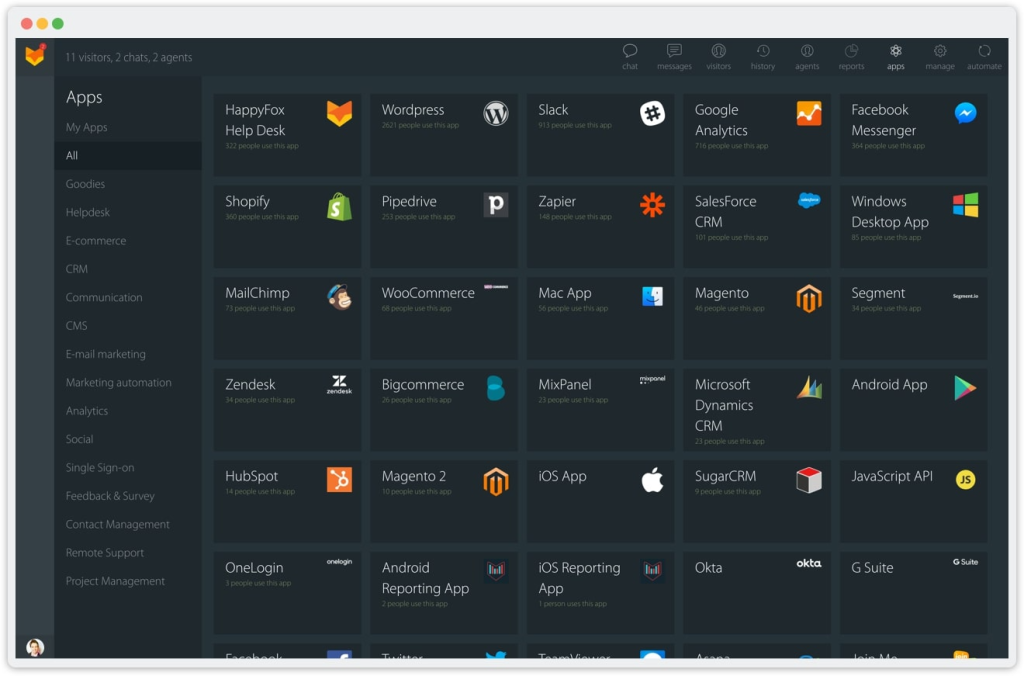
HappyFox is an IT service management tool that combines ticketing with asset and incident management. It gives IT teams visibility into both requests and the resources tied to them. Its strength lies in linking tickets to specific assets, tracking recurring issues, and enforcing structured workflows.
Where TeamSupport stops at basic ticketing, HappyFox delivers the full discipline of ITSM, helping internal teams manage service delivery more effectively.
Pros
- Built-in change management for handling IT service changes with proper approvals and workflows.
- Multi-channel support (email, chat, voice, social) alongside IT ticketing, so teams can manage internal and external requests together.
- Customizable dashboards and reports that help you track SLAs, agent performance, and recurring incidents.
Cons
- Limited AI capabilities compared to modern AI-first helpdesks like Hiver, Zendesk, or Freshdesk.
- Fewer third-party integrations than larger platforms.
Customer Reviews
- “The reports may be confusing, and some of their features require a higher tier.”
- “It is easy to maintain, easy to integrate with existing platforms, and also extensible via their powerful API.”
Pricing
HappyFox starts at $21/agent/month with core features like ticketing, SLAs, a knowledge base, and reporting. Higher tiers add multi-brand support, advanced automation, and asset management, while enterprise plans provide full ITSM capabilities. A 14-day free trial is available.
Recommended reading
7. Zoho Desk
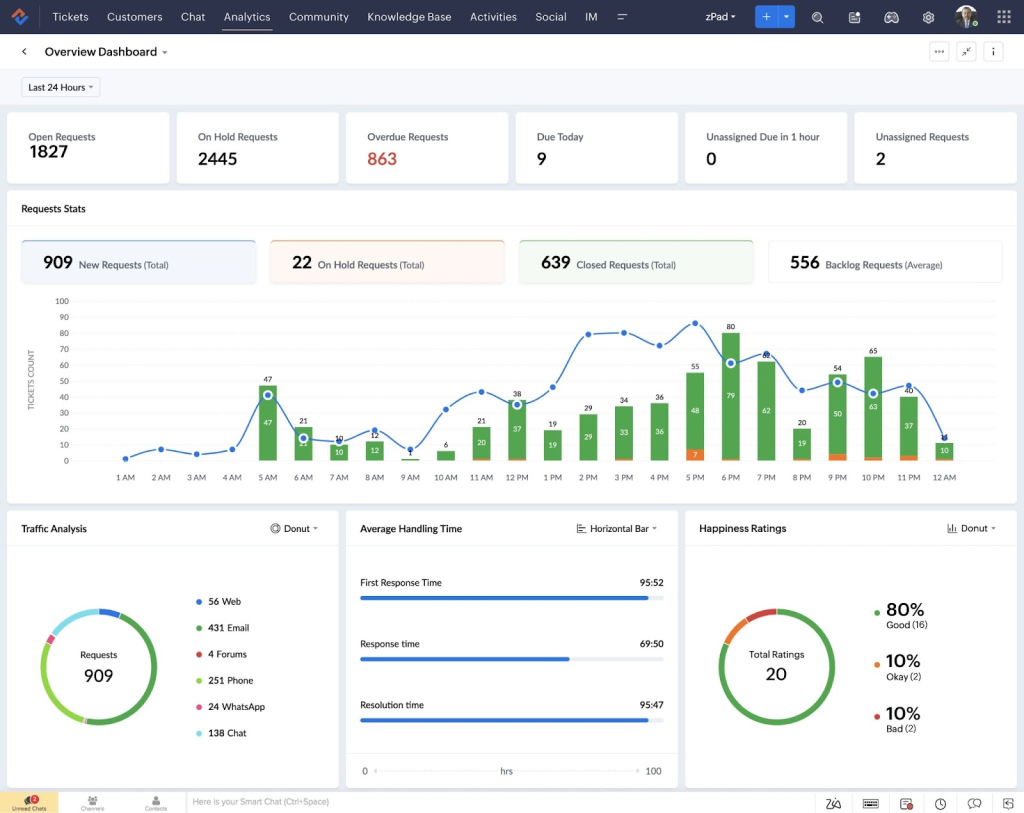
If you’re already using Zoho CRM or the broader Zoho suite, Zoho Desk is one of the most seamless TeamSupport alternatives. It pulls customer history and context from CRM directly into support tickets, so agents always know who they’re helping and what’s been discussed before.
To top it off, Zoho’s AI assistant Zia suggests responses, flags sentiment, and helps prioritize tickets. With tight workflow automation and native integration across Zoho apps, Zoho Desk gives businesses already in the ecosystem an end-to-end support solution. While TeamSupport leaves reporting and context fragmented, Zoho Desk delivers customer insights in one centralized view.
Pros
- It can be used by teams across departments like IT, HR, and Finance. Each team can manage its own tickets, workflows, and reports separately while still using the same helpdesk platform.
- Customizable SLAs and escalation rules help ensure accountability across diverse ticket types.
- Strong self-service options with a built-in knowledge base and community forums.
Cons
- UI can feel dated compared to more modern, design-focused tools.
- Integrations outside the Zoho ecosystem are limited, which can be restrictive for mixed tech stacks.
Customer Reviews
- “One feature I would really like to see is the ability to add external email addresses (non–Zoho Desk users) as CC recipients on automated alerts.”
- “I particularly appreciate the ease of use and the centralization of tickets. The APIs are also a real plus, as they allow us to create tickets directly from our own software.”
Pricing
Zoho Desk offers a Free plan for up to three agents with email ticketing, SLAs, and a basic knowledge base. Paid plans start at $14/user/month for Standard with workflows and reporting. They scale up to Enterprise with multi-department support, AI features from Zia, and advanced automation. All plans include a 15-day free trial.
Recommended reading
8. Front
Front’s standout feature is its shared inbox collaboration. Instead of juggling CCs and long email chains, agents can assign messages, tag teammates, and leave internal comments directly beside the thread. This keeps every conversation organized and prevents duplicate responses.
With CRM integrations, agents see customer history, orders, and open opportunities right beside the message, so replies are faster and more relevant. While TeamSupport also enables collaboration through internal notes and @mentions, but it doesn’t include shared drafts, so teams may still rely on external tools when working on replies together.

Pros
- Real-time collision detection prevents multiple agents from replying to the same customer.
- Analytics on team workload and response times help managers spot bottlenecks.
- Wide app integrations with Slack, Salesforce, Asana, and more to streamline workflows.
Cons
- Social channels like WhatsApp or SMS require third-party integrations, since Front doesn’t natively support them.
- Pricing increases quickly as you add more seats and advanced features.
Customer Reviews
- “While Front excels at conversation management, I’d love to see more flexibility in connecting third-party AI tools and custom integrations.”
- “Front is the most adaptable and user-friendly team platform available. You have the power to quickly and easily organize your teams.”
Pricing
Front starts at $25/seat/month for the Starter plan with a shared inbox, basic automation, and a knowledge base. The Professional plan ($65) adds omnichannel support and advanced analytics, while Enterprise ($105) unlocks unlimited automation, AI features, and enterprise security. A free trial is available for 14 days.
Recommended reading
9. ProProfs Help Desk
ProProfs Help Desk is designed for cost-conscious teams that need core support functions in one place. It provides email ticketing, live chat, and a built-in knowledge base, all accessible with minimal setup.
CX leaders value it for its fast deployment and straightforward pricing. Compared to TeamSupport, which can feel more complex to set up, ProProfs makes essential support tools available from day one.

Pros
- Automated ticket assignment routes queries to the right agents without manual effort.
- Built-in CSAT surveys let teams capture customer feedback after every interaction.
- Integration with ProProfs’ broader suite (like training, quizzes, and knowledge base) adds extra value for teams already using their ecosystem.
Cons
- Limited scalability, which can restrict larger teams with advanced workflow needs.
- Reporting remains basic, offering only standard metrics without deeper analytics.
Customer Reviews
- “The ability to manage all the emails from our customer-facing IDs helps our agents answer them faster.”
- “This tool is not a full-fledged ITSM tool. However, you can manage your basic IT ticketing needs with ease.”
Pricing
ProProfs offers a Free plan for single agents with email ticketing, chat, and a knowledge base. Paid plans start at $19.99/user/month, with higher tiers adding advanced routing, roles, and detailed reporting. A free trial is available.
Recommended reading
10. LiveAgent
If your team handles a lot of customer calls, LiveAgent gives you an edge with its built-in call center. Most tools at this price point don’t include voice, but LiveAgent lets you manage phone, email, chat, and social support in one place without paying for separate telephony software. Compared to TeamSupport, LiveAgent also stands out for its faster, plug-and-play deployment, which makes it easier for smaller teams to get started quickly.
Pros
- Ticket merging and splitting tools make it easier to manage complex or overlapping conversations.
- Gamification features (badges, leaderboards) help boost agent engagement and productivity.
- Customizable customer portal with a knowledge base and community forums for self-service.
Cons
- The interface feels crowded, so agents may struggle to find features quickly when ticket volumes are high.
- Automation is basic, with no AI-driven triage or smart routing, which limits efficiency as teams grow.
Customer Reviews
- “One area that could be enhanced is the integration with the WhatsApp Business API, especially to enable better interaction between LiveAgent’s internal triggers and WhatsApp message delivery.”
- “It was much easier to set up and configure than expected, but also has fantastic flexibility to configure and customise the nitty gritty details where this is desirable.”
Pricing
LiveAgent starts at $15/agent/month for the Small plan with email ticketing, live chat, and a knowledge base. The Medium plan ($29) adds a call center, IVR, and reporting, while the Large plan ($49) expands to full omnichannel support and gamification. The Enterprise plan ($69) includes SSO, custom roles, and audit logs. A free trial is available.
Recommended reading
10 LiveAgent Alternatives for Your Customer Support Team in 2025
11. Freshservice
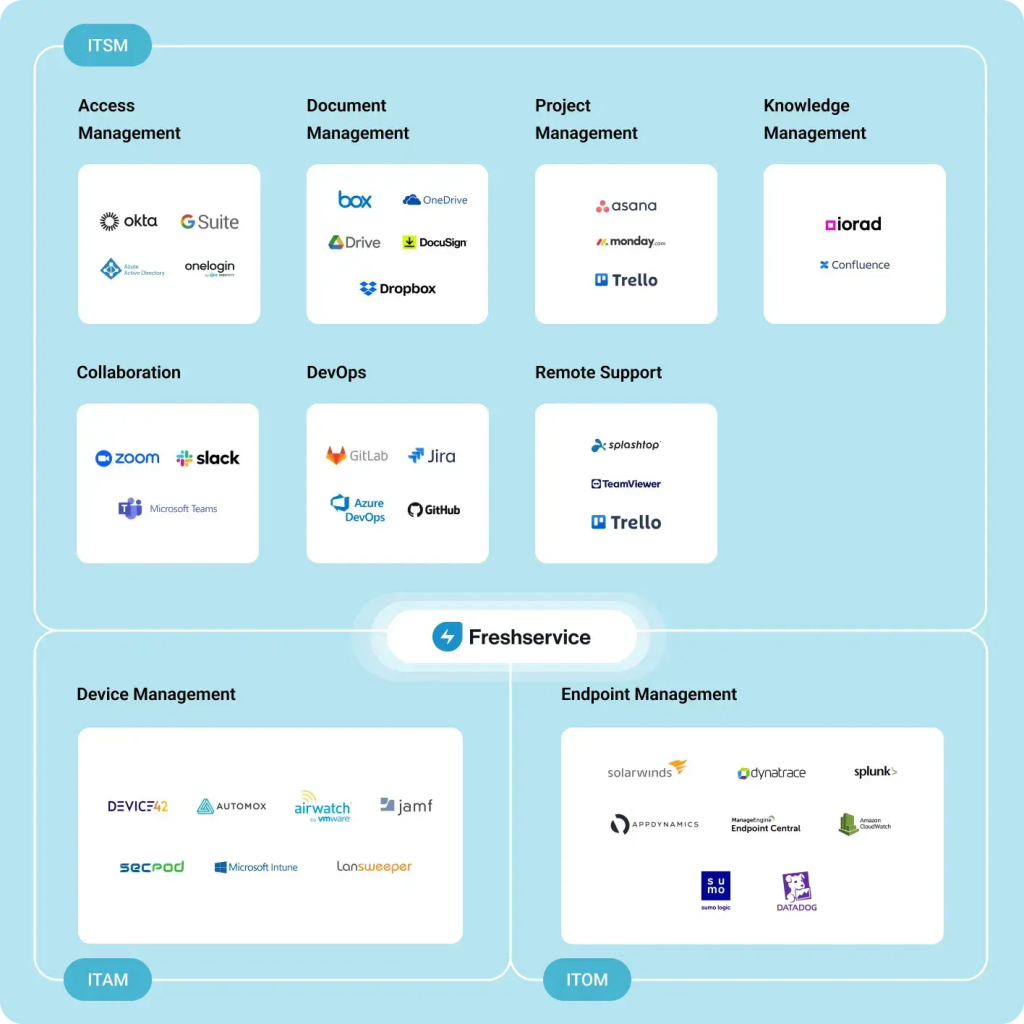
Freshservice is built for IT teams and follows ITIL (Information Technology Infrastructure Library) standards, which are best practices for handling incidents, changes, and asset management. With Freshservice, teams can log incidents, track assets, and manage approvals in one place.
Automation takes care of repetitive tasks, so IT teams spend less time on manual work. TeamSupport doesn’t support ITIL workflows or asset tracking, which makes Freshservice a stronger fit for IT departments with complex needs.
Pros
- Service catalog gives employees a simple portal to request hardware, software, or other IT services.
- AI virtual agent answers routine IT questions and guides users to knowledge articles.
- Change management workflows add approvals and risk checks before any IT change goes live.
Cons
- Pricing is on the higher side for the features it offers. For instance AI capabilities are locked under higher pricing plan and the features in the lowest plans are pretty basic.
- Customization is limited compared to larger enterprise ITSM platforms.
Customer Reviews
- “What I particularly appreciate about Freshservice is that all incoming tickets arrive in a clear system. Every request can be tracked seamlessly – nothing gets lost in the support void.”
- “Occasionally, we run into limitations with the API and workflow automations, especially when trying to implement more complex scenarios.”
Pricing
Freshservice starts at $19/agent/month with core ITSM features like incident management, SLAs, and a knowledge base. Higher tiers add asset and change management, advanced analytics, and AI capabilities at $99. A 14-day free trial is available for all tiers.
Recommended reading
12. Tidio
If you run an e-commerce store, Tidio stands out for its AI-powered chatbots that handle routine questions like order status, shipping updates, or returns instantly. It integrates directly with Shopify, WooCommerce, and other e-commerce platforms, so agents see customer and order details alongside conversations.
This helps reduce repetitive workload and keeps response times fast. TeamSupport doesn’t offer this kind of ecommerce-specific automation, which makes Tidio a smarter fit for online retailers.

Pros
- Multi-channel messaging brings live chat, email, and social platforms together in one dashboard.
- Visual chatbot builder lets teams design automated flows without coding.
- Lead capture features like pre-chat surveys and pop-ups help convert visitors into customers.
Cons
- Reporting is basic in lower-tier plans, limiting visibility into performance.
- Scaling is difficult for large enterprises since features like advanced reporting, complex automation, and multi-brand support are limited.
Customer Reviews
- “Tidio’s intuitive interface and seamless integration with multiple platforms make it incredibly easy to manage all customer interactions in one place.”
- “I really like using Tidio, but I’d like more integrations (like CRMs, marketing tools, and payment platforms) and greater customizability in chatbot flows and design.”
Pricing
Tidio has a free plan with 50 live chat conversations and 50 AI chatbot chats. Paid plans start at $29/month with 100 conversations and basic analytics, while the Growth plan ($59/month) scales to 2,000 conversations with advanced reporting. A 7-day free trial is included.
Recommended reading
13. Supportbench
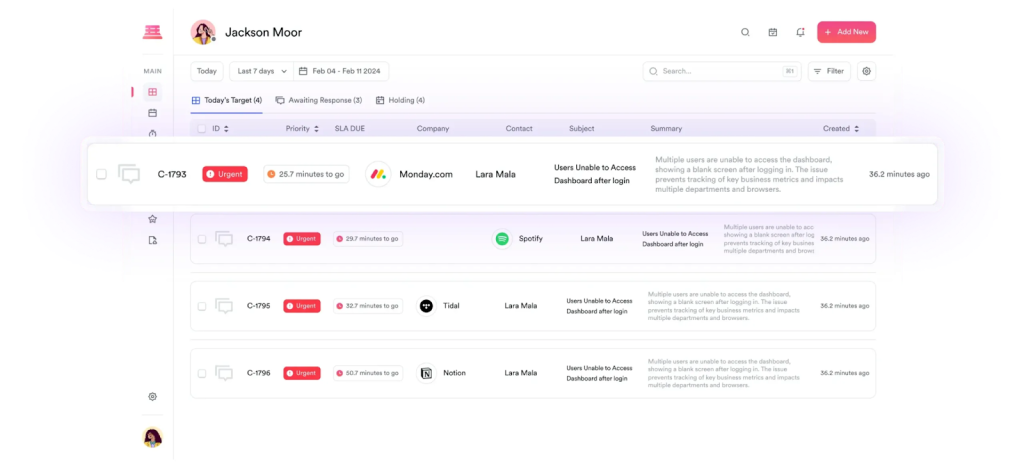
If your team lives in email and needs better visibility into performance, Supportbench delivers. Its strength is advanced SLA tracking and analytics, with dashboards that show exactly where response times slip or workloads pile up.
It also brings AI into the mix—analyzing customer sentiment, highlighting trends, and helping leaders spot issues before they escalate. TeamSupport offers basic reporting, but CX managers often export data to spreadsheets for deeper analysis. Supportbench provides those insights natively, so teams can act on them right away.
Pros
- Customizable case views let teams organize tickets by priority, type, or SLA rules.
- Built-in escalation paths ensure high-priority issues get routed to the right people fast.
- Native integrations with CRMs and productivity tools reduce the need for constant switching between platforms.
Cons
- Integrations are limited, which can make it harder to connect with a broader tech stack.
- Interface feels dated, so new agents may need extra time to adjust.
Customer Reviews
- “The limited multilingual support is a gap, especially when dealing with a diverse, global customer base. But, it’s something that hasn’t made a significant difference.”
- “The unified view of all open/pending/closed issues and custom survey integration made our process cleaner overnight.”
Pricing
Supportbench offers straightforward pricing that starts at $40/agent/month with a single all-inclusive plan. It covers everything from SLA tracking and automation to AI-powered analytics and case workflows, so there are no extra modules or hidden add-ons. A 14-day free trial is available.
Recommended reading
14. Gorgias
Gorgias is purpose-built specifically for e-commerce support, with direct integrations into Shopify, Magento, and BigCommerce. Agents can instantly see full order histories, issue refunds, and process returns without leaving the ticket. That’s a big win for speed and accuracy.
Where it really stands out is automation. Gorgias can detect and respond to repetitive queries like “Where’s my order?” or “How do I return this?” — the kinds of questions online retailers get by the hundreds every day. Unlike TeamSupport, which treats all tickets the same, Gorgias is tailored to the repeat patterns and heavy volumes of retail support

Pros
- Revenue-focused reporting connects support performance to sales and customer lifetime value. For example, managers can see if faster replies drive more renewals, or if quick resolutions create upsell opportunities.
- Macros and Templates let your team reply to FAQs in seconds while keeping the message clear and consistent.
- Multi-channel coverage pulls in email, chat, social, and SMS, giving agents a single view of customer conversations.
Cons
- Pricing is tied to ticket volume, which can make costs unpredictable for fast-growing teams.
- Limited appeal outside e-commerce, so B2B or non-retail teams may find it less useful.
Customer Reviews
- “It’s easy to use and organize enough to never worry about losing your tickets. It also integrates Shopify, email, chats, and calls.”
- “What I dislike about Gorgias is that sometimes it can be slow to load, especially when managing a high volume of tickets. Additionally, some automation features could be more flexible or customizable to better fit specific workflows.”
Pricing
Gorgias uses ticket-based pricing, starting at $10/month for 50 tickets a month. Higher tiers unlock features like advanced analytics, multi-store support, and deeper ecommerce integrations, while ticket limits scale with each plan. You can buy extra tickets as an add on, which are charged as per your plan. The AI-powered resolutions are billed separately. A 7-day free trial is available.
Recommended reading
15. Salesforce Service Cloud
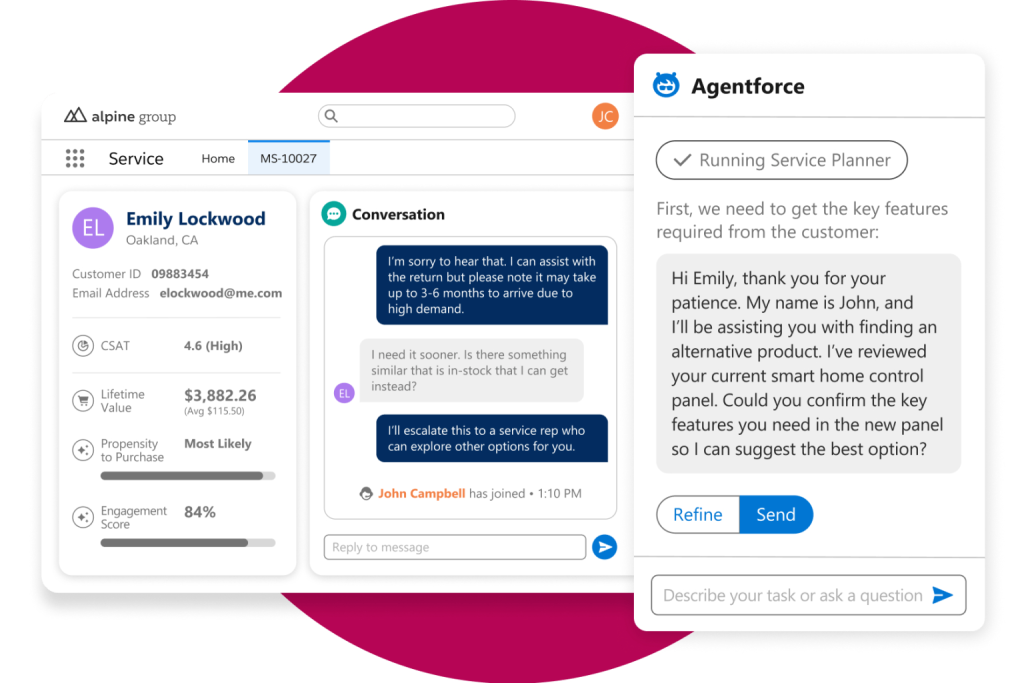
If your company already runs on Salesforce, Service Cloud makes customer support a natural extension of your CRM. Agents see a full picture of every customer, including history, purchases, and past issues, before they even reply.
Agentforce AI powers predictive routing, chatbots, and insights that help teams solve problems faster. TeamSupport does not provide this level of CRM integration or AI-driven automation, making Service Cloud better suited for enterprises.
Pros
- Deep CRM integration links support tickets directly with customer records, giving agents full context.
- Robust security and compliance features (like role-based permissions, data encryption, and audit trails) make it suitable for regulated industries.
- Highly customizable workflows allow enterprises to build tailored processes for case management and escalations.
Cons
- The overall cost is high, especially when you add advanced modules and extra features.
- Complex setup and configuration, which often requires dedicated admins or Salesforce consultants.
Customer Reviews
- “Salesforce has been our firm foundation in different production sites, assisting customers globally and ensuring the quality that we deliver.”
- “It may be more difficult to use and configure for unfamiliar users. It also needs regular training to be able to maximize all of its capabilities, and it might not be cheap for small enterprises.”
Pricing
Service Cloud starts at $25/user/month with basic email management and ticketing. Higher tiers add chat support, omni-channel routing, workflow automation, and AI features like AgentForce. The top plan at $175 includes advanced analytics, 24/7 support, and premier success resources. A free trial is available.
Recommended reading
What is Customer Relationship Management (CRM)? Types, Benefits, and Trends
How to Choose the Right TeamSupport Alternative for Your Team
When you’re evaluating TeamSupport alternatives, focus on what will impact performance directly. The goal is to find a platform that fits your workflows, supports your customers, and scales with your team.
Here are a few things to consider when opting for a TeamSupport alternative for your team.
1. Does it integrate with the tools your team already uses (Google Workspace, Slack, Salesforce)?
Hiver supports email, chat, voice, and WhatsApp without forcing you into one ecosystem. Zoho Desk is a good fit if you rely on Zoho apps. Salesforce Service Cloud works best if your organization runs on Salesforce.
2. Can new agents adopt it quickly without heavy training?
Hiver and Help Scout are easy to pick up thanks to their simple, intuitive interfaces, which shorten onboarding time.
3. Does it offer AI and automation to cut manual work?
Hiver’s AI Copilot, Zendesk’s workflows, and Intercom’s Fin bot automate routine work. They handle routing, SLA reminders, and common customer queries, which cuts down on manual effort.
4. Will it scale as your team grows in size, channels, and ticket volume?
Zendesk and Salesforce Service Cloud scale well for large enterprises. Freshdesk and Supportbench work best for mid-market teams preparing for growth.
5. Does the vendor provide reliable support with clear SLAs?
Hiver and Front are praised for responsive vendor support. HappyFox is reliable for IT teams that need consistent performance.
6. Have you factored in the true cost, including add-ons and growth?
Hiver offers a free forever plan, making it easy to start without upfront costs. ProProfs Help Desk and LiveAgent keep pricing simple for cost-conscious teams.
Scale Your CX with the Best TeamSupport Alternatives
Customer expectations continue to rise, and support teams need tools that can keep up. They need automation to reduce manual work, analytics to track performance, and platforms that can handle more agents and tickets as the business grows.
The TeamSupport alternatives I’ve covered offer focused solutions. Some excel at real-time chat. Others provide structured IT service management. A few are built for ecommerce support.
If you want an AI-first helpdesk that is simple to use and built to scale, Hiver is the one to try. It includes AI Copilot for faster responses, detailed analytics to track SLAs, and multi-channel support in one platform. Sign up for the forever free plan and explore features for yourself. Here’s Hiver’s free trial for you to begin with.
Frequently Asked Questions
1. Who is better than Zendesk?
Hiver is often a better choice than Zendesk for teams that want an AI-first helpdesk with simpler workflows. For IT teams, Freshservice is another option.
2. What are the alternatives to TeamSupport?
The best alternatives to TeamSupport include Hiver, Zendesk, Freshdesk, Zoho Desk, Intercom, Help Scout, and Salesforce Service Cloud.
3. What is the best TeamSupport alternative for small businesses?
Hiver is a strong choice for small businesses because it’s easy to use and offers a free forever plan. Help Scout and ProProfs Help Desk are also good fits.
4. What is the alternative to TeamSupport for IT service management?
Hiver covers essential IT support needs with shared inboxes and AI workflows, but if you need strict ITIL processes, Freshservice and HappyFox are strong options.
5. Which TeamSupport alternative offers the best AI features?
Hiver leads here with AI Copilot for replies, smart triage, SLA tracking, and analytics. Other AI-powered options include Zendesk and Intercom.
Start using Hiver today
- Collaborate with ease
- Manage high email volume
- Leverage AI for stellar service