







If you’re comparing Zendesk vs Kayako, you’re likely choosing between control and simplicity. Zendesk gives you deep workflow customization, layered permissions, and advanced automation. It also requires configuration and ongoing management.
Kayako takes a simpler approach. Its SingleView timeline keeps customer history in one place, making daily management easier. But as workflows grow more complex, their limits become apparent.
In this guide, I’ll break down pricing, AI depth, integrations, scalability, and where each tool creates friction as your team grows.
Key Takeaways:
- The right choice depends on team size, workflow complexity, and the level of customization you actually need.
- Zendesk is for large-scale operations that require deep customization and have the budget for a high-maintenance toolkit.
- Kayako wins on context. Its unified customer timeline lets agents see a full history without toggling between screens, though its automation library is relatively thin.
- Zendesk’s pricing scales with feature tiers and AI usage. Kayako’s pricing is simpler but offers fewer advanced automation options.
How I Did the Research
I skipped the sales demos and tested both platforms directly. I spent a week inside the latest versions of Zendesk and Kayako, setting up ticket routing rules, configuring SLA policies, building automations, and testing how their AI handled real customer scenarios.
This is not the usual feature checklist comparison. I evaluated how each system performs under real operational pressure. I tested how easily SLAs can be enforced, how routing behaves as complexity increases, and how much ongoing effort is required to maintain workflows.
I then validated these findings against recent user feedback from G2 and Capterra to confirm how the tools perform beyond the initial setup phase.
Kayako vs Zendesk: Quick Comparison
| Feature | Zendesk | Kayako |
|---|---|---|
| Best For | Enterprise teams need deep customization and advanced AI agents. | Small to mid-sized teams prioritizing customer context and simple setup. |
| G2 Rating | ⭐⭐⭐⭐ (4.3/5) | ⭐⭐⭐⭐ (4.0/5) |
| Starting Price | $19/agent/month (Billed annually) | $79/agent/month (Billed annually) |
| Free Plan | 14-day trial only | 14-day trial only |
| Setup & Configuration | Requires configuration and ongoing admin management | Faster to set up, lighter configuration |
| Ticket Management | Highly customizable views, triggers, macros, SLAs | Unified “SingleView” timeline with simpler controls |
| Automation Depth | Advanced workflow builder with granular logic | Basic automation and routing rules |
| AI Capabilities | Intent detection, AI agents, outcome-based pricing for resolutions | AI suggestions, basic triage, and chatbot support |
| Integrations | 1,500+ apps, including deep CRM, e-commerce, and dev tool connections. | Limited. Basic native integrations; relies heavily on Zapier for modern stacks. |
| Reporting | Advanced analytics and custom dashboards | Standard reporting, fewer advanced filters |
| On-Premise Option | Cloud only | Available via Kayako Classic |
| Omnichannel | Full (Email, Chat, Voice, Social, WhatsApp) | Standard (Email, Chat, Social, WhatsApp) |
| Scalability | Strong for 50+ agent teams and multi-brand setups | Best suited for smaller teams with simpler needs |
Feature Comparison: Kayako vs Zendesk
Choosing between Zendesk and Kayako is not about feature volume. It is about how each system organizes work and how that structure holds up as your support operation grows.
1. Ticket management & workflow control
This is where both the tools take fundamentally different approaches to organizing support work.
Zendesk
Zendesk treats every interaction as a structured ticket with defined fields such as status, priority, form type, custom fields, and SLA policies attached to it.

That structure allows you to:
- Create separate ticket forms for billing, technical, onboarding, or enterprise accounts.
- Apply SLA rules automatically based on plan or customer tier.
- Route tickets to specific groups using tags and conditional logic.
- Escalate tickets when response times breach thresholds.
- Separate brands or business units within the same account.
- Maintain a full audit trail for compliance and reporting.
Operationally, this means tickets move through predefined workflows. Response commitments are enforced automatically. Escalations do not depend on manual monitoring.
If you manage multiple queues or operate under strict SLA commitments, this structure reduces risk and prevents missed obligations. However, that structure must be configured and maintained. As ticket forms, routing rules, and SLAs increase, ongoing admin management becomes necessary.
Kayako
Kayako centers support around its SingleView timeline.
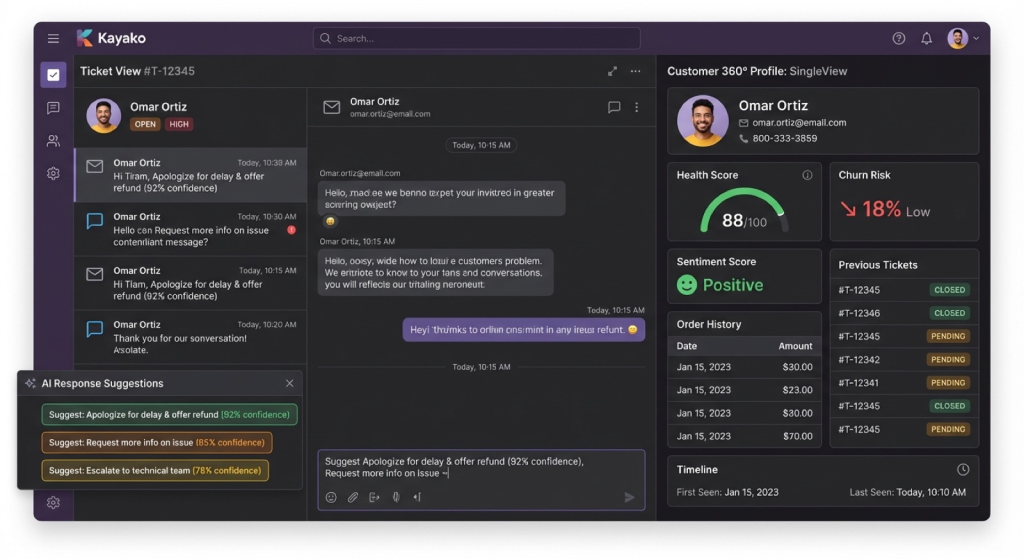
All customer conversations across email, chat, and social channels are combined into one continuous customer thread. Agents see the full interaction history before responding, rather than working across multiple ticket records.
This allows agents to:
- Avoid jumping across multiple ticket IDs.
- Respond with full context immediately.
- Reduce internal clarification and handoff confusion.
However, routing flexibility and SLA enforcement are lighter. As workflows become segmented across customer tiers or departments, you may need to work around structural limits rather than configure deeper control.
Verdict
Zendesk is the stronger system when operational discipline, SLA enforcement, and segmented routing are critical.
Kayako is the stronger system when your biggest friction is context loss and conversation fragmentation.
Choose Zendesk if process control protects revenue or compliance. Choose Kayako if speed and clarity at the agent level matter more than workflow depth.
2. Automation & Workflow Builder
Automation defines how tickets move through your system and how consistently processes are enforced. This is rule-based logic that you configure in advance.
Zendesk
Zendesk’s automation runs on Triggers, Automations, and Macros, which allow you to build layered, conditional workflows. You can:
- Route tickets based on plan type, issue category, or region.
- Escalate tickets automatically if SLA thresholds are breached.
- Reassign tickets when agents are unavailable.
- Apply tags, priorities, or statuses instantly when conditions match.
- Chain multiple conditions together across departments.
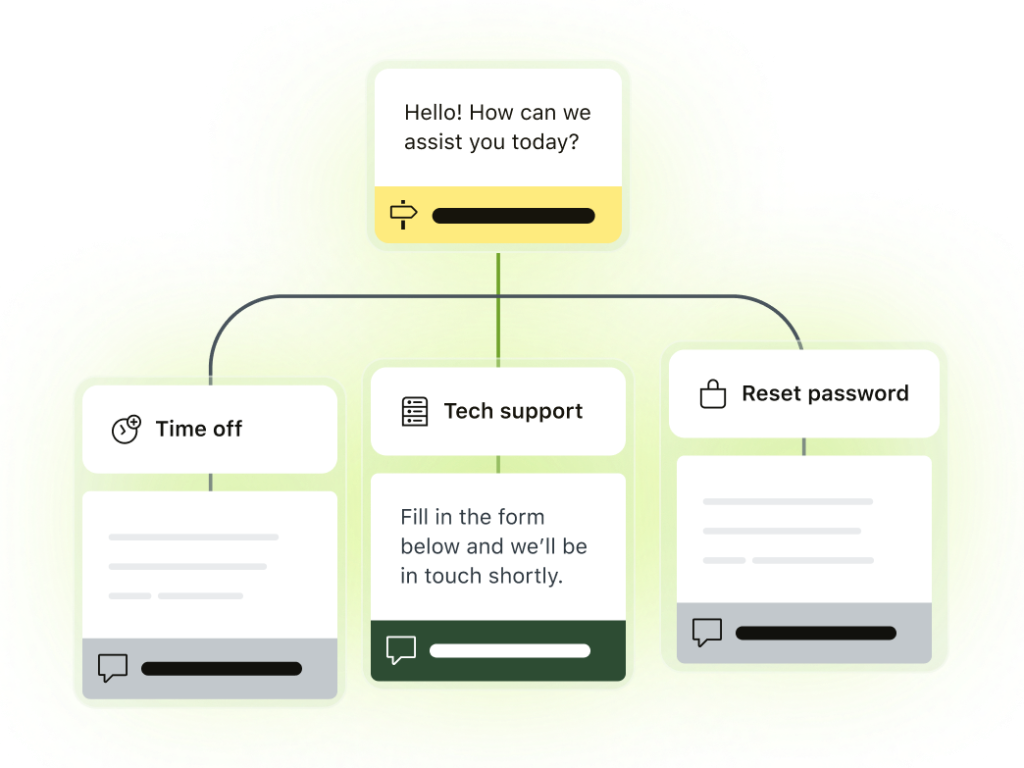
For example, you can design workflows that operate without manual intervention. Enterprise billing issues can be routed to senior agents, marked high priority, assigned a specific SLA, and escalated to management if unresolved, all automatically.
For teams handling volume across multiple queues, this removes dependency on manual triage and reduces SLA risk. The tradeoff is the complexity of the tool. As routing layers increase, workflow governance becomes part of ongoing operations.
Kayako
Kayako supports rule-based routing and tagging designed for simpler support models.
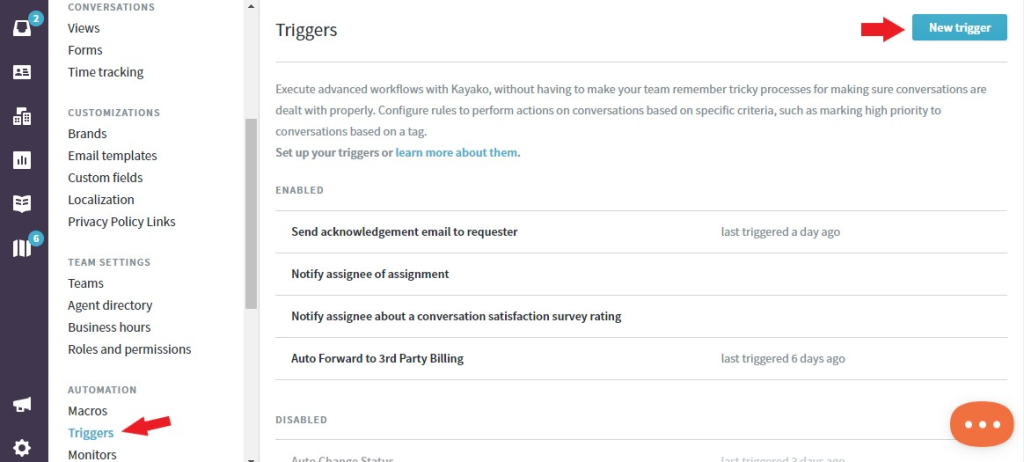
You can:
- Auto-assign tickets based on keywords.
- Route conversations by channel.
- Trigger actions when certain conditions are met.
- Auto-apply tags or priorities.
This eliminates manual sorting for straightforward workflows and keeps setup manageable.
However, conditional chaining is limited. Multi-tier SLA enforcement and highly segmented routing across departments are less flexible. As workflows grow more layered, automation may require simplification rather than expansion.
Verdict
If your support operation relies on tiered SLAs, structured escalation paths, and segmented routing across teams, Zendesk gives you the control to automate that complexity reliably.
If your routing needs are straightforward and centralized, Kayako handles automation cleanly without heavy configuration.
3. AI Capabilities
AI only matters if it meaningfully changes workload. The real question is whether it reduces the number of tickets agents handle or simply helps them respond faster.
Zendesk
Zendesk’s AI spans triage, classification, reply drafting, and autonomous resolution. It can:
- Detect intent from customer language without predefined keyword rules.
- Automatically classify and route tickets based on historical patterns.
- Draft contextual replies using knowledge base content.
- Trigger AI agents that resolve repetitive issues end-to-end.
- Detect sentiment and prioritize high-risk conversations.
When you use it, this allows common queries to be handled before they reach an agent. Repetitive requests such as password resets, billing status checks, or basic troubleshooting can be resolved automatically. That reduces queue volume and protects response times during peak periods.
This level of automation directly impacts staffing pressure. Fewer repetitive tickets reaching agents means more focus on complex issues.
AI capability, however, scales with usage. As automation becomes central to operations, costs can increase depending on tier and AI deployment model.
Zendesk’s AI is built for teams that view deflection and workload reduction as measurable operational goals.
Kayako
Kayako’s AI focuses on assisting agents rather than resolving tickets autonomously. It can:
- Suggest replies.
- Recommend relevant help center articles.
- Support basic chatbot interactions.
This improves drafting speed and consistency. However, it does not provide deep predictive routing or full autonomous resolution at scale.
AI helps agents respond faster, but it does not significantly reduce the number of tickets agents must handle.
Verdict
- If your goal is to reduce ticket volume through autonomous resolution, Zendesk offers materially stronger AI capabilities.
- If your goal is to improve reply speed while keeping agents fully involved, Kayako provides useful assistance, but not to the same extent in terms of workload reduction.
4. Omnichannel Support
Most support teams handle email, chat, and messaging at minimum. Many also manage voice. The question is not whether a tool supports multiple channels. The question is whether those channels operate under one consistent system.
Zendesk
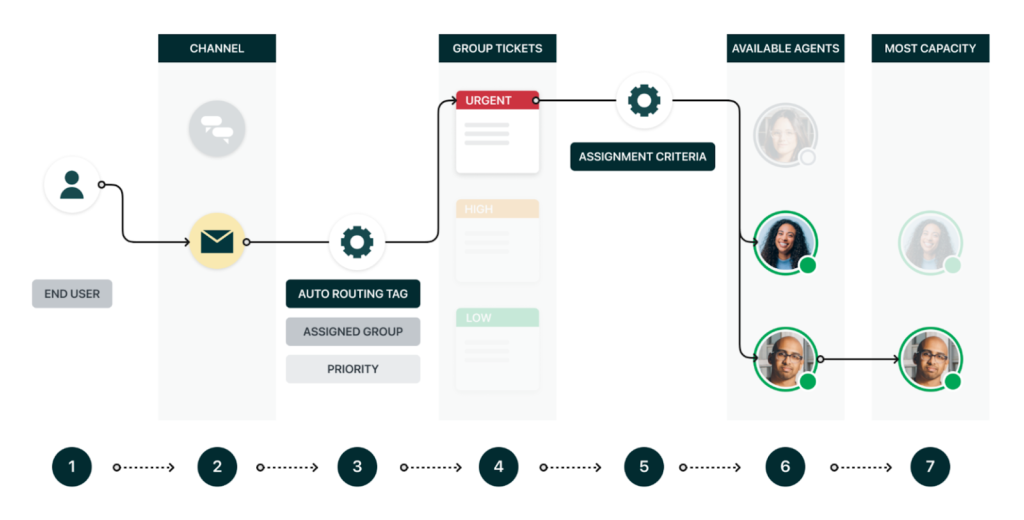
Zendesk supports email, live chat, voice, social messaging, and WhatsApp under one structured system. Here’s how it works:
- Every interaction, regardless of channel, becomes a ticket.
- Routing rules and SLAs apply consistently across channels.
- Voice calls can be logged, recorded, and tracked alongside email and chat.
- Reporting aggregates performance across all channels into a single dashboard.
This matters when volume increases. Agents do not manage separate workflows for chat and voice. Managers do not pull reports from different systems. Escalations behave the same way across every channel.
Here the implementation effort can be hectic. Each channel must be configured properly to ensure routing logic, SLA enforcement, and reporting remain consistent.
Kayako
Kayako supports email, live chat, and social messaging inside its SingleView interface.
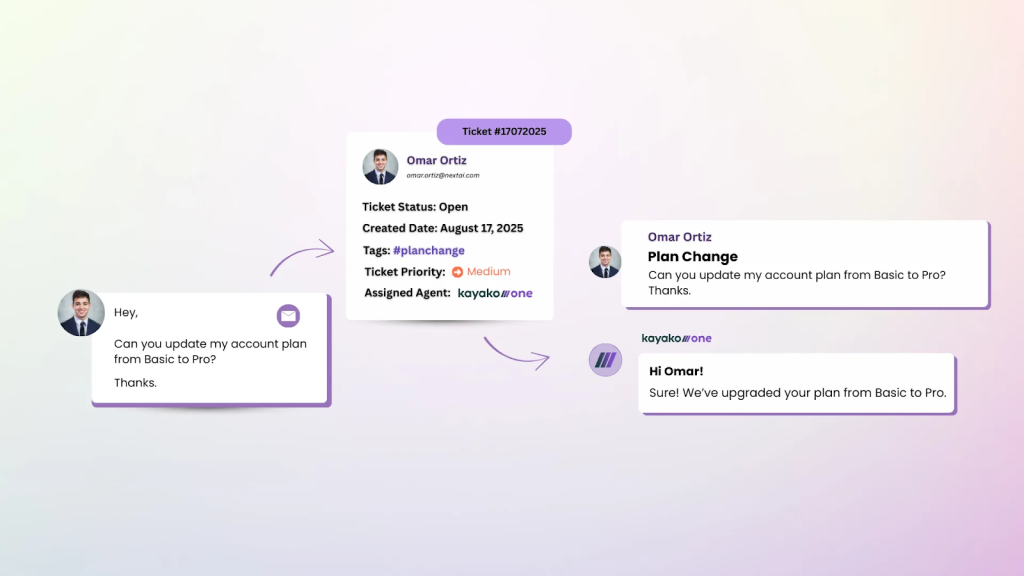
All interactions appear in a single customer timeline, keeping conversations unified from an agent’s perspective.
This works well when support is primarily digital and chat-based. However, voice support is not as deeply embedded as in Zendesk, and channel flexibility is narrower. Scaling across many touchpoints may require additional tooling.
Verdict
Zendesk provides broader and more structured omnichannel coverage. It is better suited for teams managing high traffic across multiple communication channels.
Kayako handles core digital channels well but lacks the same depth for complex omnichannel operations. If your support model spans voice, chat, and messaging at scale, Zendesk is the stronger platform.
5. Integrations & Ecosystem
Your help desk does not operate alone. It needs to pull data from your CRM, push updates to billing, sync with engineering, and surface customer context instantly.
The strength of integrations determines how connected your support operation truly is.
Zendesk
Zendesk offers a marketplace with more than 1,500 apps and integrations. You can:
- Sync customer data with CRMs like Salesforce and HubSpot.
- Connect with e-commerce platforms such as Shopify and Magento.
- Link engineering workflows through Jira.
- Integrate voice systems and messaging platforms natively.
- Use APIs and webhooks to build custom integrations.
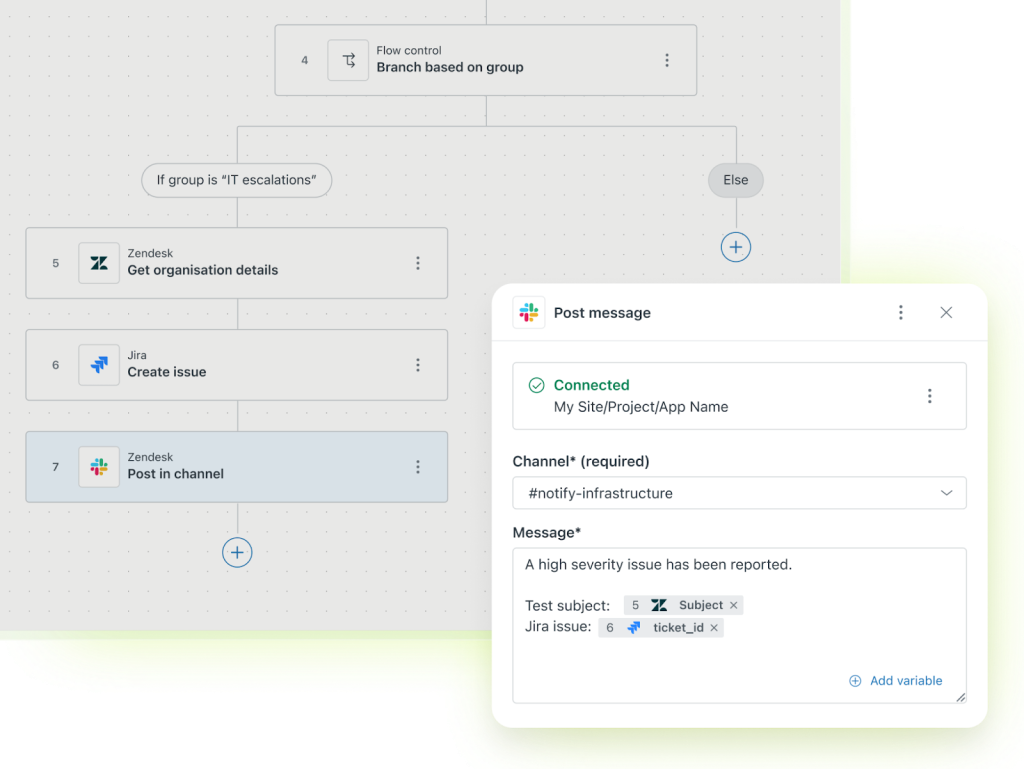
This allows support agents to work with customer data without leaving the platform.
For teams with complex tech stacks, Zendesk reduces tool-switching and keeps workflows centralized. However, deeper integrations may require configuration time or development resources.
Kayako
Kayako supports integrations with common CRMs and core business tools.
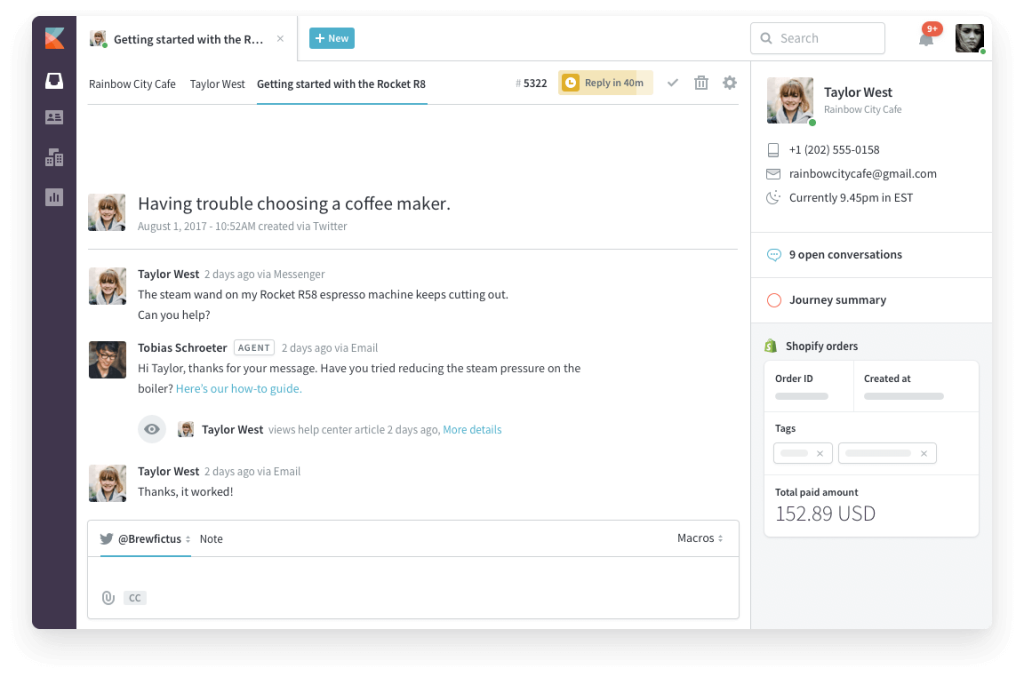
It connects with standard platforms for email, chat, and some CRM systems. For extended integrations, teams often rely on Zapier rather than deep native connectors.
For smaller stacks, this is usually enough. For teams that require real-time syncing across multiple internal systems, the integration depth is narrower than with Zendesk.
Verdict
Zendesk offers significantly deeper integration and greater ecosystem flexibility. It is better suited for teams that rely on multiple interconnected systems. Kayako supports essential integrations but does not offer the same extensibility.
6. Reporting & Analytics
Reporting determines whether you can manage proactively or only react when performance drops. If you are making staffing decisions, tracking SLA compliance, or reporting to leadership, reporting depth matters.
Zendesk
Zendesk’s reporting layer (Zendesk Explore) is built for structured analysis. You can:
- Segment performance by custom fields, plan type, region, or brand.
- Track SLA compliance at granular levels.
- Build dashboards for executives, managers, and frontline leads.
- Compare performance across teams or departments.
- Schedule automated report exports.
- Drill into individual metrics with filters tied to ticket properties.
This allows you to answer operational questions such as:
- Are enterprise accounts breaching SLAs more often?
- Is the backlog growing in one region?
- Are certain ticket types driving longer resolution times?
Zendesk gives you the flexibility to isolate these variables. However, building advanced dashboards requires setup time and familiarity with the reporting interface.
Kayako
Kayako provides built-in dashboards focused on core metrics. You can:
- Track ticket volume and resolution time.
- Monitor SLA compliance.
- View agent activity and response time.
- Review CSAT results.
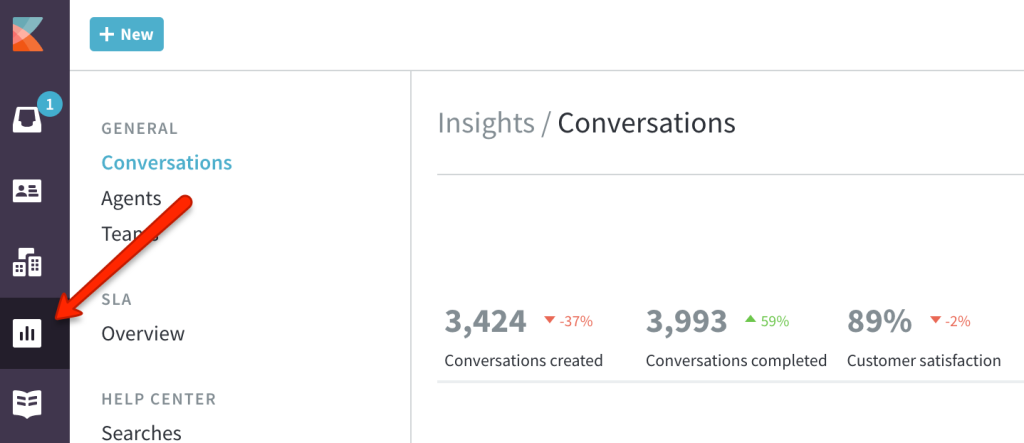
The reporting interface is straightforward and easier to interpret.
However, segmentation options are more limited. You cannot easily slice performance across multiple-layered variables, such as customer tier and region, simultaneously.
Verdict
Zendesk offers stronger reporting flexibility for teams that rely on detailed segmentation and operational oversight.
Kayako provides essential reporting but lacks advanced analytical depth. If reporting drives your staffing decisions, SLA strategy, and executive reviews, Zendesk offers more control.
7. Scalability & Administrative Overhead
The real test of a help desk is not how it works with a small team of five agents. It is how it behaves when the team grows to twenty-five, fifty, or more.
Scaling is not just about adding seats. It is about whether the system becomes heavier to manage as complexity increases.
Zendesk
Zendesk is designed to support structured growth. You can:
- Separate teams by function or region.
- Create different workflows for enterprise and SMB customers.
- Enforce tier-based SLA policies.
- Control permissions with role-based access.
- Run multiple brands inside one account.
This makes Zendesk well-suited for layered support organizations where routing, escalation paths, and compliance controls matter.
However, as routing rules, triggers, and custom fields increase, administrative oversight becomes necessary. Larger teams often assign an internal owner to manage workflows and prevent conflicts.
Zendesk supports structural complexity, but it requires ongoing operational management.
Kayako
Kayako is easier to manage on a smaller scale. It has fewer configuration layers, simpler routing logic, and lighter permission structures. Teams can onboard agents quickly without having to build deeply segmented workflows.
This reduces day-to-day administrative effort. However, when support models become segmented across departments or customer tiers, Kayako provides fewer structural controls. Complex routing and layered SLA enforcement are more limited.
Verdict
Zendesk is better suited for teams expecting operational growth and structured workflows, but it requires more administrative involvement over time.
Kayako is easier to maintain for centralized teams, but it offers less flexibility as operational complexity increases.
If you anticipate operational complexity, Zendesk is better equipped to handle it. If simplicity and lower maintenance are priorities, Kayako will be easier to manage.
8. Customization Flexibility
Customization determines whether the tool adapts to your internal processes or forces your team to adjust to predefined workflows.
Zendesk
Zendesk offers extensive customization across tickets, permissions, and workflows. You can:
- Create multiple ticket forms tailored to different issue types.
- Add custom fields to capture structured data.
- Define granular role-based permissions.
- Build SLA policies tied to customer segments.
- Customize routing logic using conditional rules.
- Extend functionality through APIs and webhooks.
This allows you to model your internal processes directly inside the help desk. If your organization has defined workflows across teams, regions, or customer tiers, Zendesk can reflect that structure.
However, deeper customization increases setup and governance effort. As configurations expand, oversight becomes necessary to prevent workflow conflicts.
Kayako
Kayako offers simpler customization options. You can configure routing rules, add tags and basic fields, adjust agent views, and customize the help center. These tools are sufficient for straightforward support models and centralized teams.
However, Kayako does not offer the same level of granular permissions, layered ticket forms, or deeply segmented configuration. If your workflow requires high structural control, limitations may appear.
Verdict
Zendesk provides significantly greater customization depth and is better suited for teams with structured or evolving processes. Kayako supports essential customization but is better aligned with simpler workflows.
9. Support & Onboarding Experience
The buying decision does not end at checkout. How quickly your team becomes productive affects ROI from day one.
Zendesk
Zendesk provides structured onboarding resources, documentation, and tier-based customer support.
You get:
- Guided setup flows.
- A detailed knowledge base.
- Access to implementation partners for larger deployments.
- Customer support depends on your plan level.
Because Zendesk supports complex configurations, initial setup usually requires planning. Teams often need to configure ticket forms, routing logic, SLAs, and reporting dashboards before going live.
For larger organizations, this is manageable and often expected. Many assign a dedicated owner to manage implementation. Zendesk supports structured rollouts but requires time investment.
Kayako
Kayako is easier to deploy and learn. The interface is straightforward, and agents can begin handling tickets quickly without having to build deeply segmented workflows.
Onboarding typically requires less configuration and training than with Zendesk. Teams can get operational faster, especially if workflows are simple.
However, enterprise-level onboarding support and implementation depth are more limited.
Verdict
Zendesk provides a stronger onboarding infrastructure for complex deployments but requires more setup effort. Kayako enables faster adoption with less configuration.
At a feature level, Zendesk is built for teams that expect operational complexity, while Kayako is built for teams that want a simpler system with less administrative weight. The right choice depends on how much structure your support model truly requires.
Recommended reading
The 15 Best Zendesk Alternatives in 2026 (Tested & Reviewed)
Pricing Breakdown: Kayako vs Zendesk (2026)
When comparing pricing, do not look only at the lowest plan. Look at the plan that actually includes the features you need: automation depth, multichannel, AI, reporting, and integrations.
Below is a simplified tier overview based on publicly listed annual pricing (subject to change by vendors).
| Platform | Entry Tier | Mid Tier | Advanced Tier | Enterprise Tier |
|---|---|---|---|---|
| Zendesk | Support Team (~$19/agent/mo) | Suite Team (~$55/agent/mo) | Suite Professional (~$115/agent/mo) | Suite Enterprise (~ $169/agent/mo) |
| Kayako | Kayako One (~$79/agent/mo) | – | – | – |
(Prices typically reflect annual billing and can change.)
Kayako Pricing
Kayako offers a primary plan called Kayako One, typically priced around $79 per agent per month (annual billing).
In addition to this, Kayako pricing also provides a custom enterprise plan, where pricing is not publicly listed and depends on team size, deployment complexity, and required features.
What you get in the plan:
- Shared inbox and ticketing
- Unified SingleView customer timeline
- Basic automation and routing
- Standard reporting
- Multichannel support (email, chat, social)
The custom plan is intended for larger teams that require:
- Higher agent volumes
- Expanded integrations
- Advanced support requirements
- Potentially deeper implementation assistance
- Pricing is quote-based and varies depending on scope.
What buyers should consider:
The public plan makes budgeting simple on a smaller scale. However:
- There is no lower-cost entry tier.
- Feature expansion does not follow a transparent tier ladder like Zendesk.
- Enterprise capabilities require direct sales engagement.
If you anticipate growth or require structured enterprise controls, you should request detailed feature comparisons between Kayako One and the custom plan before committing.
Kayako’s pricing is straightforward at the base level, but long-term cost visibility depends on how your needs evolve.
Zendesk Pricing
Zendesk uses tiered pricing. The $19 entry price is real, but most structured support teams do not operate on that tier for long.
If you are evaluating Zendesk seriously, you should focus on the Suite plans.
Core Suite Plans (Annual Billing)
These are the main plans most support teams evaluate:
- Support Team ($19 per agent/month) – Basic ticketing with email and limited automation. No advanced SLA enforcement, no structured segmentation. This tier works for small, email-only teams.
- Suite Team ($55 per agent/month) – Adds multichannel support, messaging, and a knowledge base. Suitable for digital-first teams, but still limited in advanced reporting and structured control.
- Suite Professional ($115 per agent/month) – Adds SLA enforcement, multiple ticket forms, skills-based routing, CSAT, IVR, and advanced analytics. This is the tier most mid-market teams land on because it enables operational structure.
- Suite Enterprise ($169+ per agent/month or custom pricing) – Adds sandbox environments, advanced roles, audit logs, and deeper administrative control. Built for large or compliance-heavy deployments. Pricing is quote-based and tailored to large deployments.
Zendesk pricing also allows monthly billing, typically at a higher per-agent rate than annual.
Add-Ons That Change the Real Cost
Zendesk’s base pricing covers ticketing and multichannel handling. Many performance-focused teams add:
- Copilot AI add-on (~$50 per agent/month) — Adds proactive AI assistance and workflow insights.
- Workforce Management (~$25 per agent/month) — Forecasting, scheduling, and real-time performance metrics.
- Quality Assurance (~$35 per agent/month) — Automated QA at scale.
- Workforce Engagement Bundle (~$50) — Combines workforce management and QA.
- Advanced Data Protection (~$50 per agent/month) — Extra security and compliance features.
These are optional on paper. In structured environments with 15–20+ agents, they often become operational necessities.
Total Cost of Ownership
To understand Zendesk pricing properly, calculate based on what your team actually requires.
Assume a 20-agent support team that needs multichannel handling, SLA enforcement, structured routing, reporting, and AI assistance. That places the team at Suite Professional.
20 agents × $115 = $2,300 per month.
If the team adds Copilot AI ($50 per agent) and Workforce Management ($25 per agent), the calculation becomes:
20 × ($115 + $50 + $25) = $3,800 per month.
That equals $45,600 per year before enterprise-level upgrades.
The takeaway is simple. Zendesk pricing scales with capability, not just seat count. As you layer AI, workforce planning, QA, and compliance features, your effective per-agent cost rises.
What This Means for You
Zendesk is well-suited for teams that require structured control and are prepared to invest in it. If you are evaluating seriously, budget around Suite Professional or Enterprise tiers rather than the entry-level Support plan.
The right way to assess Zendesk is to model cost based on the workflows, automation, and reporting depth you actually need. That number will give you a more accurate picture than the headline price.
What Real Users Say: Kayako vs Zendesk Reviews
Zendesk is widely described as powerful and capable, especially for structured teams. However, two themes show up repeatedly: pricing escalation and setup complexity.
One senior software engineer notes:
- “While Zendesk is powerful, the pricing can become expensive as your team grows or when adding advanced features. Some useful capabilities are locked behind higher-tier plans, which can make scaling costly. The initial setup and customization can also feel complex, especially for smaller teams without a dedicated admin.” – Balkishan N., Senior Software Engineer
This aligns with what we saw earlier. Zendesk delivers control, but unlocking that control often requires higher-tier plans and configuration effort.
Another support manager shared frustration around implementation support:
- “Zendesk significantly overpromised during the sales process and has failed to deliver on the level of support that was clearly discussed and agreed upon. From the beginning, I was explicit: I have a large team and require hands-on, ongoing implementation support—not surface-level assistance. This was communicated before signing and reiterated multiple times after onboarding began. Zendesk repeatedly emphasized the size of their team and their ability to support businesses like mine.” – LMS S., Support Manager
This highlights a practical reality. Zendesk is powerful, but successful deployment often requires internal ownership. Teams expecting guided implementation without internal configuration expertise may feel friction.
A developer also highlighted the platform’s depth, but noted early friction:
- “Zendesk can feel a bit overwhelming at first because there are so many features and configuration options. It takes time to set up properly and can be confusing for new users. Another thing is pricing, many useful features and integrations are locked behind higher plans, which can be tough for smaller teams. also when ticket volume is high the interface can feel slightly cluttered.” – Radhika R., Full Stack developer
Zendesk’s depth shows up in structured workflows, automation, and reporting, but real users confirm the two biggest tradeoffs: setup complexity and higher effective cost as capabilities scale.
Reviewers on G2 consistently praise Kayako’s ease of use, especially its AI assistance and how quick teams can adopt it.
One user said Kayako transformed how their team handled repetitive tickets:
- “Reviewers on G2 consistently praise Kayako’s ease of use: especially its AI assistance and how quick teams can adopt it. One user said Kayako transformed how their team handled repetitive tickets:” – Etee D., Head of Customer Success
Another reviewer highlighted how AI features speed up replies and improve consistency:
- “I love how the AI helps us reply to tickets faster. The summaries and suggestions save a lot of time… self-learning mode picks up content from past tickets and generates accurate answers.” – Anna K., Customer Care Representative
A third user emphasized contextual accuracy even for nuanced issues:
- “The AI isn’t just responsive; it’s contextual. Our support agents get suggestions that genuinely reflect what the customer is asking… Within two weeks, we stopped second-guessing the AI-generated responses.” – Verified User in Education Management
At the same time, reviewers also mention minor friction points. Some note that account connection and setup guidance could be clearer, and features like mobile experience could use polish.
Kayako users consistently highlight speed, context clarity, and accessible AI assistance. Unlike Zendesk, teams do not report steep setup costs or hidden tier traps.
But as workflows become more segmented or compliance requirements increase, several reviewers imply they pushed against feature ceilings.
Verdict from Real Users
The patterns in user feedback align with what we saw in hands-on testing:
- Zendesk users appreciate control and depth, but often cite cost escalation and complexity as real operational issues.
- Kayako users appreciate the contextual AI and ease of use, but hint that deeper workflow needs and advanced reporting can feel constrained.
Real world feedback confirms: neither tool is universally perfect. The risk lies in choosing a platform that does not match your team’s workflow complexity and growth expectations.
Recommended reading
Kayako vs Zendesk: Who Should Use What?
By now, the differences should be clear. The real question is not which tool is better. The question is which one fits your support model today, and where you expect it to be in 12–24 months. Here’s how to decide.
Choose Zendesk if:
You run a structured support operation, and process control matters more than interface simplicity. Zendesk is the right fit if:
- You manage multiple teams with different responsibilities.
- You enforce SLAs across customer tiers.
- You route tickets differently based on plan type, region, or product line.
- You need detailed reporting for leadership or compliance.
- You expect your support organization to grow in layers.
If you already think in terms of workflows, escalations, and structured segmentation, Zendesk will feel aligned with how you operate.
Be honest about one thing: Zendesk requires ownership. If no one internally is responsible for maintaining workflows, it can become heavy over time. Zendesk is best when complexity is intentional and managed.
Choose Kayako if:
You want your team to handle conversations quickly without building a highly segmented system. Kayako is a better fit if:
- Your support team is centralized.
- Most of your tickets come through email and chat.
- Context loss between conversations is your biggest pain.
- You do not require layered SLA policies.
- You do not need heavy reporting segmentation.
If your priority is agent clarity and faster responses without managing dozens of routing rules, Kayako delivers that.
However, if your workflows become more structured later, you may start to feel its limits. Kayako works best when simplicity is the goal and segmentation is minimal.
Here’s a rubric to help you make a foolproof decision:
| Scenario | Better Fit |
|---|---|
| 5–20 agents, centralized support | Kayako |
| 20+ agents, tiered SLA commitments | Zendesk |
| Heavy voice + multichannel at scale | Zendesk |
| Email + chat focused support | Kayako |
| Strict compliance or audit requirements | Zendesk |
| Minimal admin resources | Kayako |
| Expect rapid structural growth | Zendesk |
Can You Use Both?
In practice, most teams do not run both platforms simultaneously because they solve the same core problem.
However, hybrid models occasionally appear in larger organizations where:
- Zendesk handles structured enterprise support.
- A lighter tool manages internal or simpler queues.
That said, running two help desks introduces reporting fragmentation and operational complexity. Most teams are better served choosing one system aligned to their primary workflow.
Why Growing Teams Are Choosing Hiver Over Both
When teams compare Zendesk and Kayako, they are usually choosing between two extremes. Zendesk and Kayako both solve real problems.
Zendesk gives you depth and structural control, but it comes with configuration weight and rising costs as you unlock the features most growing teams actually need. Kayako keeps things clean and easy to manage, but it starts to feel limited once workflows become segmented or SLA-driven.
Hiver exists in the space between those two models. It gives growing teams structured workflows, multichannel visibility, built-in AI, and SLA tracking without requiring enterprise-level setup or a dedicated admin to keep the system running smoothly.
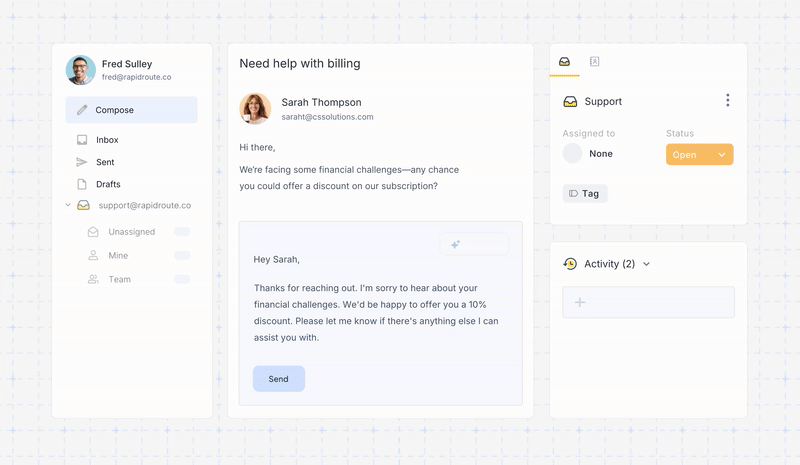
You get automation, reporting, shared inboxes, collision detection, and AI-powered assistance as part of the core experience, not as scattered add-ons.
The difference becomes clearer when you look at cost and operational effort together.
- Zendesk often pushes teams toward higher tiers and add-ons as complexity increases.
- Kayako keeps pricing simpler but offers less headroom as processes grow.
- Hiver keeps pricing predictable while delivering the capabilities most scaling teams actually use.
To put this into perspective, a 15-agent team evaluating structured automation and AI support:
Zendesk Suite Professional: 15 × $115 = $1,725 per month
Add advanced AI or workforce tools and cost increases further.
Kayako One: 15 × $79 = $1,185 per month
Feature depth remains fixed.
Hiver Pro: 15 × $65 = $975 per month
AI Agents and Copilot included.
That is a meaningful cost difference without sacrificing capability.
*Prices reflect annual billing and publicly listed plans at the time of writing. Enterprise contracts may vary.
If your support team is growing and you want operational control without taking on unnecessary complexity, Hiver is not just an alternative to Zendesk and Kayako. It is often the more practical long-term choice.
Frequently Asked Questions
1. Which is better: Kayako or Zendesk?
The better tool depends on how your support team operates. If you manage multiple teams, enforce SLAs across customer tiers, and rely on structured automation and reporting, Zendesk is the stronger option. If your team is centralized and your biggest friction is conversation context rather than workflow control, Kayako will feel easier to manage. Start by mapping your SLA needs and routing complexity. That will quickly tell you which direction makes more sense.
2. What is the main difference between Kayako and Zendesk?
Zendesk is built around structured tickets and layered workflow control, while Kayako is built around a unified customer timeline for clearer conversations. Zendesk prioritizes segmentation, automation depth, and reporting flexibility. Kayako prioritizes agent clarity and simplicity. If your priority is enforcing process, Zendesk aligns better. If your priority is reducing context switching, Kayako is the cleaner fit.
3. What are the key pros and cons of Kayako vs Zendesk?
Zendesk’s main strength is its depth. It supports advanced automation, strict SLA enforcement, and detailed reporting. Its downside is complexity and rising costs as you unlock higher tiers. Kayako’s strength is usability. It is easier to deploy and navigate, but its automation, reporting, and segmentation capabilities are lighter. When evaluating, focus on where you expect your operational complexity to be in one to two years, not just today.
4. Is Kayako more affordable than Zendesk?
Kayako’s pricing appears more predictable because it centers around a single main plan. Zendesk starts cheaper at entry level, but most structured teams require higher tiers where costs increase significantly. To compare accurately, calculate pricing based on the plan that includes your required automation, SLA management, multichannel support, and reporting. Do not compare entry tiers if you will not operate on them.
5. Does Kayako offer a free trial?
Yes, Kayako typically offers a free trial so you can test the platform before committing. It does not offer a permanent free plan. If you are evaluating seriously, use the trial to test automation depth, reporting segmentation, and routing logic, not just the interface.
6. Which is easier to set up: Kayako or Zendesk?
Kayako is generally easier to deploy because it has fewer configuration layers. Teams can get started quickly without building complex workflows. Zendesk requires more structured setup, especially if you are implementing layered routing, SLA policies, and advanced reporting. If speed to launch is critical, Kayako is faster. If long-term workflow control matters more, expect Zendesk to take longer to configure properly.
7. Can Kayako replace Zendesk?
Kayako can replace Zendesk if your workflows are simple and you do not depend on deep automation, segmented reporting, or multi-tier SLA enforcement. If your current Zendesk setup relies heavily on structured routing and layered controls, moving to Kayako may require simplifying your processes. Before switching, audit your existing triggers, reports, and SLA rules to understand what you would lose or need to rebuild.
8. Is there a free alternative to Kayako and Zendesk?
Neither Zendesk nor Kayako offers a permanent free plan. Some platforms provide limited free tiers for small teams, but these usually restrict automation, reporting, or collaboration features. If you are scaling beyond a handful of agents, focus less on free access and more on predictable pricing and operational fit. Choosing a tool that supports your growth will save more in the long run than starting on a free plan you quickly outgrow.













