





Tidio works well for teams that want live chat, basic automation, and email support in one place.
It’s quick to set up, budget-friendly for small teams, and covers the essentials if you’re just getting started with customer conversations.
But as support needs grow – more conversations, more channels, better automation – it helps to have options. We’ve looked into a bunch of tools that offer more flexibility, smarter AI, or easier collaboration.
This list brings together 11 tools that stand out as strong alternatives to Tidio in 2025, with key details to help you compare and choose what fits your team best.
Why businesses look for Tidio alternatives
Tidio is built for teams that want to offer quick, real-time support through live chat, AI-powered chatbots, and email, all from one platform. It’s popular among e-commerce businesses and startups because it’s easy to deploy, doesn’t require much technical effort, and includes a free plan to get started.
It covers the basics well: responding to customer queries, automating simple tasks, and integrating with platforms like Shopify or WordPress. The addition of Lyro, Tidio’s AI agent, adds more automation options for teams looking to reduce manual workload.
But while Tidio is effective for early-stage support needs, it can feel limiting as customer conversations grow in volume or complexity. Here’s a closer look at why many teams eventually move away from Tidio:
1. Scaling becomes a struggle
Tidio works well for teams handling a few dozen chats a day, mostly through the website. But when volume picks up, across live chat, email, WhatsApp, and social media, it becomes harder to manage. There’s no structured way to triage, prioritize, or track issues, and everything starts slipping through the cracks.
According to a verified user on G2, “While Tidio offers some lead management tools, it’s not a full-fledged CRM. Businesses with more complex sales pipelines might need to integrate with external tools.”
2. Automation that only goes so far
Tidio’s bots are useful for handling FAQs, collecting contact info, and triggering simple workflows. But that’s about it.
There’s no AI-based triage, no contextual replies, and no way to automate complex support journeys.If you’re trying to triage incoming requests, route tickets based on sentiment, or have AI suggest and draft replies, you’ll likely hit a wall.
As one user on G2 puts it: “Some advanced automation features are only available on higher-tier plans, which can be limiting for smaller businesses with tight budgets.”
3. Shallow reporting and limited insights
You get the basics: number of chats, response time, agent performance. But beyond that, reporting feels limited.
You can’t track SLA compliance, agent workload distribution, or how queries flow across different channels. That makes it hard for managers to spot patterns, measure team efficiency, or take data-driven decisions.
A user on G2 put it plainly: “Having more in-depth analytics and reporting features would be fantastic, as it would help me better understand my customer interactions.”
4. Multichannel support is disjointed
Tidio offers integrations with email, Messenger, and Instagram – but these are siloed. Agents can’t view or respond to all messages from one place, which breaks context and slows down response time.
There’s also no native support for voice calls, co-browsing, or shared views across channels – key features that many growing teams need when handling high-touch or urgent support.
5. Pricing gets complicated fast
Tidio’s pricing structure is based on “billable conversations,” which makes it hard to predict monthly costs as volume grows:
- Starter plan: $24.17/month for 100 conversations
- Growth plan: $49.17/month for 250 conversations
- Plus plan: $749/month
- Premium plan: Custom pricing
Add-ons like Lyro AI and additional flows have separate usage limits. Removing branding, adding more bots, or enabling voice support often comes with extra costs, creating unexpected expenses.
One Trustpilot user noted, “If you have a few users (say 3-5) and you want to add a few more, you essentially have to make a huge price jump to another tier, which is ridiculous.”
Another user on G2 echoed a common frustration: “The add-ons can accumulate costs quickly, and it’s unclear how much usage will contribute to the final cost, making budgeting difficult.”
6. Chat visibility & notification issues
If a user navigates away from your site during a chat, they might not get notified when an agent replies. The message box only refreshes when the page is actively open, which means important messages can go unseen. That’s risky — especially when customers expect real-time replies.
11 best Tidio alternatives in 2025
Below, we break down 11 top Tidio alternatives in 2025 each with its own strengths, pricing, and ideal use case — so you can find a solution that actually scales with your team.
| Tool | Best For | Key Features | Pricing | G2 Rating |
|---|---|---|---|---|
| Hiver | Teams needing AI-powered multichannel support | – Multichannel ticketing – AI Copilot & AI Agents – Workflow automation | Free Forever plan is available. Paid plans start from $19 per user per month. | 4.6 |
| Zendesk | Large enterprises needing advanced workflows | – Omnichannel ticketing – Custom SLAs – Deep analytics | $55 per agent per month | 4.3 |
| Freshdesk | Teams wanting flexibility and integrations | – Freddy AI – SLA management – 1000+ integrations | Free plan exists, paid plans from $15 per agent per month | 4.4 |
| Front | Teams prioritizing email-based collaboration | – Shared inbox – Omnichannel view – Workflow automation | $19 per user per month | 4.7 |
| Intercom | SaaS companies needing proactive support | – Fin AI Agent – Behavior-based messaging – Unified inbox | $39 per user per month | 4.5 |
| Help Scout | Small and mid-sized businesses wanting simplicity with collaboration | – Shared inbox – Live chat & Knowledge base – AI Assist | $20 per user per month | 4.5 |
| Gorgias | E-commerce businesses on Shopify/Magento | – Ticket management – AI assistance – Performance reporting | $10 per agent per month | 4.6 |
| LiveChat | Real-time support and engagement | – Multichannel communication – Chat widget customization – Chat routing | $20 per user per month | 4.5 |
| Crisp | Sales teams and lead qualification | – AI chatbots – CRM – Shared inbox | $2500 per month, billed annually. | 4.4 |
| HubSpot Service Hub | Teams already using HubSpot CRM | – CRM ticketing – Automation workflows – CSAT/NPS feedback tools | $45 per user per month | 4.4 |
| Tawk.to | Teams needing a comprehensive, feature-rich platform with extensive channel support | – Omnichannel shared inbox – AI-powered chatbot – Built-in AI assistance | Free (add-ons optional) | 4.5 |
1. Hiver
Hiver is a modern customer service platform that helps teams manage support across email, live chat, WhatsApp, SMS, voice, and social channels like Facebook and Instagram – without ever switching tabs.
It resembles an inbox-like interface, so there’s no clunky interface to learn or new system to adopt. Everything from assigning conversations to automating workflows just works the way your team already does.
You also get built-in AI features, automation, a knowledge base, a customer portal, SLA tracking, and detailed reporting—all without the usual complexity of most help desks.
And if security is a concern, Hiver ticks those boxes too: no email data is accessed or stored, and it’s SOC 2 Type II, ISO 27001 certified, and GDPR compliant.
“Hiver has completely transformed how our team manages shared inboxes and collaborative email workflows. As a virtual assistant handling both administrative and support functions, I’ve found Hiver to be an essential tool in staying organized, responsive, and efficient.” – G2 review

Key features
- AI Copilot: Draft replies faster using suggestions from your knowledge base, past tickets, and connected apps. It helps agents respond quickly and more accurately.
- AI chat assistant: Provide 24/7 support with a chatbot that understands your FAQs. It pulls answers from help docs and past conversations so customers get reliable responses instantly.
- AI triage and tagging: Automatically sort incoming emails based on keywords, sentiment, or urgency. Whether it’s a payment issue or an order delay, Hiver routes it to the right person without any manual effort.
- AI Compose and Summarize: Clean up tone, fix grammar, or shorten responses with a single click. You can also turn long email threads into quick, readable summaries that give agents better context in less time.
- Email delegation: Assign queries based on workload, skill, or round-robin rules. This keeps ownership clear, prevents overload, and ensures no conversation gets missed.
- Internal notes and @mentions: Collaborate right inside the conversation. Leave notes or tag teammates to clarify questions without switching to Slack or starting another thread.
- Canned responses: Use pre-written replies for common questions. It saves time and keeps responses consistent across the team.
- Customer feedback (CSAT): Send customizable CSAT surveys after a conversation or at any point in your workflow. Gather real-time feedback while the interaction is still fresh.
- Reporting: Track key metrics like response time, resolution rates, or agent workload. Build custom dashboards to monitor exactly what matters to your team.
- Branded customer portal: Let customers submit and track tickets through a portal that matches your branding. You can customize the logo, domain, and the form fields they fill out.
- Knowledge base: Publish help articles that customers can search through anytime. Agents can also use these articles in replies to resolve issues faster.
- Integrations: Connect Hiver with 100+ tools like HubSpot, Salesforce, NetSuite, Shopify, and Jira. Access or update customer data directly without switching platforms.
Pricing:
Paid plans start at $19/user/month (Lite), $29/user/month (Growth), and $49/user/month (Pro). There’s also a custom-priced Elite plan for larger organizations. A 7-day free trial is available for all plans, and there’s a forever free plan too.
2. Zendesk
Zendesk is a robust customer service platform that offers everything from advanced ticketing to SLA tracking, automation, and deep integrations – making it a strong fit for large teams managing complex workflows across multiple channels.
Unlike Tidio, which focuses more on quick live chat support, Zendesk gives you full control over how tickets are created, routed, escalated, and resolved.
It does come with a steeper setup curve and a higher price tag – but for teams that need enterprise-grade capabilities, it delivers well.

Key features
- Structured ticketing workflow: Create custom workflows with SLAs, escalations, and skill-based routing. Auto-assign tickets based on issue type, customer segment, or priority.
- Omnichannel support: Manage conversations from email, chat, voice, SMS, WhatsApp, and social media inside a unified agent workspace – complete with full customer history and internal notes.
- Explore analytics: Track metrics like resolution time, agent performance, and CSAT. Build custom dashboards for team leads or execs to monitor performance by channel, region, or issue type.
- Extensive integrations: With over 1,200 apps, including Salesforce, Jira, and Slack, Zendesk integrates deeply into existing tech stacks. Teams can also build internal tools or workflows via its open APIs.
| Pros | Cons |
|---|---|
| Enables complex ticket workflows and SLA enforcement across channels | Setup and configuration can take weeks require dedicated admin resources |
| Rich AI and automation tools for smart routing and auto-response | Pricing escalates quickly; many features are add-ons or require high-tier plans |
| Strong support for self-service with customizable ‘Help Centers’ and AI-suggested articles | Interface complexity can overwhelm new agents or teams without helpdesk experience |
“While Zendesk Support Suite is a robust and reliable platform, there are a few areas that could be improved. At times, the admin settings can feel a bit complex or unintuitive, especially when setting up advanced workflows or automation rules—it takes some time to fully understand and configure them correctly.” – A G2 review
Pricing:
Starts at $19/agent/month for basic email ticketing. The Suite Team plan at $55/agent/month adds multichannel support, while the Suite Professional plan at $115/agent/month includes SLAs and workflow automation. Enterprise features are available with custom pricing under the Suite Enterprise plan. A free trial for 14 days is available.
Recommended reading
Hiver vs Zendesk: Which Support Platform Is Right for Your Team in 2025?
3. Freshdesk
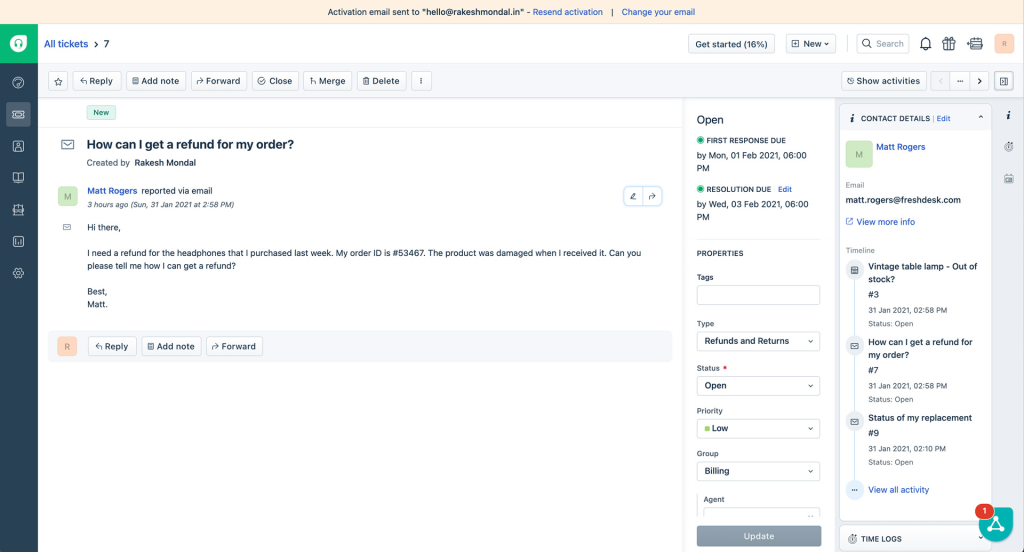
Freshdesk is a support platform that helps teams manage customer conversations across email, chat, phone, and social channels – all from a single workspace.
Compared to Tidio, Freshdesk offers more robust ticketing, deeper automation, and built-in tools like SLAs and agent collaboration – making it better suited for teams handling higher volumes or complex workflows.
It also comes with Freddy AI, which adds automation across chat, email, and ticket routing, helping agents work faster and reduce manual tasks. The platform’s clean UI, fast onboarding, and modular approach make it a strong fit for mid-sized businesses.
Key features
- Ticketing with workflow automations: Automate assignment, escalation, and resolution using time-based triggers, SLAs, and scenario rules.
- Chat and voice features: Add chat, social, and voice to your email support and manage every customer conversation in one place. Respond faster across channels and shorten wait times.
- AI-powered support with Freddy: Suggests replies, detects sentiment, and routes tickets based on customer intent – built into higher-tier plans.
- Self-service and knowledge base: Build multilingual help centers, community forums, and customer portals. AI-suggested articles help deflect tickets and improve resolution speed.
| Pros | Cons |
|---|---|
| Easy to set up and navigate, with a clean UI that works well for non-technical users | Advanced customization and reporting features are limited to higher-tier plans |
| Strong automation engine for routing, tagging, and prioritization | Chat and telephony are separate products (Freshchat, Freshcaller), which can make setup fragmented |
| Freddy AI offers solid AI capabilities without requiring a separate add-on purchase | Reporting lacks flexibility compared to enterprise tools may require exports for deeper insights |
“One major concern is that certain features are being deprecated without prior notice. This creates challenges, as teams are not given sufficient time to adapt or transition to alternative solutions.” – A G2 review
Pricing:
Plans start at $15/agent/month, and Pro plan is at $49/agent/month. For advanced AI, routing, and audit logs, the Enterprise plan is priced at $79/agent/month. A 14 day free trial is also available.
Recommended reading
4. Front
Front is a shared inbox platform for teams that manage a high volume of customer conversations over email, SMS, and chat. While Tidio is centered around live chat and automation, Front is built for visibility, ownership, and collaboration – making it a favorite for SaaS, logistics, and client-facing teams.
It doesn’t offer deep helpdesk features like advanced SLAs or AI triage, but it shines when it comes to teamwork. With @mentions, internal comments, and real-time collision detection, Front keeps everyone aligned and reduces duplicate responses – something Tidio doesn’t handle natively.

Key features
- Shared inbox with team collaboration: Assign conversations, leave internal notes, and prevent duplicate replies with real-time collision detection.
- Lightweight ticketing system: Tag, assign, and track messages while keeping the familiar email-like interface – ideal for support and client success teams.
- Robust integrations and API: Connect with 100+ tools like Salesforce, Asana, and HubSpot – or build custom workflows using Front’s open API and webhooks.
| Pros | Cons |
|---|---|
| Excellent for internal collaboration, great mix of comments, mentions, shared drafts, and visibility | Lacks deep ticketing functionality (e.g., ticket states, escalation layers) found in dedicated helpdesk platforms |
| Feels like using email is not a ticketing tool, which lowers training time and keeps workflows intuitive | AI features are limited; no native bots or AI triage without third-party tools |
| Omnichannel capabilities available on higher plans, with a strong focus on email + chat, + SMS | Starter plan supports only one channel type; multichannel requires Growth or higher |
“While Front excels at conversation management, I’d love to see more flexibility in connecting third party AI tools and custom integrations. It would be helpful to have more granular tagging options at the email level.” – A G2 review
Pricing:
Starts at $25/user/month. Multichannel features and deeper collaboration tools unlock at $65/user/month (Professional) and $105/user/month (Enterprise). Custom pricing is available for larger teams, with a 7-day free trial.
Recommended reading
5. Intercom
Intercom is a full-fledged customer service suite, that helps support teams manage live conversations, automate routine queries, and engage users directly inside the product. It’s widely used by SaaS and product-led companies that want to combine chat-based support with onboarding and customer engagement – all from one place.
Compared to Tidio, Intercom offers more control over automation, in-app messaging, and AI-powered workflows. But the pricing can add up quickly, especially when you start using advanced features like Fin AI or outbound campaigns.

Key Features
- AI chatbot (Fin) + automated playbooks: Fin handles common questions and hands off anything complex to agents. You can also set up custom bots and automated flows for support, onboarding, or lead capture.
- In-app engagement and messaging: Send targeted messages or tooltips based on what users do inside your product – useful for onboarding or highlighting new features.
- A different Help Center for every brand: Create individually branded Help Centers for each of your brand entities, and manage them all in one workspace.
- Analytics & segmentation: Track performance metrics like resolution time and CSAT, and group users by behavior or traits to personalize engagement.
| Pros | Cons |
|---|---|
| Best-in-class for conversational and in-app support; highly engaging UI and customer experience | Can get very expensive pricing scales with seats, contacts, bots, and outbound features |
| Powerful automation via custom bots, Fin AI, and behavior-triggered flows | AI bot usage is billed per resolution, which can add unpredictable costs at scale |
| Excellent for product-led growth teams that want to combine support + onboarding | Lacks full-fledged ticketing workflows and escalation paths—more suited for chat-driven teams |
“The biggest downside is pricing — it can scale up quickly as your user base or contact volume grows. Some features that feel core (like advanced reporting or certain automation tools) are gated behind higher-tier plans.” – A G2 review
Pricing:
Intercom’s Essential plan starts at $29/seat/month for basic chat. The Advanced plan at $85/seat/month includes ticketing and SLAs, while the Expert plan at $132/seat/month adds workload management and multibrand support. Fin AI is billed separately at $0.99 per resolution, and other features like outbound messaging and WhatsApp also cost extra.
6. Gorgias
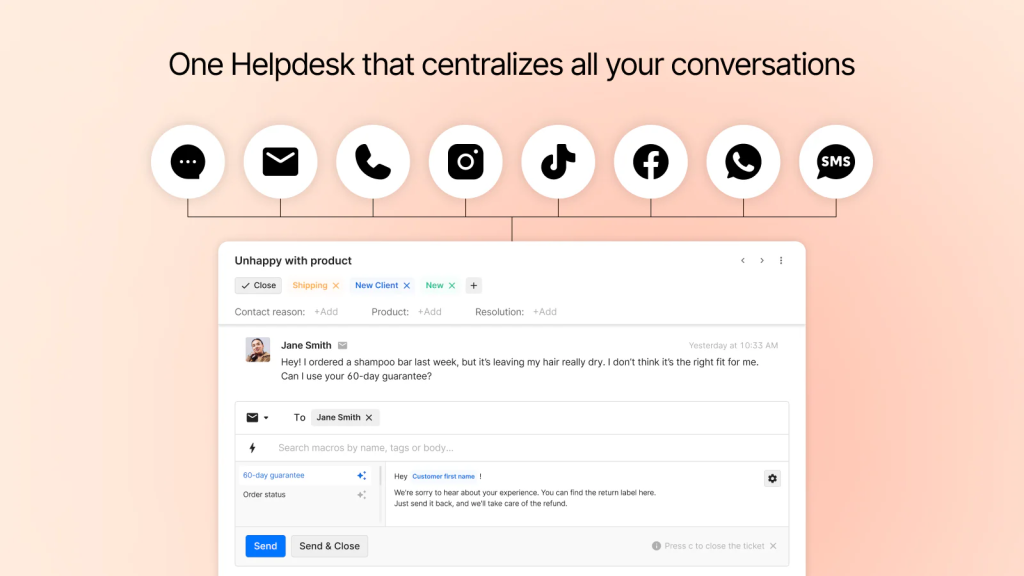
Gorgias helps ecommerce teams manage support across email, live chat, social media, and SMS – while staying closely connected to their storefront. It works especially well for brands on Shopify, BigCommerce, or Magento, where agents often need to handle returns, refunds, and order updates alongside support queries.
Unlike Tidio, which focuses on chat and basic automation, Gorgias brings storefront data directly into the inbox. Agents can issue refunds, cancel orders, or add tracking links without switching tabs, saving time and improving response accuracy.
Key Features
- Social media and comment management: Convert Instagram DMs and Facebook comments into tickets and reply from your helpdesk – ideal for managing public queries or complaints.
- Rules and macros for repetitive queries: Use macros and real-time order data to instantly respond to repetitive questions like shipping status or return policies.
- Live chat with storefront context: During live chats, agents can see cart contents, purchase history, and customer info, helping personalize support and create upsell opportunities.
- Revenue and performance tracking: Measure how support influences revenue by tracking tickets that lead to recovered or retained sales – something most platforms (including Tidio) don’t offer.
| Pros | Cons |
|---|---|
| Tailored for ecommerce teams, deep Shopify/Magento integrations out of the box | Not suitable for non-retail support teams or B2B workflows |
| Agents can edit orders, issue refunds, and insert tracking links without leaving the inbox | Pricing is ticket-volume-based, which can get expensive as business grows |
| Pulls in social media comments as tickets—great for managing public customer issues | Lacks advanced ticketing workflows like SLA escalations or ITSM-style queues |
“Gorgias is a great customer support software, but the only downside is its pricing structure, as it may seem pricey for startup brands with limited budgets.” – A G2 review
Pricing:
Plans start at $10/month for 50 tickets, $50 for 300, $300 for 2,000 (Pro), and $750 for 5,000 (Advanced). Enterprise offers custom pricing for 10,000+ tickets. All plans include unlimited users; live chat, social integrations, ecommerce sync, and voice/SMS start at Pro.
Recommended reading
7. LiveChat
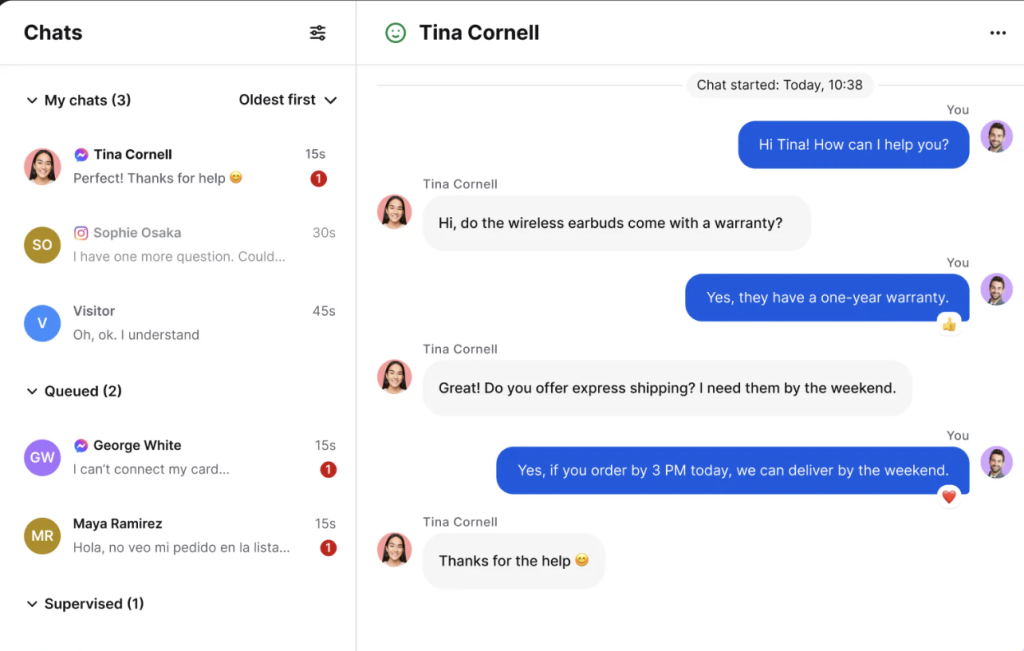
LiveChat is a real-time messaging platform that helps businesses connect instantly with customers on their websites. While Tidio also offers live chat, LiveChat focuses on speed, customization, and proactive engagement, making it ideal for companies looking to convert leads or provide fast responses.
LiveChat is often used alongside its sibling products HelpDesk (for ticketing) and ChatBot (for AI automation), but its core strength lies in real-time human conversations. It’s not a complete helpdesk solution, but it delivers a polished chat experience that’s reliable, fast, and loaded with engagement tools.
Key Features
- Polished real-time chat widget: Agents can manage multiple conversations, see what users are typing before they hit send, transfer chats, and view visitor behavior in real time.
- Custom greetings and proactive chat triggers: Automatically start chats based on visitor actions – like spending time on the pricing page or stalling at checkout. More flexible than Tidio’s standard triggers.
- Canned responses and quick actions: Use saved replies, file attachments, and keyboard commands to speed up responses and keep messaging consistent.
- Chat routing and agent groups: Route chats based on agent availability, department, or custom rules. Group agents by function to streamline who handles what.
- Integrations with external tools and add-ons: Connect LiveChat to 200+ tools including CRMs, ecommerce platforms, analytics tools, and more.
| Pros | Cons |
|---|---|
| Easy to set up and use. Agents can be productive with minimal training | Not a complete helpdesk solution unless paired with HelpDesk. |
| Highly customizable chat widget with strong branding and behavior-based triggers | Chat-focused platform—missing omnichannel support like email, voice, or social media |
| Excellent real-time features like typing preview and chat transfers | AI automation (via ChatBot) is a separate paid product |
“Outside of being able to chat, LiveChat doesn’t offer much. The reporting is pretty lackluster, tracking user behavior is very limited, if someone chats after-hours, you essentially lose all data associated with their session, customization is limited.” – A G2 review
Pricing
Plans start at $20/user/month (Starter), $41 (Team), and $59 (Business), with custom Enterprise pricing. All include live chat, canned responses, reporting, and integrations. AI and chatbots are sold separately via ChatBot and HelpDesk.
8. Crisp
Crisp helps support and sales teams manage customer conversations across live chat, email, social DMs, and messaging apps – all from one shared inbox. It brings together automation, AI, and multichannel communication in a single workspace, making it a good fit for teams that want to scale without stacking multiple tools.
Compared to Tidio, Crisp offers stronger multichannel coverage, a more collaborative inbox, and built-in workflow automation. It’s better suited for teams that need more control over how queries are routed, automated, or escalated across different channels.

Key Features
- Omnichannel AI chatbot: From the Essentials plan upward, Crisp’s bot can automate replies across multiple channels and escalate issues based on custom flows.
- Visual workflow automation: Drag-and-drop workflow builder helps automate routing, tagging, lead capture, and more – no coding required.
- Built-in knowledge base: Publish help articles that appear in the chat widget and customer portal. Articles are auto-suggested during chats to deflect tickets.
- AI-powered automations: Get unlimited AI resolutions, full ticketing features, white-labeling, conversation summaries, and advanced analytics – aimed at teams managing large volumes.
| Pros | Cons |
|---|---|
| All-in-one platform combining live chat, shared inbox, email, and automation in a single workspace | AI-powered features like automations and ticketing are only available on the highest-priced Plus plan |
| Built-in omnichannel inbox with support for email, WhatsApp, Messenger, and more | No pre-built chatbot templates — bot setup requires manual flow creation |
| Visual workflow builder and omnichannel chatbot make automation accessible | UI can feel overwhelming at first, especially with layered features |
“WhatsApp messaging credits and template approvals requires more handholding than expected.” – A G2 review
Pricing
Free plan supports 2 users with live chat, shared inbox, mobile apps, and ecommerce integrations. Mini $45/month adds email inbox, triggers, notes, and search 4 users. Essentials $95/month includes AI chatbot, knowledge base, automation, analytics, and routing 10 users. Plus $295/month adds unlimited AI, full ticketing, 100+ integrations, white-labelling, and advanced analytics 20+ users.
9. HubSpot Service Hub
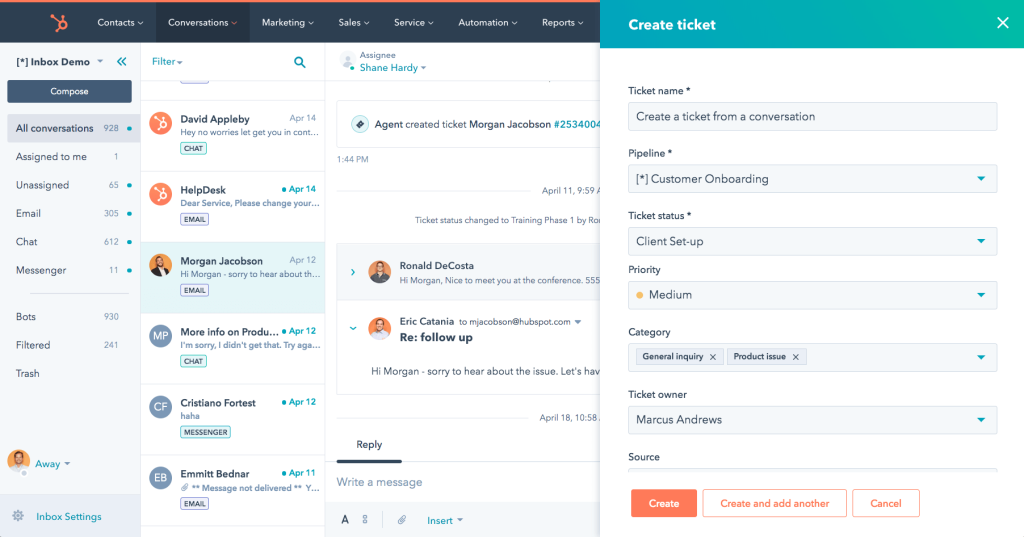
HubSpot Service Hub helps support teams manage tickets, build knowledge bases, track SLAs, and automate workflows, while staying fully connected to sales and marketing data through HubSpot’s CRM. For teams already using other HubSpot tools, Service Hub offers a unified platform that pulls customer context from every interaction – emails, chats, purchases, or lifecycle stages.
Compared to Tidio, which focuses on live chat and basic bot automation, Service Hub provides more structure and visibility across the entire customer journey.
Key Features
- Ticketing integrated with CRM: Every ticket in Service Hub is tied to a customer record, so agents have full context: past conversations, purchases, website behavior, marketing emails opened, and more.
- Knowledge base and self-service portal: You can build a searchable, SEO-optimized knowledge base with categories, article performance tracking, and customer feedback on articles. Service Hub also offers a customer portal for users to track the status of their tickets—functionality that’s missing from most chatbot-first platforms like Tidio.
- Live chat with shared inbox: HubSpot’s Conversations Inbox lets you manage emails, chats, and form submissions in one place. Live chat integrates with the CRM and can be handed off to humans or bots. It’s not as customizable as Crisp’s or Intercom’s chat experiences, but it gets the job done.
- Automation and workflows: You can create automation rules for ticket routing, follow-ups, and satisfaction surveys using HubSpot’s drag-and-drop workflow builder.
- Reporting and feedback tools: Built-in dashboards cover ticket volume, resolution time, and team performance. You can also run CSAT, NPS, and CES surveys to gather customer feedback and route low scores to specific agents for follow-up.
| Pros | Cons |
|---|---|
| Unified with HubSpot CRM gives agents full context into every customer’s history | Most powerful when paired with HubSpot CRM, which may not fit every tech stack |
| Robust knowledge base and customer portal features | Chat widget is basic compared to Crisp or Intercom |
| Flexible workflows for automation, escalations, and alerts | Advanced reporting and SLAs require higher-tier plans |
“Advanced reporting and customization options can require an additional investment in higher tiers, and installing marketplace apps from third parties.” – A G2 review
Pricing
Free plan includes ticketing, shared inbox, live chat, and reporting for 2 users. Starter at $9 per user per month adds routing, pipelines, automation, and removes branding. Professional at $100 per user per month includes SLAs, knowledge base, feedback tools, and full help desk. Enterprise at $150 per user per month adds AI insights, conditional SLAs, custom roles, playbooks, and conversation intelligence.
10. Tawk.to
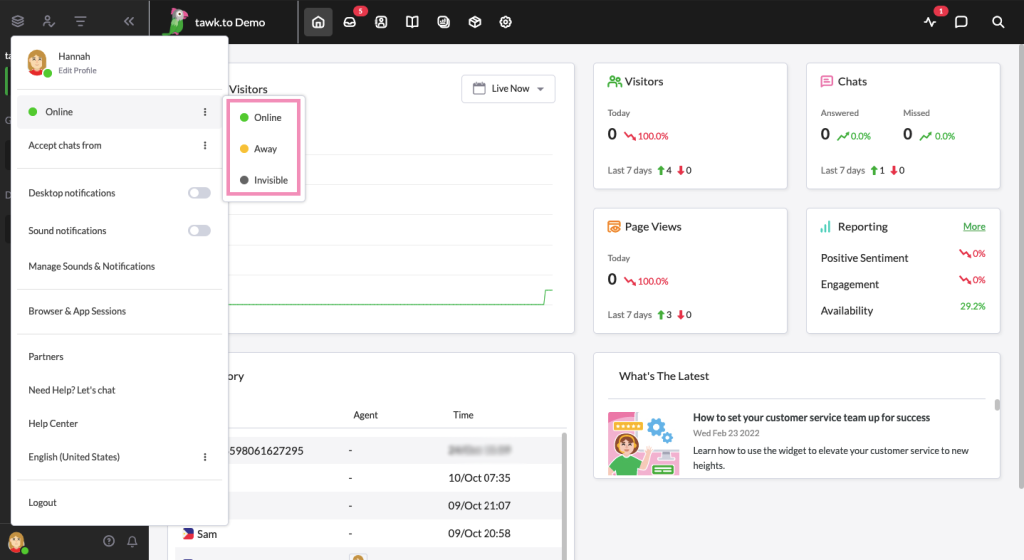
Tawk.to is a completely free live chat and messaging platform aimed at businesses that want a no-cost solution for real-time customer support. It covers the basics well: a customizable widget, agent-customer messaging, canned responses, and simple reporting. Compared to Tidio, it’s less about AI or automation and more about providing a live chat widget without any budget overhead.
While it doesn’t offer advanced workflows or omnichannel capabilities, it can be a good fit for startups or small teams that need basic communication functionality without monthly fees.
Key Features
- Free live chat for unlimited agents: Add as many agents as you want—completely free. You can deploy the widget on multiple websites, customize its design, and respond to customers in real time.
- Canned responses and file sharing: Agents can speed up replies using pre-saved messages for FAQs. The chat interface also supports attachments, so users can share files or screenshots as part of the conversation
- Visitor monitoring and engagement: See real-time data about who’s browsing your site, including their location, what page they’re on, and how long they’ve been there. You can also trigger proactive chats to engage visitors based on their behavior.
- Mobile and desktop apps: Tawk.to offers apps for iOS, Android, Windows, and macOS, making it easy for teams to respond to chats on the go. Push notifications ensure agents stay responsive even when away from their desks.
- Add-ons for automation and outsourcing: While the base product is free, Tawk.to monetizes through optional add-ons like a virtual assistant hire service, video calling, or removing the “Powered by Tawk.to” branding. You can also purchase chat agents from their network.
| Pros | Cons |
|---|---|
| Completely free live chat solution with unlimited agents | No AI, ticketing system, or deep automation features |
| Real-time visitor tracking and basic proactive chat triggers | Chat-only tool no support for email, voice, or social media |
| Easy to install, use, and customize | Branding removal and some features require payment |
“The user interface can be overwhelming or cluttered, especially for users new to live chat tools, which may affect ease of use. Limited Branding as in Customization options for the chat widget are somewhat limited, which may not fully align with a brand’s aesthetic or specific needs.” – A G2 review
Pricing
Tawk.to’s core platform is free with unlimited agents, live chat, ticketing, knowledge base, and reporting. Removing branding costs $29 per month. AI Assist chatbot has a free 100-message tier, with paid plans from $29 to $399 per month. Voice, video, and screen sharing cost $49 per month or $348 annually. Hired Agent Service starts at $1 per hour for 24/7 coverage.
11. Help Scout
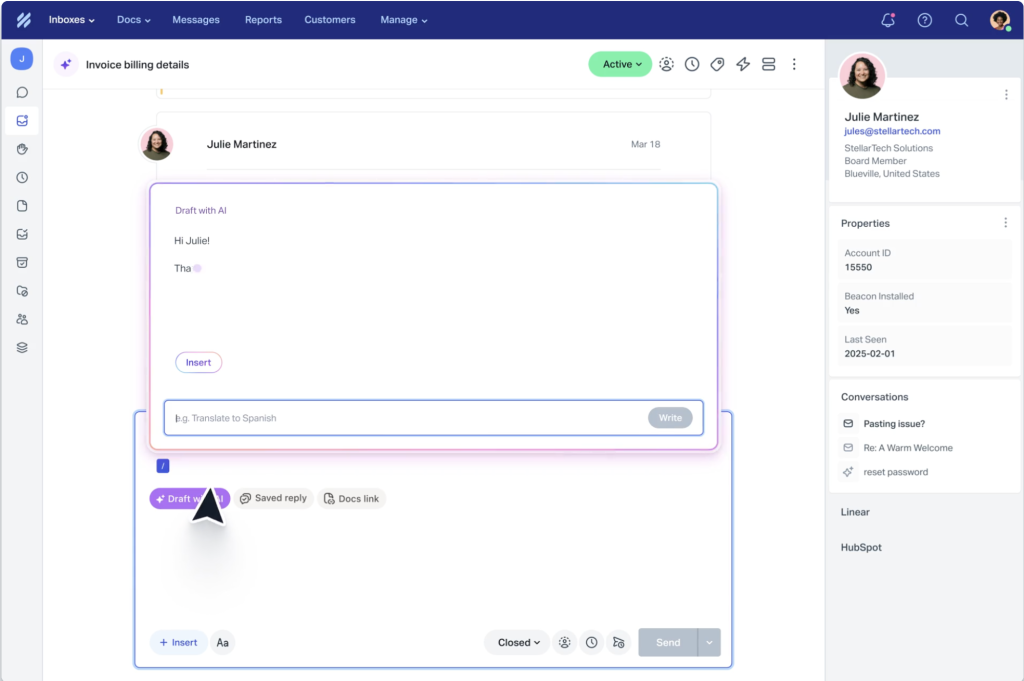
Help Scout is an email-first support platform that combines ease of use with real collaborative workflows and a clean customer interface. Compared to Tidio’s chat-heavy positioning, Help Scout organizes support through shared inboxes, a built-in knowledge base, and human-centered workflows. Its simplicity and customer satisfaction focus make it effective for support teams that need structure without overwhelming complexity.
Key Features
- Shared inbox with built-in collaboration: Offers tagging, assignments, internal notes, collision detection, and full conversation history – all in a simple, transparent workspace.
- Beacon widget and Docs knowledge base: The Beacon widget combines live chat, contact forms, and knowledge base search in one interface – helping customers find answers or reach out, without switching tabs.
- Workflow automation and routing: Route and tag conversations automatically based on content, sender, or custom fields to speed up triage and reduce manual steps.
- Built-in AI Assist on all plans: Help Scout’s built-in AI suggests replies, helps draft responses, and links relevant articles – available even on the free plan.
- Reporting and analytics: Track CSAT, resolution time, agent productivity, and more through customizable dashboards. Filter reports by tag, agent, or inbox to uncover trends.
- Integrations and open API: Connect with tools like Slack, Salesforce, Jira, Shopify, and HubSpot. The open API supports custom workflows and deeper data syncs.
| Pros | Cons |
|---|---|
| Clean, intuitive interface with minimal learning curve | Limited visual customization for the customer portal |
| Built-in knowledge base and customer portal | No built-in live chat bot (requires Beacon + Docs, no AI deflection) |
| Shared inbox with collision detection and internal notes | Multichannel support is limited compared to other platforms |
“Helpscout is not the most extensive product. It feels like some reports are limited in the drilldown capacities. Also being “online” in the chat window is necessary to allow customers to “chat”.” – A G2 review
Pricing
Help Scout charges by monthly contacts, not users. Free plan supports 100 contacts with unlimited users, shared inbox, Docs, AI replies, and live chat. Standard at $25 adds surveys, reporting, and integrations. Plus at $75 includes workflows, Salesforce/HubSpot integrations, and advanced permissions. Pro is custom for 1,000+ contacts with dedicated onboarding and enhanced security. All plans include unlimited seats and AI tools.
How to choose the right Tidio alternative
Now that we have explored the top alternatives to Tidio, the next step is figuring out which one best fits your team. Every platform has its strengths, but the right choice depends on your support volume, automation needs, team structure, and long-term goals. Here’s a breakdown of the key capabilities to evaluate before making the switch.
1. Automation and AI capabilities
Basic bots that reply to FAQs are no longer enough. Look for platforms that offer automation with depth and flexibility, especially if your team handles high volumes or repetitive queries. Prioritize tools that support:
- AI triage to categorize and route tickets based on sentiment, topic, or urgency
- Suggested or auto-drafted replies that help agents respond faster with a consistent tone
- Self-service automation, where bots surface relevant knowledge base articles or resolve queries end-to-end
Platforms like Hiver, Intercom, and Freshdesk stand out here, offering AI agents and automated workflows that reduce manual work without compromising quality.
2. Multichannel support
Customers don’t stick to one channel, your support tool shouldn’t either. A strong Tidio alternative should help you:
- Manage email, chat, voice, WhatsApp, SMS, and social media in one view
- Maintain context continuity across channels
- Apply consistent SLAs, tags, and workflows no matter where a conversation starts
Hiver, Zendesk, and Front offer unified multichannel workspaces that reduce silos and keep conversations on track.
3. Ease of use and deployment
A powerful platform is only valuable if your team can actually use it. Before switching, ask:
- Is the interface intuitive for new agents?
- Can workflows be set up without dev support?
- How steep is the learning curve for admins and managers?
If you’re looking to scale fast without months of onboarding, Help Scout, Hiver, and Freshdesk strike a good balance between functionality and simplicity.
4. Scalability and pricing transparency
Some tools lock key features behind higher tiers—or charge per seat, per bot, and per add-on until the cost spirals. Evaluate:
- Whether core features (like analytics or automation) are available on mid-tier plans
- Whether pricing is per agent, per contact, or usage-based
- Whether adding users, channels, or workflows requires a complete plan upgrade
Hiver includes AI and multichannel support across all paid plans, while others, like Intercom, can get expensive fast depending on usage.
5. Reporting and performance insights
To improve your support ops, you need visibility. Make sure your next tool includes:
- SLA tracking and real-time alerts
- Custom reports on response time, CSAT, volume by channel, etc.
- Agent performance breakdowns and workload heatmaps
- AI-powered insights to surface trends or bottlenecks
Zendesk, Hiver, and Freshdesk all offer strong reporting—though the depth and accessibility may vary by plan.
6. Integrations and flexibility
Your support platform should connect easily with your existing tools CRMs, e-commerce platforms, and internal systems. Check for:
- Native integrations with tools like Salesforce, HubSpot, Slack, Jira, and Shopify
- Open APIs and webhooks for custom workflows
- Integration limits based on pricing tier
Hiver, Gorgias, and Help Scout offer extensive out-of-the-box integrations and support for custom setups when needed.
Finding the Tidio alternative that fits your team’s growth
Tidio works well for getting started with live chat and automation, but it’s not always enough when your support needs grow. Whether you’re dealing with more conversations, adding new channels, or just want more control, the tools on this list offer plenty of strong alternatives.
Some are better for structured ticketing, others for real-time messaging or ecommerce workflows. The best choice depends on what’s slowing your team down today.
And if your team manages support from email and wants a simple, familiar interface to scale with, Hiver is worth checking out.
Schedule a free demo
FAQs
Is Tidio suitable for customer support?
Tidio works well for live chat and basic automation, especially for ecommerce teams. But it lacks key support features like SLA tracking, email workflows, and strong analytics – things growing teams usually need.
What is the best free alternative to Tidio?
Hiver’s free forever plan is a great place to start. It includes multichannel ticketing, tagging, assignments, and 24/7 support – all in a simple, email-like interface. Freshdesk also offers a free plan, but most advanced features require upgrades.
Which tool is better than Tidio for multichannel support?
Both Hiver and Zendesk offer real multichannel coverage – email, chat, voice, WhatsApp, and more. Hiver stands out for being easier to use and faster to set up, with AI tools built right in.
What are Tidio’s main limitations?
Tidio is solid for chat, but weak on ticketing, reporting, and workflow automation. If your team handles high volumes or complex issues, tools like Hiver or Zendesk are better equipped.
Does Tidio support WhatsApp or SMS?
Tidio has limited support for WhatsApp and lacks native SMS integration. For seamless multichannel support, including WhatsApp, SMS, and voice, consider platforms like Hiver or Freshdesk, which offer better native coverage.
What’s the difference between Tidio and Zendesk?
Tidio is designed for smaller teams that need to deploy quickly. Zendesk, on the other hand, comes with advanced ticketing, workflow, and SLA management features, but it has a steeper learning curve and higher costs. Hiver offers a balance between the two; it provides all these capabilities without the additional overhead.
Is Tidio good for startups?
For startups just beginning to use chat support, Tidio can be a solid choice. However, many rapidly growing startups find that they outgrow Tidio quickly because of its limited automation, collaboration features, and analytics. For those looking to scale their support without needing to switch platforms later, tools like Hiver are more suitable.
Can I use AI with Tidio?
Tidio provides basic chatbot functionality and some AI-powered suggestions; however, it does not include advanced features such as sentiment-based routing, auto-triage, or AI-generated replies. If AI is an essential component of your support strategy, consider platforms like Hiver, Intercom, or Zendesk, which offer more advanced and integrated AI capabilities.













