







Quick summary
- More straightforward and cost-effective alternatives like Hiver exist, offering core features and AI capabilities with fewer paid extras.
- Front offers three pricing plans: Starter ($25/user/month), Professional ($65/user/month), and Enterprise ($105/user/month), billed annually.
- The Starter plan is limited to a single channel (email, chat, or SMS) and caps usage at 10 seats. The Professional plan offers omnichannel support and has a limit of up to 50 seats.
- AI features like Copilot, Smart QA, and Smart CSAT are not included by default on either the Starter or the Professional tiers and are available as paid add-ons.
- The AI Autopilot feature is not available on any plan by default and can only be accessed as an add-on. Its price is usage-based, which can significantly increase total costs as ticket volume grows.
- Enterprise plans include AI features by default (except Autopilot), but mandatory onboarding fees apply for annual contracts over $25,000.
- Front’s pricing appears simple upfront, but add-ons, seat requirements, and AI usage can make total cost harder to predict.
Want to determine if Front’s pricing is worth it?
If you’re evaluating Front as a customer support platform, or trying to understand how its pricing works in practice, this guide is designed to help.
Front offers three pricing plans, and while they may look simple at first glance, costs can rise quickly once you factor in add-ons and other terms and conditions.
In this guide, we break down Front’s pricing plans for 2026, highlight the hidden cost drivers teams often overlook, and compare Front with Hiver to help you put things in perspective.
Here’s a quick glance at the difference in cost between Front and Hiver. Read on to explore this in depth.
| Assumed helpdesk features | Helpdesk Tool | Small teams + Medium Teams (15 users) | Large Teams (60 users) |
|---|---|---|---|
| -Shared inboxes -Live chat -Voice channel -Knowledge base -Automation -Analytics & Reporting -SLAs -Integrations -CSAT -AI assistance & automation | Front | $18,900 / year | $75,600 / year (excluding required tailored onboarding for larger contracts) |
| Hiver | $11,700 / year | $46,800/year | |
| Annual savings | $7,200 / year | $28,800 / year |
A quick overview of Front’s pricing plans in 2026
Front offers three different pricing plans – Starter, Professional, and Enterprise. Each plan comes with different seat limits and feature sets. The Starter plan includes the essentials for getting started with single-channel support, while higher-priced tiers unlock more advanced capabilities as teams scale.
Below is a side-by-side comparison of all three plans to help you understand what each plan includes and where the main differences lie.
| Plan details | Starter plan | Professional plan | Enterprise plan |
|---|---|---|---|
| Price (per seat per month, billed annually) | $25 | $65 | $105 |
| Seat limits | Maximum 10 seats | Maximum 50 seats | Custom |
| Key features | Shared inbox and ticketing, basic automation rules, basic analytics, public knowledge base | +Omnichannel support (email, SMS, social), advanced automation and analytics, multiple workspaces, SSO and SCIM | +Unlimited rules and macros, advanced AI tools, custom roles and permissions, multilingual knowledge base |
| Best suited for | Small teams getting started with basic, single-channel support | Growing teams that need omnichannel support and more automation | Enterprise teams with complex workflows that need advanced AI and automation features to speed up resolution |
| Additional costs | Add-ons: – Copilot: $20 per user/month– QA: $20 per user/month– CSAT: $10 per user/month– AI Autopilot ($0.89/resolution)– Workforce Management: $20 per user/month | Add-ons: – Copilot: $20 per user/month– QA: $20 per user/month– CSAT: $10 per user/month– AI Autopilot ($0.89/resolution)– Workforce Management: $20 per user/month | Add-ons:– AI Autopilot ($0.89/resolution)– Workforce Management: $20 per user/month Mandatory onboarding for annual contracts above $25,000 |
The table above shows how Front’s plans differ at a glance. Next, I’ll break down each plan in more detail.
A detailed breakdown of Front’s pricing plans
Here is a detailed look at Front’s Starter, Professional, and Enterprise plans, including what each tier offers and how they scale.

1. Front’s Starter plan ($25/user/month)
The Starter plan is Front’s entry-level option, designed for small teams that are just getting started with customer support and primarily rely on email. It focuses on core inbox and collaboration features without advanced automation or omnichannel capabilities.
What’s included in Front’s Starter plan?
- Single-channel support
- Basic collaboration features like shared drafts and internal comments
- Beginner AI capabilities like AI Compose, Translate, and Summarize
- Trigger-based rules (up to 10) and round-robin assignment
- Basic reporting only
- 1 knowledge base with up to 1000 published articles
- Pre-built integrations and API access (50 requests per minute)
- Standard Front vendor support and access to Front community and help center
What are some things to keep in mind about Front’s Starter plan?
- Low seat limit – Front’s Starter plan only allows you a maximum of 10 users which makes it suitable only for very small teams. As soon as your team grows beyond this limit, you’ll be pushed into a higher-priced plan i.e. Front Professional which has a steep jump in price.
- Single-channel support only – Starter supports any one customer communication channel so you’ll have to pick a channel type. This can be limiting for teams that interact with customers across email, chat, SMS, or social platforms, or expect to add new channels as they scale.
- AI is limited – Only beginner AI features like Compose, Translate, and Summarize are included. Other more impactful capabilities like AI Copilot, Smart QA, and Smart CSAr are offered as paid-addons, which can quickly drive up costs.
This is a common pattern across customer support software available today, where meaningful AI capabilities are locked behind premium plans or expensive add-ons, quickly driving up costs. We put together a document studying this phenomenon if you’re interested.
2. Front’s Professional plan ($65/user/month)
The Professional plan is designed for growing teams that need to support customers across multiple channels. With omnichannel messaging, advanced automation, and detailed analytics, this plan suits teams with higher ticket volumes and complex workflows.
What’s included in Front’s Professional plan?
Everything in the Starter plan, plus –
- Omnichannel support, including email, live chat, SMS, and social channels
- Up to 5 workspaces to organize teams and workflows at scale
- More advanced automation, including higher rule limits (up to 20), SLA-based workflows, and load balancing
- More advanced reporting with live dashboards and report scheduling
- 2 knowledge bases with up to 5000 articles, Front chat integration, and ability to draft articles with AI
- More flexible live chat and messaging, with advanced routing and ability to send proactive messages
- More integrations including voice and CRM and higher API rate limits (100 requests per minute)
- Single sign-on (SSO) and SCIM for identity and user management
What are some things to keep in mind about Front’s Professional plan?
- Seat limits exist – Front’s Professional plan also has seat limits (up to 50) which works for many teams but can become restrictive for fast-growing or multi-team support organizations, prompting an upgrade to the Enterprise plan.
- AI capabilities same as Starter plan – Although there’s a big jump in price compared to the Starter plan, AI capabilities on offer remain the same. Most of the useful features like Copilot, Smart QA, and Smart CSAT are still sold as separate add-ons and can significantly increase costs.
- AI Autopilot is usage-based – One of Front’s add-ons, AI Autopilot, which automates customer resolutions and actions using an AI agent, is priced on a per-resolution basis ($0.89/resolution). As usage increases, costs scale accordingly, making it an ongoing usage-based expense rather than a fixed feature.
3. Front’s Enterprise plan ($105/user/month)
The Enterprise plan is Front’s most comprehensive offering. It’s designed for large teams with complex workflows, strict security requirements, and advanced customization needs. It removes most plan limits and adds enterprise-grade AI, governance, and control features.
What’s included in Front’s Enterprise plan?
Everything in the Professional plan, plus –
- Unlimited workspaces and seats, with custom limits defined by contract
- Advanced AI capabilities, including AI Copilot, Smart QA, and Smart CSAT built into the plan
- Advanced automation with unlimited macros and rules
- Unlimited data retention in analytics and reporting
- Up to 50 published knowledge bases offering multi-language support and up to 10,000 articles
- Enterprise-grade integrations, including custom integrations and higher API rate limits (200 requests per minute)
- Enhanced security and identity management, with advanced SSO, SCIM, and compliance controls
What are some things to keep in mind about Front’s Professional plan?
- Even at the highest-priced tier, not all functionality is included – Despite being Front’s most expensive plan, Enterprise still relies on paid add-ons to unlock certain capabilities. Features such as AI Autopilot and native WhatsApp are sold separately, meaning teams may need to account for additional costs even at this level.
- Pricing is billed annually, not monthly – Front’s Enterprise plan does not offer a monthly billing option. Contracts are annual, which can reduce flexibility for teams that prefer shorter commitments or expect their support needs to change frequently.
- Dedicated account team – Although a dedicated account team is available for support, it only applies to you if your annual contract value crosses the $25k value. Smaller Enterprise customers may still rely on standard support channels. The same applies to a tailored onboarding service.
Recommended reading
Hidden costs in Front pricing
In addition to its base plan pricing, Front’s total cost is shaped by several factors beyond the headline per-seat price. Paid add-ons, usage-based features, seat limits that trigger upgrades, and contract terms can all influence what teams ultimately pay over time. Let me break down some of the hidden cost drivers to be aware of.
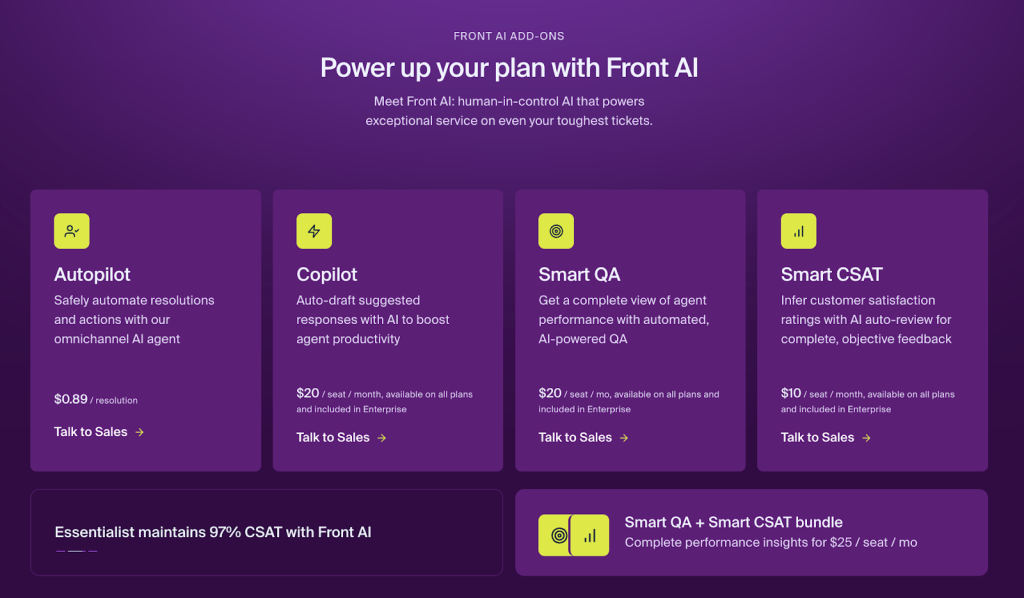
- Important features gated behind paid add-ons – Front adds many features through paid add-ons that aren’t included in its core plans. Over time, these extras can significantly increase the total cost of the software. Let’s look at a few examples.
Most of Front’s AI capabilities are gated behind add-ons on the Starter and Professional plans. Copilot, which drafts suggested responses, costs an extra $20 per seat per month. Smart QA, which provides insights into agent performance, is another $20 per seat per month. Smart CSAT, which helps teams understand satisfaction trends, costs an additional $10 per seat per month.
So even if you’re paying $65 per seat on the Professional plan, accessing these AI features can add up to an extra $50 per seat, bringing the total cost to $115 per seat per month. Even the Enterprise plan doesn’t offer all Front AI features. AI Autopilot is sold as an add-on and costs $0.89 per resolution.
Beyond AI, Front also offers several other paid add-ons that can further increase costs. Workforce Management add-on will cost you $20 per seat per month. Similarly, a range of services like platform optimization are offered by Front as add-ons which costs extra dollars.
- Seat limits and plan upgrades – Front’s pricing tiers come with fixed seat limits, which means if your team grows in size, you’ll be forced to upgrade to the next pricing tier. The Starter plan is capped at 10 seats, while the Professional plan supports up to 50 users. Once these limits are reached, teams are required to move to the next tier, often at a significantly higher per-seat cost. As a result, adding more agents can quickly increase your costs.
- Paid services for onboarding and support – Front also offers a range of paid services for onboarding, training, and platform optimization. While these services can help teams get set up more efficiently and adopt the platform faster, they also introduce additional upfront costs that aren’t reflected in the base plan pricing.
It’s also worth noting that in some cases these services are mandatory to purchase. For example, tailored onboarding is required as a separate purchase when an account’s annual contract value exceeds $25,000.
When you factor all this in, Front’s actual cost often goes beyond its base price. That’s usually when teams start exploring alternatives, for more predictable pricing. One such alternative is Hiver. Let’s look at how the two compare in pricing.
Recommended reading
What teams pay once you add AI: Front’s cost by team size
The plan prices on Front’s pricing page tell part of the story. But once you add the AI features that most support teams need, the per-seat cost looks quite different. These three team sizes show how the bill grows.
A 5-person team on the Starter plan
At $25 per seat, the base cost for five users is $125 per month. But Starter only includes basic AI features like Compose and Translate. If you want AI-assisted reply drafting, you’ll need Copilot as an add-on at $20 per seat. Add Smart QA ($20 per seat) and Smart CSAT ($10 per seat), and your effective cost jumps to $75 per seat. That’s three times the listed plan price.
| Line item | Per seat | 5 seats/month | Annual |
| Starter plan | $25 | $125 | $1,500 |
| + Copilot | $20 | $100 | $1,200 |
| + Smart QA | $20 | $100 | $1,200 |
| + Smart CSAT | $10 | $50 | $600 |
| Total | $75 | $375 | $4,500 |
A 15-person team on the Professional plan
With 15 users, you’re past the Starter plan’s 10-seat cap, so you’ll need Professional at $65 per seat. That’s $975 per month for the base plan alone. The same AI add-ons add another $50 per seat, bringing each seat to $115 and your monthly total to $1,725.
Front does offer a Smart QA + Smart CSAT bundle at $25 per seat instead of $30 separately, which saves $5 per seat. Even with the bundle, you’re still looking at $110 per seat, or $1,650 per month.
| Line item | Per seat | 15 seats/month | Annual |
| Professional plan | $65 | $975 | $11,700 |
| + Copilot | $20 | $300 | $3,600 |
| + Smart QA + CSAT bundle | $25 | $375 | $4,500 |
| Total (with bundle) | $110 | $1,650 | $19,800 |
If you also use AI Autopilot for automated resolutions, that adds a separate usage-based cost that scales with your ticket volume.
A 50-person team on the Enterprise plan
At $105 per seat, 50 users comes to $5,250 per month, or $63,000 per year. Enterprise does include Copilot, Smart QA, and Smart CSAT in the base price, so there are no AI add-on costs for those features. But AI Autopilot is still a separate usage-based add-on, even at this tier. And for annual contracts over $25,000 (which a 50-seat Enterprise deal will always exceed), Front requires a paid onboarding package.
| Line item | Per seat | 50 seats/month | Annual |
| Enterprise plan | $105 | $5,250 | $63,000 |
| Copilot, QA, CSAT | Included | $0 | $0 |
| Autopilot | Usage-based | Varies | Varies |
| Onboarding | Required | One-time | Varies |
The pattern across all three tiers is consistent. On Starter and Professional, AI add-ons can push your per-seat cost to two or three times the listed plan price. Enterprise bundles most AI features, but Autopilot and mandatory onboarding still add to the total.
Front vs. Hiver: Total cost of ownership comparison
Here’s a quick glance at the difference in cost between Front and Hiver. Read on to explore this in depth.
| Helpdesk features | Helpdesk Tool | Small teams + Medium Teams (15 users) | Large Teams (60 users) |
| -Shared inboxes -Live chat -Voice channel -Knowledge base -Automation -Analytics & Reporting -SLAs -Integrations -CSAT -AI assistance & automation | Front | $18,900 / year | $75,600 / year (excluding required tailored onboarding for larger contracts) |
| Hiver | $11,700 / year | $46,800/year | |
| Annual savings | $7,200 / year | $28,800 / year |
Let’s begin by quickly looking at Hiver’s pricing plans. Hiver offers four core pricing tiers, each designed to align with support team needs at different stages of growth.
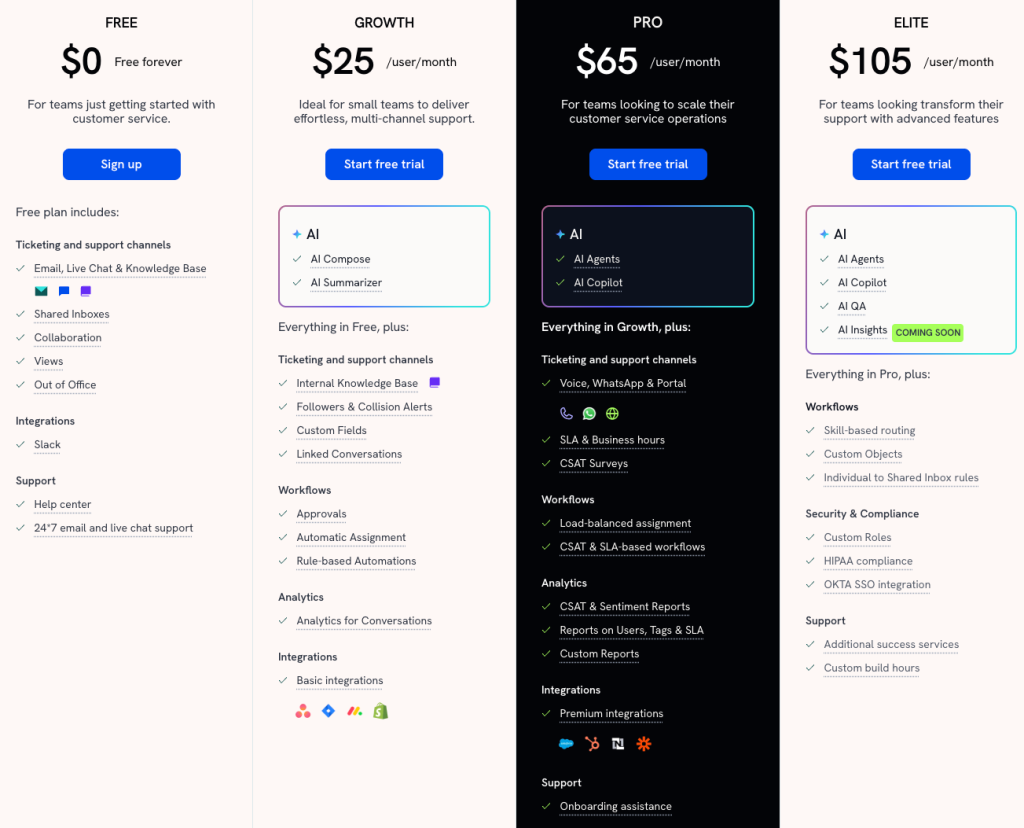
- Forever free plan – Designed for teams just getting started with customer support and that don’t want to make a big investment in a tool right off the bat. The free plan includes the basics like email, live chat, knowledge base, Slack integration, and core collaboration features such as collision alerts, internal notes, and shared drafts. Teams also get access to 24×7 email and live chat support.
- Growth plan – The Growth plan ($25 per user per month) is ideal for smaller teams that want to provide multichannel support to their customers. This plan introduces internal knowledge bases, rule-based automations, analytics, and integrations with tools like Asana, Slack, and Shopify, along with AI features such as AI Compose and AI Summarizer. It’s a practical step up for teams that want efficiency without added complexity.
- Pro plan – The Pro plan ($65 per user per month) is where Hiver steps it up a notch. It’s ideal for operationally mature support teams that need stronger automation, reporting, and omnichannel capabilities. Pro adds channels like WhatsApp, voice, and customer portals, along with SLAs, CSAT surveys, advanced workflows, richer analytics, and premium integrations with tools like HubSpot and Salesforce.
Importantly, Hiver Pro also includes powerful AI features like AI Agents and AI Copilot, allowing teams to automate workflows, assist agents in real time, and scale support without paying extra for add-ons.
- Elite plan – Hiver’s Elite plan ($105 per user per month) is designed for larger organizations and enterprises and offers all of Hiver’s features in an all-in-one package.
It adds advanced AI features like AI QA for agent quality monitoring and AI Insights for identifying trends across support operations.
Elite also includes a dedicated customer success manager and enterprise-grade security features such as custom roles, HIPAA compliance, and Okta SSO integration, making it suitable for complex and regulated environments.
At face value, Hiver’s paid plans may appear similar to Front’s. But when you dig deeper into what’s included and how costs scale, there’s a stark difference in what you’ll actually end up paying and how much value you’ll get for it. Take a look.
How Hiver and Front differ on pricing and value
Here are the key differences that shape the total cost of ownership and value you get over time between Front and Hiver.
1. Forever free plan – Hiver offers a free-forever plan that allows teams to try the product properly or continue using it if they have basic support needs. Even on the free plan, teams get access to email, live chat, and a knowledge base, along with basic collaboration features.
In contrast, Front does not offer a free tier, and its paid Starter plan is limited to single-channel support. This makes Hiver’s free plan a more practical entry point for small teams that want to set up structured support without immediate cost commitments.
2. AI bundled into Hiver’s plans – Front gates most of its AI capabilities behind separate paid add-ons, even on its Professional plan priced at $65 per seat. Features like Copilot, Smart QA, and Smart CSAT are not included by default, and AI Autopilot is sold separately on a usage-based model.
In contrast, Hiver’s Pro plan, which is similarly priced to Front’s Professional plan, includes powerful AI capabilities such as AI Agents and AI Copilot as part of the plan and not as add-ons.
At the enterprise level as well, Front continues to gate AI Autopilot behind an add-on. While Hiver’s Elite plan includes its complete AI feature set within the plan price, making AI costs easier to predict as teams scale.
3. No separate add-ons in Hiver – Building on the previous point, Hiver does not offer any add-ons whatsoever. What you see is what you get. Features available at each plan tier are included in the base price, without requiring separate purchases to unlock additional functionality.
This is a clear contrast to Front’s pricing model, where multiple features and services are sold separately as add-ons and layered on top of base plan pricing, as discussed in detail earlier. From a total cost of ownership perspective, Hiver’s approach makes costs easier to understand upfront and reduces the risk of unexpected spend as teams scale.
4. No seat limits forcing plan upgrades in Hiver – Unlike Front, Hiver does not impose hard seat caps that push teams into higher pricing tiers as they grow. Teams can scale their headcount without being forced into an upgrade solely because they crossed a user limit, making growth more predictable and linear from a pricing standpoint.
5. 24×7 support across all plans – Hiver provides best in class, 24×7, human-led support across all of its plans, including the free tier, with no add-ons required to access live assistance. This means teams can get help whenever they need it, regardless of the plan they’re on. For larger Hiver customers, the Elite plan also includes a dedicated customer success manager to help with adoption, optimization, and getting maximum value from the platform.
In contrast, Front offers onboarding and optimization as paid services, and access to a dedicated account team is typically tied to higher annual contract values.
Let’s look at a real-world cost example.
Consider a 15-agent support team comparing Front’s Professional plan and Hiver’s Pro plan, both priced at $65 per user per month.
With Front, if the team wants AI assistance for drafting replies and quality monitoring, they would need to add Copilot (+$20 per seat) and Smart QA (+$20 per seat), bringing the effective cost to $105 per user per month.
With Hiver, the same team on the Pro plan gets AI Agents and AI Copilot included in the base price, with no additional AI add-ons required. The monthly cost remains $65 per user, with no usage-based AI fees layered on top.
Monthly cost comparison (15 users):
- Front Professional: 15 × $105 = $1,575 per month
- Hiver Pro: 15 × $65 = $975 per month
That’s a $600 difference per month, or $7,200 annually, for teams of the same size with similar AI requirements.
Final take on Front’s pricing
To put it all together and sum it up, while Front is a very capable support platform, its pricing structure can be a bit tricky to figure out and costs climb quickly once you factor in all the hidden expenses. This is something teams evaluating Front should be mindful of.
In this context, teams may want to consider alternatives like Hiver, which take a more straightforward and predictable approach to pricing as teams scale. All things considered, Hiver provides more bang for your buck and will also be significantly more affordable than Front.
In case you’d like to check out Hiver for free, sign up for a free trial here and access all the features available on the Elite plan. Alternatively, you can schedule a demo.
Frequently Asked Questions (FAQs)
1. Does Front have a free plan?
No, Front does not have a free forever plan. You can sign up for a 14 day free trial.
2. What are Front’s seat limits by plan in 2026?
The Starter plan supports up to 10 seats, the Professional plan supports up to 50 seats, and Enterprise plans have custom seat limits based on your needs.
3. How much does Front’s AI Autopilot cost per resolution?
Front prices AI Autopilot on a per-resolution basis, so you only pay when the AI successfully resolves a conversation. Each resolution costs $0.89.
4. Can I access Omnichannel (WhatsApp/SMS) on the Front Starter plan?
No. The Starter plan does not include omnichannel support. Omnichannel features such as SMS and social channels are available starting from the Professional plan. Starter is primarily designed for single-channel email support.
5. Is there a setup or onboarding fee for Front?
Front does not charge a mandatory setup or onboarding fee to get started. However, services such as tailored onboarding, training, and platform optimization are available as paid add-ons on Professional and Enterprise plans.
6. Can you combine seats across different Front plans?
No. Front plans are assigned at the organization level, which means all users must be on the same plan. You can add or remove seats as needed, but they must all belong to a single plan.
7. Does Front charge extra for API access and integrations?
Front includes API access on all plans, with usage limits based on your plan. Starter supports up to 50 requests per minute, Professional up to 100, and Enterprise up to 200. Higher API limits are available as paid add-ons.
8. Does Front charge for inactive users?
Yes. Front charges per licensed seat, regardless of whether a user is actively using the product. To avoid unnecessary costs, inactive users must be removed or deactivated from your account.
9. Does Front include AI features in its base pricing?
The Starter and Professional plans include basic AI features like Compose, Translate, and Summarize. But the capabilities that make a bigger difference are sold separately.
Copilot (reply drafting) costs $20 per seat per month, Smart QA (quality monitoring) costs $20, and Smart CSAT (satisfaction tracking) costs $10. The Enterprise plan is the only tier that bundles these three into the base price. AI Autopilot, which handles automated resolutions, is a usage-based add-on on every plan, including Enterprise.
10. Does Front offer discounts for startups or nonprofits?
Yes. Front has a startup program that offers six months free along with onboarding and AI credits for qualifying startups. Nonprofits and educational organizations can get 50% off base plan pricing, though that discount doesn’t extend to paid add-ons. Front also saves you roughly 24% if you commit to annual billing instead of month-to-month. Teams on multi-year contracts may be able to negotiate additional volume discounts through Front’s sales team.
11. How much does Front cost for a team of 10?
On the Starter plan at $25 per seat, a 10-person team pays $250 per month for the base plan. But if you add Copilot ($20 per seat) and Smart QA ($20 per seat), the total jumps to $650 per month, or $7,800 per year. Keep in mind that 10 is the maximum seat count on Starter. Adding one more team member means upgrading to Professional at $65 per seat.
12. What happened to Front’s Growth, Scale, and Premier plans?
Front consolidated its pricing in 2026, moving from four tiers down to three. The old structure was Starter ($19), Growth ($59), Scale ($99), and Premier ($229) per seat per month. The current lineup is Starter ($25), Professional ($65), and Enterprise ($105), all billed annually. If you find references to the old plan names or different price points online, those are outdated. Front’s current pricing is on front.com/pricing.













