Skip to content



Imagine running a business where your customers are spread across different time zones. They shop at their convenience, and sometimes, they need help at odd hours. That’s where a global help desk comes in.
It ensures that no matter where your customers are, they always feel heard and assisted. In this 24/7 digital age, a global help desk isn’t just an added benefit—it’s a must-have for businesses aiming for top-notch customer satisfaction.
By adopting this, only you’re not only differentiating yourself from competitors but also building lasting trust with your global audience.
This article will help you understand everything about global help desks and how you can set them up.
Table of Contents
- TL;DR
- What is a Global Help Desk?
- Why a Global Help Desk Is a Business Necessity in 2026
- Global Help Desk vs Regular Help Desk: Key Differences
- Challenges with Global Help Desks + How to overcome them
- The Follow-the-Sun Model for Global Customer Support
- Top 3 Global Help Desk Tools in 2026
- Key Components to Look for in a Global Help Desk Solution
- Setting Up Your Own Global Help Desk: Step-by-Step Guide
- Ready To Go Global?
- Frequently Asked Questions
TL;DR
- Tools like Hiver, Freshdesk and Zendesk help manage handoffs, routing, and conversations in one centralized place.
- A global help desk supports customers across time zones with 24/7 coverage
- It replaces single-region support that slows down outside business hours
- The follow-the-sun model keeps work moving by passing tickets between regions
- Distributed teams handle higher volume without delays or burnout
What is a Global Help Desk?
A global help desk is a customer support system made for businesses with customers all over the world. It’s built to always be available. So that no matter where and when a customer reaches out from, the system ensures uninterrupted service across borders and time zones.
So, what makes the global help desk stand out?
- Always-On Service: Unlike a regular help desk that might work in just one-time zone or during specific hours, a global help desk is available 24/7.
- Adaptable and Diverse: Global help desks often come equipped to handle multiple languages and cultural nuances, ensuring that your customers feel right at home, no matter where they’re from.
- Tech-Powered: Many global service desks leverage modern technology, like chatbots and AI, to answer frequently asked questions instantly. Human agents step in for more complex issues, ensuring customers get the right blend of speed and personal touch.
- Centralized yet Local: Even though the service is continuous and global, the magic of a global help desk is in making customers feel they’re interacting with a local service desk. They get responses tailored to their region, culture, and language, creating a sense of familiarity and trust.
Why a Global Help Desk Is a Business Necessity in 2026
Customer expectations don’t pause for time zones. When someone runs into a problem at 11 PM their time, they’re not going to wait until your team clocks in the next morning. They’ll follow up repeatedly, escalate, or quietly move on to a competitor. That’s the reality businesses are dealing with today.
A global help desk fixes this, but it goes beyond just “being available 24/7.” Here’s what’s actually at stake.
- Your team can’t absorb global demand alone. Product launches, outages, and sudden spikes don’t follow business hours. When your support is tied to one region, those surges pile up fast. Spreading coverage across time zones keeps response times consistent, even when volume jumps.
- Speed builds trust. Customers who get quick, relevant answers are more likely to stay, upgrade, and refer others. Customers who wait? They churn — or worse, they talk about it. Support quality directly affects how people feel about your product, not just their ticket.
- Local context changes everything. Tone, language, and expectations vary significantly across regions. Teams that understand this nuance resolve issues faster, with less back-and-forth. Generic responses don’t cut it when your customers span multiple cultures.
- Burnout is a real cost. When one team covers every time zone, agents end up stretched thin — late hours, constant context-switching, mounting backlogs. A distributed setup keeps workloads manageable and support quality consistent across the board.
- Customers don’t stick to one channel. They start on chat, follow up over email, and circle back on WhatsApp if they don’t hear from you. Without continuous, cross-channel coverage, conversations fall through the cracks. A global help desk keeps someone monitoring every channel, so customers never have to repeat themselves.
Global Help Desk vs Regular Help Desk: Key Differences
A traditional help desk can work fine when your customers are all in one region. But as soon as you start supporting customers across countries and time zones, that same setup begins to show its limits.
Here’s the difference in how both models operate:
| Feature | Regular Help Desk | Global Help Desk |
|---|---|---|
| Coverage | Single region | Multiple regions |
| Support hours | Business hours only | 24/7 coverage |
| Languages | Usually one language | Multi-language support |
| Team structure | Centralized team | Distributed teams across time zones |
| Response times | Slower outside working hours | Faster, round-the-clock responses |
| Workload handling | Can get overwhelmed during spikes | Load distributed across teams |
| Routing & workflows | Mostly manual or basic rules | Automated routing based on region, shift, or expertise |
| Channels covered | Limited or inconsistent coverage | Continuous coverage across channels |
| Scalability | Harder to scale globally | Built to support global growth |
What this means in practice:
If your customers are spread across regions, a regular help desk will struggle with delays, backlogs, and inconsistent experiences. A global help desk helps you stay responsive without overloading one team. For instance you can:
- Automatically route queries based on time zone or team
- Manage conversations across channels in one place
- Let AI handle simple requests while routing complex ones to the right team
This makes it easier to run a global support operation without constantly firefighting.
Challenges with Global Help Desks + How to overcome them
Implementing a global service desk can feel a bit tricky in the beginning. It does come with its own set of challenges. Let’s uncover these and also find out effective strategies to tackle them:
1. Cultural Differences
Challenge: Every region has its unique customs, traditions and expectations. For instance, while a direct approach might work in the U.S., in Japan, a more nuanced and respectful tone is preferred.
Solution: Conduct cultural sensitivity training for all support staff. Furthermore, having regional support representatives or experts can offer insights into local customs, ensuring communications resonate well with local sensibilities.
2. Linguistic Barriers
Challenge: Language can often be a significant obstacle. Imagine a Spanish-speaking customer struggling to explain an issue to an English-only agent.
Solution: Employ multilingual agents, phone interpretation services, and integrate translation tools. Advanced AI chatbots can also be programmed to understand and respond in multiple languages, ensuring that language is never a barrier to quality customer service.
3. Time Zone Complexities
Challenge: When it’s daytime in New York, it’s nighttime in Sydney. This can lead to staffing challenges because global help desks require that there’s always someone available to help.
Solution: Implement a ‘follow-the-sun‘ support model. This means having teams located across the globe to ensure that as one team’s day ends, another’s is just beginning. This provides seamless 24/7 coverage.
4. Unified Training and Quality Assurance
Challenge: How do you ensure an agent in Paris offers the same quality of support as one in Tokyo?
Solution: Implement centralized training programs and regular quality assurance checks. Cloud-based training modules can be accessed by teams globally, ensuring consistent training. Also, regular audits and feedback sessions can maintain high service standards.
5. Technical Integration
Challenge: Different regions might use different platforms or tools, making it hard to offer a consistent tech-driven support experience.
Solution: Adopt universally accepted tools and platforms. This ensures that all regions are on the same technical page. Regular tech training sessions can keep agents updated on the latest upgrades and best practices of using a help desk.
6. Data Privacy and Security Regulations
Challenge: Different countries have different laws regarding data protection, like the HIPAA Compliance, GDPR- compliance and so on. Ensuring compliance across borders can be tricky.
Solution: Maintain a legal team or advisors knowledgeable in international data protection laws. Implement global data management practices that adhere to the strictest regulations, ensuring compliance across the board.
The Follow-the-Sun Model for Global Customer Support
The Follow-the-Sun Model for Global Customer Support
There’s a version of 24/7 support that looks good on a pricing page but falls apart in practice. Slow responses, repetitive conversations, agents who clearly don’t have context from the previous shift.
We’ve thought about this a lot at Hiver, not just as a product decision, but as a daily operational reality.
Our own customer support team runs 24/7, including weekends. And given what we build, that’s not accidental.
If we’re asking support teams to trust Hiver with their most critical workflows, the least we can do is show up when they need us.
That commitment pushed us toward the follow-the-sun model. Honestly, it’s one of the better decisions we’ve made.
What Is the Follow-the-Sun Customer Support Model?
The follow-the-sun model is a way to structure support operations so work continues around the clock, without requiring any team to work odd hours. Each team handles requests during its local daytime, and as one team signs off, another in a different time zone picks up where they left off.
At Hiver, our support runs in staggered shifts starting at 6 AM, 9 AM, 3 PM, 6 PM, and 9 PM. The team is small and tight-knit: a 12-member global group led by Shankar, with Akshay overseeing day-to-day operations and Harsha handling high-priority escalations. At any given point, a few reps are online, and the next shift is never far behind.
How the Follow-the-Sun Model Works in Practice
You can have agents across every time zone and still deliver a fragmented experience if handoffs aren’t done well.
A customer explains their issue to one agent, comes back six hours later, and has to start over. That’s not a staffing problem. It’s a context problem.
This is something we at Hiver are very deliberate about. Before anyone on our team signs off, they document what’s happened, what the customer is expecting, and what needs to happen next.
Not as a formality, but because the next agent needs to walk in ready to act, not catch up.
As Harsha puts it:
“When I log off after my morning shift, the night team logs in and has full context. It’s seamless. No customer is ever left waiting”
Akshay Adheesh, Support Manager from Hiver reiterates the same: “We’ve structured our shifts in a way that there’s always someone available to take over. That’s what keeps things moving without delays.”
That’s what good handoffs look like in practice. The customer doesn’t feel the shift change. From their side, it’s one continuous conversation, even if three different agents touched it behind the scenes.
Tools You Need to Run Follow-the-Sun Support
A follow-the-sun model only holds together if your tooling supports it. Without a shared workspace, internal notes, and clear routing, you’re just moving tickets around without actually moving them forward.
At Hiver, every conversation lives in one shared space. Agents leave internal notes directly alongside the conversation.
No digging through Slack threads or separate docs to understand what’s already been tried. The next shift opens a ticket and immediately sees the full picture.
The team also uses tools like ClickUp and Google Meet to stay coordinated across shifts.
As Akshay explains: “We use a mix of communication and productivity tools to stay fast and efficient. The setup is lean, but it works because everyone knows what they’re responsible for.”
A few things that are non-negotiable for this model to work:
- Shared conversation history visible to every team, across every shift
- Internal notes added before sign-off, not as an afterthought
- Smart routing so conversations reach the right team at the right time
- Multi-channel visibility across email, chat, and voice, all in one place
Top 3 Global Help Desk Tools in 2026
Once you understand how a global help desk works, the next question is simple: what tools can actually support this setup without creating more complexity?
Not every help desk is built for global operations. Some work well for single-region teams but start to break when you add multiple time zones, languages, and handoffs. The tools below are better suited for distributed teams that need consistent coverage.
| Tool | Best for | Multilingual Support | Starting Price |
|---|---|---|---|
| Hiver | Teams that want a simple, shared workspace for multi-region support | Yes | Free plan available |
| Zendesk | Large teams managing complex, high-volume global support | Yes | Starts at ~$55/agent/month |
| Freshdesk | Growing teams that need flexible automation and regional routing | Yes | Free plan available |
Hiver
Hiver brings every customer conversation — across email, chat, voice, and more — into one shared workspace. When a shift ends, the next team logs in and sees everything: what was tried, what the customer is expecting, and what needs to happen next. No gaps, no repeated questions, no scrambling to piece together context from three different tools.
In a follow-the-sun model, this clarity matters. Work keeps moving, customers don’t feel the shift, and your operations stay smooth without adding process overhead.
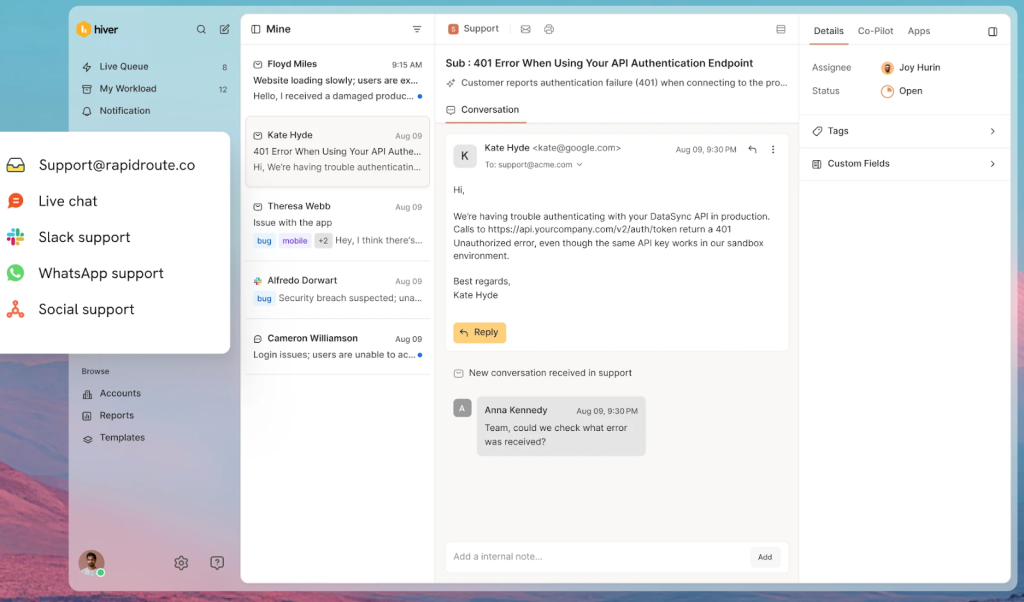
For example, teams can:
- Route conversations based on time zone or working hours. This way, requests don’t sit idle when one team logs off. For instance, you can create an automation rule that routes all requests from 8am to 7pm IST to agents Rob, Marie and Sarah.
- Use AI to handle repetitive queries and assist agents during handoffs. AI agents can automatically resolve common queries like password resets or order status updates, so these don’t wait for the next shift. At the same time, when an agent from another shift picks up a conversation mid-way, they don’t have to search through past threads or docs. With Ask AI, they can instantly pull answers from internal docs and SOPs, and with AI Suggested Responses, they get ready-to-send drafts based on the conversation history. This helps them respond faster without missing context.
- Leave internal notes before handing off to the next shift. Quite handy because the next agent doesn’t have to re-read or re-investigate the issue. For example, if a customer is troubleshooting an integration issue, an agent can leave a note explaining what’s already been checked and what needs to be tried next. Since these notes sit right beside the conversation with Hiver, the next agent can continue instantly without asking the customer to repeat anything.
Zendesk
As your team grows across regions, support starts to break not because of volume, but because of coordination. Different teams handle different queues, priorities vary, and without structure, things slip.
That’s where Zendesk fits in. It’s designed for teams that need tight control over how conversations move across regions, agents, and priorities.
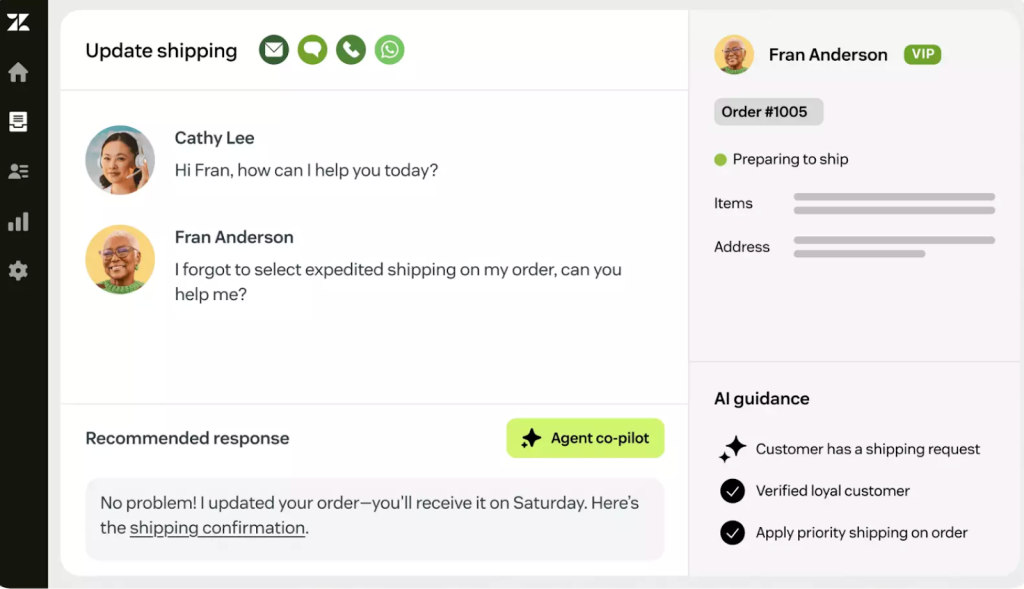
Instead of relying on manual triage, teams use Zendesk to standardize how work flows from one stage to the next. Here’s how:
- Route tickets based on skills, priority, or region. A high-priority issue from an enterprise customer can be sent directly to a specialized team instead of sitting in a general queue. This reduces back-and-forth and speeds up resolution for complex cases.
- Track SLAs across time zones. When a ticket moves from one region to another, Zendesk’s SLA timers continue without disruption. Every team involved can see what’s pending and how much time is left.
- Use macros and triggers to standardize responses and actions. For recurring issues like refunds or account updates, agents can trigger predefined actions and replies. This removes repetitive work and ensures responses stay consistent across regions.
- Use AI to assist with responses and automate resolutions. Zendesk’s AI can suggest replies based on past tickets, summarize long threads, and handle simple queries end to end. This helps agents focus on more complex issues while routine requests are resolved faster.
Freshdesk
When support starts coming in from different parts of the world, the problem isn’t just volume, it’s also the timing.
A ticket raised in London at 10 AM is sitting in someone’s working hours. A ticket raised in California at 11 PM is not. But without location-aware setup, most teams apply the same SLA rules and routing logic everywhere, regardless of when or where a request actually came in. The result is uneven response times and customers waiting longer than they should.
Freshdesk lets you account for this. You can configure support to behave differently based on where a customer is and when they reach out, so your global operations don’t run on a one-size-fits-all clock.
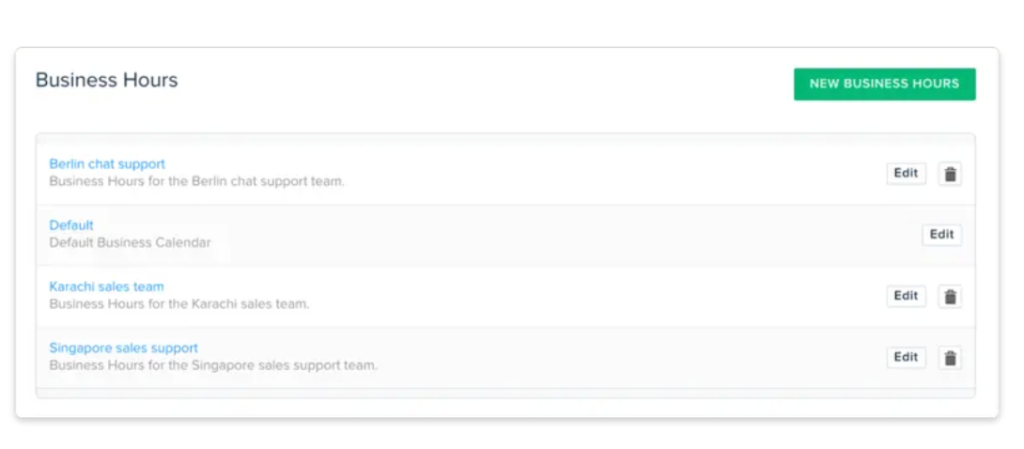
Here’s how that plays out in practice:
- Time zone-aware SLAs. A customer in Paris and a customer in Chicago aren’t active at the same time, so holding both to the same response window doesn’t make sense. Freshdesk lets you set SLA policies that run on local business hours, so response targets are measured against when that customer is actually reachable, not a fixed global clock.
- SLAs that account for local business hours and holidays. If a request comes in during a regional holiday or outside working hours, the SLA auto-adjusts accordingly.
- Automatic ticket assignment based on region and availability. Tickets don’t sit in a global queue waiting for the right person to notice them. A request that comes in during APAC hours gets routed directly to the APAC team, who are already online and ready to respond. The right team gets the ticket at the right time, without anyone having to manually sort through a shared queue.
- Multilingual support through a localized knowledge base. When a customer in Japan or Brazil searches for help, finding an article in their language makes a real difference. They’re more likely to find what they need and less likely to raise a ticket in the first place. Freshdesk lets you build your knowledge base in multiple languages, so self-service works for a global audience, not just English-speaking customers.
- Freddy AI assists with responses and handles routine queries. Instead of starting from scratch on every reply, agents get response suggestions pulled from past conversations and existing knowledge base articles. Routine queries get handled automatically, and for anything more complex, Freddy gives agents a solid starting point so they’re not staring at a blank reply box.
If you’re evaluating more options or want a deeper breakdown, check out our guide on best helpdesk solutions
Key Components to Look for in a Global Help Desk Solution
Choosing the right global help desk solution can help you cater to your global audience and build lasting relationships.
To ensure you make an informed decision, here’s a checklist of pivotal features to consider:
1. Multi-Channel Support
Customers can reach out via various customer service channels – email, chat, social media, or phone. A global help desk should be adept at handling all these channels.
It should also ensure seamless integration of channels so that your agents can have contextual discussions with the customers right from the help desk. This is called an omni-channel support.
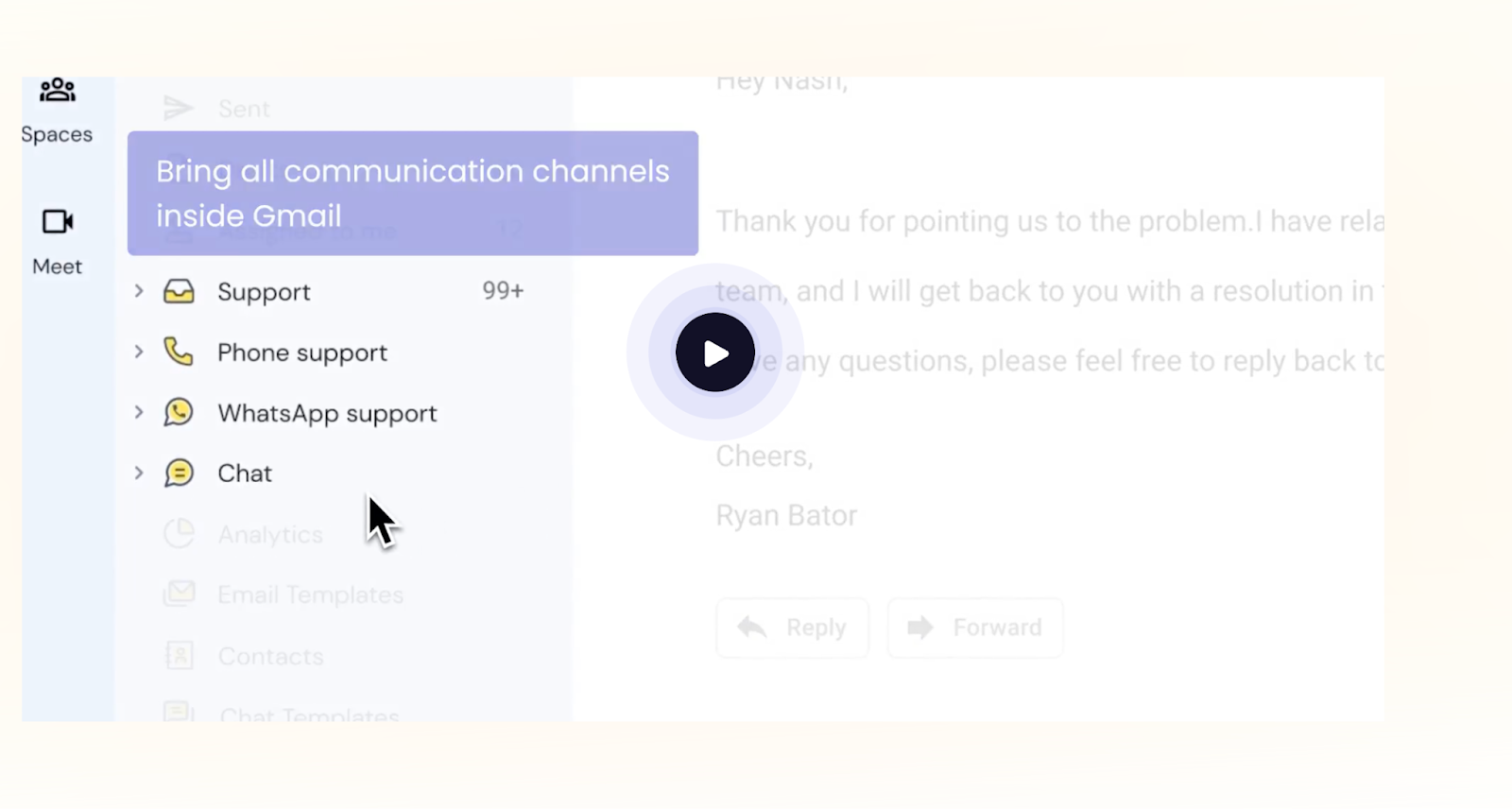
Here’s how a multichannel support system in a global help desk can be beneficial:
- Enhanced Accessibility: Customers can choose their preferred communication method, whether it’s email, chat, social media, or a direct call.
- Faster Response Times: With various channels manned concurrently, queries can be addressed more promptly, leading to improved customer satisfaction.
- Increased Sales Opportunities: Every channel can be an avenue for upselling or cross-selling. For instance, a chat query about a product could lead to a recommendation for another complementary product.
- Higher Customer Retention: Meeting customers on their preferred platforms fosters loyalty and encourages repeat business.
- Richer Data Collection: Multiple channels provide varied insights into customer behavior and preferences, enabling more informed business decisions.
Recommended reading
2. Knowledge Base Integration
A knowledge base is a centralized database containing information on guides, how-to articles, FAQs, and other resources. It’s designed to assist customers in troubleshooting common problems or answering queries without the direct intervention of a support agent.
A self-service knowledge base can empower customers to find solutions independently, reducing the ticket volume.
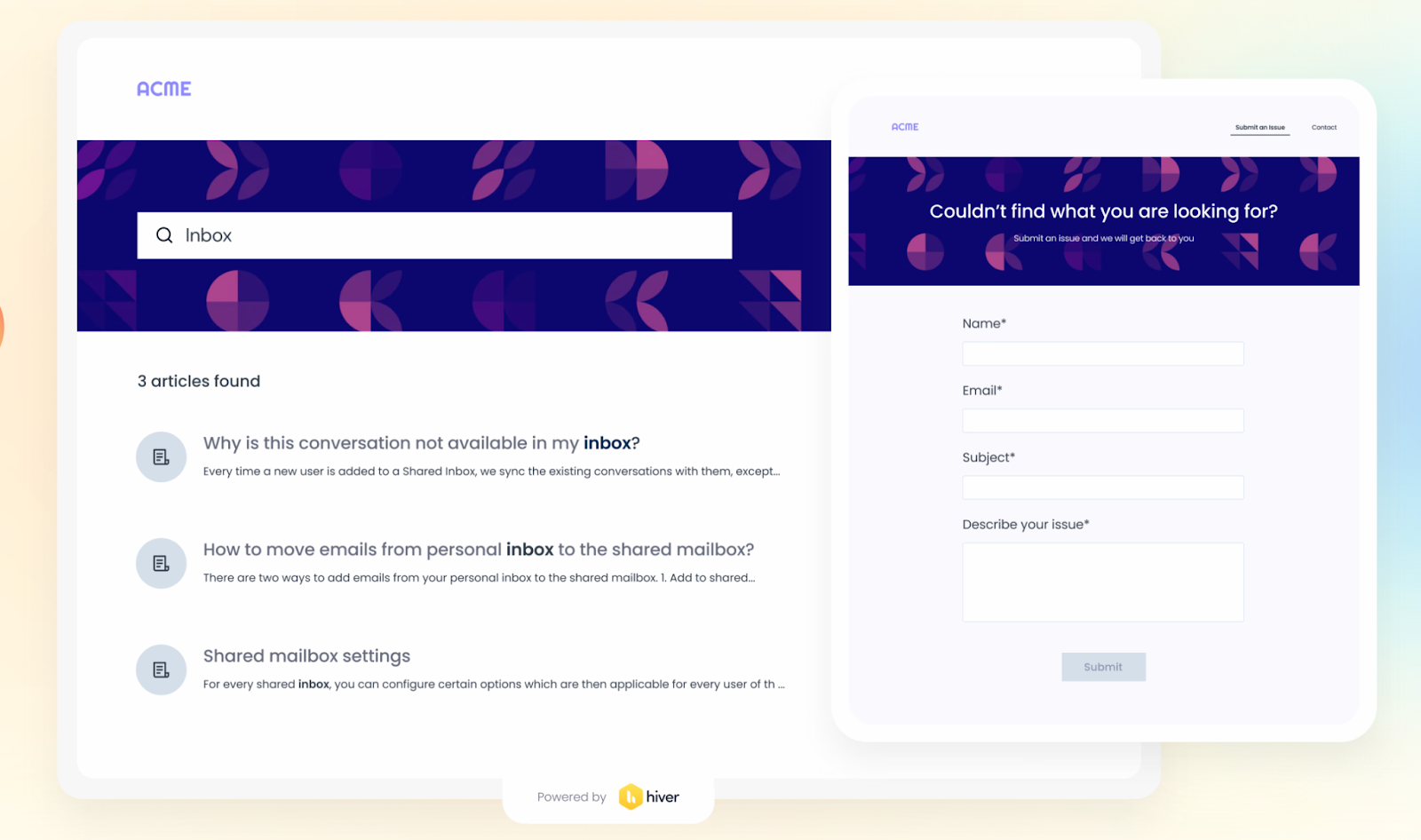
Here’s how a knowledge base functionality in your global help desk can be helpful:
- Reduced Ticket Volume: By providing answers to frequently asked questions and common issues, a significant portion of customer queries can be resolved without creating a ticket. This reduces the workload on support agents and speeds up resolution times for more complex queries.
- 24/7 Assistance: Since it’s self-service, customers can access the knowledge base anytime, anywhere, even outside the regular support hours. This ensures that customers across different time zones always have a resource to turn to. This improves the service experience of the customers.
- Empowering Customers: A knowledge base is a self-service portal that equips customers with the tools they need to solve issues on their own. This sense of empowerment can lead to increased customer satisfaction and loyalty.
3. Collaborative Interface
Global service desks are to cater to global customers. And when customers are global, the issues they face can be varied and complex. Such issues often require multiple minds, departments, or even global support teams to collaborate and arrive at the best solution.
This is where an integrated and collaborative interface in a global help desk system is beneficial.
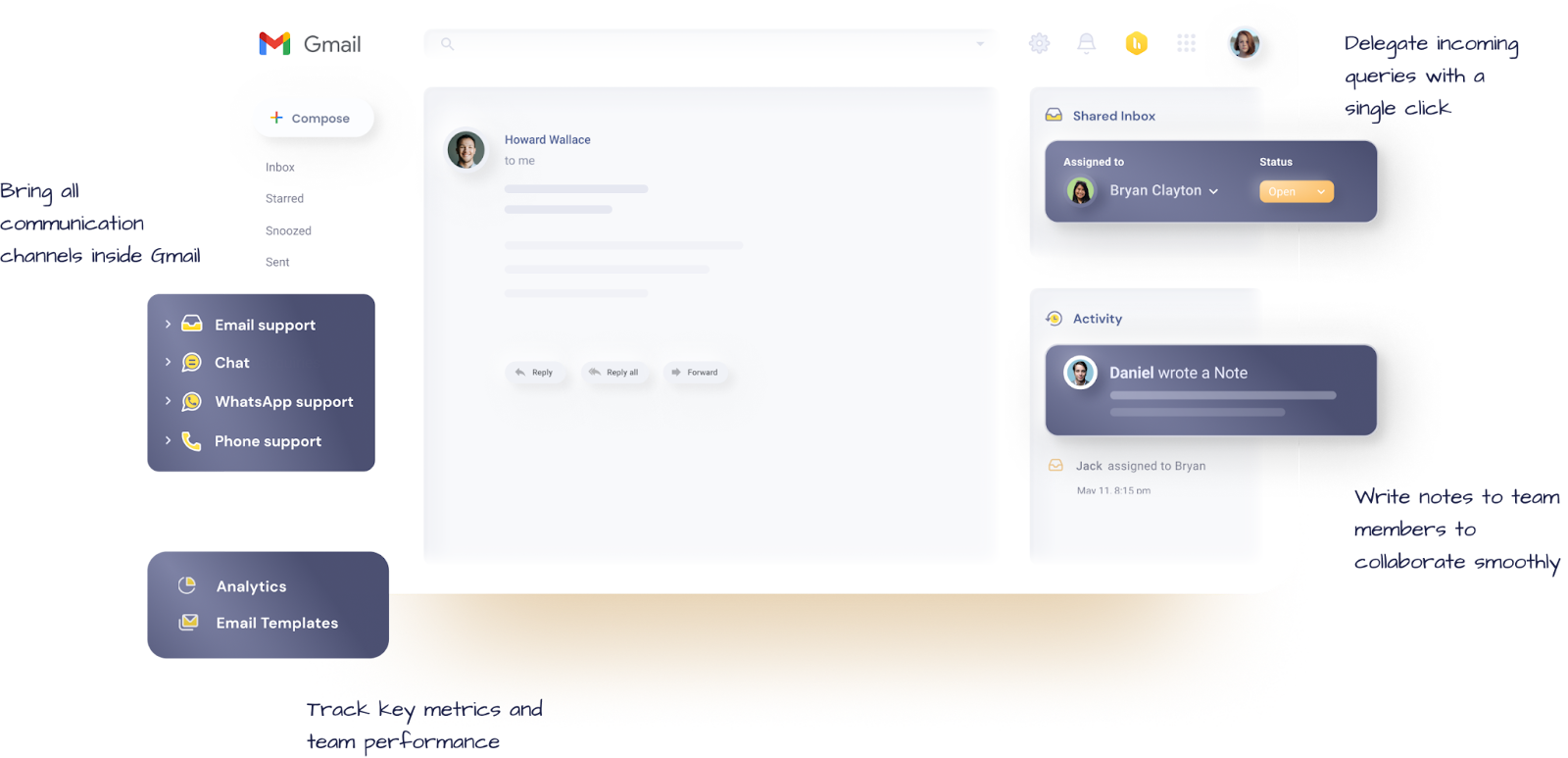
Here’s how a collaborative interface in a help desk can be beneficial:
- Unified Communication: A help desk with a collaborative interface provides a singular platform where agents can communicate seamlessly. Whether it’s through chat, video calls, or shared documents, agents can quickly exchange information, ensuring that there’s no delay in resolving customer queries.
- Real-Time Updates: As agents collaborate and update tickets or issues, everyone involved gets real-time notifications. This ensures everyone is on the same page, and no efforts are duplicated.
- Cross-Departmental Collaboration: Often, customer issues might span across different departments – say, a software bug requiring both technical and customer service teams. Integrated tools allow effortless collaboration between these departments, ensuring faster and more efficient problem resolution.
For example, Hiver as a help desk ticketing system provides a collaborative interface for customer support agents to work together. With features like shared inbox, shared templates, email notes and @mentions, agents can seamlessly work together without toggling between other messaging channels.
4. Integration Capabilities
A global help desk should seamlessly integrate with other business tools, like CRMs or other project management platforms. It ensures that every piece of information is instantly available in the help desk, empowering support agents to deliver prompt and informed assistance.
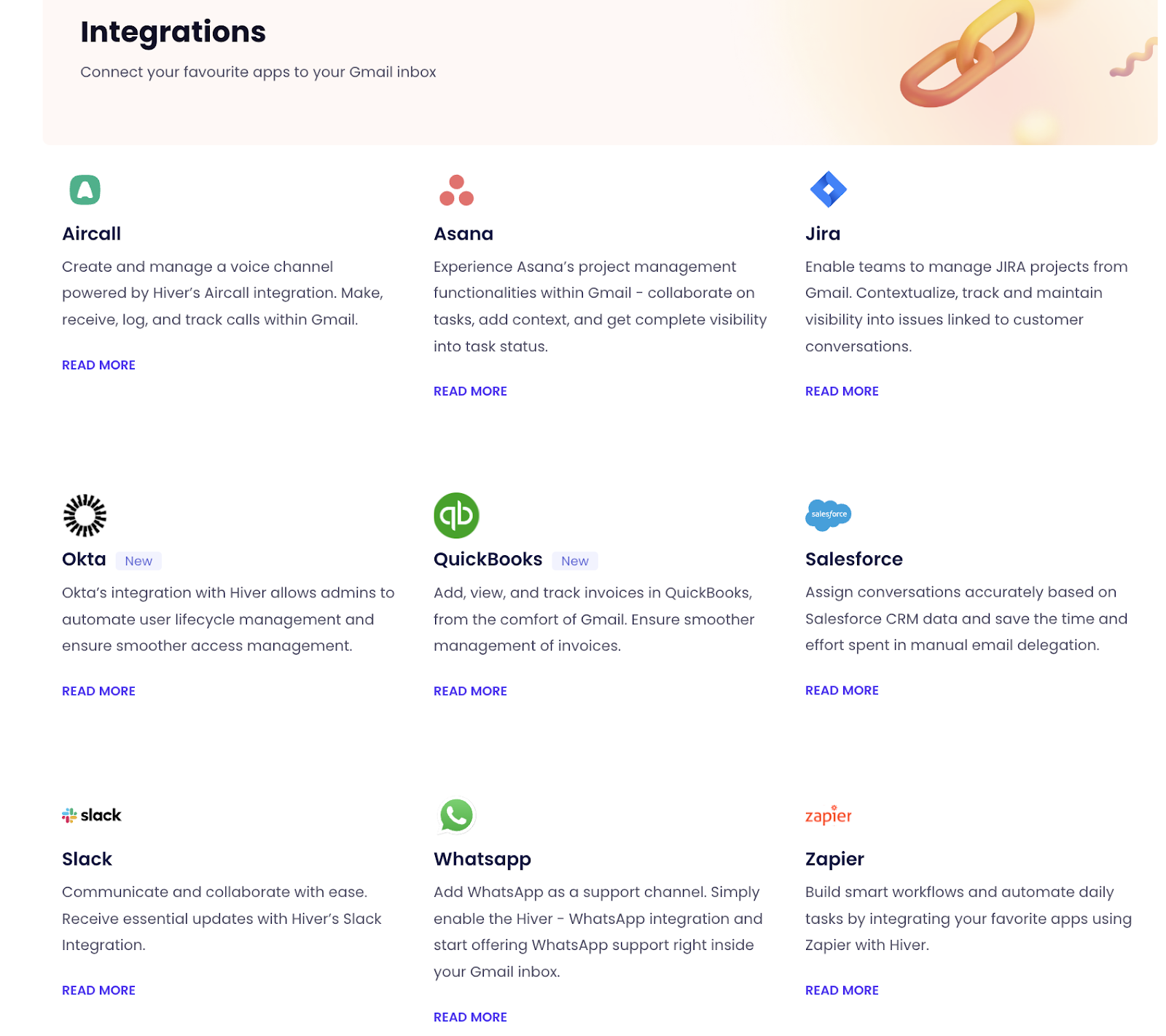
Here’s how strong integration capabilities in a help desk can be beneficial:
- Holistic View of Customers: Integration with CRMs ensures that support agents have access to a customer’s entire history with the company in the help desk itself. Whether it’s previous tickets, purchase history, or feedback given, agents can tailor their approach based on this comprehensive view.
- Automated Data Synchronization: Real-time data synchronization means that any update on one platform is instantly reflected across all integrated systems. This eliminates redundant data entry from the help desk, reduces errors, and ensures all departments work with up-to-date information.
- Streamlined Workflow: Integration with tools like agile project management software or billing systems can help automate many support processes. For instance, if a customer reports a billing issue, the ticket can automatically trigger an investigation in the billing system, speeding up resolution.
Recommended reading
5. Real-time Analytics and Reporting
Businesses today rely on data-driven decision making. For global help desks, real-time data on ticket management metrics, agent performance, and customer interactions provide invaluable insights. This immediate feedback allows businesses to be proactive in making decisions that enhance efficiency and customer satisfaction.
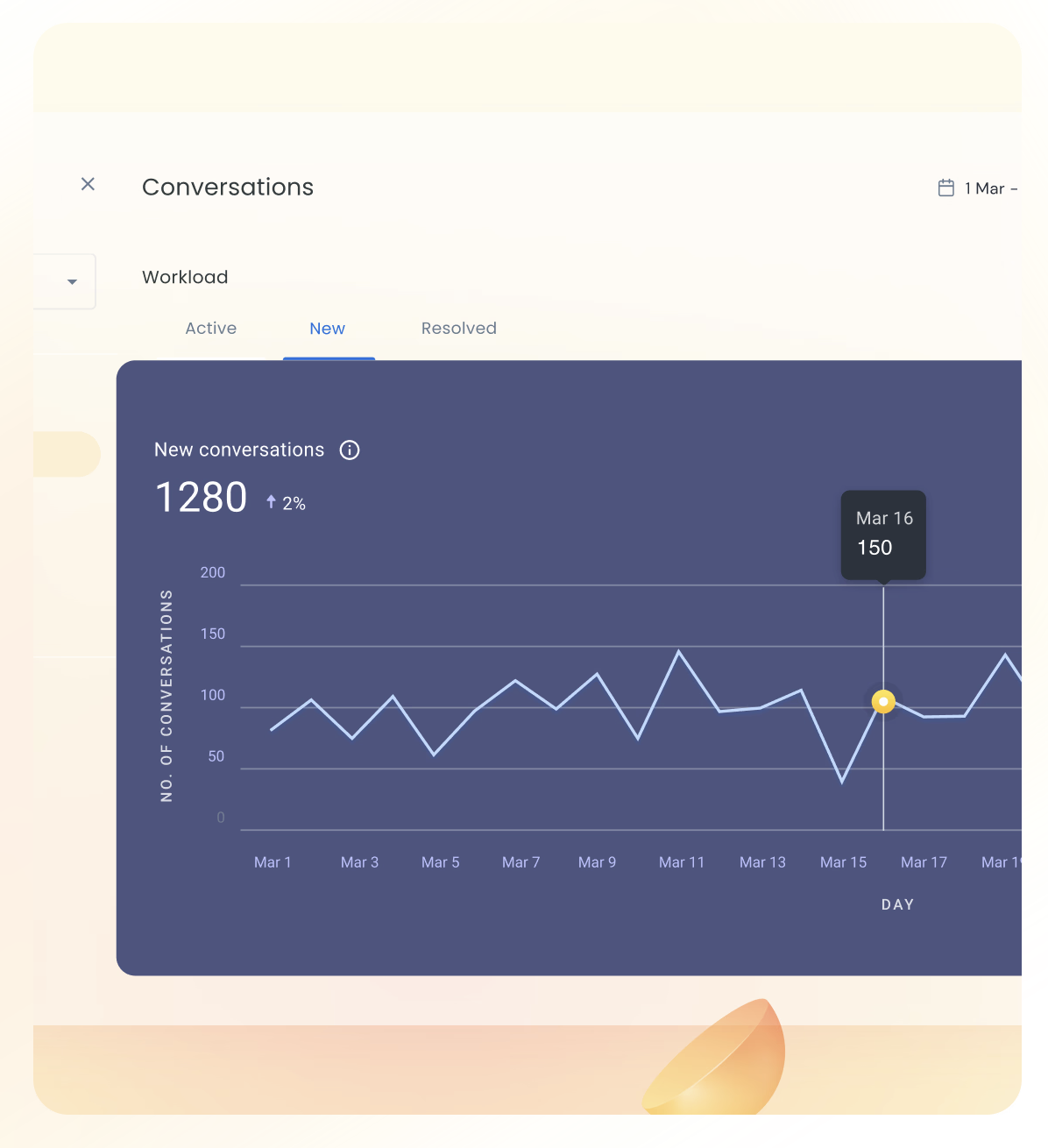
Here’s how real time analytics in a global help desks are beneficial:
- Immediate Issue Identification: Real-time monitoring can quickly identify spikes in ticket volume or recurring issues, enabling businesses to address problems before they escalate.
- Agent Performance Tracking: With real-time analytics, managers can gauge individual agent performance, including factors like resolution times, customer satisfaction scores, and ticket handling efficiency. This allows for timely feedback and coaching.
- Enhanced Customer Experience: By monitoring metrics like first-response time and overall resolution time, businesses can ensure they meet or exceed customer expectations. Continuous performance tracking can lead to refined support processes, improving customer satisfaction.
- Resource Allocation: Real-time data can highlight peak support times or specific issues that require more attention. This helps businesses allocate resources efficiently, ensuring that high-priority tickets are addressed promptly.
- Trend Analysis: Real-time analytics can identify emerging trends or patterns in customer queries or complaints. This insight can be crucial for other departments, such as product development or marketing, guiding them in making informed decisions.
- Feedback Loop: With real-time feedback and customer satisfaction scores, businesses can quickly implement changes based on what’s working and what’s not. This dynamic approach ensures a consistently high-quality customer experience.
6. Automation Capabilities
Having automation capabilities in global help desks is beneficial. Automated ticket routing and workflow automation ensure repetitive tasks are taken care of. They help facilitate swift responses, streamlined operations, and consistent service delivery across different regions and time zones.
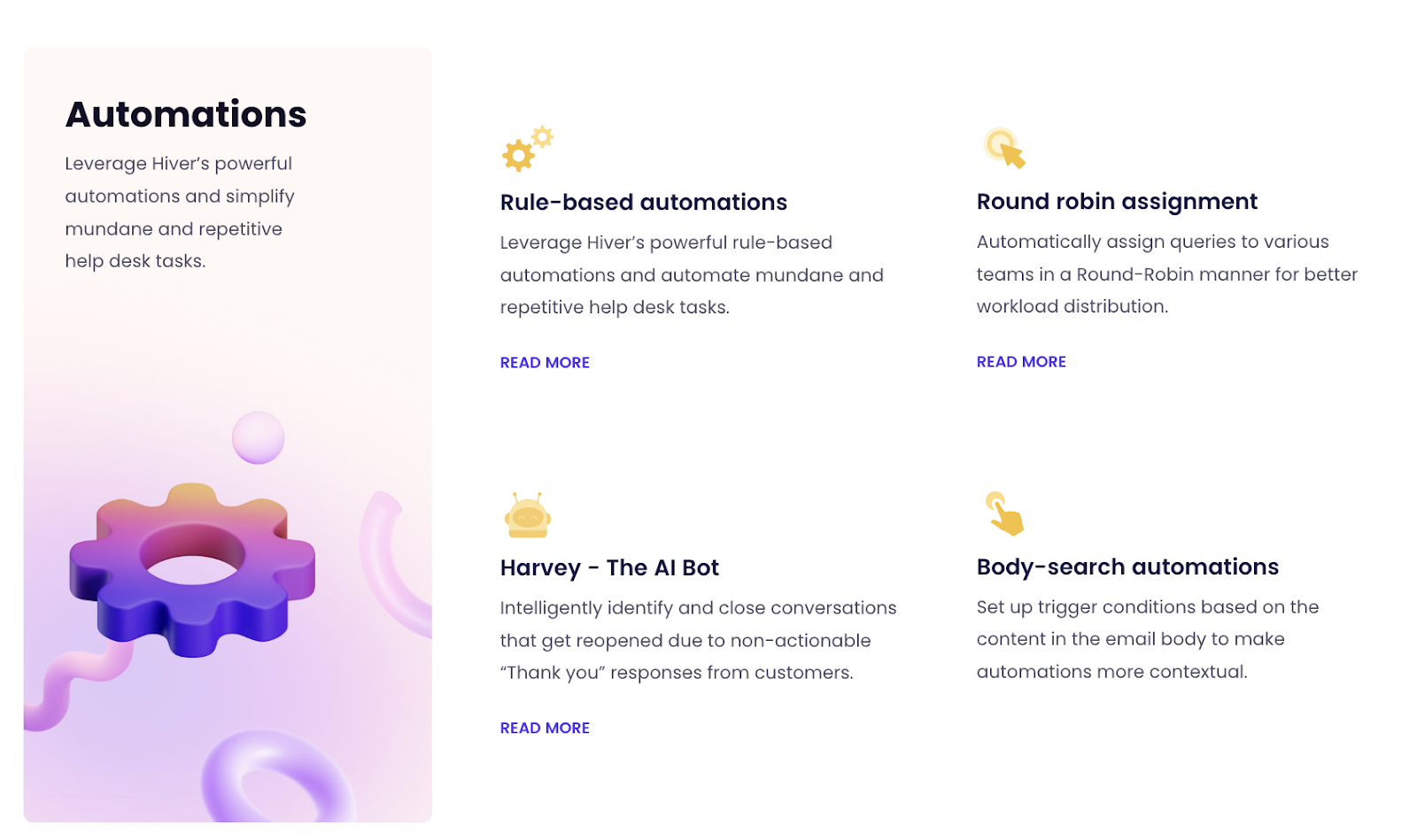
Here’s how powerful automation capabilities can be helpful:
- Ticket Routing: With automation, incoming tickets can be immediately routed to the most suitable agent or department based on predefined criteria like issue type, customer location, or the agent’s expertise. This ensures faster response times and more effective resolutions.
- Workflow Automation: Workflow automation allows for the creation of predefined sequences based on specific triggers. For instance, if a customer raises a billing issue, the ticket can automatically move through a set workflow: verification by the support agent, forwarding to the finance department, and finally, a follow-up email sent to the customer upon resolution. Each of these steps can be automated, ensuring consistency and efficiency.
- Auto-Responses: Upon receiving a ticket, an automated response can be sent to the customer, acknowledging receipt and providing an expected wait time. This keeps the customer informed and sets clear expectations.
- Task Automation: Routine tasks, such as sending follow-up emails, updating ticket statuses, or generating daily reports, can be automated, freeing up agents to focus on more complex issues.
- SLA Enforcement: Automation can help monitor and enforce Service Level Agreements. If a ticket is nearing its SLA breach, automation can send reminders to agents or escalate the ticket to higher support tiers.
Setting Up Your Own Global Help Desk: Step-by-Step Guide
Launching a global help desk is a strategic move. And once it’s up and running, it leads to new heights of customer satisfaction and operational efficiency.
But how exactly do you get started? Here’s a practical guide:
1. Assess your needs
There are many help desk services available in the market. But, the foundation of any successful global help desk lies in a clear understanding of your brand’s requirements. Identifying the scope and scale of your customer support needs. This ensures that the system you establish is both effective and efficient.
Steps to Follow:
- Data Collection: Begin by collecting data on your current customer support operations. How many queries do you receive daily? Which geographic locations generate the most tickets? What is the nature of these tickets — are they technical, billing-related, or product inquiries?
- Feedback Analysis: Engage with your customer support team. They’re on the frontline and can offer valuable insights into recurrent issues, customer complaints, or suggestions. This feedback is vital as it gives a ground-level view of operations.
- Customer Surveys: Understand the end-user perspective by conducting customer surveys. Ask about their support experiences, preferences in terms of language or communication mode, and any improvements they’d like to see.
- Technology Audit: Review the current technology stack being used for support. Is your existing help desk solutions capable of handling an upscale? Are there tools you currently use that will need to be integrated with a new global platform?
- Forecast Future Needs: While your current data is essential, it’s equally important to forecast future support needs based on business expansion plans, product launches, or entry into new markets.
2. Choose the Right Global Help Desk Platform
Choosing the right help desk software is the next important step. The strength and efficacy of your global support system rely heavily on this choice. A platform that resonates with your business’s specific demands would be the best help desk software for you.
Steps to Follow:
- List Down Essential Features: Before diving into market options, pinpoint the features that are non-negotiable for your business. Do you need integrated AI support? Is multilingual capability a must? How about integration with other software in your tech stack?
- Scalability Matters: Your chosen platform should not only serve your current needs but also be adaptable to future expansions. Assess how easy it is to add new features or scale operations.
- Prioritize Security: In a digital era where data breaches are increasingly common, can’t be an afterthought. Ensure the platform complies with global data protection regulations and offers robust encryption and security protocols.
- Evaluate User Experience: A system can have all the bells and whistles, but if it isn’t user-friendly, your team might struggle to use it effectively. Consider the platform’s user interface, ease of training, and overall experience.
- Budgetary Considerations: While it’s crucial to invest in a quality system, you must also ensure it aligns with your budget. Remember to consider not just the initial setup cost but also ongoing maintenance and upgrade expenses.
- Check Reviews and testimonials: Learn from other businesses’ experiences. Reviews, case studies, and user testimonials can offer insightful perspectives about the platform’s strengths and potential issues.
- Engage in Demos or Trials: Most software providers offer demonstrations or trial periods. Utilize these to get a hands-on feel of the system and evaluate its fit for your business.
Recommended reading
Mistakes to Avoid While Purchasing Customer Service Software
3. Implement Multilingual Support
Language shouldn’t be a barrier to providing exceptional global customer service. Implementing multilingual support ensures that businesses connect authentically with customers, irrespective of their linguistic background.
Steps to Follow:
- Identify Key Languages: Begin by analyzing the geographic distribution of your customers. Which regions contribute the most to your user base? Are there emerging markets you’re planning to tap into?
- Choose Between Translation Tools and Human Support: Depending on the complexity of queries and the nature of your product or service, decide whether automated translation tools would suffice or if there’s a need for native-speaking agents.
- Invest in Quality Translation Software: If opting for automated translation, ensure the tools you choose provide accurate and contextual translations. Misinterpretations can lead to customer dissatisfaction or even potential business losses.
- Hire and Train Multilingual Agents: If human support is the way to go, ensure that the agents you hire not only speak the language but also understand cultural nuances. Ongoing training is key, given that languages evolve and customer expectations shift.
- Localized Knowledge Bases: Create knowledge bases or FAQs in multiple languages. This ensures that users can access self-help resources in their preferred language.
- Regularly Review and Update Language Resources: Just as with any other aspect of customer service, regular audits and updates are crucial. This ensures accuracy and relevancy in the support provided.
- Feedback Mechanism: Encourage feedback specifically related to multilingual support. This can provide insights into areas of improvement and ensure the language support remains top-notch.
4. Train Your Staff
A well-trained support team is the backbone of any successful global help desk. The skills and knowledge they possess directly impact customer satisfaction and service efficacy. Ensuring they’re equipped to handle the unique challenges of a global clientele is paramount.
Steps to Follow:
- Comprehensive Onboarding: Begin with an in-depth onboarding process for new hires. This should cover the basics of your company, the products or services you offer, and the ethos of your brand.
- Cultural Sensitivity Workshops: Operating on a global scale means encountering diverse cultures and belief systems. Workshops on cultural nuances and sensitivities can equip your staff to address concerns with respect and understanding.
- Language Training: While you might have multilingual support, it’s beneficial for all team members to understand key phrases or terms in the primary languages of your customer base. This aids in smoother internal communication and escalation of issues.
- Software Proficiency: Ensure that every team member is proficient in using the chosen global help desk platform. Regular training sessions, especially after updates or feature additions, can keep the team up-to-date.
- Scenario-based Training: Simulate real-world scenarios where agents encounter challenging or complex queries. This prepares them for actual interactions and helps them apply their training effectively.
- Feedback and Continuous Learning: Create a mechanism where agents can provide feedback on their training. Use this to refine and update your training modules. Encourage a culture of continuous learning and development.
5. Establish Clear Protocols
Protocols aren’t just about maintaining order; they ensure efficient and consistent customer service. Establishing clear, actionable guidelines means that every customer interaction is met with the same level of dedication and precision.
Steps to Follow:
- Define Ticket Priorities: Clearly categorize tickets based on urgency and complexity. For example, a ticket from a user facing payment issues should ideally be addressed faster than a general inquiry about product specifications.
- Ticket Routing Rules: Leverage your global help desk’s automation capabilities. Ensure that queries are automatically directed to the most appropriate department or agent. This minimizes the need for internal transfers and results in quicker resolutions.
- Escalation Procedures: Not all issues can be resolved at the first point of contact. Have a clear system to escalate tickets to higher-level support or specialized teams when needed. This process should be transparent to customers, ensuring they always know the status of their inquiry.
- Service Level Agreement (SLA) Adherence: Define clear SLAs for different ticket types. Make sure these are communicated transparently to customers and are consistently met by the support team.
- Feedback Loop: After an issue is resolved, always have a system in place to collect customer feedback. This ensures continuous improvement in your protocols and service delivery.
- Regularly Review Protocols: The business environment and customer expectations are ever-evolving. Regularly revisit and refine your protocols to ensure they remain aligned with current needs.
- Training on Protocols: All agents should be well-versed with these protocols. Regular training sessions, coupled with real-time reminders or software prompts, can aid in adherence.
6. Integrate with Other Business Tools
Integration of your help desk with other business tools is a necessity for delivering holistic customer service. A disjointed system not only hampers internal operations but can also hinder the customer experience.
Steps to Follow:
- Identify Key Platforms: Begin by listing down all essential business tools you currently use, from CRMs to other communication platforms and analytics tools.
- API Availability: Check if your chosen help desk solution offers API integrations. APIs, or Application Programming Interfaces, act as a bridge, allowing different software solutions to communicate with each other.
- Real-time Data Sync: Integration should ensure real-time data synchronization. This ensures that any changes or updates on one platform are instantly reflected across all integrated tools.
- Consistent Customer Profiles: When your help desk is integrated with other tools, especially CRMs, agents can have a holistic view of the customer. This includes purchase history, preferences, past interactions, and more, enabling more personalized support.
- Automate Workflows: Use integrations to automate tasks. For instance, when a customer places an order on an e-commerce platform, the details can automatically be fed into the CRM and reflected in the help desk for any subsequent support interactions.
- Training and Familiarization: Once integrated, ensure that your support staff understands how to leverage these integrations. This might involve training on accessing data from other platforms or understanding the flow of information.
- Periodic Assessment: As with all tech solutions, periodically assess your integrations. Ensure they’re functioning seamlessly and consider new integrations as your business adopts additional tools.
You may also like: 7 Customer Service Tools to Integrate with Google Workspace
7. Test and Iterate
Businesses should recognize that continuous refinement is a necessity. By perpetually testing and iterating, brands ensure they evolve alongside customer expectations and industry standards.
Steps to Follow:
- Feedback Collection: Proactively gather feedback from both customers and support agents. While customers can highlight pain points in their support experience, agents can provide insights into system efficiencies or lack thereof.
- Data Analysis: Utilize the analytics capabilities of your help desk software. Monitor key metrics such as ticket resolution times, customer satisfaction scores, and first response times. Trends in these metrics can signal areas needing improvement.
- Implement Changes: Based on the feedback and data analysis, make incremental changes. This could involve tweaking protocols, refining automated responses, or offering additional training to agents.
- Pilot Testing: Before rolling out significant changes, consider pilot testing. For instance, if introducing a new chatbot functionality, test it with a subset of customers before a full-scale launch.
- Review Tools and Integrations: As your business grows and evolves, the tools you once found valuable might become less so. Regularly reassess your software and integrations, ensuring they still align with your business needs.
- Reiterate: After implementing changes, go back to step one. Collect feedback, analyze new data, and continue refining. This iterative process ensures your global help desk remains agile and relevant.
You may also like: A Guide to Implementing a Ticket Tracking Software
Ready To Go Global?
Today, businesses aren’t confined by borders. As more businesses go global, good customer support globally becomes important. A global help desk makes sure customers get the help they need, no matter where they are. This is what modern customer service looks like.
If you are looking for a global help desk support tool, you might want to check out Hiver. Since it is built to work from your Gmail inbox, a lot of businesses find it easy to use. Plus, with features like shared inboxes, automated workflows, and detailed analytics, your business can ensure that customer queries are promptly addressed and nothing falls through the cracks.
Frequently Asked Questions
1. How do global help desks handle language diversity?
Global help desks offer automated translation features to help support teams communicate with customers effectively across different languages. This helps ensure that no matter the customer’s language, they can receive assistance that feels personalized and clear.
2. What technology is typically used in a global help desk?
Modern global help desks often incorporate AI, chatbots, and integration with CRM systems to manage customer interactions efficiently. AI helps in handling routine queries quickly, while humans can step in for more complex issues.
3. Can a small business benefit from a global help desk?
Absolutely! Even small businesses can expand their reach and enhance customer service with a global help desk. It allows them to operate 24/7 and handle customers from around the world, which can be crucial for growth and scalability.
4. How do you ensure the quality of service across different regions?
By implementing standardized training programs for all agents regardless of location and conducting regular quality checks. Also, employing regional managers who understand local nuances can ensure that the service meets the regional standards.