





Support issues don’t follow business hours. A customer might report a bug at midnight or need help from another time zone.
If no one responds, those tickets sit unresolved for hours and often escalate by morning. That’s when teams start evaluating 24/7 helpdesk support.
But running round-the-clock coverage raises practical questions: Should you add overnight shifts, rotate on-call staff, outsource support, or rely on automation?
This guide explains how 24/7 helpdesk support works, what it costs, and the models teams use to run it effectively.
What is 24/7 IT Help Desk Support?
A 24/7 IT help desk ensures users can report issues and receive assistance at any time. Support teams continuously monitor incoming requests, triage them, and take action based on urgency.
When a ticket arrives, the system logs it, assigns priority, and triggers the right workflow. Critical issues get escalated immediately.
A 24/7 help desk typically handles requests such as:
- System outages or technical failures
- Account access and password issues
- Software troubleshooting
- Billing or service questions
- Product usage support
To maintain this coverage, teams rely on operational models such as overnight shifts, rotating on-call engineers, global support teams across time zones, and automated ticket triage.
If you’re evaluating how support operations work, it helps to understand what a helpdesk is and how teams manage requests, prioritize incidents, and track resolutions.
What Does “24/7 Helpdesk” Really Mean in Practice?
24/7 support is not about resolving everything instantly. It is about making sure nothing waits without action.
When a ticket comes in at 2 a.m., the system does not just log it and move on. It classifies the request, assigns priority, and pushes it into the right workflow immediately. Work starts the moment the request arrives. Three decisions drive what happens next.
- Severity triggers escalation: Critical issues such as outages or security incidents are identified early and escalated promptly. Alerts go out, ownership is clear, and the right person steps in. There is no dependency on someone manually scanning the queue.
- Priority controls the queue: Not every ticket needs immediate attention. The system ranks requests based on impact, so teams always know what to handle first. High-impact issues move forward right away, while lower-priority work is scheduled without blocking the queue.
- Coverage determines execution: Teams define how after-hours requests are handled. Some rely on overnight agents. Others use on-call engineers, AI-driven deflection, or self-service. The setup can vary, but every request still moves forward.
For this to work consistently, teams need systems that move tickets forward even when no one is actively working. That’s where the underlying capabilities matter.
Tickets are not left waiting for the next shift. They are triaged, routed, and acted on in real time. Critical issues get immediate attention, and everything else progresses in a structured way.
Key Features of 24/7 Helpdesk Support
Extending support hours is the easy part. Keeping operations running smoothly across those hours is where most teams struggle.
Tickets arrive at any time, but without the right systems, they sit unprocessed, get misrouted, or miss escalation signals. What keeps 24/7 support reliable is not coverage alone. It is how work moves when no one is actively watching.
A few capabilities make that possible.
- Continuous intake across channels: Requests come in through email, chat, portals, or messaging channels, and each one is captured instantly. Nothing waits in a personal inbox. Every ticket is logged, timestamped, and placed into a shared queue the moment it arrives.
- Triage that happens without human intervention: Sorting tickets manually does not scale, especially overnight. Systems classify incoming requests, tag them based on intent, and route them to the right team. By the time agents log in, the queue is already structured.
- Escalation that does not rely on visibility: Critical issues cannot depend on someone noticing them. Outages, security risks, or high-impact tickets trigger alerts automatically. On-call teams are notified in real time, and escalation happens without delay.
- Self-service that absorbs repeat volume: A large portion of tickets never need an agent. Help centers, FAQs, and guided troubleshooting allow customers to resolve common issues instantly. This reduces dependency on after-hours coverage and keeps queues manageable.
- One workspace, not multiple systems: Context breaks when conversations are scattered. Bringing email, chat, voice, and messaging into a single workspace ensures every agent works from the same queue with full visibility across shifts.
- SLA awareness is built into the workflow: Response and resolution targets are tracked continuously. Urgent tickets are surfaced automatically, and teams know exactly what needs attention next without scanning reports.
- Visibility into how support actually runs: Support leaders need to see patterns, not just numbers. Ticket volume by hour, response times across shifts, and escalation trends highlight where coverage breaks and where automation needs to step in.
- AI that handles the repetitive layer: Routine work slows teams down. AI steps in to tag tickets, suggest responses, summarize conversations, and resolve simple queries. This keeps operations moving even when staffing is limited.
24/7 support works when every ticket moves forward without waiting. These capabilities define how 24/7 support operates.
The next constraint is cost. Once you try to run this continuously, the question shifts from what works to what you can afford to sustain.
How Much Does 24/7 Helpdesk Support Cost?
Once you decide to support customers around the clock, the real constraint shows up fast: cost.
Not because tools are expensive, but because coverage is. Every additional hour needs to be staffed, automated, or managed in some way.
Most teams end up choosing between three paths: build an in-house team, outsource after-hours support, or use automation with limited human coverage. Each one shifts cost differently, either into headcount, vendor spend, or tooling.
(Disclaimer: The estimates below reflect Tier-1 support roles in North America and common helpdesk pricing models. Actual costs vary based on geography, ticket volume, and complexity.)
1. In-House Staffing Costs
Running 24/7 support internally means covering every hour of the day, not just extending business hours.
To keep one support seat staffed 24/7, so there’s always someone available to respond, teams typically need 4–5 agents. This accounts for shift rotations, weekends, and time off.
This is where costs escalate. You’re not hiring for shifts. You’re hiring to maintain uninterrupted coverage. As soon as you add more queues, regions, or channels, headcount scales with it.
For example:
| Example Scenario | Estimated Annual Cost based on Glassdoor |
|---|---|
| 5 agents covering one 24/7 support seat | $250K–$400K |
| 10 agents for a mid-size support team | $500K–$800K |
| 20+ agents for global coverage | $1M+ |
*Estimates assume fully loaded Tier-1 support costs in North America (~$50K–$80K per agent/year, including benefits, shift differentials, and overhead, based on aggregated salary benchmarks from platforms like Glassdoor).
This is why in-house coverage becomes expensive quickly. You gain full control over quality and response times, but you also commit to a fixed cost base that does not adjust with ticket volume.
2. Outsourced Help Desk Costs
Outsourcing lets you extend coverage without building an overnight team. Instead of hiring for every shift, you pay for access to a support team that handles tickets based on volume, channels, and SLA requirements.
Pricing varies based on how much coverage you need and how complex the requests are.
Typical pricing ranges look like this:
| Example Scenario | Estimated Annual Cost |
|---|---|
| After-hours ticket coverage | $60K–$120K |
| Full 24/7 Tier 1 support | $120K–$300K |
| Technical Tier 2 support | $250K+ |
*Estimates are based on typical BPO pricing models for North America, combining per-ticket and per-agent contracts across providers (rates vary by geography, SLA strictness, and ticket complexity).
Outsourcing reduces the need for internal staffing, but it shifts the burden to the process. Without clear documentation, escalation rules, and training, response quality can drop quickly.
3. AI and Automation Cost Savings
Automation significantly lowers the cost of 24/7 coverage because routine requests no longer require human agents.
AI-powered help desks can automatically:
- Categorize and route tickets
- Respond to common questions
- Extract information from requests
- Escalate critical incidents
This shifts cost away from headcount and into tooling. For example:
| Example Scenario | Estimated Annual Cost |
|---|---|
| Helpdesk platform + AI automation | $10K–$50K |
| Hybrid model (AI + small support team) | $80K–$200K |
*Estimates are based on typical SaaS helpdesk pricing (per-user plans + AI add-ons) and lean support team structures, using public pricing from platforms like Zendesk, Intercom, and Freshdesk. Actual costs vary by automation usage, ticket volume, and team size.
Here’s how the three models compare side by side.
| Model | Typical Setup | Estimated Annual Cost |
|---|---|---|
| In-house coverage | 8–12 agents across shifts | $400K–$700K |
| Outsourced overnight coverage | External Tier-1 team + internal escalation | $120K–$300K |
| Hybrid AI model | Automation + small on-call team | $80K–$200K |
(These figures are illustrative. Actual costs vary by geography, ticket volume, and technical complexity.)
For many teams, the hybrid model offers the best cost-to-coverage balance, keeping headcount lean while still covering urgent after-hours issues.
Cost forces a trade-off. You can’t optimize for coverage, speed, and cost at the same time without choosing a model.
That’s why most teams converge on a few proven ways to run 24/7 support.
5 Ways to Deliver 24/7 IT Help Desk Support
Deciding you need 24/7 support is the easy part. The challenge is building a system that supports continuous coverage without overloading your team or increasing costs unnecessarily.
As CX delivery veteran Craig Stoss points out, customers should not feel a difference between your midnight service and your midday service. When they do, the support system is broken.
Support leaders usually rely on a few proven operating models to deliver continuous coverage. These models are not mutually exclusive. Most teams combine them based on ticket volume, risk, and cost constraints. Each model solves a different part of the 24/7 problem.
1. Follow-the-Sun Relay
This model works best when your customers are spread across time zones and ticket volume remains consistent throughout the day.

Teams distribute support across regions so coverage continues as each shift ends. When one team signs off, the next team takes over the queue, allowing work to move forward without interruption.
The model looks efficient on paper. It breaks at the handoff.
When tickets move between regions without clear ownership or context, the incoming team has to re-read conversations, reassess the issue, and restart parts of the investigation. That delay is immediately visible to the customer.
To prevent this, handoffs need to be treated as a defined part of the workflow. Every ticket passed between regions should include:
- A clear issue summary
- Current status and blockers
- The next action required
- A designated owner for the next shift
If any of this is missing, the ticket is not ready to be handed off.
Visibility needs the same level of discipline. Incoming agents should not have to sort through a mixed queue of new and existing tickets. They should land on a prioritized view of inherited work.
Teams typically set this up using timezone-based queue views within a shared workspace. This allows agents to see what they own, identify what needs action first, and continue work without re-triaging.
When handoffs are structured and visible, tickets move forward across shifts. When they are not, progress resets and resolution time increases.
2. AI-First “Deflection” (Tier 0 Support)
Even with global coverage, a large share of tickets never needed a human response in the first place. They follow the same pattern. Password resets, account access issues, and basic setup questions make up most of the volume.
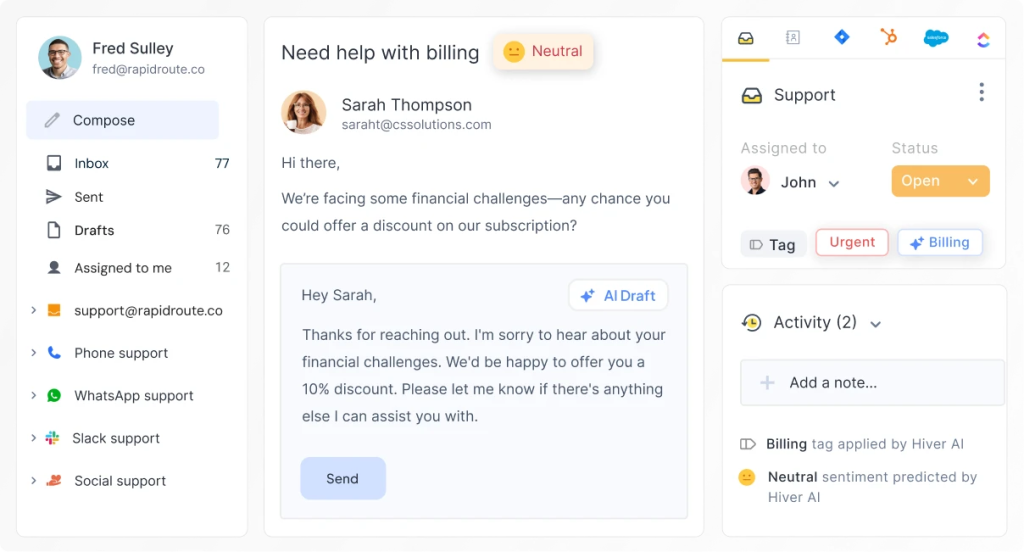
These requests are simple, but they still create a backlog when they wait for a human response. AI-first deflection removes that dependency on availability.
Modern support systems handle these requests from the moment they arrive. They identify intent, match it to the right answer or workflow, and resolve the issue immediately. A reset gets completed, a question gets answered, and a common issue gets handled without entering the queue.
This keeps support fast and consistent. Customers get what they need without waiting, and teams avoid the buildup that slows everything down.
The impact shows up quickly:
- Routine tickets are resolved in real time.
- Overnight backlogs do not accumulate.
- Support volume drops without adding headcount.
This also changes how teams work. Agents no longer start the day by clearing repetitive tickets. They focus on issues that require context, coordination, and judgment.
3. Incident-Only Escalation (On-Call Model)
Once routine volume is handled automatically, what remains overnight is low in volume but high in risk. This is where full shift coverage stops making sense.
Some teams receive very few after-hours requests, but they cannot afford to miss critical issues like outages or security incidents. Keeping agents online for low volume is inefficient, yet ignoring urgent signals is not an option.
Incident-only escalation solves for this gap.
The help desk continues to collect tickets overnight while escalation rules monitor incoming requests in real time. When the system detects a high-risk issue, it immediately alerts the on-call engineer.

Support leaders like Miles Goldstein often point out a simple principle: engineers should not spend their nights clearing routine tickets. Their time is best used when something breaks or when customer impact is immediate.
This model keeps the focus where it belongs. Engineers are not pulled into routine work. They step in only when system availability, security, or key customer relationships are at risk.
Common escalation triggers include:
- Service outages
- Security incidents
- VIP customer issues
Everything else stays in the queue and is handled during the next business shift. This approach balances cost and responsiveness. Teams avoid unnecessary overnight staffing while still maintaining fast reaction times for critical events.
4. Overnight Triage and Preparation
Escalation handles critical issues. Everything else still needs to be organized before the next shift begins.
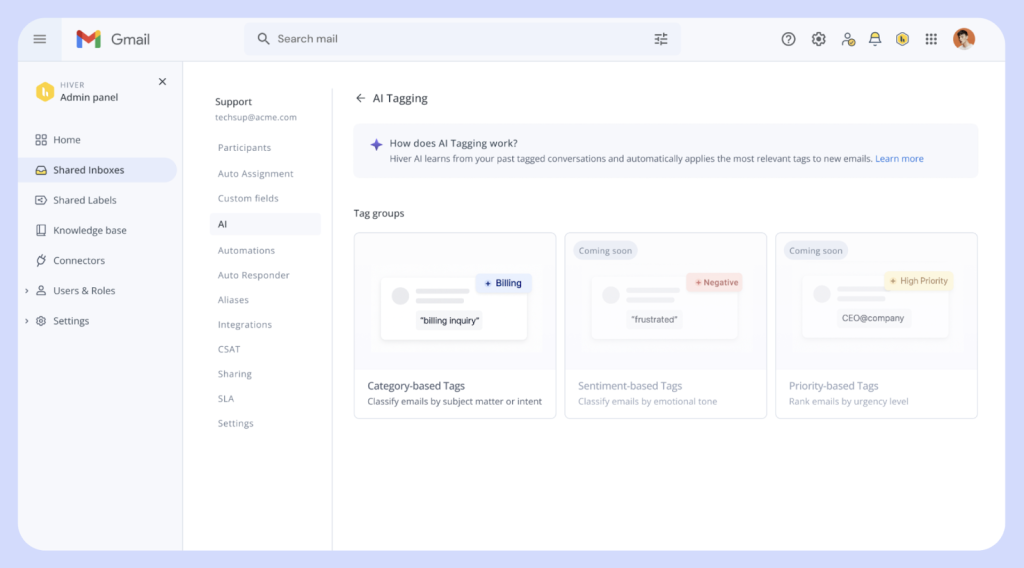
Growing teams often face the same problem every morning. Engineers log in to hundreds of unread tickets and spend the first part of their day sorting instead of resolving. That delay compounds across the queue and slows down response times.
A small internal team or an outsourced partner monitors incoming tickets, organizes them, and prepares the queue in advance. By the time the day team logs in, the work is already structured.
Leaders like Giulio Castiglioni point out that this step eliminates one of the biggest operational bottlenecks: morning sorting.
The overnight team focuses on:
- Tagging tickets by issue type
- Assigning priority levels
- Routing requests to the correct teams
This changes how the day begins. Agents do not waste time figuring out what to do next. They start with a clear, prioritized queue and move straight into resolution.
5. Shared Context Operations
24/7 support breaks down when customer information is scattered across personal inboxes and disconnected tools. The next agent starts a shift without context, and the customer ends up repeating the issue.
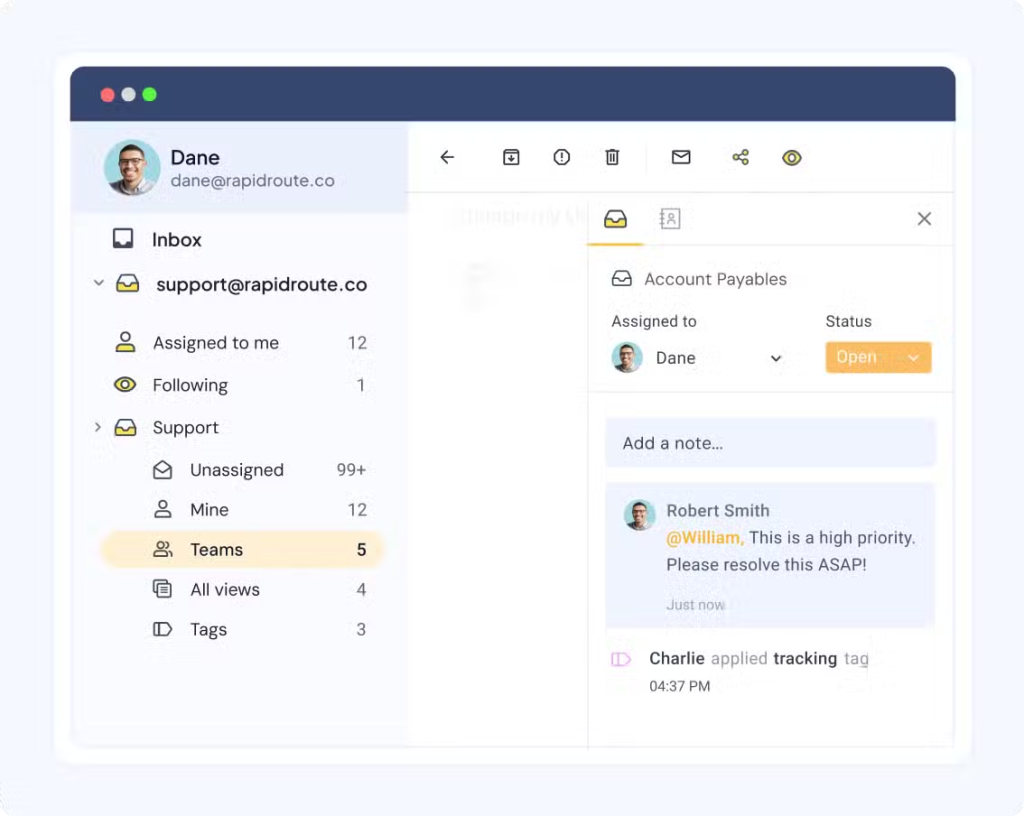
CX leader Jessica Botello stresses that every agent should be able to see the full history of a customer interaction, regardless of when the ticket was created.
Centralizing conversations in a shared workspace solves this problem. Every reply, internal note, escalation update, and status change stays attached to the same ticket. When ownership shifts, the next agent does not investigate the past, and they continue the work.
Teams operationalize this in a few clear ways:
- AI summaries highlight what matters so agents can act quickly.
- Internal notes capture decisions and next steps.
- Collision detection ensures only one agent responds.
This removes friction from every handoff. Agents move directly into resolution, and customers experience a single, continuous conversation.
Key Metrics to Track for 24/7 Support
Running a 24/7 helpdesk exposes performance issues quickly. A few core metrics will show where coverage slows down, handoffs fail, or costs rise.
1. First Response Time (FRT)
First Response Time measures how quickly a support team acknowledges a ticket after it is submitted.
For 24/7 operations, this metric often reveals slow coverage during specific hours. If response times spike overnight or during shift changes, it usually indicates insufficient staffing, weak escalation rules, or delayed ticket routing.
Tracking FRT by time of day or shift helps teams identify when coverage needs adjustment.
2. Resolution Time
Resolution time measures how long it takes to fully resolve a ticket. Long resolution times often signal operational problems such as:
- Poor shift handoffs
- Tickets bouncing between teams
- Unclear ownership of issues
For 24/7 support teams, monitoring this metric helps ensure that issues continue progressing across shifts instead of restarting the investigation each time a new agent takes over.
3. Customer Satisfaction (CSAT)
CSAT scores measure how satisfied customers are with the support experience. For teams running 24/7 coverage, CSAT often highlights problems with:
- Overnight response quality
- Delayed escalations
- Inconsistent support between shifts
Tracking CSAT alongside ticket timestamps helps identify whether customer experience drops during specific hours or support periods.
4. Cost Per Ticket
Cost per ticket measures how much it costs to resolve a single support request. For organizations running round-the-clock support, this metric helps answer an important operational question: is the current coverage model financially sustainable?
If cost per ticket increases during overnight shifts, it may indicate that the team is overstaffed or that automation could handle a portion of those requests. Monitoring this metric helps leaders balance service quality with operational efficiency.
Tracking these metrics consistently allows teams to refine their coverage model over time. If you’re exploring which metrics matter most, our guide on help desk metrics explains how support teams measure performance and improve service operations.
3 Best Tools for 24/7 Help Desk Support
Not every helpdesk tool can handle round-the-clock operations. Tickets pile up overnight, routing breaks, agents lose context during shift changes, and costs increase as you add agents or channels.
Many tools handle daytime support but break down when multiple shifts share the same queue.
What to Look For in a 24/7 Helpdesk Tool
Choose a helpdesk that can handle tickets continuously without creating operational friction.
- Automated ticket routing: The system should categorize, prioritize, and assign tickets automatically so overnight requests move through the queue without manual sorting.
- Shared ticket context: Every agent must see the full conversation history, internal notes, and escalation details. This prevents tickets from restarting when shifts change.
- Shift-level reporting: The tool should show response times, resolution times, and ticket volume by hour. This helps identify slow shifts, routing failures, or coverage gaps.
- Unified inbox for all channels: Email, chat, phone, and messaging requests should appear in one workspace.
- Pricing that scales predictably: Review how pricing changes as you add agents, automation rules, or support channels. Some tools become expensive quickly as support operations grow.
Top 24/7 Help Desk Support Tools in 2026: Quick Comparison
Once you know what capabilities matter, the next step is evaluating tools that can support round-the-clock operations.
The platforms below are commonly used by teams running continuous support.
| Tool | Starting Price | Best For | Key 24/7 Feature |
|---|---|---|---|
| Hiver | From $25 per user/month | Teams that need fast setup and clean shift handoffs without heavy admin overhead | Keeps all conversations in one workspace with clear ownership, real-time visibility, and automation that ensures tickets don’t get missed or duplicated across shifts |
| Zendesk | From $19 per agent/month | Large teams with complex workflows, multiple tiers, and strict SLAs | Uses advanced routing, escalation rules, and reporting to manage high ticket volumes and enforce structured workflows across global teams |
| Freshdesk | From $19 per agent/month | Small to mid-size teams building structured support processes | Provides SLA tracking, ticket prioritization, and basic automation to maintain coverage and response consistency across time zones |
For smaller teams, the risk is operational drag. A tool that requires heavy setup or obscures context across shifts will create more work than it saves.
Pricing and complexity vary widely. Some tools launch quickly but become limiting as ticket volume grows. Others offer deep customization but require heavier setup and training.
The right tool depends on the complexity of your support operations and how quickly you expect them to scale.
5 Best Practices for 24/7 Helpdesk Teams
24/7 support breaks when work stops moving between shifts. Tickets lose ownership, alerts create noise, and overnight issues return unresolved. Strong teams fix this at the workflow level.
- Build overlap into every handoff: Schedule a fixed 30–60 minute overlap between shifts. Use this time to review active tickets, confirm ownership, and flag anything that may escalate. Do not rely on notes alone. Teams that skip this step lose context and delay resolution.
- Lock escalation rules before incidents happen: Define which issues trigger immediate action and who responds. Outages, security incidents, and high-impact customer issues should route directly to the on-call owner. All other tickets stay in the queue. This removes hesitation and prevents unnecessary escalation.
- Standardize incident response with playbooks: Document the exact steps for common failures such as outages, authentication errors, and API issues. Include first checks, escalation paths, and responsible teams. When an incident occurs, agents follow a defined path instead of deciding what to do next.
- Limit alerts to real impact: Configure alerts to trigger only for service disruptions, SLA risks, or critical failures. Disable alerts for routine tickets. This keeps on-call teams focused and prevents alert fatigue.
- Review overnight tickets every week: Audit tickets created outside business hours. Identify missed escalations, delayed responses, and repeat issues. Convert repeat issues into automation or documentation. This keeps overnight volume under control and improves response consistency.
These practices ensure that work continues without interruption. Teams maintain control across shifts, and customers receive consistent responses at any hour.
24/7 Helpdesk Support by Industry
In some industries, business-hour support is not enough.
| Industry | Operational Pain | Why 24/7 Support Matters |
|---|---|---|
| SaaS | Customers use the product across global time zones. Product issues can block entire teams from working. | A login failure or API error reported overnight needs immediate investigation so users can continue working without waiting for the next business day. |
| Ecommerce | Sales activity peaks during evenings, weekends, and promotions. Checkout or payment issues lead to abandoned carts. | When customers cannot complete a purchase during a late-night sale, immediate support can recover the order before the customer leaves the site. |
| Healthcare | Clinical and patient systems run continuously and disruptions affect operational workflows. | If patient records or scheduling systems fail overnight, support teams must respond quickly to prevent care delays or administrative breakdowns. |
| Financial Services | Transactions, payments, and account activity occur around the clock. Delays can create compliance and financial risk. | A failed transaction or payment dispute reported overnight often requires immediate investigation to prevent financial errors or regulatory issues. |
| Managed IT Services | Client infrastructure runs 24/7 and outages can disrupt entire organizations. | When a server outage or system alert occurs overnight, engineers must intervene quickly to restore services before business operations begin. |
In these industries, 24/7 helpdesk support ensures critical issues are captured, prioritized, and addressed as soon as they occur.
Building a Reliable 24/7 Helpdesk Operation
Start with your support data. Check when tickets arrive, which issues need immediate action, and whether your current setup can handle after-hours demand without manual work.
If you need tighter control across shifts, tools like Hiver can help. Teams can centralize conversations, automate routing, and maintain context across handoffs. Hiver also offers 24/7 customer support.
The goal is not to staff every hour with more people. It is to make sure urgent issues never wait and routine work never slows the team down.
Frequently Asked Questions
1. How much does 24/7 helpdesk support cost?
Costs depend on the coverage model. A fully staffed internal team requires multiple shifts and is the most expensive option. Many companies reduce costs by combining automation, on-call escalation, and limited overnight staffing.
2. What are typical SLAs for 24/7 support?
SLAs usually vary by issue severity. Critical incidents such as outages often require responses within minutes, while operational issues may have response windows of 30–60 minutes. Routine requests are logged immediately and resolved during the next active shift.
3. How can small teams afford 24/7 coverage?
Small teams usually avoid overnight staffing. They rely on automation, knowledge bases, and escalation rules to handle routine requests. On-call coverage is used only for high-impact incidents.
4. What tools do I need for 24/7 help desk support?
Choose a helpdesk that captures tickets at any hour, routes them automatically, and preserves ticket context across shifts. The system should also provide reporting by time of day so teams can identify coverage gaps.
5. How does AI change 24/7 helpdesk staffing?
AI reduces the need for overnight staffing by triaging tickets, suggesting responses, and answering common questions. It can also detect urgent issues and trigger escalation workflows. This allows smaller teams to maintain 24/7 coverage without expanding headcount.













