


A customer emails in about an invoice discrepancy. The agent can’t respond without more context — so the lookups begin.
They open NetSuite to pull the invoice details and confirm the payment history. Then, Salesforce, to check whether this customer has raised something similar before, and what the account relationship looks like. Then, Jira, to see if there’s an open engineering ticket already logged against this account that might be connected to what they’re describing.
Three systems, three separate lookups — and this is just standard practice. The information agents need to respond well lives outside the helpdesk, and getting to it means leaving the conversation to find it.
The problem is doing this across a full queue, for every ticket, every day, at scale. Context gets missed, steps get skipped under pressure, and a response that makes it obvious your team doesn’t have the full picture does more damage than a slow one.
The fix isn’t asking agents to be more thorough. It’s making sure the right context is already in front of them when they open a conversation. That’s what happens when your helpdesk is connected to your CRM, ERP, and project management tools. Here’s what that looks like in practice with Hiver.
Why disconnected tools quietly degrade support quality

Data disconnect and support quality
Agents reply to the message, but without customer context
Without CRM context alongside the conversation, an agent can’t tell if they’re looking at a VIP account, an upcoming renewal, or a customer who’s raised the same issue three times before.
The response is shaped by a single email instead of the full account story. A technically correct reply to the wrong customer at the wrong moment doesn’t show up in your resolution metrics, but it does show up in renewal conversations.
Cross-team handoffs lose context every time
When a bug needs to go to engineering or a billing question needs finance, agents have to leave the conversation, re-explain the issue in a separate tool, and manually pull together whatever context they think is relevant.
What the other team receives is a summary of a summary. A missed detail, like a workaround that the customer has already tried, can send them down the wrong path entirely, costing everyone time and the customer another round of back and forth.
Updates rely on people, not systems
A ticket gets resolved, but the CRM isn’t updated. A bug gets escalated, but the Jira ticket is created manually with whatever the agent had time to type in.
Each step depends on someone remembering to take an extra action — and over time, the very systems your team relies on for account context become unreliable.
This isn’t because the data doesn’t exist, but because keeping it current depends on people remembering to do it manually, every time.
What changes when your helpdesk connects to your tech stack
We built Hiver’s integrations around a simple belief: everything an agent needs to handle a ticket should be right there with them. Not across three tabs, not in a system they have to remember to check, or in a note someone copied across manually.
The CRM context, the transaction records, the open engineering ticket — all of it should surface the moment a conversation opens. And when something gets updated in Hiver, it should flow back to the right system automatically.
Because a helpdesk that sits in isolation from the rest of your stack doesn’t just slow agents down — it puts a ceiling on the quality of support your team can deliver, no matter how good they are.
Here’s what that looks like across the tools B2B support teams rely on most.
CRM integrations: Salesforce and HubSpot
For most B2B support teams, the CRM is where the account story lives. Renewal dates, deal stage, past interactions, account tier — all of it is there.
The problem is that none of it is visible when an agent opens a conversation. Hiver’s Salesforce and HubSpot integrations fix that by pulling the relevant CRM context directly into the help desk, alongside the conversation.
Salesforce
When a ticket arrives, Hiver pulls context from Salesforce — account details, open opportunities, renewal dates, recent activity — directly into the right panel. The agent sees it the moment the conversation opens.
Beyond visibility, the integration takes care of the manual work that would otherwise fall on your agents:

The difference in tab switching and manual work with Hiver’s Salesforce Integration
- CRM-driven routing: This is where the integration makes its biggest immediate impact. Hiver assigns incoming conversations based on account ownership in Salesforce, so every conversation goes straight to the right AE or CSM without manual triage.
- Automatic email logging. Every ticket handled in Hiver logs to the associated Salesforce record as a full thread. No one has to remember to update Salesforce — it happens as part of the workflow, and teams working out of Salesforce have the full picture.
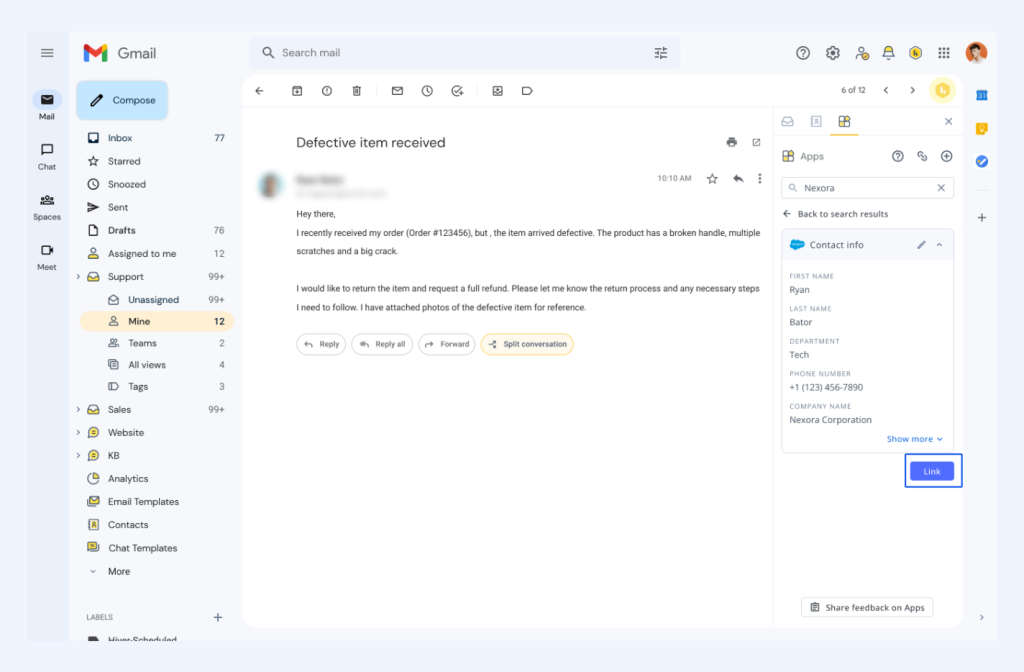
Hiver’s Salesforce Integration
- One-click Case creation. Agents can create a Salesforce Case from any customer issue with key fields pre-populated, including custom fields that most teams rely on. There’s no need to open Salesforce.
- Bidirectional status sync. When a Case is closed in Salesforce, the linked Hiver conversation resolves automatically — and vice versa.
Pattern Life, a physician-focused insurance brokerage, was manually cross-checking client ownership in Salesforce before routing every inbound email. On Monday mornings, that meant hundreds of unassigned emails and hours of work before anyone could even start responding.
Once they connected Salesforce to Hiver, account ownership surfaced directly inside each conversation. Agents no longer had to leave Hiver to route emails to the right owner. Across hundreds of emails a day, that eliminated a significant amount of back-and-forth, and routing time dropped by 60%.
Project management: Jira and ClickUp
When a bug or feature request needs to go to engineering, the agent has to leave the conversation, open Jira, create a ticket, and manually type out the issue.
What the engineer receives is whatever the agent had time to write. Not the customer’s original words. Not whether they’d already tried a workaround or the exact error message they described.
Without that detail, the engineer is starting from an incomplete picture, and the back-and-forth that follows costs everyone time.
Hiver’s Jira and ClickUp integrations fix this by letting context travel with the ticket from the start.
- Engineering gets the full picture, not a summary
Agents can create a Jira or ClickUp task directly from any ticket in Hiver, with ticket details pre-populated instantly from the conversation — the subject becomes the ticket title, the email body becomes the description, and customer details come attached automatically. If an issue already exists in Jira, agents can link to it instead of creating a duplicate.
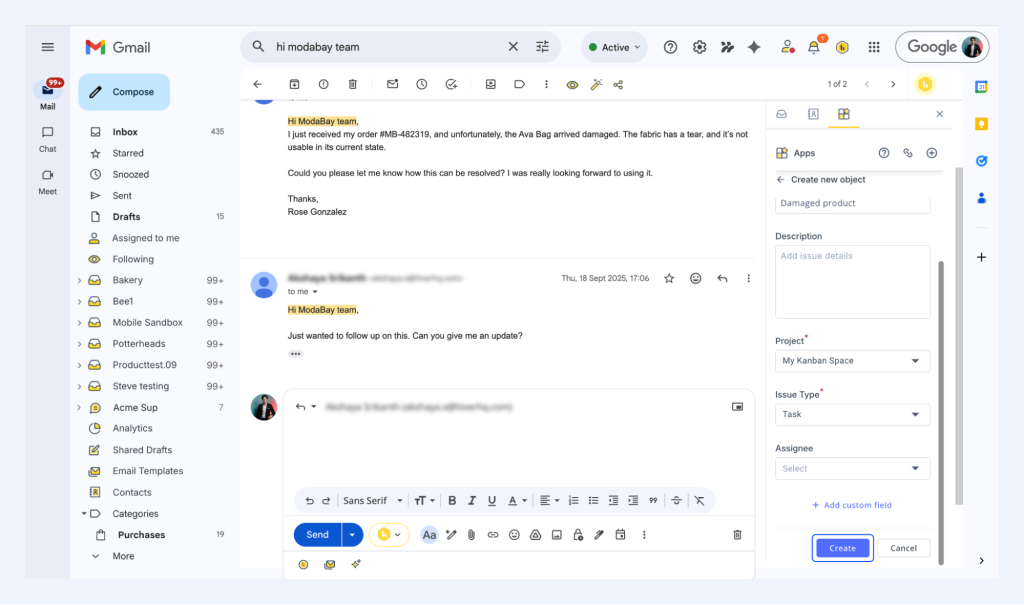
How Hiver’s Jira Integration Works
Hiver AI takes this a step further. When a customer writes in about a product bug, AI can identify that it requires the engineering team’s attention, and create or link the Jira ticket – before a support agent even opens the conversation.
- Status changes that flow both ways
When engineering updates or closes a Jira issue, that change appears automatically in the linked Hiver conversation. The agent doesn’t have to check Jira or chase an engineer for an update. As soon as the issue status changes on the engineering side, it reflects in the help desk, and the agent can reply to the customer with an actual update.
The same applies to ClickUp. For teams where operations live in ClickUp but customer conversations happen in Hiver, the gap between those two systems is where work usually goes quiet. When a task is marked done in ClickUp, the update flows back into Hiver automatically. The agent knows the work is finished, replies to the customer- all without having to open ClickUp.

How Hiver’s ClickUp Integration Works
Kiwi.com, a travel booking platform, was manually copying context from every customer email into Jira.
During peak travel season, with ticket volume spiking, the manual process couldn’t hold — context was getting lost mid-handoff, tickets reached engineering missing critical details, and agents on both sides were spending more time filling gaps than resolving issues.
Once they connected Hiver to Jira, tickets were created automatically with context extracted directly from the email body. Agents stopped spending time on manual handoffs, and engineers could start working the moment a ticket arrived. And the back-and-forth that used to precede every bug resolution largely disappeared.
ERP and e-commerce: NetSuite and Shopify
For finance and e-commerce teams, the data that matters most- order status, invoice details, PO numbers- all live outside the helpdesk.
Hiver’s integrations with both bring that context into the conversation, so agents aren’t switching tabs to find information that should already be in front of them.
NetSuite
For finance and ops teams, most incoming emails are about something that already exists in NetSuite — an invoice, a purchase order, a payment dispute. But without that record visible alongside the conversation, the first thing an agent has to do before they can respond is go find it. That lookup happens dozens of times a day, for every email that comes in about an order or a payment.
Once NetSuite is connected, Hiver shows relevant records — Sales Orders, Purchase Orders, invoices, open balances — directly in the side panel when an email arrives.
To find the right record, it doesn’t just look at the sender’s email address. Hiver reads the email body too, picking up order numbers, invoice IDs, and PO numbers to match the conversation to the correct NetSuite record automatically.
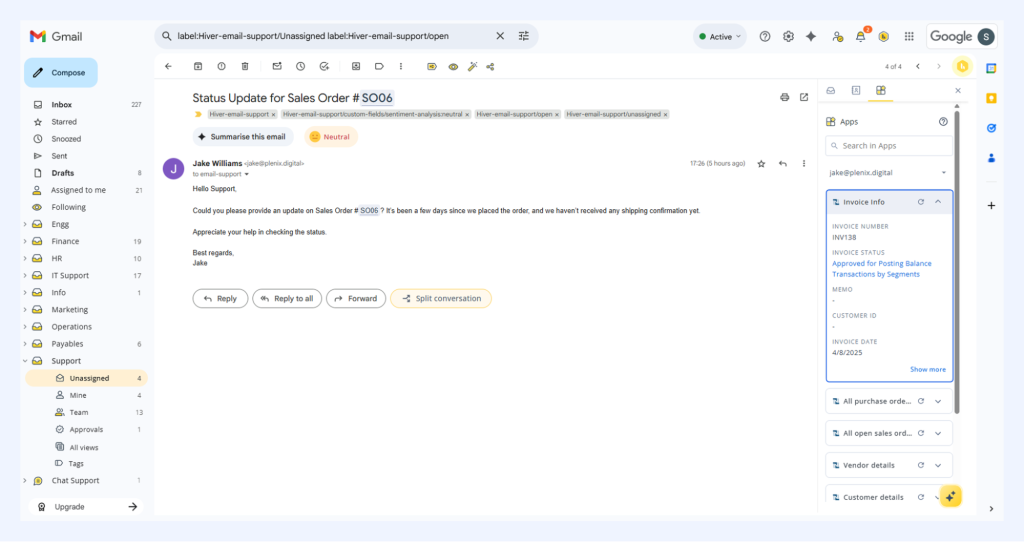
Hiver’s Netsuite integration
Agents can link a conversation thread directly to the right NetSuite record so anyone opening it later sees the full conversation, not a copy-pasted note.
Additionally, AI Extract makes this whole process a lot more effortless.
When an email comes in referencing an invoice or a purchase order, it reads the body, pulls the relevant identifiers, and matches the conversation to the right NetSuite record before the agent opens it.
Shopify
For e-commerce support teams, a significant portion of the support queue are questions on order status, shipping updates, and missing items. When Hiver is connected to Shopify, the order number, status, line items, and shipping details surface in the side panel the moment an agent opens a ticket.
If an order ID appears in the email body, hovering over it shows the order status in a tooltip without leaving the conversation.

Hiver’s Shopify Integration
For teams running multiple stores, the operational overhead adds up fast. Each store has its own inbox, its own queue, and agents jumping between them to make sure the right store is replying to the right customer.
Instead, Hiver brings all of it into one place. Store identities stay separate, so every response still goes out under the right brand — but without your agents switching between five tabs to make it happen.
How Different Teams Use These Integrations
The same integrations can play out very differently depending on the team, their workflows, and what they’re trying to get done:
- B2B support and SaaS teams use CRM and Jira context together. An agent can see renewal date and account tier from Salesforce alongside open engineering issues from Jira — all in the same conversation. A ticket from an at-risk account gets handled differently, and collaboration with the engineering team happens without anyone leaving the help desk to chase an update.
- Customer success teams lean on CRM context to understand where an account stands. When a customer writes in, the CS rep can see health score, deal stage, and recent support history alongside the message — pulled from Salesforce or HubSpot. They know immediately whether they’re looking at an expansion opportunity or a churn risk, and respond accordingly.
- E-commerce teams use Shopify context to give customers an accurate answer on the first reply. Order status, line items, and shipping details surface the moment an email opens. The conversation that used to start with “Can you send me your order number?” starts with a real response instead.
- Finance and billing teams use NetSuite context to eliminate the manual record lookup. Invoice references and PO numbers are matched to the right NetSuite record before the agent opens the conversation. Amounts, due dates, and dispute history are visible from the inbox help desk, without opening a separate tab or tracker
How a connected tech stack makes a difference
Your support is only as good as the context your helpdesk has access to. But when that context lives in separate systems, agents end up switching tabs and carrying information manually from one system to another.
However, when your help desk is integrated with the systems your team already depends on, that changes. Agents start conversations from context rather than spending time gathering information. Handoffs stop losing information. Records stay current because the systems update themselves.
For the customer, it feels like talking to someone who already knows the full picture, not someone figuring it out as they go.
Curious to see how Hiver connects your help desk to other important tools? Book a demo, and we’ll provide you a live walkthrough.













