





Customers don’t really follow a set script; neither should your team. Use these 15 real-world scenarios to train for what actually happens: angry calls, refund requests, outages, or missing orders.
Each one includes ready-to-use steps, role-play prompts, and feedback checklists so agents can:
- Handle pressure with confidence.
- Communicate clearly under stress.
- Turn complaints into trust-building moments.
What is a customer service scenario?
A customer service scenario is a real or simulated situation where your team helps a customer. This can be about fixing a billing error, calming someone upset about a delay, or resolving a technical glitch.
Research from Salesforce shows that a good service experience is as important as the product itself for 80% of customers. That’s why scenarios matter. They test how well agents listen, solve problems, and stay calm under pressure. Practicing them prepares your team for the real thing
How to prepare your team:
- Identify the most common situations, such as payment failures, shipping delays, or login issues.
- Create simple, step-by-step guides for how to handle each one.
- Use a help desk or shared inbox to track and assign tickets clearly.
- Review and update scenarios regularly as customer behavior or product features change.
When your team knows how to respond, even tough situations become easy to handle.
Why customer service scenarios matter in training?
Even the best support agents encounter situations they’ve never faced before — a delayed refund, a furious caller, or a sudden system outage. The real test is: how prepared are they to respond calmly and correctly?
That’s where customer service scenario training comes in. It gives teams a safe space to experiment, make mistakes, and sharpen their instincts before they’re on a live ticket. Agents learn to listen actively, manage emotions, and resolve issues faster.
Here’s why it’s such an effective training approach:
- Prepares agents for the unpredictable: Simulated tough cases build quick thinking and confidence, so agents stay composed when pressure hits.
- Reduces real-world errors: Practice sessions surface weak spots in process or communication before they affect real customers.
- Builds empathy through role-play: Switching roles helps agents feel customer frustration firsthand, leading to more thoughtful, human responses.
- Creates team-wide consistency: Everyone learns the same tone, escalation steps, and service standards. This ensures a uniform customer experience.
- Improves customer loyalty: Confident, composed service earns trust. In fact, PwC found that 80% of customers stay loyal after a positive experience.
- Promotes continuous learning: Regular reviews keep skills sharp and prevent bad habits from creeping in.
Types of customer service scenarios to learn and practice
Training across different customer service scenarios helps your team stay calm, empathetic, and accurate, no matter what situation arises.
Here are five core scenario types every support team should practice regularly:
1. Product or Service Issues
When something breaks, a feature fails, or an order goes missing, customers want quick answers, not lengthy explanations.
- Train for: Fast problem-solving and proactive communication.
- How to practice: Simulate a bug report or a missing product case. Ask agents to gather key details, identify the root cause, and share realistic timelines for resolution.
2. Billing and Refund Challenges
Money-related issues are always sensitive. Customers expect empathy and transparency when dealing with charges, refunds, or payment errors.
- Train for: Clear, calm communication and transparent policy explanations.
- How to practice: Role-play cases like duplicate charges or delayed refunds. Teach agents to acknowledge frustration, explain next steps clearly, and follow up once the issue is resolved.
3. Angry or Emotional Customers
The hardest part of these interactions isn’t the problem; it’s the emotion behind it.
- Train for: Active listening, empathy, and de-escalation.
- How to practice: Create mock calls or chat sessions with angry customers. Train agents to validate feelings first (“I understand this has been really frustrating”) before moving toward solutions.
4. Technical or Outage-Related Cases
During an outage, your team represents the brand’s transparency and reliability.
- Train for: Clear communication, accuracy, and calm under pressure.
- How to practice: Run “outage drills” where agents craft status updates for simulated downtime. Teach them to share verified information only and guide customers to resources like status pages or knowledge base articles.
5. Escalation and Manager Involvement
Not every problem can be solved at the first level. The key is knowing when and how to escalate.
- Train for: Recognizing escalation triggers, summarizing context concisely, and closing the loop post-resolution.
- How to practice: Role-play scenarios that require managerial decisions. Ask agents to justify the escalation, brief the manager effectively, and follow up with the customer afterward.
15 real-life customer service scenarios (for role-playing)
Customers don’t care how prepared you are; they care how you handle the moment. Learn how to handle 15 common customer service situations with scripts, do’s and don’ts, and trainer tips. We’ll show you how to turn those hard moments into opportunities for building stronger relationships.
1. The “Something’s Broken” Ticket
This is the everyday scenario. A feature isn’t working, or the system’s acting up, and the customer’s understandably frustrated. These cases demand quick action and reassurance from your team.

Steps to handle
Let’s face it, no software is perfect. Bugs happen, glitches occur, and sometimes things just break. But how you handle these situations can set you apart from the competition.
- Acknowledge right away: Let the customer know you’ve seen their report and are working on it. Try something like: “Thanks for letting us know. I’m checking into this now and will keep you posted.”
- Get the details: Ask for screenshots, error codes, or other information to help fix the problem faster.
- Keep them updated: Don’t leave them hanging. Even if there’s no news, let them know you’re still working on it. Try something like, “Just a quick update—we’re still investigating the issue. I’ll share more as soon as I can.”
- Confirm the fix: Once it’s resolved, check with the customer to make sure everything is working as expected.
- Follow up later: A quick check-in a day or two afterward shows you’re proactive and care about the customer’s experience.
Here’s the same “Something’s Broken” scenario, as a phone script:
Type: Phone or Chat Script
Agent: “Hi [Customer Name], thanks for reaching out. I’m really sorry you’re running into this. I know how frustrating it can be when things don’t work the way they should.”
Customer: “[Explains the issue]”
Agent: “Got it. I’ve noted everything down, and I’m looping in our technical team right now. While we dig in, could you help me out with a quick screenshot or error message if you have it handy?”
Customer: “[Provides info]”
Agent: “Perfect, that really helps. We’re investigating this, and I’ll keep you updated as we go, even if it’s just to say we’re still on it. If anything changes on your end, feel free to call or message us again. I’ll make sure this stays top of our queue.”
Optional follow-up after fix:
Agent: “Hey [Customer Name], just a quick follow-up, the issue’s been resolved on our side. Can you check and let me know if everything’s working for you now?”
What not to do?
- Don’t leave them in the dark. Send regular updates, even if there’s no fix yet.
- Skip the vague “We’re working on it.” Instead, give a real timeframe.
- Never blame the customer or brush it off. Take responsibility and fix it.
💡 Pro Tip: If the issue caused a major disruption, offer something that adds real value. For example, extend the customer’s monthly subscription or give them free access to a paid feature they haven’t tried yet.
2. The “How Do I Use This Feature?” Query
This one’s actually a good sign. It shows customers are interested and trying to get more out of your product. But if they’re confused, they’ll quickly give up. So you need to fix it fast.
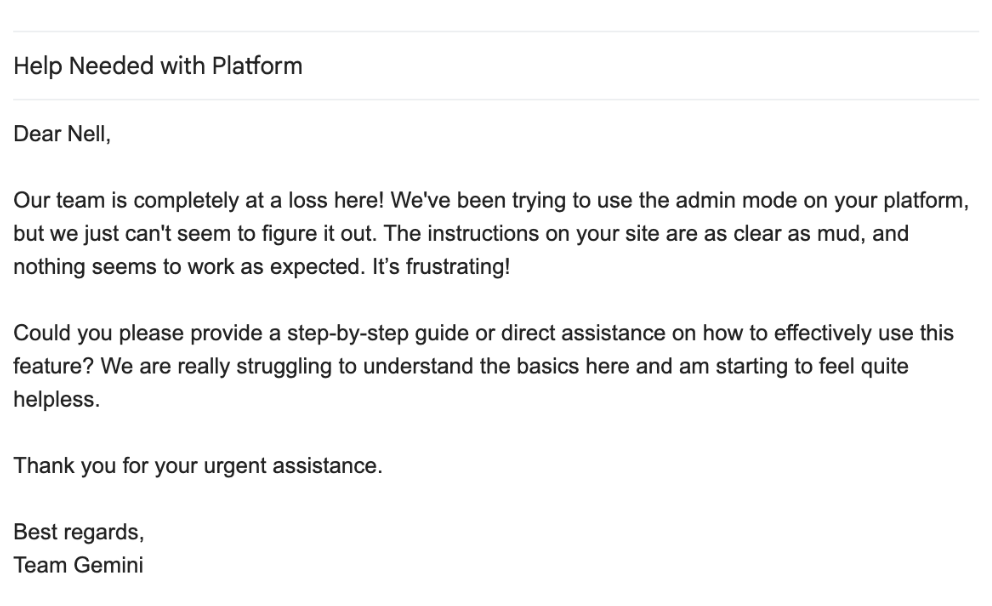
Steps to handle
New features can be exciting but also intimidating. Not everyone is tech-savvy, and even those who are might not have the time to explore your software.
- Reassure them: A simple, “No problem! Let me show you how it works” keeps the tone friendly and makes them feel supported.
- Break it down: Skip the jargon. Use clear, simple steps. For example, instead of “navigate to the settings tab,” say, “Click the gear icon in the top-right corner.”
- Show, don’t just tell: Share a quick screenshot, GIF, or a short video clip that walks them through it. Visuals make a huge difference.

- Check for clarity: Once you’ve explained, ask something like, “Did that help? Is anything still unclear?”
- Follow up: After a couple of days, send a quick note to check how they’re doing with the feature. It shows you’re paying attention.
Here’s the same “How Do I Use This Feature?” scenario, as an email script:
Type: Chat or Email Script
Subject Line: Need help using [Feature Name]? I’ve got you covered.
Hi [Customer Name],
Thanks for reaching out! I’d be happy to walk you through how [Feature Name] works.
Here’s a quick step-by-step:
- Click the [Gear Icon] in the top right corner.
- Select [Settings > Feature Section].
- Turn on [Feature Name] and hit Save.
[Attach screenshot or GIF if possible]
Let me know if you’d like a quick call or screen share, happy to walk you through it live.
Was this helpful? I’ll check back in a couple of days just to make sure everything’s working as expected.
Best,
[Your Name]
What not to do?
- Don’t overload them with too much information. Keep it clear and simple.
- Ditch the jargon. Use plain language they’ll understand.
- Don’t assume they’ll read the help docs. Show them how, right then and there.
💡Pro Tip: If one customer is asking, chances are others are wondering too. Use this as a prompt to update your FAQs or add a how-to video for everyone to access. Consider adding these queries to the knowledge base.
3. The “I Want a Refund” Conversation
A refund request can feel like a loss, but it’s also a chance to learn. The key is handling it carefully and keeping the door open for the customer.

Steps to handle
Refund requests can arise for various reasons, such as unmet expectations, financial constraints, or even a change of heart. It’s a natural part of doing business.
- Acknowledge and ask why: Start by letting the customer know you’ve heard them. Say something like, “I understand you’re requesting a refund. Can you tell me what went wrong?” It’s the only way to know if you can fix the issue.
- Check your policy: Before you promise anything, know what your company’s refund policy allows. This keeps things clear and fair.
- Offer alternatives: If allowed, offer options that might solve the problem without a refund. For example, a free month of service, an account credit, or an upgrade to a higher plan.
- Process or escalate: If the refund is valid and that’s the only way forward, process it quickly. If the request is beyond your authority, escalate it right away so the customer doesn’t wait.
- Follow up: Whether they stay or go, follow up with a thank-you and ask for feedback. It shows you care about their experience, not just their payment.
Here’s the same “I Want a Refund” scenario, as phone script:
Type: Phone or Chat Script
Agent: Hey [Customer Name], I’m really sorry to hear that. I can help you with the refund. Could you share a bit more about what didn’t go as expected?
(Wait for reply)
Customer: [Explains the issue — e.g., didn’t meet expectations, overcharged, etc.]
Agent: Thanks for explaining. I totally get where you’re coming from. Let me check your account and our refund policy real quick.
(Pause a moment, then continue)
Agent: Good news, you’re eligible for a refund. I’ll start the process now. It usually takes about 5–7 business days to reflect, depending on your bank. Would you like me to proceed, or is there something we could do to make this right, such as offering a free month or an upgrade?
(Let them decide)
Customer: Let’s go with the refund.
Agent: All set, I’ve processed the refund. You’ll get a confirmation email shortly. Thanks again for giving us a try, and I hope we get another chance down the line.
What not to do?
- Don’t ignore the request or delay a response. It would only make them more upset.
- Don’t argue about the refund, especially if they follow the policy. Stay calm.
- Don’t offer fake alternatives. If you can’t solve the issue another way, process the refund.
💡Pro Tip: Keep track of refund reasons. Patterns in the feedback can show you what needs fixing in your product or process.
4. The “Can You Add This Feature?” Request
Feature requests mean customers are invested, but it can be tricky to handle. The way you respond here matters. Get it right, and you’ll keep them engaged. Get it wrong, and you risk losing them. Active listening here can be the breakthrough you’re looking for.

Steps to handle
Customers are the people who use your product or service day in and day out, and they often see gaps or opportunities that you might not have considered. These feature requests are a form of direct feedback and can serve as a valuable resource for innovation.
- Say thanks, and mean it: “Thanks for sharing this idea. We appreciate you taking the time to tell us what would improve the product.” It shows you value their input.
- Ask for details: Find out exactly what they’re looking for. “Can you tell me more about how you’d use this feature?” This helps your product team understand the real use case.
- Be honest: Share a rough timeline if the feature fits your roadmap. If it doesn’t, explain why, and don’t make false promises. “Right now, we’re focusing on X, but I’ll log your request and share it with the team.”
- Log and track: Make sure their request gets recorded somewhere your product team will see it. If you happen to hear similar requests often, make them a priority.
- Follow up: If the feature gets built, tell the customer. Better yet, invite them to try it out in beta. It’s a great way to turn feedback into loyalty.
Here’s the same “I Can You Add This Feature?” scenario, as an email script:
Type: Chat or Email Script
Subject: Thanks for Your Feedback, Feature Request Logged
Hi [Customer Name],
Thanks so much for sharing this idea, we really appreciate it when customers take the time to tell us what would make the product more useful.
To help our product team understand the need better, could you share a quick example of how you’d use this feature in your workflow?
Right now, we’re focused on [briefly mention current roadmap priority, if relevant], but I’ve logged your request with our product team. If we build it (or anything similar), I’ll make sure you’re the first to know.
Thanks again, feedback like this helps shape what we build next.
Best,
[Your Name]
Customer Support
What not to do?
- Don’t brush off their request with a vague “I’ll pass this along.” Give a real response.
- Don’t promise features you know aren’t on the roadmap. Customers will remember.
- Don’t ignore patterns. If you’re hearing the same request from multiple customers, it’s time to flag it with your product team.
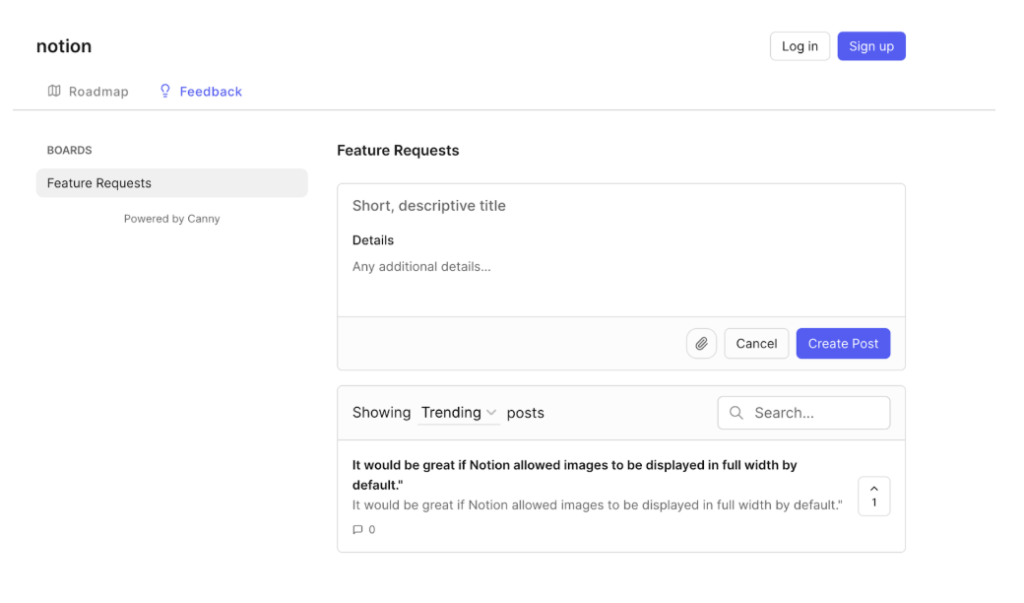
💡Pro Tip: Want to involve customers in your product roadmap? Look at what Notion does. They use a public feature request board (Notion’s Feature Requests) where customers can submit ideas and upvote others. This way, everyone can see what’s being worked on, giving your team clear insight into what’s in demand.
*Have agents tag feature requests in a shared doc or CRM field with product context + use case. Regularly review these with product or PMs to prioritize popular requests.
5. The Angry Customers’ “You’re Not as Good as [Competitor]” Comments
It’s tough when a customer tells you they prefer a competitor. But instead of feeling defensive, use it as a chance to learn what’s missing or what you could do better.

Steps to handle
Customers often have experience with alternative solutions in the same industry or vertical. They’re making this comparison based on firsthand experience, and their insights can reveal gaps in your product or service that you might not be aware of.
- Keep emotions in check: It’s natural to feel defensive, but professionalism wins the day. Acknowledge their opinion respectfully, like, “Thanks for your honesty. I’d love to understand what’s working better for you with them.”
- Get specific: “Can you share what they’re doing differently or better?” You need real feedback to take action.
- Highlight your strengths: Gently remind them of your value. “While they offer X, we focus on Y, which helps you with [benefit].”
- Document and analyze: Record the feedback from the customer’s issue and share it with the relevant internal teams. This data could be invaluable for your next strategy meeting.
- Follow-up: If you make improvements based on their feedback, let them know. It shows you listen.
Here’s the same “You’re Not as Good as [Competitor]” scenario, as a phone script:
Type: Phone or Chat Script
Agent: Hey [Customer Name], thanks for your honesty. I really appreciate you sharing that. I’d love to understand what’s working better for you with [Competitor Name]. Do you mind telling me a bit more?
Customer: They just feel easier to use. And their response times are faster.
Agent: Got it, thank you. That’s helpful to know. Just to check, when you say “easier,” is there a specific part of our product that’s been tricky?
Customer: Yeah, the reporting dashboard’s confusing.
Agent: Totally fair. I’ll pass this along to our product team, and if it’s okay with you, I’d love to email you once we make improvements there.
Also, while [Competitor] might be ahead on some features, something we hear often is how much our users appreciate [your unique strength, e.g., personalized support / better integrations]. I’d be happy to walk you through a few ways we can help streamline things for you, too, if you’re open to that?
*Always dig for the “why” behind competitor praise. It often reveals areas you can fix or reposition. Use this feedback in win-back campaigns or roadmap planning.
What not to do?
- Don’t argue or get defensive. That just makes the customer more upset.
- Don’t brush them off with a “We’ll look into it.” Give them a real response.
- Don’t forget to update them if you make a change based on their feedback.
💡Pro Tip: Create a simple “Voice of the Customer” board where you track this type of feedback. Review it regularly with your team to spot patterns and plan changes.
Recommended reading
6. The “Can I Speak to Your Manager?” Situation
When a customer asks for a manager, it usually means they’re frustrated or feel their problem isn’t getting solved. It’s a chance to make things right and keep the customer.
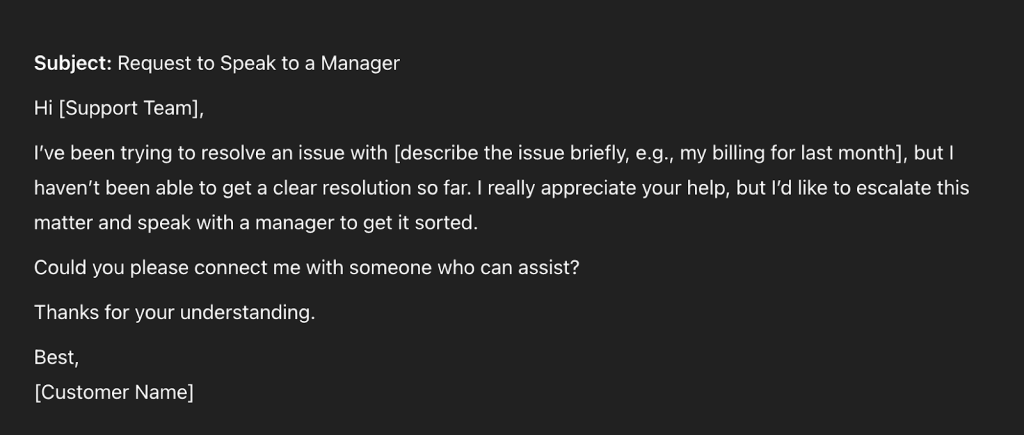
Steps to handle
Here’s how to handle it:
- Pause and check: Before escalating, ask a few clarifying questions to see if you can solve the issue yourself. Sometimes, a clearer explanation or a small solution is all they need.
- Follow the steps: If the issue does need a manager, follow your escalation process. Give your manager all the details so they’re prepared and don’t need to repeat the same questions.
- Write it down: Take clear notes on why the customer asked to escalate and what was said. This will make it easier to follow up and learn from the situation.
- Check in after: Once the manager has spoken to the customer, follow up to confirm that the problem was resolved. A simple, “Just checking in, did everything get sorted out?” goes a long way.
- Learn from it: Afterward, talk as a team. Could this have been handled differently? Is there a gap in training or process?
Here’s the same “Can I Speak to Your Manager?” scenario, as a phone script:
Type: Phone or Chat Script
Customer: I’m done explaining. Can I just speak to your manager?
Agent: Of course, I understand you’re frustrated. Before I loop them in, can I quickly check, is there anything I can help clarify or fix right now?
Customer: I’ve already explained it twice. Nothing’s changing.
Agent: Totally fair. Let me get my manager on this for you. Just a moment, I’ll brief them so you don’t have to repeat everything.
[Wait / Transfer]
Agent (after call): Just checking back in, did everything get sorted out with [Manager Name]? If there’s anything else you need, I’m right here.
*Teach agents when to try resolving and when to escalate. Always confirm the handover context to avoid making the customer repeat themselves.
What not to do?
- Don’t just pass the customer off without trying to help first. Show you’ve made an effort.
- Don’t leave your manager in the dark. Always give them the whole picture.
- Don’t assume it’s over once the manager takes over. Follow up and make sure the customer is happy.
💡Pro Tip: Make escalation training part of your regular team sessions. Show examples of when to handle things yourself, when to escalate, and how to explain the situation clearly.
7. The “Your Service Is Down” Alarm
When a customer says your service is down, it shakes their trust. Your product is part of their workflow, and when it breaks, so does their day. What you do next will decide if they stick around or look for something else.
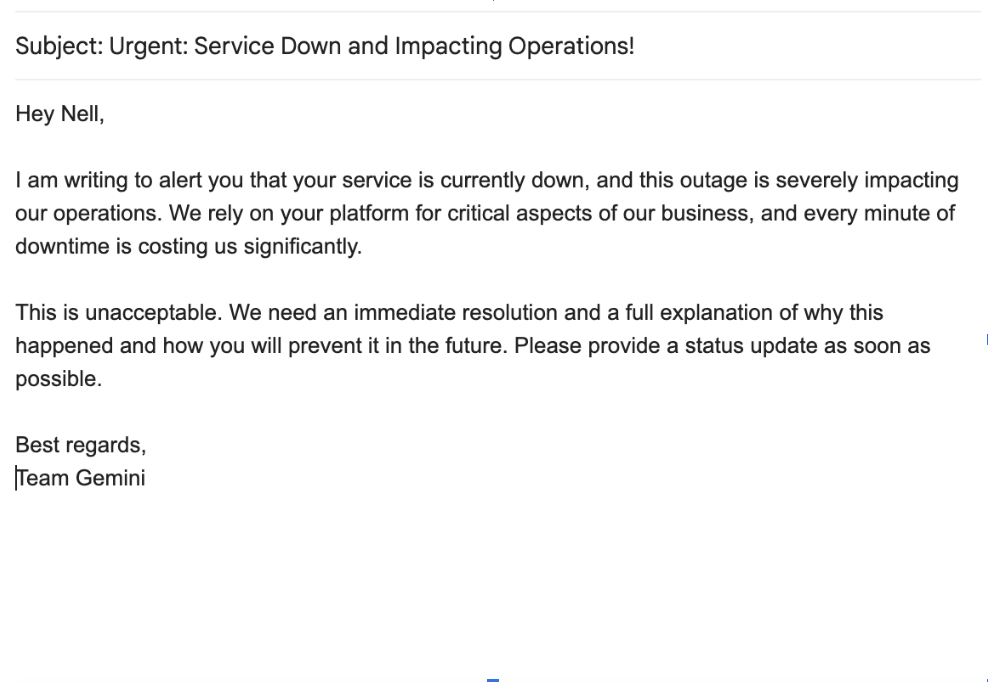
Steps to handle
No service is up 100% of the time. Whether it’s server issues, software bugs, or third-party outages, downtime is unfortunate for any tech product or service. When this happens, you need to rally to keep their trust.
- Immediate acknowledgment: The first step is to acknowledge the issue publicly and directly to affected customers.
- Diagnose the issue: Work closely with your technical team members to understand the root cause and the estimated time for resolution.
- Regular updates: Keep customers informed through email, social media, or your website. Transparency is key.
- Resolution and debrief: Once the issue is resolved, inform your customers and briefly explain what went wrong and the steps taken to fix it.
- Follow-up: After the service is restored, a follow-up message thanking customers for their patience can go a long way in rebuilding trust.
Here’s the same “Your Service Is Down” scenario, as an email script:
Type: Email or Chat Script
Subject: We’re on it, service update from [Your Company Name]
Hi [Customer Name],
Thanks for flagging this. We’re aware of the outage, and our engineering team is already investigating.
We’ll send an update within the next [X minutes/hours], even if there’s no new information. You don’t need to follow up; we’ve got this.
We understand the disruption this can cause, and we’re treating it as a top priority.
Appreciate your patience,
[Your Name]
Customer Support, [Company Name]
What not to do?
- Don’t stay silent. This will frustrate your customers to no end.
- Don’t share complicated technical explanations. Keep updates simple and clear.
- Don’t wait for customers to contact you. Get ahead of the problem with proactive communication.
💡Pro Tip: Consider creating a status page that customers can check for real-time updates on service issues. This can reduce the volume of support tickets and calls during an outage.
8. The “When Will This Issue Be Fixed?” Impatience
When a customer keeps asking when something will be fixed, it’s clear that they’re frustrated. They need clear, honest answers and signs that you’re genuinely working on it.
This scenario is a litmus test for your customer service’s ability to manage expectations of your customers’ needs and communicate effectively. It’s also an opportunity to show that you’re committed to resolving issues promptly, even when the clock is ticking.

Steps to handle
Customers often have multiple deadlines and responsibilities. When they encounter an issue with your service, it can disrupt their workflow, making time a critical factor.
- Acknowledge the urgency: “I understand this is causing you issues. Let’s get it sorted as soon as possible.”
- Provide a time frame: Share the estimated fix time if you have it. If you don’t, be honest: “I’m waiting on an update from the technical team. I’ll keep you posted as soon as I have more info.”
- Keep them in the loop: Don’t wait for them to ask again. Proactively send updates, even if there’s no news yet.
- Explain the process: Give a brief summary of what’s being done. “We’re running diagnostics now, and once that’s done, we’ll know more.”
- Send a mini timeline: If the fix takes a while, send them a timeline of what’s being done and when. It can be as simple as: “Diagnostics complete by 2 PM, fix testing by 4 PM, expected resolution by 6 PM.” This shows you’re working steadily and keeps them informed.
- Follow-up: Once the issue is resolved, reach out to confirm that everything is working as expected and thank them for their patience. You can say, “The issue’s resolved. Can you confirm it’s working for you now?”
Here’s the same “When Will This Issue Be Fixed?” scenario, as a phone script:
Type: Phone or Chat Script
Customer: Any update on my ticket? It’s been hours.
Agent: Hey [Customer Name], I totally understand the wait is frustrating. I just checked in with our tech team — they’re still working on the issue.
Customer: Can you tell me when it’ll be fixed?
Agent: Right now, diagnostics should wrap up by [2 PM], and then we’ll start testing the fix. If all goes well, we’re aiming to resolve it by [6 PM]. I’ll keep you updated along the way.
Customer: Okay, please keep me posted.Agent: Absolutely. I’ll send you the next update by [3 PM] or sooner if I hear anything. Appreciate your patience, we’re on it.
What not to do?
- Don’t leave them in the dark. Even a quick “We’re still working on it” is better than silence.
- Don’t overpromise on timelines. If you’re not sure, just say so.
- Don’t close the issue until the customer confirms it’s fixed.
💡Pro Tip: Use a ticketing system that lets customers track their issues in real time. This reduces the “When will it be fixed?” questions and gives them peace of mind.
9. The “I’m Leaving You for [Competitor]” Breakup
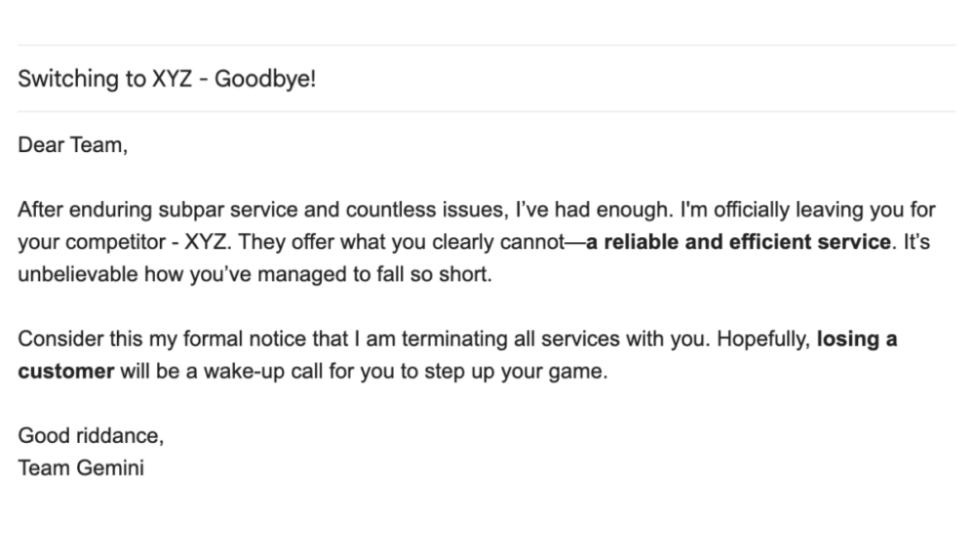
When a customer says they’re switching to a competitor, it’s tempting to say “Okay” and move on. But this is a chance to learn and maybe even change their mind.
Steps to handle
Churn is an inevitable part of business, especially in competitive markets. Customers leave for better pricing, features, or customer service. Understanding why can help you refine your own offerings.
- Keep it professional: Thank them for their business and time, regardless of their reason for leaving. Say something like “Thanks for being with us. I’m sorry to hear you’re leaving.”
- Inquire about the why: Politely ask why they’re choosing to leave. Is it a feature, pricing, or something else?
- Offer alternatives: If it’s an issue you can resolve, consider offering an incentive to stay, like a discount or free upgrade, as per company policy. But don’t beg; it has to make business sense.
- Process the exit: If they’re leaving no matter what, make it easy for them. A smooth transition can leave the door open for them to return later.
- Post-exit follow-up: Send a simple “Thank you for your time with us. If you have any more thoughts on what we could have done better, we’d love to hear from you.”
Here’s the same “I’m Leaving You for [Competitor]” scenario, as an email script:
Type: Email or Chat Script
Hi [Customer Name],
Thanks so much for being a part of our journey. I’m really sorry to hear you’ve decided to move on to [Competitor Name], but I understand entirely.
If you don’t mind my asking, was there something specific that led to this decision? Any feedback you can share would really help us improve.
If it’s something we can fix, I’d be happy to explore options with you, whether it’s a feature you need, a pricing concern, or anything else. And if your decision is final, we’ll make the transition smooth and easy on our end.
Thanks again for your time with us. You’re always welcome back anytime.
Best,
[Your Name]
[Your Title]
What not to do?
- Don’t beg them to stay. If they’ve made up their mind, respect that.
- Don’t ignore the feedback. Listen and learn.
- Don’t make the process harder than it needs to be. A smooth exit leaves a better impression.
💡Pro Tip: Use a simple exit survey or a quick call to gather insights. This helps spot patterns in why customers leave, whether it’s pricing, features, or service, and gives you a roadmap for fixing it.
10. The “I Didn’t Get My Order” Panic
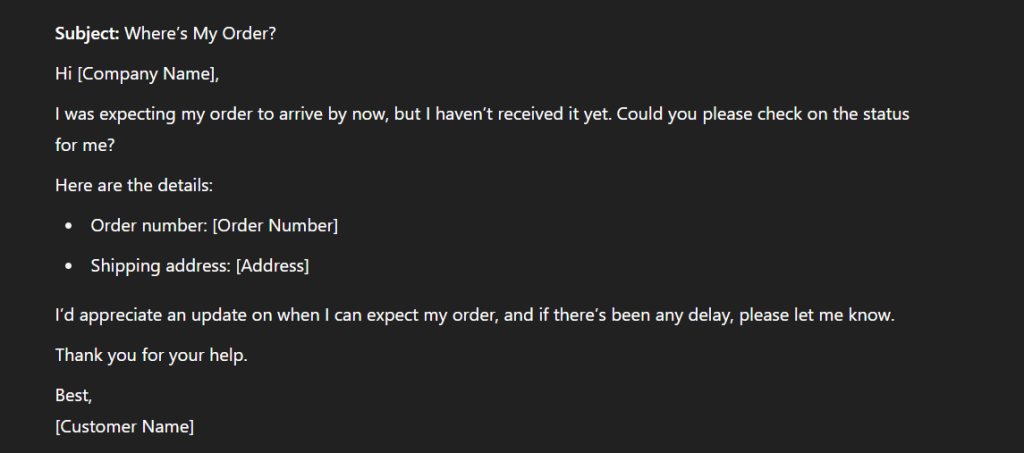
When a customer says their order didn’t arrive, they don’t want excuses. They want a solution.
A Reddit user shared an experience where proactive communication about a delayed order turned a potentially negative situation into a positive one. The company maintained trust and customer satisfaction by keeping the customer informed and offering a small discount.
Here’s a snippet from the Reddit thread:
First, thank you for being patient with us.
We really are doing everything we can to get your orders to you as soon as possible – as long as we can do that without compromising on quality.
As you are probably aware, our holiday ship dates have been slipping, in some cases repeatedly. We tend to be optimistic when it comes to schedules and that’s bitten us (and you) big time this year.
This kind of honest, proactive communication can turn a problem into a chance to build trust.
Steps to handle
Delivery issues happen, but transparency and fast action can keep the customer on your side.
- Acknowledge the concern: Express understanding and reassure them you’ll investigate immediately.
- Verify order details: Double-check shipping info, tracking, and order status.
- Provide a clear update: Give an estimated delivery time or alternative solution.
- Offer compensation if needed: A discount or complimentary item can ease frustration.
- Follow-up after delivery: Check if the item was received and if they’re satisfied.
Here’s the same “I Didn’t Get My Order” scenario, as a phone script:
Type: Phone or Chat Script
Agent: Hi [Customer Name], I’m really sorry to hear your order hasn’t arrived. Let me help you sort this out right away.
Customer: It was supposed to come two days ago. Still nothing.
Agent: Got it. Let me quickly check the tracking details and confirm the status. Can you please confirm your order number or email ID?
Customer: Sure, it’s #48219 and email is [email@example.com].
Agent: Thanks! One moment while I pull that up…Okay, I see your order was shipped on [Date] via [Carrier], and it shows a delay at the [Location] hub. I’ll contact the carrier right now for a delivery update.
Customer: Okay, but I needed it by yesterday.
Agent: I totally understand how frustrating that is. I’m going to escalate this on priority. Meanwhile, would a replacement or a refund work better if this doesn’t reach you in the next 24 hours?
Customer: A replacement would be great if it doesn’t show up by tomorrow.
Agent: Done. I’ll set a reminder to check on this tomorrow morning. If the package still hasn’t arrived, we’ll ship a replacement the same day. I’ll also follow up personally.
Customer: Appreciate it.
Agent: Thanks for your patience, [Customer Name]. I’ll keep you posted, feel free to message me here any time.
What not to do?
- Don’t say, “It’s not our fault” or blame the carrier. Own the resolution.
- Don’t leave them in the dark; update them regularly, even if you don’t have a full fix yet.
- Don’t assume they’ll contact you again; be proactive and follow up.
💡 Pro Tip: Keep a list of high-value or repeat customers. If one of them reports a missing order, prioritize their case and make sure they feel valued.
11. The “My Account Has Been Locked” Complaint
Nothing frustrates customers more than being locked out of their accounts. It blocks them from accessing important features, interrupts their workflow, and leaves them feeling helpless.
For example, a customer shared how their LinkedIn account was suddenly locked. They were left waiting with vague instructions. The lack of clear, fast support only made things worse.

Handling this situation efficiently not only restores access but also reassures the customer that their trust and data security are your priority.
Steps to handle
Customers expect swift resolution when access is blocked.
- Acknowledge and apologize: Validate their frustration and explain the likely cause.
- Verify identity: Follow security protocols to ensure it’s the right customer.
- Unlock the account: Restore access as quickly as possible.
- Explain the cause: Provide a simple reason for the lockout and how to avoid it.
- Follow-up: Ensure the customer can access everything and is satisfied.
Here’s the same “My Account Has Been Locked” scenario, as a phone script:
Type: Phone or Chat Script
Agent: Hi, this is Priya from [Company Name]. I see you’re having trouble accessing your account. Let me help you with that.
Customer: Yeah, I’m locked out and can’t get anything done. I’ve tried resetting the password, but it didn’t work.
Agent: I’m really sorry for the hassle, and thanks for calling. Let’s fix this quickly. For security, I’ll just need to verify a few details. Can I confirm your email ID and the last 4 digits of the phone number on file?
Customer: Sure, it’s [email@example.com] and 7764.
Agent: Got it, thank you. I’ve verified your identity. Looks like the lock was triggered by multiple failed login attempts. I’ve now unlocked the account—you should be able to log in again using your current password.
Customer: Okay, I’ll try… yep, I’m in now. Thanks!
Agent: Great to hear! As a heads-up, if this happens again, you can always use the “Unlock Account” link on the login page. It skips the reset and gets you in faster.
Customer: Good to know. Appreciate the help.
Agent: Anytime! And if you hit any other issues, just give us a call or drop a message. Have a smooth rest of your day.
*Always explain why the lock happened and how to avoid it next time. It builds trust and reduces repeat contacts.
💡 Pro Tip: Make it easy for customers to unlock their accounts with simple, clear instructions. Look at Google’s approach, they send clear recovery emails with steps, timelines, and a backup contact.
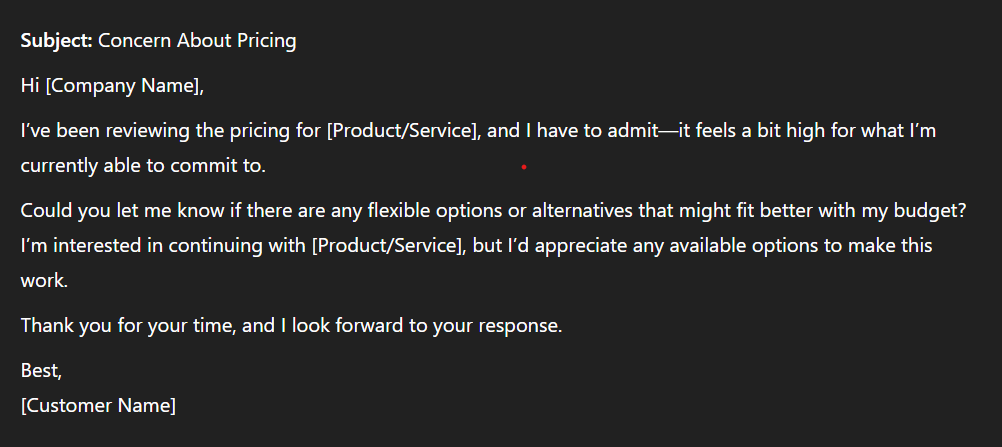
12. The “This Is Too Expensive” Pushback
When a customer says your product is too expensive, don’t rush to offer a discount. Instead, show them why it’s worth it.
In a Reddit thread, someone pointed out that focusing on value over price is key. When businesses explain the unique benefits and quality of their product, customers are more likely to stick around.
Steps to handle
Here’s how to handle it:
- Start with understanding: “I hear you. Could you tell me what’s making it feel expensive?” This invites them to share specifics instead of making a blanket objection.
- Show the value: Talk about the features, support, and long-term benefits that set you apart.
- Offer flexible options: Suggest a lower-tier plan or trial extension if it makes sense.
- Respect their choice: If they still decide to leave, thank them for their time.
Here’s the same “This Is Too Expensive” scenario, as an email script:
Type: Email or Chat Script
Subject: About Your Pricing Concern
Hi [Customer Name],
Thanks for reaching out and I totally understand where you’re coming from. Pricing’s a big deal, and we want to make sure you’re getting the best value for what you’re paying.
If you’re open to it, I’d love to understand what’s making it feel too expensive right now. Are there specific features you’re not using, or are you comparing us to something else you’ve tried before?
In the meantime, here’s a quick reminder of what your plan includes:
[Highlight 2–3 unique, high-value features]
Dedicated support + [any add-ons, integrations, etc.]
If your budget is tight, we can also explore some alternatives, such as switching to a lighter plan or extending your trial, to help you become more familiar with the platform.
Let me know what works best, and we’ll figure it out together.
Best,
[Your Name]
Customer Support, [Company Name]
What not to do?
- Don’t immediately offer a discount. It makes your product feel less valuable.
- Don’t brush off their concerns. Listen and respond with real examples.
- Don’t leave the conversation unfinished. Follow up if they show interest.
💡 Pro Tip: Forget the discounts and provide your team with real stories. For example, “One customer cut response time by 40% with [Feature X].” That sticks with people way more than $10 off.
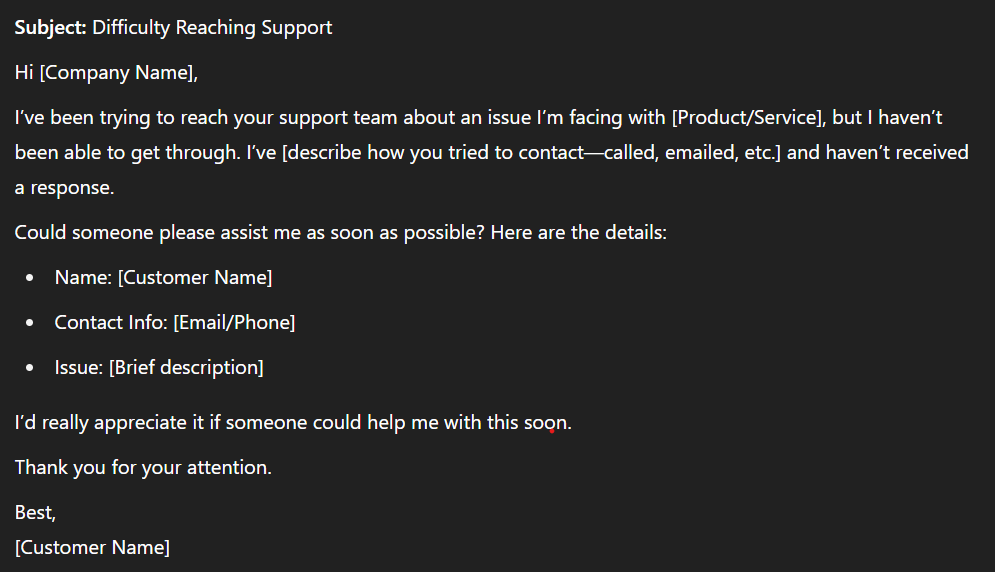
13. The “I Can’t Reach Support” Frustration
Nothing drives customers away faster than feeling ignored. Whether they’re stuck in a queue, waiting on hold, or emailing with no reply, it’s frustrating. But if handled well, it’s also a chance to turn a bad experience into a loyalty-building moment.
A LinkedIn article highlights why multi-channel support matters. Customers expect fast, reliable help across email, chat, and phone, so make sure every channel is covered and responsive.
Steps to handle
Here’s how to handle it:
- Apologize genuinely: “I’m sorry you had trouble reaching us. Let’s get this sorted now.” Empathy goes a long way in defusing frustration.
- Solve the issue first: Focus on resolving the original problem that caused them to reach out. This shows that you prioritize their needs over protocol.
- Share improvements: Let them know your steps to improve availability.
- Offer a direct contact: “Here’s a way to reach us directly if you need help in the future.”
- Follow up: Once the issue is resolved, check back in to ensure everything’s running smoothly. A simple “Just checking in to make sure everything’s working fine” can leave a lasting positive impression.
Here’s the same “I Can’t Reach Support” scenario, as an email script:
Type: Phone or Chat Script
Agent: Hey! I’m really sorry you had trouble reaching us earlier. I’m here now, let’s get this sorted. What’s going on?
Customer: I’ve been trying to get help for hours. No reply to my emails.
Agent: I completely understand the frustration. Let me start by resolving your issue right away. Could you quickly share what you need help with?
Customer: I’m locked out of my dashboard and nothing’s loading.
Agent: Got it. I’m checking your account status now. Give me a minute.
[1 min later]
Thanks for waiting! It looks like there was a temporary sync issue. I’ve just reset your access, can you try logging in now?
Customer: Okay, it’s working now.
Agent: Great! And just to make sure this doesn’t happen again, I’ll email you a direct line to our priority support team. That way, if anything comes up, you’ll get help faster.
Customer: Appreciate that. Thanks for fixing this.
Agent: Anytime. Thanks for your patience, and sorry again for the delay earlier. We’re working on improving our response times across all channels.
💡 Pro Tip: Don’t wait for complaints to know there’s a problem. Use tools like SLA management, missed message alerts, and assignment rules to catch gaps before they affect customers.
14. The “You Promised X but I Got Y” Disappointment
A customer was promised one thing but got something different. This isn’t just another complaint. If you don’t fix it fast, you risk losing their trust and business.

Steps to handle
Here’s how to handle it:
- Own the mistake immediately: Start by recognizing their frustration. A simple, “I see how this is frustrating, and I’m here to make it right,” sets a tone of empathy and responsibility.
- Identify the exact gap: Go through the details with the customer, i.e., what they were promised vs. what they received. Show them you’re serious about understanding the issue. “Here’s what you were told: [X]. Here’s what happened: [Y].”
- Fix it fast and visibly: Take action right away. Whether it’s delivering the missing feature, honoring the promised price, or providing compensation, make the fix clear and prompt. Communicate each step to the customer.
- Document the issue for your team: Record exactly what was promised and where the breakdown happened. Share this with sales, marketing, and product to stop it from happening again.
- Check in: After the resolution, reach out to make sure they’re happy.
Here’s the same “You Promised X but I Got Y” scenario, as a phone script:
Type: Phone or Chat Script
Agent: Hi, this is Priya from [Company]. I saw your message, looks like something didn’t match up with what you were promised?
Customer: Yeah, I signed up for the Pro plan because it said I’d get onboarding support. But I didn’t get anything.
Agent: I’m really sorry about that. I totally get how frustrating it is when expectations aren’t met. Let me take a quick look at your account.
[Pause while checking]
Thanks for holding. You’re absolutely right. Your Pro plan does include onboarding, and it looks like that step was missed during setup. Let’s fix that now.
Customer: Okay.
Agent: I’ve scheduled your onboarding call for tomorrow at 11 AM your time. You’ll get a confirmation in your inbox in a minute. And I’ll personally follow up after the call to make sure everything’s on track.
Customer: Appreciate it.
Agent: Thank you for flagging it. We’re also noting this internally so it doesn’t happen again. Anything else I can do for you now?
Customer: No, that’s all. Thanks again.
Agent: Glad I could help. Talk soon!
What not to do?
- Don’t brush it off or downplay the customer’s frustration.
- Don’t leave the resolution unclear. Fix it and explain exactly what was done.
- Don’t close the case until the customer confirms they’re satisfied.
💡 Pro Tip: Build a simple “promise tracker” for your support team. When a customer claims a promise wasn’t met, log the original commitment, the resolution steps, and how long it took. Share these insights with marketing, sales, and product teams to tighten your messaging and processes.
15. The “I Have a Data Privacy Concern” Escalation
When a customer raises a concern about their data privacy, it’s a big deal. They trust you with sensitive information, and how you handle a privacy concern can make or break that trust. And if you lose that trust, you could lose the customer and damage your reputation.
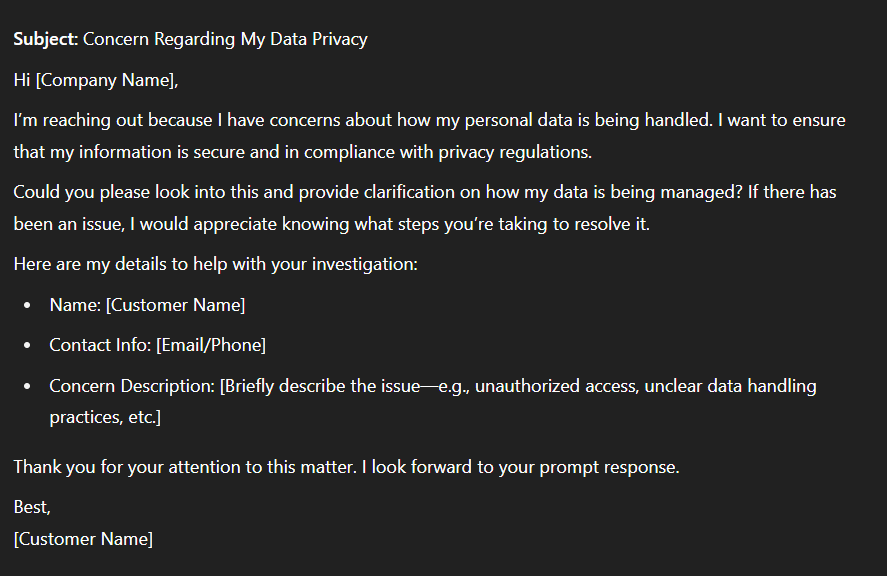
Steps to handle
- Acknowledge and take control: Don’t make excuses or vague promises, act immediately. “Thanks for bringing this up. I’m escalating this to our privacy team now.”
- Dig into the details: Work with your legal and security teams to track exactly what happened. Pull access logs, identify if there was a breach or mishandling, and get the full story.
- Communicate with specifics: Set a deadline, stick to it, and give precise updates. “We’re investigating the issue and will update you by [time/date].”
- Give them a direct line: Provide a specific email or phone number for the privacy lead. “If you need to reach our privacy team directly, contact [specific contact info].”
- Resolve and explain: Be clear and specific. “Here’s what caused the issue, what we’ve done to fix it, and how we’re preventing it from happening again.”
- Follow up and reassure: Once the issue is resolved, follow up personally to confirm they feel comfortable with the outcome.
Here’s the same “I Have a Data Privacy Concern” scenario, as a phone script:
Type: Email or Chat Script
Subject: We’re Investigating Your Data Concern
Hi [Customer Name],
Thank you for reaching out and bringing this to our attention. We take data privacy extremely seriously, and I’ve escalated your concern to our privacy and security team right away.
Here’s what happens next:
We’re currently investigating the issue, and I’ll update you by [specific time/date].
In the meantime, if you have any additional context (like screenshots or suspicious activity), please send it over; it’ll help us speed up the review.
If you’d prefer to speak directly with our Privacy Officer, you can reach them at [privacy@yourcompany.com].
We’ll get back to you with clear answers and next steps. I’ll stay with you through the process and make sure your concerns are fully addressed.
Thank you for your patience and for flagging this.
Best,
[Your Name]
Customer Experience Team
[Your Company]
💡 Pro Tip: Set up a dedicated privacy contact email and train your team to handle these issues fast. Keep clear steps ready for investigating, fixing, and following up. This shows customers you’re serious about protecting their data.
How to use customer service scenarios in team training?
Knowing the scenarios is one thing, and practicing them regularly is what turns theory into instinct. Here’s how to make scenario-based customer service training part of your team’s routine:
1. Set Up Mock Calls or Chat Sessions
Role-play sessions are the most effective way to help agents experience real customer emotions without the pressure of a live ticket. They’re designed to simulate common situations, i.e., a refund request, an outage, or an upset customer.
This kind of hands-on practice strengthens empathy, tone, and quick thinking. It helps agents recognize how their words and attitude directly affect customer experience.
How to do it:
- Pick one scenario per session and assign roles like one agent, one customer, and one observer.
- Keep each session short (5–10 minutes) and focused on a specific skill like problem-solving or de-escalation.
- Rotate roles so everyone experiences both perspectives.
ProTip: Record sessions and review them as a group. Hearing themselves helps agents self-correct faster than verbal feedback alone.
2. Use Feedback Loops and Scoring Sheets
Practice only works if you reflect on it. Every role-play should end with an immediate debrief to discuss what worked and what didn’t.
Structured feedback creates a measurable loop, and agents can see progress over time and understand where to focus next.
How to do it:
- After each session, discuss what went well and where the response could improve.
- Use a simple scorecard to rate 3–4 key skills: empathy, tone, accuracy, and ownership.
- Share one clear takeaway with each agent and revisit it in the next session.
ProTip: Keep feedback specific and constructive. Instead of “Be more empathetic,” say “Try acknowledging the frustration before explaining the fix.”
3. Gamify the Sessions to Make Learning Fun
Repetition builds mastery, but it can also become dull. Adding a little healthy competition keeps participation high and motivation steady.
Gamified sessions turn training into something agents look forward to, not another task to check off.
How to do it:
- Award points for strong communication, creative solutions, or calm handling of tough customers.
- Track scores across sessions, host mini “Customer Challenge” days, or recognize top performers publicly.
- Mix up the scenarios so agents face a balance of easy and high-pressure cases.
ProTip: Run a monthly “Scenario Showdown”, a timed, surprise challenge where agents handle an unexpected customer issue live. It sharpens composure under pressure and shows how far the team has come.
Training with real-world scenarios is about helping agents think and respond like experts. When you combine practice, feedback, and gamification, you turn every session into a learning loop that builds confidence, empathy, and consistency across your entire support team.
Use it during weekly role-plays or onboarding sessions to help agents build real-world instincts faster.
Pro tips to make scenario training more effective
Once you’ve built your scenario training routine, these strategies will help you make every session more engaging, measurable, and effective.
- Start with clear goals: Define what each session is meant to achieve, like improving empathy, reducing response time, or refining tone. When goals are clear, customer service representatives know exactly what to focus on.
- Rotate scenario difficulty: Mix simple and high-pressure cases, like angry customers. Start with everyday issues like refunds or product bugs, then move to escalation or outage scenarios as your team gains confidence.
- Encourage empathy-first responses: Teach agents to acknowledge the customer’s feelings before solving the issue. It’s a small shift that dramatically improves satisfaction scores.
- Balance tone and accuracy: During debriefs, highlight not just what was said, but how it was said. Clear communication delivered with the right tone builds trust faster than scripted responses.
- Record and review sessions regularly: Replays help agents spot habits, like interrupting customers or over-explaining, that they may not catch in the moment. Use short clips for group learning.
- Track progress visibly: Keep a shared dashboard or sheet showing each agent’s scores and improvements. Visibility keeps everyone motivated and accountable.
- Keep sessions short and consistent: Frequent 10-minute drills are far more effective than long, infrequent workshops. Regular practice keeps skills sharp and builds confidence over time.
- Reward growth, not perfection: Recognize small wins like a better tone, a faster resolution, a calmer interaction. Positive reinforcement keeps your team invested in improving.
When training feels short, specific, and encouraging, it stops being “extra work.” It becomes part of how your team grows every day.
Turning customer service scenarios into success stories
Every interaction with a customer is a chance to build trust or lose it. The difference lies in how prepared your team is when things don’t go as planned.
Scenario-based training gives customer service representatives the skills and confidence to handle anything. By practicing regularly, reviewing what worked, and refining their approach, your team turns difficult moments into proof of reliability.
The 15 service scenarios we’ve covered are just the starting point. Turn them into clear, simple guides your team can rely on in real conversations.
Give your customer facing reps the tools, real-life stories, and confidence to act fast and fix issues. Don’t just stop there. Use every customer interaction to make your service stronger and more impactful. When customer service agents treat every situation as a learning opportunity, they don’t just fix problems, you create loyal customers.
Frequently Asked Questions
What are customer service scenarios?
Customer service scenarios are real or simulated situations where agents practice handling customer issues like billing errors, delays, or complaints, to build problem-solving and communication skills.
Why is role-playing customer service scenarios important for training?
Role-playing helps customer service agents prepare for real interactions by practicing empathy, tone, and quick thinking in a low-risk setting, so they perform better when the stakes are real.
What are some examples of customer service scenarios?
Common examples of tricky customer service scenarios include handling refund requests, calming angry customers, managing system outages, explaining billing disputes, or responding to feature requests.
How can managers use customer service scenarios in team training?
Managers can use customer service scenarios test in short role-play sessions to observe responses, provide targeted feedback, and track improvements in key areas, such as empathy, accuracy, and resolution time.
What skills do customer service scenarios teach?
They help customer service agents develop active listening, emotional control, problem-solving, and clear communication—skills that directly improve customer satisfaction.
How can AI or ChatGPT assist in creating customer service scenarios?
AI tools like ChatGPT can generate realistic customer queries, suggest role-play scripts, and create variations of scenarios to help teams practice handling different tones and levels of difficulty.
Start using Hiver today
- Collaborate with ease
- Manage high email volume
- Leverage AI for stellar service













