


About Conservice
Conservice is the largest utility management provider in the United States. The company helps property owners and managers handle utility setup, track usage, manage billing, and stay compliant across large portfolios.
James Ribera, Director of Account Management, leads the Client Success team that supports Conservice’s small to mid-sized corporate clients. Each account manager works with 8–10 client accounts. These accounts can include 50,000–60,000 units (here unit refers to an apartment or a bedroom in student housing). The client success team also works with finance, operations, and billing groups to keep monthly utility cycles running smoothly.
Challenge: Handling massive client volumes without a structured system
Conservice’s Account Management team manages a high volume of client communication each month. Activity spikes around mid-month billing, month-end closings, and budgeting season (July to October). Each account manager receives hundreds of client requests during these periods, making it difficult to stay organized without a centralized system.
Before Hiver, the team relied on a mix of shared and individual inboxes. One shared inbox received communication from 40–50 small to mid-sized clients. Larger accounts involved multiple managers who all received the same messages in their personal inboxes as well. With no centralized platform, ownership was unclear and important conversations were often missed or duplicated.
Account managers spent a large part of their day searching through shared inboxes to locate messages tied to their clients. For larger accounts, two or more managers often received the same requests in parallel. Without shared visibility, no one knew who had responded or followed up. This led to duplicated replies, delayed action, and broken continuity when someone was out of office.
Key challenges:
- Unclear ownership: Without routing or structured workflows, managers had to guess which requests belonged to whom.
- Missed conversations: Requests were overlooked when several managers assumed someone else had responded.
- No visibility: Leadership had no reliable view of workload distribution, response times, or bottlenecks across the team.
- Heavy manual effort: Manual Sorting, filtering, and triaging conversations took hours that could have gone into client-facing work.
- Pressure during peak periods: Billing cycles and month-end closings flooded inboxes, making timely follow-ups difficult.
“Managing high-volume client communication without structure was our biggest bottleneck. We needed a system that brought order, accountability, and confidence back into our process.” — James Ribera, Director of Account Management, Conservice
Looking for a scalable system for client communication
As client accounts and communication grew, James set out to organize workflows, clarify ownership, and strengthen visibility across his Account Management team. During this search, he discovered Hiver and immediately recognized its potential to align teams and streamline client interactions.
He started with a small pilot, inviting one group of account managers to test the new system. The team quickly adopted Hiver, using it to manage ongoing conversations, track progress, and stay aligned on client needs. When the setup proved successful, James expanded the rollout to other groups managing larger and more complex portfolios. James says,
“We saw right away that Hiver could bring structure to how we manage client relationships. It gave us a scalable way to stay organized and deliver the same level of service, no matter how much we grew.”
Over time, Hiver shaped how Conservice teams work each day. New managers now step into structured workflows, share context effortlessly, and maintain continuity across every client relationship.
Solution: Handling thousands of client conversations with structured workflows
After rolling out Hiver, James and his team revamped their approach to handling client communication. Now, nearly 50 account managers use Hiver every day to route client requests, collaborate in real time, and stay aligned on thousands of ongoing conversations.
1. Keeping client communication organized in central platform
Account managers work from Shared Inboxes (supportxyz@) grouped by client accounts. All incoming communication is consolidated in one place, ensuring everyone views the same history and context. The team can open, review, and respond to conversations directly within these inboxes. This setup eliminates fragmentation, and every relevant team member gains visibility into client requests, ensuring alignment.

2. Creating clear ownership across every client request
Hiver’s routing rules help assign new client requests to the right account manager instantly. Everyone can see who is handling what, which eliminates confusion and overlap.
When workloads shift, team leads can route conversations to another manager to keep distribution balanced. This keeps ownership visible and prevents stalled follow-ups.

3. Prioritizing requests with clean categorization
With Hiver, the customer success team can categorize client requests by urgency, department, or type of follow-up. For example, they label requests based on billing support, operational coordination, or escalation. This helps them group related conversations, understand what needs attention, and act faster.

4. Reducing manual work with smarter routing
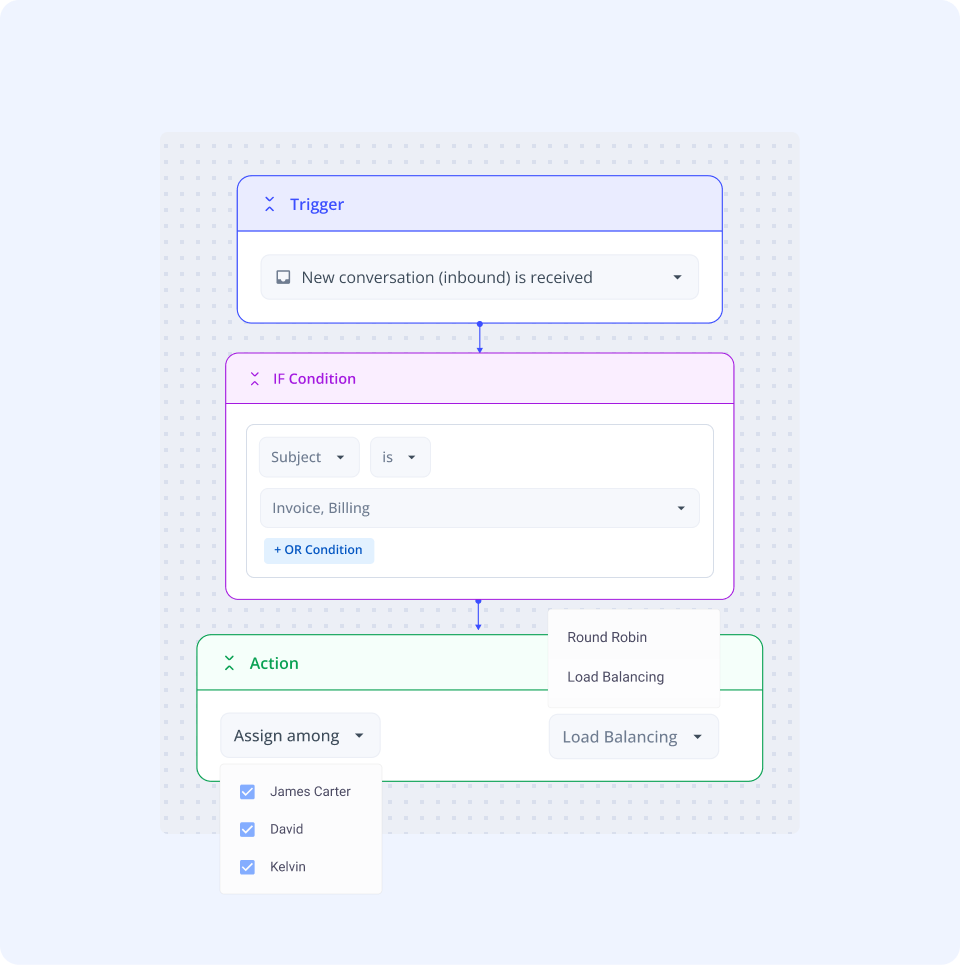
With Hiver, the team can route conversations the moment they arrive. They have set up rule-based automations that detect client names, domains, or key terms and send the request to the correct account manager automatically. These rules also triage or archive low-priority items to reduce noise.
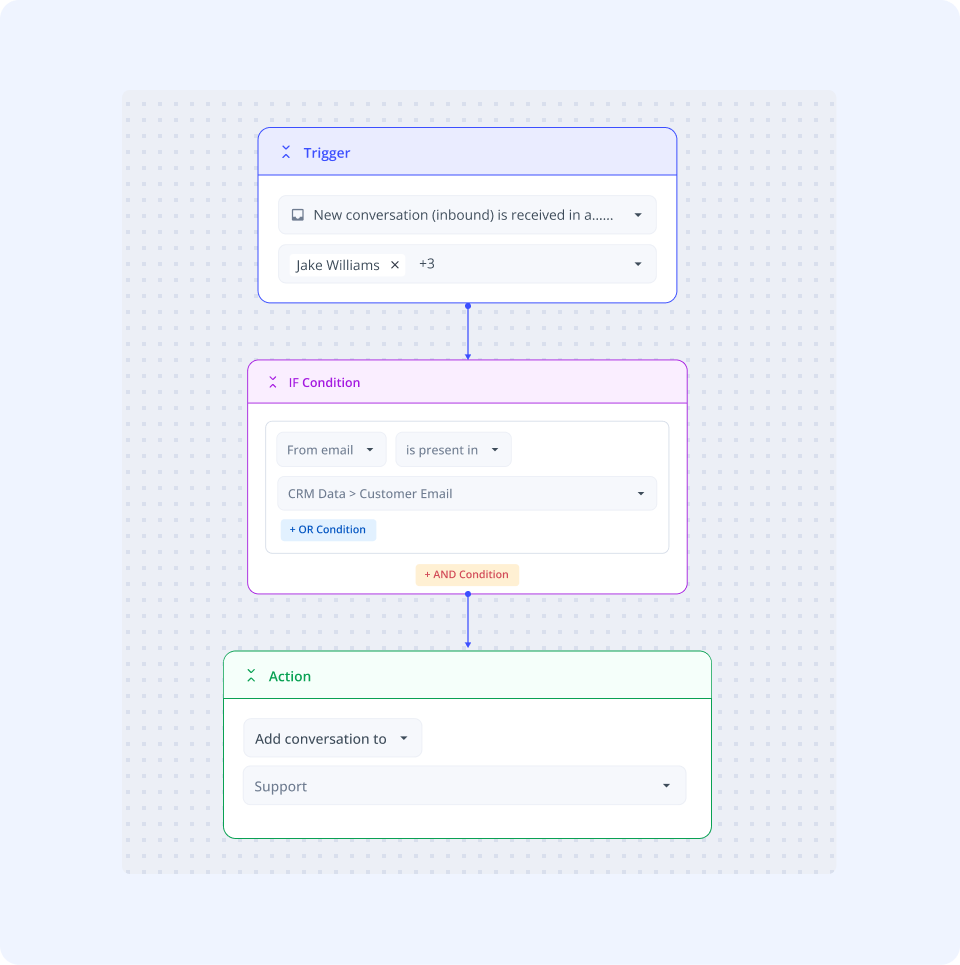
The team also uses automations to pull relevant communication out of personal inboxes into the shared inbox (supportxyz@). This keeps all client activity visible and removes manual triaging altogether.

“Automations and auto triaging have been phenomenal for us. We have specific clients that are assigned to specific account managers. So as information flows into Hiver, it’s automatically routed and tagged for that individual to work on.”
James Ribera
Director of Account Management
5. Maintaining continuity even when team members are away
Account managers add notes to capture status updates or next steps just beside a customer conversation.
When someone is out of office, another manager can read the notes and continue the work without losing context. This reduces dependency on side channels and keeps continuity strong.

6. Gaining visibility into workloads and performance
James uses Hiver Analytics to monitor conversation volume, turnaround times, and resolution trends. These insights help him balance workloads, spot bottlenecks, and coach team members more effectively.

7. Ensuring consistent, accurate responses during transitions
The Transitions team handles property ownership and management changes, which require fast and detailed communication. They use Hiver’s Templates feature to create, save and share standardized responses to some commonly asked questions and SOPs including property details, timelines, and next steps. When there’s a need, a teammate can easily pull out a response, personalize it and share with the client. This saves time and keeps messaging consistent across every transition.
“We use Hiver’s Email Templates. The team has created numerous comprehensive templates that include items people often forget to include when writing from scratch. So it really does save a significant amount of time for each team member every month.” — James Ribera, Director of Account Management, Conservice
8. Improving cross-team coordination on complex projects
When client work involves multiple departments, the team integrates Hiver with Asana. Account managers can create or connect Asana tasks directly from a conversation. Updates stay in sync across both tools, so project progress and client communication stay connected. This helps teams in billing, operations, or transitions work together without losing context.
“Hiver’s Asana integration turned collaboration into a connected process. It lets our teams track progress, share updates, and close the loop on complex projects right from where communication starts.” — James Ribera, Director of Account Management, Conservice

Results: Measurable efficiency and scalability
Since adopting Hiver, Conservice’s Account Management team has achieved clear operational gains in efficiency, visibility, and capacity.
- Hiver triggers more than 7,000 automations each month that route, tag, and prioritize messages automatically. These automations cut inbox clutter by nearly 50% and help account managers focus on high-priority client conversations instead of manual sorting.
- 265 hours saved every month through Automation, Notes, Templates, and AI Tagging—time the team now invests directly in client service.
- 30% faster response times across client communication, even during high-volume billing cycles.
- A 15% increase in client capacity per account manager, enabling the team to manage more portfolios without additional workload.
- 40% improvement in response consistency, ensuring every client receives clear and complete communication.
- 100% visibility into workloads and activity, giving leadership complete control over assignments and performance.
“We’ve gained time, accuracy, and complete visibility into our operations. Hiver doesn’t just streamline work—it gives us the clarity to perform at a higher level.” — James Ribera, Director of Account Management, Conservice
Looking forward: Expanding Hiver’s role across account management
James plans to extend Hiver to more Account Management teams as Conservice continues to grow. He wants each group that manages client relationships to adopt the same structured workflows that have worked well for his current team. By doing this, he will create consistency and accountability across the department.
He also intends to deepen Hiver’s integration with existing systems, including Salesforce and other internal tools. His goal is to connect client information and communication seamlessly, giving every team member a single view of each client’s activity.
James continues to explore new automation and AI features within Hiver. His team already uses AI triaging extensively and plans to test AI Sentiment Analysis to help account managers identify critical issues quickly and respond with the right level of urgency. As Conservice scales, James expects Hiver to play an even larger role in daily operations. He sees it evolving from a communication platform into a central system that unites teams, workflows, and client visibility across the organization.
“We’re not just expanding Hiver—we’re building on it. Each new integration and AI feature strengthens how our teams work together and how we serve our clients.” — James Ribera, Director of Account Management, Conservice
Turning complexity into clarity with Hiver
Hiver now plays a central role in how Conservice’s Account Management teams organize, track, and manage client communication. What began as a small pilot to bring order to Shared Inboxes has evolved into a structured system that supports seamless coordination across teams handling thousands of client interactions each month.
By embedding ownership and visibility into every stage of their workflow, James and his team transformed a high-volume process into a controlled, transparent operation. Conservice’s journey shows how a fast-scaling organization can build structure into complexity—and how the right system can adapt and grow alongside its teams.









