





Every year, thousands of IT managers and support leads often land on the same search: Zendesk vs Spiceworks.
On paper, it makes sense – both tools handle tickets, both have been around forever, and both show up on every other “best help desk” list out there.
Truth be told, these two tools are not at par.
Zendesk is a $115/agent/month customer support machine built for external-facing teams running omnichannel support operations across email, chat, voice, and social.
Spiceworks is a free, ad-supported IT help desk that’s kept small IT shops running on duct tape and goodwill since 2006.
Comparing them is a bit like comparing a commercial airline to a regional bus service. Both get people from A to B. But if you pick the wrong one for your route, you’ll either massively overpay or never reach your destination.
This guide breaks down the real differences between the two tools – features, pricing, AI, limitations, and the use cases where each tool actually wins.
And toward the end, a third option worth knowing about if neither tool checks every box.
What Is Zendesk?
Zendesk is a cloud-based customer service platform used by over 100,000 businesses worldwide.
It combines a vast range of features like ticketing, live chat, voice support (Zendesk Talk), messaging, AI-powered bots, and a knowledge base (Zendesk Guide) into a single Agent Workspace.
Zendesk earned a 4.3/5 rating on G2 based on nearly 7,000 reviews and was recognized as a G2 Leader across 250 categories in its Winter 2026 report.

The platform is primarily used by customer support, CX, and service operations teams in mid-market and enterprise companies. It also supports internal IT and HR use cases through its employee experience capabilities.
What Is Spiceworks?
Spiceworks Cloud Help Desk is a free, ad-supported IT help desk designed for internal IT teams. It handles ticket management, asset tracking, network inventory, and basic reporting, all without charging a license fee. Spiceworks holds an 87% user satisfaction rating across review platforms, with users consistently praising its value and ease of setup.
The platform is primarily used by IT professionals in small-to-medium businesses who need to track internal requests and manage hardware/software assets.
Its on-premise version was deprecated in 2021, and all users now operate on the cloud version.
Quick Comparison: Zendesk vs Spiceworks
| Feature | Zendesk | Spiceworks | Winner |
|---|---|---|---|
| Free plan | No (free trial only) | Yes — Core plan is free forever | Spiceworks |
| Ticket management | Advanced workflows, macros, triggers, omnichannel ticketing | Basic ticketing focused on internal IT requests | Zendesk |
| Channels supported | Email, chat, voice, social, messaging apps | Email and web portal | Zendesk |
| AI & automation | AI agents, copilot, intelligent triage, bots | Minimal — basic auto-responses, manual workflows | Zendesk |
| Reporting & analytics | Zendesk Explore — advanced custom dashboards, AI analytics | Basic reports; Power BI integration available | Zendesk |
| Integrations | 1,500+ in Zendesk Marketplace | Limited — mostly IT ecosystem, Active Directory | Zendesk |
| Security & compliance | SOC 2 Type II, ISO 27001, ISO 27018, ISO 42001, HIPAA-eligible | Basic security; ad-supported model raises data concerns | Zendesk |
| Asset management | Limited — via Custom Objects (requires setup) | Strong native asset tracking and device inventory | Spiceworks |
| Voice/call support | Zendesk Talk — IVR, routing, recording, voicemail | Not available | Zendesk |
| Mobile apps | Full-featured iOS/Android apps | Available but limited features vs. desktop | Zendesk |
| Pricing (starting) | $55/agent/month (Suite Team) | $0 (free, ad-supported) | Spiceworks |
Zendesk vs Spiceworks: Key Feature Comparison
The quick comparison table above tells you which tool wins across helpdesk features. This section tells you why, with the details that actually affect your day-to-day.
Ticket Management
Ticket management is the backbone of any help desk — it’s how requests get created, tracked, prioritized, assigned, and resolved through their lifecycle.
Zendesk Ticket Management
Zendesk offers an advanced ticketing engine built around the Agent Workspace. Agents manage tickets from all channels in a single interface.
Macros let teams apply pre-set actions to tickets with a click, triggers fire automatically based on ticket conditions, and automations handle time-based workflows like escalations and follow-ups.
Skills-based routing (available on Professional plans and above) ensures tickets reach the right agent based on expertise.
Here’s what a G2 reviewer has to say about Zendesk’s ticketing system: “If you want a system with persistent ticket tracking and meaningful data, Zendesk is strong. It does feel like it has a steep learning curve when you get to the various rules and automations it is capable of, but even right out of the box it is a strong ticketing system.”
Spiceworks Ticket Management
Spiceworks keeps ticket management straightforward. IT staff can create, assign, and prioritize tickets via email or the user portal. Tickets can be linked to devices from the built-in inventory, which is a unique advantage for IT teams troubleshooting hardware issues. Workflow rules exist but are limited to basic “if/then” logic.
Here’s what a Redditor has to say about Spiceworks’ ticketing capabilities: “Spiceworks gives you a lot more than just a ticketing system, including agentless inventory tracking/management. The only downside is the advertisements, but come on it’s free!”
The Verdict on Ticketing
Zendesk handles complex, multi-channel ticket workflows at scale.
Spiceworks covers the basics for internal IT requests and does it well, especially when you need tickets tied to specific assets.
Self-Service
Self-service usually starts with a knowledge base, but it also includes customer portals, ticket deflection, and automated responses to common questions. This is where the gap between Zendesk and Spiceworks becomes clear.
Zendesk’s Self Service Capabilities
Zendesk offers a full self-service ecosystem through Zendesk Guide. Teams can build branded help centers where users can browse help articles, search documentation, submit tickets, and track the status of their requests.
The platform also includes community forums and AI-powered features that recommend relevant articles before a ticket is submitted. This helps resolve many Tier 1 questions without involving an agent.
Zendesk also supports multiple help centers on higher-tier plans, multilingual documentation, and content cues that highlight gaps in existing articles so teams can improve their knowledge base over time.
Spiceworks’ Self Service Capabilities
Spiceworks includes a knowledge base and a basic user portal, but both are fairly limited in comparison.
The knowledge base is mostly suited for internal IT documentation rather than customer-facing self-service. Community discussions also suggest that knowledge base articles aren’t easy to surface inside the help desk portal, which makes it harder for users to discover answers before submitting a ticket.
The portal does allow end users to submit requests and track their tickets, but it lacks advanced web self-service features such as AI-powered suggestions, automated ticket deflection, or a fully integrated help center experience.
The Verdict on Self Service
Overall, if self-service content is a priority for customers or employees, Zendesk is clearly the stronger option. Its help centers, automation, and AI suggestions actively reduce ticket volume by guiding users toward answers before they contact support.
Spiceworks, on the other hand, provides only the basics, and its knowledge base functions more like an internal reference for IT teams than a true self-service help center.
Channel Coverage
Channel coverage determines how easily customers can reach your support team. Most modern help desks today support multiple communication channels like email, live chat, phone, social media, and messaging apps, so customers can choose the one they prefer.
Zendesk’s Channel Coverage
Zendesk is a pure omnichannel helpdesk. The Agent Workspace unifies email, live chat, voice (via Zendesk Talk), social media (Facebook, X, Instagram), and messaging apps (WhatsApp, Apple Business Chat) into a single view.
Agents can switch between channels mid-conversation without losing context.
Here’s a review by a Zendesk user: “Zendesk’s omnichannel capability is a huge advantage for my team, as it eliminates the need to jump between different tools and allows us to have a complete view of a customer’s history in one place.”
Spiceworks’ Channel Coverage
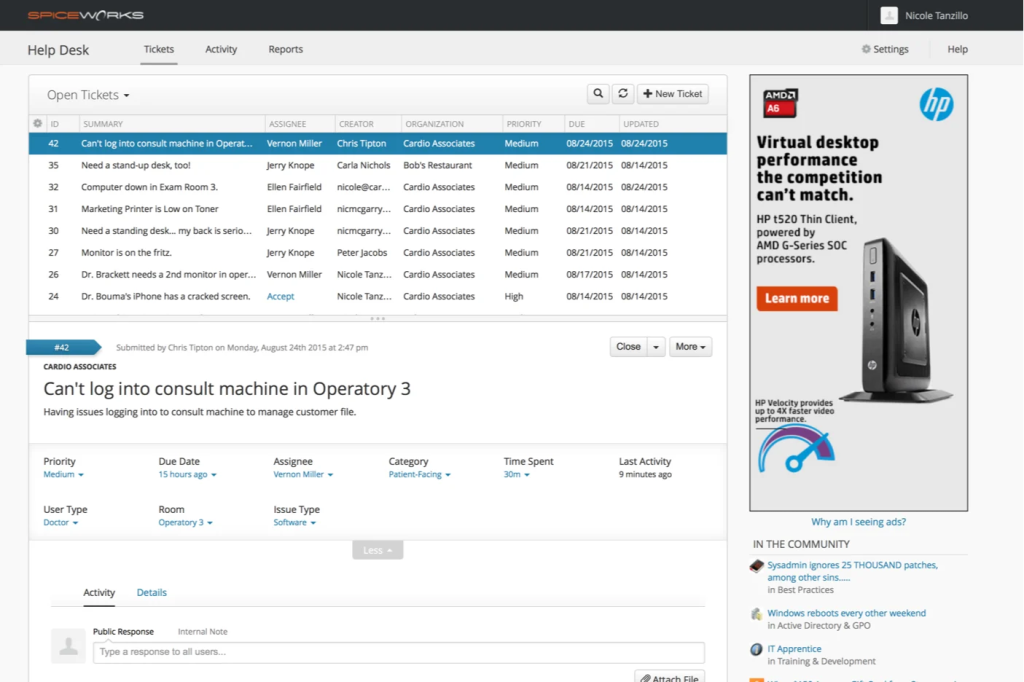
Spiceworks supports email-based ticketing and a web portal. It doesn’t offer native live chat (chat was added to the Premium plan in 2025), voice, social, or messaging support.
For internal IT use, email-based ticketing often works fine. But for customer-facing support, this is a major gap.
The Verdict on Channel Coverage
Zendesk wins this one convincingly. If your team needs to meet customers where they are – across chat, phone, social, and messaging, Zendesk covers it all from a single workspace.
Spiceworks works fine when your “customers” are internal employees who are happy emailing the IT team, but it won’t cut it for external-facing support.
AI and Automation
AI and automation often separate basic help desks from modern support platforms. A tool that relies on manual ticket routing simply can’t compete with one that automatically triages requests, recommends replies, and even resolves common issues without agent involvement.
Zendesk’s AI and Automation Capabiltities
Zendesk has invested heavily in AI in recent years. Its current capabilities include:
- AI Agents — autonomous bots that handle customer requests independently, with generative replies grounded in your knowledge base
- AI Copilot — real-time agent assist that generates draft replies, summarizes tickets, and recommends next steps (available as a $50/agent/month add-on)
- Intelligent Triage — automatically detects intent, language, and sentiment to classify and route tickets
- Smart macros and auto-replies — AI-enhanced versions of Zendesk’s classic automation tools
The catch is that much of these capabilities live behind the Advanced AI add-on at $50/agent/month, on top of already-premium plan costs.
Spiceworks’ AI and Automation Capabiltities
Spiceworks has minimal automation. Basic auto-response rules and simple ticket routing exist, but there’s no AI-powered triage, no bot capability, no sentiment detection, and no generative response features. Everything beyond basic rules requires manual effort.
The Verdict on AI and Automation
Zendesk clearly offers more advanced AI and automation capabilities, especially for teams looking to automate ticket triage, surface suggested replies, or deflect common requests before they reach an agent.
Spiceworks, on the other hand, keeps things simple and largely manual. For small IT teams with manageable ticket volumes, that simplicity may be enough, but teams looking to reduce workload through automation will likely find Zendesk better equipped.
Recommended reading
10 Best AI Helpdesk Software in 2026 (Ranked by AI efficiency)
Reporting and Analytics
Effective reporting turns ticket data into operational insights, helping managers identify bottlenecks, measure agent performance, track SLAs, and monitor CSAT/ESAT trends.
Zendesk’s Reporting Suite
Zendesk Explore is a robust analytics platform that pulls data from Support, Talk, Chat, and Guide into pre-built and custom dashboards. Here are some of its key features:
- Pre-built dashboards for all Zendesk products
- Custom report builder with drag-and-drop interface
- AI-powered analytics (intelligent triage metrics, AI agent performance tracking)
- Omnichannel analytics for cross-channel comparisons
- Enhanced dataset exports for integration with external BI tools
That said, some users note that reporting feels limited on lower-tier plans and often requires upgrades or workarounds for custom reports. Also, its complexity trickles down to reporting features as well.
According to a G2 reviewer, “Zendesk has powerful reporting tools, but they can sometimes be complicated to use and difficult to navigate when trying to pull reports or data.”
Spiceworks’ Reporting Suite
Spiceworks provides basic ticket reports and dashboard stats for things like ticket volume, response times, and activity feeds.
Power BI integration is available for more advanced analysis, which is a useful workaround. But out-of-the-box reporting is consistently called out as a weakness in reviews.
According to a Redditor: “If you were a small shop with no budget, Spiceworks is fine. I came from a Spiceworks shop, the metrics are bare-bones. I had to export the data and use PowerBi to get any reports worth anything. The system is pretty decent though.”
The Verdict on Reporting and Analytics
Zendesk clearly stands out for teams that rely heavily on data. Its analytics tools support deeper performance tracking and custom reporting, though accessing the full capabilities often requires higher-tier plans.
Spiceworks takes a more lightweight approach, offering basic visibility into ticket activity and response metrics, which may be enough for smaller IT teams but lacks the analytical depth Zendesk provides.
Integrations Ecosystem
The strength of a help desk often depends on how well it connects with other support tools. Integrations help teams link their support platform with CRM systems, collaboration apps, and operational tools to keep workflows running smoothly.
Zendesk’s integrations
Zendesk boasts over 1,500 integrations in its marketplace, spanning CRM (Salesforce, HubSpot), e-commerce (Shopify, Magento), project management (Jira, Asana), collaboration (Slack, Microsoft Teams), and more. The Zendesk API also enables custom integrations for teams with developer resources.
Here’s a G2 review by a user: “Another thing that’s been helpful is how flexible Zendesk is with integrations. Being able to connect tools like Facebook and Instagram directly into the ticketing system makes it much easier to manage conversations from multiple channels in one place.”
Spiceworks’ integrations
Spiceworks integrates primarily within the IT ecosystem — Active Directory, LDAP, and some third-party IT management tools.
There’s no native integration marketplace. Connecting Spiceworks to tools like Slack or Microsoft Teams typically requires third-party platforms like Zapier or Tray.io, and even then, the integration depth is limited.
According to a user’s review on G2: “Integrating (Spiceworks) with other systems is quite challenging.”
The Verdict on Integrations
Zendesk offers a far broader integration ecosystem, making it easier to connect support workflows with CRM, e-commerce, collaboration, and project management tools.
Spiceworks, in contrast, focuses mainly on IT infrastructure integrations and lacks a dedicated marketplace, which can limit flexibility for teams that rely on a wider software stack.
Asset Management
Asset management helps IT teams track hardware, software, and other devices across the organization. When asset data is connected to the help desk, technicians can quickly see which device a ticket relates to, review its history, and troubleshoot issues faster.
Zendesk’s Asset Management Capabilities
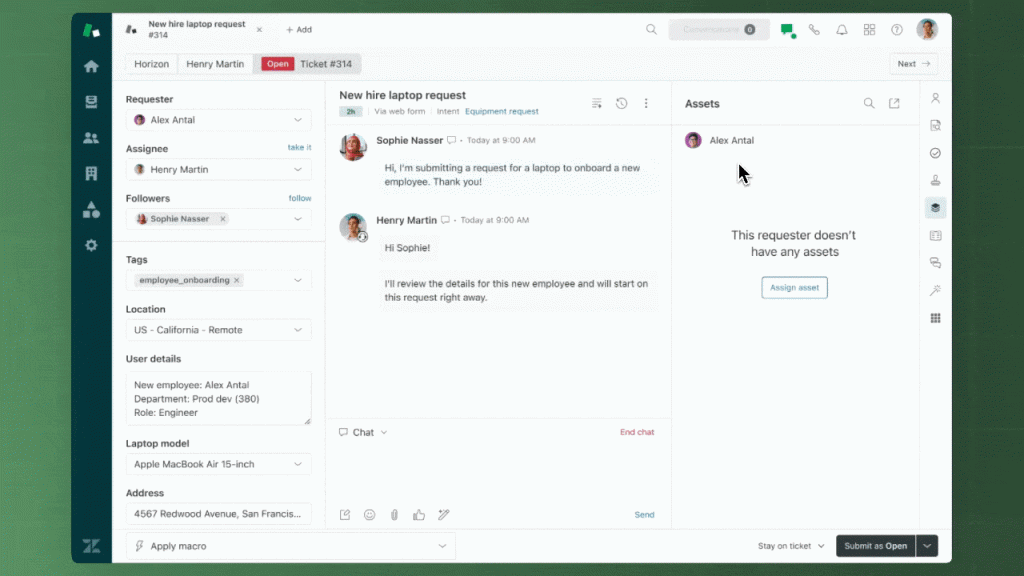
Zendesk has historically lacked native asset management, with teams relying on Custom Objects as a workaround, creating manual data models for hardware, software licenses, and equipment that required significant setup and configuration.
Here’s what a Zendesk user shared on Reddit: “We currently use Zendesk. It works well for our use, but we’d have to pay for an asset management solution to bolt on.”
However, Zendesk launched an IT Asset Management Early Access Program (EAP) in November 2025, with Phase 2 rolling out in February 2026. The EAP introduces a dedicated ITAM module with asset tracking and inventory management, lifecycle management (from acquisition to disposal), seamless ticketing integration, and automatic sync with third-party tools like Jamf Pro and Microsoft Intune. It’s not fully GA yet, but it signals that Zendesk is actively closing this gap.
Spiceworks’ Asset Management Capabilities
Spiceworks Inventory is a cloud-based asset management tool that integrates directly with the help desk.
It scans networks to discover IP-enabled devices like laptops, servers, printers, IoT devices, and logs details like manufacturer, MAC address, OS, installed software, and serial numbers. When a ticket comes in about a specific device, techs can link it directly to the asset record.
Here’s what a user has to say: “My life became easy when I started using Spiceworks to update all the IT assets, as I can add new devices from anywhere and monitor who was assigned to a particular device for tracking and report documentation.”

The Verdict on Asset Management
Spiceworks wins this one. Its built-in inventory tool automatically discovers and tracks devices and links them directly to help desk tickets with no setup required.
Zendesk’s ITAM EAP is promising, but it’s early access and not yet available to all users. If you’re already on Zendesk and can wait for GA, it’s worth watching.
Recommended reading
SLA Management
Service Level Agreements (SLAs) define response and resolution time targets, and a good help desk should help you enforce them.
Zendesk’s SLA features
Zendesk offers advanced SLA policies on the Suite Professional plan ($115/agent/month) and above. Teams can set multiple SLA targets based on priority, ticket type, or customer tier.
SLA breach notifications, escalation triggers, and detailed SLA reporting through Explore help managers stay on top of commitments.
On Enterprise plans, group SLAs are also available to measure internal team handoffs and ownership time.
Spiceworks’ SLA features
Spiceworks has basic SLA features. You can set ticket due dates and get overdue alerts. But the SLA management isn’t as granular as Zendesk’s, and there’s no automated escalation or multi-tier SLA policy support.
The Verdict on SLA Management
Zendesk provides far more structured SLA management. Teams can define multiple policies, automate escalations, and track SLA performance through detailed reports.
Spiceworks, by comparison, offers only basic due-date tracking and overdue alerts, which may work for small IT teams but lacks the policy flexibility and automation larger support operations often need.
Recommended reading
Zendesk vs Spiceworks: Usability, Customization, Compliance
Feature depth is only part of the story. How easy a platform is to use, how much you can customize it, and whether it meets compliance requirements can significantly influence which help desk works best for your team. Let’s compare the two platforms on these factors:
Implementation and Ease of Use
Zendesk
Zendesk positions itself as ready to go in days, not months. But real-world reviews consistently flag that advanced configuration takes longer than expected and often requires technical expertise — especially for triggers, automations, and multi-brand setups. Enterprise onboarding with custom workflows can stretch into weeks. The Agent Workspace is well-designed for experienced support agents, but the admin panel and reporting setup require significant time investment.
Here’s what a G2 reviewer says: Honestly, Zendesk can be a bit of a headache to set up, often requiring a dedicated expert just to get the workflows right.
Spiceworks
Spiceworks is genuinely quick to deploy. Teams can set up an email address for ticket intake, configure basic categories, and start accepting tickets within an hour. However, the platform’s simplicity reflects its limited feature set, and the ad-supported interface may be distracting for some users.
The Verdict on Implementation and Ease of Use
Spiceworks is easier to deploy and learn, making it a good fit for small IT teams that want a simple help desk with minimal setup.
Zendesk requires more time to configure and adopt, but the additional complexity comes with greater flexibility for larger or more structured support operations.
Deployment
Zendesk
Zendesk is 100% cloud SaaS with full-featured mobile apps for iOS and Android.
Spiceworks
Spiceworks is now cloud-only after deprecating its on-premise (Desktop) version in 2021. Spiceworks also has a mobile app, but the mobile experience is more limited. Users report missing features compared to the desktop version.
The Verdict on Deployment
Both are cloud-based helpdesks, but Zendesk provides a more complete mobile experience.
Spiceworks supports mobile access as well, though its app offers fewer capabilities for managing tickets on the go.
Recommended reading
Security, Compliance, and Governance
Zendesk’s Security Certifications
Zendesk takes security seriously. Certifications include:
- SOC 2 Type II
- ISO 27001:2022
- ISO 27018:2019 (cloud privacy)
- ISO 27701:2019 (privacy information management)
- ISO 27017:2015 (cloud security)
- ISO 42001 (AI management — the first international AI standard)
- HIPAA eligibility (on Suite Professional plans and above, with BAA)
Data is hosted in AWS data centers, and enterprise plans offer advanced data protection and governance controls.
Spiceworks’ Security Protections
Spiceworks has basic customer data protections, but the ad-supported model introduces concerns. The free plan serves ads within the interface, which means user data may be shared with third-party ad networks for targeting and analytics.
There are no SOC 2, ISO, or HIPAA certifications. For teams in regulated industries (healthcare, finance, government), this is a serious limitation.
The Verdict on Security and Compliance
Zendesk is the clear choice for organizations with strict security and compliance requirements. Its certifications and governance controls make it suitable for regulated industries and large enterprises.
Spiceworks provides basic security protections, but the lack of formal certifications and its ad-supported model can raise concerns for teams handling sensitive data.
Zendesk vs Spiceworks: Pricing Comparison
Zendesk Pricing
Zendesk uses per-agent, per-month pricing (billed annually):
| Plan | Price/Agent/Month (Annual) | Key Features |
|---|---|---|
| Suite Team | $55 | Multichannel ticketing (email, chat, voice, social), knowledge base, basic AI agents, CSAT, pre-built dashboards |
| Suite Growth | $89 | Everything in Team + SLA management, multilingual support, multiple ticket forms, self-service customer portal, light agents |
| Suite Professional | $115 | Everything in Growth + skills-based routing, HIPAA eligibility, community forums, advanced analytics |
| Suite Enterprise | $169 | Everything in Professional + sandbox, custom agent roles, dynamic workspaces, content cues |
Add-ons (all plans unless noted):
- Copilot (Advanced AI): $50/agent/month — available on Professional and above
- Quality Assurance: $35/agent/month
- Workforce Management: $25/agent/month
- Advanced Data Privacy: $50/agent/month
- Workforce Engagement Bundle (WFM + QA): $50/agent/month
A 20-agent team on Suite Professional with Copilot hits $39,600/year on base plans alone — and that’s before QA, WFM, or data privacy add-ons.
Recommended reading
Zendesk Pricing 2026: Plans, AI Add-Ons, and Hidden Costs Explained
Spiceworks Pricing
Spiceworks uses a freemium model:
| Plan | Price/Agent/Month | What’s Included |
|---|---|---|
| Core (Free) | $0 | Basic ticketing, asset tracking, alerts, reporting, unlimited end-users. Ad-supported. |
| Premium | $6 | Everything in Core plus ad-free experience, bulk actions, live chat, productivity tools. |
For a 20-agent team on Premium, annual costs come to approximately $1,440.
Zendesk vs Spiceworks: Total Cost of Ownership
Sticker price tells one story. That’s why it’s important to account for the total cost of ownership.
Zendesk’s TCO is higher than the plan price suggests.
Per-agent pricing means costs scale linearly with headcount. Feature gating pushes teams toward higher tiers – SLAs require the Growth plan, HIPAA requires Professional, and AI requires an add-on. Users frequently report that costs become harder to justify as teams grow.
Spiceworks’ TCO is near-zero in licensing but carries hidden costs: ads consume agent attention, limited automation means more manual work, basic reporting may force teams to adopt external tools, and the lack of enterprise security features could create compliance gaps.
Remember – “Free” doesn’t mean costless when your team spends extra time on manual workflows.
Zendesk vs Spiceworks: Best for Different Use Cases
In this section, we’ll break down when Zendesk or Spiceworks makes the most sense, based on team size, budget, and support needs.
Best for Small-to-Medium IT Help Desks: Spiceworks
For internal IT teams managing employee requests, hardware issues, and software troubleshooting, Spiceworks makes a strong case.
Built-in asset tracking, network inventory scanning, and Active Directory integration give IT teams tools they actually need, all for free. The Spiceworks community also provides peer support that partially compensates for the lack of formal vendor support.
The $6/month Premium plan removes ads and adds quality-of-life improvements. For a 5-person IT team supporting 200 employees, this is hard to beat on value.
Best for Enterprise Customer Support: Zendesk
When you’re handling thousands of external customer conversations across email, chat, phone, and social media, Zendesk’s infrastructure pays for itself.
The omnichannel Agent Workspace, advanced SLA policies, AI-powered triage, and 1,500+ integrations create a support operation that scales. Enterprise-grade security certifications (SOC 2, ISO 27001, HIPAA) also matter when you’re handling sensitive customer data.
The investment is significant, though. A 50-agent team on Professional plans can easily reach $100K+ annually. However, for organizations where support quality directly impacts revenue and retention, Zendesk delivers the tooling to match.
Recommended reading
12 Best Enterprise Help Desk Software (Ranked by User Reviews)
Best for Budget-Conscious Teams: Spiceworks (With Caveats)
Spiceworks’ free Core plan is unbeatable on price.
If your team handles a low-to-moderate volume of internal requests and doesn’t need omnichannel support, AI, or enterprise compliance, it’s a practical starting point.
But budget-conscious teams that handle customer-facing support should look beyond both tools. Free doesn’t help if the tool doesn’t cover your channels or workflow needs.
Recommended reading
The 15 Best Low-Cost Help Desk Software for Small Businesses
Zendesk vs Spiceworks: Which Should You Choose?
Choose Zendesk if:
- Your team handles external customer-facing support
- You need omnichannel coverage (email, chat, voice, social, messaging)
- AI-powered automation and self-service are priorities
- You operate in a regulated industry requiring SOC 2, ISO, or HIPAA
- You have the budget for $55–$115+/agent/month
Choose Spiceworks if:
- You manage an internal IT help desk
- Asset tracking and device inventory are essential
- You’re a small IT team with a tight (or zero) budget
- You don’t need live chat, voice, social, or AI features
- You can tolerate ads or are willing to pay $6/agent/month to remove them
Hiver: A Simpler Alternative When Neither Zendesk nor Spiceworks Fits
For teams caught between Zendesk’s complexity and Spiceworks’ limitations, Hiver offers a different approach.
Hiver is anAI-powered help desk platform that you can get started with in minutes. It’s designed for teams that want to manage customer service operations without the overhead of learning a new platform. Instead of pulling agents into a separate ticketing system, Hiver turns shared inboxes (like support@ or help@) into a full multi-channel help desk with email, chat, voice, and a knowledge base.
Here’s what makes Hiver relevant for teams evaluating Zendesk vs Spiceworks:
- AI included in every paid plan; not a $50 add-on. Unlike Zendesk, which charges an extra $50/agent/month for its Copilot add-on, Hiver offers AI ticketing across all paid plans at no additional cost. That includes AI Agents (auto-tagging, sentiment analysis, autonomous query resolution), AI Copilot (suggested responses, compose, summarizer), AI QA (real-time response scoring), and AI Insights (conversation trends, performance coaching).
- It’s built for simplicity without sacrificing capability. Teams can set and track response and resolution SLAs, monitor performance through reporting dashboards, and keep collaboration organized through shared inboxes. Features like collision detection help prevent duplicate replies, ensuring customers always receive clear and timely responses.
- Pricing that scales predictably. Hiver starts at $0 (Free plan) and scales to $25/user/month (Growth), $55/user/month (Pro), and $85/user/month (Elite) — all billed annually. AI is included across all paid plans, with no per-resolution charges or hidden add-on tiers. For a 20-agent team on Hiver Pro, annual costs come to approximately $13,200, versus $39,600+ for a comparable Zendesk Professional + Copilot setup.
| Comparison | Zendesk Suite Professional | Spiceworks Premium | Hiver Pro |
|---|---|---|---|
| Price/agent/month | $115 + $50 (AI add-on) = $165 | $6 | $55 (AI included) |
| Annual cost (20 agents) | ~$39,600 | ~$1,440 | ~$13,200 |
| Channels | Email, chat, voice, social, messaging | Email, web portal | Email, chat, voice, knowledge base |
| AI capabilities | Advanced — AI agents, copilot, triage (paid add-on) | None | Full — copilot, agents, insights, QA (included) |
| Asset management | Via Custom Objects | Native | Not native |
| Setup complexity | High | Low | Low |
| Security certifications | SOC 2, ISO 27001, HIPAA-eligible | Basic | SOC 2, HIPAA (Elite plan) |
Hiver covers several core ITSM workflows, including ticket triage, SLA tracking, approval workflows, Jira escalations, and an internal knowledge base for L1 deflection. However, it doesn’t offer asset management capabilities like network scanning, device inventory, or hardware lifecycle tracking. For IT teams where asset visibility is non-negotiable, Spiceworks still wins that ground.
And for enterprises with 500+ agents and deep customization requirements, Zendesk’s ecosystem is hard to replace. But for support teams of 5 to 100 agents who want effective AI, omnichannel ticketing, and a fast setup without enterprise-level complexity, Hiver is worth evaluating.
Curious enough? Take Hiver for a spin today!
Frequently Asked Questions (FAQs)
1. Should internal IT and customer-facing support share the same tool?
Not always. Internal IT teams prioritize asset tracking, device inventory, and employee request management – workflows built around ITSM principles. Customer-facing support teams prioritize fast, multi-channel communication, self-service, and CSAT measurement. Trying to force both into a single platform often means compromises on both sides.
That said, if your team handles both IT and customer support (common in mid-sized companies), a single platform that covers both use cases, like Zendesk for Employee Service or Hiver’s multi-channel inbox, can reduce tool sprawl and simplify vendor management.
2. Does Spiceworks integrate with Zendesk?
Not natively. There is no direct integration between the two platforms. Connecting them would require a third-party automation tool like Zapier or Tray.io, and even then, the integration depth is limited since Spiceworks lacks a robust API. Most teams evaluating both tools are choosing between them, not trying to connect them.
3. Does Zendesk have native asset management?
No. Zendesk doesn’t include a built-in asset management module. However, teams can use Custom Objects, a feature that allows admins to define custom data models within Zendesk, to track assets like hardware, software licenses, or equipment. This requires setup (creating objects, importing data, configuring lookup fields) and works best for teams that already have Zendesk and want to bring asset data into agent workflows. It’s not a replacement for a dedicated ITAM tool.
4. Which platform integrates best with Microsoft 365 or Slack?
For Microsoft 365: Spiceworks has a natural fit for Microsoft-centric IT environments through its Active Directory and LDAP integration, which supports user authentication and device management. Zendesk also integrates with Microsoft 365, Teams, and Outlook, but through marketplace apps rather than native IT-level integration.
For Slack: Zendesk has deeper Slack integration, allowing teams to create tickets from Slack messages, receive ticket notifications, and collaborate on issues directly in Slack channels. Spiceworks doesn’t offer a native Slack integration.
For teams using both: Hiver integrates natively with both Google Workspace and Microsoft 365, and offers Slack integration for real-time notifications and collaboration.













