


Top AI ticketing tools in 2026:
- Hiver: Best for teams that handle complex tickets and want AI across the support lifecycle. AI Agents, Copilot, and QA come built in, starting at $25/user/month. No separate AI add-on fees.
- Zendesk: Best for large teams with complex operations. AI only starts at $55/user/month. It is powerful, but it costs more and takes a while to set up.
- Freshdesk: Best for growing teams. Its AI, Freddy, works well, but it is a paid add-on, so your total cost is hard to predict.
- Intercom (Fin): Best for teams that want AI to resolve transactional tickets on its own. You pay $0.99 for each ticket Fin resolves, so the cost goes up as volume grows.
There was a time when customer support meant listening to elevator music on hold or sending an email and waiting three to five business days for a response.
As support moved online, speed improved. Live chat made conversations more immediate, and automated acknowledgments confirmed requests instantly. But as businesses scaled and customer expectations rose, the real challenge shifted behind the scenes: how to manage growing volumes without losing context, consistency, or speed.
Over the last few years, the way support teams handle that operational layer has evolved. A big part of that evolution is the rise of AI ticketing systems.
These systems help classify incoming requests, detect intent, prioritize urgency, and route tickets more efficiently from the moment they arrive.
They don’t replace good support. They help teams maintain it at scale.
So what exactly is an AI ticketing system, and how does it work? Let’s break it down.
What is an AI Ticketing System?
An AI ticketing system is a platform that uses artificial intelligence to manage customer requests from start to finish. It collects tickets from email, chat, web forms, and social channels and turns them into organized, actionable work for teams.
Traditional ticketing systems depend heavily on manual effort. Agents must read, categorize, and assign each ticket individually, often leading to slower response times, higher workloads, and inconsistent prioritization.
On the other hand, AI ticketing systems understand conversations using natural language processing (NLP), machine learning (ML), and generative AI. The system detects intent, classifies tickets, prioritizes urgency, routes requests automatically, and suggests responses for agents.
This helps customer support teams, IT helpdesks, and operations teams handle higher ticket volumes with less manual effort.
Teams respond faster, reduce repetitive tasks, and maintain consistent service quality while keeping humans involved where judgment is needed.
Recommended reading
10 Best AI Helpdesk Software in 2026: Ranked by AI Efficiency
What features should an AI ticketing system have?
AI ticketing systems help support teams move faster, reduce manual work, and make better decisions during every customer interaction. These are the core capabilities you should ideally look for.
- Auto-tagging and categorization: AI reads incoming requests and applies the right labels automatically. Teams skip manual sorting and start working on tickets immediately.
- Intelligent routing and prioritization: The system sends each ticket to the right agent based on urgency, expertise, workload, and response targets. Critical issues get attention first without managers stepping in.
- AI-assisted reply creation and conversation summaries: AI drafts response suggestions and summarizes long conversations. Agents understand context quickly and reply with less effort while maintaining consistency.
- Knowledge base integration: The platform surfaces relevant help articles and internal documentation directly inside the ticket view. Agents find answers faster without switching between tools.
- Agent assistance workspace: AI supports agents in real time by suggesting next steps, highlighting missing details, and guiding conversations toward resolution.
- Self-service and automated resolutions: Automated assistants resolve repetitive questions before they reach human agents. Customers receive instant answers while teams focus on complex cases.
- Analytics and insights: AI tracks performance metrics such as backlog trends, resolution speed, and automation impact. Leaders use these insights to improve workflows and staffing decisions.
- Security, privacy, and audit logs: The system controls access, records actions, and protects sensitive customer data. Teams maintain visibility and accountability while scaling automation.
AI Ticketing vs Manual Ticketing: Which Is Right for Your Team?
Yes. Manual ticketing depends on human effort and slows down as ticket volume grows. An AI ticketing system automates tasks like ticket creation, categorization, and routing. This helps teams respond faster and focus on solving complex customer issues.
Which AI ticketing tools are worth using in 2026?
| Feature | Hiver | Zendesk | Freshdesk | Intercom (Fin) |
|---|---|---|---|---|
| AI in base plan? | Yes | No (from $55/user) | No (add-on) | No ($0.99/resolution) |
| AI Agents | Yes | Yes | Yes (Freddy) | Yes (Fin) |
| AI Copilot | Yes | Yes | Yes | Yes |
| AI QA | Yes | No | No | No |
| Pricing from | $25/user/mo | $19/user/mo | $19/user/mo | $29/seat/mo |
| Setup complexity | Low | High | Medium | Medium |
| Best for | Complex queries with AI helping throughout the support lifecycle | Large teams, complex setup | Growing teams who can add AI later as they scale | Transactional queries needing maximum AI deflection |
To build this list, I evaluated 11 AI ticketing platforms using the same criteria across every tool: how well AI actually works in day-to-day support.
I reviewed product documentation, analyzed user reviews, and compared how each platform handles core workflows like triage, routing, automation, agent assistance, and reporting. My goal wasn’t to rank a winner, but to highlight the top 4 tools that genuinely apply AI to improve support operations.
Note that every platform in this list, including Hiver, was evaluated using the same unbiased framework focused on AI maturity, workflow impact, and practical usability.
1. Hiver
Tool at a glance: Hiver is an AI-powered help desk that manages email, live chat, WhatsApp, and voice from one workspace. It is built for teams handling complex, relationship-driven support that requires cross-team collaboration. Starting price: $25/user/month. Free trial: 7 days. AI features include Agents, Copilot, and QA, all included across paid plans with no per-resolution fees. Key limitations: free plan automation is limited, the mobile app lags behind desktop, and it is not built for ITIL workflows. Best for teams that want AI included in the base plan with predictable pricing as they scale.
My favorite thing about Hiver is that it offers all essential AI ticketing features without compromising on ease of use. This is, in fact, where it wins over legacy ticketing platforms like Zendesk or Intercom.

Hiver’s AI is present across the support lifecycle and is not a glorified chatbot. Behind the scenes, support agents can use AI to draft replies, rewrite messages, and summarize long customer conversations.
They can also ask the AI to pull up information from the knowledge base articles while responding to customers. Straightforward, repetitive requests on password resets or refund policies can be handled automatically by Hiver’s AI agents.
Other features, like the AI QA review conversations and highlight coaching opportunities, while AI Insights surface bottlenecks in support quality and processes without teams having to create manual reports.
The platform also includes role-based permissions, audit visibility, and governance controls to help teams maintain oversight over AI usage and customer data.
The trade-off is that if your organization relies on complex ITSM processes or heavy workflow customization, a more enterprise-focused platform like Zendesk might be a better fit.
Key facts about Hiver’s AI
- Setting up automations is extremely easy and straightforward
- All-in-one AI workspace combining Copilot, Agents, and Insights
- AI QA and coaching visibility for team performance
Pricing: Starts at $25 per user/month, with AI features included across plans rather than sold as separate add-ons. This ensures that costs remain predictable even when the volume of support tickets increases.
2. Zendesk
Tool at a glance: Zendesk is a help desk built for large teams managing high ticket volumes across multiple departments with complex routing needs. Starting price: $19/user/month; AI features start at $55/user/month. Free trial: 14 days. AI features include reply drafting, intent detection, automatic routing, and 24/7 bots, available on Suite Professional and above. Key limitations: AI is not included in the base plan so costs climb fast, and the automation is complex enough that most teams need a dedicated admin to run it. Best for large teams with the budget and staff to handle high-volume, multi-department support.
When I look at Zendesk, I see a platform designed for teams managing large, complex support operations. It is the best option on the list for companies where multiple teams handle high ticket volumes and need structured workflows to keep everything organized.
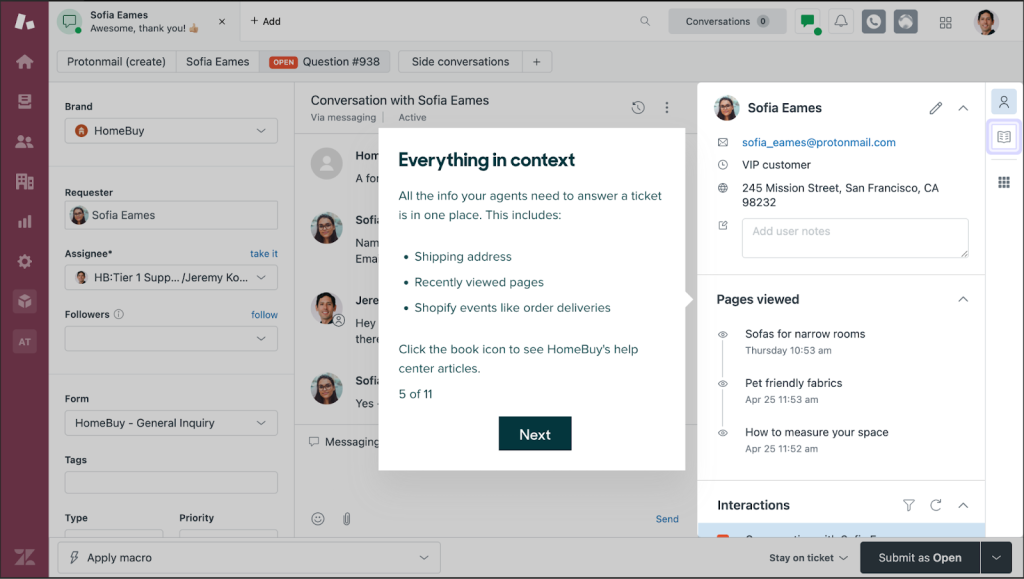
Zendesk includes AI features like reply drafting, conversation summaries, and suggested next steps inside the agent workspace.
It can also detect intent, categorize tickets, and route them automatically using historical patterns. Bots are available to handle routine queries and provide 24/7 automated responses across channels.
That said, most of Zendesk’s automation is built on layers of rules, triggers, workflows, and permissions. To get the most out of it, teams usually need careful setup and ongoing admin management. It is powerful, but it can feel complex and time-consuming to maintain.
Compare that to a platform like Hiver, where automations are extremely easy to set up and maintain. You can use a simple drag-and-drop builder to create extremely sophisticated workflows.
Zendesk is also relatively expensive. A 10-agent team on Zendesk Suite Professional with AI Copilot would spend about $19,800 per year, compared to roughly $7,800 on Hiver Pro, a difference of around $12,000 annually.
Top features
- Deep workflow customization with layered triggers and automations
- Advanced routing logic for scenarios where a support ticket has to be handled by multiple teams
- Enterprise reporting and governance controls
Pricing: The basic plan starts at $19 per agent/month, but AI is only included in the higher plans (starting at US$55 per agent/month).
3. Freshdesk
Tool at a glance: Freshdesk is a help desk that leans heavily on Freddy AI, which can handle simple requests end to end without an agent stepping in. Starting price: $19/agent/month; advanced automation requires a higher plan. Free trial: 14 days, with a free plan that expires after 6 months. AI features include Freddy Copilot and AI Agents, both available as paid add-ons billed by usage. Key limitation: AI costs are unpredictable since Copilot is an add-on and AI Agents are billed per resolved ticket. Best for growing teams that want strong automation and are comfortable with costs that vary by usage.
Freshdesk often appeals to growing support teams that want stronger automation without committing to a full enterprise setup. It sits between basic helpdesks and large-scale service platforms, offering AI capabilities that expand as teams mature.
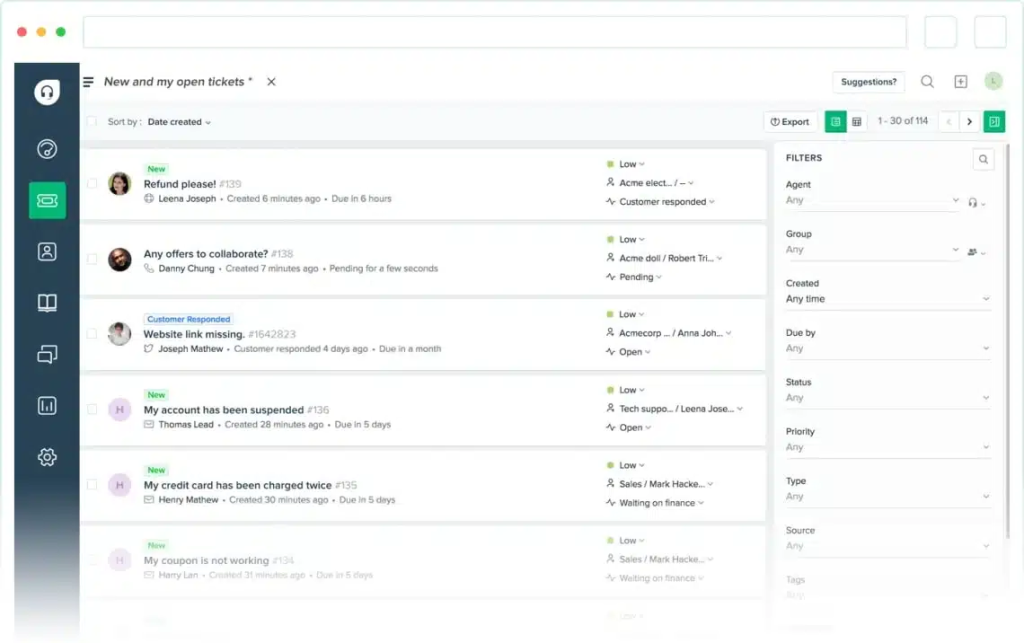
Freddy AI powers much of Freshdesk’s automation.
It helps agents draft replies, summarize conversations, detect intent, and route tickets automatically.
It also has AI agents that can track orders, process exchanges, update subscriptions, or modify customer details without agent involvement.
Moreover, they escalate conversations to humans with full context when needed. Prebuilt workflows and a no-code builder allow teams to launch automation quickly and expand it as support operations grow.
For organizations with mature support operations, this level of automation can unlock significant efficiency.
The pricing can be a concern. While Freshdesk plans start at $19 per agent per month, most teams needing advanced automation move to the $55 Pro plan, with Freddy AI Copilot priced separately and AI agents billed by usage.
This is why some teams prefer tools like Hiver, where AI is included as a core capability instead of layered on through add-ons or separate pricing models.
Top features
- Freddy AI can handle customer requests end-to-end, such as tracking orders or updating subscriptions.
- Skill-based routing with workload balancing
- Tiered automation that expands as teams grow
Pricing: The basic plan starts at $19 per agent/month, but AI features are available only in higher plans or as paid Freddy AI add-ons.
4. Intercom (Fin AI)
Tool at a glance: Intercom is a support platform built for chat-first and in-app conversations. Its AI agent, Fin, resolves transactional queries end to end and hands off to a human when it cannot. Starting price: $29/seat/month plus $0.99 per ticket Fin resolves. Free trial: 14 days. AI features include Fin for autonomous resolution and Copilot for reply suggestions and chat summaries. Key limitations: costs scale directly with Fin’s resolution volume, and answer quality depends entirely on how current your help content is. Best for teams running chat and in-app support who want AI handling as many tickets as possible and are fine paying per resolution.
Intercom was built with the goal of letting AI resolve a large share of customer conversations without intervention from human support agents.
This approach works well for teams that are eager to experiment with AI, and are extremely committed to operationalizing it in customer-facing scenarios.

Fin AI Agent attempts to answer customer questions independently and accurately using help center content and past conversations.
The system evaluates incoming requests, decides whether AI can resolve them on its own or escalate, and transfers full context to agents when human support is required.
Where I see trade-offs is in control and cost. This model depends heavily on well-maintained knowledge bases and ongoing monitoring to ensure response quality.
Again, pricing is usage-based, with Fin billed at $0.99 per resolution, so costs rise as AI handles more conversations.
In comparison, tools like Hiver, starting around $19 per user per month, include AI within the base plan, making costs easier to predict as automation scales.
Top features
- Fin AI Agent for autonomous resolution
- AI performance tracking and containment analytics
Pricing: Starts at $29 per seat/month (billed annually). AI automation is priced at $0.99 per successful resolution.
Which industries benefit most from AI Ticketing?
To understand the real impact of AI ticketing, let’s look at how different industries apply it in day-to-day operations.
SaaS
For SaaS customer support, ticket volume grows faster than teams expect. New users ask onboarding questions, customers run into account access issues, and billing conversations spike every renewal cycle.
AI ticketing helps SaaS teams instantly categorize these requests, guide onboarding automatically, and route complex product issues to the right experts. This helps teams keep response times fast even as customer bases scale.
IT Industry
AI ticketing has most benefited internal IT support, turning slow, manual processes into near-instant resolutions.
For example, Unity Technologies introduced an AI-based support assistant when remote work led to a higher number of IT requests. The system was used to handle routine problems such as account access and basic troubleshooting. This reduced response times for standard tickets and allowed IT staff to spend more time on complex or unresolved cases.
Travel & Hospitality
In travel and hospitality, support requests are highly time-sensitive. Guests and partners often reach out about itinerary changes, refunds, loyalty programs, availability updates, or booking corrections, where delays directly impact revenue and customer experience.
AI ticketing helps teams manage these requests with structured workflows, automated routing, and SLA tracking. For example, travel platform Travelist uses Hiver to organize internal operations and automate request handling, helping teams maintain accurate listings and save 160+ hours every month through smarter workflows and automation.
E-commerce
In e-commerce customer support, AI ticketing isn’t just about speed but personalization and scalability.
For instance, Tata Neu, India’s first super app, launched AI automation to manage millions of customer queries daily. AI chatbots now resolve half of all customer issues without human input. This improved response times and allowed the platform to deliver consistent, high-quality service across shopping, travel, and finance verticals, all within a single digital experience.
Healthcare
AI ticketing is transforming how organizations manage patient and provider inquiries at scale in healthcare.
Medline Industries, the largest privately held healthcare manufacturer in the U.S., uses AI capabilities to streamline its massive support ecosystem. Handling over 800,000 tickets annually, Medline achieved a 78% one-touch resolution rate, a 52% boost in email productivity, and sustained billion-dollar revenue growth. This was all driven by faster, smarter routing and self-service powered by AI.
Finance
Banks are increasingly relying on AI ticketing to deliver 24/7, multilingual support while maintaining compliance and security.
DNB, Norway’s largest financial institution, deployed Boost.ai’s conversational agents, including “Aino” for customer support and “Hugo” for HR. The goal was to automate over 50% of all chat traffic. The virtual assistants now interact with more than a million customers, helping DNB cut costs, maintain data control, and achieve record-high satisfaction scores, even during peak inquiry periods.
Education, HR & Nonprofit
Beyond corporate sectors, AI ticketing empowers mission-driven organizations to do more with less.
Nonprofits like the American Cancer Society have leveraged AI-driven insights to increase donor conversions by 400%, proving that automation and empathy can coexist to drive real-world impact.
What are the benefits of using an AI ticketing system?
AI ticketing systems bring a measurable impact to customer service teams. They eliminate manual effort, speed up resolutions, and improve both agent performance and customer satisfaction.
Let’s take a look at the benefits in detail:
- Always available: Your AI system never clocks out. It’s ready to respond 24/7 so customers can get help even when your team’s offline.
- Fast responses: Instead of waiting in queues, customers receive instant acknowledgment and suggested solutions. AI automatically sorts and categorizes requests, helping teams achieve lower FRT and MTTR by reducing the time spent on manual triage.
- Smart routing: There is no need for manual triage. Each ticket automatically goes to the right person or department, saving time and preventing mix-ups.
- Less busywork: 60% of customer support professionals recognize AI’s in automating repetitive tasks and offering intelligent recommendations. You and your team can finally focus on real problem-solving.
- More consistent answers: AI helps ensure every response matches your brand voice and is factually accurate, even on a hectic day.
- Easy to scale: Whether your volume doubles overnight or during the holidays, AI keeps up without needing more headcount. In fact, during peak shopping seasons, Alibaba’s AI chatbots field over 2 million customer sessions per day, handling 10+ million messages.
- Lower costs: Automating simple queries means fewer agents handling repetitive work, so you save on staffing while keeping quality high. An IBM report confirms that AI can cut customer support costs by this same 30% margin.
- One system for every channel: Customers can reach you through chat, email, voice, SMS, or social media, and the AI connects it all behind the scenes for a smooth experience.
- No missed SLAs: The system automatically spots high-priority tickets and moves them up the queue, so you never miss critical deadlines.
What Are the Challenges of Implementing an AI Ticketing System?
Adopting an AI ticketing system is less about switching tools and more about changing how support operates. Most implementation challenges come from data readiness, workflow alignment, and trust in automation rather than the technology itself.
- Unstructured or incomplete support data:
AI performs best when past tickets, help articles, and workflows are consistent. Many teams discover gaps in documentation only after deployment. Missing knowledge base content, unclear ownership rules, or inconsistent tagging can reduce AI accuracy until processes are standardized.
- Hallucinations and response safety: Generative AI can occasionally produce confident but incorrect answers. Without guardrails, this risks customer frustration or brand damage. Teams must introduce approval workflows, grounded responses, and escalation logic so AI assists safely rather than operating unchecked.
- Data privacy, security, and compliance concerns:Customer conversations often contain sensitive information. Organizations must define clear policies around data protection & PII handling, access permissions, and audit trails before expanding AI automation across channels.
- Agent adoption and workflow change: AI alters daily agent workflows. Resistance typically comes from uncertainty rather than opposition. Strong help desk management practices, such as starting with AI suggestions instead of automation, help teams build confidence gradually.
- Over-automation too early: Many companies try to automate resolution immediately. In reality, AI works best when introduced in phases. Beginning with triage, summarization, and drafting allows teams to validate accuracy before enabling autonomous actions.
- Governance and scaling across teams: What works for one support queue may not translate across regions or departments. As organizations expand AI usage, they must define ownership models, performance-monitoring frameworks, and approval processes to scale AI across teams and ensure governance.
- Measuring real impact: AI adoption can feel successful without proving business value. Teams often struggle to connect automation to outcomes. Tracking metrics such as resolution time, automation coverage, deflection rate, and CSAT ensures AI investments remain tied to operational improvement rather than experimentation.
What does the future of AI Ticketing look like?
To ground this section in real-world practice, I spoke with two leaders shaping how AI is being adopted in support today: Shankar Srinivasan (VP of Customer Success at Hiver) and Sandip Gupta (Senior Manager and Customer Experience Transformation Specialist at HCLTech).
Here’s what I learnt from the same:
- Predictive support replaces reactive ticket handling:
If the last few years were about automating ticket queues, the next few will be about anticipating intent—solving problems before customers even have to ask. As Sandip Gupta put it, “We’ll see AI moving from responding to predicting—helping teams prevent issues before customers even notice them.”
That shift is already underway. IBM’s Future of AI in Customer Service Report (2024) found that companies using predictive AI in support see 17% higher CSAT and 21% faster resolutions on average. In practice, this means a system that quietly spots recurring glitches, recognizes churn signals, and nudges teams before the next wave of complaints hits.
- AI augments agents instead of replacing them:
A study at Cornell of more than 5,000 support agents found that AI assistance made agents 15% more productive, especially those newer to the role. That echoes what Shankar told me: “Machines deliver scale, speed, and prediction. Humans deliver care, trust, and meaning. The magic happens when both work together.” In short, the future isn’t AI versus agents—it’s AI with agents.
- Business value shifts from automation to trust and ROI:
FullView’s 2025 research estimates AI in customer service delivers an average 3.5× ROI, with the market projected to exceed $47 billion by 2030. But automation alone will not define success. As Shankar summarized, “Every brand promise is tested in customer support. AI should help us pass that test, not hide behind it.” The organizations that adapt successfully will focus on transparent AI adoption, measurable outcomes like faster resolution and higher CSAT, and tools that align automation with customer trust.
The future of AI ticketing is not about removing humans from support. It is about predictive, contextual systems working quietly in the background so agents can act faster, understand better, and deliver service that earns long-term trust.
Frequently Asked Questions
1. What is an AI ticketing system and how is it different from traditional ticketing?
Traditional ticketing requires agents to manually read, categorise, and assign every incoming request, a process that breaks down as volume grows. An AI ticketing system replaces that layer using NLP, machine learning, and generative AI to detect intent, classify tickets, prioritise urgency, route requests automatically, and suggest responses. Teams handle higher volumes without proportionally increasing headcount, while humans stay involved for judgment-heavy cases.
2. What features should you look for in an AI ticketing system?
The core features worth evaluating: auto-tagging and categorisation, intelligent routing by urgency and agent expertise, AI reply drafting and conversation summarisation, knowledge base integration within the ticket view, self-service resolution for repetitive queries, real-time agent assistance, analytics on backlog and automation impact, and audit logs for governance. The key distinction is whether AI is embedded natively in the workflow or sold as a separate module added on top.
3. Which AI ticketing tools include AI in the base plan without add-on fees?
Among the major platforms, most price AI separately. Zendesk includes AI only from its $55/user/month tier, the base plan at $19/user/month does not include AI features. Freshdesk’s Freddy AI Copilot is a paid add-on on top of base plans. Intercom’s Fin AI is billed at $0.99 per successful resolution, meaning costs scale with usage volume. Hiver is the exception, AI Agents, Copilot, QA, and Insights are included across all paid plans starting at $25/user/month with no separate AI billing, making total cost easier to predict as automation scales.
4. How does Hiver’s AI differ from Zendesk’s AI in a ticketing context?
Both platforms offer AI reply drafting, conversation summarisation, intent detection, and automatic routing. The primary differences are cost structure, setup complexity, and scope. Zendesk’s AI capabilities are available only from the $55/user/month tier and are built on layers of rules, triggers, and workflow configurations that typically require dedicated admin management. Hiver includes AI Agents, Copilot, QA, and Insights from $25/user/month, with automations described as significantly easier to set up, including a drag-and-drop builder for complex workflows. A 10-agent team on Zendesk Suite Professional with AI Copilot costs approximately $19,800 per year versus roughly $7,800 on Hiver Pro, a difference of around $12,000 annually.
5. Can AI resolve customer tickets automatically without human involvement?
Yes, for certain categories. AI can fully resolve routine, rules-based requests such as password resets, order status updates, refund policy questions, and booking confirmations. Hiver’s AI Agents, Freshdesk’s Freddy AI, and Intercom’s Fin AI all support end-to-end automated resolution for these cases, with escalation to human agents, including full conversation context, when requests require judgment. The key constraint is knowledge base quality: AI resolution accuracy depends directly on how well-maintained the underlying help content is.
6. What does the future of AI ticketing look like according to practitioners?
Based on conversations with Shankar Srinivasan (VP of Customer Success at Hiver) and Sandip Gupta (Senior Manager, HCLTech), two shifts are underway. First, AI is moving from reactive (responding to tickets) to predictive- anticipating issues before customers raise them. IBM’s research supports this: companies using predictive AI in support see 17% higher CSAT and 21% faster resolutions. Second, AI augments agents rather than replacing them, a Cornell study of 5,000+ agents found AI assistance made agents 15% more productive, with the biggest gains for newer team members. The framing from Shankar: “Machines deliver scale, speed, and prediction. Humans deliver care, trust, and meaning.”
7. How long does it take to implement an AI ticketing system?
Basic automation, triage, conversation summaries, and reply suggestions, typically goes live within days to weeks of setup. Advanced automation, including autonomous resolution flows and cross-team routing logic, usually evolves over a few months as teams validate accuracy and expand scope. The implementation timeline is less about technical complexity and more about data readiness: teams that have clean, consistent ticket history and well-maintained knowledge bases see faster and more accurate AI performance from the start.
8. Does AI in ticketing replace human support agents?
No. AI handles repetitive, rules-based requests and assists agents in real time, but human involvement remains essential for empathy, contextual judgment, and complex problem-solving. A Cornell study of more than 5,000 support agents found that AI assistance made agents more productive, not redundant. The design principle across platforms like Hiver, Zendesk, and Freshdesk is that AI suggests or automates actions while humans retain oversight and final accountability through approval workflows, confidence thresholds, and escalation rules