







Every team has that one incident that won’t stay fixed. You close it, document the root cause, maybe even run a postmortem, and a few weeks later, it shows up again under a different ticket.
Problem management software is supposed to break that loop, but most tools don’t. They help you track recurring incidents, which is useful, but tracking a pattern isn’t the same as preventing it.
This guide breaks down what actually separates a real problem management tool from an incident log, and what’s worth evaluating if your goal is fewer repeats.
If you’re shortlisting tools, these three cover the most common use cases:
- ServiceNow: Best for strict ITIL workflows and complex, multi-team environments. Pricing is enterprise-level (custom).
- Jira Service Management: Best for teams where problem resolution needs to stay close to engineering. Pricing starts at ~$20/user/month.
- Hiver: Best for teams that need speed, visibility, and fast adoption without heavy setup. Pricing starts at ~$25/user/month.
What is ITIL Problem Management?
ITIL problem management is the process of identifying and fixing the root cause behind recurring incidents within IT Service Management. The goal is to understand why issues happen and prevent them from coming back, not just resolve them one at a time.
This usually involves linking related incidents, analyzing root causes, and documenting fixes so teams don’t repeat the same work. As teams adopt AI in ITSM, this process is increasingly supported by automation, faster root cause analysis, and better pattern detection. In theory, it’s straightforward.
In practice, it only works if teams can actually use that context across workflows. If root causes sit in documents but don’t influence how issues are handled the next time, the process falls short.
6 Top ITIL Problem Management Software
The tools below are built to help teams go beyond incident tracking and actually manage recurring issues at scale. Each one takes a slightly different approach to workflows, automation, and cross-team visibility.
1. ServiceNow
ServiceNow is an enterprise ITSM platform built on the ITIL framework. It brings problem, incident, change, and asset management into one system.
When the same issue hits multiple teams, it doesn’t get handled in isolation. Incidents are grouped under one problem, traced to a root cause, and pushed through change workflows with approvals. The system ensures fixes don’t get lost between teams or stuck in handoffs.
This works when complexity is high and processes need to be enforced.
It takes effort to get there. Workflows need to be designed upfront, and most teams rely on dedicated admins to keep everything running. Without that, it feels heavier than the problem it’s trying to solve.
Key Features
- Grouping related incidents automatically: When multiple tickets point to the same issue, ServiceNow doesn’t treat them separately. It pulls them into one problem record, so the team can focus on the root cause instead of resolving the same ticket five different times.
- Root cause analysis workflows: Investigations don’t happen ad hoc. There’s a clear structure with timelines, hypotheses, and actions, which makes it easier to document what actually worked and reuse that approach later.
- Change management integration: Fixes don’t stop at identification. Once a root cause is confirmed, it moves into a change request with approvals and tracking, so the solution actually gets implemented.
- Known error database (KEDB): Store known issues and workarounds to reduce repeated investigation.
- Automation and approvals: Escalations, routing, and approvals can be built into workflows, so issues move forward without constant manual follow-ups
Pricing
Custom pricing based on modules and scale
Integrations
ServiceNow integrates with tools like Jira, Azure DevOps, Slack, Microsoft Teams, and Salesforce. This allows problems to move across engineering, support, and business workflows without losing context.
Pros
- Teams consistently call out how incidents, problems, and changes stay linked, which makes root cause tracking much clearer.
- Handles complex workflows without breaking. Works well once multiple teams, approvals, and dependencies are involved.
- Detailed logs and reporting come up often in reviews, especially for compliance-heavy teams.
Cons
- A common theme across reviews is the effort required to configure workflows properly.
- Most teams mention needing ongoing support to manage and maintain the system.
- Pricing is often flagged as a challenge, especially as teams and feature usage grow.
2. BMC Helix ITSM
BMC Helix focuses on catching problems earlier, not just managing them after the fact.
It pulls in monitoring data and uses AI to surface patterns before they turn into incidents. Issues get flagged, grouped, and pushed into workflows before support volume spikes.

This works best in environments where system performance drives problem management.
The system still depends on how well it’s configured. Monitoring signals, workflows, and automation need to be wired correctly. Without that, the AI layer doesn’t add much.
Key Features
- Bringing related issues into one place: Related incidents get grouped under a single problem, so teams can focus on the root cause rather than resolving the same issue repeatedly
- Catching issues before they escalate: Monitoring data and AI signals surface patterns early, so teams can act before incidents pile up
- Making investigations repeatable: Root cause analysis follows a structure, which makes it easier to document what worked and reuse it later
- Pushing fixes through controlled workflows: Once the cause is clear, fixes move through change approvals and tracking without losing context
- Reducing back-and-forth between teams: Escalations, routing, and approvals can run automatically, so work keeps moving without manual coordination
Pricing
Custom pricing based on modules and deployment.
Integrations
BMC Helix integrates with Jira, Azure DevOps, Salesforce, and monitoring tools like Dynatrace and SolarWinds.
This works best in environments where problems are tied to system performance. Monitoring data flows directly into workflows, so teams can detect issues early and act before they escalate.
Pros
- Monitoring data feeds into workflows, so patterns show up before they turn into multiple incidents.
- Problems, changes, and approvals move together, which reduces handoff gaps.
- Works well when problem management depends on signals from monitoring tools.
Cons
- Workflows and integrations need to be configured properly first.
- Most teams need admins to manage workflows, data sources, and updates.
- The structure makes sense at scale, but can slow down smaller teams.
3. Jira Service Management
Jira Service Management is a service desk built for teams that already rely on Jira to manage engineering work.
Recurring issues don’t sit in support queues. They get turned into Jira tickets and move directly into development. The same context carries through, so nothing needs to be recreated.
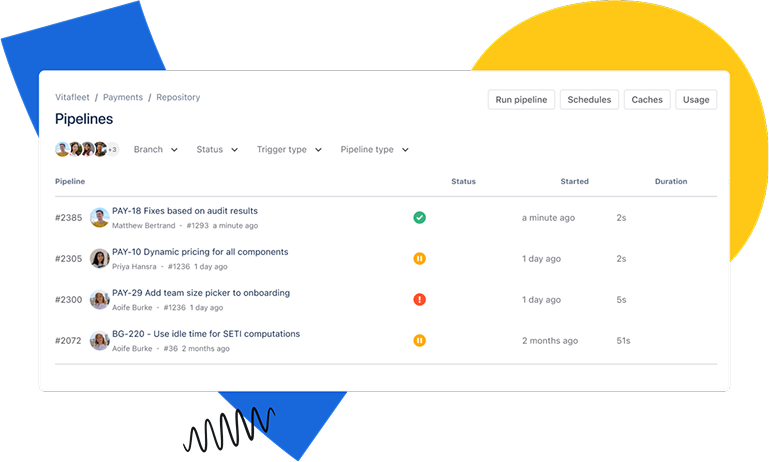
This keeps execution fast and removes handoff friction.
As usage grows, the system becomes harder to manage. Rules, fields, and dependencies build up quickly, and without discipline, workflows turn messy.
Key Features
- Turning support issues into engineering work: Recurring problems can be converted into Jira tickets and assigned directly to developers, so fixes move straight into execution.
- Native Jira integration: This is the biggest advantage. Problems can move straight into development as tasks, which removes delays between support and engineering.
- Keeping incidents tied to the same issue: Related tickets can be linked, which helps teams track how often a problem shows up without reopening the investigation each time.
- Documenting root cause inside Jira workflows: Investigations can be captured alongside tickets, but the quality depends on how consistently teams maintain it.
- Running triage through rules and conditions: Automation handles routing and updates, though managing rules gets harder as workflows expand.
- Tracking fixes through development cycles: Changes can be followed from issue to deployment, but stricter approval layers need to be built manually.
Pricing
Free plan available; paid plans start at ~$20/user/month.
Integrations
Jira Service Management integrates deeply with the Atlassian ecosystem, including Jira, Confluence, Bitbucket, and Opsgenie.
This works best for teams already using these tools. Problem tracking, documentation, and development workflows stay connected, which reduces handoffs and keeps execution faster.
Pros
- Everything flows into Jira, so work starts where it actually gets done.
- Issues can go from detection to development without extra coordination.
- Pricing and setup make it accessible compared to heavier ITSM tools.
Cons
- As rules, fields, and dependencies grow, the system becomes harder to manage.
- Structure isn’t enforced out of the box, so consistency depends on how teams use it.
- New users often struggle to navigate once multiple workflows are in place.
4. Freshservice
Freshservice is designed for teams that need structure without slowing down. You can start linking incidents, problems, and assets quickly, and track recurring issues without heavy setup. It gives enough control to reduce repeat problems without forcing strict workflows.
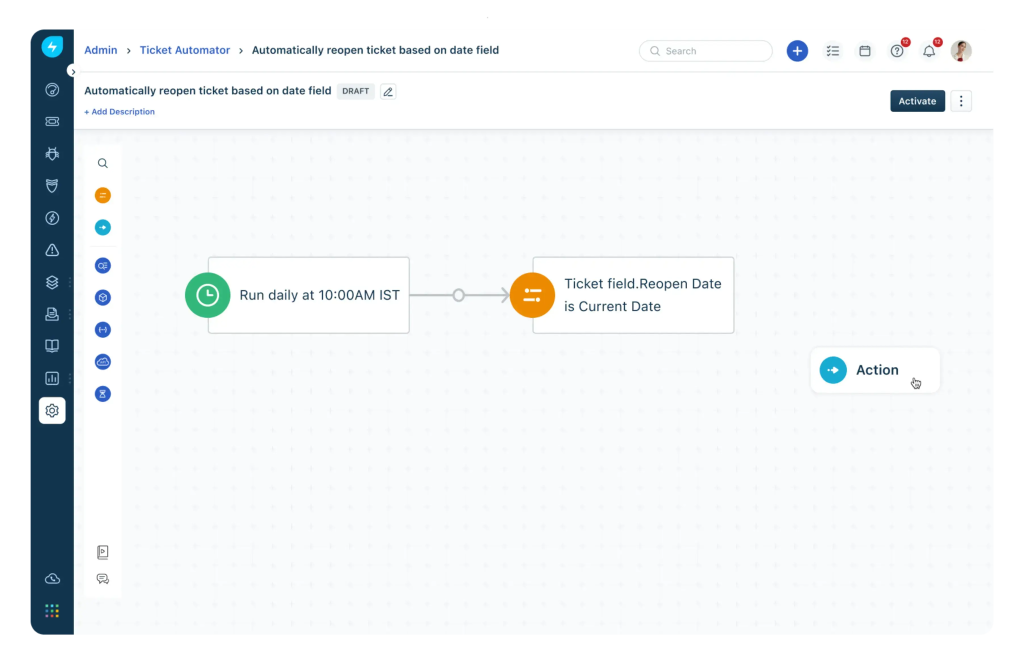
This works well for growing teams moving beyond basic ticketing. However, limits show up when workflows need precision. Customization and reporting don’t go very deep, and advanced features require upgrades.
Key Features
- One place to manage issues and fixes: Incidents, problems, and changes sit in the same system, so teams don’t lose context between steps.
- Issues tied to services and assets: Problems can be linked to infrastructure, which helps teams understand impact and prioritize faster.
- AI that reduces manual triage: Freddy AI surfaces patterns, suggests solutions, and handles repetitive actions.
- Approvals built into fixes: Changes move through structured workflows, so resolutions don’t introduce new issues.
- Automation that keeps work moving: Routing, prioritization, and SLAs run in the background instead of being tracked manually.
Pricing
Starts at ~$19/user/month, but key features such as advanced automation, reporting, and asset management are gated behind higher tiers.
Integrations
Freshservice integrates with Slack, Microsoft Teams, Jira, and monitoring tools.
This works well for teams that need basic coordination across support and engineering. It starts to feel limiting when workflows depend on deeper, multi-system automation.
Pros
- Most teams don’t need long setup cycles to move from basic ticketing to structured workflows.
- Tickets, assets, and services are connected, which makes recurring issues easier to trace.
- Reduces manual triage by surfacing patterns and suggesting next steps.
- Doesn’t require constant admin effort to keep workflows moving.
Cons
- Hard to support highly specific workflows or edge cases.
- Teams often need higher plans for deeper automation and reporting.
- Not ideal for teams with layered processes or multiple dependencies.
- Works for tracking performance, but limited for detailed analysis.
5. ManageEngine ServiceDesk Plus
ManageEngine ServiceDesk Plus is a practical option when budget matters, but an ITIL structure is still needed.
It covers problem, incident, and change management with built-in CMDB support. Teams can track recurring issues, map them to systems, and manage fixes without needing a complex setup.
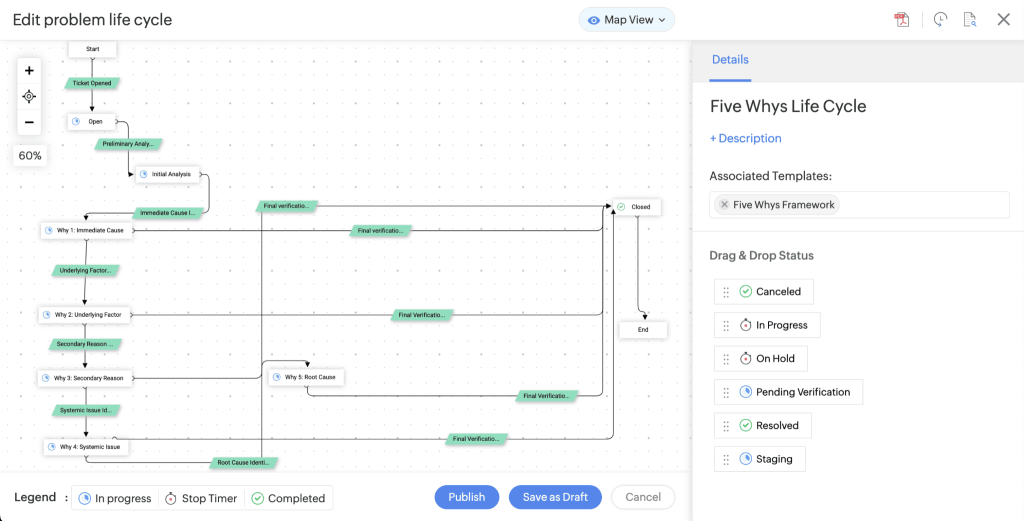
This works when cost matters more than flexibility. The tradeoff shows up in usability. The interface feels dated, and workflows often need more manual effort. It gets the job done, but not efficiently.
Key Features
- Problem management workflows: Track recurring issues and link incidents so teams don’t keep investigating the same problem
- CMDB and asset management: Map problems to systems and infrastructure to understand where failures are happening
- Root cause analysis tools: Document fixes and reuse them, which reduces repeat effort over time
- Change management integration: Push fixes through approvals so changes are tracked and controlled
- Automation and SLA tracking: Enforce response timelines and reduce manual follow-ups
Pricing
Starts at ~$13/user/month, but advanced features like enterprise automation and analytics are available only in higher-tier plans
Integrations
Integrates with tools like Active Directory, Jira, and monitoring systems.
Works well for managing internal IT operations and infrastructure. Becomes limiting when workflows need deeper integration across support, product, and business tools.
Pros
- Low cost of entry. Makes structured problem management accessible without enterprise spend.
- Covers essential ITIL workflows. Problem, incident, and change management are all included.
- Useful for infrastructure-heavy teams. CMDB adds context to recurring issues.
- Flexible deployment. Supports both cloud and on-premise setups.
Cons
- Slower to work with. Interface and workflows add friction in day-to-day use.
- Requires manual effort. Automation and workflows are less streamlined compared to modern tools.
- Limited scalability. Struggles as workflows and team complexity grow.
- Integration depth is basic. Not ideal for highly connected, cross-functional environments.
6. Hiver
If recurring issues aren’t visible early, teams end up solving the same problem dozens of times without realizing it. Tracking it later doesn’t fix that.
Hiver surfaces those patterns while the work is happening. You don’t need someone to manually group tickets or run reports.
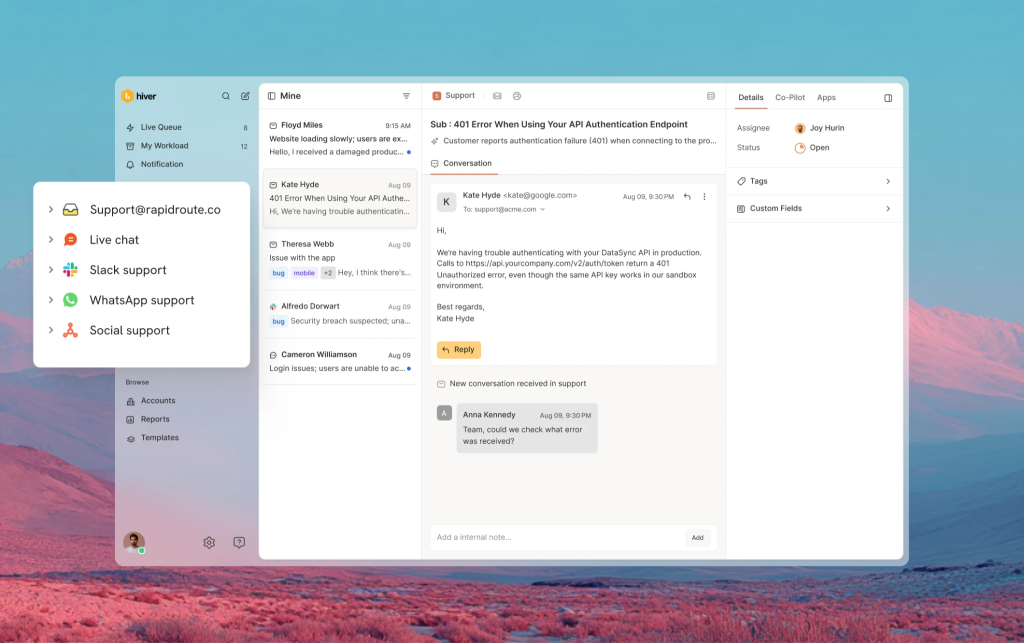
AI Topics clusters conversations automatically, so when a category starts growing, it’s obvious without anyone manually grouping tickets or running reports. That changes how teams react. Patterns show up as they form, which means escalation happens earlier instead of after a spike has already created a backlog.
AI Tagging makes that usable. Every conversation is tagged on arrival based on topic and intent, and those tags feed directly into analytics. You can see when a category started increasing, how fast it’s growing, and what type of issue it is. That’s enough to tell whether it’s a one-off or something systemic.
Execution is where most tools slow teams down. Hiver keeps that part simple.
AI Extract pulls structured data like order IDs, invoice numbers, or ticket references from conversations, so similar issues can be grouped by actual identifiers, not just keywords. Routing and escalation become more precise.
Fixes stay where the work happens. When an agent resolves something, they leave a note in the same thread. The next person dealing with a similar issue can apply the same solution immediately without digging through separate documentation.
When volume increases, AI Tasks handles the repetitive work. It can tag the conversation, assign it, pull in relevant data, and send an initial response before the agent even opens it.
The shift is practical. Problem management doesn’t sit in a separate system. It happens as patterns form, and teams act before the issue spreads.
On G2, one reviewer notes:
“The ability to assign emails to specific team members is invaluable. No more “did someone reply to that?” chaos.”
Another reviewer adds:
“Additionally, once an email is received, we can quickly categorize it and assign responsibilities, which keeps our team running smoothly.”
The tradeoff is clear. You get speed, clarity, and fast adoption. You don’t get deep ITIL structure, formal problem records, or change management workflows. If strict compliance tracking or multi-layered approval processes are required, this won’t get you there.
But if recurring issues are buried in volume and the team keeps re-solving the same problems, Hiver surfaces the pattern before it becomes a crisis.
Key Features
- AI Topics: Automatically clusters conversations by theme so recurring issues become visible without manual tagging or categorization.
- Shared inbox with ownership: Every conversation has a clear owner, so teams stop asking “who’s handling this?” and start moving faster.
- Internal notes and @mentions: Capture fixes inline so the next agent to see a similar issue can apply the solution immediately.
- Automation workflows: Route, tag, and prioritize conversations without constant manual triage.
- Analytics and reporting: Track tag volume, response times, and resolution trends to identify which issues keep coming back.
- SLA management: Set deadlines and get alerts before they’re breached, so follow-ups don’t slip.
- Collision detection: Prevents two agents from replying to the same conversation at the same time.
Pricing
Hiver offers three plans (billed per user/month):
- Growth: starts at $25/user/month
- Pro: starts at $55/user/month
- Elite: starts at $85/user/month
Start with Growth if you need shared visibility and basic workflows in place. Move to Pro when you want automation and AI to handle higher volumes. Elite makes more sense once you need advanced reporting and quality monitoring across larger teams.
Most teams don’t face friction getting started. Costs start to increase as you rely more on automation and AI to scale.
Integrations
From my experience, integrations matter only when they reduce back-and-forth. With Hiver, connecting tools like HubSpot, Salesforce, Slack, or Aircall means I don’t have to chase context. Customer details, conversations, and internal updates stay connected to the same thread.
It works well when teams need quick coordination across support, sales, and engineering. If I were trying to build deeply layered workflows across multiple systems, this is where I’d start hitting limits.
Pros
- No long setup or workflow design needed to start seeing patterns and assigning ownership.
- Internal notes keep solutions inside the conversation, so agents don’t re-investigate.
- Every conversation has an assignee, which removes missed replies and duplicate responses.
- Automation handles routing and triage, so teams don’t need to constantly restructure workflows.
Cons
- There are no dedicated problem records, change workflows, or compliance-heavy tracking.
- You can automate and route work, but not design highly customized, multi-layered processes.
- Works for tracking trends and performance, but not for deep audits or granular analysis.
Recurring issues don’t get fixed by tracking them better. They get fixed when patterns are visible early and acted on quickly. Teams that catch those signals sooner spend less time re-investigating and more time preventing the same problem from coming back.
What are the Key Features of Problem Management Software?
These are the features that determine whether a tool actually helps reduce recurring issues or just tracks them.
- Ticketing System with problem records and incident linking: A robust Ticketing System that links related incidents under one problem record so patterns become visible early, and teams stop reopening the same issue across multiple tickets.
- Root Cause Analysis (RCA) workspace: Structures investigations with timelines, evidence, and documentation so teams can identify the real cause and apply the same fix consistently across systems.
- Known Error Database (KEDB): Stores verified fixes and workarounds in one place so agents can resolve recurring issues immediately without starting from scratch.
- Change management integration: Connects problems to change requests so fixes are approved, tested, and implemented in a controlled way without creating new issues.
- Automation and approvals: Builds multi-step workflows for escalations, routing, approvals, and milestones so teams can act before problems escalate.
- AI-powered pattern detection: Automatically clusters similar conversations by topic and intent so recurring issues surface without manual tagging or formal problem records. This replaces the need for a KEDB when fixes are captured inline within conversations.
- Automatic tagging and categorization: Tags every conversation on arrival based on topic, so analytics can track volume trends and surface issues that are spiking before they overwhelm the queue.
- AI-driven Copilot and automation: An AI-driven Copilot detects issue type and triggers workflows (routing, tagging, auto-replies, CRM updates) based on conversation intent, not keywords. This replaces rigid rule-based automation that breaks when customers phrase things differently.
- Inline knowledge capture: Internal notes and mentions let teams document fixes within the conversation thread, so the next agent to see a similar issue can apply the solution immediately without hunting through a separate knowledge base.
- Reports and Analytics: Reports and Analytics track tag volume, response times, resolution trends, and MTTR so teams can identify which issues keep coming back and where fixes aren’t sticking.
- CMDB integration: CMDB Integrations map problems to services and infrastructure so teams can identify affected systems, assess impact, and fix issues at the source.
Each category solves the same core problem (reducing recurring issues) but does it differently. ITIL platforms assume structured workflows, formal problem records, and multi-team dependencies. Support-first tools assume high conversation volume, minimal process overhead, and fixes that need to happen fast.
Without the right features for how the team operates, teams keep reacting to the same issues. With them, problems are identified earlier, resolved faster, and less likely to return.
Benefits of using Problem Management Software
The impact shows up in how quickly issues are resolved and how often they come back.
- Reduced downtime (lower MTTR): Identify root causes faster and fix issues once, so the same problem doesn’t keep disrupting systems
- Cost efficiency: Cut down repeated investigations and escalations, so teams spend less time resolving the same issues
- Higher productivity: Reduce manual triage and back-and-forth, so teams can focus on resolving high-impact problems
- Improved user satisfaction (CSAT): Resolve issues faster and prevent repeat failures, so users don’t face the same problem multiple times
How to choose the right problem management software?
Start with what the team actually does. Managing IT infrastructure at scale with formal change controls requires ServiceNow or BMC Helix. Trying to force a lighter tool into that environment will fail.
Teams where support and engineering work closely and recurring issues need code fixes should use Jira Service Management. Problems move directly into development without context loss.
Freshservice or ManageEngine work when ITIL structure is needed but enterprise complexity isn’t. Hiver fits teams where recurring issues are buried in email volume and formal customer workflows slow things down more than they help.
Most tools can log problems. Few actually reduce how often they come back. Choose based on that.
Frequently Asked Questions
1. What are IT Service Management Platforms?
IT Service Management platforms are systems used to manage IT services across incidents, problems, changes, and requests within a structured workflow.
2. What is the ITIL problem management process?
The ITIL problem management process follows a cycle of identification, logging, categorization, investigation, root cause analysis, resolution, and closure.
3. What is the difference between ITIL and ITSM?
ITSM is the practice of managing IT services, while ITIL is the framework that defines how those processes should be structured.
4. What metrics matter most in ITIL Problem Management?
Tracking the right help desk metrics helps teams understand how effectively problems are resolved and prevented. The most important metrics include MTTR, recurrence rate, time to identify root cause, known error usage, and PIR completion.
5. Can Problem Management software integrate with other IT systems?
Yes. These tools integrate with ticketing systems, monitoring tools, CRMs, and collaboration platforms so teams can share context, automate workflows, and resolve issues without switching between systems.
6. How does ITIL problem management differ from incident management?
Incident management focuses on restoring service as quickly as possible, while problem management focuses on identifying and fixing the root cause to prevent recurrence.













