


Support teams move fast. We try to move faster.
Every month, we ship updates that give your team more control, more visibility, and less manual work. Here’s everything we got out of the door in March.
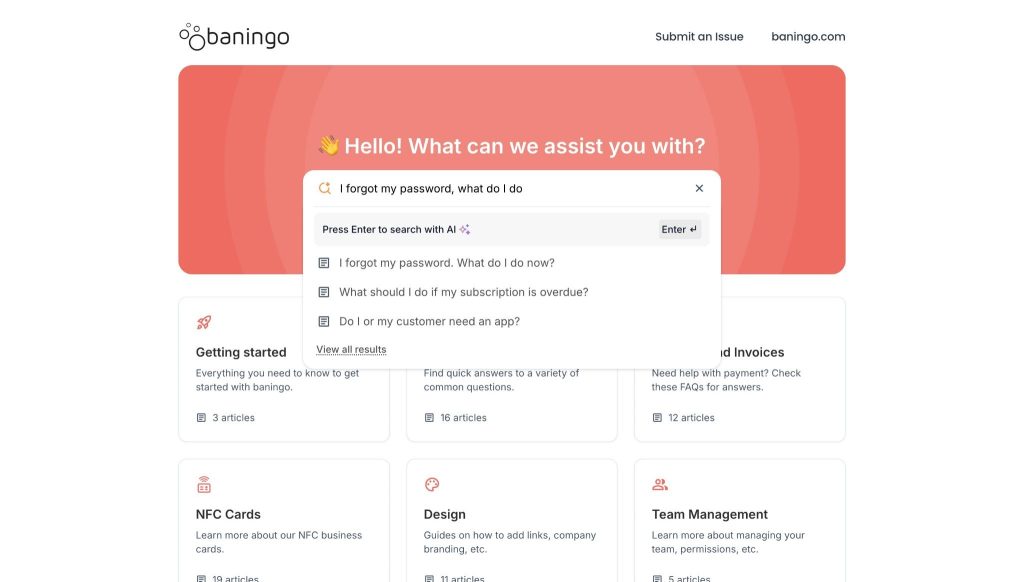
New: AI-powered search for your knowledge base in Hiver Omni
Only 14% of customer service issues are fully resolved through self-service, according to Gartner. Not because customers don’t want to find answers themselves, but because most knowledge bases just hand them a list of links and call it “help”.
We believe that a knowledge base should do that work, not the customer. That’s what our AI-powered search does.
Hiver’s AI-powered search in Omni reads your existing knowledge base content, understands the intent behind a question, and returns a clear answer at the top of the results instead of a long list of links.
Here’s how it works:
If someone asks, “How do I delete my account?”, the AI-powered search pulls information from the right articles, composes a direct reply, and links the original sources.

When information isn’t available in your knowledge base, Hiver AI clearly acknowledges the gap instead of generating unsupported responses. — which matters more than people expect when you’re trying to build trust at scale.
For support leaders, this means more questions resolved through self-service and fewer repetitive tickets hitting the queue.
For customers, it means getting an accurate answer in seconds — even for nuanced questions — without having to hunt through articles and piece things together themselves.
Customer Spotlight
Baningo, a digital business card platform, already has Hiver’s AI-powered search live on its knowledge base. Their customers can now get instant answers to questions about cards, accounts, and transactions — without having to navigate through multiple support articles to find what they need.
New: Shareable dashboards for live visibility in Hiver Omni
Sharing support performance data is still surprisingly manual in many support teams.
Someone exports a CSV, pastes charts into slides, or walks stakeholders through a dashboard that only lives in the helpdesk. By the time that data reaches the people who need it, it might already be out of date. Teams then risk making decisions on numbers that no longer reflect what’s actually happening in the queue.
Shareable custom dashboards in Hiver Omni change that. You can publish a dashboard and generate a secure link that anyone in the team can open in their browser, even if they don’t have a Hiver account.
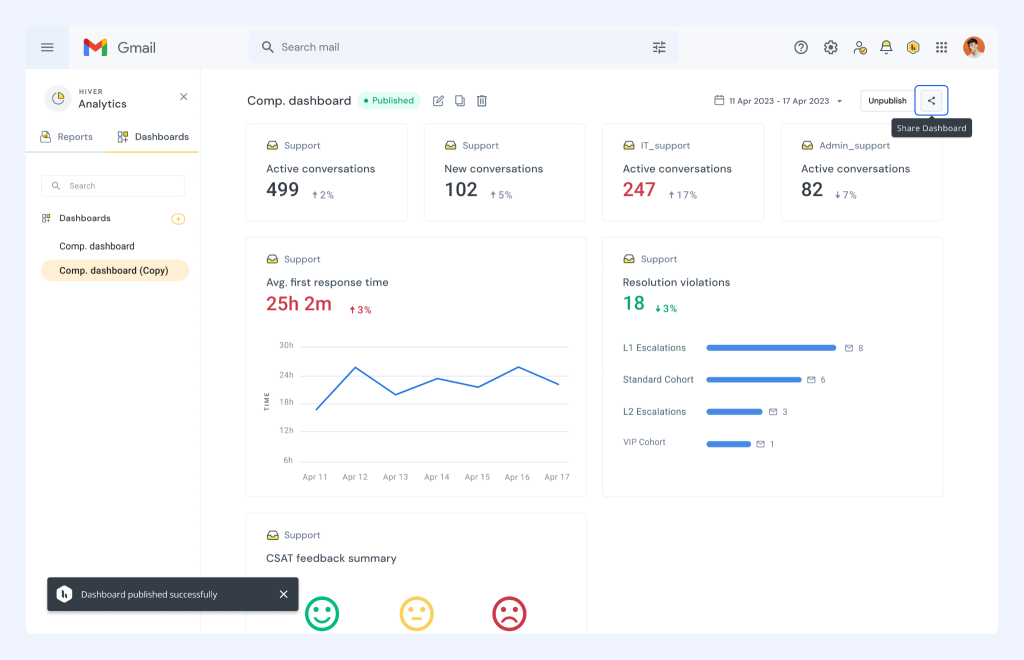
Teams see a live, read-only view with the ability to filter, change time ranges, and explore the data on their own terms — without asking your team to pull a fresh report.

Because the dashboard stays in sync with your real-time metrics, you avoid the usual version-control issues.
You can also build different dashboards for different audiences. Leadership gets a view focused on CSAT, SLA breaches, and resolution times. Your frontline team gets one centered on workload and response time. Each gets its own link, and both stay current without you having to touch anything.
Each gets its own link, and both stay current without you having to touch anything.
Update: Auto-assign outbound conversations to the sender (Hiver Omni)
When teams send outbound emails from shared addresses, it’s easy to lose track of who’s responsible for the follow-up. An agent sends an email, and without a clear owner, there’s no reliable way to know who initiated what, or to report on outbound activity at all.
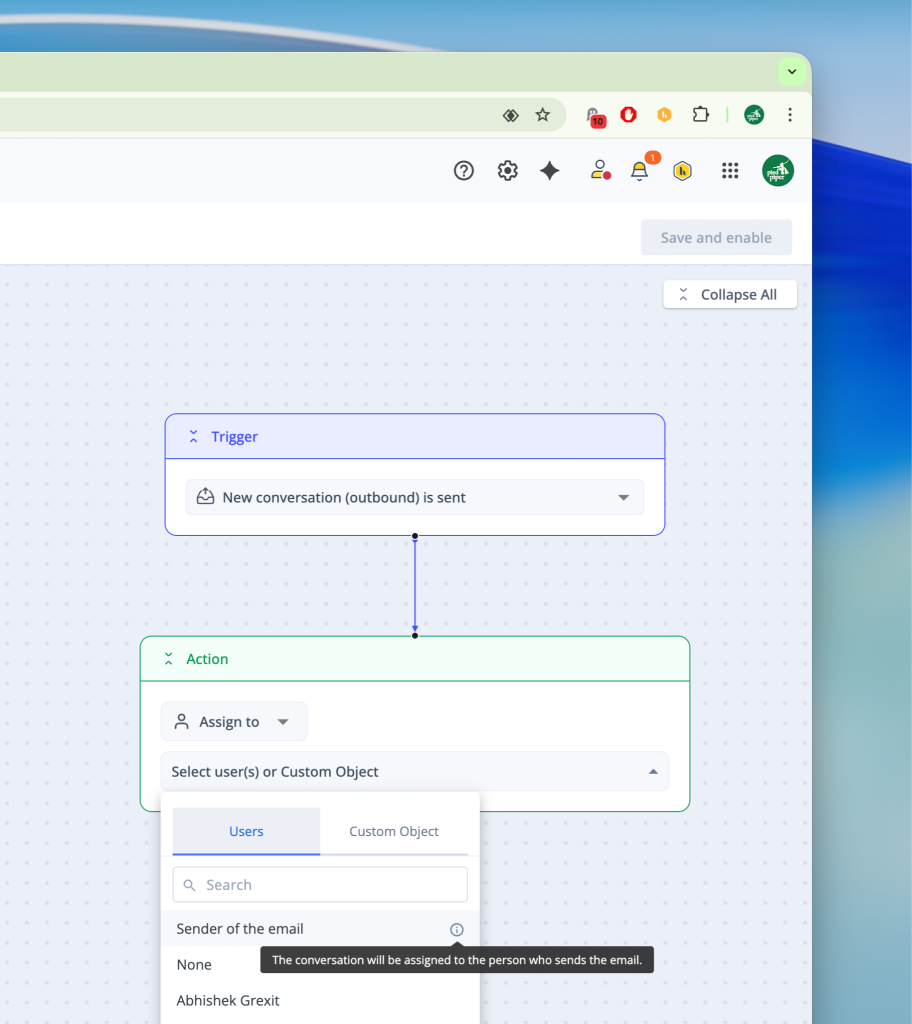
Auto-assignment fixes that. Every outbound email sent from a shared mailbox is automatically assigned to the person who sent it.
The result is straightforward: every outbound conversation has a visible owner from the first message, responses don’t get missed, and your outbound reporting actually reflects what’s happening.
You can see how those conversations are progressing, and where someone might need to step in — without adding any manual work for the team.
Update: Hiver SSO for secure, centralized access (Hiver Omni, Elite Plan)
As teams grow, managing access through individual passwords becomes a security risk. IT needs a single place to enforce login policies, revoke access when someone leaves, and make sure only the right people can get in — consistently, across every tool the company uses.
SSO changes that. Hiver now supports SSO across all major identity providers — Okta, Microsoft Entra ID, OneLogin, Ping, Google Workspace, ADFS, and JumpCloud.
Once enabled, your team authenticates through your existing IdP instead of Hiver’s native login, and access stays consistent with the policies your IT team already has in place. Admins can manage everything from a dedicated Identity & Access section in the admin panel.

Admins always have a clear view of whether SSO is active, which IdP and protocol are in use, and when it was first set up.
New: Automations Center as one place to build and manage all your workflows (Hiver Omni)
Automation is usually where support teams win back time — but only when people can actually find and manage the rules they’ve created. When assignment, tagging, SLA rules, and AI actions are scattered across different screens, it becomes hard to know what’s running, why something isn’t working, or how to bring a new admin up to speed.

The new Automation Center in Hiver Omni brings everything into one place. You get a single view of all your automation templates — from assignment and tagging to auto-responses. You can also configure them in a consistent interface without hunting through separate screens.

The practical difference is that your automation setup becomes something you can actually understand at a glance — what’s active, how rules interact, and what to change when something needs updating.
New: Chat Playground to test your chat experience before customers see it (Hiver Omni)
Launching a chat experience has always involved some guesswork. You set up your flows, configure the bot, and spend time getting the details right — but there’s no real way to know how it all comes together until a customer is actually using it.

Chat Playground in Hiver Omni removes that guesswork. From your widget settings, you can open a live preview of your chat and walk through the experience exactly the way a customer would — seeing how the bot responds, how flows branch, and where things might need adjusting.
You’re not reviewing a configuration screen; you’re actually using the thing you built.
This makes it much safer to experiment and makes iteration faster, too. You can refine welcome messages, adjust routing logic, and tune AI responses until the flow feels right.
For teams rolling out chat for the first time, or making significant changes to an existing setup, being able to test the full experience before going live makes the whole process a lot less stressful.
Also shipping this month:
Collision Alerts are now live in Hiver Omni. When two agents open the same conversation at the same time, whoever starts typing first is flagged as the active responder — and everyone else sees a clear alert so they know not to send a duplicate reply.
If the active responder navigates away or goes idle, the alert clears automatically and passes to whoever picks it up next.
All of this month’s updates are live now. If you have questions about any of these features or need help getting them set up for your team, write to us at support@hiverhq.com.













