







There’s no shortage of live chat tools out there.
While researching this guide, I found over 440+ live chat products listed on G2 alone. But once I narrowed it down to tools built specifically for SaaS teams, the options became surprisingly unclear.
Most live chat software is designed for e-commerce or generic support—great for order questions, not so great for SaaS workflows.
In SaaS, live chat plays a much bigger role. It helps convert trial users, remove onboarding friction, and support clients at different stages of their journey. A question from a new trial user isn’t the same as one from a long-time customer, and SaaS teams need tools that understand that difference.
That’s why this guide focuses only on the best live chat SaaS platforms, filtering out tools that look good on paper but fall apart in real SaaS use cases.
Top 12 Best Live Chat Platforms for SaaS Businesses
Here is a table comparing SaaS live chat tools so you can quickly see which ones fit your product, team size, and support model.
| Platform | Key SaaS Features | SaaS Use Case Fit | Core Perception (Reddit, Reviews & Social) | G2 Rating | Pricing |
|---|---|---|---|---|---|
| Hiver | AI agents and chatbots, clear ownership, omnichannel continuity | Growing SaaS handling onboarding + support | Simple, SaaS-friendly, predictable pricing | 4.5/5 | Free plan available · Paid plans start at $25/user/month |
| Intercom (Fin) | AI agent, automation-first deflection | High-volume SaaS focused on scale | Powerful but expensive, pricing can spike | 4.5/5 | Starts at $29/seat/month + $0.99 per resolved conversation |
| Zendesk | Chat-to-ticket flow, advanced routing, AI bots | Mid-market & enterprise SaaS | Very powerful, heavy setup | 4.3/5 | Starts at $19/agent/month |
| LiveChat | Fast human chat, multi-chat handling, basic AI assist | SaaS products with high trial volume | Reliable, limited continuity | 4.5/5 | Starts at $19/agent/month |
| HubSpot Live Chat | CRM-first chat, bots, lifecycle context | SaaS teams on HubSpot | Best inside the HubSpot ecosystem | 4.4/5 | Free plan available (paid features scale with HubSpot Hubs) |
| Tidio | AI chatbot, proactive triggers | Early-stage SaaS | Easy to start, automation-led | 4.6/5 | Free plan available · Paid plans start at $24.17/month |
| Drift (Salesloft) | AI qualification, meeting booking | Sales-led & high-ACV SaaS | Strong for revenue, expensive | 4.4/5 | Custom pricing |
| Freshchat | Bots, shared inbox, lifecycle triggers | SaaS wanting full support suite | Solid suite, mixed reliability | 4.6/5 | Free plan available · Paid plans scale with usage |
| Zoho SalesIQ | Proactive chat, visitor tracking | SaaS focused on engagement | Good value, dated UI | 4.4/5 | Free plan available · Paid plans start at ₹350/operator/month |
| tawk.to | Unlimited agents, basic visitor tracking | Bootstrapped SaaS | Free but very limited | 4.5/5 | Free forever · Branding removal at $29/month |
| Crisp | Shared inbox, chat continuity | SaaS needing continuity on a budget | Great value, lightweight | 4.5/5 | Free plan available · Paid plans start at $45/workspace/month |
| ProProfs Chat | Simple automation, chat-to-ticket | SMB SaaS | Predictable, easy to use | 4.5/5 | Free plan available · Paid plans start at $19.99/operator/month |
How I Evaluated These Live Chat Tools
I evaluated these live chat tools through hands-on testing, product research, and review analysis, focusing on real SaaS workflows rather than generic support use cases. Where free trials were available, I tested setup, agent experience, and performance at higher chat volumes.
I also reviewed documentation and independent walkthroughs to assess harder-to-test features like automation depth, routing logic, and cross-channel continuity, and cross-checked findings against consistent feedback on G2 and Capterra.
More importantly, every tool was evaluated against common SaaS live chat realities, including:
- User context during conversations: Whether agents can see who the user is, their account status, and in-app activity, and past conversations without re-asking basic questions.
- Onboarding and activation support: How well chat helps users get unstuck during setup, trials, and early product use. This includes in-app chat, proactive triggers, and self-serve deflection.
- Conversation continuity: Whether chats remain useful once they extend beyond a single session—through follow-ups, handoffs, ownership, and conversation history.
- Automation vs human balance: How tools handle deflection, routing, and AI assistance without breaking the experience or creating more work for agents.
- Pricing behavior as usage grows: Not just starting price, but how costs scale with more chats, automation, and active users—especially for trial-heavy SaaS teams.
- Day-to-day usability for lean teams: How much operational overhead the tool introduces once it’s live, including setup complexity, maintenance, and agent adoption.
The final list reflects fit, trade-offs, and ROI for SaaS teams at different stages, not just feature volume.
Now, let’s look at how each tool holds up in day-to-day SaaS use and what you get for the cost.
1. Hiver — Best for SaaS Teams That Need AI + Omnichannel Continuity
In SaaS, live chat rarely stays limited to one-off questions. Conversations often need follow-up, context, and continuity.
Hiver’s live chat is built for SaaS teams that want real-time conversations without losing context when those conversations continue beyond chat. It uses AI and automation to handle incoming conversations and route conversations, and keeps context attached as conversations move between chat and email.

Key Features
- Branded live chat widget: Add a customizable live chat widget to your website or app that aligns with your brand guidelines.
- Chatbots for context collection and routing: Before an agent joins the chat, chatbots can capture key details like issue type or urgency and route the conversation appropriately.
- AI-assisted replies: Agents get AI-suggested responses and AI openers to reduce typing time and respond faster when there’s high chat volume.
- Self-service inside chat: Help articles can be surfaced directly in the chat widget so customers can find answers without waiting or switching pages.
- Clear ownership and assignments: Chats are auto-assigned based on availability or round-robin rules, with AI and chatbots capturing context before handoff so agents can pick up the conversation cleanly.
- Business hours and fallback handling: Outside business hours, users can still leave a message through the chat interface. It is then captured as an email-style inquiry or ticket and queued for follow-up, instead of going unanswered.
- Chat analytics and feedback: Track volume, workload, response times, and CSAT to understand how chat impacts support performance.
- Conversation history and transcripts: Teams can refer back to past chats to maintain continuity when issues resurface.
What Teams Like About Hiver (Pros)
- Clean, intuitive interface that agents adopt quickly
- AI-assisted replies help teams respond faster without changing workflows
- Clear ownership reduces duplicate replies and dropped conversations
Here’s what a user on Reddit has to say about Hiver’s live chat experience:

Hear it from Hiver’s customers:
“Hiver’s Live Chat made it easy for customers to reach us. Chatbots handled common questions automatically and reduced our support load by 20% during peak times.” — Werner Alsemgeest, Specialist Master, CyberHunter
Where Hiver Falls Short (Cons)
- The mobile app is limited in functionality
- Availability hours need to be managed carefully; if not set correctly, chats can remain open when no one is available
The pros and cons have been summarised from Hiver’s reviews on G2.
Pricing
- Growth: $25/user/month
- Pro: $65/user/month
- Elite: $105/user/month
- 7-day free trial on all paid plans, and a forever-free plan
Who is this for: Growing SaaS support teams that want AI-assisted live chat with clear ownership, follow-ups, and continuity across conversations.
Who is this not for: Teams that want fully bot-led support or require mobile-first handling for complex conversations.
2. Intercom (Fin AI Agent) — Best for Automation-First SaaS Teams Aiming to Deflect High Chat Volume
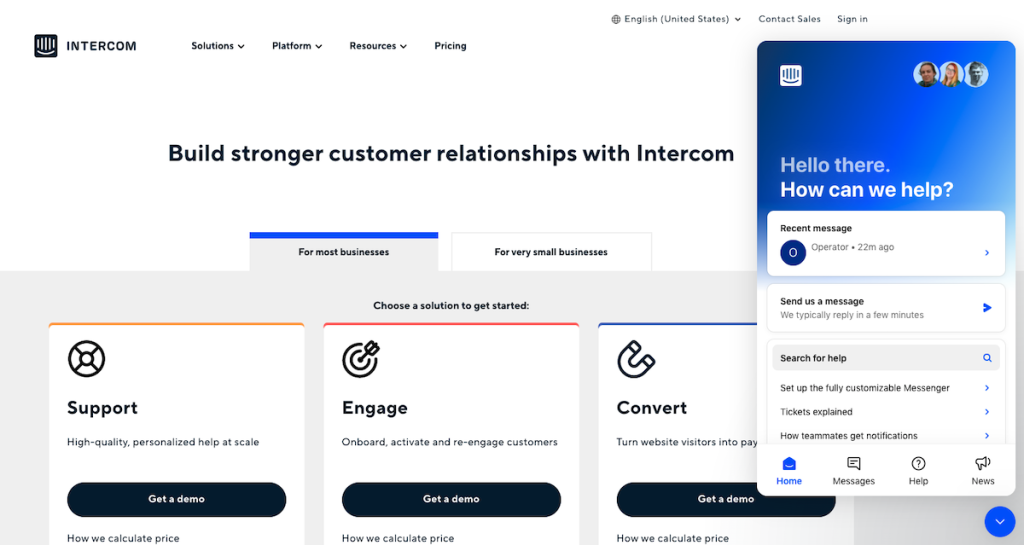
Intercom is the most automation-forward option on this list, and it’s clearly built for teams trying to deflect a large share of inbound chat. From what I saw, it’s optimized for fast resolution at scale more than long, ongoing conversation threads.
Key Features
- AI Agent (Fin) for frontline resolution: Fin handles common questions end-to-end using your help center and internal knowledge. This helps teams resolving chats without human involvement.
- Knowledge-based answers with low hallucination risk: Responses are generated only from approved sources, and Fin highlights gaps when it can’t answer confidently.
- Live chat + async channel coverage: Fin works across live chat, email, and messaging so users get consistent answers regardless of channel.
- Outcome-based pricing per resolution: You pay only for resolved conversations, aligning cost with automation results rather than agent seats.
- Automation insights and quality tracking: Intercom shows which topics fail, where customers get frustrated, and what knowledge needs improvement.
- Seamless human handoff: When automation falls short, chats escalate to agents with full context and conversation history intact.
Why SaaS Teams Choose Intercom (Pros)
- AI agent resolves a high percentage of repetitive questions out of the box
- Strong multilingual support (45+ languages) for global teams
- Useful insights into knowledge gaps and top customer pain points
Where Intercom Falls Short (Cons)
- Pricing frustration is the most common complaint, especially billing unpredictability.
- The platform can feel overloaded and confusing for teams using only live chat
- Post-purchase support and account management are frequent pain points
- Smaller SaaS teams report feeling locked into plans they don’t fully use
I have summarised these pros and cons based on Intercom’s customer reviews from G2.
Pricing
- Free trial: 14 days
- Starting price: From $29 per seat/month
- Fin AI Agent: $0.99 per resolved conversation
- Additional costs may apply for add-ons like proactive messaging or outbound campaigns
Who is this for: SaaS teams with high chat volume that want automation-first deflection and an AI agent that resolves repetitive questions at scale.
Who is this not for: Teams that prefer predictable costs and a lightweight, human-first chat setup without usage-based pricing.
Recommended reading
3. Zendesk — Best for large SaaS teams that need enterprise-grade structure
I see Zendesk as a good fit for SaaS teams that use live chat as an entry point into a larger, structured support operation. It works best when chats regularly turn into tickets, escalations, or cross-team handoffs.
Key Features
- Unified omnichannel workspace: Live chat, email, voice, social, and messaging all live in one agent workspace with shared context.
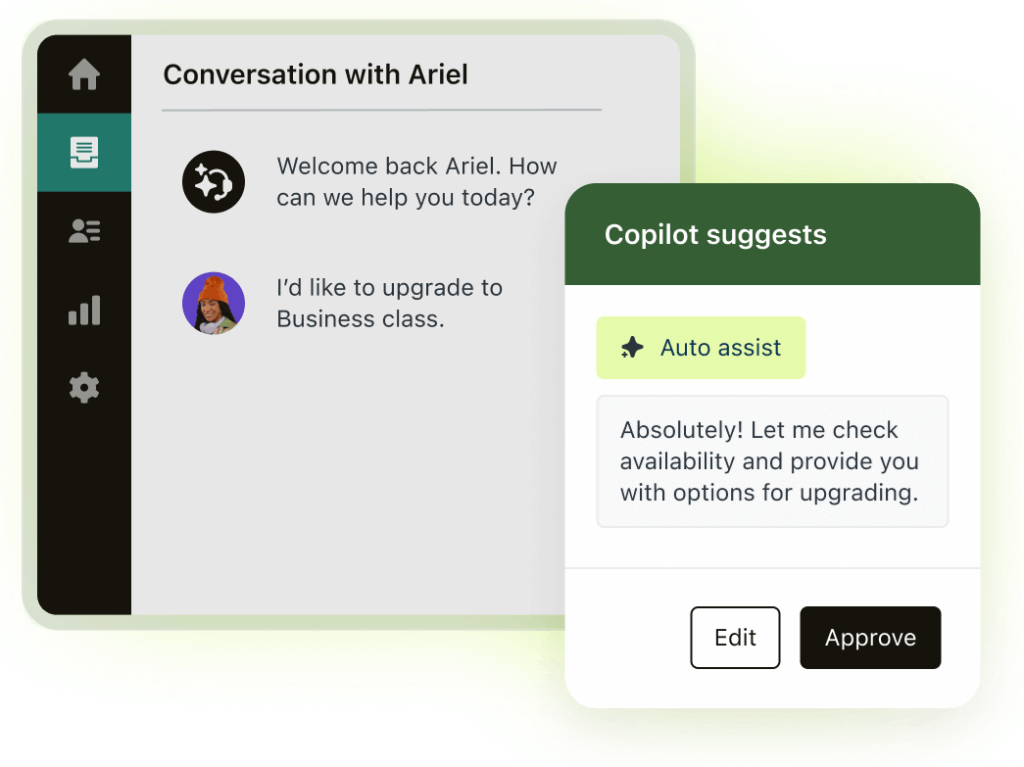
- AI-powered agent assistance: AI helps summarize conversations, suggest replies, shift tone, and surface relevant knowledge articles.
- AI agents and bots for deflection: Zendesk AI agents can resolve common questions autonomously and route complex issues to humans.
- Seamless chat-to-ticket continuity: Chats convert into tickets without losing history, ownership, or customer context.
- Advanced routing and automation: Conversations are routed based on skills, availability, priority, or business rules.
- Deep reporting and workforce insights: Real-time dashboards track automation rates, resolution times, agent performance, and QA metrics.
Why SaaS Teams Choose Zendesk (Pros)
- Centralizes all customer conversations into a single system of record
- Strong continuity when chats become longer support cases
- Powerful automation and routing for high-volume environments
Where Zendesk Falls Short (Cons)
- Live chat setup can feel complex and slow, especially for smaller teams
- Many features require higher-tier plans or add-ons
- Pricing escalates quickly as teams add channels or automation
- Zendesk’s own support is often described as slow or hard to reach
I have summarised these pros and cons based on Zendesk’s G2 customer reviews.
Pricing
- Free trial: 14 days
- Price: Starts at $19 per agent/month and goes up to $169 per agent/month
Who is this for: Mid-market to enterprise SaaS orgs that need structured workflows, strong routing, and chat-to-case continuity across multiple channels.
Who is this not for: Teams that want quick setup, minimal admin overhead, and simple day-to-day live chat operations.
4. LiveChat — Best for SaaS Teams That Want Fast, Human-First Conversations
LiveChat is for teams that want real-time conversations to stay simple: get a human in quickly, answer the question, move on. I’d pick it when speed and reliability matter more than deep continuity across touchpoints.
Key Features
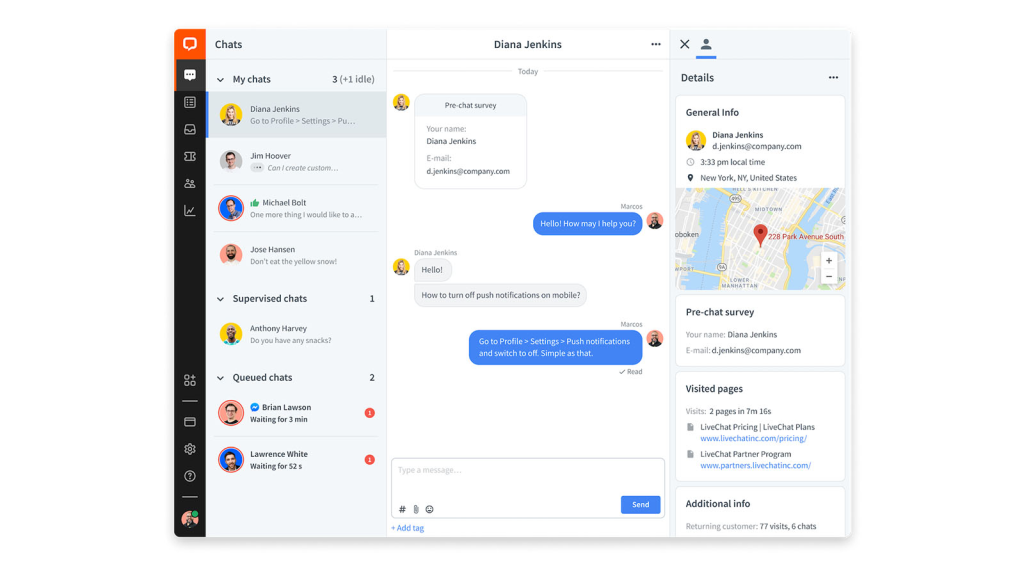
- Direct, human-first live chat: Chats go straight to an available agent, without heavy automation in the way. This works well for trial questions, feature clarifications, or quick “can I do X?” moments that need a real support agent on the other side.
- Fast setup with minimal configuration: LiveChat can be added to a SaaS website or app quickly, without building workflows or maintaining complex rules. Teams can start supporting users early in the trial stage with little operational effort.
- Basic visitor and session context: Agents can see the page a user is on and also access basic session details during a chat. This helps tailor replies during pricing or onboarding page visits, even without deep product usage data.
- Agent productivity and concurrency handling: Agents can handle multiple chats at once without performance issues. This matters when several trial users or prospects reach out at the same time.
- Lightweight AI assistance for agents: AI features like Copilot help with reply suggestions and summaries. They improve speed without turning chat into a bot-led experience.
- Simple reporting and performance metrics: Teams can track response times, chat volume, satisfaction, and agent performance. Reporting stays easy to use without a complex analytics setup.
Why SaaS teams choose LiveChat (Pros)
- Fast, human-first conversations that help teams engage users in real time
- Responsive chat widget that works reliably across desktop and mobile
- Canned responses, chat routing, and visitor tracking streamline agent workflows
Where it falls short (Cons)
- Front-end customization can require additional effort, especially when matching strict brand guidelines
- Some interfaces feel generic compared to more customizable chat tools
- Queue handling can feel unclear when users are waiting for an agent
I have summarised these pros and cons based on LiveChat’s G2 customer reviews.
Pricing
- Free trial: 14 days
- Price: Starts at $19 per agent/month and goes up to $79 per agent/month (billed annually)
Who is this for: SaaS teams that need human-first real-time conversations for trials, pricing questions, and quick product clarifications.
Who is this not for: Teams where chats frequently become multi-step support cases that require ongoing context, ownership, and follow-ups.
Recommended reading
5. Hubspot — Best for SaaS Teams Already Running on Hubspot CRM
HubSpot Live Chat makes the most sense when you want chat to live inside your CRM motion. If your team already runs on HubSpot, this feels like the cleanest way to keep conversations connected to the customer record.
Key Features:
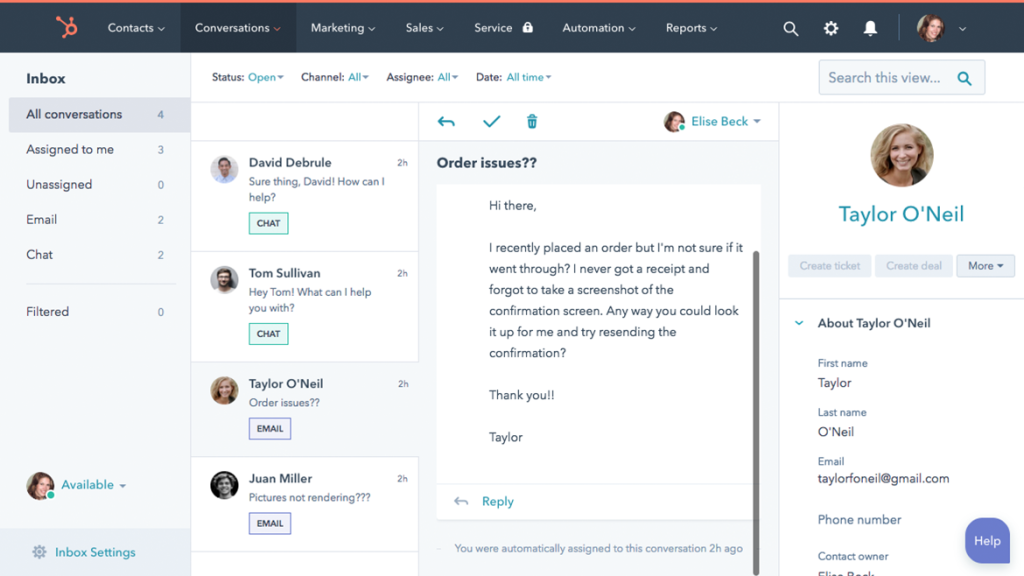
- CRM-first live chat: Every chat automatically creates or updates a contact in HubSpot’s CRM. Agents can see the lifecycle stage, owner, past emails, forms, and notes while responding, which helps when handling trial users or inbound leads.
- Chatbots for qualification and routing: No-code chatbots can qualify visitors, capture contact details, book meetings, or route chats to sales or support. This is useful for filtering low-intent chats and escalating higher-intent users during trials or demos.
- Shared conversations inbox: Chats live in a universal inbox alongside emails and tickets. Agents can reply, leave notes, create tasks, or open support tickets without losing context.
- Handoff between sales and support: Chats can be routed to different teams based on intent. Sales can take over qualification chats, while support handles product or onboarding questions.
- Office hours and fallback capture: Teams can set chat availability and automatically turn new chats into emails when agents are offline. This ensures inbound requests don’t get lost.
- Mobile and Slack access: Agents can receive and respond to chats via the HubSpot mobile app or Slack, which helps teams stay responsive without living inside the CRM UI.
Why SaaS Teams Choose Hubspot (Pros)
- Live chat automatically ties conversations to contacts, tickets, and timelines, keeping customer data organized without manual updates
- Unified inbox lets teams manage chat, email, and messages from one place, reducing handoffs and missed replies
- Workflow automation turns chat conversations into follow-ups, tasks, or campaigns with little manual effort
Where HubSpot Falls Short (Cons)
- Live chat offers limited differentiation when used outside the HubSpot ecosystem
- Customizing chat for multiple audiences or segments can take significant setup time
- Chat widgets can impact page performance on traffic-heavy or SEO-optimized sites
- Costs rise quickly as teams expand beyond basic chat into Service Hub automation
I have summarised these pros and cons based on G2 customer reviews of HubSpot’s ServiceHub.
Pricing
- Free plan: Yes (live chat + basic bots via free CRM)
- Paid plans: Scale with Service Hub tiers, starting at ₹7,497–₹8,330 per seat/month for Professional and ₹10,900 per seat/month for Enterprise.
- Costs increase as automation, reporting, and routing needs grow
Who is this for: SaaS teams using HubSpot that want live chat tied directly to CRM records.
Who is this not for: Teams looking for a standalone chat product without CRM dependence or heavier HubSpot ecosystem costs.
6. Tidio — Best for Early-Stage SaaS Teams
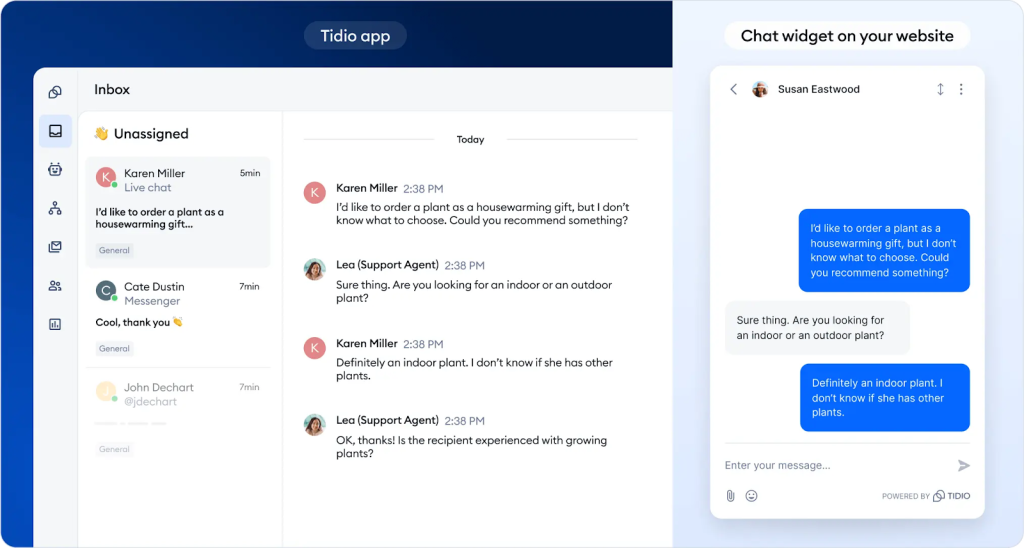
Tidio works best when teams want to reduce repetitive inbound questions before they reach humans. It’s built keeping in mind an automation-first approach, with live chat acting as a fallback when AI can’t resolve the issue.
Key Features
- AI agent for first-line resolution: Tidio’s AI agent (Lyro) handles common questions around pricing, features, onboarding steps, and integrations. This reduces the number of basic queries that reach human agents.
- Proactive chat triggers: Teams can surface chat automatically when users linger on pricing pages, docs, or onboarding steps. This helps catch hesitation during trials without agents monitoring dashboards.
- Simple live chat fallback: When automation can’t resolve an issue, chats are handed to a human agent with basic context already captured. No complex routing or CRM logic required.
- Unified inbox across channels: Live chat, email, and messaging channels land in one inbox, which works well for small SaaS teams handling both support and sales conversations.
- Quick setup with no-code automation: Chatbots, canned responses, and flows can be set up quickly without engineering help, making it easy to iterate as the product evolves.
- Multi-device and multi-language support: Agents can respond via web, desktop, or mobile, and teams can support users in multiple languages as they expand globally.
Why SaaS Teams Choose Tidio (Pros)
- AI handles routine questions well, reducing load on human agents
- Quick and simple onboarding, even for non-technical teams
- Automation runs reliably once set up, helping reduce missed leads
- Smart chatbots help capture leads and grow subscriber lists
Where It Falls Short (Cons)
- Advanced automation and customization take time to fine-tune
- Complex workflows and deeper AI logic can be limiting
- Reporting is useful at a high level but lacks deeper analytical flexibility
- Costs increase quickly as teams move beyond basic automation
I have summarised these pros and cons based on G2 customer reviews of Tidio.
Pricing
- Free trial: 7 days
- Price: Starts at $24.17/month and goes up to $749/month (with Premium custom pricing available)
Who is this for: Early-stage SaaS teams that want AI-led deflection and quick, no-code automation.
Who is this not for: Teams that need advanced automation logic, deeper analytics, or highly customized workflows at scale.
7. Drift (Salesloft) — Best for Sales-Led SaaS Teams
Drift is not a general-purpose live chat tool. It’s built for SaaS teams that use chat as a revenue channel, not a support channel.
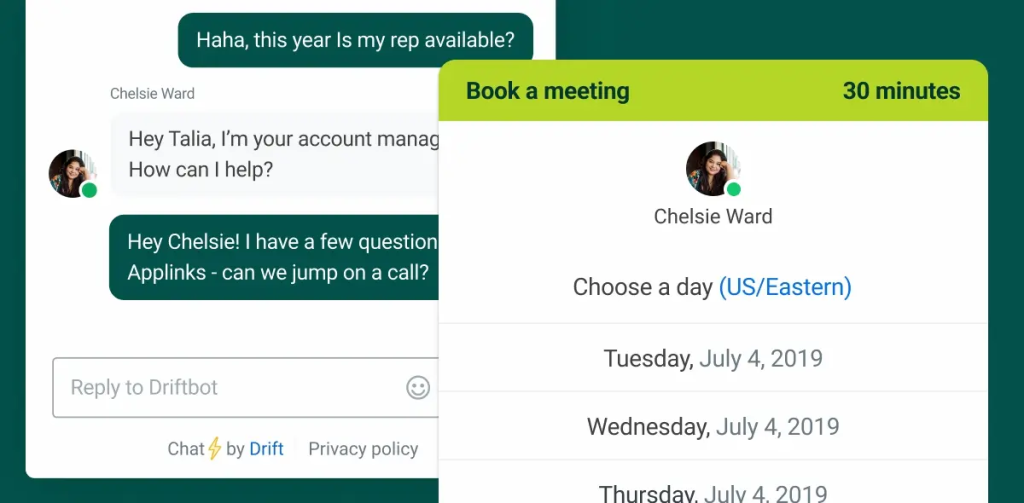
Its strength is engaging high-intent website visitors, qualifying them in real time, and routing them directly into sales workflows.
Key Features:
- AI chat agents for buyer qualification: Drift’s AI chat agent engages visitors, asks intent-based questions, and qualifies them in real time. This works well for demo requests, pricing interest, and enterprise evaluation flows.
- Intent and account identification: Drift identifies high-intent visitors and surfaces account-level data like company, location, and engagement signals. Sales teams can prioritize buyers who are ready to talk instead of treating all chats equally.
- Sales routing and meeting booking: Qualified visitors can be routed directly to the right rep or prompted to book meetings instantly. This shortens sales cycles and removes form-based handoffs.
- Tight integration with sales workflows: Drift connects chat activity to sales execution tools, pushing qualified conversations into seller workflows with context. Chat becomes an input to the pipeline, not a side channel.
- ROI and pipeline attribution: Teams can track which chat conversations convert into opportunities and revenue, helping justify chat as a growth channel rather than a support cost.
- Conversational experiences over static forms: Drift replaces traditional forms with real-time conversations, improving engagement on high-intent pages like pricing, solutions, and product overviews.
Why SaaS Teams Choose Drift (Pros)
- Real-time engagement with website visitors improves buyer experience and conversion rates
- AI-powered chatbots qualify leads and route conversations efficiently
- Strong integrations with CRM and marketing tools like Salesforce, HubSpot, and Marketo
- Built-in meeting scheduling lets buyers book time instantly through chat
- Account-based targeting supports sales-led and enterprise SaaS motions
Where It Falls Short (Cons)
- Pricing is higher than many live chat alternatives, which can be hard for smaller teams to justify
- Advanced features and setup introduce a learning curve
- Chatbot customization has limits, and some users report occasional bugs
- Customer support and implementation can feel slow at times
- Some users have raised concerns around billing issues and platform changes post-acquisition
I have summarised these pros and cons based on G2 customer reviews of Drift.
Pricing
- Free plan: No
- Paid plans: Custom pricing only
Note: Pricing depends on traffic, use case (marketing vs sales), and feature set. Drift is positioned at the enterprise/revenue team end of the market.
Who is this for: Sales-led SaaS teams using chat to qualify high-intent visitors, book meetings, and drive pipeline from website traffic.
Who is this not for: Support-first teams that need affordable, simple live chat for ongoing product help and post-purchase conversations.
8. Zoho Salesiq — Best for SaaS Teams That Want Proactive Chat With Deep Visitor Context
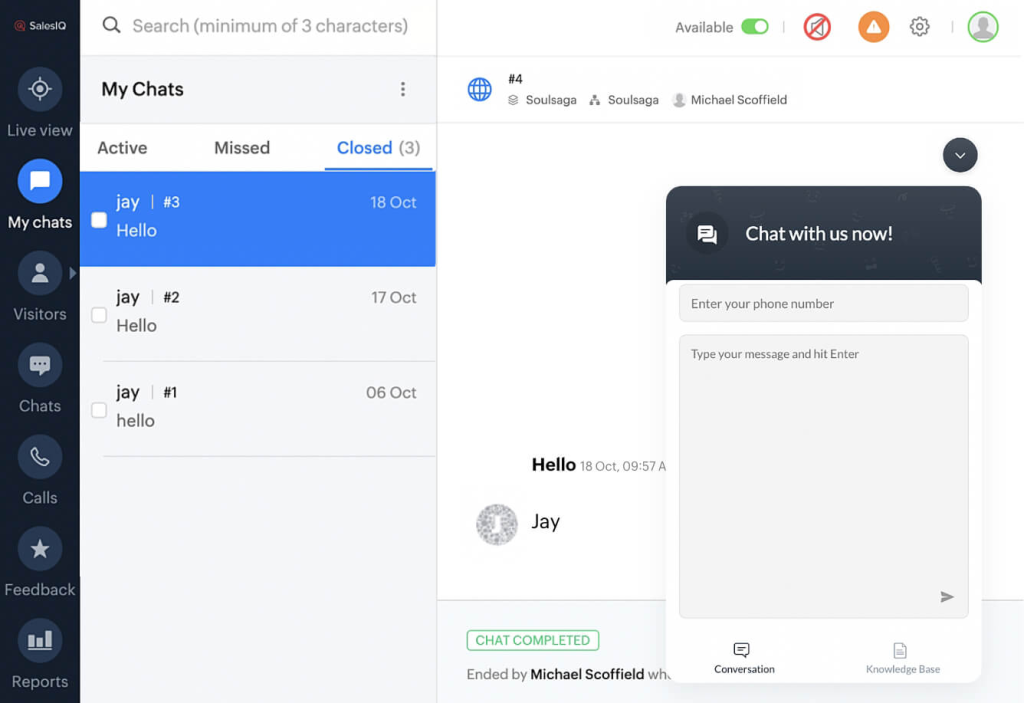
Zoho SalesIQ is built for SaaS teams that care about when and why a user starts a chat. Based on customer reviews, its strength lies in visitor tracking, proactive engagement, and real-time context during conversations.
Key features:
- Deep visitor and behavior tracking: Agents can see where users came from, which pages they visited, device details, and past conversations. This helps tailor responses when users stall during trials, onboarding, or pricing evaluation.
- Proactive chat triggers: SalesIQ can automatically initiate chats based on behavior, time on page, or high-intent actions. This is useful for nudging trial users, qualifying leads, or offering help before users drop off.
- Chatbots for handling volume: Chatbots can act as first-line responders, answering common questions or routing conversations when teams can’t keep up with inbound chat volume.
- Audio calls and screen sharing from chat: Agents can start calls or share screens directly from the chat window. This is particularly helpful for complex setup issues, demos, or troubleshooting during onboarding.
- GenAI-powered agent assistance: AI tools help agents refine replies, surface suggested responses, and generate conversation summaries, improving speed without replacing human support.
- Clear availability and offline handling: Chat widgets can be shown only when agents are online, with offline messaging and follow-up capture outside business hours.
- Strong fit within the Zoho ecosystem: SalesIQ integrates tightly with Zoho CRM, Desk, and Analytics, making it easier to connect chat conversations to leads, tickets, and reports.
Why SaaS Teams Choose Zoho SalesIQ (Pros)
- Easy to use and quick to implement, even for non-technical teams
- Strong real-time engagement with visitors and lead tracking context
- Helpful alert system reduces the chance of missed chats
Where It Falls Short (Cons)
- Customization and UI navigation can feel limited or clunky when handling multiple chats
- Pricing can be complex and add-ons are often required for larger teams
- Chatbot capabilities can feel lacking for SMBs and harder to tailor
- Occasional connectivity and notification reliability issues have been reported
I have summarised these pros and cons based on G2 customer reviews of Zoho SalesIQ.
Pricing
- Free trial: 15 days
- Price: Starts at ₹350 per operator/month and goes up to ₹1,200 per operator/month (billed annually)
Who is this for: SaaS teams that want proactive, behavior-based chat with visitor tracking and context-rich conversations (especially within Zoho).
Who is this not for: Teams that need a highly modern UI and robust, out-of-the-box chatbot sophistication without add-ons.
9. Freshchat — Best for SaaS Teams That Want Chat Tied Into a Full Support Suite
I see Freshchat by Freshworks as a strong option for SaaS teams that use live chat for more than just resolving one-off questions. It works well when conversations span sessions and switch channels.
Key features
- Lifecycle-aware campaigns and triggers: Freshchat can send proactive messages when users hit key stages. These include signup anniversaries, repeated knowledge base visits, or stalls in onboarding flows. This helps nudge users toward activation rather than only answering questions when asked.
- Simple bot automation for repetitive questions: Built-in bots handle FAQs on pricing, feature differences, and onboarding, reducing the volume of basic requests reaching human agents.
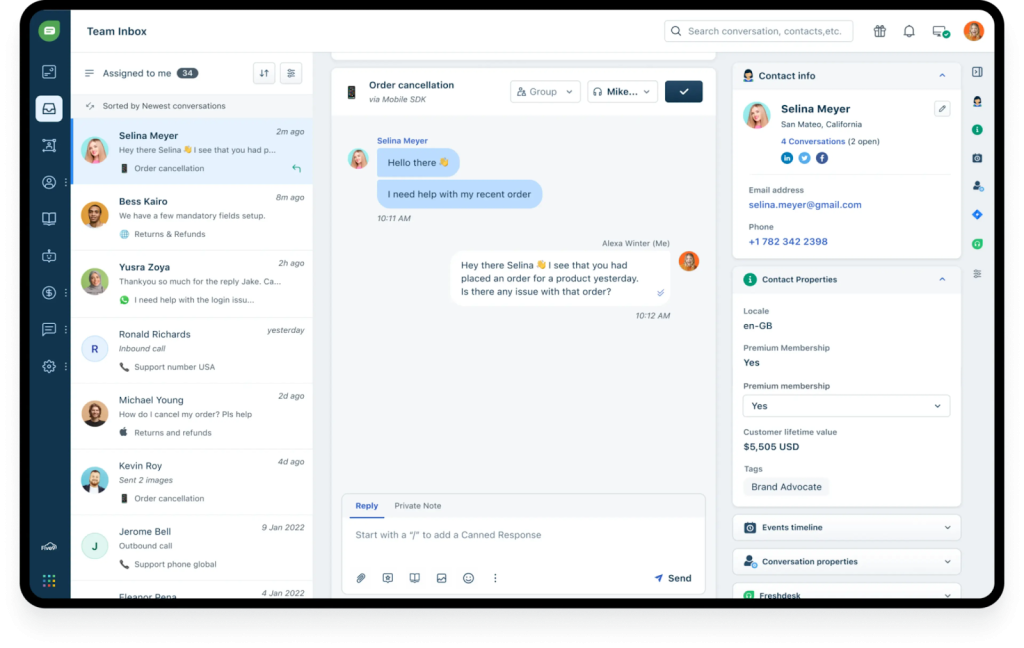
- Unified inbox with integrations: Support, success, and product teams get a dashboard where chat, email, and app messages converge, so conversations don’t break when users switch channels mid-issue.
- Context in the agent view: Agents see basic user metadata (like plan or account tags pulled from your CRM), past interactions, and campaign history while replying—helping tailor replies to where the user is in the SaaS journey.
- Proactive nudge without complexity: You don’t need to build elaborate automation flows to trigger messages; simple rules based on behavior or time-in-product work well for lean teams.
Why SaaS Teams Choose Freshchat (Pros)
- Built-in automation like bots and canned responses helps reduce manual effort
- Agents can see customer details and conversation history alongside live chats
- Useful analytics covering response times, resolution times, and agent performance
- Integrates easily with common platforms and messaging channels
Where It Falls Short (Cons)
- Some users report delays or errors when sending or receiving messages
- Customer support responsiveness is inconsistent, especially during technical issues
- Bugs and slow performance are recurring complaints in negative reviews
- Costs can rise quickly as teams add channels, automation, or advanced features
- Dashboard and chatbot customization can feel restrictive or frustrating
I have summarised these pros and cons based on FreshChat’s G2 customer reviews.
Pricing
- Free trial: 14 days
- Price: Starts at ₹0 and goes up to ₹6,399 per agent/month (billed annually)
Who is this for: SaaS teams that want live chat connected to a broader support suite with omnichannel coverage, basic bots, and shared inbox workflows.
Who is this not for: Teams that only need a lightweight chat widget and don’t want to adopt a larger support platform.
10. tawk.to — Best Free Live Chat for Bootstrapped SaaS Teams
tawk.to is a free live chat tool for teams that want instant coverage with as many agents as they need, without committing a budget. It’s designed to get teams up and running in minutes, and offers a reliable way to handle inbound requests.

Key Features:
- Instant setup: Add live chat with a simple JavaScript snippet. No configuration or engineering work required.
- Unlimited agents and chats: There’s no cap on users or conversations, which removes cost anxiety as ticket volume grows.
- Real-time visitor monitoring: See which pages users are on, how often they visit, and basic journey context while chatting.
- Canned responses and shortcuts: Save common replies to handle repetitive trial or pricing questions faster.
- Mobile apps (iOS & Android): Agents can respond on the go, helping small teams avoid missed chats.
- Multilingual support: Built-in translation supports conversations across 45+ languages.
Why SaaS Teams Choose tawk.to (Pros)
- Completely free live chat
- Unlimited agents and conversations
- Real-time visitor tracking included
Where tawk.to Falls Short (Cons)
- UI and widget design feel basic and dated
- tawk.to branding removal requires a paid add-on
- Advanced features (AI Assist, video/voice, hired agents) cost extra
- Some users report bugs, stability issues, or slow performance
I have summarised these pros and cons based on G2 customer reviews of tawk.to
Pricing
- Free trial: Free forever
- Price: $0 for core live chat (powered by tawk.to branding); $29/month to remove tawk.to branding
Who is this for: Bootstrapped SaaS teams that need free, unlimited live chat with quick setup and basic visitor context.
Who is this not for: Teams that require advanced automation, deeper reporting, premium design customization, or strict SLA-grade support.
11. Crisp — Best for SaaS Teams That Want Chat Continuity Without Enterprise Cost
Crisp positions itself as an all-in-one customer communication suite, and I can see why. It keeps live chat from becoming a dead-end.
Conversations can move between chat, email, and WhatsApp without losing context, which makes Crisp a strong option for teams where chats often turn into follow-ups.

Key Features:
- Fast, lightweight chat widget: Quick to install on most websites and known for being light on page performance.
- Shared inbox across channels: Live chat, email, WhatsApp, and other channels come into one workspace so teams don’t lose context.
- Automation + chatbots + triggers: Bots and proactive messages help reduce repetitive questions and nudge users at the right moment.
- Visitor tracking + segmentation: See who’s browsing, what they’re doing, and route or prioritize chats based on user context.
- Agent productivity tools: Typing preview (MagicType), canned responses, file sharing, and collaboration notes speed up handling.
- Multilingual support: Built-in translation helps teams support international users without adding separate workflows.
Why SaaS Teams Choose Crisp (Pros)
- Easy for teams to adopt quickly; UI is widely described as intuitive
- Strong value for money compared to many “suite” tools
- Shared inbox reduces fragmentation across chat + async channels
- Automation and chatbots reduce manual workload for small teams
Where Crisp Falls Short (Cons)
- Some advanced features are gated behind higher-tier plans
- Free plan has limited chat history
- Some users report performance lag during peak usage
- Privacy/GDPR concerns are mentioned in a small number of negative reviews
I have summarised these pros and cons based on G2 customer reviews of Crisp.
Pricing
- Free trial: 14 days
- Price: Free plan available; paid plans start at $45/workspace/month and go up to $295/workspace/month (Enterprise pricing is custom)
Who is this for: SaaS teams that want chat continuity across channels with predictable pricing and lightweight automation.
Who is this not for: Teams with strict compliance requirements or those that need enterprise-grade SLAs and advanced governance controls.
12. Proprofs Live Chat — Best for SaaS Teams That Want Simple Automation With Predictable Pricing
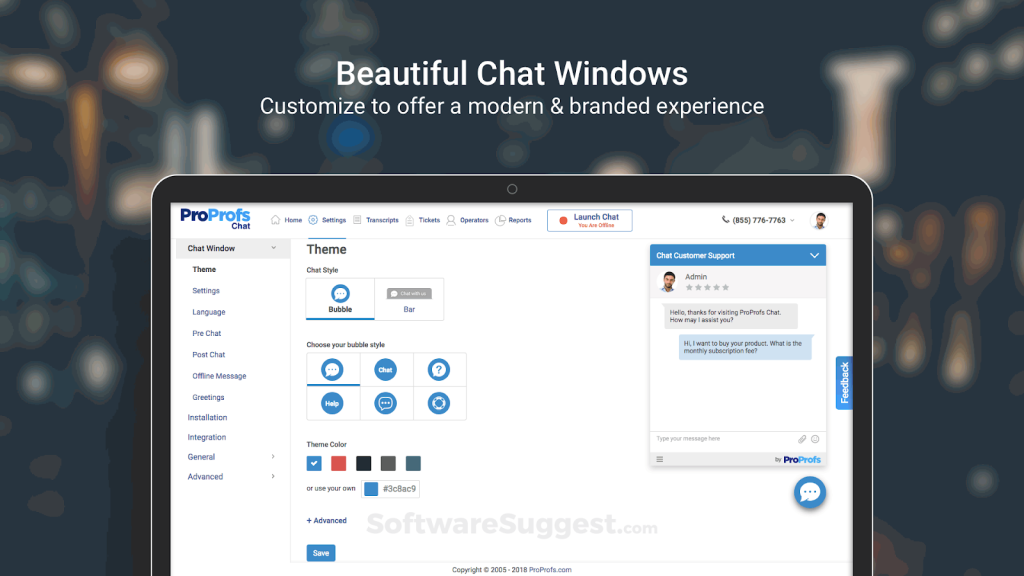
ProProfs Live Chat is for SaaS teams that have outgrown basic free chat widgets. It adds practical features like simple automation, reporting, and optional ticketing, without the setup and overhead of an enterprise help desk.
It works best when live chat is part of a broader support motion, but you don’t want heavy configuration or an ops-heavy setup.
Key features:
- Quick installation and setup: Add live chat to your site in minutes with minimal configuration. No engineering dependency.
- AI chatbots trained on your content: Bots can be trained using your website, help center, or uploaded files to answer common product and onboarding questions.
- Proactive chat and routing: Trigger chat invitations based on page visits or behavior, and route conversations to the right team or department.
- Canned responses and macros: Speed up replies to repetitive questions during trials, onboarding, or pricing evaluations.
- Chat-to-ticket continuity: Chats can convert into tickets using ProProfs Help Desk when follow-ups are required.
- Analytics and supervisor dashboard: Track response times, missed chats, agent performance, and customer ratings without complex setup.
Why SaaS Teams Choose ProProfs Live Chat (Pros)
- Easy to install and simple to use across devices
- Improves agent productivity with macros and automation
- Strong reporting on response times and operator performance
- Helpful for proactive engagement on high-intent pages
Where It Falls Short (Cons)
- Advanced chatbot capabilities are more basic than AI-first platforms
- Occasional performance lags or technical issues reported (usually resolved by support)
- Some requested features (like deeper supervisor visibility or sneak-peek controls) are missing
I have summarised these pros and cons based on G2 customer reviews of ProProfs Live Chat.
Pricing
- Free trial: Forever free for 1 operator
- Team plans start at $19.99 per operator/month (billed annually).
- Optional add-ons include AI Chat Automation at $450/year and white-label branding at $300/year.
Who is this for: Small to mid-size SaaS teams that want straightforward live chat with basic automation, reporting, and predictable pricing as they scale.
Who is this not for: Teams that need advanced AI, deep lifecycle routing, or tight CRM/revenue workflow customization.
How to Choose the Right Live Chat Tool for Your SaaS Stage
Most SaaS teams don’t switch live chat tools because they lack features. They switch when response times slip, chats fall through the cracks, and ownership isn’t clear.
As teams and chat volume grow, tools that worked early can start to slow things down, making fit more important than feature count.
Here’s how to think about live chat at each stage.
1. Early-stage SaaS (founder-led support)
At this stage, live chat exists to make you reachable. Speed matters more than structure. Cost matters more than optimization. Most conversations are short and handled by one or two people.
A free or very lightweight tool is usually enough. Tools like tawk.to or Tidio work well here because you can go live in minutes and respond from anywhere.
This is not the stage to invest in AI automation, routing logic, or analytics. If a tool needs setup time or pricing calculations, it’s already too heavy.
2. Trial-heavy or product-led SaaS (activation and conversion)
For SaaS companies that offer free trials, live chat affects revenue. Users reach out when they’re confused, blocked, or hesitating. The problem isn’t volume yet. It’s timing and context.
You need to know who the user is and where they are in the product. You also need guardrails so chat doesn’t become a constant interruption for founders or early teams.
This is where tools like Hiver start to make sense because conversations can continue beyond the live moment, and context doesn’t reset. Some teams also use Intercom here for automation-first handling, especially if the volume of trial users is high.
The risk at this stage is unpredictable pricing. If chat usage grows, you want to know what that costs before it happens.
3. Growing SaaS teams (onboarding + support overlap)
As the team grows, chats stop being one-off. A question today becomes a follow-up tomorrow. Ownership matters. Internal handoffs matter. Losing context becomes expensive.
This is where chat-only tools start to break down. You need conversations to persist across sessions. You need internal notes and reminders. You need everyone to see what’s open and who owns it.
Tools like Hiver work well here because live chat is treated as part of a shared workflow, not a separate channel. Some teams also consider Crisp if conversation continuity is the main requirement.
4. Sales-assisted or high-ACV SaaS
For sales-led SaaS, live chat is less about support and more about qualification. Conversations need structure before a human steps in. Intent matters more than speed.
Tools like Drift and Intercom are designed for this. They capture intent early and route conversations to the right team.
The trade-off is cost. These platforms work best when chat directly drives pipeline. If most conversations turn into long support threads, the pricing model can become painful.
5. Mature or multi-product SaaS
At scale, live chat is just one entry point into a broader support system. The challenge is maintaining structure without adding friction.
You need a unified workspace. You need predictable pricing. You need visibility across products and teams without forcing agents into rigid workflows.
This is where teams often choose between tools like Zendesk for enterprise control, or Hiver for a simpler, conversation-first approach that still scales.
A final check before you decideIf your live chat tool constantly interrupts your team, loses context across sessions, or becomes expensive without warning, it won’t scale with your SaaS.The best tool is the one that fits your current stage, while still making sense six months from now.
Recommended reading
Live Chat Best Practices: The Ultimate List of Dos and Don’ts
Which Live Chat Tool Should You Choose?
Choosing the right live chat tool comes down to how conversations actually play out in your product.
If chats are short and transactional, a lightweight tool will do the job. But if they regularly turn into onboarding help, billing follow-ups, or ongoing support, you need a system that preserves context, ownership, and history as conversations continue.
Before committing, test each tool against real SaaS scenarios, like
- a pre-sales question,
- a support issue that requires follow-up, and
- multiple chats happening at once
The right live chat software should handle these smoothly without adding friction for your team.
If you’re looking for a SaaS-first option designed for ongoing, cross-channel conversations, Hiver is worth trying. Start a free trial now!
Frequently Asked Questions
1. Why do SaaS teams need specialized live chat tools?
Customer conversations in SaaS rarely end in one message. A pricing question often turns into onboarding help or a support follow-up. Specialized live chat tools keep context, ownership, and history intact so conversations don’t break as they continue.
2. What are the must-have features in live chat software for SaaS companies?
SaaS teams need shared visibility, conversation history across sessions, clear ownership, and integrations with support or CRM tools. Without these, chats quickly become hard to manage as volume grows.
3. How does live chat improve trial-to-paid conversion rates for SaaS?
Live chat helps users get answers at the exact moment they hesitate or have questions. Fast, contextual responses during trials reduce confusion, speed up onboarding, and help users reach value sooner.
4. What are the best live chat tools for SaaS startups on a budget?
Early-stage SaaS teams should look at tawk.to, Tidio, Crisp, or ProProfs Live Chat. They’re affordable (or free), easy to set up, and don’t require heavy configuration. These tools work well for handling trial questions and basic onboarding without adding operational overhead.
5. Which live chat tool is better for SaaS: Intercom, Zendesk, or Hiver?
There is no single best option for every SaaS team. If you want AI that helps agents respond faster (without turning everything into bots) plus clear ownership and chat-to-email continuity, choose Hiver. Pick Intercom for automation-first AI deflection at scale, and Zendesk for enterprise-grade structure (ticketing, routing, omnichannel) when your support org is complex.
6. What are common mistakes SaaS companies make with live chat?
Teams often choose chat-only tools that break once follow-ups begin, underestimate how pricing scales with volume, or invest in automation without maintaining it properly.
7. When should a SaaS company add live chat?
A SaaS company should add live chat as soon as users start asking questions during trials, onboarding, or pricing evaluation. Even a basic live chat tool helps reduce friction early on.
8. What is the best live chat SaaS for small businesses?
For small SaaS teams, tools like tawk.to Tidio, Crisp, and ProProfs Live Chat work best because they’re affordable, easy to set up, and don’t require dedicated admins. Hiver is a good step up once conversations need ownership and follow-ups.
9. What is the best live chat SaaS for multilingual support?
Tools like Intercom, Zendesk, Crisp, and Zoho SalesIQ offer built-in translation or language-based routing for global users.













