Skip to content




Zoho Desk alternatives are on the radar for many businesses that want customer support software built to scale with them. Zoho Desk is widely known as part of the larger Zoho ecosystem, and it delivers the basics well, including ticketing, automation, and reporting. That makes it a popular starting point, especially for teams already using Zoho CRM or other Zoho apps.
But as customer expectations and support volumes grow, teams often explore other options. From faster onboarding to deeper automation and broader channel coverage, different platforms bring their own strengths to the table.
This guide looks at the 11 best Zoho Desk alternatives in 2025 with details on features, pricing, and what makes each tool stand out so you can find the one that best fits your team.
Table of Contents
- What is Zoho Desk?
- Why teams look for a Zoho Desk alternative
- Top 11 Zoho Desk alternatives in 2025
- How to choose the right Zoho Desk alternative
- Final thoughts
- FAQs
What is Zoho Desk?
Zoho Desk is a cloud-based help desk software that helps businesses manage customer support requests across email, chat, phone, and social channels. It gives teams a centralized workspace to track, assign, and resolve tickets, automate workflows, and use the platform’s built-in reporting to monitor performance.
Core features of Zoho Desk:
- Multichannel support: Manage requests from email, chat, phone, and social media in one inbox.
- AI assistant (Zia): Auto-tags tickets, suggests replies, and analyzes sentiment.
- Ticket management: Assign, prioritize, and track issues with clear ownership.
- Knowledge base: Publish self-service articles for faster customer resolutions.
- Automation: Create workflows to handle repetitive tasks and escalations.
- Reports & dashboards: Monitor SLAs, agent performance, and customer satisfaction.
- Zoho ecosystem integrations: Connect with Zoho CRM, Projects, Analytics, and more.
Why teams look for a Zoho Desk alternative
Zoho Desk packs in plenty of features, but many businesses still look to switch because of a few key limitations:
- Initial setup and configuration: Many users mention that getting started with Zoho Desk takes longer than expected. The setup process can feel complicated, especially for teams not already using other Zoho products.
💬 “Initial setup is a dedicated process that takes time, and can be a little intimidating when testing to see if you can integrate.“ – G2 Review
- Mobile app limitations: While the desktop version is robust, users point out that the mobile app lacks several key functions. This makes it harder for agents who want to stay productive on the go.
💬 “The mobile app feels a bit limited compared to the desktop version, especially when checking ticket details or adding notes.” – G2 Review
- Steep learning curve: Many users note that initial setup and configuration can be time-consuming, especially for teams unfamiliar with the Zoho ecosystem. The interface often feels cluttered, and the mobile app lacks several desktop functions, limiting users who would want it on-the-go.
💬 “While it’s feature-rich, Zoho Desk isn’t very beginner-friendly. New users may find it overwhelming and poorly guided during onboarding.” – G2 Review
- Rigid workflows: Zoho Desk does offer automation, but it doesn’t give much room to customize. Setting up advanced workflows usually requires technical know-how, and even then, the tool feels more restrictive compared to other platforms.
💬 “The initial setup can feel a bit overwhelming, especially if you’re not already familiar with the Zoho ecosystem. There’s a bit of a learning curve when trying to customize workflows or automation rules.” – G2 Review
- Pricing and feature tiers: A common frustration is how core features are gated. Live chat, advanced automation, Answer Bot, and Zia (Zoho’s AI assistant) are only available in the highest-priced plans. This forces smaller teams to either operate without these features or pay enterprise-level pricing.
💬 “Some of the more advanced features like detailed reporting or multi-brand support are only available in higher-tier plans, which might not be ideal for smaller teams or startups on a tight budget.” – G2 Review
- Support delays: Reviewers also mention delays in getting help from Zoho’s own support team. In some cases, resolution takes days, making it harder to troubleshoot urgent platform issues.
💬 “This has been one of the worst support experiences we have encountered in over a decade of using SaaS tools. Lack of accountability, missed commitments, and complete silence when timelines are not met.” – G2 Review
Recommended reading
Top 11 Zoho Desk alternatives in 2025
Zoho Desk is a popular starting point for many businesses. It’s budget-friendly and covers the basics for handling customer queries. The gaps usually show up as teams grow, when setup gets heavier, customization feels limited, and features like AI or live chat are only available on higher-priced plans.
That’s why many teams explore other platforms that offer easier onboarding, stronger automation, and more flexible multichannel support. To help you compare, here’s how the top Zoho Desk alternatives stack up on pricing, channels, and key features.
| Tool | Standout features | Starting price (Billed annually) |
|---|---|---|
| Hiver | • Multichannel ticketing • AI Copilot, AI Agents, AI Insights • Knowledge base • Customer portal • AI-powered live chat • 100+ integrations • CSAT | Free forever plan • Paid plans start at $19/ user/month |
| Zendesk | • Multichannel support • Advanced automation • AI bots (add-on) | $55/ agent/ month |
| Freshdesk | • Omnichannel ticketing • Freddy AI (higher plans) • Self-service portal | Free plan exists, paid plans from $15/ agent/ month |
| Front | • Shared inbox • CRM & app integrations • Rules & workflows | $19/ user/ month |
| Help Scout | • Simple ticketing • Knowledge base • Beacon live chat | $20/ user/ month |
| Kayako | • Unified conversations • Real-time live chat • Self-service and custom workflows | $79/ month |
| GrooveHQ | • Email-based helpdesk • Lightweight automation • Reporting | $24/ user/ month |
| HappyFox | • Omnichannel support • Smart automation • Reporting dashboards | $21/ agent/ month |
| Intercom | • AI bots (Fin) • Omnichannel • Customizable workflows | $29/ seat/ month |
| DragApp | • Gmail-based collaboration & automation • Lightweight ticket management | $12/ user/ month |
| HubSpot Service Hub | • CRM ticketing • Automation workflows • Built-in CSAT/NPS feedback tools | $15/ seat/ month |
1. Hiver
I’ve seen many support teams struggle with tools that feel bloated or too technical. Hiver takes a different approach: it’s a modern, AI-powered customer service platform that’s easy to adopt and intuitive. It also offers advanced capabilities to scale multichannel ticketing, AI-powered live chat, knowledge base, customer portal, and deep automation.
With AI built directly into the workflows, teams can draft responses faster, triage tickets automatically, and gain actionable insights without adding extra tools or overhead.
Key features:
- Multichannel ticketing: Manage support across email, live chat, WhatsApp, voice, SMS, and social media in one place.
- AI Copilot: Guides agents throughout the support journey, from the first customer message to resolution. It suggests relevant answers, drafts responses, adjusts tone, and rephrases replies to keep them clear and consistent, pulling from past conversations, knowledge articles, and connected apps.
- AI Agents: Run automated workflows to take routine tasks off your team’s plate. They handle FAQs, follow-ups, and thank-you closures, as well as classify or route tickets by urgency, sentiment, or category. They can also trigger multi-step actions like processing refunds or updating records.
- AI insights: Turn conversations into predictive insights that help teams improve continuously. Insights reveal bottlenecks, highlight account health risks, and forecast issues before they escalate so teams can act early and deliver a smoother experience.
- Customer portal: Give customers a centralized hub to track tickets and access resources.
- Knowledge base: Create searchable, self-service content that reduces inbound queries.
- Automation & workflows: Build custom rules to route, prioritize, and resolve tickets efficiently.
- SLA management: Track service level agreements with timers and alerts to avoid breaches.
- CSAT surveys: Measure customer satisfaction and capture feedback inside your support workflow.
- Integrations: Connect with popular apps like Salesforce, Slack, Jira, and Shopify to extend capabilities.

What makes Hiver a better alternative to Zoho Desk
Getting started with Hiver is quick and straightforward. Most teams are up and running in minutes, without heavy setup or long onboarding cycles. Unlike Zoho Desk, where AI features are locked into the highest plans, Hiver makes AI Copilot, Agents, and Insights available from the Lite plan onwards.
On the security front, Hiver is SOC 2 Type II compliant and GDPR-ready, so businesses can rely on enterprise-grade data protection. And if you need help, Hiver’s 24/7 support ensures you always have access to quick resolutions without long wait times.
| Pros | Cons |
|---|---|
| Easy, intuitive UI, teams get started in minutes. 24/7 support and free onboarding included | Some advanced AI features (like deeper workflows and AI Insights) are still rolling out |
| AI capabilities embedded in day‑to‑day workflows | Not as widely adopted as legacy players like Zendesk or Freshdesk |
| Predictable pricing; strong multichannel coverage | Doesn’t offer ITSM-heavy complexity that very large enterprises may need |
💬 User reviews
“I never worry if our team has forgotten an email or not. I use Hiver every day, and it allows us to stay organized. This software has been easy to use, implement, and integrate into our team. We can always take care of our customers and ensure they are getting the best customer support!”
“It is awesome at organizing shared email accounts and fairly intuitive when it comes to implementation and adoption. The notes function is excellent to assign, and link others to review an email and notes to provide background information.”
Pricing
- Free Forever: Covers essentials like multichannel shared inboxes, live chat, WhatsApp, voice, knowledge base, team collaboration tools (notes, @mentions, shared drafts, collision detection), Slack integration, and 24/7 support.
- Free Trial: 7 Days
- Lite: $19 per user/month
- Growth: $29 per user/month
- Pro: $49 per user/month

2. Zendesk
Zendesk is one of the most established customer service platforms, trusted by enterprises and large teams that manage high ticket volumes and complex workflows. It unifies email, chat, voice, and social into a single workspace and layers on deep automation to keep operations running smoothly.
AI runs through the entire support experience, powering smarter bots for self-service, suggesting relevant knowledge articles, assisting agents with triage and quick replies, and helping admins automate large-scale processes. For organizations dealing with complex, high-volume support, Zendesk remains a go-to choice.
Key features:
- Omnichannel support: Helps manage conversations across email, chat, voice, and social channels in one place.
- Advanced automation: Skills-based routing, macros, and triggers to streamline ticket resolution.
- Reporting & analytics: Pre-built and customizable dashboards through Zendesk Explore.
- AI Agents: Automate repetitive tasks, handle FAQs, and deflect tickets with conversational bots.
- Generative AI: Auto-triage incoming requests, suggest replies, and create or update knowledge base articles.
- Reporting & analytics: Track performance with pre-built and customizable dashboards in Zendesk Explore.
- Integrations: Connect with 1,000+ apps through the Zendesk marketplace, including CRMs, collaboration, and ecommerce tools.

What makes Zendesk a better alternative to Zoho Desk
Zendesk is built for scale, making it a strong fit for enterprises and large teams with complex support needs. Its automation goes far beyond Zoho Desk’s basic workflows, with triggers, macros, and skills-based routing that give teams the flexibility to manage intricate processes without technical workarounds.
AI is another major differentiator. Zendesk includes AI Agents, intelligent triage, and generative reply tools starting from the Suite Team plan, making them accessible earlier in the pricing tiers. In contrast, Zoho’s AI assistant, Zia, is locked behind its most expensive plan.
On top of that, Zendesk provides advanced SLA tracking, a wider integration ecosystem, and a more unified Agent Workspace for multichannel support. While it does come at a higher cost, for teams that need scale and flexibility, Zendesk delivers more depth than Zoho Desk.
| Pros | Cons |
|---|---|
| Robust omnichannel support | Steep learning curve; setup can be complex |
| Highly customizable workflows | Many advanced features (like analytics and AI) are locked in higher-tier plans |
| Advanced AI and automation tools | Pricing can get expensive for scaling teams |
💬 User reviews
“Some of the more advanced parts of Zendesk you pretty much need to be a developer or spend some of your devs’ time helping set up some backend bit.”
“With a clean and intuitive interface, it’s possible to build a unified management system, integrated with channels such as WhatsApp and Facebook. The most interesting thing is that by analyzing the data using the Explore reporting feature, I can generate valuable insights for developing new products and business opportunities.”
Pricing
- Free trial: 14 days
- Support team: $19 per agent/month
- Suite Team: $55 per agent/month
- Suite Professional: $115 per agent/month
- Suite Enterprise: Custom pricing
Recommended reading
Hiver vs Zendesk: Which Support Platform Is Right for Your Team in 2025?
3. Freshdesk
Freshdesk is a great option for teams looking for a user-friendly and budget-friendly support tool that doesn’t come with a lot of complicated setup. It provides multichannel ticketing, automation, and handy AI features like Freddy, making it a solid choice for rapidly growing businesses. Plus, the interface is much easier to navigate than Zoho Desk or Zendesk, which can really help with onboarding and getting everyone up to speed quickly.
Key features:
- Ticketing with automations: Automate assignment, escalation, and resolution with triggers, SLAs, and rules.
- Chat, social, and voice support: Add chat, social, and voice to your email support and manage every customer conversation in one place. This helps teams respond faster and reduce wait times.
- Freddy AI: Suggests replies, detects sentiment, and routes tickets based on intent (available in higher-tier plans).
- Self-service: Create multilingual help centers, forums, and portals with AI-suggested articles to deflect tickets.

What makes Freshdesk a better alternative to Zoho Desk
Compared to Zoho Desk, Freshdesk offers more flexible workflows and is easier to onboard. Its AI assistant, Freddy, provides smarter automation for deflecting and routing tickets, something Zoho locks behind higher tiers. While Zoho integrates tightly with its own ecosystem, Freshdesk is more adaptable for businesses using other CRMs or ecommerce platforms.
| Pros | Cons |
|---|---|
| Wide channel coverage, including phone support | Advanced AI features are only available in higher-tier plans |
| Large integration marketplace | Pricing can rise quickly as you scale |
| Freddy AI adds smart automation | Reporting is more limited than peers |
💬 User reviews
“I appreciate Freshdesk’s simple and approachable UI, which made the setup smooth and navigation easy. I find its ticket management capabilities beneficial for efficiently handling support requests and managing escalations, significantly saving time. I also commend the recent addition of the AI chatbot, Freddie AI, which summarizes tickets and assists in creating responses.”
“Reporting could be a bit easier to use, or more intuitive. Jira was not easy, so we ended up not using it; it was giving us an error during setup.”
Pricing
- Free trial: 14 days
- Growth: $15 per agent/month
- Pro: $49 per agent/month
- Enterprise: $79 per agent/month
Recommended reading
4. Front
Front is a collaborative inbox where teams can handle email, chat, SMS, and social messages side by side. It feels very much like using a familiar email client but with the added benefit of shared visibility, quick collaboration, and light automation. Startups and SMBs like it because they can manage conversations together without learning a heavy helpdesk system.
Key features:
- Shared inbox: Assign conversations, leave notes, and avoid duplicate replies with collision detection.
- Lightweight ticketing: Tag, assign, and track messages in an email-like interface suited for support and client success.
- Integrations and API: Connect with 100+ tools like Salesforce, Asana, and HubSpot, or build custom workflows with the open API.
- Analytics & reporting: Monitor response times, team workload, and customer satisfaction with built-in dashboards.
- AI Assist: Drafts replies, suggests responses, and summarizes conversations to help teams save time and stay consistent.

What makes Front a better alternative to Zoho Desk
Front is often praised for how naturally it brings collaboration into customer support. Instead of feeling like a traditional help desk, it works more like a team inbox where you can assign messages, tag colleagues, and leave comments without disrupting the customer thread.
Many users also highlight Front’s integrations with CRMs and project tools, which makes it a good fit for teams that manage both support and client relationships. Compared to Zoho Desk’s more rigid, ticket-heavy setup, Front gives teams a faster, more collaborative way to stay on top of conversations.
| Pros | Cons |
|---|---|
| Intuitive, email-like interface that’s easy to adopt | Limited advanced automation and SLA tracking |
| Strong team collaboration tools (comments, assignments) | Expensive for what it offers as you scale |
| Unified multichannel inbox (email, SMS, chat, social) | AI features are limited; no native bots or AI triage without third-party tools |
💬 User reviews
“Front has completely transformed how our team handles customer communications and support. What I love most is how intuitive it is, we were up and running in no time, and even non-tech team members picked it up instantly. With 16 team members using it daily to manage over 8,600 emails per month, Front has become the backbone of our customer support operations.”
“One thing I dislike about Front is that some advanced features like certain integrations or automation capabilities can be a bit restrictive or require higher-tier plans.”
Pricing
- Free trial: 14 days
- Starter: $25 per seat/month
- Professional: $65 per seat/month
- Enterprise: $105 per seat/month
Recommended reading
5. Help Scout
Help Scout is often the choice for small teams that want customer support to feel as simple and personal as email. The interface is clean, it doesn’t take weeks to learn, and it comes with just the essentials: a shared inbox, live chat widget, and knowledge base. It works great for teams that want to keep customer support straightforward and personal without the overhead of a big enterprise system.

Key features:
- Shared inbox: Tag, assign, leave notes, and prevent duplicate replies with full conversation history.
- Beacon widget & Docs: Combine live chat, forms, and knowledge base search in one customer-facing widget.
- Integrations and open API: Connect with tools like Slack, Salesforce, Jira, Shopify, and HubSpot. The open API supports custom workflows and deeper data syncs.
- AI Assist: Suggests replies, drafts responses, and links articles included on all plans.
What makes Help Scout a better alternative to Zoho Desk
Help Scout is easier to adopt than Zoho Desk, which many users find clunky and complex. Its minimal interface and clean design work well for small teams that just need a functional shared inbox with chat and knowledge base options. Unlike Zoho Desk, which can feel overwhelming with configuration, Help Scout keeps things lightweight. But for fast-growing support teams, its lack of SLAs, limited analytics, and weak automation mean you’ll hit ceilings quickly.
| Pros | Cons |
|---|---|
| Clean, intuitive interface with minimal learning curve | Limited visual customization for the customer portal |
| Built-in knowledge base and customer portal | No built-in live chat bot (requires Beacon + Docs, no AI deflection) |
| Affordable for small teams | Multichannel support is limited compared to other platforms |
💬 User reviews
“Helpscout was easy to set up. And to maintain the system. And as a result, my customers are helped much better. Also, they are very clear in there communication. Once, they announced a change in the system. They helped me on every aspect to implement this change and to make sure everything was setup correctly. Awesome support.”
“Integration with some channels not available (like Whatsapp) as well as round robins and more complex adjustments not available on this platform.”
Pricing
- Free for up to 100 contacts per month
- Standard: $25 for 100 contacts per month for unlimited users
- Plus: $75 for 200 contacts per month for unlimited users
- Pro: Custom pricing, starts with 1000 contacts
Recommended reading
6. Kayako
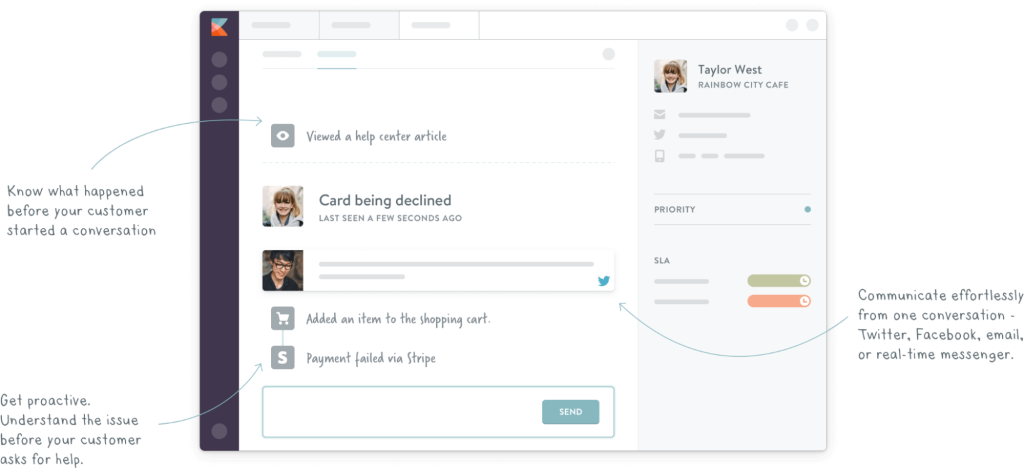
Kayako has moved from its old on-premise “Classic” setup to the modern, cloud-based Kayako One. The shift makes a big difference: instead of worrying about server maintenance or quarterly updates, you get instant fixes, real-time workflows, and no-code integrations. At its core is the SingleView timeline, which shows every customer interaction in one continuous thread, whether it came through email, chat, social, or phone. It also adds automation, a multilingual self-service portal, and a modern messenger that helps deflect repetitive queries.
Key features
- SingleView: See every customer interaction email, chat, social, or phone in one continuous timeline.
- Collaboration: Use internal notes, shared visibility, and assignments so agents can work together without overlap.
- Self-service: Build multilingual help centers and FAQs so customers can resolve issues on their own.
- Integrations: Connect Kayako with apps like Slack, Salesforce, or Zapier to streamline workflows.
What makes Kayako a better alternative to Zoho Desk
Zoho Desk often feels rigid and takes more effort to set up, while Kayako is quicker to get running. Its SingleView timeline gives agents full context across channels, so they don’t have to dig through multiple tickets. Kayako also offers no-code automations, which make it easier for non-technical teams to customize workflows without relying on IT. For teams that need speed and visibility into customer history, Kayako does a better job than Zoho Desk.
| Pros | Cons |
|---|---|
| Simple interface, easier to set up than Zoho Desk | Outdated design and slower product updates |
| The customer journey view helps track interactions | Lacks modern AI and advanced automation |
| Multichannel support | Stability and reliability issues reported |
💬 User reviews
“The AI Suggested Responses are incredibly helpful. agents barely have to start from scratch anymore. Plus, the Self-Learning Mode learns from our closed tickets, so over time, it just gets smarter.”
“Over the last few years, new features are no longer released. Only recently have there been active reports on bug fixes, and sometimes the system becomes extremely slow.”
Pricing
- Free trial: 14 Days
- Kayako One: $79/ month + $1 for all AI-resolved tickets
Recommended reading
7. GrooveHQ
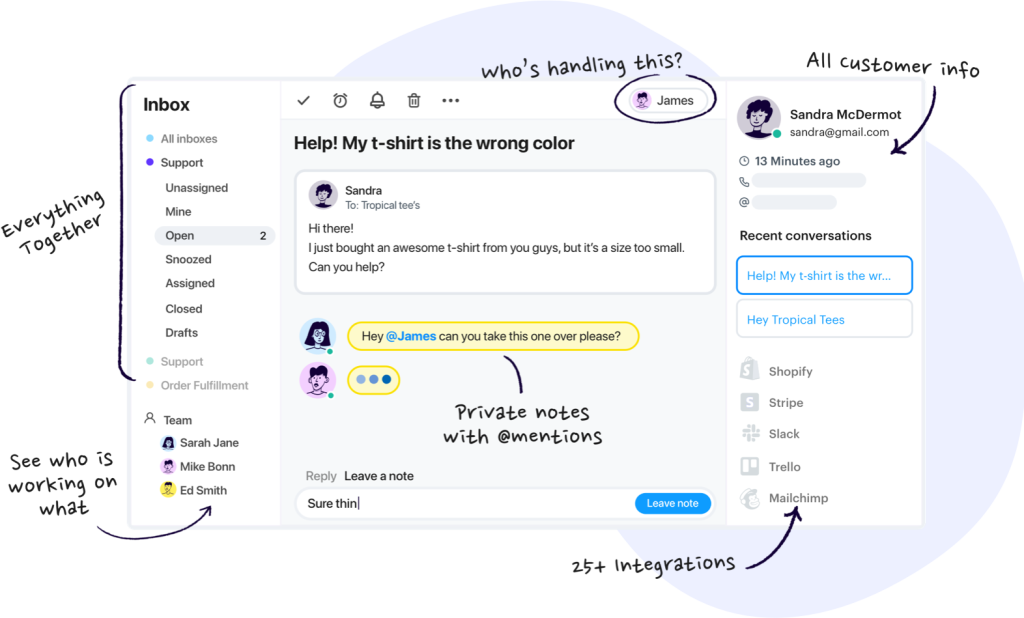
GrooveHQ is a cloud-based help desk with a clean shared inbox, a built-in knowledge base, and lightweight automation for routing and tagging. The interface is minimal and easy to learn, which makes it popular with early-stage support teams that just want email and chat handled without a complex setup.
Key features
- Shared inbox: Manage support emails in one place with tagging, assignments, and basic ticketing.
- Knowledge base: Create self-service articles so customers can find answers without raising a ticket.
- Collision detection: Prevent duplicate replies by seeing when someone else is handling the same conversation.
- Reporting & history: Track performance metrics and view full customer conversation history.
What makes GrooveHQ a better alternative to Zoho Desk
Zoho Desk can feel heavy to configure, while Groove is faster to adopt and get started with. Its clean shared inbox and simple knowledge base are helpful for small teams to start supporting customers without a heavy setup. Automations are straightforward too; you can route, tag, and prioritize tickets with just a few clicks, and no IT help is required. For lean teams that just want email and chat support running smoothly, Groove does the job better than Zoho Desk.
| Pros | Cons |
|---|---|
| Extremely easy to set up with a clean, intuitive interface that small teams can adopt quickly | Lacks advanced automation and AI features, making it less powerful than modern helpdesks |
| Affordable pricing makes it accessible for startups and early-stage teams | No true omnichannel thread unification (separate views for inbox/chat/KB) |
| Simple automations for routing and tagging are enough to handle lightweight workflows | Reporting is basic, not ideal for scaling. Unsuitable for high-volume teams. |
💬 User reviews
“Groove was super easy to implement in our project. They have a bunch of prebuilt features that are easy to add or configure from their web interface. It was pain-free to add, and from our testing, looks fairly robust. Customer support is also super helpful and quick to respond.”
“Groove lacks the capacity to export the data analytics provided in the report’s dashboard. This would be SUPER beneficial going forward!”
Pricing
- Free trial: 30 Days
- Standard: 24/per user/month (Up to 25 users)
- Plus: $36/ user/ month
- Pro: $56/ user/ month
Recommended reading
8. HappyFox
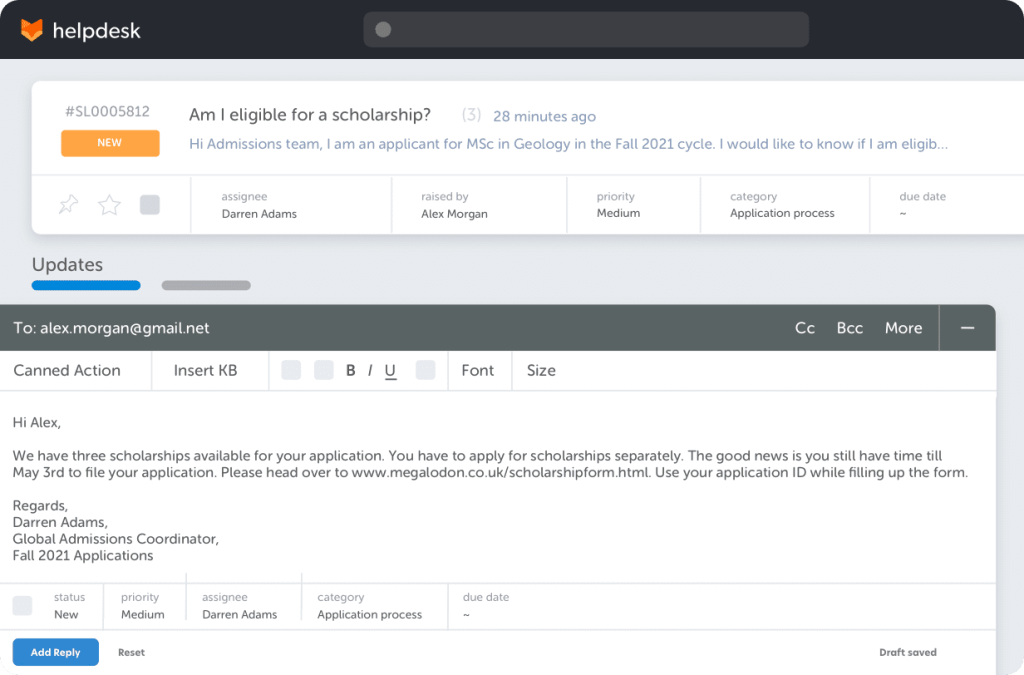
HappyFox is a cloud-based help desk that balances simplicity with the tools teams need to stay efficient. Its ticketing system is clean and easy to manage, automation clears away repetitive work, and the self-service knowledge base gives customers quick answers without waiting on an agent.
It also integrates with CRMs, productivity apps, and communication tools, making it easy to slot into existing workflows. While it works across industries, HappyFox is especially useful for teams that prioritize speed, organization, and streamlined support processes.
Key features
- Ticketing system: Tracks and manages IT incidents and customer requests in a centralized workspace
- Self-service portal & knowledge base: Lets customers find answers quickly, reducing ticket volume
- Multi-channel support: Consolidates email, phone, chat, and social media into one interface
- Automation & canned actions: Automates ticket assignment, follow-ups, and provides pre-written responses.
- AI capabilities: Speeds up replies with AI-suggested responses, ticket summarization, and automated deflection — aimed at reducing ticket volume and boosting agent productivity.
What makes HappyFox a better alternative to Zoho Desk
Zoho Desk can feel rigid and limiting when it comes to building workflows, while HappyFox provides more flexibility with automation and stronger SLA management out of the box. It also includes built-in IT asset management, allowing teams to track hardware and software directly alongside support tickets, something Zoho Desk doesn’t offer.. Even so, for teams that prioritize reliability, SLA compliance, and asset tracking, HappyFox is often the stronger choice over Zoho Desk.
| Pros | Cons |
|---|---|
| Strong SLA management and workflow automation make it reliable for structured support | Interface feels outdated compared to more modern platforms |
| IT asset management is built in, which is valuable for IT and support-heavy organizations | Steeper learning curve and limited AI functionality compared to peers |
| Multichannel ticketing with a help center and customer portal covers core support needs | Advanced features are locked into higher-tier plans, raising overall costs |
💬 User reviews
“It has eased all my trouble to accumulate tickets from all sources. This software easily gives all the tickets raised from various sources like email, social media, phone calls, chat, website widgets, and everything. Love it.”
“A lot of the newer features are limited to the top tier pricing bracket which means, starting out with the lower level limits the features. It is limited ticketing and providing a knowledge base.” – Capterra Review
Pricing
- Free trial: 14 Days
- Basic: 24/ agent/month
- Team: $49/ agent/month
- Pro: $56/ agent/month
- Enterprise pro: Custom pricing
9. Intercom
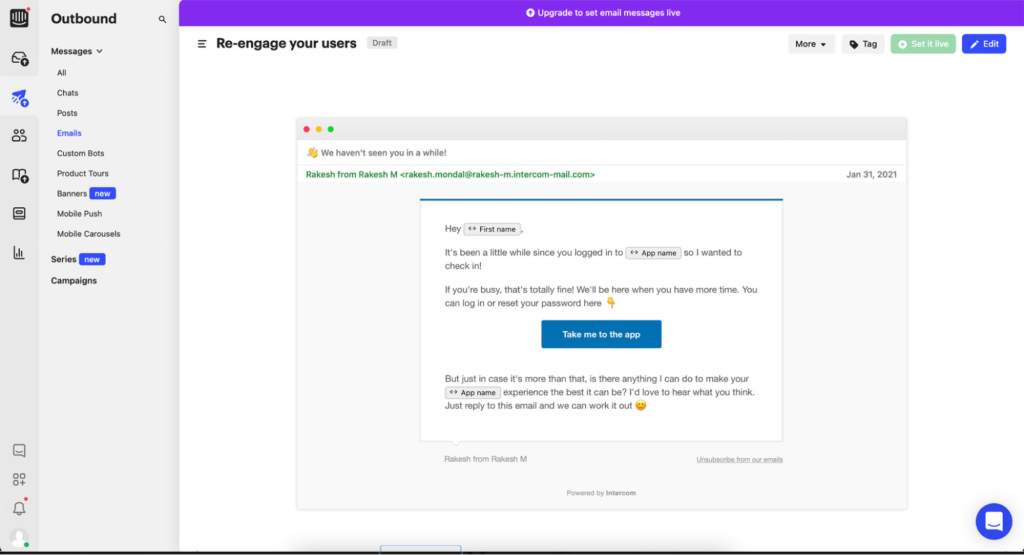
Using Intercom feels less like logging into a helpdesk and more like opening a messenger. It helps businesses engage with customers in real time with bots, targeted messages, and customizable workflows. The AI bot, Fin, jumps in for repetitive stuff, but when the issues get complex, it slides the conversation over to an agent without missing a beat. Intercom also ties in with product tours and in-app messages, which makes it especially appealing for SaaS companies that want to blend support with customer engagement.
Key Features
- AI chatbot (Fin) + automated playbooks: Fin handles routine questions and escalates complex ones, while custom bots and flows can automate onboarding, support, or lead capture.
- In-app engagement and messaging: Send targeted pop-ups, tooltips, or messages based on what users are doing in your product.
- Multiple Help Centers: Build separate Help Centers for each brand you manage, all controlled from one Intercom workspace.
- Analytics & segmentation: Track CSAT, resolution times, and segment users by traits or behavior for more personalized engagement.
What makes Intercom a better alternative to Zoho Desk
Zoho Desk can feel heavy when it comes to user experience, while Intercom leans into simplicity with a modern messenger that works right inside your app or website. It’s more conversational and proactive, making it better for companies that want to engage users instead of just reacting to tickets. That said, Intercom’s pricing can get steep as you scale, especially if you want advanced features or high chat volumes.
| Pros | Cons |
|---|---|
| Best-in-class for conversational and in-app support; highly engaging UI and customer experience | Can get very expensive pricing scales with seats, contacts, bots, and outbound features |
| Powerful automation via custom bots, Fin AI, and behavior-triggered flows | AI bot usage is billed per resolution, which can add unpredictable costs at scale |
| Excellent for product-led growth teams that want to combine support + onboarding | Lacks full-fledged ticketing workflows and escalation paths more suited for chat-driven teams |
💬 User review
“I like best about Fin by Intercom is how easy it is to get started and use on a daily basis. The setup was smooth and didn’t require much technical effort, which was a big plus. It integrates well with our existing tools and works right alongside our support team.”
“Some features that feel core (like advanced reporting or certain automation tools) are gated behind higher-tier plans. Also, while the inbox is powerful, there’s a bit of a learning curve for new team members to fully grasp the workflows and settings.”
Pricing
- Free trial: 14 days
- Essential plan: $29/seat/month
- Advanced plan: $85/seat/month
- Expert plan: $132/seat/month
- Fin AI is billed separately at $0.99 per resolution; other features like outbound messaging and WhatsApp also cost extra.
10. DragApp
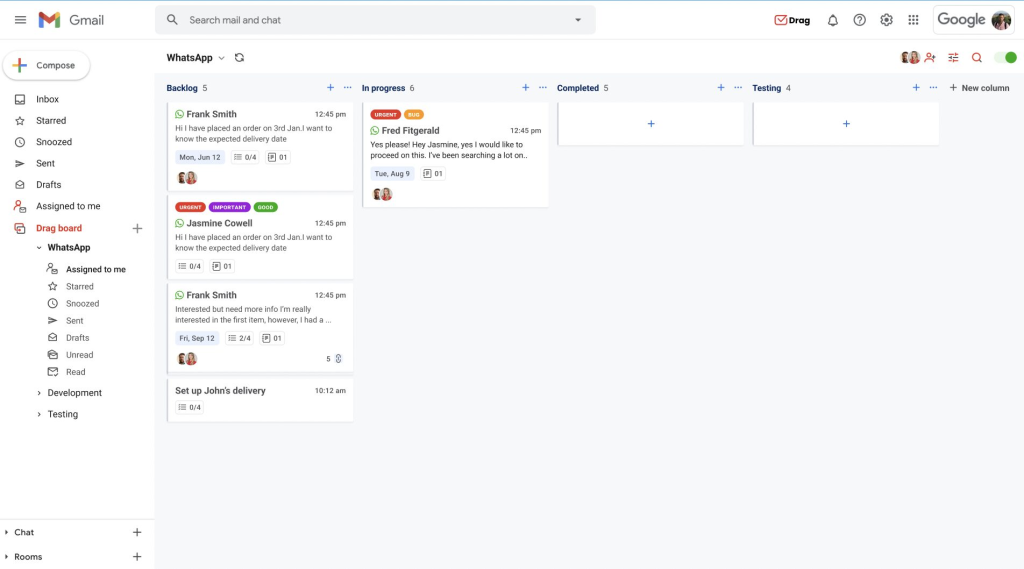
With DragApp, you don’t need to learn a new helpdesk – it just works right within Gmail. Support emails show up as kanban-style cards you can drag across stages, and the shared inbox makes collaboration easy without endless CCs or forwards. It’s lightweight, affordable, quick to roll out, and works best for small teams that already live in Gmail every day.
Key features
- Shared inbox in Gmail: Manage support collaboratively without leaving your inbox.
- Kanban boards: Turn emails into cards you can drag across stages like “Open” or “Resolved.”
- Collaboration tools: Shared drafts and notes so multiple teammates can work on replies together.
- Simple automations: Set up rules for tagging, routing, and assignments to keep workflows tidy.
What makes DragApp a better alternative to Zoho Desk
Zoho Desk requires teams to move into a separate system, which can feel heavy for smaller setups. DragApp keeps everything inside Gmail, making it easier to adopt and far less intimidating. This makes it suitable for small teams just starting out
| Pros | Cons |
|---|---|
| Works right in Gmail, reducing the need for new software | Limited only to Gmail users not suitable for teams on other email platforms |
| Kanban boards make tracking tickets and tasks simple and visual | Lacks multichannel support like phone, chat, or social |
| Quick adoption with almost no setup effort | Reporting and analytics are very limited compared to full helpdesks |
💬 User review
”Drag is integrated into my daily work routine, and I particularly like that I can assign and move emails to my colleagues. This way, we can work on projects together, and they have access to my mailbox if I am out of the office. This makes collaboration much easier and saves time.”
“Occasionally, the app becomes somewhat slow, especially when I move a large number of emails. This is not too bothersome, but an improvement in this area would be helpful.” – G2 Review
Pricing
- Free trial: 7 days
- Starter: $12/user/month
- Plus: $18/user/month
- Pro: $24/user/month
Recommended reading
11. HubSpot Service Hub
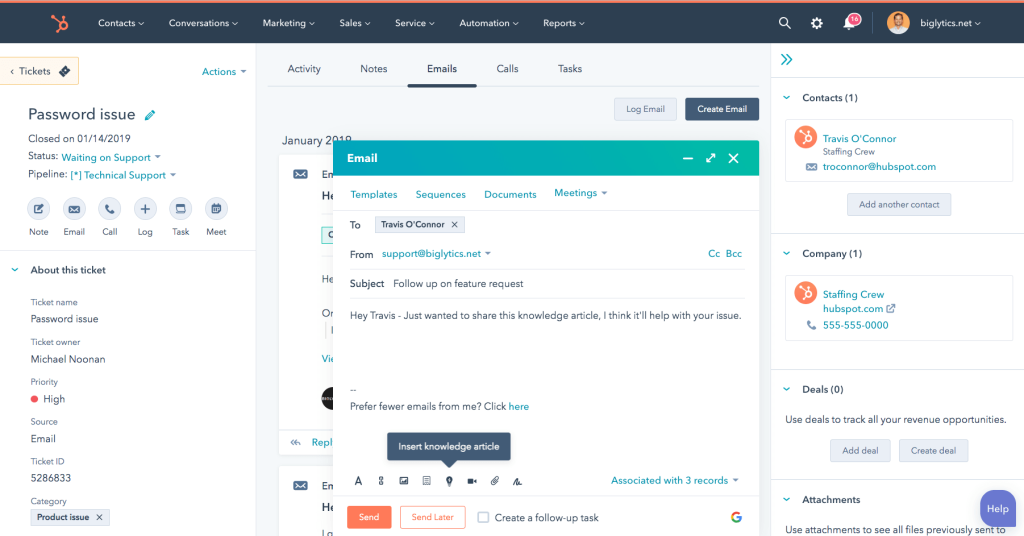
With HubSpot Service Hub, the biggest advantage is how neatly it ties into HubSpot CRM. Every support ticket is linked to the customer record, so agents know the full history before replying. It comes with ticketing, automation, and feedback tools out of the box, plus a clean interface that feels polished and easy to navigate. For companies already running on HubSpot, it feels less like adding a new system and more like extending the one they already know.
Key features
- CRM-linked ticketing: Every ticket connects directly to the customer’s HubSpot record.
- Workflow automation: Automates routing, assignments, and notifications so no request gets lost.
- Customer feedback tools: Built-in CSAT, NPS, and CES surveys to track satisfaction.
- Knowledge base & portal: Self-service articles and FAQs to help customers resolve issues quickly.
What makes HubSpot Service Hub a better alternative to Zoho Desk
Zoho Desk works best if you’re already deep in the Zoho ecosystem, while Service Hub does the same for HubSpot users. The difference is that HubSpot’s CRM connection is tighter and the interface feels cleaner, giving teams better visibility into the customer journey. It’s a great fit if you already use HubSpot, but costs climb quickly as you scale.
| Pros | Cons |
|---|---|
| Seamless CRM integration gives full context for every customer conversation | Pricing rises steeply as you add seats and advanced features |
| Clean, modern interface that’s easy for agents to learn | Works best only if your company already runs on HubSpot |
| Built-in CSAT, NPS, and CES surveys make measuring satisfaction straightforward | Advanced reporting and SLAs require higher-tier plans |
💬 User review
“It really helps me assist clients with their concerns and resolve them on the spot. I also love how everything is tracked and documented, so I can easily follow up, review past cases, and ensure no request gets overlooked. This makes my workflow smoother and my customer interactions more efficient and professional.”
“Some of the more advanced features, like custom reporting or advanced automation, are locked behind higher-tier plans. This can limit small or growing teams from fully leveraging the platform’s potential without increasing costs.”
Pricing
- Free trial: 14 days
- Starter: $15/seat/month
- Professional: $100/seat/month
- Enterprise: $150/seat/month
Recommended reading
Best HubSpot Service Hub Alternatives to Power Your Support in 2025
How to choose the right Zoho Desk alternative
When comparing Zoho Desk alternatives, the right fit depends on your team’s priorities. Some platforms are better for real-time conversations, others shine at structured workflows, and a few bring AI and automation that Zoho still lacks. Here’s what I like to look at when evaluating a new platform:
✅ Automation and AI capabilities
If your team handles high volumes or repetitive queries, automation with depth and a good amount of flexibility is essential! Look for tools that can:
- AI triage: Categorize and route tickets by sentiment, topic, or urgency
- Suggested or auto-drafted replies: Help agents respond faster while staying on-brand
- Self-service automation: Surface knowledge base articles or resolve queries end-to-end with bots
Hiver, Intercom, and Freshdesk stand out here, offering AI agents and workflows that cut down manual effort without sacrificing quality.
✅ Multichannel support
Customers don’t stick to one channel for support, and your support tool shouldn’t either. A strong Zoho Desk alternative should help you:
- Manage email, chat, voice, WhatsApp, SMS, and social media in one view
- Maintain context continuity across channels
- Apply consistent SLAs, tags, and workflows no matter where a conversation starts
Hiver, Zendesk, and Front offer unified multichannel support that reduce silos and keep conversations on track.
✅ Ease of use and deployment
Even the most powerful platform won’t help if your team struggles to use it. Before choosing, ask:
- Is the interface intuitive for new agents?
- Can workflows be set up without dev support?
- How steep is the learning curve for admins and managers?
If you’re looking to scale fast without months of onboarding, Help Scout, Hiver, and Freshdesk strike a good balance between functionality and simplicity. In fact, with Hiver, teams start running in just minutes!
✅ Scalability and pricing transparency
Some tools lock key features behind higher tiers or charge per seat, per bot, and per add-on until the cost hits the roof. So, keep a check on:
- Whether core features (like analytics or automation) are available on mid-tier plans
- Whether pricing is per agent, per contact, or usage-based
- Whether adding users, channels, or workflows requires a complete plan upgrade
Hiver includes AI and multichannel support across all paid plans, while others, like Intercom, can get expensive fast depending on usage.
✅ Reporting and performance insights
You can’t improve support if you can’t see what’s going on. Look for a tool that gives you clear visibility into day-to-day operations, like:
- SLA tracking and real-time alerts
- Custom reports on response time, CSAT, volume by channel, etc.
- Agent performance breakdowns and workload heatmaps
- AI-powered insights to surface trends or bottlenecks
Zendesk, Hiver, and Freshdesk all cover reporting well, though the depth and ease of access will depend on which plan you’re on.
✅ Integrations and flexibility
Your support platform should connect easily with your existing tools, CRMs, e-commerce platforms, and internal systems. Check for:
- Native integrations with tools like Salesforce, HubSpot, Slack, Jira, and Shopify
- Open APIs and webhooks for custom workflows
- Integration limits based on pricing tier
Hiver, Gorgias, and Help Scout all stand out here, offering plenty of built-in integrations plus the option to customize when needed.
Final thoughts
Zoho Desk is popular for a reason: it’s affordable and covers the basics. But once you need more flexibility, faster automation, or a cleaner user experience, there are plenty of better options. Each tool on this list has its strengths, whether it’s Intercom for chat, HubSpot Service Hub for CRM-driven support, or HappyFox for IT-heavy teams.
If you want a platform that combines ease of use with powerful AI across every channel, Hiver is the one I’d recommend. It’s modern, quick to roll out, and goes beyond Zoho Desk with features like AI Copilot for drafting replies, AI Agents for triage and automation, and AI Insights to help leaders spot trends and improve processes. Plus, it includes multichannel ticketing, a knowledge base, a customer portal, and workflow automation, all without the setup headaches Zoho is known for.
👉 Start your free trial of Hiver and see how it stacks up against Zoho Desk.
FAQs
What is Zoho Desk mainly used for?
Zoho Desk is a customer service platform, help desk software, and customer support tool that helps teams manage requests across email, chat, phone, and social channels. It includes essentials like ticketing, a knowledge base, and workflow automation. However, advanced features such as AI assistance and live chat are only available on higher-tier plans.
Why do companies look for Zoho Desk alternatives?
Many teams switch because Zoho Desk has a steep learning curve and limited workflow flexibility. Businesses also look for desk software that’s easier to use and more predictable on pricing, since core features like live chat and advanced automation are only available on expensive plans.
Which Zoho Desk alternative is best for small teams?
Tools like Help Scout, GrooveHQ, and DragApp are easier to adopt for smaller teams that want simplicity and a faster setup. They focus on clean interfaces, lightweight automation, and quick onboarding.
Which Zoho Desk alternative is best for larger or scaling teams?
Zendesk and Freshdesk are often chosen by larger organizations because they offer advanced automation, enterprise-level workflows, and deeper reporting. They’re more expensive but built to handle scale.
How does Hiver compare to Zoho Desk?
Hiver keeps things simple with an intuitive interface and faster rollout, while embedding AI across everyday workflows. It supports email, chat, WhatsApp, voice, SMS, and social media plus includes automation, SLAs, analytics, and AI Insights in one platform. This makes it a stronger fit for modern teams that want to scale without the complexity of legacy tools.
Start using Hiver today
- Collaborate with ease
- Manage high email volume
- Leverage AI for stellar service