







When I started researching AI agents, I knew the usual talking points: they automate busywork, reduce load, and save time. But I wanted to understand how they actually think and work. So I sat down with Suraj Sharma from Hiver’s AI team, and one thing he said reframed the entire idea for me, “AI agents don’t just reply; they do the work.”
But the irony is that most support teams still rely on humans to process refunds, check logs, assign tickets, or confirm updates. AI agents change this dynamic. They read the issue, pull context from your systems, decide the next steps, and complete the task end-to-end. This guide breaks down what they are, how they work, and how support teams can use them effectively.
TL;DR
- AI agents read the issue, pull context from your systems, decide the next steps, and complete tasks end-to-end without constant human input.
- Unlike chatbots that follow scripts and assistants that only help with tasks, AI agents reason through problems, use connected tools like CRMs or billing systems, and carry out the full workflow on their own.
- AI agents follow a simple loop like understand the request, set the goal, plan the steps, execute actions across tools, verify success, and learn from the outcome, which makes them more reliable over time.
- Hiver’s AI stack powers this loop by tagging intent, triggering workflows, resolving issues safely, and improving via QA and insights, letting support teams automate work without losing control.
- Every effective AI agent relies on five layers: reasoning, planning, memory, tool-execution, and learning. Evaluating these layers helps you understand how capable an agent really is.
- AI agents come in seven forms (reflex, model-based, goal-based, utility-based, learning, hierarchical, and multi-agent), each built for different levels of reasoning, autonomy, and collaboration.
- Companies using AI agents see faster resolutions, lower operational costs, fewer manual steps, consistent responses, and higher CSAT because agents handle routine work instantly and accurately.
- The biggest risks when adopting AI agents like data exposure, poor data quality, integration failures, and missing feedback loops, are manageable only with clear guardrails and audits.
- Real brands like Bank of America, Telstra, PhonePe, and Eye-oo use AI agents to reduce backlogs, improve speed, increase revenue, and deliver more dependable service.
- AI agent projects succeed when teams start with one measurable workflow, clean their data, and match the right agent to the right task.
What is an AI agent? Definition & characteristics
An Artificial Intelligence (AI) agent is software that understands a goal, decides what steps are needed, and completes the task with minimal human input.
As Suraj, Hiver’s AI Product Manager, explained during our conversation, “Unlike chatbots that follow scripts, AI agents use large language models to reason, gather context, and act across systems.”
For example, when a customer reports a failed refund, the agent checks payment logs, verifies the issue, updates billing, and confirms resolution. Some key traits of an AI agent:
- Autonomous: Operates without step-by-step human input.
- Goal-driven: Works toward specific outcomes.
- Context awareness: Pulls data from multiple tools to act accurately.
- Adaptive: Learns from outcomes and improves with time.
In simpler terms, a chatbot tells you something, but an AI agent does something.
AI agents vs chatbots vs AI assistants
Chatbots, assistants, and agents solve different problems, even though they all use AI. The biggest difference is in how much thinking and doing each one can handle.
- Chatbots stick to predefined scripts. They can answer FAQs but struggle the moment a question falls outside their decision tree. As Suraj explained, “Chatbots break when the context shifts because they rely on fixed paths.”
- AI assistants go a step further. They use AI to help with tasks like summaries, suggested replies, scheduling, yet they still depend on a human to take the final action.
- AI agents are the most advanced. They gather context, reason through the situation, use connected tools like CRMs or billing systems, and complete the task end-to-end.
This makes AI agents the only category built to think, decide, and act across systems without constant supervision.
| Capability | Chatbot | AI Assistant | AI Agent |
|---|---|---|---|
| Primary function | Responds using predefined rules | Helps with tasks using natural language processing | Understands goals and completes tasks autonomously |
| Context handling | Limited | Moderate | Deep and continuous |
| Learning ability | None | Basic | Advanced and adaptive |
| Integration | Single system | Few systems | Multiple connected tools and APIs |
| Decision making | None | Guided | Independent and reasoning-based |
| Example | Answers FAQs | Draft email summaries | Resolves a refund issue end-to-end |
How do AI agents work?
AI agents follow a simple loop: understand the situation, decide what needs to happen, and take action. They repeat this cycle continuously, learning and improving with every task.

To make this easier to follow, let’s look at how this works in practice using Hiver’s AI Agent as an example. It’s a good reference point because it’s designed for customer service teams and runs within an intuitive interface.
1. Read the customer message and collect context
The AI agent starts by reading the customer’s message and pulling in everything it needs like order details, past emails, account history, and any previous actions taken. This gives it the full picture before it decides what to do next.
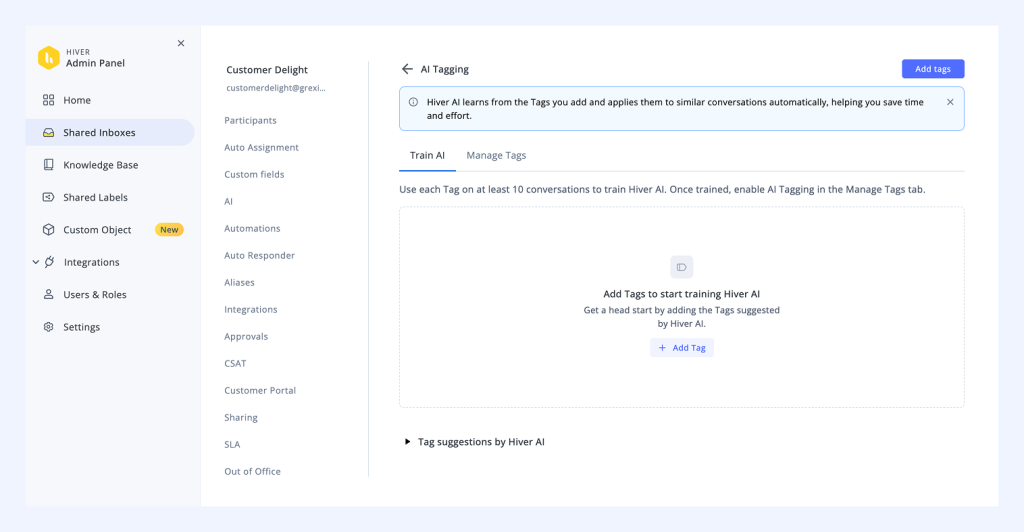
In Hiver, this begins with AI Triage, which instantly understands the intent behind each message. Once it knows what the issue is, it can organize queries into the right buckets like refunds, payment failures, or delivery problems. That early classification helps the agent build context faster and act with more accuracy.
2. Detect what the customer needs and set a goal
Next, the agent figures out what the customer wants and what success looks like, whether that’s issuing a refund, updating an order, or confirming a delivery. For instance, if someone says, “I was charged twice,” the AI agent identifies a billing error, checks records, and sets the goal: refund the duplicate charge and notify the customer.
This is where AI transitions from support “assistant” to autonomous operator.
3. Decide how to get the task done
The agent then outlines the steps needed to reach that goal, similar to how a support rep would follow a checklist.
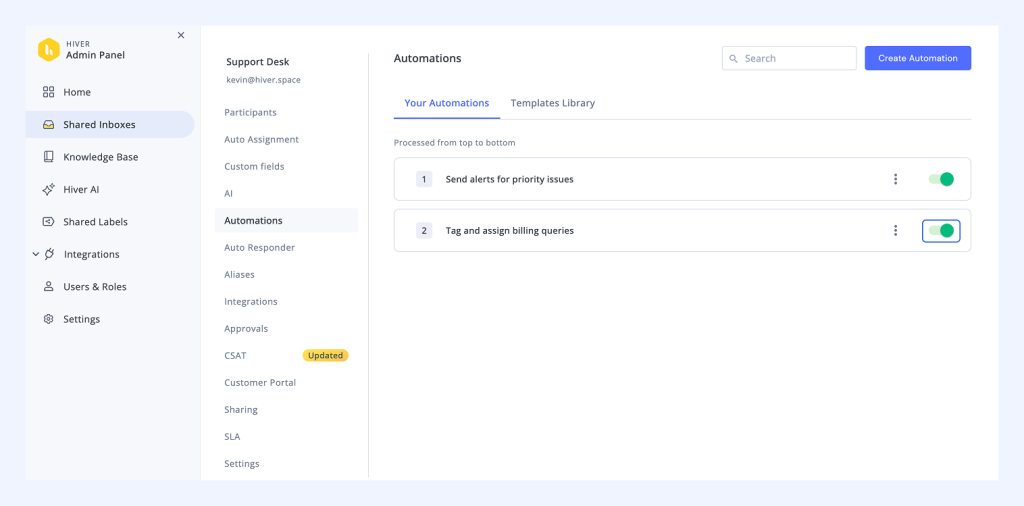
With Hiver’s AI Workflow Automation, the agent automatically decides which systems to use, what actions to trigger, and when to involve a human if necessary.
4. Carry out the actions across your tools
The agent now does the work. It updates customer records, issues refunds, assigns conversations, and notifies teammates across all connected systems.
In Hiver, this execution layer is powered by AI Workflow Automation. The agent can call the right workflow, pass it the required context, and complete the steps automatically. A refund request, for example, can be verified, pushed to the billing system, closed, and acknowledged.
5. Check if everything worked correctly
Before closing the case, the AI agent double-checks their own work. It verifies that every update, refund, or status change went through successfully.
With Hiver Resolution Assist, the system flags when something doesn’t go through or matches unexpectedly, so issues get caught before returning to the customer.

6. Learn from every outcome and keep improving
Every action teaches the agent something new. It learns which responses worked best, how to handle exceptions, and when to involve a human.
With Hiver’s AI QA and AI Insights, this learning becomes continuous. The system evaluates tone, accuracy, and efficiency, helping the AI Agent and your team improve with every interaction.

Core components of an AI agent architecture
Every AI agent is built on a few foundational layers that allow it to understand information, make decisions, take action, and improve over time. Knowing how these layers work helps you evaluate how capable and mature an AI agent really is.
1. Reasoning (Foundation Model / LLM)
This is the agent’s brain. It reads the input, understands intent, interprets tone, and figures out what should happen next. This layer is powered by large language models trained on huge datasets, which is why agents can understand natural language so well.
Suraj put it clearly: the LLM is “the brain that decides what action makes sense based on all the context it sees.”
2. Planning
Once the goal is clear, this layer breaks it down into smaller, manageable steps and sequences them logically. Planning enables the agent to handle multi-step workflows, like processing refunds or escalating technical issues. These planning capabilities are especially important when coordinating actions among multiple agents
IBM explains it as, modern AI agents consist of “interconnected subsystems of planning, memory, tool use, and reflection, all guided by a central reasoning model.” The planning layer ensures these parts work in sync.
3. Memory
Memory allows the agent to remember past actions and use them in future interactions. Short-term memory handles what’s happening now, while long-term memory stores historical data, previous resolutions, and patterns.
As Suraj noted during our conversation, this is what makes agents context-aware. They don’t start from zero; they learn and personalize every interaction over time.
4. Action Layer (Tool Integration)
This is where intelligence turns into execution. The agent connects to your CRM, billing tools, or APIs to perform real-world actions like updating data, processing refunds, or triggering automations.
In more complex workflows, the action layer may also require coordination or communication with multiple agents to accomplish shared tasks.
Without this layer, AI would remain theoretical. Tool integration is what turns decisions into outcomes.
5. Feedback and Learning Loop
The feedback loop helps the agent evaluate its actions and improve automatically. It learns from both human corrections and real-time results.
Suraj mentioned that this layer is built into the model itself. AI agents course-correct through reinforcement, gradually getting faster, more accurate, and more autonomous with experience.
Together, these components form the core of every effective AI agent: it reasons to understand, plans to act, remembers context, executes across tools, and keeps learning with every cycle.
Types of AI agents
AI agents come in many forms, depending on how much they understand, how independently they act, and how well they learn. As technology evolves, we’re moving from rule-following bots to systems that can think, reason, and even collaborate.
These seven types were first defined in Russell & Norvig’s AI framework, which still shapes how modern systems, from IBM to OpenAI, are built today. Each level represents a step up in autonomy and intelligence.
1. Simple Reflex Agents
Simple reflex agents follow basic “if X happens, do Y” rules. They don’t analyze the situation or learn from past behavior; they just respond to triggers.

When a specific condition is met, they perform a fixed action. For example, if a support email contains the word urgent, the system immediately moves it to a priority queue.
They work well for repetitive, predictable tasks but fail when the situation changes. There’s no context, no learning, and no flexibility.
Recommended reading
2. Model-Based Reflex Agents
Model-based reflex agents use a small internal memory to keep track of what’s happening around them. Instead of reacting instantly to a trigger, they pause and check a few details first. This gives them a bit more “awareness” compared to simple reflex agents.

For instance, a customer says their refund hasn’t arrived. A simple agent would fire off a generic reply. A model-based agent does better; it quickly looks at payment logs or recent transactions before deciding what to say.
This stored memory acts like a lightweight database that the agent can reference. It helps the agent understand the current situation and how its action will affect the next one. It’s a meaningful step above simple reflex agents, which only follow rigid “if X, then Y” rules.
But there are limits. These agents still can’t learn from experience. They don’t improve over time. And when the situation becomes too complex or unpredictable, they struggle because they can only operate within the rules they were originally programmed with.
3. Goal-Based Agents
Goal-based agents focus on achieving a specific outcome. They choose actions that move them closer to a defined goal.
For example, if the goal is “restore access to a locked account,” the agent might verify identity details, reset credentials, and guide the user back in. Each step is chosen because it helps reach the final objective.
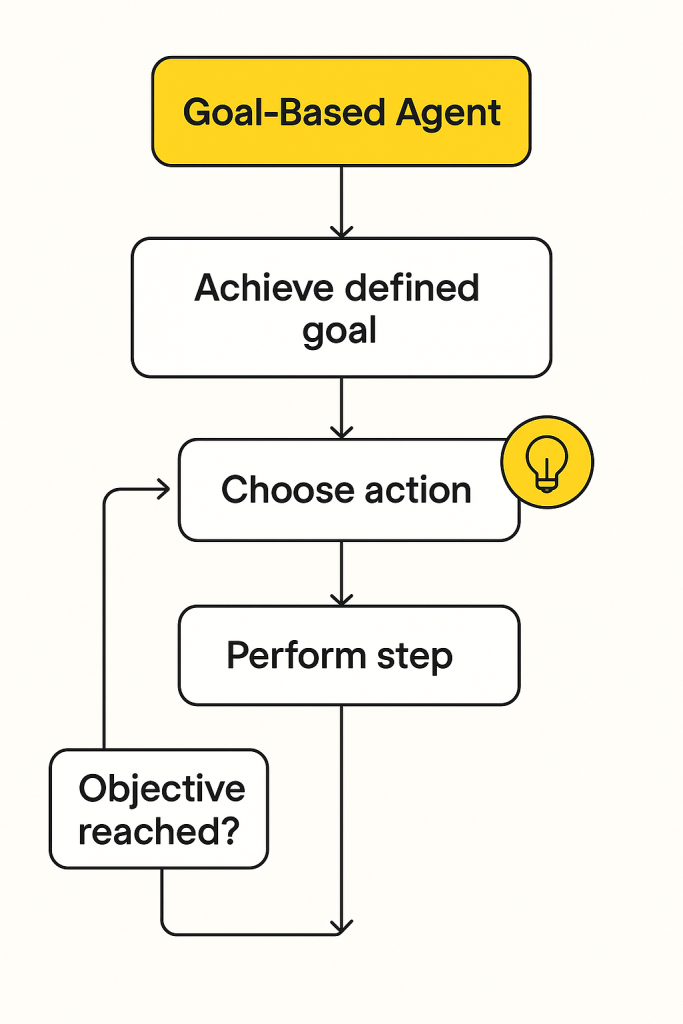
These agents are well-suited for tasks that require reasoning. They can interpret natural language, understand the user’s intent, and break a complex request into smaller actions. They’re also useful for multi-step processes such as onboarding, order correction, or technical troubleshooting.
4. Utility-Based Agents
Utility-based agents take planning further by evaluating multiple possible actions and selecting the one with the best outcome.
Instead of following a fixed path, they weigh factors like speed, accuracy, cost, compliance requirements, and customer impact. This allows them to make smarter choices in situations where there isn’t a single “right” answer.

For example, imagine the agent needs to verify a suspicious login attempt. It can either grant access quickly to reduce friction or run additional checks to reduce risk. The agent evaluates both options, considers the trade-offs, and picks the path that offers the safest and most efficient outcome.
This ability to balance competing priorities makes utility-based agents especially useful in scenarios where decisions aren’t straightforward.
5. Learning Agents
Learning agents get smarter over time. They learn patterns from past interactions and adjust their behavior based on what the data shows. In simple terms, the more situations they see, the better they get.
For example, if the agent notices that refund delays almost always happen when a certain API is slow, it adapts. Over time, it starts routing those cases differently, adds extra checks, or alerts a human earlier in the process.

This ability to adjust based on real data makes learning agents effective in environments where workflows evolve frequently and new edge cases appear over time.
6. Hierarchical Agents
Hierarchical agents work across multiple levels of goals and subgoals. Each layer handles a specific part of the task: one layer manages communication, another handles backend processes, and another ensures compliance. This keeps large workflows organized and prevents the entire system from failing if one layer hits an issue.
For example, let’s take a customer who wants to change their subscription plan.
- Layer 1 (Conversation Layer): Understands the request and confirms the new plan.
- Layer 2 (Process Layer): Checks eligibility, updates billing, and applies changes.
- Layer 3 (Compliance Layer): Verifies that the change meets policy rules before finalizing.
Even if the billing step slows down, the communication layer can keep the customer informed and request the next step only when the backend is ready.

This structure keeps operations efficient and scalable. If one layer fails, others continue functioning. It’s how large systems manage thousands of requests simultaneously without breaking the flow.
7. Multi-Agent Systems
In multi-agent systems, several agents work together and each has a specific function, such as data retrieval, decision-making, or communication.
For example, if a customer writes in saying, “My order never arrived, and I think I was charged twice.”
In a multi-agent setup:
- Agent A (Data Retrieval) pulls the order status, shipment logs, and payment history.
- Agent B (Decision-Making) reviews the data, identifies a delivery failure and a duplicate charge, and decides what needs to happen next.
- Agent C (Action Execution) processes the refund, opens a replacement order, updates the CRM, and drafts the customer reply.
Each agent does its part independently but shares information, coordinates decisions, and divides responsibilities to solve problems more quickly. It’s similar to how different departments in a company work together: one gathers insights, another acts on them, and a third verifies the result.
These seven types form the foundation of modern AI architecture. Today’s systems combine multiple types, often blending learning, planning, and multi-agent collaboration, to create AI that’s truly autonomous, adaptable, and capable of reasoning like a human team.
Hiver’s AI Agent, for instance, acts like a goal-based and learning agent. It plans actions, executes them, and improves continuously with feedback, making it both intelligent and adaptive.
AI agents in customer service: applications & benefits
Instead of reacting to tickets, AI agents handle repetitive work, resolve issues faster, and help human agents focus on more complex problems. Here are some of it’s key applications and its benefits.
Key Applications
In customer service, AI agents function like autonomous team members, understanding customer intent, pulling data from multiple systems, and executing tasks end-to-end.
They step in where workflows slow down, finishing routine tasks so your team doesn’t have to.
- Autonomous query resolution: Handle common issues like refunds, password resets, or delivery tracking automatically.
- Smart ticket triage and routing: Detect intent, urgency, and sentiment in incoming messages to assign them to the right agent or workflow instantly.
- Personalized customer interactions: Use past data, preferences, and tone analysis to tailor responses, making automation feel human and promote empathy in customer service.
- Proactive engagement: Anticipate customer needs by identifying early signals of dissatisfaction or repeat issues and triggering timely outreach.
- Self-service and deflection: Suggest relevant help articles, FAQs, or troubleshooting steps based on the customer’s query before escalating to human agents.
- Workflow execution: Update CRMs, process refunds, generate reports, or trigger internal actions across tools, directly from the same interface.
- AI-powered quality assurance: Analyze tone, accuracy, and compliance in support interactions to provide instant coaching and improve team performance.
AI agents make the whole process more efficient by connecting systems, learning from past interactions, and minimizing manual work.
Business Benefits
When implemented well, AI agents do more than automate support. They make operations faster, leaner, and more consistent across every channel.
- 24/7 support coverage: AI agents are always available, ensuring uninterrupted assistance, regardless of time zones.
- Reduced handling time: Automating repetitive tasks shortens resolution time and frees agents for complex, human-centric interactions.
- Lower operational costs: Efficiency gains result in reduced costs per ticket and an optimized team size.
- Improved accuracy and consistency: AI eliminates human error by following the same logic and policy across every workflow.
- Faster onboarding and training: Agents learn from AI suggestions and QA feedback, shortening the learning curve.
- Scalable customer service: Capacity scales automatically with demand, no need for proportional hiring.
- Higher customer satisfaction (CSAT): Faster, more consistent responses and proactive problem-solving boost overall satisfaction.
In short, AI agents make your teams sharper, faster, and more focused on what really needs human judgment.
Real-World Case Studies: AI Agents in Action
AI agents are already transforming the way major brands handle customer experiences. Here are a few real-world examples that show how autonomous systems perform in practice:
1. Bank of America with Erica
Customers struggled with long wait times for basic banking queries like checking balances or tracking payments.

Bank of America launched Erica, an AI-driven agent integrated into its mobile app. It helps users check balances, manage cards, and resolve routine tasks through natural language
conversations. Over 1.5 billion client interactions have been handled since launch, reducing live agent workload and improving customer satisfaction.
2. Camping World with Arvee
High ticket volume during seasonal demand peaks made it difficult for support agents to respond quickly.
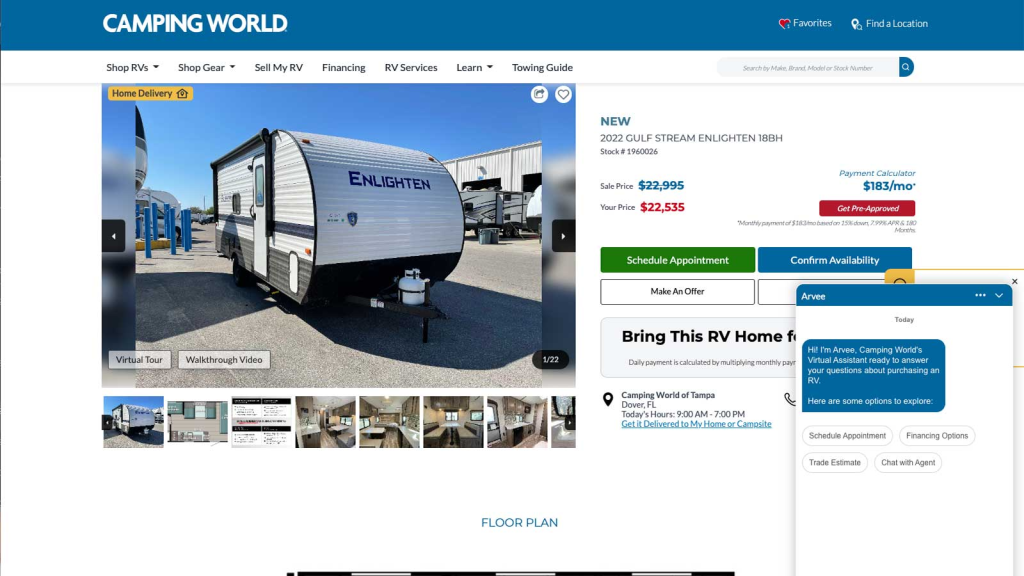
The company deployed Arvee, an AI-powered agent that integrates with Salesforce to handle customer queries, schedule appointments, and manage warranty claims. Response times dropped by 40%, and agents could focus on higher-value customer interactions.
3. Telstra with Ask Telstra
Australia’s largest telecom provider needed to handle high inbound traffic while maintaining quality and personalization.
Telstra deployed Ask Telstra, an AI support system capable of routing tickets, updating plans, and resolving common issues across multiple channels. Customer handling capacity increased by 35%, and support satisfaction scores improved significantly.
4. PhonePe
PhonePe’s support operations faced delays due to high ticket volumes during transaction surges.
By integrating AI-powered workflows through Freshworks, PhonePe automated ticket classification, response generation, and escalation. Resolution times decreased by 60%, and first-contact resolution saw a sharp improvement.
Challenges & considerations when implementing AI agents
Even the most advanced AI agents face challenges in real-world environments. Here’s what teams need to keep in mind before going live:
1. Customer data exposure is a real risk: AI agents often access sensitive emails, payments, or CRM data. Without strong permission controls, they can overstep access boundaries.
▶️ Limit permissions, encrypt all data, and monitor every external API call. Strong secrets management also keeps the API keys and credentials your agent uses to reach those systems encrypted and rotated so a single leaked key cannot open every connected tool.
2. Poor data quality leads to poor decisions: If the underlying data is outdated or inconsistent, the agent will make inaccurate recommendations or trigger wrong actions.
▶️ Maintain clean datasets and automate regular validation checks to prevent cascading errors.
3. Integrations can easily break workflows: When agents rely on multiple systems, one failed connection can stop the entire automation.
▶️ Build modular integrations, use fallback mechanisms, and run routine system health checks.
4. Agents don’t learn without structured feedback: Even the smartest model needs reinforcement.
▶️ Set up feedback loops where human agents review AI actions, flag errors, and feed the corrections back into training.
5. Full autonomy can backfire without oversight: Without guardrails, agents may act on incomplete information or in sensitive situations.
▶️ Define clear boundaries for what AI can handle and when humans should step in.
6. Ethical bias and compliance gaps can erode trust: AI agents may unintentionally favor certain outcomes based on skewed data.
▶️ Test for bias regularly, document all decision rules, and align actions with industry compliance frameworks.
7. Lack of traceability makes accountability difficult: If you can’t trace what an agent did, you can’t fix or defend it.
▶️ Maintain detailed activity logs, attach unique identifiers to every automated task, and enable audit trails for full visibility.
AI agents only work as well as the systems around them. Set clear rules, maintain clean data, and review their actions regularly. The more structure and visibility you build early on, the more confidently your team can scale automation without losing control.
Best practices for implementing AI agents in customer service
AI agents work best when they’re introduced with structure, not speed. Here’s how to make implementation smooth and effective:
1. Start with one measurable outcome. Pick a single use case like auto-triaging incoming emails or handling refund queries. Define what success means in numbers like faster responses, reduced handling time, or fewer manual steps.
2. Standardize the data AI will rely on. Clean your customer records, align field names across systems, and ensure APIs between your CRM, billing, and help desk tools are working. Incomplete or inconsistent data is the fastest way to break an AI workflow.
3. Match the agent’s capability to the workflow. Use assistive agents for generating responses or summaries. Deploy autonomous agents for predictable, repetitive processes like ticket tagging or order tracking.
4. Add approval checkpoints for complex actions. Let AI handle repetitive decisions but route sensitive actions, like refunds or account changes, to human review. Set clear escalation paths.
5. Review how AI responses appear to customers. Focus on clarity, tone, and usefulness, not just speed. Run small pilots and gather feedback from both customers and agents before scaling.
6. Track real metrics, not just activity. Measure deflection, resolution time, and customer satisfaction. Use what you learn to refine the workflow, not just to report performance.
7. Add accountability and safety rules. Every AI-triggered action should leave an audit trail. Define access levels, maintain activity logs, and assign ownership for oversight.
8. Help your team adapt to AI-driven workflows. Train agents to review AI suggestions, handle exceptions, and share feedback. Their input keeps the automation useful and aligned with real-world cases.
When implemented this way, AI agents become reliable, measurable extensions of your support team.
The future of AI agents: What’s coming next
AI agents are evolving quickly. Here’s how the next wave will reshape customer service, and what you can do today to stay ahead.
1. Increased Autonomy & Multi-agent Ecosystems
Gartner predicts that by 2026, 40% of enterprise applications will ship with task-specific AI agents, up from less than 5% today. This shift is already happening, and teams that don’t prepare now will struggle to catch up. For support leaders, this means the window for experimentation is now, not later.
The practical step forward is to build “handoff-ready” processes. Map the intent, define the guardrails, and make sure your data is consistent across tools. When your systems are clean and structured, AI agents can step in and execute actions reliably. Teams that make these changes early benefit the most with reduced backlog and less handling time.
2. Industry Specialisation & Vertical Integration
AI agents are shifting from “general Q&A bots” to specialized operators built for specific industries. This isn’t a small shift. Precedence Research projects the AI agent market to grow to USD 236B by 2034 at a CAGR of 45.82%, driven largely by industry-tailored automation rather than generic assistants.
For customer service teams, this means generic bots won’t be enough. Workflows will need domain logic, like, refund rules, compliance constraints, billing scenarios, policy exceptions, and product-specific troubleshooting into the AI agent’s reasoning.
The teams that prepare now by mapping their top 5 repeat issues, identifying data sources involved, and defining policy boundaries will adopt industry-specific agents faster and see stronger ROI.
3. Compelling Market Projections & Customer Service Implications
The “AI for customer service” market is projected to reach $74B by 2032, growing at roughly 25% a year. This means AI-driven support will soon be the default customer expectation.
If your team isn’t already showing measurable outcomes from AI agents, you risk falling behind competitors who resolve issues faster, operate with leaner teams, and deliver more consistent experiences.
The takeaway is simple: if you don’t start proving value with small AI-driven wins now, you will be competing against support organizations that run at a fundamentally different speed and cost structure.
4. Personalization & Multimodal Capabilities
Agents will handle multiple input types, text, voice, image, and personalize outcomes. According to Kellton research, “by 2027, 40% of generative AI solutions will be fully multimodal (handling text, image, audio, and video), up from just 1% in 2023.”
As an action step, test voice or image-based self-service in one channel (like mobile chat) and measure how much faster or more accurate it becomes.
What you can do now:
- Identify one workflow that can upgrade from “agent drafts” to “agent acts” within six months.
- Run a pilot with a voice- or image-enabled agent in one channel.
- Build specialist logic for one vertical task (e.g., refund, subscription, claim).
- Measure baseline performance (resolution time, manual escalations, customer satisfaction) so you have a point of comparison as agents evolve.
Bringing AI agents into your support workflow
AI agents work best when they replace very specific pieces of manual effort. They read context, decide what needs to happen, and complete tasks end-to-end, if the foundation is right.
- Select one workflow that slows down your team (e.g., refund checks, delivery lookups, account fixes).
- Map the steps, connect the systems, and measure the time saved per case. That single improvement usually shows whether you’re ready to scale.
This gives you a clean before-and-after benchmark and makes it obvious whether automation is actually paying off.
Teams that see the strongest ROI treat AI agents like operational partners. They set boundaries for what the agent should handle, review its early decisions, and gradually expand autonomy as accuracy improves. This keeps automation safe while still reducing workload.
If you want to see this in practice, Hiver’s AI Agent makes it easy to start small and scale safely. It reads customer emails, finds the intent, pulls data from your CRM or billing system, and completes actions like tagging, routing, updating records, or drafting responses. And when something looks risky or unusual, it automatically escalates with full context. You get reliable automation, shorter handling times, and a clearer picture of where humans add the most value.
Try one workflow, measure the impact, and expand from there, that’s how teams build sustainable AI operations.
Frequently Asked Questions
What is the difference between an AI agent and a chatbot?
A chatbot answers questions. An AI agent answers questions and takes action, such as issuing refunds, updating systems, or routing tasks based on context.
How much do AI agents cost?
Pricing varies by vendor and usage, but most charge per interaction, per agent seat, or based on automation volume. Costs usually scale with complexity and integrations.
Can AI agents replace human customer service agents?
No. They handle repetitive tasks, but humans still manage judgment-heavy, emotional, or complex issues. The best teams use AI agents to reduce workload, not replace people.
What are the most common use cases for AI agents in customer service?
Billing queries, refunds, account updates, order tracking, ticket routing, knowledge lookup, and summarizing conversations are the most frequent use cases.
How long does it take to implement AI agents?
Simple setups take a few hours. More advanced workflows with system integrations typically take a few days to a few weeks, depending on data quality and approvals.
Are AI agents secure?
Yes, when built correctly. Modern AI systems use encryption, access controls, audit logs, and strict data governance to ensure customer data stays protected.
What’s the ROI of implementing AI agents in customer service?
Most ROI comes from faster resolution times, reduced workload, lower operating costs, and improved customer satisfaction. Many teams see measurable gains within weeks.
Do AI agents work in multiple languages?
Most LLM-powered agents support dozens of languages and automatically detect the customer’s language before responding.
What happens when an AI agent can’t solve a customer’s problem?
It hands the case to a human agent with full context, including steps attempted, data retrieved, and any errors, so the agent can pick it up immediately.
What industries benefit most from AI agents?
E-commerce, SaaS, fintech, logistics, travel, and telecom benefit the most because they deal with high volumes of repeatable, data-driven customer requests.
Start using Hiver today
- Collaborate with ease
- Manage high email volume
- Leverage AI for stellar service













