





Zendesk has been a default choice for customer support teams for years. It’s widely adopted, trusted by large organizations, and often seen as a “safe” platform that can scale as support operations grow.
But scale changes expectations.
As teams mature, hire faster, add more channels, and start caring about time-to-value, the conversation around Zendesk becomes more layered. That’s where customer reviews get interesting.
Especially ones from teams that have used Zendesk long enough to understand both its strengths and its limits.
This article is built on real user feedback from G2, Capterra, and Reddit. It’s not a feature checklist, pricing teardown, or a comparison guide. If you’re looking for Zendesk’s pricing plans or add-ons, you’ll find those covered elsewhere.
Instead, this review focuses on what day-to-day users actually experience: where Zendesk delivers reliably, where complexity creeps in as teams scale, and the common reasons some teams eventually start looking for alternatives.
If you’re evaluating Zendesk, already using it, or questioning whether it still fits how your team works today, these reviews tell a far more useful story than the star rating alone.
Zendesk Rating Snapshot Across Sources- TL;DR
Here’s a snapshot of user reviews across different platforms:
| G2 rating & sentiment summary | 4.3/5 ⭐ Users on G2 rate Zendesk highly for its core ticketing and overall reliability. Negative reviews consistently point to setup complexity, admin overhead, and rising costs as teams scale. |
| Capterra ratings & sentiment summary | 4.4/5 ⭐ On Capterra, users have given positive feedback on its ticket management feature, omnichannel support, and dashboard usability. Negative sentiment about the platform is due to the learning curve, performance quirks, and higher costs as usage grows. |
| TrustRadius ratings & sentiment summary | 8.7/10 ⭐ Reviewers appreciate Zendesk’s flexibility and customization options. However, many of them have also flagged that it requires significant configuration effort, reliance on admin, and increased cost as teams scale. |
| Reddit sentiment summary | On Reddit, sentiment around Zendesk is far more critical. Users frequently call out high costs, heavy admin effort and rigid workflows. |
| Twitter sentiment summary | On X, the sentiment is mixed, but there are more complaints about the platform than you can count. Users have flagged the high price and difficulties around cancelling subscriptions. |
Zendesk is rated 4.3/5 on G2, 4.5/5 on Capterra, and 8.7/10 on TrustRadius, based on thousands of reviews across platforms.
Across reviews, users consistently agree on one thing: Zendesk is dependable for core ticketing and can handle high volumes of support conversations without breaking. It’s seen as stable, mature, and capable of supporting complex support environments once fully configured.
That said, negative reviews follow clear patterns. Teams frequently point to long setup cycles, heavy reliance on admins, slow or gated customer support, and rising costs as usage scales. These issues don’t usually surface on day one, but become more visible as teams add agents, channels, and workflows.
Who Zendesk is best for
Zendesk works best for mid-to-large support teams that:
- Handle high ticket volumes across multiple channels
- Need deep workflow customization, custom objects, or complex routing logic
- Have access to dedicated admins or ops specialists to manage setup, maintenance, and ongoing changes
- Are comfortable trading time-to-value for long-term flexibility
- Can absorb cost increases as they scale agents, features, and add-ons
Who Zendesk is not ideal for
Zendesk is often a tough fit for small or lean support teams that:
- Want to get live quickly without weeks of configuration
- Don’t have a full-time admin to manage workflows, permissions, and integrations
- Prefer simple day-to-day operations over deep customization
- Expect transparent, predictable pricing as their team grows
- Care more about ease of use and adoption than maximum configurability
Key Takeaways: What Do These Zendesk Reviews and Ratings Tell Us?
After reading reviews across G2, Capterra, TrustRadius, and Reddit, a few common themes stood out to me.
- Zendesk excels at structured, day-to-day support. Users consistently say it handles tickets, queues, and agent workflows at scale.
- It works best for teams that need process and control. Reviews from mid-market and enterprise teams often praise Zendesk functionalities such as roles and permissions, workflows, and integrations.
- Setup effort and admin work are the main friction points. Many users say getting Zendesk to work the way they want takes time, planning, and ongoing admin effort.
- Pricing becomes a concern as needs grow. Costs rise with the number of agents, features, and add-ons like AI, leading some teams to question its long-term value.
- AI features and reporting lack clarity. Users often say Zendesk’s AI relies on add-ons or marketplace apps for automation, while reporting feels basic unless teams upgrade to higher plans.
The 2026 Sentiment Map of Zendesk (G2/Capterra Insights)
Rather than focusing only on glowing praise or highly frustrated complaints, this analysis leans heavily on 3- star reviews across different platforms. These tend to come from teams that have used Zendesk long enough to understand its strengths, but also feel its friction in day-to-day operations. As a result, they offer the most realistic picture of what it’s like to run support on Zendesk over time.
Below is a breakdown of where users consistently see value in Zendesk, and where expectations often start to shift as teams grow.
🟢 What users like about Zendesk (The Pros)
Across G2 and Capterra, positive feedback follows a fairly consistent theme. Even reviewers who call out limitations usually agree that Zendesk gets a few fundamentals right.
1. Zendesk handles day-to-day ticketing reliably.
Zendesk earns strong praise for handling the basics of customer support well. Users frequently mention that tickets stay organized, conversations don’t get lost, and teams can manage steady volumes of customer requests without things falling through the cracks. For many teams, this reliability is the primary reason they continue using the platform.
“I appreciate how Zendesk Support Suite helps us organize our tickets effectively. It allows us to automatically assign tasks based on tags that we’ve created, equipped with specific names and triggers, thus enhancing our efficiency”. – Lisa A. (user review on G2)
2. Becomes efficient once teams adapt to it
While onboarding and early usage are often described as challenging, many reviewers note that Zendesk becomes easier to work with after the initial learning curve. Once agents are familiar with the interface, macros, and workflows, they’re able to move through tickets quickly and handle large queues without constant friction.
“Pros of Zendesk the fact that it gets easier to navigate, tickets translate information clearly & can handle many users.” – Ashli (user review on Capterra)
3. Well-suited for larger or scaling teams
As teams grow, add agents, and split responsibilities, Zendesk’s role-based access, permissions, and user segmentation features become more relevant.
One G2 reviewer from a mid-market organization specifically highlighted how user roles and permissions helped them maintain structure as their support team expanded. This kind of feedback shows up frequently and helps explain why Zendesk resonates more strongly with larger, more structured support organizations.

4. Flexible admin controls and automation
Admins across G2 and Capterra highlight the ability to shape workflows, triggers, and rules to match how their team actually works. Zendesk’s customization and automation options get positive mentions because they help reduce repetitive work and enforce consistent processes
…”Also it’s robust automation, including AI-powered ticket routing, workflow triggers, and macros that reduce agent workload and speed resolution.” – system admin (user review on Capterra)
5. Extensive integration ecosystem
Zendesk’s marketplace is consistently called out as a major advantage. Users appreciate the ability to connect Zendesk with tools they already rely on, including CRMs, collaboration platforms, and analytics tools.
“Zendesk is a mature product with a well-established app marketplace and integrates with many of the everyday third-party products.”“Has a wealth of marketplace apps made it seemingly capable of any support experience you can imagine.”“Several integrations across CRMs and other software like Monday, Gainsight, and Power BI are used at my company, and I find most of them work well enough.”
All reviews are sourced from G2
Recommended reading
🔴 Common Zendesk complaints (The Cons)
While many users acknowledge Zendesk’s strengths, a set of recurring complaints shows up consistently once teams move beyond the initial setup and start using it day to day. These issues don’t usually surface immediately, but become more noticeable as teams grow, add agents, or rely more heavily on advanced features.
1. Pricing becomes harder to justify as needs grow
One of the most common frustrations across reviews is how Zendesk’s pricing scales over time. Many users say it feels reasonable at first, but costs rise quickly once teams need additional agents, advanced workflows, analytics, or AI-related features.
What bothers users most isn’t the price alone. It’s the layered structure. Reviews frequently mention that features teams expect to be standard often sit behind higher-tier plans or add-ons, making long-term costs harder to predict. For growing teams, this uncertainty creates hesitation around value for money.
“It can feel slow at times, especially with larger ticket volumes, and some basic features are locked behind higher pricing tiers.” – (user review on G2)
2. Zendesk support can feel slow or hard to navigate
Users tend to notice quickly when a support platform struggles with its own support. Across G2, Reddit, and TrustRadius, several reviewers mention slow response times, difficulty escalating issues, or getting stuck in long support loops.
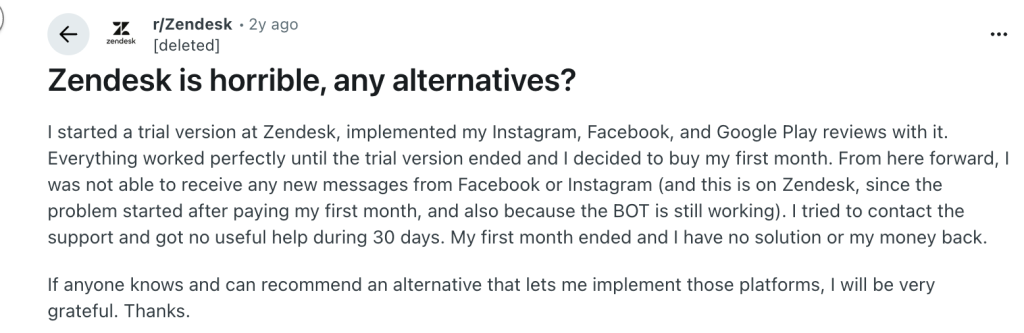
One Reddit user described how the experience felt smooth during the trial phase, but once real issues surfaced post-purchase, Zendesk’s support became harder to reach. This contrast between expectations and reality shows up frequently and contributes to dissatisfaction, especially when teams are dealing with billing, integrations, or technical issues.
Recommended reading
3. Reporting and analytics feel limited without upgrades
Reporting is another area where expectations don’t always match reality. While users appreciate having dashboards and basic metrics, many reviews point out limitations in customization, particularly on lower-tier plans.
Teams that rely heavily on reporting for performance management or operational decisions often mention needing upgrades, workarounds, or external tools to get the insights they want. For support leaders, this can feel restrictive rather than empowering.
“The reporting and analytics tools are helpful, though they would benefit from greater flexibility and clearer options, ideally without the need for additional add-ons or workarounds.”“The reporting module, while robust, could benefit from more intuitive custom report building without relying heavily on Zendesk Explore.”
All reviews are sourced from G2
4. AI features feel unclear or expensive
When I went through newer reviews and community discussions, I understood that there is a lot of confusion around Zendesk’s AI features. It isn’t always clear what’s included in the plan by default, what needs an add-on, and which AI capabilities are actually helpful.
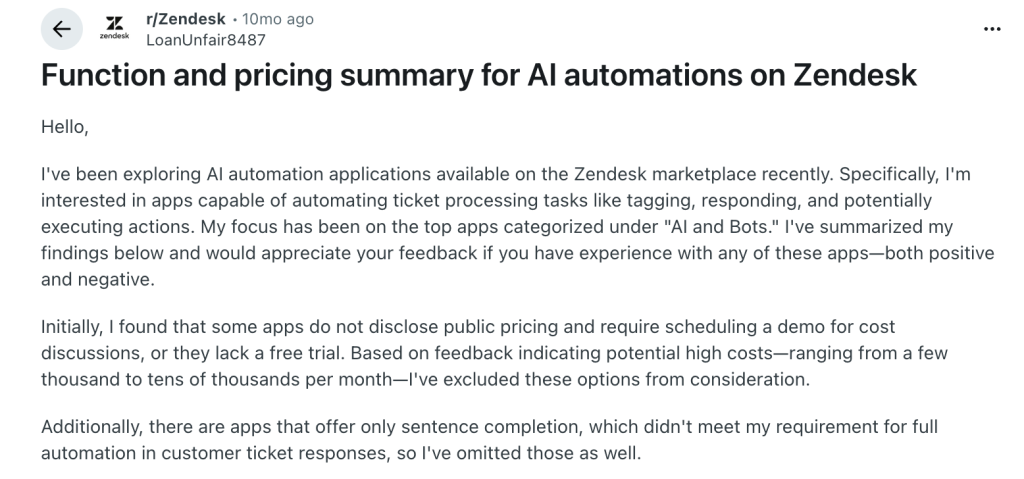
I saw this most clearly in a Reddit discussion where a user broke down their experience evaluating AI automation apps in the Zendesk marketplace. They were specifically exploring features like auto-tagging, responses, and ticket actions.
But they soon found that Zendesk either didn’t disclose pricing upfront, required demos just to understand costs, or skipped free trials altogether. Based on community feedback, some of these features were reported to cost anywhere from a few thousand to tens of thousands per month.
This lack of pricing clarity, along with the uncertainty around how much automation teams actually get, can be quite frustrating. Users end up questioning whether the value justifies the cost, especially when they compare it with newer platforms that position AI as more straightforward or built-in.
Recommended reading
5. Feels heavy for small teams with simple needs
For small businesses, Zendesk often feels more complex than necessary. Reviews frequently note that advanced workflows, roles, and customization go unused, while the effort required to set them up and maintain them still adds overhead.
- “I find setting up Zendesk Support Suite quite challenging due to the depth of options available. It can be daunting for small teams or those without previous Zendesk experience, as the platform is built to support potentially large-scale customer service operations and global compliance needs.” – Scott S., user review on G2
- “It has a steep learning curve, making it a little difficult for new or smaller teams to understand and utilize the tool.” – User review on Capterra
- “The options for smaller teams are not great in terms of features/ pricing.” – User review on Capterra
The Hidden Friction- Is Zendesk Worth the Price?
Here’s how I look at it after reading the reviews and seeing the same patterns show up across platforms.
Zendesk can be worth the price when you are paying for things you actually use: structured ticketing, clear workflows, roles and permissions, and a system that can handle a higher volume of queries.
Where reviews start to shift is when costs rise faster than perceived value. This usually happens for two reasons: teams need higher tiers or add-ons to unlock features they assumed were standard, and ongoing admin effort becomes necessary just to keep the system clean and usable.
If someone asked me, “Should we pay for Zendesk?”, this is how I’d answer based on reviews.
Zendesk is a good option if you are in one of these buckets
1. You have a robust support suite, not just a shared inbox
If you have multiple agents, multiple request types, and you need consistent routing and accountability, Zendesk can justify its cost. Reviews from mid-market teams often mention things like roles, permissions, and structured workflows as reasons it works.
2. You need to enforce process
Teams with rules around approvals, prioritization, or departmental routing often find Zendesk’s workflow controls valuable.
3. You already have someone who can own the setup
Zendesk performs best when someone owns the admin side. Not necessarily a full-time role, but someone responsible for configuration, maintenance, and improvement over time.
When Zendesk starts to expose cracks
This is where 3-star reviews are most revealing. Zendesk is often questioned when the total effort and cost stop feeling proportional to day-to-day outcomes.
1. You are a small team with simple needs.
For small teams with simple needs, the setup and maintenance rarely feel worth it. Teams that mainly need to reply to customers, maintain context, and close issues often describe Zendesk as overkill
Recommended reading
2. Your costs shoot up because of higher tiers or add-ons
Reviews often shift tone when teams realize they need higher tiers to access the exact mix of features they want. What frustrates users is not the price alone, but having to upgrade for features they assumed to be the bare minimum.
3. You want strong reporting features without extra work
If reporting is core to how you run support, Zendesk can be a mixed experience, depending on your level and the customization you need. Reporting dashboards on lower tiers are quite basic and lack customization, so you’d need to upgrade to a higher plan and pay extra.
Recommended reading
4. You are evaluating AI features and want a clear ROI
Based on user discussions, AI is where pricing clarity matters most. Zendesk’s AI agents are priced per resolution rather than a fixed plan, which makes costs harder to predict. There’s no free trial, and teams usually need to sit through a demo to get a quote, even then without a clear sense of the ROI they can expect.
Quick decision checklist I’d use before paying
- For AI, what is the exact workflow it will automate for us in the first 30 days?
- Do we need structured workflows and permissions, or just a clean way to manage tickets?
- Who will own admin changes when we need new routing rules?
- Which features do we consider “must-haves,” and which Zendesk plan actually includes them?
- Are we comfortable with costs increasing as we add agents and capabilities?
Why Teams are Switching from Zendesk in 2026
From what I’ve seen in reviews and conversations, teams don’t usually leave Zendesk because it “doesn’t work.” They leave because it starts to feel like a system that requires constant maintenance.
Zendesk takes time to set up. Admin work keeps piling up. Costs go up as soon as teams add agents, features, or AI. At some point, teams pause and ask, Why does supporting customers feel harder than it should?
In 2026, many teams are choosing tools that are easier to run day to day. They want to handle customer requests, collaborate internally, and stay accountable, without managing a complex system in the background.
That’s where platforms like Hiver often come into the conversation. Not because they replicate every advanced Zendesk feature, but because they emphasize simpler workflows, predictable pricing, and lower admin effort for growing teams.
Frequently Asked Questions
1. How long does it take to set up Zendesk?
Implementation can take weeks or even months, depending on complexity. Many teams need professional services support.
2. Can I migrate my existing support data from Zendesk to a new platform?
Yes. Zendesk and most alternatives offer migration tools, usually involving CSV exports and field mapping.
3. What should I look for in customer service software?
Focus on ease of use, integrations, scalability, and total cost of ownership, not just feature lists.
4. How can I calculate the ROI of customer service software?
Start by adding up your direct costs, like subscription fees, implementation, training, and ongoing support. Then measure the indirect gains, like faster resolution times, higher CSAT, and increased agent productivity. For example, if automation saves each agent 5 hours a week, multiply that by your team’s hourly rate over a year. The difference between costs and gains is your ROI.













