Skip to content






Let’s talk chatbots.
I’m sure we’ve all faced the occasional “I’m sorry, I cannot seem to process this further. Please wait till one of our representatives get in touch. Thank you”.
And we’ve also faced “Thanks for letting me know about the issue. Based on your concern, you can either refer to this article on troubleshooting or have a live agent guide you. What do you prefer?”
Frankly, the former makes me want to shut my laptop. The latter? I’m starting to believe AI in customer service isn’t that bad after all.
That’s because the latter is an example of conversational AI in action.
It’s smart automation that doesn’t feel robotic and actually resolves the issue.
In this post, we’ll break down what conversational AI really is, how it actually works, and how to make it work for you without overcomplicating things.
Table of Contents
- What Is Conversational AI for Customer Service?
- Types of Conversational AI for Customer Service
- Benefits of Conversational AI for Customer Service
- Conversational AI Examples for Customer Service
- How to Implement a Conversational AI Strategy for Customer Service
- 1. Identify Use Cases Where AI Can Add Real Value
- 2. Audit and Organize Your Support Content
- 3. Choose the Right Conversational AI Platform
- 4. Define Your Bot’s Personality and Tone of Voice
- 5. Set Up Contextual Triggers and Smart Routing
- 6. Train, Test, and Get Your Support Team Involved
- 7. Monitor, Analyze, and Keep Improving
- Use Conversational AI as a Competitive Advantage
What Is Conversational AI for Customer Service?

Conversational AI is what powers chatbots, virtual assistants, and other tools that can actually hold a conversation; not just give templated responses. It can handle complex queries, adapt to different conversation flows, and even detect customer sentiment to provide more empathetic responses.
Essentially, it represents the evolution from “click option 1 for billing” to “I understand the issue here. Please give me a minute to check order details”.
Unlike rule-based bots that follow a fixed decision tree, conversational AI understands natural language, interprets customer intent, and responds in a way that feels human.
Here’s how they do it:
1. Natural Language Processing (NLP): Understands what the customer is really saying, even if they don’t word it perfectly.
2. Intent Recognition: Knows the difference between “I can’t log in” and “I forgot my password.” Both sound like login issues, but they need totally different fixes.
3. Contextual Memory: Remembers past interactions, so customers don’t have to repeat themselves.
4. Machine Learning: Gets better over time based on how people interact with it.
🌞 Did you know?
96% of surveyed shoppers expect more companies to adopt chatbots over traditional customer support services. Primarily because interactions are better, and they appeal to customers who want to avoid call-based support.
Types of Conversational AI for Customer Service
Not all conversational AI is built the same. It varies depending on the technology used, to what resources you train it with.
Also, depending on how your team is structured and what your customers expect, there are many ways to integrate AI into the support mix.
Here are a few examples:
1. AI Chatbots
AI chatbots are the most common form of conversational AI. You can embed it on your website or inside apps, ready to handle incoming messages.
These chatbots are perfect for answering FAQs, checking order status, handling refund requests, or routing conversations to the right agent.
🌟Real life example
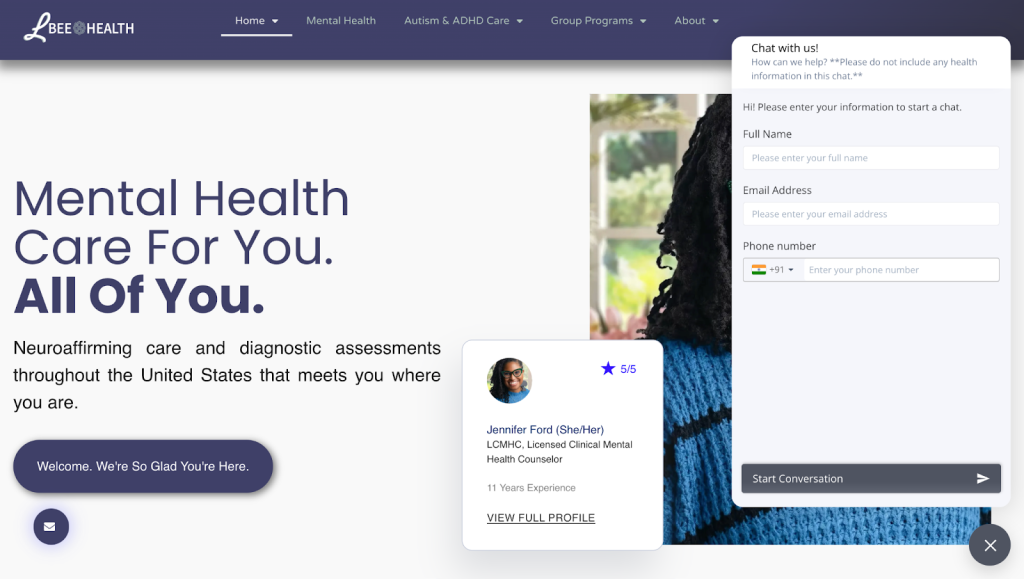
LBee Health uses Hiver’s chatbot to help potential customers learn more about their product and services when they visit their website. They also have an option to escalate to a live agent whenever needed.
2. Voice Assistants
Voice assistants are AI-powered systems that let customers speak instead of typing. Rather than having pre-recorded messages like an IVR, they are trained to listen and respond to customer queries.
Voice assistants are used for phone-based support, mobile apps, and even smart speakers. They’re great for basic troubleshooting, password resets, or checking account info.
3. AI Copilots
AI Copilots work behind the scenes to support your human agents. However, they’re more of a sidekick for agents rather than customers.
They typically support by suggesting responses, summarizing customer history, flagging urgency, or helping agents draft complex replies faster.
Let’s say an agent is handling a high-priority billing dispute. An AI Copilot can pull up the full ticket history, suggest a response, and highlight a potential policy issue, saving the agent time and reducing errors.
💡Pro tip: Your agents can use Hiver’s AI copilot to streamline support operations.

Whether you need help drafting an email, assigning another colleague to a message thread, or tagging messages based on priority, you can get it done effortlessly.
Benefits of Conversational AI for Customer Service

If you think human agents are the only way to handle every incoming query, you might be leaving efficiency and customer satisfaction on the table.
Conversational AI is all about smart automation that fills this gap, simplifies, and actually improves the support experience- all without added human resources.
Here are some other benefits of using conversational AI:
Doesn’t Require Extensive Manual Training
Modern AI chatbots are often plug-and-play. Your agents don’t have to wait for developers to set it up but can rather just plug it into your existing knowledge base or other company resources for it to start answering questions. Just connect, configure, and let it run.
Available 24/7
Customers don’t care what time it is, and they increasingly expect 24/7 support.
Conversational AI delivers just that.
It’s always on, handling queries in the middle of the night, on weekends, and even during holidays without missing a beat.
Recommended reading
Reduces Support Volume
By handling repetitive, low-complexity queries, such as order status, password resets, or refund timelines, AI reduces the number of tickets your human team has to deal with.
Improves First Response Time (FRT)
With a chatbot, customers get instant responses the moment they reach out. That alone can make a huge difference in CSAT scores.
💡Did you know? You can track key support metrics effectively with Hiver’s reporting analytics, so you can refine your CX strategy without the guesswork.

Improves Personalization
By pulling in customer history, preferences, and past interactions, conversational AI helps deliver replies that feel just as personal as talking to a support agent.
Integrates Across Channels
The thing about chatbots is that they can be integrated into the channel of your choice.
Whether your customers message you via live chat, WhatsApp, email, or in-app chat, conversational AI can meet them there and keep the conversation consistent.
💡Guess what?
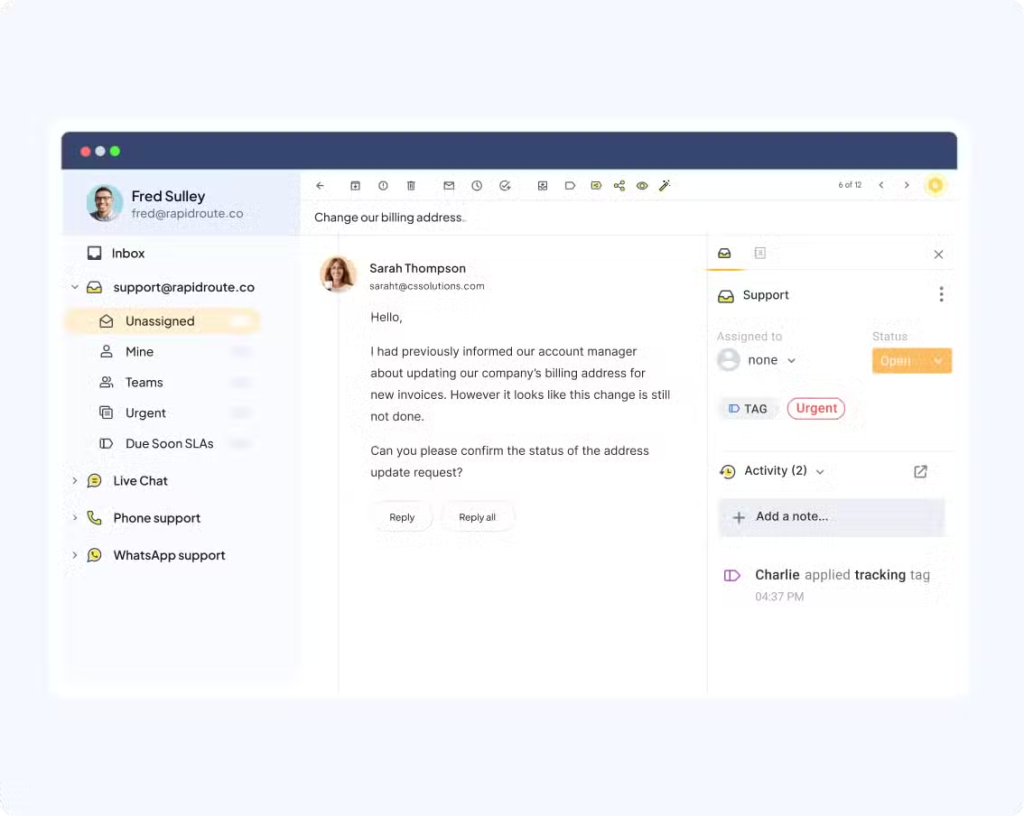
Hiver’s omnichannel inbox unifies and routes all your support queries across channels – SMS, WhatsApp, Email, Social – and brings them into one dashboard so nothing is missed by your reps.
Drives Cost Efficiency
This is one of the biggest benefits, especially for smaller teams. With fewer human resources, you can use conversational AI to handle common tickets. This leads to fewer tickets for your team, faster resolutions, and less need for overtime or extra headcount.
All this adds up to serious cost savings, without compromising on quality.
Conversational AI Examples for Customer Service
Here are some examples of websites that are nailing the use of conversational AI for support:
enCoreGuard’s Chatbot
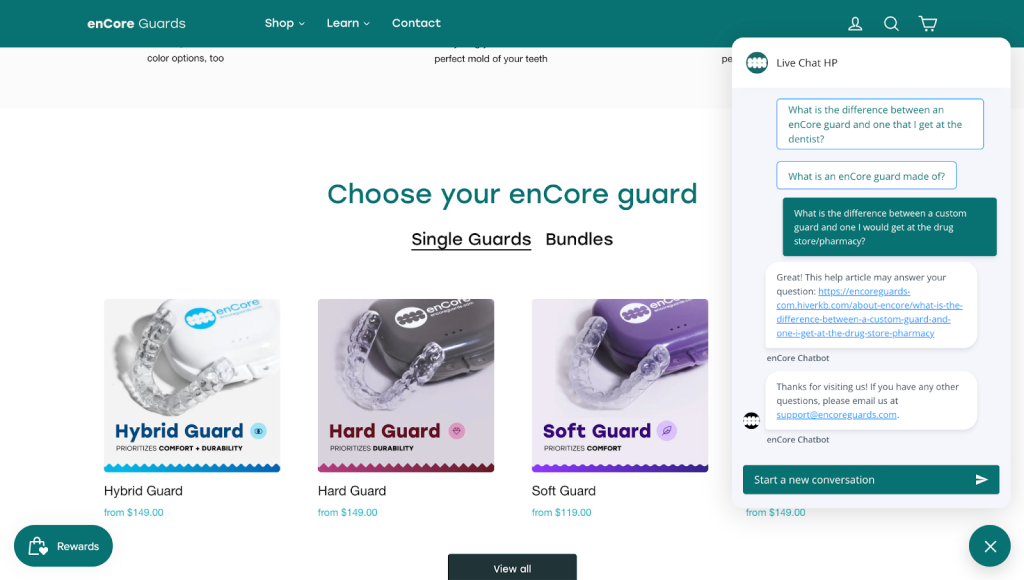
enCoreGuard’s chatbot powered by Hiver helps users on the site scroll through options, get the required help articles or even speak to a live agent if needed.
Peloton’s Chatbot

Peloton’s conversational AI chatbot is designed to provide interactive, real-time assistance to both current and prospective users directly from their website and fitness platform.
The chatbot can answer a range of questions about Peloton products, suggest popular classes, recommend instructors, and offer guidance on workout plans.
IKEA’s Multilingual Chatbot

IKEA’s AI chatbot is available across its global websites and leverages advanced natural language processing to support multiple languages, automatically adapting its responses based on the user’s location.
This multilingual capability enables customers to receive personalized product information, order support, and design advice in their native language.
How to Implement a Conversational AI Strategy for Customer Service
Rolling out conversational AI isn’t just about dropping a chatbot on your site and calling it a day.
If you want it to actually improve your support experience, it needs to be intentional and scalable.
Here’s a step-by-step checklist to help you do it right:
1. Identify Use Cases Where AI Can Add Real Value
Don’t try to automate everything at once. If you don’t really have the need to outsource, then it’s best to sideline chatbots for a while.
But if your team’s burning out or you’d need your resources to focus on complex things, start by identifying high-volume, repetitive queries that eat up your team’s time and don’t need a human touch.
Some easy wins:
- Order tracking
- Product FAQs
- Refund status
- Basic troubleshooting
- Account setup or password reset
Use support data to spot patterns. Look at what your agents handle most often, and prioritize automation where it’ll make the biggest dent in ticket volume.
🌞Did you know?
According to Hiver’s AI vs. Human Customer Support Report, 26% of support professionals say AI helps reduce repetitive tasks, while 22% appreciate its ability to predict customer needs.
2. Audit and Organize Your Support Content
AI is only as smart as the information it has access to. A messy or outdated knowledge base will confuse customers and undermine trust.
Do a full content audit:
- Update outdated help articles
- Fill in gaps where agents often write custom replies
- Organize content with clear categories and tags
💡Did you know? You can use Hiver to create an intuitive and easy-to-use knowledge base, so your customers can find all they need without too much tab switching.

3. Choose the Right Conversational AI Platform
Not all AI tools are built for customer service. Choose one that’s designed to work with your support workflow, not against it.
Here’s what to look for:
- Natural Language Processing (NLP) to handle real customer language
- Easy integration with your CRM, helpdesk, or email system
- Multilingual support if your customer base is global
- Context-aware responses based on user history or behavior
- Smooth handoff to human agents when needed
Recommended reading
4. Define Your Bot’s Personality and Tone of Voice
Your AI is an extension of your brand. If your support team is known for being helpful and approachable, your bot should be too.
Decide on a consistent tone: friendly, professional, casual, etc., and write sample responses for greetings, common replies, fallback or escalation messages that reflect that voice.
Make sure it never sounds cold or robotic, especially in moments where empathy matters.
5. Set Up Contextual Triggers and Smart Routing
Conversational AI is great for common queries- but you can also use it to connect with customers at the right stage of their buying journey.
You can set up contextual triggers or rules based on page behavior (e.g., customer lingers on the pricing page, AI offers help) or time of the day, so conversational AI can send targeted messages.
This helps funnel users further down the buying journey. It’s also key to build logic to route complex queries to human agents instantly with full context, so the customer doesn’t have to repeat themselves.
Recommended reading
6. Train, Test, and Get Your Support Team Involved
Before launching, test the system like a customer would. Run through real-life scenarios, not just ideal cases.
And make sure to involve your agents. They know the edge cases, phrasing, and shortcuts customers use. Their input helps train the AI to handle things more naturally.
7. Monitor, Analyze, and Keep Improving
AI isn’t a set-it-and-forget-it tool. Make sure to track chatbot-specific metrics such as:
- First Response Time (FRT)
- Ticket deflection rate
- Resolution Rate (without human involvement)
- Escalation Rate
- Customer Satisfaction (CSAT)
- Bot confusion rate (how often it fails to understand)
Use this data to refine your AI’s responses, add new intents, and update outdated replies. Over time, your AI should get smarter, and your support experience should get smoother.
Recommended reading
Use Conversational AI as a Competitive Advantage
Put yourself in your customers’ shoes. Would you want quick answers, or ones that feel personal, proactive, and on point?
That’s where conversational AI becomes more of a competitive edge.
When you use an AI platform like Hiver, you can automate the repetitive stuff and use AI as your agent’s sidekick.
With live chat features and AI CoPilot for auto-suggested replies, smarter routing, and consistent multi-channel support, teams can focus on conversations that actually need a human touch.
Want to see what that looks like in action? Discover how Hiver can help your team with a 7 day free trial.
Start using Hiver today
- Collaborate with ease
- Manage high email volume
- Leverage AI for stellar service