Skip to content





Struggling with customer support in Gmail?
Email is an easy way to offer customer support, and teams that use Google Workspace may choose to set up a shared Gmail inbox, like ‘support@.’ This makeshift Gmail helpdesk allows everyone to view and respond to customer emails in one place.
However, Gmail was not initially designed for collaborative ticketing. As support volumes grow, teams often need a modern customer service platform to manage ownership, automation, and reporting at scale.
And today, support teams aren’t just managing emails. They handle chats, social messages, self-service requests, and phone interactions — all while maintaining speed and quality. Teams need structure, visibility, and AI-assisted workflows to keep up as volume grows.
Want to avoid the confusion of missed queries and overlapping replies? This article covers the ideal tools and setup for creating a scalable Gmail-based Google ticketing system.
Table of Contents
- Struggling with customer support in Gmail?
- Quick Summary
- Why Trust Us?
- Can Gmail as a Help Desk work?
- What’s the best way to build a Gmail help desk?
- 1. How to set up Google groups (Collaborative inbox)?
- 2. How to set up a Gmail shared inbox?
- 3. How to Integrate Hiver for a true help desk
- 2. Built-in ticket assignment & status tracking
- 3. SLAs, analytics, and real-time reporting
- 4. Collaboration features for teams
- 5. Automation, AI, and workflows for Gmail help desk
- 6. Powerful analytics to improve support quality
- 7. Live chat and chatbots for instant support
- 8. Self-service that customers actually use
- Success stories: Gmail Helpdesk powered by Hiver
- Turn Gmail into a Help Desk Your Team Actually Uses
- Frequently Asked Questions
Quick Summary
Gmail alone offers limited customer support features because it lacks collaboration, automation, and reporting. This article examines three methods for establishing a functional Gmail-based helpdesk (or Google Ticketing system, as some people like to call it): Google Groups, Gmail Shared Inbox, and Hiver. Among these options, Hiver gives teams a modern customer service platform that connects with Gmail — preserving familiar workflows while adding structure (ownership, statuses), automation, reporting, and AI-assisted work across channels.
Why Trust Us?
We try every tool ourselves, cross-check it with user reviews, and compare it against clear criteria such as ease of use, key features, integrations, and support. Our team works closely with CX leaders and sees what actually works in day-to-day operations.
And with 10,000+ teams trusting Hiver, we’ve learned what makes customer service software truly dependable.
So, you get straightforward, unbiased recommendations, nothing more, nothing less.
Can Gmail as a Help Desk work?
To some extent, yes. Gmail is a great starting point for managing customer support. It’s fast, familiar, and already part of most teams’ daily workflow.
The opportunity: familiar, accessible, and flexible
Gmail gives you a strong foundation to begin with.
- It’s easy to use and requires no additional training.
- It’s accessible from anywhere and integrates with other Google Workspace tools.
- It’s flexible enough for small teams to start handling customer queries quickly.
However, as email volume grows and more agents share the same inbox, managing support becomes difficult to coordinate.
The challenges of scaling support in native Gmail
- No clear ownership: Two agents might reply to the same email, or no one does.
- No visibility: It’s hard to see which conversations are open, pending, or resolved.
- Too much manual work: Labels and filters help for a while but don’t scale.
- No tracking: There’s no built-in way to measure response times or agent performance.
If this feels familiar, you’ve likely outgrown Gmail’s native features. Tools like Hiver can help structure and scale your help desk within Gmail.
What’s the best way to build a Gmail help desk?
Gmail wasn’t built as a helpdesk, doesn’t give you ticket ownership, SLAs, or performance tracking. But many teams still start with Gmail because it’s familiar and easy to set up. The good news: with a few tweaks (or the right tool), you can turn Gmail into a functional Gmail ticketing system.
Here are your options:
1. Google Groups: Convert a group into a Collaborative Inbox to assign, label, and track support emails.
2. Common Login: Manage all queries from one login, organize with filters and labels, and rely on manual assignment.
3. Hiver for Gmail Helpdesk: Layer Hiver on top of Gmail to get full helpdesk capabilities, like ticket ownership, SLAs, automation, AI, and multi-channel support.
For small teams, Google Groups or a shared inbox might be enough. As your customer support needs grow, third-party tools like Hiver can add advanced features and help turn Gmail into a reliable help desk.
Prefer seeing the Gmail helpdesk workflow before choosing an option? Take the Hiver product tour to see assignment, SLAs, and collaboration inside Gmail.
Here’s a Gmail help desk comparison table for Google Groups vs Shared Inbox vs Hiver for Gmail:
| Method | Pros | Cons | Best For |
|---|---|---|---|
| Google Groups (Collaborative Inbox) | Free, native to Google Workspace, allows basic assignment and labeling | Limited tracking, manual reporting, clunky collaboration | Small teams testing a Gmail ticketing system |
| Shared Gmail Account | Simple to set up, no extra tools needed | No ticket ownership, risk of overlap, and manual processes | Very small teams handling low email volumes |
| Hiver for Gmail Helpdesk | Full customer service platform connected to Gmail: structured ticketing, SLAs, automation, AI-assisted workflows, and multi-channel support | Requires a setup, no social media integration | Growing teams that need a scalable helpdesk Gmail solution |
Let’s break down how each works.
1. How to set up Google groups (Collaborative inbox)?
Set up a Google Group as a Collaborative Inbox. It lets your team assign ownership, add labels, and organize queries. It’s not perfect, but it’s a good starting point if you need a lightweight Gmail helpdesk without new software.
Step 1: Create a dedicated support inbox, i.e., support@yourdomain.com as a gmail ticketing system. Share access only with your support team.
Step 2: Go to Google Groups, create a group for support, and switch it to Collaborative Inbox. This allows team members to assign emails, add labels, and manage queries together.

Step 3: Forward incoming messages from support@ to the Google Group, or use the group as the main support address. This way, every request lands in one shared place.
Step 4: Create labels such as Priority, Status, and Category. Use Gmail filters to auto-apply them based on keywords, subject lines, or senders. This adds instant structure to incoming queries.

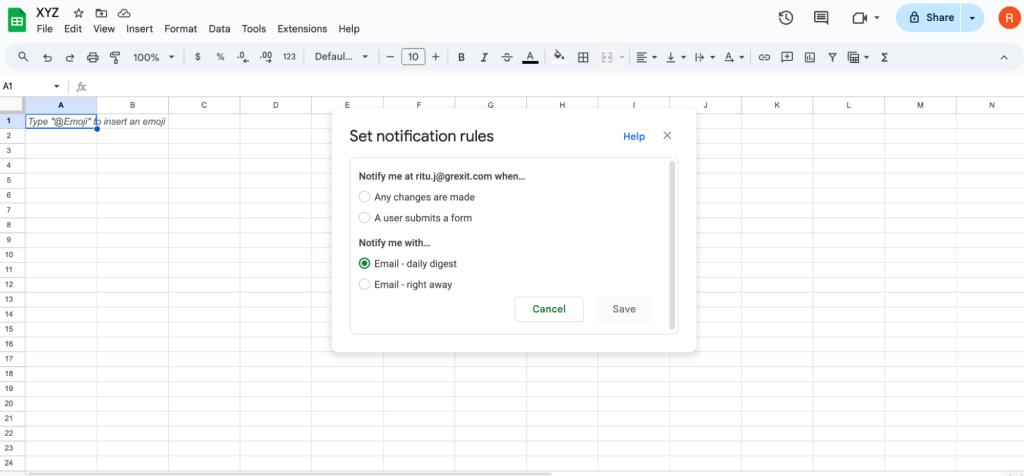
Step 5: Capture requests with Google Forms. Build a simple “Contact Support” form. Send responses to a Sheet. Turn on email notifications or use Apps Script to email the group.
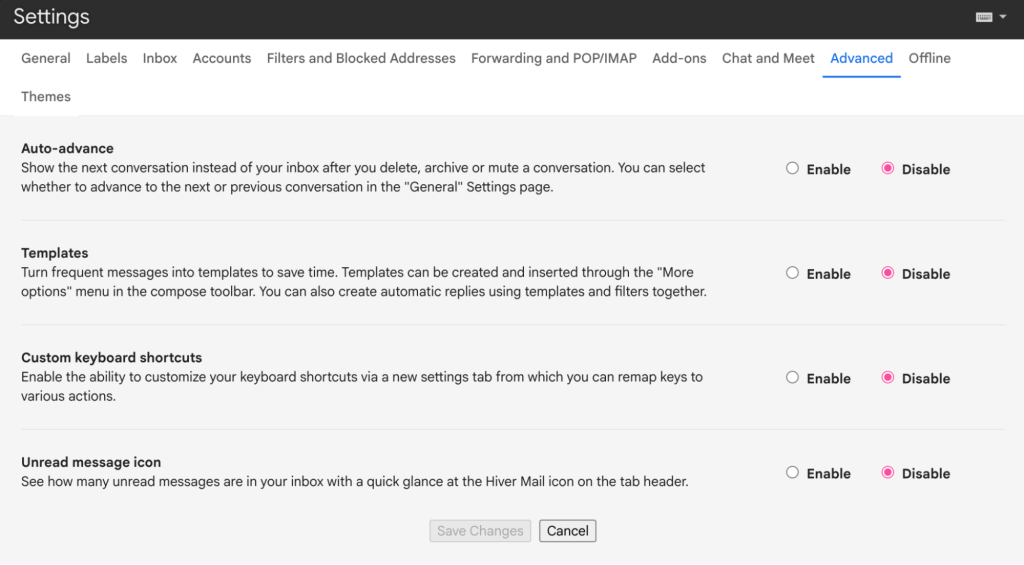
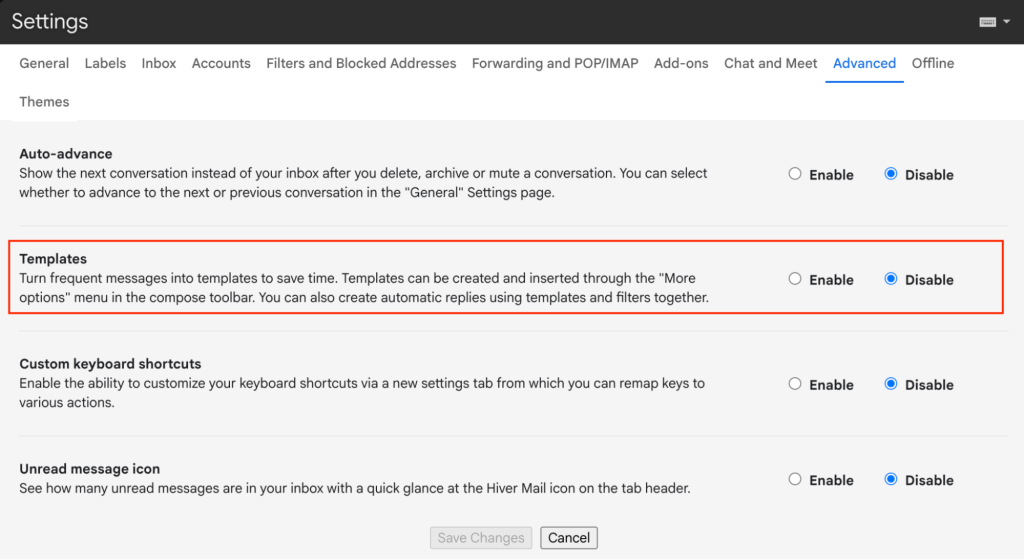
Step 6: Standardize replies. Enable Templates in Gmail. Save responses for common issues. Train the team to personalize before sending.
Step 7: Track work. Use group topics as “tickets.” Assign each topic to an owner. Use labels for status updates. Review open items daily.
Step 8: Report basics. Export group activity or use the linked Sheet to tally volume, time-to-first-reply, and closures each week.
What we like about Google Groups
Here’s what makes Google Groups useful as a basic Gmail helpdesk option:
- Free and built-in: No extra cost if you already use Google Workspace.
- Shared visibility: All team members can see incoming support emails in one place.
- Basic ticketing feel: Labels, assignments, and collaborative features make it feel somewhat like a Gmail ticketing system.
- Customizable with add-ons: Can be extended with Google Forms, Sheets, and simple automations.
What we don’t like about Google Groups
These are some common Google Groups issues to take into consideration:
- Clunky workflow: Assigning and updating tickets takes multiple steps.
- No SLA or reporting dashboards: You’ll need to export data into Sheets and manually build reports.
- Poor collaboration: Relying on CCs/forwards creates clutter and confusion.
- Scales poorly: Becomes messy and unreliable once volumes increase.
👉 Best for: Teams just starting out and want a free, lightweight way to manage support without new software.
2. How to set up a Gmail shared inbox?
If your team handles just a handful of emails, the fastest way to start is by sharing one Gmail account. Everyone logs into support@, sorts emails with labels, and follows a manual process to assign or close tickets. Simple, but only sustainable for very small teams.
Step 1: Set up an address like support@yourdomain.com. Share the login credentials only with your support team.
Step 2: Sort conversations using Gmail labels such as Priority, Status, or Category. For example, mark urgent tickets as High Priority so they don’t get lost.
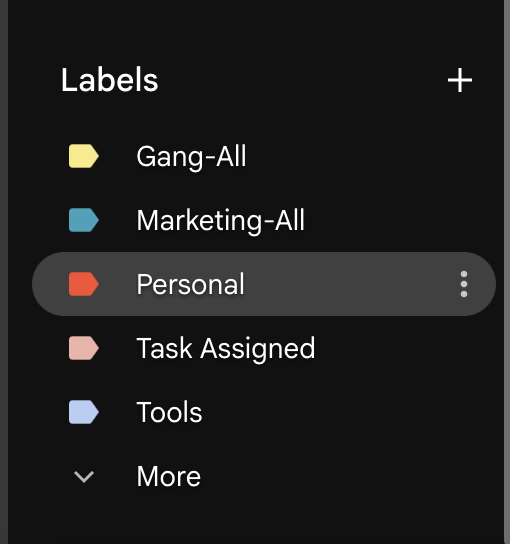
Step 3: Set up Gmail filters to automatically apply labels based on keywords, subject lines, or sender. This helps route emails into buckets like Billing, Refunds, or Technical.

Step 4: Enable Templates in Gmail settings. Save replies to common questions (like password resets or refund instructions) so agents can respond faster.
Step 5: Since Gmail doesn’t assign ownership, the team must agree on a process. For example:
- Add a label like Assigned to John to mark responsibility.
- Move resolved emails into a “Closed” folder.
Step 6: Review sent mail and inbox activity to check if SLAs are being met. This could mean exporting data into a Google Sheet once a week.
Pros
Why do some teams start with a shared login:
- Fastest setup: Create a support@ address, share the login, and you’re live.
- Centralized inbox: All customer queries land in one place.
- Low learning curve: Anyone familiar with Gmail can use it right away.
Cons
The downsides become clear as soon as email volume grows:
- No ticket ownership: Since you can’t assign emails, two agents may reply to the same query or, worse, give different answers. This creates confusion for customers and extra work for the team.
- Manual processes: Labels and folders need strict rules to avoid overlap and missed emails.
- Zero accountability: It’s hard to see who’s responsible for each query or whether SLAs are being met.
- No automation or analytics: Everything depends on manual review and spreadsheet exports.
👉 Best for: Very small teams handling fewer than ~20 support emails a day, where structure and reporting aren’t yet critical.
3. How to Integrate Hiver for a true help desk
Filters and shared logins only work for small teams. When multiple agents start handling dozens of customer emails a day, ownership gets messy, and reporting is impossible.
For teams managing dozens of customer emails daily, Hiver offers a structured support workspace connected to Gmail, with ownership, status tracking, SLAs, automation, and AI built-in. Each email becomes a trackable ticket with an owner, status, and SLA timer. You can auto-assign queries, tag and escalate issues, and use AI to draft replies or summarize long threads.
Want to see how Hiver works in practice? Check out this quick demo walkthrough to see everything from installation to your first ticket in minutes.
In addition, Hiver adds multi-channel support via email, chat, WhatsApp, phone, and a knowledge base right inside Gmail.
Here’s a side-by-side feature comparison between Google Groups vs Hiver:
| Feature | Native Gmail (with Groups/labels) | Gmail + Hiver |
|---|---|---|
| Email assignment | Manual forwards, no clear ownership | Auto-assign to agents with skill/round-robin rules |
| Status tracking | Labels only (manual) | Built-in statuses (Open, Pending, Closed) with SLA timers |
| Collaboration | Internal CCs/forwards → clutter | Notes, shared drafts, @mentions within the email |
| Accountability | Hard to know who owns what | Every ticket has a clear owner and progress visible |
| Automation | Basic filters only | Workflow rules, auto-tagging, SLA escalations, AI Agents |
| Analytics | Exports to Sheets (manual) | Dashboards: response time, resolution, SLA compliance |
| Multi-channel support | Email only | Email, chat, WhatsApp, phone, knowledge base |
| AI features | None | AI Copilot: suggested responses, summarizer, tone adjust |
| Scalability | Works for <50 tickets/day | Handles high volumes, multiple teams, strict SLAs |
In short, Gmail provides the basics for collaboration, while Hiver adds the structure and features your team needs to scale.
A key advantage is that both customer and internal conversations stay in one place, reducing the need to switch between tabs or tools.
Here’s what users have shared on Reddit about their experience with Hiver:
We used Hiver heavily for several years and always thought it was a solid service. They’ve done a ton of dev to improve the platform since that time as well. I always found them a good team to work with. – Hiver review from a Reddit user
Now let’s break down what makes Hiver a great option for managing customer support.
1. Multi-channel support: Email, chat, WhatsApp, phone, and knowledge base
Hiver allows support teams to manage conversations across channels such as email, chat, WhatsApp, phone, and self-service from one workspace. In fact, Hiver also enables your team to build a knowledge base, allowing customers to self-serve.

After setup, you can manage customer conversations from a unified workspace. The tool enables you to conduct customer conversations and handle repetitive queries using chatbots.
You can even use auto-responders to let customers know if agents are unavailable or busy and redirect them to your knowledge base.

This combination of live chat, chatbots, and AI self-service balances speed with availability; allowing customers to get answers instantly, and your team to avoid repetitive queries.
2. Built-in ticket assignment & status tracking
All incoming queries are converted into tickets and assigned to your support agents based on their skills or workload.
Every query has a status: Open, Closed, or Pending, which can help you track its progress. This establishes accountability and ensures no customer conversation falls through the cracks.
Your customer support team can use this to indicate availability on the platform. This way, you know exactly who is available to manage customer queries, and every ticket gets a dedicated owner.
You can also use ‘assignment limits’, a handy feature that limits the maximum number of tickets an agent can handle. This is key to avoiding overloading your agents

3. SLAs, analytics, and real-time reporting
Configuring SLAs within Hiver ensures that every query receives a timely response. An SLA, or service level agreement, outlines the level of service a customer can expect to receive from a provider.
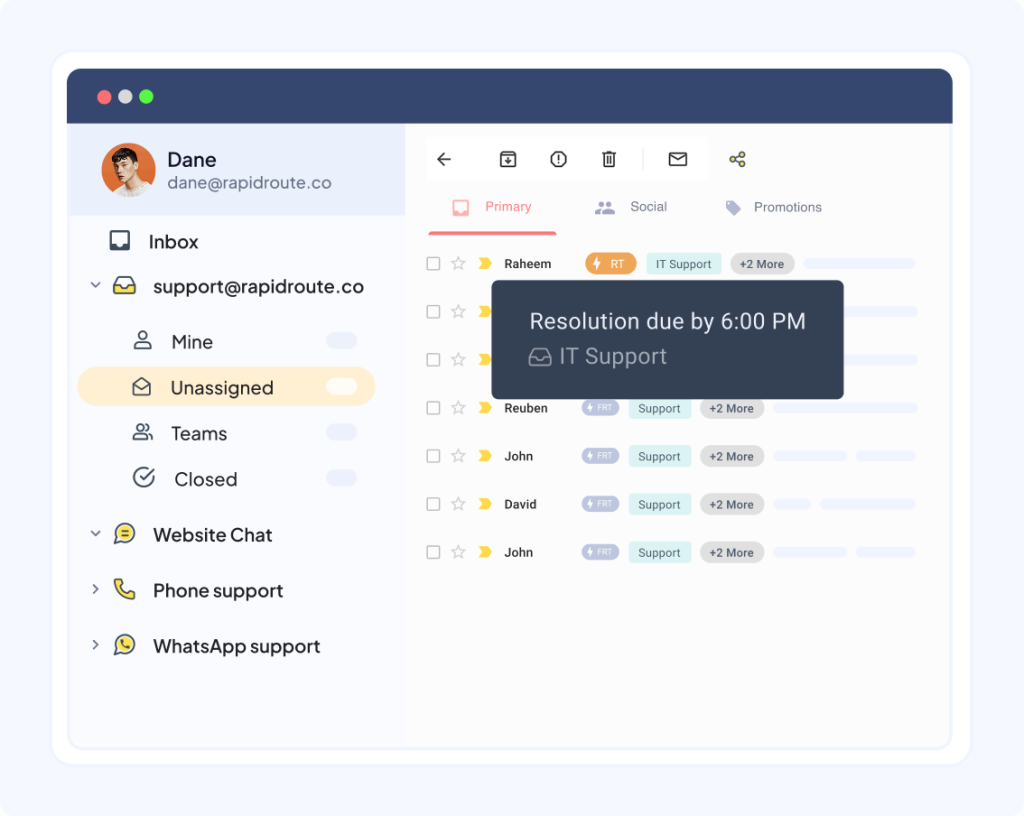
With Hiver, you can define conditions so that every email receives a response within a certain time frame.
- Set SLAs: Define how quickly different types of queries should be answered. For example, respond within 30 minutes for critical issues and 4–8 hours for general ones. If an SLA isn’t met, Hiver automatically flags it and notifies the right people.
- Detailed Analytics: Track metrics like response time, resolution time, backlog, and SLA compliance.
- Actionable Insights: Spot workflow bottlenecks, measure automation efficiency, and identify trends over time.
If an SLA is not met, an ‘SLA Violation’ tag is attached to the email, and the relevant stakeholders are notified.
All of this gives you full visibility into your team’s performance, without needing to export data or switch between tools.
4. Collaboration features for teams
Customer support team members often need to come together to discuss complex customer issues or send the perfect response. Hiver understands this and helps agents collaborate internally without forwarding emails, keeping customer conversations clean and contextual.
So, how can team members have fast internal discussions? With Notes, agents have chat-style conversations, right next to email threads.
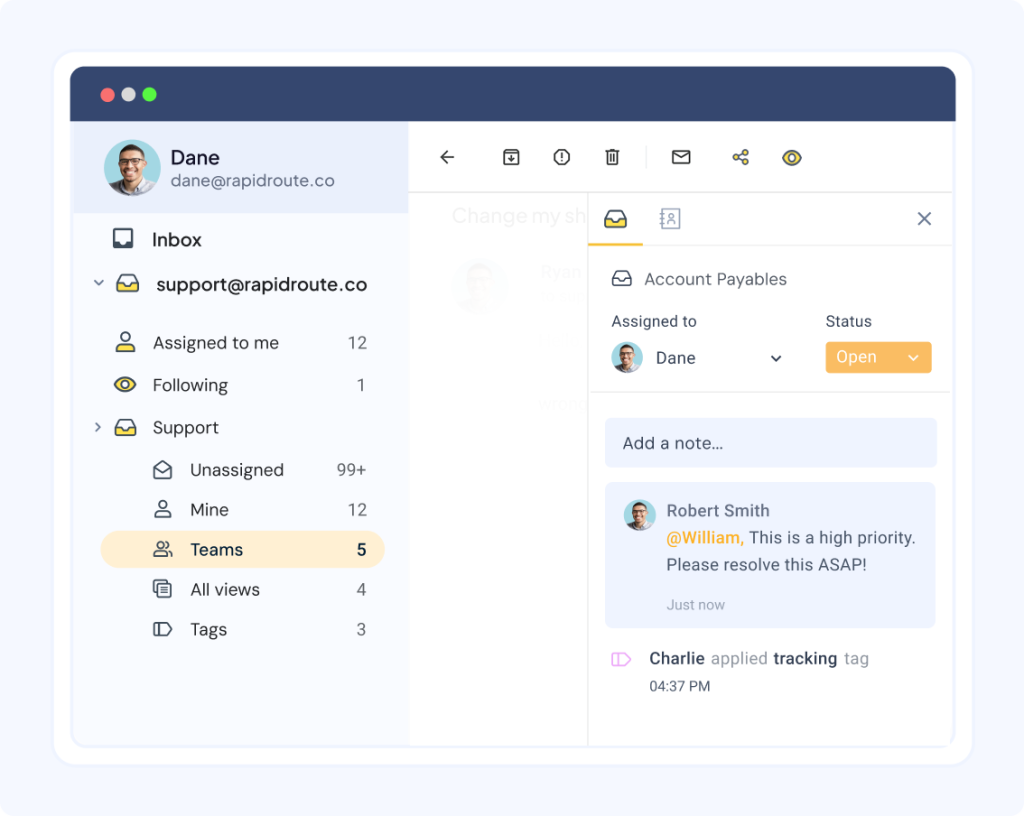
It also means the next person jumping into the thread has full context. If teams rely on side chats or messaging apps to discuss emails, piecing the story together later takes a lot of time. Another key part of collaboration is being able to work on replies together.
And how do team members help each other send great replies to customers?
- Shared Drafts helps agents collaborate on email replies in real time instead of back-and-forth emails (think: collaborating within Google Docs, it’s that simple).
- Email Templates can be created and shared across the board (in case you’re wondering: Gmail’s canned responses cannot be shared across the team).
5. Automation, AI, and workflows for Gmail help desk
Hiver offers some compelling automation features. It combines workflow automation with a powerful AI suite that reduces repetitive work, speeds up responses, and gives your team more time for meaningful conversations. With workflow automation, conversations can be routed, tagged, or escalated automatically based on rules or conditions.
✅ Automation for Smart Workflows
- Use skill-based auto-assignment to route queries to the right people instantly. For example, emails with “Bills” in the subject line automatically go to your finance specialists.
- Distribute work fairly with a round-robin assignment and set assignment limits to prevent agent burnout.
- Automate repetitive workflows such as tagging, triaging, and SLA reminders, so your team doesn’t waste time on manual tasks.
✅ AI Copilot: Assisting Agents in Real Time

- AI Suggested Responses: Generate quick, contextual drafts that agents can edit and send, cutting response times.
- AI Compose: Reframe replies for tone, clarity, or length so every response feels polished and on-brand.
- AI Summarizer: Turn long email threads into crisp notes, which are especially useful for team handoffs.
- Ask AI: Pull instant answers from knowledge bases, docs, or integrated tools, so agents don’t have to search manually.
That’s not all. If you’ve integrated Hiver with other tools, the AI co-pilot can search for information on these tools before responding.
✅ AI Agents: Taking Work Off the Plate
- AI Triage: Autonomously classifies emails by category, urgency, or sentiment and routes them to the right person or workflow.
- AI Thank You Detector: Closes tickets with “thanks” or “noted” messages so agents don’t waste clicks.
- AI Extract: Captures order IDs, customer tiers, and other details directly from emails to auto-fill fields.
Together, these features mean fewer manual tasks, faster resolutions, and a team that spends its energy where it matters
6. Powerful analytics to improve support quality
Hiver includes built-in analytics and reporting tools. These help teams evaluate support quality and agent performance directly within Gmail.
With this, you can:
- Spot workflow bottlenecks and underused macros with Resolution Insights.
- Monitor customer health by tracking sentiment, unresolved issues, and spikes in volume.
- Measure how automation impacts your SLAs and team efficiency, with built-in feedback loops.
7. Live chat and chatbots for instant support
Hiver’s Live Chat feature allows teams to respond to customer inquiries in real-time.

- Respond faster with templates: Agents can use predefined chat responses for recurring questions, reducing response time.
- Never leave customers hanging: Set up chatbots and auto-responders so customers receive immediate replies, even outside business hours.
- Automate repetitive queries: Build chat workflows for common issues and connect them to your help center, ensuring customers find answers instantly.
This combination of live chat and chatbots balances speed with availability, giving customers the help they need while reducing the load on your team.
8. Self-service that customers actually use
Customers today don’t want to wait, they expect answers on demand. Research shows that 9 in 10 customers prefer brands that provide self-service options.
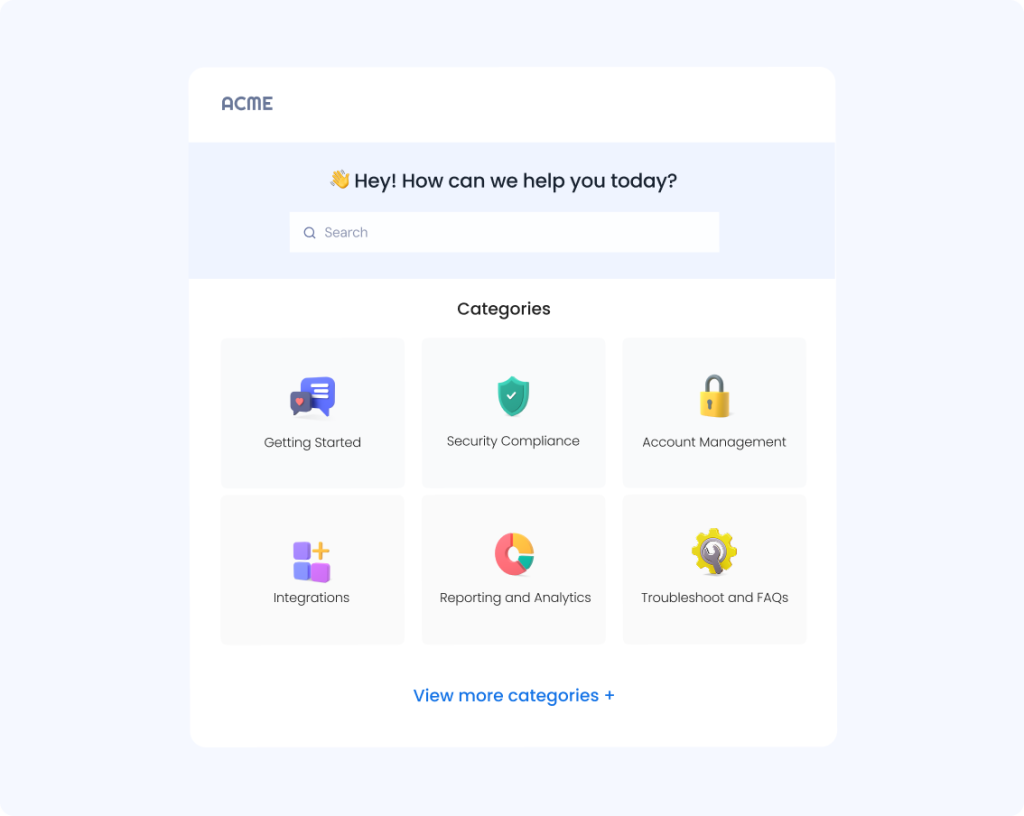
Hiver makes it simple to build and manage a knowledge base so customers can resolve issues on their own:
- Convenient for customers: They get quick answers without needing an agent.
- Efficient for teams: Agents aren’t stuck handling repetitive questions, freeing them to focus on complex cases.
- Better overall experience: Customers feel empowered, and your team runs more efficiently.
Hiver’s Knowledge Base is an elegant solution that gives customers the control to self-serve.
Pros
Why Hiver is the best long-term option for scaling support:
- Full helpdesk inside Gmail: Adds ticket ownership, statuses (Open/Pending/Closed), and SLAs without leaving the inbox.
- Automation and AI: Auto-assign tickets, set SLA timers, auto-tag queries, and use AI to draft replies, summarize threads, and even close “thank you” emails. Beyond drafting replies, Hiver’s AI helps with smart ticket triage (routing based on intent), extracting key details (order IDs, account numbers), and surfacing insights across conversations to improve quality and reduce repetitive work.
- Multi-channel support: Manage email, live chat, WhatsApp, phone, and a knowledge base from the same inbox view.
- Collaboration made simple: Use Notes for internal chats, shared drafts for co-writing replies, and @mentions to loop in teammates without forwards.
- Built-in analytics: Dashboards track response time, resolution, SLA compliance, and team performance in real time.
- Scales easily: Works for small teams but is also strong enough to handle large volumes across multiple departments.
Cons
The main limitation to note:
- Some setup needed: You’ll need to configure workflows, but onboarding is much easier than moving to a standalone helpdesk.
- No social media: Hiver doesn’t currently integrate with platforms like Twitter or Facebook.
Recommended reading
Success stories: Gmail Helpdesk powered by Hiver
From logistics and financial services to healthcare and travel, Hiver helps companies transform Gmail into a powerful AI-powered customer service software.
Here are a couple of stories of how teams overcame Gmail’s limitations and delivered faster, more reliable support.
1. Hiver helps Flexport resolve customer emails 50% faster
Flexport is a SoftBank-backed freight forwarding and customs brokerage company based in San Francisco, California.
The challenge
The team managed customer conversations in Gmail but struggled with ownership. Emails were constantly forwarded for assignment, which led to confusion, missed messages, and slow response times.
The solution
With Hiver, Flexport replaced clunky forwards with clear email ownership. Teams can now:
- Assign conversations instantly without forwarding.
- Track every request so no email is missed.
- Collaborate on responses without switching tools.
- Give managers real-time visibility into team performance (volumes handled, resolution times, and more).

“With Hiver, I have much better visibility into where an issue is on the resolution path. And we’ve stopped missing emails. It is essentially like having an additional person on my team.”
Nathan Strang
Ocean Freight Operations Manager
2. Hiver helped Kiwi.com achieve a 100% SLA completion rate
Kiwi.com is a Czech online travel agency and one of Europe’s top five online sellers of flight tickets.
The challenge
The team relied on Gmail lists to distribute incoming emails. Every message went to every team member’s inbox, creating confusion around ownership and visibility.
Managers like David Pinto had no way to track workflows, leading to missed 24-hour SLAs.
The solution
Hiver turned Gmail lists into shared inboxes, giving the team clarity and control:
- Rule-based automations assign emails instantly with no manual effort.
- Shared visibility ensures everyone knows who owns what.
- Performance insights allow managers to track email status and team output in real time.
With Hiver, Kiwi.com consistently achieves 100% SLA compliance while saving hours previously lost figuring out ownership and status.

“We are now responsible for a lot more than we thought we could. I have visibility on the volume of emails, the types of issues that we’re getting. I can now ensure that the operational tasks are accomplished in a timely manner. Hiver helps my team grow faster.”
David Pinto
Business Development, Kiwi.com
These teams used Hiver’s full support platform — including structured ticketing, automation rules and AI-assisted workflows — to deliver faster, more predictable service despite increasing volume.
Evaluating broader help desk platforms beyond Gmail + Hiver? Check out how Hiver compares against Zendesk, Front, and Help Scout.
Turn Gmail into a Help Desk Your Team Actually Uses
Gmail will always be one of the simplest tools for communication. However, without structure, it cannot handle the weight of customer support. This means, missed emails and zero accountability can cost you customers.
A Gmail help desk changes that. It gives your team the power to assign ownership, collaborate without clutter, meet SLAs, and track performance.
That’s exactly what Hiver delivers: the familiarity of Gmail with the power of a modern help desk. Whether it’s resolving customer queries 50% faster like Flexport or achieving 100% SLA compliance like Kiwi.com, the results speak for themselves.
If your team is ready to scale support without chaos, don’t wait for another customer email to slip through the cracks. Try out Hiver — a modern, AI-powered customer service platform connected to Gmail.
Frequently Asked Questions
Is there an official Google Help Desk?
Google doesn’t offer a standalone ticketing system product for customer service teams. However, you can use Gmail (and other existing Google tools) to build a functional helpdesk for your business. Simply hook it up with a platform like Hiver, and you are good to go.
Does Gmail have a ticketing system?
Not natively. Gmail doesn’t convert emails into tickets or track their status. Tools like Hiver add this functionality and every email becomes a trackable ticket with ownership, tags, and SLAs.
How can I turn Gmail into a help desk?
Yes, but only in a basic way. Forms route requests into Sheets or inboxes but lack automation, SLA tracking, and analytics.
How do I raise support tickets in Gmail?
You can start by creating a shared inbox (like support@yourcompany.com), then add a Gmail help desk tool such as Hiver. It lets you assign emails, automate workflows, and track performance, all inside Gmail’s familiar interface.
What is a Gmail Help Desk?
A Gmail help desk is simply Gmail transformed into a structured customer support system. Instead of treating each email as an isolated message, you treat it as a “ticket” that can be assigned, tracked, and resolved.
On Reddit, one user explained how they do this:
“For a small team and very basic features, you can setup a Google Group as a collaborative inbox. This allows members of this group to get all emails that get sent to this Google group and for the members to assign emails and topics. More information here: https://support.google.com/a/answer/167430?hl=en”
It’s a simple way to add accountability and visibility to your support process, without ever leaving Gmail.
Can you use Google Forms as a ticketing system in Gmail?
You can collect customer requests via Google Forms and route them to a shared Gmail inbox using Google Sheets or Apps Script. But it’s a workaround. For a scalable, automated system, a dedicated Gmail help desk tool like Hiver is far more efficient.
What is the best way to assign tickets in Gmail?
Manually forwarding emails works for small teams, but it quickly becomes chaotic. Hiver automates ticket assignment using round-robin or skill-based rules, so every email lands with the right agent instantly.
Can you track agent performance and SLAs in Gmail?
Not with native Gmail. Hiver adds built-in analytics and SLA tracking, showing response times, resolution rates, and agent workload in one dashboard.
What are the main benefits of a Gmail help desk?
You get the simplicity of Gmail with the structure of a help desk like ticket tracking, assignments, collaboration, analytics, and automation. It’s an easy way to scale customer support without changing tools.
Is Hiver better than Google Groups for Gmail help desk?
Yes. Google Groups only centralizes emails. It doesn’t support ownership, SLAs, or analytics. Hiver adds all these features, plus automation and AI, while keeping the same Gmail experience your team already knows.
How can I try Hiver for Gmail as a help desk?
You can sign up for a free trial on Hiver’s website and start managing customer emails from Gmail in minutes. There’s no complex setup, just install Hiver, connect your shared inbox, and start collaborating.
Start using Hiver today
- Collaborate with ease
- Manage high email volume
- Leverage AI for stellar service