


We started 2026 with a simple question:
If AI is powering your support team… can you actually see its impact?
In January, we focused on turning AI from something that “helps in the background” into something you can measure, refine, and coach your team around.
From tracking ROI to refining AI Responses and adding subcategories in the knowledge base, here’s everything we shipped in January.
🚀 New: AI Usage Dashboard: AI Impact, Quantified
Available in: Hiver in Gmail
The AI Usage Dashboard gives you a clear, centralized view of how Hiver AI is being used across your team — and how much time it’s actually saving.

Why You’ll Love It
- AI Actions Overview: See the total number of times your team used any Hiver AI feature within a selected timeframe.
- Time Saved (in Hours): Automatically calculated based on estimated manual effort per feature, converted into total hours saved.
- Feature-Level Breakdown: View usage and time saved across AI Sentiment, AI Tagging, AI Compose, Ask AI, and AI Summarizer — all in one place.
- Usage Distribution Graph: Visualize which features are driving the most impact and which ones may need better onboarding or visibility.
- Flexible Time Filters: Switch between 30, 60, and 90-day views to analyze trends over time.
Available via Admin Panel → Hiver AI → AI Usage
Note: This is currently available as Early Access.
Why It Matters
For support leaders and admins, this turns AI into something you can defend with data.
You can justify the ROI of AI to leadership and say exactly how many hours your team saved. You can see which features are driving real impact, which ones are underused, and where focused enablement could unlock more value.
Also, say 👋bye to generic data- you now get real-time insight into how your team is adopting features.
For leadership, it creates a simple, credible narrative:
“This is how AI is saving us X hours per month.”

Time saved is calculated using estimated manual effort per feature and converted into total hours, giving you a clear efficiency signal you can track over time — and use to justify expansion, rollout, or deeper adoption.
🚀 Ask AI Enhancements: Personalize and Review Outputs
Available in: Hiver in Gmail
We’ve made ‘Ask AI’ more personalized and added a review option for admins.
Teams told us they wanted responses that feel less generic and more on-brand. Admins told us they needed better control over the quality of AI-drafted replies.
So- we fixed both. You can now personalize how Ask AI drafts replies for each conversation — and review, refine, and improve suggestions so the next response is better than the last.
Previously:
Ask AI could draft helpful responses using your knowledge sources.
But:
- Replies could feel generic or inconsistent in tone
- Teams had limited control over brand voice
- Admins couldn’t systematically refine suggestions over time
What’s New:
- Personalized Replies: Customize the tone and style of drafted replies, internal responses, and summaries so every message feels on-brand and context-aware.
- Ask AI Review: With Ask AI review, improve inaccurate or low-confidence responses. You can also save corrected responses as Expected Answers or snippets, directly in your Knowledge Source, so Ask AI can refer to them for similar queries.
It also prioritizes the latest human correction when similar questions are asked again.
- Centralized Review Dashboard: Review both flagged and regular Ask AI conversations from one place to monitor the quality of responses.
- Auto-Flagging: Low-confidence or disliked responses (manual feedback) are automatically surfaced for review.
✍️Why It Matters
AI is most useful when responses feel accurate, consistent, and aligned with how your team actually communicates.
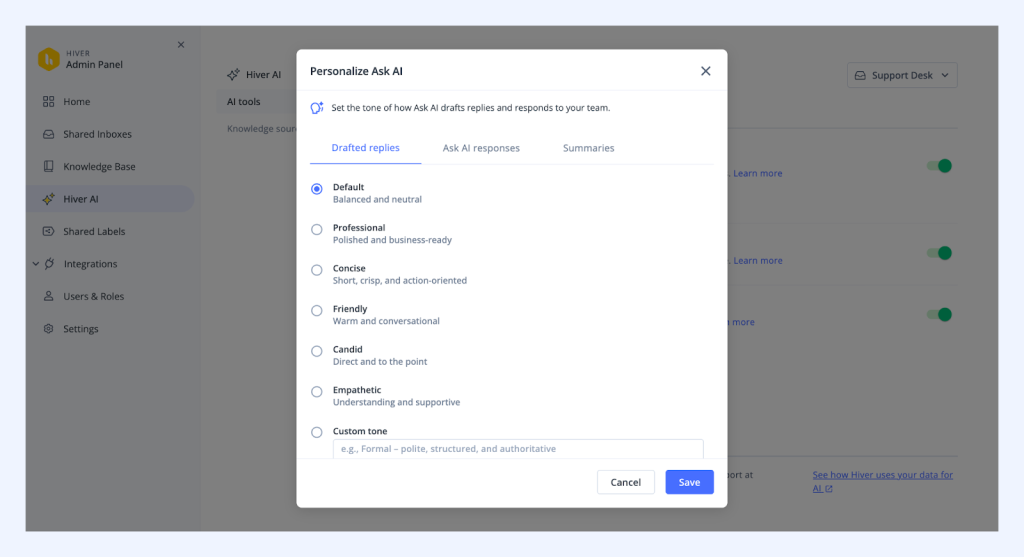
With personalization, agents get drafts that match your brand voice and the context of each conversation. That means fewer rewrites, faster replies, and more confidence when handling high-volume or policy-sensitive queries.

With Review, admins and QA leads can step in to refine responses and ensure future suggestions reflect those improvements. Corrections are also not one-off fixes — they influence similar conversations going forward.
The result is better responses, stronger quality control, and AI that improves with your team’s input over time.
Recommended reading
🚀 New: AI QA Insights — See What’s Really Happening in Your Support Quality
Available in: Hiver in Gmail
We’ve released AI QA Insights to give you a clearer, more reliable view of support quality.
Support leaders told us they don’t want random spot checks. They want to see real trends across the entire team.
They also told us that QA reports get noisy when internal emails or test conversations skew the data.
Now with AI QA insights, you get visibility into how your team is actually performing (minus the noise)
AI QA Insights surfaces real trends across agents and customer domains — and with domain-level exclusions, you can remove internal or non-customer emails so your data stays clean.
What you’re left with is simple: quality insights on customer-facing performance and metrics that help support leaders spot gaps early on.
✍️Why You’ll Love It
Automatic Quality Scoring: Every outgoing reply is evaluated across the aspects you choose — tone, clarity, completeness, personalization, grammar, and more.
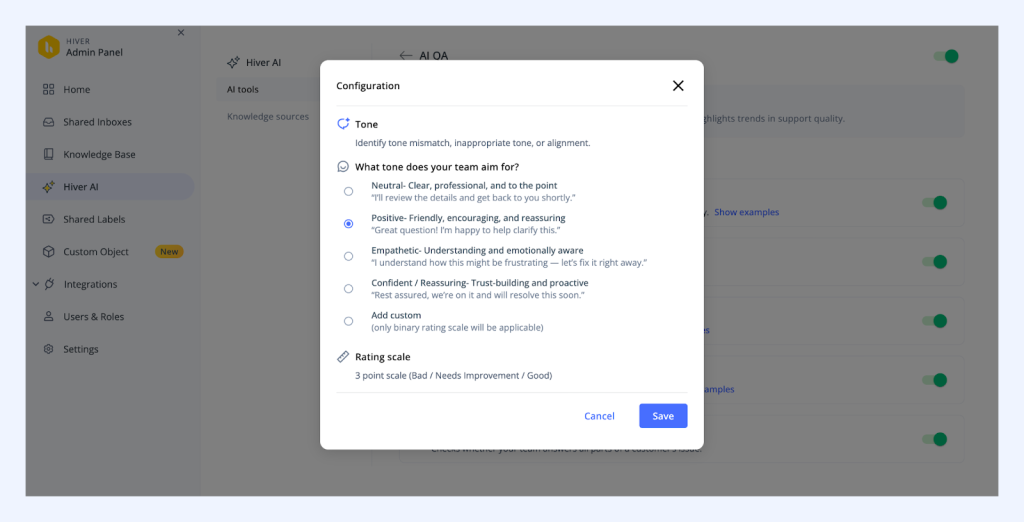
Trend & Performance Reports: Track overall response quality scores, weekly deltas, daily trends, and agent-level breakdowns.
Filters & Sentiment View: Slice QA data by tags, time range, users, score range, and sentiment (Good / Medium / Bad) to quickly identify patterns.
Customer (Domain) View: See QA performance by customer domain — including average score, tone, completeness, and conversation count — with drill-down visibility.
Domain-Level Exclusions: Exclude internal or non-customer domains from QA scoring and reporting, so your insights reflect true customer-facing performance.
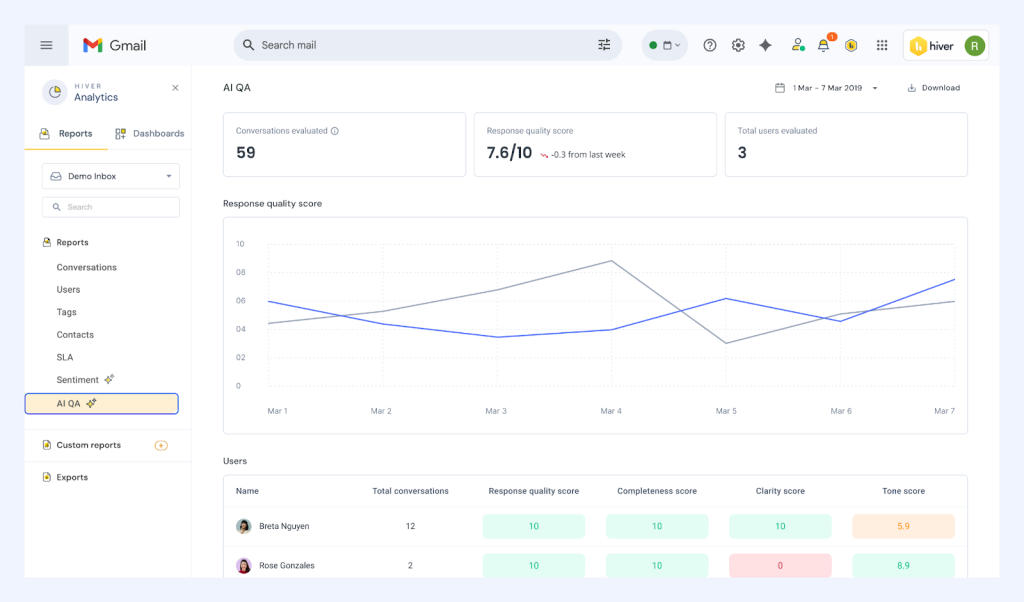
Use AI QA Report to Coach Team Members: Get summarized insights for individual team members on what’s improving, what’s declining, and the top areas that need attention — with actionable improvement suggestions.
Available via Admin Panel → Hiver AI → AI Agents → AI QA.
🚀 New: Sub-Categories in Knowledge Base
Available in: Hiver in Gmail
We’ve made it easier to organize growing knowledge bases, with multi-level categories.
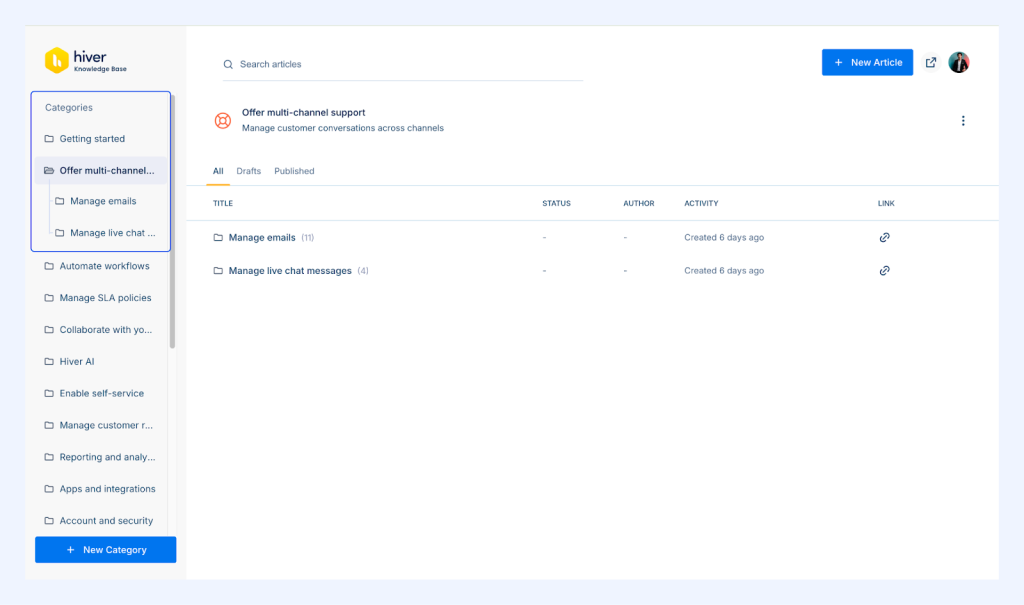
You can now structure your Knowledge Base with up to 4 levels:
Category → Sub-category → Sub-category → Article
Previously
Knowledge Base content lived in a mostly flat structure. As article count grew, grouping related topics became harder to manage. Navigation meant scrolling through long category lists, and finding the right article took more effort than it should have.
✍️What’s New
Multi-Level Organization: Instead of stuffing everything into broad buckets, you can now group related topics under clear parent and sub-categories — the way your customers actually think about them.
Clear Navigation: Breadcrumbs and structured category pages make it easy for users to understand where they are and how to move around.
Expandable Sidebar View: Get a clean, collapsible view of your entire content hierarchy so managing large help centers feels manageable again.
Better Self-Service: Customers can browse within logical topic groups instead of scrolling through endless, flat lists of articles.
Cleaner Information Architecture: As your content grows, your structure stays organized — reducing duplicates and making maintenance far easier over time.
🪜Why It Matters
As your Knowledge Base expands, keeping it structured becomes critical.
With nested categories, related topics can live under clear parent sections instead of being grouped in long, flat lists. Breadcrumbs and organized category pages make navigation more intuitive, and article counts give users quick visibility into available content.
This means customers can find answers faster, discovery feels more natural, and your help center stays clean and manageable as it grows.
🚀 Custom Objects Enhancement: Subject Line Support in Automations
Available in: Hiver in Gmail
We’ve expanded Custom Objects to make automations more flexible. This mainly includes supporting email subject lines in automation conditions.
Previously:
Custom Object conditions in automations were limited to email fields like From, To, and Domain. Teams often had to create multiple similar automations to handle variations that were only different in the subject line.
Now:

Custom Objects support subject line matching (sub-string, with case sensitivity options) directly within automation conditions. You can use subject-line keywords to trigger assignments, tags, notifications, followers, and more — all within a single, dynamic rule.
Custom Objects are now generally available for Elite and Trial customers. Core capabilities include:
- From / To / Reply-to email and domain conditions
- Subject line matching support
- Assign to, Add Tag, Send Notification, Add Follower actions
- Support within Individual Inbox automations
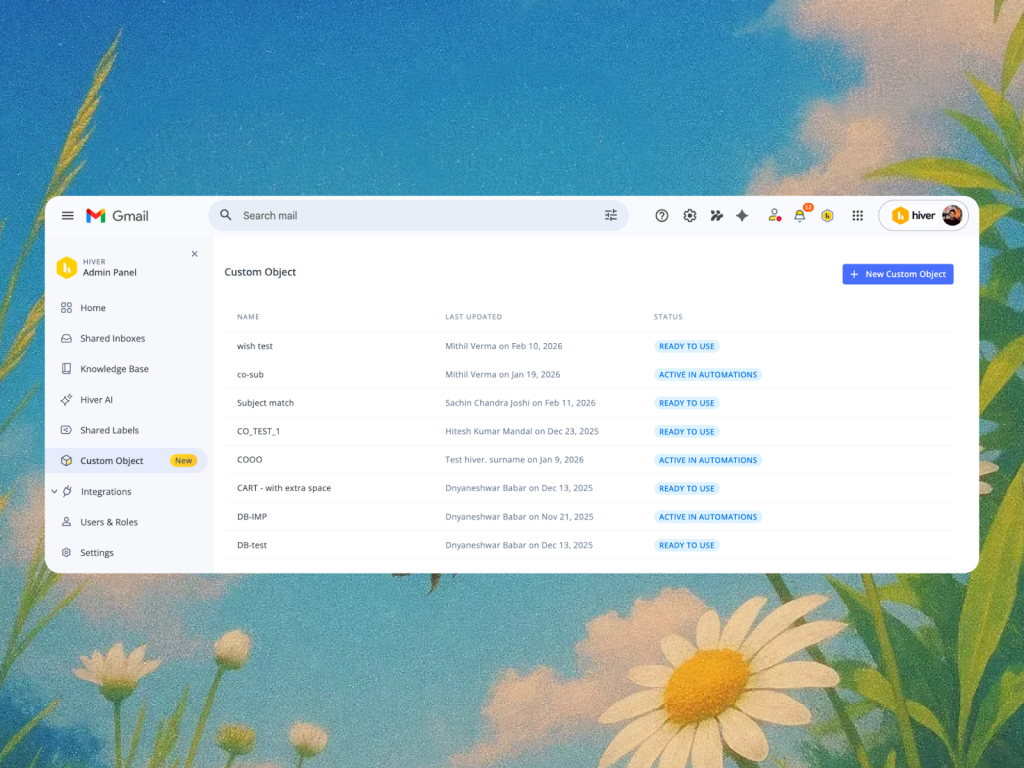
- Clear statuses such as: READY TO USE and ACTIVE IN AUTOMATION
✍️Why It Matters
Subject lines often carry critical routing signals — invoice numbers, escalation tags, order IDs, or internal prefixes.
With subject line support in Custom Objects, you can now build smarter automations without creating multiple near-identical rules. One dynamic rule can handle variations that previously required manual duplication.
📊 Just Launched: The State of AI in Customer Support 2026
AI is now embedded in everyday support workflows — from ticket triage and L1 resolution to knowledge base updates.
But how well is it actually working?
We surveyed 700+ support leaders across the US to understand what’s real, what’s hype, and where AI is genuinely driving impact inside customer support teams.
Inside the report, you’ll discover:
- Where AI is delivering measurable time savings
- The biggest gaps between AI expectations and real-world performance
- How top-performing teams are using AI to improve quality, not just speed
- What’s holding teams back from deeper AI adoption
If you’re thinking about expanding AI usage, justifying ROI, or improving adoption across your team — this report gives you the data to back your decisions.👉 Read the full report: State of AI in Customer Support 2026













