



In my experience, I’ve worked closely with a lot of support teams, many already using AI-powered tools and chatbots. But despite all that tech, I often saw similar issues crop up:
- Agents rewording the same reply over and over.
- Managers manually assigning tickets just to keep things moving.
- Delays happening because nobody’s sure who should handle what.
The problem isn’t the tools themselves; it’s how they’re used. Or more often, how teams misunderstand what Gen AI is actually capable of.
A lot of folks assume it’s just a fancier chatbot or something to auto-reply on their behalf.
But when used well, Gen AI can cut through busywork, detect customer frustration early, and help agents respond faster, without losing the human touch.
So in this guide, I’ll break down what generative AI actually is, and how to use it in a way that genuinely improves your support operations.
Let’s get into it.
Table of Contents
- What is Generative AI for Customer Service?
- How Does Generative AI Work for Customer Support?
- What are the Benefits of Generative AI?
- 10 Generative AI Use Cases for Customer Service
- 1. Automatic conversation summarization
- 2. Sentiment and emotion tracking
- 3. Customer intent detection
- 4. Automated reply drafting
- 5. AI Co-Pilot for live agent assistance
- 6. Intelligent self-service chatbots
- 7. Knowledge base gap detection
- 8. Automated quality assurance and coaching
- 9. Smart ticket routing and prioritization
- 10. Proactive issue detection and outreach
- Examples of Generative AI in Customer Service
- How to Implement Gen AI Into Your Customer Service Strategy
- How to Measure the Outcome of Gen AI Implementation
- Get Started with Generative AI in Customer Service
- Frequently Asked Questions
What is Generative AI for Customer Service?
Generative artificial intelligence (generative AI) is a class of AI models capable of producing original content such as text, images, videos, and conversational responses by learning patterns from large datasets.
And in the context of customer service, it can create human-like content in response to prompts—whether that’s answering questions, writing emails, or summarizing conversations.
It’s essentially built on three core capabilities: natural language processing (NLP), machine learning (ML), and large language models (LLMs).
Together, they help generative AI understand context, generate personalized responses, and adapt tone and intent at scale.
How Does Generative AI Work for Customer Support?
To see how generative AI differs from traditional automation, imagine you message support about a delayed order and say:
“My order #12345 hasn’t arrived, and I need it for a gift this weekend. I’m frustrated.”
A traditional, rule-based bot scans for keywords and follows a script. You might get something like:
Bot: “Please provide your order tracking number.”
It misses your emotion, ignores the order number you already gave, and feels robotic.
A generative AI chatbot handles this very differently. It understands the context, the sentiment, and what you are actually asking for. A response might look like:
Bot: “I understand you are frustrated about order #12345 being delayed. I can arrange a replacement for express delivery or issue a full refund. What would you prefer?”
It acknowledges how you feel, uses the information you provided, and offers a real solution.
While rule-based bots excel at handling predictable, high-volume tasks, GenAI systems are equipped to manage the nuance and complexity of real human interactions.
This makes them a key asset for delivering empathy and creative problem-solving at scale, especially for industries like customer support.
What are the Benefits of Generative AI?

The true benefit of generative AI is that it makes your team more effective at supporting customers. Here’s how:
- Faster response times: AI analyzes messages, pulls context, and drafts replies instantly so customers get help sooner.
- More consistent support: Every customer receives the same quality response because AI applies your policies and knowledge uniformly.
- Less repetitive work: AI closes courtesy replies, categorizes tickets, and handles routine tasks so agents focus on real issues.
- Stronger customer insights: AI processes surveys, reviews, and conversation data to highlight patterns and problem areas without manual analysis.
- Personalized interactions at scale: AI brings in account history and past conversations to help agents tailor responses for each customer.
- Lower agent burnout: Removing repetitive tasks frees agents to do more meaningful work, thus reducing agent effort and decreasing fatigue.
10 Generative AI Use Cases for Customer Service
Now let’s look at the specific ways generative AI can fit into your support operations. These are practical, real-world use cases that teams are already putting into action.
1. Automatic conversation summarization
AI automatically summarizes long email, chat, or voice interactions into short call notes, capturing the issue, steps taken, and outcome for CRM updates and hand-offs.Think about what normally happens when a ticket bounces between three agents. The third agent has to read through the entire conversation history to understand what’s happening. With AI summarization, they get a clean summary that tells them everything they need to know.
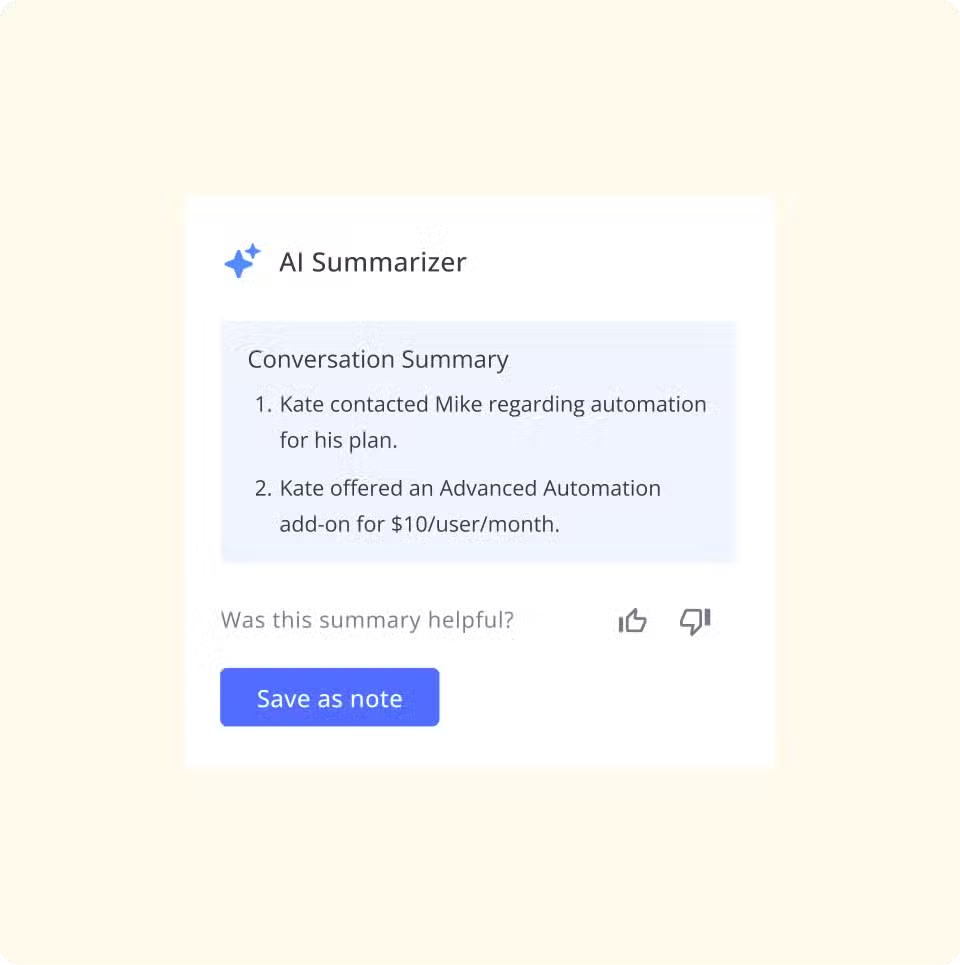
This is especially valuable for escalations or complex multi-touch issues where context is critical. The summary follows the ticket, so nobody ever has to ask the customer to repeat themselves.
2. Sentiment and emotion tracking
AI goes beyond basic positive, negative, or neutral sentiment to detect specific emotions like frustration, confusion, relief, or gratitude in conversations.
This isn’t just about knowing if a customer is happy or unhappy. It’s about understanding that a customer is confused by a policy change, or frustrated because this is their third time contacting you about the same issue.
For instance, with Hiver’s sentiment analysis, every incoming email is automatically flagged with its emotional tone. Your team can prioritize effectively—jumping on frustrated customers before the situation escalates, while routine questions can wait a bit longer.
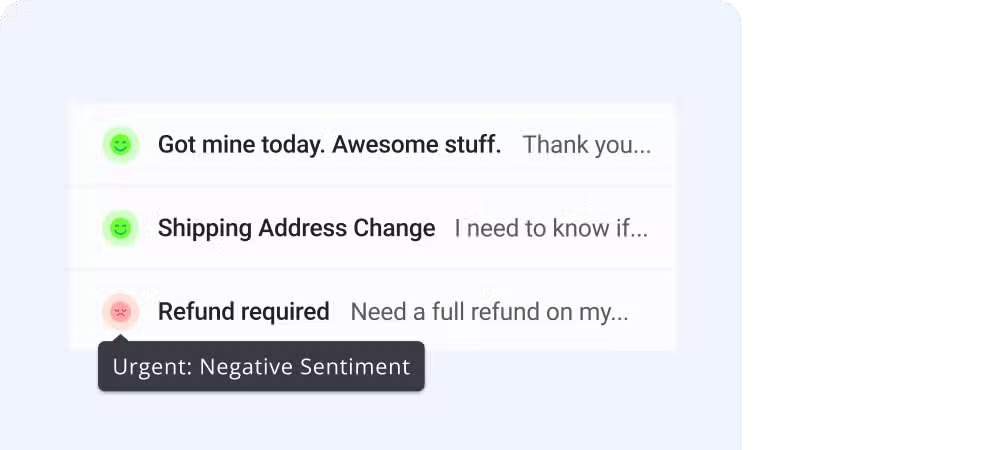
Supervisors can also identify patterns, such as which processes consistently trigger anger or frustration, so you can fix problems upstream rather than just have a reactive strategy.
🤔 Did you know?
At Hiver, we’ve found AI Sentiment Analysis to be our most used (and loved) AI feature based on customer data.
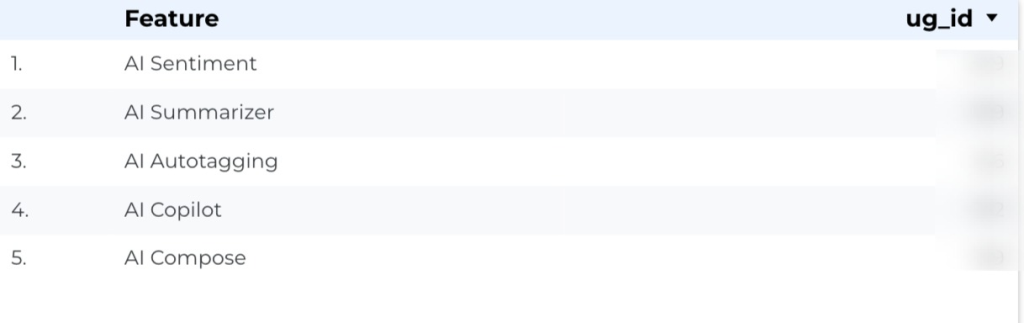
It’s a clear sign that as modern support teams evolve, AI tools and features are becoming central to delivering fast, reliable, customer support.
3. Customer intent detection
AI can identify the real purpose of a customer’s message by looking at the full sentence, not just a keyword. This helps support teams understand what the customer is trying to accomplish.
For example, a customer might write, “I need help with my account.” The AI can recognize whether they are asking about updating information, resetting access, or understanding a feature based on the specific words and context used. It helps narrow the issue so the agent does not have to guess.
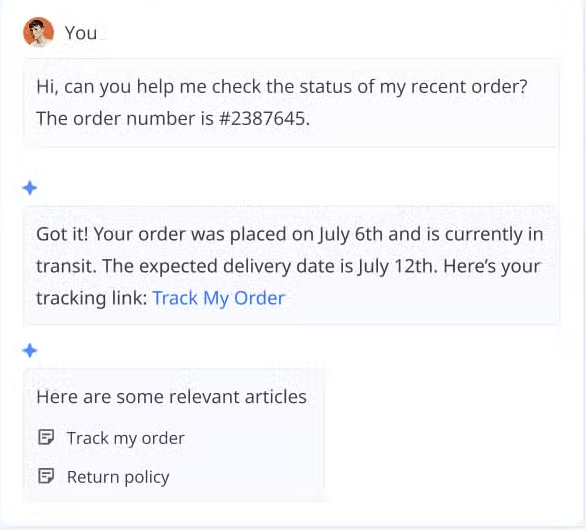
This leads to more accurate routing and faster replies. When the system understands intent clearly, the customer reaches the right person sooner, and agents get a head start on what the customer needs. It also helps teams spot common themes in requests so they can improve FAQs, workflows, and self-service content.
Recommended reading
4. Automated reply drafting
AI drafts full responses to customer queries by pulling from knowledge bases, past tickets, and policies, which agents then review and send.
For example, if your agent opens a ticket about password reset issues, AI immediately drafts a response that includes step-by-step reset instructions, links to the relevant help article, and offers to escalate if the standard process doesn’t work.

The agent reads it, tweaks the tone if needed, and sends it. Instead of spending five minutes crafting a response from scratch, they spend thirty seconds reviewing and customizing it.
This approach improves handle time and consistency while still keeping a human in the loop to prevent errors or policy mistakes.
5. AI Co-Pilot for live agent assistance
AI suggests next best actions, clarifies complex policies, reformats responses, and offers guidance while an agent is mid-conversation.
Imagine your agent is on a complex technical support call. As the customer describes their issue, the AI Co-Pilot surfaces relevant troubleshooting articles, highlights similar past tickets that were successfully resolved, and even suggests specific questions the agent should ask to diagnose the problem.

The AI can also surface relevant knowledge articles or troubleshooting flows automatically based on the live transcript or chat content.
With Hiver’s AI CoPilot, agents get this kind of real-time assistance directly inside their helpdesk. The AI analyzes the conversation as it unfolds and provides contextual help—whether that’s drafting a reply, pulling up related documentation, or suggesting next steps.
6. Intelligent self-service chatbots
Generative AI powers conversational bots that can handle more open-ended, multi-turn queries without brittle if-this-then-that flows.
Traditional chatbots fail the moment a customer asks something slightly different than expected. Generative AI chatbots can hold natural conversations, understand follow-up questions, and adjust their replies based on the customer’s needs.
These bots step in when scripted bots get stuck and help handle routine questions more effectively.
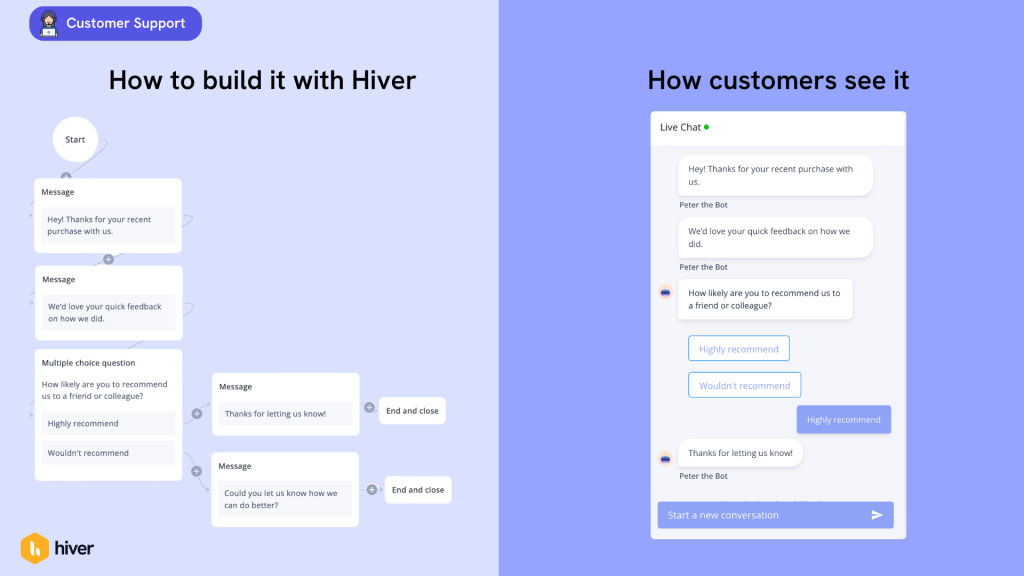
You can set up chatbot templates for common scenarios—CSAT surveys, AI lead generation, troubleshooting guides—and the AI handles the conversation naturally within those frameworks.
7. Knowledge base gap detection
AI flags missing or outdated content when the model cannot confidently answer a recurring customer question from existing documentation.
Your AI assistant keeps seeing questions about a new feature, but there’s no help article covering it yet. Instead of just failing to answer, the AI flags this gap for your team.
The system can draft new or updated help articles based on past resolved cases, and your team only needs to review and publish them.
8. Automated quality assurance and coaching
AI can review and score every customer interaction based on criteria like clarity, empathy, and policy compliance. It also explains why it gave each score, which helps teams understand what went well and what needs improvement.
By evaluating all conversations, AI makes it easy to spot patterns. You can see which agents handle tough situations effectively, who may need guidance in specific areas, and where your overall process can improve.
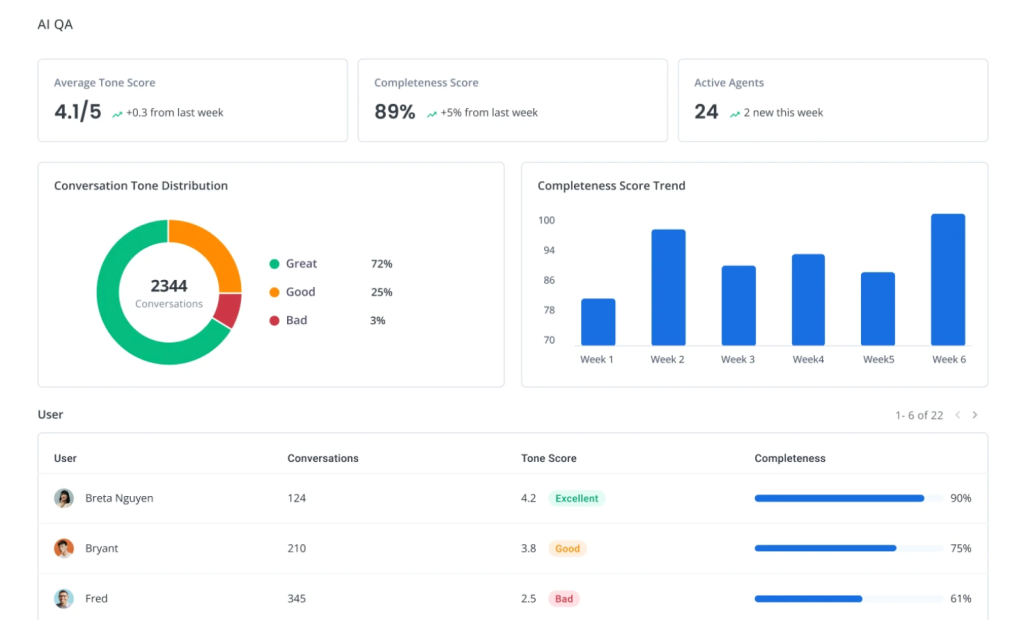
This gives managers clear coaching opportunities and helps teams grow with targeted, meaningful feedback.
9. Smart ticket routing and prioritization
AI reads free-text emails, forms, and chats to classify issues by topic, urgency, and customer value, then routes to the right queue or owner.
For instance, with Hiver’s AI tagging and routing capabilities, every incoming message is automatically analyzed and categorized. A billing question with negative sentiment goes straight to your senior billing specialist. A technical question from an enterprise customer routes to your enterprise support team. A refund request over $500 gets escalated to a manager.
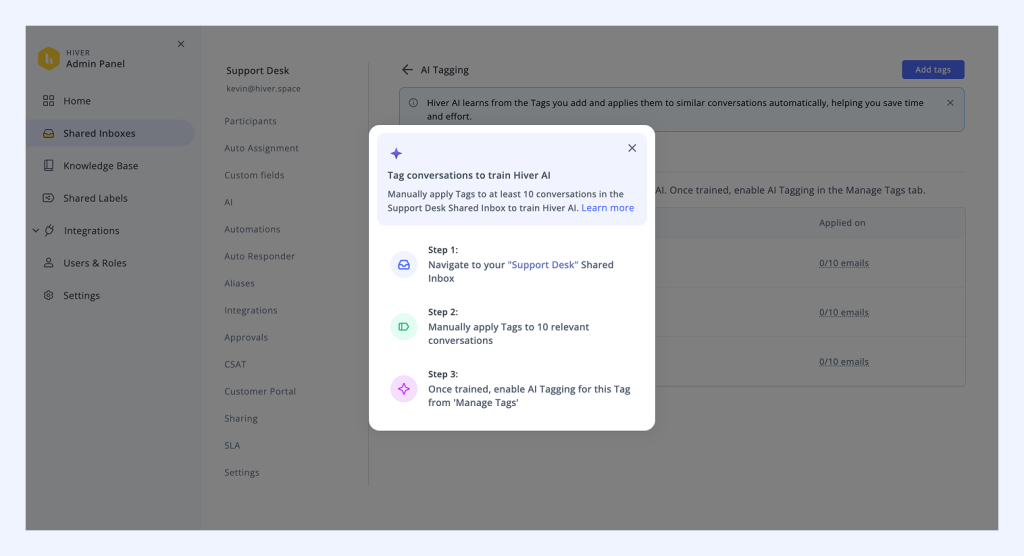
This helps separate urgent, high-value problems like outages or VIP complaints from low-priority tasks without relying on rigid rules.
The AI also uses extraction to pull key data—order numbers, account IDs, dollar amounts—and surfaces that information immediately so agents don’t waste time hunting for it.

10. Proactive issue detection and outreach
AI analyzes historical cases, telemetry, and feedback to predict emerging issues—like a version bug or billing glitch—before they blow up.
For instance, your AI notices that twenty customers this morning mentioned the same error message. Before it becomes a flood of tickets, the system alerts your team.
Teams can then send proactive updates, fix documentation, or alert users in the product, which reduces ticket volume and prevents bigger issues later.
Examples of Generative AI in Customer Service
Let’s look at how real companies are actually using generative AI as core parts of their support strategy.
JR Pass using Hiver AI to Speed up Support
JR Pass is a great example of what happens when a growing support team brings automation and AI into their everyday workflow.
During cherry blossom season, their inbox fills up with orders and questions from travellers around the world. Before Hiver, everything ran through one shared Gmail account, which made it tough to stay organized or respond quickly.
After switching to Hiver, AI and automation took over the repetitive work. Routine emails were sorted automatically, workloads were distributed more evenly, and agents could pull up templates right from the inbox.

They’re also testing AI Compose to help draft faster, clearer replies while still keeping their personal tone.
The shift made a clear difference:
- Response times improved by 60%.
- Team productivity increased by 40%.
- Complaints about slow replies dropped by 70%.
With the manual busywork out of the way, the JR Pass team had more time to focus on the conversations that actually needed attention. Travellers received quicker, more consistent support even during the busiest weeks of the year.
How United Airlines uses GenAI to improve customer experience during delays
United Airlines has been running its “Every Flight Has a Story” program for years — sending passengers clear explanations for delays through SMS and app notifications. Recently, they added generative AI to help create these messages, and it’s completely changed the scale and speed of the initiative.

Instead of manually editing templates, staff can now rely on GenAI to turn operational data, crew notes, and airport updates into messages that feel transparent, empathetic, and easy to understand. Human reviewers still give each update a final look, but the heavy lifting happens automatically.
The impact has been tangible:
- Customer satisfaction has increased by 6%.
- Message creation is faster and far more scalable.
- More travellers receive detailed, helpful updates instead of generic delay notices.
GenAI has allowed United to expand the program dramatically. They previously provided these detailed “flight stories” for about 15% of flights. With AI, they’re aiming for 50% coverage, giving far more passengers context that reduces frustration and uncertainty.
How ITS Logistics uses Hiver AI for consistent support
ITS Logistics is a strong example of how a fast-growing operations team can transform their service workflow with automation and AI.
Before Hiver, customer conversations were scattered across Google Groups, personal inboxes, WhatsApp, and phone calls. With no central system or clear ownership, multiple people often replied to the same customer, and important requests slipped through the cracks.
After moving to Hiver, everything finally came together in one place. Routing became automatic, ownership was clear, and the team no longer had to sift through disorganized threads just to figure out what needed attention.
AI made the workflow even stronger.
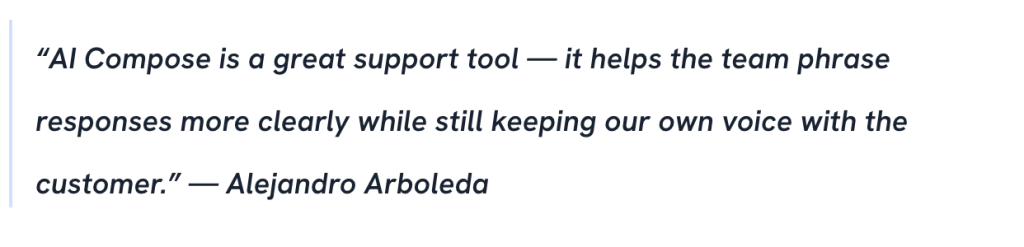
Sentiment Analysis alerts the team when a conversation needs urgent care, AI Compose helps reps reply with the right tone and clarity, and AI Tagging is being trained to categorize conversations automatically. They’re also preparing to use AI Extract to pull invoice details from PDFs and cut down on repetitive accounting tasks.
The impact was clear within weeks:
- Quote turnaround improved by 61%.
- Dispatch response time improved by 26%.
- Up to 90% of assignments now happen automatically.
With less manual sorting and clearer communication, the team can focus on the requests that matter most. ITS now moves through daily volume more smoothly and is better equipped to handle growth.
How to Implement Gen AI Into Your Customer Service Strategy

Now that you understand what generative AI can do, let’s talk about how to actually implement it without disrupting your operations or frustrating your team.
Start with high-impact, low-risk use cases
Why do it:
Starting small gives your team early wins and helps everyone build confidence while you learn how the system behaves.
How to do it:
- Begin with automatic tagging and routing so AI organizes tickets quietly in the background.
- Add auto-closing of thank-you replies to remove small tasks from your queue.
- Turn on sentiment analysis to flag emotional tone so agents can prioritize more effectively.
Keep humans in the loop for customer-facing content
Why do it:
AI can help you move faster, but agents still need to guide tone and accuracy to maintain a great customer experience.
How to do it:
- Let AI draft responses, and have agents review and send them.
- As your team gets comfortable, expand AI’s autonomy for simple tasks such as courtesy closures or basic status checks.
- Review a sample of AI-driven messages weekly to confirm the quality remains strong.
Train your team on how to work with AI
Why do it:
Agents are more likely to embrace AI when they understand how it makes their work easier and more meaningful.
How to do it:
- Show how AI drafting reduces repetitive writing.
- Explain how sentiment flags help them focus on the right conversations first.
- Demonstrate how automatic data extraction saves time on manual tasks.
- Help them see AI as an assistant that supports their work, not a replacement.
Recommended reading
Monitor performance and adjust continuously
Why do it:
To achieve consistent performance with AI, ongoing tuning is a must. Regular checks help you confirm it is improving support quality, not creating new issues.
How to do it:
- Track response times, resolution times, productivity, and customer satisfaction before and after rollout.
- Review a sample of auto-closed tickets each week to ensure decisions are accurate.
- If agents frequently override AI, adjust your rules or training data to improve results.
Integrate AI across your entire support workflow
Why do it:
AI becomes more powerful when different capabilities work together instead of operating in isolation.
How to do it:
- Use AI to tag conversations, detect sentiment, extract key details, and route tickets automatically.
- Enable AI CoPilot so agents get help drafting responses and finding the right information instantly.
- Combine all AI signals so tickets move to the right person with minimal manual effort.
Define clear escalation paths
Why do it:
AI works best with boundaries. Some issues need a human touch, and clear handoff rules keep things running smoothly.
How to do it:
- Create clear criteria for when AI should pass a ticket to an agent, such as complex technical questions or sensitive customer concerns.
- Include summaries, sentiment, extracted data, and customer history in the escalation so the agent understands the issue immediately.
How to Measure the Outcome of Gen AI Implementation
The simplest way to know whether generative AI is actually helping your support team is to look at a few key metrics. These will tell you very quickly if things are moving in the right direction.
| Metric | What it Means | What You Should See After AI |
|---|---|---|
| First Response Time (FRT) | How quickly customers get the first reply. | Faster responses because AI handles tagging, routing, and prep work. |
| Average Handle Time (AHT) | How long an agent spends resolving a ticket. | Shorter handling time since AI drafts replies and pulls key info automatically. |
| Customer Satisfaction (CSAT) | How happy customers are with the support they received. | CSAT should stay steady or improve as customers get quicker, more accurate help. |
| Agent Override Rate | How often agents edit or reject AI-generated responses. | Overrides should decrease as AI learns and becomes more reliable. |
Recommended reading
Get Started with Generative AI in Customer Service
Generative AI isn’t coming to customer service—it’s already here.
The real question is how to use it in a way that actually helps your team.
The best implementations start small, keep humans in control, and focus on eliminating tedious work rather than replacing agents. When you do that, you end up with faster response times, more consistent support, and a team that has more time and energy for the work that actually matters.
If you’re ready to see how generative AI can work in your support operations, Hiver makes it simple. Our AI features—from automatic tagging and sentiment analysis to intelligent routing and agent assistance—work directly in your helpdesk without forcing you to learn a new platform.
You can start with a free trial and see exactly how Gen AI features can help your agents move along the support workflow.
Start your free trial and begin using generative AI in your customer service today.
Frequently Asked Questions
How does Generative AI enhance customer service?
Generative AI automates repetitive tasks, provides real-time agent assistance, and enables faster, more personalized responses. It categorizes tickets, detects sentiment, drafts replies, and learns from your team’s behavior to get smarter over time—helping agents focus on complex issues while routine work happens automatically.
Which is the best generative AI for customer support?
The best generative AI depends on your workflow. For customer support, Hiver offers AI tagging, sentiment analysis, smart routing, and reply drafting directly within your helpdesk. For large contact centers, platforms like Salesforce, Genesys, and NICE provide multi-channel AI capabilities.
How to automate generative AI for customer support?
Start with low-risk use cases like automatic tagging, sentiment analysis, and thank-you reply detection. Enable these features in your platform and monitor them. Set up routing rules so AI knows how to distribute messages. For reply drafting, begin with agent review before sending. Monitor metrics weekly and gradually expand what AI handles as you gain confidence in its accuracy.