







Has this ever happened to you?
You are shopping and ready to check out, but your discount code doesn’t work. Before you could start searching for the customer support button, a quick note appears on-screen: “Having trouble with discount codes? Try this.”
That’s contextual support stepping in at the right time.
It’s the kind of customer support that actually gets what you’re doing in that moment and shows up with the exact answer you need, right when you need it.
In this blog, you will get to know what contextual support really means, how it works, and most importantly, how you can implement it without reinventing your entire support operation.
Key Takeaways
- Implementing contextual support starts with identifying friction points, tracking user behavior, and designing responses that meet customers right where they are.
- Contextual support delivers real-time, relevant help based on what customers are doing.
- It improves resolution time and customer satisfaction by anticipating issues before customers reach out.
- Teams can offer contextual support in multiple ways, from embedding self-service options to setting up proactive chat prompts and personalized help centers.
What Is Contextual Support?
Contextual support refers to providing proactive, personalized help based on a user’s current activity, location, and past interactions. It’s the opposite of traditional support, where customers have to seek out help themselves. Instead of users fishing for answers, contextual support finds them intelligently.
For example:
- In-app dynamic tooltips that guide users through onboarding without them needing to ask, like a friendly co-pilot.
- Pre-filled chat prompts that reference the page or feature the user is on, without the need to type out the whole issue.
- Targeted FAQs that pop up when a user hovers over a tricky setting.
- Even CSAT surveys that are timed based on actions (like after a refund is processed), not just arbitrary ticket closures.
Most customers don’t speak up when things go wrong. 56% of consumers never complain after a bad experience. It’s a reminder that brands need to act before customers ask for help.As Shep Hyken, CX Expert and Chief Amazement Officer of Shepard Presentations, puts it:
“Average is not good enough. You’ve got to avoid mediocrity and create moments of magic, experiences just a little better than expected.”
Contextual Support vs. Contextual Help: What’s the Difference?
While the two terms sound similar, they’re not the same.
Contextual help focuses on guiding users within a product, offering hints, tooltips, or walkthroughs when someone needs clarity.
Contextual support takes a broader view. It’s about proactively assisting customers across various channels, such as chat, email, or apps, by leveraging data about their actions and history.
| Aspect | Contextual Help | Contextual Support |
|---|---|---|
| Focus | Helps users understand or use a specific feature. | Helps customers resolve an issue before they ask for help. |
| Example | A static tooltip explaining what a button or setting does. | A live chat message offering help when a user hesitates on the checkout page. |
| Goal | Improve usability and reduce confusion. | Improve customer experience and reduce effort across touchpoints. |
Benefits of Contextual Support
Here’s why more teams are leaning into contextual support, and why you should too:
Faster Resolution Times
Contextual support is all about anticipating and addressing problems. It automatically detects what the user is doing and offers the right help at that moment.
For example, when a customer struggles to enter their address during checkout, an in-app tip can instantly point out the correct format.
💡Did you know? To make this even easier, many customer service platforms now use AI to support agents behind the scenes. Hiver, for instance, a modern AI-powered customer service platform, automatically routes conversations to the right teammate, suggests context-based replies, and provides agents with full visibility into past interactions.

Recommended reading
Improved Customer Satisfaction (CSAT)
When support feels personal and relevant, customers are more likely to enjoy the experience. They don’t need to repeat details or restate their issue because the system already has the context.
For instance, if a user contacts support about a subscription issue and receives answers tailored to their account history, it instantly builds trust and improves satisfaction scores.
💡 Pro tip: You can use Hiver’s CSAT feature to analyze how satisfied your customers are with your products and services.

Reduced Ticket Volume
Contextual support reduces ticket volume by resolving common questions before they reach your inbox. When customers find the right answers within your product, they no longer need to raise tickets for simple issues.
Groupize is a great example where they’ve added a “GG” (Groupize Guide) to the tool. It automatically links to their learning center and displays helpful guides for first-time users.

Better Onboarding and Feature Adoption
First impressions matter. Contextual guidance during onboarding helps users feel confident fast, which means less churn and more “aha” moments with your features.
For instance, Brevo, an email marketing tool, has set up helpful contextual tooltips during its onboarding so customers can learn about the tool by themselves without contacting the support team for their queries.

Higher Conversion Rates
Timely assistance during checkout or sign-up can prevent drop-offs. When customers get quick answers right where they hesitate, they’re far more likely to complete the process.
Asana, for example, features a live chat widget that offers quick help when users hesitate on the payment page, providing the nudge they need to complete their purchase.

💡Pro tip: You can apply the same approach using Hiver’s Live Chat. Your team can set up time-triggered nudges or chat pop-outs to engage visitors who linger on key pages. Combine this with AI-suggested responses and chatbots that surface relevant help articles to guide users confidently through the purchase process.

Smarter Agent Assist
Agents perform better when they have the full picture, like knowing the customer history, recent interactions, and relevant context. With quick access to past conversations and key details, there will be more accurate responses.
For example, when a returning customer reaches out about an unresolved issue, your customer agent can view past emails and pick up the conversation right where it left off.
6 Effective Ways to Provide Contextual Support
Here are six proven methods to deliver contextual support exactly when and where your customers need it:
1. Embed Smart Self-Service Options
Place help content directly on pages where users need it. Show relevant FAQs, tooltips, or guides based on what page they’re viewing or what action they’re taking.
On a payment page, display FAQs about refunds and billing. On a settings page, show articles about configuration options.
Check your analytics to find pages with high drop-off rates or frequent support tickets. Add targeted help content to those pages to answer questions before users contact support.
💡 Pro tip: Use website and support analytics to identify pages where users drop off a lot or where tickets frequently originate. Then, strategically embed specific help content in those spots. This way, you’re solving common problems before they become support tickets.
2. Use AI-Powered Chatbots
Set up chatbots that recognize what the user needs and provide quick answers. They can collect basic details, share relevant articles, or route the query to the right person.
By automating routine queries, your team frees up time to focus on complex issues while customers get quick answers.
3. Offer Proactive Live Chat Prompts
Don’t wait for customers to ask for help. Trigger chat messages when users pause on a page or abandon a form. If someone lingers on your pricing page, a quick message like “Need help choosing a plan?” can encourage them to continue.
4. Personalize Help Center Content
Show different help content based on customer profile, subscription tier, or usage patterns. Display articles relevant to their specific plan features and previous issues.
Premium customers see advanced features documentation. Free tier users see basic setup guides. Everyone gets content that applies to their situation.
Pro tip: Use dynamic content modules in your knowledge base platform to serve up personalized recommendations automatically. It cuts down repeat tickets, helping customers help themselves.
5. Contextual Email Support
Use customer history and previous tickets to personalize replies and assign messages to the right team. For example, if a returning customer emails about billing, route it directly to your finance queue instead of treating it like a new request.
6. In-App Product Walkthroughs & Tooltips
Guide users while they’re inside your product. Show tooltips or short walkthroughs only when they’re relevant, such as highlighting a feature after a setup step.
Show a payment setup guide only after a user creates an account. Display advanced features tour only after they’ve mastered the basics. Trigger tooltips based on which feature they’re using.
How to Implement Contextual Support
Contextual support sounds amazing, but how do you actually pull it off? It’s about designing an experience that anticipates customer needs at every step.
Start by understanding where users struggle and what kind of help they need in the moment. Then, connect your systems so the right information and responses appear automatically.
Here’s a practical checklist to help you get started:
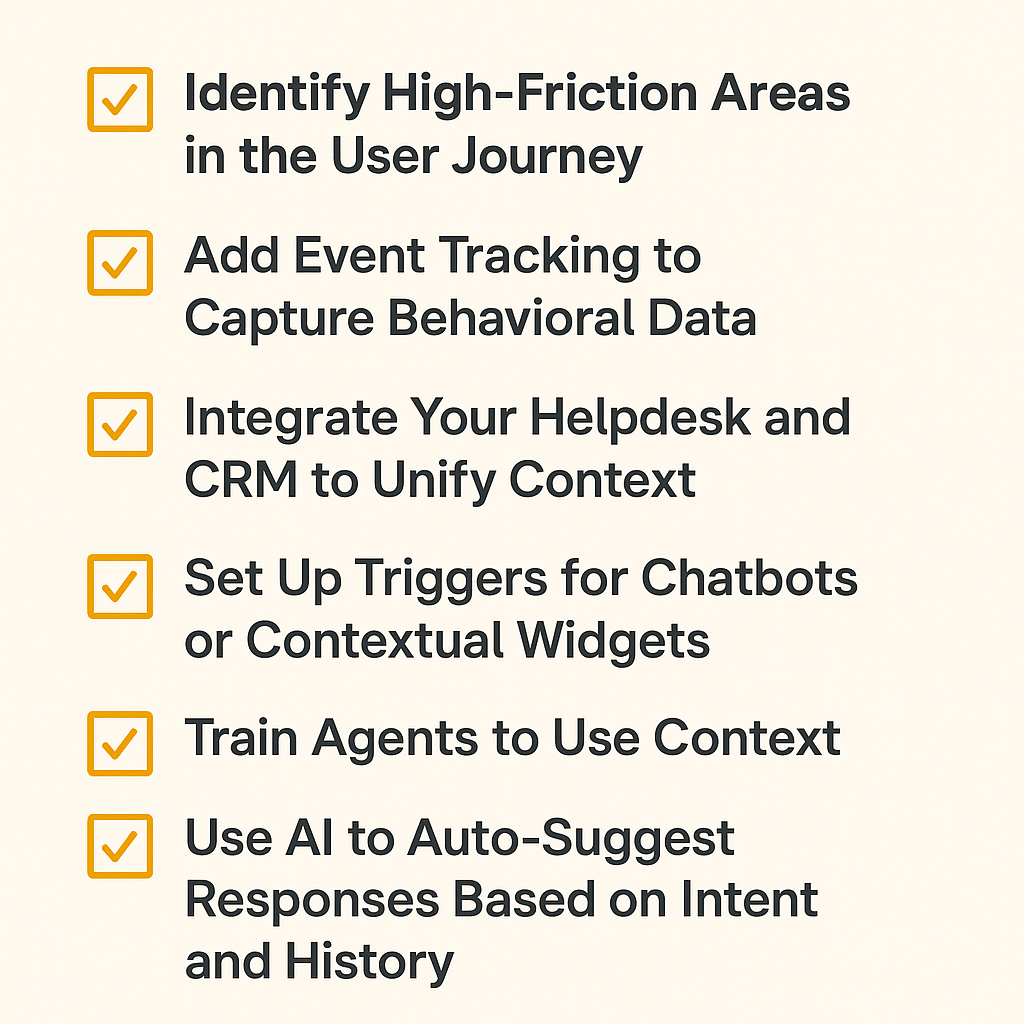
Each step, from tracking user behavior to training agents, ensures your support team delivers relevant help. When you do it right, customers never have to go looking for assistance; it’s already there, exactly when they need it.
How Contextual Support Elevates Every Customer Experience
Customers want to feel understood. Every unanswered question or repeated explanation chips away at that trust. Contextual support fixes that and helps customer teams respond with empathy and precision.
When customer support feels relevant, customers remember the whole experience. It turns a routine exchange into a lasting impression.
If you want your support team to work smarter and connect with customers on a deeper level, start by adding context to every interaction. A customer service platform like Hiver makes it possible to do this.
See how Hiver helps your team deliver context-driven support that customers actually love. Book a free demo today.
Frequently Asked Questions
1. What is an example of contextual help?
An example of contextual help is a tooltip that appears when a user hovers over a form field. For example, showing the correct password format or explaining what a setting does, so they get guidance without leaving the page.
2. Why is contextual support necessary in live chat?
Contextual support in live chat delivers faster, more accurate replies by using customer data, such as their current page or past conversations, to provide relevant answers instantly.
3. What are some best practices for contextual support?
Identify friction points, track user behavior, and add help elements, like smart FAQs, chat prompts, or personalized content, where users struggle most. Train agents to use customer context and keep support proactive and timely.













