







When customers ask for things like password resets, billing updates, or order tracking, most teams handle them the same way: an agent replies with the steps, the issue gets resolved, and the ticket gets closed.
The problem is how often this cycle repeats. The same questions show up again and again, and agents end up rewriting the same instructions multiple times a day.
Over time, that repetition slows response times and fills your queue with tickets that could have been avoided.
In many cases, the real issue isn’t agent efficiency. The answers already exist somewhere, but they’re hard to find. They’re buried in old tickets, scattered across internal documents, or sitting in someone’s memory.
A well-structured help desk knowledge base changes that. It brings common answers into one searchable place so customers can find solutions quickly and agents don’t have to repeat the same instructions every day.
What Is A Helpdesk Knowledge Base?
A helpdesk knowledge base is a collection of articles that answer commonly asked questions. It can be public (so customers can find answers on their own) or private (for your support team to reference internally).
Customers use it to solve simple issues without contacting support, which helps reduce incoming tickets. Agents use it as a quick reference to respond faster and ensure every customer receives consistent, accurate instructions, especially for repeat issues like password resets, billing questions, or setup steps.
What a Good HelpDesk Knowledge Base Looks Like?
A good help desk knowledge base should make it easy to find answers quickly.
Customers can use it to solve simple issues on their own, while agents can refer to it when responding to tickets to ensure instructions stay clear and consistent.
But this only works if the knowledge base is structured properly. If information is scattered or poorly organized, people spend more time searching for answers than actually solving the problem.
1. Clear, consistent categories for help topics
The way you organize articles determines how easily people can find answers.
A common mistake is structuring the knowledge base around internal departments. Customers don’t think in terms of “Finance team” or “Product team.” They think about the problem they’re trying to solve. For example, customers are more likely to search for:
- “I got charged twice”
- “I can’t log in”
- “How do I update my payment method?”
To make this clearer, here’s a comparison of good vs. confusing knowledge base categories across different industries.
| Industry | ✅ Good Customer Categories | 👩💻 Good Internal Agent Categories | ❌ Bad Categories |
|---|---|---|---|
| Ecommerce | -Orders & delivery -Returns & refunds -Payments & invoices | -Refund approval rules -Chargeback handling -Shipping exception cases | -Operation -Finance -Customer Success |
| SaaS | -Getting started -Account & security Billing & plans -Troubleshooting | -SLA rules -Enterprise exception workflows -Downtime communication templates | -Backend systems Infrastructure -Internal tools -Product team |
| Healthcare / Health Tech | -Appointments & scheduling -Billing & insurance -Patient portal access | -Insurance verification checklist -Sensitive case handling -HIPAA communication rules | -Clinical operations -Revenue cycle -Compliance |
| FinTech | -Account setup -Transactions & transfers -Fees & charges | -Fraud review steps -KYC verification process -Charge dispute handling | -Risk department -Fraud team -Treasury -Compliance |
| Travel & Hospitality | -Bookings & cancellations -Refunds & credits -Check-in process | -Disruption handling playbook -Compensation guidelines -VIP handling rules | -Revenue management -Ops team -Backend systems |
2. Separate content for customers and agents
Customers and agents do not need the same level of detail from a help article.
For instance, a customer just wants to know what to do next in case of a problem. On the other hand, an agent needs to know the why and how behind it.
Take refunds as an example.
For customers, the article should answer basic questions clearly:
- When can I request a refund?
- How long does a refund take?
- How to submit a refund request?
- What details should I include in my request?
Agents need more operational guidance on the same topic:
- Which refund requests require manager approval?
- What counts as “used” or “damaged” products?
- How to check the original payment method?
- What to do if a customer threatens a chargeback?
- What exact wording to use in sensitive cases
To keep your knowledge base useful for both audiences, it’s best to create separate versions for every article. One for your customers and one for your support team.
3. Knowledge base should follow a search-first design (not browse-first)
When customers open your help desk knowledge base, most don’t start by browsing categories. They go straight to the search bar and type what they’re experiencing, such as “charged twice,” “password reset not working,” or “cancel subscription.”
If people can’t find answers quickly through search, they assume the information isn’t there and contact support instead.
That’s why a knowledge base should be designed around search, not browsing through categories.
Here’s what that looks like in practice.
- Make the search bar immediately visible: The search bar should be one of the first things people see when they land on your knowledge base. If users have to click through multiple sections before they can search, many will simply give up.
- Use article titles that match how customers speak: A title like “Payment authorization failure” uses technical wording most customers would never use. Instead, “Why my payment failed” sounds like something a customer would actually type.
- Include common search phrases inside the article: Customers often use different variations of the same issue. Someone might search for “charged twice,” “double charge,” or “duplicate payment.” Including these phrases naturally within the article improves search accuracy and helps the right content surface faster.

4. Embed the KB in the helpdesk workflow
Support agents often need to check documentation while replying to customers. In many setups, this means leaving the help desk, opening a separate knowledge base tool, and searching for the right article.
Even though this sounds minor, it slows things down. Every extra tab switch breaks focus and adds friction. Over time, it can lead to delayed responses or agents relying on memory instead of verified information.
A better approach is to integrate the knowledge base directly into the help desk workflow. This way, agents can access documentation without leaving the conversation they’re working on.
In practice, this means agents can:
- Search knowledge base articles while replying to a ticket
- Insert the right article link into a response with one click
- Use pre-written templates instead of typing instructions from scratch
How to Set Up Your Helpdesk Knowledge Base (Step-by-Step)
By now, you know what a good help desk knowledge base should do. It should be searchable, clearly organized, and easy for both customers and agents to use.
The harder part is building one without turning it into a huge documentation project.
That’s where many teams get stuck. The scope feels overwhelming. There are too many tickets, too many edge cases, and too many product updates. It starts to feel like you need to document everything before you can publish anything.
You don’t.
A useful knowledge base does not start with full product documentation. It starts with the questions your team answers every day. Begin there, then build outward over time.
Step 1: Audit Your Top Ticket Drivers
Before you write a single article, look at what is already happening in your support queue.
Open your help desk and scan the last 30–60 days of tickets. This will help you find patterns in the customer queries you receive. Look for questions that show up everyday.
In most teams, the same themes keep showing up. For example:
- “I can’t log in”
- “Why was I charged twice?”
- “How do I download my invoice?”
- “How do I cancel?”
These usually are not complex product issues. They are information gaps. Customers do not have clear answers in one place, so they reach out to support.
That gives you a practical starting point. List the top 10 to 15 questions that appear most often. Those should become your first knowledge base articles.
Step 2: Write Your First 10–15 Articles
Once you have your list of repeat questions, turn each one into a separate article.
Keep the scope narrow. Each article should solve one specific problem. So if someone searches for “How do I download my invoice?”, they should land on a page that answers exactly that question and nothing else.
A good article should do three things clearly:
- Explain what issue it covers
- Walk through the steps in order
- Tell the reader what to do next if those steps do not solve the problem
If the article refers to a product flow or setting, include screenshots. Visuals make instructions easier to follow and reduce follow-up questions.
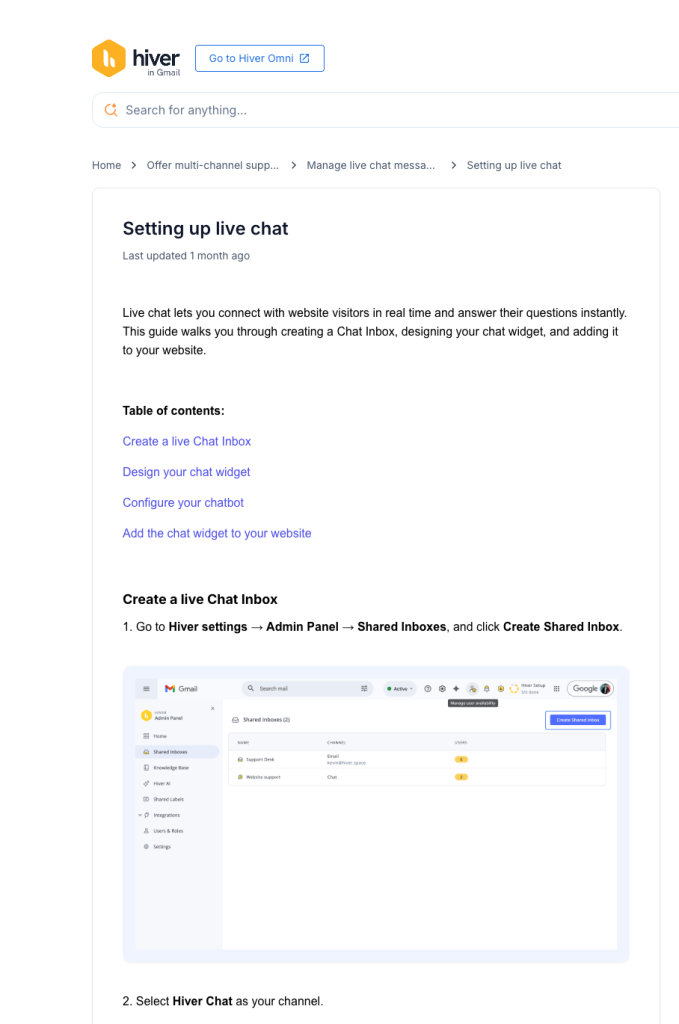
You can see this approach in Hiver’s own knowledge base. Each article focuses on one task, uses a simple title, and keeps the steps short and direct. Screenshots are used where needed to make the process easier to understand. That structure helps people find answers quickly without digging through extra detail.
Recommended reading
Step 3: Organize the Knowledge Base into 4–6 Categories
Once your first set of articles is ready, group them into a small number of clear categories.
Keep these categories simple and task-based. In a SaaS business, for example, they might look like this:
- Getting started
- Account and security
- Billing and plans
- Troubleshooting
- Integrations
This is where many teams go wrong. They organize content around internal departments such as Finance, Operations, or Product. But customers do not think that way. They look for answers based on the problem they are trying to solve.
Step 4: Connect your Knowledge Base to Your Help Desk
Once your knowledge base is live, the next step is to make sure people actually use it.
Customers should be able to find articles before they submit a ticket. Agents should be able to access the same information while replying. If the knowledge base sits in a separate tool that agents rarely open, it becomes a passive library instead of part of the support workflow.
The better approach is to bring knowledge directly into the help desk.
For example, in Hiver, teams usually maintain two spaces: a public knowledge base for customers and a centralized internal KB for agents. The internal knowledge base connects directly to shared inboxes like support@ or billing@. Agents can search and pull the right article before replying. That keeps replies accurate and avoids guessing.
But, here’s where it gets even more useful.
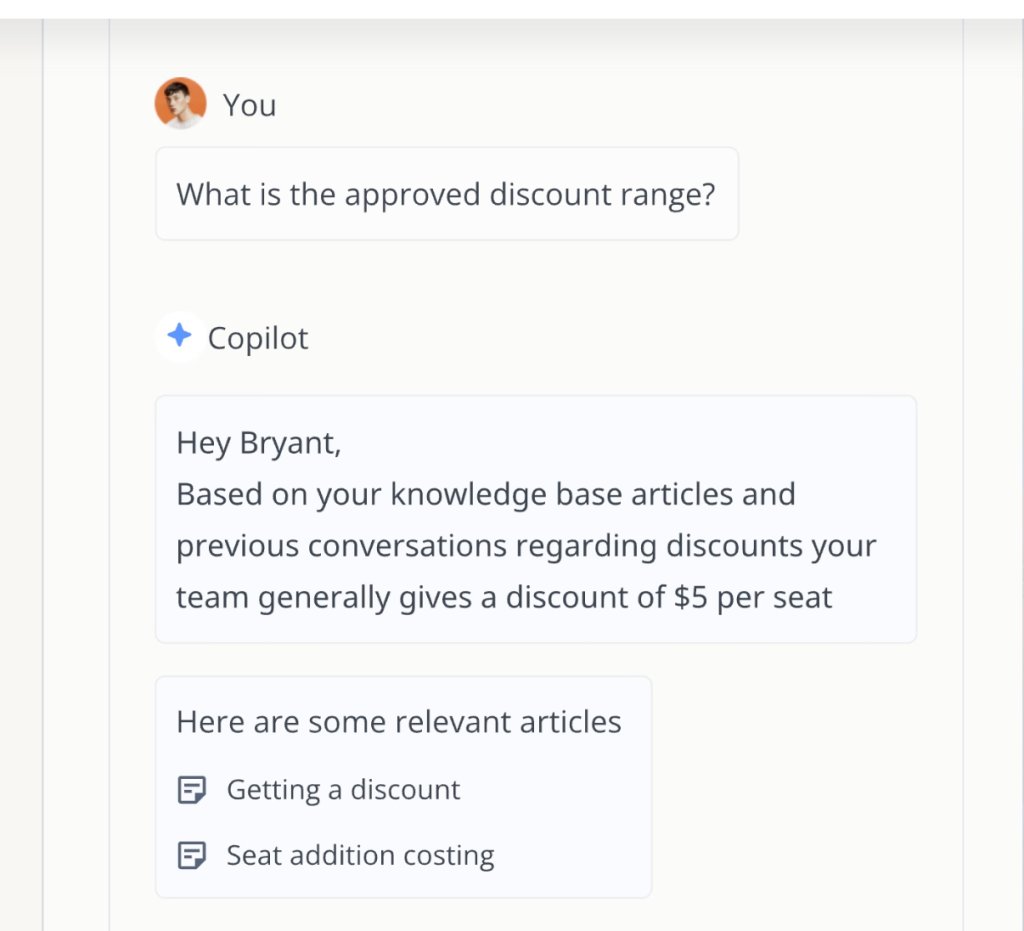
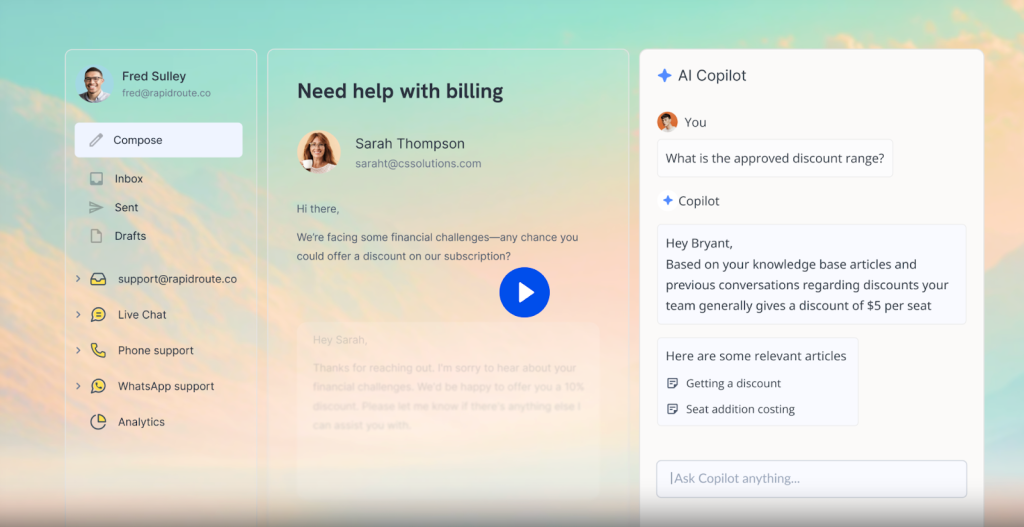
With Hiver’s Ask AI, agents don’t have to manually search for the right article.When an agent is replying, they can ask the AI copilot a question and get the relevant answer instantly, based on your own documentation. Instead of searching manually, they get the right information in seconds and respond with confidence.
Step 5: Launch, Train, and Iterate Weekly
Once everything is in place, publish your knowledge base and start using it.
For the first week, ask agents to actively use knowledge base articles in their replies. Watch where customers still ask follow-up questions. Notice which article titles are unclear or do not match the language customers use.
Make the knowledge base easier to discover. Link it from your Contact Support page and surface it inside your live chat widget or support portal.
After launch, review it every week. Check your most-viewed articles, update anything that is outdated, and create new pages when the same question starts appearing repeatedly in your queue.
30-Day Quick-Launch Playbook
You don’t need six months to build a useful help desk knowledge base.
If you focus only on real ticket data and keep the scope tight, you can launch a solid first version in 30 days.
Here’s a simple week-by-week plan you can follow.
| Week | Focus | What You Actually Do |
|---|---|---|
| Week 1 | Audit | -Pull the last 30–60 days of tickets. -Identify the top 10–15 repeat questions. -Group them into 4–6 simple categories. Do not overthink structure. -Base everything on real issues. |
| Week 2 | Write | -Turn each repeated question into a focused article. -Focus on one problem per article. Add clear steps and screenshots where needed. -Keep titles simple and match how customers describe the issue. |
| Week 3 | Setup | -Organize articles under your categories. -Add a clear search bar. -Separate customer-facing and internal agent content. -Connect the knowledge base to your help desk so agents can use it while replying. |
| Week 4 | Launch | -Roll it out to your team first. -Ask agents to use articles in replies. -Review closely and fix unclear steps. -Then link the knowledge base in auto-replies and on your support page. -Review weekly and track like ticket deflection, article helpfulness and repeat contact rate. Keep improving based on what you see. |
Why Most Help Desk Knowledge Bases Fail (Common Mistakes to Avoid)
Most knowledge bases don’t fail because they’re set up incorrectly. They fail because they aren’t maintained or used properly over time.
When that happens, a few common patterns start to show up. Customers stop relying on the knowledge base and agents start double-checking information instead of trusting what’s written. So the gap between “what’s documented” and “what’s actually happening” is what causes the decline. Here’s an indepth explanation of why your knowledge base might fail.
1. Content Goes Stale After Launch
As your product and policies change, your documentation needs to keep up. This could be anything from updated pricing to a new UI.
When articles fall behind, customers follow steps that no longer match what they see. After a few such experiences, they stop using the knowledge base and contact support instead.
Fix: Review your most-viewed articles regularly. Keeping your top 20 pages accurate goes a long way.
2. Knowledge is Trapped in People’s Memory
In many teams, one person ends up managing the knowledge base. If they get busy or leave, updates slow down. Agents start asking each other for answers, and responses become inconsistent.
Fix: Make ownership shared. Let agents update articles or flag changes when they handle repeat issues.
3. KB Lives Outside the Agent Workflow
Even with good content, usage drops if the knowledge base isn’t part of daily work. In one Reddit discussion, a three-person support team described how they kept digging through old tickets for fixes. They tried tools like OneNote, but as content grew, search became messy and structure broke down. It stopped being helpful.
Fix: Make knowledge accessible within the help desk so agents can search and use it while replying.
4. The same content is used for customers and agents
Customers and agents need different levels of detail.
Customers want clear steps. Agents need context, edge cases, and internal rules.
When both are combined, the content becomes cluttered and less useful for both.
Fix: Create separate articles. Keep customer content simple and internal content more detailed.
How To Measure If Your Helpdesk KB is Working?
Once your help desk knowledge base is live, the next question is simple: is it actually helping?
You don’t need complex reporting to figure this out. Start by tracking these five core metrics. They tell you whether customers are finding answers on their own and whether agents save time in typing out responses.
- Deflection rate: If your knowledge base is clear and easy to search, you should see a drop in common L1 queries like password resets, billing questions, or order tracking.
- Article helpfulness: Use a simple “Was this helpful?” prompt below the article. If many users mark an article as unhelpful, it likely needs clearer steps or updated screenshots.
- Search success rate: When customers search, do they find a helpful article right away, or do they keep searching again? If people search multiple times or still raise a ticket, your article titles or content may not match how they describe the problem.
- Resolution time: When agents refer to knowledge base articles when answering questions, replies become faster and more consistent. If resolution time is not improving, it’s worth looking into the quality of content you have on your knowledge base.
- Contact rate after reading: If customers read an article and still contact support, check what’s missing. Often, it’s unclear steps or no guidance on what to do next.
Help Desk Knowledge Base Examples Worth Studying
You don’t need to copy another company’s knowledge base, but it helps to study what works.
Here are three examples I genuinely like, and why.
1. Shopify – Task-Based Navigation
Shopify’s help center is built around the actions customers take. When you open their help center, you see the help articles are categorized based on tasks like managing orders, setting up payments, or customizing your store.
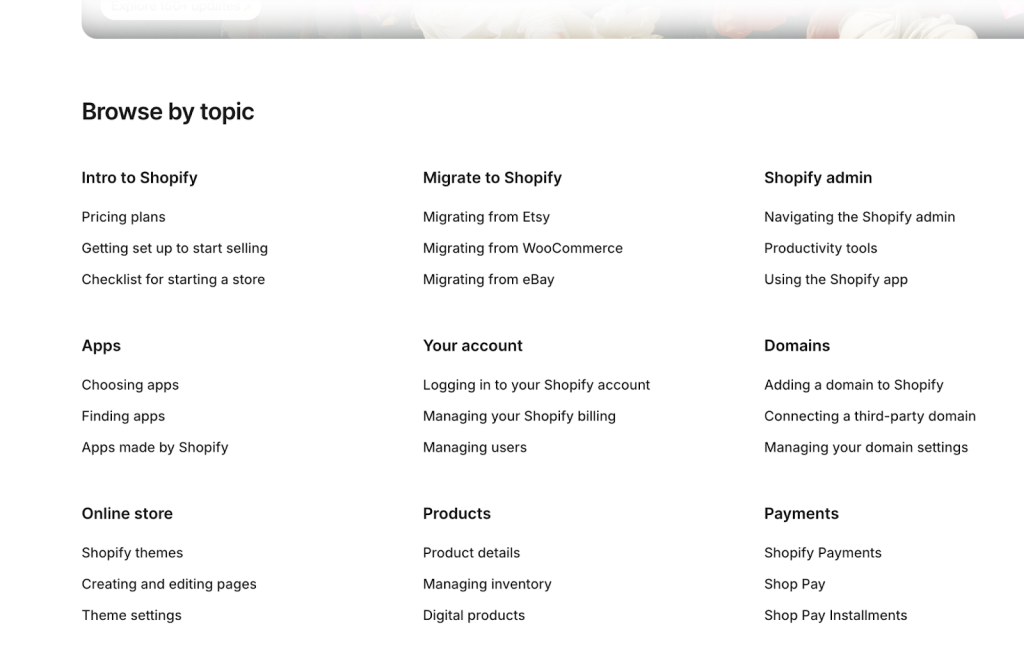
What I like is how quickly you can get to a specific action because articles are short and focused. You don’t have to read three pages to find one step.
2. Airbnb – Role-Based Content (Guest vs Host)
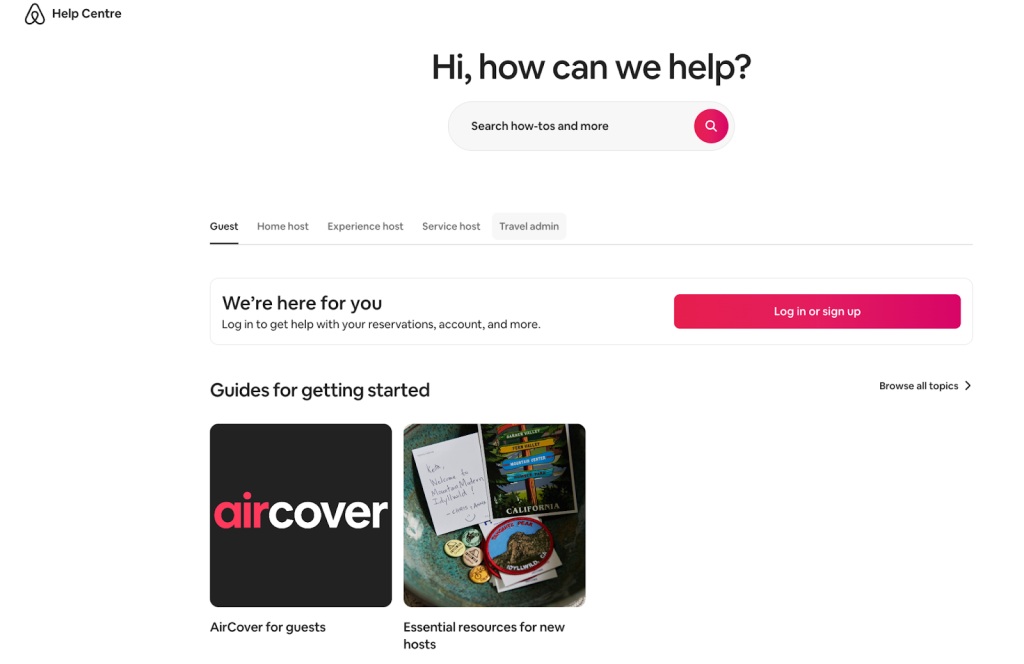
Airbnb separates help content based on who you are: a guest or a host.
Guests and hosts have completely different queries so mixing both in one structure would create confusion.
What I like here is the clarity. The moment you choose your role, everything feels relevant.
If your product serves multiple user types, don’t force them into one knowledge base structure. Instead:
- Split content by role or account type
- Show only what’s relevant
3. Slack – In-Product KB Access
Slack’s help content is so easy to access while you’re using the product. You don’t feel like you’re leaving the workflow to go read some kind of documentation.
What stands out to me is how practical the articles are. They are short, focused, and tied to real product actions.
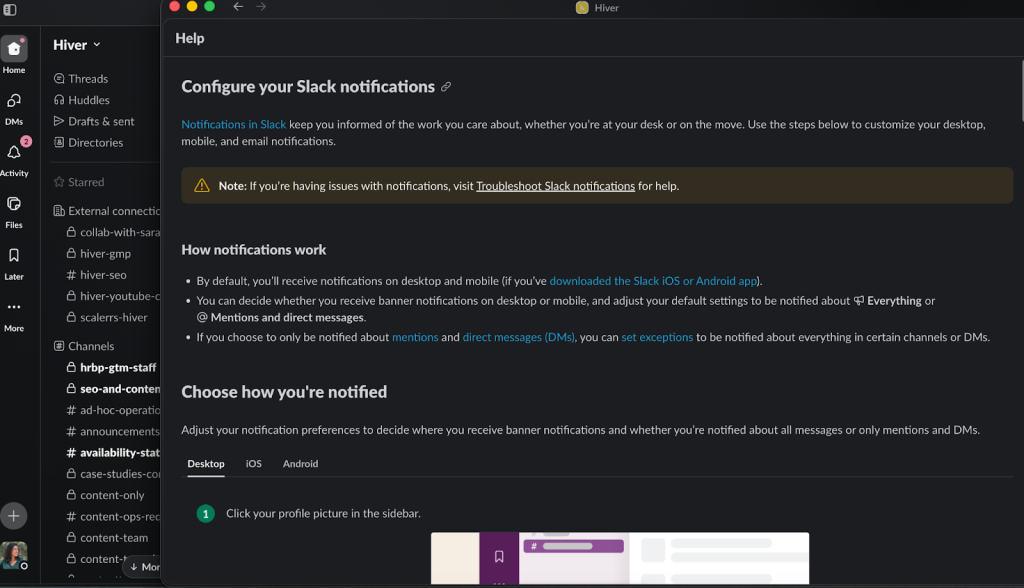
I feel like many businesses miss out on this point. A help desk knowledge base should not feel like a library. It should feel like part of the product experience.
So, if you’re designing your own setup, think about: can users access help without leaving the product?
Using AI to Make Your Knowledge Base Better
By this point, the challenge is no longer setting up the knowledge base but keeping it accurate as your support queue changes.
When new questions come in after a feature update or policy change, older articles need updates. If that doesn’t happen, useful answers stay buried inside past tickets instead of becoming part of your knowledge base.
Doing all of this manually takes time, especially as ticket volume grows. This is where AI starts to help. It reduces the effort needed to keep your help desk knowledge base updated and usable in day-to-day support.
Here’s how teams use it in practice:
1. Turn repeated issues into documented knowledge faster.
When the same queries keeps coming up, it’s a sign that the query should be documented clearly in your knowledge base. AI can help identify these and also help with creating answers for them.
For instance, With Hiver’s AI, you can easily identify these repeated queries and turn them into structured articles that your team can reuse. In fact, Hiver’s AI use those past responses to generate a draft article. The team can review it, refine the steps, and publishe it.
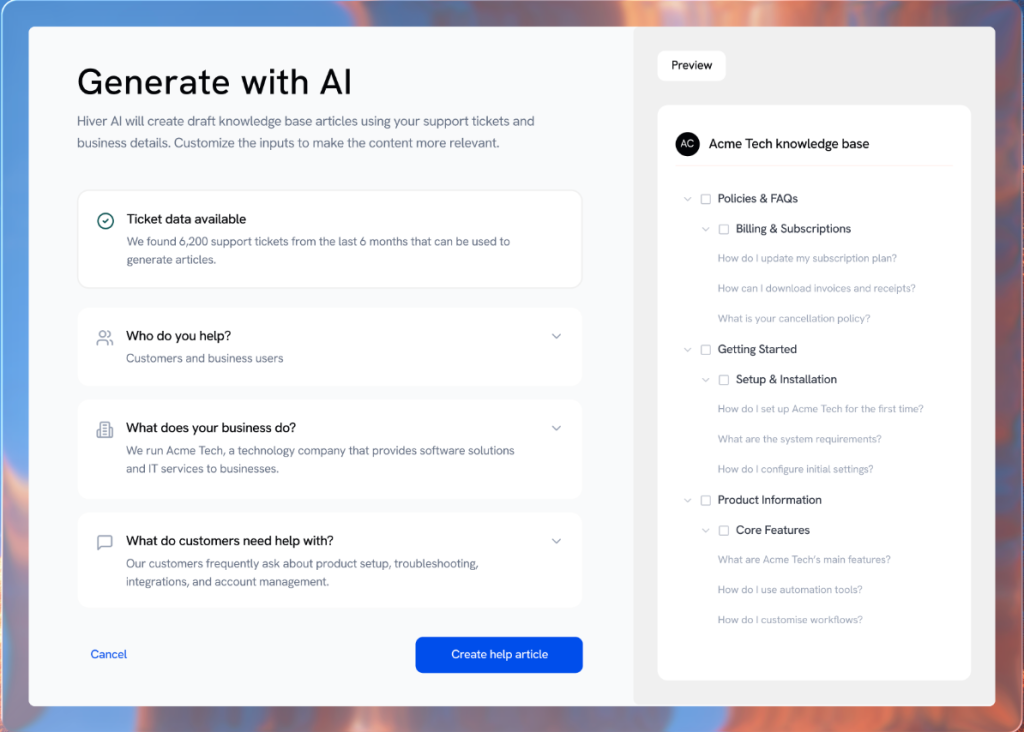
Instead of relying on memory or digging through old tickets, your team builds a reliable source of answers over time.
2. Help agents find answers while replying
Even with good documentation, manually searching for the right article slows things down. AI can fasttrack the process of searching too.
With Hiver’s Ask AI feature, agents can ask a question while replying and get the relevant answer pulled from internal articles and SOPs.
This is an AI copilot that acts like a search engine, surfacing the right response for your customers. So,when a customer asks a question, your support staff doesn’t have to dig through the company’s knowledge base to find the right answer – the copilot does all the heavy lifting. It searches the knowledge base and provides accurate responses that your team can use.
3. Keep your knowledge base clean at all times
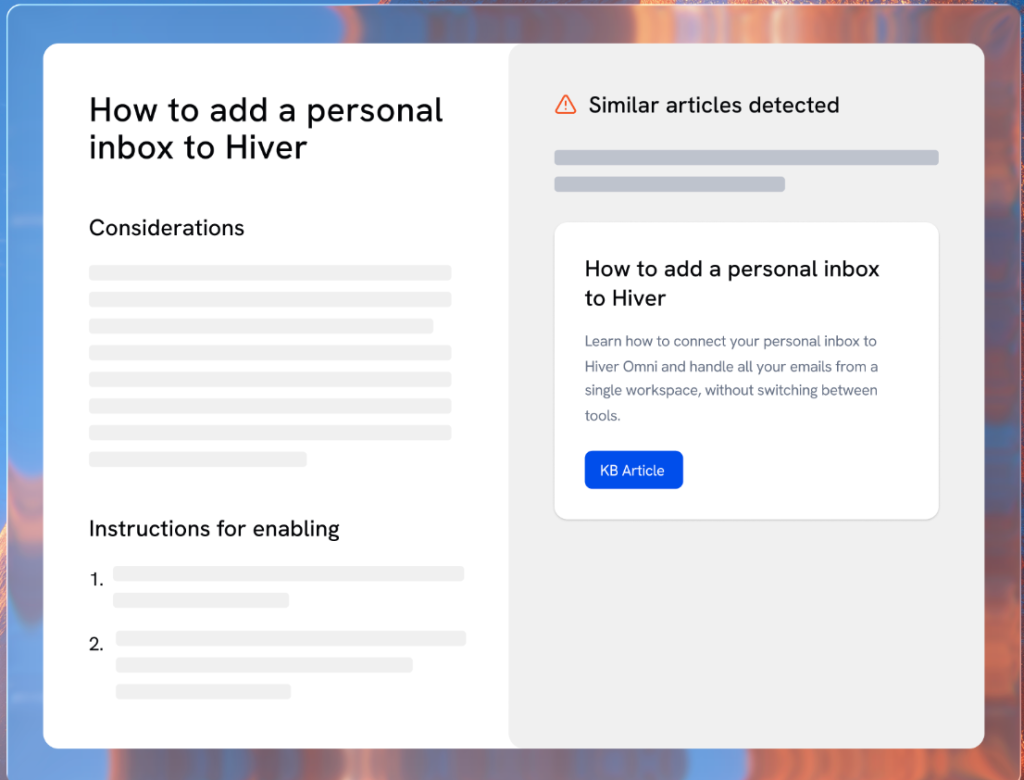
As your knowledge base expands, it’s common to end up with similar or overlapping articles. That can create confusion. For instance two articles might answer the same question slightly differently, and agents won’t know which one to trust. AI can preevent this from happeneing
Hiver’s AI helps you detect similar or duplicate content when you try to publish them so you can merge or clean it up before it becomes a problem. This keeps your knowledge base easier to navigate and more reliable.
4. Refine articles without rewriting everything
Updating articles is just as important as creating them, but rewriting content manually takes time. AI can help in this.
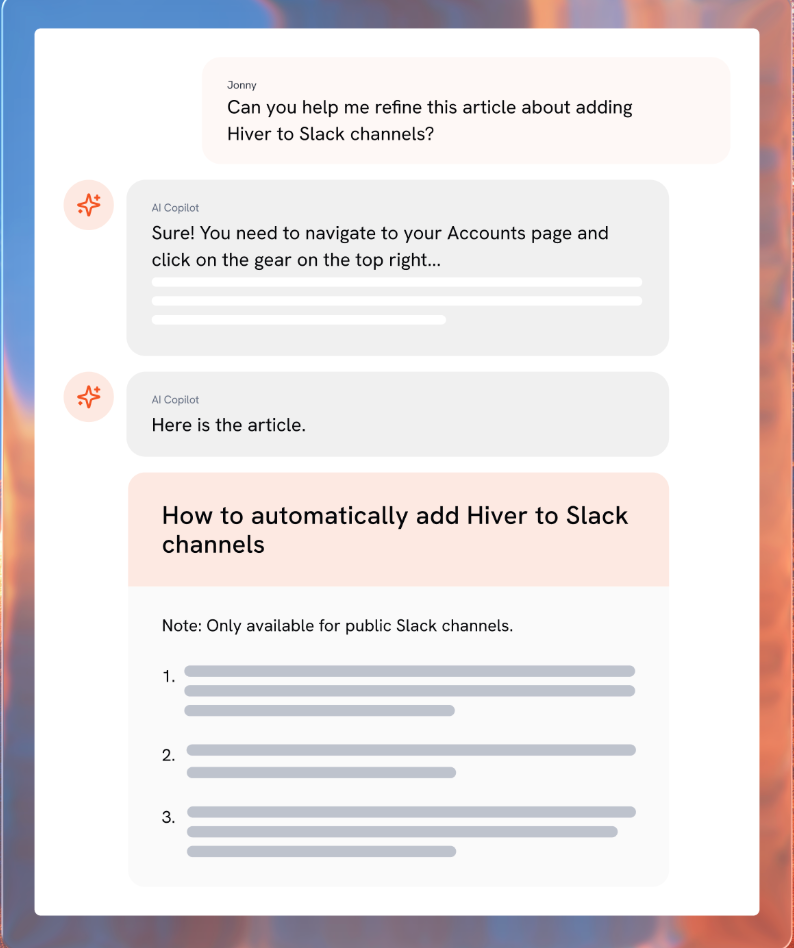
With Hiver’s AI copilot, your team can refine existing articles quickly. You can simplify steps, improve clarity, or adjust tone without starting from scratch. This makes it easier to keep articles accurate and easy to understand as your product or policies change.
Recommended reading
Make Your Help Desk Knowledge Base Actually Work
If your knowledge base is hard to maintain or disconnected from your support workflow, it won’t reduce repeat questions. That’s where the right setup makes a difference.
With tools like Hiver, you can create two things easily:
- A customer-facing knowledge base that’s easy to search
- An internal knowledge base that agents can access while replying
Because it works alongside shared inboxes like support@ or billing@, agents don’t have to switch tools. They can search, share, and reuse approved answers in one place.
And as your support volume grows, features like AI-powered search, copilot assistance, and content suggestions help you keep the knowledge base updated without turning it into a separate project.
If you want to see how this works in practice, you can try Hiver and set up your first knowledge base in minutes.
Frequently Asked Questions
1. What is the difference between a help desk and a knowledge base?
A help desk is where customer issues are managed and resolved through tickets and conversations. While, a knowledge base is where those answers are documented so customers and agents can find solutions without starting a new conversation. In simple terms, the help desk handles incoming requests, while the knowledge base helps reduce them by enabling self-service.
2. How does a knowledge base reduce help desk tickets?
A knowledge base reduces ticket volume by giving customers clear, searchable answers before they contact support. When articles explain steps fully and match how customers describe problems, many issues get resolved without opening a ticket.
3. What should a help desk knowledge base contain?
A help desk knowledge base should include your most common support topics such as login issues, billing questions, setup guides, troubleshooting steps, and policy explanations. The content should be based on real ticket data, written in simple language, and focused on solving one specific problem per article.
4. What is a Knowledge-Centered Service (KCS)?
Knowledge-Centered Service (KCS) is a support method where teams create and update knowledge while solving real customer issues instead of treating documentation as a separate project. The idea is simple: solve the issue once, document the solution clearly, and reuse it so the knowledge base stays accurate and practical.
5. Can AI build and maintain a help desk knowledge base?
The role of AI in building and maintaining knowledge base is still at a nascent stage but it’s showing a lot of promise. For instance, AI can turn resolved tickets into potential help articles, improve search accuracy, and identify repeat issues that need documentation.
6. What is the best way to structure a help desk knowledge base?
The best structure uses 4–6 clear, task-based categories that reflect how customers describe problems. Articles should focus on one issue each, use simple titles, and separate customer-facing content from internal agent guidance to avoid confusion.
7. How can you make a help desk knowledge base user-friendly?
To make a help desk knowledge base user-friendly, use jargon-free language in the title and description of the articles, ensure everything is broken down into step-by-step instructions, and clear product screenshots are used as needed. The way you write content should align with the way customers talk, and the knowledge base should always include guidance on what to do if a proposed solution doesn’t work.
8. What tools are best for managing a help desk knowledge base?
Most help desks have a separate knowledge base functionality. Hiver, Pylon, Zendesk and Freshdesk are some of the more popular options. You can use these tools to write, organize, and update help articles across different knowledge bases. They even come with integrations with other collaboration and CRM tools.













