





You call a support line. The automated voice says your estimated wait time is “20 minutes.” Do you:
a) Sit through hold music and slowly lose your patience?
b) Hang up and try again later?
c) Wish you could just….get a call back?
Turns out, most people pick option C. 63% of customers prefer a customer callback over waiting on hold. Yet many companies still don’t offer this simple option, leaving customers frustrated and support teams overwhelmed.
In this guide, you’ll see exactly how a customer callback works, its biggest benefits, and how to set them up right.
Let’s get into it.
What is a Customer Callback?
Customer callback is a service that allows customers to request a return call from a customer service representative rather than waiting on hold. This reduces wait times, avoids frustration, and enhances the customer experience.
Instead of forcing the caller to sit through music or repeat their issue to multiple agents, a callback lets them hang up and go about their day. When an agent is ready, the system dials the customer back, often with all their information ready for a faster, more personalized conversation.
This simple option gives customers control and helps businesses handle calls more efficiently without dropping service quality.
Recommended reading
How Do Customer Callbacks Work?
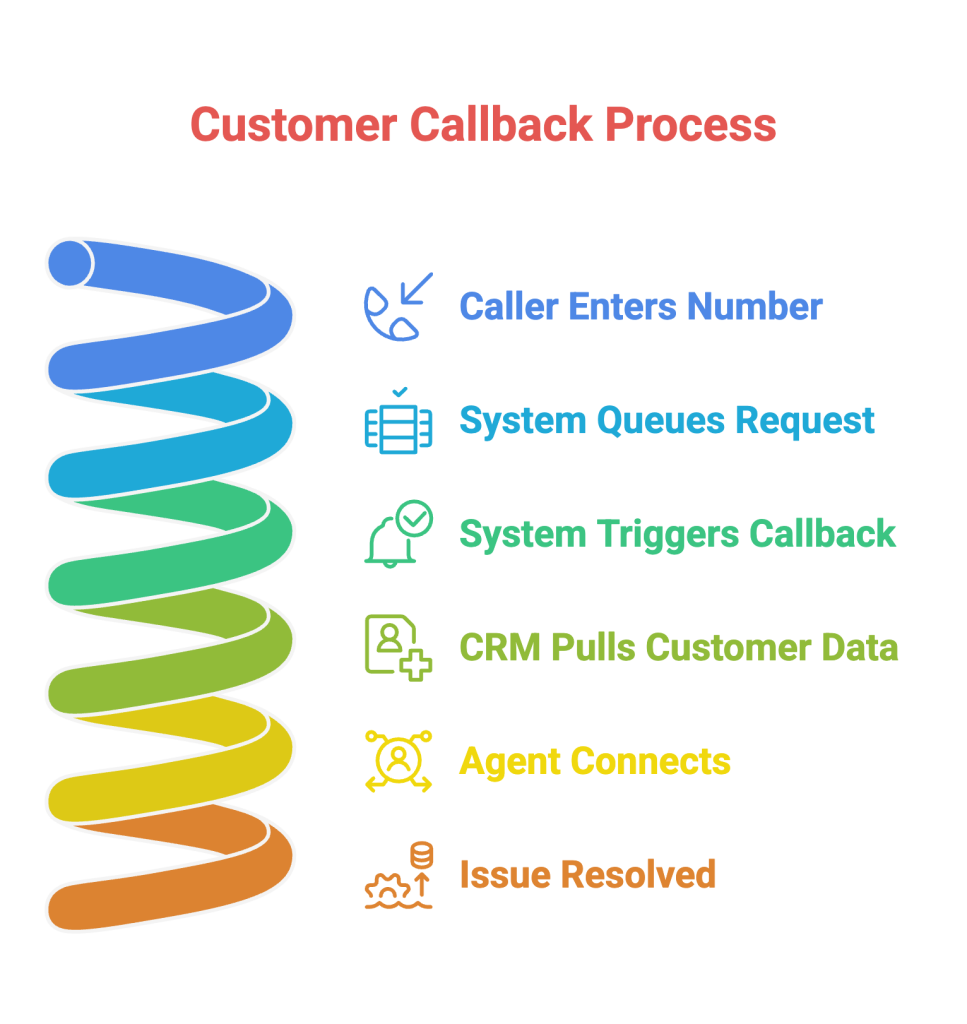
Customer callback systems automatically queue customer requests during long wait times and call them back when an agent is available or at a preferred time. They pull relevant data from your CRM, so agents can jump straight into solving the issue—leading to shorter calls, less repetition, and a better overall experience.
Below is a step-by-step breakdown of how customer callback services typically work.
Step 1: When wait times are long, the system prompts the caller to enter their number for a callback. Callers are placed in the call queue, and their queries are queued for processing.
Step 2: The system queues the request and triggers a call once an agent becomes available, sometimes immediately or at a scheduled time that the customer chooses.
Step 3: Before the callback, the system pulls relevant customer data from your Customer Relationship Management (CRM) tool, such as purchase history, preferences, and previous interactions.
Step 4: The customer service agent connects with the customer, solves the issue quickly, and avoids making them repeat information. This means shorter calls, happier customers, and more productive agents.
Recommended reading
Key Benefits of Customer Callback Services
Customer callback services improve satisfaction by eliminating long hold times, increasing first-contact resolution with better context, and reducing call abandonment by keeping customers in the loop. They also lower support costs, smooth out peak-hour volume, and help convert missed calls into inbound leads—all while delivering an efficient support experience.
Below is a breakdown of each benefit:
1. Enhanced customer satisfaction
Long hold times are a major cause of customer frustration. In fact, when wait times go beyond what customers expect, their dissatisfaction can increase by 262%. A callback option eliminates this wait, allowing customers to receive help without being stuck on hold. This slight shift makes your support feel more respectful, efficient, and customer-centric.
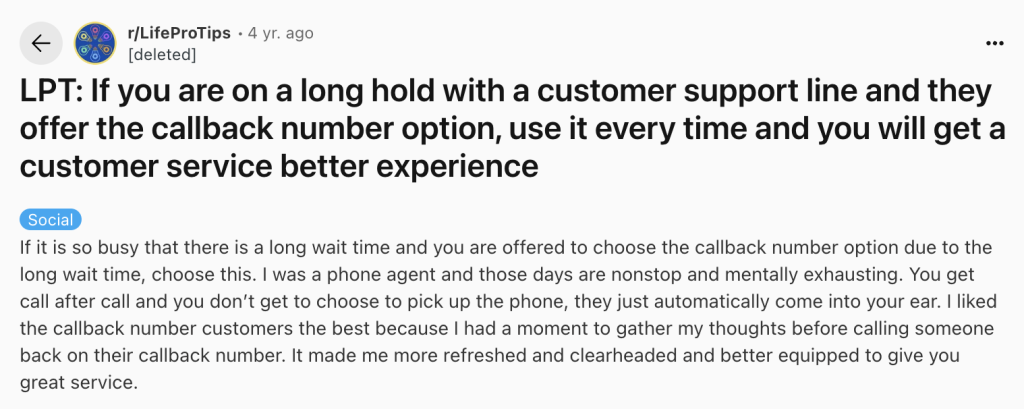
In a Reddit post, a former phone agent explained why people who asked for a callback usually got more thoughtful, better-quality help.
Recommended reading
2. Better first-contact resolution rates
With customer callbacks, your agents can access essential details about the customer before making the call. For instance, the system can show their name, previous interactions, or pages they visited.
This extra context helps agents prepare and increases the likelihood of resolving the issue in one call.
A higher FCR rate leads to shorter hold times, fewer repeat calls, improved team morale, and better agent efficiency. Agents feel more satisfied when they can resolve issues without customers needing to call multiple times.
3. Reduced call abandonment rates
When callers are stuck waiting, many simply hang up and may never call back. A callback option helps reduce call abandonment by assuring customers they’ll still get the help they need, even if they disconnect. Reducing call abandonment also helps decrease the number of repeat calls, which can smooth out call volume spikes and improve overall productivity.
Kel Kuregki, Director of Developer Support at Zapier, sums up why this matters in Hiver’s latest report:

“Right now, we only track the customers who actually give us feedback. But what about the ones who just leave? In today’s world, where customers have endless choices, ignoring the silent ones is a dangerous game.”
Kel Kuregki
Director of Developer Support at Zapier
A missed call isn’t just a dropped interaction — it’s silent churn waiting to happen. A simple callback keeps those customers in the loop and shows you respect their time. Even reducing abandonment by a few percentage points can boost loyalty and NPS, because customers appreciate it when you don’t waste their time.
📊 Want to calculate your call abandonment rate?
Call Abandonment Rate = (Abandoned Calls ÷ Total Incoming Calls) × 100
4. Lower operational costs
Eliminating hold queues not only improves customer experience but lowers support costs too.
Here’s how:
- Fewer people on hold = lower toll charges, especially for long-distance or international calls.
- Reduced peak-hour congestion means you don’t need to overstaff just to manage volume spikes.
- Shorter handle times (thanks to agents having context) mean reps resolve more issues per hour.
5. More inbound leads
Customers trying to reach you are often warm leads, and losing them due to busy lines can cost you valuable opportunities. A callback option helps ensure you don’t miss these potential conversions.
It also lets you capture and store contact details, enabling your team to follow up, nurture the relationship, and move leads further down the sales funnel. Even if they don’t convert immediately, their information can be used for targeted campaigns.
Types of Customer Callbacks
Customer callback services come in different formats—including automated IVR callbacks, scheduled callbacks, algorithm-based callbacks, and time-based callbacks—supported by dialing modes like agent-first and customer-first. These options, combined with virtual queue systems, help streamline support operations and reduce hold times.
- In agent-first dialing, the system calls the agent first so they’re ready when the customer answers.
- In customer-first dialing, the system calls the customer first and then connects them to a free agent.
Both modes offer a virtual queue system, which automates and efficiently manages callback queues. This digital waiting line manages customer calls and integrates with callback options to reduce hold times and frustration.
Here’s a more detailed breakdown of how each type works:
Automated Interactive Voice Response (IVR) Customer Callbacks
With automated IVR callbacks, customers can hang up without losing their place in the queue. The system calls them back in the original order, eliminating the need to wait on hold. An agent is already on the line when the customer answers, ensuring a smooth, immediate handoff.
Scheduled Customer Callbacks
Scheduled callbacks allow customers to choose a specific date and time for a return call. The system automatically connects them with available agents at the selected time and sends a callback confirmation.
Algorithm-Based Customer Callbacks
These callbacks use real-time data, such as peak call volumes, abandonment rates, and call queue length, to determine the optimal time to return a call. The system adjusts dynamically based on current demand, helping reduce wait times and ensuring customers receive timely support.
Time-Based Customer Callbacks
Time-based callbacks adjust based on the time of day. Near the end of business hours, the system checks for enough time to return the call the same day. If not, it suggests scheduling a callback for the next business day or offering voicemail. This ensures the caller knows when to expect support, avoiding uncertainty or indefinite waits.
Recommended reading
Setting Business Hours: The Key to Maximizing Service Availability
Best Practices for Implementing and Optimizing Customer Callback Services
To implement and optimize customer callback services, start the call with context, set accurate expectations, bridge digital and voice channels seamlessly, train your customer service reps on customer callback protocols, and use data to improve customer callback performance.
Here’s a more detailed breakdown of each point:
1. Start the Call with Context
The best callback experiences feel like a continuation, not a restart.
When agents have full context before calling, they skip the usual back-and-forth. No repeating account numbers. No, “Can you tell me what happened again?”
Integrate your callback system with your CRM so agents can access the customer’s full history and previous interactions before the call. This not only speeds up time to resolution but also makes the experience feel more personalized and efficient.
Here’s how Stephanie Ouellet, Senior Customer Service Manager at Earth Rated, describes the role of personalization in increasing customer loyalty for her brand:

“Personalization plays a HUGE part in increasing customer loyalty for us! Customers want to feel like they are considered on a personal level by your brand, and the brands that are able to deliver that level of care are the ones that win over customers for life.”
Stephanie Ouellet
Senior Customer Service Manager at Earth Rated
2. Set Accurate Expectations
A callback experience starts with clear communication.
Customers should know exactly when to expect a call, whether it’s a specific time slot or an estimated wait period. Avoid vague phrases like “we’ll get back to you shortly.” Instead, provide a clear callback window at the time of request.
If it’s a scheduled callback, send a confirmation and a reminder before the call. Whenever there’s a delay, notify the customer promptly through email, SMS, or chat. Setting the right expectations builds trust and ensures customers feel informed.
3. Bridge Digital and Voice Channels Seamlessly
Many customers begin by exploring help articles or using chat support, but some situations still require a real-time conversation to move forward. When that situation arrives, the transition to voice support should be frictionless.
Add a clear, visible callback option across digital touchpoints. If a customer can’t find what they need in your help center or gets stuck in a chatbot loop, offer a quick way to request a callback directly from that interface.
This reduces abandonment, shortens resolution time, and makes live support feel like a natural part of the journey, not a disconnected fallback.
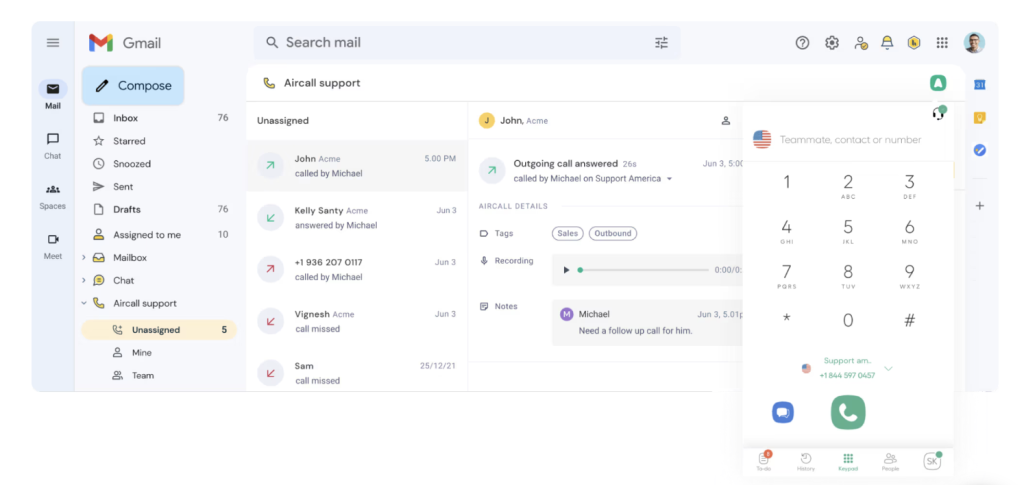
Hiver’s integration with Aircall makes handling customer callbacks easy and efficient. Your support team can make and receive calls directly from Hiver. Agents can view past interactions, get full context, and each call is logged automatically, ensuring follow-ups are always accurate and timely. It’s quick to set up and helps you deliver smooth, personalized voice support, even during peak hours.
4. Train your customer service reps on customer callback protocols
Even the best callback system falls short without well-trained reps behind it. Here’s how to do it:
- Start with the basics: Give an overview of how the callback system works. Ensure reps understand how customers schedule callbacks, how the queue works, and the available self-service options.
- Follow-up is key: Stress the importance of following up with customers who requested a callback to ensure satisfaction.
- Real-life examples: Walk through common callback scenarios so reps know precisely how to handle them.
- Role-playing: Have reps practice handling callbacks in role-playing sessions.
- Continuous training: Keep training your team to stay updated on new best practices and systems.
- Monitor performance: Track how reps are doing and offer additional support or training.
Recommended reading
5. Use data to improve customer callback performance
Your callback system is full of untapped insights. By analyzing when callbacks are requested, how quickly they’re handled, and where they get stuck, you can make smarter decisions and deliver better service.
Here’s how:
- Spot patterns: Review callback request data to see when and why customers ask for callbacks. This can help optimize scheduling and ensure agents are ready for standard requests.
- Measure performance: Track each representative’s performance with callbacks and look at the number of calls they handle, the time spent on each call, and their customer satisfaction scores. This will highlight where they need more training or support.
- Allocate resources smarter: Use these insights to plan ahead. For example, if Mondays always see more callbacks, adjust staffing or shift schedules proactively. The goal: shorter wait times, balanced workloads, and no missed callbacks.
Recommended reading
Real-World Examples of Customer Callback Success
To better understand the tangible benefits of implementing customer callback services, let’s look at how some leading companies have successfully leveraged this technology:
Mindful and U-Haul
U-Haul, one of North America’s largest moving and storage companies, handles millions of customer interactions each year, especially during peak moving seasons when support volumes surge. To maintain high service levels without overwhelming their agents, U-Haul implemented a callback system.
As a result, within one year of implementation, U-Haul saved over 30 million minutes of queue time (equivalent to 57 years), reduced toll fees by $453K, and improved service levels by 15%.
Halifax Bank
When Halifax wanted to reduce online transaction abandonment, they introduced intelligent callback scheduling on their website.
Within one year, they secured an extra £0.5 million in premium income and lowered lost sales by enabling users to book calls during or outside banking hours.
Why Customer Callback Service should be a Larger part of your Support Strategy
Fast, personal support isn’t a nice-to-have anymore; it’s what keeps customers from switching to someone else. A callback service helps you deliver exactly that: shorter wait times and more relevant, context-rich conversations.
For customers, it means flexibility and a better experience. For businesses, it means smarter resource allocation and higher service quality. Hiver makes this process effortless for businesses by offering a seamless experience when customers need live support.
With Hiver, support teams can manage callback requests from Hiver, alongside email, chat, and other channels. Agents get instant access to each customer’s conversation history, internal notes, and past interactions, so every callback is faster, more relevant, and more informed. No switching tools. No missed context. Just seamless support. Start your free trial today and see how effortless callbacks can be.
FAQs
1. How does a customer callback system improve customer satisfaction?
A customer callback system improves satisfaction by reducing long wait times, allowing customers to receive callbacks when agents are available, which saves time and frustration. It also ensures faster issue resolution by giving agents time to prepare, leading to more first-contact resolutions.
2. Can a customer callback service be integrated with existing CRM systems?
Yes, a customer callback service can be integrated with existing CRM systems. This integration allows agents to access customer data before making the callback, ensuring more personalized and efficient service. It also helps in tracking and managing customer interactions, providing a seamless experience for both agents and customers.
3. What are the costs involved in implementing a callback service?
The costs of implementing a callback service can vary based on several factors. These include the size of your business, the complexity of the system, and whether you choose a cloud-based solution or an on-premise system. Typically, costs include setup fees, monthly subscription or licensing fees, and any additional costs for integrating the service with existing CRM systems.
4. What industries can benefit the most from customer callback services?
Industries with high call volumes, such as telecommunications, e-commerce, banking, healthcare, insurance, travel, and retail, benefit the most. These sectors use callback services to reduce wait times, improve customer experience, and manage inquiries efficiently.
5. Is it possible to schedule a callback for specific times of day or days of the week?
Yes, customer callback services allow customers to schedule callbacks for specific times of day or days of the week. This provides flexibility and ensures that customers are contacted at a time that is most convenient for them.













