Skip to content



If you’re running customer support, you’ve probably gotten sucked into the Freshdesk vs Zendesk debate at some point.
These two platforms basically own the helpdesk conversation, but here’s the thing – neither one is what it used to be, and both have some pretty annoying quirks that most reviews won’t tell you about.
I’ve spent a lot of time hands-on with both platforms and dug through real user feedback on Reddit, G2, and support communities to put together this unbiased comparison guide.
In this guide, I’m giving you the truth about:
- Real pricing (including all those sneaky add-ons)
- Feature breakdown that matters for day-to-day work
- Honest pros and cons based on actual user complaints
- The team size and use cases both the tools are ideal for
Table of Contents
- My Research Methodology
- Freshdesk vs Zendesk: Quick Comparison (2026 Edition)
- Similarities of Freshdesk and Zendesk
- Zendesk vs. Freshdesk: Key Differences
- Pros and Cons of Freshdesk and Zendesk
- Pricing comparison: Zendesk vs Freshdesk (2026 Updates)
- Feature Comparison: Zendesk vs Freshdesk
My Research Methodology
This Freshdesk vs Zendesk breakdown comes from hands-on testing, verified user feedback, direct conversations with CX leaders, and years of experience helping teams build better support operations. Here’s exactly how I approached this breakdown:
I tested both platforms myself: I set up trial accounts on Freshdesk and Zendesk, created tickets, configured workflows, explored automations, and pushed the AI features to see how they actually perform. I wanted to understand the day-to-day experience of an agent and an admin on each platform.
I analyzed hundreds of real user reviews: I combed through G2, Capterra, TrustRadius, and Reddit threads to find recurring themes – what users love, what frustrates them, and where each platform falls short. The quotes you’ll see throughout this guide come directly from verified users, not cherry-picked testimonials.
I talked to teams actively evaluating these tools: At Hiver, I regularly speak with support leaders who are considering switching from Freshdesk or Zendesk. These conversations give me unfiltered insight into why teams outgrow these platforms, what pain points drive them to explore alternatives, and how these tools compare in real-world operations.
I measured each tool against what actually matters: Not vanity features, but the things that impact your team daily: ease of setup, learning curve, ticket management, collaboration, AI capabilities, reporting depth, and total cost of ownership. I also factored in scalability.
I drew on 10,000+ customer conversations: With over 10,000 teams using Hiver, we’ve seen what dependable customer service software looks like and what it doesn’t. We know which features teams actually use versus which ones gather dust, and we understand the real-world trade-offs between simplicity and power.
Freshdesk vs Zendesk: Quick Comparison (2026 Edition)
To kick things off, here’s a side-by-side comparison of Freshdesk and Zendesk on the key factors support teams care about:
| Aspect | Freshdesk | Zendesk |
|---|---|---|
| Pricing and Value | ⭐⭐⭐⭐ Free plan for up to 2 agents; paid plans start at $19/agent/month. | ⭐⭐⭐ No free plan; starts at $19/agent/month, but gets costly as you scale. |
| Setup Time | ⭐⭐⭐⭐⭐ 1-2 weeks on average. Intuitive onboarding gets teams running quickly. | ⭐⭐⭐ 4-12 weeks on average. Complex setup requires more planning and training. |
| Learning Curve | ⭐⭐⭐⭐ Low to moderate | ⭐⭐⭐ Moderate to high |
| AI Features | ⭐⭐⭐⭐ Freddy AI assists with agent productivity: auto-triage, reply suggestions, tone adjustments, etc. Focused on daily task automation. | ⭐⭐⭐⭐ Zendesk AI is more optimization-focused: robust bot builder, industry-specific intent models, and AI for workforce management. Powerful, but can feel heavy for small teams. |
| Channels Supported | ⭐⭐⭐ Email, live chat (via Freshchat app), phone (via Freshcaller), social, WhatsApp (with add-on). Multichannel, but involves separate Freshworks modules. | ⭐⭐⭐⭐⭐ Email, live chat, phone (Talk), social, SMS/WhatsApp and more built-in. Truly omnichannel out-of-the-box, no extra apps needed for core channels. |
| Reporting and Analytics | ⭐⭐⭐ Good basic reporting with pre-built dashboards and CSAT surveys. Less granular customization (custom reports only on higher plans). Real-time analytics are somewhat limited. | ⭐⭐⭐⭐⭐ Enterprise-grade analytics via Zendesk Explore: highly customizable dashboards and metrics. Great for deep insights, but many advanced reports are gated to higher tiers. |
| Ease of Use | ⭐⭐⭐⭐ Modern, user-friendly interface. Easy for small teams to adopt quickly. Some slowdown or UI clutter when handling very high ticket volumes. | ⭐⭐⭐ Powerful but complex UI. Rich features can overwhelm new users. Requires time to master advanced settings and customizable workflows. |
| Best For | Budget-conscious SMBs that need a help desk. Great for basic multichannel support. | Large enterprises or scaling orgs that need advanced customization, integrations, and global scalability despite higher costs. |
| G2 Ease of Use | ⭐⭐⭐⭐⭐ 8.8/10 | ⭐⭐⭐⭐ 8.5/10 |
As shown above, Freshdesk positions itself as the affordable, easy-start option.
Zendesk, meanwhile, justifies its premium with a more unified, all-in-one suite and richer feature set for those who can harness it.
Similarities of Freshdesk and Zendesk
Both Freshdesk and Zendesk are built on the same foundation: ticketing, automation, AI assistance, and analytics, which is why they’re constantly compared.
Here’s where they overlap the most:
- Channels: Both provide multi-channel support across email, chat, phone, social media, and WhatsApp.
- AI and Automation: Both offer AI-powered automation. Freshdesk with Freddy AI and Zendesk with Zendesk AI.
- Core ticketing controls: Both include SLA management, macros, and workflow rules to standardize responses and speed up resolution.
- Internal collaboration: Both offer collaboration features for internal discussions (Freshconnect vs. Side Conversations).
- Integrations: Both integrate with major CRMs, chat tools, and analytics tools such as Salesforce, Slack, and HubSpot.
- Self-service: Both provide knowledge base builders with self-service capabilities.
- Reporting and analytics: Both come with pre-built dashboards and report templates for tracking key metrics such as ticket volume, response times, CSAT scores, and agent performance.
- Customer feedback: Both include built-in customer satisfaction surveys that automatically request feedback at the end of support interactions.
- Scalability: Both are cloud-based platforms designed to scale from small teams to enterprise operations.
Let’s just say that they’re solving the same problems. They are just approaching them from different directions.
Zendesk vs. Freshdesk: Key Differences
While Freshdesk and Zendesk may look alike at first glance, the way they execute support is completely different.
Freshdesk is built for speed, simplicity, and affordability. Zendesk is built for depth, scale, and control. Those design choices show up clearly once you start using them.
Here’s how they differ in practice:
- Setup and Onboarding: Freshdesk gets teams running in a week or two, while Zendesk often takes a month or more to configure and train around.
- Product Ecosystem: Freshdesk splits key features across multiple apps — Freshchat, Freshcaller, Freshconnect— while Zendesk includes most channels natively in one unified suite.
- AI and Automation: Freshdesk’s Freddy AI focuses on agent productivity (reply suggestions, tone edits, auto-triage). Zendesk’s AI goes deeper into automation, intent detection, and workforce optimization, which is great for scale, but heavier to manage.
- Analytics: Zendesk’s ‘’Explore’’ offers enterprise-grade reporting and customizable dashboards; Freshdesk’s reports are easier to use but less granular.
- Pricing: Freshdesk’s plans are 20–40% cheaper overall and even include a free plan for small teams. Zendesk starts higher and adds costs through paid AI and analytics add-ons.
- Ease of Use: Freshdesk’s interface feels lighter and quicker to learn, while Zendesk’s power comes with a steeper learning curve.
- Integrations: Freshdesk’s 1,000+ integrations focus on SMB and mid-market tools with straightforward setup. Zendesk’s 1,200+ apps include more enterprise-grade connectors with deeper, bidirectional data sync capabilities for systems like Salesforce, SAP, Oracle, and ServiceNow – critical for complex, multi-system workflows in large organizations.
So while both tools do the same job on paper, they serve two different realities. Freshdesk fits teams that need to move fast and stay lean; Zendesk fits organizations that can invest time and budget to master complexity.
Pros and Cons of Freshdesk and Zendesk
| Freshdesk Pros | Freshdesk Cons |
|---|---|
| Fast setup and intuitive interface: Teams can get started in days without needing a dedicated admin. | Fragmented experience: Core features like chat and telephony live in separate Freshworks apps (Freshchat, Freshcaller, etc.). |
| Affordable pricing: Plans start lower, with a free tier for up to two agents, and bundled automation features even on mid-level plans. | Limited analytics depth: Custom reports and advanced dashboards are locked behind higher plans. |
| Freddy AI boosts agent productivity: Auto-triage, reply suggestions, and tone editing help small teams handle large volumes efficiently. | Occasional bugs and cancellation hurdles: Users frequently mention glitches and complex cancellation processes in recent reviews. |
| Strong automation and SLAs: Easy-to-build rules for routing, prioritizing, and tracking customer issues. | Integration setup complexity: Users report that configuring advanced workflows across multiple apps can be technically challenging. |
| Flexible for growing SMBs: Scales smoothly from startups to mid-sized teams without demanding heavy technical setup. | Scalability limitations: Enterprise teams report that ticket searches become unreliable at scale and that manual refreshes are needed during peak periods. |
Recommended reading
12 Best Freshdesk Alternatives for 2025 (Tried, Tested and Compared)
| Zendesk Pros | Zendesk Cons |
|---|---|
| Truly omnichannel: Email, chat, voice, SMS, WhatsApp, and social messages all live in one interface. No separate add-ons needed. | High total cost: Premium tiers and AI add-ons can quickly raise the overall spend. |
| Advanced automation and AI: Powerful intent detection, custom bots, and workforce management tools designed for scale. | Steeper learning curve: The feature depth means setup and training take longer. |
| Enterprise-grade analytics: Zendesk Explore delivers deep customization, performance dashboards, and real-time tracking across teams. | Support quality concerns: Users report slow or templated responses on lower-tier plans. |
| Strong collaboration tools: Side Conversations make cross-department communication seamless within tickets. | Some essentials gated by plan: Useful tools like Side Conversations and custom analytics often require upgrades. |
| Highly scalable and customizable: Ideal for complex, multi-department setups with global operations. | Long implementation time: Enterprise deployments typically require 4-12 weeks for full setup, configuration, and team training. |
Recommended reading
Pricing comparison: Zendesk vs Freshdesk (2026 Updates)
Let’s talk money. Pricing can be a decisive factor, and both Freshdesk and Zendesk have seen changes in their pricing structures over the years.
Here’s a quick snapshot of how their pricing compares in 2026:
Zendesk and Freshdesk Pricing Summary (as of 2026)
| Plan Tier | Freshdesk (cost/agent/month) | Zendesk (cost/agent/month) | Annual Difference (10 agents) |
|---|---|---|---|
| Free / Entry | Free for up to 10 agents | Support Team: $19 | $2,280 (Zendesk costs more) |
| Entry-Level Paid | Growth: $19 | Suite Team: $55 | $4,320 (Zendesk costs more) |
| Mid-tier | Pro: $55 | Suite Professional: $115 | $7,200 (Zendesk costs more) |
| Enterprise | Enterprise: $89 | Suite Enterprise: $169 | $9,600 (Zendesk costs more) |
| AI Add-ons | Freddy AI Copilot: $29 | Advanced AI: $50 | $2,520 (Zendesk costs more) |
| Mid-tier + AI Bundle | Pro + AI Copilot: $84* | Suite Professional + AI: $165 | $9,720 (Zendesk costs more) |
Note: Zendesk Support Team at $19/agent/month is a basic ticketing system that lacks omnichannel capabilities, making Suite Team ($55/agent/month) the more realistic entry point for most teams.
Freshdesk Pricing (as of 2026)
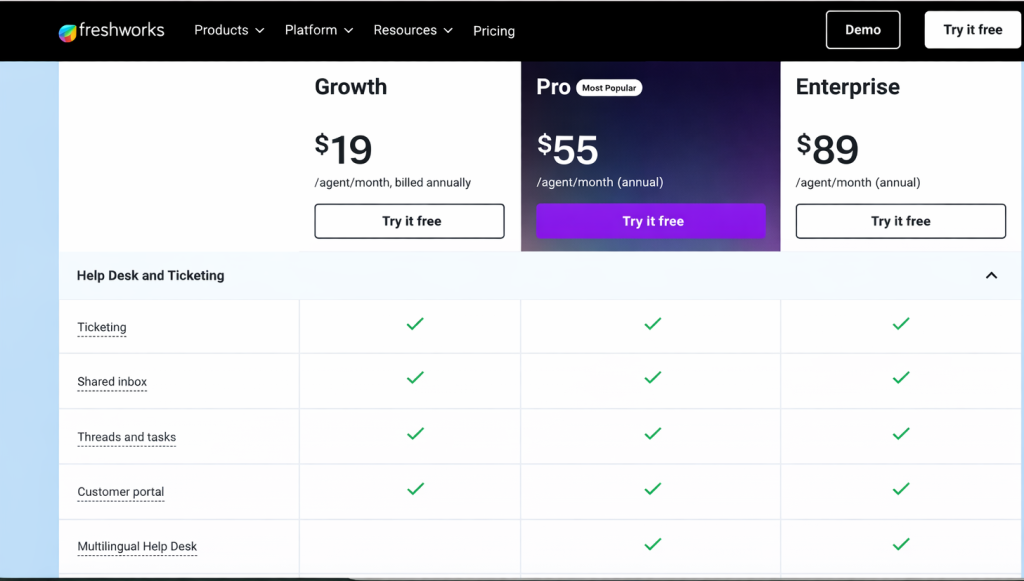
Freshdesk offers a Free plan for up to 2 agents, which covers basic social and email ticketing and a pared-down feature set.
“Their free plan has everything you could want in a support platform, and their expanded plans offer additional tools at just the right price point.” | G2
It’s a nice way for very small teams or startups to get started at no cost. Paid plans include:
- Growth: $19/agent per month (billed annually). This adds on automation rules, more robust reports, and 1000+ integrations.
- Pro: $55/agent/month (annual). At this tier, you get support for multiple time zones, custom object capabilities, more advanced automation and reporting tools, and key features such as SLA management.
- Enterprise: $89/agent/month (annual). This top tier brings in features for larger orgs: skill-based ticket routing, sandbox (testing environment), and enhanced security options (IP whitelisting, etc.).
✨AI Add-Ons and Extras
Freddy AI features come with session-based pricing across all plans:
- Freddy AI Agent sessions: First 500 sessions included with Growth, Pro, and Enterprise plans. After that, $49 per 100 sessions. These AI agents handle conversational AI, vertical AI, and agentic workflows.
- AI Copilot: Available on Pro and Enterprise plans. Includes features like sentiment analysis, writing assistant, response assistant, resolution assistant, and real-time translations ($29 per agent/month billed annually).
Freshdesk also has an Omnichannel “Suite” pricing where you can bundle in their Freshchat, Freshcaller, etc., under one plan. For example, the Omni Enterprise plan is quoted at around $119/agent/month.
But note, if you go à la carte (just Freshdesk without the omnichannel bundle), the pricing I listed above applies.
Zendesk Pricing (as of 2026)
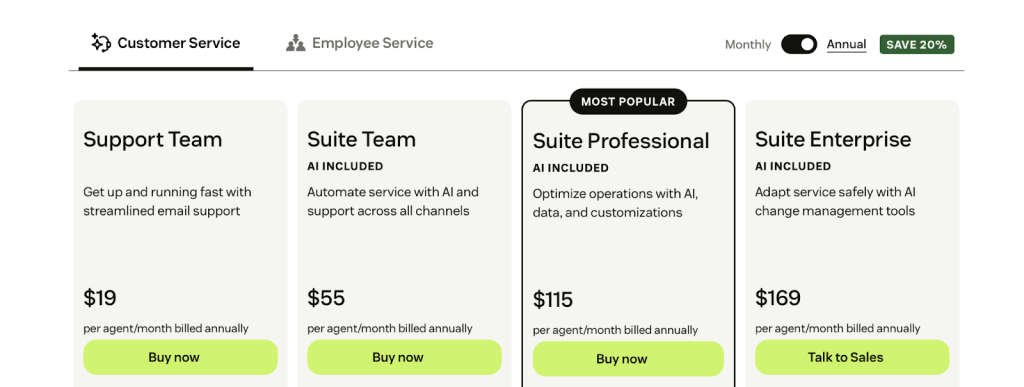
Zendesk doesn’t have a free plan. Here are the details of its paid plans:
- Support Team: $19/agent/month (annual). Includes essential support features like email, social media ticketing, basic workflows and rules, and reporting dashboards.
- Suite Team: $55/agent/month (annual). Includes ticketing, email, chat, voice and social messaging, 1 help center, AI agents, workflows, CSAT, and basic reporting.
- Suite Professional: Around $115/agent/month (annual). Adds custom reporting (Explore Professional), business hours, multilingual content, and more sophisticated workflows. Includes upto 5 help centers.
- Suite Enterprise: Around $169/agent/month (annual). This is for big enterprises needing multiple workspaces, advanced roles and permissions, AI-powered knowledge management, and premier support options.
✨AI Add-Ons and Extras
Zendesk also sells add-ons and upgrades: for example, you can tack on AI Copilot for +$50/agent, or Workforce Management for +$25/agent, among others. These can significantly raise your total cost if you need them.
“Zendesk can get expensive as you add more agents or need advanced features (e.g., AI, advanced analytics, integrations).” | G2
Recommended reading
Zendesk Pricing 2026: Plans, AI Add-Ons, and Hidden Costs Explained
Hidden Costs to Watch Out For
Both Freshdesk and Zendesk have fine print that can lead to extra costs beyond the sticker price:
- Onboarding and Setup Fees: While Freshdesk is usually self-service, very large deployments might consider Freshworks’ onboarding services (which could cost extra). Zendesk often encourages purchasing onboarding packages or consulting for enterprise deals. It’s not mandatory, but something to budget for if you need hands-on help.
- Support Tiers: Pay attention to the support you get from the vendor. Zendesk provides 24/7 support only on Enterprise (lower plans get business hours support, unless you pay extra for “Premier” support). Freshdesk similarly offers 24/5 or 24/7 support only on higher plans. If you’re on a basic plan and something breaks on a weekend, you might be out of luck until Monday.
- Add-Ons and Overages: Zendesk is notorious for its add-ons. Want the fancy AI or analytics module? It might be an extra line item. Freshdesk’s omnichannel plans include a lot, but if you use, say, their bot platform beyond a specific limit of sessions, or need additional “field service” features, those could incur extra costs too. Always check what’s included in the plan vs what’s an add-on.
“My company currently uses Zendesk, and as we’ve grown from just a few users to a couple of dozen, our Zendesk bill has climbed to around $5,000 per month (not including add-ons). At this price point, we’re increasingly tempted to explore alternatives, as switching could potentially save us tens of thousands of dollars annually.“-r/Zendesk
- Scaling User Counts: Freshdesk’s per-agent price can creep up if you have a large team (100 agents on Enterprise is not $79 total, it’s $79 * 100 = $7,900/month). Zendesk’s higher-tier plans can make scaling expensive as well. Volume discounts might apply, but are usually negotiated on a case-by-case basis.
- Integration or API usage costs: Both tools have APIs. Generally free to use, but if you heavily use a third-party integration that charges per ticket sync, etc., that’s another indirect cost.
The Final Verdict on Zendesk vs Freshdesk Pricing
Freshdesk offers 20-40% lower total cost of ownership with faster implementation, while Zendesk maintains its enterprise stronghold with advanced AI capabilities trained on the industry’s largest customer service dataset.
Freshdesk provides better value for most organizations, with its Enterprise plan costing less than Zendesk’s mid-tier offering.
For businesses that prioritize cost-effectiveness without sacrificing functionality, Freshdesk emerges as the clear winner.
However, large enterprises with specific technical requirements and flexible budgets may still find Zendesk’s premium features justify the significant cost differential.
Feature Comparison: Zendesk vs Freshdesk
After spending quality time exploring and researching both customer support software, I noticed each excels in different areas.
Let’s compare how Freshdesk and Zendesk handle core support features, and where each might delight or frustrate you.
Collaboration and Workflow Coordination Between Teams
Efficient team collaboration is the heartbeat of any helpdesk. Here, Zendesk really shines with a thoughtful approach to internal discussions:
Zendesk’s Side Conversations
Zendesk has a neat feature called “Side conversations”, which allows customer support agents to loop in other team members or departments right from a ticket.
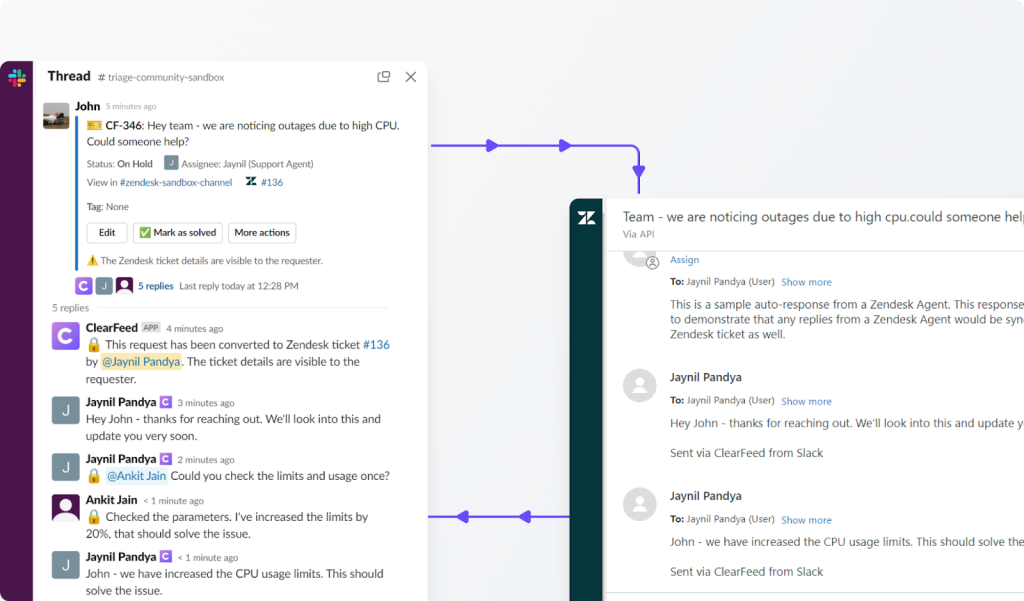
You could email or Slack colleagues about a customer issue without leaving Zendesk, and those side threads would appear inline on the ticket (hidden from the customer).
This seamless internal dialogue means less app-switching and fewer missed cues when multiple people are working on a complex issue.
One significant drawback I found is that you can’t access side conversations on Zendesk’s mobile app (so urgent on-the-go collabs might require a laptop).
Another issue is that this feature is available only on higher-tier plans.
Freshdesk’s Freshconnect
Freshdesk offers a similar capability via an add-on called Freshconnect, which integrates with Freshdesk to let your team chat about tickets.
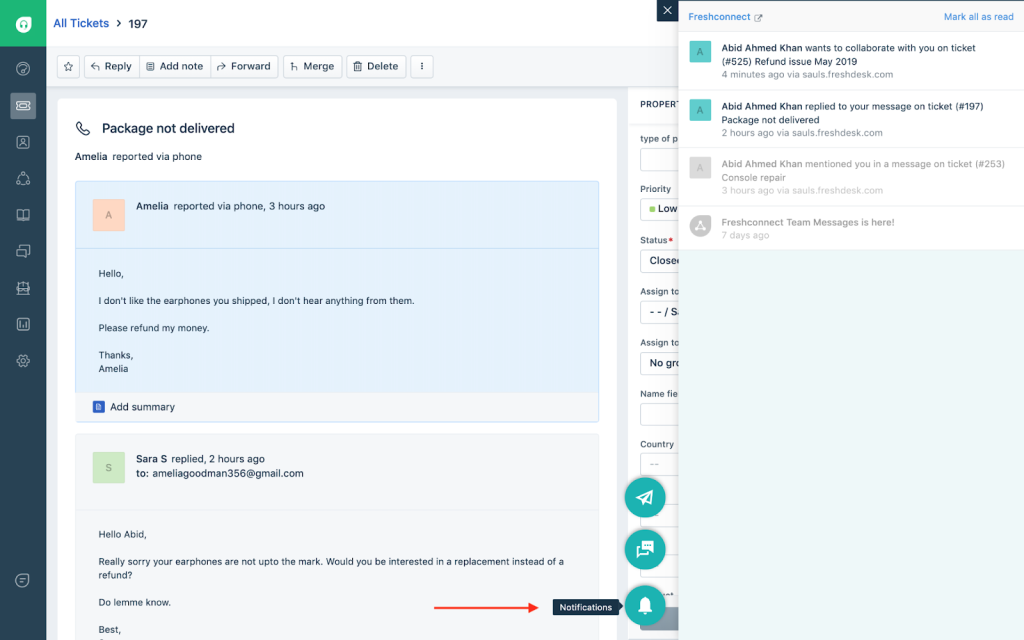
It’s a decent attempt at collaboration. You get a pop-up chat window in Freshdesk where you can see recent internal messages related to the ticket.
However, I noticed that Freshconnect wasn’t as fluid: for any in-depth discussion, it kicks you over to the separate Freshconnect interface. In practice, this means juggling between browser tabs or apps.
Even notifications through Slack/Teams only alert you of a new Freshconnect message, then force you back into Freshdesk to actually read and reply. For high-volume teams, that extra friction can make it easy to lose track of conversations and context.
Omnichannel Support and Channel Management
Today’s customers might email you one minute and DM you on Facebook the next.
Both Freshdesk and Zendesk recognize this and offer multi-channel support, but there are differences in execution.
Freshdesk Channels
Freshdesk can handle multiple channels, including email, live chat, phone calls, and social media (Twitter, Facebook), and even WhatsApp. But here’s the catch: many of these are separate Freshworks products or add-ons.
You’ll have to use Freshchat for live chat and Freshcaller for telephony, each integrating back into Freshdesk.
Though an omnichannel vision is there, it feels a bit fragmented. For example, Freshchat opens a different interface within Freshdesk, and managing settings for chat or phone often means jumping into those specific modules.
It works, but keeping track of multiple products and their interfaces (and pricing) can become a real drain on time and resources.
That said, Freshdesk’s core channels (email and basic social tickets) are straightforward, and I appreciate that even on the free tier, you get email and social ticketing for up to 2 agents.
Zendesk Channels
Zendesk truly impressed me with how omnichannel it is out of the box.
With the Zendesk Suite, you can manage email, live chat, phone (via Zendesk Talk), SMS, WhatsApp, and even Facebook and Twitter messages, all from the same agent workspace.
It feels cohesive and powerful. Zendesk even supports more niche channels like Line (popular in some regions).
The advantage of Zendesk’s approach is clear: a unified view and consistent setup for any channel you add.
The downside is obviously the cost. Zendesk doesn’t offer a free plan, and you have to be on the Suite (not the old Support-only plans) to get all these support channels.
Recommended reading
AI-Powered Automation and Chatbot Capabilities
No 2026 comparison would be complete without looking at AI.
Both Zendesk and Freshdesk have invested heavily in AI to help automate and speed up support. I explored each one’s AI helpers.
Freshdesk’s Freddy AI
Freshdesk’s AI is focused on agent assistance in real time. For example, Freddy can automate conversations with customers via chatbots and suggested solutions, but also assist human agents by summarising tickets, suggesting reply content, and even rephrasing text on the fly.
While answering tickets, you can use Freddy to draft a response or change the tone of your message.
Freshdesk has also rolled out features like AI auto-triage (it reads ticket text and categorizes/prioritizes tickets by urgency) and a “Thank You” detector that auto-closes tickets where the customer’s last reply is just a thank-you.
These little automations show Freddy’s focus on frontline tasks: reducing agent workload on everyday support tickets and ensuring nothing slips through the cracks.
For teams that want to go further, Freshdesk also offers an AI Agent Studio, where you can create and train custom AI support agents to handle queries and automate routine tasks.
One thing to note is that many Freddy features are only available as add-ons on higher-tier Freshdesk plans.
The Copilot add-on costs $29 per agent/month, while AI Agents are billed at $100 per 1,000 sessions (after the first 500 free). Insights comes bundled with Copilot.
So while Freddy is powerful, you might need to pay in addition to their Pro/Enterprise tiers to unlock all its AI benefits.
Zendesk’s AI
Zendesk’s AI capabilities are a bit more behind-the-scenes and heavy-duty. Zendesk offers an Answer Bot to automatically suggest relevant help center articles or answers to customers and an AI-powered bot builder to create custom chatbots that can handle common issues.
Beyond that, a lot of Zendesk’s AI is about optimization at scale: things like industry-specific intent detection models (to better understand tickets in, say, e-commerce vs. healthcare), and workforce management (WFM) tools that predict support volume and help schedule agents.
These are incredible for a large operation tuning its efficiency. I found Zendesk’s AI also doing subtle work like improving search results in the help center and suggesting ticket fields.
However, many of Zendesk’s advanced AI features come as paid add-ons (e.g., “AI Copilot” add-on costs ~$50 per agent/month), and some are bundled only in high plans.
Analytics and Reporting
Zendesk and Freshdesk both cover the basics (and then some) for reporting, but with different depth.
Freshdesk Reporting
Freshdesk includes a decent set of pre-built reports and dashboards, including ticket volumes, response times, CSAT, agent performance, etc. It’s enough for day-to-day team management.
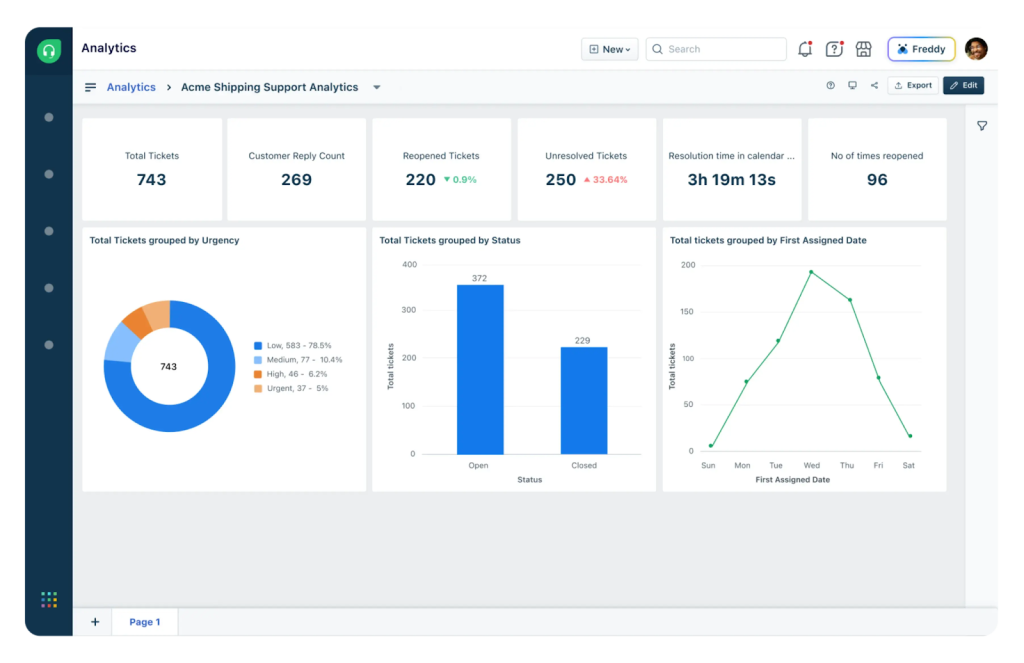
Creating custom reports in Freshdesk is also possible (especially in Pro and above), but it’s limited in granularity.
For instance, filtering by very specific criteria or building a highly tailored dashboard isn’t as straightforward.
Also, some advanced analytics (like customer journey reports or custom KPIs) either require exporting data or using add-ons.
On the plus side, Freshdesk’s reporting UI is clean and easy for beginners, and you can schedule basic report emails to managers. For a small team, it covers the necessities.
Zendesk Reporting
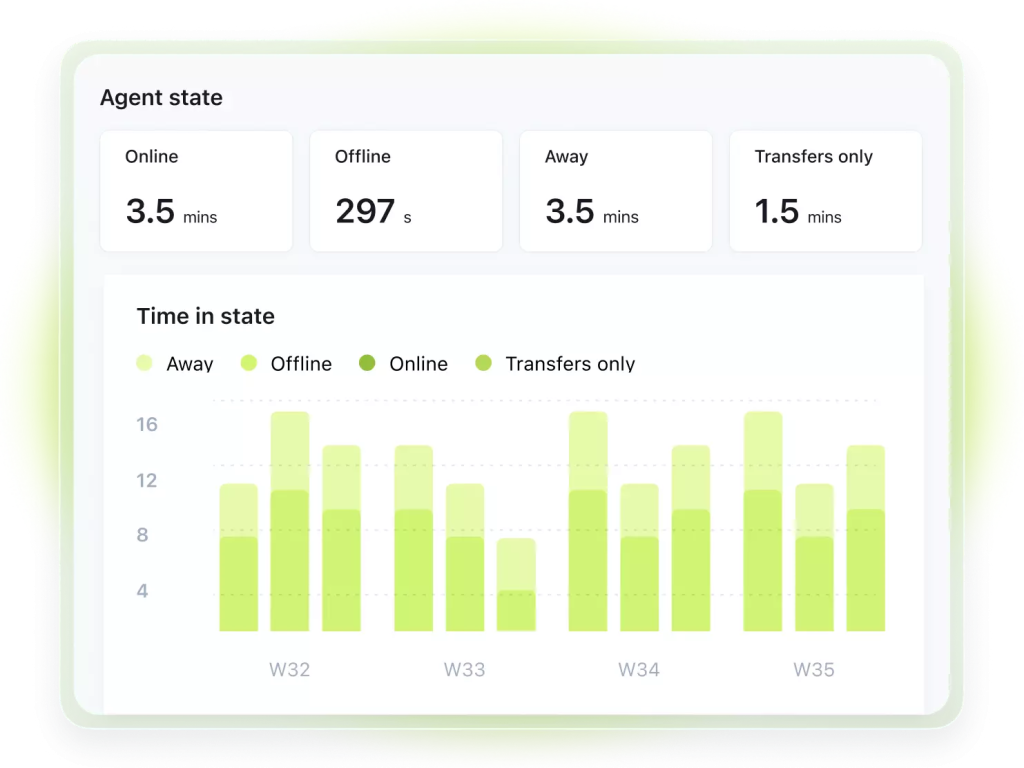
Zendesk comes with Zendesk Explore, an entire analytics module.
Like Freshdesk, you can use pre-built dashboards for overview metrics or agent leaderboards. But one area where Zendesk really stands out is in its extensive customization options.
On the Professional and Enterprise tiers, you can create custom reports and even custom support metrics.
Want to chart tickets by hour of day, by region, by channel, and compare two teams’ performance? You can do that in Zendesk. It’s very comprehensive.
The flip side is that Explore has so many options that it can feel overwhelming if you’re not an analyst.
One more thing to consider is real-time monitoring. Zendesk has some live dashboards (e.g., live queue and SLA breaches), but a lot of metrics update hourly or daily.
Freshdesk similarly isn’t truly real-time for all stats, but offers near-real-time views for open tickets, etc. If you need immediate live data, a third-party or an external BI connecting via API can be used for both tools.
The Verdict
1. Zendesk has better collaboration features than Freshdesk
If internal collaboration is a priority (say your support reps frequently need input from engineering or sales), Zendesk’s side conversations feel more natural and built-in.
Everything stays in one place, so you maintain momentum on a ticket. Freshdesk’s approach works, but it’s not as elegant, especially when you’re toggling between apps during a firefight of tickets.
2. Zendesk Helps You Set Up Support Channels More Cohesively Than Freshdesk
Zendesk takes the crown for built-in channel breadth. Freshdesk’s channels work well (and might be perfectly fine if your focus is just email + one other channel), but Zendesk will let you spread wings into SMS, WhatsApp, etc., more seamlessly.
3. Freshdesk’s Freddy is built for lean teams, Zendesk’s AI is for scaling enterprises
It’s a bit of a toss-up and depends on your needs.
Freshdesk’s Freddy is like a helpful sidekick for everyday support tasks – great for small teams that need to do more with less, right out of the box.
Zendesk’s AI is an enterprise optimizer. It’s more powerful in the long run (especially for analytics and automation at scale), but only if you have the resources to harness it (and the budget for add-ons).
For a lean team, Zendesk’s AI might feel like overkill, whereas Freddy gives you quick wins on day one.
4. Zendesk excels at enterprise reporting, while Freshdesk fits teams needing simple, ready-to-use insights
Zendesk wins for enterprise reporting needs. If you’re a data junkie or need C-suite-level reports, Zendesk Explore will suit your needs (assuming you’re on a plan that includes it). Freshdesk’s analytics are perfectly fine for smaller operations that want plug-and-play insights without much tweaking.
Bonus: What Redditors Are Saying About Freshdesk vs Zendesk
Still on the fence? Check out what users are saying about these tools on popular Reddit communities:
- “I’ve used both, and I liked both. In my experience Zendesk is more fluid compared to Freshdesk. Both have good options for integrations and customization, so I don’t think you’d go wrong with either of them. I still think Freshdesk has better dashboards.” – r/msp
- “Freshdesk is my recommendation. I’ve evaluated, implemented, and used all manner of ticketing platforms including Zendesk. Freshdesk is the easiest, provides just the right level of customizations, and has a lot of integrations with workflow platforms like Zapier, FlowXO, etc. Great people there too, nothing but a positive experience for me.” – r/customersuccess
- “We use Zendesk, but I don’t suggest you use Zendesk. It’s not bad, but I’m not sure it’s great either. And since you’re a startup, and there are free options out there, I’d use those.” – r/sysadmin
- “If you want simple and clean, Help Scout or Hiver (built into Gmail) beat both. For ecommerce, Gorgias or Re:amaze are way smoother than Freshdesk/Zendesk. Also if you need control, Zammad (open-source) gives you power without the bloat.” – r/SaaS
Zendesk vs. Freshdesk: Which Tool Is Better for You? (Use Cases and Verdicts)
Ultimately, the Freshdesk vs Zendesk decision should be guided by your customer support team’s unique needs and circumstances.
Take This 2-Minute Quiz to Find Your Perfect Fit
Before diving into specific use cases, answer these 7 questions to identify which platform aligns best with your needs:
1. What’s your team size?
- 2-25 agents (small team)
- 26-100 agents (mid-market)
- 100+ agents (enterprise)
2. What’s your monthly support budget per agent?
- Under $50/agent/month
- $50-$100/agent/month
- $100+ per agent/month (budget flexible)
3. How quickly do you need to launch?
- Within 1-2 weeks (urgent)
- Within a month (moderate timeline)
- 2-3 months is fine (we can invest in proper setup)
4. Which best describes your support needs?
- Primarily email + maybe one other channel
- Email + chat + phone (moderate multichannel)
- True omnichannel with SMS, WhatsApp, social—all unified
5. How important is ease of use vs. advanced features?
- Ease of use is critical—we don’t have dedicated IT
- Balance of both—we can handle some complexity
- Advanced features matter most—we have technical resources
6. What’s your biggest pain point?
- Cost—we need maximum value at minimum price
- Complexity—our current system is too hard to use
- Scale—we’re growing fast and need enterprise-grade infrastructure
- Fragmentation—we’re tired of juggling multiple tools
7. Do you need advanced AI and analytics?
- Basic AI is fine—agent productivity is the priority
- Yes, but only if it’s included or affordable
- Yes, and we’re willing to pay premium for best-in-class AI
Your Results:
If you answered mostly A’s (small team, tight budget, quick launch, ease of use):
→ Go with Freshdesk. The platform gives you the most bang for your buck.
You can get a support operation running in no time, enjoy an intuitive UI, and possibly even stick to lower-tier plans for a while without feeling too limited. Freshdesk’s free plan or Growth plan can cover a lot of ground for a young company. Plus, the lower complexity means you spend less time on admin and more on actually supporting customers.
If you answered mostly B’s (mid-market, moderate budget, balanced needs):
→ Either works, but Freshdesk offers better value. Unless true omnichannel is non-negotiable, Freshdesk’s $49-$79/agent/month tiers deliver what you need at 40-50% less than Zendesk’s comparable plans.
If you answered mostly C’s (enterprise, flexible budget, complex needs, omnichannel critical):
→ Go with Zendesk. For organizations with high ticket volumes, multiple support teams or departments, and requiring heavy customization/integrations, Zendesk’s scalability is unmatched. Yes, you’ll pay more and might need to invest in proper setup and training, but it will adapt to your growth.
Want a copy of this quiz? Download this interactive PDF for later use.
If you want ease of use + powerful support features, try Hiver.
If Zendesk feels bloated and Freshdesk feels basic, Hiver offers a compelling third path.
Legacy helpdesks were built for a slower era. They’re clunky, hard to set up, and make you pay extra for the features you actually need.
And while everyone talks about being “AI-first,” most still hide AI behind expensive add-ons or restrict it to bots on live chat. Hiver flips that script.
It’s a modern AI customer service platform that unifies email, chat, WhatsApp, voice, and social into one intuitive interface, so your team can get started in minutes, not weeks or months.
From drafting responses to routing customer inquiries and surfacing trends, Hiver’s AI streamlines every step of customer support without adding complexity.
You still get all the essentials with assignments, SLAs, collaboration, workflows, analytics, but without the admin maze or the “gotcha” add-on pricing.
Teams that move to Hiver often describe it as a relief: finally, a platform that’s powerful without being overwhelming, and predictable in cost as they scale.
Sign up for a free trial and see how Hiver can transform your customer support experience.
Frequently Asked Questions (FAQs)
1. Is Zendesk better than Freshdesk for small businesses?
Generally, Freshdesk is better suited for small businesses or startups. It’s more affordable and easier to get started with, which is crucial for teams with limited budgets or IT resources. It also has a free plan. Zendesk, while extremely powerful, often ends up being “too much” for a small business – both in cost and complexity.
2. Does Zendesk or Freshdesk have better AI features?
They both offer strong AI, but with different philosophies. Freshdesk’s Freddy AI is great for day-to-day agent productivity – suggesting answers, auto-closing trivial tickets, and prioritizing work based on sentiment. Zendesk’s AI is more about scaling efficiency. Its Answer Bot and automated triage can deflect common tickets, and its newer AI additions optimize large support operations.
3. How easy is migration between Freshdesk and Zendesk?
Migrating from one to the other is doable, but requires planning. Both Freshdesk and Zendesk have APIs, and there are third-party tools (like Help Desk Migration services) to help transfer tickets, contacts, etc. Freshdesk provides a migration tool for Zendesk that can import core data (tickets, contacts) fairly seamlessly. Zendesk’s team can assist in migrating from Freshdesk as well.
4. What’s the best alternative to Freshdesk and Zendesk?
There are a number of other helpdesks like Zoho Desk, Help Scout, Gorgias, Intercom, etc., each with its own strengths. However, given the context of our discussion, I’d say Hiver is a top alternative worth considering. Hiver is an AI-powered multichannel customer support tool with shared inboxes, automation, analytics, and even chat/voice channels. It’s ideal for teams that find Zendesk to be overkill or Freshdesk to be slightly underpowered.
5. How do Freshdesk and Zendesk compare on custom workflows?
Freshdesk focuses on simplicity, offering visual, template-driven automation that covers most SMB and mid-market needs. Zendesk provides more advanced triggers and conditional logic for complex, multi-team workflows, but with a steeper learning curve.
6. Which platform has better multichannel support?
Zendesk has the edge here. All channels, including email, chat, voice, social and WhatsApp, live natively in one unified agent workspace. Freshdesk supports the same channels, but they’re spread across separate apps and cost more under its omnichannel plans.
7. How do they compare on reporting and analytics?
Freshdesk offers clean, pre-built reports that are easy to use, plus basic AI insights. Zendesk Explore delivers deeper, enterprise-grade analytics and narrative insights, but advanced reporting is gated behind higher-priced plans and can feel complex for smaller teams.
8. Which integrates better with Salesforce and Slack?
Zendesk performs better for complex enterprise integrations. Its Salesforce sync supports deeper data mapping, and Slack Side Conversations feel more seamless. Freshdesk’s integrations cover most standard use cases well, but require more manual coordination in advanced setups.
9. What advanced workflow features do Freshdesk and Zendesk offer?
Both platforms support advanced workflows beyond basic ticketing. Freshdesk offers collision detection, canned responses, parent–child ticketing (Pro and Enterprise), an Enterprise sandbox, and Omniroute for workload-based ticket routing. Zendesk includes Side Conversations, linked tickets, macros, and skills-based omnichannel routing by expertise or language. Both support SLA escalation, automated triggers, and integrations with tools such as Salesforce, Jira, Slack, Shopify, and GitHub.