





Live chat is now the most preferred support channel for 41% of consumers*, which raises the bar on how reliably teams need to run it. However, a few months ago, a time-sensitive chat revealed some hard-to-overlook cracks. A customer opened a chat to reschedule a same-day appointment. Two agents saw the message, and each assumed the other would respond. The chat sat unanswered, and the customer missed the appointment.
Nothing was broken. Our tool worked, and agents were online. And yet the customer faced the consequences. That’s what made me realize we lacked a clear workflow. We fixed the situation and followed up with the customer, but the damage was done.
That’s when we rebuilt our live chat workflows. By defining routing, ownership, and escalation rules, chats stopped stalling. Response times stabilized. Conversations moved without stalling or confusion. In this guide, I’ll break down the workflows that make live chat scale without eroding customer experience.
What Is a Live Chat Workflow?
A live chat workflow is the set of rules that determines what happens after a customer starts a chat. It defines how that conversation moves through your team until it’s resolved or handed off.
For example, it determines whether a pricing question goes to sales or support. It flags if an existing customer should be prioritized and sets clear rules for when a delayed reply needs to be escalated.
In practice, a live chat workflow covers:
- Who sees the chat first
- How priority is assigned
- When ownership changes
- How context is passed between teams
- What follow-ups happen once the chat ends
The chat widget is just the entry point. The workflow is what prevents chats from sitting unanswered or bouncing between people.
In day-to-day operations, this means that all chats must follow the same routing, ownership, and response rules as the rest of your support workflow.
Recommended reading
Why Live Chat Workflows Matter?
Without workflows, live chat runs on assumptions. Chats land in shared queues with no clear owner, priority blurs, and urgent questions sit behind routine ones. Context gets lost in transfers, and follow-ups rely on memory instead of process.
I’ve seen the impact of this play out in real conversations. Sales chats have gone unanswered long enough for customers to leave, and agents have replied twice to the same conversation because ownership was never locked.
Here’s why workflows matter
- They assign ownership the moment a chat enters the system, so no conversation sits unanswered.
- They route chats based on intent, page, or customer type, not just agent availability.
- They escalate conversations automatically before SLAs are breached.
- They prioritize revenue-impacting and time-sensitive chats.
- They ensure follow-ups, records, and next steps happen consistently after a chat ends.
In a recent Reddit discussion among customer success leaders, one person put it directly:
“Automating workflows helps reduce ticket volumes and cuts down on live chat interactions, which can lead to fewer agents being needed.”
That matches what I see in practice. Workflows remove ambiguity from live chat. This means agents know which conversations are theirs, when to respond, and when a chat should move on. That clarity is what makes live chat scale reliably.
Recommended reading
Core Components of an Effective Live Chat Workflow
Every live chat workflow that scales relies on a small set of rules that control routing, ownership, escalation, and follow-through. In my experience, when even one of these is missing, chats start to stall, get misrouted, or lose context as they move between teams. The tools can vary, but these building blocks consistently appear in teams that handle high chat volume without sacrificing response quality.

1. Routing logic
Routing decides where a chat goes the moment it starts. This can be based on the page a customer is on, the type of request, the customer’s account status, or the time of day. When routing is done well, a pricing question reaches sales immediately instead of bouncing through support first.
2. Automation rules
Automation handles the repeatable parts of live chat. Greeting messages, collecting basic details, tagging conversations, and setting initial priority can all happen automatically. The goal isn’t to replace agents. It’s to clear away routine steps so agents can focus on problem-solving, decision-making, and the customer experience.
3. Handoffs and ownership
Ownership rules define who is responsible for the next response at every stage of the chat. This becomes critical when a conversation moves between teams like customer support, billing, or sales. Without clear ownership, chats sit in queues waiting for someone to pick them up. In other cases, two agents respond at the same time because responsibility was never assigned.
4. Escalation paths
Escalation rules prevent time-sensitive chats from slipping through the cracks. When response times approach SLA limits, these rules trigger alerts, reassignment, or higher priority so the conversation keeps moving. For example, a billing issue that hasn’t been answered within two minutes can automatically jump the queue or notify a manager.
5. Follow-ups and closure
What happens after the chat matters just as much as the conversation itself. Follow-up emails, transcripts, internal notes, and tasks should be triggered automatically. When they aren’t, customers are left repeating themselves, and teams lose context. A chat should always end with a clear outcome or next step that the customer understands.
Recommended reading
10+ Free Chatbot Templates to Improve Customer Support (By Industry)
8 Advanced Methods to Scale Conversions with Live Chat Workflows
Once basic routing and ownership are in place, scaling live chat becomes an execution problem. The question shifts from “Do we have workflows?” to “Are our workflows prioritizing the right conversations at the right moment?”
Teams that scale chat successfully rely on a small set of capabilities and operating habits that directly influence response time, handoffs, and whether high-intent conversations convert or stall.

The methods below are the ones I’ve seen consistently hold up as chat volume and business impact increase.
1. AI-assisted triage to surface urgency early
AI-assisted tagging and triage flag conversations that need faster or more careful handling, such as cancellations, billing disputes, or upgrade requests. In a busy chat queue, these messages often look similar to routine questions at first glance.
AI triage separates them early, so conversations that can impact revenue or retention are handled with urgency instead of waiting alongside low-risk requests.
2. Differentiated handling
Once a chat is identified as sensitive or high-stakes, workflow rules change how it’s handled. Pricing, renewal, or cancellation conversations can be limited to senior agents, require additional checks before responding, or follow stricter response guidelines.
This ensures high-risk conversations move forward with the appropriate level of care rather than being treated as routine support.
3. Shared inboxes with collision protection
A shared inbox gives teams a single view of all active chats, which is essential when multiple agents are working simultaneously. But visibility alone doesn’t prevent overlap. When several people see the same incoming chat, more than one agent can jump in at once.
Collision protection closes that gap by ensuring only one agent can respond at a time. Without it, customers receive overlapping replies, and teams end up duplicating effort during busy periods.
4. CRM-connected chat context
When a chat starts, agents should immediately see who they’re talking to and what’s already happened. That includes the customer’s account status, entitlements, and recent conversations. Without this CRM context, agents ask questions the customer has already answered or give responses that don’t apply. With that information visible upfront, agents can tailor their response correctly instead of starting every chat from zero.
For example, knowing whether a customer is on a trial, a paid plan, or has an open escalation changes the agent’s next move. They may need to explain limitations, offer an upgrade, fast-track the issue, or involve a lead right away.
5. Sentiment detection
Sentiment detection evaluates how a chat is progressing by watching for signals from the customer. This includes repeated follow-ups, shorter messages, or firmer wording that suggests growing frustration. These patterns indicate the customer is becoming less patient with delays or unclear responses.
When those signals appear, the workflow can change how the chat is handled. The conversation may be reviewed by a lead or moved to a more experienced agent. In some cases, stricter response guidelines are applied. This helps teams correct course while the customer is still engaged, instead of dealing with an escalation later.
6. Ownership reassignment
When a chat involves more than one team, the workflow makes responsibility explicit at every step. As the conversation moves between support, billing, sales, or product, ownership is clearly reassigned instead of assumed.
This prevents chats from stalling during handoffs. Agents know exactly when they’re expected to respond and when the conversation has moved on. Customers don’t experience awkward gaps while teams figure out who’s supposed to reply next.
7. Performance-based workflow tuning
As chat volume increases, specific problems start to surface. Chats pause during handoffs because of approvals. Pricing or renewal conversations take longer than expected. Agents skip steps or work around the workflow just to keep things moving. Performance-based workflow tuning looks at real chat behavior to spot exactly where this friction shows up.
This means teams don’t have to guess what to fix; instead, they use what they’re seeing in live chats to make changes. Routing rules are adjusted when certain chats consistently wait longer. Handoff steps are simplified when ownership changes slow things down. Coverage is updated when high-intent chats cluster at predictable times. Over time, these changes make chat handling steadier and easier to manage as volume grows.
8. Proactive chat triggers
Proactive chat triggers start conversations based on customer behavior instead of waiting for the customer to reach out. For example, a workflow can trigger chat when a visitor spends time on the pricing page, pauses during checkout, or revisits a comparison page without taking action.
When those triggers fire, the message is contextual and purposeful. It addresses pricing questions, clarifies plan differences, or resolves common checkout concerns. This allows teams to engage at moments of hesitation, before momentum drops or the customer leaves.
Recommended reading
How to Build a Live Chat Workflow (Step-by-Step)
When I build live chat workflows, I focus on three things: where chats start, how they move between teams, and how they close. This is the process we follow at Hiver to keep live chat predictable for agents and consistent for customers as volume grows.
Once the basic live chat workflow is set up, you can build advanced workflows in Hiver. They control prioritization, escalation, and ownership more precisely as chat volume grows.
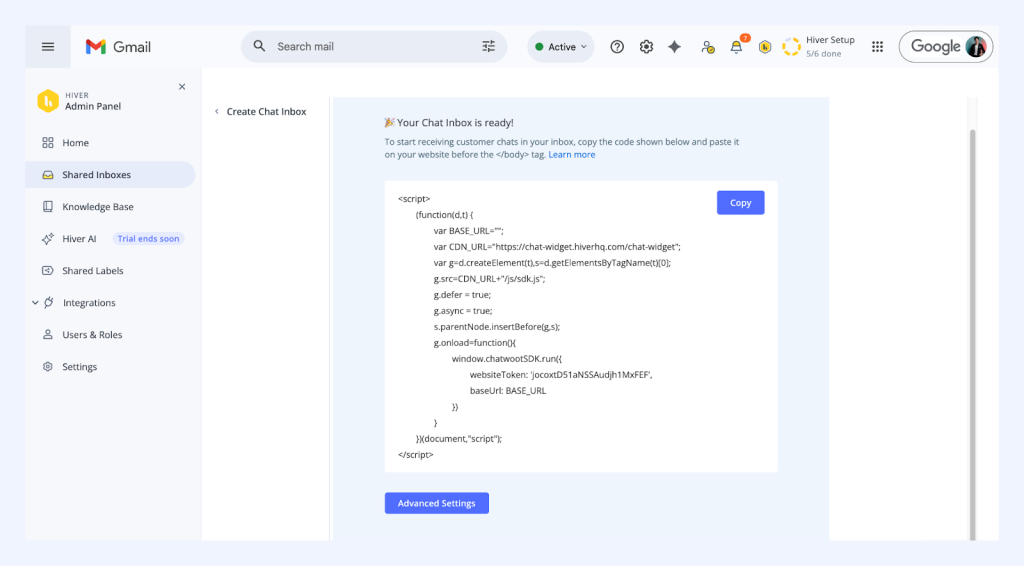
Step 1: Define the entry point
Start by deciding where chats can begin. A chat that starts on the pricing page signals a very different intent from one that starts in the help center or inside the product. In our setup, we enable chat selectively based on page or in-app location, so intent is inferred before the first message is even sent.
This avoids treating every chat the same and sets expectations for routing and priority early.
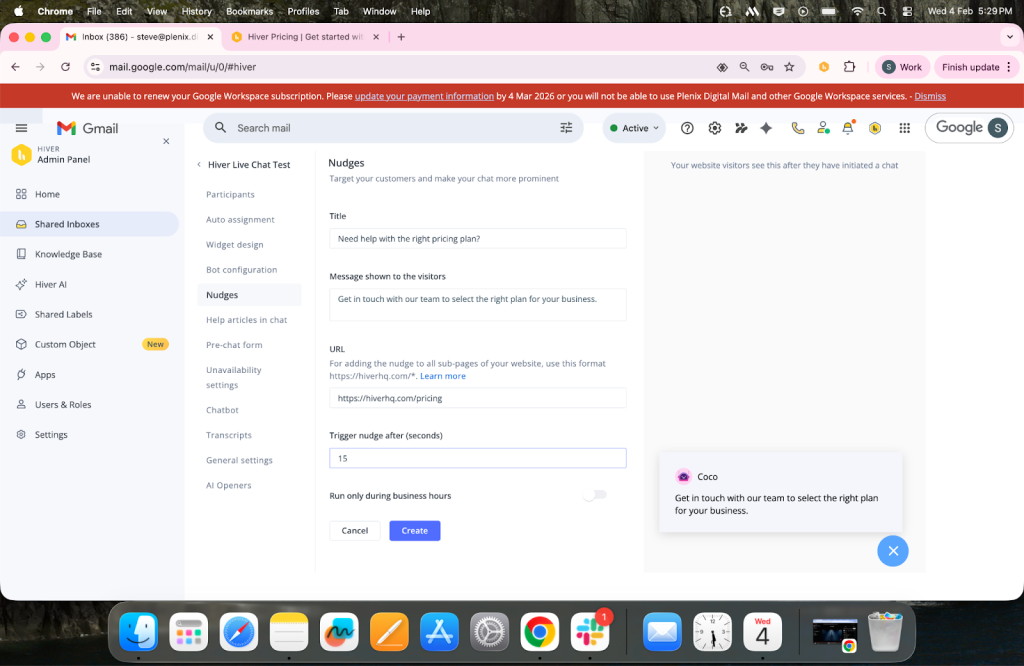
Step 2: Capture context upfront
Collect only the information needed to handle the chat correctly. Intent, customer type, or issue category is usually enough. We use lightweight pre-chat questions combined with existing customer data, rather than long forms that slow people down.
The goal here is direction, not diagnosis. Enough context to route the chat correctly without adding friction.

Step 3: Route based on intent and priority
Once context is available, chats should be routed immediately. Sales questions shouldn’t sit behind support requests, and existing customers shouldn’t be treated like first-time visitors. Routing rules account for both intent and agent availability, so chats land with the right team without manual sorting.
This prevents agents from guessing who should reply and ensures high-value conversations don’t get buried in queues.

Step 4: Assist with automation, not replacement
Automation is used to support agents, not replace them. We automate greetings, apply internal tags, and surface relevant resources before an agent replies. That way, agents start the conversation with context instead of housekeeping.
As soon as nuance or judgment is required, the workflow steps aside and lets the agent take over fully.

Step 5: Prevent missed first responses
Once a chat starts, the first response is the most fragile moment. If no one replies within the defined SLA, the customer leaves or loses confidence quickly.
Set up missed chat alerts for conversations that approach or breach the first-response SLA. If a chat isn’t picked up in time, the workflow should automatically notify another agent or escalate the chat. This ensures no conversation sits unanswered because ownership was assumed instead of assigned.

Step 6: Close with clarity
Every chat ends with a clear outcome. That could be a confirmed resolution, a follow-up timeline, or a defined next step. The conversation is logged automatically, along with notes and context, so future interactions start where the last one left off.
This prevents repeat explanations and keeps the experience consistent across touchpoints.

Recommended reading
Live Chat Workflow Automation: What to Automate vs. Keep Human
As live chat volume increases, teams usually respond by adding more automation. The risk is automating the wrong parts of the conversation. When I design live chat automation, I focus on removing steps that slow agents down without improving outcomes. Predictable actions are automated. Anything that depends on judgment, trust, or persuasion stays with a human.
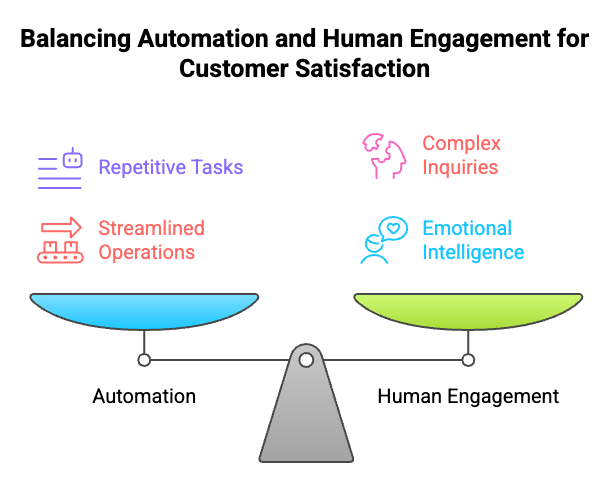
What to automate?
These are repeatable actions that create friction when done manually.
- Contextual greeting messages: Trigger greetings based on page, time of day, or customer type. This sets expectations early and avoids generic openers that don’t move the conversation forward.
- Essential data capture: Collect email, account ID, or issue category upfront to prevent agents from spending the first few messages asking for basics.
- Automatic tagging and categorization: Apply tags as the chat starts. This keeps reporting accurate and ensures routing, follow-ups, and analysis don’t depend on agents remembering to tag later.
- Routing and reassignment rules: Use them to automatically assign chats and handle handoffs. This prevents chats from sitting idle or bouncing between agents during busy periods.
- Post-chat actions: Send transcripts, trigger surveys, and log internal notes automatically. This closes the loop without relying on manual follow-up and preserves context for future interactions.
What should stay human?
These are areas where automation increases risk instead of speed.
- Multi-step or ambiguous issues: If the conversation branches or the customer needs clarification before you can even diagnose the problem, hand it off to an agent. This is where back-and-forth matters more than speed.
- Pricing, upgrades, and negotiation: When customers ask about pricing, plan changes, or discounts, keep automation out of the way. These conversations depend on timing and tone, and a rigid response can shut them down fast.
- Emotionally charged escalations: If a customer sounds frustrated or starts repeating themselves, stop scripted replies. This is the moment where how you respond can either calm things down or make them worse.
- Retention and save attempts: The moment a customer hints at canceling or downgrading, assign the chat to a human. Saving an account requires listening and adapting, not following a predefined flow.
- Context-heavy follow-ups: When a chat references past issues, exceptions, or prior promises, ensure that an agent reviews the full history before replying. Automation can’t carry accountability forward in these situations.
Recommended reading
How AI Development Can Add More Humanity to Customer Service
Common Live Chat Workflow Challenges (and How to Fix Them)
In live chat, problems show up as stalled handoffs, duplicate replies, sales chats waiting too long, or customers repeating themselves. These are the issues I see most often, and they almost always trace back to workflow gaps rather than agent effort.
1. Chats get stuck during handoffs
This usually happens when a chat moves from one team to another, and responsibility becomes implicit. For example, live chat support transfers a billing question, billing checks something internally, and the chat sits unanswered. This happens because no one is clear about who’s expected to reply next.
How I fix it:
Enforce automatic ownership changes on every transfer. Make sure a chat cannot move without assigning a new owner. Eliminate shared queues where responsibility is unclear.
2. Too much automation, not enough help
This shows up when customers repeat themselves or ask to speak to a human after already explaining their issue. In many cases, automation keeps responding even though the customer is ready for a live chat agent.
How I fix it:
Review where automation appears in the chat flow. Remove bot responses that trigger after a customer has already shared context. Use automation to collect information and route chats, not to delay human involvement.
3. Agents feel overwhelmed
This isn’t always a staffing problem. High-intent chats often compete with low-urgency questions in the same queue, forcing agents to switch context constantly.
How I fix it:
Separate high-intent conversations from routine support. Route pricing, renewal, and cancellation chats into dedicated workflows so agents can focus without interruption.
4. No visibility into workflow performance
Without visibility into workflow performance, teams see delays but don’t know where they start. A response time might look slow, but it’s unclear whether the chat waited too long in the initial queue, stalled during a handoff, or sat unassigned after escalation. Without that breakdown, fixes end up being guesswork.
How I fix it:
Track response times, handoff delays, and resolution rates by workflow. Review where chats slow down before they reach an agent or during ownership changes.
5. Inconsistent customer experience
When different teams respond differently, customers notice the inconsistency. One team may acknowledge urgency, another may jump straight into troubleshooting, and a third may close the chat without setting next steps. Even when the answers are correct, the experience feels uneven and harder to trust.
How I fix it:
Standardize key moments in the chat. Define common opening messages, escalation language, and closing responses. Allow agents to personalize within that structure.
Recommended reading
10 Key Live Chat Metrics to Track for Better Customer Engagement
Measuring Live Chat Workflow Performance
When I review live chat workflows, I’m not asking whether agents are fast enough. I’m asking whether the workflow is doing its job. That means checking how conversations move, where they slow down, and where the system needs help.
This is the checklist I use.
1. Check where chats pause
Start by looking at how long chats sit idle at each stage. Pay close attention to what happens after transfers.
If chats regularly pause after a handoff, tighten ownership rules. Every transfer should immediately assign a new owner. If ownership isn’t clear, the workflow is creating a delay even when agents are available.
2. Look for drop-offs and stalled conversations
Next, review chats that end abruptly or drag on without progress. Drop-offs often happen when automation interrupts instead of helping. Long, circular conversations usually point to poor routing or missing context.
When I see this, I revisit entry points and early context capture. If the workflow doesn’t get the chat to the right place early, everything downstream suffers.
3. Review how chats reach resolution
Don’t just check whether chats are resolved. Look at how they get there. Count how many handoffs, escalations, or internal back-and-forths feed into the average resolution time.
If resolution regularly requires multiple transfers, the workflow isn’t setting agents up for success at the start. That’s a signal to improve routing or surface more context before the first reply.
4. Compare similar chat flows
Compare how different workflows behave under similar conditions. For example, pricing chats versus general support chats. Or existing customers versus new visitors.
If one flow consistently moves faster with fewer handoffs, study those rules and apply them elsewhere. This is one of the fastest ways to improve without redesigning everything.
5. Watch how agents work around the system
Finally, observe agent behavior. If agents frequently reassign chats manually, override automation, or correct tags, the workflow isn’t helping them.
When I see repeated workarounds, I don’t coach the agent first. I fix the rule that forced them to work around it.
Building a Live Chat Workflow That Actually Scales
At scale, live chat breaks when key decisions are left undefined. Who owns the next reply? What gets handled first? When a chat needs a handoff. Without a clear live chat workflow, chats sit unassigned. High-intent conversations wait behind routine ones. Customers end up repeating themselves.
What separates chat that simply stays online from chat that drives outcomes is execution. High-intent chats reach the right person quickly. Ownership stays clear during handoffs. Conversations end with an explicit next step instead of trailing off.
That only happens when the workflow makes those decisions upfront. Where chats can start. What context is captured early? How routing works. Who owns the reply at each stage? Which steps are automated and which require a human?
If live chat matters to your conversions, this isn’t optional work. Fix the workflow first. Everything else, including response time, agent load, and conversion lift, improves once the flow is right.
*https://www.usepylon.com/blog/50-customer-support-statistics-trends-for-2025
Frequently Asked Questions
1. How do I know if my live chat workflow is working?
A live chat workflow is working when chats move from start to close without manual intervention. You should not see chats sitting unassigned after transfers, duplicate replies from multiple agents, or frequent manual reassignment. High-intent chats should reach the correct team quickly, and most conversations should follow a consistent path with clear ownership at every step.
2. How often should I update my live chat workflows?
Workflows should be reviewed whenever customer behavior or volume changes. This includes product launches, pricing updates, seasonal traffic spikes, or shifts in support demand. As a baseline, review workflows quarterly. Teams with higher chat volume or frequent changes should review them monthly to catch routing delays, handoff friction, or outdated automation.
3. What’s the best live chat workflow for a small team?
For small teams, keep the live chat workflow simple. Use a single shared inbox with clear ownership so every chat has one owner. Route high-intent chats like pricing or cancellations separately. Limit automation to greetings and basic data capture. Skip complex bot flows. Tools like Hiver, Zendesk, Tidio, and LiveChat combine shared inboxes, simple routing, and canned replies, helping small teams respond quickly without switching tools.
4. What’s the difference between routing and assignment?
Routing determines which team or queue a chat should go to based on intent, page, or customer type. The assignment determines which specific agent is responsible for responding. Routing ensures chats reach the right group. Assignment ensures someone is accountable for the next reply. Both are required to prevent delays and confusion.
5. Do I need different workflows for support vs sales live chat?
Yes. Support and sales chats have different goals and urgency. Support workflows focus on resolution, escalation, and follow-through. Sales workflows prioritize speed, availability, and momentum. Using the same workflow for both often causes high-intent sales chats to wait behind low-urgency support requests, which hurts conversions.













