Skip to content



TLDR
- Hiver: AI-powered KB that self-identifies gaps and stale content
- Notion: flexible docs and wikis, great for remote-first teams
- Confluence: purpose-built for Jira and Atlassian workflows
- Guru: AI surfaces answers inside Slack and Gmail as you work
Ever found yourself digging through outdated help docs or answering the same question for the fifth time this week?
While researching this piece, I realized how much time teams lose simply because important information isn’t easy to find. A solid knowledge base can change that.
Whether you’re onboarding new teammates, documenting repeatable processes, or just tired of answering the same questions over and over, a good knowledge base solves it all.
The best part? You don’t need a big budget to get started. Many of the most effective knowledge base tools are completely free or open-source, and surprisingly feature-rich.
I tested dozens of free knowledge base platforms – importing docs, tweaking permissions, and breaking things on purpose. These are the 10 best free knowledge base tools I’d actually recommend in 2025.
Let’s go!
Table of Contents
- Top 10 Free Knowledge Base Software Solutions
- What is Free Knowledge Base Software?
- How to Choose the Right Knowledge Base Software
- Don’t overthink it—just Pick a Free Knowledge Base and Get Started
- Frequently Asked Questions
Why Trust Our Reviews?
Each tool was evaluated against six criteria: ease of use for non-technical teams, time to get started, search accuracy, customization flexibility, multilingual and global team support, and whether users can rate or flag content. Pricing was verified directly on vendor pages. Real user reviews from G2, Capterra, and Reddit were cross-referenced throughout. Where hands-on testing wasn’t possible, that feedback does the heavy lifting.
Top 10 Free Knowledge Base Software Solutions
Here’s an overview of the top free and open source knowledge base software out there:
| Tool | Hosting Type | Article Limit (Free Plan) | AI Features | Best For |
|---|---|---|---|---|
| Hiver | Cloud (SaaS) | Unlimited | ✅ AI Copilot and AI Agents | Support teams managing multi-channel communication |
| Bitrix24 | Cloud (SaaS) | Unlimited | ❌ | Businesses wanting an all-in-one CRM, project, and documentation suite |
| Flowlu | Cloud (SaaS) | Unlimited KBs | ❌ | Small businesses linking documentation with projects and CRM |
| Confluence | Cloud (SaaS) | Limited (Free tier) | ✅ AI Search | Teams using Jira or Atlassian tools for collaboration |
| Documize | Self-hosted | Unlimited | ❌ | Technical teams needing secure, self-hosted documentation |
| Notion | Cloud (SaaS) | Unlimited | ✅ AI Assistant | Startups and creative teams wanting a flexible workspace |
| XWiki | Self-hosted | Unlimited | ❌ | Enterprises or IT teams requiring structured, secure documentation |
| ProProfs | Cloud (SaaS) | Unlimited | ❌ | Teams creating branded self-service portals and FAQs |
| Guru | Cloud (SaaS) | Unlimited | ✅ AI Search & Knowledge Agents | Internal enablement and support teams |
| MyBase | Offline/Desktop | Unlimited | ❌ | Individuals or small teams needing private, offline knowledge storage |
1. Hiver
Hiver is an AI-powered customer service platform that makes it easy for teams to manage email, live chat, WhatsApp, and voice channels—without pulling them into a new, complex interface. It also comes with a built-in knowledge base, so you can start documenting FAQs, SOPs, and help content for both your team and your customers.
So, what really sets Hiver apart?
The knowledge base capability is included in the tool’s forever-free plan, along with other critical support features such as shared inbox (email support), chat, WhatsApp, and internal collaboration.
Key Features of Hiver
- With unlimited articles on the free plan, create as much documentation as you need. There are no storage or publishing limits.
- Hiver’s AI Copilot helps agents instantly pull answers from your knowledge base and past conversations using the Ask AI feature, reducing the need to switch tabs or dig for SOPs mid-conversation.
- The AI Answers feature, powered by Hiver’s AI Agent, can auto-respond to common FAQs by pulling the right info directly from your help center, freeing up your team for more complex issues.
- Version control keeps articles accurate, allowing easy tracking of edits and rollbacks to previous versions.
- Role-based permissions define who can create, edit, or approve content, ensuring only verified information goes live.
- Use custom branding to make your help center look professional with your own logo and URL.
- Get feedback forms, and analytics to collect insights, and track top-performing articles.
| Hiver Pros | Hiver Cons |
|---|---|
| Get options to add CSAT and feedback surveys to your help articles, to get feedback from users | AI-powered features are only available as add-ons |
| Get an Internal and External Knowledge base with unlimited articles and customization | Covers basic analytics for knowledge base articles |
Hiver User Reviews
“There are a lot of great features, including the automations, round-robin assignments, approval workflows, knowledge base, and more.”
“We use the tagging function a lot, and also make use of the templates for frequently asked questions. I like the knowledge basefeature too.”
Hiver is ideal for
Hiver is perfect for support teams that want to centralize knowledge without disrupting their existing workflows. It’s particularly well-suited for customer service, HR, and operations teams.
2. Bitrix24
Bitrix24 is an all-in-one collaboration platform that includes CRM, project management, communication tools, and a knowledge base module.
My experience with Bitrix24:
It took me a while to find the knowledge base feature since it’s tucked away within other tools.
The navigation could be more intuitive, or at least include a short in-app walkthrough for new users. Once I got in, though, the templates and editing options made creating content much easier.
But there is still a bit of a learning curve, so teams may need some time to get comfortable using it.
Key Features of Bitrix24
- You can create both internal and external knowledge bases, with detailed permission controls to manage who can view or edit each section.
- The editor is easy to work with and lets you use templates, images, and version history, so articles stay clear and up to date.
- Search and tagging make articles quick to find, even when your documentation grows large.
- Knowledge base pages can be linked directly to tasks, projects, and calendars.
| Bitrix24 Pros | Bitrix24 Cons |
|---|---|
| Strong permission controls make it easy to manage who can view or edit documentation | The knowledge base interface can feel cluttered, making it harder to navigate |
| Integrates directly with tasks and projects, so teams can access documentation while working | Some core documentation features and templates are only available on higher-tier plans |
Bitrix24 User Reviews
“Bitrix24’s best feature is its versatility. It significantly reduces the need for third-party apps, streamlining workflows and improving team productivity.”
“All featuresare bundled together. There’s no way to get CRM or project management separately.”
“Sometimes we find it hard to search for what we need, and sometimestools are hidden inside other tools, making it time-consuming to discover or use them properly.”
Bitrix24 is ideal for
Bitrix24 is ideal for small to mid-sized businesses that want an all-in-one solution covering CRM, projects, and documentation. It’s great for remote or distributed teams that need everything centralized in one platform.
3. Flowlu
Flowlu is a business management platform with built-in project management, CRM, invoicing, and knowledge base capabilities. It’s designed for teams that want to connect documentation directly to their workflows.
My experience with Flowlu:
Flowlu made it easy to find and set up the knowledge base. I liked that it could pre-populate sample data, which helped me explore features quickly.
Adding categories, articles, and customizing the URL and branding was straightforward. The only drawback is that the article editor feels a bit limited and could use more formatting options.
Key Features of Flowlu
- Supports both internal and external documentation, with permission controls.
- Easy categorization and search, making articles quick to find.
- Lightweight editor with file attachments, media embeds, and version history to keep content accurate.
- Context-aware access, allowing articles to be linked directly to projects, tasks, or CRM records, so teams find guidance exactly where they need it.
| Flowlu Pros | Flowlu Cons |
|---|---|
| Connect knowledge base articles with CRM | Limited automation for reviewing and updating articles |
| Easy-to-use editor, making it easy for non-technical staff to contribute | Customization options for templates, AI-driven surfacing, or verification cycles are limited in the free version |
Flowlu User Reviews
“One thing far too many small businesses don’t do is to create a knowledge base. Flowluagain enables you to do this, quickly and easily.”
“Additional features such as invoicing, record lists, mind map or knowledge base, and great reports create a complete tool for managing a company.”
“You can create your own internal Knowledge base, which is fantastic for SOPs, and it is right inside your portal.”
Flowlu is ideal for
Flowlu works best for small businesses and startups that want to link documentation directly to their projects, tasks, and client records.
4. Confluence
Confluence is Atlassian’s enterprise wiki and knowledge management platform, mainly used by software development and IT teams.
It’s built for collaboration at scale, especially for teams already in the Atlassian ecosystem.
My experience with Confluence:
Confluence is easy to get started with. The in-app guidance and templates make creating your first knowledge base article straightforward, and the workspace setup feels familiar if you’ve used tools like Notion.
That said, it works best if your team already uses Jira or other Atlassian products. Customizing branding, layouts, or adding built-in feedback options is limited, so it may feel restrictive if you’re looking to build a polished, customer-facing knowledge base.
Key Features of Confluence
- Offers page-level permissions, content review workflows, and collaborative editing.
- Has an AI-powered search to help users quickly surface relevant content.
- Built-in templates for onboarding, SOPs, playbooks, and policy documents.
- A built-in verification workflow lets you assign reviewers, set expiration reminders, and schedule regular updates.
- Integration with Jira, Slack, and automation tools to link knowledge base entries directly to tickets, chats, or automated processes.
| Confluence Pros | Confluence Cons |
|---|---|
| Google Doc-like real-time editing and options to @ mention colleagues and add comments. | No options to customize the knowledge base as per branding. |
| Designed for collaboration with features like whiteboard, blog post, and team spaces. | The page editor can be clunky at times, and users need add-ons for some editing features. |
Confluence User Reviews
“It’s the single source of truth for everything. Now, if I need a policy, a meeting note, or a project spec, I know it’s in Confluence, and the search makes finding information easy”.
“The permission settingscan sometimes be complex to manage, especially in larger organizations with multiple teams and spaces.”
“It integrates well with other tools like Jira,which is crucial for tracking tasks and linking them to relevant documentation.”
Confluence is ideal for
Confluence works best for teams already using Jira or other Atlassian tools. It’s ideal for software, IT, and project teams that need a shared space for documentation, collaboration, and linking knowledge directly to their workflows.
Recommended reading
5: Documize
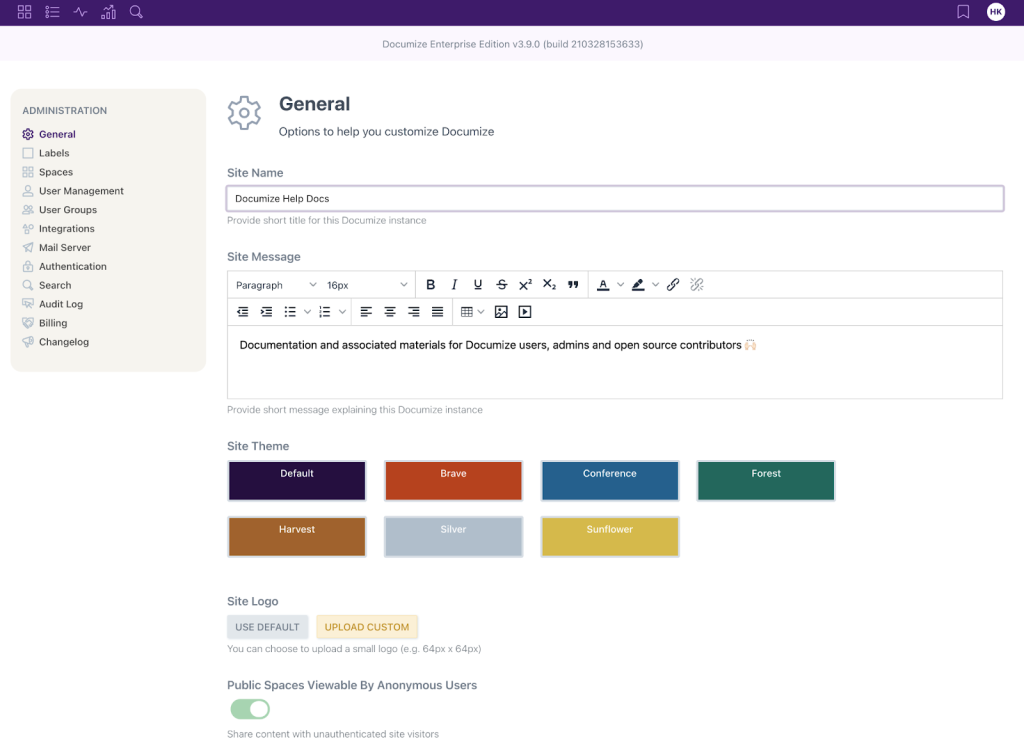
Documize is an open-source knowledge base platform designed for secure, enterprise-level documentation, with built-in workflow automation and detailed access controls.
My experience with Documize
Documize gave me full control over how I organized and managed documentation. I liked that it runs on your own server, which keeps everything secure and private.
The mix of text, diagrams, and embeds made content creation flexible, although setup and maintenance require some technical know-how.
Key Features of Documize
- Lets teams structure documentation cleanly using folders, templates, and tags so information is easy to find.
- Composable content blocks let users combine text, diagrams, code snippets, and embeds all in one page.
- Version history and approval workflows help teams review updates and keep documentation accurate over time.
- Content analytics show which articles are being used, helping teams update or improve outdated guides.
| Documize Pros | Documize Cons |
|---|---|
| The editor supports a mix of content formats, from rich text and Markdown to embedded diagrams, PDFs, and even third-party tools like Jira or Trello. | Not web-based- ideal only for teams that can work with a desktop-based platform. |
| Documize runs on your own servers, so you’re in full control of data, access, and uptime. | Ongoing maintenance requires internal effort, as support is largely community-driven. |
Documize User reviews
“Accessing by multiple people at the same time slows down the system.”
“I like that it has a filtering systemby tags and optimized navigation in the document base by key terms so that I don’t waste time navigating manually.”
“Documentsare well organized and can be placed in folders. It has some pre-defined templates that save a lot of time in everyday life.”
Documize is ideal for
Documize is ideal for teams that need complete data control, especially in regulated or security-focused environments where self-hosting is required. It works best for organizations with internal technical resources that can manage setup and maintenance.
6. Notion
Notion is an all-in-one workspace that’s become popular for its flexibility in creating wikis, databases, and knowledge bases. It’s favoured for its minimal design and ease of use.
My experience with Notion
Notion feels smooth and flexible—I could set up a knowledge base quickly without much effort. Collaborating with teammates was easy, and updates synced in real time. It’s great for smaller teams, though organizing large setups can take some getting used to.
Key Features of Notion
- You can build structured knowledge bases using templates for FAQs, onboarding guides, SOPs, and policy documentation, so teams don’t start from scratch.
- Real-time collaboration, inline comments, and @mentions make it easy for multiple teammates to update or refine documentation together.
- Advanced search filters, tags, and database views help teams quickly retrieve information, even when there are hundreds of pages.
- Linked databases and relations let you connect documentation to projects, tasks, and workflows, so knowledge shows up exactly where work happens.
| Notion Pros | Notion Cons |
|---|---|
| Easy for anyone to create and update documentation without technical setup. | The mobile app might feel less smooth and feature-rich compared to the desktop version. |
| Robust template marketplace for all types of content. | Strong version history and advanced AI search features require paid plans. |
Notion User Reviews
“In my opinion, Notion excels as a knowledge base. The customization options are outstanding, allowing you to design pages to look and work precisely as you prefer.”
“I can keep my team connected with a single knowledge base, which makes planning, getting alignment, and answering questions so much easier.”
“There is a bit of a learning curve, and the AI Assistantis just not quite advanced to the point that you can depend on it to get data structures correct from the get-go.”
Notion is ideal for
Notion is ideal for startups and small teams that need a flexible, all-in-one workspace for documentation and collaboration. It also works well for remote or creative teams who want to customize how their knowledge base is organized.
7. XWiki
XWiki is a self-hosted, open-source wiki built for structured team documentation
XWiki is an open-source enterprise wiki platform designed for organizations that need highly structured, customizable documentation with advanced permission controls.
My experience with XWiki
XWiki ticks the checklist for basic features. It’s perfect for teams that need structure and control. I liked how you can set permissions, track versions, and organize content with templates. It does take some technical setup, but once configured, it’s a solid choice for secure, large-scale documentation.
Key Features of XWiki
- Lets you structure documentation with nested pages, templates, and macros so guides stay consistent and organized.
- Granular permission controls ensure only the right people can create, edit, or view sensitive content.
- Version history, review reminders, and content expiration help keep articles accurate and up to date.
- Real-time collaboration and an open plug-in ecosystem allow teams to edit together and integrate the knowledge base with other internal tools.
| XWiki Pros | XWiki Cons |
|---|---|
| Very customizable, so you can organize documentation exactly the way your team needs. | Can be hard to set up or customize without technical help. |
| Strong access controls and review workflows make it good for secure or regulated teams. | Some useful features and easier hosting options are only available in paid plans. |
XWiki User Reviews
“XWiki gives us everything we need to create a powerful and diverse Knowledge base. Ease to use and learn”
“Xwiki is flexible and secure. It allows users to collaborate in real-time. Communication is easy through this tool.”
“The default UI still needs to be improved for better usability.Newcomers are sometimes lost by the powerful features proposed, and developers by the myriad of API available.”
XWiki is ideal for
XWiki is ideal for larger or tech-savvy teams that need secure documentation with detailed permission controls. It works well for organizations in regulated industries or those with IT resources to manage customization.
8. ProProfs
ProProfs knowledge base is a cloud-based solution designed for creating structured help sites, product documentation, FAQs, and internal knowledge hubs.
My experience with ProProfs
ProProfs felt refreshingly easy to use right from the start. The navigation was simple, and the ready-to-use templates made it effortless to set up my first knowledge base in minutes.
I liked how flexible the customization options were—you can easily tweak themes, colors, and layouts to match your brand. The built-in analytics were also a nice touch, showing which articles performed best and where users got stuck.
Key Features of ProProfs
- Ready-to-use templates and themes make it quick to launch branded help centers, FAQs, or internal documentation without design or coding.
- Contextual help widgets let you embed tooltips, pop-ups, and side-panel help directly inside your product or website.
- Built-in analytics show which articles are viewed most, where users get stuck, and what content needs improvement.
- Multi-language and custom domain support make it easy to publish both internal and customer-facing knowledge bases with consistent branding.
| ProProfs Pros | ProProfs Cons |
|---|---|
| Built-in contextual help widgets let you show pop-ups, tooltips, and side-panel help inside your app or website without custom development. | Visual customization is limited unless you use custom CSS or premium theme add-ons. |
| Analytics show which articles reduce support tickets, helping teams improve self-service over time. | Integrations and advanced workflows can require manual setup or assistance from support. |
ProProfs User Reviews
“ProProfs Knowledge Baselets me create and edit content using a simple and intuitive editor. I can also use templates, fonts, colors, logos, and more to customize the look and feel of my knowledge base”
“ProProfs Knowledge Base could benefit from additional controlsover notifications. Currently, only the account owner receives notifications about documents pending publishing.”
“ProProfs Knowledge Baseis a simple product with advanced features. We could work with the product even with minimal coding knowledge.”
ProProfs is ideal for
ProProfs is particularly effective for teams seeking to launch self-service portals, product manuals, onboarding guides, and branded FAQ sites, with reliable analytics and strong multi-language support.
9. Guru
Guru serves as your company’s AI-powered Source of truth, connecting all your tools, chats, and documents into one verified knowledge layer.
It is an internal knowledge base platform designed to help teams document and access critical information.
My experience with Guru
When I used Guru, it was clear it was built for internal documentation rather than customer-facing portals. I liked how easy it was to organize content and add images or layouts, but the inline editor felt a bit restrictive.
The role-based access, AI knowledge agents, and integrations are strong points, though the lack of branding and customization makes it less ideal for external use.
Key Features of Guru
- Guru keeps your knowledge base accurate with automatic reminders for experts to review and refresh outdated content.
- Its AI search and browser extension instantly show the right answers inside tools like Slack, Gmail, or your CRM.
- Customizable AI Knowledge Agents can be trained on specific topics or collections, helping teams surface the right information instantly and proactively.
- Prebuilt templates and integrations with Google Drive, Confluence, and Slack make it easy to create, organize, and share knowledge across teams.
| Guru Pros | Guru Cons |
|---|---|
| Extensive analytics to understand which articles gather traction and are used by internal teams. | Some advanced features require extra setup, and the learning curve can be slightly higher for non-technical teammates. |
| Its AI-powered search and integrations with tools like Slack and Gmail make finding answers fast and effortless. | It’s built mainly for internal use, with limited options for creating public-facing knowledge bases. |
Guru User Reviews
“The UI could feel slightly clutteredwhen handling a large volume of cards, and search speed occasionally lags for very large workspaces.”
“Guru’s integration capabilitieswith other tools like Chrome and Slack are very convenient.”
“The AI functionality is next-level and with the new chat featureit’s been amazing to help me ensure information is easy to find and accurate for our sales teams.”
Guru is ideal for
Guru is ideal for customer support, sales, and remote teams that need knowledge surfaced directly within their existing tools, like Slack, email, and CRM.
10. MyBase
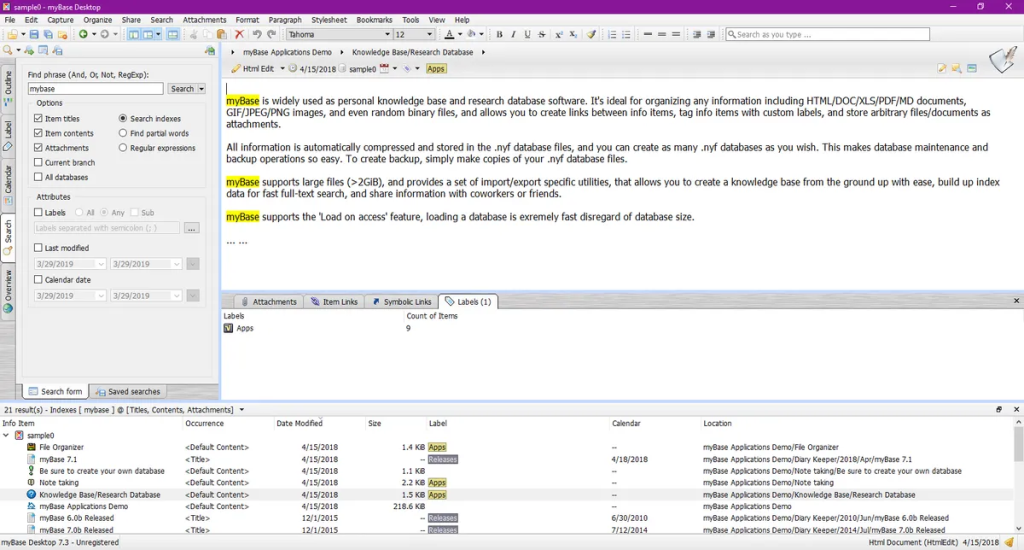
MyBase is a lightweight, personal knowledge management tool designed for individuals and small teams who need a structured, offline-first approach to documentation.
My experience with MyBase
MyBase is simple, private, and offline. I liked how easy it was to organize notes, files, and web clippings in a clear folder structure. It’s great for personal or small-team documentation, though not ideal for real-time collaboration.
Key Features of MyBase
- MyBase lets users organize information in tree-style folders with rich text, media, and file attachments, making documentation easy to browse.
- Full-text search helps find notes or articles quickly.
- Web clipping and import tools let teams save emails, web pages, and documents directly into the knowledge base.
- Encryption and offline access keep data secure and available anytime, ideal for private or small-team documentation.
| MyBase Pros | MyBase Cons |
|---|---|
| MyBase works offline and keeps all data encrypted, making it great for private or sensitive documentation. | Collaboration is limited, with no real-time editing or shared online access. |
| The tree-style structure and rich text editor make it easy to organize and format mixed content like notes, files, and web clippings. | Setup can feel technical, and some features, like integrations or exports need extra plugins. |
MyBase User Reviews
“MyBase allowed me to import a huge collection of Word documents, PDFs, photos, and webclippings into one database that is easily searched. Organizing notes into hierarchical trees that can be organized with keywords is useful for finding information quickly.”
MyBase is ideal for
MyBase is best for individuals, researchers, and small teams that need a secure, offline-first knowledge management solution. It’s particularly suited for personal documentation, research notes, and scenarios requiring data privacy.
What is Free Knowledge Base Software?
At its core, a knowledge base is a centralized repository where your team can create, organize, and access information. In a way, it’s your company’s single source of truth, whether that’s SOPs, troubleshooting guides, FAQs, or onboarding docs. For data-heavy organizations, this often works alongside a broader data infrastructur teams that invest in data warehouse consulting can better structure and centralize their operational data, making knowledge bases even more effective as a front-facing layer.
Most knowledge base software comes with core features like search functionality, categorization, tagging, version control, and permissions.
The best ones also include collaboration tools, templates, and integrations with the apps your team already uses.
Knowledge bases generally fall into three categories:
- Internal knowledge bases are designed for your team. They house everything from HR policies to technical documentation, helping employees find answers without bugging their coworkers.
- External knowledge bases are customer-facing. These are the help centers and FAQ pages your customers turn to when they need support, ideally reducing the number of tickets your team has to handle.
- Hybrid knowledge bases do both. They separate internal and external content with permissions, so your team gets the full picture while customers only see what’s relevant to them.
How to Choose the Right Knowledge Base Software
Before zeroing in on the tool for your team, make sure to give this checklist a quick read:
What’s your primary purpose? If it’s internal documentation for your team, you need robust permissions and easy editing. For customer-facing support, focus on clean public interfaces and fast search.
How big is your team, and how technical are they? Tools like Hiver, Notion, and Guru are great for non-technical users. MyBase and XWiki shine with IT teams who can customize extensively.
What’s your budget for hosting and maintenance? Open source sounds free until you factor in server costs and admin time. SaaS options like Hiver remove that overhead.
Which features are non-negotiable? If you need real-time collaboration, skip basic tools. If data privacy is critical, self-hosted solutions make sense.
What integrations do you require? Already using Atlassian tools? Confluence is a no-brainer. Need omnichannel support? Hiver fits perfectly.
Don’t overthink it—just Pick a Free Knowledge Base and Get Started
A knowledge base doesn’t need to be perfect on day one—but it does need to exist. Whether you’re trying to reduce support load, onboard users faster, or keep internal knowledge aligned, the right tool can help you get there faster.
The best part? You don’t have to spend a dollar to get started. If you’re looking for something simple and cloud-based, tools like Hiver offer powerful features even on a free plan, including unlimited articles, access control, and AI-powered search.
Start small—maybe with a few FAQs, SOPs, or onboarding checklists. Once these are in place, it becomes easier to expand and maintain.
Pick the tool that fits your workflow. Set it up. Get the basics down. You’ll thank yourself later.
Frequently Asked Questions
1. What are the benefits of using open source (and free) knowledge base software?
Open source knowledge base tools give you full control and flexibility—you can customize layouts, integrate them with your tech stack, and host everything on your own servers for maximum data privacy. They’re also cost-effective, with active communities that provide free plugins, templates, and support to keep your documentation evolving.
2. Open Source vs. SaaS Knowledge Base: Which is better?
If you want control, privacy, and deep customization, open source is the better fit. But if you prefer quick setup, automatic updates, and built-in support, a SaaS knowledge base is more convenient. Many teams start with open source for flexibility and move to SaaS when they need scale and simplicity.
3. Does any free knowledge base software offer AI features?
Yes, but they’re limited. Guru includes AI-powered search in its free plan, and tools like Hiver offer an AI Copilot, though availability may depend on the plan.
4. Can I migrate my existing documentation into a knowledge base tool?
Absolutely. Most tools support importing content from Word, Markdown, or Google Docs. Look for platforms that offer import/export options, or integrations with tools like Notion or Confluence to simplify the process.
5. Can I use a free knowledge base software for both internal and external content?
Yes—if the tool supports access control. Platforms like Hiver and Documize let you create both internal documentation and public-facing help centers. Others, like Guru or Mybase, are designed only for internal use.
Start using Hiver today
- Collaborate with ease
- Manage high email volume
- Leverage AI for stellar service