





I’ve often seen support teams run into a speed-vs-customer-context problem once they move beyond email and add live chat or social support.
At that stage, volume isn’t the problem. Tickets move quickly, and SLAs look fine. But conversations are split across channels, forcing agents to jump between tickets to understand what’s already been discussed.
That’s usually when teams start comparing Zendesk and Kustomer. While Zendesk moves tickets quickly through queues and workflows, Kustomer pulls every interaction into a single, continuous customer timeline.
This comparison breaks down how those two approaches perform in real support operations, where each tool works well and where it creates friction. And which teams see real ROI once the platform is fully in use.
Key Takeaways for Zendesk Vs Kustomer
- Support model: Zendesk follows a ticket-first design built for high volumes, strict queues, and SLA enforcement. It works best when issues are repeatable and can be handled in isolation. Kustomer uses a customer-first model in which all conversations are attached to a single profile. It fits teams dealing with cross-channel or repeat issues.
- Agent workflow: Zendesk creates separate tickets per channel, which often requires manual merging to see the full history. Kustomer shows every interaction in a single timeline, reducing context switching during live conversations.
- Pricing and long-term cost: Zendesk starts at a lower base price, but AI, bots, advanced routing, and analytics are add-ons, so costs increase as automation expands. Kustomer starts higher, but includes more functionality upfront, making ongoing costs more predictable as the team scales.
- Time to adoption: Zendesk adoption is faster when teams are already structured around queues and SLAs. Kustomer adoption is smoother when workflows already revolve around customer profiles and lifecycle stages.
How We Did Our Research
I evaluated both platforms using the same real-world buying criteria, based on hands-on trials configured to reflect actual support environments.
Instead of comparing feature lists, I focused on how each tool performs once it’s live. That meant looking at:
- How well it handles day-to-day ticket volume across email, chat, and social.
- Whether routing, SLAs, and escalations stay clear as workflows grow more complex.
- Whether AI and automation meaningfully reduce workload or add setup overhead.
- How pricing shifts once teams enable advanced features, bots, and analytics.
- How easy it is to maintain workflows without constant admin effort.
To validate these findings, I cross-checked them against feature-specific user feedback from G2 and Capterra, filtering out generic praise and focusing on comments tied to real workflows, setup effort, and unexpected costs.
The goal was simple. Understand how each platform behaves at scale, not just how it looks in a demo.
Recommended reading
Zendesk vs Kustomer: Quick Comparison
Here’s a side-by-side look at how Zendesk and Kustomer differ once you factor in setup, workflows, and day-to-day use.
| Category | Zendesk | Kustomer |
|---|---|---|
| Core model | ⭐⭐⭐⭐ Ticket-based system built around queues, where each interaction becomes a ticket | ⭐⭐⭐⭐ Customer-centric timeline where all interactions attach to one profile |
| Best suited for | ⭐⭐⭐⭐ Teams handling high volumes of similar issues with strict SLA and queue control | ⭐⭐⭐⭐ Teams handling repeat customers or conversations spanning channels |
| Setup & ramp-up | ⭐⭐⭐ Faster to get started, but routing rules and views multiply as complexity grows | ⭐⭐⭐ More setup upfront to model customers, fewer workflow changes are required later |
| Omnichannel support | ⭐⭐⭐⭐ Email, chat, and social support; each channel typically creates a separate ticket | ⭐⭐⭐⭐ Email, chat, and social flow into a single, continuous timeline |
| AI & automation | ⭐⭐⭐⭐ AI-powered triage, bots, and suggested replies available with scalable automation controls | ⭐⭐⭐⭐ AI is built into routing, prioritization, and context handling |
| CRM depth | ⭐⭐⭐ Customer profiles include interaction history and custom fields attached to tickets | ⭐⭐⭐⭐ Native customer data model with extensible attributes and cross-channel visibility |
| Context visibility | ⭐⭐⭐ Full conversation history accessible through ticket linking and views | ⭐⭐⭐⭐ Full customer history is visible in one timeline by default |
| G2 rating | ⭐⭐⭐⭐ 4.3/5 | ⭐⭐⭐⭐ 4.5/5 |
Recommended reading
Similarities of Zendesk and Kustomer
Zendesk and Kustomer share the core capabilities required to run multichannel support. Both support email, live chat, social messaging, automation rules, SLA tracking, reporting, integrations, and role-based permissions.
- Multichannel coverage: Both support email, live chat, social messaging, and voice. The capability exists in both tools, but it functions differently. Zendesk manages interactions as separate tickets, while Kustomer unifies them under a single customer record.
- Automation and routing controls: Both support rule-based assignment, prioritization, tagging, and SLA tracking. Zendesk applies these at the ticket level, while Kustomer applies them at the customer record level.
- SLA management: Both systems allow teams to define response and resolution targets and track performance against those SLAs.
- Custom fields and tagging: Teams can structure conversations using custom attributes and tags to improve organization and reporting.
- Reporting and analytics: Each platform provides dashboards for metrics such as ticket volume, response times, backlog, and agent productivity.
- Integrations and APIs: Both connect with external tools, including CRMs, ecommerce platforms, and internal systems through native integrations or APIs.
- Role-based access control: Admins can define permissions to control what different users can view, edit, or manage within the system.
Recommended reading
Differences between Zendesk and Kustomer
Both platforms support omnichannel communication and AI-assisted workflows. The difference lies in how conversations and customer records are organized once the system is in use.
- Omnichannel implementation: Zendesk follows a modular, channel-based setup. This means email, chat, and social messages typically create separate tickets. When a customer switches channels, agents often need to link or merge tickets to see the full history. Kustomer, on the other hand, routes all channels into a single customer timeline, so conversations stay connected without merging records.
- AI implementation: In Zendesk, AI is applied at the ticket level. For example, it can auto-tag a ticket, suggest a reply, or route that specific ticket to a team based on keywords. In Kustomer, AI considers the whole customer record. It looks at the customer’s past conversations, attributes, or order history before deciding how to route or prioritize the new message.
- Setup and onboarding: Zendesk is faster to launch if your team already works with tickets. You can set up queues, SLAs, and basic routing quickly, then expand rules as volume grows. Kustomer requires more upfront setup because you define customer attributes and workflow logic, like defining customer objects, attributes, and lifecycle states early. However, once configured, conversations stay attached to the same customer record as usage scales.
- Pricing structure: Zendesk has a lower starting price, but AI, advanced automation, and deeper reporting are typically tied to higher-tier plans or add-ons. Meanwhile, Kustomer has a higher starting price, but AI-assisted routing, unified customer timelines, and advanced workflow capabilities are included in the core plan.
- Ease of use: Zendesk feels familiar if your team is used to handling one ticket at a time from a queue. Kustomer works differently as agents view and respond to conversations from the customer’s profile. This takes additional time to adjust if your team is used to resolving tickets individually.
- Data model: Zendesk stores conversations as tickets linked to a requester profile. Customer data is attached to tickets, but does not serve as the structural backbone of the system. Kustomer is built around the customer record itself, with conversations, attributes, and history anchored to that profile.
- Case lifecycle: In Zendesk, each ticket has its own lifecycle. It moves through statuses like open, pending, and solved, and reopening a conversation typically creates a new SLA clock. In Kustomer, conversations stay attached to the customer record, and follow-ups continue within the same timeline. It removes the necessity of creating a separate case lifecycle.
Recommended reading
Zendesk vs Kustomer: Pricing Comparison
Pricing is where the structural differences between Zendesk and Kustomer directly affect your budget. Zendesk starts lower, but AI, advanced automation, and deeper reporting often require upgrades or add-ons.
Kustomer starts higher, with more of those capabilities included in the base plan. Below is a side-by-side comparison, followed by where costs typically increase in real deployments.
| Category | Zendesk | Kustomer |
|---|---|---|
| Entry Tier | Support Team – $19/agent/mo (basic email ticketing) | Enterprise – $89/agent/mo |
| Mid / Growth Tier | Suite Growth – $55/agent/mo (adds chat, SLAs, automation) | No mid-tier available |
| Advanced Tier | Suite Professional – $115/agent/mo (advanced reporting, automation) | Ultimate – $139/agent/mo (advanced workflows, reporting, broader AI access) |
| AI Add-Ons | Advanced AI (Copilot), bots, and intelligent triage) typically requires paid add-ons or higher Suite tiers | AI features bundled in higher tiers; some AI capabilities priced per user or usage |
| Bundling Model | Full multichannel + advanced automation + AI starts at $155/agent/mo | Core enterprise bundle with unified timeline and automation starts at $89–$139 per agent per month, depending on tier and add-ons. |
Recommended reading
Zendesk vs Help Scout: Features, Pricing, and Use Cases Compared
Zendesk Detailed Pricing Reality
Zendesk’s pricing is advertised as a low entry point, but the reality for most support teams looks different once you factor in:

- Support Team: This entry tier supports basic email ticketing and standard reporting at $19/agent/month. It does not include the full multichannel suite, advanced automation depth, or sandbox environments.
- Suite Team / Growth: This tier is priced at $55/agent/month and introduces multichannel support across email, chat, and social, along with SLA policies and standard automation triggers.
- Suite Professional: This tier unlocks advanced automation workflows, skills-based routing, and custom analytics at $115/agent/month. Teams needing deeper reporting, more complex routing logic, or higher API limits typically operate at this level.
- Suite Enterprise: At $169/agent/month, this plan includes sandbox environments, enhanced security controls, and more granular permissions. Organizations with stricter compliance, staging requirements, or enterprise governance needs often move to this tier.
Most mid-market teams evaluating multichannel support, advanced routing, and reporting depth end up between $55 and $115 per agent before factoring in add-ons.
Zendesk Add-Ons to Watch
Beyond tier upgrades, several operational capabilities in Zendesk are licensed separately. These costs apply per agent or per usage and can materially increase total spend as teams scale.

- AI/Copilot: Advanced AI for routing, suggestions, and automation typically costs extra (~$50/agent/mo).
- Workforce management: Separate licensing (~$25/agent/mo) for staffing and forecasting.
- Quality assurance: Add-on for automated coaching and agent scoring(~$35/agent/mo).
- Advanced reporting: Deeper analytics often require higher tiers or add-ons.
- Sandbox & security packs: Added cost for staging environments and enterprise compliance. This is only included in the Suite Enterprise plan by default, which costs $169/agent/mo.
- Zendesk Talk (usage-based): Voice support billed separately through per-agent licenses plus call minutes and telephony credits.
Recommended reading
Zendesk vs Jira Service Management: Which Platform Should You Opt For
Kustomer Detailed Pricing Reality
Kustomer’s base price is significantly higher, but it bundles more capabilities:
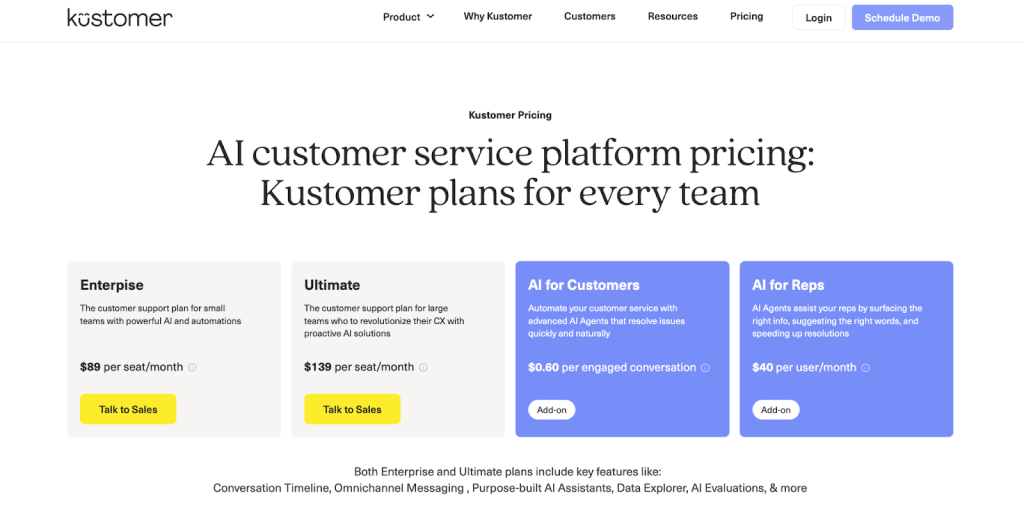
- Enterprise: At $89/agent/month, this tier includes multichannel support across email, chat, and social. It includes multichannel support, the unified customer timeline, rule-based automation and routing, SLA management, operational reporting, and the native customer data model.
- Ultimate: This tier is priced at $139/agent/month and expands workflow depth, reporting granularity, API access, and broader AI functionality. Teams needing more complex automation logic or deeper operational visibility typically operate at this level.
Because multichannel support, unified timelines, and automation are included from the Enterprise tier onward, fewer structural upgrades are required as teams scale.
There are still add-ons to watch for, and implementation costs can rise with complexity, but fewer features are locked behind upgrade walls.
Kustomer Add-Ons to Watch
While there are fewer mandatory add-ons, professional services, and usage-based AI add to the total cost.
- AI for reps and customers: AI for agents or AI handling (usage-based or per user, depending on configuration, starting at $40/user/month).
- Professional services / Implementation: Engagement-level fees for onboarding, data modeling, and workflow design.
- WhatsApp & Voice channels (usage-based): WhatsApp messaging and telephony require separate licensing and per-conversation or per-minute charges outside base seat pricing.
- Data storage (additional fees for higher volume): Storage limits apply by tier, beginning at $50/month. Higher conversation history, attachments, or event volume can require expanded storage allocations.
Let’s take an example of a 10-agent support team that needs multichannel support, advanced routing, AI assistance, and voice.
| Cost Component | Zendesk (Suite Professional) | Kustomer (Enterprise) |
|---|---|---|
| Base license (10 agents) | $115/agent ≈ $1,150/month | $89/agent ≈ $890/month |
| AI add-on | Paid add-on (often $40–$50/agent) | Included in core plan, usage-based voice only |
| Voice | ~$30 per agent + minutes ≈ $300–$400/month | Usage-based voice ≈ $250–$350/month |
| Advanced automation & routing | Often requires higher-tier or add-ons | Included in the base Enterprise plan |
| Estimated total (AI + voice enabled) | $2,400–$2,600/month | $1,500–$2,100/month |
| Onboarding & training | Typically $3,000–$8,000 upfront | Typically $3,000–$10,000 upfront |
Pricing Verdict for Zendesk Vs Kustomer
For a 10-agent team using AI, voice, and advanced workflows, Zendesk often ends up $300 to $1,100 more per month once add-ons and higher-tier requirements are included. Zendesk starts with a lower base price but expands costs through paid upgrades and AI add-ons. Kustomer starts higher but includes more core capabilities upfront, making long-term spend easier to predict as automation usage grows.
Recommended reading
Zendesk vs Kustomer: Features Comparison
On paper, Zendesk and Kustomer offer similar capabilities. In practice, the way those features are structured changes how agents work and how managers measure performance.
Omnichannel workflows
In Zendesk, interactions are typically managed as separate tickets. In Kustomer, conversations across channels are tied to a single customer record. That structural difference changes how agents see context and how managers measure continuity.
Zendesk – Multichannel via Suite
When I work in Zendesk, each new interaction from email, chat, or social typically becomes its own ticket. If a customer starts on chat and follows up by email, I often see separate tickets unless automation links them. Merging is possible, but it requires deliberate setup or manual action. This structure keeps queues clean, but it also means agents need to check related tickets to piece together history.
Kustomer – Unified Customer Timeline
In Kustomer, conversations across channels live in a single customer view. When a customer moves from chat to email, the conversation stays in one thread under the same profile. I don’t have to merge tickets or switch views. Everything is already connected.
Verdict
If cross-channel continuity matters more than ticket separation, Kustomer handles it more naturally. If maintaining strict ticket-level control and queue visibility is the priority, Zendesk offers clearer boundaries.
Automation and routing
Automation exists in both tools, but Zendesk builds it around ticket fields and triggers, while Kustomer builds it around the customer record and timeline.
Zendesk – Triggers, Automations, and Skills-Based Routing
In Zendesk, automation is built around triggers tied to ticket fields. For example, I can route tickets tagged “billing” to a specific team. I can escalate them when SLA time drops below a threshold. I can also use skill-based routing to assign tickets to agents with the right expertise.
The tradeoff shows up as complexity increases. As ticket volume grows, more triggers and conditions get layered in. Without clear documentation, it can take time to trace why a specific ticket was routed a certain way.
Kustomer – Workflow Builder
In Kustomer, automation runs at the customer record level. Routing can factor in customer attributes, past conversations, and account data, not just fields on the current case. For example, I can prioritize repeat contacts or route high-value customers differently without adding extra ticket rules.
The workflow builder is more structured by default, though it offers less granular rule layering than Zendesk.
Verdict
Zendesk offers deeper rule customization. Kustomer offers more structured automation tied to the customer profile.
Recommended reading
AI capabilities
Both platforms offer AI-assisted replies, bots, and routing enhancements. The distinction is where AI operates within the system.
Zendesk AI – AI & Copilot
Zendesk AI operates at the ticket level. It suggests replies, categorizes tickets, and routes conversations based on content. From what I observed, Zendesk evaluates and acts on the current ticket in isolation, rather than factoring in the customer’s full history. It improves handling speed, but its scope is centered on the current case rather than the full customer record.
Kustomer AI – AI within the Customer Timeline
In Kustomer, I see AI evaluate past conversations, order history, and customer attributes before routing or suggesting next steps. Prioritization isn’t based only on the current message. In repeat-contact situations, that added context noticeably changes how cases are handled.
Verdict
If your goal is faster ticket resolution, Zendesk’s AI is purpose-built for that. If your goal is decision-making informed by full customer history, Kustomer’s AI has the structural advantage.
Reporting & Analytics
How you measure support often determines which platform fits. The difference comes down to what you prioritize measuring: Zendesk focuses on ticket efficiency, while Kustomer focuses on customer continuity across conversations.
Zendesk – Explore & Ticket Analytics
Zendesk structures reporting around tickets. I see dashboards centered on first response time, resolution time, backlog, and SLA compliance. The metrics are built to monitor queue health and agent performance at the case level.
Kustomer – Customer-Centric Reporting
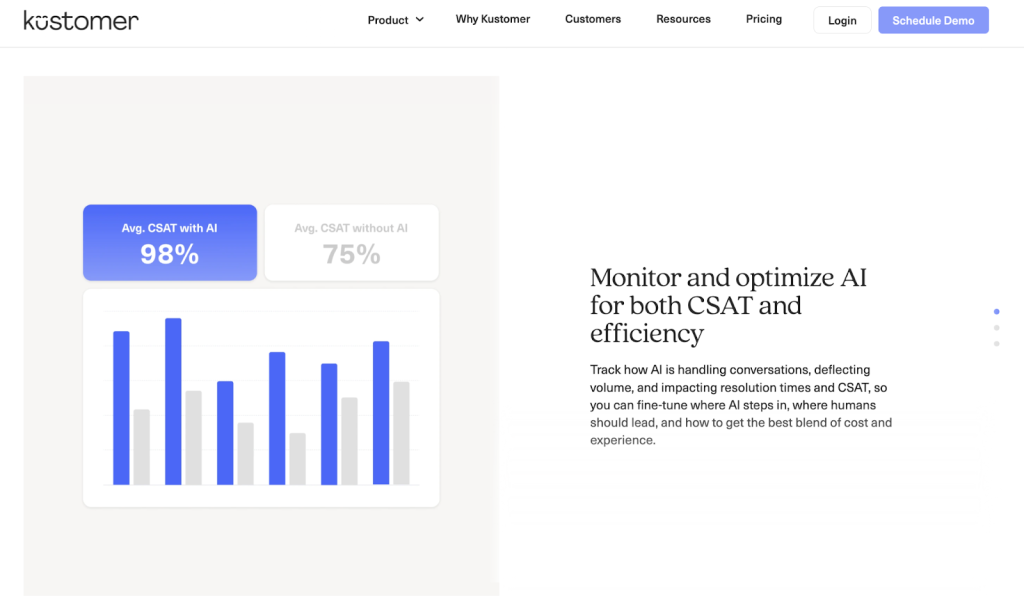
In Kustomer, reporting is structured around the customer record. I can analyze repeat contacts, interaction timelines, and activity tied to specific profiles. It shifts focus from ticket metrics to customer behavior.
Verdict
Zendesk measures ticket performance. Kustomer measures customer behavior. The better fit depends on which lens drives your reporting conversations.
Data Model & Extensibility
Both systems allow extensions through fields and APIs. The distinction is where customer data lives in the underlying model.
Zendesk – Ticket-Centric Data Model
In Zendesk, data is organized around tickets. Customer information lives in user profiles linked to those tickets. I can add custom fields, objects, and integrations, but deeper customer modeling often depends on external systems like a CRM. The ticket remains the primary unit of work.
Kustomer – Native Customer Data Model
The customer profile sits at the center of the Kustomer’s system. Conversations, attributes, and related records attach to that profile by default. As I customize workflows, I’m extending that record directly, not layering context onto separate tickets. The result is consolidated history inside support without requiring a separate CRM.
Verdict
If you treat support as a ticketing function layered onto an existing CRM, Zendesk works well. If you want support structured directly around the customer record, Kustomer makes more sense.
Recommended reading
Freshdesk vs Zendesk: Features, Pricing, Pros & Cons in 2026
The Help Desk Migration & ROI Checklist
Zendesk and Kustomer operate on different models. Here’s a quick checklist to determine whether your team is structured around ticket throughput or customer continuity. It’ll help you understand which platform supports that model more effectively.
Operational Model Fit
If most of your cases are independent, queue-driven, and measured on SLA compliance, you’re operating in a ticket-first model. That structure aligns more naturally with Zendesk. If customers frequently switch channels, reopen conversations, or require historical context to resolve issues, you’re operating in a customer-continuity model. That structure aligns more naturally with Kustomer.
Workflow Complexity
Assess how many routing rules, automations, and integrations your team depends on. If your operation relies heavily on layered ticket rules, Zendesk aligns naturally. If workflows revolve around unified customer data, Kustomer is a better fit to reduce friction.
ROI Signals
If your primary goal is faster resolution time, tighter SLA compliance, and improved queue efficiency, Zendesk is structured to deliver those gains. If your goal is to reduce repeat contacts and improve visibility into returning customers, Kustomer aligns more naturally. Its structure keeps customer history consolidated inside support.
If you need to pressure-test your Zendesk vs Kustomer decision with operations or finance, download the detailed Help Desk Fit & ROI Checklist here.
Recommended reading
Zendesk vs Kustomer: What should you choose?
After comparing architecture, workflows, pricing, and reporting models, the decision comes down to how your support operation is structured.
Choose Zendesk if:
- Your team handles high ticket volume, and most cases are resolved without agent intervention.
- SLA compliance, first response time, and backlog control are primary KPIs.
- You already use a separate CRM and want support layered on top of it.
- Your workflows are structured around queues, groups, and ticket ownership.
- You prefer starting at a lower price and expanding features incrementally.
Choose Kustomer if:
- The same customer often contacts you across email, chat, and social within the same issue cycle.
- Repeat contacts affect retention, subscription renewals, or account expansion.
- Agents regularly need order history, account status, or past interactions visible before replying.
- You want routing decisions to reference customer attributes, not just ticket fields.
- You prefer keeping support and customer data in one system instead of syncing between the help desk and CRM.
- You can commit to higher per-agent licensing and upfront workflow configuration to reduce long-term integration maintenance.
Recommended reading
Why Teams That Prioritize Ease of Use Choose Hiver
Zendesk and Kustomer require teams to adopt a dedicated help desk interface. That means onboarding agents into a new system, configuring workflows from scratch, and maintaining layered automation over time.
Hiver delivers the same structural capabilities without that operational weight. It is structured as an AI-powered help desk built for quick setup. It provides shared inboxes, omnichannel support, SLAs, automation, analytics, and AI assistance in a unified workspace. Agents don’t need weeks of onboarding to become productive. Admins don’t need to manage dozens of layered routing rules to maintain control.
The impact shows up in shorter onboarding cycles and less workflow disruption. Automation enhances productivity without introducing configuration complexity. That matters when support teams need automation to work on day one, without a long implementation cycle.
Hiver is the right fit if:
- You want omnichannel support without enterprise-level system overhead
- You need AI assistance built into daily workflows, not layered as add-ons
- You value structured automation without maintaining a heavy rule architecture
- You prioritize faster time to value over deep platform customization
For SaaS and B2B teams, this approach delivers a complete help desk with modern AI capabilities. All without the configuration burden of traditional ticketing or CRM-heavy systems.
Try Hiver for free and see how it improves your customer service.
Frequently Asked Questions
1. Is Kustomer a CRM system?
Kustomer is a customer service platform built on a native CRM data model. It stores customer profiles, attributes, and interaction history inside the platform. However, it is not a full sales CRM like Salesforce or HubSpot.
2. Is Zendesk a call center?
No. Zendesk is a help desk platform. It includes voice support through Zendesk Talk, but it is not a standalone call center system. It supports email, chat, social, and voice within a ticket-based framework.
3. What is the difference between Zendesk and Kustomer?
Zendesk is built around tickets and queues. Each interaction becomes a ticket.
Kustomer is built around the customer record. All interactions attach to one unified timeline. The difference affects routing logic, reporting, AI behavior, and workflow design.
4. Who is Zendesk’s biggest competitor?
Zendesk competes with tools like Hiver, Freshdesk, Intercom, and ServiceNow. In customer-centric help desk comparisons, Kustomer is considered a structural competitor due to its CRM-based model.
5. What are the current pricing plans for Zendesk and Kustomer?
Zendesk starts at $19 per agent per month for basic email ticketing. Multichannel and advanced automation typically begin at $55–$115 per agent per month. Enterprise tiers go up to $169 per agent per month, excluding add-ons. Kustomer starts at approximately $89 per agent per month for its Enterprise tier and $139 per agent per month for Ultimate. AI and usage-based features may increase costs.
6. Is Zendesk more expensive than Kustomer?
Zendesk has a lower advertised starting price. However, once teams enable multichannel support, advanced automation, and AI add-ons, total cost can approach or exceed Kustomer’s mid-tier pricing. Kustomer costs more upfront but bundles more functionality into base tiers.
7. Which is more cost-effective for growing teams?
Zendesk is more cost-effective for teams that want incremental upgrades and basic ticket control. Kustomer can be more cost-effective for teams that would otherwise pay for both a CRM and a help desk, especially when customer continuity drives revenue.
8. What do customer reviews say about Zendesk vs Kustomer?
Zendesk reviews frequently highlight its scalability, ecosystem, and operational reporting. Common complaints mention pricing complexity and add-on costs. Kustomer reviews often praise its unified customer timeline and CRM-style workflow. Criticism typically focuses on implementation effort and pricing at lower volumes.
9. What are the pros and cons of Zendesk compared to Kustomer?
Zendesk Pros
-Mature ecosystem with extensive integrations
-Strong SLA and queue control
-Flexible rule-based automation
Zendesk Cons
-Add-ons increase total cost
-Context may require ticket merging
-Automation complexity can grow over time
Kustomer Pros
-Unified customer timeline
-Native CRM-style data model
-Automation tied to customer attributes
Kustomer Cons
-Higher upfront cost
-Longer initial configuration
-May be excessive for basic ticket-driven teams
10. How do you migrate from Zendesk to Kustomer?
Migration typically involves exporting ticket and user data, mapping customer records to Kustomer’s data model, rebuilding routing workflows, and validating SLA logic. Before switching, use a structured evaluation checklist to confirm operational fit, data mapping complexity, and ROI assumptions. Data modeling and workflow redesign are the most time-intensive steps.
11. Zendesk vs Kustomer: Which has better integration options?
Zendesk has a larger marketplace with thousands of pre-built integrations and strong API extensibility. Kustomer offers native CRM functionality and supports integrations via APIs and connectors, but its ecosystem is smaller compared to Zendesk’s marketplace.













