







When customer requests increase, and operations start feeling harder to manage, it usually points to gaps in your customer service management setup. The right platform should bring structure and control without adding unnecessary complexity.
There are plenty of customer service tools out there, which can make choosing the right one difficult. Zendesk and ServiceNow often come up in the same discussion, but they’re built with different approaches in mind.
In this comparison, we’ll look at how Zendesk and ServiceNow CSM differ where it matters most: Cost, complexity, speed to value, and overall operational fit, so you can choose the platform that aligns with how your team actually works.
How I Did My Research
The goal behind this comparison was to help teams make a practical decision between Zendesk and ServiceNow based on real-world usage, not marketing claims or feature checklists.
To build it, I reviewed official documentation from Zendesk and ServiceNow, analyzed verified feedback on G2 and Capterra, and examined pricing disclosures, third-party cost analyses, and practitioner discussions.
Instead of listing every feature, I evaluated both platforms on decision-driving factors: total cost of ownership, speed to value, day-to-day usability, and fit for customer support versus ITIL-based service management.
Zendesk vs ServiceNow: Quick Comparison
If you want the short answer before diving into details, this table highlights how Zendesk and ServiceNow differ across the areas most teams care about during evaluation.
| Feature | Zendesk | ServiceNow |
|---|---|---|
| Best for | Support-heavy teams that want faster setup and lower operational complexity | Large enterprises where customer service must align with IT and be governed by internal processes |
| Core capabilities | Ticketing, shared inbox, live chat, help center, AI agent assist, SLAs | Customer portals, AI-powered self-service, case management, and workflow orchestration |
| Ease of use | ⭐⭐⭐⭐☆ Cleaner UI and easier for agents to adopt quickly | ⭐⭐⭐☆☆ Steeper learning curve, especially for non-IT users |
| CRM capabilities | ⭐⭐⭐☆☆ Basic customer context through integrations (Salesforce, HubSpot) | ⭐⭐⭐⭐☆ Case-centric view with deep linkage to enterprise systems rather than CRM-first |
| AI and automation | ⭐⭐⭐⭐☆ AI for triage, suggested replies, macros, routing, and intent detection | ⭐⭐⭐⭐⭐ Advanced automation across workflows, approvals, and enterprise processes |
| Reporting and dashboards | ⭐⭐⭐⭐☆ Pre-built support reports with custom dashboards via Zendesk Explore | ⭐⭐⭐⭐☆ Highly configurable analytics, often requiring admin or IT involvement |
| Marketing automation | ⭐⭐☆☆☆ Not native. Requires third-party integrations | ⭐⭐☆☆☆ Not a core focus. Typically handled via external platforms |
| Integrations | ⭐⭐⭐⭐☆ Large marketplace with plug-and-play integrations for support tools | ⭐⭐⭐⭐⭐ Deep integrations across enterprise systems via Integration Hub |
| Implementation effort | ⭐⭐⭐⭐☆ Structured configuration required; enterprise setups demand careful workflow planning | ⭐⭐☆☆☆ Longer implementation, often involving consultants |
| Admin overhead | ⭐⭐⭐⭐☆ Manageable | ⭐⭐☆☆☆ Higher governance effort |
| Cost predictability | ⭐⭐⭐⭐☆ Transparent per agent | ⭐⭐☆☆☆ Custom enterprise pricing |
Similarities of Zendesk and ServiceNow
Despite targeting different market segments, Zendesk and ServiceNow overlap in a few key areas. Understanding where they align helps you avoid over-indexing on feature checklists and focus on what actually drives day-to-day support outcomes.
Core ticket and case management
Both platforms let teams capture, track, and resolve customer issues through structured tickets or cases. Agents can assign ownership, update statuses, collaborate internally, and maintain conversation history across the ticket lifecycle.
For structured customer case management, both Zendesk and ServiceNow can capture requests, assign ownership, track statuses, and maintain conversation history.
Omnichannel customer engagement
Zendesk and ServiceNow support multiple customer touchpoints, including email, web forms, chat, and self-service portals. Customers can raise issues through different channels, while agents work from a unified interface that preserves context.
The underlying architectures differ, but the end goal is the same: consistent customer experiences across channels.
Workflow automation and routing
Both platforms offer automation to reduce manual work. You can define rules to route tickets, trigger notifications, assign priorities, and enforce SLAs.
While the depth and complexity of automation vary, each tool helps teams move beyond purely manual ticket handling and scale support operations.
Reporting and performance visibility
Zendesk and ServiceNow provide dashboards and reports to track support performance. Teams can monitor metrics like ticket volume, response times, resolution rates, and agent productivity.

These insights support operational decision-making and help leaders spot bottlenecks or workload imbalances.
Enterprise-grade security and compliance
Security, access controls, and compliance are built into both platforms. Features such as role-based permissions, audit logs, and data protection standards make both tools suitable for organizations that handle sensitive customer information or operate in regulated environments.
AI-assisted support capabilities
Both platforms highlight AI as a core part of their roadmap, offering features like classification, suggested replies, and knowledge recommendations.
The difference lies in intent. Zendesk uses AI primarily to assist frontline agents in customer conversations, speeding up replies, automating triage, and reducing repetitive ticket work.
In ServiceNow CSM, AI is designed to operate within structured service workflows, routing cases based on rules, triggering downstream processes, and coordinating work across departments when required.
Key Differences of Zendesk and ServiceNow
Zendesk and ServiceNow are built for very different operating models. The differences below tend to decide which tool teams keep long-term and which one becomes hard to live with.
Primary focus and product DNA
Zendesk is designed first for customer support teams. The product centers on handling external conversations at scale with minimal operational friction.
ServiceNow, on the other hand, is an enterprise workflow platform at its core. Its Customer Service Management module is built on the same architecture that powers its IT service management system.
As a result, customer cases can connect directly to incidents, change requests, asset records, and internal service workflows across departments.
Speed to value and setup effort
Zendesk requires structured configuration, especially for larger teams managing complex routing, automations, SLAs, and reporting. Enterprise deployments often involve careful planning to prevent long-term workflow sprawl.
That said, compared to ServiceNow CSM, the implementation scope is typically narrower because workflows are primarily contained within support operations.
Time-to-value is usually longer, but the architecture supports deeper cross-team orchestration once implemented.
ITIL and service management depth
Zendesk supports SLAs, ticket states, routing rules, and reporting to manage customer-facing support. However, it is not architected around formal ITIL frameworks or structured service management disciplines.
ServiceNow, by contrast, runs on the same platform foundation as ServiceNow ITSM. Customer service records can align with incident, problem, and change processes within the broader ServiceNow ecosystem.
For organizations that require ITIL-aligned governance, auditability, and structured cross-team coordination, that architectural depth becomes a key differentiator.
Usability for agents and admins
Zendesk prioritizes agent experience. The interface is built around tickets and conversations, with clearly defined queues, macros, and SLA views. Once configured properly, agents can move through requests without navigating multiple modules.
ServiceNow offers more flexibility because the workspace can be tailored to match complex service models. Forms can include custom tables and relationships, cases can trigger multi-step workflows across departments, and dashboards can be heavily customized.
However, that flexibility means agents may interact with more fields, states, and process layers. Admins and agents usually need more training to work efficiently.
Customization versus complexity
Customization reveals one of the biggest architectural differences between Zendesk and ServiceNow.
Zendesk allows customization across ticket fields, forms, workflows, triggers, automations, SLAs, reporting dashboards, and agent workspaces. Teams can tailor routing logic, priority rules, business hours, and even app integrations without rewriting the underlying system architecture.
The platform offers flexibility within defined boundaries, preventing teams from having to redesign the entire service model from scratch.
ServiceNow supports deeper, platform-level customization within the ServiceNow ecosystem. Organizations can configure case data models, create custom relationships between customer accounts and service records, design complex approval flows, and tailor role-based workspaces for different teams.
That depth enables highly tailored service architectures, but it typically requires experienced admins or implementation partners to build and maintain them properly.
Best-fit for
Zendesk suits teams focused primarily on managing external customer support with controlled workflow design and operational visibility.
ServiceNow fits organizations where customer service must connect tightly with IT, operations, or compliance-driven workflows across departments.
In short, Zendesk optimizes for speed, usability, and support efficiency. ServiceNow optimizes for control, scale, and enterprise-wide service management. The right choice depends less on feature parity and more on how complex your service operations already are.
Pricing Comparison: Zendesk vs ServiceNow
Pricing is where the difference between Zendesk and ServiceNow becomes more structural than numerical. Zendesk follows transparent per-agent tiers. ServiceNow relies on enterprise-level custom quotes.
To properly evaluate costs, you need to look beyond the base subscription and consider implementation effort, add-ons, scaling impact, and long-term administration.
Zendesk Pricing
Zendesk offers four main plans for customer service:
| Plan | Annual Price (per agent/month) | Monthly Price (per agent/month) | Best For |
|---|---|---|---|
| Support Team | $19 | $25 | Email-first teams getting started |
| Suite Team | $55 | $69 | Teams needing omnichannel + AI basics |
| Suite Professional | $115 | $149 | Growing teams needing customization and SLAs |
| Suite Enterprise | $169 | $219 | Large teams requiring governance and control |
Zendesk also offers a free trial.
What each tier really means
Support Team ($19): Good for email-based support with basic ticketing, routing, and automation. However, AI agents are not fully unlocked unless you add certain features. This tier works for small teams testing structured ticketing, but lacks omnichannel and deeper analytics.
Suite Team ($55): This is where AI agents (Essential), live chat, social messaging, phone support, and a help center become available. For many teams, this is the “real starting point” if omnichannel support is required.
Suite Professional ($115): Adds custom reporting, SLAs, multiple help centers, IVR, CSAT surveys, skills-based routing, and stronger customization. This tier is often preferred by mid-market teams needing operational control.
Suite Enterprise ($169): Includes sandbox environments, approval workflows, advanced governance, audit logs, and enterprise-level controls. Designed for larger, compliance-focused organizations.
Zendesk Add-On Costs
Beyond base pricing, Zendesk offers paid add-ons such as:
- Copilot: $50 per agent/month
- Quality Assurance: $35 per agent/month
- Workforce Management: $25 per agent/month
- Advanced Data Privacy: $50 per agent/month
- Contact Center: $50 per agent/month
As teams scale, combining base plans with AI, QA, WFM, or privacy features can significantly increase the total cost of ownership.
Zendesk’s pricing can look straightforward at first glance, but total cost often depends on add-ons, AI usage, and the plan you choose. For a detailed tier-by-tier breakdown, check out our complete guide to Zendesk pricing before making a decision.
Value vs cost observations (Zendesk)
- Entry pricing looks affordable at $19 per agent.
- Most omnichannel teams realistically start at $55 per agent.
- Advanced workflow control often requires $115+.
- AI and workforce features can double per-agent cost if layered in.
- Costs scale linearly with headcount.
Zendesk is generally a better financial fit for established or enterprise support teams that can justify higher-tier plans and add-ons. While pricing is per agent, the total cost depends on how much AI, automation, and advanced functionality you layer in.
ServiceNow Pricing (Custom Enterprise Model)
ServiceNow does not publish public pricing for CSM. Instead, pricing is customized based on selected modules (such as CSM, ITSM), user counts, and enterprise agreements.
- Product modules selected (CSM, ITSM, etc.)
- Number of users
- Scope of workflows
- Integration requirements
- Enterprise agreements
You need to contact ServiceNow’s sales team for a custom quote.
What impacts ServiceNow’s total cost
ServiceNow’s cost includes more than licensing:
- Implementation services
- Custom workflow configuration
- Internal or external admins
- Ongoing governance and maintenance
- Potential integration consulting
This indicates higher upfront effort but long-term enterprise consolidation benefits.
Value vs Cost Observations (ServiceNow)
- Licensing is typically negotiated at an enterprise scale.
- Implementation effort significantly impacts total cost.
- Administration overhead must be factored in.
- Often bundled within broader enterprise ServiceNow agreements.
| ServiceNow pricing makes sense for organizations that:Already use ServiceNow for IT service management and want to extend the same platform to customer servicePlan to consolidate customer service, IT, and internal workflows under one platformHave the budget and technical ownership required for enterprise implementation |
Direct Cost Comparison Summary
| Factor | Zendesk | ServiceNow |
|---|---|---|
| Published pricing | Yes | No |
| Free trial | Yes | Sales-led engagement |
| Entry cost | $19/agent | Custom |
| AI included | Yes (enterprise AI workflows) | Yes (varies by module and enterprise configuration) |
| Add-ons | Multiple paid add-ons | Often bundled but custom |
| Implementation effort | Low to moderate | Moderate to high |
| Admin overhead | Moderate | High |
Speed-to-Value vs Total Cost
- Zendesk typically delivers faster time-to-value in comparison to ServiceNow, especially for support-led teams.
- ServiceNow delivers deeper long-term consolidation value, but requires higher upfront investment.
- Zendesk’s cost scales with agent count.
- ServiceNow cost scales with enterprise scope and complexity.
If you want transparent per-agent pricing and the ability to upgrade tiers as your team grows, Zendesk is more predictable.
If you need enterprise-grade service orchestration and are prepared for custom implementation, ServiceNow aligns better with that model.
Feature Comparison: Zendesk vs ServiceNow
In this section, I’ve compared the features based on how they shape day-to-day operations.
1. Omnichannel support handling
How each platform handles customer conversations across channels reveals a fundamental difference in approach.
Zendesk: Conversation-first ticket management
Zendesk is built to centralize conversations from email, chat, social, voice, and help centers into a single workspace. Agents see the full conversation history in one place, regardless of the channel it originated from.
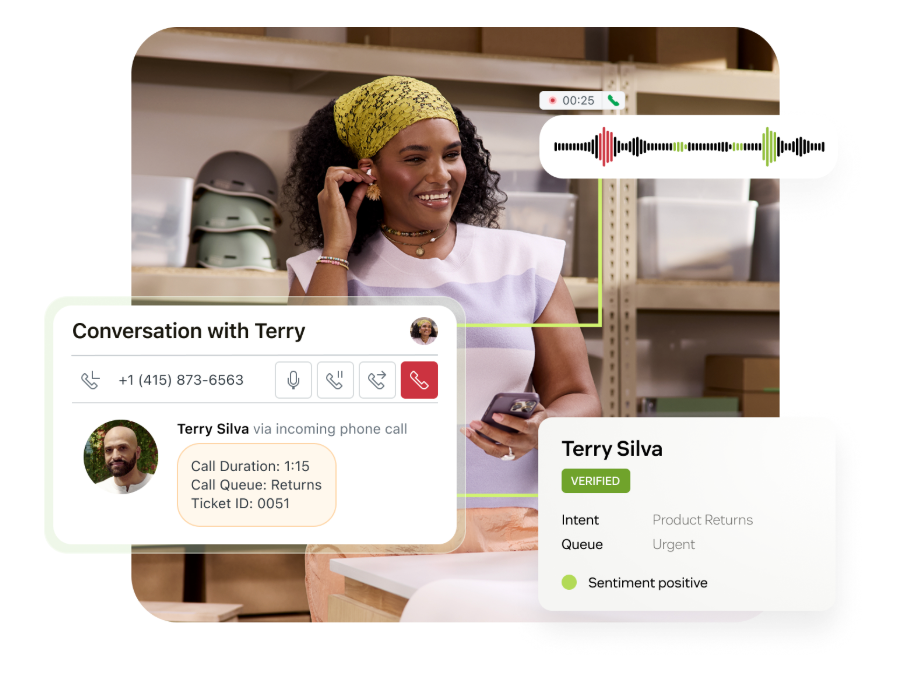
The system is conversation-driven. Requests move through ticket states, but the core focus remains on replying quickly, maintaining context, and keeping queues manageable, especially in high-volume customer-facing environments.
ServiceNow: Structured, case-driven service workflows
ServiceNow supports omnichannel intake, but it converts customer requests into structured cases. These cases can follow predefined service workflows, escalation paths, and governance rules.
The emphasis is on managing customer issues through controlled service processes rather than fluid conversation threads.
Verdict
Zendesk fits better when your priority is handling external conversations efficiently across channels. ServiceNow makes more sense when customer requests must trigger formal, multi-step enterprise workflows.
2. Workflow automation and orchestration
Automation shows how each system scales once support volume and internal coordination increase.
Zendesk: Rule-based automation for support teams
Zendesk automation is rule-based and accessible. You can route tickets automatically, apply tags, escalate based on SLA timers, and trigger internal notifications as part of a structured workflow setup that may require admin planning and some technical support.
Macros and triggers reduce repetitive manual work. Support managers can configure most workflows without engineering involvement, which keeps operations flexible and fast-moving.
ServiceNow: Enterprise-grade workflow orchestration
ServiceNow enables workflow orchestration across customer service teams and internal departments. Customer cases can trigger approval flows, task assignments, or internal service coordination when needed.
Designing and maintaining these workflows typically requires technical expertise and governance oversight.
Verdict
Zendesk is easier to automate for customer support–specific use cases. ServiceNow is stronger when workflows need to extend into IT operations, compliance, and enterprise-wide systems.
3. AI and agent assistance
AI capabilities highlight where each platform places its strategic focus, agent productivity or broader process control.
Zendesk: AI for frontline agent productivity
Zendesk uses AI to support frontline productivity. Features such as intent detection, auto-triage, suggested replies, and knowledge surfacing help agents reduce response times and handle higher volumes more efficiently. The value shows up quickly because AI sits directly inside the agent workflow.
ServiceNow: AI for enterprise process optimization
ServiceNow applies AI more broadly across its platform. It can assist with case classification, accelerate self-service, and predictive routing within structured service processes.
AI here often enhances governance and operational control rather than just agent speed.
Verdict
Zendesk AI tends to feel more immediately impactful for support teams. ServiceNow AI becomes more valuable when deeply embedded in enterprise-wide workflows.
4. Knowledge base and self-service
Knowledge management reflects whether the priority is simple customer self-service or governed service documentation.
Zendesk: Customer-facing self-service and help center
Zendesk’s knowledge base integrates directly with tickets and bots. Teams can create structured help articles that customers can search before contacting support, and agents can quickly share articles inside conversations. The system is accessible and easy to maintain for non-technical teams.
ServiceNow: Governed knowledge management across services
In ServiceNow, knowledge management operates within a governed service framework. Articles can support external customers and internal agents, with role-based access and structured approval controls.
Verdict
Zendesk works well for customer-facing self-service and ticket deflection. ServiceNow suits organizations that need knowledge governance across internal and external stakeholders.
5. ITIL and service management depth
Service structure and governance requirements further separate customer support tools from enterprise service platforms.
Zendesk: Operational SLAs without formal ITIL architecture
Zendesk provides SLA tracking and structured ticket workflows, but is not natively aligned with full ITIL frameworks. ITSM-style use cases often require integrations or customization.
It works best for support-led teams rather than formal IT departments.
ServiceNow: Native ITIL-aligned service management
ServiceNow is deeply aligned with ITIL processes, including incident, problem, change, and asset management. These capabilities are part of the platform’s foundation.
For organizations where compliance and structured service management are mandatory, this depth is critical.
Verdict
Zendesk focuses on managing external customer support efficiently within a dedicated support framework.ServiceNow CSM fits organizations where customer service must integrate tightly with internal workflows, compliance controls, and enterprise systems.
Pros and Cons of Zendesk and ServiceNow
Instead of listing surface-level advantages and disadvantages, I’ve broken this down around areas teams consistently talk about in reviews: Usability, automation, implementation effort, and cost predictability.
These pros and cons reflect how Zendesk Customer Service and ServiceNow behave once deployed in real environments:
Zendesk
| Pros (where Zendesk works well) | Cons (where teams feel friction) |
|---|---|
| Clean, organized ticket management. Many users highlight that it is easier to track tickets, assign ownership, and manage multiple channels from one workspace. Teams frequently mention that “nothing gets lost” once workflows are set up properly. | Can feel overwhelming during setup. Several reviewers note that while basic use is intuitive, configuring advanced triggers, automations, and reporting requires time and careful planning. |
| Strong automation for high-volume support. Macros, triggers, and routing rules reduce repetitive work and keep response times consistent. G2 reviews often mention how automation helps teams scale without chaos. | Pricing increases as teams grow. Users frequently point out that advanced features, additional agents, and AI capabilities are tied to higher plans or add-ons, making costs climb over time. |
| Broad channel coverage and integrations. Zendesk’s ability to unify email, chat, voice, and social into one system is widely praised. Its marketplace and APIs also receive strong positive feedback. | Interface can feel busy at scale. Some users mention that when ticket volume increases, the workspace can feel cluttered or heavy, especially for new team members. |
All the above reviews are sourced from G2
ServiceNow
| Pros (where ServiceNow works well) | Cons (where teams feel friction) |
|---|---|
| Strong case management and process control. Users frequently praise the structured visibility into cases, workflows, and service requests. It’s often described as “organized” and “clear” for enterprise operations. | Steep learning curve. Many reviewers mention that configuration and customization require experience. New users often need dedicated training or skilled admins. |
| Powerful automation and workflow orchestration. Automation across departments and systems is a recurring strength in reviews. Teams value how workflows reduce manual effort and enforce process consistency. | Complex setup and longer implementation. Several users reference the need for careful planning, consultants, or specialized personnel during rollout. Time-to-value can be slower compared to lighter tools. |
| Enterprise integration and scalability. ServiceNow is often praised for integrating with identity systems, CRM platforms, and enterprise tools while supporting large organizations. | Cost and licensing transparency concerns. Some users mention difficulty estimating total costs upfront, especially when factoring in customization, licensing tiers, and long-term administration. |
All the above reviews are sourced from G2
Zendesk vs ServiceNow: What Should You Choose?
The right platform depends less on feature parity and more on how heavy you want your service infrastructure to be.
Choose Zendesk if:
- Your primary goal is to handle customer-facing support efficiently across email, chat, voice, and self-service
- You want to go live quickly without relying heavily on IT or external consultants
- Your support team values a clean interface and shorter onboarding time for agents
Choose ServiceNow if:
- Customer service is tightly connected to IT, operations, or other internal service teams
- You need formal ITIL-based processes, such as incident, problem, and change management
- Your organization is comfortable investing time and resources into a structured implementation
Hiver: A Simpler Alternative for Support-Led Teams
If Zendesk starts to feel operationally heavy and ServiceNow feels like more infrastructure than you actually need, Hiver offers a more focused approach.
Hiver, an AI customer service platform, brings customer conversations from email, chat, WhatsApp, voice, and social channels into one connected workspace. Customer-facing teams manage support in a single platform designed for speed and control.
You get structured ownership, SLAs, automation, analytics, and AI assistance built into the core platform, without separating essential capabilities into costly add-ons or requiring enterprise-level implementation cycles.
If your priority is running efficient, AI-enabled customer support without inheriting heavyweight infrastructure, Hiver offers a more simplified path forward.
Here’s where Hiver stands apart:
- Structured support without enterprise complexity: Clear ownership, SLAs, automation, analytics, and AI assistance without heavy configuration or IT-led rollout. Most teams can go live quickly inside the tools they already use.
- Predictable pricing as you scale: Free plan available, with paid tiers starting at $25 per user/month. Core automation and AI features are included, so you won’t face surprise usage-based charges.
- Focused purely on customer support: Built for handling conversations, collaboration, and resolution workflows without layering in ITIL frameworks or enterprise governance modules you may not need.
- Practical AI inside daily workflows: AI helps with summaries, tagging, sentiment detection, drafting replies, and autonomous resolution in higher plans, designed to reduce agent workload, not add complexity.
- 24/7 support access: Email and chat support available around the clock, which growing teams often appreciate during onboarding and expansion.
The distinction comes down to weight and flexibility. Platforms like Zendesk and ServiceNow often require you to align with their structure, processes, and pricing models.
Hiver is designed to fit into the way your team already operates, without adding layers of complexity or unpredictable costs.
Here’s a practical breakdown of which team type typically fits each platform best.
| Factor | Zendesk | ServiceNow | Hiver |
|---|---|---|---|
| Team Size | 10 to 500 agents | 500 to 5000+ users | 5 to 500+ users |
| Budget | ~$20 to $169 per agent/month (tiered) | Custom enterprise pricing | $0 (Free), $25, $65, $105 per user/month |
| Technical Skills | Basic to intermediate | Intermediate to advanced | Low to moderate |
| Industry Focus | SaaS, ecommerce, tech | IT, healthcare, finance, regulated industries | SaaS, ecommerce, services, growing teams |
| Growth Stage | Scaling support teams | Large enterprises with complex service ops | Startups to mid-market teams scaling support |
Hiver occupies a different middle ground. Unlike Zendesk, which introduces a dedicated helpdesk layer, and ServiceNow, which introduces enterprise service architecture, Hiver operates across channels. That makes onboarding significantly lighter for teams already living in email.
From a pricing standpoint, Hiver is also more predictable for small to mid-sized teams. It offers a free plan for early-stage teams, followed by paid tiers starting at $25 per user per month, with AI features available across paid plans.
Advanced AI agents, copilots, QA, and analytics scale up in the higher tiers without requiring separate enterprise negotiations.
Choose Hiver if:
- Your team doesn’t want to switch to a separate helpdesk interface
- You want shared inboxes, automation, and AI support capabilities without heavy setup or IT dependency
- You’re a startup or mid-sized team that needs structure but not enterprise-level complexity
- Predictable per-user pricing matters more than layered add-ons and enterprise contracts
- You want AI features like summarization, tagging, sentiment detection, and copilots built into your support workflow without separate AI add-on negotiations
If your team sits somewhere in between, the right choice often depends on whether you want a tool that adapts to your existing workflows or one that requires you to design and enforce new ones.
Hiver combines the core features of Zendesk and ServiceNow, offering multi-channel support through a shared inbox and quick setup.
Want a more straightforward way to support customers? Start your free trial with Hiver today.
Frequently Asked Questions
1. Which platform is better for IT service management?
ServiceNow is built for ITSM and supports incidents, requests, and changes with AI and advanced reporting.
2. Is Zendesk suitable for enterprise operations?
Yes. Zendesk is widely used by enterprise customer service teams and supports large-scale, multi-channel support environments with advanced automation, governance controls, and integrations.
3. How do Zendesk and ServiceNow differ in automation?
Zendesk automates basic support workflows. ServiceNow automates complex processes across IT and service departments using AI.
4. How does pricing differ among Zendesk, ServiceNow, and Hiver?
Zendesk uses per-agent tiers. ServiceNow has custom enterprise pricing. Hiver offers transparent per-user pricing with no hidden fees.
5. Why choose Hiver over Zendesk and ServiceNow?
Hiver brings multichannel support, automation, and analytics into a simple interface. It is easier to adopt, faster to set up, and predictable in cost.













