


Choosing between Zendesk and Zoho Desk isn’t as straightforward as picking the customer support tool with more features.
Take the G2 grid as a starting point. Both help desks sit in the Leaders quadrant, positioned very close to each other in terms of customer satisfaction and market presence.
That proximity tells you this isn’t a simple “winner vs. loser” comparison — and real users across Reddit and G2 confirm it.

That’s what makes this comparison genuinely tricky. They’re built for different buyers, different budgets, and different levels of operational complexity.
Zendesk is a mature, enterprise-grade support platform with 1,200+ integrations and advanced omnichannel capabilities. Zoho Desk is part of Zoho’s broader all-in-one suite — capable, cost-effective, and a natural fit if you’re already using Zoho CRM or Books.
But neither is universally better. What matters is which one fits the way your team actually works — or whether there’s a third option that bridges the gap without the trade-offs.
This guide breaks down the real differences across AI, channels, integrations, pricing, and more — so you can make that call with confidence.
Table of Contents
- Quick Comparison: Zendesk vs Zoho Desk
- Main Comparison: Zoho Desk vs Zendesk
- Pricing and Value for Money
- Which Should You Choose: Zendesk or Zoho Desk?
- Hiver: A Better Alternative to Zendesk and Zoho Desk
- Frequently Asked Questions
Quick Comparison: Zendesk vs Zoho Desk
Both Zendesk and Zoho Desk handle the core helpdesk fundamentals, but they’re designed for different types of teams.
In fact, here’s a quick snapshot to see which platform aligns more closely with your size, budget, and operational needs.
| Comparison point | Zendesk | Zoho Desk |
|---|---|---|
| Customization | ⭐⭐⭐⭐☆ – Very flexible, best with a dedicated admin. | ⭐⭐⭐⭐☆ – Flexible setups, friendly for non‑technical admins. |
| Features | ⭐⭐⭐⭐⭐ – Deep omnichannel and CX suite for complex teams. | ⭐⭐⭐⭐☆ – Strong core help desk plus Zoho suite extras. |
| User interface | ⭐⭐⭐⭐☆ – Modern, powerful; admin side can feel heavy. | ⭐⭐⭐⭐☆ – Clean, familiar, easy for new teams. |
| AI | ⭐⭐⭐⭐☆ – Advanced AI, mostly on higher tiers/add‑ons. | ⭐⭐⭐⭐☆ – Solid built‑in Zia AI at lower price points. |
| Integrations | ⭐⭐⭐⭐⭐ – Huge marketplace and strong third‑party ecosystem. | ⭐⭐⭐⭐☆ – Ideal if you already use Zoho apps. |
| Pricing | ⭐⭐⭐☆☆ – Powerful but often on the expensive side. | ⭐⭐⭐⭐⭐ – Great value and lower total cost. |
| Free trial | ⭐⭐⭐⭐☆ – Trials on most plans, no long‑term free tier. | ⭐⭐⭐⭐⭐ – Free plan plus paid‑tier trials. |
| Best for | Mid‑large teams needing enterprise‑grade CX. | SMB/mid‑market teams, especially Zoho users. |
Overall G2 Ratings at a Glance
Zendesk — 4.3/5 (5,600+ reviews) Praised for feature depth, omnichannel capabilities, and reporting.
Zoho Desk — 4.4/5 (6,500+ reviews) Praised for ease of use, automation, and value for money.
Main Comparison: Zoho Desk vs Zendesk
The sections below go feature-by-feature so you can see exactly where each tool leads and where it falls short.
AI and Automation
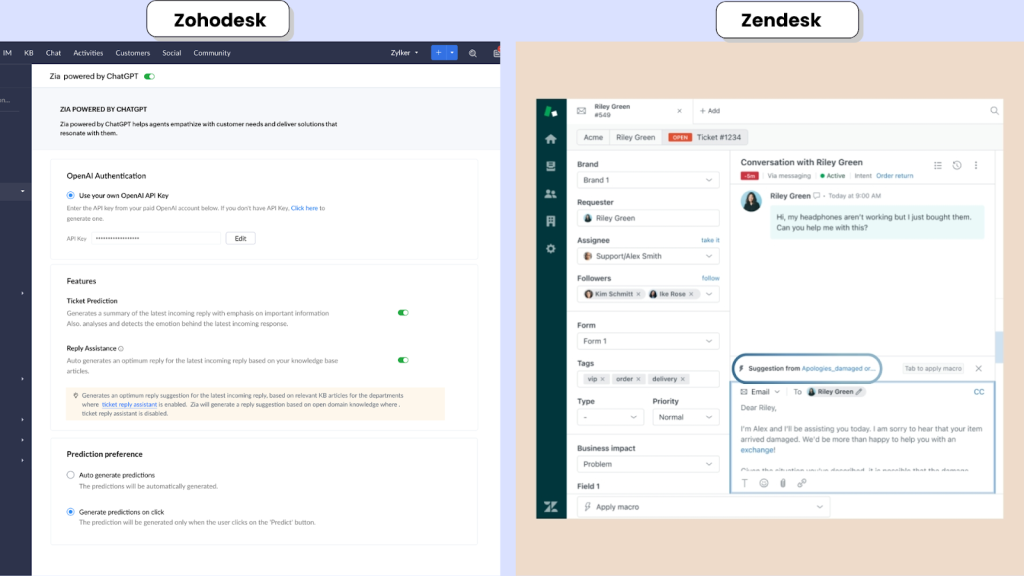
AI is now table stakes in helpdesk tools, but Zendesk and Zoho Desk differ in how much they automate, how configurable that automation is, and how it impacts your total cost of ownership.
Both are generally rated well for reducing manual effort, but users do flag issues like:
“Zendesk has a steep learning curve, making it a little difficult for new or smaller teams to understand and utilize the tool”.
“The cost on Zohodesk can become a bit prohibitive for medium-sized companies, especially when you factor in the features needed to support multiple departments”.
Zendesk AI
Zendesk treats AI as a core pillar of its platform, with automation running across email, chat, messaging, and voice.
- Intelligent triage classifies intent, sentiment, and language, then auto‑tags and routes tickets so teams don’t have to hand‑sort queues.
- AI agents and bots handle common questions from your knowledge base, then escalate with context so agents step in only when needed.
- Copilot‑style tools summarize long threads, suggest replies, and recommend macros so agents can move faster on complex tickets.
- In the contact center, Zendesk’s AI helps analyze and route calls via Zendesk Talk so voice gets the same level of automation as digital channels.
Zoho Desk (Zoho Zia)
Zoho Desk uses Zoho Zia to automate day‑to‑day support work without positioning AI as a big separate SKU.
- Zia runs sentiment analysis and smart tagging to flag unhappy customers and auto‑label tickets for routing, SLAs, and reporting.
- Reply suggestions and context panels surface related tickets and articles, helping agents respond faster without jumping between tabs.
- Anomaly detection spots unusual spikes or patterns in ticket volume, alerting managers so they can investigate issues like outages early.
Most of this AI is bundled into Zoho Desk plans and ties into the wider Zoho suite, which keeps the AI price tag lower but also means the best experience is when you’re already in the Zoho ecosystem.
Verdict: Zendesk AI vs Zohodesk AI
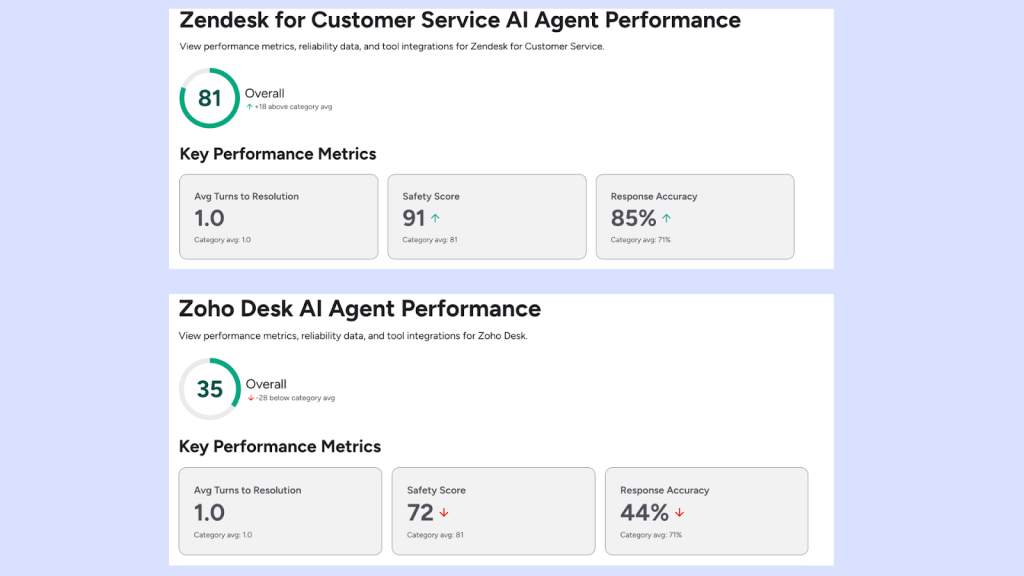
On G2’s performance benchmarks, both tools get strong marks for AI and automation, with Zendesk typically rated a bit higher on advanced AI/agent assist and Zoho Desk slightly ahead on value of money, as seen in this review– “I like Zoho Desk because it’s efficient and offers great value for money with its limitless features.”
The agent performance as per G2 shows Zendesk’s AI agent scoring 81 overall with higher safety and response‑accuracy scores, versus Zoho Desk’s 35 overall. In practice, that gap reflects how Zendesk’s AI supports the full support lifecycle: it does the heavy lifting on triage and deflection, then assists agents with context, summaries, and reply suggestions across email, chat, messaging, and voice.
Zoho Zia, on the other hand, focuses more on everyday efficiency than on high‑end “AI agent” use cases, which is why its G2 AI agent score is lower even though users still rate it well for automation and value.
It helps teams keep queues organized, surface unhappy customers, and pull in context from other Zoho apps so agents can respond faster without a big separate AI spend.
To sum it up,
- Pick Zendesk if you want enterprise‑grade AI across channels (email, chat, voice) and you’re prepared to pay for higher‑tier plans plus paid AI add‑ons (typically an extra monthly fee per agent, with usage‑based charges once you cross bundled limits).
- Pick Zoho Desk if you want practical, built‑in AI that improves everyday work—sentiment, tagging, prioritization, suggestions—without blowing up your budget, especially if you’re already invested in other Zoho apps.
Omnichannel, Messaging, and Voice
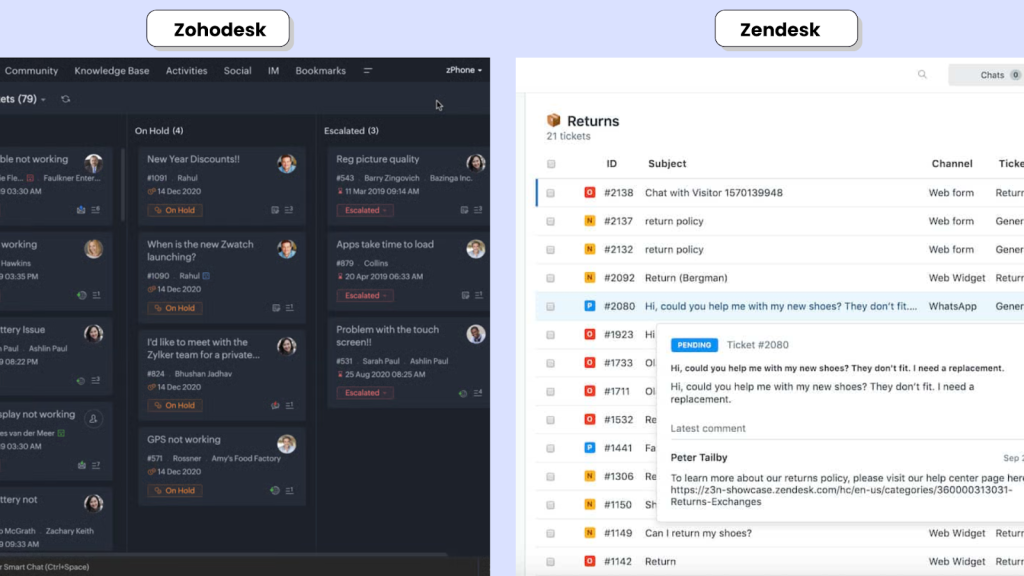
Zendesk
Zendesk delivers omnichannel support by pulling email, chat, social messaging, and voice into a single Agent Workspace, so agents handle every interaction from one unified thread.
- Zendesk Talk adds built-in telephony with IVR, call recording, call queues, and callback‑from‑queue, plus AI‑powered capabilities when paired with Zendesk AI.
- Through its marketplace and native messaging, Zendesk supports WhatsApp, Facebook Messenger, Instagram, SMS, and e‑commerce tools like Shopify, all manageable from the same workspace.
- For high‑volume, multi‑channel teams, we see reviews such as:
“Zendesk brings email, chat, and messaging into one workspace, so it is easier to track the full conversation history of a customer. This improves response quality because agents can quickly understand the context without searching across multiple systems.”
“The unified omnichannel experience is a game-changer, allowing me to manage customer interactions across multiple channels from a single dashboard.”
Highlighting Zendesk’s omnichannel experience as one of the strongest in the category.
Zoho Desk
Zoho Desk supports email, live chat, telephony via PhoneBridge, social channels, and WhatsApp, especially when used alongside other Zoho tools like Zoho Social or Zoho Voice.
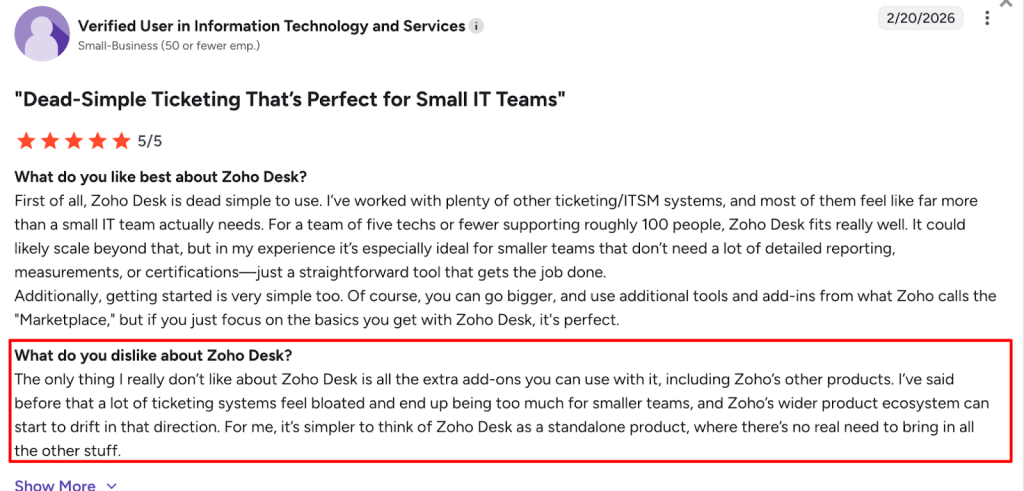
- Omnichannel is a feature, but some channels depend on additional Zoho apps or marketplace integrations, as cited by this user:
- Integrations and partners (including WhatsApp and voice providers like Aircall) help bring channels into a single view, but it typically shines most in organizations already standardized on the Zoho ecosystem.
Verdict: Where is Omnichannel better?
- Choose Zendesk if you need true omnichannel customer service, with a tightly unified agent workspace and stronger built‑in voice/IVR for high‑volume teams.
- Choose Zoho Desk if you need solid multichannel coverage at a lower cost, especially when your team already runs on Zoho and can lean on the broader suite for chat, social, and voice.
Implementation Complexity and Time to Value
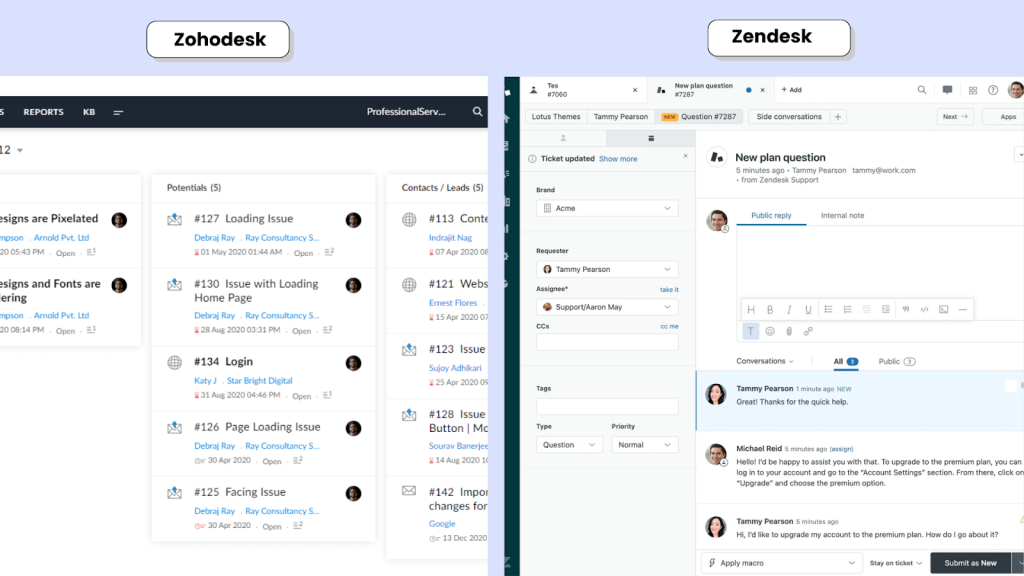
Zendesk
Zendesk is designed to handle complex workflows, multi‑brand setups, and deep integrations, which makes it powerful but heavier to configure.
Partners commonly quote 2–12 weeks for full implementations, depending on team size and complexity (data migration, SSO, custom fields, multiple channels).
On platforms like Reddit, the picture is more nuanced — and often more candid. Zendesk users frequently flag its cost and the effort needed for setting up as pain points, as this Reddit user put it:

Many teams bring in a Zendesk partner or dedicate an internal admin so “small” changes don’t turn into ongoing mini‑projects.
Zoho Desk
Zohodesk is generally faster to get live, especially if you already use Zoho CRM or Zoho One.
Zohodesk’s Blueprint gives non‑technical admins a visual way to enforce ticket workflows (states, transitions, SLAs) without code, and the most basic setup lives fully in the UI.
Advanced analytics or more complex external integrations still need planning, but the initial time‑to‑value is typically shorter, and admin overhead is lower than Zendesk.
Verdict: Whose Implementation is Smoother?
- Choose Zoho Desk if you want to go live quickly with minimal admin overhead, particularly in a Zoho‑centric tech stack.
- Choose Zendesk if you have dedicated admins/partners and genuinely complex operations that justify a longer, more involved implementation.
Integrations and Developer Extensibility

Zendesk
The Zendesk Marketplace has 1,300–1,700+ apps, with strong coverage across Salesforce, Jira, Shopify, Slack, WhatsApp, and most tools enterprise teams rely on.
With Zendesk Sunshine (Zendesk’s CRM platform), you can model custom objects like “Orders” or “Subscriptions,” link them to tickets, and use events/webhooks to update your other systems automatically, so agents see live context (plan, renewal date, order status) without leaving Zendesk.
Additionally, real‑world setups often go beyond marketplace apps, like this Reddit user’s workflow for integrating Zendesk and Zapier:

Zoho Desk
Zoho Desk integrates tightly with Zoho CRM, Zoho Analytics, Zoho Projects, and the rest of the Zoho suite — which is genuinely powerful if you’re a Zoho‑first organization.
If you’re not in the Zoho ecosystem, then channels can feel siloed, as mentioned here:

Third‑party integrations beyond the Zoho ecosystem are available, but the marketplace is smaller, and deeper customization often means working with Zoho’s Deluge scripting language, which comes with a noticeable learning curve, as this user mentions:
“The documentation often leaves out key details — like how to use custom fields in Deluge scripts. You end up hunting through forums for answers that should’ve been in the docs from the start.”
Verdict: Who’s Integration Stack is Better?
- Choose Zendesk if you need best‑in‑class third‑party coverage and Sunshine‑level extensibility, plus the ability to stitch together niche workflows via tools like Zapier without heavy engineering effort.
- Go for Zoho Desk if the Zoho suite is your core platform and you want every tool in that ecosystem to sync natively, even if you trade off some marketplace breadth and extensibility
Reporting and Analytics

Zendesk
Zendesk uses Explore as its reporting and analytics layer, with prebuilt dashboards and a drag‑and‑drop editor for custom reports. We also have users praising it for how easy it is to build, tweak and share reports across teams:

Real‑time and historical views cover SLAs, CSAT, FRT/ART, backlog trends, and more, with solid export options and BI integrations for teams that want to push data into external tools.
Zoho Desk
Zoho Desk ships with built‑in dashboards for ticket volume, SLA performance, and CSAT, which G2 reviewers say give good day‑to‑day visibility into team performance.
When paired with Zoho Analytics, you get much deeper, cross‑app reporting (for example, combining Desk and CRM data), though advanced setups often need extra configuration, as this user mentions:
“Basic reporting works fine, but anything more advanced requires a higher-tier plan — and even then, custom reports aren’t as flexible or intuitive as you’d expect.”
Verdict: Zendesk Analytics vs Zoho Desk Analytics
With Zendesk Explore, teams typically pull reports around SLAs, CSAT, first/average response times, backlog trends, channel performance, and agent productivity, using ready‑made dashboards and simple filters for drill‑downs.
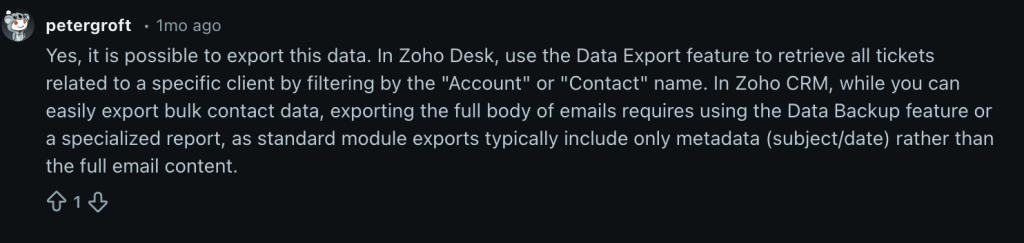
Zoho Desk’s native reports cover the usual operational metrics well. Where it gets more powerful is when you connect Zoho Analytics — you can build broader views that tie support data to CRM pipeline, revenue, or product usage. The trade-off, as one Reddit user notes, is that it takes extra setup to get there.
To sum it up,
- Choose Zendesk if you want strong, out‑of‑the‑box customer service analytics that leaders can use with minimal setup.
- Choose Zoho Desk if you care more about flexible BI and cross‑app visibility, particularly when you already use Zoho Analytics and want everything modeled in one place.
Knowledge Base and Self-Service
Zendesk
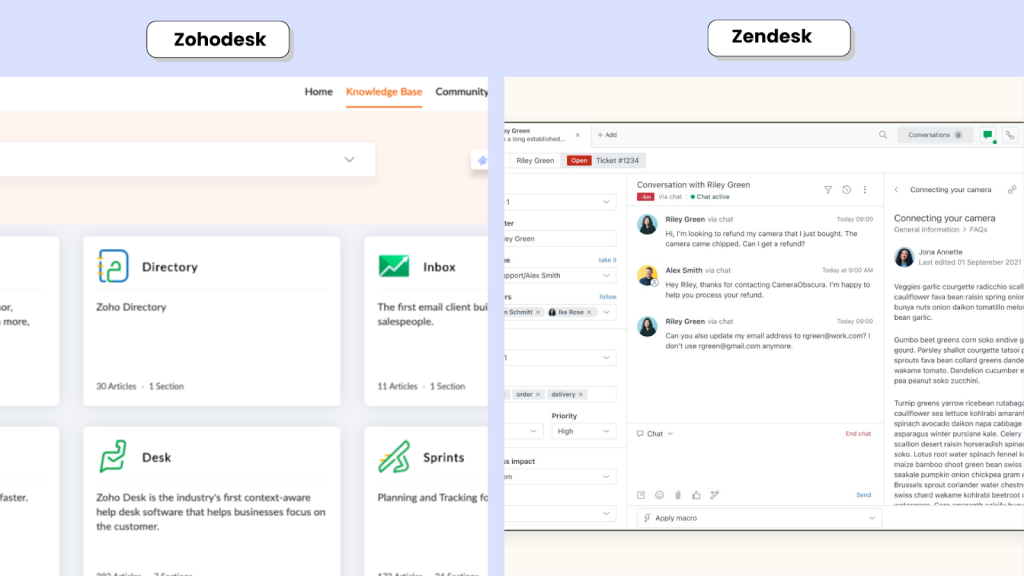
With Zendesk Guide, teams get a mature knowledge base that supports structured authoring workflows, granular permissions, multi‑language libraries, and robust search across a lot of content.
It also bakes in practical SEO controls for titles, descriptions, and indexing, and can surface suggested articles during search or ticket creation to drive self‑service and deflect simple tickets.
Zoho Desk
On Zoho Desk, the help center leans into flexibility: you can run multi‑brand portals, publish multi‑language content, and add community forums so customers can help each other and ask questions in public.
SEO fields (meta titles, descriptions, keywords) and HTML/CSS customization are available as well, though getting more advanced layouts and search/SEO tuning usually takes a bit more manual configuration than with Zendesk Guide.
The overall self‑service experience is strong, especially when the help center is tightly configured alongside the rest of the Zoho stack.
Verdict: Zendesk Knowledge Base vs Zohodesk Knowledge Base
Teams using Zendesk Guide highlight how tightly Zendesk’s AI features connect with the help center -to surface relevant articles to customers and to deflect common queries, as seen in this user review:
“I also like how Zendesk incorporates AI with the knowledge base, providing customers with relevant articles or responses even before the ticket is assigned to an agent. This is also useful for reducing the overall number of tickets for the customer support teams.”
Agents can search articles from within Zendesk, embed them in replies, and track which pieces of content actually deflect tickets. They also get analytics on search terms and article performance to keep the KB improving over time.
Zoho Desk’s help center is often praised for giving customers a clean portal and community forum to find answers on their own, We have reviews like this:
“The knowledge base and self-service features are well-designed, and the integration with other Zoho products helps keep customer support operations efficient and centralized.”
That tell us that when it is wired up with the wider Zoho suite it becomes a solid, cost‑effective way to reduce ticket volume, even if getting to more advanced layouts and SEO tuning takes extra configuration
To sum it up,
- Zendesk edges ahead on search depth, authoring polish, and out‑of‑the‑box SEO friendliness for large, content‑heavy KBs.
- Zoho Desk is more than sufficient for most teams and shines when you want the help center deeply tied into a broader Zoho workflow and multi‑brand portals.
Security, Compliance, and Governance
Zendesk
If security and governance are non-negotiable, Zendesk leans heavily into that enterprise story:
- Granular role-based access control (RBAC)
- Detailed audit logs
- SSO and SCIM provisioning
- Data residency options
- SOC 2, GDPR, and HIPAA compliance (on eligible plans)
- Sandbox environments to test changes safely
For larger organizations with strict compliance and governance requirements, Zendesk’s security framework is mature and well-documented.
Zoho Desk
Zoho covers the fundamentals well, especially for SMB and mid-market teams:
- GDPR-aligned and SOC 2 certified
- Role-based access control
- SSO support
- Regional data residency options
The compliance depth isn’t positioned as heavily toward large enterprise governance as Zendesk’s, but for most growing teams, Zoho’s security setup is more than sufficient.
Verdict:
- Choose Zendesk if you operate in a highly regulated environment or need advanced governance controls, detailed auditability, and enterprise-grade compliance certifications.
- Choose Zoho Desk if you’re an SMB or mid-market team that needs solid, reliable security without paying for enterprise-level complexity.
Pricing and Value for Money
Price is one of the biggest practical differences between Zoho Desk and Zendesk, and the gap widens as you add agents and advanced features.
| Pricing factor | Zendesk | Zoho Desk |
|---|---|---|
| Pricing model | Per‑agent (seat‑based) across Support/Suite plans. | Per‑agent tiers with a permanent free plan for up to 3 agents. |
| Entry plan (paid) | Support Team from ~$19/agent/mo (annual), Suite Team around $55/agent/mo in many 2026 analyses. | Express from ~$7/agent/mo, Standard ~$14/agent/mo (annual). |
| Mid‑tier plan | Suite Professional commonly cited at $115/agent/mo (annual). | Professional around $23/agent/mo (annual). |
| Enterprise plan | Suite Enterprise listed at $169/agent/mo+ with custom quotes and discounts. | Enterprise around $40/agent/mo (annual). |
| Overages / add‑ons | Advanced AI (~$50/agent/mo), QA, WFM and others as separate add‑ons; marketplace apps may add cost. This can mean quickly escalating costs, as mentioned by this user. | Some costs for phone/voice and add‑ons (and a learning curve due to less documentation, as this user mentions) but most core help desk and Zia AI capabilities are bundled into tiers. |
| Cost scales with | Team size (number of paid seats) + add‑ons and channels. | Team size, with a much lower per‑agent baseline and free tier for up to 3 agents. |
Zendesk Pricing
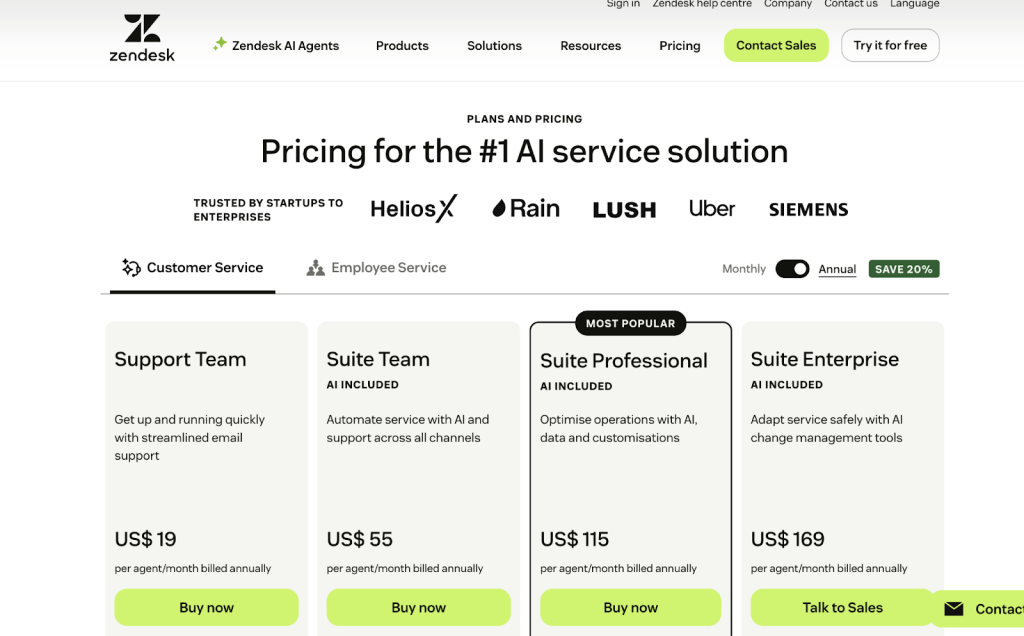
Zendesk uses per‑agent, per‑month pricing for its Support and Suite plans. At the time of writing, the pricing is at:
- Suite Team: ~$55/agent/month (annual).
- Suite Growth: ~$89/agent/month.
- Suite Professional: ~$115/agent/month.
- Suite Enterprise: headline $169/agent/month+, with many enterprises negotiating from there.
Advanced AI, quality assurance, workforce management, and other capabilities (like some AI agents and analytics) are often sold as add‑ons, frequently pushing effective per‑agent cost well above the headline plan price.
Third‑party marketplace apps and implementation services (partners, onboarding projects) add further to total cost of ownership.
For more details on pricing, refer to our Zendesk Pricing Guide.
Zoho Desk Pricing
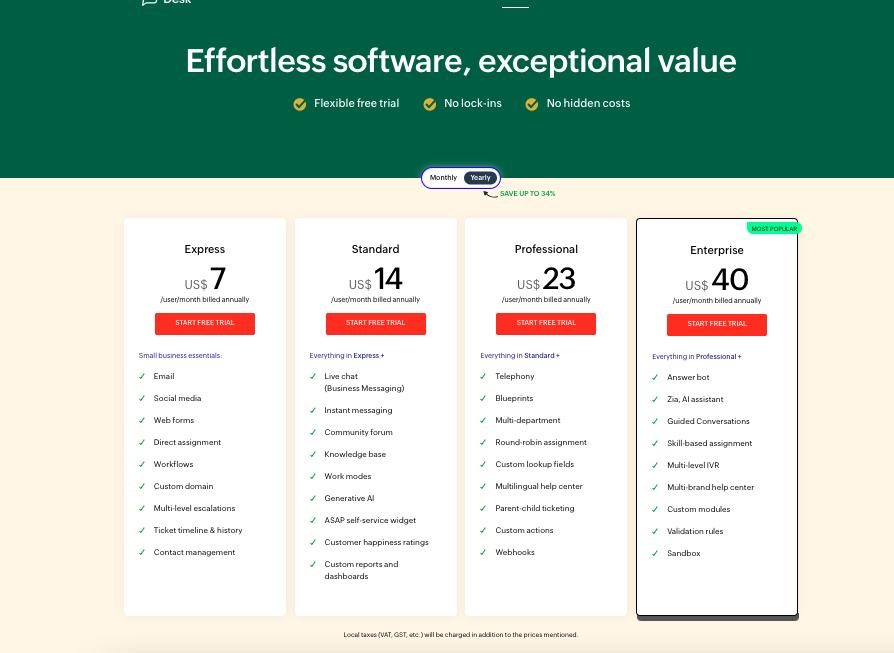
Zoho Desk offers significantly lower price points and keeps a lot of functionality bundled at each tier. At the time of writing, typical annual prices are:
- Free: $0 (up to 3 agents).
- Express: ~$7/agent/month.
- Standard: ~$14/agent/month.
- Professional: ~$23/agent/month.
- Enterprise: ~$40/agent/month.
Analyses and user reviews consistently highlight value for money as a major strength: you get automation, SLAs, Blueprints, reporting, and Zia AI features included at their respective tiers rather than as separate, high‑priced add‑ons.
There can still be extra costs for telephony (e.g., Zoho Voice) and some marketplace apps, but the baseline subscription remains far below Zendesk for the same seat count
For more details, check out our guide on Zohodesk Pricing.
Which Should You Choose: Zendesk or Zoho Desk?
Zoho Desk almost always looks cheaper on paper – and for most small or mid‑sized teams, it genuinely is. As you add agents, the lower per‑seat pricing and bundled features (automation, SLAs, Zia AI, reporting) keep your costs in check, especially if you’re already using other Zoho apps.
Zendesk, on the other hand, feels expensive from the start. But if you’re a larger, high‑volume team with relatively stable headcount, its per‑agent pricing can become predictable compared to a stack of point solutions — the catch is that real spend often jumps once you add AI, QA, WFM, voice, and marketplace apps on top of base plans.
The better fit depends on what’s really driving your support costs:
- Fast‑growing team size + need for enterprise‑grade customer service and governance → Zendesk becomes the costly (but justifiable) option.
- Need to control per‑agent spend and get “most of what you need” in the base tiers → Zoho Desk stays far more budget‑friendly.
Hiver: A Better Alternative to Zendesk and Zoho Desk
Zendesk and Zoho Desk both act as full CX platforms that sit alongside the rest of your stack. That’s powerful, but it also means another system to configure, maintain, and train everyone on.
Hiver takes an agile approach: it gives you modern help desk capabilities—shared ownership, SLAs, automation, AI, omnichannel, and reporting—without the overhead of a heavyweight enterprise suite.
Teams like Bynder moved from Zendesk to Hiver for exactly this reason: they needed a system built for long‑term customer relationships, not just tickets.
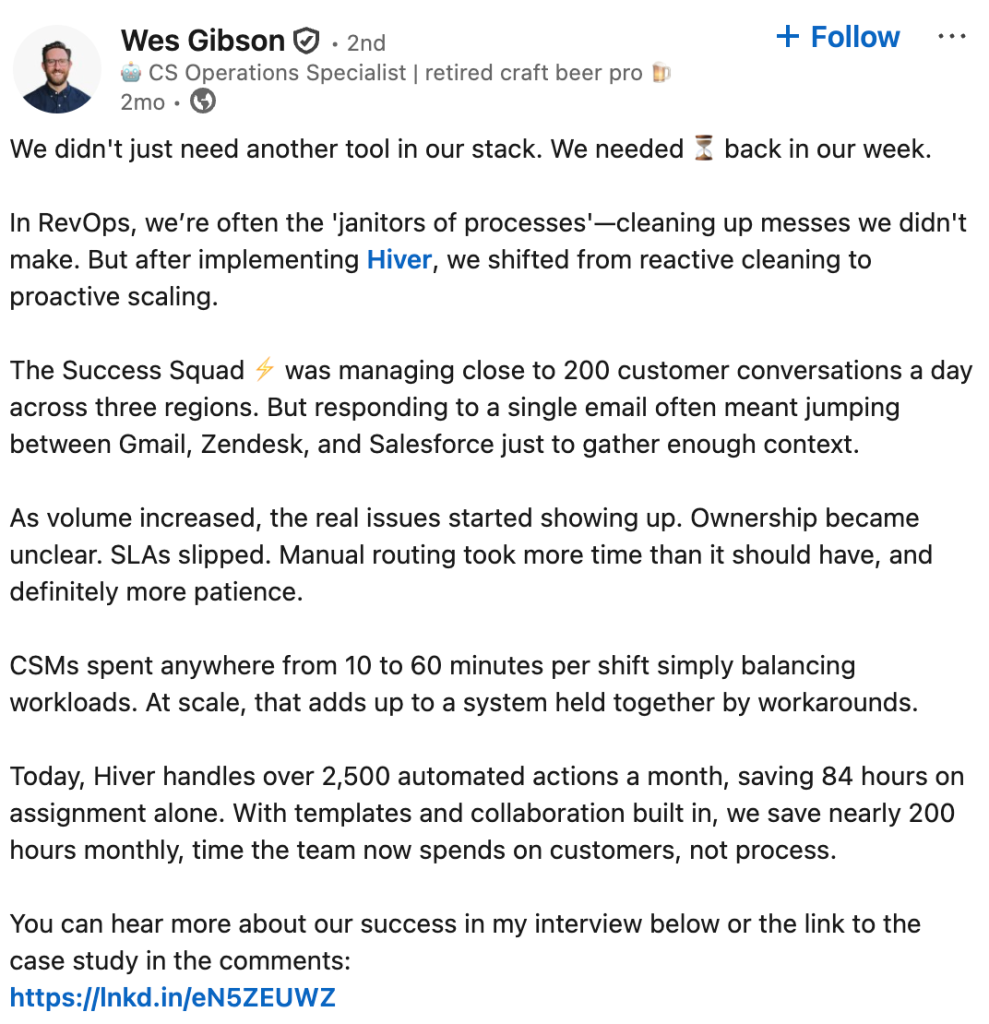
Bynder’s team was juggling Zendesk, Gmail, and Salesforce just to respond to customers- and they still lacked clear ownership and SLA visibility.
After switching to Hiver, they rolled out automated routing, SLAs, and workload views in phases—without the months of admin overhead they associated with traditional help desks—and now save 198 hours every month through automation, tagging, templates, and collaboration.
As Wes Gibson, Revenue Operations Manager at Bynder, puts it: “Zendesk worked for pure ticketing, but it never fit how my team operates. We needed a system built for relationships, not requests — and, more importantly, we needed time back in our week so the team could focus on customers, not process.”
That’s the gap Hiver fills for customer support and success teams: it delivers the structure and automation you’d expect from a CX platform, without the complexity that often comes with Zendesk or the suite lock‑in of Zoho Desk.
Here’s where Hiver stands out if you’re comparing Zendesk or Zoho Desk:
- Ease of use and implementation: Most helpdesks take months to configure before your team can do real work. Hiver gets you up and running in hours. One G2 reviewer put it best-“We switched from Zendesk, and it has been a huge improvement. What took us 3 months to set up when we started Zendesk took us about 6 hours to set up in Hiver”.
- Structured support without heavy implementation: Clear assignments, collision alerts, SLAs, and workflows help teams get organized quickly, without months of routing and permission design.
- AI embedded into everyday work: AI Copilot drafts replies, summarizes long threads, and pulls answers from internal docs. On the other hand, AI Agents auto‑classify, route, and resolve common requests on their own.
- Omnichannel without operational sprawl: Teams can manage email, live chat, WhatsApp, voice (via Aircall), and more from one unified workspace, so teams don’t have to juggle multiple tools or fragmented views. A former Zendesk user calls out the difference –“Both Freshdesk and Zendesk are very clunky—the ticketing email threads they create are completely unnecessary and confusing to customers. But sorting tickets is super easy with Hiver.”
- Custom Reporting: Built‑in dashboards track ticket volume, SLAs, CSAT, sentiment, and workload, with exports for deeper analysis. This helps teams make actionable improvements, as this user put it- “the analytics and reporting tools provide great visibility into performance and has helped my team make data-driven improvements.”
- 24×7 Support from Day One: Hiver’s customer support is available round the clock starting from the free plan. Unlike other tools, customers don’t have to upgrade to enterprise tiers just to get a human on the line. As one user who switched from Zendesk put it: “The customer service is literally the best team in software. They respond almost instantly and will happily jump on a Google Meet call with you to walk through your issue.”
If Zendesk feels like more than you need and Zoho Desk feels like it’s pulling you into a broader suite you didn’t sign up for, Hiver is worth a look.
Curious to see how it fits in with your team? Try Hiver free for 7 days.
Frequently Asked Questions
1. Are Zendesk and Zoho Desk the same?
No. Both are help desk platforms, but they serve different buyers. Zendesk is a mature enterprise CX suite built for omnichannel support at scale. Zoho Desk is part of Zoho’s broader all-in-one business platform, optimized for affordability and tight integration with other Zoho tools.
2. Is there a free alternative to Zendesk or Zoho Desk?
Yes. Zoho Desk has a free plan for up to 3 agents. Several other tools also offer free tiers — you can explore options in this overview of free helpdesk software. Hiver also offers a free trial.
3. How can I migrate from Zendesk to Zoho Desk (or vice versa)?
Both platforms support data export in standard formats. A migration typically involves exporting ticket history, contact data, and knowledge base articles, then importing them into the new platform with field mapping. For large or complex data sets, dedicated migration services and third-party tools like Help Desk Migration can handle the heavy lifting. See this guide on help desk migration for a detailed walkthrough.
4. What hidden costs should I expect with Zendesk or Zoho Desk?
With Zendesk: AI Copilot, workforce engagement management, and advanced analytics features are add-ons not included in base Suite pricing. Marketplace apps, implementation services, and partner support can add up quickly for larger deployments.
With Zoho Desk: The platform itself is affordable, but deeper analytics via Zoho Analytics, Zoho CRM integration at scale, and complex customizations using Deluge scripting may require additional Zoho licenses or development time.
5. Is Zoho Desk easy to use?
Generally, yes — particularly for smaller teams and non-technical admins. Blueprint, drag-and-drop ticket layouts, and straightforward SLA configuration are frequently praised on G2 and Capterra. Advanced reporting and complex customizations have a steeper learning curve, but day-to-day use is approachable.
6. When is the right time to switch from Zoho Desk to Zendesk?
A few signals worth watching: ticket volume growing beyond what Zoho’s reporting can surface clearly, support expanding across multiple channels that need a unified workspace, integrations with tools like Salesforce becoming critical, or compliance requirements that need enterprise-grade RBAC and audit logs. See this guide on help desk migration if you’re actively planning a move.
7. Which is better for small businesses — Zoho Desk or Zendesk?
For most small businesses, Zoho Desk is the more practical starting point. Pricing is significantly lower, the free plan covers small teams, and setup is faster. Zendesk makes more sense once you’re scaling, and the feature depth justifies the higher cost.