





Vision Helpdesk looks feature-rich at first, but cracks appear in daily use. The interface is cluttered and hard to navigate, so new agents struggle to get up to speed. Frequent bugs and lag disrupt ticket handling and slow response times.
Reporting is too limited for data-driven teams. You can’t customize filters or build detailed reports without exporting data manually. Integrations cover only a few popular tools, leaving customer data scattered across platforms.
As teams grow, managing multiple channels on Vision Helpdesk feels clunky and disconnected. When the tool itself adds friction, efficiency drops and customer satisfaction follows.
That’s why many teams are switching to better Vision Helpdesk alternatives in 2025. Here, I’ve compiled a list of the top Vision Helpdesk alternatives and competitors you can compare to find the right fit.
What is Vision Helpdesk?
Vision Helpdesk is a customer support platform designed to centralize communication across email, chat, phone, and social media into a single system. It includes ITIL-based modules to help teams handle internal IT requests. These modules let you log incidents, track recurring issues, and plan system changes with approvals.
Its satellite helpdesk feature allows businesses to manage multiple brands or departments under one account. For example, a software company can create separate portals and ticket queues for each product line while controlling everything from one backend.

Key Features
- Multi-channel ticketing across email, chat, phone, and social media
- Automation and workflow rules to speed up ticket routing and resolution
- Basic reporting to monitor agent performance and ticket trends
- Custom roles and permissions to manage team access securely
- Client billing and contract management are built into the platform
Pricing
- Starter: $12/agent/month
- Pro: $20/agent/month
- Satellite/Enterprise plans: $24/agent/month
Top 5 Reasons You Need an Alternative to Vision Helpdesk
So, what makes customer support teams look for a Vision Helpdesk alternative? Using Vision Helpdesk over time reveals problems that aren’t obvious at first. Simple actions like assigning tickets or switching views take too many steps. The platform slows down with higher ticket volumes, and reporting lacks depth. Limited integrations and slow vendor support only add to the frustration.
Here are five reasons many teams decide it’s time to switch.
- Outdated interface: The UI feels dated and cluttered, which makes even simple tasks take longer than they should.
“One of the main drawbacks of Vision Helpdesk is its complex user interface (UI), which can feel cluttered and overwhelming, especially for new users.”
- Mobile experience isn’t smooth: Reviews consistently flag issues with the mobile app being clunky and unreliable.
“The mobile app experience is not very smooth and lacks some desktop features.”
- Steep learning curve: Onboarding new agents takes time due to a complex interface and setup process.
“Users should be prepared for an initial learning curve and consider the costs involved.”
- Reporting lacks flexibility: You can view ticket counts and SLAs, but can’t drill down into agent productivity, customer feedback, or channel efficiency.
“Reporting and analytics are basic, and advanced insights require extra effort or third-party tools.”
- Weak customer support: Ironically, Vision Helpdesk’s own support team is often slow to respond when users need help.
“Email support team is a little slow to respond. I guess it’s the queue but at least you can easily contact them via Skype or online chat.”
12 Best Vision Helpdesk Alternatives to Try in 2025
I’ve compiled this list of the best Vision Helpdesk alternatives for 2025 by analyzing factors like team size, features, pricing, scalability, and support quality. Each tool directly addresses the common pain points with Vision Helpdesk, so that it is easier for you to compare options and choose the right fit for your team.
Here’s a quick overview of the top Vision Helpdesk Alternatives:
| Tool | Best For | Key Features | Starting Price | Free Trial | Customer Ratings |
|---|---|---|---|---|---|
| Hiver | Modern CX teams looking for an AI-first, easy-to-adopt help desk | AI Copilot for replies and summaries, support across email, chat, voice, WhatsApp, and advanced analytics dashboards | Offers a free plan, paid plans starts at $25/user/mo | ✅ | 4.6 ⭐ |
| Zendesk | Large enterprises that need advanced workflows and scale | Workflow automation for complex processes, AI-powered self-service, customizable analytics dashboards | $19/agent/mo | ✅ | 4.3 ⭐ |
| Freshdesk | SMBs seeking an affordable omnichannel solution | Omnichannel support (email, chat, phone, social), Freddy AI ticket suggestions, SLA, and automation rules | $15/agent/mo | ✅ | 4.4 ⭐ |
| Intercom | SaaS and product-based companies focused on conversational support | Fin AI bot for instant answers, in-app messenger, targeted product tours, and engagement messages | $29/seat/mo | ✅ | 4.5 ⭐ |
| Help Scout | Small to mid-sized teams that want a simple, email-like help desk | Email-style shared inbox with duplicate reply prevention, live chat widget, and integrated knowledge base | $50/user/mo | ✅ | 4.4 ⭐ |
| Front | Teams that need strong collaboration across departments | Team inbox for shared visibility, workflow rules for routing, customer profiles with conversation history | $25/user/mo | ✅ | 4.7 ⭐ |
| Zoho Desk | Cost-conscious teams wanting AI at a budget | Zia AI for predictions and suggestions, SLA management, native integration with Zoho CRM | $7/agent/mo | ✅ | 4.4 ⭐ |
| HappyFox | Teams balancing IT service needs with customer support | Advanced ticket categorization, asset and task management, support via email, chat, phone, and social | $24/agent/mo | ❌ | 4.5 ⭐ |
| LiveAgent | Startups and SMBs need affordable multi-channel coverage | Call center with IVR, ticketing with SLA automation, live chat widget | $15/agent/mo | ✅ | 4.5 ⭐ |
| ProProfs | Small businesses that need a help desk with a built-in knowledge base | Simple shared inbox, knowledge base integration, SLA, and ticket automation | $39.99/agent/mo | ✅ | 4.4 ⭐ |
| FreeScout | Teams that need an open-source, self-hosted help desk with an email-first workflow | Email-to-ticket inbox, modular add-ons (Knowledge Base, Live Chat), saved replies, and internal notes | NA | ✅ | 4.2 ⭐ |
| TeamSupport | B2B SaaS companies managing complex customer accounts | Customer database integration, SLA and workflow rules, customer health dashboards | $45/agent/mo | ❌ | 4.4 ⭐ |
Recommended reading
Top Service Desk Software in 2025 (+ How to Choose the Right One)
1. Hiver
Hiver is a modern AI helpdesk built for fast-moving teams. It unifies customer conversations across email, chat, voice, and more in one intuitive workspace. It’s built for speed and simplicity, helping teams collaborate easily, stay on top of SLAs, and deliver exceptional customer experiences.
Best For
Customer service, operations, and IT teams in e-commerce, SaaS, travel, and financial services that need an AI-powered helpdesk.
Key Features
- AI Copilot: Suggests replies, summarizes conversations, and prioritizes tickets based on tone and urgency.
- AI triaging: Automatically categorizes and routes tickets to the right agents or teams using intent and context.
- Knowledge base management: Lets teams easily create, organize, and update help articles to reduce repetitive queries.
- AI Sentiment analysis: Identifies customer emotion and urgency in real time, so agents can focus on the most critical issues first.
- Smart ticket routing: Assign tickets to the right experts with skill-based rules or distribute fairly using round-robin.
- Collision detection: Agents see when someone else is already replying, which prevents duplicate or conflicting responses.
- Notes and @mention: Collaborate inside tickets with @mentions and private notes, so teams can resolve issues without endless back-and-forth emails.
Pros
- Seamless integrations boost team productivity, backed by a responsive and helpful support team.
- Easy for new agents to adopt with minimal training.
- “The integrations are seamless and really enhance productivity, and the support team is always responsive and helpful.”
- “The backend setup was straightforward. The interface is easy for the end-users.”
Cons
- Mobile experience isn’t as smooth as the desktop version.
- Needs more workflow triggers and actions to cover nuanced routing scenarios.
- “The mobile experience isn’t as robust as desktop, which can be limiting for teams who are often on the go.”
- “Hiver needs more workflow actions and triggers in order to be perfect!”
Reviews are from G2
Pricing
Hiver offers a free plan that includes shared inboxes, ticketing, live chat, WhatsApp, and core collaboration tools. Paid plans start at $25/user/month and unlock advanced capabilities like multi-channel support, workflow automations, and custom roles.
Why It’s a Better Alternative to Vision Helpdesk:
Hiver is simpler, faster, and more intuitive. It delivers AI automation and actionable insights from day one. The dashboards are clean, and teams can get started quickly without a steep learning curve.
Recommended reading
2. Zendesk
Zendesk is an enterprise helpdesk platform built for large support teams. It uses AI bots and automation to handle routine queries and route complex ones to the right agents. Teams can also build a knowledge base and community forum to encourage self-service and reduce ticket load.
Best For
Enterprise teams in retail, telecom, SaaS, and finance that manage high ticket volumes and need a scalable, automated platform.
Key Features
- AI bots resolve simple customer queries automatically and prevent repetitive tickets from reaching agents.
- Automate ticket routing, escalation, and approvals to match team processes.
- Manage customer interactions across email, chat, social, and voice in one dashboard.
- Track ticket trends, agent performance, and customer satisfaction with detailed reports.
Pros
- Highly scalable for enterprise operations with high ticket volumes and complex workflows.
- Rich ecosystem of apps and integrations like Salesforce, Slack, Jira, and Shopify to extend functionality.
- “Multiple built-in[native] integrations, as well as support for third-party integrations.”
- “A reliable, all-in-one support solution that scales with your team.”
Cons
- Steep learning curve makes onboarding slow for smaller teams.
- Higher cost compared to other helpdesk alternatives Hiver, like Freshdesk, or Zoho Desk.
- “Zendesk does have a fairly steep learning curve, especially if you are intending to manage this internally.”
- “I also do not like the pricing, as you must pay it for all users in your system, even if the feature you want to use is only going to be used by 10 out of 200 users. You must still pay for all 200 users.”
Reviews are from G2
Pricing
Starts at $19/agent/month, but most teams choose Suite plans from $55/agent/month for multichannel support, automation, and AI bots. Costs rise with scale, which makes it better suited for large enterprises.
Why It’s a Better Alternative to Vision Helpdesk
Zendesk offers superior scalability, automation, and reliability compared to Vision Helpdesk. Its AI bots, advanced workflows, and deep integrations help enterprise teams handle complex operations more efficiently and deliver faster, consistent support.
Recommended reading
Hiver vs Zendesk: Which Support Platform Is Right for Your Team in 2025?
3. Freshdesk
Freshdesk is a cloud-based helpdesk platform used by over 73,000 businesses worldwide. It’s built for small and mid-sized teams that want a simple, cost-effective helpdesk to manage customer support. Its AI assistant, Freddy AI, suggests replies, detects ticket intent, and automates routine tasks. This helps agents resolve issues faster and with greater accuracy.
Best For
Support teams in SaaS, e-commerce, and services that want an easy-to-deploy, AI-powered helpdesk.
Key Features
- Customizable SLAs to set response and resolution targets based on ticket priority.
- Collision detection that prevents multiple agents from replying to the same ticket.
- Marketplace with 1,000+ apps for CRM, analytics, and collaboration.
- Enables teams to organize and monitor on-site customer visits from scheduling to completion.
Pros
- Delivers all core ticketing capabilities with strong reliability and smooth performance.
- Simple to deploy and use, especially when compared to heavier platforms like Zendesk or Salesforce Service Cloud.
- “It has all the most obvious and required features that a ticketing system needs to operate effectively, and it handles these functions cost-effectively and efficiently.”
- “I like that Freshdesk has a very user-friendly design, which makes it simple to learn and use even for non-technical staff.”
Cons
- Customer support response times are often flagged as slow.
- Mobile app lacks advanced features and feels less responsive than the desktop version.
- “Although the customer support team is helpful, responses are not always immediate.”
- “In Mobile App need to focus on more features and make it efficient and responsive.”
Reviews are from G2
Pricing
Freshdesk follows a tiered pricing model starting with a free plan that covers essentials like email and social ticketing, a knowledge base, and team collaboration. The Growth plan costs $15/agent/month and adds automation, marketplace apps, and helpdesk reporting. It also includes CSAT surveys for tracking customer satisfaction.
Why It’s a Better Alternative to Vision Helpdesk
Freshdesk has a more intuitive layout where agents can view conversations, ticket details, and customer context in one place. This reduces clicks and makes navigation faster during busy support hours. It’s Freddy AI, omnichannel support, and flexible pricing make it ideal for SMBs looking to scale support efficiently without dealing with complex configurations.
Recommended reading
12 Best Freshdesk Alternatives for 2025 (Tried, Tested and Compared)
4. Intercom
Intercom is an AI-powered omnichannel support platform built for real-time, conversational service. It uses AI automation to deliver faster, more personalized support across chat, email, and in-app channels. Its Fin AI Agent handles repetitive tasks, like routing, FAQs, and summarizing conversations, so agents can focus on high-impact customer issues.
Best For
SaaS, fintech, and e-commerce companies that rely on fast, personalized customer conversations.
Key Features
- Fin AI Agent automates conversations and can be trained by agents to use a more natural, humanlike tone.
- Fin AI Agent to handle repetitive FAQs instantly and deflect tickets before they reach agents.
- Proactive support tools, such as targeted in-app messages and banners, let you address issues before customers ask for help.
- Advanced analytics to monitor conversation volume, response times, and AI performance in real time.
Pros
- Highly intuitive interface makes it easy for agents and pleasant for customers to engage with.
- Works smoothly with popular tools across sales, marketing, and support, including Salesforce, HubSpot, Slack, and Stripe.
- “The interface of the intercom and Fin is very user-friendly and very easy to work with. I have worked with other help-desk vendors in the best, and intercom is by far the most intuitive.”
- “Its ease of integration with workflows and macros allowed us to create complex routes (e.g., KYC verification on WhatsApp) and provide quick and consistent responses to users.”
Cons
- Limited email management features compared to traditional helpdesks like Hiver or Intercom.
- Reporting can feel less flexible if you need deep, customizable analytics.
- “Although the tool is very powerful, in advanced scenarios it sometimes feels limited and we depend on Intercom support to unlock more complex configurations.”
- “A bit more customization and deeper analytics would make it even better.”
Reviews are taken from G2
Pricing
Intercom offers a free plan with basic chat and messaging. Paid plans start at $29/agent/month for the Essential tier. The Fin AI Agent costs $0.99 per resolved conversation. The add-ons like Copilot, Proactive Support, and extra channels (SMS, WhatsApp, phone) are billed separately.
Why It’s a Better Alternative to Vision Helpdesk
Intercom outperforms Vision Helpdesk with its chat-first design and advanced AI automation. It also offers proactive tools like in-app messages and targeted prompts that help prevent customer issues before they occur. Its Fin AI Agent handles routine queries and summaries, reducing agent workload instantly. A modern interface and built-in analytics help teams respond faster and personalize support as they scale.
Recommended reading
5. Help Scout
Help Scout is a simple, email-style helpdesk built for teams that value ease of use. It supports key channels like email and live chat. It also offers a built-in knowledge base and AI features that help agents collaborate and resolve tickets faster.
Best For
Support teams in SaaS, education, and e-commerce looking for a lightweight, email-based helpdesk with core automation features.
Key Features
- Use workflows and tags to automate routine actions, and saved replies to speed up manual responses.
- Use the Beacon widget to let customers start a chat, browse FAQs, and check the status of their existing requests.
- Manage inbox load with Send Later and Snooze options.
- Track performance with built-in insights on response times and trends.
Pros
- Customer profiles show past conversations and activity, giving agents full context before replying.
- Rollout takes little time, so your team can start using it within days without IT support.
- “The shared inbox keeps all client conversations organized in one place, and the HubSpot integration automatically adds context to every interaction.”
- “Helpscout was easy to setup. And to maintain the system. And as a result my customers are helped much better.”
Cons
- Offers only simple workflow automation, unlike advanced systems such as Zendesk or Freshdesk.
- Limited native integrations make it harder to connect with complex tech stacks.
- “The thin line between switching between auto and manual workflow, which can trigger 1000’s of responses to closed emails is a problem, there needs to be a dialog box warning users the result of action while setting up a workflow.”
- “Helpscout is not the most extensive product. It feels like some reports are limited in the drilldown capacities.”
Reviews are taken from G2
Pricing
Help Scout offers a free plan for up to 100 contacts with unlimited users and core AI features. Paid plans start at $50/user/month (Standard), adding multiple inboxes, reporting, surveys, and integrations.
Why It’s a Better Alternative to Vision Helpdesk
Help Scout rolls out quickly and is easier to use compared to Vision Helpdesk. It’s simple, collaborative, and ideal for small teams that want an easy-to-manage helpdesk.
Recommended reading
11 Best Help Scout Alternatives (2025): Honest Picks, Pricing & Trade-Offs
6. Front
Front is built for teams that need customer support to feel collaborative rather than siloed. Beyond a shared inbox, agents can tag colleagues, add internal notes, and manage workflows together in real time. There are automations, and AI features to help agents work together, stay organized, and deliver faster responses.
Best For
Customer-facing teams in SaaS, logistics, travel, and professional services that need a collaborative helpdesk with real-time teamwork, automation, and omnichannel support.
Key Features
- Shared drafts help multiple teammates to co-author replies in real time before sending.
- The analytics dashboard tracks team performance, SLA adherence, and customer response trends.
- Connects with CRMs and productivity tools like HubSpot, Asana, and Google Calendar for instant context while replying to customers.
- Custom workflows enable you to automate assignments, escalations, and follow-ups tailored to your processes.
Pros
- Shared drafts and @mentions let agents resolve tickets together without switching tools.
- Customer timelines give a full history of past conversations, which can help you draft contextual responses.
- “The collaboration tools let us work together seamlessly, assign conversations to the right team members based on expertise, and maintain consistency in our customer support responses.”
- “It allows me to quickly respond to clients, keep track of conversations, and collaborate with my team without losing context.”
Cons
- Advanced integrations and automation features are limited to higher-tier plans.
- The new interface can feel cluttered at first.
- “One thing I dislike about Front is that some advanced features—like certain integrations or automation capabilities—can be a bit restrictive or require higher-tier plans.”
- “I don’t really like the new interface, so I use the old one. The new interface feels overwhelming.”
Reviews are taken from G2
Pricing
Front’s Starter plan begins at $25/seat/month for up to 10 users. It includes shared inboxes, basic collaboration, and essential automation features to help small teams get started quickly.
Why It’s a Better Alternative to Vision Helpdesk
Front offers a faster, more collaborative experience than Vision Helpdesk. It eliminates silos with shared drafts, real-time collaboration, and seamless integrations. CX teams get a flexible, AI-powered platform to manage customer conversations across every channel.
Recommended reading
7. Zoho Desk
Zoho Desk is a budget-friendly Vision Helpdesk alternative trusted by 100,000+ companies worldwide. It’s built for teams that want AI without the enterprise price tag. Its Zia AI assistant auto-tags tickets, suggests responses, and detects customer sentiment so agents can prioritize urgent or high-impact issues quickly.
Best For
SMBs and mid-sized teams in IT, retail, SaaS, and customer service that need a cost-effective, omnichannel helpdesk with AI features and CRM integration.
Key Features
- Set custom SLAs to define response and resolution times for different ticket types or customer tiers.
- Multi-department setup so each team (sales, support, IT) can manage tickets with their own workflows.
- Self-service portals that let customers track tickets, access FAQs, and submit requests directly.
- Marketplace with 500+ integrations, including Slack, Salesforce, and Microsoft Teams.
Pros
- Seamless integration with Zoho CRM for full customer context.
- Automates repetitive workflows like routing and escalations, helping agents resolve tickets faster.
- “It feels like every part of the business is finally speaking the same language, and the automation features, like ticket routing in Zoho Desk and lead nurturing in Zoho CRM.”
- “Automations assign and prioritize tickets by SLA/topic, reducing manual triage and speeding up responses.”
Cons
- Steeper learning curve for non-Zoho users due to complex setup.
- Limited customization in dashboards and reports.
- “At the beginning, the learning curve is a bit steep because it has many configuration options.”
- “I did find that integrating it with some third-party tools required more customization than expected, and when we ran into issues, Zoho’s own customer support was not always as responsive or timely as we needed.”
Reviews are from G2
Pricing
Zoho Desk offers a free tier with up to 3 agents, making it easy to start small without cost. Paid plans start from $7/agent/month and increase depending on the level of features you need.
Why It’s a Better Alternative to Vision Helpdesk
Zoho Desk delivers strong AI capabilities and a smoother omnichannel experience than Vision Helpdesk. With Zia AI, flexible automation, and native CRM integration, it helps growing teams improve efficiency and scale without high costs or complex setup.
Recommended reading
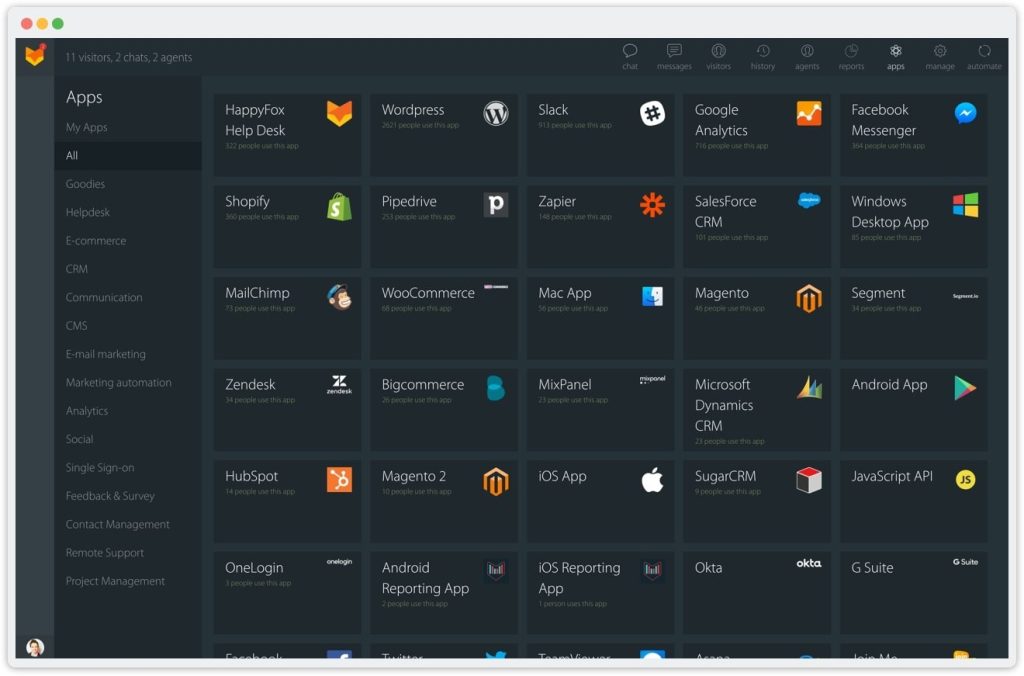
8. HappyFox
HappyFox combines IT service management and customer support in one unified platform. It lets teams manage tickets, track assets, and automate workflows without switching tools. That makes it ideal for organizations supporting both customers and employees. Its AI-driven sentiment analysis and smart search help agents detect urgent issues and surface relevant information quickly.
Best For
IT, operations, and support teams in enterprises, education, and MSPs that need one platform for internal and external support.
Key Features
- Canned actions let agents apply multiple updates (status, priority, assignee) to a ticket in one click.
- Ticket templates save time by pre-filling common fields for recurring issues. This includes password resets, access requests, or hardware replacements.
- Community forums give customers a space to ask questions and share solutions with each other.
- Manage support for multiple brands or product lines in one account, with dedicated email addresses, portals, and ticket queues for each.
Pros
- Clean, organized UI makes it easier for agents to manage high ticket volumes without getting overwhelmed.
- Strong performance and stability, even with large datasets, make it reliable for enterprise use.
- “The ease of use is on par with industry standards, and the customization is a bonus that combines every aspect of Tier 1 through Tier 3 service in a user-friendly interface.”
- “It looks and performs well, is easy for our organization to use, and has the features we needed.”
Cons
- Pricing is higher than that of many SMB-focused tools, with no free plan available.
- Reports can be confusing to navigate.
- “HappyFox can be expensive, especially for small businesses or startups. The pricing is based on a per-agent model, which can add up quickly as a business grows.”
- “The reports may be confusing, and some of its features require a higher tier.”
Reviews are from G2
Pricing
HappyFox’s Basic plan starts at $24/agent/month for up to five agents. It includes unlimited tickets, SLA management, a built-in knowledge base, and single sign-on (SSO).
Why It’s a Better Alternative to Vision Helpdesk
HappyFox offers a cleaner interface, faster performance, and deeper analytics than Vision Helpdesk. It reduces clutter, performs reliably, and delivers strong ITSM features — making it a better fit for teams that handle both customer and internal support in one place.
Recommended reading
9. LiveAgent
LiveAgent gives you a helpdesk that handles everything from live chat and email to phone, social media, and a built-in call center. Its AI features, like a chatbot and answer assistant, lighten the load by handling simple queries before they reach your team.
With features like agent collision detection, audit logs, and time tracking, LiveAgent ensures every request is managed efficiently and transparently.
Best For
Startups and SMBs in e-commerce, SaaS, and hospitality that want an affordable, all-in-one helpdesk to manage customer communication across multiple channels.

Key Features
- Ticket merging lets agents combine duplicate requests into one thread for easier handling.
- Gamification tools (badges, leaderboards, rewards) motivate agents and boost productivity.
- Customer portal where users can track ticket status, browse FAQs, and submit requests.
- Manage all customer interactions, like email, chat, and calls, in one organized view.
Pros
- Affordable entry-level pricing makes it accessible for startups and small teams.
- 24/7 support is available on all paid plans, giving teams consistent help when issues arise.
- “Time and cost efficiency – since we manage everything ourselves, we don’t need external support or integration services, which saves us both time and money.”
- “Live agent is tool which can provide support to our customer of our organization 24/7 hours and it also take records of our customer information in the form support tikcet which are creating by liveagent when they are interacting with each other.”
Cons
- Interface feels outdated compared to newer, AI-first tools like Hiver or Intercom.
- Some features require complex setup and support assistance.
- “I found the interface a bit complex, good at first, and will take some time to get familiar with it. Although LiveAgent offers customization options.”
- “LiveAgent’s functionality requires multiple levels of customization, some of which are difficult and require the support of their team to implement correctly.”
Reviews are from G2
Pricing
LiveAgent starts at $15/agent/month for the Small plan. This includes email ticketing, live chat, a knowledge base, a customer portal, and basic AI tools like the AI Answer Assistant and Chatbot. The Medium and Large tiers add call center support, proactive chat, advanced reporting, and more integrations. Every plan comes with a 30-day free trial.
Why It’s a Better Alternative to Vision Helpdesk
LiveAgent offers a more unified and responsive experience than Vision Helpdesk. Its real-time omnichannel setup, built-in call center, and AI-assisted automation make it a stronger choice for growing teams.
Recommended reading
10. ProProfs Help Desk
ProProfs stands out for its built-in knowledge base that works seamlessly with its help desk. Customers can find answers on their own, which cuts down ticket volume and frees agents to focus on complex issues. On top of that, you still get essentials like a shared inbox for email and chat, ticket automation, and AI suggestions for faster replies.
Best For
Small businesses and startups in education, SaaS, and professional services that need a helpdesk with strong self-service capabilities and quick deployment.

Key Features
- Canned responses let agents reply to common questions instantly without rewriting.
- Ticket prioritization automatically triages tickets by urgency so the right issues get attention first.
- Team performance reports highlight metrics like first response time and ticket resolution trends.
- Customer satisfaction surveys (CSAT and NPS) can be sent directly after support interactions.
Pros
- Simple and intuitive interface that lowers training overhead.
- Combines key features like chatbots, prioritization, internal notes, and automation for smooth operations.
- “What really became a highlight for us with this product is its Gmail like interface.”
- “ProProfs Help Desk offers great features such as chatbots, ticket prioritization, shared inboxes, internal notes, reports, automated ticket assignment, and much more.”
Cons
- Pricing is separate from other ProProfs products, which makes it expensive
- Limited integrations with external tools.
- “It has a separate pricing from the rest of the ProProfs products which although amazing caused it to be a not expensive as there had been no package proving provided to me.”
- “I am not much impressed with their integration options to third-party tools.”
Reviews are from G2
Pricing
ProProfs offers a Forever Free plan for one user. Teams with 2+ users move to the Team plan at $39.99/user/month (annual billing), which includes unlimited tickets, multiple inboxes and departments, SSO, and reporting. For 5+ users or enterprise needs, pricing is available on request.
Why It’s a Better Alternative to Vision Helpdesk
ProProfs offers a cleaner interface, faster setup, and stronger self-service tools than Vision Helpdesk. Its integrated knowledge base and AI-powered suggestions make it ideal for smaller teams that want an affordable, easy-to-manage helpdesk without unnecessary complexity.
Recommended reading
11. FreeScout
While researching Vision Helpdesk alternatives, I noticed many users prefer open-source tools instead of cloud-based solutions. In fact, in one Reddit thread, a user asked for
… an opensource alternative to Vision Helpdesk or something that would allow user to raise tickets , check their own ticket updates
If you’re looking for the same flexibility, FreeScout is a solid choice. It’s an open-source help desk you can host on your own server. Setup takes some technical effort, but once configured, it runs reliably.
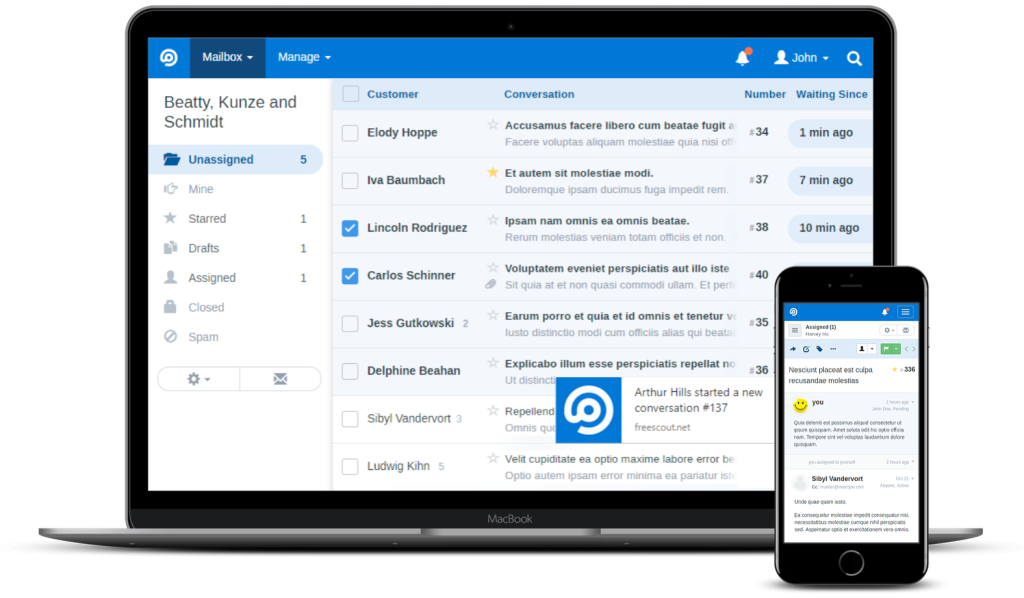
FreeScout provides a clean, email-style inbox where messages turn into trackable tickets. With tags, saved replies, and automation rules, teams can manage support efficiently without relying on the cloud.
Best For
IT teams, startups, and privacy-conscious organizations that prefer a self-hosted, customizable helpdesk with no per-agent fees and complete data ownership.
Key Features
- Turns incoming emails into trackable tickets with assignees, priorities, SLA timers, and shared mailbox queues.
- Add-on modules for core helpdesk needs like Knowledge Base, Live Chat, Custom Fields, and Time Tracking.
- Agent workflow features to speed resolution, including saved replies, tags, internal notes, ticket merge, and bulk actions.
- Self-hosted platform with a REST API and webhooks so you can integrate with CRM/BI tools and keep full data control.
Pros
- Full data control with no per-agent licensing, keeping costs predictable as you scale.
- Open-source and highly customizable, so workflows and UI can be tailored precisely.
- “We tried other solutions but this one is the best for one reason: you are in charge of your data and application.”
- “I love that Freescout is open source, paid modules are optional, and you can pick and choose what you want to implement.”
Cons
- Requires self-hosting and ongoing maintenance (server updates, security, backups).
- Some key features, like knowledge base, are still in development.
- “Had to pay extra for necessary features, had no support behind it, and was tricky to set up and then move to another server, which was a must for me.”
- “Freescout is in constant progress and some features are missing like a knowledge base or API but they are listening and those are in the roadmap.”
Reviews are from Capterra
Pricing
FreeScout is free to download and self-host (AGPL). There are no per-agent fees. Your only costs are hosting and any optional modules you choose (e.g., Knowledge Base, Live Chat, Custom Fields, Time Tracking).
Why It’s a Better Alternative to Vision Helpdesk
FreeScout offers simplicity, flexibility, and complete control — something Vision Helpdesk can’t match. It eliminates recurring licensing costs, gives teams ownership of their data, and allows full customization without the clutter or complexity of traditional enterprise systems.
Recommended reading
How to Ace Your Social Media Customer Service Strategy in 2025
12. TeamSupport
Last but not the least, TeamSupport is purpose-built for B2B support. It gives agents a complete view of every contact, contract, SLA, and past interaction, making it easier to resolve multi-contact and multi-product issues.
Its product tracking feature links tickets to specific product versions or assets, helping teams identify recurring defects or version-related issues. Customer health monitoring highlights churn risks such as unresolved issues or low engagement, prompting timely follow-ups.
Best For
B2B teams in SaaS, manufacturing, and tech that need deep visibility into customer accounts and product issues.
Key Features
- Customer Hub, where customers submit tickets, check status, and use your knowledge base.
- Organize customers by parent and subsidiary accounts, with permissions aligned to each level.
- Native Salesforce and Jira sync for account context and engineering updates.
- Automatically assigns tickets by account or product and alerts the right team.
Pros
- Account-level view helps resolve B2B issues faster for key customers.
- Flexible platform backed by a team that’s open to suggestions and quick to help.
- “TeamSupport creates powerful internal visibility, which brings customer success and other communication contexts.”
- “The product itself is very customizable and the team is always receptive to helping us with needed.”
Cons
- Mobile performance needs improvement.
- Costs add up fast since AI features are limited to 5 users in the base plan. You’ll need to buy add-ons for more agents.
- “We have reported mobile performance problems with TeamSupport, which is something we need some update.”
- “At this time, my only cons are the costs, I think some of the items like AI should be included. Overall it is hard to complain about the product.”
Reviews are from G2
Pricing
TeamSupport’s Starter plan is $45/agent/month and covers core ticketing, a customer portal, a knowledge base, and SLAs. The Pro tier layers in account-level context, product tracking, deeper automation, and broader integrations.
Why It’s a Better Alternative to Vision Helpdesk
TeamSupport goes beyond ticket management with account-level visibility, product tracking, and customer health monitoring. It’s built specifically for B2B organizations, offering the structure and depth that Vision Helpdesk lacks for managing enterprise relationships and cross-functional collaboration.
Recommended reading
AI vs Human in Customer Service: 50% Support Professionals Support AI-Human Collaboration
How to Choose the Best Alternative to Vision Helpdesk
Start with what will move the needle: workflows, customer expectations, and the ability to scale without friction. The right platform should fit how your team works today and where you need to be in 12 months. Here’s a checklist CX leaders can actually use:

1. Does it integrate with your stack?
Choose Hiver if you want an AI-first help desk that plugs into Slack, Salesforce, Jira, WhatsApp, and telephony with minimal setup. Pick Zendesk for the broadest marketplace and enterprise-grade connectors. Go with Intercom if you need in-app messaging, event-driven workflows, and a trainable AI agent tied to your product.
2. Can new agents adopt it quickly?
Choose Hiver for a near-zero learning curve; most teams can be up and running in under an hour. Pick Help Scout if you want an email-like interface that feels familiar on day one.
3. Does it offer AI and automation that remove manual work?
Pick Hiver for AI drafting, summaries, and auto-tagging that cut handling time. Choose Intercom for a trainable AI agent that automates conversational answers at scale. Go for Zendesk if you need deep, rules-based routing and complex workflow automation.
4. Will it scale with volume and channels?
Choose Zendesk for high ticket volumes and multi-team enterprise scale. Pick Freshdesk for mid-market growth across email, chat, phone, and social without heavy overhead. Go TeamSupport if you manage B2B accounts with contracts, SLAs, and product-linked issues.
5. Is vendor support reliable with clear SLAs?
Choose Hiver for 24/7 responsive support and quick issue resolution. Pick Front if you want hands-on guidance during onboarding and continued support as your team scales. Go with HappyFox if you need consistent, round-the-clock assistance across both IT and CX operations.
6. Have you priced the real cost, including add-ons and growth?
Start with Hiver if you want a forever-free plan to prove value before scaling. Choose LiveAgent for straightforward, budget-friendly tiers. Model Intercom carefully, since AI usage is billed per resolution on top of seats.
Level Up Your CX with the Best Vision Helpdesk Alternatives
If your helpdesk slows agents, frustrates customers, or hides the data you need, it is time to move. Choose a Vision Helpdesk alternative that matches your channels, fits your workflows, and plugs into your stack. Define what you want AI to achieve, like reducing resolution time or improving CSAT, then run a short pilot. Use those insights to decide whether the new platform truly drives better performance.
If you want a strong default, choose Hiver. It is AI-first, fast to adopt, and built to keep agents moving. Smart routing, SLA alerts, and reminders run in the background. Reports surface bottlenecks before customers feel the impact. And with Hiver’s forever-free plan, you can see the results firsthand, then scale confidently when you’re ready. Start with Hiver’s free trial.
FAQs
1. What are the best Vision Helpdesk alternatives in 2025?
Hiver, Zendesk, Freshdesk, Intercom, Help Scout, Front, Zoho Desk, HappyFox, LiveAgent, ProProfs, FreeScout, and TeamSupport. Shortlist two based on your channels, AI goals, and integrations.
2. Which Vision Helpdesk alternative is easiest to adopt with minimal training?
Hiver and Help Scout. Both have simple UIs and fast setup; Hiver often goes live in under an hour.
3. Which option delivers the strongest AI automation without heavy setup?
Hiver for agent assist, routing, and sentiment. Intercom for a trainable conversational bot. Zendesk for deep rules and complex workflows.
4. How do we migrate from Vision Helpdesk without losing data?
Export tickets, contacts, custom fields, and your knowledge base. Map fields in the new tool, recreate SLAs and automations, run a short dual-run, then cut over.
5. Are there open-source Vision Helpdesk alternatives?
Yes. FreeScout and Zammad give you full data control and customization. The trade-off is hosting, updates, and ongoing maintenance.
Start using Hiver today
- Collaborate with ease
- Manage high email volume
- Leverage AI for stellar service













