Skip to content





The biggest problem with email management is procrastination. We keep deferring emails to a point where we no longer know where to start, and gradually lose control of our inboxes. This is where structured frameworks like the 4 D’s of email management become useful.It has been designed by Microsoft to help you quickly decide what to do with an email and how to organize your inbox.
Table of Contents
- So, what are the 4 D’s in email management?
- Advantages of the 4D method for managing emails
- How to use the 4 D’s of email management
- Wrapping up: make it a habit, not a one-time exercise
- Frequently Asked Questions
So, what are the 4 D’s in email management?
According to the 4D model, every time an email arrives in your inbox, you can do one of the following:
- Delete it
- Do it
- Delegate it
- Defer it
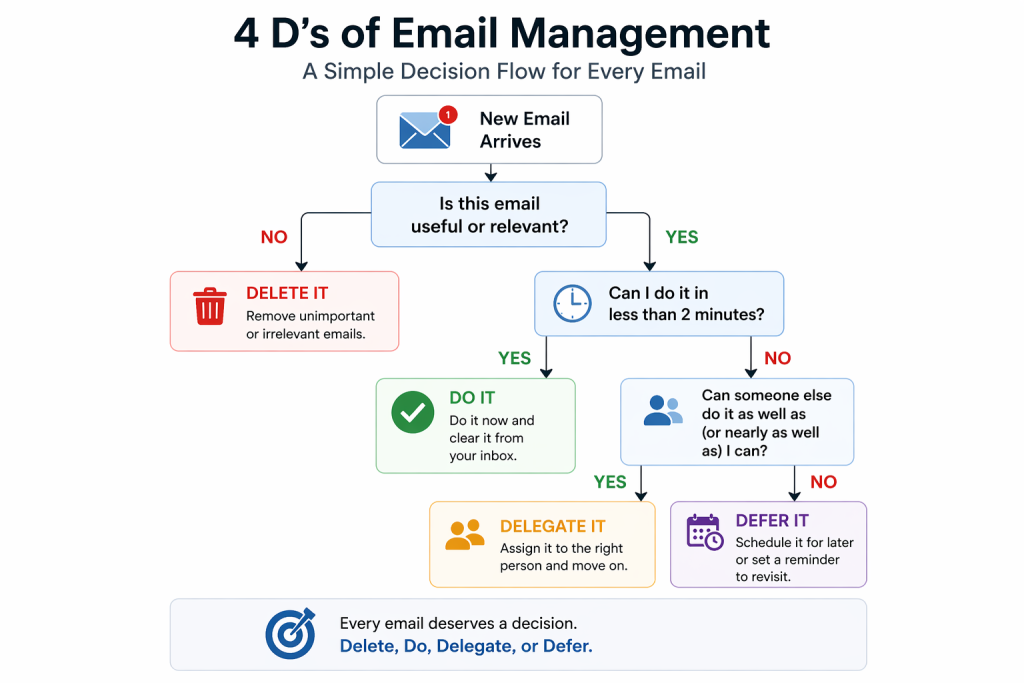
These four simple actions form the foundation of not just email productivity, but also broader task management that some tools pick up while building their workflows.
Let’s dive in.
Delete it
Practically speaking, 50 % of emails you receive can be deleted the moment you see them.
So why don’t we do it? Mostly we worry we might need that information later.
But ask yourself: what percentage of the emails you keep actually become useful?
If your answer is “a lot,” you’re probably being intentional. For most people, though, the reality is different, we keep far more than we ever use.
To decide what to delete, use a simple filter:
- Is this directly relevant to my work or responsibilities?
If not, delete it. There’s no value in storing information unrelated to your focus. - Can I easily find this information elsewhere?
If yes, delete it. There’s no need to store something you can quickly look up again. - Will I realistically need this within the next six months?
If not, delete it. Information loses relevance quickly, and most emails won’t age well. - Does this information belong in a more structured place (e.g., a document, CRM, or project tool)?
If yes, move it there and then delete the email. Your inbox shouldn’t be your long-term storage system.
The goal isn’t to keep everything “just in case,” but to keep only what is truly useful and actionable.
Do it
When a task arrives in your inbox and it’s both important and something only you can do, it’s often best to handle it immediately.
That said, context matters, if doing it right away would significantly interrupt focused work, it may be better to defer it.
A useful guideline here is the 2-minute rule: if a task takes less than two minutes, do it immediately. If it takes longer, add it to your to-do list.
The reasoning is simple, small tasks are faster to complete than to track, prioritize, and revisit later. And you might be surprised how many emails fall into this category. Some studies suggest that up to one-third of emails can be handled in under two minutes.
Common examples include:
- FYI or memo emails – Often require no action. You can quickly read, understand, and archive or label them if needed.
- Promotional emails – If you’re interested, you can sign up or save the resource right away. If not, delete them.
- Reminder emails – A quick status check and short reply (e.g., “I’ll have this ready by the end of the week”) usually takes less than two minutes.
- Invitation emails – Accepting or declining takes seconds and shouldn’t be postponed.
The goal is to clear quick tasks immediately, so your inbox doesn’t become a backlog of small, unnecessary decisions, even if you manage multiple at once.
Delegate it
If an email isn’t something you can delete or handle immediately, the next question is: can someone else take care of it?
Delegation not only helps clear your inbox faster but also frees up your time to focus on higher-impact work. Many people hesitate to delegate, worrying it might affect quality but that’s not always a valid concern.
A useful guideline here is the 70% rule: if someone on your team can do the task at least 70% as well as you can, it’s worth delegating.
Here are the types of emails you should consider delegating:
- Small, repetitive tasks – These may seem minor individually, but they add up and interrupt your workflow. For example, scheduling calls or following up on routine requests.
- Tasks outside your expertise – If completing something would require you to spend significant time learning, it’s more efficient to pass it to someone already skilled in that area.
- Tasks that can be broken into clear steps – Even if something feels complex, if you can define a process and review the outcome, it can be delegated effectively.
- Tasks that don’t match your strengths – If you consistently take longer or struggle with a certain type of work (e.g., creating presentations), it’s a strong signal that someone else could handle it better.
Apart from that, delegation is part of a broader productivity approach often called the 4 D’s: Delete, Do, Delegate, Defer, a simple system for managing not just emails, but work in general.
To make delegation seamless, you can use a shared inbox where emails can be assigned, tracked, and managed without forwarding or cluttering threads.

For example, tools like Hiver let you assign emails to teammates in just a couple of clicks and keep visibility on progress making delegation feel less like handoff and more like collaboration.
Defer it
When you cannot delete it, or finish it in two minutes, or delegate it, it essentially means:
- The email requires you to perform a certain action
- The action would take more than two minutes
- You’re the only person who can do it
These are tasks that will require you to work with focused attention. Set a reminder for yourself to revisit the task after you’re done processing email or at a later time.
Deferring a non-urgent task takes away the pressure of doing it right away, and lets you target your important tasks first.
Interestingly, when you start following the 4D model properly, you’ll realize that only 10% of emails would fall into this category.
The easiest way to remind yourself of the emails is obviously with some email management tools.
Advantages of the 4D method for managing emails
Adopting the 4D method for email management can simplify how you handle your inbox, making your workflow more efficient and stress-free. Here are some key benefits you can expect:
Increased productivity
The 4D method helps prioritize and categorize emails effectively, allowing you to focus on what’s important without getting overwhelmed by the sheer volume of emails in your inbox. For example, quickly deleting spam or unimportant messages reduces clutter, making it easier for you to focus on emails that matter.
Reduced stress
By having a clear strategy for managing emails, you can reduce the anxiety that comes with an overflowing inbox. A rule of thumb to stick to this method is to remember that every email has a designated action: Do, Delete, Delegate, or Defer.
Better time management
The 4D method encourages you to tackle emails that can be dealt with immediately while deferring those that require more time. This approach ensures you’re not wasting time on less important emails.
Enhanced collaboration
Delegating emails to team members when necessary fosters better teamwork and ensures tasks are handled by the appropriate person. This not only lightens your load but also empowers your team to take ownership of relevant tasks.
Recommended reading
19 AI email management tools that actually save you time in 2026 + link
Improved decision making
Having a structured method for categorizing and addressing emails enables quicker and more informed decision-making. By deferring emails that need more thought and acting swiftly on those that don’t, you become more efficient and responsive.
How to use the 4 D’s of email management
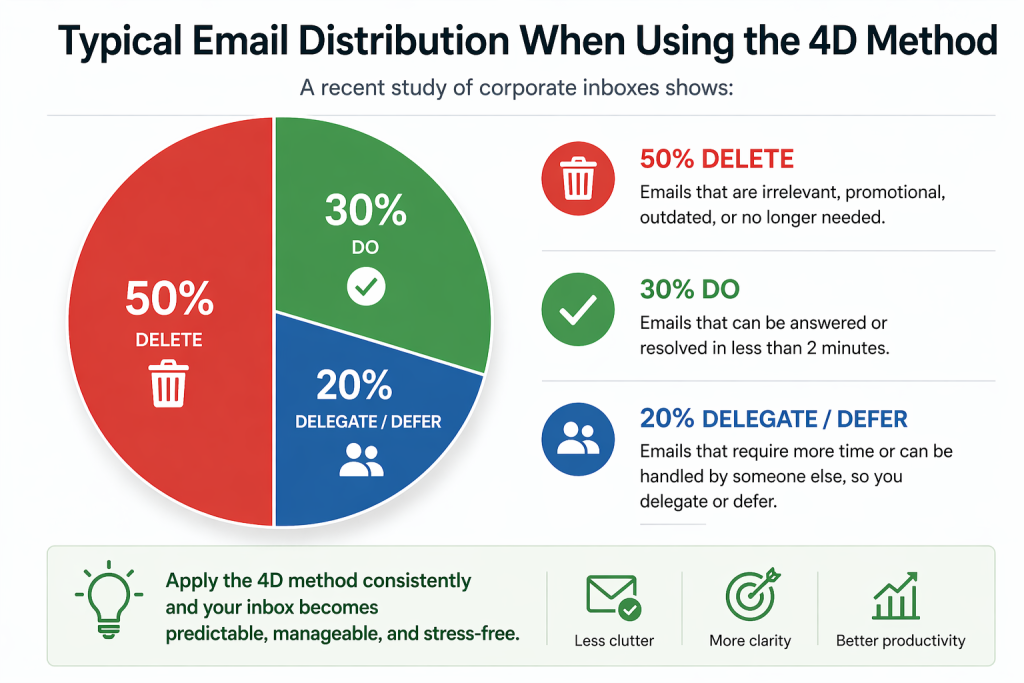
A method from David Allen’s “Getting Things Done” (GTD) productivity system says that most corporate email inboxes follow a similar trend:
- 50 percent of emails can be deleted (or filed) instantly
- 30 percent can be dealt with in less than two minutes each
- 20 percent can be delegated or deferred
In practice, say you have four emails in your inbox:
- Answer a cold email
- Schedule a meeting with James
- The SEO for a landing page is broken
- CEO wants updated marketing numbers
Let’s see which D applies to each email.
- Answering a cold email – You see a cold email from an unknown author who wants to contribute a guest post to your blog. This is your Delete task.
- Schedule a meeting with James – You’d rather focus on the important tasks first and then get to figuring out which day and time makes sense to catch up with James. This is your Defer task.
- The SEO for a landing page is broken – You’d want to send this to the digital marketing guy on your team or at the SEO and backlink services agency. This is your Delegate task.
- Update marketing numbers – This is a pressing task and can be done only by you. Updating an excel takes a minute. This is your Do task.
Wrapping up: make it a habit, not a one-time exercise
If you really want to handle large amounts of emails well, make this a habit and not a one-time exercise.
Set up a time when you sit and process emails every day. You’ll gradually start freeing up more time for important tasks.
In our experience, once you consistently apply the 4 D’s of email management, your inbox becomes far more predictable and manageable.
Frequently Asked Questions
1. What are the 4 parts of an email?
To apply the 4D model faster, it helps to understand the basic structure of an email: subject line, greeting, body, and call-to-action. The call-to-action in particular helps you quickly decide which “D” applies.
2. What are the 5 D’s of email management?
While the 4D model is the most widely used, some variations expand it into the 5 D’s of email management by adding a fifth step such as “Document” or “Drop.”
This typically refers to either archiving important emails for future reference or consciously ignoring emails that don’t require action. However, for most workflows, the 4 D’s remain the simplest and most effective approach.