


Every support team has a rule set. Usually it starts small — route emails with the word refund in the subject to billing, close tickets tagged resolved after 48 hours, send a CSAT survey when a conversation closes. It works. It scales. And then, gradually, it doesn’t.
A customer emails about a delayed order. The subject line says ‘Order update’. Your rule routes it to logistics. But the body of the email says this is the third time they’ve contacted support this week, they’re escalating to their VP on Friday, and they want a call, not another email chain.
The rule saw Order update. It had no idea what the email actually said. The ticket lands in the wrong queue, gets picked up by a junior agent, and the escalation happens anyway.

The gap between what a rule reads and what the conversation means — this is where most support automation breaks down.
That gap — between what the rule saw and what the conversation meant — is what this article is about. Not an argument against rules but a clear case for understanding where they stop, and what fills the space they leave.
What rule-based automation does well, and where it stops
Rule-based automation is reliable, auditable, and fast to configure. For high-volume, predictable scenarios, it’s exactly the right tool. Password resets always route the same way. Thank-you replies always get closed. Invoice requests in a standard format always hit the billing queue.
Rules don’t hallucinate. They do precisely what they’re told.
The problem is that most customer conversations aren’t predictable. A billing dispute arrives as a quick question about an invoice. A churn risk arrives as just checking in on something. An urgent escalation arrives with a friendly subject line and a very unfriendly third paragraph. The rule sees the surface. It misses everything underneath.
And the maintenance overhead compounds this. Every new query type needs a new rule until the rule set grows into a system nobody fully understands, and nobody wants to touch.
What intent-based AI does differently
The shift is from “does this conversation match a condition I defined” to “what is this conversation about, and what does it need?” In Hiver, that shift happens across four capability layers, each one handling a different part of what rules miss.
Triage: AI Categorisation and Sentiment Analysis
When a conversation arrives, Hiver’s AI reads it — the whole conversation, not just the subject line — and categorises it by topic, tone, intent, and urgency. A billing dispute labelled as a quick question gets routed to billing. An email that’s technically about a product feature but written with mounting frustration gets flagged for priority handling before an agent opens it.
This isn’t a fixed category list an admin maintains. The AI learns from past conversations and improves as it processes more. When a new query type appears (such as questions about a new product change) it gets categorised correctly without anyone updating the rule set.
Once categorised, the downstream consequences follow automatically: assigned to the right agent, correct SLA applied, escalated to a manager if the urgency threshold is met. The categorisation is the trigger. Everything after it is automated.
AI Sentiment Analysis runs in parallel, detecting emotional tone and surfacing frustrated or at-risk conversations before they escalate. A support lead can configure the system to route any negative-sentiment conversation directly to a senior agent, without writing a single rule about what frustrated looks like in keyword terms.
Extract and Act: AI Tasks
Customer emails rarely arrive in clean formats. An order ID is buried in paragraph three. A refund amount is mentioned in passing. Rule-based automation can’t act on any of this — it can only match on structured fields.
AI Tasks closes this gap, but the real capability is broader than extraction. AI Tasks lets you insert an AI block into any automation. The AI block reads the conversation, understands what it contains, and triggers the appropriate action. That block can do four different things:
- Triage — detect urgency, classify intent, identify feature requests
- Extract — pull order IDs, invoice numbers, and dates from free text
- Summarise — generate escalation summaries, account health reports, handoff briefs
- Suggest — recommend next steps, draft replies, surface relevant SOPs
A practical example: a customer service rep picks up an order status email. AI Tasks extracts the order ID, surfaces the order details from Netsuite alongside the conversation, and triggers the relevant workflow — updating the ERP, sending the customer an automated status update, or flagging the order for manual review. The agent didn’t manually copy a reference number into another system. The AI read the email and acted on it.

Intent-based automation — the AI reads what the conversation means, not what keywords it contains.
Going further: AI Agents
For conversations that don’t need human judgment at all, AI Agents resolve them end-to-end. Connected to your knowledge base, SOPs, and uploaded documentation, the AI Agent understands the customer’s question and responds with an actual answer. When a conversation needs human input, it hands off with full context preserved. For support teams exploring this shift, understanding how to build an AI agent from the ground up can help clarify the design decisions behind systems like these particularly around knowledge integration and handoff logic.
For support teams where 50–60% of volume is password resets, tool FAQs, and access queries, this isn’t a marginal efficiency gain. It’s a different operating model.
How the four types of queries compare
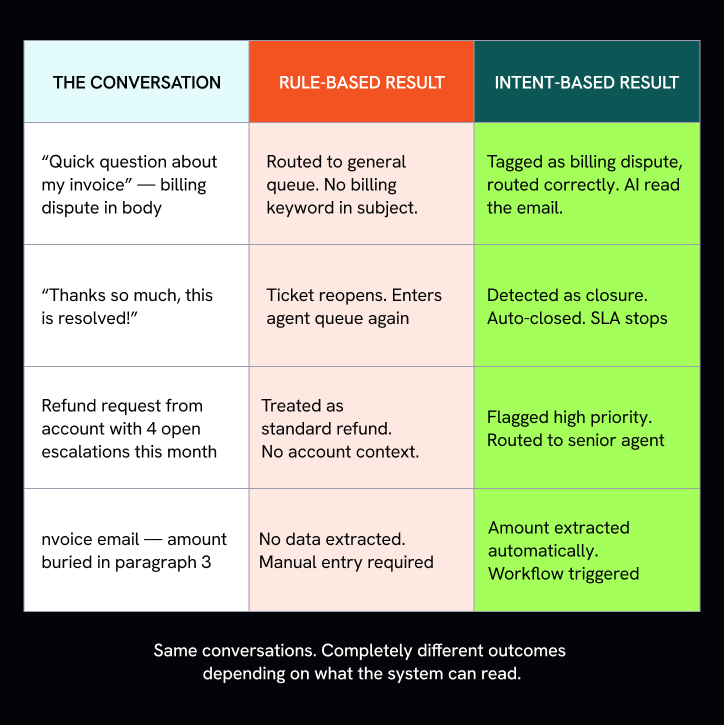
Same conversations. Completely different outcomes depending on what the system can read.
Rules or Intent: Where to use each
This isn’t a binary choice. Rules still earn their place for scenarios that are always the same such as auto-closing thank-you replies, triggering SLA timers on ticket creation, routing emails that always arrive in a structured format. If the condition never changes and the action never changes, a rule is the right tool.
Intent-based AI earns its place everywhere else; which, in most support operations, is most of the work. The transition doesn’t require replacing existing rules. It requires adding an intent layer on top, so what your rules handle cleanly stays handled, and what they miss gets caught.
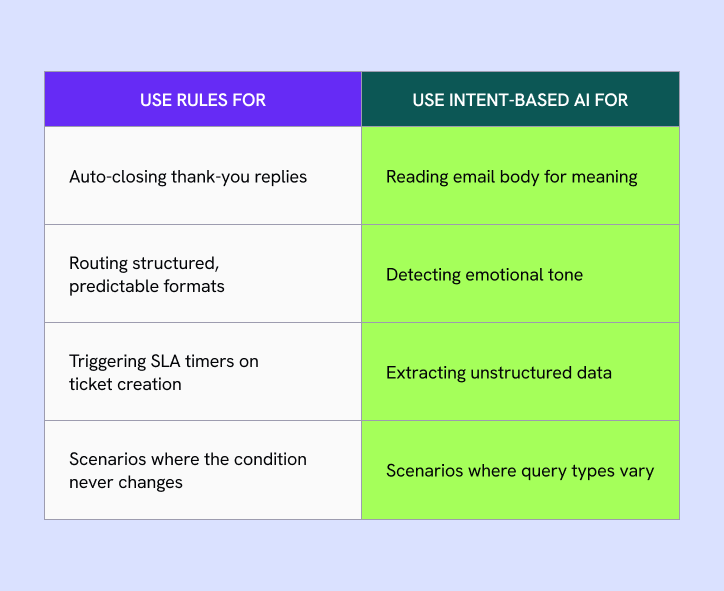
Where to use rules vs Intent based AI
What it looks like on a Tuesday morning
An agent arrives at 9 am. Without AI, their first 20 minutes go to triage — reading each overnight email, applying tags, deciding priority, routing to the right queue. For a team of five agents, that’s nearly two hours of collective capacity spent before anyone has resolved a single conversation.
With AI Categorisation and Sentiment Analysis running overnight, they open their queue to find everything already categorised, priority conversations flagged, routing done, and escalation summaries added to the tickets that came in complex. They start on the first conversation.

The conversations don’t change. The volume doesn’t change. What changes is how much of the team’s time goes to the work around the work versus the work itself.
The question isn’t whether to use AI in your support workflows. Most teams already are. The question is whether the AI is reading your conversations or just scanning them for keywords.
Rules will always have a place. But the support operation that scales without scaling headcount is the one where the system understands what customers are actually saying — and acts on that, automatically, before an agent even opens the thread.












