







If you’ve worked in finance, you know most delays don’t come from the work itself. They come from chasing requests across emails, follow-ups, and threads that no one fully owns.
Invoices sit waiting because someone is “checking internally,” reimbursements stall when ownership isn’t clear, and billing queries move between teams without resolution. Over time, the team shifts from completing work to managing the chaos around it.
The problem is not capacity, but the absence of a system that can track, assign, and move requests forward reliably.
In this guide, I’ll show you how to fix that by setting up a finance helpdesk that brings every request into a single system and gives you full visibility into how work is moving.
What is a Finance Helpdesk?
A finance helpdesk is a centralized system that captures and manages finance-related requests in one place.
Finance teams use it across accounts payable, accounts receivable, payroll, procurement, and budgeting to handle employee, vendor, customer, and internal team queries. These include invoice status checks, vendor payment follow-ups, reimbursement approvals, payroll queries, purchase order approvals, and billing or revenue-related issues.
Each request is logged as a trackable item and routed to the right owner. It moves through a defined workflow rather than being passed around in email threads.
This changes how the team operates. You don’t have to search through conversations to understand status or follow up to find ownership. You can see what is pending, who is responsible, and what needs action next.
Why Do Finance Teams Need a Dedicated Helpdesk?
Most finance teams start with a shared inbox like finance@ or accounts@. It works when the volume is low, and the team can keep track of requests manually.
As the company grows, the nature of requests changes. Employees follow up on reimbursements, vendors chase invoice payments, and internal teams ask for updates on budgets, approvals, and payouts. These requests come in across multiple threads, which makes it difficult to track ownership and progress.
The problem is not just volume. Finance work depends on timing, approvals, and clear ownership.
For example, an employee replies to an old thread about a reimbursement, and it lands without a clear owner or current status. The team has to read through past emails to understand what is pending. A vendor follow-up creates the same issue. With email, context has to be reconstructed every time, and ownership is never explicit.
A dedicated finance helpdesk fixes this by introducing a structured system:
- Every request is captured and assigned to a clear owner
- Approval steps are built into the workflow
- Time-sensitive queries are prioritized with defined response targets
- Every request has a trackable history for audits and escalations
- Leaders can identify delays and fix process gaps early
With this in place, finance teams move from reactive follow-ups to a controlled system where ownership, timelines, and progress are always visible.
These breakdowns do not show up in one place. The same lack of ownership and visibility plays out across employee queries, customer billing, and cross-team finance operations.
Key Use Cases of a Finance Helpdesk
Almost every department depends on the finance department for answers, approvals, and payment updates. When those requests arrive through scattered emails or direct messages, the work quickly becomes reactive and difficult to manage.
The pattern is consistent. The same system gap shows up differently depending on who is making the request
A finance helpdesk creates a structured way to handle these interactions. Every request is captured, routed to the right owner, and tracked until it is resolved.
1. Employee support
Employees reach out to finance for reimbursement status, expense approvals, payroll clarifications, and tax documents. These requests come in continuously, and without a system to track them, follow-ups become the default because no one can clearly see what is pending or who owns it.
This is where the slowdown begins. The team has to re-check threads, figure out context, and decide who should respond. Follow-ups stack up because the status of each request is unclear, not because the work is difficult.
A finance helpdesk changes this at the point of entry. It turns every incoming query into a new request with a clear owner, a current status, and a defined next step. Nothing depends on who saw the email last or who remembers to follow up.
In practice, this runs like an internal help desk. Employees submit requests through a central finance channel, the system routes them to teams like payroll or accounts payable, and each request moves forward with clear ownership until it is resolved.
2. Customer-facing financial support
Finance teams handle customer queries around invoices, payments, refunds, and overdue balances. These conversations often span multiple touchpoints. A customer may reply to an old invoice, send a new email about a payment, and follow up again if there is no response.
Here, the problem becomes the lack of a single reliable view for these tickets. The team has to check past emails, verify invoice details in another system, and confirm payment status before responding. This back-and-forth slows down resolution and increases the risk of giving incomplete or incorrect information.
A finance helpdesk changes this by linking each query to the relevant billing context and assigning it to a clear owner. The request carries its history, current status, and next step, so the team can act on it without going back through multiple threads. In practice, this means billing queries, payment confirmations, and refund requests move through one system.
3. Cross-department finance operations
Finance teams work closely with sales, procurement, HR, and operations on requests like vendor payments, purchase orders, budget approvals, and payment updates. These requests usually come in as part of ongoing conversations, where finance is one step in a larger process.
The challenge is not the request itself. It is how these dependencies are managed.
A purchase order is sent to finance for approval, but its status is unclear, so procurement moves ahead assuming it is done. The vendor follows up on payment, but a required detail is sitting in a different thread. Sales is waiting on billing confirmation, but no one can confirm the current state without checking multiple places.
A finance helpdesk brings these requests into a single workflow. Each request is captured, assigned to a clear owner, and tracked with a visible status, so every team involved knows what is pending and what has already been completed.
For finance leaders, this creates a clear view of incoming requests, delays, and resolution timelines across teams. It also ensures that finance is not slowing down cross-functional work because of missing context or unclear ownership.
Must-Have Features in Finance Helpdesk Software
If you’re evaluating a finance helpdesk, the goal is simple. The system should help your team manage financial requests in a predictable and organized way.
Invoice queries, reimbursement approvals, vendor follow-ups, and payment updates should move through defined steps. Finance leaders should always be able to see what is pending, who is responsible, and how quickly issues are being resolved.
Use the checklist below when evaluating finance helpdesk tools.
Once these workflows are visible, the gap becomes obvious. The issue is not effort. It is the absence of a system that can structure requests, assign ownership, and keep work moving without constant follow-ups.
That is what a finance helpdesk needs to handle.
1. A single place where all finance requests arrive

Finance requests often arrive through email and stay unstructured from the start. The team has to read each message, understand the context, and decide what to do next before any work begins.
A helpdesk should convert every incoming query into a structured request with a clear owner, priority, and status the moment it arrives. In tools like Hiver, this happens automatically, so the team works from a queue of active requests instead of scanning inboxes.
2. Automatic routing to the right person

Routing is where delays usually begin. Requests get forwarded across teams, ownership becomes unclear, and responses slow down because no one is sure who should act next.
A helpdesk should route requests based on category and context, so vendor invoices go directly to accounts payable and billing disputes reach accounts receivable without manual intervention.
3. Approval workflows that move without follow-ups

Finance work usually involves approvals. Expense reimbursements, purchase orders, and vendor payments often require multiple sign-offs. A helpdesk should support approval workflows, so requests move through these checkpoints without relying on manual follow-ups.
4. Automation that removes triage and follow-ups

Finance teams often receive the same requests repeatedly, such as invoice status checks or reimbursement updates. Automation should categorize requests, assign them automatically, and send reminders when deadlines are approaching.
5. Response timelines that are enforced

Some finance queries are time-sensitive. Vendors want payment updates, and employees expect clarity about their reimbursement. A helpdesk should allow finance teams to define response timelines so requests do not sit unresolved.
6. A knowledge base that reduces inbound load

Many questions finance teams receive are predictable. Employees frequently ask about reimbursement policies, payroll schedules, or tax forms. A knowledge base allows teams to publish answers so employees can find information without submitting a request.
7. Access control and audit visibility
Finance teams handle sensitive financial data. The helpdesk should allow managers to control who can view, edit, or approve requests. Audit logs are also important, so every action is recorded.
8. Reporting that shows where work is slowing down
Finance leaders should be able to see request volumes, response times, backlog trends, and workload distribution. These insights help leaders identify where delays are happening.
9. Integrations that bring context into the workflow
Finance teams rely on ERP platforms, accounting tools, payroll systems, and payment software. A helpdesk should integrate with these tools so the team can access financial information without switching between systems.
If your current setup cannot support most of the items in this checklist, the finance team is likely spending more time organizing requests than resolving them.
How to Set Up a Finance Helpdesk
When finance leaders set up a helpdesk, the goal is not to add another tool. The goal is to create a clear system for handling finance requests.
A good setup ensures that every request enters the same workflow, reaches the right owner, and moves forward without manual coordination.
The steps below will help you set up a helpdesk in a practical way.
1. Start by mapping the requests your team receives.
Before configuring anything, look at the requests that arrive in your finance inbox today.
Open the finance@ or accounts@ inbox and review the last two to three weeks of emails. Patterns usually appear very quickly. Most companies receive similar types of requests, such as invoice status checks, vendor payment queries, reimbursement approvals, payroll questions, purchase order approvals, and customer billing issues.
Create categories for these request types. These categories will later help the helpdesk automatically organize incoming requests.
In many cases, finance teams discover that most incoming queries fall into fewer than ten request categories. Once these patterns are clear, it becomes much easier to configure routing rules and approval workflows.
2. Decide where finance requests should enter
Finance teams often receive requests through multiple paths. Employees email individual team members, vendors reply to invoice threads, and internal teams message finance directly.
This makes it difficult to track requests and creates confusion about ownership.
Choose a single entry point for finance communication. Most companies use inboxes such as finance@, billing@, or accounts@. Connect this inbox to the helpdesk so that every email automatically becomes a tracked request.
Once this is in place, leaders can immediately see what has arrived and what still needs attention.
3. Assign clear owners for each type of request
Next, decide who should handle each category of request. Vendor payment questions usually belong to accounts payable, while customer billing issues belong to accounts receivable. Reimbursement requests may be handled by the finance operations team, and payroll questions should go to the payroll team.
Configure routing rules in the helpdesk so requests are assigned automatically when they arrive. This prevents requests from being forwarded across the team and ensures they reach the right owner immediately.
This also reduces the common problem of multiple team members replying to the same request.
4. Set up approval workflows for financial processes
Many finance requests involve approvals. Expense reimbursements, purchase orders, and vendor payments often require sign-offs from managers or finance leaders.
Define these approval steps directly in the helpdesk.
For example, a reimbursement request may first go to the finance team for review, then to the employee’s manager for approval, and finally back to finance for payment processing.
When this workflow is configured in the system, each approver is notified automatically, and the request continues moving forward. These structured processes are similar to common help desk workflows used to manage operational requests.
5. Define response expectations for common requests
Different requests require different response times. Vendors asking about payment status often expect quick updates, while internal information requests may allow more flexibility.
Define response timelines for the most common request types. This helps the team prioritize work and prevents important queries from sitting unresolved.
In many helpdesk systems, these response commitments are implemented as helpdesk SLAs so finance leaders can track whether requests are handled within the expected time.
6. Track request data and identify bottlenecks
Once the helpdesk is running, start reviewing request data regularly.
Look at metrics such as request volume, response times, and unresolved queries. These insights often reveal operational issues that were previously hidden inside email threads. Many finance teams track these indicators using standard help desk metrics that measure how quickly requests are handled and where delays occur.
Over time, this information becomes part of ongoing help desk reporting that helps finance leaders identify patterns and improve internal processes.
7. Create documentation for recurring finance questions
Finance teams often answer the same questions repeatedly. Employees frequently ask about reimbursement policies, payroll schedules, tax forms, and payment timelines.
Create simple documentation for these topics and publish them in a knowledge base. Employees can then find answers on their own instead of sending a request.
Over time, this reduces repetitive queries and allows the finance team to focus on more complex financial work.
A well-implemented finance helpdesk does more than organize requests. It gives finance leaders a clear operational view of incoming queries and helps the team respond quickly while maintaining control over financial workflows.
Over time, this visibility also helps leaders identify process gaps and improve how finance operations run across the organization.
Once requests are structured and ownership is clear, a different bottleneck starts to appear. The system is in place, but the work is still manual. Every request still needs to be read, categorized, and responded to.
How AI Is Transforming Finance Helpdesks in 2026
Most finance delays do not come from complex decisions. They happen much earlier, when requests enter the system and start moving between teams.
A vendor follows up because the first email was never picked up. A reimbursement request sits untouched because it did not reach the approver. A billing query is answered late because it got buried in an ongoing thread.
The problem is not a lack of expertise. It is the way requests are handled before anyone takes action. AI is reshaping this layer. It structures incoming requests, moves them forward without friction, and reduces the manual coordination that slows teams down.
1. Requests are understood and routed the moment they arrive
Every incoming request used to depend on someone reading it and deciding where it should go. That step alone creates delay and inconsistency.

Now the system interprets the request as it comes in. A vendor email referencing an invoice is treated as a payment query. An employee asking about expenses is directed to reimbursements.
In Hiver, this happens at intake. The request shows up already tagged and assigned, so no one has to sort through inboxes to figure out ownership.
2. Responses begin with context, not from scratch
Finance teams spend a large part of their time answering familiar questions. Payment timelines, invoice copies, and reimbursement updates come up repeatedly.

AI uses past conversations and internal knowledge to prepare a response as soon as the request is opened. The team reviews it, makes adjustments if needed, and sends it out.
This keeps responses consistent and removes the need to rewrite the same answers throughout the day.
3. Documentation becomes part of the conversation
Most finance teams already maintain policies and documentation, but those answers are not always accessible when the question is asked.
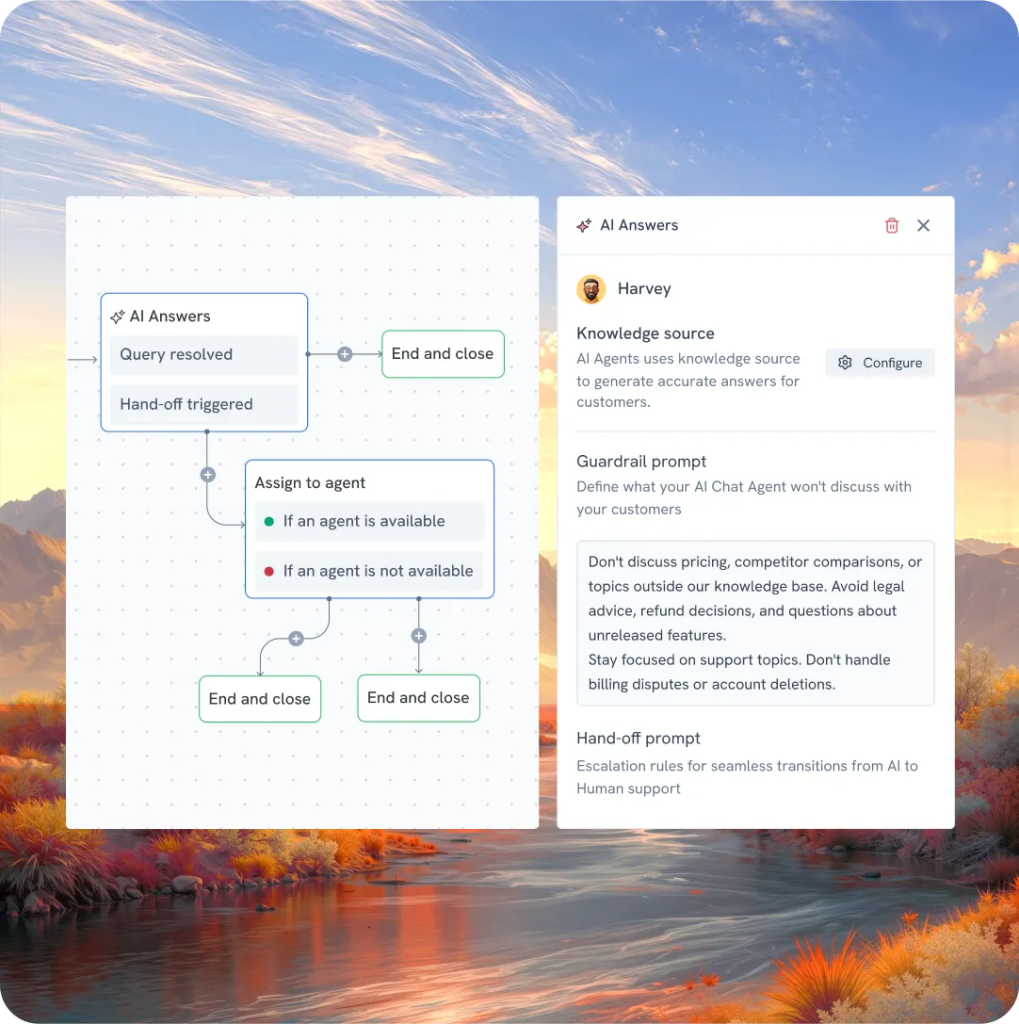
AI closes that gap by surfacing the right information at the right time. When someone asks about reimbursement timelines or tax-related queries, the system brings in the relevant policy immediately.
In Hiver, this also feeds back into the knowledge base. Support conversations reveal what is missing or unclear, and those gaps can be turned into new articles so documentation improves alongside real queries.
4. Patterns emerge before issues escalate
Operational issues rarely appear all at once. They build gradually across conversations.
These issues rarely look connected at first. A delayed payment, a refund query, a billing confusion. When they start appearing across multiple conversations, they point to the same underlying breakdown in the process.

Viewed individually, these feel like isolated requests. Seen together, they point to a deeper issue.
AI connects these signals across conversations and surfaces them early, giving finance teams the chance to fix the root cause instead of responding to each instance separately.
5. The team spends less time coordinating and more time deciding
A significant portion of finance work goes into coordination. Tracking ownership, following up on approvals, and checking whether someone has responded.
When requests are categorized, routed, and partially handled at the start, that coordination layer is reduced.
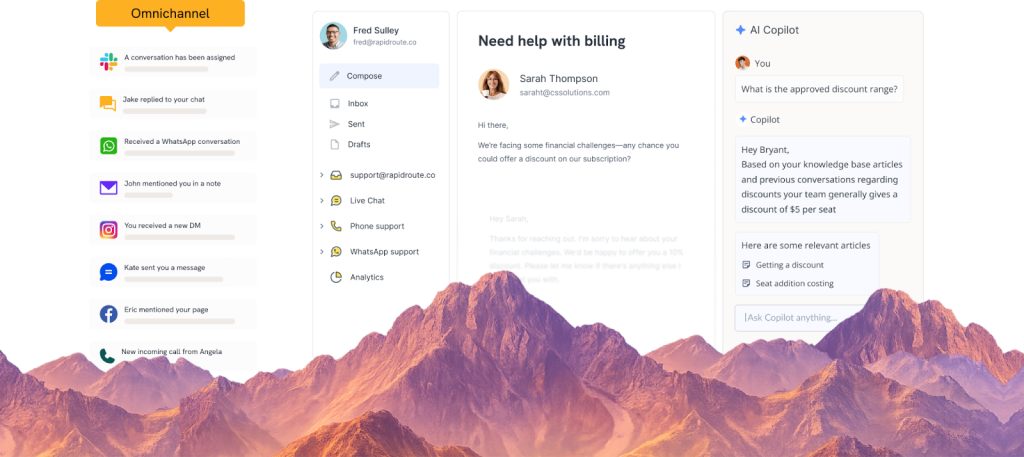
In Hiver, this happens within the same workspace where the team already operates. AI supports the flow of work across intake, response, and tracking, so requests continue to move without constant intervention.
The result is a shift in focus. Less time is spent managing requests, and more time is spent reviewing decisions, handling exceptions, and maintaining financial control.
AI does not change what finance teams are responsible for. It changes how reliably work moves through the system, so fewer requests stall and more decisions move forward without delay.
Turning Finance Requests Into a Controlled Workflow
Finance work does not slow down because it is complex. It slows down when there is no clear system to move requests forward.
A finance helpdesk changes how work flows.
Every request enters a single system, is assigned to a clear owner, and moves through defined steps. Status is visible, ownership is explicit, and the next action is always clear. Nothing depends on inbox visibility or manual follow-ups.
This brings consistency to how finance operates across teams. Approvals move without delays, queries are handled with full context, and issues are resolved without restarting conversations.
Over time, the impact becomes visible in how the team works. Fewer interruptions or follow-ups, and work moves forward without constant intervention.
The role of the team shifts as a result. Less time is spent tracking requests, and more time is spent reviewing decisions, handling exceptions, and maintaining financial control.
Frequently Asked Questions
1. What’s the difference between a finance helpdesk and an IT helpdesk?
An IT helpdesk manages technical issues such as system access, software problems, and device troubleshooting. A finance helpdesk focuses on financial requests such as invoice queries, reimbursement approvals, payment follow-ups, payroll questions, and vendor communication. The workflows, approvals, and data involved are different, which is why finance teams often need their own system to manage these requests.
2. Who needs a finance helpdesk?
Finance helpdesks are most useful for companies where finance teams regularly handle requests from employees, vendors, customers, and internal departments. If the finance team manages queries through shared inboxes like finance@ or accounts@ and struggles to track ownership, response times, or request volume, a helpdesk helps bring structure and visibility to those interactions.
3. How much does finance helpdesk software cost?
Finance helpdesk tools usually charge per user each month. Pricing often ranges from about $20 to $100 per user, depending on the features included, such as automation, reporting, AI capabilities, and integrations with accounting systems. Many teams start with a small setup for the finance operations team and expand as request volumes grow.
4. Can a finance helpdesk work with Gmail or Google Workspace?
Yes. Most finance helpdesk tools connect directly to Gmail or Google Workspace inboxes such as finance@ or billing@. Incoming emails are automatically converted into trackable requests inside the helpdesk, which allows finance teams to manage conversations, assign ownership, and track responses without relying on email threads.
5. How long does it take to set up a finance helpdesk?
Most finance teams can set up a basic helpdesk in a few hours once request categories and routing rules are defined. The initial setup usually involves connecting the finance inbox, creating request categories, assigning owners, and configuring approval workflows. Over the next few weeks, teams typically refine automation rules and response timelines as they see how requests flow through the system.













