





An employee writes to HR asking about a payroll discrepancy. Another sends a Slack message asking about parental leave. A manager emails about an onboarding delay for a new hire. Meanwhile, a sensitive employee grievance comes in through a private channel.
None of these requests are unusual. What makes them difficult to manage is how they come through: scattered across email threads, messages, and informal conversations.
Without a structured system, HR teams often end up manually tracking requests, forwarding emails internally, and relying on memory or spreadsheets to keep things moving.
An HR ticketing system changes that workflow. Every employee request becomes a ticket with clear ownership, priority, and documentation. Instead of chasing conversations, HR teams can track requests, and maintain confidentiality for sensitive cases.
In this guide, we compare the best HR ticketing systems available in 2026, including their pricing, integrations, automation capabilities, and security features.
What is an HR ticketing system?
An HR ticketing system is a dedicated platform to manage and resolve employee requests. It acts as a secure, central hub where employee relations (ER) and internal requests are tracked with clear ownership.
It’s built for the lifecycle of an employee, from onboarding and payroll queries to benefits administration and policy clarifications.
Since HR teams handle sensitive information such as salary details and medical leave records, HR ticketing systems include strong privacy and access controls.
These safeguards help protect Personally Identifiable Information (PII) and Protected Health Information (PHI), so confidential cases are only visible to authorized HR personnel.
Quick comparison chart for top HR ticketing software
| Software | Starting price | Key features | Free trial/free plan |
|---|---|---|---|
| Hiver | From ~$25 per user/month | Email-to-ticket conversion, shared inbox, SLA tracking, AI automation, internal notes, knowledge base | Free forever plan + 7-day free trial |
| Zendesk | From ~$19 per agent/month | Omnichannel ticketing, workflow automation, AI bots, analytics, SLA management | 14-day free trial |
| Freshservice | From $49 per agent/month | Ticket automation, AI assistance (Freddy AI), self-service portal, reporting, SLA management | 14-day free trial |
| Zoho People | Around $1.25 to $2.00 per person, per month | Ticket management, knowledge base, workflow automation, analytics, multichannel support | 30-day free trial |
| Jira Service Management | From $20 per agent/month | Request management, automation rules, Atlassian integrations, SLA tracking, reporting | Free for up to 3 agents. Free trial for 7-30 days |
| ServiceNow HR Service Delivery | Not available | HR case management, workflow automation, compliance tracking, employee service portal | No free trial. Custom enterprise demos |
| HappyFox | From $29 per agent/month | Ticket automation, knowledge base, SLA management, reporting, multi-channel intake | 14 days |
| ManageEngine ServiceDesk Plus | From ~$13–$16 per technician/month | Request management, asset management, workflow automation, reporting | 30 days |
Our evaluation and selection criteria for the best HR ticketing software
We evaluated these eight platforms based on their ability to handle the total experience of an employee (right from onboarding), majorly focusing on:
- Frictionless intake: How easily employees can raise requests via Slack, Microsoft Teams, or email without learning new software.
- Privacy-first security: Robust Role-Based Access Control (RBAC), audit logs, and compliance (GDPR/HIPAA) to protect sensitive employee files.
- HR-specific workflows: The ability to handle complex case types like grievance reporting, workplace conflicts, and multi-stage leave approvals.
- AI & HR intent modeling: The presence of generative AI to summarize long case histories and accurately route tickets based on HR intent.
- Total cost of ownership (TCO): Transparency in pricing, including implementation costs, AI add-ons, and the speed of ROI.
- HRIS ecosystem connectivity: Seamless integrations with core systems like Workday, BambooHR, and SAP SuccessFactors.
We also analyzed major review platforms like G2, Capterra, and Gartner Peer Insights to see what HR professionals are saying about their daily usage. And how real users rate these tools in terms of usability, reliability, and HR workflow support.
8 best ticketing systems for HR and employee relation management
1. Hiver
Most HR teams don’t struggle because of lack of effort. They struggle because everything feels scattered.
Hiver changes that by bringing structure to how requests show up and move forward. The moment a query comes in, it lands in the right place — Unassigned, Assigned, or the Team view — so there’s no confusion about what needs attention.
From there, ownership is built in. Every request has a clear owner, and everyone on the team has visibility into progress.
Then AI steps in to reduce the manual work. It categorizes requests, routes them to the right people, and suggests replies to speed up responses. Repetitive questions can be handled through a knowledge base or chatbot, so HR isn’t answering the same thing all day.
The end result is simple: less time spent managing requests, and more time spent supporting employees.

Why this tool made the list:
It is the easiest tool to get started with. You can have your entire HR help desk running in under 15 minutes. While other systems take weeks to learn, Hiver feels natural immediately. It is perfect for HR teams that need to collaborate across departments like Finance or Legal without losing track of who is doing what.
Noble Schools, managing HR across 18 campuses, were able to move from manual tracking systems to handling 5,000+ employee conversations with better visibility and accountability.
Instead of adding complexity, it focuses on getting the basics right: who owns a request, where it stands, and how it moves across teams, which is often where HR support starts to break down at scale.
Pricing:
Hiver offers a 7-day free trial and a forever free plan for teams that want to explore the tool.
Paid plans start at $25 per user/month and go up to $85 per user/month for the Elite plan (billed annually).
Top features:
Unified HR inbox: Funnel all your emails from addresses like HR@, Jobs@, or Talent@ into one team dashboard. This ensures every message has a clear owner and no two people work on the same thing twice.
AI-powered self-service: You can set up an AI Chatbot and a Knowledge Base to help employees help themselves. The AI agent can automatically answer repetitive questions using your company’s own rulebooks.
Inter-team collaboration: Employee requests often involve more than one team. For example, onboarding a new hire may require HR, IT (for laptop access), and Finance (for reimbursements). With Hiver, all of this collaboration happens within the same ticket using private notes and @mentions, so everyone stays aligned without switching tools or losing context.
Smart automation: You can build simple workflows to auto-route requests, trigger approvals, and flag urgent cases. For example, a payroll query can be automatically assigned to the Finance team, while a leave request can trigger a manager approval workflow before it’s processed.
Data-driven insights: Track exactly how much work your team is doing. You can see your total email volume, response times, and the most common types of employee questions.
Integrations:
A single HR request often requires inputs from different tools: employee details from your HRMS, approvals via Slack, or updates from other teams. Hiver brings these together by integrating with 100+ apps, including HRMS platforms, Slack, Microsoft Teams, and CRM systems.
Pros:
No training needed. The interface design is so simple that most HR teams can start using it to its fullest potential without watching long tutorial videos.
24/7 expert support. If you ever get stuck, you can talk to a real person at any time of the day or night, on email and live chat.
Multi-team collaboration: Some HR cases are sensitive and evolve over time: like a workplace concern that requires HR, Legal, and leadership input.
In Hiver, internal discussions happen through private notes, so teams can align without exposing sensitive context, while the full history remains intact as the case progresses. Instead of splitting into multiple threads, the entire case stays within a single ticket.
Cons:
Limited workflow complexity: While great for most teams, Hiver might not handle extremely complex, multi-stage legal workflows as deeply as a tool like ServiceNow (on this list).
Specific focus: It is built primarily for communication and request management, so it doesn’t try to be a giant database for every single employee record.
Security & compliance:
Hiver is trusted by over 10,000 teams worldwide. It meets the highest global standards for data safety, including ISO 27001, SOC 2 Type II, GDPR, CCPA, and HIPAA. Your employee data is kept secure and private at all times.
User reviews
- “What I like best about Hiver is how easy it is to set up and start using. The integrations are seamless and really enhance productivity, and the support team is always responsive and helpful.”
- “One small drawback is that it can feel a little slow when handling a very high volume of emails, but overall, it’s a huge improvement to our workflow.”
2. Zendesk
Zendesk has been part of the customer support software ecosystem for years, and many organizations already rely on it for customer service operations.
Because of that maturity, HR teams often adopt it internally to manage employee requests through the same ticketing infrastructure.
Why this tool made the list:
Zendesk works well for HR teams operating at scale, especially in organizations with 500–1000+ employees or with multi-region operations. It supports complex workflows like multi-step onboarding, approvals, and escalations, while giving HR leaders control over access, SLAs, and case ownership.
Pricing:
Price ranges from $19 to $169 per person, per month. Zendesk AI is priced as an add-on and costs approximately $50 per agent/month.
There’s a 14-day free trial available.
Top features:
Unified agent workspace: It pulls in queries from email, Slack, Microsoft Teams, and even voice chat into a unified dashboard, so you aren’t jumping between tabs to find an employee’s history.
AI-powered triage: This feature automatically “reads” incoming tickets to detect intent (e.g., payroll vs. leave) and sentiment. It flags frustrated employees and routes the case to the right specialist instantly.
Employee self-service (Help center): A branded portal where employees can find answers to common questions (like “How do I update my 401k?”) through an AI-powered search. This allows for high case deflection, freeing up your team for more complex human relations work.
Integrations:
HR workflows rarely stay in one tool. Zendesk integrates with platforms like Workday, BambooHR, Slack, Teams, Jira, Salesforce, and Okta, along with hundreds of other apps, so teams can stay connected while handling requests.
Pros:
Private internal collaboration. Internal discussions can happen directly inside a ticket through the “Side Conversations” feature. Finance, Legal, or other stakeholders can be looped in without the employee seeing those messages.
Scales well for global organizations. Zendesk supports multiple languages, time zones, and regional business hours, which helps HR teams manage employee requests across different locations.
Cons:
Zendesk isn’t HR-native. Teams may need to invest time in configuring ticket fields, workflows, and access controls so the platform reflects HR processes.
Costs increase with advanced features. Many advanced capabilities, such as AI features, compliance tools, or testing environments, are available only in higher-tier plans or add-ons.
Time-intensive implementation. Setting up automations, triggers, ticket fields, and macros requires planning and administrative effort.
Security & compliance:
Includes enterprise-grade security controls such as role-based access control (RBAC), audit logs, encryption, and compliance with standards like SOC 2 and GDPR.
User reviews:
- “Improves coordination between departments like support, operations, engineering.”
- “Reporting is basic and confusing. You have to take the reports that are automatically generated and spend a lot of time customizing them to what you actually want.”
If you’d like more info, there’s a Zendesk for HR guide available.
3. Freshservice
It hits a sweet spot for mid-sized teams that need power but hate complexity. Freshservice is so intuitive that even a new HR coordinator can start answering questions within an hour of logging in.

Why this tool made the list:
It stands out for its usability. Compared to heavier platforms, like Zendesk, Freshservice easier to implement and quicker for HR teams to adopt.
However, if you have deeply complex, multi-stage approval workflows (like a 5-step executive compensation change), you might find its simplicity a bit limiting.
Pricing:
It costs $49 per person, per month (billed annually). If you want the Freddy AI copilot to help you write replies and summarize emails, it’s a paid add-on that costs an extra $29 per person, per month.
Free trial: 14 days
Top features:
Omnichannel ticketing: It takes every “Where is my W2?” request from email, WhatsApp, or chat and drops them into one shared inbox so no one double-handles a case.
Freddy AI agent: A conversational bot that lives on your employee portal to answer basic policy questions instantly, saving your team from the 50th “What’s the holiday schedule?” email of the week.
Parent-child ticketing: Perfect for onboarding. Like you can split a “new hire” ticket into smaller tasks for IT (laptop), Payroll (bank details), and Facilities (desk) while keeping them all linked to the main case.
Collision detection: A simple but life-saving feature that shows you if another HR rep is currently typing a reply to an employee, preventing those awkward double-response emails.
Integrations:
Slack, Microsoft Teams, Jira, Salesforce, BambooHR, Zapier, Google Workspace, and other Freshworks tools.
Pros:
No tech expert needed. You can sign up and start categorizing employee requests (like payroll or benefits) in a few hours. You don’t need a consultant to set it up.
Automated sorting. You can set simple rules to automatically send “leave requests” to one person and “payroll issues” to another, making sure nothing gets missed.
Cons:
Extra costs for AI. You’ll have to pay an extra cost of $29 per agent, per month to access the helpful Freddy AI bot.
Rigid templates. If you want to change the look of the employee portal to perfectly match your company’s branding, you’ll need someone who knows how to code (CSS/HTML).
Security & compliance:
Includes role-based access control (RBAC), audit logs, encryption, and compliance support such as GDPR and SOC 2, helping protect sensitive employee information.
User reviews:
- “What has been most impactful for us is the service portal. Creating a single, user-friendly front door for all employee inquiries has dramatically improved our internal processes.”
- “Freshservice has some rough edges that I wish were polished out some. The analytics/reporting is a bit clunky.”
4. Zoho People
It is a full HR system that manages an employee’s whole career, from their first day to their last. Zoho People is in fact very handy; the second an employee sends a message, the system already knows their manager, department, and how long they’ve worked there.

Zoho People helps HR teams manage employee records, leave requests, and internal workflows in a single platform
Why this tool made the list:
Zoho People stands out because it combines HR management and employee request tracking in a single platform. Requests related to attendance, leave, payroll, or employee documents can be handled within the same system where HR data is stored.
Pricing:
Basic plans start at around $1.25 to $2.00 per person, per month. For the more advanced analytics and automation, you’ll likely want the Enterprise plan, which is about $4.50 to $5.00 per person, per month.
Free trial: 30 days
Top features:
Centralized HR cases: All employee queries, whether about payroll, benefits, or policy, are turned into cases (or tickets) and assigned to the right HR specialist automatically.
Zia: Zoho’s AI, Zia, can answer common questions like “How many vacation days do I have left?” through a chat interface, which prevents those repetitive questions from ever reaching your inbox.
Direct HRIS link: When an employee asks a question, the HR rep sees their full profile instantly. No more searching through spreadsheets to see which manager an employee reports to or what their current salary is.
Advanced HR analytics: Generate precise reports on every HR metric: from how long it takes to hire someone to why employees might be leaving. It uses advanced visuals (like charts and heatmaps) to help you identify patterns and analyze trends.
Integrations:
Native ties to Zoho Payroll, Zoho Recruit, and Zoho Expense, plus external tools like Slack, Microsoft Teams, and Google Workspace.
Pros:
Everything stays together. You don’t have to move data from a “hiring” tool to a “payroll” tool. Once a person is in the system, their whole history is right there.
Very affordable. Compared to big names like Zendesk, Zoho is much easier on the budget, especially for growing companies.
Cons:
Interface is a bit crowded. Because the platform does everything, from performance reviews to attendance, the screen can look a bit messy and overwhelming at first.
Learning curve: Some of the advanced reporting tools are a bit techy. You might need to spend a few hours watching tutorial videos to master them.
Security & compliance:
Built for high-stakes HR data. It meets GDPR, SOC 2, and HIPAA standards, and also keeps detailed audit logs, so you can see exactly who looked at a sensitive employee file and when.
User reviews:
- “Easy for both administrators and employees to navigate, which makes everyday tasks like attendance, leave requests and timesheet submissions very straightforward.”
- “The user interface is functional, but it isn’t always intuitive. Some settings are buried under multiple layers of menus, and the initial setup can feel overwhelming.”
5. Jira Service Management
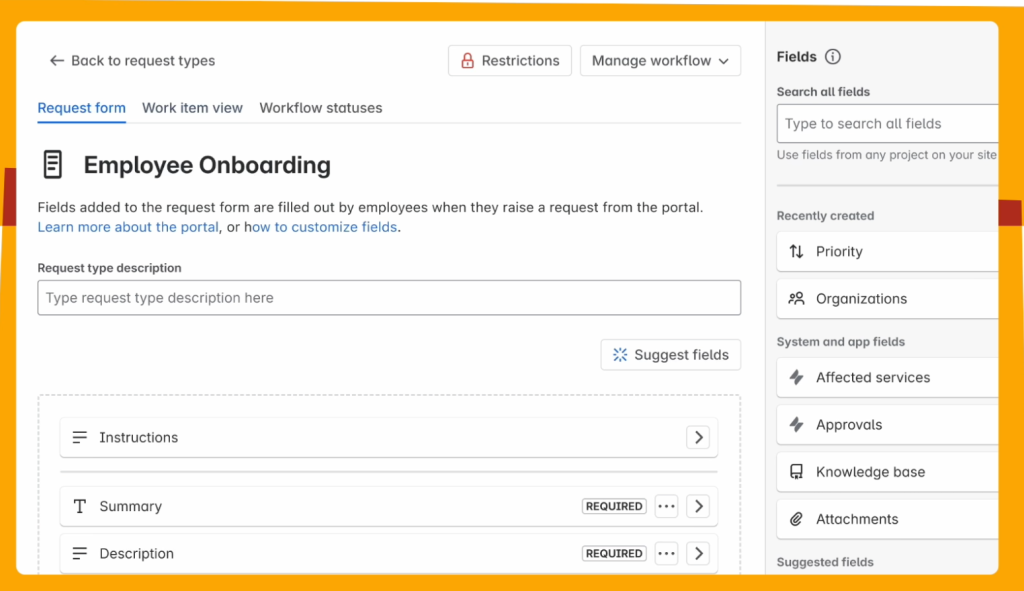
Jira Service Management is the best choice if your HR team needs to work closely with other departments like IT or Finance. Instead of things getting lost in long email chains, JSM gives you one organized place to track every employee request from start to finish.
Why this tool made the list:
It is incredibly flexible. You can start with a simple setup and add more advanced features as your company grows.
However, the platform can feel heavy for teams that only need basic HR request tracking. It offers strong automation and flexibility, but setting it up usually requires more configuration than lighter ticketing tools, like Hiver.
Pricing:
There is a free plan for up to 3 agents. Paid plans start at $20 per person, per month, and goes up to $51.42 per agent, per month.
Free trial: 7 to a maximum of 30 days (if extension is needed)
Top features:
AI virtual assistant: This digital helper answers common employee questions instantly. It gives staff the help they need faster and frees up your HR team to focus on more difficult cases.
Help Center: You can build a single home for your employees to get support. It includes a place for company news, helpful articles for self-service, and a simple way to send in requests.
Connected workflows: This feature links your HR tasks with other departments. It is perfect for things like onboarding, where HR needs to hire someone and IT needs to prepare their laptop.
Reporting: You can create reports to see how your team is doing. It tracks things like employee satisfaction and how quickly requests are closed so you can keep improving.
Integrations:
Slack, Microsoft Teams, Confluence, Jira Software, Bitbucket, Okta, and many third-party apps through the Atlassian marketplace.
Pros:
Privacy controls. You can keep sensitive employee information safe by limiting who can see certain files. This ensures only the right people have access to private data.
Audit logs: The system keeps a perfect record of who looked at what and when. This is a lifesaver if you ever need to prove that a process was followed correctly.
Cons:
Steep learning curve. It takes time to learn how to build the automations and reports. You might need to ask your IT department for help during the initial setup.
Premium features cost more. To get the best AI and advanced scaling tools, you have to move to the much more expensive “Premium” or “Enterprise” plans.
Security & compliance:
Jira is highly secure. It meets major global standards like ISO 27001, SOC 2, and GDPR, so you can trust that employee data is safe and private.
User reviews:
- “The initial setup can be intimidating particularly for teams with no prior Jira expertise.”
- “Jira serves as the primary, standardized intake and tracking tool for nearly all internal needs, including high-priority functions like human resources.”
6. ServiceNow HR Service Delivery
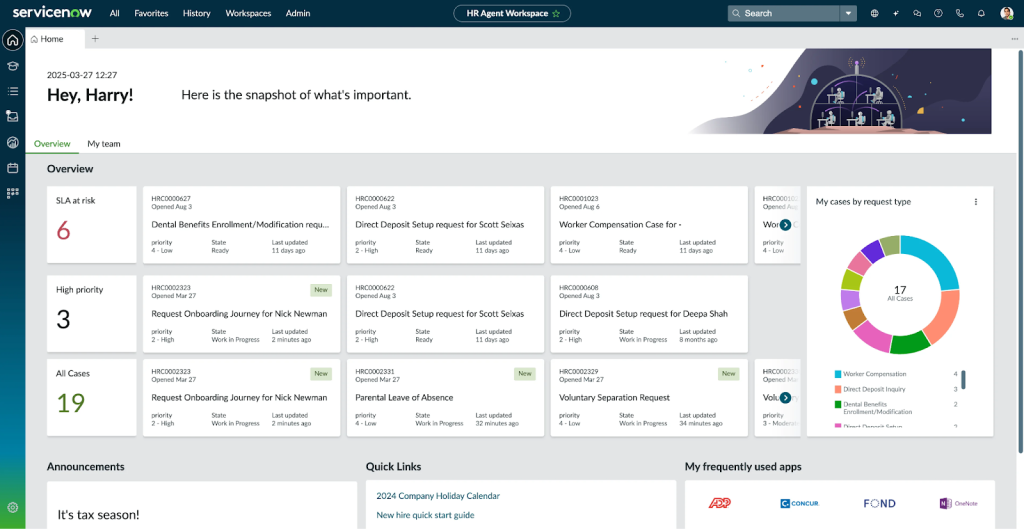
Large organizations often deal with thousands of employee requests every month. ServiceNow HR Service Delivery is designed for that scale.
It brings employee requests, HR cases, approvals, and workflows into one system so HR teams can manage everything from onboarding to workplace concerns.
Why this tool made the list:
This is one of the most powerful HR Service Delivery (HRSD) platforms on the list. HR requests can move seamlessly between teams like IT, payroll, and finance. But that power comes with complexity. Most companies need a dedicated administrator to implement and manage the system.
Pricing:
ServiceNow does not list its prices publicly. You have to contact their sales team for a custom quote. It is generally known as the most expensive option on the market.
Free trial: They usually offer a custom demo instead of a standard free trial.
Top features:
Now Assist AI: This feature uses generative AI to summarize long conversations. It speeds up work by handling the repetitive parts of your day.
Employee center: This is a single portal for your staff. They can go to one website to find insurance info, report a tech issue, or ask a payroll question.
Employee journey management: This helps you plan for big moments. It builds a step-by-step path for things like promotions or transfers, making sure no tasks are forgotten.
Issue auto resolution: The system uses AI to solve easy requests without a human. It can answer common questions instantly so your HR team can focus on more important cases.
Integrations:
It connects with almost every major business tool, including Workday, Oracle, SAP, Microsoft Teams, and Slack.
Pros:
Smooth collaboration across teams. It is great at linking departments. If a new hire needs a desk, a laptop, and a badge, the system tells Facilities, IT, and Security to get ready at the same time.
Guided journeys: It creates a roadmap for big life events. For example, if an employee goes on maternity leave, the system automatically handles the paperwork, the benefits, and the return-to-work plan.
Cons:
Long setup time. It can take several months to get the system fully ready for your team to use.
Over-engineered for small tasks: For a simple HR team that just wants to track leave or answer payroll emails, the system can feel like too much. It takes many clicks to do basic things that other platforms can do in one.
Security & compliance:
ServiceNow is world-class when it comes to security. It meets all global safety standards and is trusted by governments and the large banks to keep employee data private.
User reviews:
- “What I like best is its ability to unify complex, cross-departmental workflows into a single, intuitive interface.”
- “I find the user interface complexity challenging, especially with too many menu layers.”
7. HappyFox
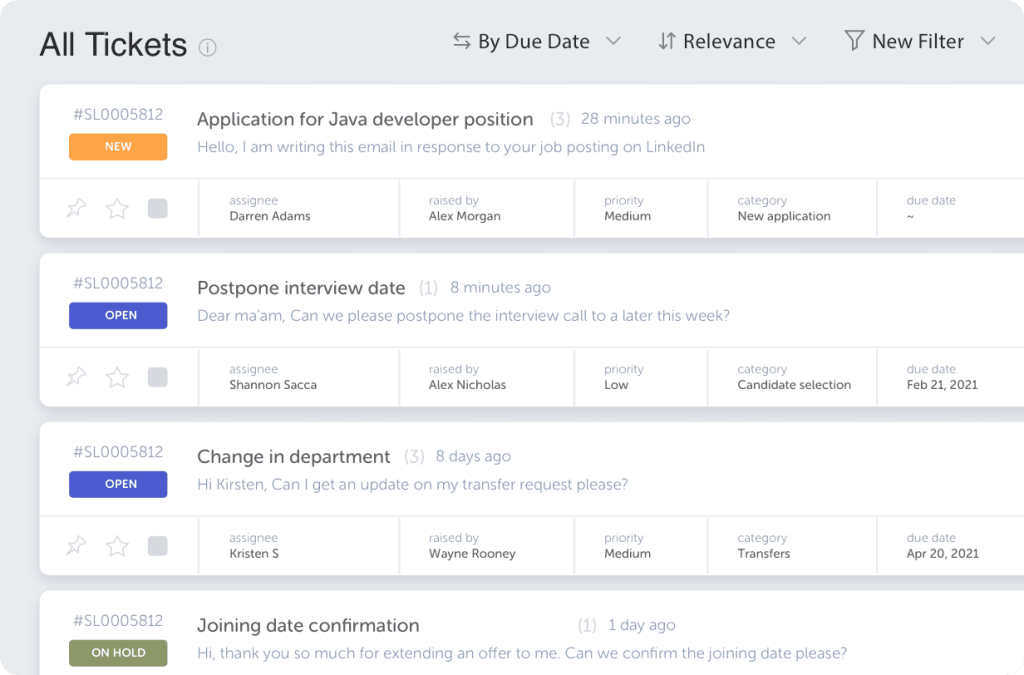
Some HR teams simply want a platform that keeps employee requests organized without turning support into a complicated project. HappyFox fits well in that space.
Instead of letting payroll questions, leave requests, or policy clarifications sit across scattered email threads, everything lands in a structured help desk.
Why this tool made the list:
We included this tool because it bridges the gap between a help desk and a hiring tool. Most HR ticketing systems focus only on employee support. HappyFox goes a step earlier in the process. It can capture applicant emails and referrals as tickets. This makes it easier for HR teams to keep hiring conversations organized alongside employee requests.
Pricing:
Plans typically start around $29 per agent/month and go up to $119 per agent/month. There’s an Enterprise Pro plan available, for which you need to contact their sales team.
Free trial: 14 days.
Top features:
Application tracking: The system logs every job application as a separate task. This makes it easy for your hiring team to see candidate info and schedule interviews in one spot.
Smart rules: You can set up automatic actions to save time. For example, the system can automatically assign payroll questions to your finance expert as soon as they arrive.
Knowledge base: You can create a library of company policies and procedures. This allows employees to find their own answers to common questions about things like time-off or insurance.
Referral management: It stores all employee referral emails in one destination. This helps you track new talent leads without losing them in a crowded inbox.
Integrations:
It works with common tools like Slack, Microsoft Teams, and several popular email services.
Pros:
All-in-one hiring. It turns job applications into tasks. This makes it very easy to track every candidate and schedule interviews without losing emails.
Simple feedback. The system sends a quick survey after every request. This tells you exactly how happy your employees are with the help they received.
Cons:
Basic design. The look of the software is very simple. You cannot change much of the design to match your company branding.
Can feel limited: If you have a massive company with thousands of people, you might find that you outgrow this tool quickly.
Security & compliance:
Includes role-based access controls and permission settings so only authorized staff can view sensitive employee information.
User reviews:
- “I love how easy and intuitive this software is to setup and configure, including cusomizing the knowledge base.”
- “The reports can be confusing, and some of its features require a higher tier.”
8. ManageEngine ServiceDesk Plus
While it started as an IT service desk tool, it also supports HR service management by helping teams manage employee requests, approvals, and workflows in one system.
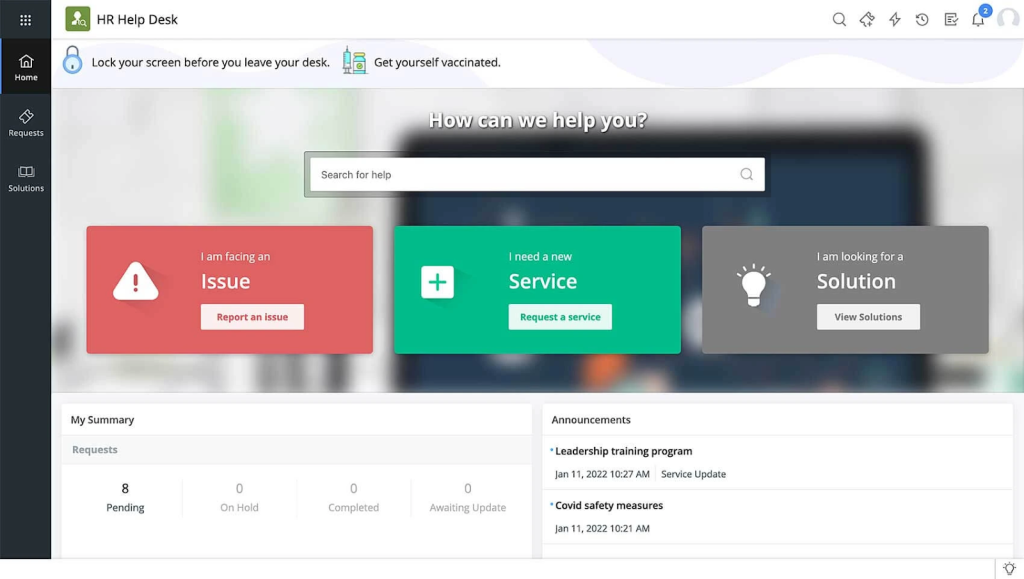
Employees can raise requests through a centralized portal where they can view services, submit tickets, and track updates. HR teams can then route requests, automate approvals, and manage employee cases through structured workflows.
Why this tool made the list:
Some other tools in this list might require a developer to set them up, but ServiceDesk Plus uses a simple drag-and-drop builder. This means an HR manager can personally design the exact steps for an onboarding process or a leave request without waiting for the IT department to help.
Pricing:
Pricing is based on the number of technicians. Plans start around $13–$16 per technician/month, with Professional ($27+/month) and Enterprise ($67+/month) tiers.
Free trial: 30 days
Top features:
Centralized employee portal: It gives your employees a single website for everything. They can read company news, search for policies, and ask HR questions all in one place.
Smart service catalog: You can display your HR services like an online store. Employees can browse and pick the help they need, such as requesting a new ID card or a payroll change.
Massive reporting library: It comes with over 180 ready-made reports. You can instantly see how your team is performing or check if you are meeting your deadlines.
Self-help knowledge base: You can build a library of FAQs. The system will suggest these articles to employees before they send a ticket, which helps reduce your daily workload.
Integrations:
It works seamlessly with Microsoft Teams, Active Directory, Jira, Zoho apps, and many third-party tools through ManageEngine integrations.
Pros:
Visual builders: You can use a simple drag-and-drop tool to map out how a request moves from start to finish. You do not need to write any code to create professional workflows.
Microsoft Teams integration: Your HR team can pick up tickets and chat with employees directly inside Microsoft Teams, so you never have to leave your main workspace.
Smart notifications: The system sends automatic updates to employees. They always know exactly where their request stands, which stops them from calling you for updates.
Cons:
Complicated customization: While you don’t need to code, making small changes to a workflow can be tricky. You often have to click through several menus to change one simple setting, which could get complex.
Email notifications: If you aren’t careful with the settings, the system can send out too many automated emails. This can clutter the inboxes of both your HR team and your employees, leading them to ignore important updates.
Security & compliance:
This tool is highly secure. It is certified with ISO 27001 and SOC 2 Type II. It is also HIPAA-compliant, which is essential if your HR team handles sensitive employee health information.
User reviews:
- “It has many built in modules like change management, problem management. Also it can be easily integrated with Manage Engine’s other solutions like OpManger..”
- “The portal is a little slow if you get the hosted plans. It takes some time to customise and get what you need with the tool.”
What are the key features of a ticketing system for HR?
To truly support an organization, an HR ticketing system must balance operational speed with the high level of confidentiality required for employee relations. Here are some key features you should look for:
Omnichannel intake & private tickets
Employees should be able to reach HR where they already work, whether that’s via email, a dedicated portal, or Slack/Microsoft Teams. For sensitive matters like workplace conflict or grievance reporting, the system must support private tickets that restrict visibility to only the assigned HR case owner.
AI triage & intent detection
Modern systems use AI intent detection to automatically categorize incoming requests (e.g., distinguishing a “payroll error” from a “leave request”). AI also provides instant summarization of long email threads and suggested replies, allowing HR teams to respond to complex policy questions in seconds rather than minutes.
Policy-aware automations & SLAs
You can set specific SLAs (Service Level Agreements) based on case sensitivity and business hours. For example, a “missing paycheck” query can be flagged for immediate escalation, while a general “policy clarification” follows a standard 24-hour response window. Automated routing rules ensure the right specialist always gets the right case.
Self-service knowledge base & in-channel forms
A robust HR knowledge base empowers employees to find answers to common questions (like “How do I update my 401k?”) through a self-service portal. By using in-channel forms in Slack or Teams, you can collect all necessary data upfront, significantly increasing your case deflection rate.
Secure approvals & workflows
HR often involves multi-step authorizations for sensitive changes like compensation adjustments or access permissions. Built-in approval workflows ensure that every change is documented, authorized by the correct manager, and trackable for audit purposes.
Analytics, ESAT, & QA
Beyond just counting tickets, HR leaders need to track Employee Satisfaction (ESAT), Time to Resolution (TTR), and First Contact Resolution (FCR). These metrics, combined with QA/coaching tools, help identify bottlenecks in HR service delivery and areas where the team might need additional training.
Security and access controls
Since HR cases often involve confidential employee data, ticketing systems include role-based access control (RBAC), audit logs, and data retention policies. These safeguards help ensure that only authorized HR personnel can access sensitive employee information and that compliance requirements are met.
What are the benefits of using HR ticketing system software in your organization?
HR teams often manage dozens of employee requests every day, ranging from payroll queries to workplace concerns. An HR ticketing system helps bring structure to these interactions while improving visibility, accountability, and employee experience.
- Better visibility into employee requests: Instead of scattered emails or messages, all HR requests are captured as tickets with clear ownership and status. This makes it easier for HR teams to track issues such as payroll discrepancies, leave approvals, or policy questions without losing context.
- Faster and more consistent responses to employees: With automated routing, prioritization, and SLA tracking, employee requests reach the right HR specialist faster. This reduces delays and helps employees receive timely updates on their queries.
- Improved handling of sensitive HR cases: Many HR interactions involve confidential matters such as grievances, disciplinary actions, or personal information. Ticketing systems include access controls and audit trails that help HR teams manage these cases with the appropriate level of privacy and documentation.
- Clear documentation for compliance and employee relations: HR ticketing systems create a record of every employee request, response, and resolution. This documentation helps HR teams maintain transparency, support compliance requirements, and review past cases when handling employee relations issues.
- Reduced HR workload through employee self-service: A knowledge base or employee self-service portal allows employees to find answers to common questions about benefits, policies, or leave without contacting HR directly. This reduces repetitive queries and allows HR teams to focus on more complex employee matters.
Implementing a ticketing system for employee relations
Introducing a ticketing system for HR doesn’t have to be complex. The goal is to create a structured way to manage employee requests while maintaining confidentiality and clear ownership across HR workflows.
Step 1: Identify common HR request categories
Start by mapping the types of requests HR receives most often, such as payroll discrepancies, benefits inquiries, onboarding support, leave requests, or employee relations concerns. Defining these categories helps structure how tickets are captured and routed.
Step 2: Define workflows and ownership
Establish how tickets move through the system: who receives them first, when they should be escalated, and which HR stakeholders need to be involved. Clear workflows ensure employee requests are handled consistently.
Step 3: Set up SLAs and prioritization rules
Configure response and resolution timelines for different request types. For example, payroll issues may require faster response times compared to general policy queries.
Step 4: Create an HR knowledge base for self-service
Document common policies and answers to frequently asked questions, such as leave policies or benefits enrollment processes. This allows employees to find information quickly without submitting a new request.
Key metrics to track HR ticketing system success
- First response time (FRT): Measures how quickly HR acknowledges employee requests after submission.
- Resolution time: Tracks how long it takes to fully resolve a case from creation to closure.
- SLA compliance: Indicates whether HR teams meet defined response and resolution targets.
- Ticket volume by category: Helps HR understand which types of requests occur most frequently.
- Reopen rate: Shows how often employee cases are reopened due to incomplete resolution.
- Employee satisfaction (ESAT): Measures employee feedback after HR requests are resolved.
- Escalation rate: Indicates how often HR cases require escalation to senior HR leaders or legal teams.
Recommended reading
17 best help desk metrics and KPIs to measure and track in 2026
The next step: Selecting an HR ticketing system for your team
There is no one-size-fits-all when it comes to an HR ticketing system. Large enterprises might find the deep complexity of ManageEngine or JSM necessary for their scale.
Choosing an HR ticketing platform comes down to one thing: does it make life easier for your people? You don’t need the most expensive software; you need the one that fits your daily routine.
If your priority is speed, ease of use, and getting your team up and running in minutes, a streamlined, AI-powered solution like Hiver can be a breath of fresh air. Book a demo
Frequently asked questions (FAQs)
1. How do AI features like ticket summarization improve HR efficiency?
AI summarization allows HR managers to instantly grasp the context of long, complex email threads (like a multi-week grievance discussion) without reading every previous message. This saves hours of manual review, reduces the risk of missing critical details, and allows for faster, more accurate handovers between team members.
2. What are the most common use cases for HR ticketing during the employee lifecycle?
HR ticketing is used at every stage, including:
-Onboarding: Managing equipment requests and document collection. (See: Employee Onboarding use cases)
-Maintenance: Handling payroll discrepancies, benefits enrollment, and policy questions.
-Employee Relations: Documenting workplace conflicts or disciplinary actions.
Offboarding: Coordinating exit interviews and asset recovery.
3. How is the HR ticketing system different from an HR help desk?
While the terms are often used interchangeably, the main difference lies in the intent: an HR ticketing system focuses on the internal workflow and tracking of specific “cases,” whereas an HR help desk refers to the entire service delivery infrastructure, including the portal and knowledge base.
4. Can an HR ticketing system integrate with our HRIS and SSO?
Yes. Modern systems are designed to sync with HRIS platforms like Workday or BambooHR to pull employee data automatically. SSO integration (via Okta or Microsoft Entra ID) is also standard, ensuring that HR teams can access the tool securely without managing separate credentials.
5. What security & compliance standards should HR ticketing systems meet?
At a minimum, systems must offer Role-Based Access Control (RBAC), data encryption at rest and in transit, and audit logs. Depending on your industry and region, you may also require a HIPAA compliant ticketing system for medical-related leave or GDPR compliance for data privacy.
6. Is an HR ticketing system suitable for small HR teams?
Yes. In fact, small teams often benefit the most because they have fewer resources to manage inbox chaos. A ticketing system prevents duplicate work, ensures no employee request is forgotten, and provides the automation needed to handle high volumes without hiring more staff.
7. Can employees still email HR and receive normal email replies while the team works on tickets?
Yes. Solutions like Hiver allow employees to continue using familiar email channels. They send a regular email and receive a professional reply, while the HR team sees that email as a structured ticket with ownership, tags, and internal notes behind the scenes.
8. What is an HR ticket?
An HR ticket is a digital record of an employee’s request or inquiry. It acts as a single source of truth for a specific issue, containing the communication history, internal notes, priority level, and the assigned HR owner responsible for its resolution.













