





For most customer service teams, email is where the hard conversations happen.
Refunds. Apologies. Policy clarifications. Follow-ups. But irrespective of why a customer is reaching out, how you respond makes all the difference.
Emails that are vague, robotic, or overloaded with jargon can leave customers confused or frustrated. Great support emails, on the other hand, show empathy, set clear expectations, and make up for the lack of non-verbal cues.
This guide will help you understand this difference clearly. Inside, you’ll find best practices, proven templates, and real-world examples to help you write customer service emails that build trust, not tension.
What are customer service emails?
Customer service emails are messages sent by support teams to respond to customer questions, concerns, or requests. These can range from simple customer inquiries like “How do I reset my password?” to more complex issues like billing disputes or product feedback.
But they’re more than just replies.
Every email reflects your brand’s tone, values, and reliability and often serves as the most human touchpoint in an otherwise digital experience. Whether you’re solving a problem, apologizing for an error, or simply saying “thanks for reaching out,” how you write matters.
Why customer service emails matter
1. First impressions count: A customer’s negative experience can be costly. 72% of customers switch brands after just one poor experience. Your email might be their first real interaction with your company, and it sets the tone. A clear, thoughtful reply shows you’re responsive, professional, and human.
2. They build (or break) trust: Customers usually write in because they’re confused, frustrated, or need clarity. How you respond, not just what you say, but how you say it can either ease their concern or add to it.
3. They influence customer loyalty and retention: A well-written email can turn a one-time buyer into a loyal customer. A cold or careless one might push them toward a competitor.
4. They keep your team efficient: When your emails are clear and complete, you reduce follow-ups. That means faster resolutions for customers and more breathing room for your team.
5. They reflect your brand’s voice: Every support email is a small brand moment. Whether your tone is casual, formal, or friendly, the way you write tells customers who you are and what you stand for.
6. They scale: Unlike calls or live chat, email lets customer service reps handle multiple conversations at once, with less time pressure and better documentation.
11 effective customer service email templates for common scenarios
Support emails don’t need to be written from scratch every time. The right template can help your team respond faster, stay consistent, and strike the right tone, especially in high-stress situations.
Below, you’ll find customer service email responses and templates for some of the most common scenarios, from complaint acknowledgments to refund notifications and friendly follow-ups. Each one is designed to be clear, empathetic, and easy to personalize.
Feel free to adapt these customer service response templates to fit your company’s voice and the specifics of the situation.
1. Welcome email
A welcome email sets the tone for your customer relationship. It’s your chance to say thank you, offer guidance, and make support feel accessible from day one.
Subject: Welcome to [Your Company], [Customer Name]!
Email body:
Hi [Customer Name],
Thanks for signing up with [Your Company]. We’re excited to have you on board!
To help you get started, here are a few useful resources:
– Getting Started Guide: [link]
– FAQs: [link]
– Community Forum: [link]
If you ever need help, just reply to this email. We’re here whenever you need us.
Welcome again, and we hope you love using [Product/Service].
Best,
[Agent Name]
Customer Success Team, [Your Company]
2. Acknowledgment email: “Thank you for contacting us.”
When a customer reaches out, a prompt acknowledgment email helps build trust and sets clear customer expectations, even before a resolution is in place.
Subject: We’ve Received Your Message – [Your Company] Support
Email Body: Hi [Customer Name],
Thanks for getting in touch. We’ve received your request regarding [brief summary of issue], and a member of our team is on it.
You can expect an update within [X timeframe]. If you need anything urgent in the meantime, feel free to reply here or visit our [Help Center link].
We appreciate your patience and will follow up shortly.
Best,
[Agent Name]
[Your Company] Support Team
3. Complaint acknowledgment
When a customer shares a complaint, how you respond can either diffuse the tension or escalate it. A prompt, empathetic email that owns the issue and sets clear expectations goes a long way.
Subject: We’re Sorry — and We’re On It (Case #[Ticket ID])
Email body:
Hi [Customer Name],
I’m really sorry you had this experience with [product/service]. I can understand how frustrating that must be, and I appreciate you flagging it.
Your issue has been logged under case #[Ticket ID], and our team is already looking into it. We’ll follow up by [expected timeframe] with more details or a resolution.
If you have any extra context or questions in the meantime, feel free to reply, it could help us troubleshoot faster.
Thanks again for your patience, and please accept our sincere apologies for the inconvenience.
Best,
[Agent Name]
Customer Care, [Your Company]
4. Resolution confirmation
Once an issue is resolved, it’s important to close the loop clearly and confidently. This customer message should confirm what was fixed and let the customer know you’re still available if anything’s off.
Subject: Your Issue Has Been Resolved (Case #[Ticket ID])
Email body:
Hi [Customer Name],
Good news! We’ve resolved the issue with [brief description of the problem]. Our team [explain briefly what was done: e.g., “updated your account settings” or “fixed the bug on your dashboard”].
Your support case #[Ticket ID] is now closed. If anything still isn’t working as expected, or if you have follow-up questions, just hit reply, we’re here to help.
Thanks again for your patience and for giving us the chance to make this right.
Best,
[Agent Name]
[Your Company] Support
5. Escalation notice
When an issue needs deeper investigation, keep the customer in the loop. A transparent, well-worded escalation email builds trust and shows you’re taking their request seriously.
Subject: Update on Your Request – We’ve Escalated Your Case (#[Ticket ID])
Email body:
Hi [Customer Name],
Thanks for your patience while we dig into this. Since the issue requires a closer look, I’ve escalated your case to our [Senior/Technical Support Team].
[Expert’s Name], our [Job Title – e.g., “Technical Specialist”], will be reviewing it and will follow up with the next steps by [insert expected timeframe].
I’ll stay looped in to make sure everything moves forward smoothly. If you have any questions while we work on this, feel free to reply here I’m still your point of contact.
Best,
[Agent Name]
Support Escalation Desk, [Your Company]
6. Refund processed notification
When confirming a refund, your tone should be clear and reassuring. This is a key moment to prevent confusion and reinforce trust, especially if the initial experience wasn’t ideal.
Subject: Refund Confirmed for Your Order [Order #]
Email body:
Hi [Customer Name],
As discussed, we’ve processed your refund for [Product Name]. A credit of $XX.XX has been issued to your original payment method. It should reflect in your account within [X business days], though the timing may vary by bank.
Here’s what to expect next:
– You’ll receive a confirmation email at [customer email]
– If you paid by card, the refund will show up as “[Your Company] Refund”
– No need to return the item if it arrives. Feel free to keep or donate it.
We’re sorry again for the inconvenience, and we appreciate your patience. If you have any questions, just reply to this email and we’re here to help.
Best,
[Agent Name]
Billing Team, [Your Company]
Recommended reading
7. Follow-up after no response
When a customer hasn’t responded in a while, a polite nudge can help close the loop or surface any lingering issues. The tone should be gentle and respectful.
Subject: Just Checking In — Still Need Help with [Issue]?
Email body:
Hi [Customer Name],
I just wanted to follow up on your support case regarding [brief description of issue]. We haven’t heard back from you in a while, and wanted to check if you still need assistance.
If you’re still experiencing the issue or have questions, feel free to reply to this email. If everything’s resolved, no action is needed on your end.
If we don’t hear back by [Date], we’ll go ahead and close this case for now. You can always reopen it by replying to this thread. Thanks again for reaching out, and we’re here anytime you need us.
Best,
[Agent Name]
[Your Company] Support Team
8. Order delay notification
When an order is delayed, proactive communication shows customers you’re on top of it, and helps prevent frustration before it builds.
Subject: Update on Your Order – A Slight Delay
Email body:
Hi [Customer Name],
I wanted to give you a quick heads-up. Your order #[Order Number] is running a bit behind schedule due to [brief reason, e.g., “unexpected shipping delays” or “supply chain disruption”].
We’re currently expecting it to arrive by [new estimated delivery date]. As soon as it ships, you’ll receive a confirmation email with tracking details.
We’re sorry for the inconvenience and truly appreciate your patience. If you need any further assistance, feel free to reply to this message.
Thanks again for your understanding.
Best,
[Agent Name]
[Your Company] Support Team
9. Outage or service disruption update
When something breaks, vague updates don’t cut it, especially if your customer’s business is impacted. They want clarity, transparency, and the confidence that someone capable is on it.
Subject: We’re Aware of the Issue – Working on a Fix
Email body:
Hi [Customer Name],
We’re currently experiencing an unexpected service disruption that may be affecting [brief description, e.g., “login access,” “dashboard performance,” “billing page”].
Our engineering team is actively investigating and working to resolve it as quickly as possible. We’ll keep you updated and send another message once things are fully back to normal.
We’re really sorry for the disruption and we appreciate your patience while we get this sorted.
If you have questions or notice anything unusual, feel free to reply here and we’ll assist you directly.
Thanks for bearing with us,
[Agent Name]
[Your Company] Customer Service Department
Recommended reading
10. Feature request acknowledgment
Not every feature request can be implemented, but every request deserves acknowledgment. This email template shows you’re listening, even if there’s no immediate fix.
Subject: Thanks for Your Feedback on [Feature Name]
Email body:
Hi [Customer Name],
Thanks so much for sharing your thoughts on [brief description of feature request]. We really appreciate you taking the time to send this through.
While we can’t guarantee immediate changes, I’ve passed your request along to our product team for review. We keep a running list of customer suggestions as we plan future updates, and your input helps shape that direction.
If we move forward with something similar, we’ll be sure to keep you posted.
Thanks again for helping us improve [Product/Service]. If there’s anything else you’d like to share, I’m all ears.
Best,
[Agent Name]
Product Support, [Your Company]
11. Cancellation confirmation
Cancellations are a key moment in the customer journey, and how you handle them matters. A clear, respectful confirmation email can leave a positive final impression and even open the door for future re-engagement.
Subject: Your [Subscription/Account] Has Been Cancelled
Email body:
Hi [Customer Name],
We’ve processed your cancellation request for [Product/Plan/Subscription], and your account will remain active until [last active date].
We’re sorry to see you go but we really appreciate the time you spent with us. If there’s anything we could have done better, or if you’d like to share feedback, feel free to reply. We’re always looking to improve.
And if you ever decide to return, we’ll be here to help you pick up right where you left off.
Thanks again,
[Agent Name]
Customer Success Team, [Your Company]
15 best practices of customer service emails
Let’s start with the first and arguably most important principle:
1. Be human. Write like you talk
Customers don’t want to feel like they’re reading a help desk script. They want to hear from a real person who sounds thoughtful, capable, and kind. Your tone should reflect that.
Using natural, everyday language builds customer trust and makes your message more relatable. You don’t need to sound overly casual, but ditching stiff, robotic phrasing goes a long way.
📝 Example:
❌ “Your issue has been logged.”
✅ “Thanks for flagging this. I’ve logged the issue and will keep you posted.”
Here are some do’s and don’ts to keep in mind:
| Do ✅ | Don’t ❌ |
|---|---|
| Use contractions (e.g., we’re, it’s, I’ll) | Use overly formal or robotic language |
| Write in a warm, friendly tone | Use templates and scripts without tailoring them |
| Sign off with your name, not just “Support Team” | Hide behind generic sign-offs |
| Speak like you’re talking one-on-one | Sound like you’re broadcasting a mass update |
💡 Pro tip: Write your draft, then read it aloud. If it doesn’t sound like something you’d say in a conversation, rewrite it.
2. Personalize beyond just the name
Customers can tell when they’re being treated like a ticket. Personalization is about more than greeting someone by their first name; it’s about showing them you remember who they are, why they reached out, and what matters to them.
In fact, 77% of customers say they’ll choose, recommend, or spend more with brands that offer personalized experiences. In support, that starts with your emails.
Here’s how to make your customer service emails feel more personal and human:
- Mention previous interactions: “I see you reached out last week about your subscription plan. Thanks for following up.” This shows continuity and that you’re not starting from zero.
- Reference specific details: If you’re issuing a refund, note the amount, reason, and payment method (e.g., “We’ve issued a $47.99 refund to your card ending in 4321”). This reduces friction and feels more attentive.
- Tailor the solution: Don’t just say “your issue has been resolved.” Instead, say what was fixed and why it matters. An example is, “We’ve updated your plan to include file export that should unblock your reporting workflow.”
- Make relevant recommendations: “Since you asked about feature X, you might also find this guide useful.” Or: “A few of our other users in [industry] also use [feature]. Want me to walk you through it?”
- Follow up with intent: A short check-in email a few days after the resolution shows that you actually care. Example: “Just wanted to make sure everything’s working smoothly. Is there anything else I can help with?”
🔧 Use tools that make personalization easier
Customer service platforms like Hiver and Help Scout make personalization easier at scale. They let you see customer history, including past conversations, account details, and tags, right alongside the current message. That means agents don’t have to dig around or ask customers to repeat themselves.

3. Apologize sincerely when things go wrong
Mistakes happen, but what matters is how you respond. A genuine apology shows empathy, builds trust, and reinforces your commitment to doing right by the customer.
But not all apologies are equal. Vague, robotic responses can make things worse. What customers want is clarity, ownership, and a sense that someone capable is handling it.
This 5-part framework helps you write apology emails that actually feel sincere:
1. Acknowledge how they feel
Start by recognizing the customer’s frustration, not just the issue. It helps de-escalate tension.
“I can see how frustrating this must’ve been. I’m really sorry you had to deal with that.”
2. Own the mistake
If it was your company’s fault, say so. Avoid passive or blame-shifting language.
“We take full responsibility for what happened. It’s not the experience we aim to deliver, and we’re truly sorry.”
3. Speak like a human
Avoid legalese or scripted phrasing.
“This isn’t the kind of experience we want you to have, and honestly, it’s not okay on our part.”
4. Reassure and explain the fix
Let them know what’s being done to address the issue and prevent it in the future.
“We’ve flagged this to our product team and are reviewing what went wrong to make sure it doesn’t happen again.”
5. Follow up with a clear next step
An apology means more when it comes with a meaningful action.
“I’ve issued a full refund to your card ending in 4321. It should reflect in 3–5 business days.”
Recommended reading
4. Make every word easy to understand
Support emails should be clear, concise, and free from jargon. Customers shouldn’t have to Google your terminology or read twice to grasp what’s happening.
Even if you’re dealing with a technical issue, your language should feel approachable.
📝 Example:
❌ “We have escalated your query to Tier 2 for further review.”
✅ “I’ve looped in our senior support team; they’ll follow up with you shortly.”
Here are some do’s and don’ts to consider:
| Do ✅ | Don’t ❌ |
|---|---|
| Use short, direct sentences | Assume the customer knows your internal processes |
| Choose plain language over internal jargon | Use acronyms without context |
| Break complex ideas into steps | Overload the message with unnecessary detail |
| Explain any necessary terms or acronyms | Bury answers in long paragraphs |
💡Pro Tip: Aim for an 8th-grade reading level. Tools like Hemingway Editor or Grammarly can help simplify complex phrasing.
5. Set expectations with specific timelines
When a customer reaches out, what they want most is clarity. Vague responses like “We’ll get back to you shortly” might seem polite but they leave customers wondering when (or if) they’ll hear from you again.
Even if you can’t solve the issue immediately, giving a clear timeframe reassures the customer that their concern is in motion.
Instead of: “We’ll look into this and get back to you soon.”
Try: “I’m checking on this now and will follow up by Tuesday at 3 PM.”
Clear timelines reduce anxiety, avoid unnecessary follow-ups, and show customers that you respect their time.
💡Pro Tip: Use time-based framing. Phrases like “by [day, time]” or “within [X business days]” work better than vague phrases like “as soon as possible” or “at the earliest.”
6. Make your emails accessible to everyone
Clear writing is important but accessibility goes one step further. It’s about making sure your emails are easy to understand, navigate, and act on for every customer, including those with visual, cognitive, or learning differences.
Here are a few practical ways to write emails that are more accessible by design:
| Do ✅ | Don’t ❌ |
|---|---|
| Use high-contrast formatting and easy-to-read fonts | Rely on small text or low-contrast colors in visual elements |
| Keep paragraphs short and use bullet points for clarity | Use vague or generic CTA links |
| Use descriptive link text (e.g. “Reset your password” instead of “click here”) | Overwhelm with dense walls of text |
| Avoid idioms, jargon, or cultural references that may not translate | Assume every reader will interpret metaphors or slang the same way |
| Add alt-text to images or screenshots if they’re critical to your message | Share visual-only info without written context |
💡Pro Tip: When in doubt, test your email on a mobile screen and read it out loud. If it feels overwhelming, it’s probably not accessible enough.
7. Link to helpful resources (FAQs, how-tos, videos)
A great customer service email doesn’t just answer the question; it prevents the next one. That’s why linking to helpful resources is one of the simplest (and most scalable) ways to deliver proactive support.
When you include the right article, video, or FAQ in your response, you give customers the tools to help themselves. It reduces follow-up emails, boosts resolution speed, and builds trust, especially when customers feel like you’ve thought one step ahead.
But not all links are helpful. Overloading an email with too many resources can feel lazy or overwhelming.
✅ Best practices for sharing resources in support emails
- Anticipate follow-up questions: Before hitting send, ask yourself, “If I were the customer, what’s the next question I’d ask?” Add a link that answers it so they don’t need to write back.
- Send only the most relevant 1–2 resources: Prioritize quality over quantity. Pick the links that directly address the issue and explain in one sentence how each will help.
- Embed links where they add context: Weave the link into your explanation instead of tacking it onto the end of the email. This makes it feel like part of the solution, not an afterthought.
- Write clear, specific link text: Swap “click here” for action-oriented text like reset your password, watch the setup video, or check our refund policy so customers instantly know what to expect.
- Offer multiple formats if possible: Link to a quick video tutorial for visual learners and a step-by-step guide for those who prefer reading. This increases the odds they’ll use the resource.
- Use helpdesk features to speed it up: Tools like Hiver let agents insert knowledge base articles directly into replies, making it easy to share the right resources without switching tabs.
- Add visuals when clarity matters: Screenshots or GIFs can bridge gaps that words can’t, helping customers follow along without confusion.
Recommended reading
8. Check in even if there’s no update
Silence breeds frustration. When customers don’t hear back, they often assume that their issue has been forgotten, deprioritized, or lost in a support queue.
That’s why it’s critical to check in proactively, even when you don’t have a resolution yet. A quick status update signals that the issue is still on your radar and that someone is actively managing it behind the scenes.
Here’s what a quick check-in might look like:
“Hi Jenna, I’m still waiting on details from our product team. I know this is taking longer than expected, and I really appreciate your patience. I’ll follow up again by 3 PM tomorrow, even if I don’t have new info by then.”
💡Pro Tip: If you promise to follow up, follow through. Set a reminder in your inbox or help desk to avoid accidental silence.
9. When you can’t say yes, don’t say no, offer a middle ground
Sometimes, the answer really is no. You can’t issue a refund, extend a trial, or override a policy. But that doesn’t mean the conversation has to end there.
A blunt “no” can make customers feel dismissed or boxed out, even if the decision is justified. That’s where creative problem-solving comes in. Offering an alternative, even if it’s not exactly what they asked for, shows empathy and effort.
What this looks like in practice:
- Offer a discount, credit, or workaround
- Share a similar feature or service tier that solves the root problem
- Escalate for a second opinion when a hard line feels too rigid
- Be transparent about the why behind the limitation
Use bridging language to soften the no and lead with what is possible:
“While we can’t issue a refund after 30 days, I’d be happy to offer you a one-time discount on your next purchase. Here’s the code: SAVE15.”
“That feature isn’t available right now, but I can show you a workaround that may get you the result you’re looking for.”
10. Respond fast, but don’t rush the customer
Speed matters in support, but only when it’s paired with clarity and care.
A quick reply that misses the point or feels cold can leave customers feeling unheard. On the other hand, a thoughtful response, even if it takes a few extra minutes, shows that someone capable is genuinely working on their issue.
Here’s the balance to aim for: Respond quickly enough to show the issue is being handled but take the time to answer it well.
Example: “Hi [Name], thanks for reaching out. Just a quick note to say I’ve received your message and I’m digging into it now. I’ll follow up with more details shortly.”
In fact, research from Toister Performance Solutions shows that customer satisfaction drops sharply when the first response time exceeds one hour, but it also drops when responses feel too fast and impersonal.
💡Pro Tip: Use auto-acknowledgements to bridge the gap between receipt and resolution. They let the customer know you’re on it without forcing a rushed reply.
Recommended reading
First Response Time Explained: Tips for Delivering Faster Customer Support
11. Use templates, but personalize every time
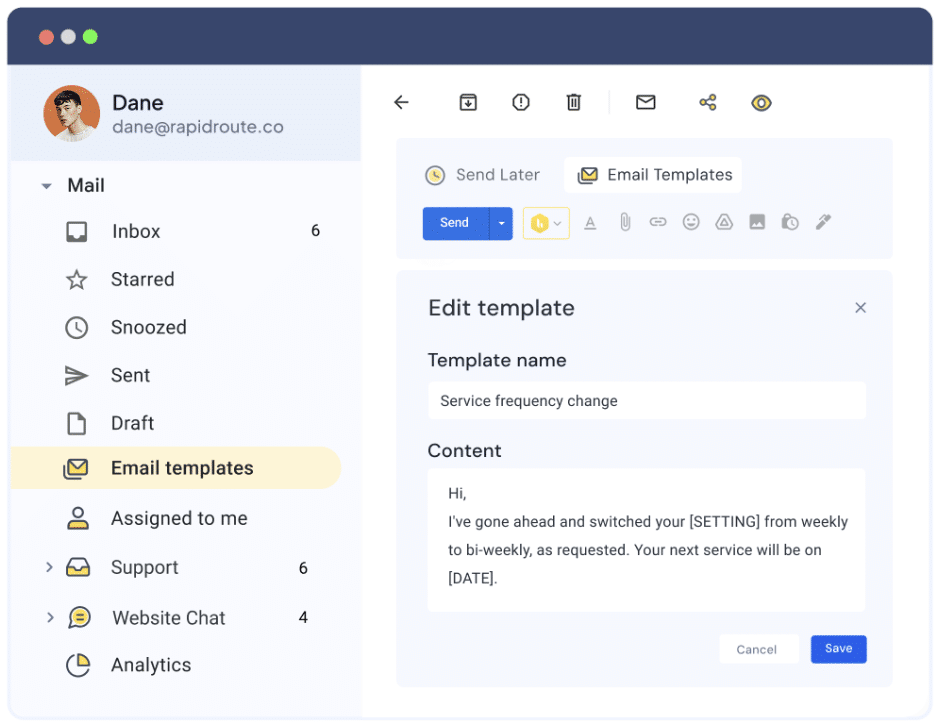
Templates are a lifesaver when your support inbox is packed. They help your customer support team respond faster, stay consistent, and maintain a high level of service.
But if your reply feels like a template, customers will notice. And it can instantly make them feel like just another ticket.
That’s why the best support teams treat templates as a starting point and not a final draft. A few personal touches can turn a canned response into something warm, human, and genuinely helpful.
Whether you’re referencing a previous conversation, adjusting the tone, or adding a quick line of empathy, these small edits show the customer that you’re paying attention and not just copy pasting.
| Do ✅ | Don’t ❌ |
|---|---|
| Adjust the greeting, tone, and sign-off to match the conversation | Leave placeholders like [INSERT NAME] or [TICKET ID] |
| Reference the customer’s issue or account details | Use generic phrasing that ignores the actual context |
| Add one line that shows you understand their situation (e.g., “I can imagine how frustrating that delay must’ve been.”) | Skip straight to the solution without showing empathy |
💡Pro Tip: If your team uses a customer support tool like Hiver, they can create and share email templates for different scenarios. Simply drag and drop the most relevant template into your response window, and add a touch of personalization before hitting ‘Send’.
12. Mirror the customer’s tone, not their emotion
Tone-matching is one of the most underrated tools in customer service. When done well, it builds trust quickly, making your response feel aligned, respectful, and human.
If a customer writes formally, responding with polish and professionalism shows that you’re meeting them where they are. If they’re casual or light-hearted, it’s okay to loosen up a bit, and a more conversational tone can make things feel less transactional.
But when the emotion runs high, when a customer is angry, upset, or stressed, your job is to acknowledge, not absorb. You’re not there to mirror an angry customer’s frustration. You’re there to steady the conversation, bring it back to clarity, and guide it forward.
Here’s an example of how to do that well:
“Totally get why that would be frustrating. Thanks for hanging in there while I work on this for you.”
It’s empathetic, grounded, and keeps the focus on resolution, not reaction.
Customers subconsciously pick up on tone. When you strike the right balance, it helps de-escalate tense situations and builds faster rapport. You’re showing that you’re listening and adapting, without losing control of the conversation.
Recommended reading
13. Sign off with warmth and a clear next step when needed
The way you close a customer service email matters just as much as how you start it. A thoughtful sign-off leaves a final impression of your brand. One that says, “You’re in good hands.”
Too often, agents default to cold, transactional endings like “Regards” or “Thanks in advance” especially when no help has actually been provided yet. These closings can feel abrupt or impersonal.
Here’s how to do it well:
“Let me know if there’s anything else I can help with. I’m happy to assist anytime!”
“Hope that clears things up! Feel free to reply if anything’s still unclear.”
If your message includes a request or next step like updating account info, confirming a fix, or reviewing a guide, end it with a clear CTA.
“Once you’ve updated your shipping info using this link, just reply to let me know I’ll take it from there.”
“Can you confirm if the new settings are working as expected? If so, I’ll go ahead and close the case.”
Too often, agents default to cold, transactional endings like “Regards” or “Thanks in advance” especially when no help has actually been provided yet. These closings can feel abrupt or impersonal.
14. Always review before hitting send
No matter how busy your inbox is, it’s worth taking a final 30 seconds to review your message before hitting “Send.”
Why? Because the small things a missing name, a wrong link, a tone that doesn’t quite land can make a big difference in how your message is received.
Here’s a quick review checklist to run through before sending:
- Is the message clear, well-formatted, and easy to follow?
- Is the tone appropriate for the situation? Does it feel warm and human, especially if the customer is upset or frustrated?
- Is the customer’s name spelled correctly?
- Have you answered every part of the customer’s query?
- Are there any placeholders or template fragments left?
15. Close the loop internally
Customers care about getting their issue resolved, but support teams need to care about preventing that issue from recurring. One of the most powerful things an agent can do (that customers never see) is flag patterns, bugs, or recurring pain points to the right internal teams.
What this looks like:
- Escalate negative feedback that keeps surfacing in tickets
- Log common confusions that could be fixed with a better UI or onboarding
- Suggest help docs when you’re seeing the same “How do I…?” question five times a day
When agents take the extra step to close the loop internally, it helps every customer who comes after. It improves the product, reduces repeat tickets, and shows that you value customer feedback.
“Thanks for your feedback. I’ve shared this with our product team so they can review how we might improve the experience.”
Real-world customer service email examples to learn from
Templates and best practices are helpful, but sometimes, the best way to learn is by seeing how standout companies handle customer communication in the real world.
Here are five real examples of customer service emails that get it right, each for a different reason.
1. Drizly – owning a mistake with humor and accountability
Drizly, an alcohol delivery app, accidentally sent out an email filled with placeholder text. Instead of hiding it, they followed up with a witty, self-aware message and threw in a discount code to make up for it.

2. Kit (formerly ConvertKit) – clear, helpful, and hard to ignore
This webinar confirmation email from Kit blends clarity, empathy, and soft persuasion, making it hard not to attend. Instead of just listing a date and time, they explain what the user will learn and make support feel just a click away.

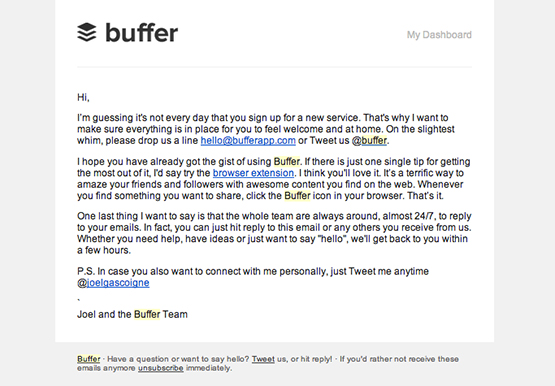
3. Buffer – a support-focused welcome email that actually helps
Right after someone signs up for Buffer’s free trial, they receive a friendly welcome email from the support team. It highlights how to get the most value from the product and reassures the user that 24/7 help is available.
4. Sundays for dogs – a warm, no-pressure post-purchase check-in
This DTC pet food brand sends a low-pressure check-in email after a purchase. It includes a thank-you note, a few helpful blog links, and a light nudge to reach out if there’s any confusion about feeding or transitioning.

Every email is a chance to show you care
In customer service, most conversations happen over email. That’s why learning to write with clarity, empathy, and intention isn’t just a nice-to-have but a real differentiator.
Every message you send is a reflection of your brand. It’s a chance to make someone feel heard, supported, and confident that they’re in good hands.
By applying the best practices we’ve shared from writing with warmth and structure to using templates thoughtfully your team can turn routine email responses into moments of trust.
So write like a human. Be clear, kind, and helpful. Save time with templates, but always make space for personality. It’s hard to go wrong from there.
Happy emailing!
FAQs on customer service emails
1. What should be included in a customer service email?
A good customer service email should include a personalized greeting, a clear explanation or solution, any necessary next steps, and a warm sign-off. It’s also helpful to include relevant links or resources and a way for the customer to follow up easily.
2. How do you respond to a customer complaint by email?
Acknowledge the complaint, take responsibility if appropriate, and clearly explain what steps you’re taking to resolve it. Avoid defensive language.
3. What’s the best tone to use in a customer service email?
Your tone should be warm, respectful, and adapted to the customer. If they’re formal, mirror that professionalism. If they’re casual, a relaxed tone can help build rapport. Avoid being robotic or overly scripted.
4. Can I use templates for customer service emails?
Yes, templates save time and help teams stay consistent. But always personalize them before sending. Adjust the tone, mention the specific issue, and make sure no placeholders (like [NAME]) are left behind.
5. How fast should I respond to a customer service email?
Ideally, within one hour. Even if you don’t have a full answer yet, a quick acknowledgment shows the customer you’ve received their message and are working on it.
6. What’s the best way to end a customer service email?
End with warmth and clarity. Thank the customer, offer help for anything else they might need, or guide them to the next step. Example: “Let me know if anything else comes up. I’m here to help.”
7. How can I sound more human in customer service emails?
Write like someone who genuinely wants to help. Acknowledge the customer’s frustration or confusion without sounding scripted. Use natural language, not jargon. For example, instead of “We apologize for the inconvenience,” try:
“I totally get how frustrating this must’ve been. I’m really sorry you had to deal with that.”
8. What proactive customer service strategies involve email?
Proactive service means helping before the customer asks. Great email-based strategies include:
– Onboarding emails that walk new users through setup
– Check-ins after a ticket is closed to confirm resolution
– Notifications for delays, outages, or known issues
– Sharing helpful tips or blog content based on recent purchases
These emails show you’re one step ahead and help reduce future support volume.
9. What are some common mistakes to avoid in customer service emails?
Here are a few mistakes to watch out for:
– Sounding robotic or overly scripted
– Over-explaining instead of keeping it simple
– Failing to clarify next steps
– Using a formal tone when empathy is needed
– Skipping the final proofread (typos and broken links hurt credibility)
Start using Hiver today
- Collaborate with ease
- Manage high email volume
- Leverage AI for stellar service













