





Pylon holds a 4.9/5 rating on G2, and it’s easy to see why. It started as a support platform built around Slack, and that’s still where it feels most at home.
But Pylon has expanded quickly from Slack ticketing into a much broader customer support platform, adding email, chat, Teams, WhatsApp, phone, AI agents, and more along the way. Many of those capabilities are relatively new, so teams looking for a mature, feature-rich helpdesk across several support channels may find that Pylon doesn’t yet offer the same depth everywhere that it does for Slack-based support.
That’s where the alternatives come in.
We evaluated 10 Pylon alternatives based on channel coverage, AI capabilities, workflow depth, pricing transparency, and verified user reviews. The goal was to find platforms that give support teams more flexibility beyond Slack without adding unnecessary complexity.
What is Pylon?
Pylon is famous in the industry for being a Slack and Teams-first support platform. Instead of pulling agents into a separate helpdesk, it lets them manage tickets directly inside the tools they already use. That’s been its biggest pull for startups and fast-moving B2B teams.

It also stands out for its clean, Kanban-style interface and AI-driven workflows like auto-tagging, triage, and deflection. With a 4.9/5 rating, Pylon has built a strong reputation among small teams that want speed and simplicity without the bloat of older platforms.
Why choose a Pylon alternative?
Pylon gets a lot of things right- but as companies grow, the gaps start to show. Here are the common drawbacks that push companies to consider Pylon alternatives:
No mobile support
Pylon still doesn’t offer a native mobile app. Agents can access the platform through a mobile browser, but Pylon itself recommends primarily using it from a non-mobile device.
That can be limiting for support leaders and agents who need to monitor tickets or handle escalations away from their desks.
As one G2 review pointed out, “Only option is to sign in via Slack. No mobile application.”
Some integrations still lack depth
Pylon connects with a growing range of CRMs, engineering tools, messaging platforms, and data systems. But having an integration doesn’t always mean every advanced workflow is covered.
Recent G2 feedback, for example, calls for deeper Salesforce integration and broader API capabilities. Teams with complex support stacks should therefore check that Pylon supports the specific data syncs and workflows they rely on, rather than looking at integration availability alone.
Advanced customization still has some limits
Pylon offers a capable automation system with triggers, routing rules, SLAs, assignments, AI conditions, and escalation workflows. So basic automation isn’t the problem.
The limitation appears further down the curve. We’ve seen a few complaints mentioning constraints around reporting, filtering, API functionality, and some more specialized workflows. Teams with highly customized support operations may therefore want to test their more complex processes before committing.
Customer portal is reserved for Enterprise
Pylon does offer a customer portal for viewing, responding to, and managing support issues, alongside its knowledge base and customer authentication features. However, the portal is listed as an Enterprise feature.
There are also some customization limits. For example, customers can only choose the default Open and Closed ticket statuses rather than the custom statuses your internal team may use. Teams that rely heavily on sophisticated self-service workflows may want to evaluate those limitations closely.
10 Best Pylon Alternatives (Full Comparison in 2026)
Based on reviews, pricing, and features, here are 10 Pylon alternatives worth considering:
| Tool | Key Features | Starting Price | G2 Rating |
|---|---|---|---|
| Hiver | Agentic omnichannel platform, native AI (Agents + Copilot + QA + Insights), cross-team collaboration, Workflow Automation, ticketing | $25/user/mo (Growth plan) | 4.6/5 |
| Intercom | Proactive messaging, Fin AI per-resolution bot, branching chatbot flows | $39/seat/mo (Essential plan); 14-day free trial | 4.5/5 |
| Freshdesk | Freddy AI Copilot, multi-time-zone support, SLA automation, marketplace apps | Growth starts at $15/agent/mo; 21-day trial | 4.4/5 |
| Zendesk | AI Copilot, omnichannel (voice, chat, social), SLA routing, Explore analytics | $55/agent/mo (Suite Team); 14-day free trial | 4.3/5 |
| Help Scout | Email/Chat support, unlimited seats, AI assistance | Standard starts at $25/user/mo; 15-day free trial | 4.4/5 |
| Zoho Desk | Zia AI, macros/automation, multi-channel support (email, social, telephony) | Standard starts at $14/agent/mo; 15-day free trial | 4.4/5 |
| Gorgias | E-commerce focused automation, Shopify deep integration, SMS/WhatsApp channels | $60/mo (350 tickets); 7-day free trial | 4.6/5 |
| Salesforce Service Cloud | Einstein AI, omnichannel routing, self-service help center, case automation | $25/user/mo (Starter plan); 30-day free trial | 4.4/5 |
| Desk365 | AI ticket summarization, SLA workflows, Teams integration | $12/user/mo (Standard plan); 21-day free trial | 4.8/5 |
| Kapture CX | AI-driven deflection, industry-specific workflows, omnichannel reach | ~$39/user/mo (Essential plan); no free trial | 4.5/5 |
1. Hiver
Hiver is a modern and intuitive AI-powered customer support platform. One standout feature is its agentic capabilities. AI Agents understand intent, run multi-step procedures, and resolve even the edge cases. For the ones that need judgment, AI Agents do the groundwork alongside your team: pulling similar issues, drafting replies, taking actions as directed, and suggesting next steps.
Where Hiver really pulls ahead is scale. While Pylon stays tied to Slack and Teams, Hiver supports all major channels, like email, chat, phone, WhatsApp, social, and more. Its AI goes beyond simple tagging: it drafts replies, resolves common queries on its own, and gives managers insights they can act on to improve performance.
Another big difference is customer support. Hiver offers 24×7 assistance across all channels, while Pylon’s support is limited to weekdays – something that can slow teams down when issues arise outside standard hours.
Pricing is another differentiator. Hiver keeps AI costs predictable with flat-fee pricing, which means growing ticket volumes don’t lead to unpredictable bills.
Key features
- AI Agents: Handle customer requests end-to-end on their own. They read the full conversation, follow your team’s playbooks, and complete actions in connected tools without waiting for a human to step in.
- AI Copilot: Works alongside your agents in real time. It surfaces past tickets that match, builds a draft reply that sounds like your team wrote it, and flags what to do next.
- AI QA: Scores every single conversation against the benchmarks your team has set, so quality checks aren’t limited to the few a manager can get to manually.
- AI Insights: Surfaces patterns like recurring problems, gaps in service quality, and changes in customer health while there’s still time to act.
- Omnichannel Inbox: Brings every customer conversation across email, chat, Slack, voice, SMS, and social into one platform, so context carries across channels instead of starting over.
- Cross-team Collaboration: Keeps the full thread intact when a request moves between departments. Conversation history, private notes, handoffs, and Slack discussions all stay tied to the original customer conversation.
- Workflow Automation: Takes care of repetitive tasks like routing, tagging, and follow-ups. This reduces manual errors and ensures no customer query is missed.
Pros
- AI is built into every stage, from the first triage decision through autonomous resolution and post-conversation quality scoring.
- Flat AI pricing (no surprise per-resolution costs).
- 24×7 support across all channels, and most teams go live the same day without needing IT help.
Cons
- AI Agents work best with a well-maintained knowledge base, so teams with sparse documentation will want to build that out first.
- Voice is available as an add-on rather than bundled into every plan.
Pricing
- Growth: $25/user/month
- Pro: $55/user/month
- Elite: $85/user/month
All plans billed annually. Hiver also offers a 7-day free trial so teams can test it risk-free.
AI is included across all paid plans, with no usage caps and no add-on fees.
Hiver comes in two products. Hiver Omni is a dedicated omnichannel platform, and Hiver in Gmail runs inside your inbox.
Rating
G2 rating: 4.6/5 (1,283 reviews)
Use cases
- Teams managing complex, cross-team support who need AI that goes beyond simple deflection
- Scaling support teams that want predictable AI costs
- B2B companies that need omnichannel support with full account-level context
Why it’s a better alternative to Pylon
Pylon works well for chat-first teams inside Slack or Teams. But it stops short once you need omnichannel capabilities, advanced ticketing, collaboration, or AI that does more than triage. Hiver’s AI is native and covers the full lifecycle, from resolving requests autonomously to reviewing quality after the fact. And unlike per-resolution AI pricing, Hiver keeps costs flat as your volume grows.
2. Intercom
Intercom is known for being one of the most modern customer support tools out there. Its biggest draw is Fin, a powerful AI agent that can fully resolve conversations before they even reach a human. Combined with a clean interface and strong automation features, Intercom helps companies deliver a modern, customer-first experience.

Key features
- Fin AI Agent: A generative AI bot that connects to your knowledge base and resolves customer questions with high accuracy, escalating only when necessary.
- Workflows: Drag-and-drop builder to design automated flows, guide customers, and route conversations without coding.
- Proactive Messaging: Trigger in-app messages or emails based on user behavior to support, upsell, or onboard customers at the right time.
- Help Center + Tickets: Built-in knowledge base and shared inbox ensure agents have full context and customers always have self-service options.
Pros
- Strong live chat and in-app messaging experience.
- Fin handles a high share of conversations when paired with a well-built knowledge base.
- Clean, modern UI that agents enjoy using.
Cons
- Expensive compared to most tools, especially as conversation volume grows.
- Fin’s per-resolution pricing ($0.99 per resolution) can add up quickly at scale, making costs unpredictable.
- Some features (like Telegram or advanced integrations) are paid add-ons.
User Reviews
“While the core product is decent, it’s far from perfect and doesn’t justify the high cost. They lack some integration like native Telegram… Fin, in particular, is overhyped — most of its replies aren’t helpful.” — User after 3 years on Intercom
“After nearly four years on Intercom, I regret choosing it. Support is painfully slow — responses take hours or days, and you’re passed between agents who lose context, forcing you to repeat yourself. They even blocked our ability to send emails without warning and took days to fix it. Pricing keeps climbing as everything is an add-on, and core features like Telegram integration are missing unless you upgrade. Fin, their AI bot, is overhyped, most replies aren’t actually helpful.”
All these reviews are from Intercom’s G2.
Pricing Overview
- Essential: Starts at $39/seat/month (billed annually)
- Advanced / Pro tiers: Custom pricing based on team size and features
- Fin AI Agent: $0.99 per resolution
- Free trial: 14 days
While Intercom’s entry price looks reasonable, AI and automation costs can spike quickly if your volume is high.
Ideal For / Use Cases
- SaaS / product-led companies with high chat or in-app traffic
- Teams that prioritize automation and self-service deflection
- Companies that value proactive support and user engagement over traditional ticket queues
Why It’s a Better Alternative to Pylon
Pylon is great for chat inside Slack or Teams, but it doesn’t offer in-app messaging, behavioral triggers, or a powerful AI bot like Fin. Intercom helps you support and engage users across web, mobile, and email, not just internal chat platforms.
3. Freshdesk
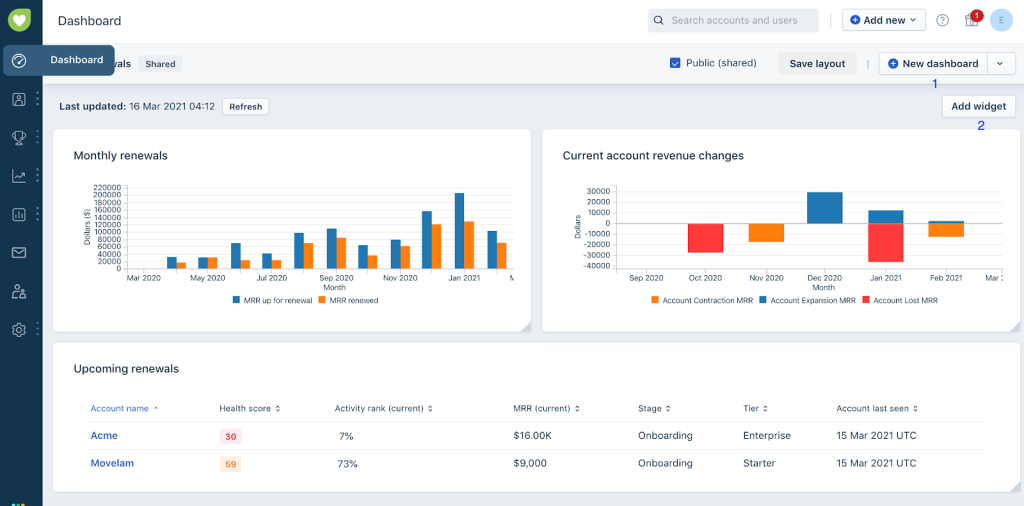
Freshdesk has become a go-to tool for businesses that want a full helpdesk without too much complexity. It offers email, chat, phone, and social support in one place, with AI features under the Freddy AI brand. From auto-triaging tickets to helping agents draft faster replies, it balances automation with usability.
Key features
- Freddy AI Copilot: Helps agents write better responses, summarize conversations, and resolve tickets faster.
- Freddy Self-Service: AI bots that deflect repetitive queries by answering them before they reach an agent.
- Freddy Insights: AI-powered reporting that surfaces customer sentiment and performance trends.
- Auto-Triage: Machine learning that classifies tickets and assigns the right priority automatically.
Pros
- Easy to deploy with a clean UI that works well for teams moving from email/spreadsheets.
- Strong mix of support channels, especially phone support (which Pylon lacks).
- Freddy AI tools help reduce repetitive work for agents.
Cons
- Setup becomes increasingly complex as workflows grow — often requiring IT help.
- Some users report delayed or inconsistent customer support from Freshdesk itself.
- Customization options feel limited compared to larger tools like Zendesk.
User Review
“When the ticket count is high and workload is heavy, this causes very much frustration.”
“The platform sometimes feels crowded with too many features and it takes time to discover which ones are really useful. Some of the integration steps requires technical knowledge, which is difficult for clerical staff to handle alone.”
All these reviews are from Freshdesk’s G2.
Pricing Overview
- Free Plan – Basic ticketing for small teams
- Growth – $15/agent/month
- Pro – $49/agent/month
- Enterprise – $79/agent/month
- AI Add-ons – Freddy Copilot ($29/agent), AI Sessions ($100 per 1,000 sessions)
- Free Trial – 21 days
Freshdesk is affordable to start with, but AI and add-ons can increase total cost quickly once volume grows.
Ideal For / Use Cases
- Businesses wanting full omnichannel support without jumping to an enterprise-level tool.
- Teams that need built-in voice support and quick access to integrations.
Why It’s a Better Alternative to Pylon
Pylon sticks to chat-based support, while Freshdesk gives teams voice, social, email, and AI-powered workflows in one place. It scales better for high-volume ticket environments and offers far more automation depth — especially around phone support and SLArouting.
4. Zendesk
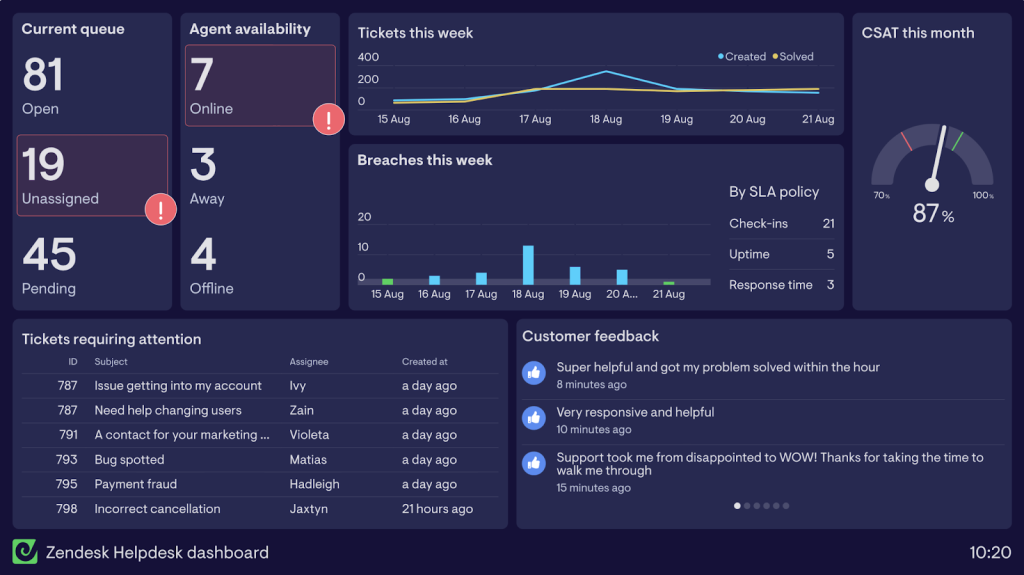
Zendesk has long been considered the gold standard in enterprise customer support. It’s a feature-packed platform covering ticketing, messaging, voice, and knowledge management. Recently, it’s doubled down on AI with AI Agents, Copilot, and built-in quality assurance tools.
Key features
- AI Agents: Automate and resolve common queries across multiple channels.
- AI Copilot: Assist agents with suggested responses, summaries, and guidance in real time.
- Quality Assurance & WFM: Track and evaluate 100% of interactions, and forecast staffing needs.
- Omnichannel Suite: Manage tickets across email, chat, voice, and social from one platform.
Pros
- Highly scalable with enterprise-ready automation and routing.
- Strong AI and reporting capabilities across multiple support channels.
- Extensive integration ecosystem with thousands of apps and partners.
Cons
- Steep learning curve — setup and navigation can feel complex.
- Key features like reporting or integrations are often locked behind higher-tier plans.
- Customer support and contract flexibility are frequent complaints.
User Review
“It’s difficult to cancel your contract, and even harder to get through to a human in support. Many features are only available for elite users.”
“Some advanced customization features require technical expertise or paid add-ons, which can be limiting for small teams. Reporting dashboards could be more flexible, and certain integrations take extra time to configure.”
All these reviews are from Zendesk’s G2.
Pricing Overview
- Suite Team – $55/user/month (annual billing)
- Suite Growth – $89/user/month
- Suite Professional – $115/user/month
- Add-ons – AI Copilot (~$50/user), QA, Workforce Management
- Free Trial – 14 days
Zendesk is one of the pricier options in this list — especially once AI and add-ons are included — but the tradeoff is enterprise-grade control and automation.
Ideal For / Use Cases
- Large teams that need advanced automation, strict SLAs, or multi-brand support.
- Enterprises looking for an all-in-one AI-powered support suite across channels.
Why It’s a Better Alternative to Pylon
Where Pylon is great for simplicity, Zendesk is made for scale. It covers every major support channel — not just chat — and offers deeper automation, routing, and analytics. If your support volume is growing fast and you need structure, Zendesk goes much further than Pylon.
5. Help Scout
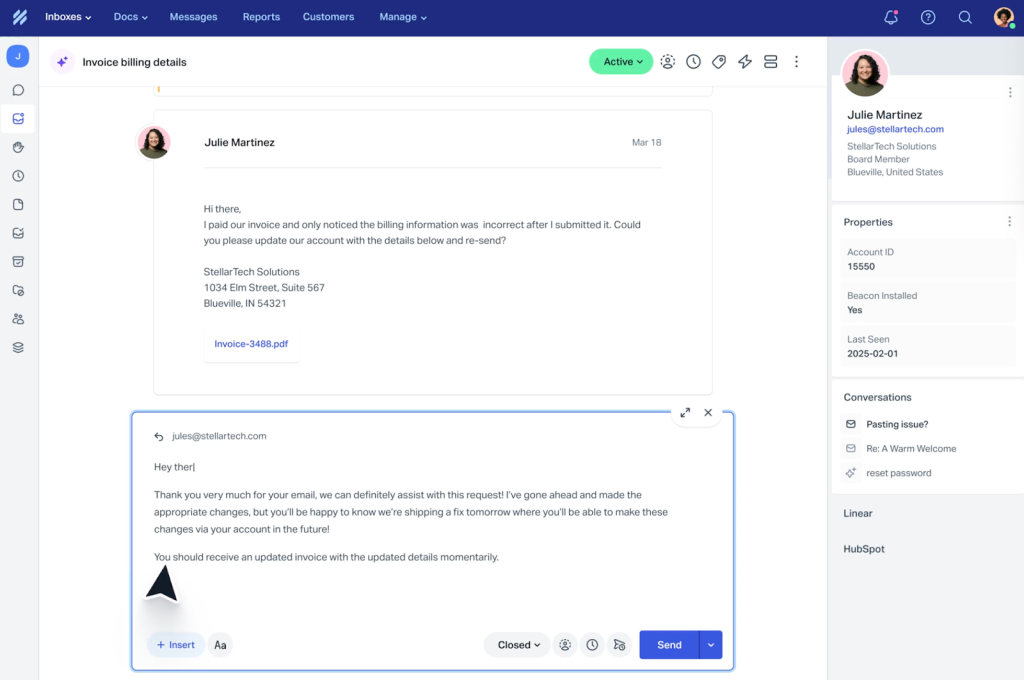
Help Scout is one of the easiest customer support platforms to get started with. It combines a shared inbox, a knowledge base, and live chat into one clean interface. Unlike heavier helpdesks, it feels approachable and friendly, which is why smaller teams love it.
It’s a better alternative to Pylon if your support is still largely email-first, but you want to add chat and self-service. While Pylon feels limited outside chat platforms like Slack, Help Scout makes support feel natural for both teams and customers.
Key features
- Unified Customer View: All emails, chats, and form submissions flow into one inbox, along with customer history. Agents can see context instantly instead of digging through multiple systems.
- Beacon Live Chat + AI Answers: Customers can search help docs or talk to an agent directly inside the Beacon widget. AI Answers use your knowledge base to instantly reply to common questions.
- Knowledge Base (Docs): Build a branded, searchable library of FAQs and guides. The editor is simple, so anyone on your team can update articles quickly.
- Reports and Satisfaction Surveys: Track response times, agent performance, and CSAT without needing an external analytics tool.
Pros
- Clean, email-style UI that’s easy for teams to adapt to.
- Built-in chat and knowledge base make self-service easy to enable.
- Affordable pricing with flexible contact-based billing.
Cons
- Limited automation and routing for larger or complex teams.
- Docs module lacks advanced formatting/collaboration features.
- Some channels like WhatsApp and deeper integrations are missing.
User Review
“Integration with some channels not available (like WhatsApp) as well as round robins and more complex adjustments not available on this platform. So not sufficient for larger, more complex operations.”
“Help Scout is work in progress, where multiple services are not yet automated. The reporting capabilities from Help Scout are shallow and they need advanced support “
All these reviews are from HelpScout’s G2.
Pricing Overview
- Standard — $25/user/month
- Plus — $50/user/month
- Pro — $75/user/month
- AI Answers — $0.75 per resolution
- Free Trial — 15 days
Help Scout’s pricing is one of the most reasonable in this list — especially for smaller teams focused on email and chat.
Ideal For / Use Cases
- Startups and nonprofits that want a support tool as easy as Gmail.
- Teams that prioritize email-first workflows with light chat support.
- Businesses that want a human, conversational support approach.
Why It’s a Better Alternative to Pylon
If your team isn’t locked into Slack or Teams and prefers email-based workflows, Help Scout feels more natural than Pylon. It brings chat and self-service without overcomplicating things — making it a better fit for teams that want structure without feeling like a heavy helpdesk.
6. Zoho Desk
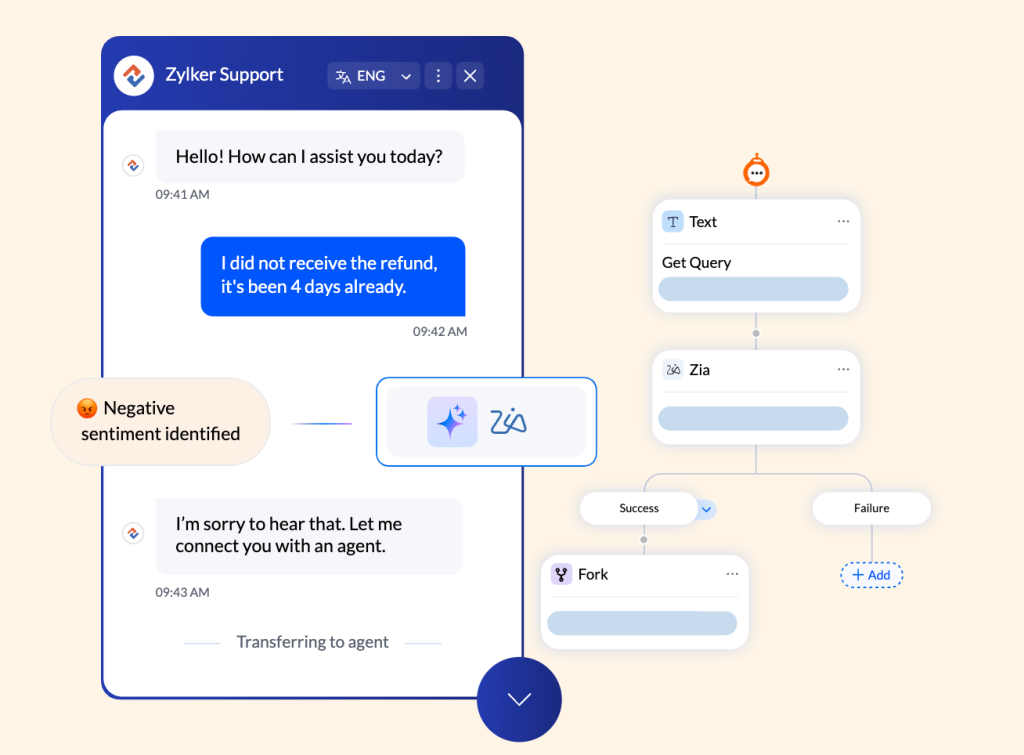
Zoho Desk is part of the larger Zoho suite, but it stands strong on its own. It offers a flexible ticketing system, omnichannel support, and AI assistance from Zia, Zoho’s in-house AI. With plans starting free, it’s popular with growing teams that want more automation without spending big.
It’s a better alternative to Pylon because it’s built for scale. Pylon is lightweight but narrow, while Zoho Desk gives you a full-service desk with workflows, SLAs, and AI..
Key features
- Zia AI: Provides reply suggestions, sentiment analysis, and anomaly detection so agents can work smarter and faster.
- Blueprints: A drag-and-drop workflow builder to automate multi-step processes like escalations or SLA tracking. Perfect for complex support environments.
- Guided Conversations: Let customers navigate structured chat flows that connect them to the right answer or agent.
- Multichannel Support: Handle customer queries from email, chat, social, and phone without switching platforms.
Pros
- Extremely affordable compared to Pylon and other alternatives
- Powerful automation and SLA workflow capabilities
- Handles more channels out of the box
Cons
- Interface feels dated and unintuitive
- Setup and customization often require technical effort
User Review
“Zoho Desk is powerful, but the setup can be confusing — I had to rely on support and documentation more than expected, especially when building advanced workflows.”
“The mobile app works, but it’s limited. It would be great to have more admin controls and the option to CC external emails without creating full user accounts.”
“Small annoyance, but not being able to close tickets with a written resolution field is frustrating — feels like a basic feature that’s still missing.”
All these reviews are from Zoho Desk’s G2.
Pricing Overview
- Standard — $14/agent/month
- Professional — $23/agent/month
- Enterprise — $40/agent/month
- Free Trial: 15 days
Ideal For / Use Cases
- Teams that want more automation than Pylon without paying enterprise prices
- Companies that need voice + social support in addition to email/chat
- Ops-heavy teams willing to trade simplicity for long-term flexibility
Why it’s a better alternative to Pylon
Pylon is easy to start with — but it stays limited to Slack/Teams and basic automation. Zoho Desk offers full-scale workflows, AI assistance, phone and social channels, and deeper customization — all while costing less. If you’re scaling and don’t mind a slightly more complex interface, Zoho delivers far more value.
7. Gorgias
Gorgias is purpose-built for ecommerce brands. It integrates directly with Shopify, BigCommerce, and WooCommerce, pulling customer orders into the helpdesk so agents can manage refunds, replacements, or shipping issues without leaving the ticket. For online stores, it blends customer support with sales in a way that generic helpdesks don’t.
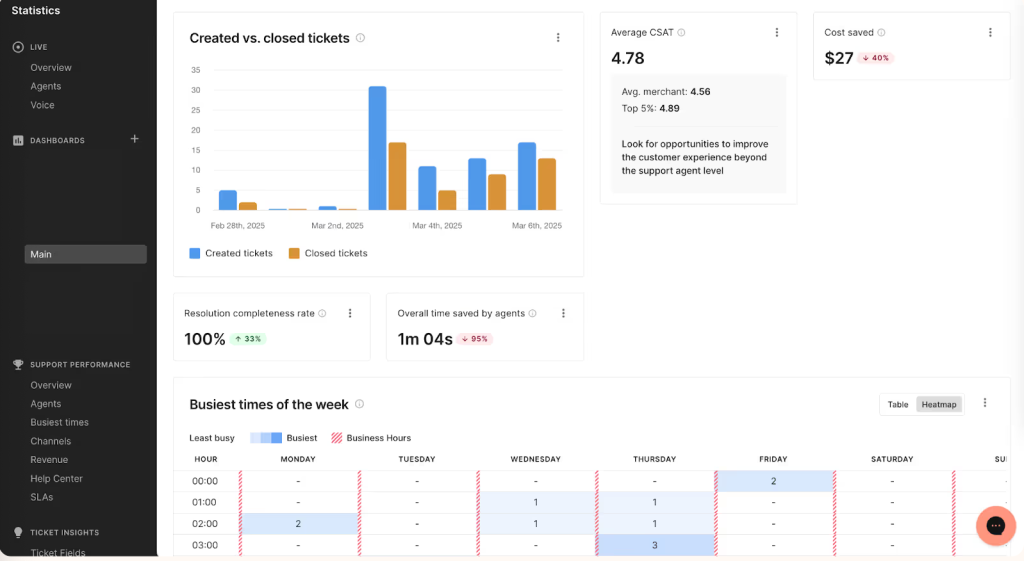
While Pylon is chat-first, Gorgias turns support into a growth driver for ecommerce teams, connecting customer issues directly to revenue impact.
Key features
- Order Management Sidebar: Agents can view, edit, or refund customer orders from Shopify or WooCommerce directly inside the helpdesk. No need to jump between tools.
- Rules and Macros: Automate common ecommerce workflows like order status updates, discount codes, or return instructions with one click.
- Sentiment & Intent Detection: Automatically prioritize angry customers or high-value buyers so agents respond faster where it matters most.
- Revenue Reporting: Tie support interactions back to actual sales, so you can measure the business impact of customer service.
Pros
- Deepest ecommerce integrations compared to any tool on this list
- Lets support agents act like sales reps without switching platforms
- Fast setup if you’re already on Shopify
Cons
- Ticket-based pricing becomes expensive quickly for high-volume stores
- UI can feel cluttered and overwhelming for first-time users
- Reporting and email formatting/customization are limited
User Review
“For how big Gorgias is, it should have more personalized and customizable options. Reporting and email functions are limited, and the small file size allowed is frustrating.”
“What I dislike about Gorgias is that sometimes it can be slow to load, especially when managing a high volume of tickets. Additionally, some automation features could be more flexible or customizable to better fit specific workflows.”
All these reviews are from Gorgias’s G2.
Pricing Overview
- Starter: $10/month (50 tickets)
- Basic: $60/month (300 tickets)
- Pro: $360/month (2,000 tickets)
- Advanced: $900/month (5,000 tickets)
- Free Trial: 7 days
Ideal For / Use Cases
- E-commerce stores that live inside Shopify or WooCommerce
- Brands that want their support team to upsell/retain customers directly from tickets
Why it’s a better alternative to Pylon
Pylon is built for chat-based support inside Slack and Teams, great for internal conversations, but not optimized for transactional ecommerce workflows. Gorgias is built specifically for online stores, with refunds, order edits, and upsells built into the helpdesk. If your customers expect fast responses and immediate actions on their orders, Gorgias is a much closer fit.
8. Salesforce Service Cloud
Salesforce Service Cloud is the heavyweight in this space, built for enterprises that want customer support tightly tied to their CRM. It offers omnichannel service, advanced case management, and a powerful AI layer through Einstein and Agentforce. For large companies, it provides unmatched customization and integration options.

It’s a better alternative to Pylon if you’ve outgrown simple chat-based ticketing. Where Pylon keeps things lightweight, Salesforce gives you a full-service solution that can handle high volumes, strict SLAs, and complex workflows without breaking a sweat.
Key features
- Einstein AI & Agentforce: Combines predictive and generative AI to route cases, draft responses, and even automate workflows end-to-end. It’s built for scale, not just surface-level assistance.
- Omnichannel Routing: Automatically assign work across chat, email, phone, and social, ensuring the right agent handles the right case at the right time.
- Knowledge & Self-Service Portals: Create branded help centers, deflect FAQs, and integrate with bots to lower ticket load.
- Native CRM Integration: Every interaction ties back to the customer record, giving sales, marketing, and support teams a single view.
Pros
- Best-in-class CRM visibility across sales, service, and marketing
- Highly customizable workflows for enterprise-scale operations
- Strong AI capabilities for intelligent routing and response automation
Cons
- Steep learning curve — lots of features but not immediately usable
- Requires technical setup and ongoing admin support
- Pricing jumps quickly when you add multiple modules or AI features
User Review
“Very hard to move off and integration with other apps is clumsy, despite the APIs. Very expensive license and implementation.”
Performance can be slow during peak times or with complex configurations
Cost can be prohibitive for smaller organizations, especially when including add-on features.”
“Salesforce Service Cloud is powerful but complex, requiring heavy setup and admin expertise. High costs, clunky UI, and performance issues can be drawbacks, and advanced automation often needs Flow or Apex.”
All these reviews are from Salesforce Service Cloud’s G2.
Pricing Overview
- Starter Suite: $25/user/month
- Professional Suite: $100/user/month
- Enterprise Suite: $175/user/month
- Free Trial: 30 days
Ideal For / Use Cases
- Enterprises that already use Salesforce CRM
- Teams with complex workflows, strict SLAs, and large agent counts
Why it’s a better alternative to Pylon
Pylon keeps things fast and simple, which works for early-stage support teams. Salesforce is the opposite: it’s built for scale, multi-team collaboration, and automation at every layer. If your biggest pain point is complexity, Salesforce will feel overwhelming. But if your challenge is volume and operations, it delivers far more structure than Pylon ever could.
9. Desk365
Desk365 is a modern helpdesk designed for Microsoft environments. It works seamlessly with Teams, making it easy for employees and agents to manage tickets without leaving their daily workspace. It’s lightweight, affordable, and straightforward, which is why many small and mid-sized teams adopt it.

It’s a better alternative to Pylon if your team lives in Microsoft products. Pylon’s strength lies in Slack-first workflows, but Desk365 brings that same simplicity to Teams, while also offering stronger automation and a customer portal.
Key features
- AI Ticket Summarization: Automatically condenses long conversations into short summaries, saving agents time.
- Knowledge Base & Portal: Customers can self-serve with a branded portal, reducing repetitive tickets.
- Microsoft Teams Integration: Agents can create, manage, and resolve tickets directly inside Teams.
- SLA Workflows: Automate due dates, escalations, and reminders to ensure no issue slips through.
Pros
- Extremely affordable compared to most tools in this category
- Seamless for companies already living inside Microsoft Teams
- Simple and fast setup with minimal learning curve
Cons
- Reporting and dashboards are fairly basic
- Interface can feel clunky and less polished than newer tools
- Notifications and templates lack flexibility
User Review
“Desk365 works well overall, but it’s still maturing — some enterprise-level features and AI capabilities are clearly still in progress.”
“The interface and customer portal could use a visual revamp, and reporting feels limited, it’s hard to extract clean data for leadership.”
“One big miss is the lack of tools to track prepaid or hourly service credits. A built-in way to monitor remaining usage would save a lot of manual work.”
All these reviews are from Desk365’s G2.
Pricing Overview
- Standard: $12/user/month
- Pro / Plus: $20/user/month
- Free Trial: 21 days
Ideal For / Use Cases
- Companies that already rely heavily on Microsoft Teams
- Small to mid-sized support teams looking for simple automation
Why it’s a better alternative to Pylon
If your team lives in Microsoft products, Desk365 is essentially the “Pylon for Teams users” — but with more built-in automation and a stronger customer portal. While Pylon leans heavily into Slack-first workflows, Desk365 mirrors that experience inside Teams and adds essentials like SLAs and self-service — without adding much cost.
10. Kapture CX
Kapture CX is a customer experience platform built with enterprises in mind. It offers customizable workflows, a “Customer 360” dashboard, and AI-powered automation for both agents and managers. It’s often chosen by teams in industries like retail, banking, and travel that need tailored solutions.

It’s a better alternative to Pylon if you’re looking for something more specialized and scalable. While Pylon does a good job for smaller chat-focused teams, Kapture helps larger organizations design industry-specific workflows and manage high complexity.
Key features
- Customer 360 Dashboard: Pulls together support, sales, and account data into one view, so agents see the full picture before responding.
- Side Conversations & Multilingual Support: Collaborate internally on tickets and serve customers in multiple languages.
- AI-driven Deflection: Automates responses to FAQs and reduces agent workload with smart self-service.
- Extensive Integrations: Connect with 1,000+ APIs and tools, making it easier to fit into enterprise tech stacks.
Pros
- Designed for enterprises that need deep customization
- Strong fit for industry-specific workflows like retail/order tracking or banking service flows
- AI and automation capabilities go beyond basic tagging or routing
Cons
- Interface can be confusing and slow to learn
- Mobile app performance is inconsistent, with crashes and delays reported
- Frequent bugs and lagging ticket updates affect daily productivity
User Review
“I wish that the User Interface was more simple and user friendly. I feel that one needs to spend a lot of time understanding the tedious process of Kapture CRM and there are issues where you will need to get in touch with their support very often.”
Pricing Overview
- Essential: ~$39/user/month
- Professional & Enterprise: Quote-based
- Free Trial: Not officially listed (sales-led)
Ideal For / Use Cases
- Enterprises with complex workflows across multiple teams or regions
- Industries like retail, travel, or banking that need deep system integration
Why it’s a better alternative to Pylon
Pylon is simple and fast, but it wasn’t built for heavy customization or enterprise operations. Kapture, on the other hand, excels when support needs to connect with billing systems, logistics platforms, or multilingual teams. If your support process can’t be squeezed into generic workflows, Kapture offers flexibility Pylon doesn’t.
How We Evaluated
We looked at each platform across six dimensions: channel coverage, AI depth (native vs. bolted-on), automation and workflow capabilities, ease of setup, pricing transparency, and verified G2 reviews. Pricing was verified directly from each vendor’s own website.
How to Choose
Not every helpdesk can handle growing volumes or rising expectations. If you’re moving away from Pylon, these core features will help make sure you don’t face the same roadblocks again.
1. AI that goes beyond triage
Pylon’s AI handles tagging and basic deflection, but it doesn’t resolve complex requests, review conversation quality, or surface account-level insights. Look for a platform where AI spans the full support lifecycle.
2. Support on every channel
Pylon is built mainly for Slack and Teams, but customers expect help across email, chat, phone, social, and even WhatsApp.
3. Strong integrations
A good alternative should integrate smoothly with billing, CRM, and other tools so agents always have full context.
4. Smarter automation
Look for platforms that support multi-step workflows, SLA-based triggers, and complex escalations.
5. Better knowledge base
A stronger option should give you a proper knowledge base with AI search, analytics to spot content gaps, and even auto-translations.
6. Mobile access
One big drawback of Pylon is the lack of a mobile app.
7. Transparent, scalable pricing
The best alternatives make pricing predictable and tied to the value you actually get.
Which Pylon alternative is right for you?
Pylon deserves credit. It’s growing fast and has carved out a strong spot for chat-first B2B teams. But as support operations scale, the need for native AI, multi-channel coverage, and cross-team workflows pushes teams to look at alternatives that can keep up.
If you’re trying to decide, think about your team’s size, budget, and the channels you can’t compromise on. Here’s a quick checklist:
- Does it support all the channels you need, including email, chat, WhatsApp, voice, and social?
- Does the AI actually resolve requests end-to-end, or does it just triage and tag?
- Can it scale smoothly as your team grows from 10 to 100 agents?
- Are reporting and dashboards easy to use, flexible, and reliable?
- Will it integrate cleanly with your CRM, billing, and collaboration tools?
- Is the pricing model transparent and predictable as volumes grow?
If a tool checks these boxes, you’re on the right track. And if you’d like to see how Hiver stacks up, you can start a free trial and test it out with your own workflows.
FAQs
What is the best Pylon alternative for teams that need AI beyond triage?
Hiver is the strongest option if you need AI that covers the full support lifecycle. AI Agents resolve requests autonomously, and AI Copilot assists your team on complex cases. AI QA reviews every conversation for quality, and AI Insights surface patterns you can act on. All of this is included at a flat $20/user/month with no per-resolution charges.
Why do companies look for Pylon alternatives?
Most teams switch when they need more. Pylon doesn’t scale well for larger operations, multi-channel support is limited, integrations can be unreliable, and automation only covers the basics.
Which Pylon alternative is best for ecommerce?
Gorgias is built specifically for ecommerce brands. It integrates directly with Shopify, BigCommerce, and WooCommerce. Pricing is ticket-based, starting at $10/month for 50 tickets.
How does Pylon compare to Zendesk?
Pylon is simple and great for quick setup, while Zendesk is an enterprise-level helpdesk. Zendesk supports voice, WhatsApp, complex workflows, and AI.
Is Pylon good for scaling customer support teams?
Pylon works fine for small, chat-first teams. But as ticket volume grows, the gaps show. It lacks voice support and advanced SLAs, and its automation is limited.
Start using Hiver today
- Collaborate with ease
- Manage high email volume
- Leverage AI for stellar service













