

Customers don’t like waiting. They expect a quick reply when they reach out for help, whether day or night. In fact, almost 39% say long wait times are one of their biggest frustration.
That’s why fast, dependable support has become non-negotiable. But with rising ticket volumes and 24/7 expectations, many support teams struggle to keep up. This is where a managed helpdesk can make a difference.
In this guide, we’ll explain what a managed helpdesk is, the services included, its typical cost, and what to look for before choosing one.
Table of Contents
- What is a Managed Helpdesk?
- What's Included in Managed Helpdesk Services?
- What are the Benefits of a Managed Helpdesk?
- Managed Helpdesk Pricing Models
- Managed Helpdesk vs Service Desk vs IT Support vs Co-managed: What’s the difference?
- What SLAs and KPIs should you track?
- When Should You Not Consider a Managed Helpdesk?
- Are Managed Helpdesk Services Right for You?
- FAQs
What is a Managed Helpdesk?
A managed helpdesk is an outsourced IT support solution where a third-party provider takes full responsibility for your entire helpdesk function. They handle everything from initial setup to daily operations and ongoing maintenance.
It’s different than traditional IT support, which follows a “reactive” or break-fix model. It waits for problems to occur and then fixes them. A managed helpdesk takes a “proactive” approach instead. The provider monitors your IT systems constantly, spotting and resolving issues before they cause disruptions.
What’s Included in Managed Helpdesk Services?
Managed helpdesk providers handle regular maintenance, updates, and security checks. They also track performance and share detailed reports. Most importantly, they focus on building a long-term partnership to support your business as it grows. Let’s look at the services in a bit more detail:
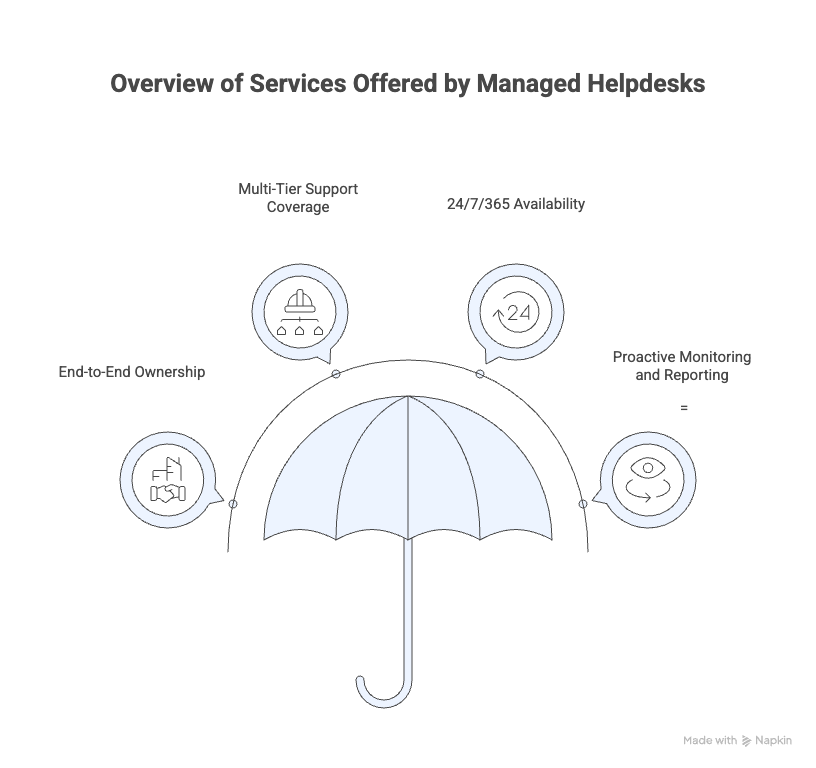
End-to-end ownership
Managed helpdesks are usually managed by Managed Service Providers (MSPs), third-party companies that manage your entire IT infrastructure and support operations. They handle everything: hardware, software, support agents, ticketing systems, and service-level commitments. This gives you a complete IT setup without the burden of hiring, training, or managing an in-house team.
Multi-tier support coverage
Managed helpdesks operate with a multi-tiered structure to resolve IT issues efficiently. It’s basically to put each IT problem in the hands of someone with the right skills. This avoids bottlenecks, ensures faster responses, and lets experts focus on what they do best. The multi-tiered structure is typically divided into three levels:
- Level 1 (L1): These agents handle simple and common issues like password resets, access problems, or basic software questions.
- Level 2 (L2): This tier involves more experienced technicians who tackle issues beyond the basics, such as recurring outages, complex software installation, or malfunctioning hardware.
- Level 3 (L3): These are the highest-level experts, often senior engineers or developers who get involved when there’s a bug in the core product, advanced system failure, or integration issue.
24/7/365 availability
Most managed helpdesk services offer round-the-clock support to accommodate global teams and different time zones. So if a problem arises, you don’t have to wait for office hours and can get help immediately.
Also, fast responses keep business running smoothly and prevent long disruptions. Your employees stay productive, and your customers get answers when they need them most.
Proactive monitoring and reporting
Unlike reactive support models, managed helpdesks actively monitor systems. They conduct regular audits, analyze ticket trends, and share performance metrics with clients. This proactive approach to support helps identify and resolve potential issues before they impact operations.
What are the Benefits of a Managed Helpdesk?
Advantages of using managed helpdesk services include 24/7 coverage, faster responses and fixes, predictable costs, and on-demand expertise. It can also scale with demand, reduce downtime, and free your team to focus on upgrades, security, and high-impact projects.
Let’s go over the benefits in more detail below:
1. Costs stay predictable (and often lower)
With managed helpdesk services, you pay a fixed monthly or yearly fee for support, so costs stay predictable and easier to budget. This approach often leads to significant savings compared to running an in-house team. There are no surprise charges or staffing costs when ticket volume spikes.
CitiGroup, for example, moved over 11,000 IT helpdesk jobs from its own offices to companies like Wipro in other countries. By doing this, Citi saved about $1 billion yearly. The teams they hired outside handle everyday questions and keep Citi’s IT systems working worldwide, so the staff can focus on bigger projects.
2. Easy to Scale Up or Down
Your support needs can shift overnight. As your team grows or busy seasons hit, you might need more hands on deck.
A managed helpdesk scales with you instantly, adding support when workloads spike and reducing it when things slow down. You don’t have to worry about hiring, training, or letting people go. The provider handles it all, so your support always fits your business.
3. Access to specialized expertise
Managed helpdesks have teams full of IT professionals with different skills. This includes people with expertise that might be hard or expensive to recruit on your own. So, you can get readily available help with almost any problem, from basic troubleshooting to new software updates or cybersecurity.
For instance, Circle K (a huge convenience store chain) ran into problems because its helpdesk staff kept quitting, leaving too many open seats and skill gaps. To fix this, they signed a 10-year, $380 million deal with CGI for managed IT support. As a result, CGI filled skill gaps within months, even replacing a key database expert overnight. Circle K now has a bigger talent pool, faster store tech rollouts, and more reliable service, all without losing quality.
4. Improved productivity and reduced downtime
According to a Unisys study, nearly 50% of employees lose 1–5 hours weekly to IT issues. Managed helpdesks keep your team on track by fixing issues faster and automating routine tasks, so tech problems don’t slow everyone down.
5. More time on strategic projects
IT teams often get stuck handling small, repetitive issues. That leaves little time for work that actually drives growth. A managed helpdesk takes routine support off your team’s plate. Your team can finally focus on strategic projects, such as system upgrades, security improvements, and new technology rollouts. Instead of putting out fires, they get to build what’s next.
For example, Google uses outside agents to handle Google Ads support, allowing their team to spend more time on new initiatives instead of solving user problems. As a result, Google was able to answer tons of requests every week, without overloading its staff or slowing down progress.
Managed Helpdesk Pricing Models
Managed helpdesk pricing can vary, depending on things like support hours, languages, skill level, security needs, and how much you want the provider to handle. Here are some simple pricing models:
- Per-ticket helpdesk pricing: The per-ticket pricing model charges you based on each individual support incident resolved, making it a pay-as-you-go approach. Costs typically range from $6 to $40 per ticket.
- Per-user helpdesk pricing: This model charges you a fixed monthly fee for each employee, regardless of their actual support usage or device count. Costs typically range from $80-$150 per user in the United States.
- Per-hour helpdesk pricing: Per-hour pricing operates like a traditional consulting arrangement. They charge you for the actual time helpdesk agents spend working on support issues. Domestic US providers typically charge $28-$40 per hour, while offshore providers range from $7-$16 per hour. International rates reach $40-$65 per hour in Australia.
- Tiered outsourced IT support & helpdesk packages: Tiered pricing packages services into bundles. This typically includes bronze, silver, gold, and platinum levels. Entry-level plans often start around $50-$300 per user monthly, with premium tiers reaching $200-$300 per user, depending on included services.
Managed Helpdesk vs Service Desk vs IT Support vs Co-managed: What’s the difference?
When you understand how each support setup works, you can make smarter choices for your business. By matching what these setups offer, like fast response, broad strategy, or tight control, to what you actually need, you prevent headaches down the line. Here’s what you need to know about each model:
1. Managed Helpdesk
A managed help desk zeroes in on resolving user and customer issues fast. Picture it as the team people call when something’s broken, a password reset, a software glitch, or a device issue. It’s typically reactive, ticket-based, and aims to fix incidents so work can keep rolling.
2. Service Desk
A service desk handles everything from service requests to changes, assets, knowledge, and even compliance. Think of it as the command center of IT, connecting people, processes, and business objectives. The goal is not just solving problems, but improving the whole IT experience over time.
3. IT Support
IT support is the umbrella term for any kind of technical assistance a business might need. This can include fixing computers, setting up networks, handling cybersecurity, or even planning for company-wide technology upgrades. IT support covers both everyday troubleshooting and long-term strategy to keep the entire tech side of a business running well.
4. Co-Managed IT
Co-managed IT gives you the best of both worlds by letting your internal IT team work alongside outside experts. You don’t have to choose between handling everything in-house or outsourcing it all. Instead, you share the workload. This means your staff can focus on their strengths while experienced specialists step in for tough challenges or major projects.
Here’s a quick comparison to help you understand the difference better:
| Feature / Focus | Managed Help Desk | Service Desk | IT Support | Co-managed IT |
|---|---|---|---|---|
| Approach | Reactive (fix problems) | Proactive & strategic | Holistic tech management | Collaborative, shared responsibility |
| Scope | User issue resolution | End-to-end IT service requests | Systems, networks, and all IT needs | Blend of internal & external IT capabilities |
| Typical Tasks | Password resets, troubleshooting | Incidents, service requests, process improvement | Setup, maintenance, upgrades, security | Project support, specialized tasks, and daily support |
| Alignment | Task oriented | Business & process oriented | Business infrastructure-oriented | Partnership, flexible resource allocation |
| Example | Fixing a crashed computer | Approving new IT tools and workflow | Installing servers, cybersecurity | In-house team + provider working on a cloud migration project |
💡Pro Tip: Co-managed vs fully managed: who should choose what?
Choose fully managed if you have little or no internal IT, want everything handled for you, or need constant, reliable coverage.
Choose co-managed if you have an IT team you trust, but need extra help for growth, complex projects, or business continuity, while keeping day-to-day control and flexibility in your own hands.
Recommended reading
What SLAs and KPIs should you track?
You don’t need to track everything. Focus on the signals that reveal how well your help desk is really doing. Here are some of the key helpdesk metrics that you can track:
- First Response Time (FRT): It’s the average amount of time it takes for a support agent to reply after a ticket is created. Tracking FRT helps you catch responsiveness issues before they affect customer trust or satisfaction.
- Average Resolution Time (ART): It tells you how long it takes, on average, to fully resolve a user’s issue from submission to completion. Average resolution time helps identify bottlenecks and ensure your team handles problems efficiently, keeping users happy with quick solutions.
- First Contact Resolution Rate (FCR): It’s the percentage of issues solved in just one interaction, with no follow-ups. A healthy FCR shows your team’s skill and prevents users from having to repeat themselves, cutting down frustration and support costs.
- Customer Satisfaction (CSAT): This is direct feedback from users on their support experience. It’s usually collected through post-interaction surveys. High CSAT scores signal that your service is meeting user expectations, and dips point to issues you need to fix fast.
- Open Ticket Count: It’s the current number of unresolved support requests in your queue. Monitoring this keeps your team from getting swamped and helps prevent long waits or growing backlogs that damage user satisfaction.
- SLA Compliance Rate: Service level agreements (SLAs) measure whether issues are being resolved within the promised timelines, especially for high-priority or urgent problems. Tracking SLA compliance keeps your support reliable and confirms you’re honoring user commitments on priority and urgent requests.
When Should You Not Consider a Managed Helpdesk?
Sometimes, outsourcing your help desk just isn’t the right fit. There are situations where a managed helpdesk can introduce roadblocks instead of relieving them. Here’s when you should take a closer look before making the switch.
1. Your product changes all the time
If your business updates its products or services often, an outsourced team might struggle to keep up. Big changes or new features may take time to reach the managed helpdesk. This can lead to slow or incorrect answers for your customers. In-house teams usually adapt faster because they hear about changes right away and know your product inside and out.
2. You need tight data control
For some businesses, keeping sensitive data private is a must-have. Strict privacy laws or company rules may forbid sharing certain information outside your team. If this is your situation, it’s safest to keep your helpdesk and support channels in-house, where you control who sees what.
Recommended reading
3. You want support to feel special
For some companies, like Zappos, customer support is part of what makes them unique. Take this one story, for instance: a customer bought shoes from Zappos to wear to a wedding. When the courier misrouted his package, he called Zappos support. They sent him a new pair overnight at no cost, upgraded his account to VIP status, and even gave him a full refund.
When you keep support in-house, you control every detail: from the tone of responses to how quickly feedback loops back to your product team. This personal touch, like what Zappos’ customers experienced, is tough to replicate with an outside provider.
Are Managed Helpdesk Services Right for You?
Deciding if managed helpdesk services are right for you starts with examining your business goals, support needs, and how much flexibility or control you want. Think about what matters most:
- Will a managed helpdesk help you respond to seasonal spikes and off-hours emergencies without hiring more staff?
- Can managed helpdesk services handle your data securely and meet any industry compliance needs?
- Is it important for your support team to work closely with product or engineering, or is separation fine?
- How quickly do you need customer issues resolved, and can an outside provider guarantee those response times?
If you value ownership, speed, and a deeply personalized approach, keeping support in-house may be your best move. AI helpdesks like Hiver make this even easier. In Hiver, AI agents can handle common or repeated questions, reducing costs and leaving your team free to focus on tougher problems. You’ll see faster ticket responses and stronger customer satisfaction, without needing a bigger team.
So before outsourcing, consider whether investing in helpdesk software could help your team deliver faster, more personalized, cost-effective support.
FAQs
1. How do SLAs work in managed help desk services?
SLAs define guaranteed response and resolution times based on issue priority, with financial penalties for non-compliance. Typical SLAs include 15-minute response for critical issues, 4-hour response for low priority, and 70-80% first-contact resolution targets. Most providers offer 99.9% uptime guarantees and CSAT scores above 85%, with service credits of 5-25% for missed targets.
2. Can I switch from managed services to in-house support later?
Yes, you can switch from managed services to in-house support later. Most providers offer flexible contracts, so you can transition gradually by reducing their scope while building your internal team. Just make sure to plan knowledge transfer, hire the right talent, and document all systems and processes before ending the contract to avoid disruptions.
3. How do managed help desk services handle security and compliance?
Managed helpdesk services handle security and compliance by providing 24/7 security monitoring, rapid incident response, and regular vulnerability assessments. They also manage regulatory compliance (HIPAA, PCI DSS, GDPR), maintain SOC 2 Type II certification, carry cyber insurance, and follow strict data residency and breach notification requirements.
4. What companies offer managed helpdesk services?
Some popular managed helpdesk providers are Accenture, TCS, Wipro, Infosys, HCLTech, Cognizant, and IBM, offering 24/7 support and industry-specific expertise.
Start using Hiver today
- Collaborate with ease
- Manage high email volume
- Leverage AI for stellar service