Skip to content





If you’re evaluating customer support tools, you’ve probably found yourself stuck between Zendesk and Intercom.
Both are widely used and well-known. But once you get past demos and comparison pages, the trade-offs start to show up in day-to-day support work.
I’ve spent time working inside both tools and researching real user feedback on G2, Reddit, and support communities. This guide cuts through the noise to focus on what actually fits your team’s workflow, scale, and budget.
Before getting into the details, it helps to see how they’re positioned publicly. On the G2 Grid for Helpdesk Software, Zendesk and Intercom both appear as market leaders, but for different reasons. Zendesk is known for its ticketing features, while Intercom leans heavily into conversational and in-app support.

That difference shows up clearly once you start using them. In this comparison, we’ll look at:
- Real pricing, including add-ons that drive costs up
- Features that affect daily support work
- Common complaints teams raise after using each tool
- Where each product fits better based on team size and needs
Table of Contents
- User Reviews On Zendesk and Intercom
- My Research Methodology
- Zendesk vs Intercom At a Glance (TL;DR)
- Similarities of Zendesk and Intercom
- Differences between Zendesk and Intercom
- Zendesk vs Intercom: Pricing Comparison
- Zendesk vs Intercom: Features Comparison
- Pros and Cons of Zendesk and Intercom
- Zendesk vs Intercom: What should you choose?
- Hiver: A Modern AI-Powered Customer Service Platform
- Zendesk or Intercom: What is Your Choice?
- Frequently Asked Questions
User Reviews On Zendesk and Intercom
Before comparing both the tools in detail, it might be helpful to look at what users say after using Zendesk and Intercom for a while.
I have pulled user reviews from G2, Capterra, and Reddit and clustered them by recurring themes. This section reflects patterns around ticketing, SLAs, knowledge base setup, AI usefulness, and day-to-day automation.
| Theme | Zendesk | Intercom |
|---|---|---|
| Ticketing features | “The ticketing system is especially powerful—it helps us stay on top of customer requests, assign them efficiently, and track their progress without anything slipping through the cracks.” – G2 | “Coming from platforms that use a more traditional ticketing structure (like New, Open, Pending, Solved, Closed), Intercom’s status options can feel a bit too simplified. It sometimes makes it harder to track where each conversation stands.” – G2 |
| SLA management | “Zendesk works really well overall, but getting everything set up the way it is wanted can take some time. customizing workflows and SLA’s isn’t always straightforward, and reporting tools could be a bit easier to use.” – G2 | “Intercom helps us respond to customer inquiries in a centralized place that allows us to prioritize based on SLA and Tier.” – G2 |
| Knowledge base | “Zendesk’s knowledge base tools require you to learn a new programming language in order to set up a support site. Also, the KB tool is buggy.” – Capterra | “We started migrating our KB to Intercom a few months ago based on a module they offer called Articles. However, their content management lacks collaboration abilities like commenting and co-editing” – Reddit |
| AI features | “Zendesk’s basic AI agents are not as intuitive or customizable as many businesses would prefer. To truly maximize the benefits of Zendesk, it seems necessary to upgrade to the enhanced AI agents” – G2 | “Fin AI agent is a powerful feature that has saved us a lot of time in reference to support” – Capterra |
| Automations and triggers | “I also like Zendesk’s automation and triggers. Tickets can be routed, tagged, proportioned, and escalated automatically. This reduces manual work for the support team and keeps response times consistent.” – G2 | “We can’t automate replies to customers based on certain events; Intercom’s triggers are limited, and in general, it requires a lot of manual effort to manage customers on the day-to-day.” – G2 |
My Research Methodology
This Zendesk vs Intercom comparison is based on how these tools behave in real support environments, not on feature pages or sales claims. Here’s how the research came together:
- I tested out the tools myself. I set up trial accounts and tested everyday workflows like ticket routing, SLA handling, AI responses, and reporting. The goal was to see how each tool feels for agents and how much effort admins need to keep things running smoothly.
- I looked for patterns in user feedback. Instead of relying on isolated reviews, I went through G2, Capterra, TrustRadius, and Reddit threads to identify recurring themes.
- I paid attention to post-adoption feedback. Many reviews change tone after teams have used the tool for a few months. We specifically looked for feedback from teams that had scaled usage, added AI features, or upgraded their plans to understand where friction begins to appear.
- I broke down pricing beyond the base plans. Instead of comparing list prices, I looked at how pricing changes once teams add AI features, increase volume, or upgrade plans. This helped me highlight where costs stay predictable and where they can climb quickly over time.
Zendesk vs Intercom At a Glance (TL;DR)
Zendesk is great for teams that need structured, ticket-based support with strong control over workflows, SLAs, and high-volume queues. Intercom on the other hand is a great choice for teams that want fast, chat-first support combined with onboarding, engagement, and customer lifecycle workflows.
| Criteria | Zendesk | Intercom | Winner |
|---|---|---|---|
| Communication channels | Strong for email, voice, and social in one ticketing flow. | Strong for in-app chat, mobile push, and proactive nudges; other channels via integrations. | Tie (ticketing = Zendesk; chat = Intercom) |
| Automation & workflows | Rule based automation: routing, triggers, macros, SLAs; ideal for high-volume queues. | Behavior-based automation focused on timing messages and guiding conversations. | Zendesk |
| AI capabilities | Built for triaging and agent assistance across tickets; advanced features are add-ons. | Two lanes: Fin the Copilot (helps agents) + Fin the AI Agent (auto-resolves); both sold as add-ons. | Intercom (for conversational AI) |
| Knowledge & self-service | Knowledge base is a core self-service channel designed to deflect tickets. | Knowledge base exists, but is often used to support conversations rather than replace them. | Zendesk |
| Customer lifecycle & growth | Focused on support. Lifecycle context is handled through tickets and integrations. | Strong for onboarding, follow-ups, and sales-related conversations alongside support. | Intercom |
| Pricing | Starts at $19/user/month AI agent priced at $1.50/month. AI-copilot’s pricing is not explicitly mentioned | Starts at $29/user/month Fin AI Agent priced at $0.99/resolution Fin Copilot is priced at $29/user/month | Zendesk, based on the base price. |
| Free Trial | 14 days | 14 days | Tie |
Similarities of Zendesk and Intercom
To put it simply, Zendesk and Intercom are solving the same core problem: helping teams manage customer conversations at scale. That’s why they’re so often compared.
Here’s where they overlap the most:
- Multi-channel support: Both support email and chat as core channels, with options to extend into voice, social, and messaging apps through native features or integrations.
- AI assistance: Both offer AI to reduce manual work. Each platform provides agent assistance and customer-facing automation, even though the execution and pricing differ.
- Automation fundamentals: Both let teams automate common actions like routing, prioritization, and follow-ups, so agents don’t have to handle everything manually.
- Knowledge base support: Both include tools to create help content and surface it during support interactions, helping teams answer repeat questions more efficiently.
- Reporting and analytics: Both provide dashboards and reports to track volumes, response times, and agent performance, giving managers visibility into support operations.
- Integrations: Both integrate with popular tools like CRMs, internal collaboration apps, and ecommerce platforms, allowing teams to connect support with the rest of their stack.
- Free trial: Both offer a 14-day free trial, so teams can test features before committing.
- Scalability: Both are cloud-based platforms used by teams ranging from small startups to large organizations, with plans that expand as needs grow.
In short, they cover the same ground at a feature level. The real differences come down to how those features are designed and which type of team each platform fits best.
Differences between Zendesk and Intercom
Zendesk and Intercom offer many of the same building blocks, but they’re designed for different types of support teams. The differences show up in how work is structured, how agents interact with the tool, and how teams experience it day to day.
- User interface and agent experience: Zendesk’s interface is designed for operations. It works well for managing queues, views, and workflows, but it feels more like a work console than a chat app. Intercom’s interface feels closer to modern messaging tools. Conversations are easier to follow, and agents spend less time navigating screens, which works well for real-time and in-app support.
- Workflow design: Zendesk relies on rules, triggers, and automation to enforce processes. Once configured, the system handles routing, escalation, and updates with little manual input. Intercom relies more on guidance and timing. Playbooks and behavior-based triggers help agents and customers move forward without strict enforcement.
- Automations and AI: Zendesk uses automation mainly to improve internal efficiency, such as triage, routing, and assisting agents during replies. Intercom uses AI more directly in conversations, allowing it to answer questions and resolve simple issues without human involvement.
- Internal collaboration style: Zendesk keeps collaboration structured, often through internal notes and side conversations tied to a ticket. Intercom collaboration is more informal and chat-like, which can feel faster but less controlled at scale.
- Admin and setup effort: Zendesk requires more upfront configuration to work well, especially for automation, SLAs, and reporting. Intercom is easier to get started with, but advanced setups still require planning once usage grows.
In short, Zendesk is better suited for teams that want structure, control, and operational clarity. Intercom fits teams that prefer a conversational experience and faster, more flexible interactions.
Zendesk vs Intercom: Pricing Comparison
Instead of comparing list prices, I looked at the total cost of ownership. That includes base plans, AI add-ons, and other extras that affect what teams actually pay month to month.
Base plan pricing (seat cost only)
| Plan level | Zendesk (per agent/month, billed annually) | Intercom (per seat/month, billed annually) |
|---|---|---|
| Entry plan | $19/user/month – Support Team Plan (email-only ticketing) | $29/user/month – Essential Plan (live chat + inbox) |
| Mid-tier | $55/user/month – Suite Team Plan (email, chat, voice, social) | – |
| Advanced | $115/user/month – Suite Professional Plan (advanced workflows + analytics) | $85/user/month – Advanced Plan (automation + reporting) |
| Enterprise | $169/user/month – Suite Enterprise Plan (change management, + approval workflows) | $132 – Expert Plan (advanced routing, SLAs, controls) |
Zendesk clearly starts cheaper. But meaningful features like live chat, SLAs, and advanced reporting only show up once you move to higher tiers. With Intercom, the entry plan looks affordable, but most teams outgrow it quickly and end up on the $85 Advanced plan.
Base pricing alone doesn’t tell the full story, however. AI is where things get interesting.
Recommended reading
AI pricing simulation: per agent vs per resolution
AI pricing is structured differently in Zendesk and Intercom.
- Zendesk charges around $50 per agent per month for its AI Copilot.
- Intercom charges $0.99 per resolved conversation for its AI Agent (Fin).
So the real question is: which model costs less once your team starts using AI regularly?
That depends on two things: how many agents you have and how many conversations AI actually resolves each month.
Here’s a simple simulation to show how that plays out.
Let’s assume the following scenario:
- You own a support team of 20 agents.
- The number of support conversations resolved by AI is projected to be 2000.
| Tool | AI pricing model | Monthly AI cost | What this means |
|---|---|---|---|
| Zendesk | $50 per agent | 20 × $50 = $1,000 | Cost stays flat, even if volume increases |
| Intercom | $0.99 per resolution | 2,000 × $0.99 = $1,980 | Cost rises directly with usage |
Now flip the scenario.
If the same team only resolves 600 conversations with AI:
| Tool | Monthly AI cost |
|---|---|
| Zendesk | $1,000 |
| Intercom | $594 |
This means Zendesk’s AI pricing makes more sense when you have a large team and consistently high AI usage. Intercom is cheaper at low volumes, but costs can spike fast once AI starts handling more conversations. This is precisely why pricing feels unpredictable for many teams. The “cheaper” tool depends entirely on how much you rely on AI.
Want the power of AI without the unpredictable bill?
If you’re looking for an alternative that doesn’t spike costs with every successful resolution, you might want to consider Hiver. Unlike Zendesk or Intercom, Hiver doesn’t treat AI as an add-on. Features like AI Agents and Copilot are included in its sticker plans at no extra cost. So your monthly bill is 100% predictable regardless of volume.
Zendesk vs Intercom: Features Comparison
Zendesk and Intercom are built with different goals in mind. Zendesk focuses on structured support operations, while Intercom leans toward conversational support and customer engagement.
In this section, I have compared the features based on the intent behind support work (like resolving customer issues, scaling knowledge and automation, and managing the customer lifecycle), rather than by product categories.
This will help you not only to see what each tool offers, but also how those features shape day-to-day support work.
1. Core support operations for resolving customer issues
This is where the difference between Zendesk and Intercom becomes very clear.
Zendesk is designed around structured support operations, with clear ownership, SLAs, and defined workflows to manage high request volumes. Intercom, on the other hand, takes a lighter, conversation-first approach that prioritizes speed and flexibility over strict process.
Zendesk’s ticketing features
I feel this is where Zendesk stands out. The platform is built to help teams handle a large number of support requests without losing track of ownership or timelines.
- Ticketing system: Every customer request in Zendesk becomes a ticket with a clear owner, status, and history. This makes it easy to see who’s working on what and what still needs attention. Nothing sits unnoticed in someone’s inbox.
- SLA management: SLAs let teams set response and resolution targets and track them closely. When a deadline is about to be missed, Zendesk flags it immediately. This helps managers step in early, rather than finding out after a customer is already unhappy.
- Omnichannel agent workspace: Email, chat, voice, and social messages all land in one centralized place. Agents don’t have to jump between tools to respond. Even though everything comes from different channels, it’s handled through a single, consistent workflow.
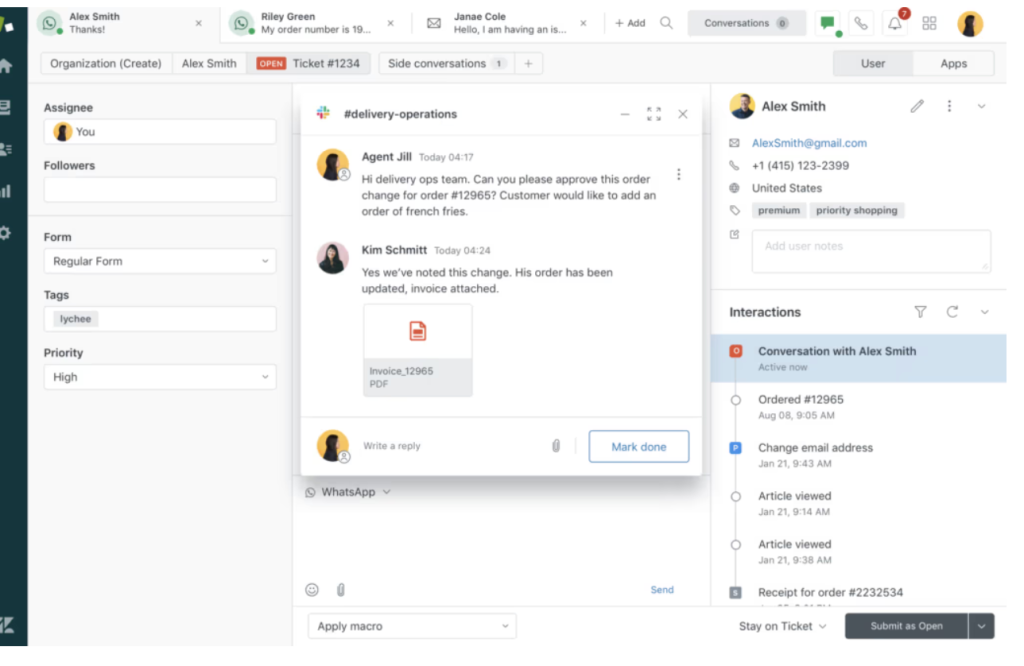
- Side conversations: Side conversations let agents bring internal teams into a ticket without looping the customer in. For example, an agent can ask the billing team to confirm a refund or check with engineering on a bug, all within the same ticket. These internal threads stay separate from the customer reply, so agents don’t have to forward messages, copy context, or switch tools.
Intercom’s shared inbox
Intercom handles support through a shared inbox instead of tickets. Customer messages appear as ongoing conversations, with the full chat history and user details visible in one place.
Agents don’t have to manage multiple ticket states or workflows. The focus is on replying quickly with context, rather than moving conversations through a formal process. This works well for teams that handle a lot of real-time or in-app support and want to keep conversations flowing without extra steps.
Intercom does support SLAs and priority rules, but they are layered on top of conversations rather than built around strict ticket states. Teams can set response targets and prioritize messages, but the experience stays chat-first and less process-driven.
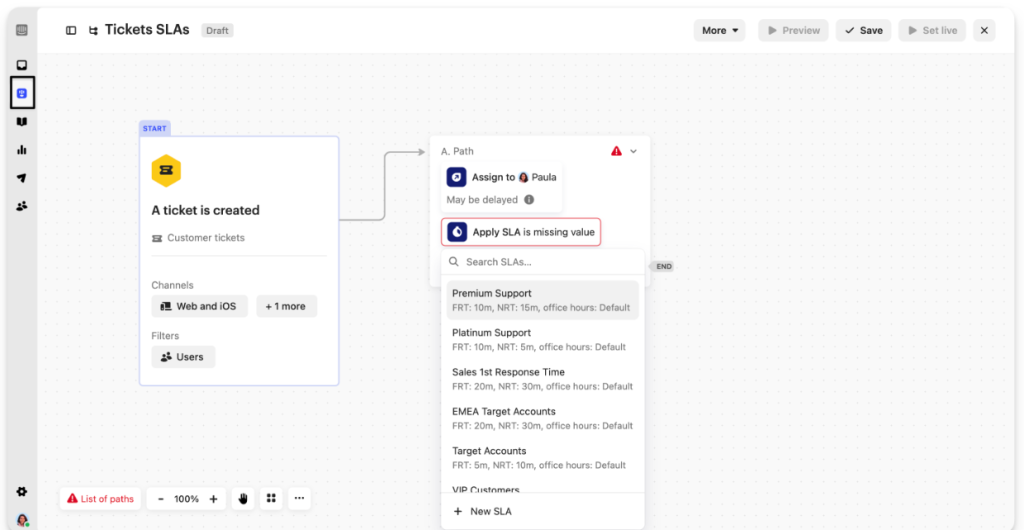
This setup works well for teams that prioritize fast, contextual replies over strict process. As volume grows, teams that rely on detailed queue control, strict SLAs, and structured tracking may find Intercom less suited to highly regulated or process-heavy environments.
2. Knowledge and self-service for reducing repeat work
Zendesk and Intercom both help teams answer common questions without starting from scratch, but they do it in very different ways.
Zendesk pushes customers toward help articles to reduce incoming requests. On the other hand, Intercom focuses on “snippets” to help agents reply faster inside ongoing conversations.
Zendesk’s Knowledge Base
Zendesk’s knowledge base has answers to the common questions, and customers can go through them before they reach an agent. A support team can create structured help articles that customers can search for, or that agents can share directly in a ticket.
Alternative: Support teams can create structured help articles that customers can search on their own or that agents can share directly within a ticket.

This works well when the same questions keep coming up and require consistent, documented answers. The downside is upkeep. Articles need to be written, organized, and reviewed regularly, which requires time and clear ownership. When content isn’t updated, customers either get outdated information or don’t trust the help center at all, and they end up contacting support anyway.
Intercom’s Snippets
Intercom uses Snippets to help agents respond faster inside customer conversations. Instead of directing customers to long help articles, agents can insert short, pre-written replies directly into chat.
Snippets are easy to set up and work well when teams are still figuring out what questions come up most often. They keep answers consistent without the overhead of maintaining a full help center.
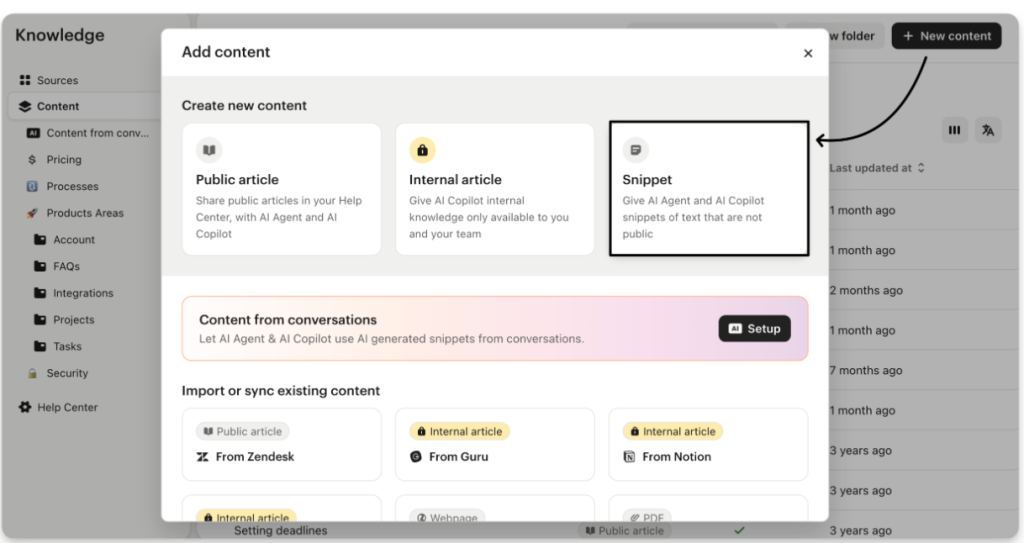
It is important to note that Intercom also offers a knowledge base through its Articles feature. Teams can create help content that’s searchable and surfaced directly inside chat. In practice, articles are often used to support conversations rather than replace them, with agents sharing links when a longer explanation is needed.
However, snippets are more widely used, and here’s a user review talking about its usefulness:
“The snippets feature is incredibly useful for quickly adding info that we don’t want clients to just find by scrolling through articles but want them to know if they’re specifically looking for it.” – G2
3. Automation and workflow for scaling support
Zendesk focuses on automating internal processes like routing, escalations, and updates. On the other hand, Intercom focuses on automating customer-facing actions based on behavior and timing.
Zendesk: Structured, rule-based workflows
Zendesk is one of the strongest tools for workflow automation if your team handles high volume and needs tight control.
- Event-based triggers and routing rules: You can set clear rules that automatically route requests to the right department, queue or person and even update ticket fields. For example, billing questions can go straight to the billing queue, while bug reports can be routed to product support.
- Time-based triggers: Zendesk lets teams automate actions based on time, not just events. For example, you can set rules that escalate a ticket if it hasn’t been updated within a certain number of hours, or notify a manager when an SLA is about to be breached.
- Macros: Instead of typing the same reply every time, an agent can apply a Macro that sends a pre-written response and updates the ticket at the same time. For example, a single macro can respond to a “reset my password” request, update the ticket status, and apply the appropriate tags. This saves time on routine work and ensures consistent responses.
Overall, Zendesk’s automation features have a deep focus on consistency. Tickets don’t sit idle because someone forgot to change a status or route it. The system pushes work forward, even when the queue gets busy.
Intercom: Proactive, journey-based automation
Intercom’s automation is less about pushing tickets through a workflow and more about guiding customers at the right moment.
- Behavior-based triggers: Intercom can trigger messages based on what a user does (or doesn’t do). For example: If a user gets stuck on onboarding, you can automatically trigger a message with a help article or prompt them to ask for support.
- Playbooks (agent guidance in the moment): Playbooks help agents know what to do next during a conversation. Instead of remembering every step, agents see prompts inside the chat that guide them through common situations. For example, when a customer asks about upgrading, a playbook can remind the agent to check the plan, share the right link, and ask a follow-up question, without the agent having to remember every step.
4. Customer lifecycle and growth workflows
This is where the gap between the two tools is the clearest.
Intercom is built to engage customers during onboarding, trials, and upgrades. Zendesk stays focused on support operations. It can support lifecycle work, but mostly through support workflows and integrations rather than native sales or marketing features.
Zendesk: Handles customer lifecycle inside support queues
Zendesk doesn’t offer native marketing or sales workflows, but it does help teams handle lifecycle context through support operations.
- Custom ticket fields and forms: Zendesk lets you capture customer context and route requests based on it. For example, you can add a field for “plan type” or “customer stage” and route trials to a faster queue than free users.
- Triggers and automation rules: Zendesk can automate internal actions based on customer type or request type. Let’s say if a customer mentions “Cancel,” in the email body, you can set up a rule to flag the ticket, raise priority, and notify a manager automatically.
- Views and queues: Views help teams organize work by customer segment or urgency.
You can create queues like “Trials,” “Renewals,” or “VIP” so urgent lifecycle-related requests don’t get buried under general support queries. - CRM and sales integrations: Zendesk typically relies on integrations to connect support to sales or lifecycle data. If you integrate HubSpot with Zendesk, agents can see account status or renewal notes while replying, but the actual pipeline and outreach usually live in the CRM (Hubspot), not Zendesk.
Intercom: Focuses on customer engagement and growth
- Marketing automation (automated follow-ups): Intercom lets you send targeted messages based on what a user does inside your product. Example: If a user keeps failing at a setup step, you can automatically trigger a helpful message or point them to the right article. This reduces friction without waiting for the user to contact support.
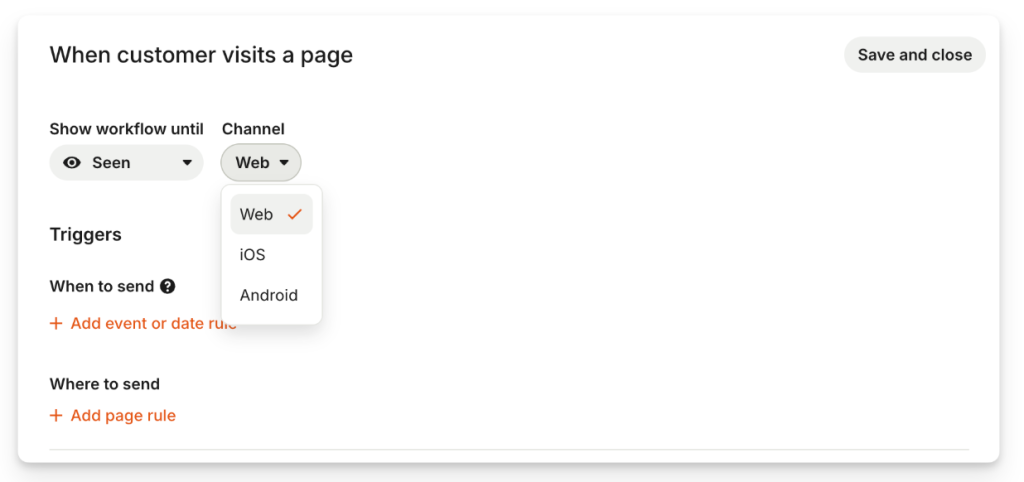
- Sales pipelines: Intercom can track leads and deals inside a pipeline, so teams can move a conversation toward a sale without switching tools. For example, if someone asks pricing questions in chat, you can log them as an opportunity within the chat, and track the next steps.
- Sequences: Sequences help you follow up in a structured way. For example, After a demo request, you can send a planned set of follow-ups over a few days instead of relying on manual reminders.
- Meeting scheduler: Intercom makes it easy to book meeting time within a chat. For example: A sales rep can send a scheduling option in chat and confirm the meeting without back-and-forth messages.
Recommended reading
5. AI capabilities to reduce manual work
Zendesk uses AI to make ticket handling more efficient behind the scenes.Intercom, on the other hand, uses AI to actively handle conversations and resolve issues in real time. That difference shows up clearly in how their AI is designed and priced.
Zendesk: AI for ticket triage and workflow efficiency
Zendesk’s AI is mainly focused on helping teams manage tickets faster and with less manual effort. Zendesk splits its AI into two layers:
- Zendesk AI: This includes simple auto-replies and basic deflection across email, messaging, and forms. It helps answer straightforward questions but stays limited in scope.
- Zendesk Copilot: Copilot adds intelligence to ticket workflows. It can detect intent, sentiment, and language, then automatically categorize and route tickets to the right agents. It also helps agents work faster by suggesting replies, adjusting tone, and summarizing long conversations.
The value here is efficiency. Agents spend less time sorting, reading, and rewriting, and more time handling complex issues.
The trade-off is cost and setup. Copilot is not included in standard plans and is priced per agent (around $50 per user per month). Zendesk also offers an AI Agent with outcome-based pricing, which means costs increase as usage grows.
“I don’t like the new AI system. It is still too new and the intents’ system is not really super easy to use based on our specific needs.”
Intercom: AI for real-time conversations and automated resolution
AI is a core part of Intercom’s product, not an add-on to existing workflows.
- Fin AI Copilot: Fin Copilot assists agents while they reply to customers. It suggests answers based on help articles, past conversations, and approved content. It can also summarize long threads so agents don’t need to read everything before responding. This works well when conversations are fast-moving and context-heavy.
- Fin AI Agent: Fin AI Agent is customer-facing. It can fully resolve common questions on its own, like password resets or billing queries. When it can’t resolve an issue, it hands the conversation to a human agent with context intact. This makes Fin useful for reducing human workload on repetitive questions.
Like Zendesk, Intercom bills AI as a separate add-on. Fin Copilot is priced per seat ($29 per seat per month), while Fin AI Agent follows a per-resolution model (@0.99/resolution). This keeps entry costs lower, but total spend grows as AI handles more conversations.
Pros and Cons of Zendesk and Intercom
Instead of listing generic advantages and disadvantages, I’ve broken this section down by feature areas teams actually care about like automation, onboarding, customization, and pricing.
Each pro and con is based on recurring feedback from users and how these tools behave once teams start using them at scale. The goal is to make it easy to see where each platform performs well and where teams usually run into limitations, so you can judge what matters most for your setup.
Zendesk
| Pros (where Zendesk works well) | Cons (where teams feel friction) |
|---|---|
| Agents can move fast once set up. Macros and triggers let teams reply, update ticket fields, and close requests in a single step, which works well for high-volume queues. | The interface is functional but not chat-first. It’s designed for managing records and queues, not for conversational chat, which can feel dated for real-time support. |
| Zendesk offers deep routing logic. Tickets can be prioritized and routed based on language, sentiment, customer type, or custom fields like “VIP” status. | Advanced automation takes effort to configure. Teams often need time, training, or external help to set up complex workflows correctly. |
| Zendesk handles multiple support channels—email, voice, SMS, WhatsApp, and social—in a single ticketing system. This works well for centralized support operations. | Zendesk is not built for outbound engagement. It lacks native tools for in-app messages, onboarding nudges, or proactive announcements. |
| Zendesk Guide allows teams to build structured, branded help centers. Multiple knowledge bases and customization options work well for large or multi-brand organizations. | The effectiveness of AI and self-service depends heavily on documentation quality. Poor or outdated articles reduce deflection and AI accuracy. |
| Zendesk has a large app marketplace with deep integrations for tools like Slack, Salesforce, and Shopify, plus strong APIs for custom workflows. | Some features teams expect, such as advanced SLAs or multi-brand support, are only available on higher-priced plans. |
| Core pricing is per agent, which keeps costs stable when ticket volume increases unexpectedly. This makes budgeting easier during spikes. | Many advanced AI features are sold separately. Once AI add-ons are included, total costs can rise quickly, especially for larger teams. |
Intercom
| Pros (where Intercom works well) | Cons (where teams feel friction) |
|---|---|
| The messenger feels like a modern chat app. Customers are familiar with the interface, which makes it easier to start and continue conversations. | The admin backend is dense. Setting up workflows, automation, and permissions takes time, especially for new teams. |
| Fin AI Agent can resolve common questions using existing help articles without manual bot building. This reduces agent workload for repetitive issues. | AI pricing is usage-based. You’re charged for every resolved conversation, which makes monthly costs harder to predict as volume grows. |
| All customer activity lives in one timeline. Support, onboarding, and sales conversations stay connected to the same user profile. | It’s not a full sales CRM. Teams still need tools like Salesforce or HubSpot for complex pipeline management and forecasting. |
| Product tours let teams guide users through the app step by step. This is useful during trials and early onboarding. | Product tours are usually sold as an add-on. This increases the effective cost beyond the base plan. |
| Strong APIs and developer tools make it possible to build custom apps and workflows inside the messenger. | Visual customization is limited. The messenger keeps a distinct Intercom look, with no true white-label option. |
| Combines chat, help desk, and outbound messaging in one tool, which can replace multiple products for smaller teams. | Pricing scales with usage and audience size. As more users are contacted or resolved by AI, costs can rise quickly. |
Recommended reading
Zendesk vs Intercom: What should you choose?
If you’re stuck between Zendesk and Intercom, don’t decide based on which has more features. Honestly, both are well-known and capable platforms. The better choice comes down to how your team runs support, how much structure you need, and how predictable you want costs and workflows to be.
Here’s a practical way to decide based on what we’ve covered so far.
Choose Zendesk if:
- You run support in queues and tickets, not ongoing chats. You need clear ownership, status, and a reliable system for tracking work.
- SLAs and accountability are non-negotiable. You want strict response/resolution targets that are easy to enforce across the team.
- You deal with high volume across multiple channels. Email, voice, social, and messaging need to stay tied to a single support workflow.
- You need deep automation and routing rules. For example, routing by language, priority, customer type, or issue category without relying on manual sorting.
- Your team relies on internal collaboration to resolve issues. Side conversations help you pull in billing or engineering without losing context or exposing internal threads to customers.
- Reporting needs to be ops-friendly. You care about backlog, SLA compliance, and agent performance tracking.
- You have someone who can own setup and maintenance. Zendesk works best when an admin or ops lead can keep workflows clean and tuned.
Recommended reading
Choose Intercom if:
- Most of your support happens in chat, inside your product or website. You want conversations to feel natural and fast, not like ticket processing.
- You want a cleaner agent experience. The interface is closer to modern messaging, which helps teams ramp faster and stay in flow.
- You care about customer lifecycle workflows, not just support. You want to use the same tool for onboarding nudges, follow-ups, and sales handoffs.
- You want automation tied to user behavior. For example: sending help at the moment a user gets stuck, or following up after a key action.
- AI is a big part of your support strategy. You want AI that can resolve common questions and hand off with context when needed.
- You don’t want a heavy workflow setup upfront. You’d rather start simple and refine as you learn.
- Your team can handle usage-based AI costs. Intercom can be cost-effective early on, but you need to watch volume if AI is resolving a lot of conversations.
Final verdict
If your support team needs structure, tight control, and operational reporting, Zendesk is usually the safer bet. It’s built for managing high volume without losing track of ownership or deadlines.
If your team needs fast, conversational support and you also care about onboarding and customer engagement, Intercom is often the better fit. It’s easier to work in day to day, and its lifecycle features are stronger.
And if you’re reading this thinking, “I want solid support workflows, but without the heavy setup or unpredictable add-ons,” it’s worth also looking at simpler modern options. Let’s delve into that.
Hiver: A Modern AI-Powered Customer Service Platform
If Zendesk feels heavy and Intercom feels costly as you scale, simpler solutions like Hiver can flip that script. The tool that helps businesses deliver stellar support across email, chat, voice, WhatsApp, and more channels.
Your team doesn’t have to go through extensive training or learn complicated workflows. In fact, our tool is rated 4.6 on G2 and 4.5 on Gartner, reflecting strong feedback around ease of use, faster setup, and predictable pricing for day-to-day support teams.
Here’s where Hiver addresses common gaps teams run into with Zendesk and Intercom:
- Structured support without the complexity: You get clear ownership, SLAs, automation, and reporting without weeks of setup or the need for a dedicated admin.
- Predictable pricing as teams grow: Core capabilities are available upfront. AI and automation don’t feel like expensive add-ons that suddenly change your monthly bill.
- Focused on support, not sales workflows: Hiver is built for handling customer inquiries end to end—routing, collaboration, follow-ups, and resolution—without blending in marketing or sales tools many support teams don’t need.
- AI that fits real workflows: AI helps with routing, replies, and context sharing, without forcing usage-based pricing models that become hard to control at scale.
- Free plan: Unlike Zendesk or Intercom, Hiver has a free forever plan for small teams to get started.
- 24/7 support: None of the other tools offer it. Users get help when they need it without waiting endlessly.
The difference is simple. Zendesk and Intercom make you adapt to their systems and pricing. Hiver adapts to how your team already works, and keeps the math straightforward. And this isn’t just my view. We’ve had teams move away from Zendesk to Hiver, and for all the right reasons.
- “Ticketing systems like Zendesk generate emails that don’t look like regular emails. I wanted to interface with our customers and vendors in a manner that was familiar to them rather than forcing them to use email in a different way.”
- “We got a little burned with Zendesk, so we didn’t want to commit. I was just looking at a better solution yet simpler than Zendesk for us – and Hiver is a perfect fit.”
- “We looked at many options including Zendesk, where did it lose? The issue was their lack of support. They weren’t very responsive. We found Hiver’s support to be very responsive and very proactive.”
Zendesk or Intercom: What is Your Choice?
Zendesk and Intercom are both incredibly powerful customer service software, and they have their own strengths and weaknesses.
Choosing between the two really boils down to your business demands.
Zendesk excels in traditional ticket management. On the other hand, Intercom’s AI capabilities and in-app messaging features help companies provide intuitive, on-the-go support.
But as we’ve seen in this comparison guide, both platforms have their share of limitations. Zendesk can take weeks to configure and usually requires a dedicated admin to maintain.
On the other hand, Intercom’s AI pricing is outcome-based, which means costs rise sharply as usage grows.
So, if you’re seeking a more cost-effective and user-friendly solution, Hiver presents a compelling alternative. It delivers the same core helpdesk and AI capabilities as Zendesk and Intercom but with a far simpler setup and transparent pricing.
Want to give Hiver a shot? Try its free forever plan.
Frequently Asked Questions
1. Are Intercom and Zendesk the same?
No. Zendesk is built around tickets, queues, and SLAs to run support as an operation. Intercom is built around conversations and customer engagement, with chat and lifecycle messaging at the center. They solve similar problems, but in different ways.
2. Which is cheaper for SMBs over 12 months?
It depends on how you use AI and how many conversations you handle. Zendesk’s base plans can start lower, but meaningful features and AI often require paid add-ons. Intercom’s entry plan looks affordable, but most SMBs move to higher tiers, and AI costs are usage-based. For SMBs with low AI usage, Intercom can be cheaper early on. As volume grows, Zendesk’s costs are usually easier to forecast.
3. Which offers better omnichannel messaging?
Zendesk is stronger for true omnichannel support. It handles email, voice, social, SMS, and messaging apps inside one ticketing system. Intercom is strongest for in-app and website chat, with other channels relying more on integrations.
4. How easy is migration from Zendesk to Intercom?
Migration is possible, but not trivial. Historical tickets, SLAs, and workflows don’t map cleanly to Intercom’s conversation model. Most teams migrate recent conversations and keep Zendesk data for reference. Expect planning and cleanup, especially if you rely heavily on custom workflows.
5. What integrations does each platform support natively?
Zendesk offers a very large marketplace with integrations for tools like Salesforce, Slack, Jira, Shopify, and many others. Intercom supports popular CRMs, analytics, and product tools as well, but with a smaller ecosystem overall. Zendesk typically fits better into complex, multi-tool environments.