Skip to content





Live chat proves its value quickly in ecommerce.
It often shows up when a shopper hesitates at checkout, then quietly expands into order tracking, delivery issues, refunds, and returns. Once that happens, live chat stops being a conversion tool and becomes a core support channel.
That’s where most tools begin to show their limits. In ecommerce, live chat has to surface order context instantly, hold up during traffic spikes, and carry conversations forward when follow-ups are needed.
This guide compares the best ecommerce live chat tools for 2026 based on how they perform in real store workflows.
Table of Contents
- Best ecommerce live chat at a glance
- How do we evaluate and test tools
- Top 11 live chat software tools for ecommerce (Compared)
- Best ecommerce live chat software: Detailed deep dives
- 2. Intercom: Best for automation-first ecommerce chat and proactive cart recovery
- 3. Zendesk Chat: Best for enterprise ecommerce teams with complex support operations
- 4. LiveChat: Best for chat-first ecommerce teams prioritizing fast human responses
- 5. Tidio: Best for ecommerce teams that want an AI bot and live chat in one tool
- 6. Gorgias: Best for Shopify ecommerce support with order-driven automation
- 7. Tawk.to: Best free live chat tool for early-stage ecommerce stores
- 8. Zoho SalesIQ: Best live chat with low-cost automation for ecommerce
- 9. Smartsupp: Best for simple ecommerce chat with light automation
- 10. Richpanel: Best for ecommerce support focused on refunds and post-order workflows
- 11. VanChat: Best for lightweight ecommerce chat with minimal setup
Best ecommerce live chat at a glance
If you want a quick shortlist before getting into detailed reviews, start here. Each tool below is mapped to a specific ecommerce use case so you can quickly narrow your options.
- Hiver: Best AI-powered omnichannel ecommerce live chat tool.
- Intercom. Best for automation-first ecommerce chat and proactive cart recovery.
- Zendesk Chat: Best for enterprise ecommerce chat tied to tickets and CRM workflows.
- LiveChat: Best for chat-first ecommerce teams prioritizing fast human responses.
- Tidio: Best for small ecommerce stores using AI bots with live chat.
- Gorgias: Best for Shopify ecommerce support with order-driven automation.
- Tawk.to: Best free live chat for early-stage ecommerce stores.
- Zoho SalesIQ: Best free live chat option for early-stage ecommerce stores.
- Smartsupp: Best for simple ecommerce chat with basic automation.
- Richpanel: Best for ecommerce support focused on refunds and post-order workflows.
- VanChat: Best for lightweight ecommerce chat with minimal setup.
This shortlist should help you narrow things down to two or three options. The sections below explain why these tools landed where they did and where each one starts to break down.
How do we evaluate and test tools
I evaluated these tools the way ecommerce teams actually use them, not by feature lists.
I relied on hands-on demos and trials where possible, then validated what I saw against recent G2, Capterra, and Reddit reviews. The focus was simple: can agents resolve real order, delivery, and refund issues without switching tools or losing context?
If a live chat tool slowed agents down during peak traffic, broke when chats turned into follow-ups, or became expensive as volume grew, it ranked lower. Tools that held up under pressure made the list.
That’s the standard used across this guide.
Top 11 live chat software tools for ecommerce (Compared)
I put all the ecommerce live chat tools side by side so you can quickly see which ones fit your store, team size, and support model.
Evaluate each live chat tool as if today is your biggest sale of the year.
Open multiple chats at once. Run a checkout hesitation (shipping cost, delivery timing, sizing), a delivery delay, and a refund request in parallel. Watch how quickly agents respond, whether context stays visible, and if ownership is clear.
Then check pricing. If costs jump when chat volume spikes, factor that in now.
If the tool holds up under pressure, it’s a contender. If it breaks or gets expensive fast, cross it off.
Use it to narrow your shortlist before jumping into the detailed reviews.
| Platform | Best fit for (primary ecommerce use case) | Business size | Core perception (reviews & operator sentiment) | Rating | Pricing (official starting price) |
|---|---|---|---|---|---|
| Hiver | AI-powered omnichannel ecommerce live chat with automated handling and follow-ups | Mid-market | Known for simple shared workflows and powerful visibility across channels | 4.6/5 | Free plan available; paid plans start at $19/agent/month |
| Intercom | Automation-first ecommerce chat with proactive cart recovery | Mid-market | Bots and automation praised but pricing unpredictability often cited | 4.5/5 | Platform from ~$29/seat/month + $0.99 per Fin AI resolution |
| Zendesk | Enterprise ecommerce chat tied to tickets, CRM workflows, and SLAs | Enterprise | Robust and scalable but heavy and often overkill for smaller teams | 4.3/5 (G2) | Zendesk Suite plans from ~$19/agent/month |
| LiveChat | Chat-first ecommerce teams prioritizing fast, reliable human responses | SMB | Fast, dependable chat; automation and workflows limited | 4.5/5 | Plans start at ~$19/agent/month |
| Tidio | AI bot + live chat for small ecommerce stores combining automation with human handoff | Startup | Loved for quick setup and bot handling; limited on deeper context | 4.7/5 | Free plan available; paid plans start at ~$24/month |
| Gorgias | Shopify ecommerce support with order-driven automation and macros | SMB | Strong Shopify integration and automation; can get pricey | 4.6/5 | Plans start around $10/month (ticket-based) |
| Tawk.to | Free live chat for early-stage ecommerce stores | Startup | Extremely popular for free unlimited agents; basic feature set | 4.5/5 | Free (optional paid add-ons available) |
| Zoho SalesIQ | Low-cost ecommerce live chat with visitor tracking and basic AI triggers | SMB | Good value with engagement scoring; automation is basic | 4.4/5 | Free plan available; paid plans start at affordable entry tiers |
| Smartsupp | Simple ecommerce chat with lightweight automation triggers | SMB | Easy setup, basic automation; weaker deep context | 4.7/5 (G2) | Free plan available; paid plans for basic automation |
| Richpanel | Ecommerce support focused on refunds, returns, and post-order workflows | SMB | Strong post-purchase support tools; setup takes time | 4.7/5 | Free plan available; paid plans start ~$29/agent/month |
| VanChat | Lightweight ecommerce chat with AI-led product, order, and conversion support | SMB / Startup | Shopify-focused AI works well; limited advanced routing | NA | Free plan available; paid plans start at $19/month |
If a tool looks like a good fit here, the sections below will show how it actually performs once chat volume and complexity increase.
The two-tool shortlist rule:
Don’t try to evaluate everything. Shortlist two tools and ignore the rest.
One should fit how your store runs today. The other should fit how your store will run after volume grows. Test both against the same scenarios: a checkout question, a refund that needs follow-up, and a traffic spike.
If a tool only works well in one of those situations, it’s not a long-term choice. Keep the one that works in all three.
Best ecommerce live chat software: Detailed deep dives
This section breaks down each ecommerce live chat tool in detail, focusing on where it fits, where it falls short, and the type of ecommerce team it actually works for.
1. Hiver – Best AI-powered omnichannel ecommerce live chat tool
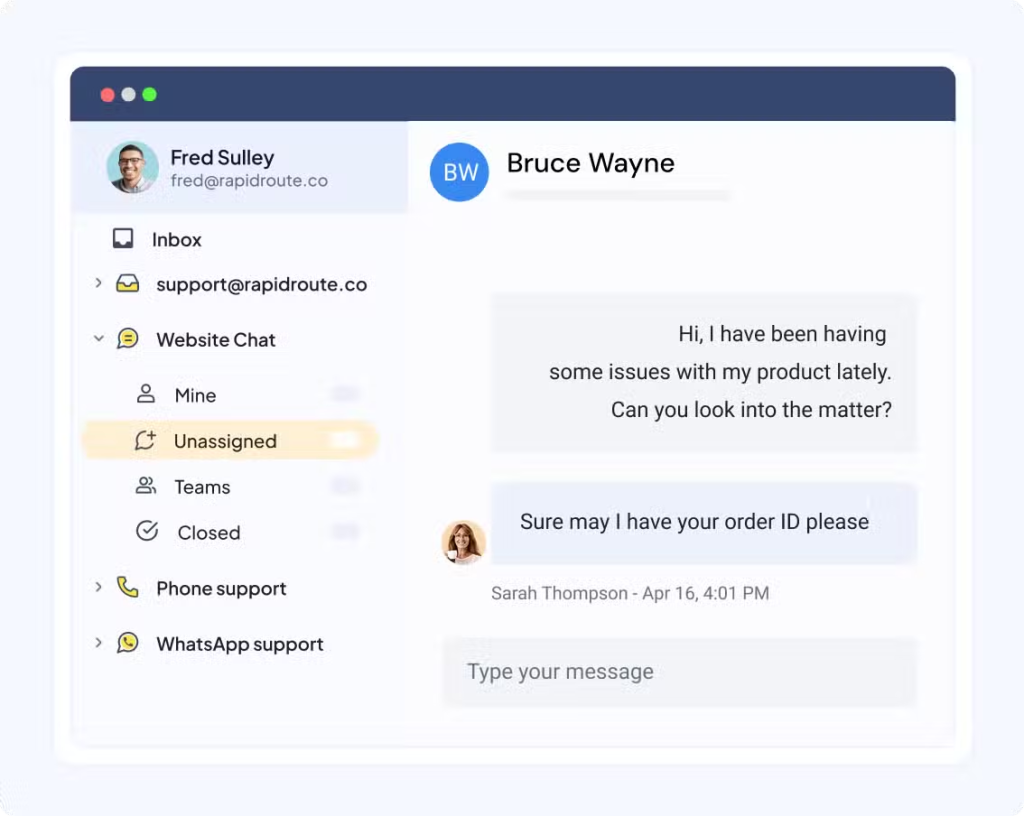
Hiver treats ecommerce live chat as part of the support workflow, so agents can handle order questions, delivery issues, and follow-ups from one shared workspace.
Key features
Here are some key features of Hiver and how it plays out in a real ecommerce workflow:
- Unified conversation thread: Live chats that need follow-ups continue in the same thread instead of restarting elsewhere. Teams reported fewer repeated questions and faster resolution on order-related issues. A customer asks about a delivery date or wants to cancel an order.
- Customer and conversation context in-chat: Agents can see past conversations and customer details while replying, reducing tab switching and speeding up responses during peak traffic.
- Assignment and status tracking: Each chat has clear ownership, which prevents duplicate replies and confusion when multiple agents are online at once.
- Macros for ecommerce FAQs: Saved replies for shipping timelines, returns, and delivery delays cut repetitive typing by 20–30% on high-volume questions.
- Snooze and task reminders: Refunds, delivery delays, and order issues resurface automatically, reducing missed follow-ups and manual tracking.
- Shared inbox visibility: Any agent can see what’s open, pending, or resolved, which keeps handoffs clean when conversations move between team members.
For example, Craftgate’s teams reported measurable efficiency gains after unifying chat, email, and messaging. This includes up to 60% faster first response times and 130+ hours saved per month.
Pros: Why teams stick with it
- Reviewers say assignments and status tracking make it clear who owns each conversation.
- Many mention that the interface is easy to learn and quick to set up.
- Users say that notes, assignments, and visibility of ownership make teamwork smoother.
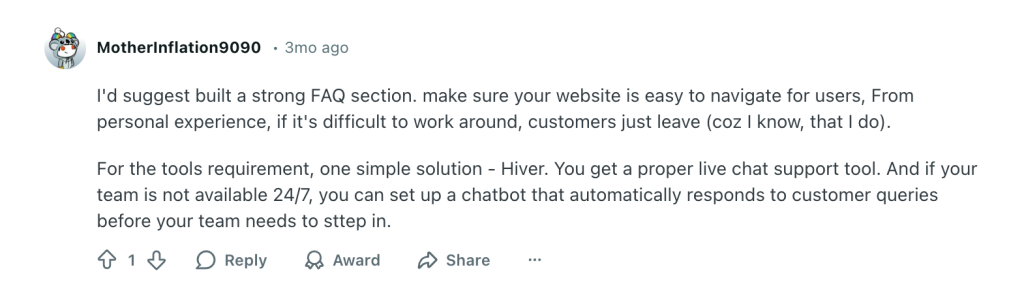
This is what a Reddit user had to say about Hiver,
Here are some other reviews:
“…The intuitive and simple interface is another aspect I enjoy, as it ensures that even those less tech-savvy find it user-friendly to adopt…” – Nitansh S.
“Hiver’s shared inbox and email collaboration features make it incredibly easy for teams to manage support and sales queries without missing anything.” – Divyam K.
“…It centralizes communication and ensures nothing slips through the cracks. Using it as our major customer support workflow has been a game-changer…” – Bala K.
Con: Where it may not meet expectations
- Several reviewers note that Hiver works best on desktop, while the mobile app feels limited for complex conversations, assignments, and follow-ups.
“…The mobile experience isn’t as robust as desktop, which can be limiting for teams who are often on the go…” – Lean L.
The reviews above are sourced from G2, Capterra, and Reddit.
Pricing
- Free tier: Yes, with core chat and inbox features
- Paid plans: From $25 per agent/month
- Trial: Available on paid plans
Who this is IDEAL for
- E-commerce teams where live chat is one of many support channels.
- Stores where chats frequently turn into emails, tasks, or multi-step follow-ups.
- Support teams that want one workspace instead of juggling tabs.
Who this is NOT IDEAL for
- Stores that want deep bot-first automation or AI-led conversations.
- Teams relying solely on live chat with minimal email or messaging follow-up.
- Enterprises needing highly custom routing, analytics, and chatbot flows out of the box.
2. Intercom: Best for automation-first ecommerce chat and proactive cart recovery
Intercom is built for ecommerce teams that want bots to handle most chats before an agent ever sees them.

Key features
Here are some key features that Intercom offers
- AI bots (Fin) for first-touch resolution: Bots answer order status, delivery timelines, and product FAQs automatically. Teams report deflecting a large share of repetitive chats before they reach agents.
- Pre-chat data collection: Bots ask for order ID, issue type, or intent upfront, so agents don’t spend the first few messages gathering basics.
- Proactive chat triggers on product and checkout pages: Chat can appear when shoppers hesitate, helping address purchase-blocking questions and improve cart recovery rates.
- Automated routing based on intent: When a human is needed, chats are routed to the right team with context already attached, reducing reassignment and internal back-and-forth.
- Knowledge base–driven responses: Bot answers are tied to help docs, which keeps replies consistent, but also means accuracy depends heavily on how well content is maintained.
Teams use proactive triggers to step in when shoppers pause on checkout pages, helping resolve purchase-blocking questions before abandonment. However, the payoff depends on ongoing bot tuning and content upkeep.
Pros: When Intercom is the right tool
- Teams say Fin resolves common order and delivery questions before an agent gets involved.
- Reviewers like how responsive the interface feels across web and in-app chat.
- Agents get intent and basic details upfront, so customer conversations move faster.
“like that Fin by Intercom improves over time. We’ve seen a gradual increase in resolution rates since implementing it. It’s also been crucial in keeping up with our support volume, as it resolves 75% of all inbound tickets.” – Chase C.
“The interface is very simple and clean, which makes it easy to use. Additionally, the learning curve is low, so it is easy to become familiar with it quickly.” – Víctor G.|
“I like that you can feed it the adjustments needed to improve it, and that is has a wide range of integrations you can connect with it, to elevate the bot and it’s knowledge.” – Verified User
Cons: What users commonly report in reviews
- Reviewers say Fin can miss the mark on complex or niche questions.
- Basic chat is easy, but automation and bot flows take time to configure and maintain.
- Pricing often rises with usage, contacts, and AI resolutions, which surprises teams as volume grows. Take a look at what this Reddit user had to say about it,

“What I dislike is Accuracy on niche/specific questions is lower Fin depends a lot on how well your help‑docs / knowledge base cover a topic. If your content isn’t clear, detailed, or well‑structured, Fin may misunderstand or give incomplete answers.” – Raphael C.
All the reviews above are sourced from G2, Capterra, and Reddit.
Pricing
Intercom does not offer a free tier. A free trial is available.
- Platform pricing is seat-based and varies by plan; costs often rise with contacts, automation, and AI usage. It starts around $29–$39 per agent/month (billed annually), depending on plan.
- Fin (AI chatbot): $0.99 per resolution (charged each time Fin resolves a conversation)
- Add-ons: AI and automation features can increase costs further
Who this is IDEAL for?
- Your ecommerce store handles high chat volume daily.
- You want bots to answer common questions or qualify issues before agents step in.
- Speed, deflection, and queue control matter more than long-tail follow-ups.
Who this is NOT IDEAL for?
- Most chats turn into manual follow-ups or back-and-forth conversations.
- You want chat, email, and messaging handled from one shared workflow.
- You need predictable pricing as chat volume increases.
Recommended reading
3. Zendesk Chat: Best for enterprise ecommerce teams with complex support operations
Zendesk Chat is designed for large ecommerce teams that need live chat tightly integrated with tickets, CRM data, and multi-layered support workflows.

Key features
- Native ticket creation from chat: Every chat can be converted into a ticket, which works well for refunds, delivery issues, and account problems that require follow-up.
- Full customer and ticket history: Agents can view customer profiles past tickets and conversations before responding, which helps when handling repeat customers or complex cases.
- Advanced routing and SLAs: Chats follow the same rules, priorities, and escalation paths as email and forms, making it easier to manage large teams.
- Omnichannel workspace: Live chat coexists alongside email and other channels, rather than being managed in a separate tool.
- Reporting built for scale: Dashboards focus on volume, response times, and SLA performance rather than lightweight chat metrics.
Zendesk Chat shines when live chat is one entry point into a structured, ticket-driven support system. It’s less about speed and simplicity, and more about control and scale.
Pros: When is Zendesk chat the right tool?
- Agents can see past tickets, conversations, and customer history before replying, which helps when handling repeat buyers, escalations, or long-running order issues.
- Routing rules, SLAs, and role-based access work well when chat volume is shared across multiple teams, and ownership needs to be tightly controlled.
“Our agents can handle problems more quickly with complete context because to its unified workspace, which unifies all customer channels into one view.” – Jobert G.
Cons: What users commonly report in reviews?
- Reviewers often say basic chat is easy to enable, but meaningful workflows require configuration, testing, and ongoing upkeep.
- Teams with simple chat use cases frequently describe Zendesk as heavy or overwhelming compared to lighter chat-first tools.
“While overall powerful, the initial setup and configuration can be a bit complex, especially when integrating multiple brands or departments.” – Akshat Y.
“Ticket views are clunky to create and manage, and contain way too much white space (again, no customization options), causing constant vertical and horizontal scrolling.” – Eric W.
The reviews above are sourced from G2, Capterra, and Reddit.
Pricing
Zendesk Chat is not offered as a standalone free product.
- Free tier: No
- Paid plans: Included as part of Zendesk Suite plans (pricing varies by tier, starting from $19 per agent/month billed annually)
- Pricing model: Per-agent, with higher costs for advanced features and automation
For ecommerce teams, chat costs are often bundled with ticketing, bots, and analytics. This makes the total cost harder to predict upfront.
Who this is IDEAL for
Zendesk Chat is a good fit if:
- You run a large or enterprise ecommerce operation.
- Live chat needs to plug into tickets, SLAs, and CRM workflows.
- You have dedicated resources to configure and maintain support tooling.
Who this is NOT IDEAL for
Zendesk Chat is likely not a fit if:
- You want a lightweight or quick-to-deploy live chat tool.
- You need simple, predictable pricing without heavy configuration.
Recommended reading
4. LiveChat: Best for chat-first ecommerce teams prioritizing fast human responses
LiveChat is built for ecommerce teams that want customers talking to a human immediately, without bots or complex workflows in the way.

Key features
- Direct-to-agent live chat: Chats go straight to a human agent instead of a bot, which works well for delivery questions, product clarifications, and order checks that need quick answers.
- High-performance real-time chat: The platform is consistently described as fast and reliable, even when multiple chats are active at once.
- Simple, lightweight setup: Teams can launch LiveChat quickly without configuration-heavy workflows, making it easy to run day to day.
- Concurrent chat handling: Agents can manage multiple conversations at once, which helps during moderate traffic spikes without adding complexity.
Pros: When is LiveChat the right tool?
- LiveChat reviews frequently describe LiveChat as dependable and quick, especially for real-time ecommerce questions.
- Teams like that, agents can start using it immediately without training or ongoing maintenance.
“…I appreciate the easy access to Customer Care that it offers our customers…” – Mel C.
“Our customers love the opportunity to chat with our service reps in real time at the click of a button instead of calling in. Our chat operators appreciate how easy it is to service multiple customers simultaneously…” – Adam Z.
Cons: What users commonly report in reviews?
- There are no advanced bots or routing rules built in, and deeper automation requires separate tools.
- Chats that turn into refunds or delivery issues often need to move to email or another system, which can break context.
“Some useful automation capabilities require using a separate product (ChatBot), which adds extra cost and setup.” – Motawea N.
The reviews above are sourced from G2, Capterra, and Reddit.
Pricing
- Free tier: No
- Paid plans: Start around $19 per agent/month
- Pricing model: Per-agent
Who is this for?
LiveChat is a good fit if:
- Your ecommerce team wants fast, human-first chat.
- Most questions can be resolved in a single conversation.
- You don’t need advanced bots or heavy automation.
Who is this NOT IDEAL for?
LiveChat is likely not a fit if:
- You want automation-led chat or AI-driven deflection.
- Your chats frequently turn into long follow-ups.
- You need a chat that is tightly connected to email and other channels.
LiveChat is a strong choice for ecommerce teams that prioritize speed and simplicity. It works best when live chat stays short, human, and focused on quick answers.
Recommended reading
Top 13 LiveChat Alternatives For Your Customer Support Teams in 2025
5. Tidio: Best for ecommerce teams that want an AI bot and live chat in one tool
Tidio works well for small ecommerce teams that want bots to handle common questions before a human steps in.

Key features
- AI chatbot (Lyro) for FAQs: The bot answers repetitive questions like shipping timelines, return policies, and order tracking, reducing the number of chats agents need to handle manually.
- Bot-to-human handoff: When the bot can’t resolve an issue, the conversation moves to a human agent with basic context already captured.
- Quick setup with templates: Ecommerce teams can launch chat and bots quickly using prebuilt flows without technical setup.
- Live chat fallback: Agents can jump in at any point, which helps when a shopper needs reassurance before buying.
Pros: What reviewers actually report?
- Reviewers often say live chat setup is fast and doesn’t require technical help.
- Teams mentions fewer “Where is my order?” and policy questions reaching agents.
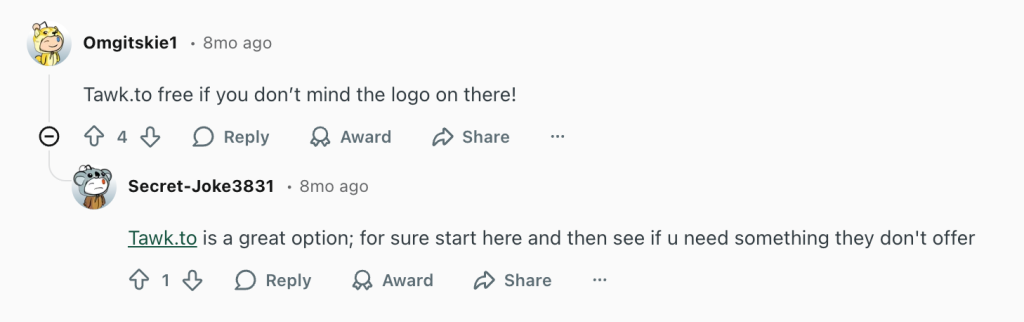
- Few users also liked that it’s free. Here’s what a Reddit user had to say,
“The setup was quick, the live chat works reliably, and the chatbot automation has helped reduce repetitive queries.” – Carl R.
“On the top of all features, Tidio now offers Lyro AI agent, it can automatically create knowledge base from your website and answer to customers more accurately, the conversation can be easily be transferred to human operator back and forth” – Nabin P.
Cons: What users commonly report
- Bots work well for simple questions but struggle with complex ecommerce logic or edge cases.
- Teams handling higher chat volume or detailed order issues often outgrow Tidio’s workflows.
“Lastly, while the interface is clean, navigating between chats and settings isn’t always as smooth as it could be.” – Carl R.
“The free plan offers only a limited set of features, and advanced automation is accessible exclusively in the higher-tier plans. I also find that customization options feel somewhat restricted.” – Padma B.
The reviews above are sourced from G2, Capterra, and Reddit.
Pricing
- Free tier: Yes, includes basic chat and bots
- Paid plans: From approximately $24.17/month (adds automation features, removal of branding, and expanded bot capabilities)
- Add-ons: AI bots and advanced automation may require higher plan tiers
Who this is IDEAL for
Tidio is a good fit if:
- Your ecommerce store is small or mid-sized.
- You want both AI bot responses and live chat without heavy setup.
- You want straightforward automation for FAQs and common cart questions.
Who this is NOT IDEAL for
Tidio is likely not a fit if:
- You need deep ecommerce order context built into chat.
- You want workflows with multi-step automation and routing.
- You operate at enterprise scale or with complex support operations.
Recommended reading
6. Gorgias: Best for Shopify ecommerce support with order-driven automation
Gorgias is built for Shopify stores where live chat is tightly tied to orders, refunds, and post-purchase actions.

Key features
- Native Shopify order and cart context: Agents see order status, items, refunds, and customer history directly inside the chat, cutting out admin tab switching during live conversations.
- Order-based macros and actions: Prebuilt macros can reply with order details, initiate refunds, or send return instructions, reducing manual work on high-volume post-purchase chats.
- Automation for repetitive ecommerce issues: Common questions like “Where’s my order?” or “How do I return this?” can be partially or fully handled before an agent steps in.
- Live chat connected to post-chat workflows: Chats that turn into refunds, exchanges, or delivery issues stay linked to the original order instead of becoming disconnected follow-ups.
Pros: What reviewers actually report
- Reviewers consistently say so much time is saved when order data is available inside chat.
- Teams report faster handling of returns, refunds, and delivery issues using macros and rules.
“I find Gorgias incredibly valuable as it seamlessly handles our help desk needs, particularly for its ease of implementation and excellent integration with Shopify.” – Jason L.
“Features like automated responses, intent detection, and macros allow teams to handle high volumes of inquiries quickly without sacrificing personalization.” – Joana Angela N.
Cons: What users commonly report
- Pricing scales with tickets and automation usage, which can get expensive as chat volume grows.
- Teams on non-Shopify platforms don’t get the same level of value.
“It’s a bit too expensive. I would like it to be more affordable or offer AI services at the integrated cost.” – Clari L.
The reviews above are sourced from G2, Capterra, and Reddit.
Pricing
- Free tier: No
- Paid plans: Plans start around $10/month for basic help desk features, which include 50 tickets/month. However, ecommerce-specific tiers with automation and multi-channel support cost more.
- Usage model: Charges often include agent seats, message volume, and automation/use limits.
Who is this IDEAL for?
Gorgias is a good fit if:
- Your ecommerce store runs on Shopify (or Shopify Plus).
- You rely on order/cart data inside support to resolve questions quickly.
- You want automation that can pre-fill replies and reduce manual handling.
- Your support workflows revolve around returns, refunds, and order exceptions.
Who this is NOT IDEAL for
Gorgias is likely not a fit if:
- You’re not on Shopify (or store data isn’t critical to support).
- Your team handles most chats manually without automation.
- You need a lightweight, simple live chat tool with no CRM data linkage.
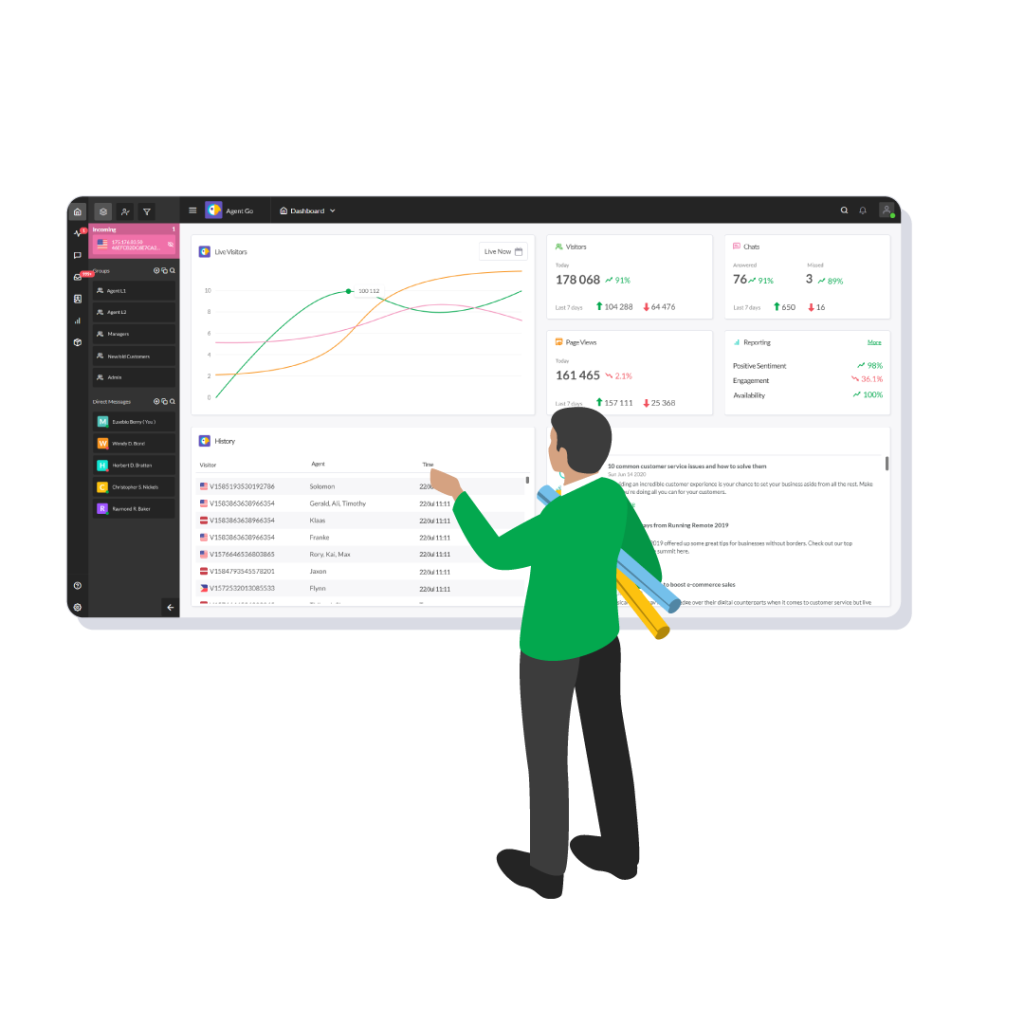
7. Tawk.to: Best free live chat tool for early-stage ecommerce stores
Tawk.to is a no-cost way to add live chat to your store when budget matters more than automation.
Key features
- Completely free live chat: Unlimited agents and chats with no upfront cost, making it easy for early-stage stores to offer real-time support.
- Basic live chat widget: Customers can ask questions directly from product, cart, or checkout pages and get a human response.
- Offline message capture: When live chat agents aren’t available, messages are captured and sent via email so no inquiry is lost.
- Simple setup: Stores can install the widget quickly without technical configuration or ongoing maintenance.
Pros: What reviewers actually report
- Reviewers consistently highlight that it delivers real live chat without seat limits or hidden fees.
- Many users say they had chat running the same day it was installed.
“What I like best about Tawk.to is its feature-rich platform combined with its free pricing model, making it accessible for businesses of all sizes…” – Dan P.
“Easy to use, quick to set up, and completely free. Great for staying connected with visitors and improving response time on any device.” – Indrashish
Cons: What users commonly report
- All chats require manual handling, which becomes a bottleneck as volume grows.
- Teams lack insights into chat performance and struggle to manage follow-ups at scale.
“I enjoy how clean and smooth the chat is, but there are little to no possibilities for automation or triggering a pre-determined sequence of messages based on the visitor’s response.” – Ramakrishnan V.
“The analytics is not very comprehensive, especially in the free plan.” – Verified User
The reviews above are sourced from G2, Capterra, and Reddit.
Pricing
- Free tier: Yes, fully free, unlimited agents and chats.
- Paid add-ons: Optional features and branding removal are available but not required
Who this is IDEAL for
Tawk.to is a good fit if:
- You are an early-stage ecommerce store with no or limited support budget.
- You want a chat solution that works without upfront cost or seat limits.
- Most support is handled live by agents (not bots).
Who this is NOT IDEAL for
Tawk.to is likely not a fit if:
- You want automation or AI-led responses.
- Your team needs a built-in ecommerce context inside chat.
- You need robust reporting or analytics.
Tawk.to is a compelling free entry point for ecommerce live chat, especially for small or early-stage stores. It lacks advanced automation and a deep ecommerce context.
8. Zoho SalesIQ: Best live chat with low-cost automation for ecommerce
Zoho SalesIQ gives ecommerce teams affordable live chat with basic automation and visitor tracking, ideal when you need more than just a free widget.

Key features
- Visitor tracking and engagement scoring: See who’s browsing, where they’re coming from, and how far into checkout they got, so you can trigger chats at high-intent moments.
- Basic AI and bot automation: Simple bots can greet visitors or answer FAQs on delivery and returns, reducing repetitive questions before an agent jumps in.
- Live chat with contextual tagging: Chats get tagged with page, campaign, or visitor details, helping agents tailor replies based on where the shopper is in the funnel.
- Mobile agent apps: Support can happen on the go, which helps small teams stay responsive during peak browsing windows.
Pros: When Zoho SalesIQ works well
- Reviewers like that you get visitor behavior data and proactive triggers without a big price tag.
- Teams report that engagement scoring helps them jump in just as customers start to hesitate at checkout.
“Besides integrating with the option to approve leads–avoiding misdirected chats and making it very easy to identify and assign missed chats–the data on visitor behavior enhances our google analytics and helps in making decisions about conversion rates by source.” – Katharine C.
“I like the ease of having everything in one dashboard. I use Sales IQ with CRMPlus and it integrates perfectly. I like the ability to monitor user behavior and capture the statistics. I really like the live chat feature that allows us to engage with site visitors immediately.” – David R. C.
Cons: Where teams feel limits
- Unlike bot-first tools, SalesIQ’s bots handle simple flows but struggle with deep ecommerce logic.
- Some users say the interface and feature set take time to get familiar with, especially if they just want a simple chat setup.
“Tried asking their support about what the metrics mean and how they are calculated, but did not get clear answers. Chatbot automation is very complicated. Very difficult to set up chatbots, the UI is super complex to understand.” – Karishma L.
The reviews above are sourced from G2, Capterra, and Reddit.
Pricing
- Free plan: Available (basic chat)
- Paid plans: Affordable entry-level options starting from $7/agent/month (adds visitor scoring, triggers, automation)
Who this is for
- Small to mid-size ecommerce teams on a budget.
- Stores that want smart chat triggers with basic automation.
- Shops that rely on engagement data to nudge hesitant shoppers.
Who this is NOT for
- Teams needing deep ecommerce automation or advanced bots.
- Stores that want a tight order/cart context inside chat.
- High-volume support operations need advanced workflows.
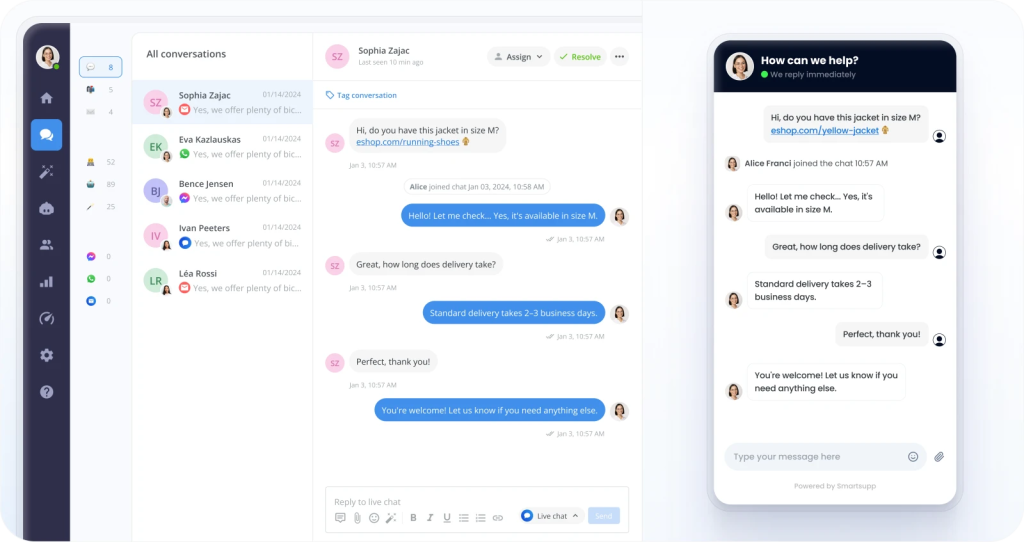
9. Smartsupp: Best for simple ecommerce chat with light automation
Smartsupp gives ecommerce teams a straightforward live chat with basic automation, perfect when you want simplicity over complexity.
Key features
- Basic automated greetings: You can set simple triggers (like “visitor on checkout page”) to start chat automatically, which helps capture hesitant shoppers.
- Visitor behavior tracking: See what pages a shopper has viewed before they start a chat, giving you context without extra tools.
- Live chat across web and mobile: Agents can respond from desktop or the mobile app, which is handy for small teams handling chats on the go.
- Chat transcripts and simple history: Conversations are logged so you can refer back to buyer questions about orders or policies..
Pros: What reviewers actually report
- Users consistently note that installation and first-day use are fast, with minimal configuration.
- Reviewers say that simple greetings and triggers help open conversations without manual monitoring.
“Functions that allow you to insert shortcuts in the chat by pressing the dot key can be configured to give greetings, quick answers and thus speed up the process.” – David S.
“What I like best about Smartsupp is how simple it is to set up and customize the chat widget so it matches our store’s style.” – David O.
Cons: What users commonly report
- Bots and rules are simple; Smartsupp isn’t designed for deep automation or complex ecommerce flows.
- Unlike tools that pull in order or cart details, agents often need to check that info separately.
“Limited advanced automation: While the chatbot builder is solid, it may lack some of the sophisticated flows that higher-end platforms offer.” – KORVEL L.
“Limited in abilities in comparison to competitors software, such as no social integrations…” – Marcy V.
The reviews above are sourced from G2, Capterra, and Reddit.
Pricing
- Free plan: Often available with core chat features
- Paid plans: Starts from $14, adds more automation and customization at modest price points
Who is this IDEAL for?
- Small ecommerce teams that want fast, simple live chat.
- Stores that only need lightweight triggers and basic chat.
- Teams handling moderate, straightforward customer questions.
Who this is NOT IDEAL for
- Stores needing deep order/cart context in chat.
- Teams that require advanced ecommerce automation or routing.
- High-volume operations with complex workflows.
10. Richpanel: Best for ecommerce support focused on refunds and post-order workflows
Richpanel is built for ecommerce brands where most live chat queries are actually post-purchase issues like refunds, exchanges, tracking, and account questions.

Key features
- Order and customer context inside chat: Agents see order history, refund status, and previous interactions directly inside the chat window, so there’s no tab-switching during live conversations.
- Self-service help center and bot suggestions: Customers can find answers to common post-purchase questions (such as tracking, returns, and cancellations) before reaching a live agent, reducing repetitive tickets.
- Macros tied to ecommerce actions: Prebuilt replies and actions (like issuing refunds or sending return instructions) significantly cut manual steps for post-purchase chats.
- One inbox across channels: Chat, email, and social messages appear in a single support view, helping teams handle multi-step customer journeys without losing context.
- Ticketing and automation workflows: Chats that require follow-ups automatically turn into tracked tickets with reminders and SLA tracking.
Pros: When Richpanel works well
- Reviewers highlight how seeing orders and returns inline speeds up complex conversations.
- Automation and macros take repetitive tasks off agents’ plates.
“I like how rich panel shows us the lifetime sales of customers, which allows me to treat our valued, long standing customers with a lot of care!” – Joseph V.
“The interface is clean and intuitive, which made onboarding quick, and the automation tools have saved us hours each week.” – Matthew S.
Cons: Where teams feel limits
- Some users mention that automation and ticketing setup take time before they work smoothly.
“It is a little complicated to use. Setting up the automations and the self service options are hard to follow. It takes some getting used to. I assume if you use it enough it will make sense.” – Joseph E.
The reviews above are sourced from G2, Capterra, and Reddit.
Pricing
- Free tier: Yes, a free plan is available with basic live chat and order tracking features.
- Paid plans: Start around $69 per user/month for help desk features (chat and email).
- Higher tiers: Plans with advanced automation, multiple brands, and channels range up to $99 per agent/month or custom enterprise pricing.
Who this is for
- Ecommerce teams handling heavy post-purchase support.
- Stores where refunds, delivery tracking, and exchanges dominate chat volume.
- Brands that want self-service deflection plus agent handling.
Who this is NOT for
- Teams focused mainly on pre-purchase support.
- Stores needing only lightweight live chat.
- Businesses that want simple bot deflection without full ticketing.
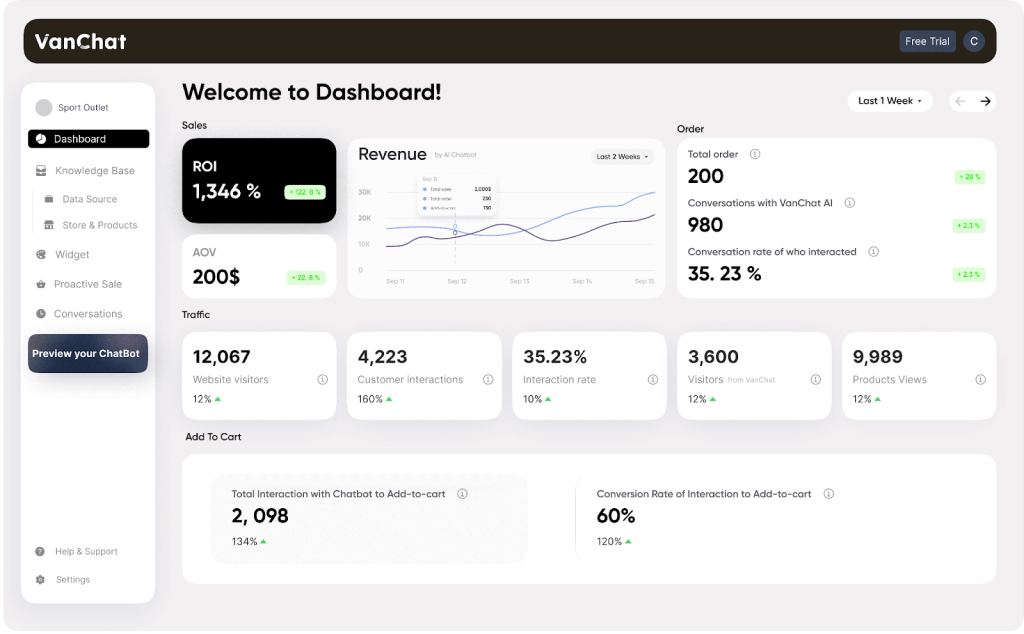
11. VanChat: Best for lightweight ecommerce chat with minimal setup
VanChat uses trained AI to answer product, order, and sizing questions in real-time and nudges hesitant shoppers toward purchase when their intent is detected.
Key features
- Shopify-native AI with live inventory awareness: VanChat syncs directly with Shopify SKUs and inventory, so shoppers get accurate product availability, variants, and stock updates without agents stepping in. This reduces “is this in stock?” chats entirely.
- Industry-specific AI responses: The AI adapts answers based on your vertical (apparel, beauty, electronics). That means size advice for clothing, ingredient explanations for beauty, and spec clarity for electronics.
- Built-in size recommendations for apparel stores: For fashion brands, VanChat uses your size charts inside chat to suggest the right fit. This directly targets size-related returns, one of the biggest post-purchase cost drivers.
- Instant order tracking inside chat: Shoppers can ask “Where’s my order?” and get real-time tracking updates automatically. No agent lookup. No ticket created. This removes one of the highest-volume ecommerce queries.
- Discount triggers tied to buying intent: VanChat detects hesitation signals during browsing and surfaces relevant discount codes from Shopify at the right moment, helping convert chats that would otherwise stall.
- Clean human handoff when needed: When a conversation goes beyond automation, agents can jump in immediately with full context and chat history already visible.
Pros: What users like
- Store owners say the bot reliably answers product, sizing, order status, and delivery questions without agent involvement.
- Merchants consistently mention that installation is fast and requires little to no technical work.
“I have used many different chatbots and VanChat is the best one I’ve come across. It is incredibly accurate and detailed in response when you take some time and load training data to the agent” – Verified User|
“I rarely feel this happy about an app! I have been a long-time Shopify user, and this little app was so easy to install. It started generating orders without any extra work from me.” – Verified User
Cons: What can limit it
- VanChat does not currently offer a dedicated mobile app for human agents to reply on the go.
The reviews above are sourced from Shopify and Reddit.
Pricing
- Free: Free plan available (for 7 days) for all plans.
- Starter: $19/month up to ~100 monthly visitors, proactive AI sales, AI assistant, 24/7 live support, smart recommendations, automated service, custom branding.
- Advanced: $49/month up to ~1,000 monthly visitors with the same core features as Starter.
- Growth: $99/month up to ~10,000 monthly visitors, unlimited products and chat replies, full AI sales and support suite.
Who this is for
- Shopify stores that want AI to handle product, order, and sizing questions.
- Small to mid-sized ecommerce teams prioritizing fast setup and automation.
- Stores using chat to assist conversions, not just support.
Who this is NOT for
- Non-Shopify or enterprise ecommerce teams.
- Teams needing deep workflows, SLAs, or advanced reporting.
- Businesses looking for a full help desk rather than AI chat.
Recommended reading
How to choose the right ecommerce live chat software?
Most ecommerce teams choose the wrong ecommerce live chat not because they lack options, but because they ignore how their store actually operates.
The right ecommerce live chat isn’t the one with the most features. It’s the one that fits how customers ask questions, how agents handle follow-ups, and how your store behaves during traffic spikes.
1. Early-stage ecommerce stores
These teams require a live chat that runs quickly, without incurring any costs or operational overhead. Here, your priority is speed to launch and providing real-time support to customers.
Pick a tool that:
- Goes live in under an hour.
- Works without setup, training, or process changes.
- Lets you answer customers immediately.
Avoid:
- Automation-first platforms.
- Complex pricing
- Usage-based pricing, you don’t understand yet.
Typical fit: Tawk.to, Tidio
If you’re still validating demand, anything more is unnecessary risk.
2. Small to mid-size ecommerce brands
As volume grows, speed alone isn’t enough. This is where most teams make mistakes. Chats stop being “quick answers” and start turning into refunds, delivery checks, and follow-ups. Here you need to prioritize fast replies with order context and follow-ups.
Pick a tool that:
- Keeps chat, email, and follow-ups connected.
- Shows order context while the conversation is live.
- Makes ownership obvious across the team.
Avoid:
- Chat-only tools that break once follow-ups start
- Enterprise platforms that slow you down
Typical fit: Hiver, Gorgias, Freshchat, LiveChat
If agents often say “I’ll follow up,” chat-only tools will fail you.
3. Shopify-first ecommerce teams
If your support lives inside Shopify, your live chat must too. For these stores, live chat is tightly tied to orders, refunds, and cart changes. So your priority is to see order and customer data directly inside chat
Pick a tool that:
- Surfaces order, refund, and customer data inside chat.
- Automates common Shopify actions.
- Reduces tab switching during conversations.
Avoid:
- Generic live chat tools with no store context.
Typical fit: Gorgias, Hiver
If agents open Shopify during chats, your tool is slowing them down.
4. High-volume ecommerce stores running sales and launches
Traffic spikes expose weak workflows and unpredictable pricing fast. Here your priority is to handle peaks without slowing agents or inflating costs
Pick a tool that:
- Holds up when chat volume doubles.
- Keeps routing and ownership clear.
- Has pricing you can predict before launch day.
Avoid:
- Per-resolution or uncapped usage pricing.
- Tools that feel “fine” only on quiet days.
Typical fit: Hiver, LiveChat, Intercom only if costs are modeled carefully
If pricing scares you during planning, it will hurt during execution.
5. Automation-heavy ecommerce teams
Some teams want live chat to deflect volume before agents step in. Bots can help, but only if you commit to maintaining them. So here, you need to prioritize reducing repetitive questions and qualifying chats upfront
Pick a tool that:
- Deflects repetitive questions before agents step in.
- Hands off to humans cleanly with context intact.
- Justifies its cost through real deflection.
Avoid:
- Tools where automation looks powerful but needs constant tuning.
Typical fit: Intercom, Tidio
If no one owns automation internally, don’t buy a bot-first platform.
6. Enterprise ecommerce operations
At this scale, live chat is just one entry point into a larger support system. You need to prioritize structured workflows, SLAs, and multi-team coordination
Pick a tool that:
- Integrates with tickets, SLAs, and CRM workflows.
- Supports multiple teams and escalation paths.
Avoid:
- Lightweight chat tools without governance
Typical fit: Zendesk Chat
Enterprise complexity demands enterprise control.
Before committing, ask one last question: “Will this tool still work when we’re handling twice the chat volume?” If the answer is unclear, keep looking.
What to test in a 7-day trial:
Use the trial the same way your team will work day to day. Don’t explore settings just to understand features.
During the week, run real situations like checkout questions during busy hours, refund or delivery issues that need follow-up, and moments when multiple chats arrive at once. Watch how quickly agents can find order context, whether conversations stay connected as they move into follow-ups, and how the tool behaves as volume increases.
If anything feels slow, confusing, or brittle during a low-risk trial, it will feel worse under real pressure.
The right ecommerce live chat tool should reduce decisions for agents, not create new ones. Here’s a table I’ve created to assess your fit:
| Decision area | Ask yourself | If YES, you need… | If NO, you can skip… |
|---|---|---|---|
| Chat resolution pattern | Do chats often turn into refunds, shipping follow-ups, or order changes? | A tool with shared inboxes, ticketing, or persistent context | Chat-only tools |
| Order & cart context | Do agents regularly check order status or cart details during chats? | Native ecommerce or order context inside chat | Deep platform integrations |
| Automation ownership | Will someone actively maintain bots and automation rules? | Bot-first or automation-led tools | Complex automation platforms |
| Cart recovery role | Do customers often ask questions right before paying? | Proactive chat triggers and fast handoff to agents | Reactive, inbox-only chat |
| Traffic variability | Do chat volumes spike during sales or launches? | Predictable, per-agent pricing | Usage-based or per-resolution pricing |
| Team workflow | Do agents work from a shared workspace and hand off conversations? | Shared visibility and ownership tracking | Individual agent chat tools |
| Speed vs depth | Is speed more important than long-term follow-ups? | Chat-first, agent-led tools | Full help desks or ticketing systems |
| Growth horizon | Will this tool still work if chat volume doubles in 6–12 months? | Scalable workflows and reporting | Lightweight or free tools |
As a rule of thumb, if a tool forces agents to switch tabs, lose context, or guess ownership, it will slow you down as volume grows.
What should you check before committing to an ecommerce live chat tool?
Before committing, test the tool in real conditions. Run checkout questions, refund follow-ups, and peak-hour traffic through it, not demos or feature tours.
If workflows stay clear as volume increases, it’s a fit. If things slow down, feel messy, or get expensive, that friction will only grow.
Try Hiver for real ecommerce support.
Frequently asked questions
What is ecommerce live chat?
Ecommerce live chat is a real-time messaging tool that lets customers ask questions and get help directly on an online store’s website, usually on product, cart, or checkout pages. It helps shoppers get answers without leaving the buying flow.
Why is live chat important for ecommerce businesses?
Live chat matters because it removes delays during shopping and checkout. When customers get answers instantly, they are more likely to complete purchases, trust the brand, and avoid abandoning their carts.
How can I measure the success of ecommerce live chat?
Ecommerce live chat success is measured by faster response times, higher conversion rates from chat-assisted customers, reduced cart abandonment, and fewer follow-up support requests after a chat ends.
What are the key benefits of live chat for ecommerce businesses?
Live chat increases conversions, improves customer experience, and reduces support workload by resolving questions quickly. It also helps businesses identify where customers get stuck during checkout.
How do live chat and chatbots differ in ecommerce?
Live chat connects customers to human agents in real time, while chatbots automate replies to common questions. In ecommerce, chatbots usually assist live chat by handling simple queries before passing complex issues to agents.
Which is the best live chat software for ecommerce stores?
The best ecommerce live chat software depends on your store’s size, platform, and support needs. Some tools focus on Shopify order context, others on automation or high-volume chats. The right choice fits your workflow, not just features.
What features should you look for in live chat software for ecommerce?
Key ecommerce live chat features include fast response times, access to order or cart context, reliable performance during traffic spikes, smooth follow-ups, and predictable pricing as volume grows.